
MEDITECH Expanse Universal Discharge Web Based EHR
DP
Published · 46 slides · 0 views

1 / 1


Description
MEDITECH Expanse Universal Discharge Web Based EHR Content Only major sections indicated Introduction Universal Discharge InPt Referrals Prescriptions ED Discharge Slide 3 Slide 5 Slides 16-18 Slides 20-31 Slides 42-45 Universal Discharge
Related Topics
Share
Embed code
Download this presentation From Below
"MEDITECH Expanse Universal Discharge Web Based EHR" is the property of its rightful owner. Permission is granted to download and print the materials on this website for personal, non-commercial use only, and to display it on your personal computer provided you do not modify the materials and that you retain all copyright notices contained in the materials. By downloading content from our website, you accept the terms of this agreement.
Presentation Transcript
01
MEDITECH Expanse
Universal Discharge Web Based EHR<br>
02
Content
Only major sections indicated Introduction
Universal Discharge InPt
Referrals
Prescriptions
ED Discharge Slide 3
Slide 5
Slides 16-18
Slides 20-31
Slides 42-45<br>
Universal Discharge InPt
Referrals
Prescriptions
ED Discharge Slide 3
Slide 5
Slides 16-18
Slides 20-31
Slides 42-45<br>
03
Universal Discharge
Overview Meditech has adopted a Discharge Process with all-inclusive access
Providers have the most input, but
Case Management and Nursing can add information
Registration details are included
While we will demonstrate the “discharge” tab
The same information is in discharge documents under the “Discharge Plan” section.<br>
Providers have the most input, but
Case Management and Nursing can add information
Registration details are included
While we will demonstrate the “discharge” tab
The same information is in discharge documents under the “Discharge Plan” section.<br>
04
Universal Discharge
Types At the time this was produced, there were 3 different Universal Discharges
The location of the patient determines which displays
The current location each time “Discharge” is opened
ED (ED location)
ED specific information
Post-Op (SDS location)
Post-Op specific information
Everywhere Else
General information **This is what will be used for this training**<br>
The location of the patient determines which displays
The current location each time “Discharge” is opened
ED (ED location)
ED specific information
Post-Op (SDS location)
Post-Op specific information
Everywhere Else
General information **This is what will be used for this training**<br>
05
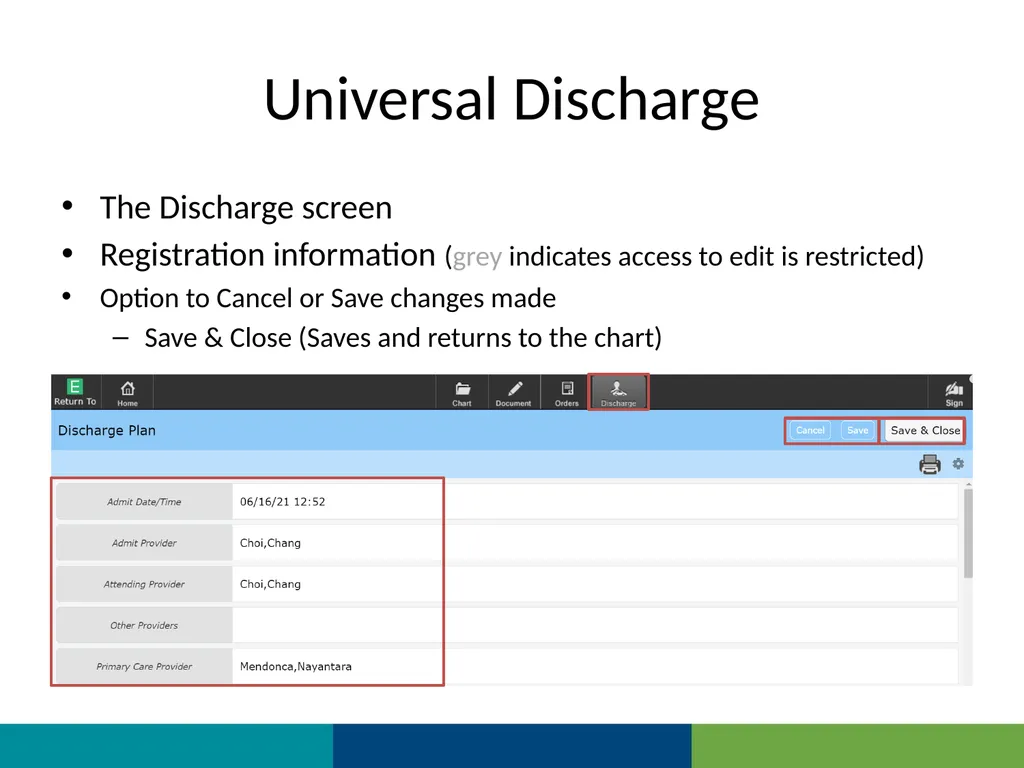
Universal Discharge The Discharge screen
Registration information (grey indicates access to edit is restricted)
Option to Cancel or Save changes made
Save & Close (Saves and returns to the chart)<br>
Registration information (grey indicates access to edit is restricted)
Option to Cancel or Save changes made
Save & Close (Saves and returns to the chart)<br>
06
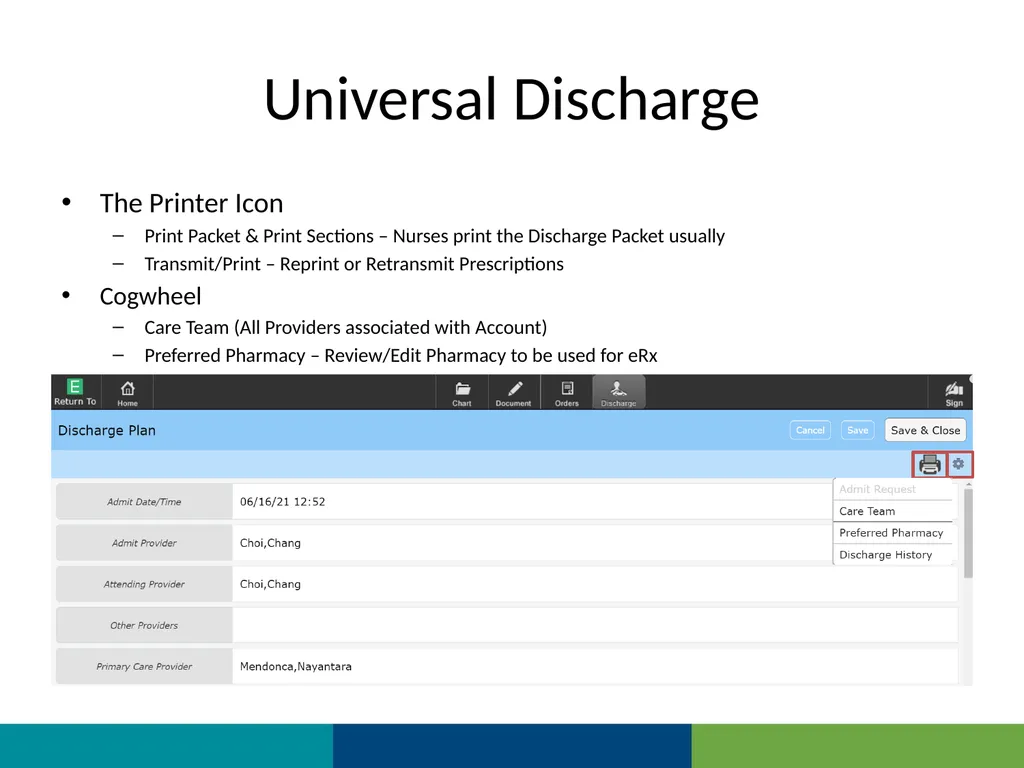
Universal Discharge The Printer Icon
Print Packet & Print Sections – Nurses print the Discharge Packet usually
Transmit/Print – Reprint or Retransmit Prescriptions
Cogwheel
Care Team (All Providers associated with Account)
Preferred Pharmacy – Review/Edit Pharmacy to be used for eRx<br>
Print Packet & Print Sections – Nurses print the Discharge Packet usually
Transmit/Print – Reprint or Retransmit Prescriptions
Cogwheel
Care Team (All Providers associated with Account)
Preferred Pharmacy – Review/Edit Pharmacy to be used for eRx<br>
07
Universal Discharge
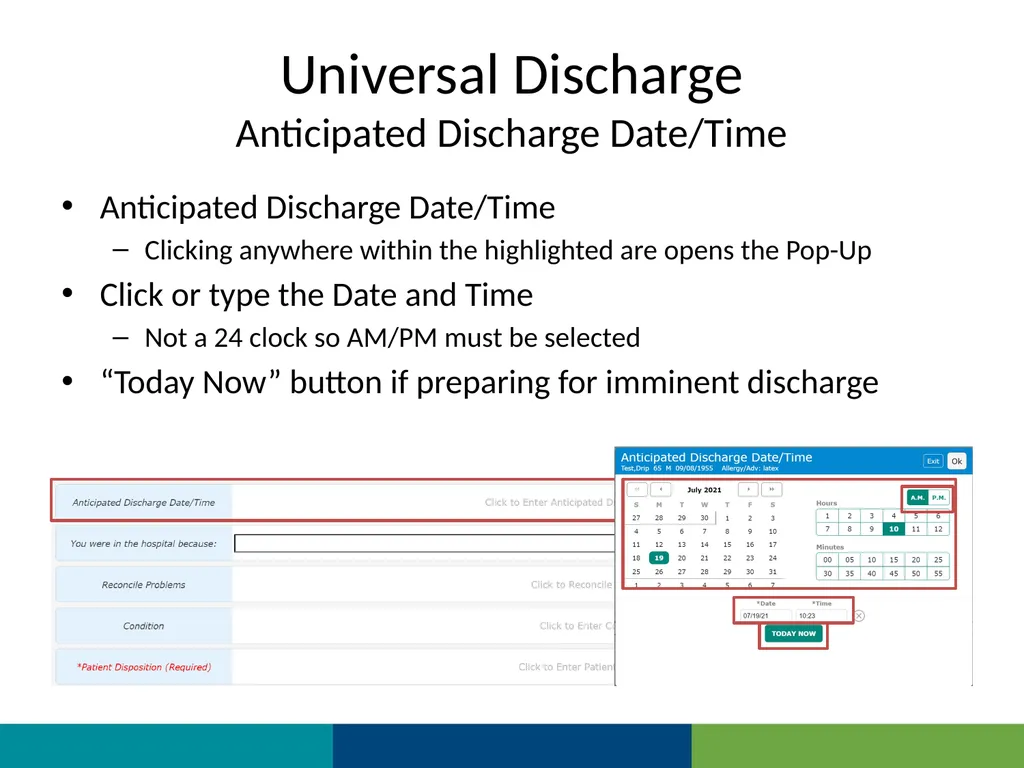
Anticipated Discharge Date/Time Anticipated Discharge Date/Time
Clicking anywhere within the highlighted are opens the Pop-Up
Click or type the Date and Time
Not a 24 clock so AM/PM must be selected
“Today Now” button if preparing for imminent discharge<br>
Clicking anywhere within the highlighted are opens the Pop-Up
Click or type the Date and Time
Not a 24 clock so AM/PM must be selected
“Today Now” button if preparing for imminent discharge<br>
08
Universal Discharge
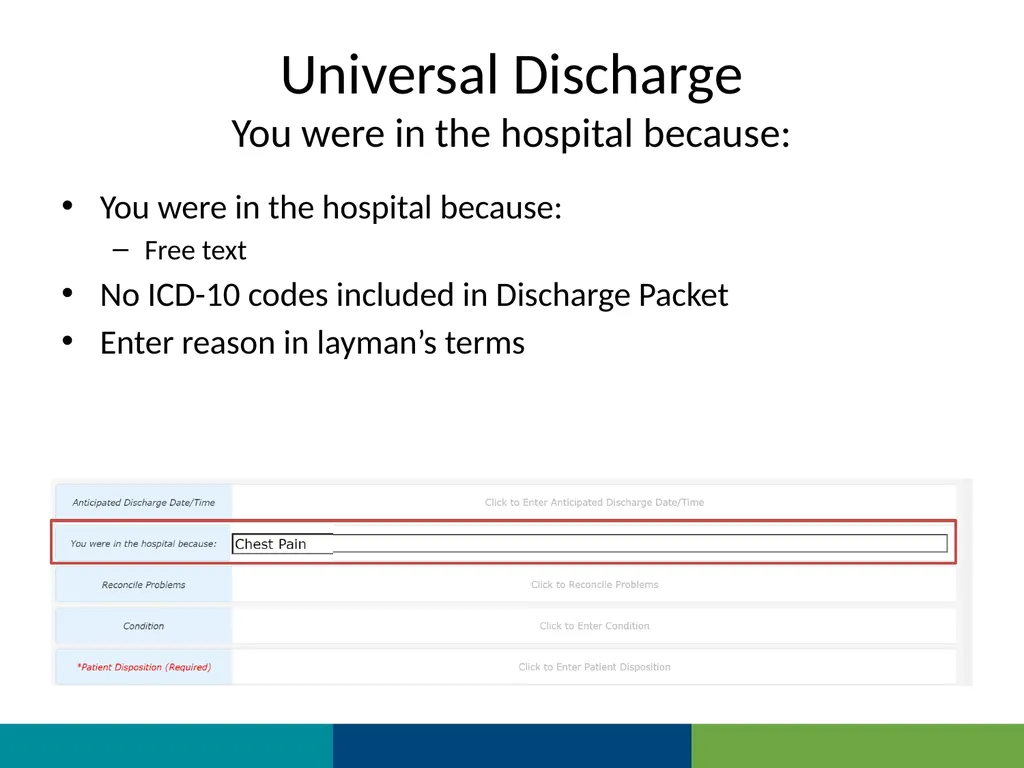
You were in the hospital because: You were in the hospital because:
Free text
No ICD-10 codes included in Discharge Packet
Enter reason in layman’s terms<br>
Free text
No ICD-10 codes included in Discharge Packet
Enter reason in layman’s terms<br>
09
Universal Discharge
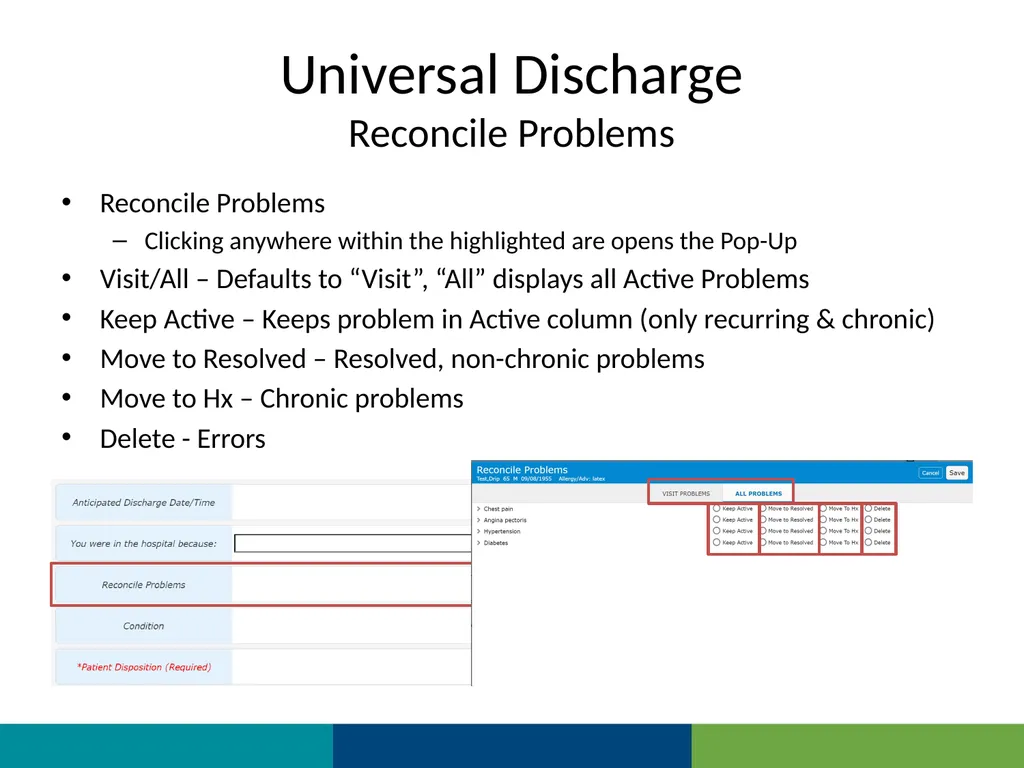
Reconcile Problems Reconcile Problems
Clicking anywhere within the highlighted are opens the Pop-Up
Visit/All – Defaults to “Visit”, “All” displays all Active Problems
Keep Active – Keeps problem in Active column (only recurring & chronic)
Move to Resolved – Resolved, non-chronic problems
Move to Hx – Chronic problems
Delete - Errors<br>
Clicking anywhere within the highlighted are opens the Pop-Up
Visit/All – Defaults to “Visit”, “All” displays all Active Problems
Keep Active – Keeps problem in Active column (only recurring & chronic)
Move to Resolved – Resolved, non-chronic problems
Move to Hx – Chronic problems
Delete - Errors<br>
10
Universal Discharge
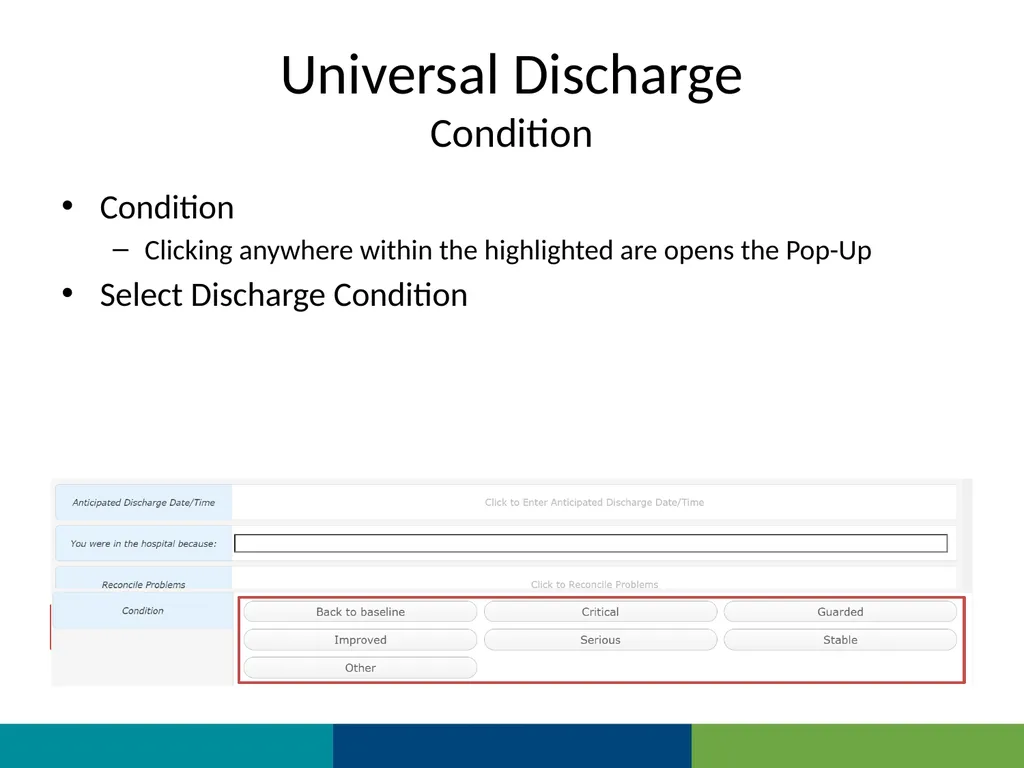
Condition Condition
Clicking anywhere within the highlighted are opens the Pop-Up
Select Discharge Condition<br>
Clicking anywhere within the highlighted are opens the Pop-Up
Select Discharge Condition<br>
11
Universal Discharge
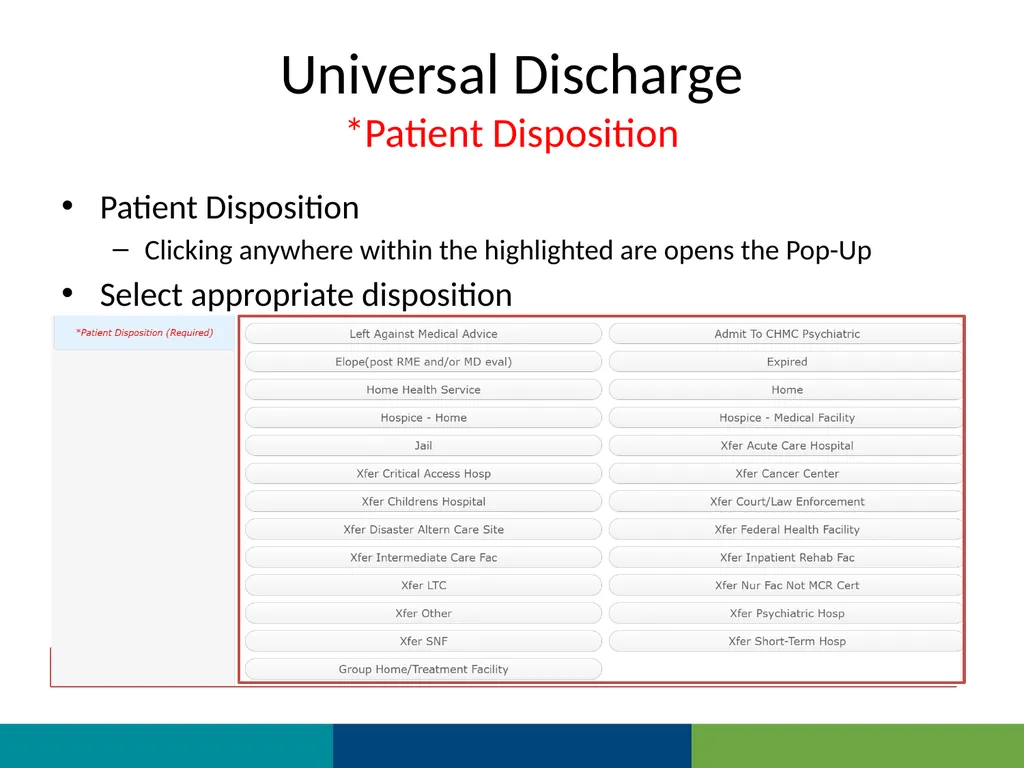
*Patient Disposition Patient Disposition
Clicking anywhere within the highlighted are opens the Pop-Up
Select appropriate disposition<br>
Clicking anywhere within the highlighted are opens the Pop-Up
Select appropriate disposition<br>
12
Universal Discharge
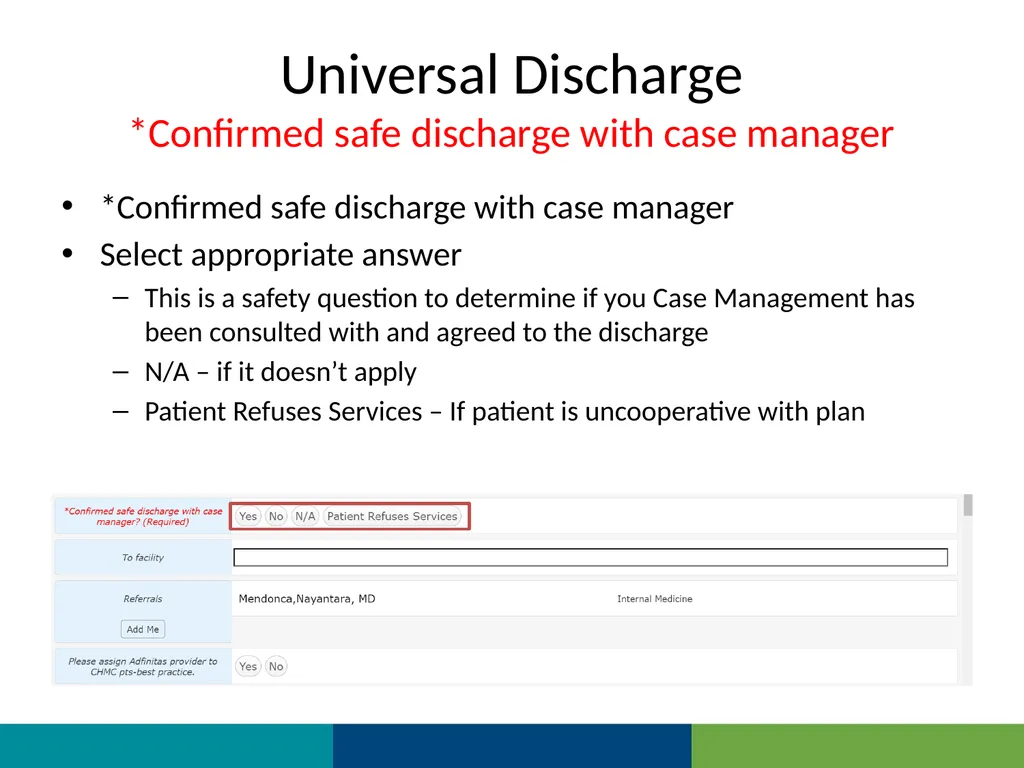
*Confirmed safe discharge with case manager *Confirmed safe discharge with case manager
Select appropriate answer
This is a safety question to determine if you Case Management has been consulted with and agreed to the discharge
N/A – if it doesn’t apply
Patient Refuses Services – If patient is uncooperative with plan<br>
Select appropriate answer
This is a safety question to determine if you Case Management has been consulted with and agreed to the discharge
N/A – if it doesn’t apply
Patient Refuses Services – If patient is uncooperative with plan<br>
13
Universal Discharge
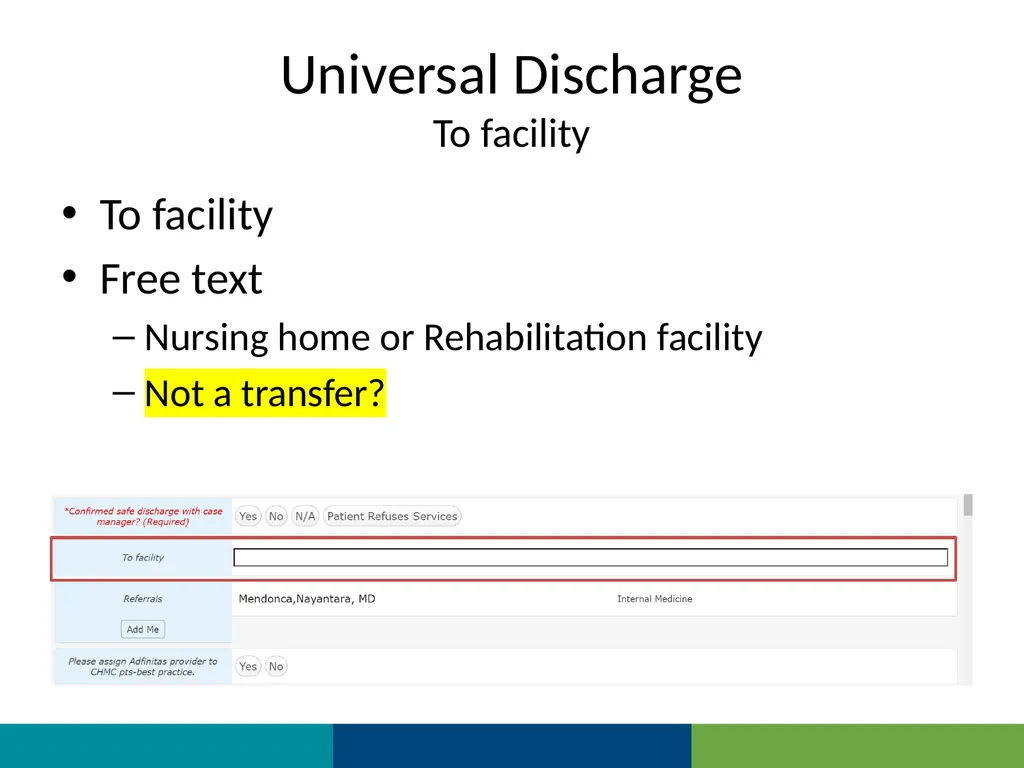
To facility To facility
Free text
Nursing home or Rehabilitation facility
Not a transfer?<br>
Free text
Nursing home or Rehabilitation facility
Not a transfer?<br>
14
Universal Discharge
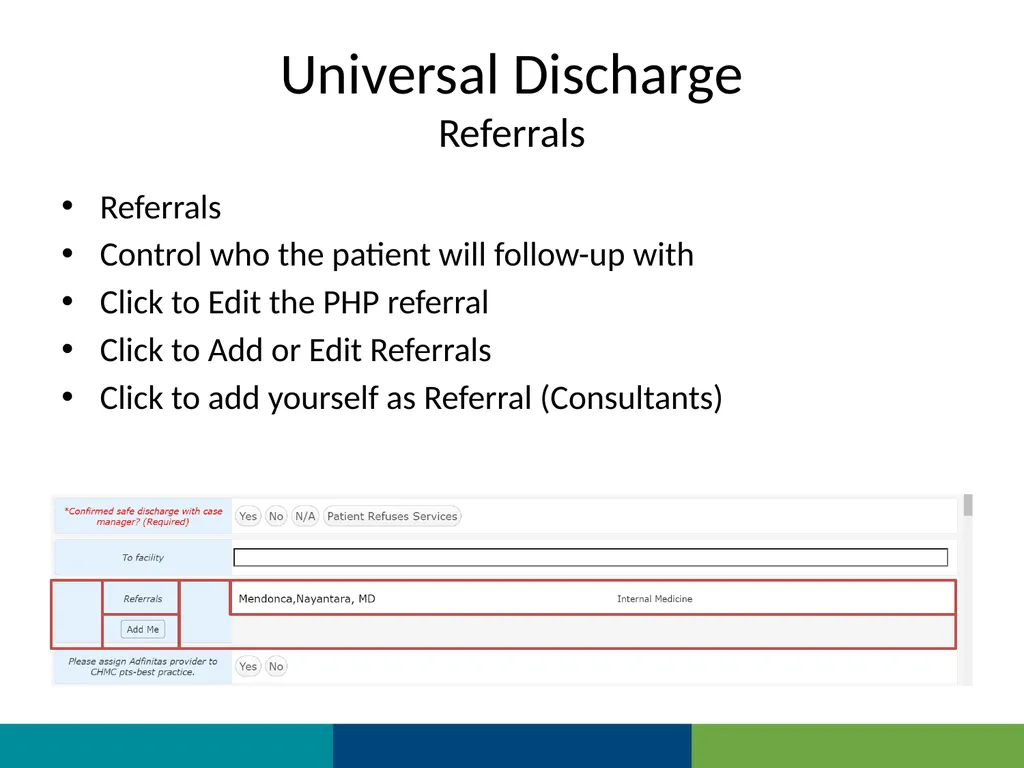
Referrals Referrals
Control who the patient will follow-up with
Click to Edit the PHP referral
Click to Add or Edit Referrals
Click to add yourself as Referral (Consultants)<br>
Control who the patient will follow-up with
Click to Edit the PHP referral
Click to Add or Edit Referrals
Click to add yourself as Referral (Consultants)<br>
15
Universal Discharge
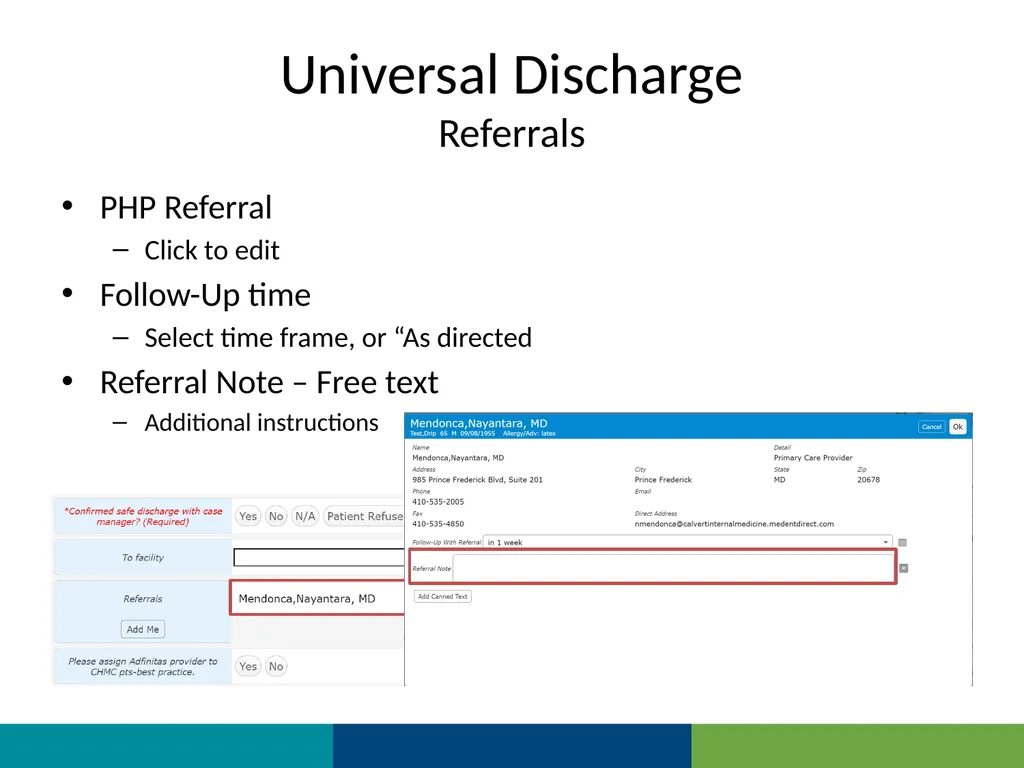
Referrals PHP Referral
Click to edit
Follow-Up time
Select time frame, or “As directed
Referral Note – Free text
Additional instructions<br>
Click to edit
Follow-Up time
Select time frame, or “As directed
Referral Note – Free text
Additional instructions<br>
16
Universal Discharge
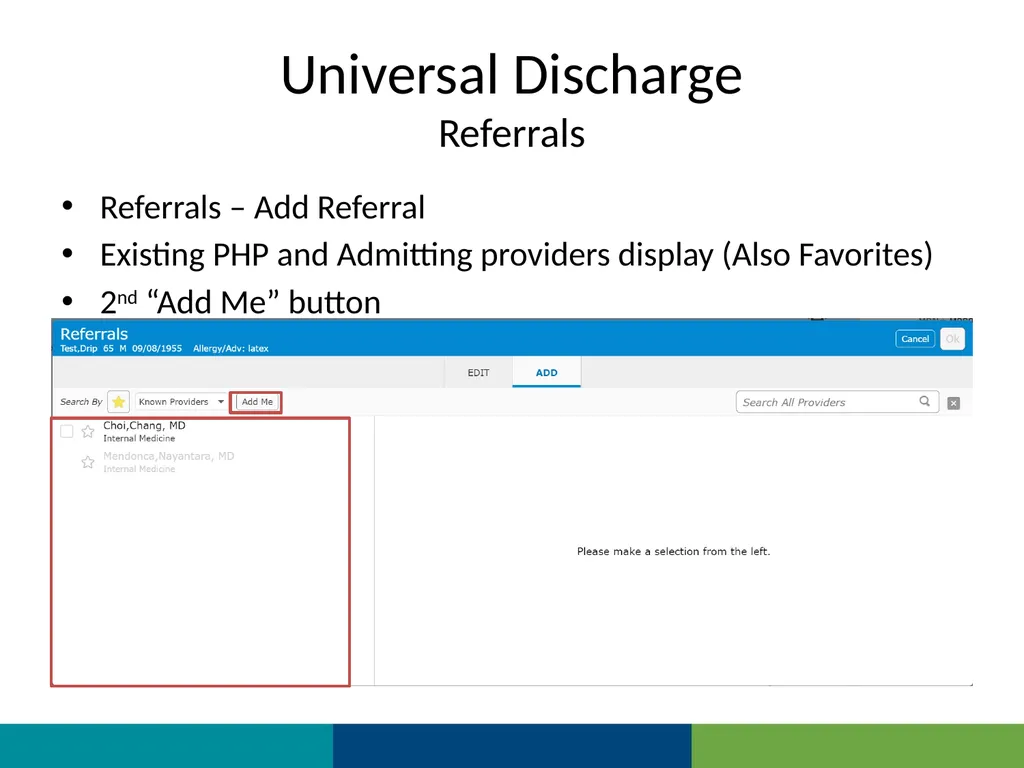
Referrals Referrals – Add Referral
Existing PHP and Admitting providers display (Also Favorites)
2nd “Add Me” button<br>
Existing PHP and Admitting providers display (Also Favorites)
2nd “Add Me” button<br>
17
Universal Discharge
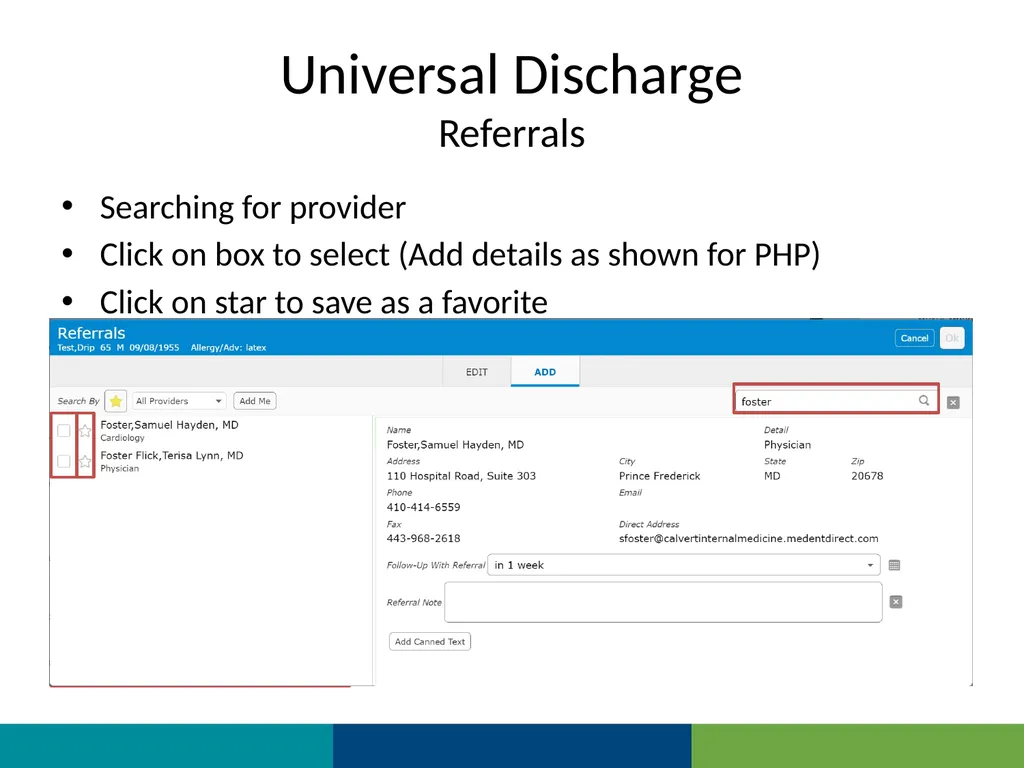
Referrals Searching for provider
Click on box to select (Add details as shown for PHP)
Click on star to save as a favorite<br>
Click on box to select (Add details as shown for PHP)
Click on star to save as a favorite<br>
18
Universal Discharge
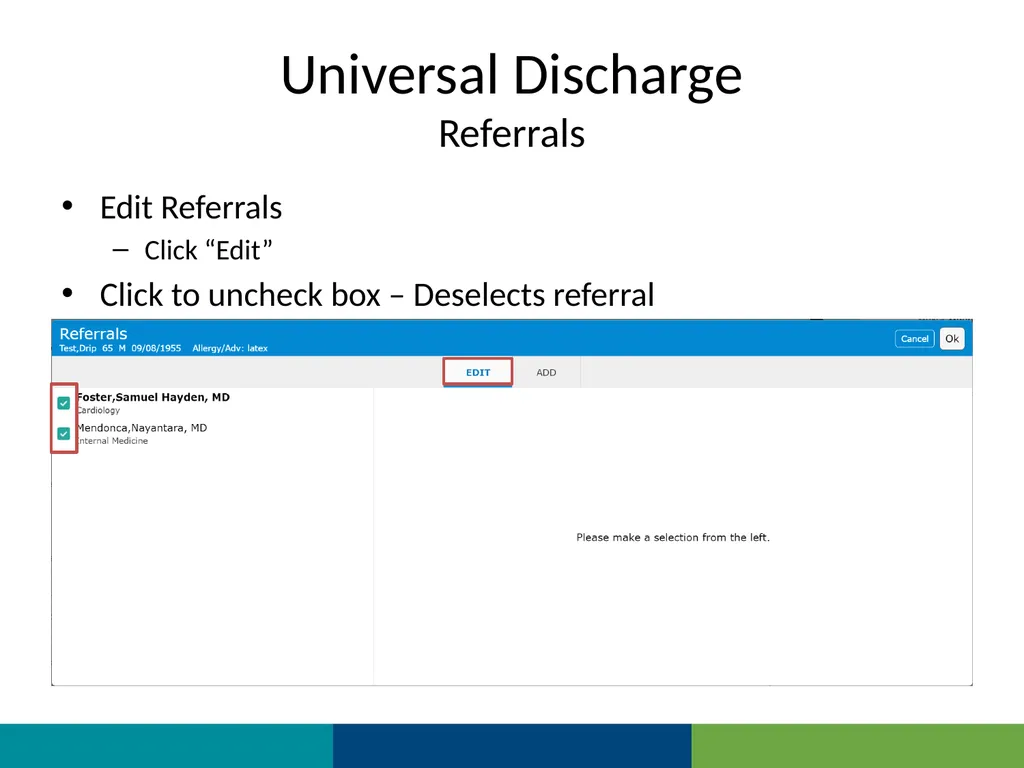
Referrals Edit Referrals
Click “Edit”
Click to uncheck box – Deselects referral<br>
Click “Edit”
Click to uncheck box – Deselects referral<br>
19
Universal Discharge
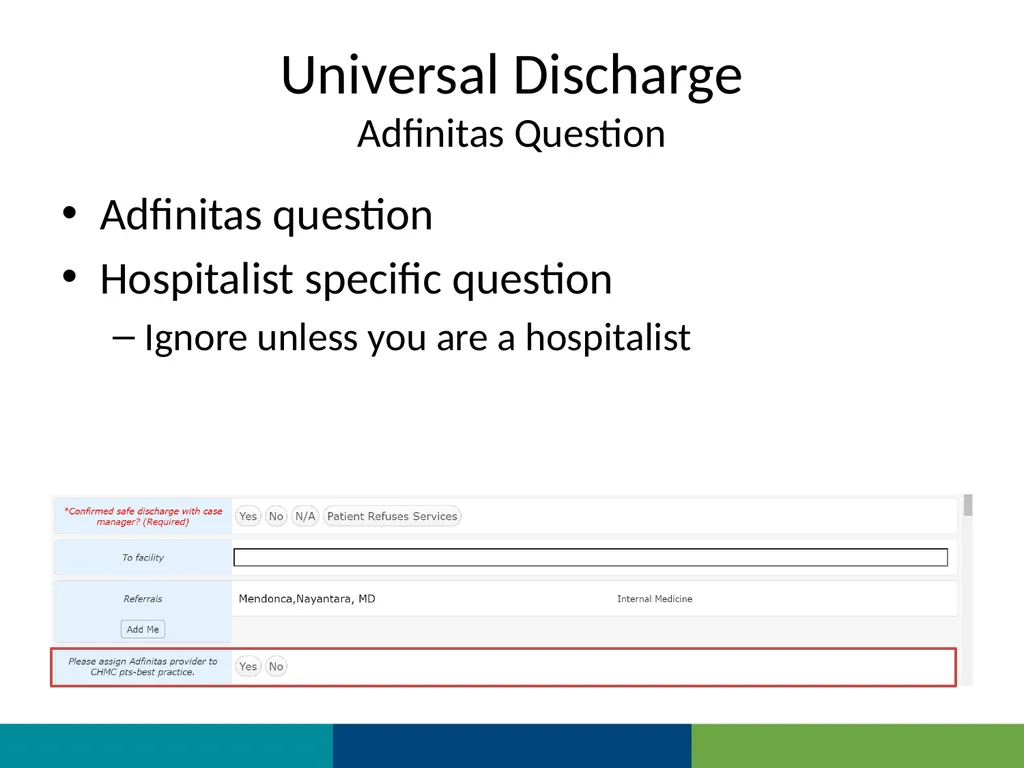
Adfinitas Question Adfinitas question
Hospitalist specific question
Ignore unless you are a hospitalist<br>
Hospitalist specific question
Ignore unless you are a hospitalist<br>
20
Universal Discharge
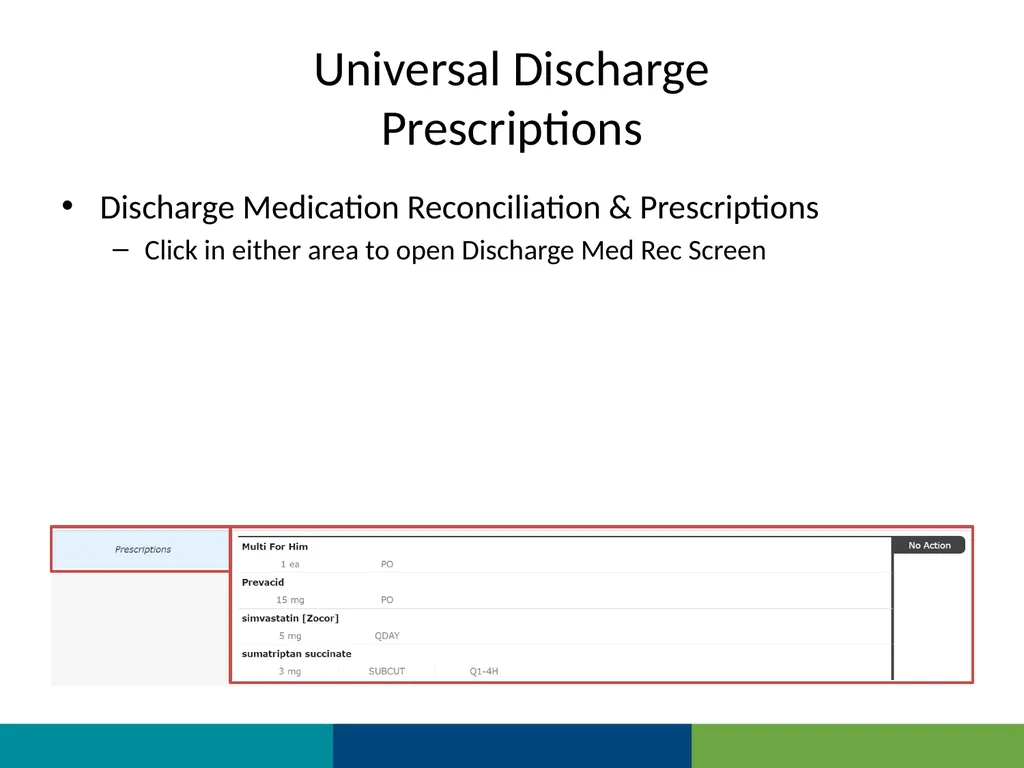
Prescriptions Discharge Medication Reconciliation & Prescriptions
Click in either area to open Discharge Med Rec Screen<br>
Click in either area to open Discharge Med Rec Screen<br>
21
Universal Discharge
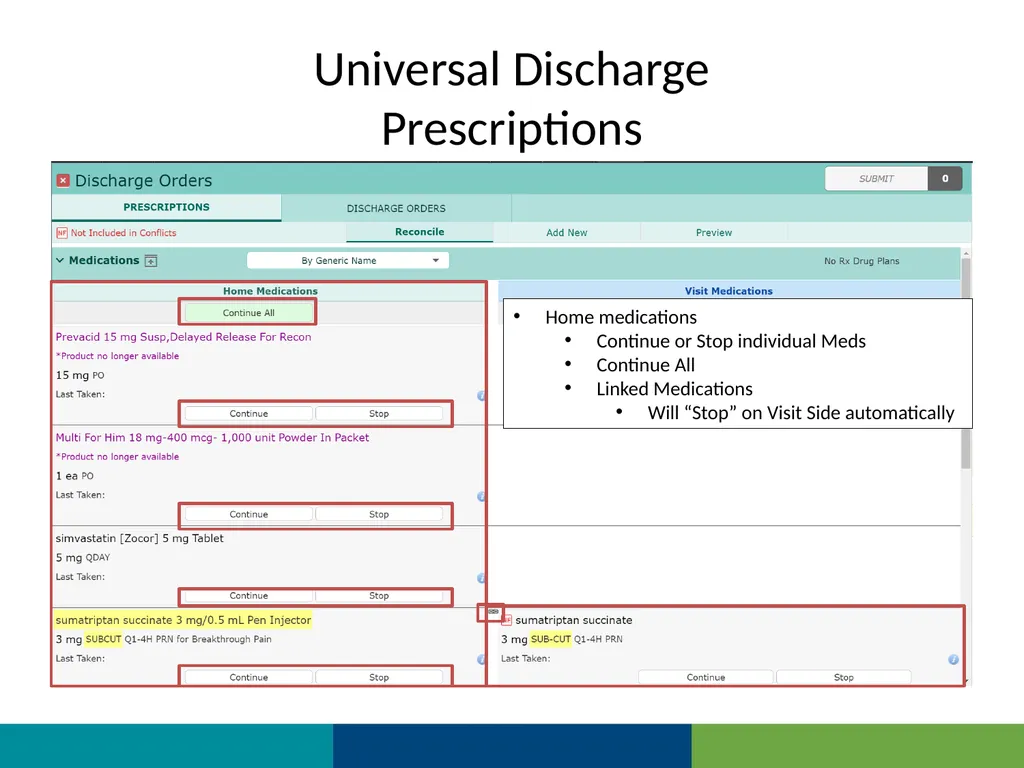
Prescriptions Home medications
Continue or Stop individual Meds
Continue All
Linked Medications
Will “Stop” on Visit Side automatically<br>
Continue or Stop individual Meds
Continue All
Linked Medications
Will “Stop” on Visit Side automatically<br>
22
Universal Discharge
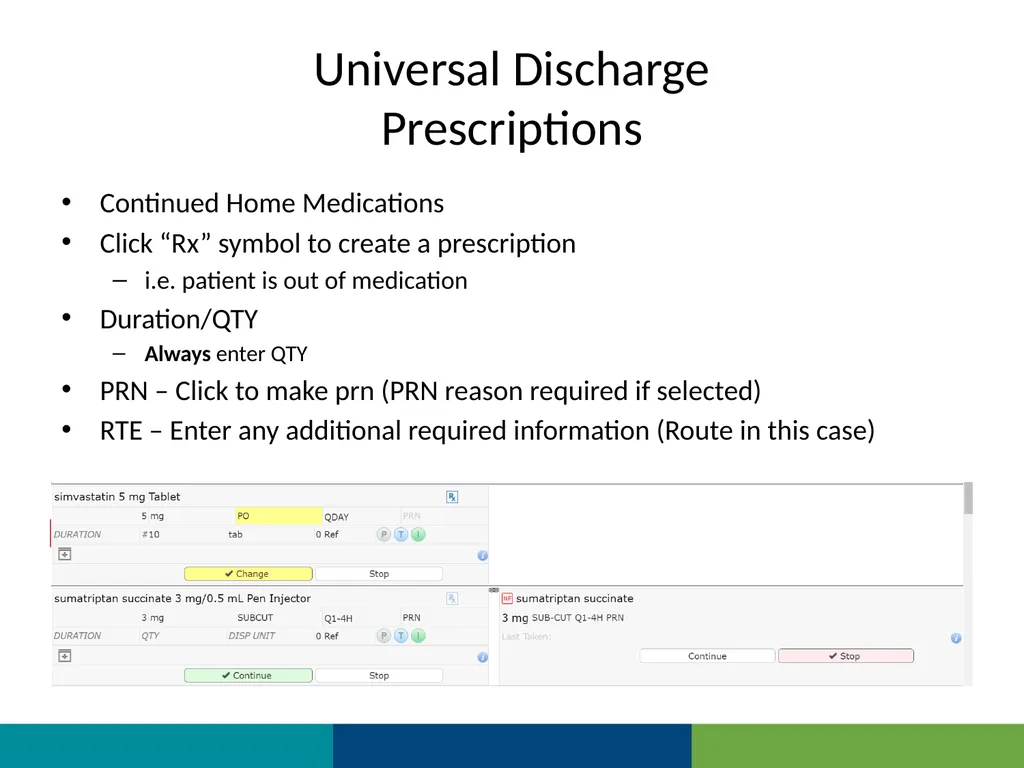
Prescriptions Continued Home Medications
Click “Rx” symbol to create a prescription
i.e. patient is out of medication
Duration/QTY
Always enter QTY
PRN – Click to make prn (PRN reason required if selected)
RTE – Enter any additional required information (Route in this case)<br>
Click “Rx” symbol to create a prescription
i.e. patient is out of medication
Duration/QTY
Always enter QTY
PRN – Click to make prn (PRN reason required if selected)
RTE – Enter any additional required information (Route in this case)<br>
23
Universal Discharge
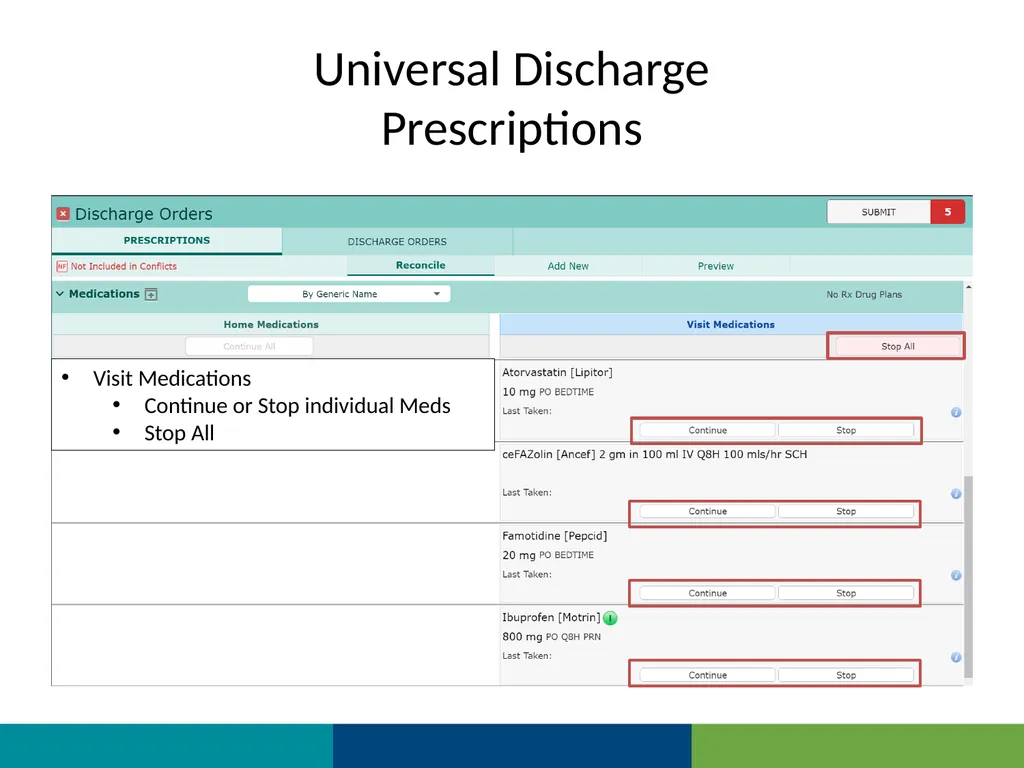
Prescriptions Visit Medications
Continue or Stop individual Meds
Stop All<br>
Continue or Stop individual Meds
Stop All<br>
24
Universal Discharge
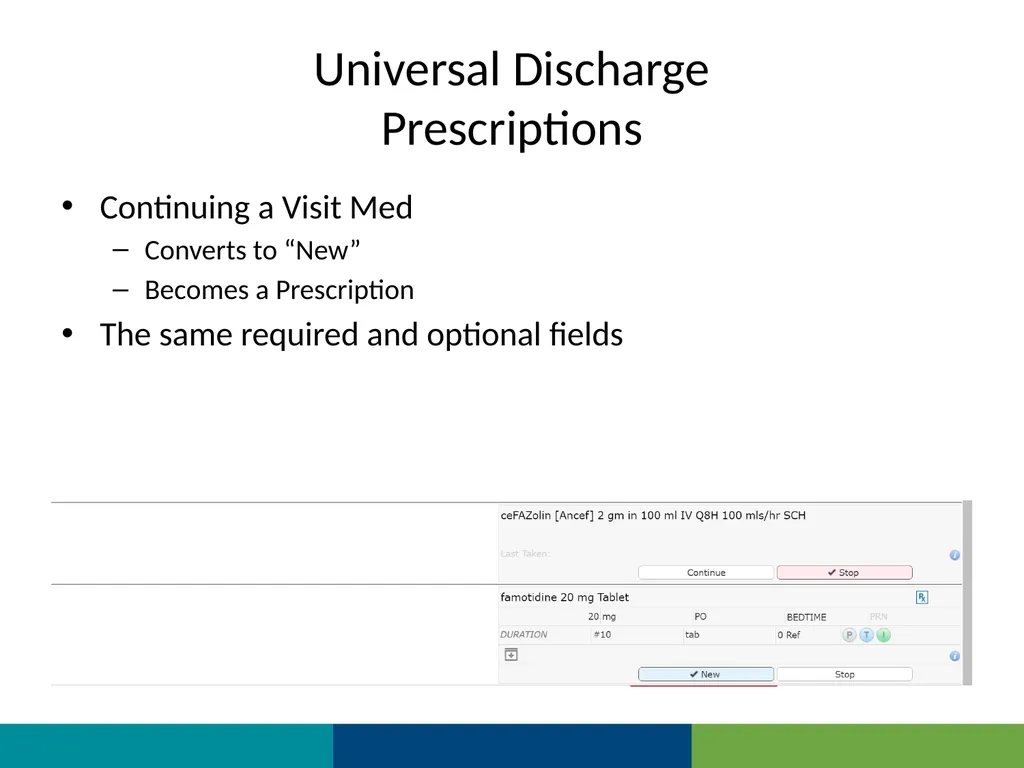
Prescriptions Continuing a Visit Med
Converts to “New”
Becomes a Prescription
The same required and optional fields<br>
Converts to “New”
Becomes a Prescription
The same required and optional fields<br>
25
Universal Discharge
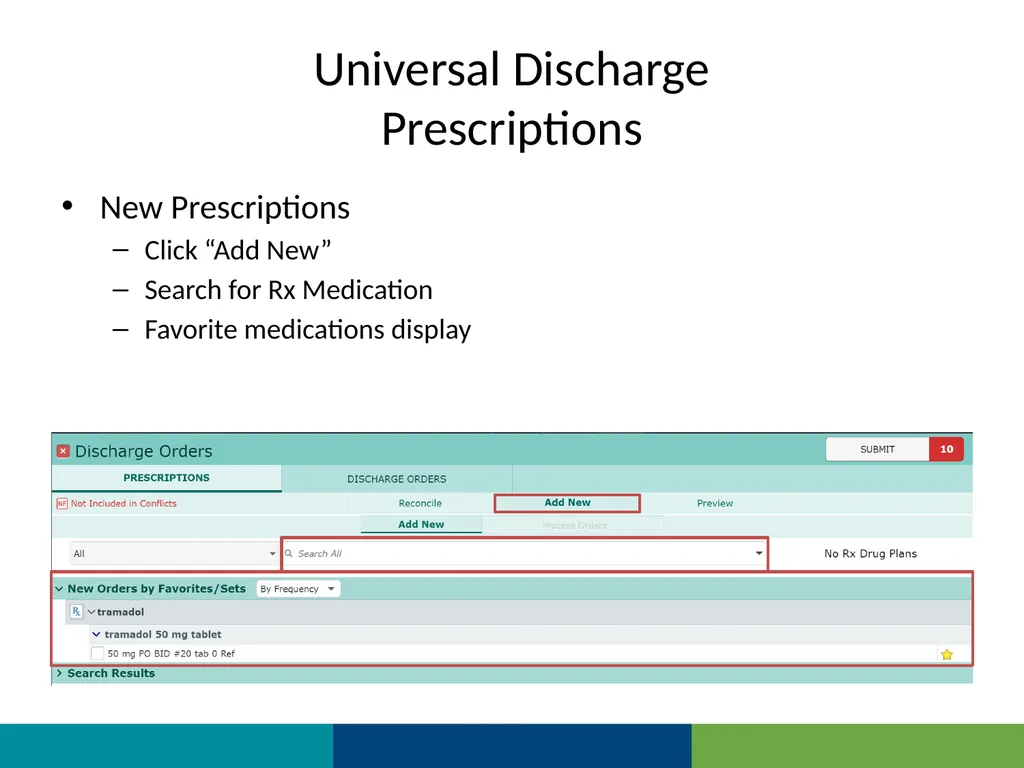
Prescriptions New Prescriptions
Click “Add New”
Search for Rx Medication
Favorite medications display<br>
Click “Add New”
Search for Rx Medication
Favorite medications display<br>
26
Universal Discharge
Prescriptions Searching for new medication
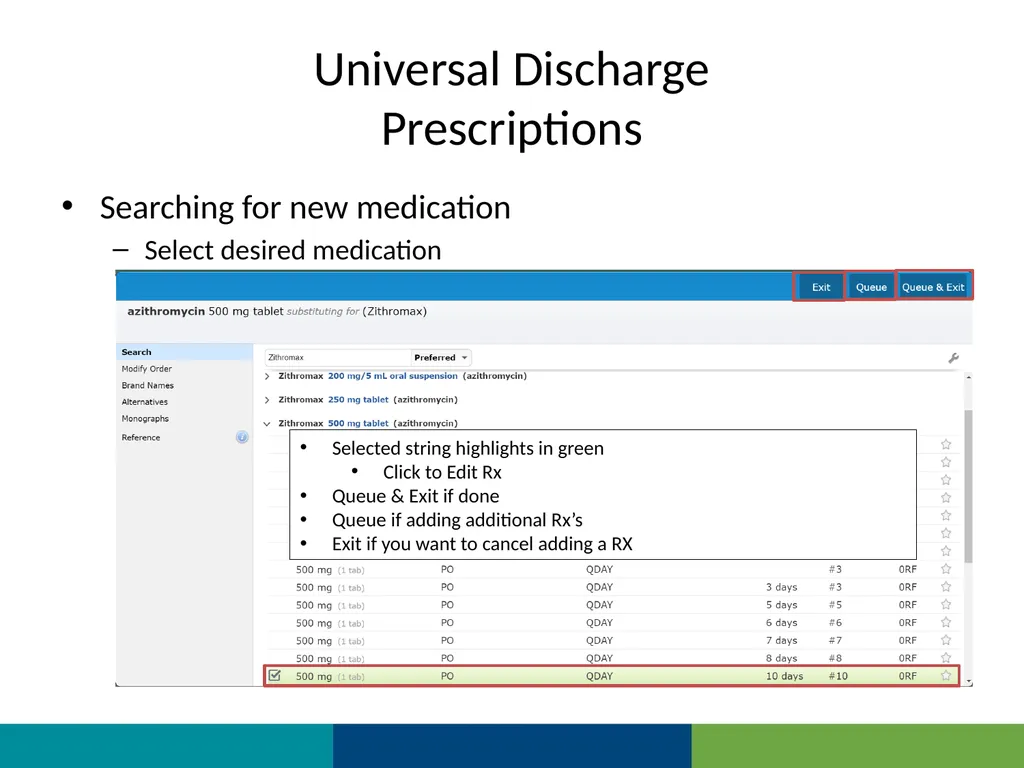
Select desired medication Pop-Up about Insurance recommendations – Click “OK” Select the desire formulation Select the desired string (frequency/Duration)
Note that you can save as Favorite Selected string highlights in green
Click to Edit Rx
Queue & Exit if done
Queue if adding additional Rx’s
Exit if you want to cancel adding a RX<br>
Select desired medication Pop-Up about Insurance recommendations – Click “OK” Select the desire formulation Select the desired string (frequency/Duration)
Note that you can save as Favorite Selected string highlights in green
Click to Edit Rx
Queue & Exit if done
Queue if adding additional Rx’s
Exit if you want to cancel adding a RX<br>
27
Universal Discharge
Prescriptions Finalizing the Discharge Med Rec
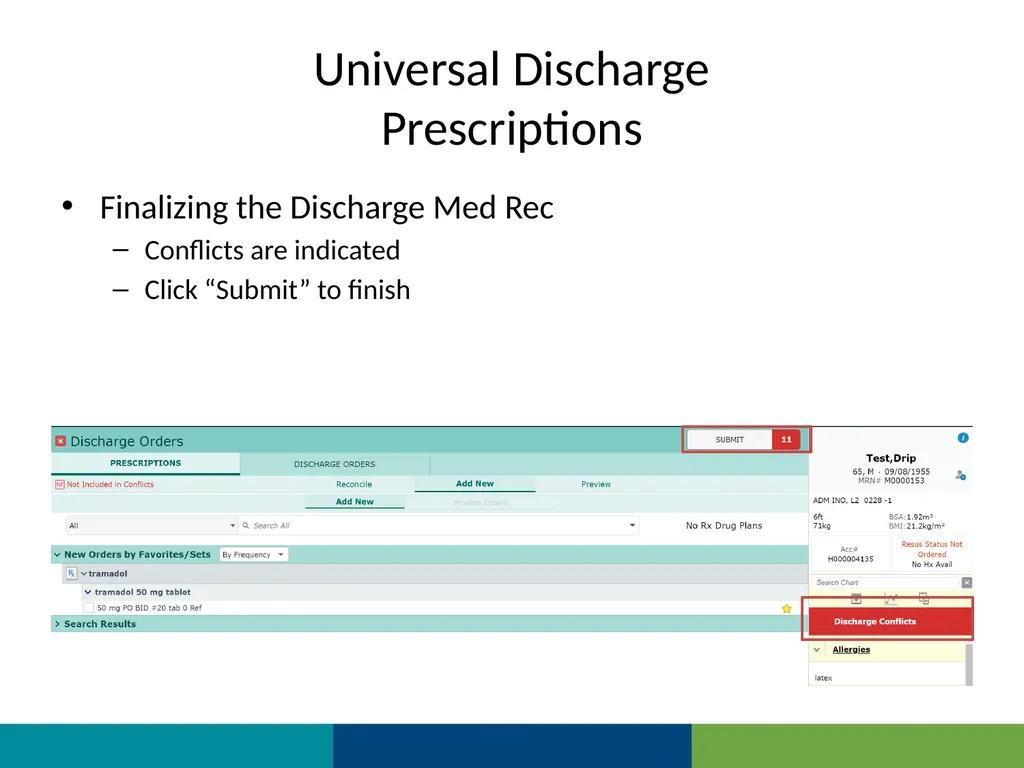
Conflicts are indicated
Click “Submit” to finish<br>
Conflicts are indicated
Click “Submit” to finish<br>
28
Universal Discharge
Prescriptions Conflicts
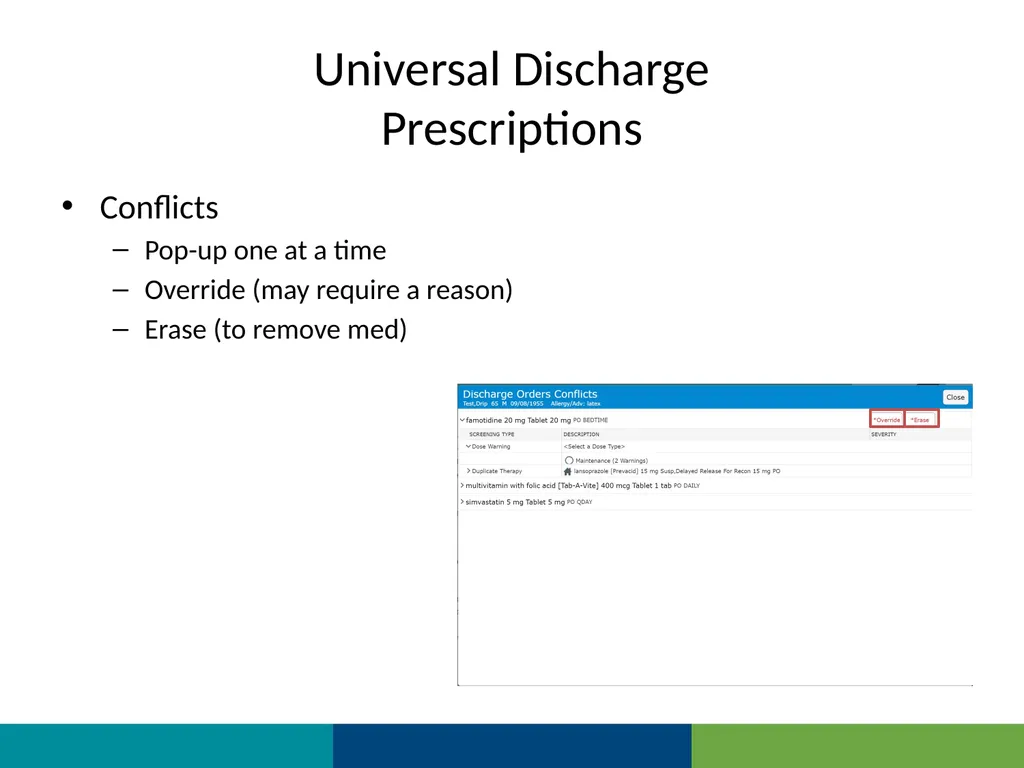
Pop-up one at a time
Override (may require a reason)
Erase (to remove med)<br>
Pop-up one at a time
Override (may require a reason)
Erase (to remove med)<br>
29
Universal Discharge
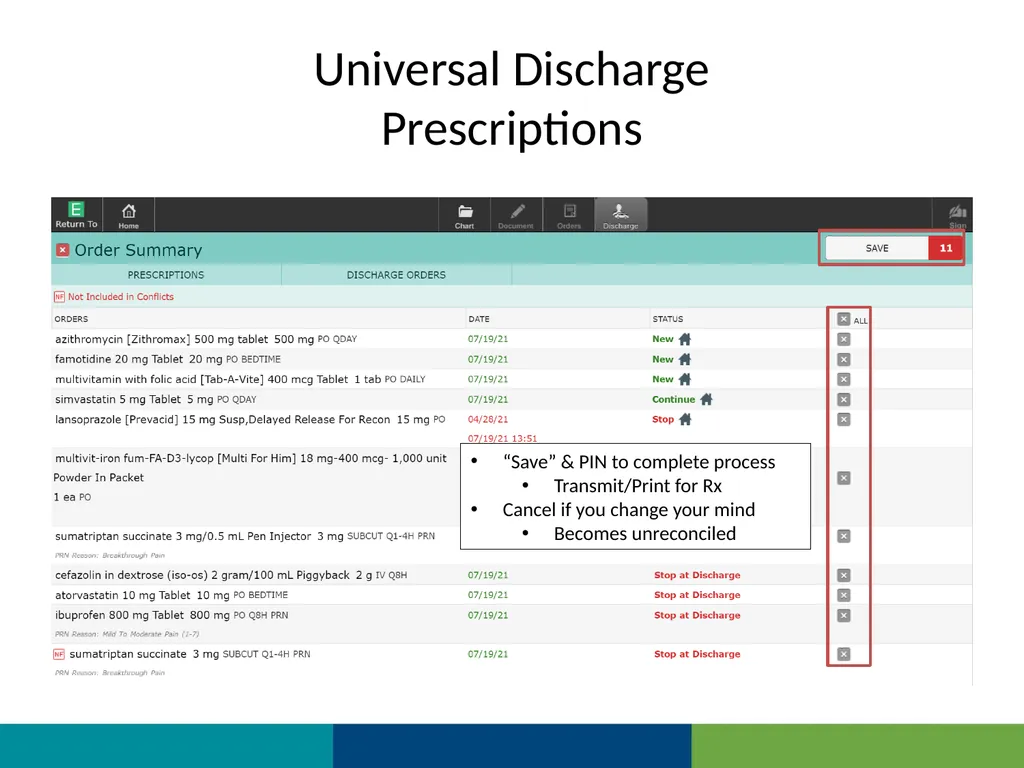
Prescriptions “Save” & PIN to complete process
Transmit/Print for Rx
Cancel if you change your mind
Becomes unreconciled<br>
Transmit/Print for Rx
Cancel if you change your mind
Becomes unreconciled<br>
30
Universal Discharge
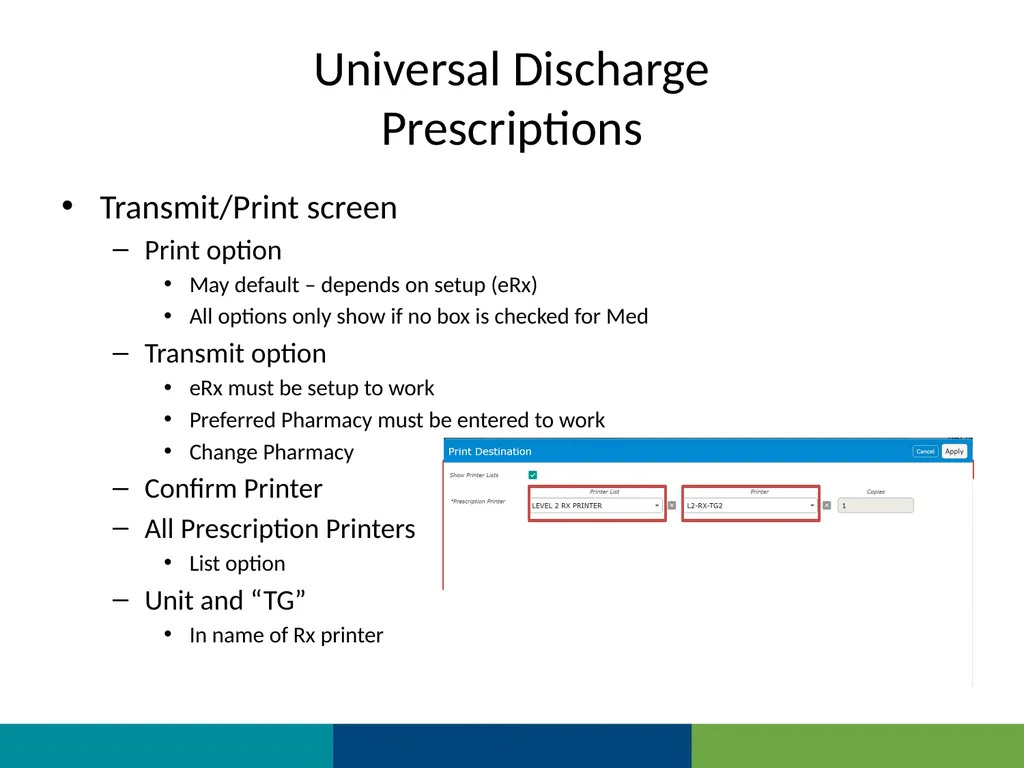
Prescriptions Transmit/Print screen
Print option
May default – depends on setup (eRx)
All options only show if no box is checked for Med
Transmit option
eRx must be setup to work
Preferred Pharmacy must be entered to work
Change Pharmacy
Confirm Printer
All Prescription Printers
List option
Unit and “TG”
In name of Rx printer<br>
Print option
May default – depends on setup (eRx)
All options only show if no box is checked for Med
Transmit option
eRx must be setup to work
Preferred Pharmacy must be entered to work
Change Pharmacy
Confirm Printer
All Prescription Printers
List option
Unit and “TG”
In name of Rx printer<br>
31
Universal Discharge
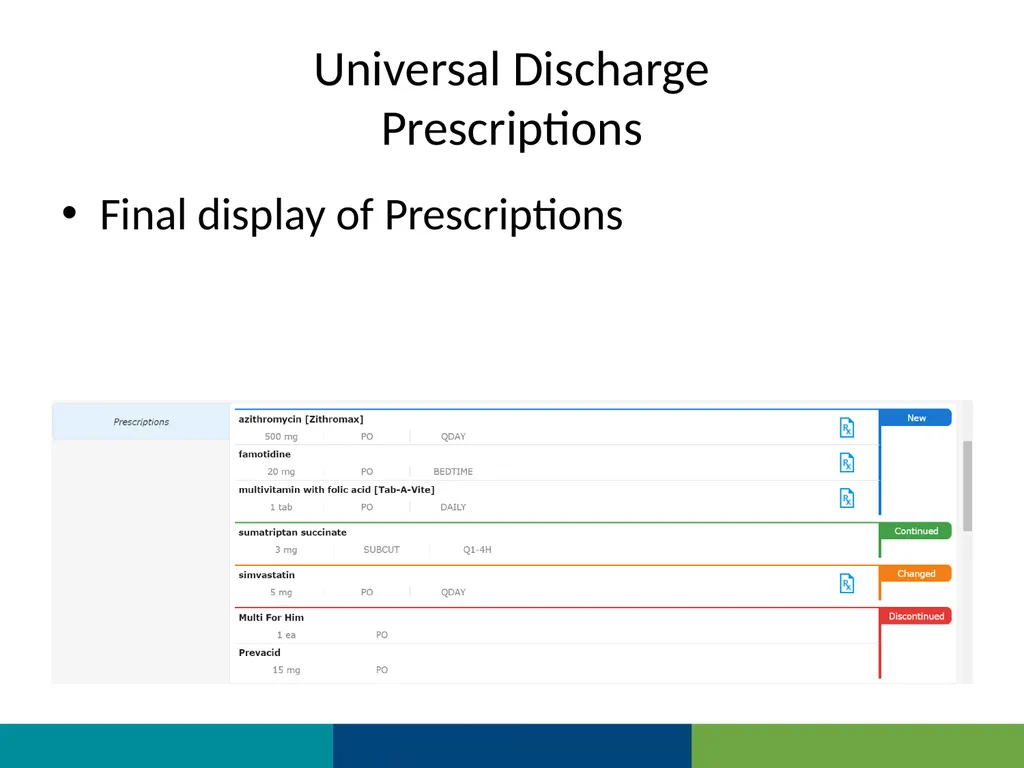
Prescriptions Final display of Prescriptions<br>
32
Universal Discharge
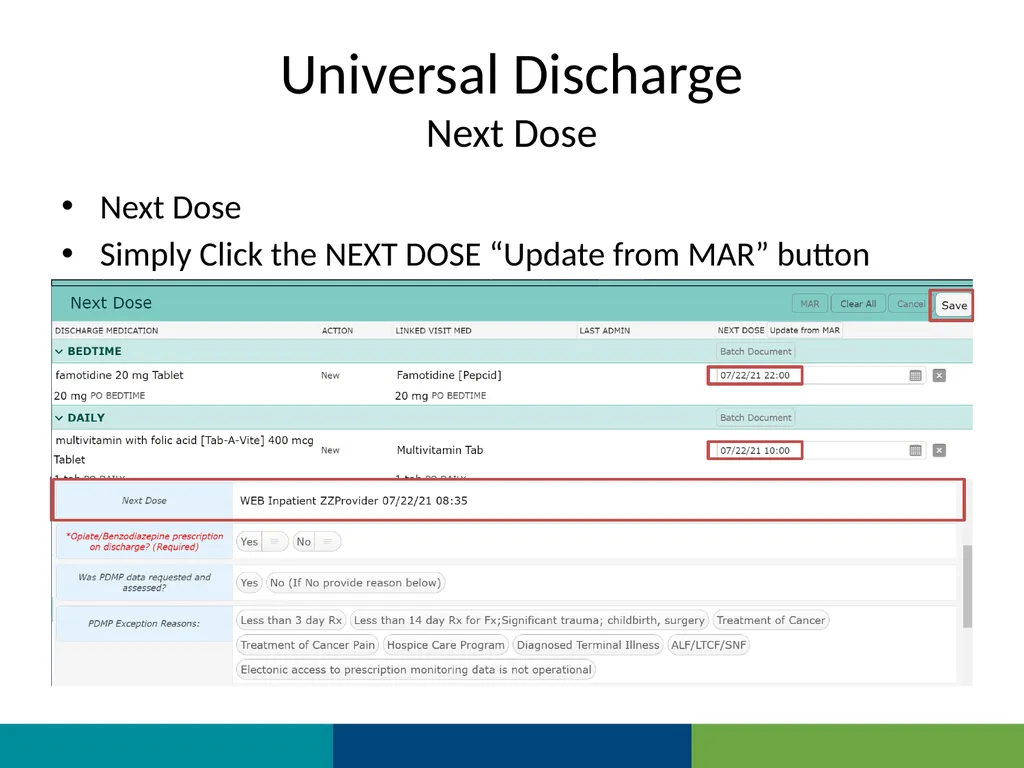
Next Dose Next Dose
Simply Click the NEXT DOSE “Update from MAR” button The last previous administration date & time is applied
Click “Save”<br>
Simply Click the NEXT DOSE “Update from MAR” button The last previous administration date & time is applied
Click “Save”<br>
33
Universal Discharge
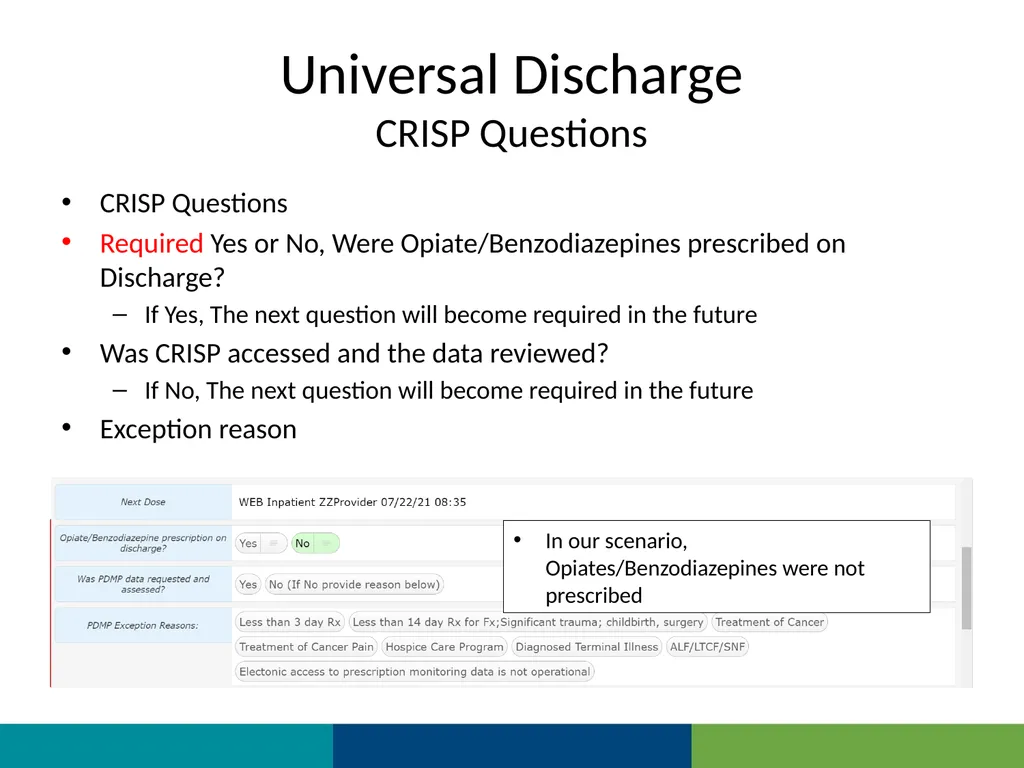
CRISP Questions CRISP Questions
Required Yes or No, Were Opiate/Benzodiazepines prescribed on Discharge?
If Yes, The next question will become required in the future
Was CRISP accessed and the data reviewed?
If No, The next question will become required in the future
Exception reason This example is provided for when CRISP was not consulted after Opiate/Benzodiazepine was ordered on discharge In our scenario, Opiates/Benzodiazepines were not prescribed<br>
Required Yes or No, Were Opiate/Benzodiazepines prescribed on Discharge?
If Yes, The next question will become required in the future
Was CRISP accessed and the data reviewed?
If No, The next question will become required in the future
Exception reason This example is provided for when CRISP was not consulted after Opiate/Benzodiazepine was ordered on discharge In our scenario, Opiates/Benzodiazepines were not prescribed<br>
34
Universal Discharge
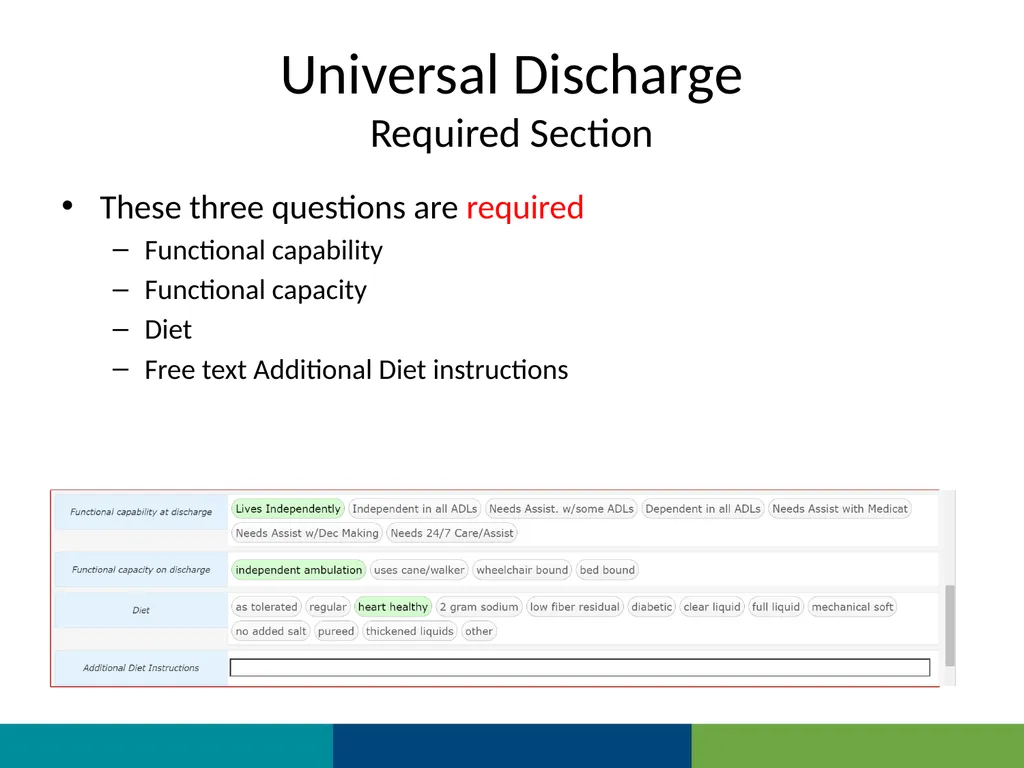
Required Section These three questions are required
Functional capability
Functional capacity
Diet
Free text Additional Diet instructions<br>
Functional capability
Functional capacity
Diet
Free text Additional Diet instructions<br>
35
Universal Discharge
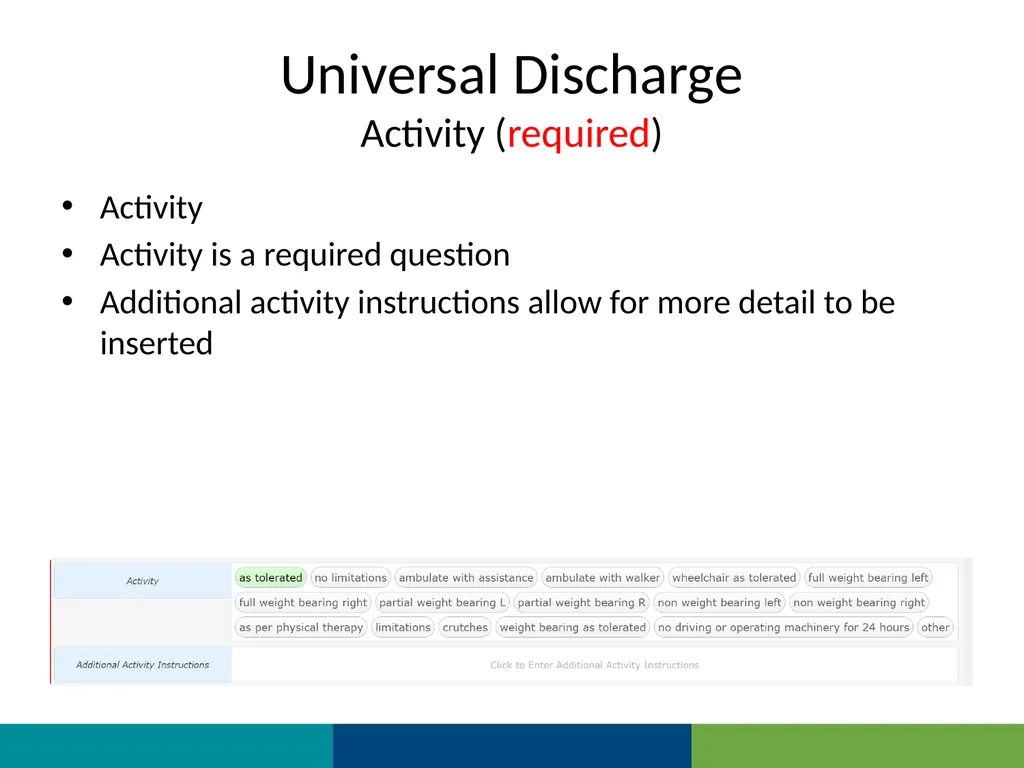
Activity (required) Activity
Activity is a required question
Additional activity instructions allow for more detail to be inserted<br>
Activity is a required question
Additional activity instructions allow for more detail to be inserted<br>
36
Universal Discharge
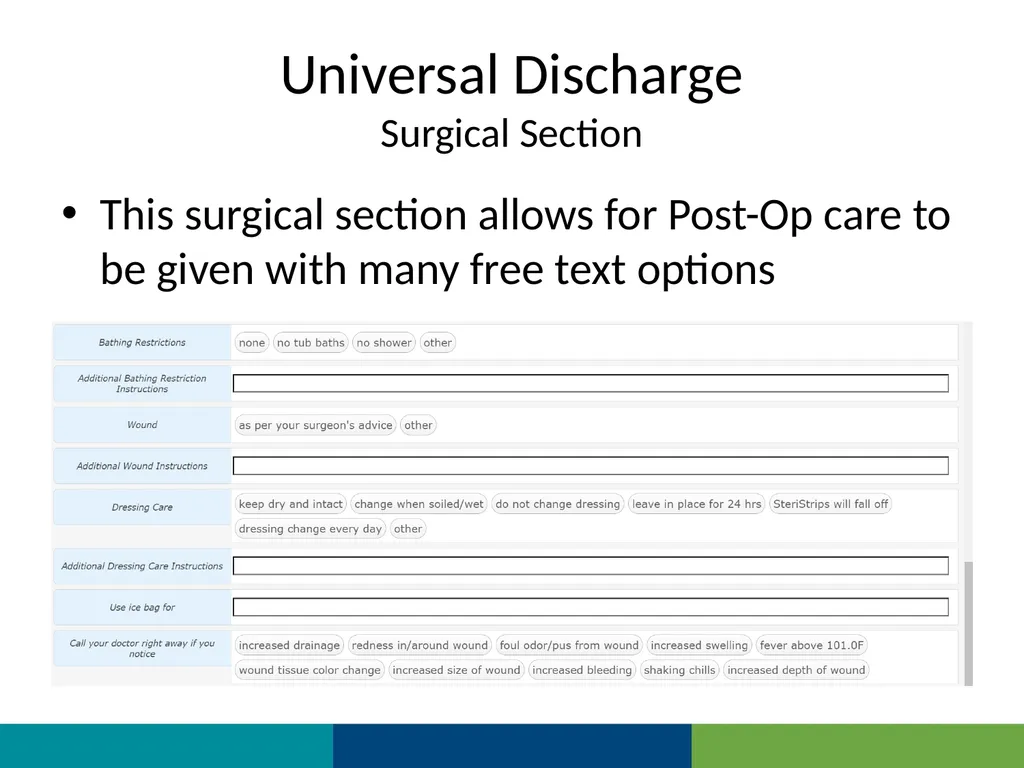
Surgical Section This surgical section allows for Post-Op care to be given with many free text options<br>
37
Universal Discharge
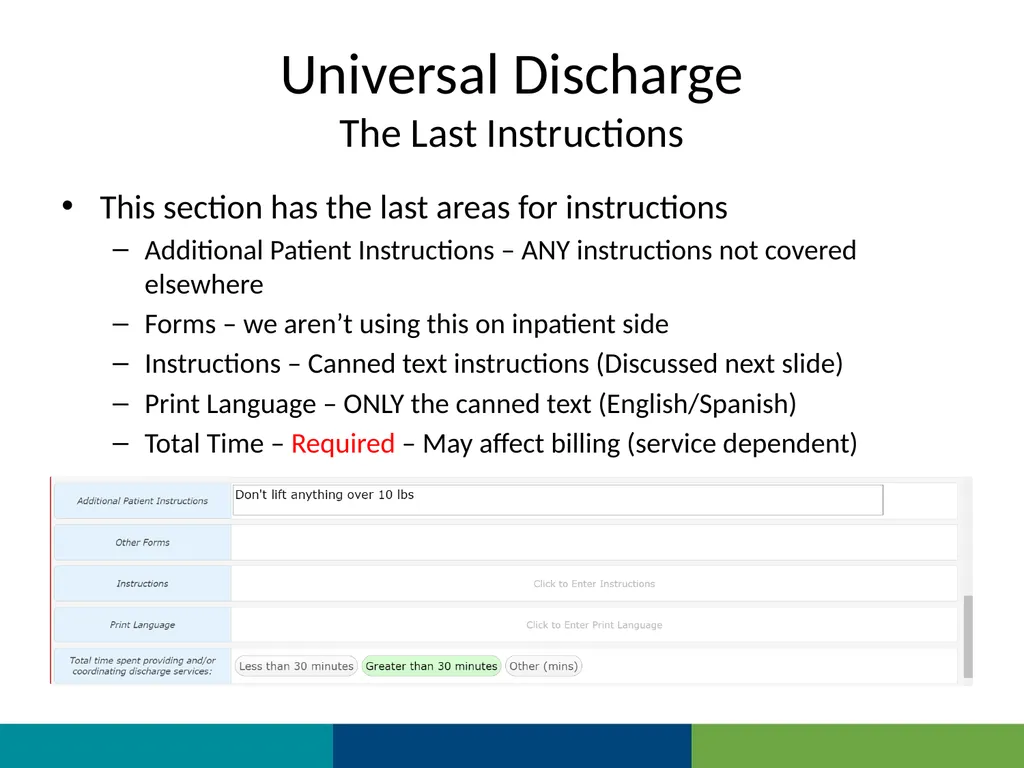
The Last Instructions This section has the last areas for instructions
Additional Patient Instructions – ANY instructions not covered elsewhere
Forms – we aren’t using this on inpatient side
Instructions – Canned text instructions (Discussed next slide)
Print Language – ONLY the canned text (English/Spanish)
Total Time – Required – May affect billing (service dependent)<br>
Additional Patient Instructions – ANY instructions not covered elsewhere
Forms – we aren’t using this on inpatient side
Instructions – Canned text instructions (Discussed next slide)
Print Language – ONLY the canned text (English/Spanish)
Total Time – Required – May affect billing (service dependent)<br>
38
Universal Discharge
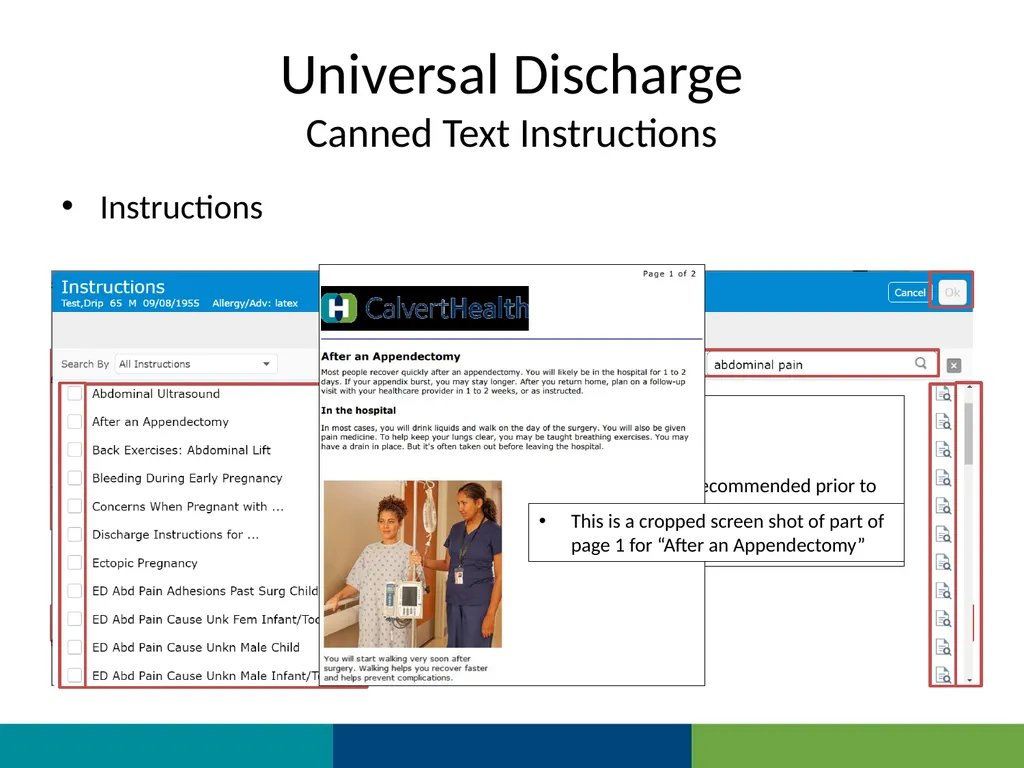
Canned Text Instructions Instructions Current Problems may be selected from
This process doesn’t seem to work properly yet
Additional Instructions may be search for Search by diagnosis/key word
Available instructions are listed
Scroll for additional options
Click icon to view instructions (recommended prior to selecting first time)
Click box to select
OK to add when done This is a cropped screen shot of part of page 1 for “After an Appendectomy”<br>
This process doesn’t seem to work properly yet
Additional Instructions may be search for Search by diagnosis/key word
Available instructions are listed
Scroll for additional options
Click icon to view instructions (recommended prior to selecting first time)
Click box to select
OK to add when done This is a cropped screen shot of part of page 1 for “After an Appendectomy”<br>
39
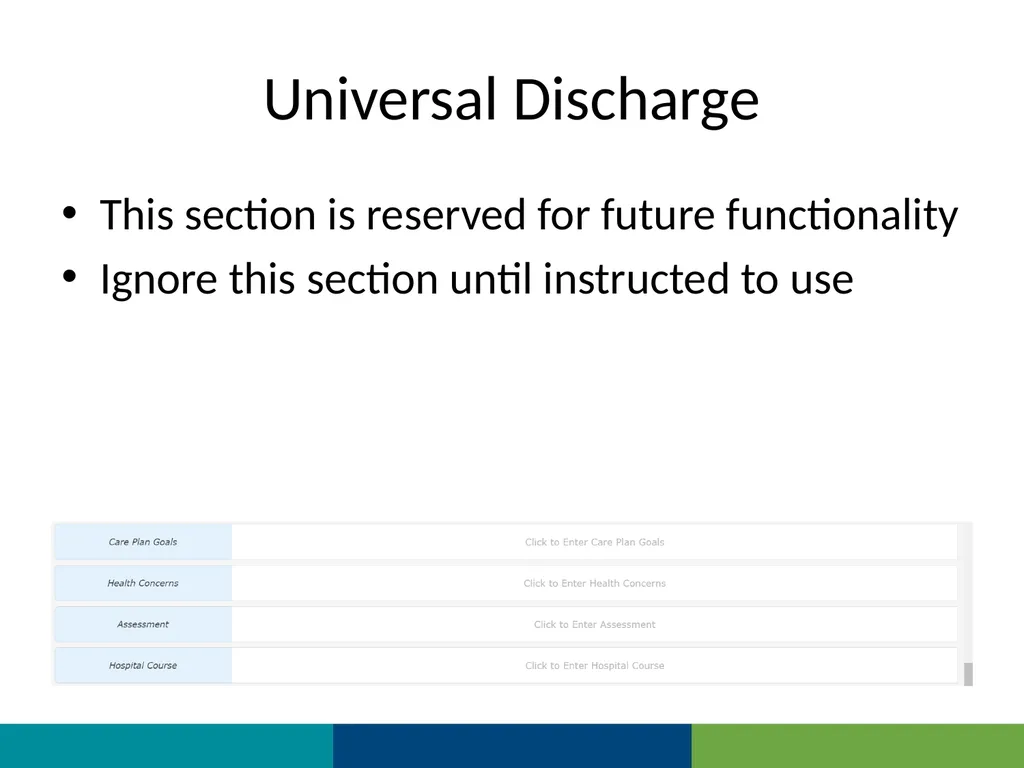
Universal Discharge This section is reserved for future functionality
Ignore this section until instructed to use<br>
Ignore this section until instructed to use<br>
40
Universal Discharge
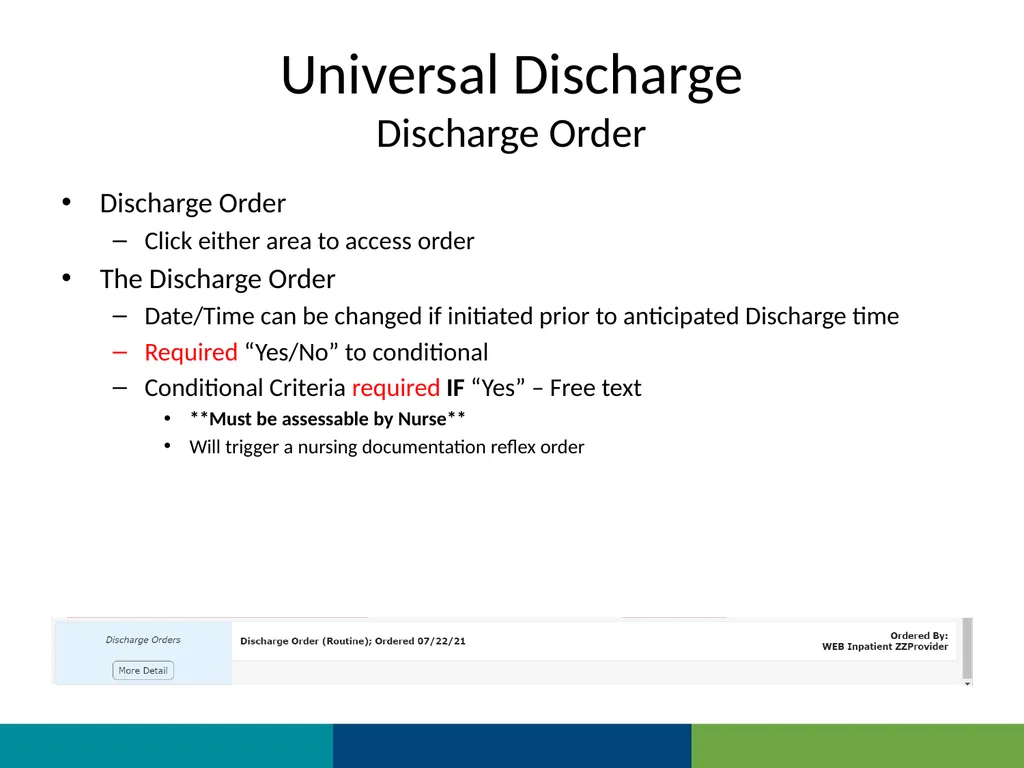
Discharge Order Discharge Order
Click either area to access order
The Discharge Order
Date/Time can be changed if initiated prior to anticipated Discharge time
Required “Yes/No” to conditional
Conditional Criteria required IF “Yes” – Free text
**Must be assessable by Nurse**
Will trigger a nursing documentation reflex order<br>
Click either area to access order
The Discharge Order
Date/Time can be changed if initiated prior to anticipated Discharge time
Required “Yes/No” to conditional
Conditional Criteria required IF “Yes” – Free text
**Must be assessable by Nurse**
Will trigger a nursing documentation reflex order<br>
41
Universal Discharge
Summary We have reviewed the Inpatient Universal Discharge
This is the longest and most complex Discharge
SDS Discharge instructions are more focused and a subset of the Inpatient Universal Discharge<br>
This is the longest and most complex Discharge
SDS Discharge instructions are more focused and a subset of the Inpatient Universal Discharge<br>
42
Universal Discharge
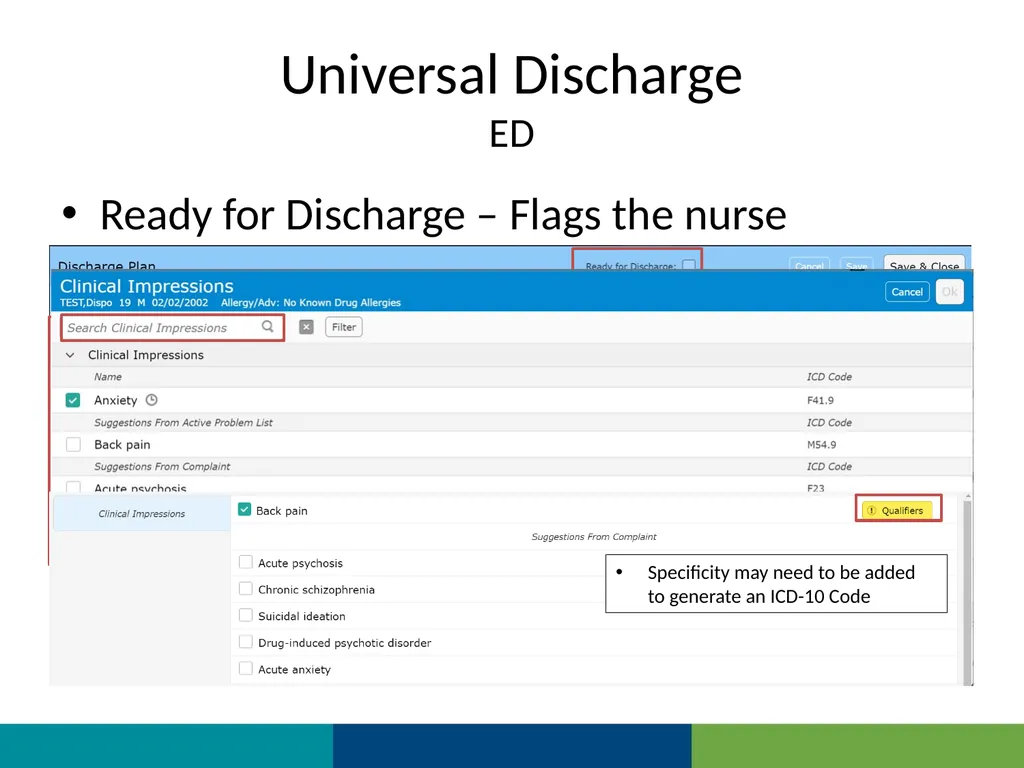
ED Ready for Discharge – Flags the nurse Clinical Impression
Click on Blue area to search for alternatives Specificity may need to be added to generate an ICD-10 Code<br>
Click on Blue area to search for alternatives Specificity may need to be added to generate an ICD-10 Code<br>
43
Universal Discharge
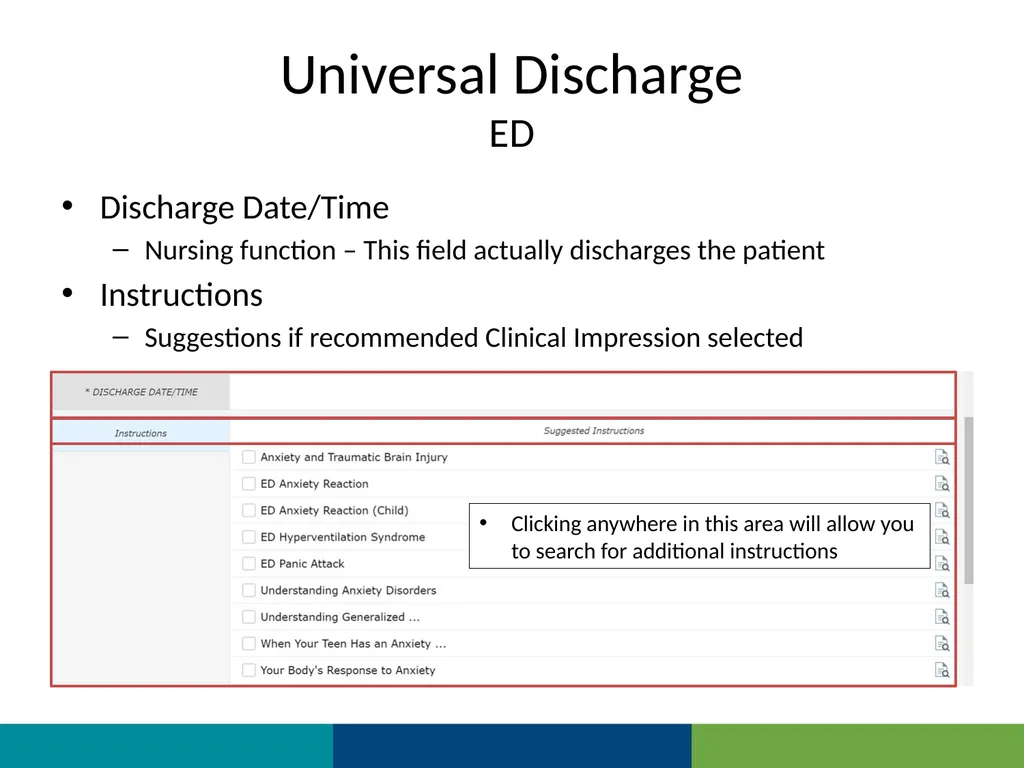
ED Discharge Date/Time
Nursing function – This field actually discharges the patient
Instructions
Suggestions if recommended Clinical Impression selected Clicking anywhere in this area will allow you to search for additional instructions<br>
Nursing function – This field actually discharges the patient
Instructions
Suggestions if recommended Clinical Impression selected Clicking anywhere in this area will allow you to search for additional instructions<br>
44
Universal Discharge
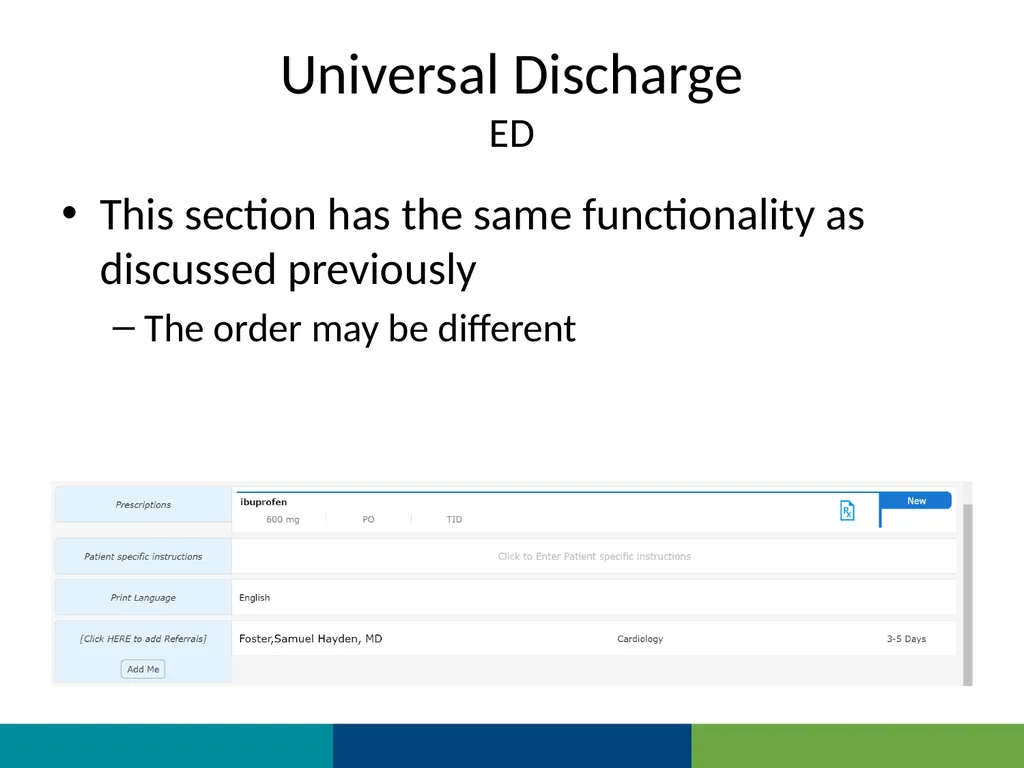
ED This section has the same functionality as discussed previously
The order may be different<br>
The order may be different<br>
45
Universal Discharge
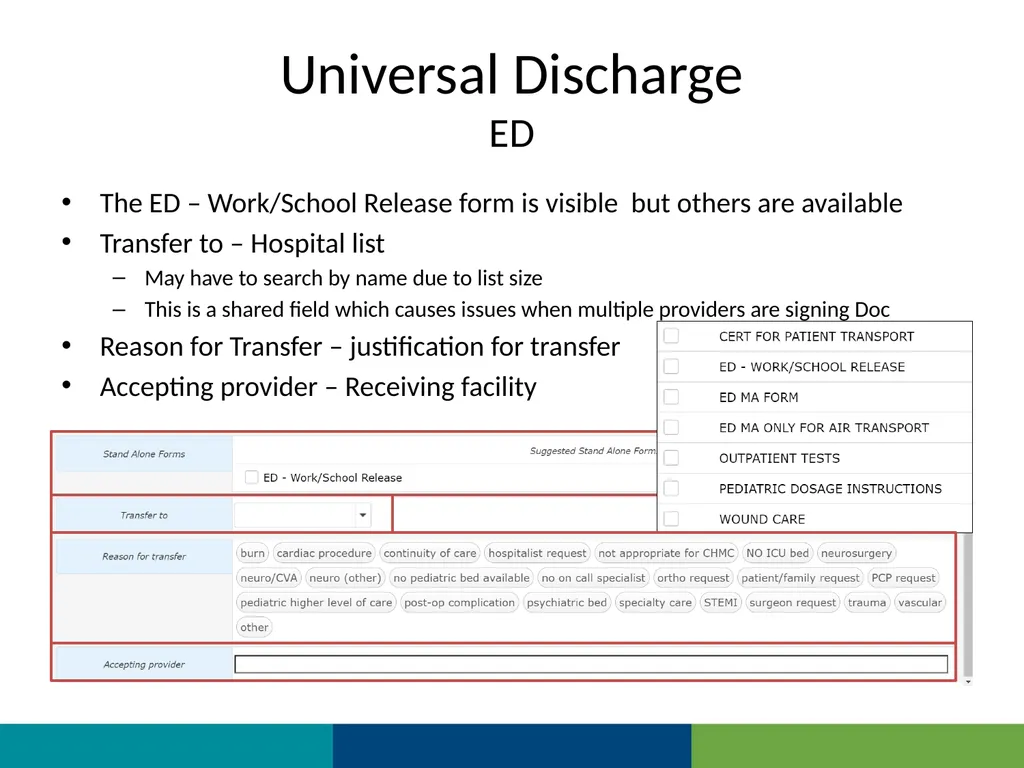
ED The ED – Work/School Release form is visible but others are available
Transfer to – Hospital list
May have to search by name due to list size
This is a shared field which causes issues when multiple providers are signing Doc
Reason for Transfer – justification for transfer
Accepting provider – Receiving facility<br>
Transfer to – Hospital list
May have to search by name due to list size
This is a shared field which causes issues when multiple providers are signing Doc
Reason for Transfer – justification for transfer
Accepting provider – Receiving facility<br>
46
Thank You You should have been scheduled for 1 on 1 training
Please call (410)535-8260 or email glenn.heaney@calverthealthmed.org if you have questions<br>
Please call (410)535-8260 or email glenn.heaney@calverthealthmed.org if you have questions<br>