New NODF DLF Procedure Brief Guidance We have developed a more efficient process for creating a patients DLF (Discharge Liaison Form) using RiO. The Rio Hospital Discharge Form has been reduced significantly in size and should be
"New NODF / DLF Procedure – Brief Guidance We have" is the property of its rightful owner. Permission is granted to
download and print the materials on this website for personal, non-commercial use only, and to display it
on your personal computer provided you do not modify the materials and that you retain all copyright
notices contained in the materials. By downloading content from our website, you accept the terms of this
agreement.
Share
Embed code
Presentation Transcript
01
New NODF / DLF Procedure – Brief Guidance<br>
02
We have developed a more efficient process for creating a patient’s DLF (Discharge Liaison Form) using RiO. The Rio ‘Hospital Discharge Form’ has been reduced significantly in size and should be significantly quicker to complete, and the aim is therefore to complete this during a patient’s discharge ward round.
The information in the Hospital Discharge Form is then combined with information pulled from a number of other places in RiO to create an ‘editable letter’ which is the document sent to the GP and uploaded to RiO as the NODF (Notification of Discharge Form – the four letter code used to upload in RiO).
The intention is to gradually change the way we enter information into Rio during day-to-day clinical work, so that most of the information pulled from other places in RiO to create the editable letter is entered during the course of a patient’s admission, rather than being left until the time of the patient’s discharge. Background<br>
03
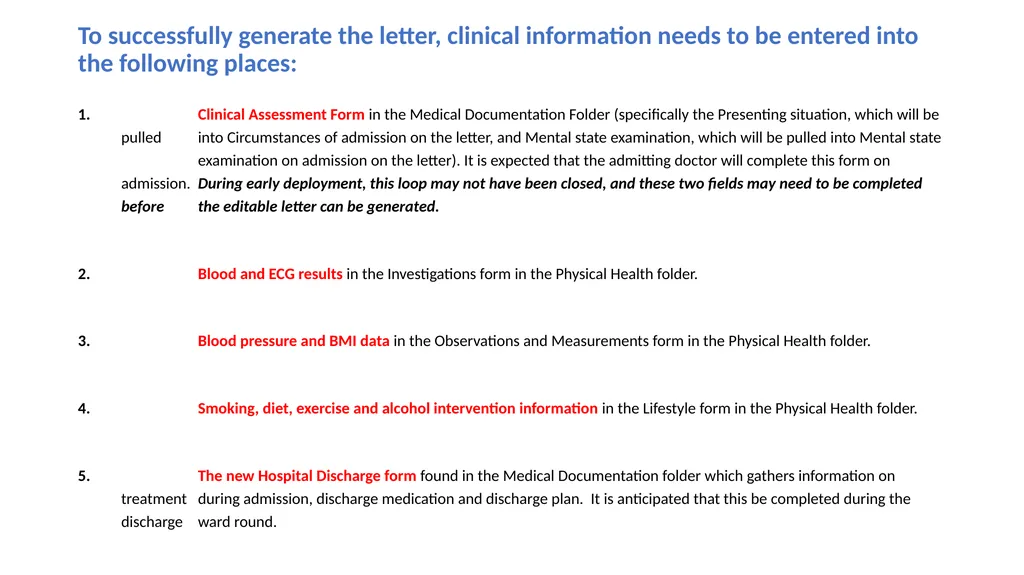
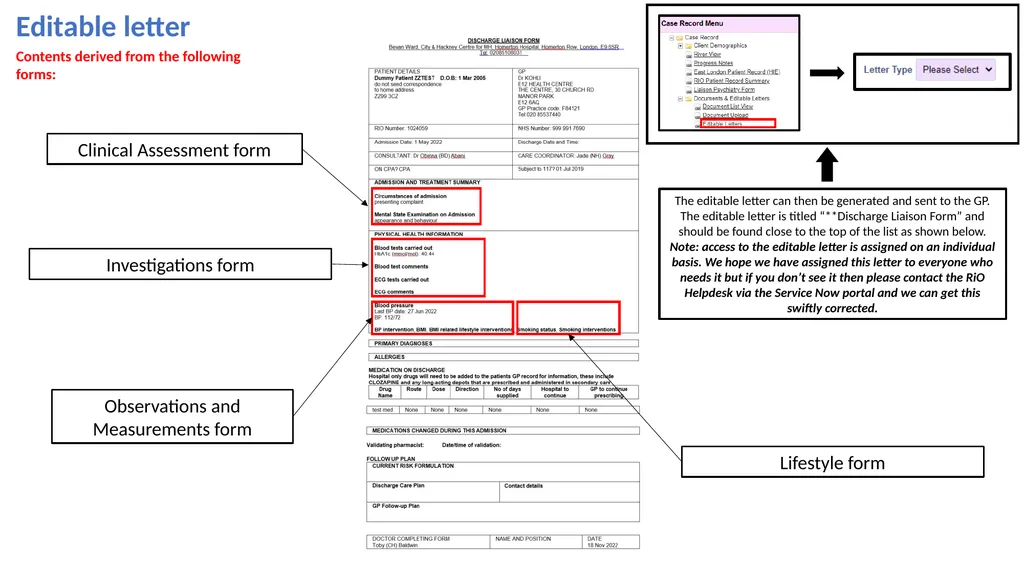
To successfully generate the letter, clinical information needs to be entered into the following places: Clinical Assessment Form in the Medical Documentation Folder (specifically the Presenting situation, which will be pulled into Circumstances of admission on the letter, and Mental state examination, which will be pulled into Mental state examination on admission on the letter). It is expected that the admitting doctor will complete this form on admission. During early deployment, this loop may not have been closed, and these two fields may need to be completed before the editable letter can be generated.
Blood and ECG results in the Investigations form in the Physical Health folder.
Blood pressure and BMI data in the Observations and Measurements form in the Physical Health folder.
Smoking, diet, exercise and alcohol intervention information in the Lifestyle form in the Physical Health folder.
The new Hospital Discharge form found in the Medical Documentation folder which gathers information on treatment during admission, discharge medication and discharge plan. It is anticipated that this be completed during the discharge ward round.<br>
04
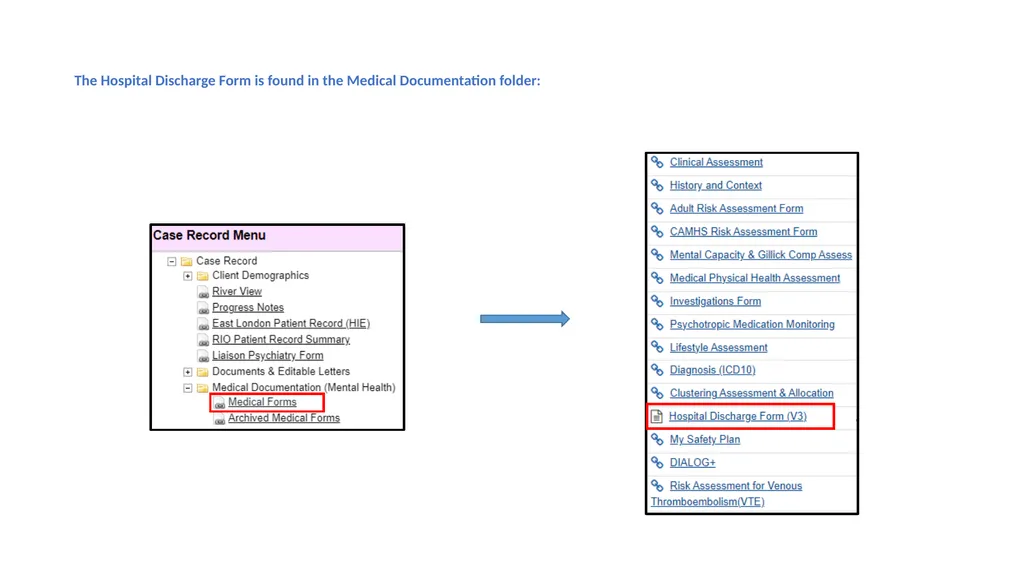
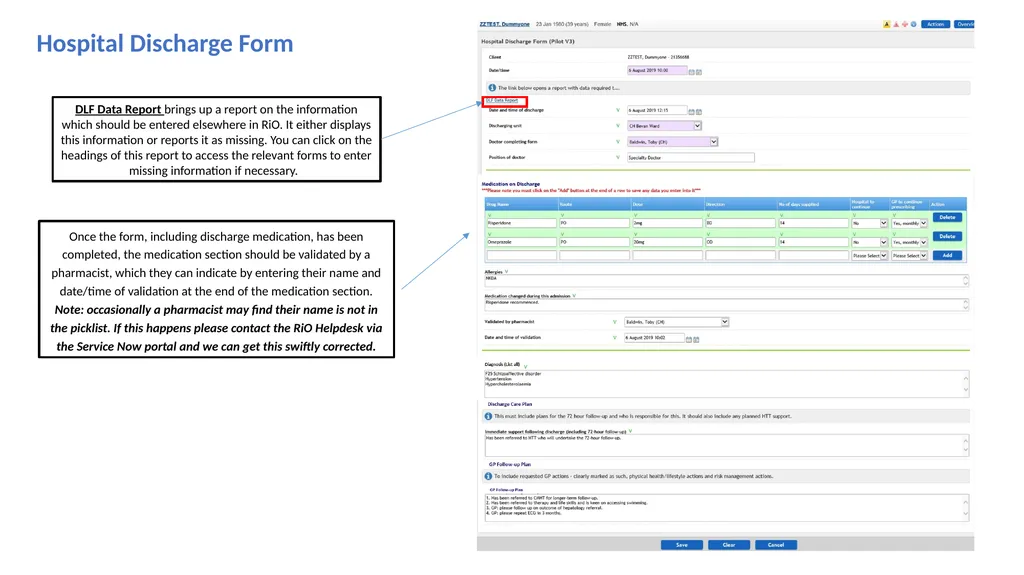
The Hospital Discharge Form is found in the Medical Documentation folder:<br>
05
Hospital Discharge Form DLF Data Report brings up a report on the information which should be entered elsewhere in RiO. It either displays this information or reports it as missing. You can click on the headings of this report to access the relevant forms to enter missing information if necessary. Once the form, including discharge medication, has been completed, the medication section should be validated by a pharmacist, which they can indicate by entering their name and date/time of validation at the end of the medication section. Note: occasionally a pharmacist may find their name is not in the picklist. If this happens please contact the RiO Helpdesk via the Service Now portal and we can get this swiftly corrected.<br>
06
Editable letter Clinical Assessment form Investigations form Observations and Measurements form Lifestyle form Contents derived from the following forms: The editable letter can then be generated and sent to the GP. The editable letter is titled “**Discharge Liaison Form” and should be found close to the top of the list as shown below. Note: access to the editable letter is assigned on an individual basis. We hope we have assigned this letter to everyone who needs it but if you don’t see it then please contact the RiO Helpdesk via the Service Now portal and we can get this swiftly corrected.<br>
07
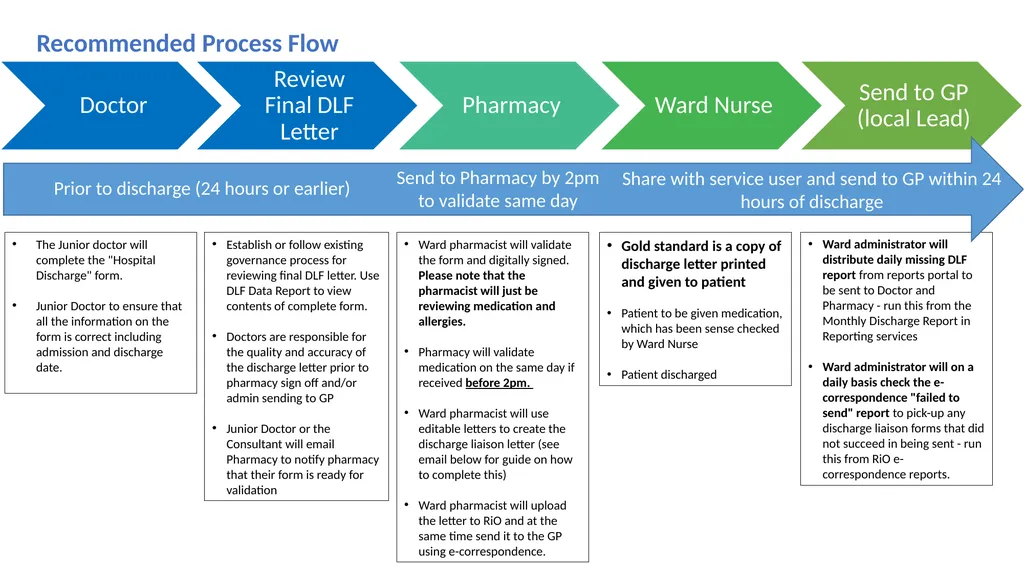
The Junior doctor will complete the "Hospital Discharge" form.
Junior Doctor to ensure that all the information on the form is correct including admission and discharge date. Ward pharmacist will validate the form and digitally signed. Please note that the pharmacist will just be reviewing medication and allergies.
Pharmacy will validate medication on the same day if received before 2pm.
Ward pharmacist will use editable letters to create the discharge liaison letter (see email below for guide on how to complete this)
Ward pharmacist will upload the letter to RiO and at the same time send it to the GP using e-correspondence. Gold standard is a copy of discharge letter printed and given to patient
Patient to be given medication, which has been sense checked by Ward Nurse
Patient discharged Ward administrator will distribute daily missing DLF report from reports portal to be sent to Doctor and Pharmacy - run this from the Monthly Discharge Report in Reporting services
Ward administrator will on a daily basis check the e-correspondence "failed to send" report to pick-up any discharge liaison forms that did not succeed in being sent - run this from RiO e-correspondence reports. Establish or follow existing governance process for reviewing final DLF letter. Use DLF Data Report to view contents of complete form.
Doctors are responsible for the quality and accuracy of the discharge letter prior to pharmacy sign off and/or admin sending to GP
Junior Doctor or the Consultant will email Pharmacy to notify pharmacy that their form is ready for validation Recommended Process Flow Prior to discharge (24 hours or earlier) Send to Pharmacy by 2pm to validate same day Share with service user and send to GP within 24 hours of discharge<br>