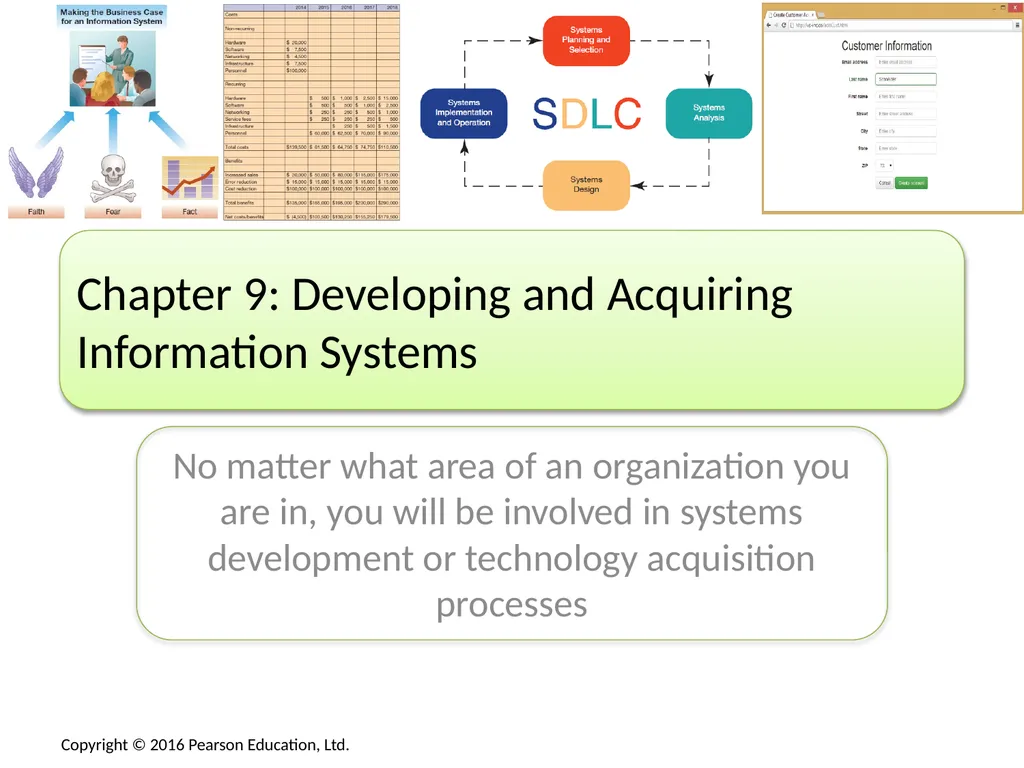
No matter what area of an organization you are in,

Published  . 0 views
↓ Download
No matter what area of an organization you are in,
1 / 1
No matter what area of an organization you are in, - slide 1 of 47 No matter what area of an organization you are in, - slide 2 of 47 No matter what area of an organization you are in, - slide 3 of 47 No matter what area of an organization you are in, - slide 4 of 47 No matter what area of an organization you are in, - slide 5 of 47 No matter what area of an organization you are in, - slide 6 of 47 No matter what area of an organization you are in, - slide 7 of 47 No matter what area of an organization you are in, - slide 8 of 47 No matter what area of an organization you are in, - slide 9 of 47 No matter what area of an organization you are in, - slide 10 of 47 No matter what area of an organization you are in, - slide 11 of 47 No matter what area of an organization you are in, - slide 12 of 47 No matter what area of an organization you are in, - slide 13 of 47 No matter what area of an organization you are in, - slide 14 of 47 No matter what area of an organization you are in, - slide 15 of 47 No matter what area of an organization you are in, - slide 16 of 47 No matter what area of an organization you are in, - slide 17 of 47 No matter what area of an organization you are in, - slide 18 of 47 No matter what area of an organization you are in, - slide 19 of 47 No matter what area of an organization you are in, - slide 20 of 47 No matter what area of an organization you are in, - slide 21 of 47 No matter what area of an organization you are in, - slide 22 of 47 No matter what area of an organization you are in, - slide 23 of 47 No matter what area of an organization you are in, - slide 24 of 47 No matter what area of an organization you are in, - slide 25 of 47 No matter what area of an organization you are in, - slide 26 of 47 No matter what area of an organization you are in, - slide 27 of 47 No matter what area of an organization you are in, - slide 28 of 47 No matter what area of an organization you are in, - slide 29 of 47 No matter what area of an organization you are in, - slide 30 of 47 No matter what area of an organization you are in, - slide 31 of 47 No matter what area of an organization you are in, - slide 32 of 47 No matter what area of an organization you are in, - slide 33 of 47 No matter what area of an organization you are in, - slide 34 of 47 No matter what area of an organization you are in, - slide 35 of 47 No matter what area of an organization you are in, - slide 36 of 47 No matter what area of an organization you are in, - slide 37 of 47 No matter what area of an organization you are in, - slide 38 of 47 No matter what area of an organization you are in, - slide 39 of 47 No matter what area of an organization you are in, - slide 40 of 47 No matter what area of an organization you are in, - slide 41 of 47 No matter what area of an organization you are in, - slide 42 of 47 No matter what area of an organization you are in, - slide 43 of 47 No matter what area of an organization you are in, - slide 44 of 47 No matter what area of an organization you are in, - slide 45 of 47 No matter what area of an organization you are in, - slide 46 of 47 No matter what area of an organization you are in, - slide 47 of 47
Description: No matter what area of an organization you are in, you will be involved in systems development or technology acquisition processes Chapter 9: Developing and Acquiring Information Systems Chapter 9 Learning Objectives Making the Business

Related Topics

Download Presentation

"No matter what area of an organization you are in," is the property of its rightful owner. Permission is granted to download and print the materials on this website for personal, non-commercial use only, and to display it on your personal computer provided you do not modify the materials and that you retain all copyright notices contained in the materials. By downloading content from our website, you accept the terms of this agreement.

Presentation Transcript

slide1. No matter what area of an organization you are in, you will be involved in systems development or technology acquisition processes Chapter 9: Developing and Acquiring Information Systems<br>
slide2. Chapter 9 Learning Objectives<br>
slide3. Making the Business Case<br>
slide4. Business Case Objectives The business case sells an investment
Build a strong, integrated set of arguments
Show how an IS adds value to the organization
Lays out the costs and benefits
Used to make a “go” or “no-go” decision
May be used to justify continued funding<br>
slide5. The Productivity Paradox<br>
slide6. Making a Successful Business Case: Types of Business Cases Based on Wheeler and Marakas, 1999<br>
slide7. Making a Successful Business Case: Identifying Costs and Benefits Identifying Costs
Tangible costs—total cost of ownership (TCO)
Non-recurring costs (acquisition)
Recurring costs (use and maintenance)
Intangible costs (e.g., loss of customers)
Identifying Benefits
Tangible benefits (e.g., estimated sales gains)
Intangible benefits (e.g., improved customer service)<br>
slide8. Making a Successful Business Case: Performing Cost-Benefit Analyses<br>
slide9. Making a Successful Business Case: Comparing Competing Investments Weighted Multicriteria Analysis<br>
slide10. Presenting the Business Case Know the Audience
Know who you are presenting to, what their background is, and what they care about
Convert Benefits to Monetary Terms
Show benefits as $ per time period, often annual
Devise Proxy Variables
Measure What Is Important to Management
Know management “hot-button” issues
Describe how the system impacts them<br>
slide11. Making a Successful Business Case: Stakeholders and Factors<br>
slide12. The Systems Development Process<br>
slide13. Customized Versus Off-the-Shelf Software Customized Software
Customizability—tailored to unique needs
Problem specificity—pay only for what is needed
Off-the-Shelf Software (Packaged Software)
Less costly than customized systems
Faster to procure than customized systems
Of higher quality than customized systems
Less risky than customized systems<br>
slide14. Off-the-Shelf Software: Examples Commercial off-the-shelf (COTS) software—typically developed by software companies that spread the development costs over a large number of customers<br>
slide15. Open Source Software Program’s source code is freely available for use and/or modification
Linux and MySQL are prevalent example
Free to use, but “hidden” support costs
Typically no support for the free version
Commercial vendors may offer commercial-grade support to industry users for a fee
MySQL database is used by Yahoo!, Facebook, and Associated Press<br>
slide16. Combining Customized, Open Source, and Off-the-Shelf Systems Off-the-shelf systems can often be customized
Off-the-shelf systems may interact with open-source systems (e.g., the MySQL open source database can be used to store data for a small business ERP system)<br>
slide17. IS Development in Action<br>
slide18. IS Development in Action<br>
slide19. The Role of Users in the Systems Development Process System analysts design the system
System users know what is needed
System analysts depend on system users
System users are key throughout the process<br>
slide20. Steps in the Systems Development Process Systems planning and selection
Systems analysis
Systems design
Systems implementation and operation<br>
slide21. Phase 1: Systems Planning and Selection Resources are limited so projects must be limited
Analyst gathers information and builds the case
Multiple approaches to selecting projects
Formal IS planning process
Ad-hoc planning process
The business case role
Business cases for different projects compared
Multiple selection criteria<br>
slide22. Phase 2: Systems Analysis Collecting Requirements
May be the most important part of systems development
Dictates how the proposed system should function
Modeling Data
What data are needed
Modeled using entity-relationship diagrams
Modeling Processes and Logic
Model the data flow
Model the processing logic
Develop System Designs and Evaluate, Selecting One<br>
slide23. Phase 3: Systems Design The system design chosen from Phase 2 is now elaborated to where it could be built
Human–computer interface
Point of contact between the user and the system
Data entry and management forms
Databases and files
Processing and logic
Modeled using one of many techniques
Models converted into code in Phase 4<br>
slide24. Phase 4: Systems Implementation and Operation Convert design into a working system
Software programming and software testing
System conversion, documentation, training, and support
User and reference guides
User training manuals and tutorials
Installation procedures and troubleshooting suggestions<br>
slide25. Phase 4: Systems Implementation and Operation: Conversion Strategies<br>
slide26. Repeating the SDLC: Systems Maintenance<br>
slide27. Repeating the SDLC: Systems Maintenance: Activity Mapping<br>
slide28. Other Approaches to Designing and Building Systems Prototyping
Trial-and-error
Works even when the desired endpoint isn’t known, if there is a basis for determining when one prototype is better than another
RAD & Extreme Programming<br>
slide29. Acquiring Information Systems<br>
slide30. External Acquisition: Reasons for External Acquisition Possible situations:
Situation 1: Limited IS staff
Situation 2: IS staff has limited skill set
Situation 3: IS staff is overworked
Situation 4: Problems with performance of IS staff
When this is the case, there are two options:
External acquisition of a prepackaged system
Outsourcing systems development<br>
slide31. External Acquisition: Steps Systems planning and selection
Systems analysis
Development of a request for proposal
Proposal evaluation
Vendor selection<br>
slide32. External Acquisition: Steps: Development of a Request for Proposal A summary of existing systems and applications
Requirements for system performance and features
Reliability, backup, and service requirements
The criteria that will be used to evaluate proposals
Timetable and budget constraints (how much you can spend)<br>
slide33. External Acquisition: Steps: Proposal Evaluation Evaluation may include:
Viewing system demonstrations
Evaluating system performance
Judging how system stacks up to important criteria
Use of system benchmarks
Response time given a specified number of users
Time to sort records
Time to retrieve a set of records
Time to produce a given report
Time to read in a set of data<br>
slide34. External Acquisition: Commonly Used Evaluation Criteria<br>
slide35. External Acquisition: Steps—Vendor Selection Typically multiple feasible solutions
Prioritize or rank competing proposals
Weighted scoring system works well for this
Other approaches include
Simple checklists
Subjective processes
Once vendor is selected, external acquisition is complete<br>
slide36. External Acquisition: Managing the Software License Varying degrees of restrictiveness or freedom
Types of licenses
Shrink-wrap or click-wrap licenses
Typical for off-the-shelf and system software
Enterprise or volume licenses
Usually negotiated
Software asset management
Performing a software inventory<br>
slide37. Outsourcing Systems Development: Why Outsourcing?<br>
slide38. Outsourcing Systems Development: Managing the IS Outsourcing Relationship Outsourced relationships take continuous management
Realistic, tangible measures of performance should be developed and tracked
Multiple levels of interaction based on the type of interaction
Operational and tactical
Policy and relationship<br>
slide39. End of Chapter Content<br>
slide40. Managing in the Digital World: Microsoft Is “Kinecting” Its Ecosystem Apple, Google, Microsoft, and Amazon are building app ecosystems
System development is a cooperation between large companies and small independent app developers
Microsoft released the Kinect in 2010, a motion capture device for the Xbox with a USB interface
Programmers saw the potential to use the Kinect in new and novel ways
Microsoft resisted at first, but now includes an SDK
In 2013, Microsoft released an improved version with the help of independent app developers<br>
slide41. Brief Case: Software Patent Wars In the mobile space
Apple patented slide-to-unlock features
Samsung patented 4G data transmission
Microsoft sued Motorola for video encoding
Motorola sued Microsoft for email, IM, and Wi-Fi
Oracle sued Google for basing Android on Java
Samsung and Apple battle over their patents
Are patent wars preventing productivity?<br>
slide42. Coming Attractions: IBM’s 5 in 5 5 innovations that will transform our lives in 5 years
Based on Big Data and machine learning
Offline retail stores will learn about customers
Doctors will learn about your DNA
Digital guardians will protect you from cybercriminals
The classroom will learn about its students
Smart cities will improve their citizens’ lives<br>
slide43. Ethical Dilemma: Ethical App Development Nowadays anyone can build an app, not just major software companies
Mobile apps are especially prevalent, with opportunities to build the next “killer app”
This leads to possible ethical issues, especially related to privacy concerns
Facebook privacy policies always changing, often violating privacy preferences of users
iOS social media Path app secretly sends users’ complete address list to Path’s servers
Apps can easily retrieve user data, but can does not imply ought<br>
slide44. Who’s Going Mobile Creating Mobile Apps Smartphone apps are being rapidly developed and deployed
In 2013, Google and Apple announced more than 1 million apps in their app stores
Only a relatively few are highly successful
Flappy Bird took only three days to complete, but netted $50K per day
Game templates are available for as low as $199 for developers, not even needing code
Other app possibilities
Productivity tools for students
Managing your passwords
Plenty of other ideas<br>
slide45. Key Players: Game Development Studios Some tech companies (IBM, Apple) receive only a small amount of their total revenue from software
Others (e.g., Microsoft) are primarily software vendors
All software involves SDLC, but game software SDLC has unique characteristics
Begin with general project goal
After that, it’s more like movie production than normal software production
Leading games sometimes cost more than $100 million to develop<br>
slide46. When Things Go Wrong: Conquering Computer Contagion Blue Frog had a new solution to combat spam
For every e-mail received, sent a response e-mail
Six of the top 10 spammers dropped Blue Frog’s clients from their lists
One spammer fought back, inundating Blue Frog’s clients with so much spam that ISP servers crashed
Blue Frog decided to fold instead of creating a new cyberwar
2014 top malware issues: growth in botnets, Android-based malware, Linux and Mac OS vulnerabilities, Web-based malware, attacks on financial accounts, Windows XP, spam evolving to overcome blocking<br>
slide47. Industry Analysis: Broadcasting Broadcasters of radio and television are facing dwindling viewership
The Internet has opened new entertainment sources and competition to viewers
Advertisers are willing to pay less for smaller audiences
Broadcasters now use the Internet as another distribution channel, and can charge for online show advertising
Some formats are requiring shorter broadcast formats to cater to online audiences<br>