
Performance Tuning Workshop - Architecture Adam
MT
Published · 107 slides · 0 views

1 / 1












Description
Performance Tuning Workshop - Architecture Adam Backman President and Pretty Nice Guy White Star Software, LLC Overview OpenEdge Architecture Shared memory Server-less Multi-server Networking Primary broker Splitting clients across servers
Related Topics
Share
Embed code
Download this presentation From Below
"Performance Tuning Workshop - Architecture Adam" is the property of its rightful owner. Permission is granted to download and print the materials on this website for personal, non-commercial use only, and to display it on your personal computer provided you do not modify the materials and that you retain all copyright notices contained in the materials. By downloading content from our website, you accept the terms of this agreement.
Presentation Transcript
01
Performance Tuning Workshop - Architecture Adam Backman
President and Pretty Nice Guy
White Star Software, LLC<br>
President and Pretty Nice Guy
White Star Software, LLC<br>
02
Overview OpenEdge Architecture
Shared memory
Server-less
Multi-server
Networking
Primary broker
Splitting clients across servers
Secondary broker
Splitting clients across brokers<br>
Shared memory
Server-less
Multi-server
Networking
Primary broker
Splitting clients across servers
Secondary broker
Splitting clients across brokers<br>
03
Overview Database block size
Setting records per block
Using OE Type II Storage areas<br>
Setting records per block
Using OE Type II Storage areas<br>
04
Overview Disk Stuff
Use RAID 10
Use large stipe widths
Match OpenEdge and OS block size<br>
Use RAID 10
Use large stipe widths
Match OpenEdge and OS block size<br>
05
Architecture I think Ms. Monroe’s architecture is extremely good architecture
-Frank Lloyd Wright<br>
-Frank Lloyd Wright<br>
06
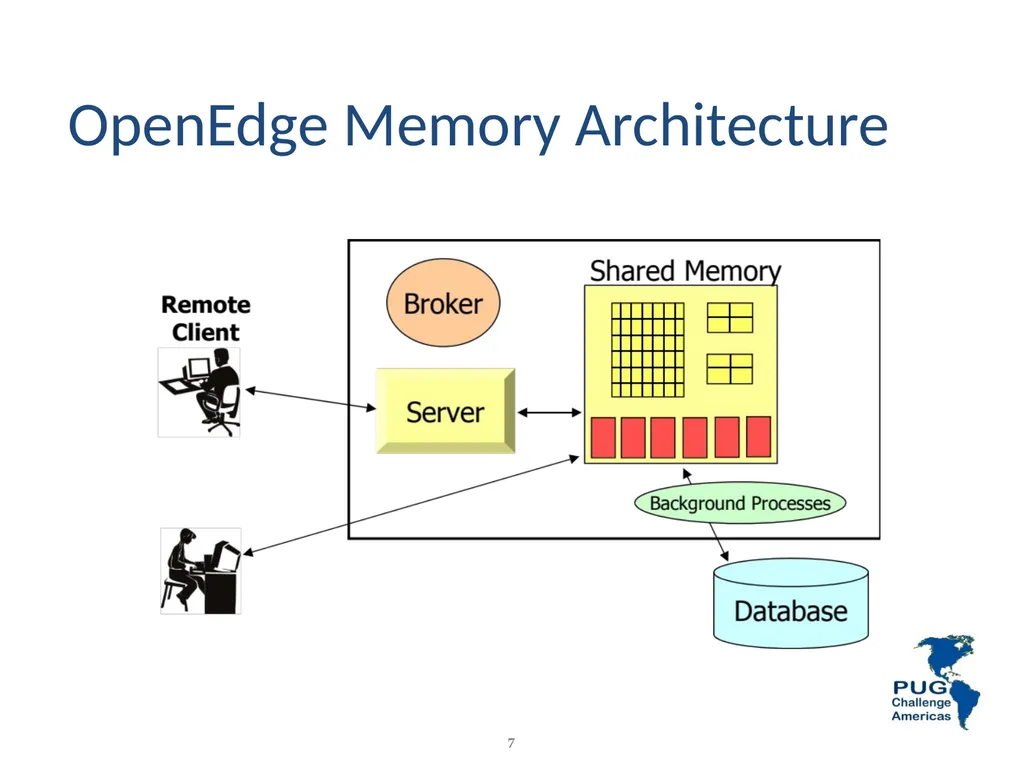
OpenEdge Memory Architecture Shared memory
Server-less
Multi-server
Multi-broker<br>
Server-less
Multi-server
Multi-broker<br>
07
7 OpenEdge Memory Architecture<br>
08
OpenEdge Network Architecture Primary broker
Splitting clients across servers
Secondary broker
Splitting clients across brokers<br>
Splitting clients across servers
Secondary broker
Splitting clients across brokers<br>
09
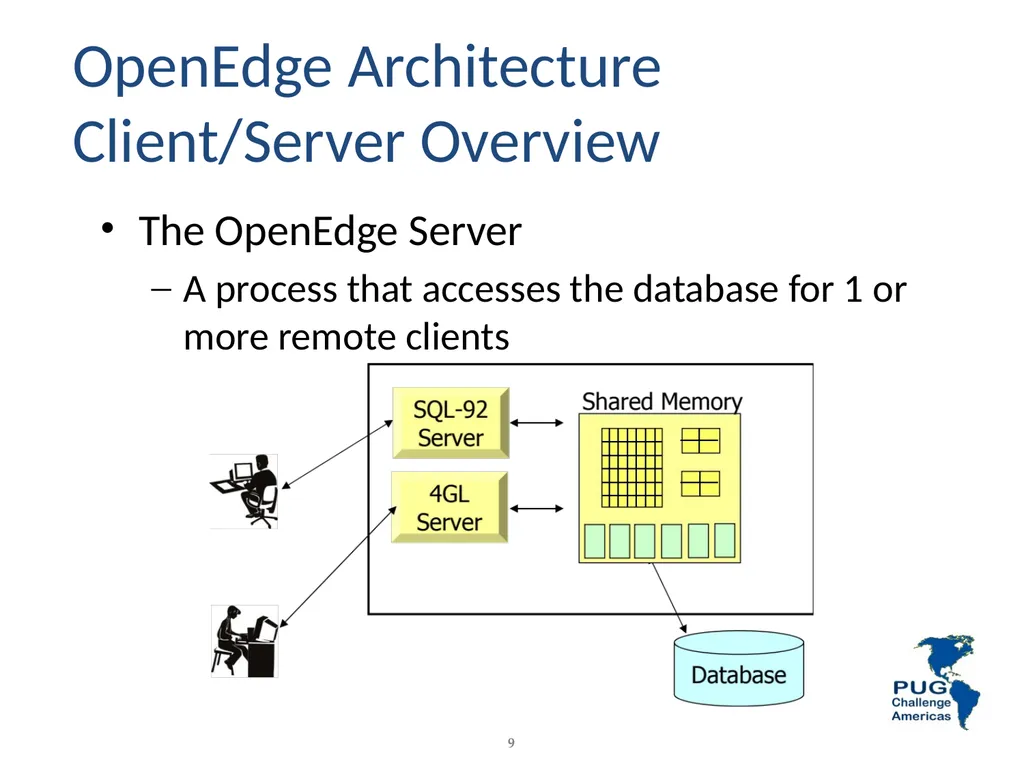
9 The OpenEdge Server
A process that accesses the database for 1 or more remote clients OpenEdge Architecture Client/Server Overview<br>
A process that accesses the database for 1 or more remote clients OpenEdge Architecture Client/Server Overview<br>
10
OpenEdge Storage Considerations Database block size
Setting records per block
Type II Storage areas<br>
Setting records per block
Type II Storage areas<br>
11
Database Block Size Generally, 8k works best for Unix/Linux
4k works best for Windows
Remember to build filesystems with larger block sizes (match if possible)
There are exceptions so a little testing goes a long way but if in doubt use the above guidelines<br>
4k works best for Windows
Remember to build filesystems with larger block sizes (match if possible)
There are exceptions so a little testing goes a long way but if in doubt use the above guidelines<br>
12
Determining Records per Block Determine “Mean” record size
Use proutil <dbname> -C dbanalys
Add 20 bytes for record and block overhead
Divide this product into your database block size
Choose the next HIGHER binary number
Must be between 1 and 256<br>
Use proutil <dbname> -C dbanalys
Add 20 bytes for record and block overhead
Divide this product into your database block size
Choose the next HIGHER binary number
Must be between 1 and 256<br>
13
Example: Records /Block Mean record size = 90
Add 20 bytes for overhead (90 + 20 = 110)
Divide product into database blocksize
8192 ÷ 110 = 74.47
Choose next higher binary number 128
Default records per block is 64 in version 9 and 10<br>
Add 20 bytes for overhead (90 + 20 = 110)
Divide product into database blocksize
8192 ÷ 110 = 74.47
Choose next higher binary number 128
Default records per block is 64 in version 9 and 10<br>
14
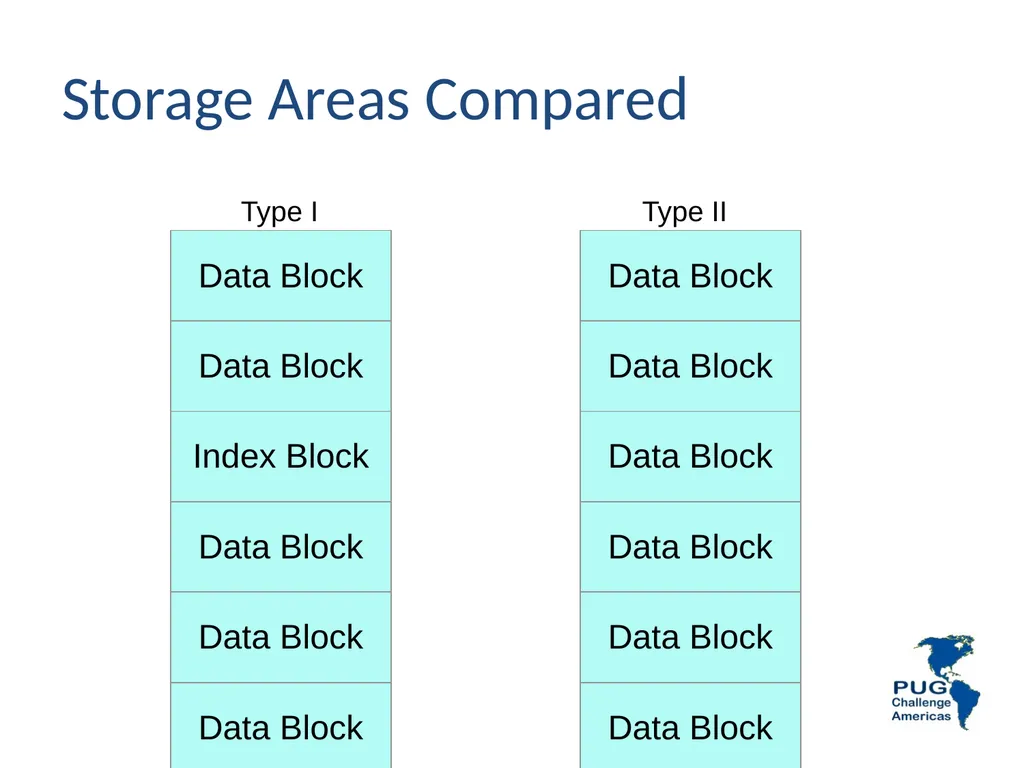
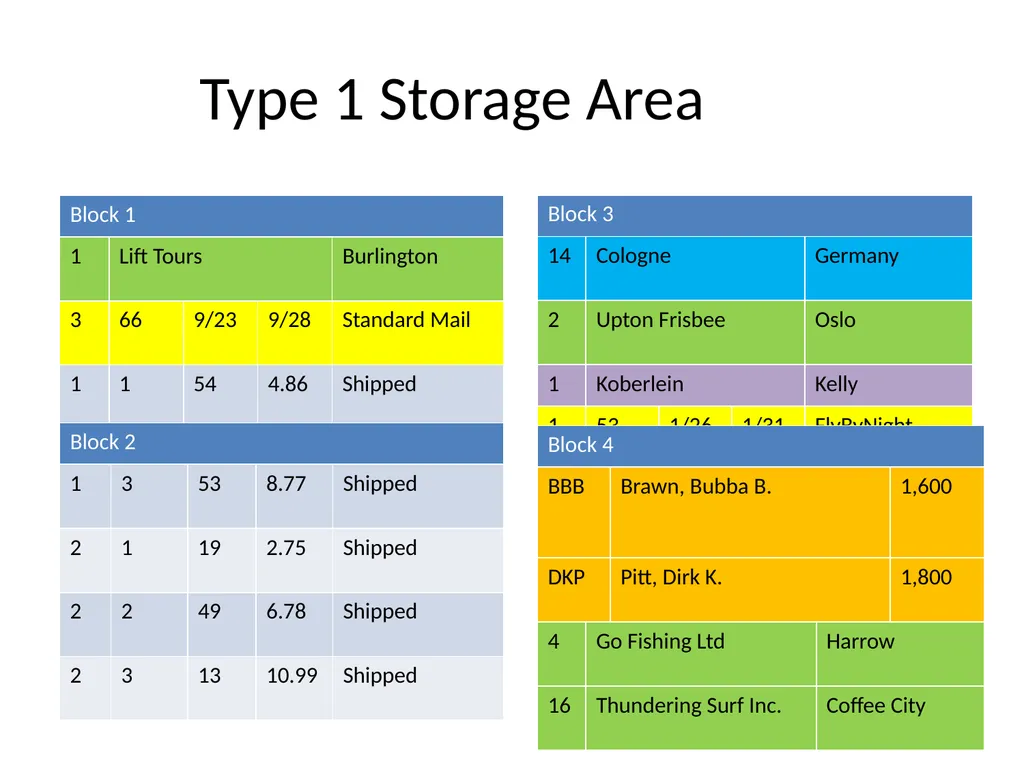
Records Type I Storage Areas Data blocks are social
They allow data from any table in the area to be stored within a single block
Index blocks only contain data for a single index
Data and index blocks can be tightly interleaved potentially causing scatter<br>
They allow data from any table in the area to be stored within a single block
Index blocks only contain data for a single index
Data and index blocks can be tightly interleaved potentially causing scatter<br>
15
Database Blocks<br>
16
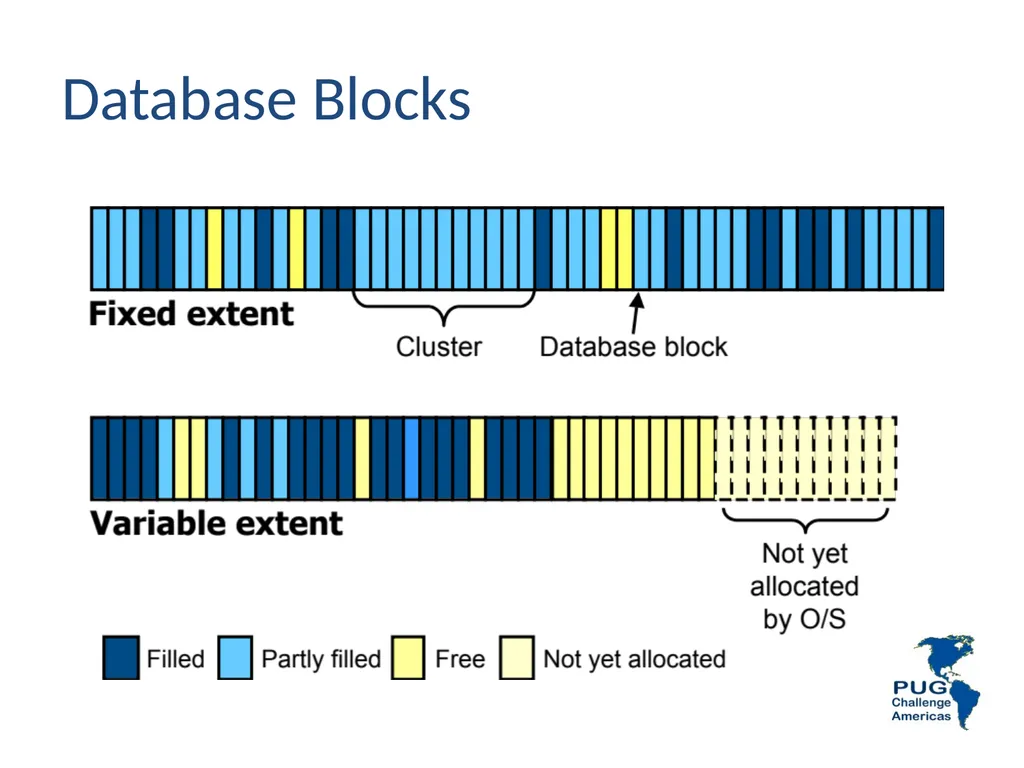
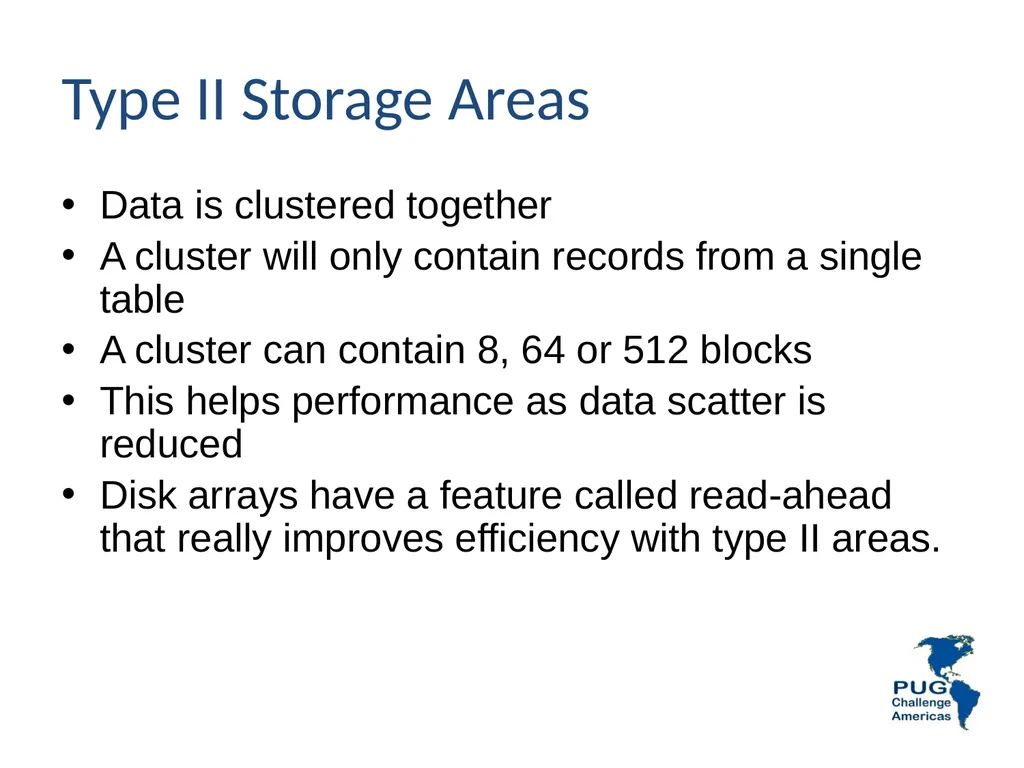
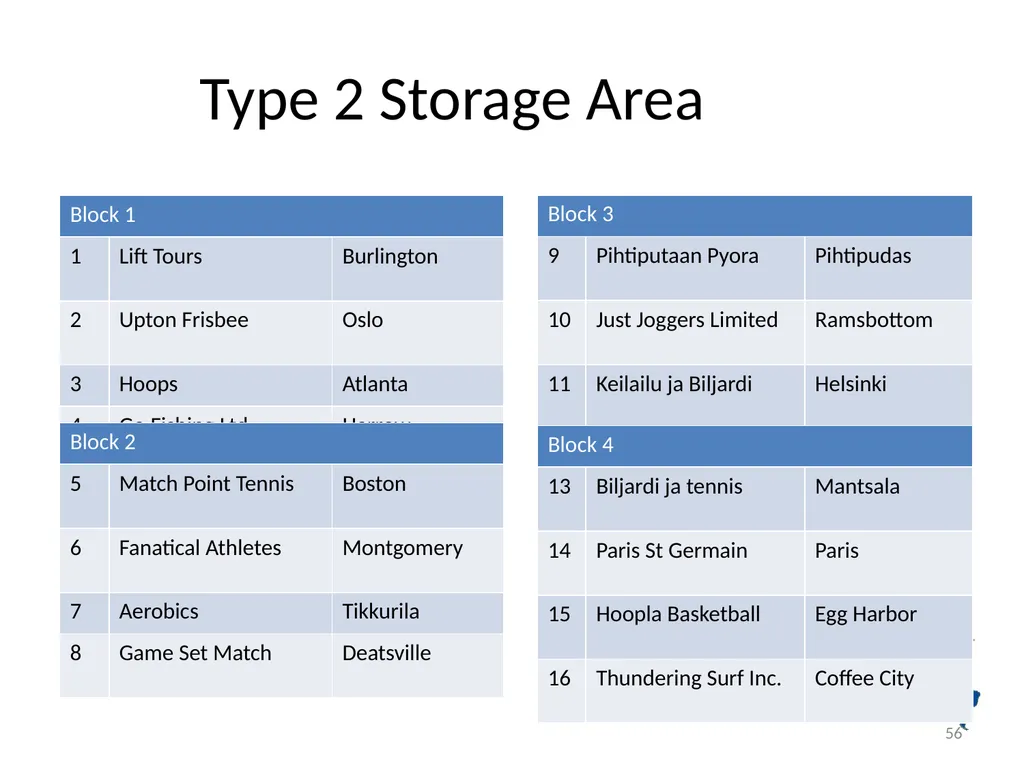
Type II Storage Areas Data is clustered together
A cluster will only contain records from a single table
A cluster can contain 8, 64 or 512 blocks
This helps performance as data scatter is reduced
Disk arrays have a feature called read-ahead that really improves efficiency with type II areas.<br>
A cluster will only contain records from a single table
A cluster can contain 8, 64 or 512 blocks
This helps performance as data scatter is reduced
Disk arrays have a feature called read-ahead that really improves efficiency with type II areas.<br>
17
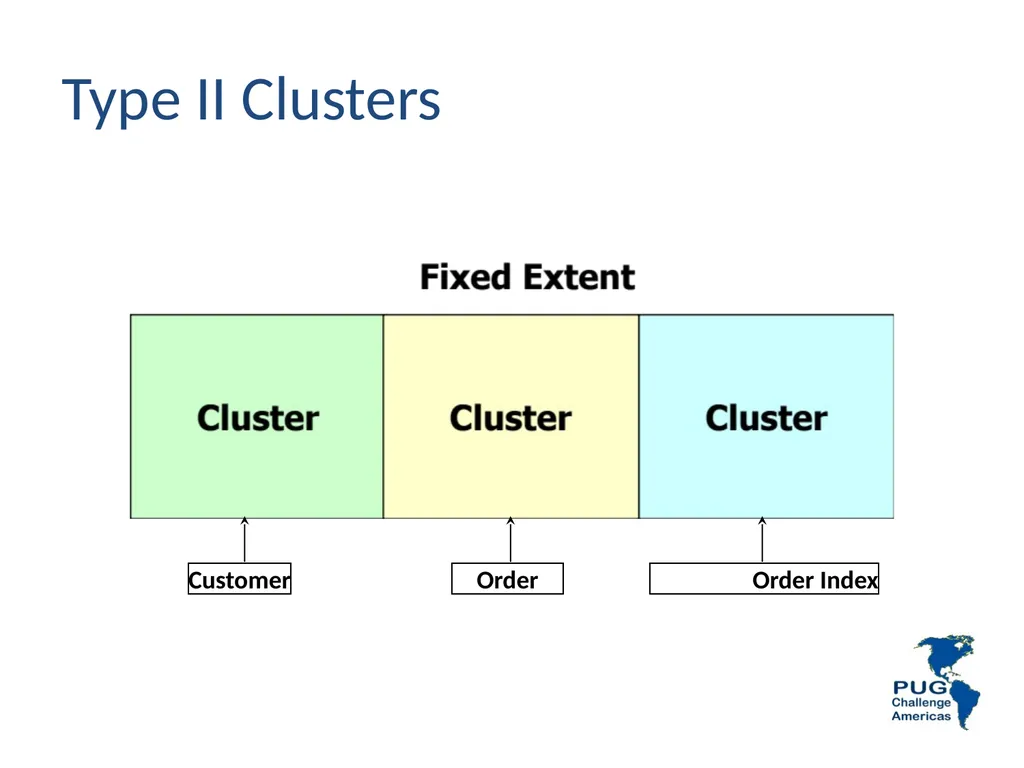
Type II Clusters Customer Order Order Index<br>
18
Storage Areas Compared Type I Type II<br>
19
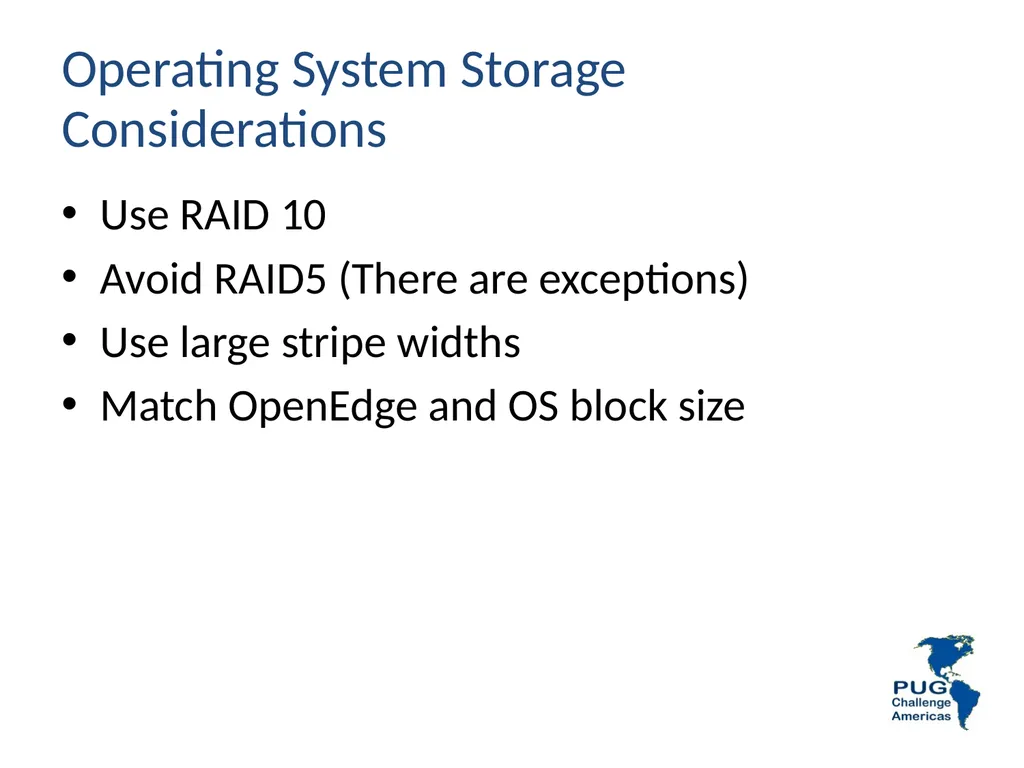
Operating System Storage Considerations Use RAID 10
Avoid RAID5 (There are exceptions)
Use large stripe widths
Match OpenEdge and OS block size<br>
Avoid RAID5 (There are exceptions)
Use large stripe widths
Match OpenEdge and OS block size<br>
20
Causes of Disk I/O Database
User requests (Usually 90% of total load)
Updates (This affects DB, BI and AI)
Temporary file I/O - Use as a disk utilization leveler
Operating system - usually minimal provided enough memory is installed
Other I/O<br>
User requests (Usually 90% of total load)
Updates (This affects DB, BI and AI)
Temporary file I/O - Use as a disk utilization leveler
Operating system - usually minimal provided enough memory is installed
Other I/O<br>
21
Disks This is where to spend your money
Goal: Use all disks evenly
Buy as many physical disks as possible
RAID 5 is still bad in many cases, improvements have been made but test before you buy as there is a performance wall out there and it is closer with RAID 5<br>
Goal: Use all disks evenly
Buy as many physical disks as possible
RAID 5 is still bad in many cases, improvements have been made but test before you buy as there is a performance wall out there and it is closer with RAID 5<br>
22
Disks – General Rules Use RAID 10 (0+1) or Mirroring and Striping for best protection of data with optimal performance for the database
For the AI and BI RAID 10 still makes sense in most cases. Exception: Single database environments<br>
For the AI and BI RAID 10 still makes sense in most cases. Exception: Single database environments<br>
23
Performance Tuning General tuning methodology
Get yourself in the ballpark
Get baseline timings/measurements
Change one thing at a time to understand value of each change
This is most likely the only thing where we all agree 100%<br>
Get yourself in the ballpark
Get baseline timings/measurements
Change one thing at a time to understand value of each change
This is most likely the only thing where we all agree 100%<br>
24
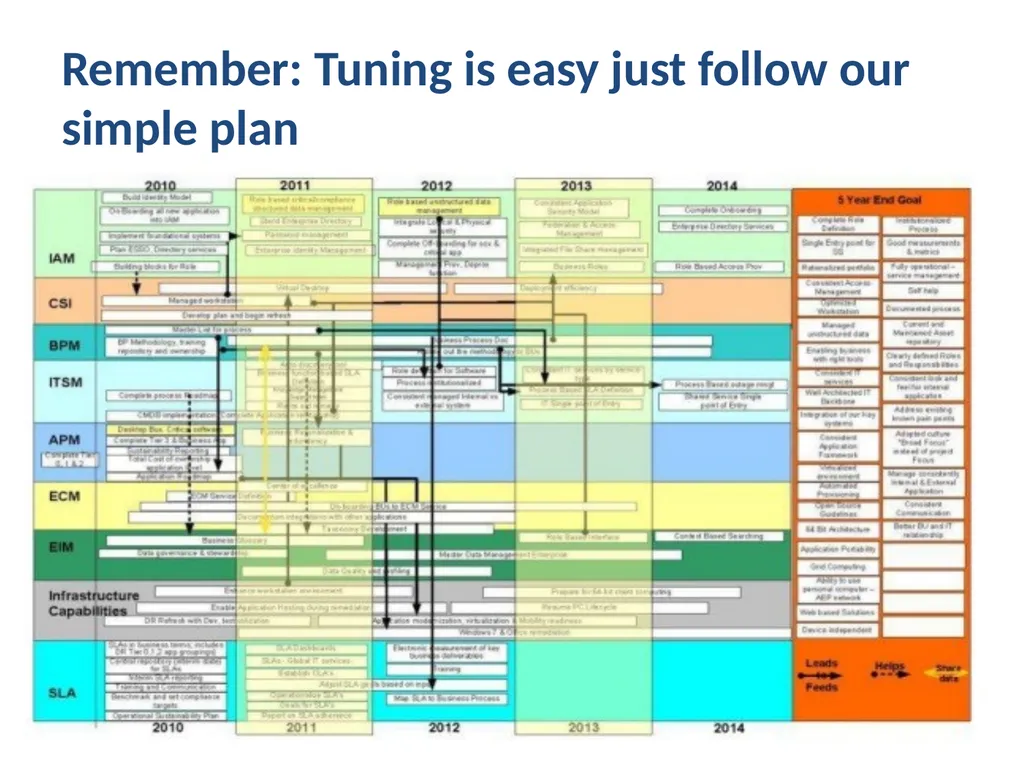
Remember: Tuning is easy just follow our simple plan<br>
25
Performance
Tuning
Basics
(Very basic) Gus Björklund
PUG Challenge Americas, Westford, MA
Database Workshop, 5 June 2011<br>
PUG Challenge Americas, Westford, MA
Database Workshop, 5 June 2011<br>
26
A Rule of Thumb The only "rule of thumb"
that is always valid is this one.
I am now going to give you some other ones.<br>
I am now going to give you some other ones.<br>
27
Subjects Out of the box performance
Easy Things To Do
Results
Try It For Yourself<br>
Easy Things To Do
Results
Try It For Yourself<br>
28
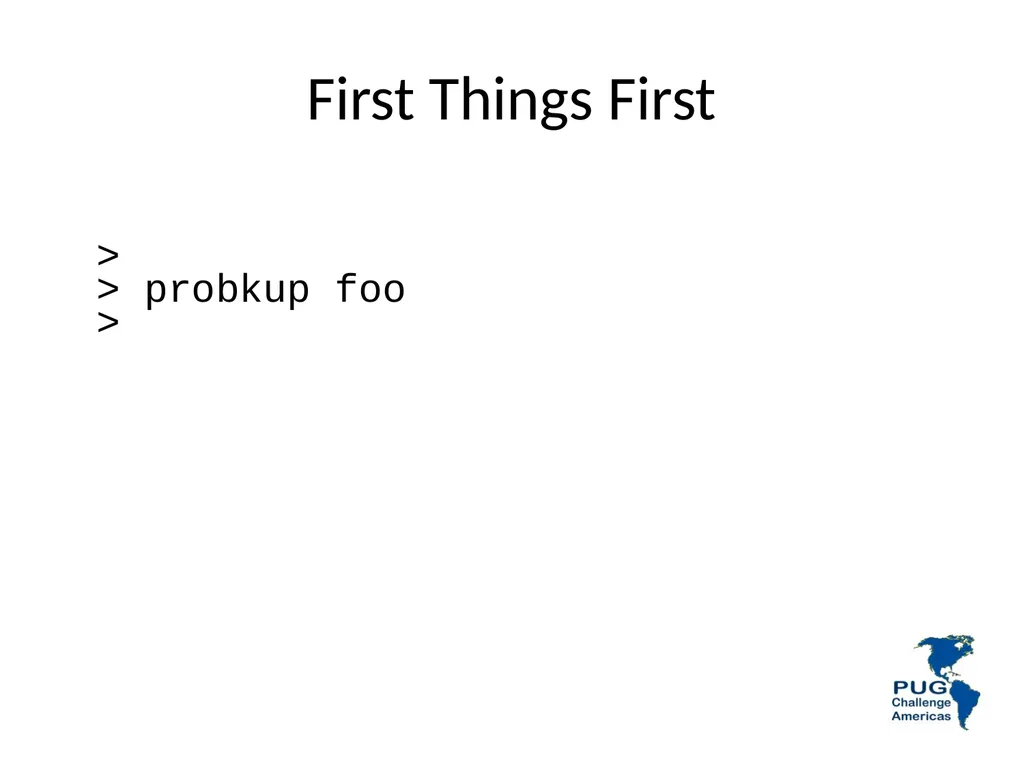
First Things First >
> probkup foo
><br>
29
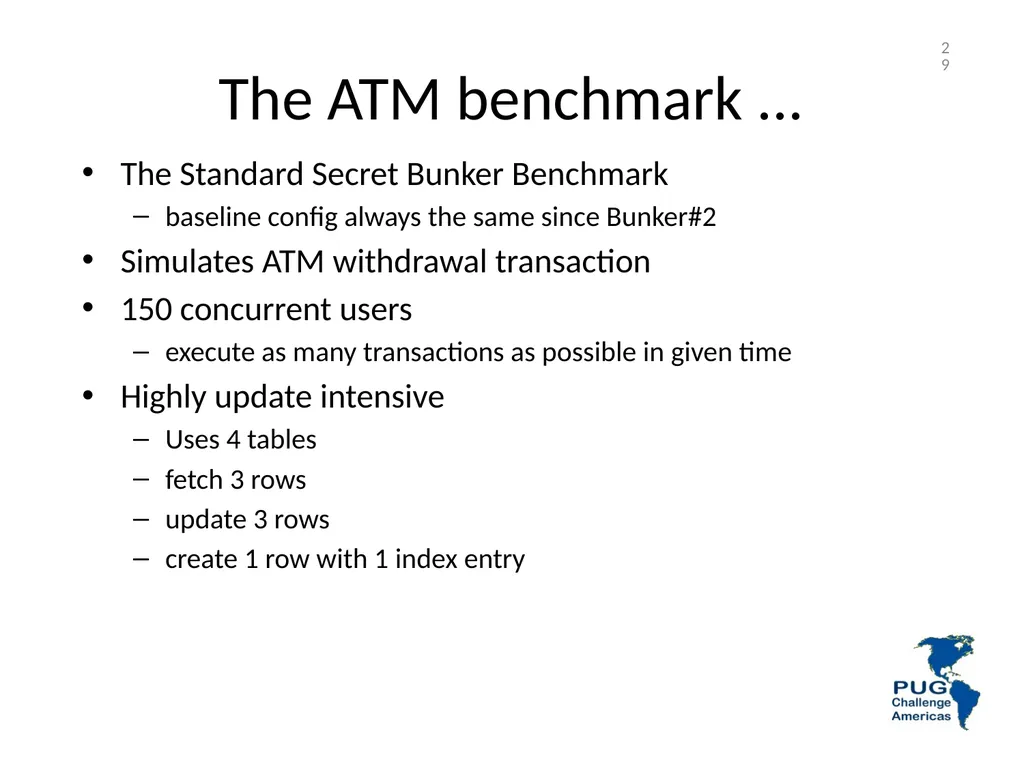
The ATM benchmark ... The Standard Secret Bunker Benchmark
baseline config always the same since Bunker#2
Simulates ATM withdrawal transaction
150 concurrent users
execute as many transactions as possible in given time
Highly update intensive
Uses 4 tables
fetch 3 rows
update 3 rows
create 1 row with 1 index entry 29<br>
baseline config always the same since Bunker#2
Simulates ATM withdrawal transaction
150 concurrent users
execute as many transactions as possible in given time
Highly update intensive
Uses 4 tables
fetch 3 rows
update 3 rows
create 1 row with 1 index entry 29<br>
30
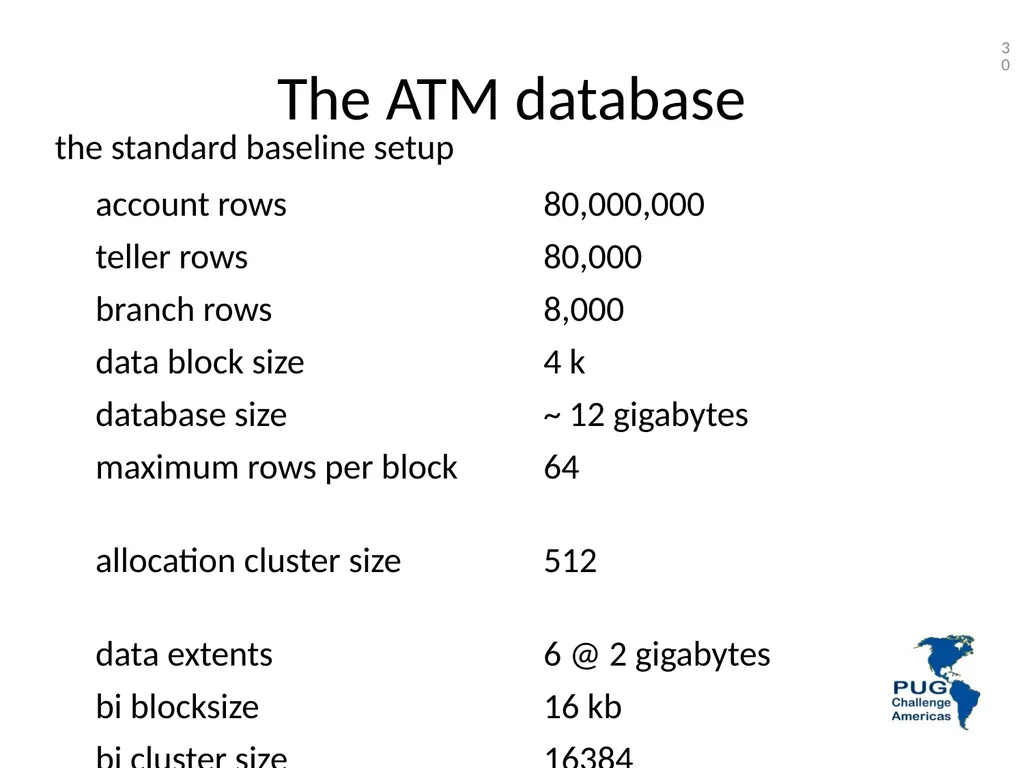
The ATM database 30 the standard baseline setup<br>
31
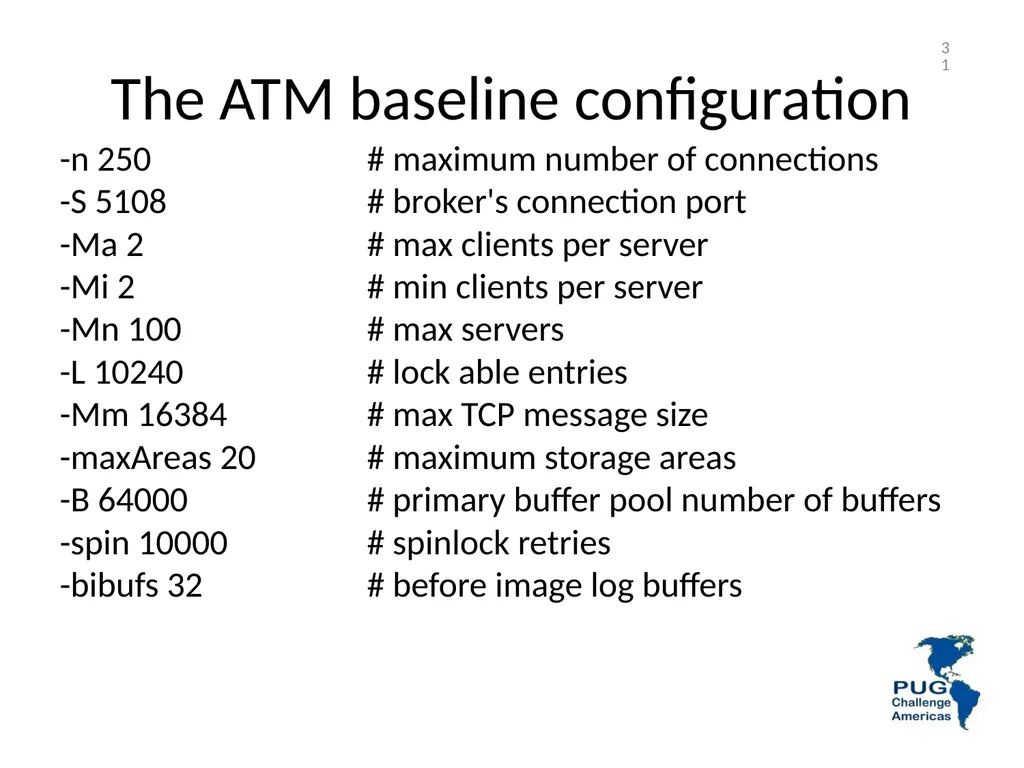
The ATM baseline configuration 31 -n 250 # maximum number of connections
-S 5108 # broker's connection port
-Ma 2 # max clients per server
-Mi 2 # min clients per server
-Mn 100 # max servers
-L 10240 # lock able entries
-Mm 16384 # max TCP message size
-maxAreas 20 # maximum storage areas
-B 64000 # primary buffer pool number of buffers
-spin 10000 # spinlock retries
-bibufs 32 # before image log buffers<br>
-S 5108 # broker's connection port
-Ma 2 # max clients per server
-Mi 2 # min clients per server
-Mn 100 # max servers
-L 10240 # lock able entries
-Mm 16384 # max TCP message size
-maxAreas 20 # maximum storage areas
-B 64000 # primary buffer pool number of buffers
-spin 10000 # spinlock retries
-bibufs 32 # before image log buffers<br>
32
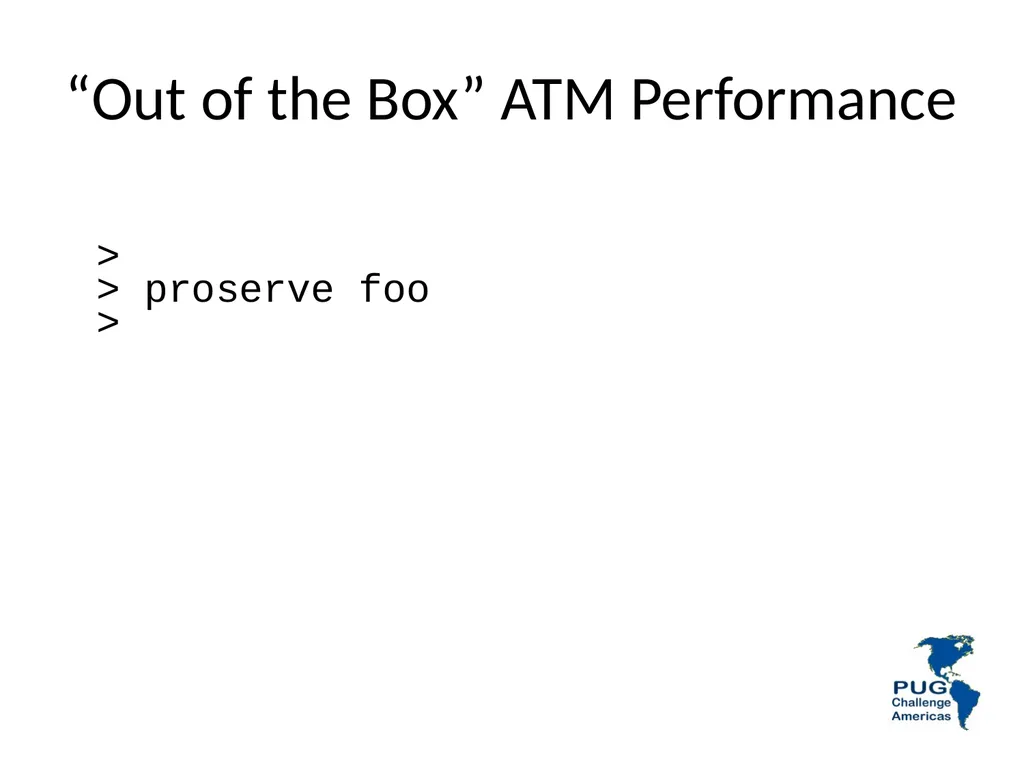
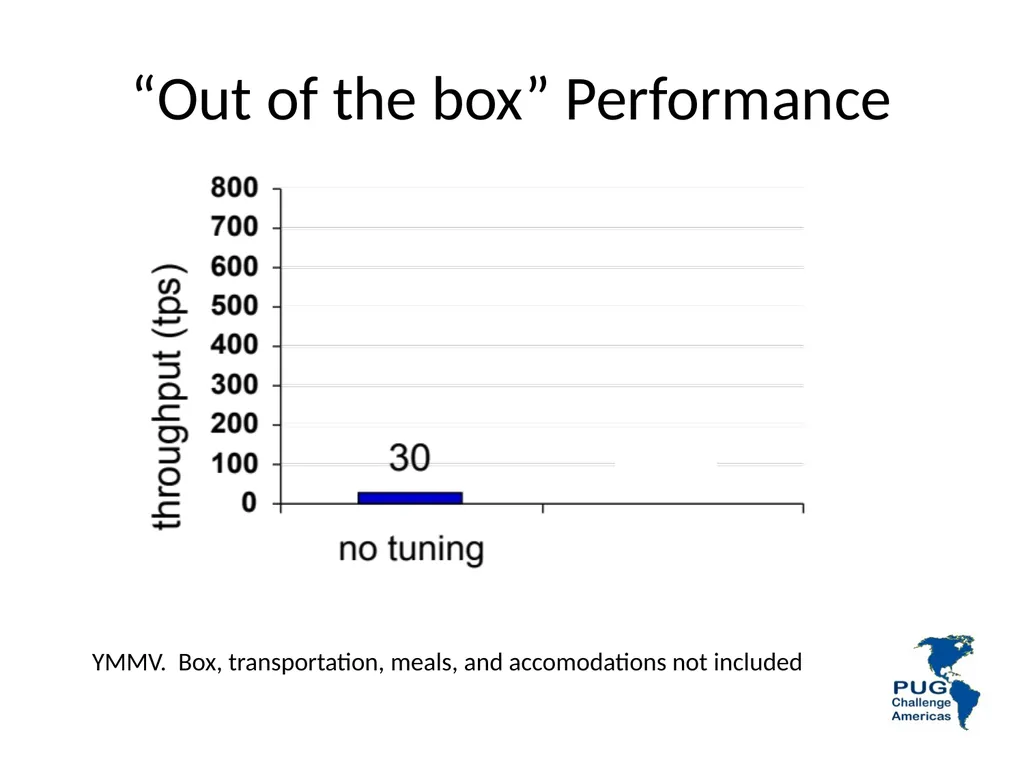
“Out of the Box” ATM Performance >
> proserve foo
><br>
33
“Out of the box” Performance YMMV. Box, transportation, meals, and accomodations not included<br>
34
Some EASY Things
To Do
For Better Results<br>
35
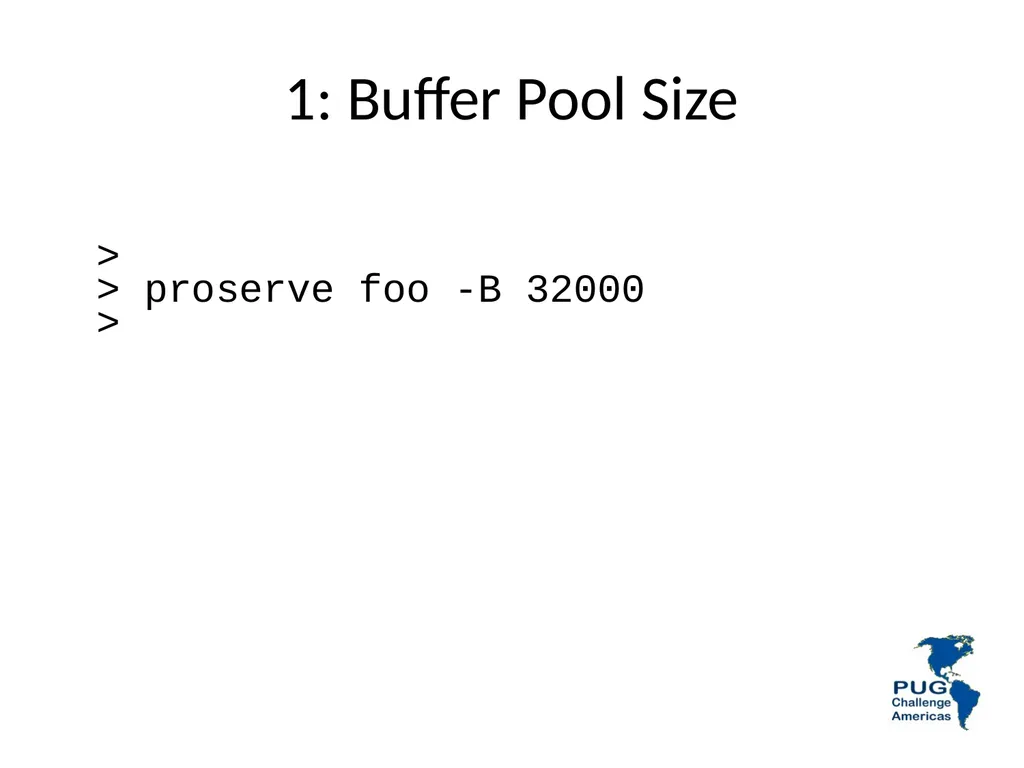
1: Buffer Pool Size >
> proserve foo -B 32000
><br>
36
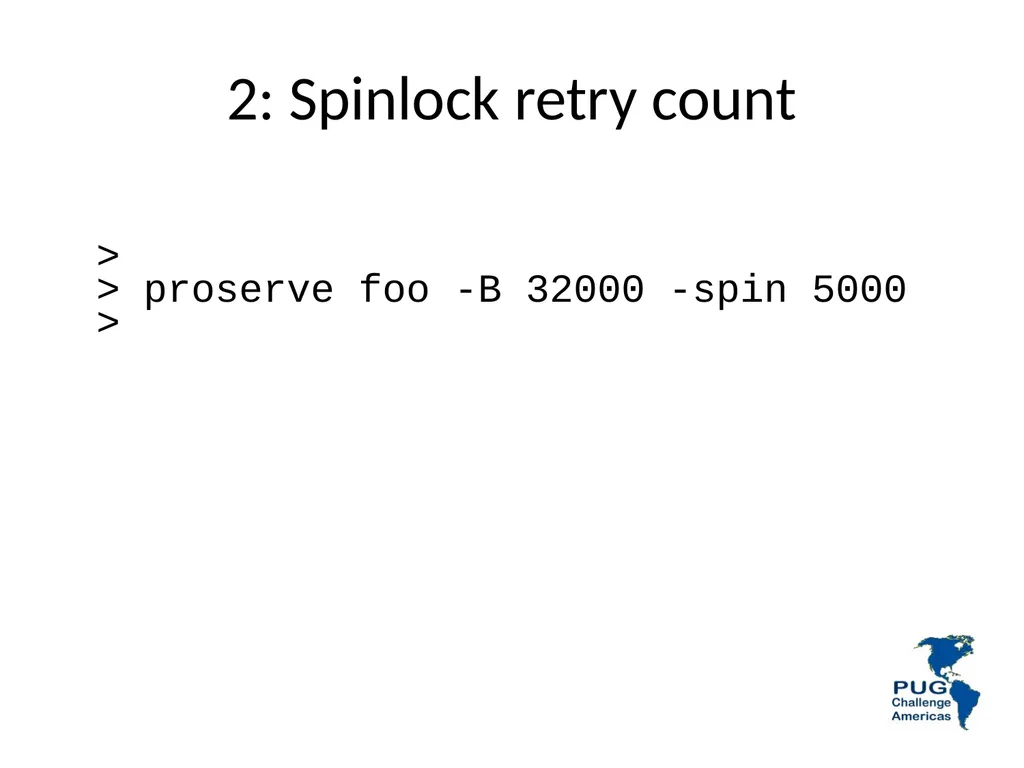
2: Spinlock retry count >
> proserve foo -B 32000 -spin 5000
><br>
37
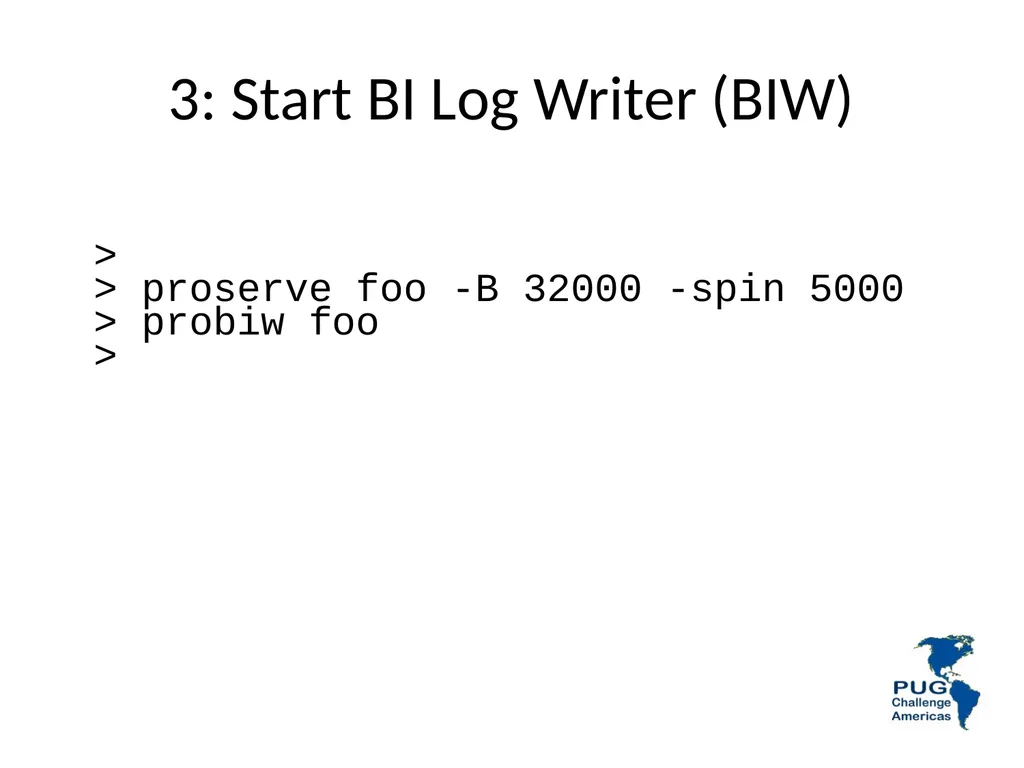
3: Start BI Log Writer (BIW) >
> proserve foo -B 32000 -spin 5000
> probiw foo
><br>
38
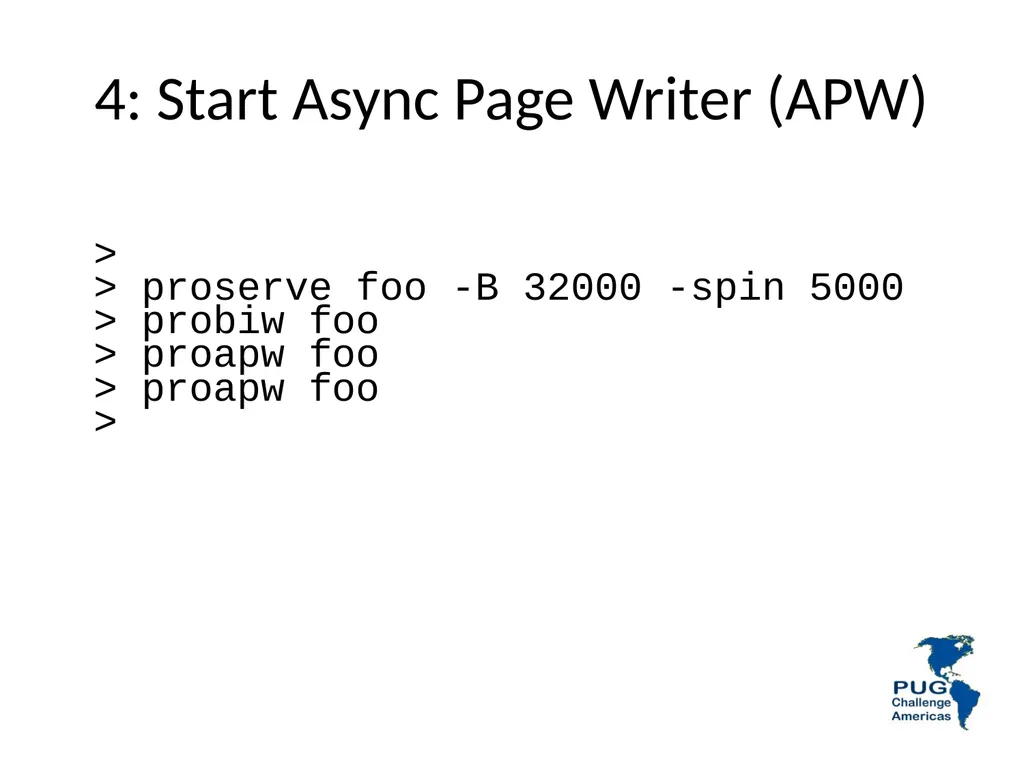
4: Start Async Page Writer (APW) >
> proserve foo -B 32000 -spin 5000
> probiw foo
> proapw foo
> proapw foo
><br>
39
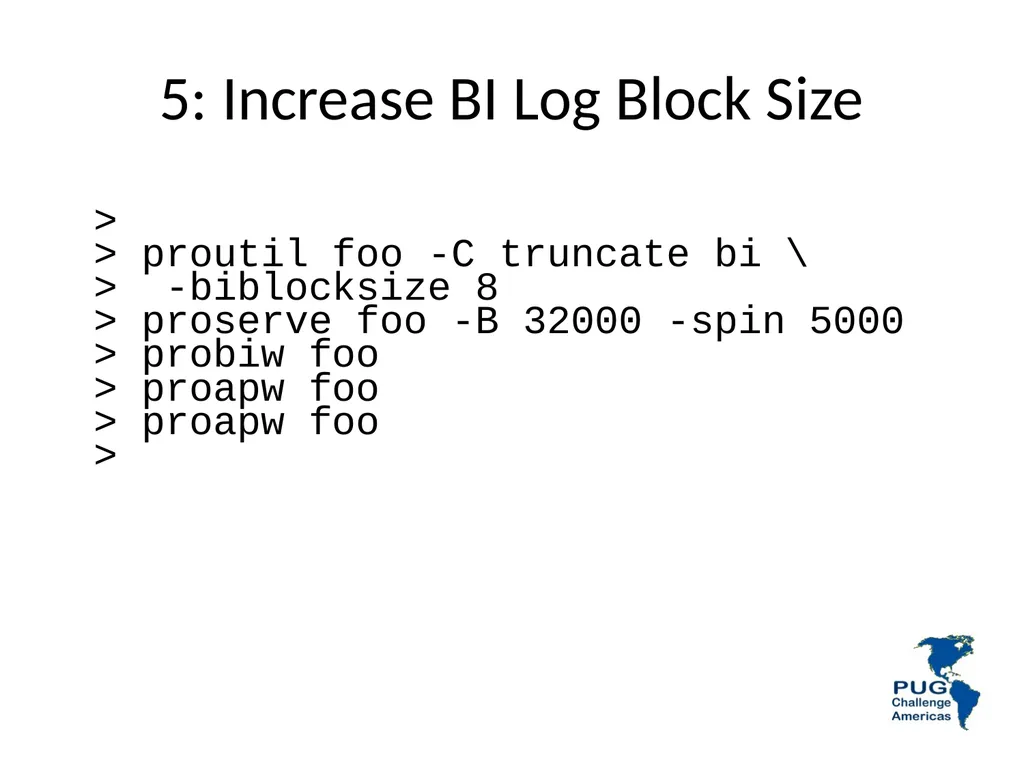
5: Increase BI Log Block Size >
> proutil foo -C truncate bi \
> -biblocksize 8
> proserve foo -B 32000 -spin 5000
> probiw foo
> proapw foo
> proapw foo
><br>
40
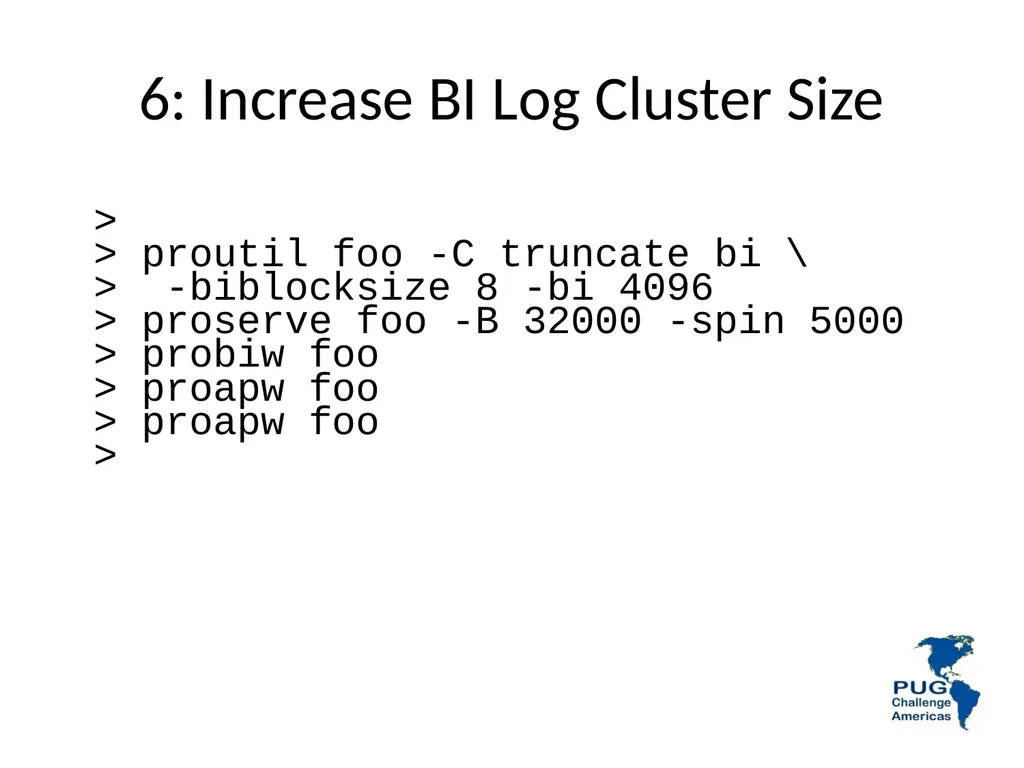
6: Increase BI Log Cluster Size >
> proutil foo -C truncate bi \
> -biblocksize 8 -bi 4096
> proserve foo -B 32000 -spin 5000
> probiw foo
> proapw foo
> proapw foo
><br>
41
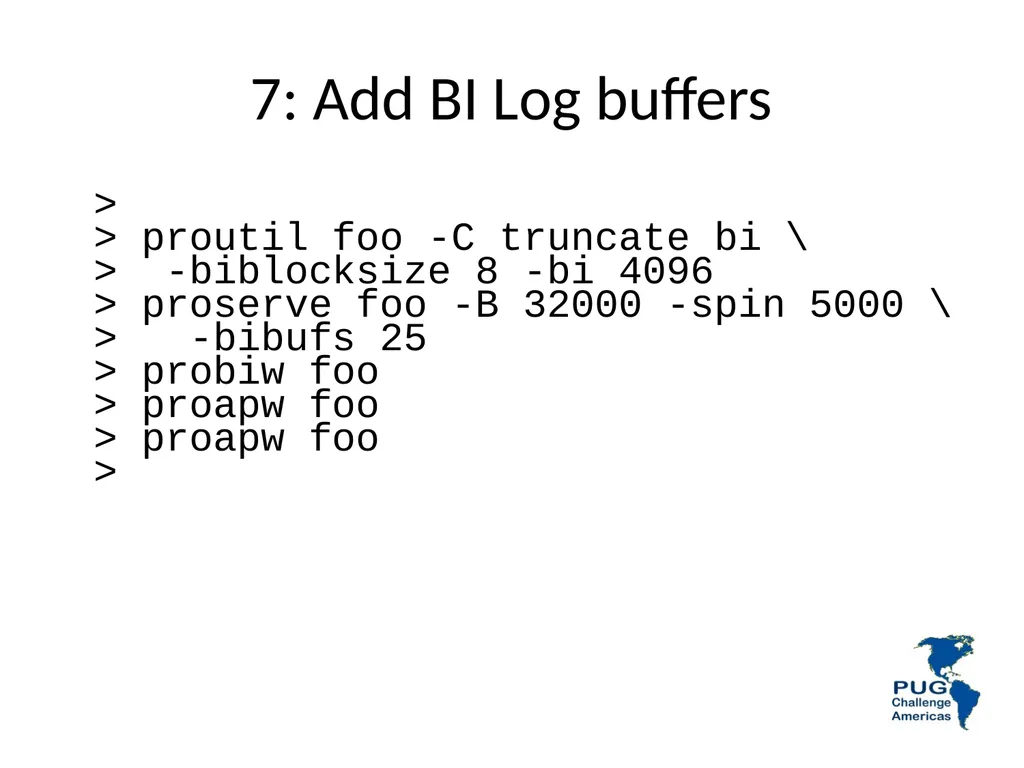
7: Add BI Log buffers >
> proutil foo -C truncate bi \
> -biblocksize 8 -bi 4096
> proserve foo -B 32000 -spin 5000 \
> -bibufs 25
> probiw foo
> proapw foo
> proapw foo
><br>
42
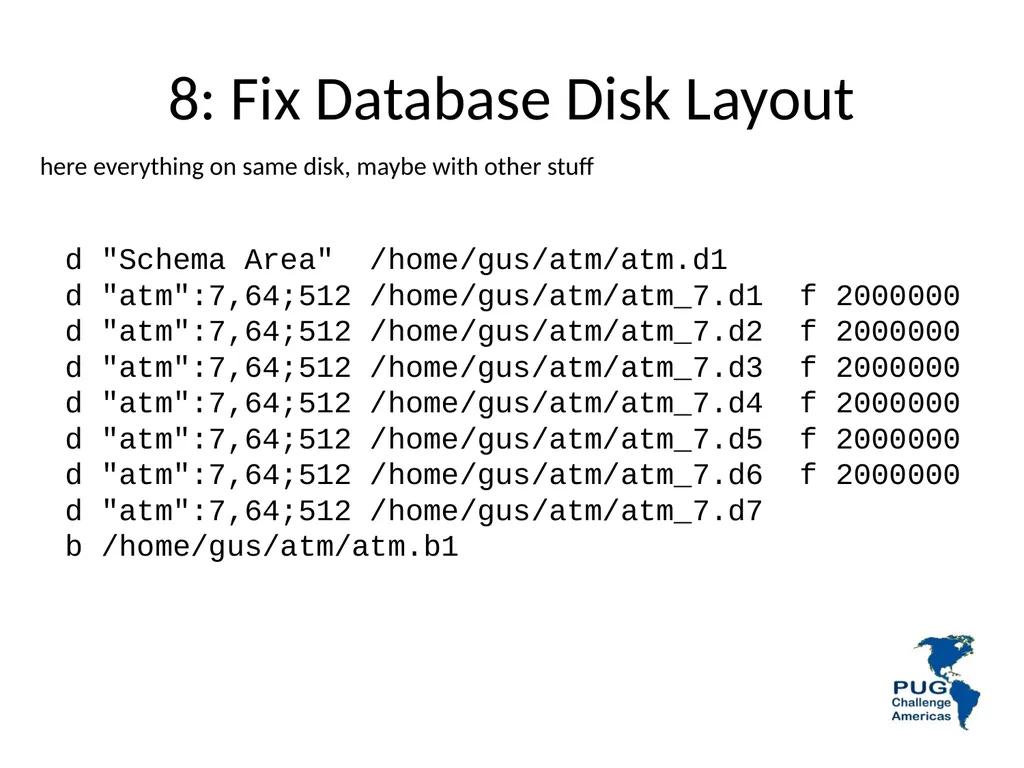
8: Fix Database Disk Layout d "Schema Area" /home/gus/atm/atm.d1
d "atm":7,64;512 /home/gus/atm/atm_7.d1 f 2000000
d "atm":7,64;512 /home/gus/atm/atm_7.d2 f 2000000
d "atm":7,64;512 /home/gus/atm/atm_7.d3 f 2000000
d "atm":7,64;512 /home/gus/atm/atm_7.d4 f 2000000
d "atm":7,64;512 /home/gus/atm/atm_7.d5 f 2000000
d "atm":7,64;512 /home/gus/atm/atm_7.d6 f 2000000
d "atm":7,64;512 /home/gus/atm/atm_7.d7
b /home/gus/atm/atm.b1 here everything on same disk, maybe with other stuff<br>
d "atm":7,64;512 /home/gus/atm/atm_7.d1 f 2000000
d "atm":7,64;512 /home/gus/atm/atm_7.d2 f 2000000
d "atm":7,64;512 /home/gus/atm/atm_7.d3 f 2000000
d "atm":7,64;512 /home/gus/atm/atm_7.d4 f 2000000
d "atm":7,64;512 /home/gus/atm/atm_7.d5 f 2000000
d "atm":7,64;512 /home/gus/atm/atm_7.d6 f 2000000
d "atm":7,64;512 /home/gus/atm/atm_7.d7
b /home/gus/atm/atm.b1 here everything on same disk, maybe with other stuff<br>
43
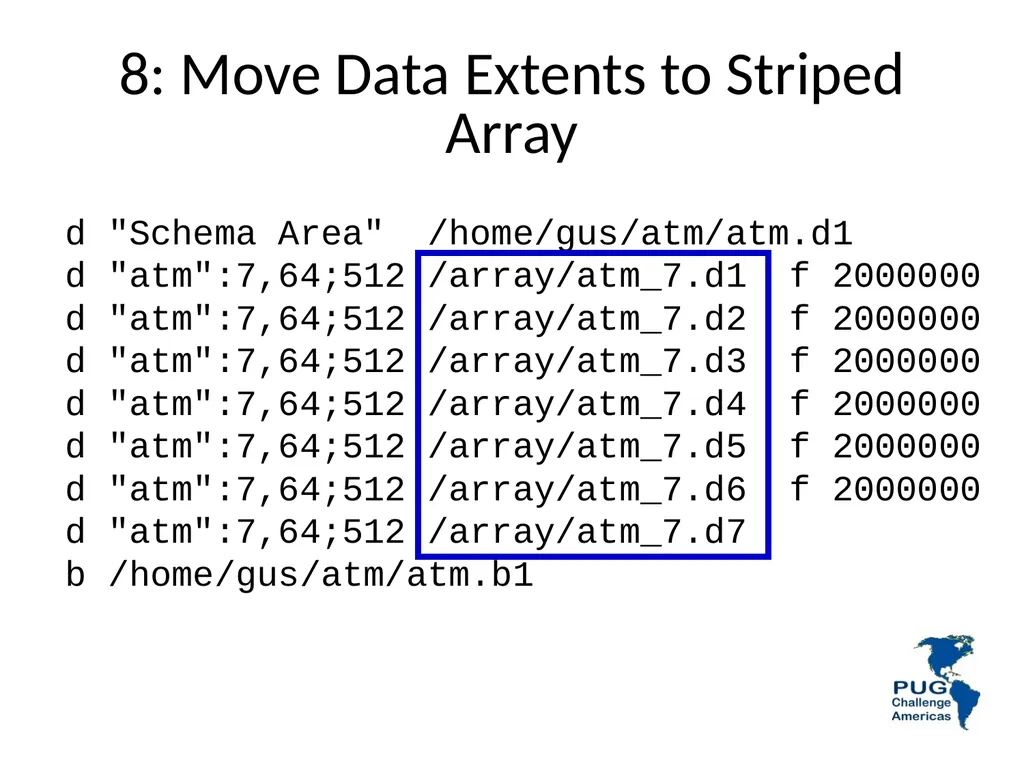
8: Move Data Extents to Striped Array d "Schema Area" /home/gus/atm/atm.d1
d "atm":7,64;512 /array/atm_7.d1 f 2000000
d "atm":7,64;512 /array/atm_7.d2 f 2000000
d "atm":7,64;512 /array/atm_7.d3 f 2000000
d "atm":7,64;512 /array/atm_7.d4 f 2000000
d "atm":7,64;512 /array/atm_7.d5 f 2000000
d "atm":7,64;512 /array/atm_7.d6 f 2000000
d "atm":7,64;512 /array/atm_7.d7
b /home/gus/atm/atm.b1<br>
d "atm":7,64;512 /array/atm_7.d1 f 2000000
d "atm":7,64;512 /array/atm_7.d2 f 2000000
d "atm":7,64;512 /array/atm_7.d3 f 2000000
d "atm":7,64;512 /array/atm_7.d4 f 2000000
d "atm":7,64;512 /array/atm_7.d5 f 2000000
d "atm":7,64;512 /array/atm_7.d6 f 2000000
d "atm":7,64;512 /array/atm_7.d7
b /home/gus/atm/atm.b1<br>
44
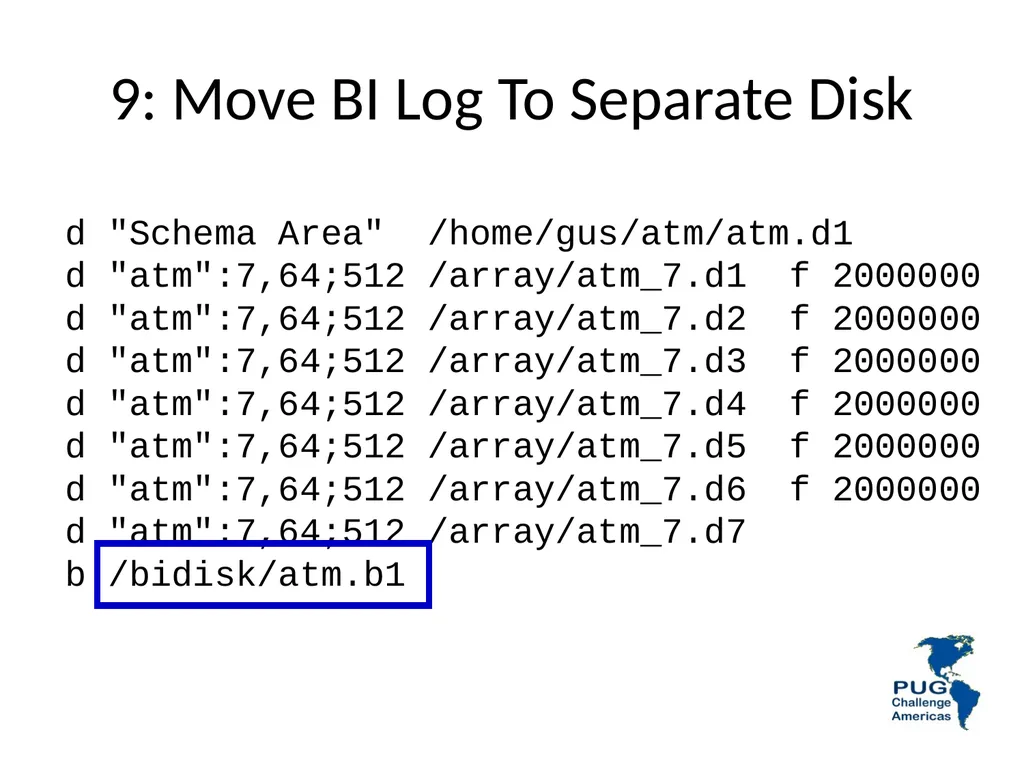
9: Move BI Log To Separate Disk d "Schema Area" /home/gus/atm/atm.d1
d "atm":7,64;512 /array/atm_7.d1 f 2000000
d "atm":7,64;512 /array/atm_7.d2 f 2000000
d "atm":7,64;512 /array/atm_7.d3 f 2000000
d "atm":7,64;512 /array/atm_7.d4 f 2000000
d "atm":7,64;512 /array/atm_7.d5 f 2000000
d "atm":7,64;512 /array/atm_7.d6 f 2000000
d "atm":7,64;512 /array/atm_7.d7
b /bidisk/atm.b1<br>
d "atm":7,64;512 /array/atm_7.d1 f 2000000
d "atm":7,64;512 /array/atm_7.d2 f 2000000
d "atm":7,64;512 /array/atm_7.d3 f 2000000
d "atm":7,64;512 /array/atm_7.d4 f 2000000
d "atm":7,64;512 /array/atm_7.d5 f 2000000
d "atm":7,64;512 /array/atm_7.d6 f 2000000
d "atm":7,64;512 /array/atm_7.d7
b /bidisk/atm.b1<br>
45
Can you predict the results ?<br>
46
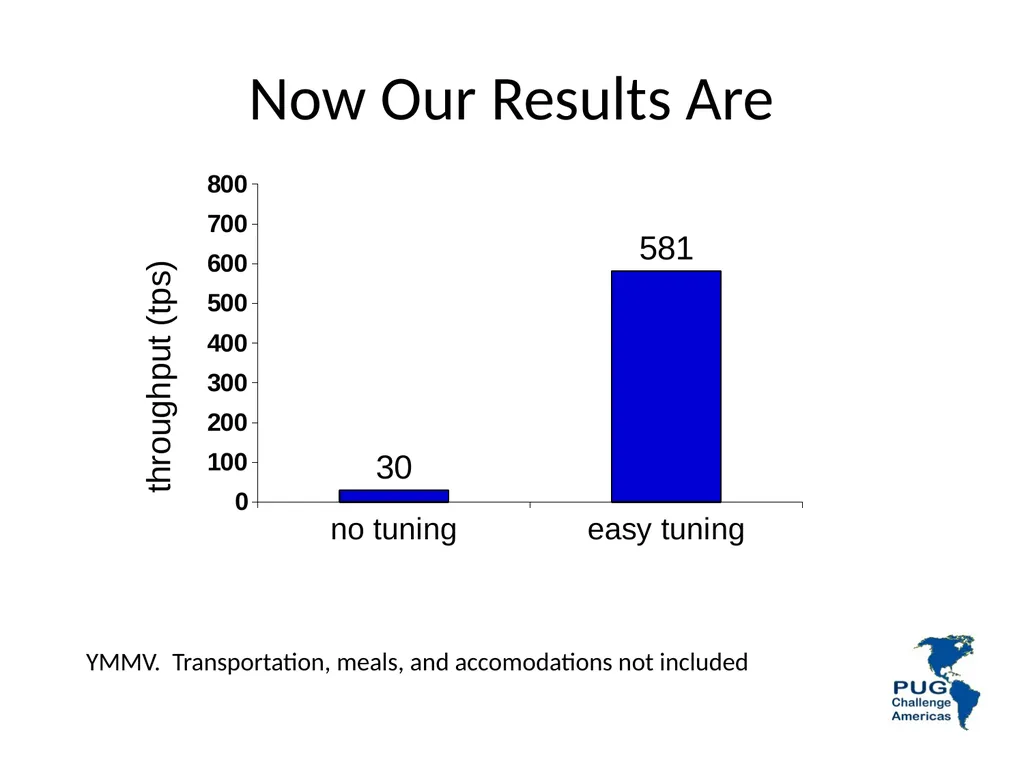
Now Our Results Are YMMV. Transportation, meals, and accomodations not included<br>
47
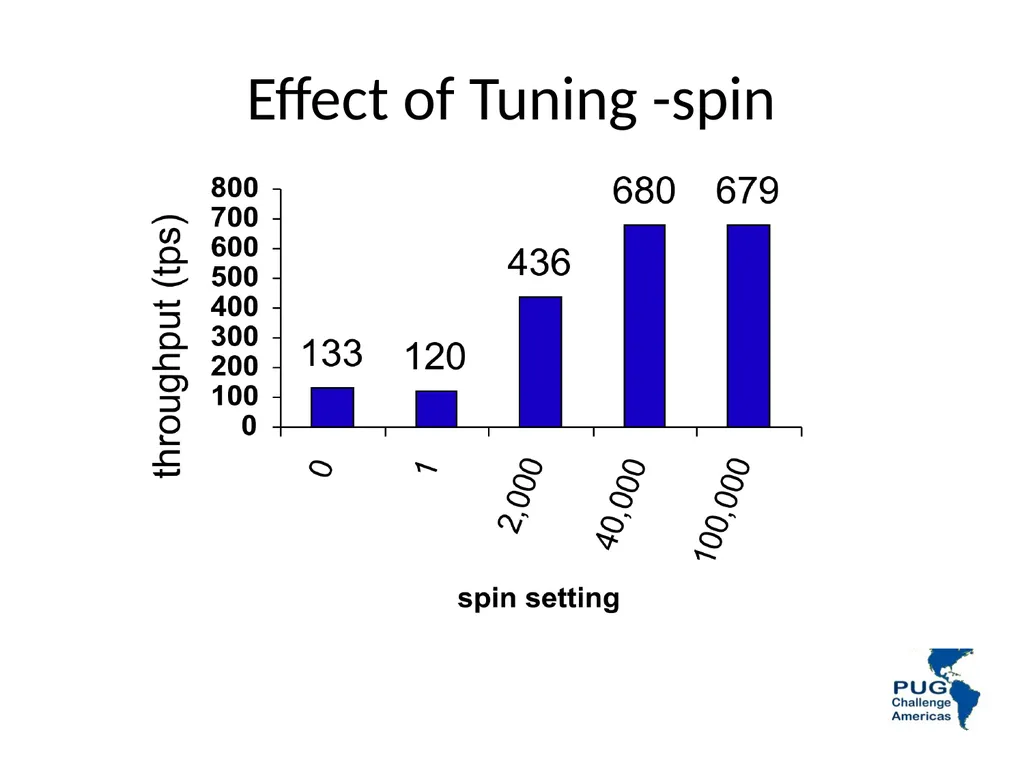
Effect of Tuning -spin<br>
48
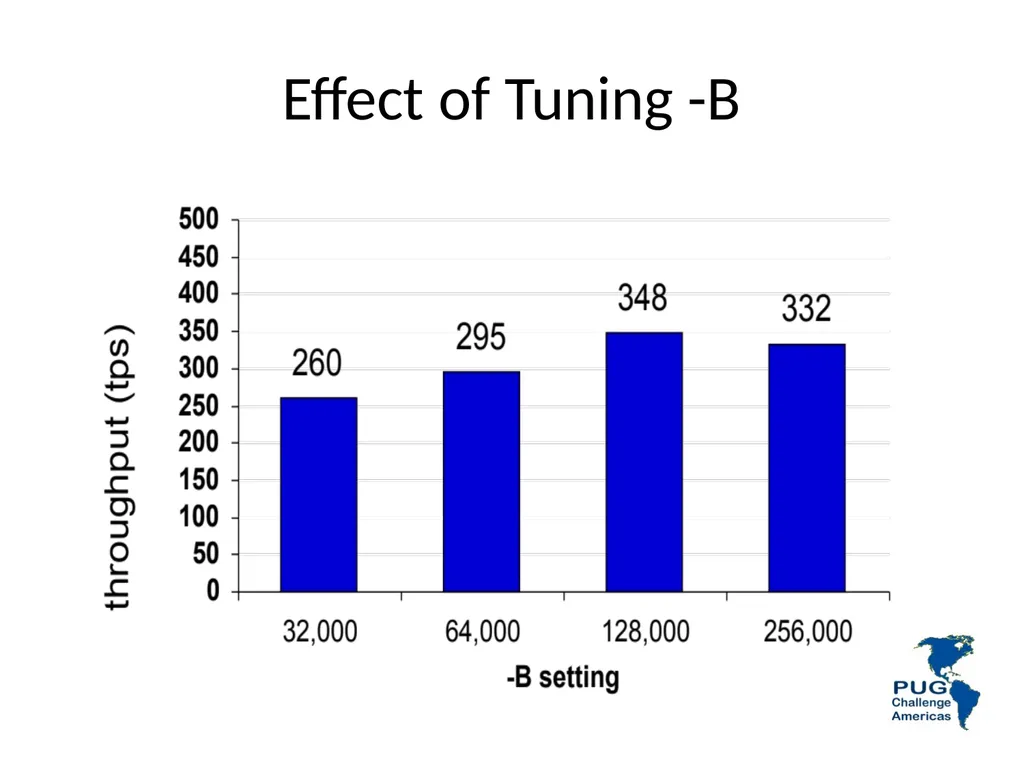
Effect of Tuning -B<br>
49
Questions ? Next, the lab,
but first:<br>
50
Big B Database Performance Tuning Workshop<br>
51
A Few Words about the Speaker Tom Bascom; free-range Progress coder & roaming DBA since 1987
VP, White Star Software, LLC
Expert consulting services related to all aspects of Progress and OpenEdge.
tom@wss.com
President, DBAppraise, LLC
Remote database management service for OpenEdge.
Simplifying the job of managing and monitoring the world’s best business applications.
tom@dbappraise.com 51<br>
VP, White Star Software, LLC
Expert consulting services related to all aspects of Progress and OpenEdge.
tom@wss.com
President, DBAppraise, LLC
Remote database management service for OpenEdge.
Simplifying the job of managing and monitoring the world’s best business applications.
tom@dbappraise.com 51<br>
52
What is a “Buffer”? A database “block” that is in memory.
Buffers (blocks) come in several flavors:
Type 1 Data Blocks
Type 2 Data Blocks
Index Blocks
Master Blocks<br>
Buffers (blocks) come in several flavors:
Type 1 Data Blocks
Type 2 Data Blocks
Index Blocks
Master Blocks<br>
53
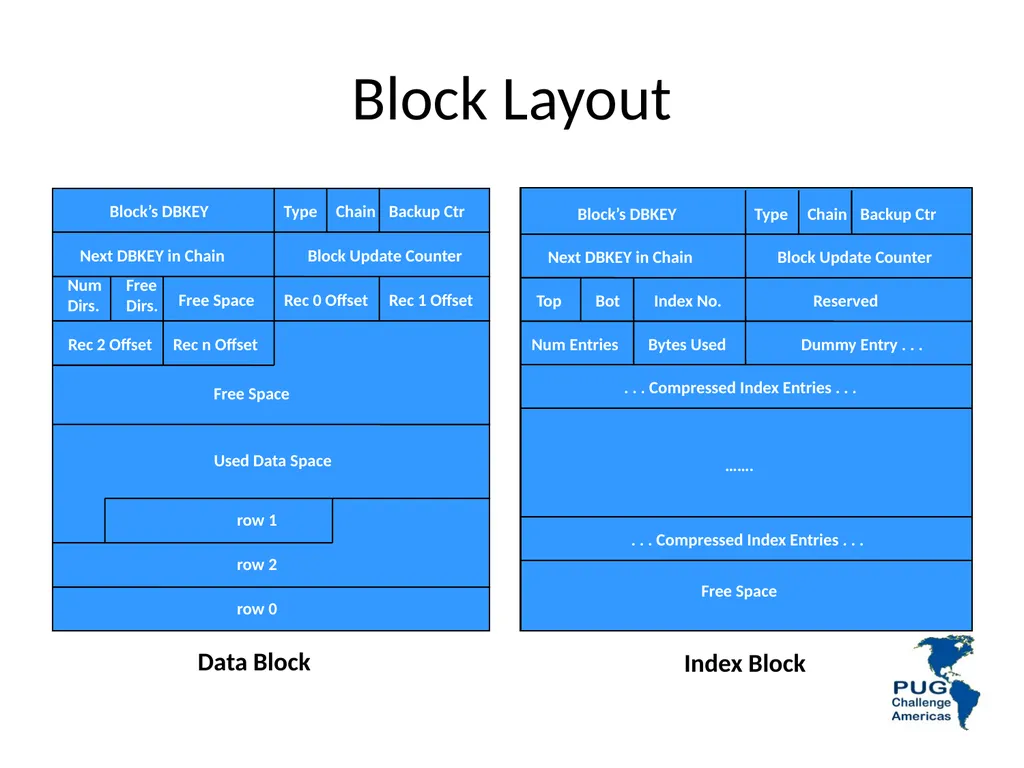
Block Layout Block’s DBKEY Type Chain Backup Ctr Next DBKEY in Chain Block Update Counter Top Reserved Free Space ……. . . . Compressed Index Entries . . . Bot Index No. Num Entries Bytes Used . . . Compressed Index Entries . . . Dummy Entry . . . Block’s DBKEY Type Chain Backup Ctr Next DBKEY in Chain Block Update Counter Free Space Free
Dirs. Rec 0 Offset Rec 1 Offset Rec 2 Offset Rec n Offset Num
Dirs. Free Space Used Data Space row 0 row 2 row 1 Data Block Index Block<br>
Dirs. Rec 0 Offset Rec 1 Offset Rec 2 Offset Rec n Offset Num
Dirs. Free Space Used Data Space row 0 row 2 row 1 Data Block Index Block<br>
54
Type 1 Storage Area 55<br>
55
Type 2 Storage Area 56<br>
56
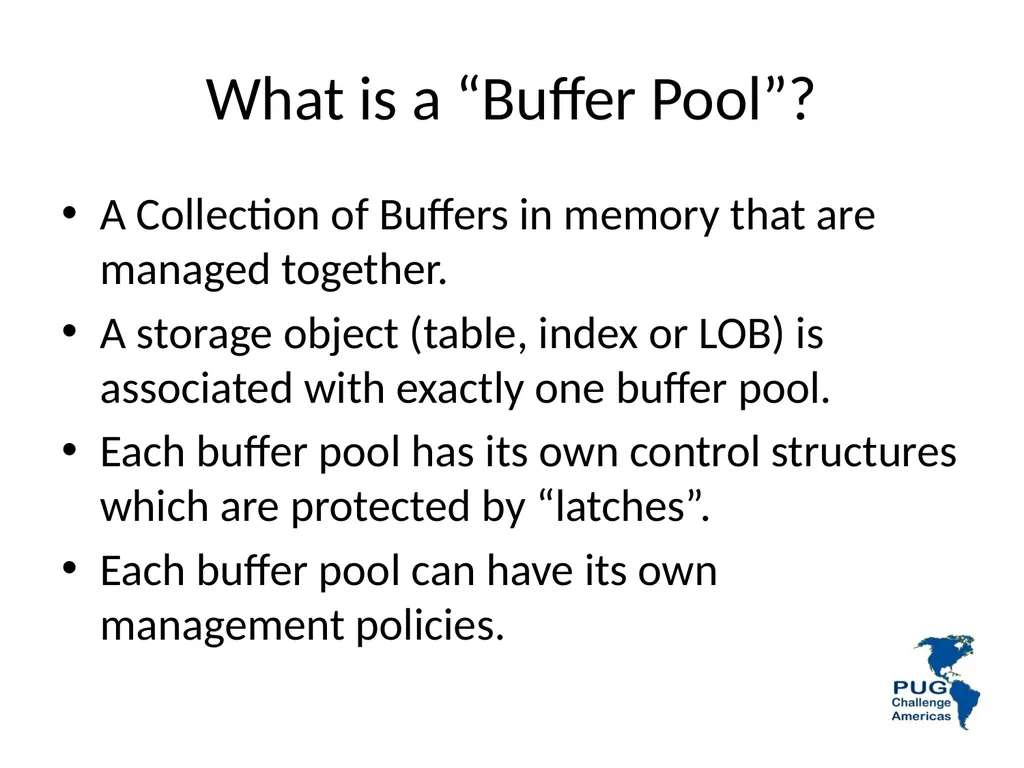
What is a “Buffer Pool”? A Collection of Buffers in memory that are managed together.
A storage object (table, index or LOB) is associated with exactly one buffer pool.
Each buffer pool has its own control structures which are protected by “latches”.
Each buffer pool can have its own management policies.<br>
A storage object (table, index or LOB) is associated with exactly one buffer pool.
Each buffer pool has its own control structures which are protected by “latches”.
Each buffer pool can have its own management policies.<br>
57
58 Why are Buffer Pools
Important?<br>
58
Locality of Reference When data is referenced there is a high probability that it will be referenced again soon.
If data is referenced there is a high probability that “nearby” data will be referenced soon.
Locality of reference is why caching exists at all levels of computing. 59<br>
If data is referenced there is a high probability that “nearby” data will be referenced soon.
Locality of reference is why caching exists at all levels of computing. 59<br>
59
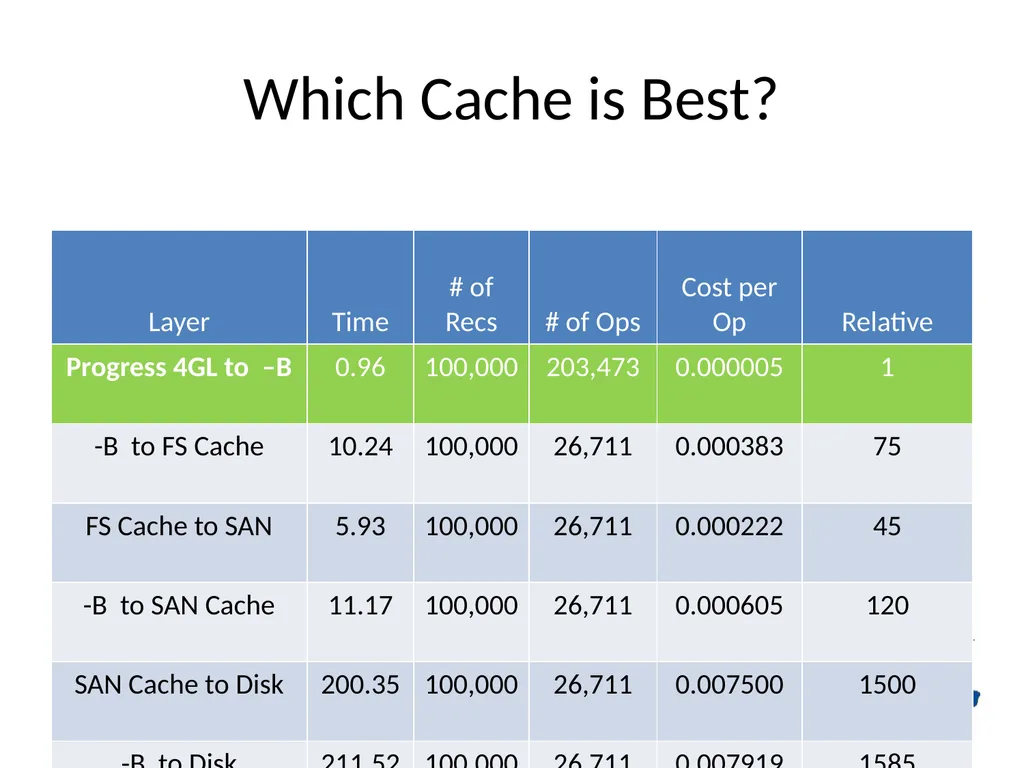
Which Cache is Best? 60<br>
60
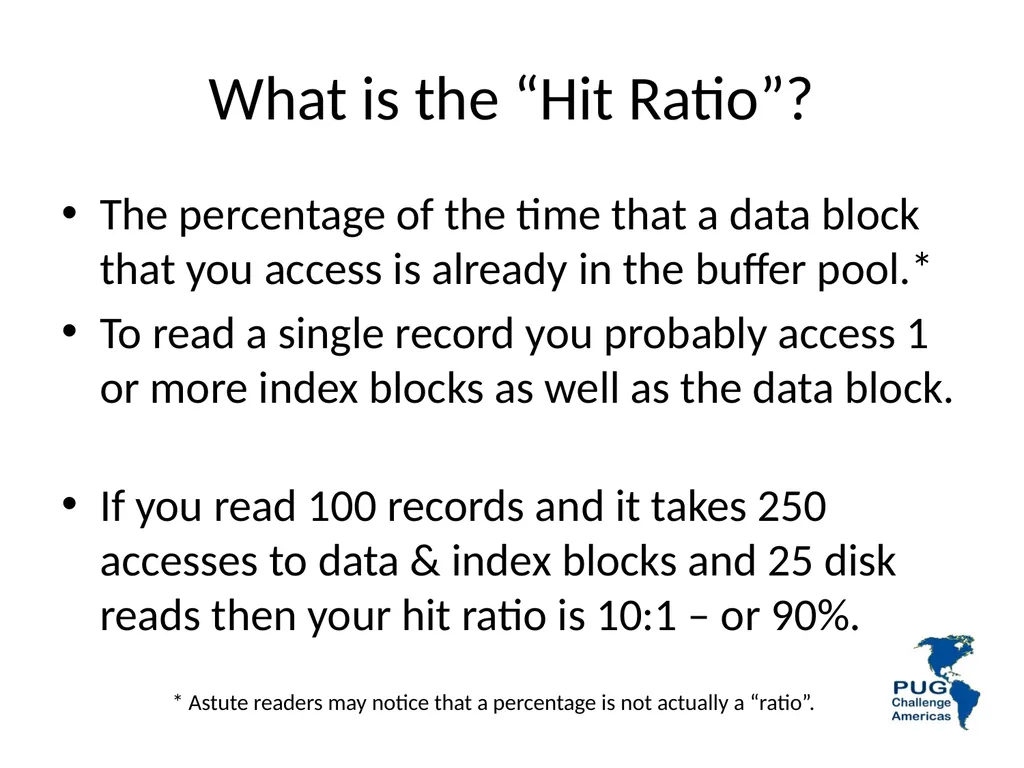
What is the “Hit Ratio”? The percentage of the time that a data block that you access is already in the buffer pool.*
To read a single record you probably access 1 or more index blocks as well as the data block.
If you read 100 records and it takes 250 accesses to data & index blocks and 25 disk reads then your hit ratio is 10:1 – or 90%. * Astute readers may notice that a percentage is not actually a “ratio”.<br>
To read a single record you probably access 1 or more index blocks as well as the data block.
If you read 100 records and it takes 250 accesses to data & index blocks and 25 disk reads then your hit ratio is 10:1 – or 90%. * Astute readers may notice that a percentage is not actually a “ratio”.<br>
61
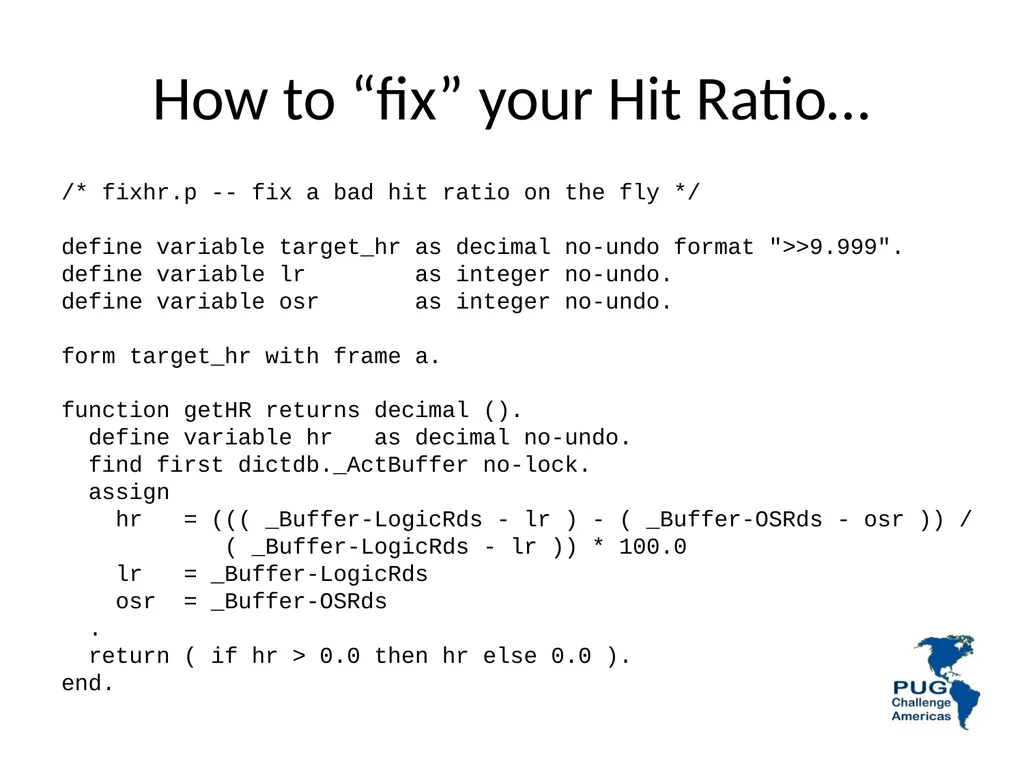
How to “fix” your Hit Ratio… /* fixhr.p -- fix a bad hit ratio on the fly */
define variable target_hr as decimal no-undo format ">>9.999".
define variable lr as integer no-undo.
define variable osr as integer no-undo.
form target_hr with frame a.
function getHR returns decimal ().
define variable hr as decimal no-undo.
find first dictdb._ActBuffer no-lock.
assign
hr = ((( _Buffer-LogicRds - lr ) - ( _Buffer-OSRds - osr )) /
( _Buffer-LogicRds - lr )) * 100.0
lr = _Buffer-LogicRds
osr = _Buffer-OSRds
.
return ( if hr > 0.0 then hr else 0.0 ).
end.<br>
define variable target_hr as decimal no-undo format ">>9.999".
define variable lr as integer no-undo.
define variable osr as integer no-undo.
form target_hr with frame a.
function getHR returns decimal ().
define variable hr as decimal no-undo.
find first dictdb._ActBuffer no-lock.
assign
hr = ((( _Buffer-LogicRds - lr ) - ( _Buffer-OSRds - osr )) /
( _Buffer-LogicRds - lr )) * 100.0
lr = _Buffer-LogicRds
osr = _Buffer-OSRds
.
return ( if hr > 0.0 then hr else 0.0 ).
end.<br>
62
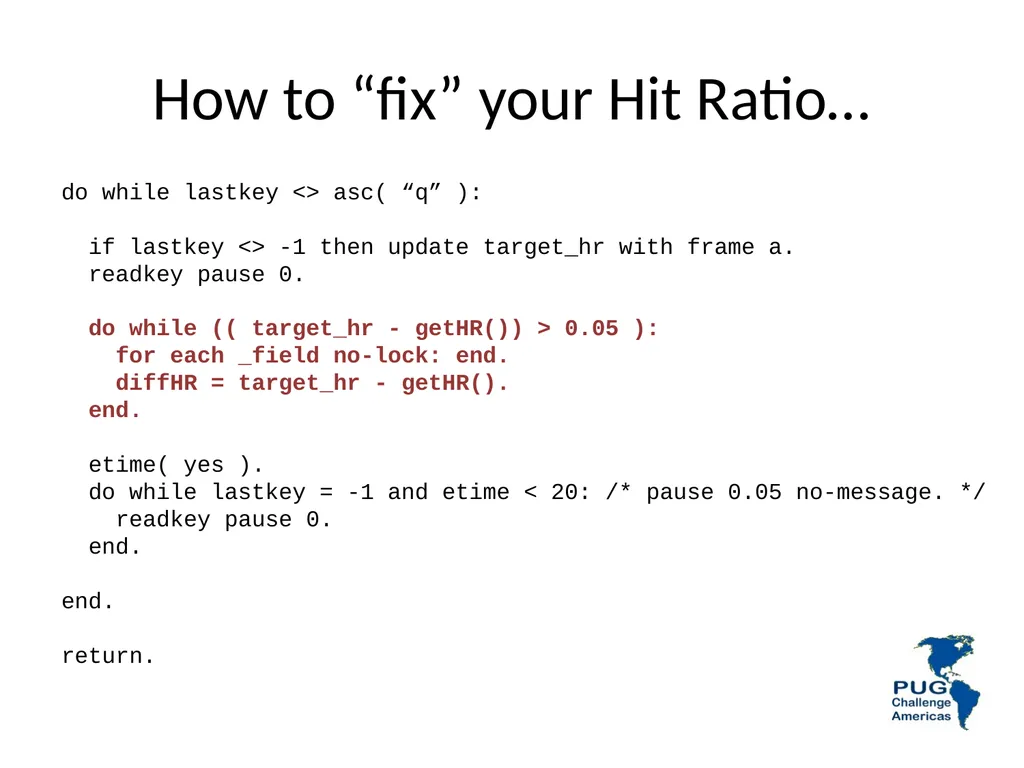
How to “fix” your Hit Ratio… do while lastkey <> asc( “q” ):
if lastkey <> -1 then update target_hr with frame a.
readkey pause 0.
do while (( target_hr - getHR()) > 0.05 ):
for each _field no-lock: end.
diffHR = target_hr - getHR().
end.
etime( yes ).
do while lastkey = -1 and etime < 20: /* pause 0.05 no-message. */
readkey pause 0.
end.
end.
return.<br>
if lastkey <> -1 then update target_hr with frame a.
readkey pause 0.
do while (( target_hr - getHR()) > 0.05 ):
for each _field no-lock: end.
diffHR = target_hr - getHR().
end.
etime( yes ).
do while lastkey = -1 and etime < 20: /* pause 0.05 no-message. */
readkey pause 0.
end.
end.
return.<br>
63
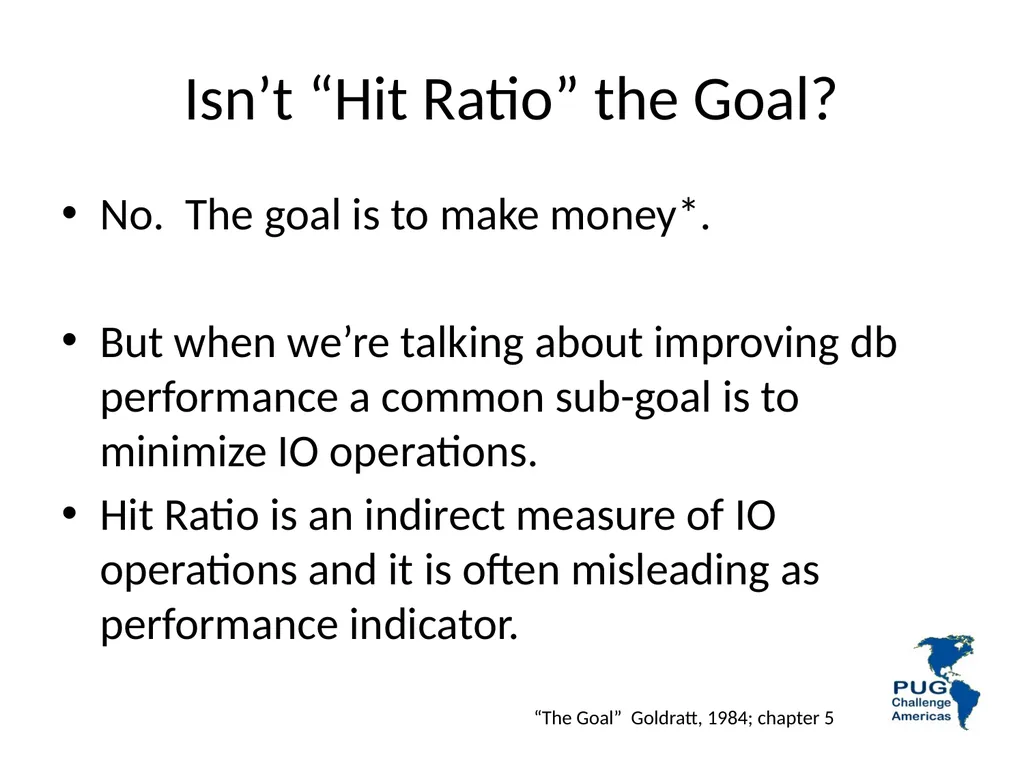
Isn’t “Hit Ratio” the Goal? No. The goal is to make money*.
But when we’re talking about improving db performance a common sub-goal is to minimize IO operations.
Hit Ratio is an indirect measure of IO operations and it is often misleading as performance indicator. “The Goal” Goldratt, 1984; chapter 5<br>
But when we’re talking about improving db performance a common sub-goal is to minimize IO operations.
Hit Ratio is an indirect measure of IO operations and it is often misleading as performance indicator. “The Goal” Goldratt, 1984; chapter 5<br>
64
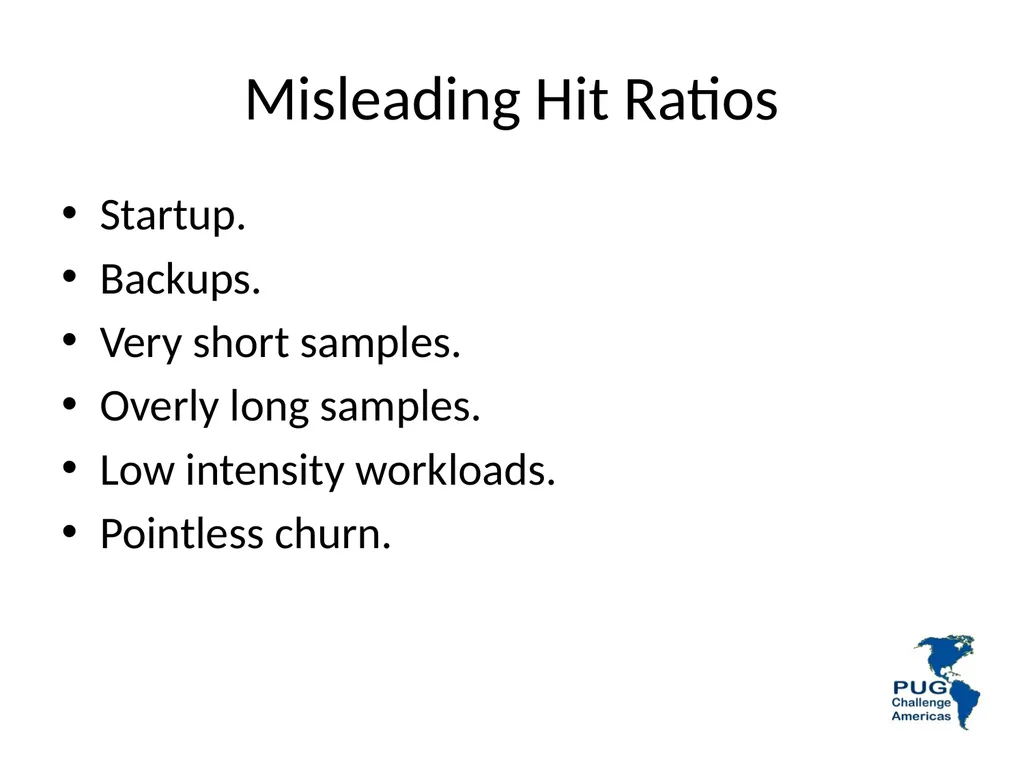
Misleading Hit Ratios Startup.
Backups.
Very short samples.
Overly long samples.
Low intensity workloads.
Pointless churn.<br>
Backups.
Very short samples.
Overly long samples.
Low intensity workloads.
Pointless churn.<br>
65
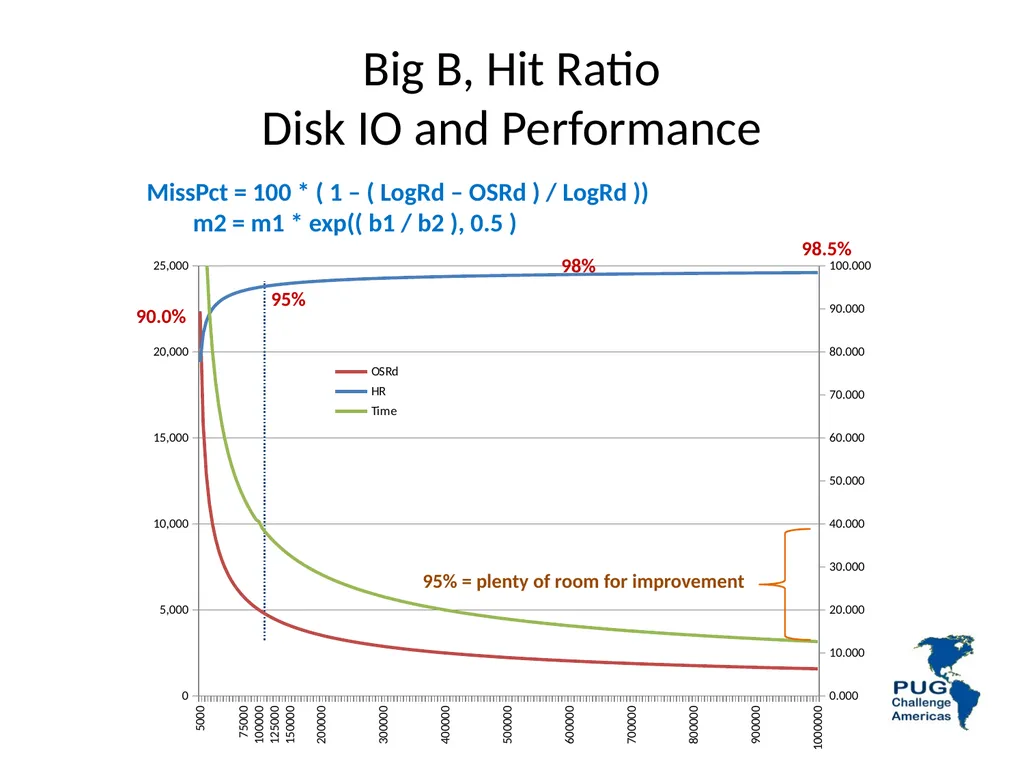
Big B, Hit Ratio
Disk IO and Performance MissPct = 100 * ( 1 – ( LogRd – OSRd ) / LogRd ))
m2 = m1 * exp(( b1 / b2 ), 0.5 ) 95% 98% 98.5% 90.0% 95% = plenty of room for improvement<br>
m2 = m1 * exp(( b1 / b2 ), 0.5 ) 95% 98% 98.5% 90.0% 95% = plenty of room for improvement<br>
66
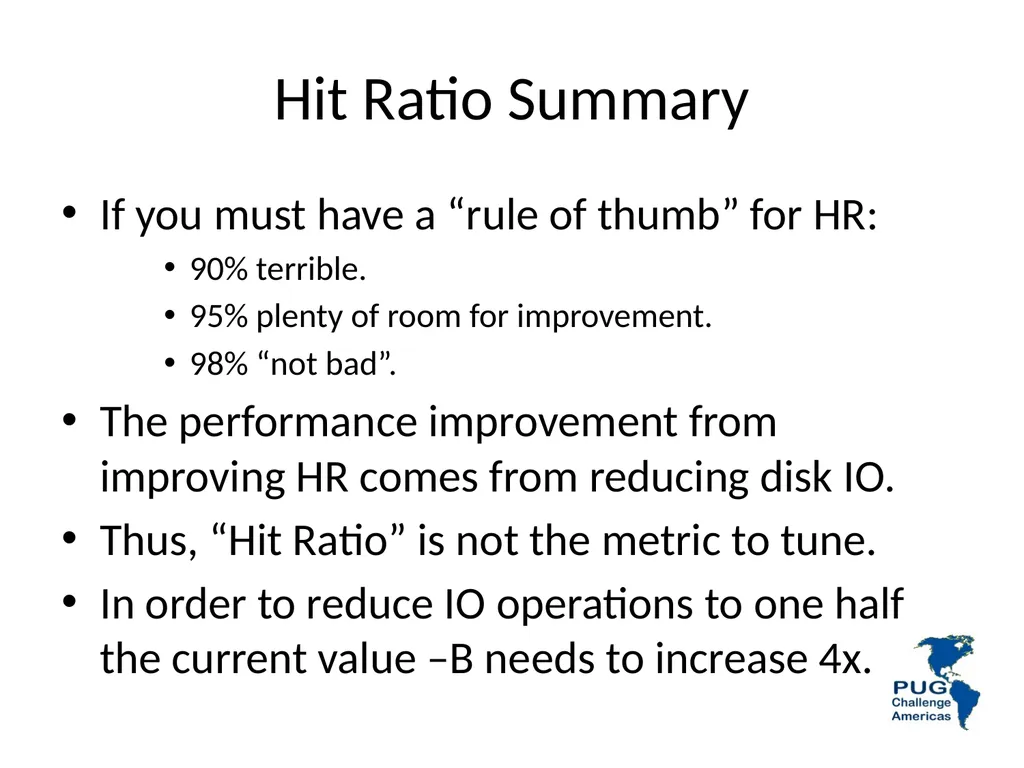
Hit Ratio Summary If you must have a “rule of thumb” for HR:
90% terrible.
95% plenty of room for improvement.
98% “not bad”.
The performance improvement from improving HR comes from reducing disk IO.
Thus, “Hit Ratio” is not the metric to tune.
In order to reduce IO operations to one half the current value –B needs to increase 4x.<br>
90% terrible.
95% plenty of room for improvement.
98% “not bad”.
The performance improvement from improving HR comes from reducing disk IO.
Thus, “Hit Ratio” is not the metric to tune.
In order to reduce IO operations to one half the current value –B needs to increase 4x.<br>
67
68 Exercises<br>
68
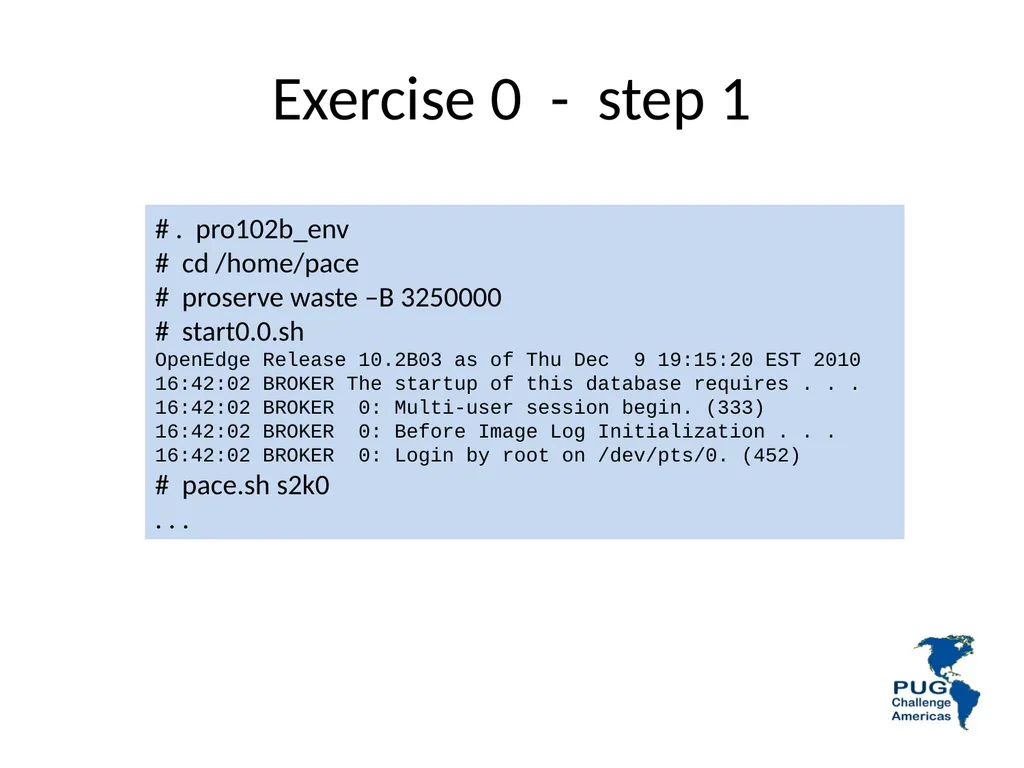
Exercise 0 - step 1 # . pro102b_env
# cd /home/pace
# proserve waste –B 3250000
# start0.0.sh
OpenEdge Release 10.2B03 as of Thu Dec 9 19:15:20 EST 2010
16:42:02 BROKER The startup of this database requires . . .
16:42:02 BROKER 0: Multi-user session begin. (333)
16:42:02 BROKER 0: Before Image Log Initialization . . .
16:42:02 BROKER 0: Login by root on /dev/pts/0. (452)
# pace.sh s2k0
. . .<br>
# cd /home/pace
# proserve waste –B 3250000
# start0.0.sh
OpenEdge Release 10.2B03 as of Thu Dec 9 19:15:20 EST 2010
16:42:02 BROKER The startup of this database requires . . .
16:42:02 BROKER 0: Multi-user session begin. (333)
16:42:02 BROKER 0: Before Image Log Initialization . . .
16:42:02 BROKER 0: Login by root on /dev/pts/0. (452)
# pace.sh s2k0
. . .<br>
69
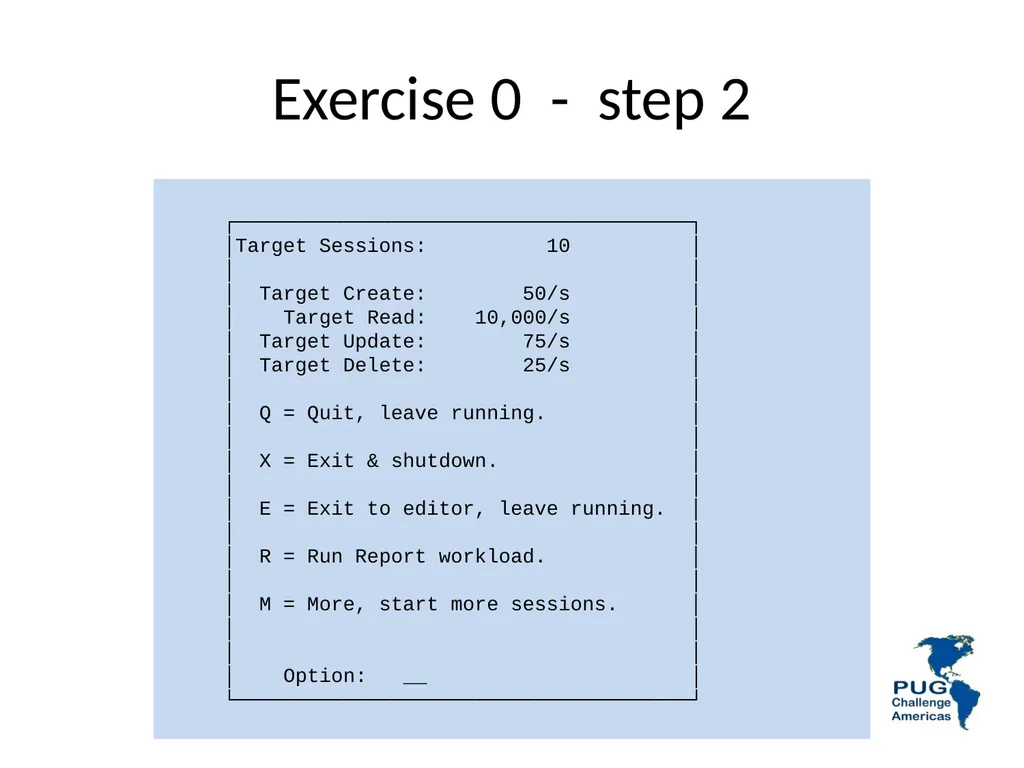
Exercise 0 - step 2 ┌──────────────────────────────────────┐
│Target Sessions: 10 │
│ │
│ Target Create: 50/s │
│ Target Read: 10,000/s │
│ Target Update: 75/s │
│ Target Delete: 25/s │
│ │
│ Q = Quit, leave running. │
│ │
│ X = Exit & shutdown. │
│ │
│ E = Exit to editor, leave running. │
│ │
│ R = Run Report workload. │
│ │
│ M = More, start more sessions. │
│ │
│ │
│ Option: __ │
└──────────────────────────────────────┘<br>
│Target Sessions: 10 │
│ │
│ Target Create: 50/s │
│ Target Read: 10,000/s │
│ Target Update: 75/s │
│ Target Delete: 25/s │
│ │
│ Q = Quit, leave running. │
│ │
│ X = Exit & shutdown. │
│ │
│ E = Exit to editor, leave running. │
│ │
│ R = Run Report workload. │
│ │
│ M = More, start more sessions. │
│ │
│ │
│ Option: __ │
└──────────────────────────────────────┘<br>
70
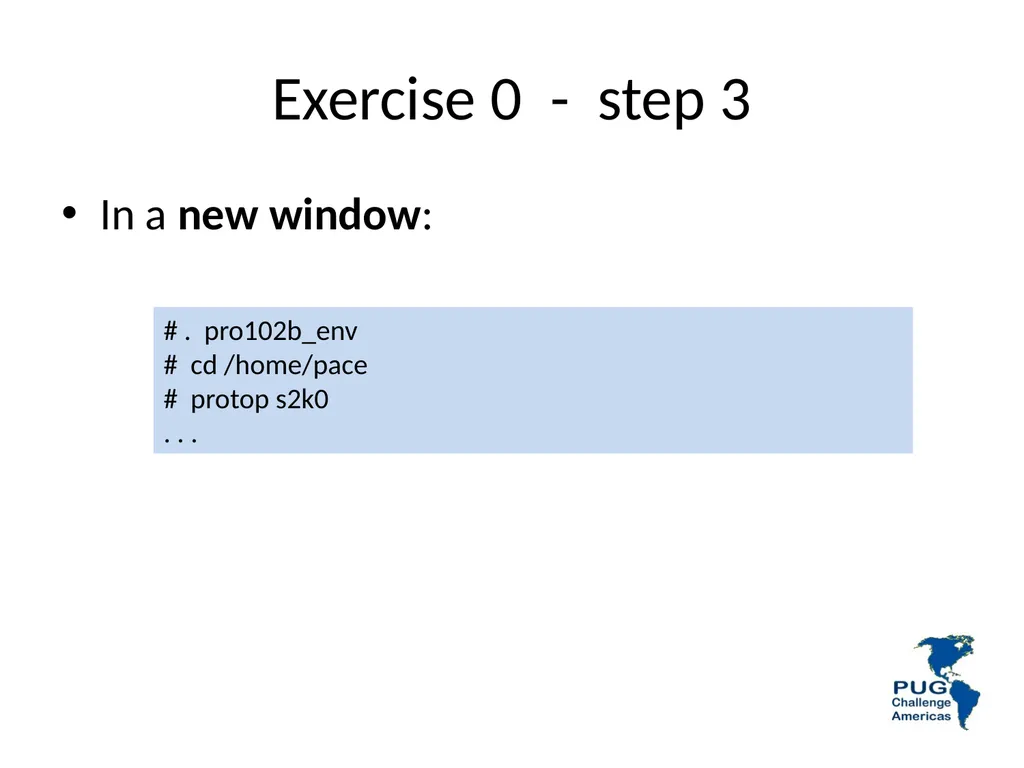
Exercise 0 - step 3 # . pro102b_env
# cd /home/pace
# protop s2k0
. . . In a new window:<br>
# cd /home/pace
# protop s2k0
. . . In a new window:<br>
71
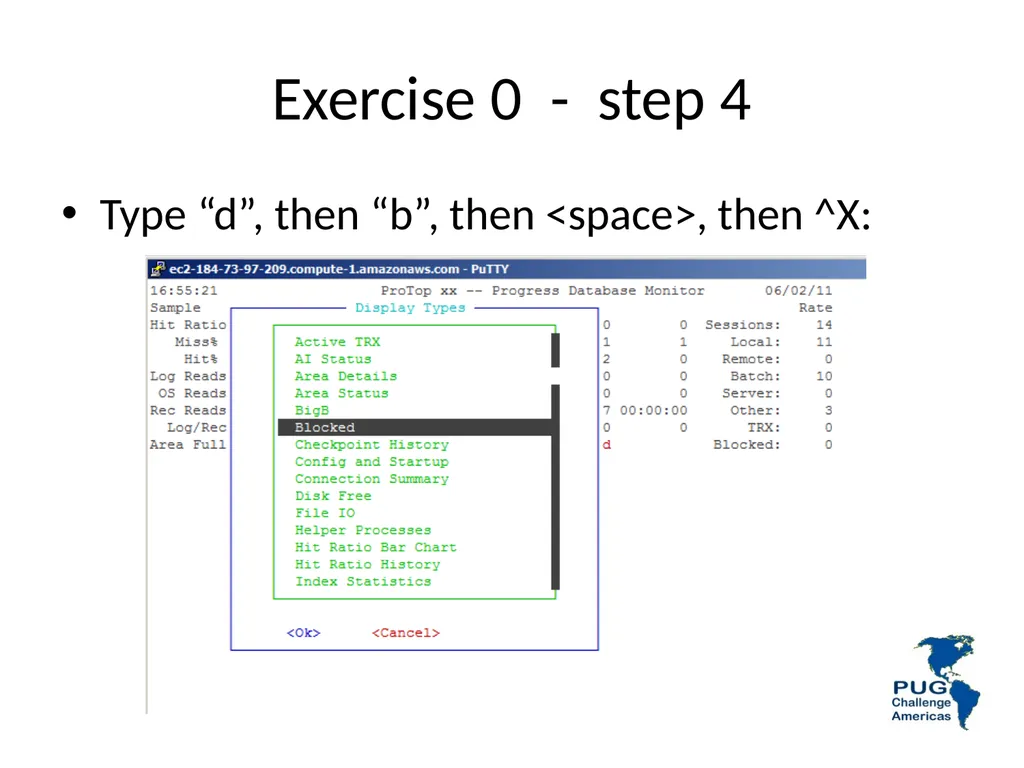
Exercise 0 - step 4 Type “d”, then “b”, then <space>, then ^X:<br>
72
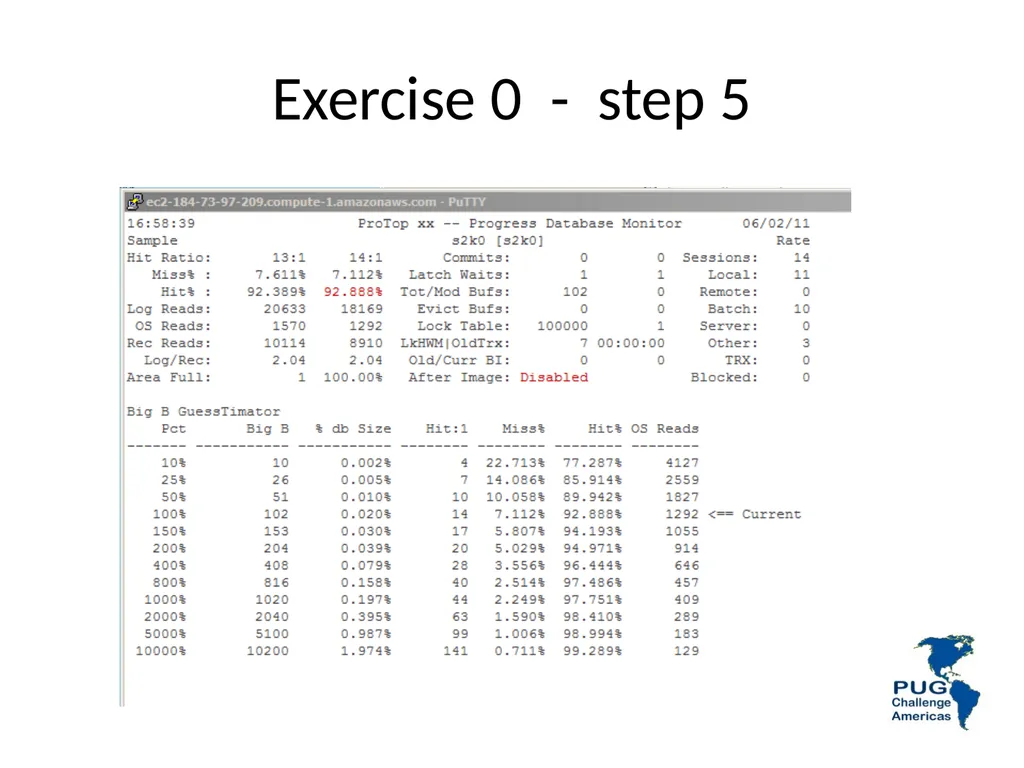
Exercise 0 - step 5<br>
73
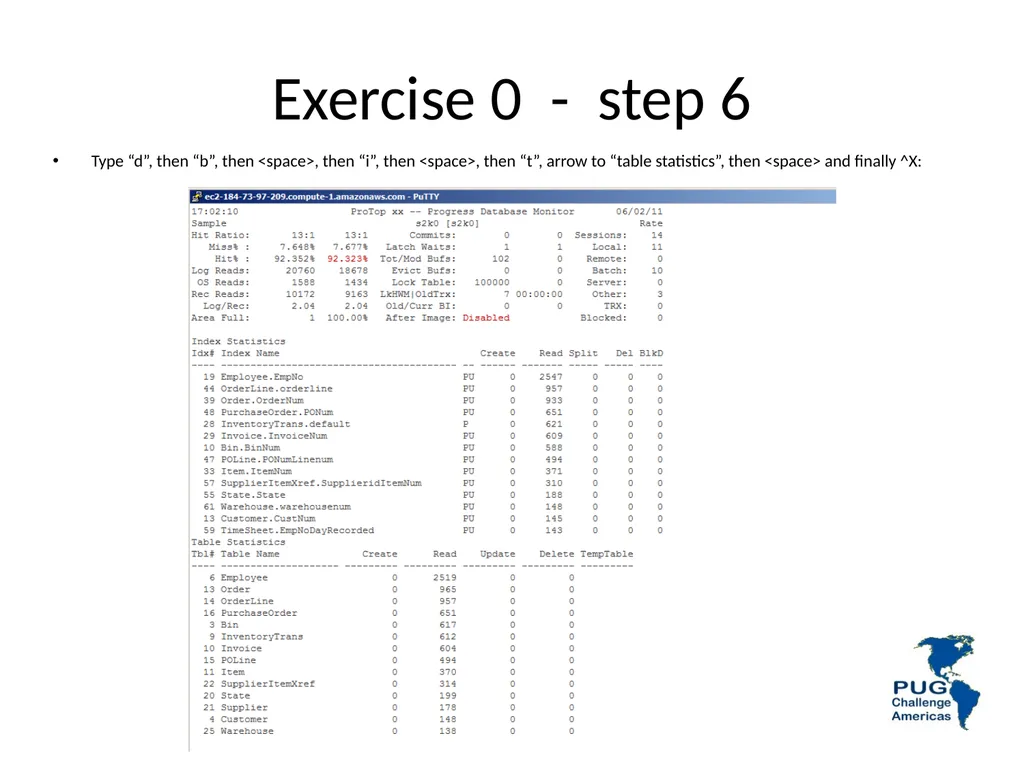
Exercise 0 - step 6 Type “d”, then “b”, then <space>, then “i”, then <space>, then “t”, arrow to “table statistics”, then <space> and finally ^X:<br>
74
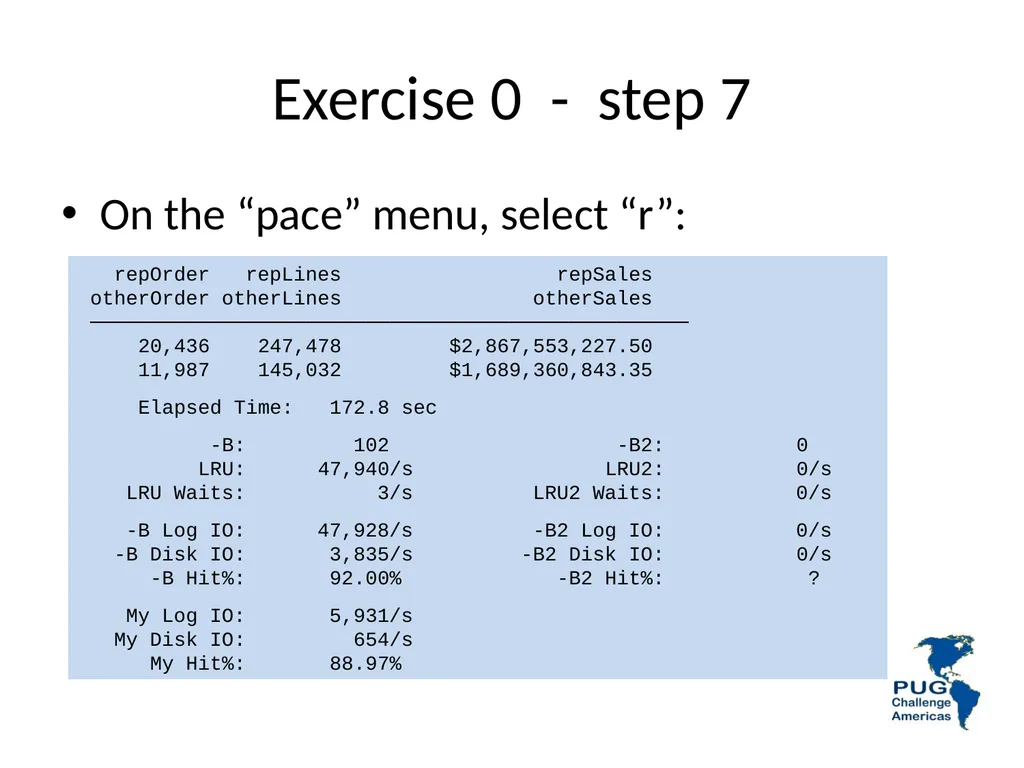
Exercise 0 - step 7 repOrder repLines repSales
otherOrder otherLines otherSales
──────────────────────────────────────────────────
20,436 247,478 $2,867,553,227.50
11,987 145,032 $1,689,360,843.35
Elapsed Time: 172.8 sec
-B: 102 -B2: 0
LRU: 47,940/s LRU2: 0/s
LRU Waits: 3/s LRU2 Waits: 0/s
-B Log IO: 47,928/s -B2 Log IO: 0/s
-B Disk IO: 3,835/s -B2 Disk IO: 0/s
-B Hit%: 92.00% -B2 Hit%: ?
My Log IO: 5,931/s
My Disk IO: 654/s
My Hit%: 88.97% On the “pace” menu, select “r”:<br>
otherOrder otherLines otherSales
──────────────────────────────────────────────────
20,436 247,478 $2,867,553,227.50
11,987 145,032 $1,689,360,843.35
Elapsed Time: 172.8 sec
-B: 102 -B2: 0
LRU: 47,940/s LRU2: 0/s
LRU Waits: 3/s LRU2 Waits: 0/s
-B Log IO: 47,928/s -B2 Log IO: 0/s
-B Disk IO: 3,835/s -B2 Disk IO: 0/s
-B Hit%: 92.00% -B2 Hit%: ?
My Log IO: 5,931/s
My Disk IO: 654/s
My Hit%: 88.97% On the “pace” menu, select “r”:<br>
75
PUG Challenge USA
Performance Tuning Workshop
Latching Dan Foreman
Progress Expert, BravePoint<br>
Progress Expert, BravePoint<br>
76
Introduction – Dan Foreman Progress User since 1984 (longer than Gus)
Since Progress Version 2 (there was no commercial V1)
Presenter at a few Progress Conferences<br>
Since Progress Version 2 (there was no commercial V1)
Presenter at a few Progress Conferences<br>
77
Introduction – Dan Foreman Publications
Progress Performance Tuning Guide
Progress Database Administration Guide
Progress Virtual System Tables
Progress V10 DBA Jumpstart<br>
Progress Performance Tuning Guide
Progress Database Administration Guide
Progress Virtual System Tables
Progress V10 DBA Jumpstart<br>
78
Introduction – Dan Foreman Utilities
ProMonitor – Database monitoring
ProCheck – AppServer/WebSpeed monitoring
Pro Dump&Load – Dump/load with minimum downtime
Balanced Benchmark – Load testing tool<br>
ProMonitor – Database monitoring
ProCheck – AppServer/WebSpeed monitoring
Pro Dump&Load – Dump/load with minimum downtime
Balanced Benchmark – Load testing tool<br>
79
Apology Due to a flurry of chaos in my life the last few weeks, I prepared this presentation while riding an airport shuttle at 4am in the morning….<br>
80
Terminology Latch
Latch Timeout (seen in promon)
Spinlock Retries (-spin)<br>
Latch Timeout (seen in promon)
Spinlock Retries (-spin)<br>
81
Server Components CPU – The fastest component
Memory – a distant second
Disk – an even more distant third
Exceptions exist but this hierarchy is almost always true<br>
Memory – a distant second
Disk – an even more distant third
Exceptions exist but this hierarchy is almost always true<br>
82
CPU Even with the advent of more sophisticated multi-core CPUs, the basic principle of a process being granted a number of execution cycles scheduled by the operating system<br>
83
Latches Exist to prevent multiple processes from updating the same resource at the same time
Similar in concept to a record lock
Example: only one process at a time can update the active output BI Buffer (it’s one reason why only one BIW can be started)<br>
Similar in concept to a record lock
Example: only one process at a time can update the active output BI Buffer (it’s one reason why only one BIW can be started)<br>
84
Latches Latches are held for an extremely short duration of time
So activities that might take an indeterminate amount of time (a disk I/O for example) are not controlled with latches<br>
So activities that might take an indeterminate amount of time (a disk I/O for example) are not controlled with latches<br>
85
-spin 0 Default prior to V10 (AKA OE10)
User 1 gets scheduled ‘into’ the CPU
User 1 needs a latch
User 2 is already holding that latch
User 1 gets booted from the CPU into the Run Queue (come back and try again later)<br>
User 1 gets scheduled ‘into’ the CPU
User 1 needs a latch
User 2 is already holding that latch
User 1 gets booted from the CPU into the Run Queue (come back and try again later)<br>
86
-spin <non-zero> User 1 gets scheduled into the CPU
User 1 needs a latch
User 2 is already holding that latch
Instead of getting booted, User 1 goes into a loop (i.e. spins) and keeps trying to acquire the latch for up to –spin # of times<br>
User 1 needs a latch
User 2 is already holding that latch
Instead of getting booted, User 1 goes into a loop (i.e. spins) and keeps trying to acquire the latch for up to –spin # of times<br>
87
-spin <non-zero> Because User 2 only holds the latch for a short time there is a chance that User 1 can acquire the latch before running out of allotted CPU time
The cost of using spin is some CPU time is wasted doing “empty work”<br>
The cost of using spin is some CPU time is wasted doing “empty work”<br>
88
Latch Timeouts Promon R&D > Other > Performance Indicators
Perhaps a better label would be “Latch Spinouts”
Number of times that a process spun –spin # of times but didn’t acquire the Latch<br>
Perhaps a better label would be “Latch Spinouts”
Number of times that a process spun –spin # of times but didn’t acquire the Latch<br>
89
Latch Timeouts Doesn’t record if the CPU Quanta pre-empts the spinning (isn’t that a cool word?)<br>
90
Thread Quantum How long a thread (i.e. process) is allowed to keep hold of the CPU if:
It remains runnable
The scheduler determines that no other thread needs to run on that CPU instead
Thread quanta are generally defined by some number of clock ticks<br>
It remains runnable
The scheduler determines that no other thread needs to run on that CPU instead
Thread quanta are generally defined by some number of clock ticks<br>
91
How to Set Spin Old Folklore (10000 * # of CPUs)
Ballpark (1000-50000)
Benchmark
The year of your birthday * 3.14159<br>
Ballpark (1000-50000)
Benchmark
The year of your birthday * 3.14159<br>
92
Exercise Do a run with –spin 0
Do another run with a non-zero value of spin
Percentage of change?<br>
Do another run with a non-zero value of spin
Percentage of change?<br>
93
PUG Challenge Americas
Performance Tuning Workshop PAUL KOUFALIS PRESIDENT
PROGRESSWIZ CONSULTING After Imaging<br>
PROGRESSWIZ CONSULTING After Imaging<br>
94
Based in Montréal, Québec, Canada
Providing technical consulting in Progress®, UNIX, Windows, MFG/PRO and more
Specialized in
Security of Progress-based systems
Performance tuning
System availability
Business continuity planning Progresswiz Consulting<br>
Providing technical consulting in Progress®, UNIX, Windows, MFG/PRO and more
Specialized in
Security of Progress-based systems
Performance tuning
System availability
Business continuity planning Progresswiz Consulting<br>
95
Extents - Fixed versus variable In a low tx environment there should be no noticeable difference
Maybe MRP will take a 1-2% longer
Human speed tx will never notice
Best practice = fixed
AIFMD extracts only active blocks from file
See rfutil –C aimage extract<br>
Maybe MRP will take a 1-2% longer
Human speed tx will never notice
Best practice = fixed
AIFMD extracts only active blocks from file
See rfutil –C aimage extract<br>
96
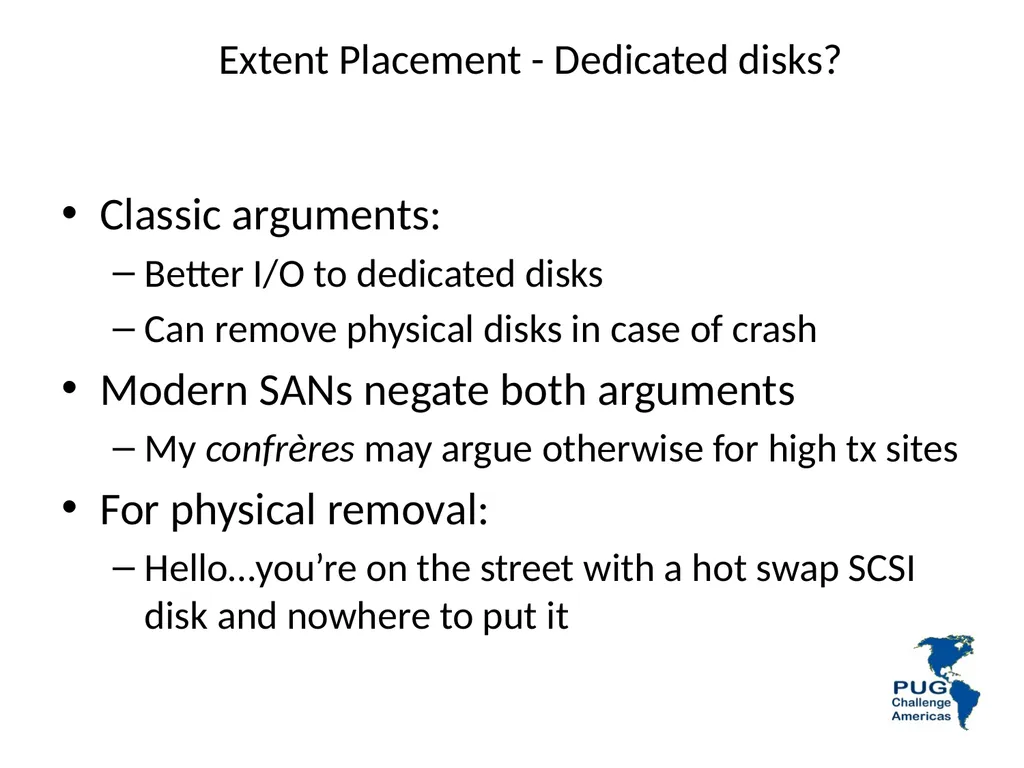
Extent Placement - Dedicated disks? Classic arguments:
Better I/O to dedicated disks
Can remove physical disks in case of crash
Modern SANs negate both arguments
My confrères may argue otherwise for high tx sites
For physical removal:
Hello…you’re on the street with a hot swap SCSI disk and nowhere to put it<br>
Better I/O to dedicated disks
Can remove physical disks in case of crash
Modern SANs negate both arguments
My confrères may argue otherwise for high tx sites
For physical removal:
Hello…you’re on the street with a hot swap SCSI disk and nowhere to put it<br>
97
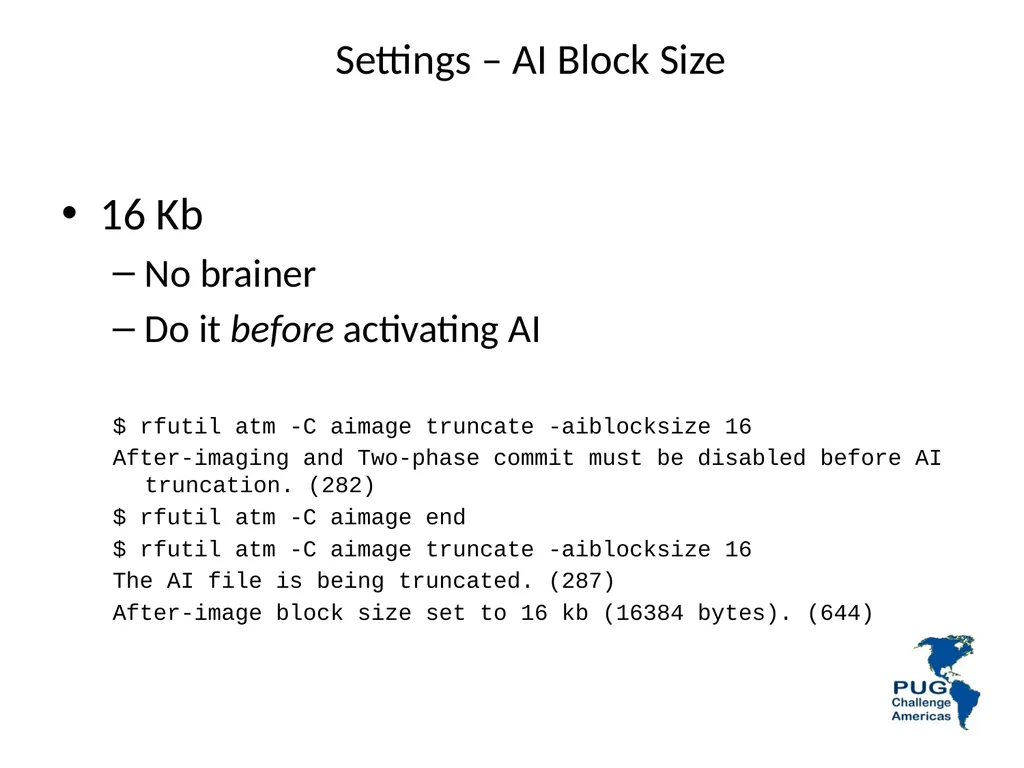
Settings – AI Block Size 16 Kb
No brainer
Do it before activating AI
$ rfutil atm -C aimage truncate -aiblocksize 16
After-imaging and Two-phase commit must be disabled before AI truncation. (282)
$ rfutil atm -C aimage end
$ rfutil atm -C aimage truncate -aiblocksize 16
The AI file is being truncated. (287)
After-image block size set to 16 kb (16384 bytes). (644)<br>
No brainer
Do it before activating AI
$ rfutil atm -C aimage truncate -aiblocksize 16
After-imaging and Two-phase commit must be disabled before AI truncation. (282)
$ rfutil atm -C aimage end
$ rfutil atm -C aimage truncate -aiblocksize 16
The AI file is being truncated. (287)
After-image block size set to 16 kb (16384 bytes). (644)<br>
98
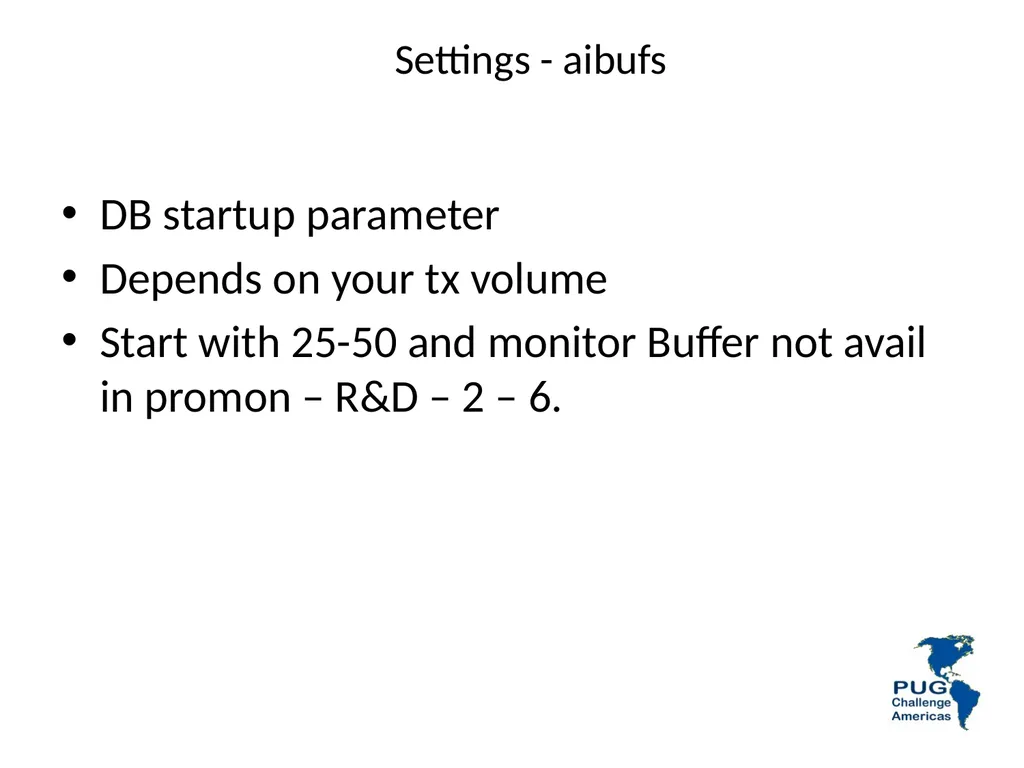
Settings - aibufs DB startup parameter
Depends on your tx volume
Start with 25-50 and monitor Buffer not avail in promon – R&D – 2 – 6.<br>
Depends on your tx volume
Start with 25-50 and monitor Buffer not avail in promon – R&D – 2 – 6.<br>
99
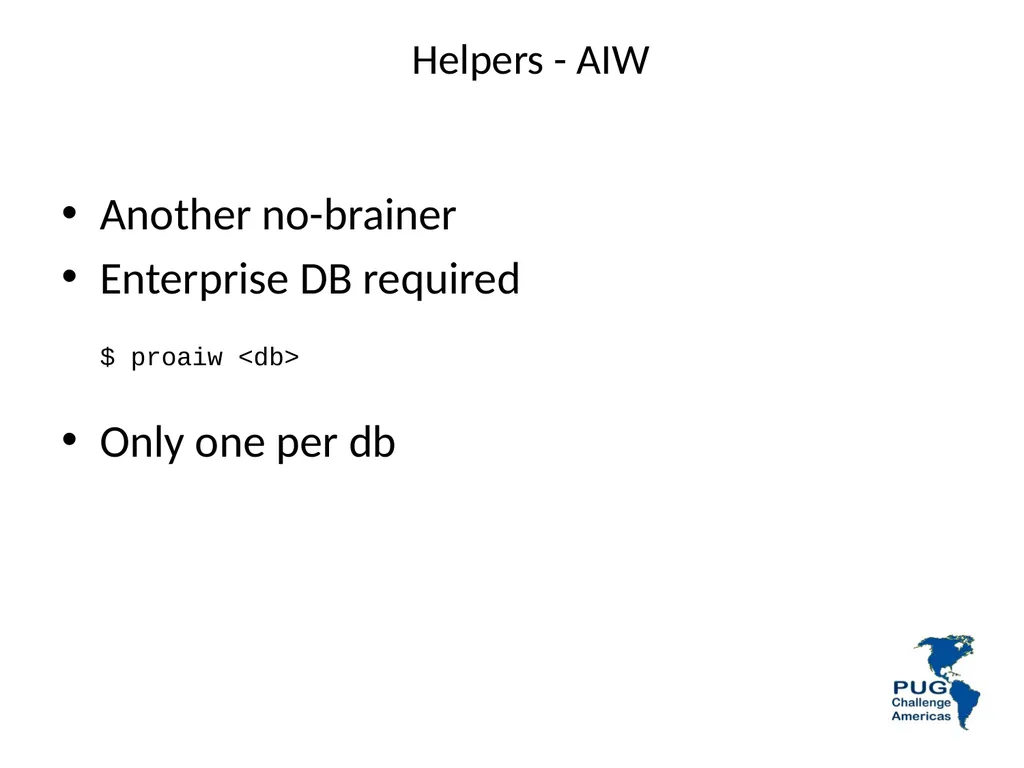
Helpers - AIW Another no-brainer
Enterprise DB required
$ proaiw <db>
Only one per db<br>
Enterprise DB required
$ proaiw <db>
Only one per db<br>
100
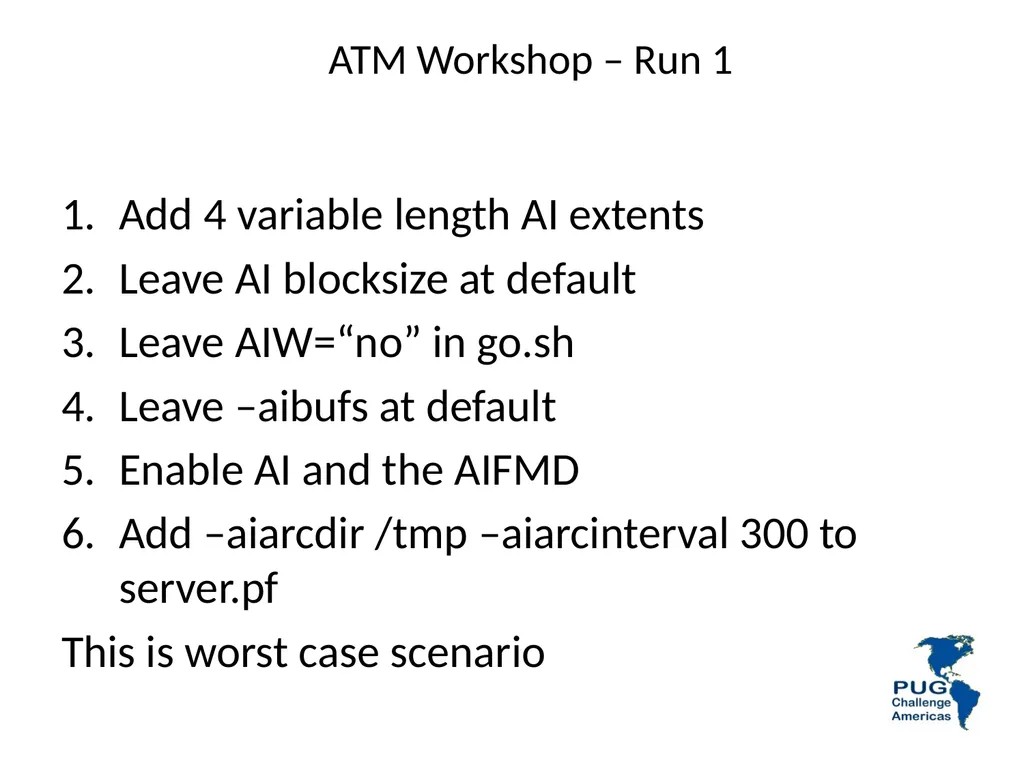
ATM Workshop – Run 1 Add 4 variable length AI extents
Leave AI blocksize at default
Leave AIW=“no” in go.sh
Leave –aibufs at default
Enable AI and the AIFMD
Add –aiarcdir /tmp –aiarcinterval 300 to server.pf
This is worst case scenario<br>
Leave AI blocksize at default
Leave AIW=“no” in go.sh
Leave –aibufs at default
Enable AI and the AIFMD
Add –aiarcdir /tmp –aiarcinterval 300 to server.pf
This is worst case scenario<br>
101
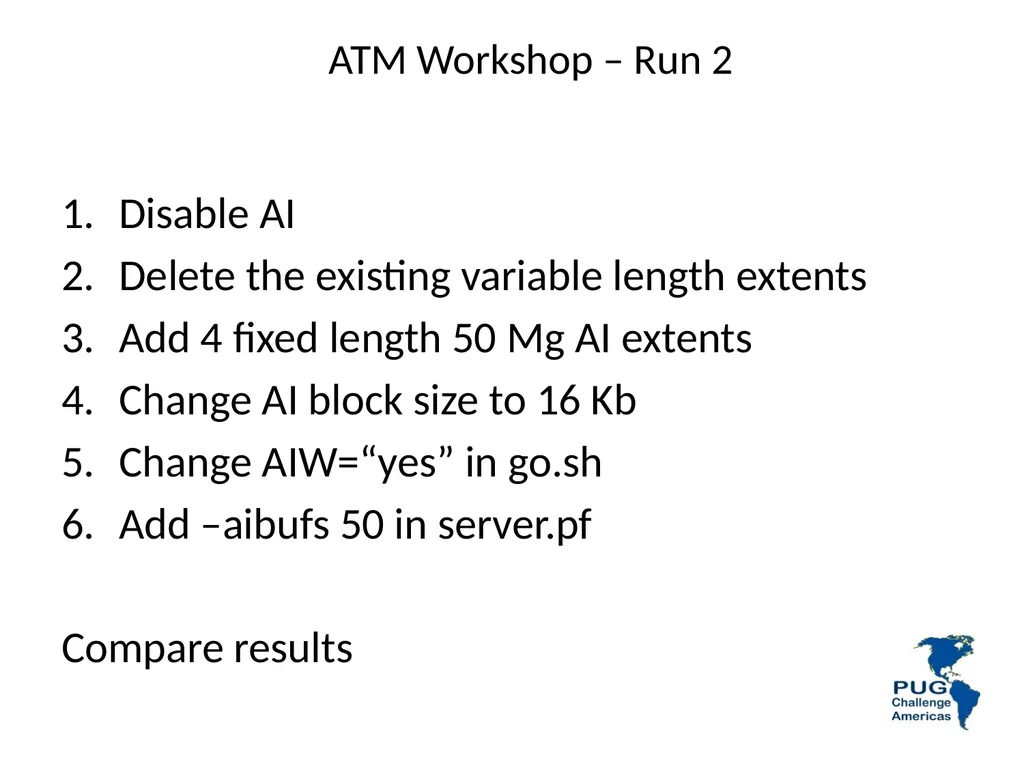
ATM Workshop – Run 2 Disable AI
Delete the existing variable length extents
Add 4 fixed length 50 Mg AI extents
Change AI block size to 16 Kb
Change AIW=“yes” in go.sh
Add –aibufs 50 in server.pf
Compare results<br>
Delete the existing variable length extents
Add 4 fixed length 50 Mg AI extents
Change AI block size to 16 Kb
Change AIW=“yes” in go.sh
Add –aibufs 50 in server.pf
Compare results<br>
102
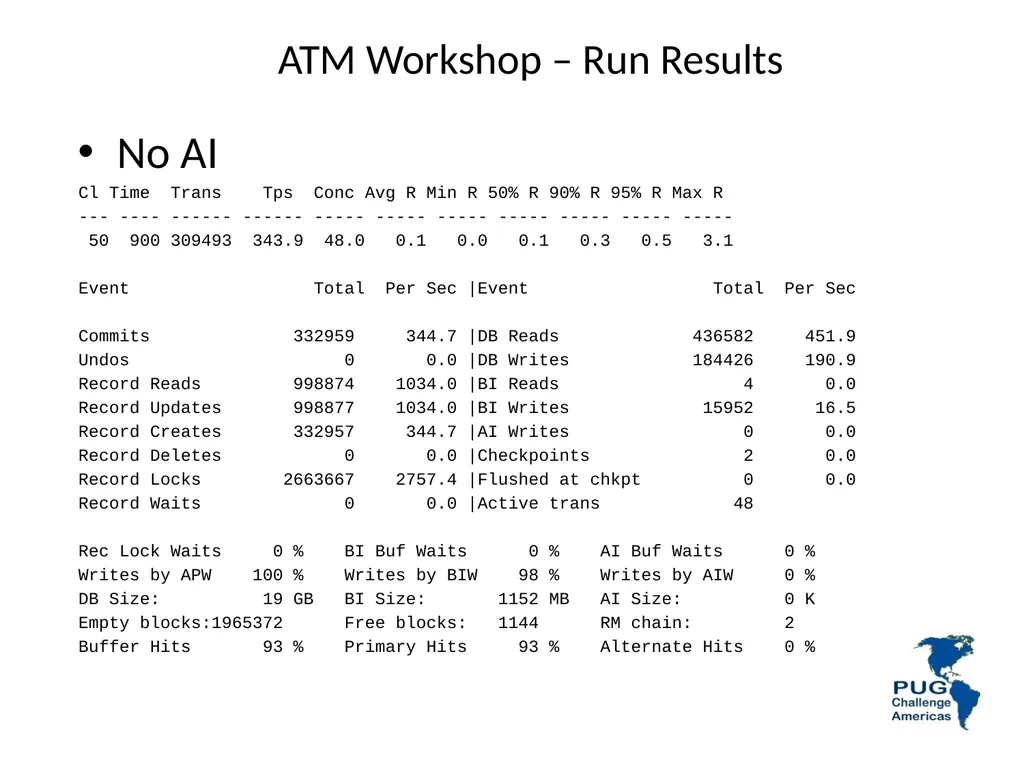
ATM Workshop – Run Results No AI
Cl Time Trans Tps Conc Avg R Min R 50% R 90% R 95% R Max R
--- ---- ------ ------ ----- ----- ----- ----- ----- ----- -----
50 900 309493 343.9 48.0 0.1 0.0 0.1 0.3 0.5 3.1
Event Total Per Sec |Event Total Per Sec
Commits 332959 344.7 |DB Reads 436582 451.9
Undos 0 0.0 |DB Writes 184426 190.9
Record Reads 998874 1034.0 |BI Reads 4 0.0
Record Updates 998877 1034.0 |BI Writes 15952 16.5
Record Creates 332957 344.7 |AI Writes 0 0.0
Record Deletes 0 0.0 |Checkpoints 2 0.0
Record Locks 2663667 2757.4 |Flushed at chkpt 0 0.0
Record Waits 0 0.0 |Active trans 48
Rec Lock Waits 0 % BI Buf Waits 0 % AI Buf Waits 0 %
Writes by APW 100 % Writes by BIW 98 % Writes by AIW 0 %
DB Size: 19 GB BI Size: 1152 MB AI Size: 0 K
Empty blocks:1965372 Free blocks: 1144 RM chain: 2
Buffer Hits 93 % Primary Hits 93 % Alternate Hits 0 %<br>
Cl Time Trans Tps Conc Avg R Min R 50% R 90% R 95% R Max R
--- ---- ------ ------ ----- ----- ----- ----- ----- ----- -----
50 900 309493 343.9 48.0 0.1 0.0 0.1 0.3 0.5 3.1
Event Total Per Sec |Event Total Per Sec
Commits 332959 344.7 |DB Reads 436582 451.9
Undos 0 0.0 |DB Writes 184426 190.9
Record Reads 998874 1034.0 |BI Reads 4 0.0
Record Updates 998877 1034.0 |BI Writes 15952 16.5
Record Creates 332957 344.7 |AI Writes 0 0.0
Record Deletes 0 0.0 |Checkpoints 2 0.0
Record Locks 2663667 2757.4 |Flushed at chkpt 0 0.0
Record Waits 0 0.0 |Active trans 48
Rec Lock Waits 0 % BI Buf Waits 0 % AI Buf Waits 0 %
Writes by APW 100 % Writes by BIW 98 % Writes by AIW 0 %
DB Size: 19 GB BI Size: 1152 MB AI Size: 0 K
Empty blocks:1965372 Free blocks: 1144 RM chain: 2
Buffer Hits 93 % Primary Hits 93 % Alternate Hits 0 %<br>
103
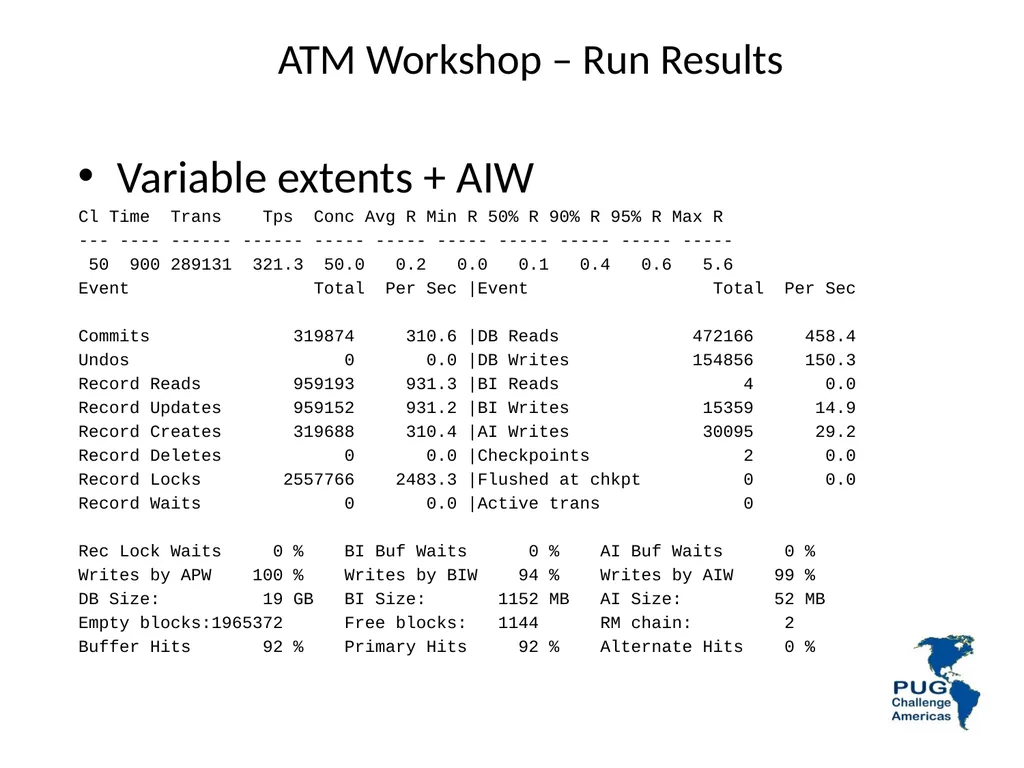
ATM Workshop – Run Results Variable extents + AIW
Cl Time Trans Tps Conc Avg R Min R 50% R 90% R 95% R Max R
--- ---- ------ ------ ----- ----- ----- ----- ----- ----- -----
50 900 289131 321.3 50.0 0.2 0.0 0.1 0.4 0.6 5.6
Event Total Per Sec |Event Total Per Sec
Commits 319874 310.6 |DB Reads 472166 458.4
Undos 0 0.0 |DB Writes 154856 150.3
Record Reads 959193 931.3 |BI Reads 4 0.0
Record Updates 959152 931.2 |BI Writes 15359 14.9
Record Creates 319688 310.4 |AI Writes 30095 29.2
Record Deletes 0 0.0 |Checkpoints 2 0.0
Record Locks 2557766 2483.3 |Flushed at chkpt 0 0.0
Record Waits 0 0.0 |Active trans 0
Rec Lock Waits 0 % BI Buf Waits 0 % AI Buf Waits 0 %
Writes by APW 100 % Writes by BIW 94 % Writes by AIW 99 %
DB Size: 19 GB BI Size: 1152 MB AI Size: 52 MB
Empty blocks:1965372 Free blocks: 1144 RM chain: 2
Buffer Hits 92 % Primary Hits 92 % Alternate Hits 0 %<br>
Cl Time Trans Tps Conc Avg R Min R 50% R 90% R 95% R Max R
--- ---- ------ ------ ----- ----- ----- ----- ----- ----- -----
50 900 289131 321.3 50.0 0.2 0.0 0.1 0.4 0.6 5.6
Event Total Per Sec |Event Total Per Sec
Commits 319874 310.6 |DB Reads 472166 458.4
Undos 0 0.0 |DB Writes 154856 150.3
Record Reads 959193 931.3 |BI Reads 4 0.0
Record Updates 959152 931.2 |BI Writes 15359 14.9
Record Creates 319688 310.4 |AI Writes 30095 29.2
Record Deletes 0 0.0 |Checkpoints 2 0.0
Record Locks 2557766 2483.3 |Flushed at chkpt 0 0.0
Record Waits 0 0.0 |Active trans 0
Rec Lock Waits 0 % BI Buf Waits 0 % AI Buf Waits 0 %
Writes by APW 100 % Writes by BIW 94 % Writes by AIW 99 %
DB Size: 19 GB BI Size: 1152 MB AI Size: 52 MB
Empty blocks:1965372 Free blocks: 1144 RM chain: 2
Buffer Hits 92 % Primary Hits 92 % Alternate Hits 0 %<br>
104
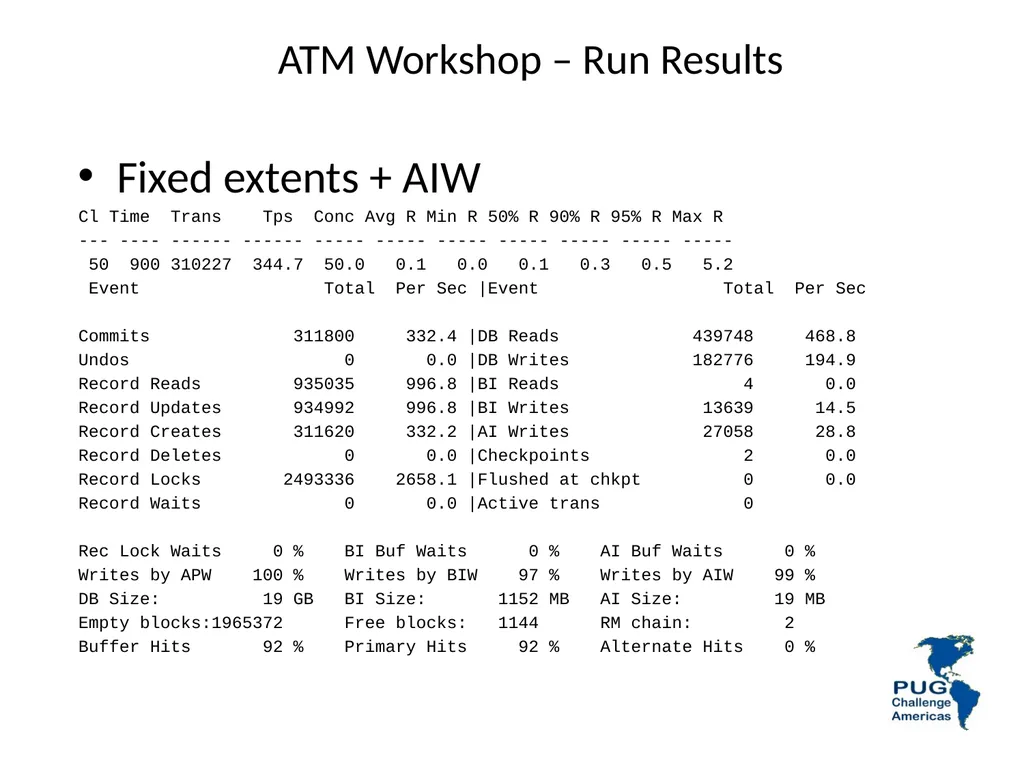
ATM Workshop – Run Results Fixed extents + AIW
Cl Time Trans Tps Conc Avg R Min R 50% R 90% R 95% R Max R
--- ---- ------ ------ ----- ----- ----- ----- ----- ----- -----
50 900 310227 344.7 50.0 0.1 0.0 0.1 0.3 0.5 5.2
Event Total Per Sec |Event Total Per Sec
Commits 311800 332.4 |DB Reads 439748 468.8
Undos 0 0.0 |DB Writes 182776 194.9
Record Reads 935035 996.8 |BI Reads 4 0.0
Record Updates 934992 996.8 |BI Writes 13639 14.5
Record Creates 311620 332.2 |AI Writes 27058 28.8
Record Deletes 0 0.0 |Checkpoints 2 0.0
Record Locks 2493336 2658.1 |Flushed at chkpt 0 0.0
Record Waits 0 0.0 |Active trans 0
Rec Lock Waits 0 % BI Buf Waits 0 % AI Buf Waits 0 %
Writes by APW 100 % Writes by BIW 97 % Writes by AIW 99 %
DB Size: 19 GB BI Size: 1152 MB AI Size: 19 MB
Empty blocks:1965372 Free blocks: 1144 RM chain: 2
Buffer Hits 92 % Primary Hits 92 % Alternate Hits 0 %<br>
Cl Time Trans Tps Conc Avg R Min R 50% R 90% R 95% R Max R
--- ---- ------ ------ ----- ----- ----- ----- ----- ----- -----
50 900 310227 344.7 50.0 0.1 0.0 0.1 0.3 0.5 5.2
Event Total Per Sec |Event Total Per Sec
Commits 311800 332.4 |DB Reads 439748 468.8
Undos 0 0.0 |DB Writes 182776 194.9
Record Reads 935035 996.8 |BI Reads 4 0.0
Record Updates 934992 996.8 |BI Writes 13639 14.5
Record Creates 311620 332.2 |AI Writes 27058 28.8
Record Deletes 0 0.0 |Checkpoints 2 0.0
Record Locks 2493336 2658.1 |Flushed at chkpt 0 0.0
Record Waits 0 0.0 |Active trans 0
Rec Lock Waits 0 % BI Buf Waits 0 % AI Buf Waits 0 %
Writes by APW 100 % Writes by BIW 97 % Writes by AIW 99 %
DB Size: 19 GB BI Size: 1152 MB AI Size: 19 MB
Empty blocks:1965372 Free blocks: 1144 RM chain: 2
Buffer Hits 92 % Primary Hits 92 % Alternate Hits 0 %<br>
105
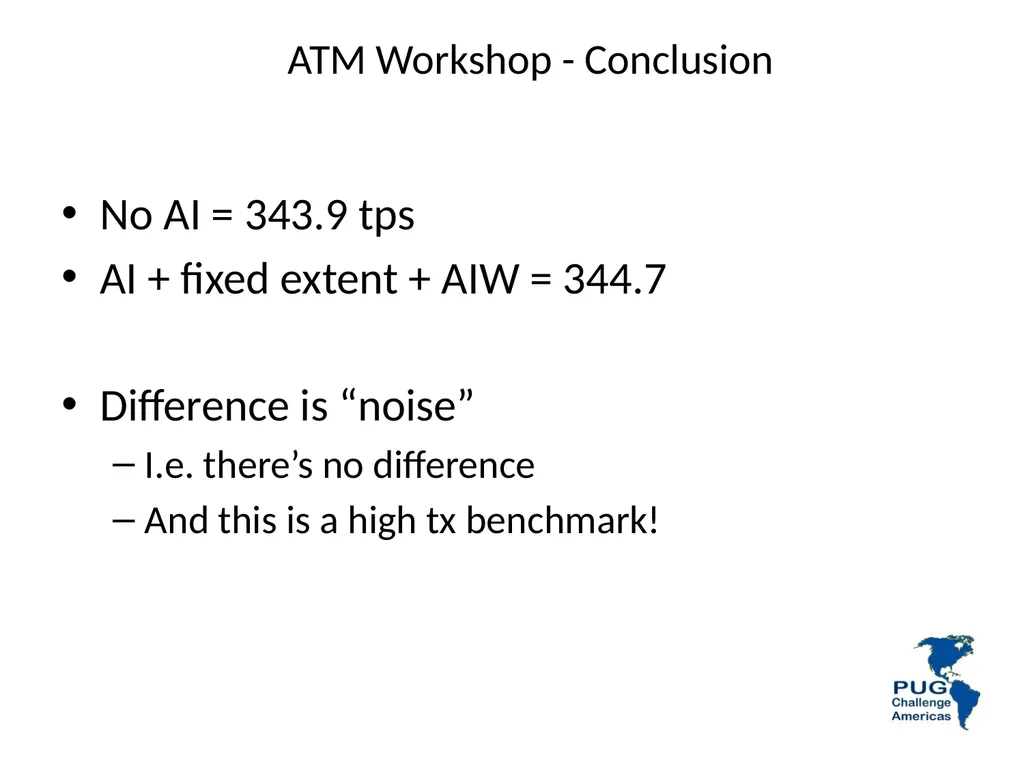
ATM Workshop - Conclusion No AI = 343.9 tps
AI + fixed extent + AIW = 344.7
Difference is “noise”
I.e. there’s no difference
And this is a high tx benchmark!<br>
AI + fixed extent + AIW = 344.7
Difference is “noise”
I.e. there’s no difference
And this is a high tx benchmark!<br>
106
Questions?<br>