Presented by: SBCTC System Accounting staff Payroll Reconciliation from the Finance Side Net Pay voucher is created Voucher entered processed in FIN Finance receives AP Vouchers Finance receives PAY journal Payroll is entered processed
"Presented by: SBCTC System Accounting staff" is the property of its rightful owner. Permission is granted to
download and print the materials on this website for personal, non-commercial use only, and to display it
on your personal computer provided you do not modify the materials and that you retain all copyright
notices contained in the materials. By downloading content from our website, you accept the terms of this
agreement.
Presentation Transcript
01
Presented by: SBCTC System Accounting staff Payroll Reconciliation from the Finance Side<br>
02
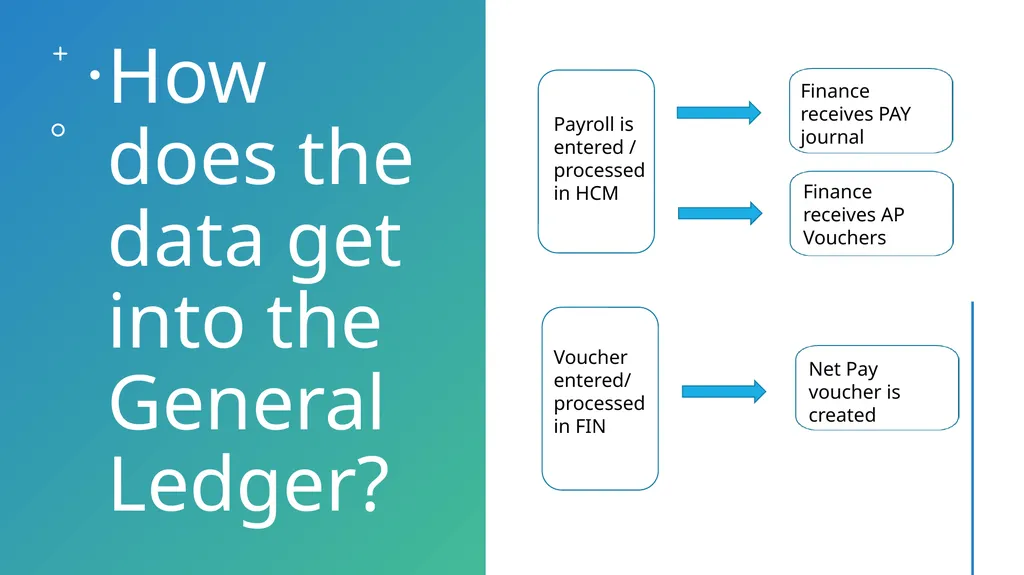
Net Pay voucher is created Voucher entered/
processed in FIN Finance receives AP Vouchers Finance receives PAY journal Payroll is entered / processed in HCM How does the data get into the General Ledger? 2<br>
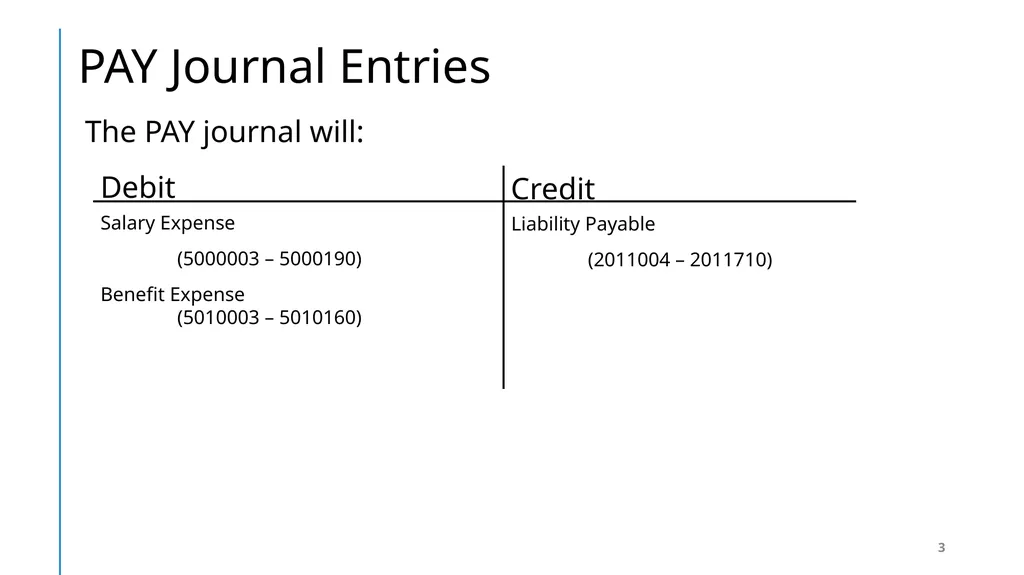
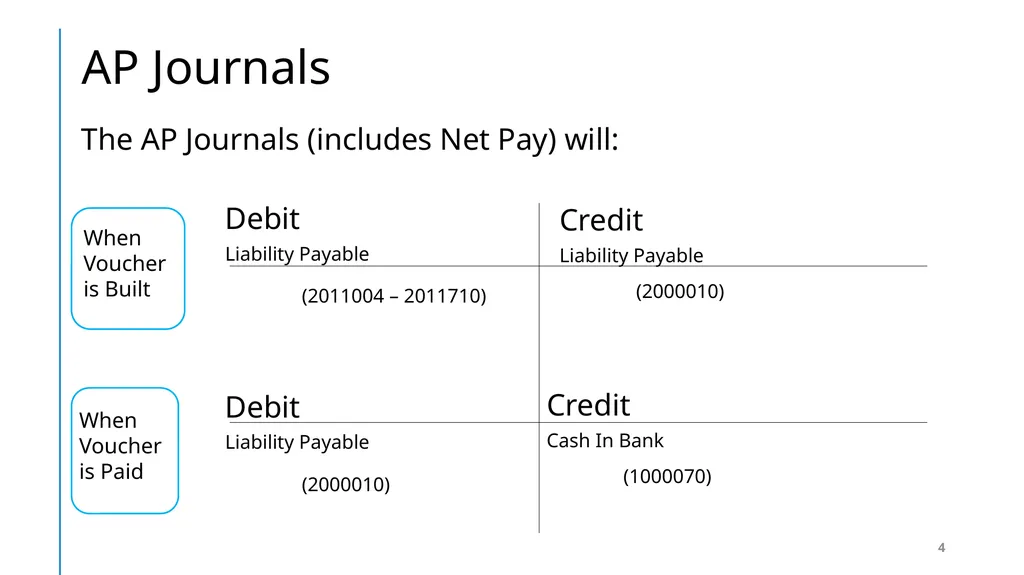
Credit
Cash In Bank
(1000070) Debit
Liability Payable
(2000010) Credit
Liability Payable
(2000010) Debit
Liability Payable
(2011004 – 2011710) The AP Journals (includes Net Pay) will: AP Journals 4<br>
05
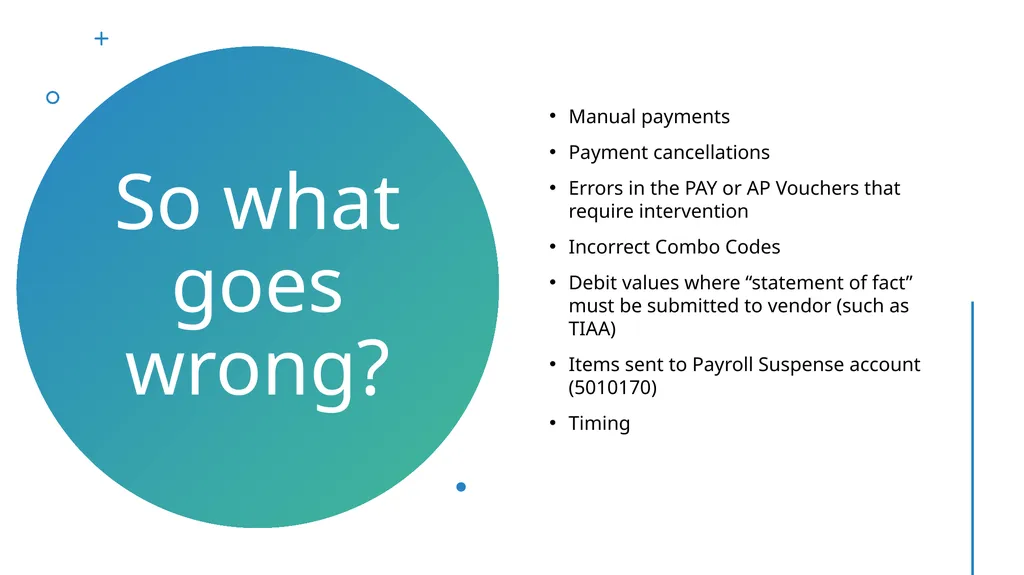
Manual payments
Payment cancellations
Errors in the PAY or AP Vouchers that require intervention
Incorrect Combo Codes
Debit values where “statement of fact” must be submitted to vendor (such as TIAA)
Items sent to Payroll Suspense account (5010170)
Timing So what goes wrong? 5<br>
06
7. Ensure all AP vouchers are built from HCM – If a deduction doesn’t have a corresponding vendor attached, a voucher will not be created. 6. Manual payments should not be expensed – should use account 2011015 5. Payments received from suppliers are posted to Liability accounts with adjustments to interest/fees to recognize gain/loss to investments 4. Ensure adjustments to AP vouchers are expensed 3. If something must be corrected, be sure to modify both the PAY journal and AP vouchers.
Note: if a state fund is modified, it will affect the college state reimbursements. 2. Avoid correcting anything in either the PAY journal or AP vouchers 1. Double check combo codes for accuracy Ways to mitigate potential issues 6<br>
07
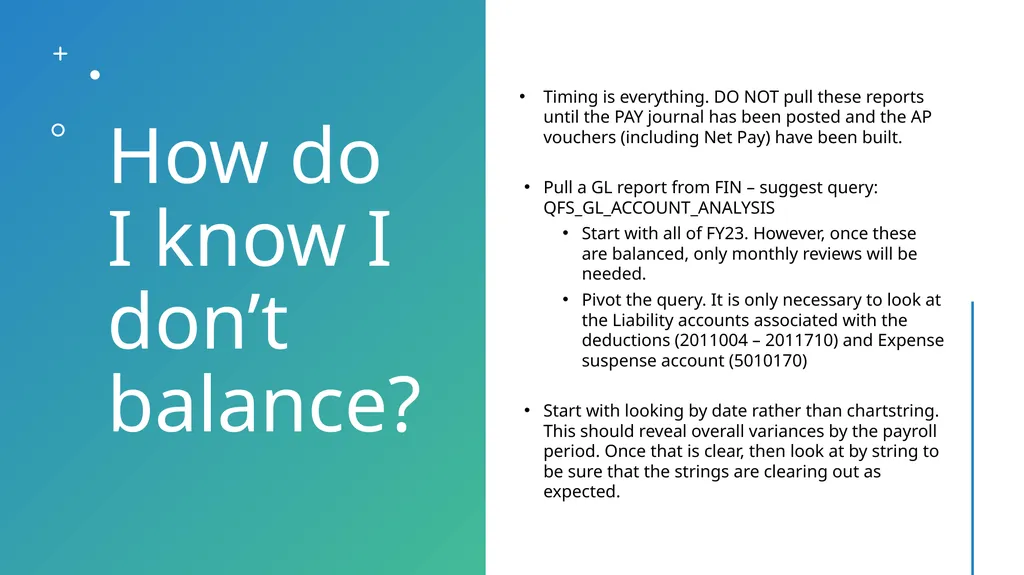
Timing is everything. DO NOT pull these reports until the PAY journal has been posted and the AP vouchers (including Net Pay) have been built.
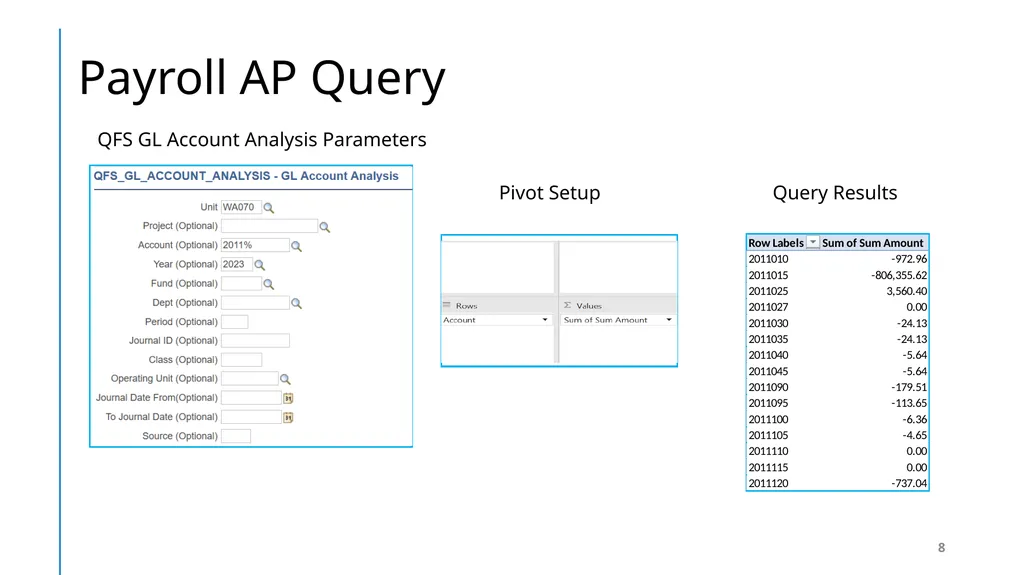
Pull a GL report from FIN – suggest query: QFS_GL_ACCOUNT_ANALYSIS
Start with all of FY23. However, once these are balanced, only monthly reviews will be needed.
Pivot the query. It is only necessary to look at the Liability accounts associated with the deductions (2011004 – 2011710) and Expense suspense account (5010170)
Start with looking by date rather than chartstring. This should reveal overall variances by the payroll period. Once that is clear, then look at by string to be sure that the strings are clearing out as expected. How do I know I don’t balance? 7<br>
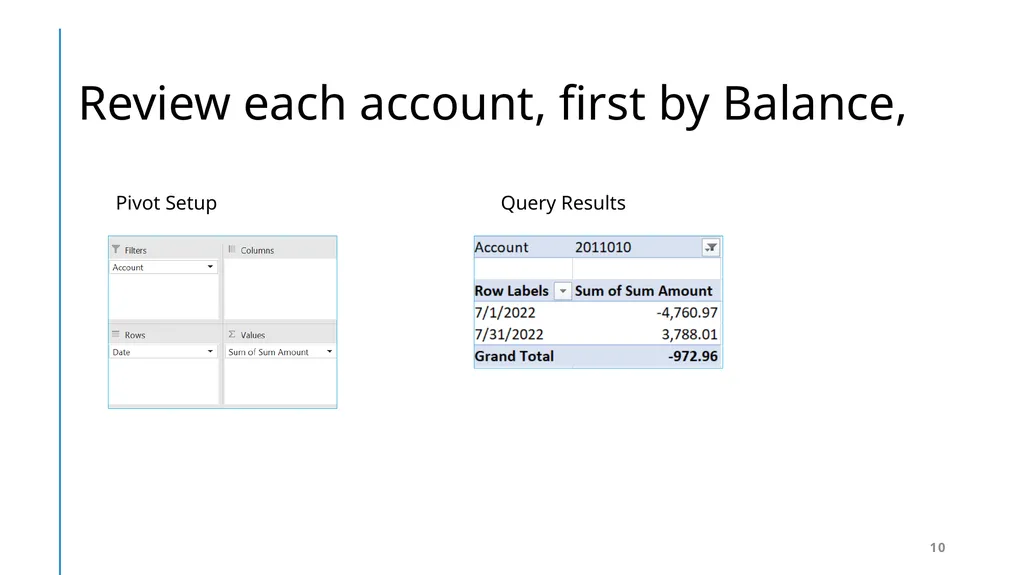
Query Results Pivot Setup Review each account, first by Balance, 10<br>
11
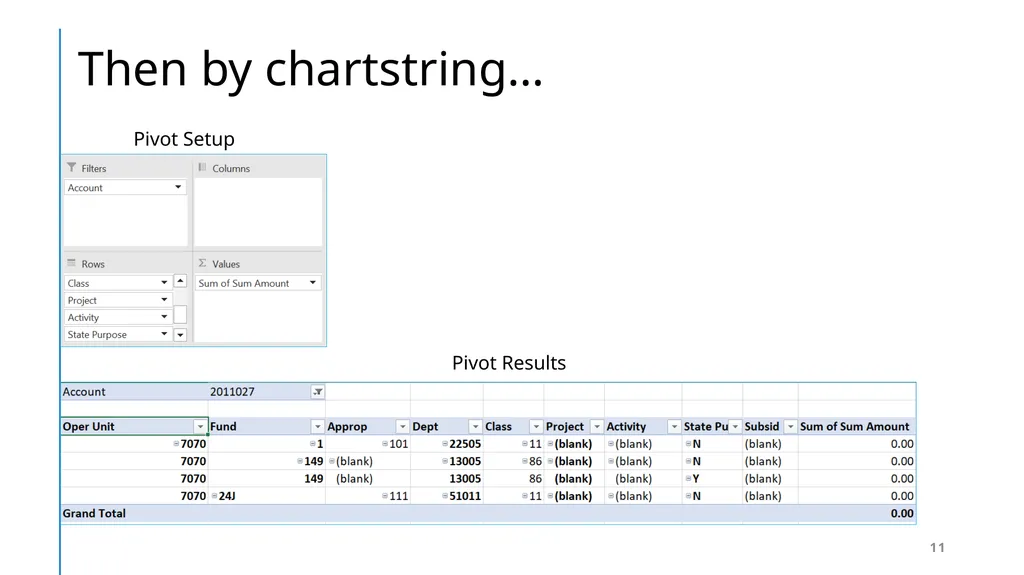
Pivot Results Pivot Setup Then by chartstring… 11<br>
12
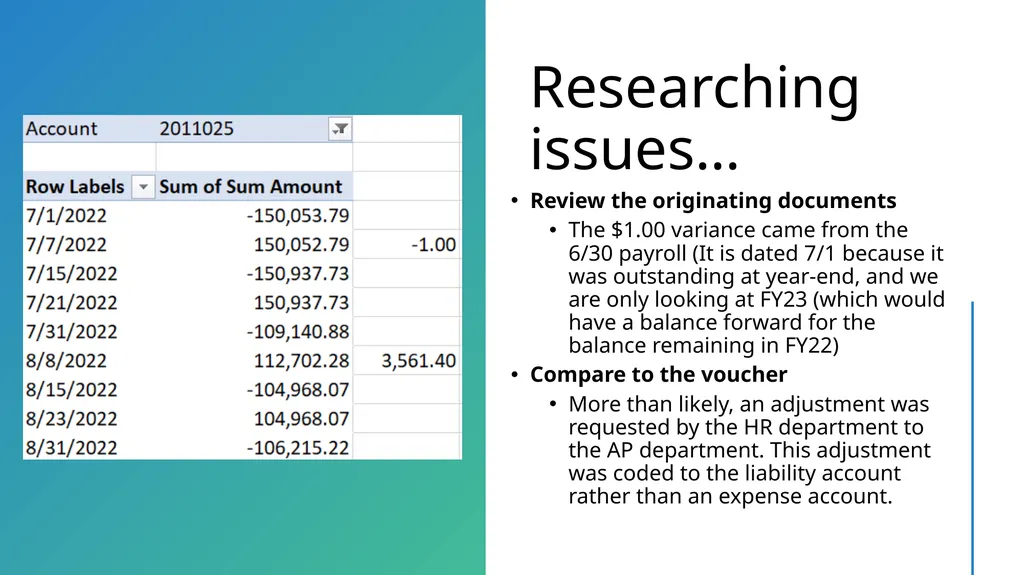
Review the originating documents
The $1.00 variance came from the 6/30 payroll (It is dated 7/1 because it was outstanding at year-end, and we are only looking at FY23 (which would have a balance forward for the balance remaining in FY22)
Compare to the voucher
More than likely, an adjustment was requested by the HR department to the AP department. This adjustment was coded to the liability account rather than an expense account. Researching issues… 12<br>
13
how does Reversed payments and manual payments effect my Net Pay voucher and GL Accounts? 13<br>
14
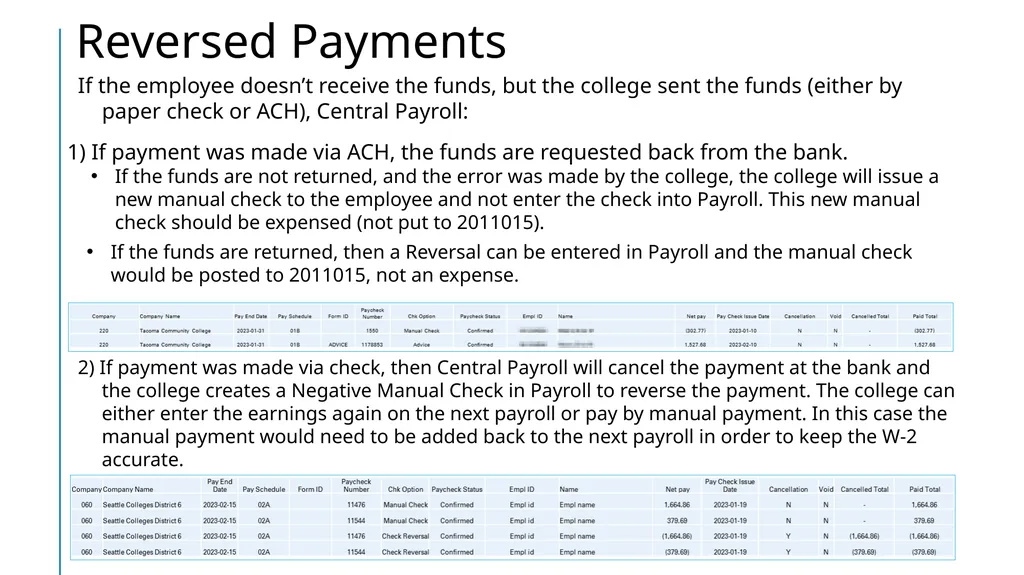
2) If payment was made via check, then Central Payroll will cancel the payment at the bank and the college creates a Negative Manual Check in Payroll to reverse the payment. The college can either enter the earnings again on the next payroll or pay by manual payment. In this case the manual payment would need to be added back to the next payroll in order to keep the W-2 accurate. 1) If payment was made via ACH, the funds are requested back from the bank.
If the funds are not returned, and the error was made by the college, the college will issue a new manual check to the employee and not enter the check into Payroll. This new manual check should be expensed (not put to 2011015).
If the funds are returned, then a Reversal can be entered in Payroll and the manual check would be posted to 2011015, not an expense. If the employee doesn’t receive the funds, but the college sent the funds (either by paper check or ACH), Central Payroll: Reversed Payments 14<br>
15
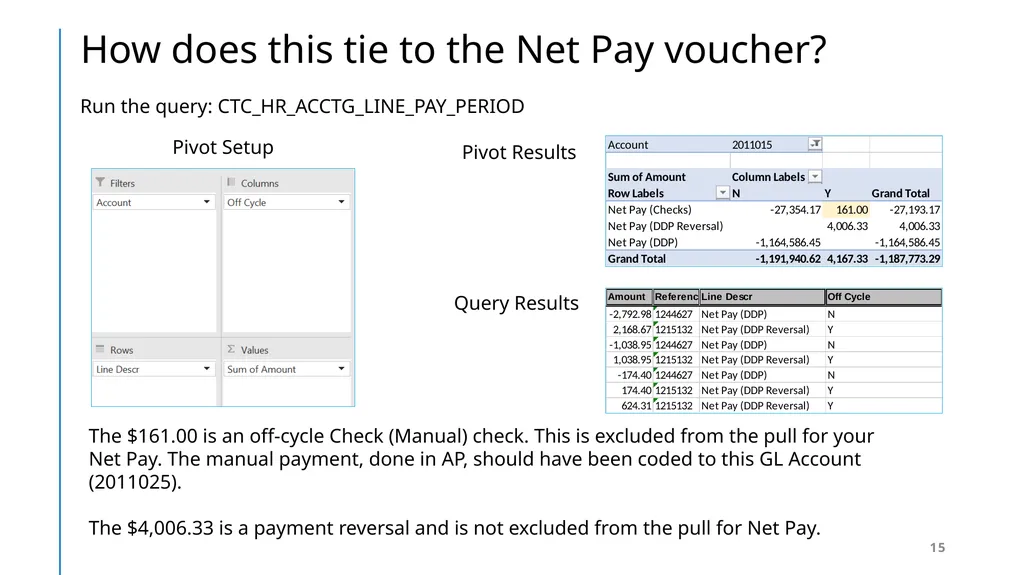
The $161.00 is an off-cycle Check (Manual) check. This is excluded from the pull for your Net Pay. The manual payment, done in AP, should have been coded to this GL Account (2011025).
The $4,006.33 is a payment reversal and is not excluded from the pull for Net Pay. Query Results Pivot Results Pivot Setup Run the query: CTC_HR_ACCTG_LINE_PAY_PERIOD How does this tie to the Net Pay voucher? 15<br>
16
Please don’t delete these lines!
This happens when the Payroll department process payments to employees that have been terminated from the business unit. If the Payroll department does not follow the correct process, its results in incorrect detail entries. These expenses/liabilities still belong to the college. However, it will be necessary to update the journal and the corresponding AP vouchers with the correct codes.
Issue: If the error or correction has a state fund, this create a discrepancy in the college VPA. If possible, correct the transaction to make the string postable without changing the state fund. Then correct the transaction in a second journal so the changes to VPA will be picked up in the VPA monthly report. Otherwise, the college will need to manually adjust the monthly VPA report.
To determine who the employee is, run the HCM query: HR Accounting Line by Pay Period, filter on the operating unit that is not correct. Then, ask payroll for the correct chartfields for the employee in question. Payroll can find it by looking at the combo code(s) in the employee’s file. Why does the PAY journal have entries for other operating units? 16<br>
17
Whenever an employee is paid without a valid combo code (which is not a requirement in the HCM pillar to have to pay an employee), the system will assign this suspense account and string. Colleges should review these transactions each pay period and make all the necessary adjustments. Query Results Pivot Results Why do amounts end up in the Payroll Suspense account? 17<br>
18
Make sure to go back to the employee’s job record and add a valid combo code. The adjusting journal must use the Source Type of “PTR” to be collected at year-end for reconciliation of reports being sent to SAO from the HCM pillar. This account is a “benefit” expense and needs to be reclassed to the appropriate salary account. There should be associated Staff Month value in the Stat field. How do I clean these up? 18<br>
19
If you need assistance, please create a ticket for the accounting department 19<br>