
Prevention Data Collection Form VAdata: Virginia’s
TF
Published · 33 slides · 0 views
1 / 1
Description
Prevention Data Collection Form VAdata: Virginias Sexual and Domestic Violence Data Collection System Purpose of the Prevention Data Collection Form Sexual and Domestic Violence Agencies (SDVAs) in Virginia are implementing a variety of
Related Topics
Share
Embed code
Download this presentation From Below
"Prevention Data Collection Form VAdata: Virginia’s" is the property of its rightful owner. Permission is granted to download and print the materials on this website for personal, non-commercial use only, and to display it on your personal computer provided you do not modify the materials and that you retain all copyright notices contained in the materials. By downloading content from our website, you accept the terms of this agreement.
Presentation Transcript
01
Prevention Data Collection Form VAdata: Virginia’s Sexual and Domestic Violence Data Collection System<br>
02
Purpose of the Prevention Data Collection Form Sexual and Domestic Violence Agencies (SDVAs) in Virginia are implementing a variety of strategies to prevent sexual and intimate partner violence.
Prior to the development of the Prevention Form, we had few mechanisms for capturing data about prevention activities taking place across the Commonwealth. Many SDVAs used the Community Engagement form, which was built to capture community outreach and public awareness events. While community engagement data is valuable, this form was never able to fully capture primary prevention data.<br>
Prior to the development of the Prevention Form, we had few mechanisms for capturing data about prevention activities taking place across the Commonwealth. Many SDVAs used the Community Engagement form, which was built to capture community outreach and public awareness events. While community engagement data is valuable, this form was never able to fully capture primary prevention data.<br>
03
Purpose of the Prevention Data Collection Form Through developing the Prevention Form, we hope to tell a more meaningful story about the robust prevention strategies taking place across Virginia.
The Action Alliance plans to use the data collected from the Prevention Form to:
Provide aggregate data to SDVAs, partners, and the public in general about all of the prevention work taking place in Virginia
Provide training and technical assistance to SDVAs in order to expand capacity for prevention work
Advocate on behalf of SDVAs for additional funding for prevention work<br>
The Action Alliance plans to use the data collected from the Prevention Form to:
Provide aggregate data to SDVAs, partners, and the public in general about all of the prevention work taking place in Virginia
Provide training and technical assistance to SDVAs in order to expand capacity for prevention work
Advocate on behalf of SDVAs for additional funding for prevention work<br>
04
Terms and Definitions For folks who may be new to prevention work or less familiar with some of the language used in prevention, we’ve included a few brief terms and definitions in this module.<br>
05
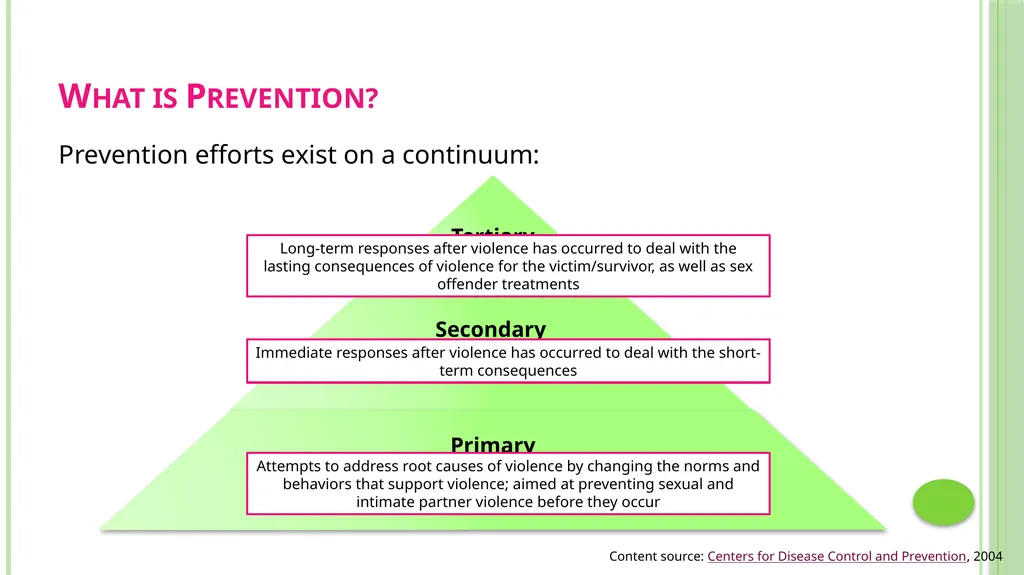
What is Prevention? Prevention efforts exist on a continuum: Content source: Centers for Disease Control and Prevention, 2004<br>
06
What is a Prevention Strategy? Your prevention program is likely made up of various activities, or strategies, that are aimed at preventing sexual and intimate partner violence. When we mention the prevention strategy on the Prevention Form, we are referring to each specific activity that makes up your prevention program.
You will enter a separate Prevention Form for each prevention strategy.<br>
You will enter a separate Prevention Form for each prevention strategy.<br>
07
What are Risk and Protective Factors? Protective factors protect against or lessen the impact of trauma. Protective factors work together to counteract the negative effects of risk factors. Protective factors also make it less likely that a person will perpetrate violence. They help build resilience in children, teens, and adults.
Risk factors are factors associated with a greater likelihood of violence perpetration. Risk factors aren’t necessarily causative; they are contributing factors. Not everyone who is identified as “at risk” becomes a perpetrator of violence.<br>
Risk factors are factors associated with a greater likelihood of violence perpetration. Risk factors aren’t necessarily causative; they are contributing factors. Not everyone who is identified as “at risk” becomes a perpetrator of violence.<br>
08
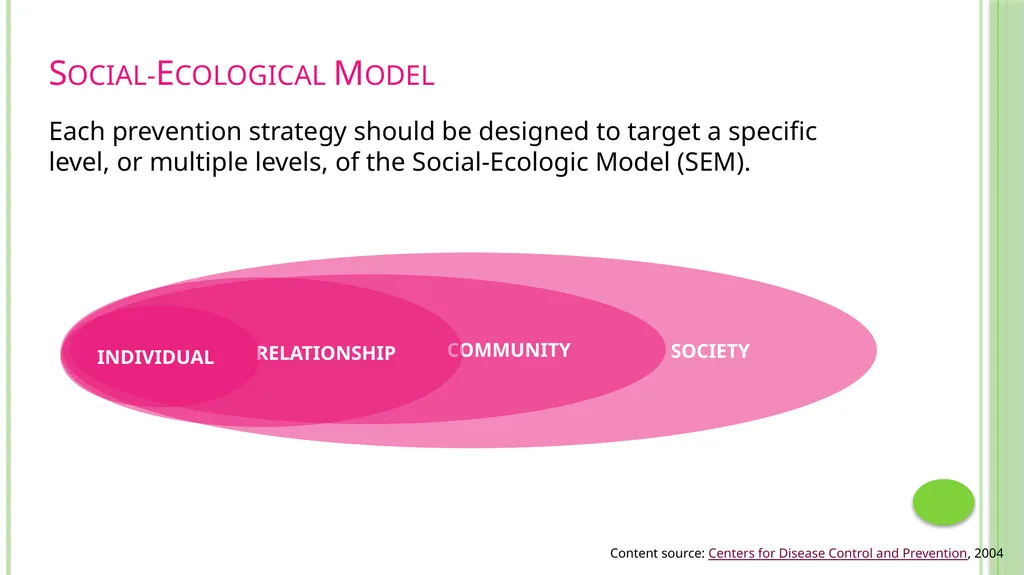
Social-Ecological Model Each prevention strategy should be designed to target a specific level, or multiple levels, of the Social-Ecologic Model (SEM). Content source: Centers for Disease Control and Prevention, 2004<br>
09
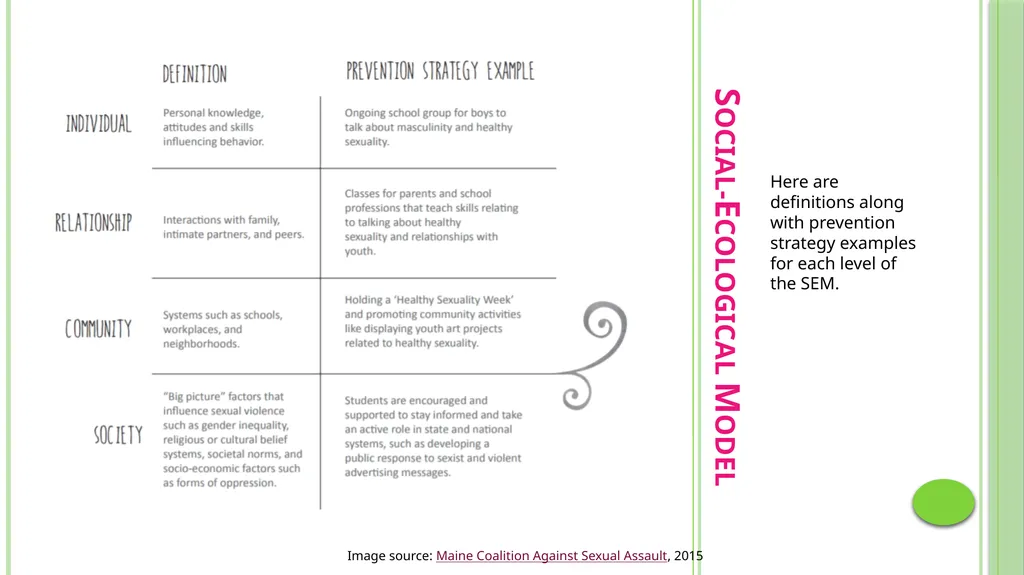
Social-Ecological Model Here are definitions along with prevention strategy examples for each level of the SEM. Image source: Maine Coalition Against Sexual Assault, 2015<br>
10
Accessing the Prevention Form Unlike the Advocacy, Hotline, and Community Engagement Forms, the Prevention Form must be “turned on” by Action Alliance staff for members of your agency to use the form.<br>
11
Accessing the Prevention Form If your agency has access to VAdata, you can request access to the Prevention Form!
Before requesting access, at least one staff member from your agency will need to watch the Prevention Form webinar. To access the webinar, visit: https://zoom.us/recording/share/aIryqmcaefFq37z9dhg2vKufTK2T7IODStGhTPM5bEY.
After you’ve registered for and watched the webinar, an Action Alliance staff member will grant access to the Prevention Form in VAdata.<br>
Before requesting access, at least one staff member from your agency will need to watch the Prevention Form webinar. To access the webinar, visit: https://zoom.us/recording/share/aIryqmcaefFq37z9dhg2vKufTK2T7IODStGhTPM5bEY.
After you’ve registered for and watched the webinar, an Action Alliance staff member will grant access to the Prevention Form in VAdata.<br>
12
Components of the Prevention Form The Prevention Form is brief, consisting of just 17 total questions. The Prevention Form collects the following types of information:
Information to identify the prevention strategy
Details about the prevention strategy
Information about participants<br>
Information to identify the prevention strategy
Details about the prevention strategy
Information about participants<br>
13
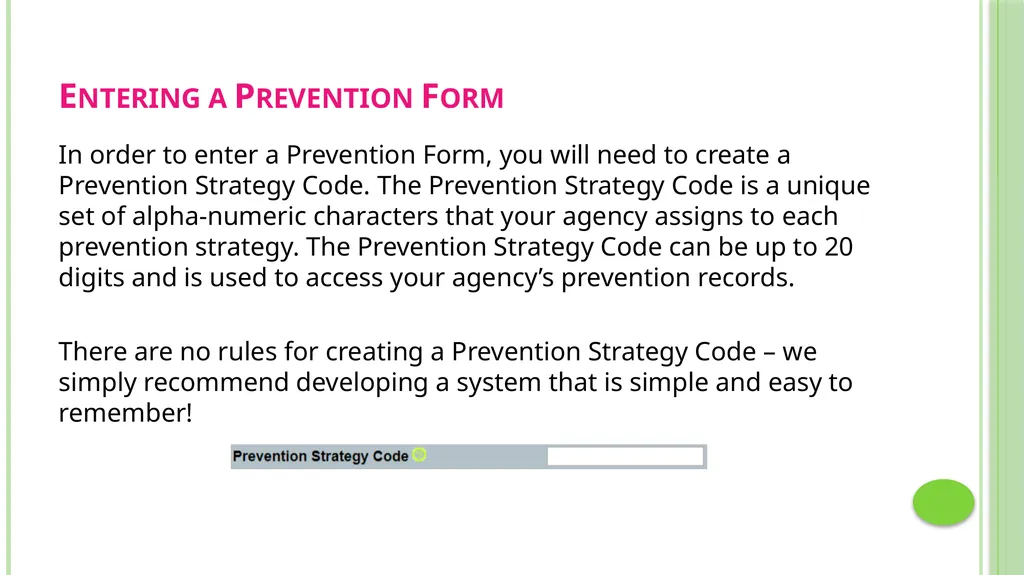
Entering a Prevention Form In order to enter a Prevention Form, you will need to create a Prevention Strategy Code. The Prevention Strategy Code is a unique set of alpha-numeric characters that your agency assigns to each prevention strategy. The Prevention Strategy Code can be up to 20 digits and is used to access your agency’s prevention records.
There are no rules for creating a Prevention Strategy Code – we simply recommend developing a system that is simple and easy to remember!<br>
There are no rules for creating a Prevention Strategy Code – we simply recommend developing a system that is simple and easy to remember!<br>
14
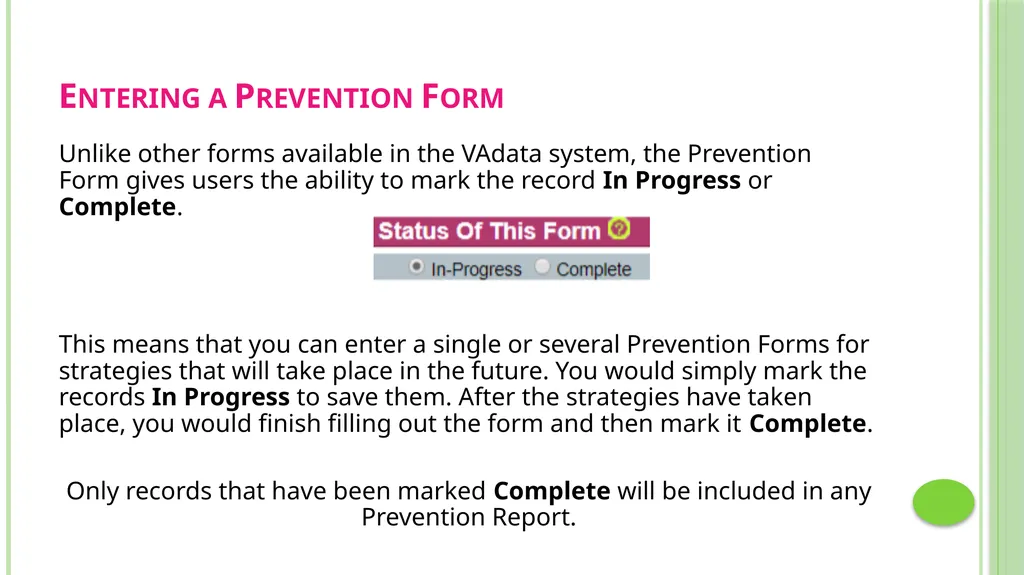
Entering a Prevention Form Unlike other forms available in the VAdata system, the Prevention Form gives users the ability to mark the record In Progress or Complete.
This means that you can enter a single or several Prevention Forms for strategies that will take place in the future. You would simply mark the records In Progress to save them. After the strategies have taken place, you would finish filling out the form and then mark it Complete.
Only records that have been marked Complete will be included in any Prevention Report.<br>
This means that you can enter a single or several Prevention Forms for strategies that will take place in the future. You would simply mark the records In Progress to save them. After the strategies have taken place, you would finish filling out the form and then mark it Complete.
Only records that have been marked Complete will be included in any Prevention Report.<br>
15
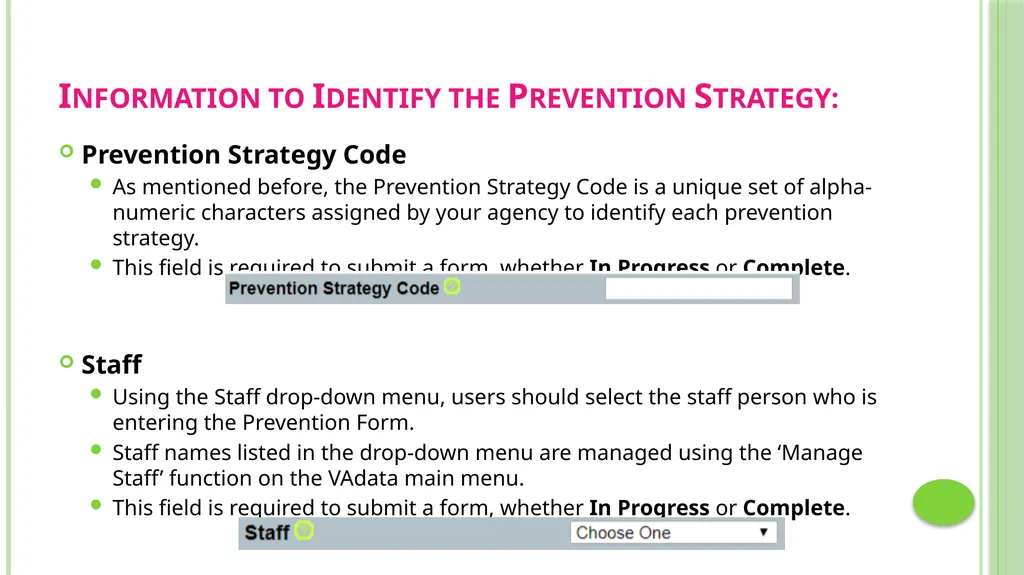
Information to Identify the Prevention Strategy: Prevention Strategy Code
As mentioned before, the Prevention Strategy Code is a unique set of alpha-numeric characters assigned by your agency to identify each prevention strategy.
This field is required to submit a form, whether In Progress or Complete.
Staff
Using the Staff drop-down menu, users should select the staff person who is entering the Prevention Form.
Staff names listed in the drop-down menu are managed using the ‘Manage Staff’ function on the VAdata main menu.
This field is required to submit a form, whether In Progress or Complete.<br>
As mentioned before, the Prevention Strategy Code is a unique set of alpha-numeric characters assigned by your agency to identify each prevention strategy.
This field is required to submit a form, whether In Progress or Complete.
Staff
Using the Staff drop-down menu, users should select the staff person who is entering the Prevention Form.
Staff names listed in the drop-down menu are managed using the ‘Manage Staff’ function on the VAdata main menu.
This field is required to submit a form, whether In Progress or Complete.<br>
16
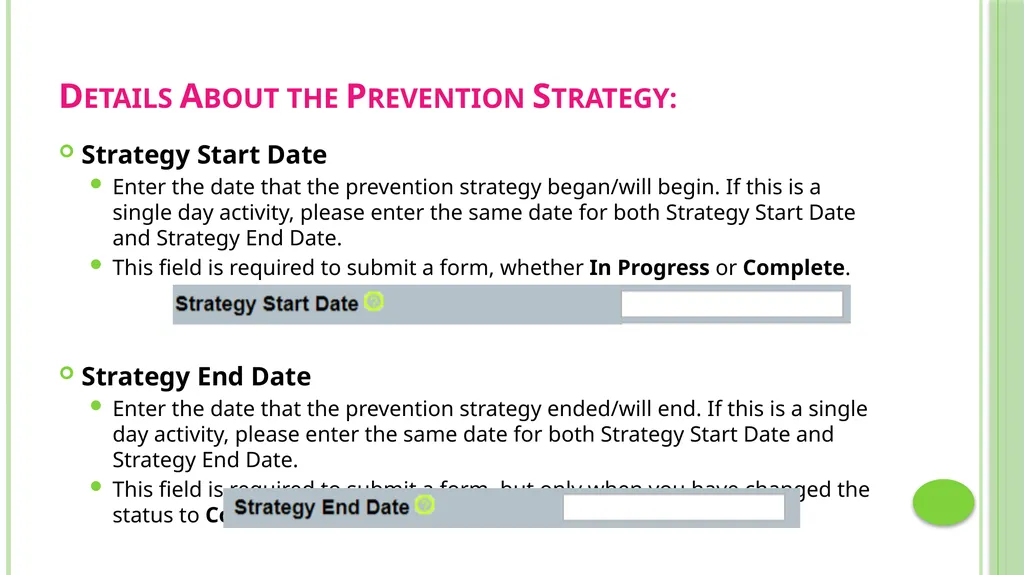
Details About the Prevention Strategy: Strategy Start Date
Enter the date that the prevention strategy began/will begin. If this is a single day activity, please enter the same date for both Strategy Start Date and Strategy End Date.
This field is required to submit a form, whether In Progress or Complete.
Strategy End Date
Enter the date that the prevention strategy ended/will end. If this is a single day activity, please enter the same date for both Strategy Start Date and Strategy End Date.
This field is required to submit a form, but only when you have changed the status to Complete.<br>
Enter the date that the prevention strategy began/will begin. If this is a single day activity, please enter the same date for both Strategy Start Date and Strategy End Date.
This field is required to submit a form, whether In Progress or Complete.
Strategy End Date
Enter the date that the prevention strategy ended/will end. If this is a single day activity, please enter the same date for both Strategy Start Date and Strategy End Date.
This field is required to submit a form, but only when you have changed the status to Complete.<br>
17
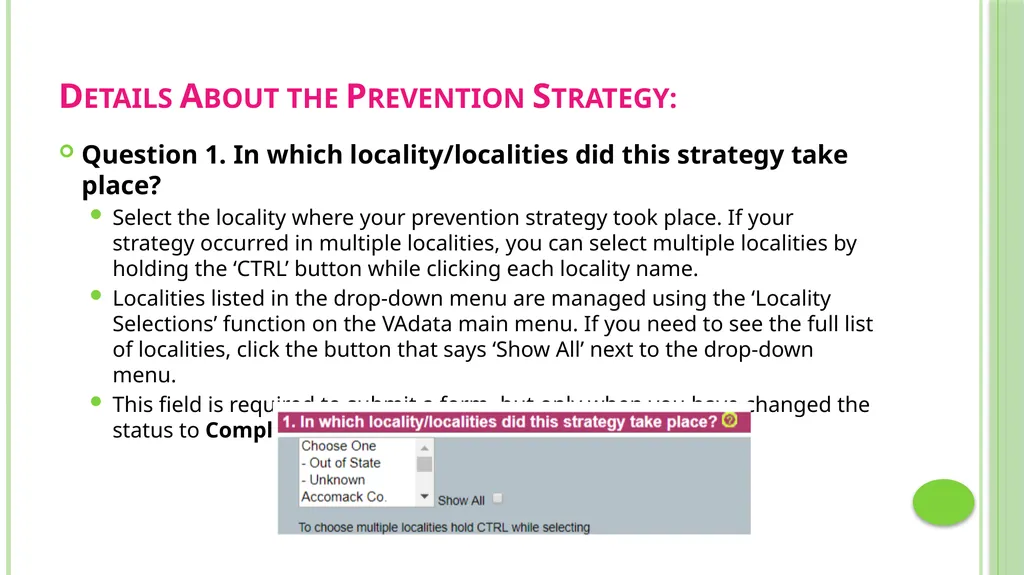
Details About the Prevention Strategy: Question 1. In which locality/localities did this strategy take place?
Select the locality where your prevention strategy took place. If your strategy occurred in multiple localities, you can select multiple localities by holding the ‘CTRL’ button while clicking each locality name.
Localities listed in the drop-down menu are managed using the ‘Locality Selections’ function on the VAdata main menu. If you need to see the full list of localities, click the button that says ‘Show All’ next to the drop-down menu.
This field is required to submit a form, but only when you have changed the status to Complete.<br>
Select the locality where your prevention strategy took place. If your strategy occurred in multiple localities, you can select multiple localities by holding the ‘CTRL’ button while clicking each locality name.
Localities listed in the drop-down menu are managed using the ‘Locality Selections’ function on the VAdata main menu. If you need to see the full list of localities, click the button that says ‘Show All’ next to the drop-down menu.
This field is required to submit a form, but only when you have changed the status to Complete.<br>
18
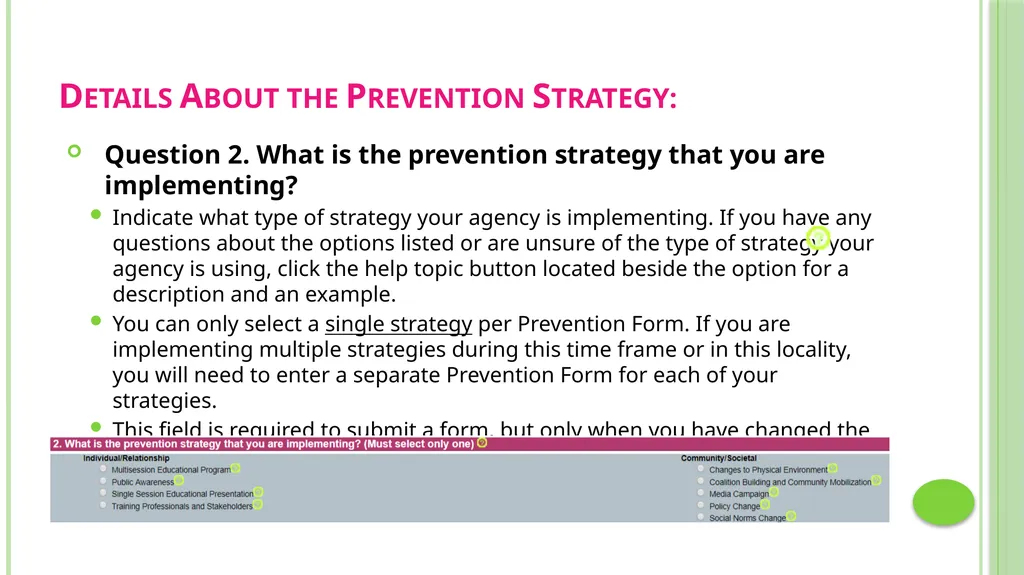
Details About the Prevention Strategy: Question 2. What is the prevention strategy that you are implementing?
Indicate what type of strategy your agency is implementing. If you have any questions about the options listed or are unsure of the type of strategy your agency is using, click the help topic button located beside the option for a description and an example.
You can only select a single strategy per Prevention Form. If you are implementing multiple strategies during this time frame or in this locality, you will need to enter a separate Prevention Form for each of your strategies.
This field is required to submit a form, but only when you have changed the status to Complete.<br>
Indicate what type of strategy your agency is implementing. If you have any questions about the options listed or are unsure of the type of strategy your agency is using, click the help topic button located beside the option for a description and an example.
You can only select a single strategy per Prevention Form. If you are implementing multiple strategies during this time frame or in this locality, you will need to enter a separate Prevention Form for each of your strategies.
This field is required to submit a form, but only when you have changed the status to Complete.<br>
19
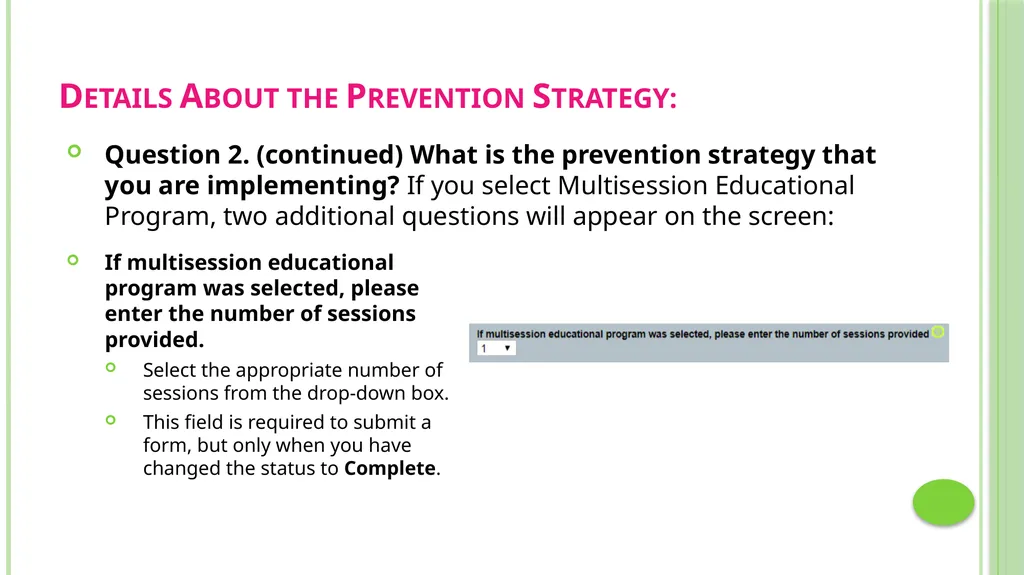
Details About the Prevention Strategy: Question 2. (continued) What is the prevention strategy that you are implementing? If you select Multisession Educational Program, two additional questions will appear on the screen: If multisession educational program was selected, please enter the number of sessions provided.
Select the appropriate number of sessions from the drop-down box.
This field is required to submit a form, but only when you have changed the status to Complete.<br>
Select the appropriate number of sessions from the drop-down box.
This field is required to submit a form, but only when you have changed the status to Complete.<br>
20
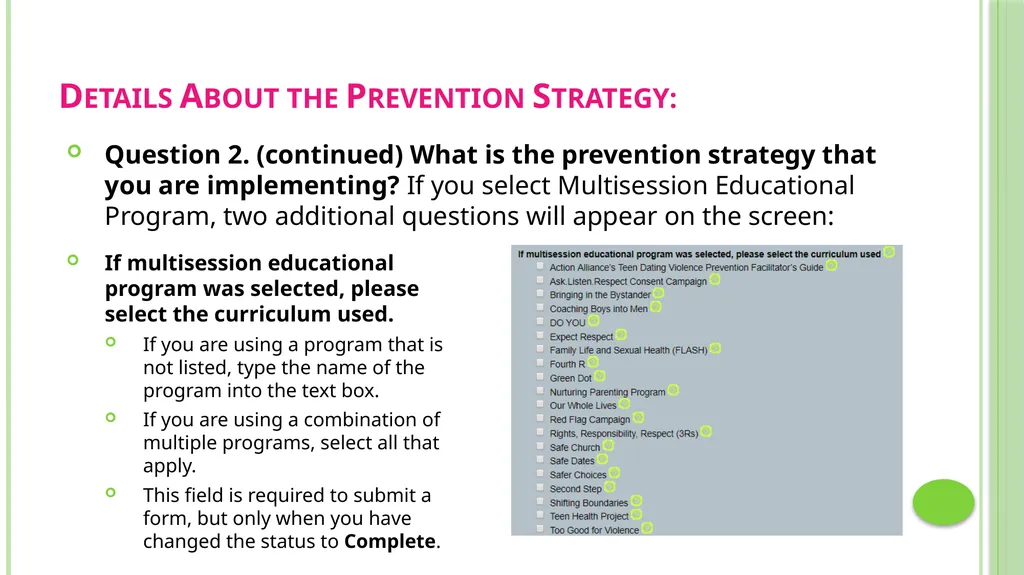
Details About the Prevention Strategy: Question 2. (continued) What is the prevention strategy that you are implementing? If you select Multisession Educational Program, two additional questions will appear on the screen: If multisession educational program was selected, please select the curriculum used.
If you are using a program that is not listed, type the name of the program into the text box.
If you are using a combination of multiple programs, select all that apply.
This field is required to submit a form, but only when you have changed the status to Complete.<br>
If you are using a program that is not listed, type the name of the program into the text box.
If you are using a combination of multiple programs, select all that apply.
This field is required to submit a form, but only when you have changed the status to Complete.<br>
21
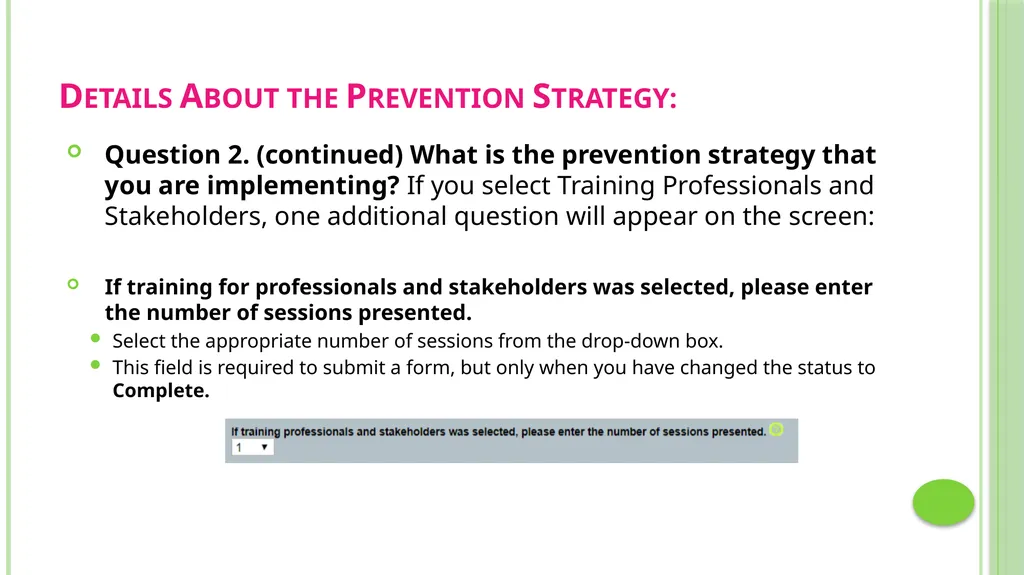
Details About the Prevention Strategy: Question 2. (continued) What is the prevention strategy that you are implementing? If you select Training Professionals and Stakeholders, one additional question will appear on the screen:
If training for professionals and stakeholders was selected, please enter the number of sessions presented.
Select the appropriate number of sessions from the drop-down box.
This field is required to submit a form, but only when you have changed the status to Complete.<br>
If training for professionals and stakeholders was selected, please enter the number of sessions presented.
Select the appropriate number of sessions from the drop-down box.
This field is required to submit a form, but only when you have changed the status to Complete.<br>
22
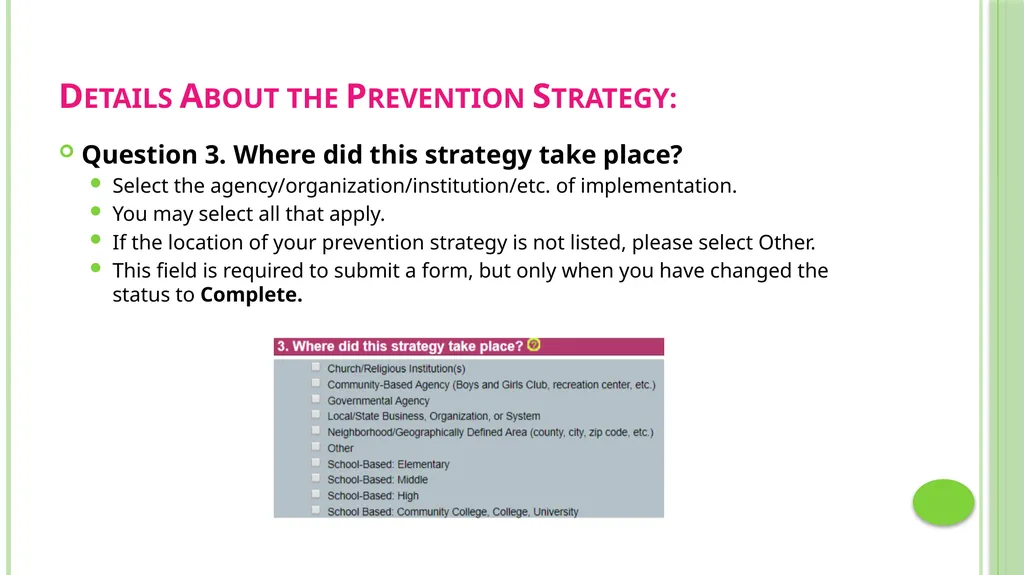
Details About the Prevention Strategy: Question 3. Where did this strategy take place?
Select the agency/organization/institution/etc. of implementation.
You may select all that apply.
If the location of your prevention strategy is not listed, please select Other.
This field is required to submit a form, but only when you have changed the status to Complete.<br>
Select the agency/organization/institution/etc. of implementation.
You may select all that apply.
If the location of your prevention strategy is not listed, please select Other.
This field is required to submit a form, but only when you have changed the status to Complete.<br>
23
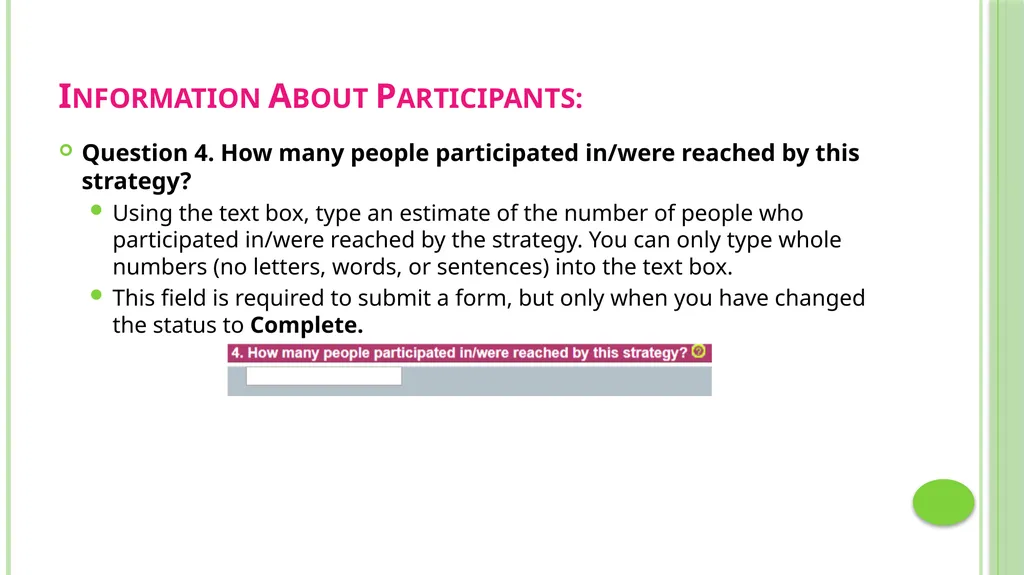
Information About Participants: Question 4. How many people participated in/were reached by this strategy?
Using the text box, type an estimate of the number of people who participated in/were reached by the strategy. You can only type whole numbers (no letters, words, or sentences) into the text box.
This field is required to submit a form, but only when you have changed the status to Complete.<br>
Using the text box, type an estimate of the number of people who participated in/were reached by the strategy. You can only type whole numbers (no letters, words, or sentences) into the text box.
This field is required to submit a form, but only when you have changed the status to Complete.<br>
24
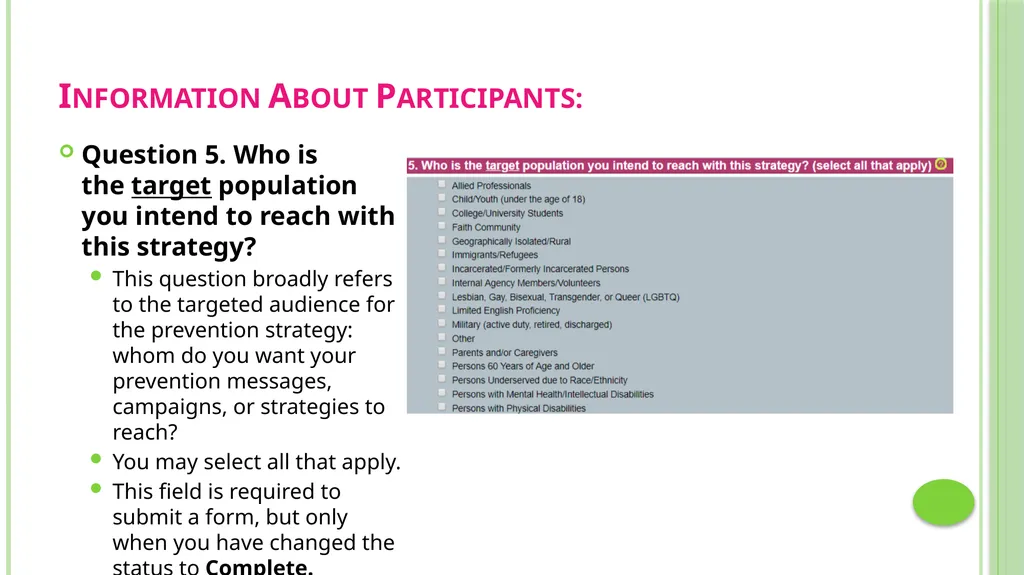
Information About Participants: Question 5. Who is the target population you intend to reach with this strategy?
This question broadly refers to the targeted audience for the prevention strategy: whom do you want your prevention messages, campaigns, or strategies to reach?
You may select all that apply.
This field is required to submit a form, but only when you have changed the status to Complete.<br>
This question broadly refers to the targeted audience for the prevention strategy: whom do you want your prevention messages, campaigns, or strategies to reach?
You may select all that apply.
This field is required to submit a form, but only when you have changed the status to Complete.<br>
25
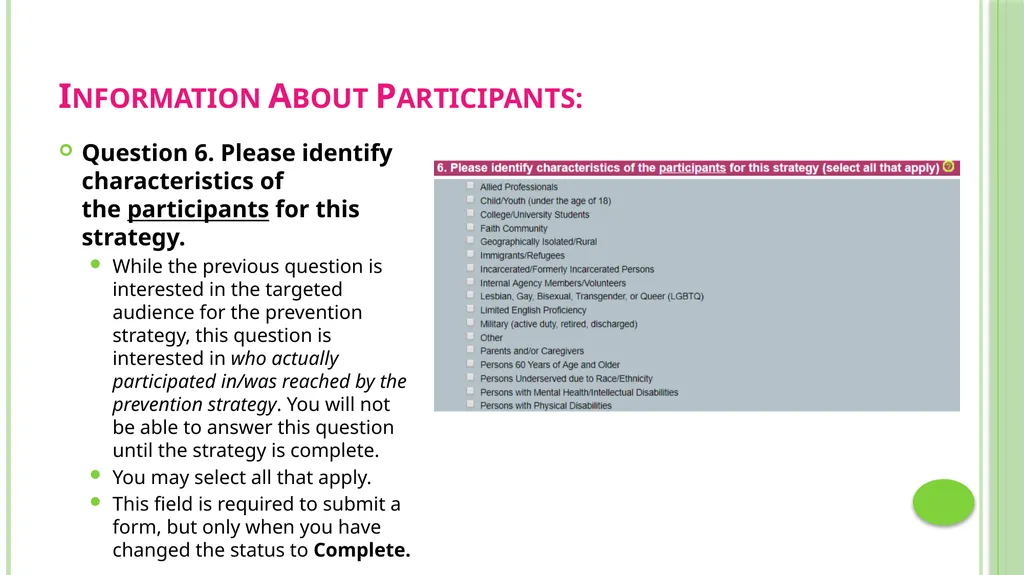
Information About Participants: Question 6. Please identify characteristics of the participants for this strategy.
While the previous question is interested in the targeted audience for the prevention strategy, this question is interested in who actually participated in/was reached by the prevention strategy. You will not be able to answer this question until the strategy is complete.
You may select all that apply.
This field is required to submit a form, but only when you have changed the status to Complete.<br>
While the previous question is interested in the targeted audience for the prevention strategy, this question is interested in who actually participated in/was reached by the prevention strategy. You will not be able to answer this question until the strategy is complete.
You may select all that apply.
This field is required to submit a form, but only when you have changed the status to Complete.<br>
26
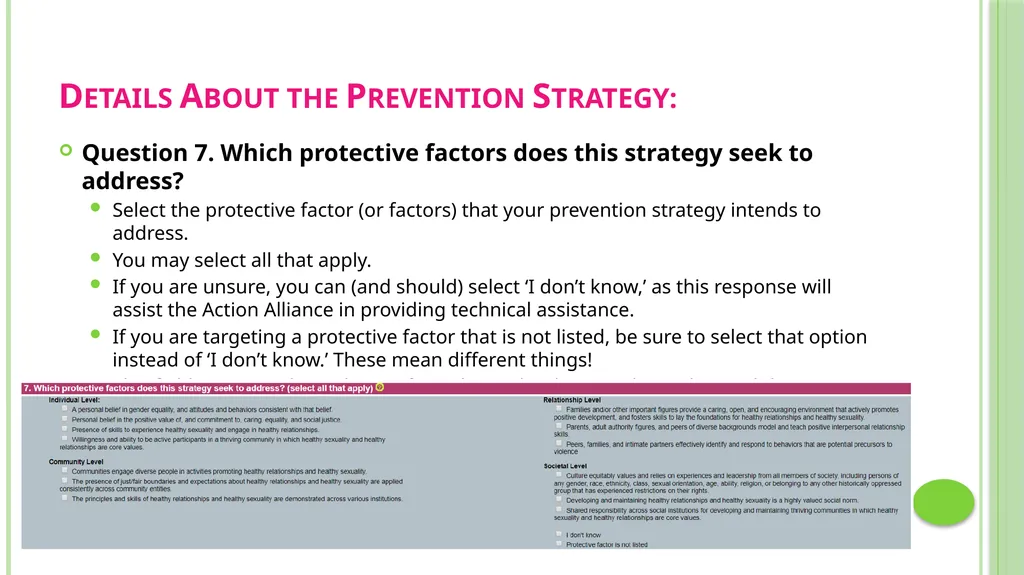
Details About the Prevention Strategy: Question 7. Which protective factors does this strategy seek to address?
Select the protective factor (or factors) that your prevention strategy intends to address.
You may select all that apply.
If you are unsure, you can (and should) select ‘I don’t know,’ as this response will assist the Action Alliance in providing technical assistance.
If you are targeting a protective factor that is not listed, be sure to select that option instead of ‘I don’t know.’ These mean different things!
This field is required to submit a form, but only when you have changed the status to Complete.<br>
Select the protective factor (or factors) that your prevention strategy intends to address.
You may select all that apply.
If you are unsure, you can (and should) select ‘I don’t know,’ as this response will assist the Action Alliance in providing technical assistance.
If you are targeting a protective factor that is not listed, be sure to select that option instead of ‘I don’t know.’ These mean different things!
This field is required to submit a form, but only when you have changed the status to Complete.<br>
27
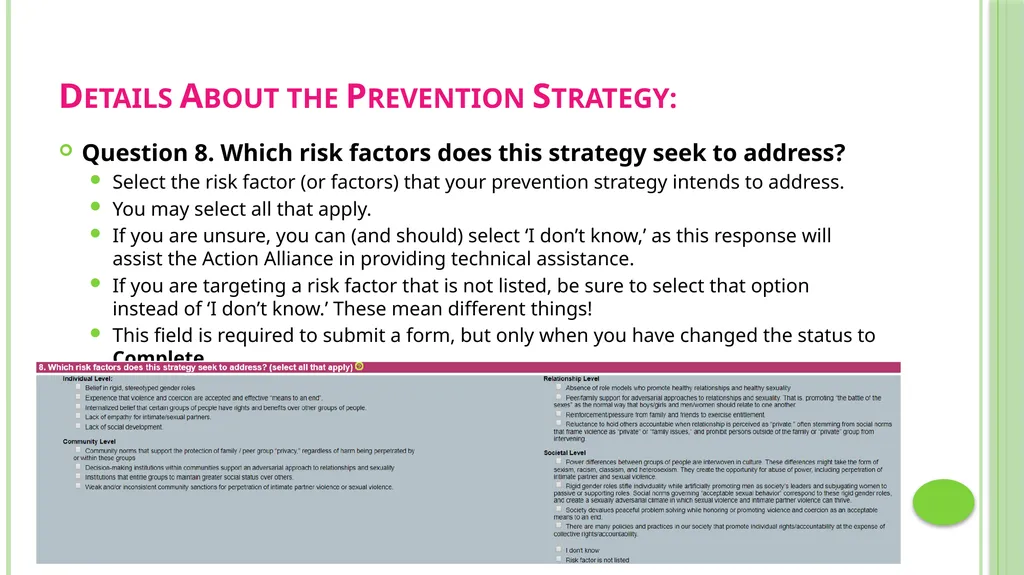
Details About the Prevention Strategy: Question 8. Which risk factors does this strategy seek to address?
Select the risk factor (or factors) that your prevention strategy intends to address.
You may select all that apply.
If you are unsure, you can (and should) select ‘I don’t know,’ as this response will assist the Action Alliance in providing technical assistance.
If you are targeting a risk factor that is not listed, be sure to select that option instead of ‘I don’t know.’ These mean different things!
This field is required to submit a form, but only when you have changed the status to Complete.<br>
Select the risk factor (or factors) that your prevention strategy intends to address.
You may select all that apply.
If you are unsure, you can (and should) select ‘I don’t know,’ as this response will assist the Action Alliance in providing technical assistance.
If you are targeting a risk factor that is not listed, be sure to select that option instead of ‘I don’t know.’ These mean different things!
This field is required to submit a form, but only when you have changed the status to Complete.<br>
28
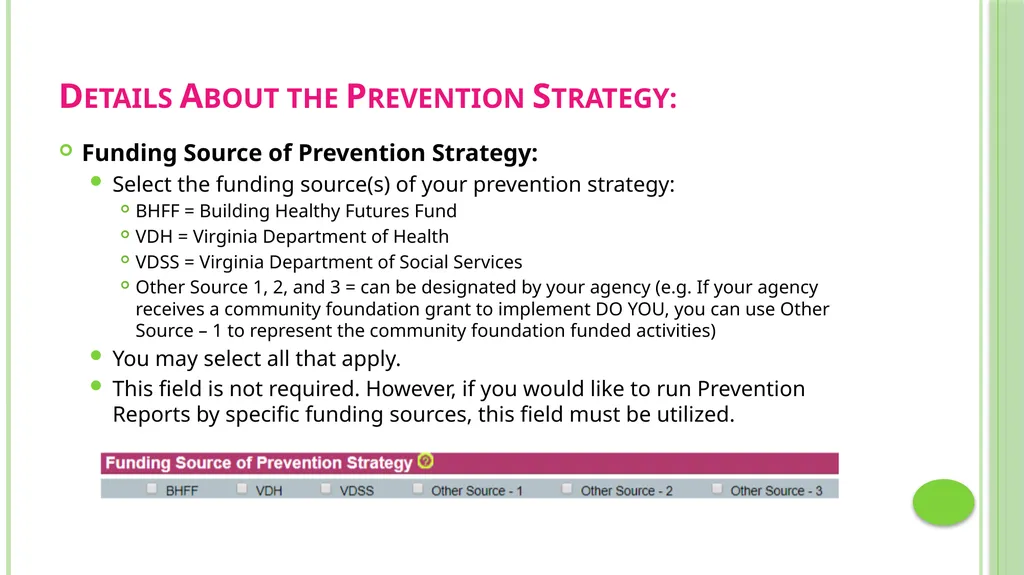
Details About the Prevention Strategy: Funding Source of Prevention Strategy:
Select the funding source(s) of your prevention strategy:
BHFF = Building Healthy Futures Fund
VDH = Virginia Department of Health
VDSS = Virginia Department of Social Services
Other Source 1, 2, and 3 = can be designated by your agency (e.g. If your agency receives a community foundation grant to implement DO YOU, you can use Other Source – 1 to represent the community foundation funded activities)
You may select all that apply.
This field is not required. However, if you would like to run Prevention Reports by specific funding sources, this field must be utilized.<br>
Select the funding source(s) of your prevention strategy:
BHFF = Building Healthy Futures Fund
VDH = Virginia Department of Health
VDSS = Virginia Department of Social Services
Other Source 1, 2, and 3 = can be designated by your agency (e.g. If your agency receives a community foundation grant to implement DO YOU, you can use Other Source – 1 to represent the community foundation funded activities)
You may select all that apply.
This field is not required. However, if you would like to run Prevention Reports by specific funding sources, this field must be utilized.<br>
29
Frequently Asked Questions Here are some of the questions we receive about the Prevention Form from VAdata users. This section will be updated as we collect additional FAQs.<br>
30
Frequently Asked Questions When should I enter a Community Engagement Form instead of a Prevention Form?
If you are doing community outreach and public awareness (like tabling events, awareness building presentations, etc.), these activities are likely better suited for the Community Engagement Form. This could look like a tabling event for a local college’s red zone awareness activities.
If you are doing single-session educational presentations as a component of a comprehensive prevention strategy, these events should likely be captured on the Prevention Form. This could look like a session provided to a community partner from a community coalition. The intention is not only to provide education and awareness, but it is also to build a more lasting relationship in an effort to address community risk and protective factors.
When in doubt, ask yourself: Are these activities designed to address root causes of violence? Are these activities connected to a bigger picture? If you are still unsure, reach out to us at the Action Alliance and we will be happy to talk it through.<br>
If you are doing community outreach and public awareness (like tabling events, awareness building presentations, etc.), these activities are likely better suited for the Community Engagement Form. This could look like a tabling event for a local college’s red zone awareness activities.
If you are doing single-session educational presentations as a component of a comprehensive prevention strategy, these events should likely be captured on the Prevention Form. This could look like a session provided to a community partner from a community coalition. The intention is not only to provide education and awareness, but it is also to build a more lasting relationship in an effort to address community risk and protective factors.
When in doubt, ask yourself: Are these activities designed to address root causes of violence? Are these activities connected to a bigger picture? If you are still unsure, reach out to us at the Action Alliance and we will be happy to talk it through.<br>
31
Frequently Asked Questions Why is special training required to access the Prevention Form?
We think it’s important that agencies receive training surrounding use of the form before entering data. The Prevention Form was designed specifically to better capture prevention activities, which often look very different from advocacy and community engagement services. We want to make sure that agencies understand how the form works and what the numbers in the report mean before significantly changing their current data collection practices.<br>
We think it’s important that agencies receive training surrounding use of the form before entering data. The Prevention Form was designed specifically to better capture prevention activities, which often look very different from advocacy and community engagement services. We want to make sure that agencies understand how the form works and what the numbers in the report mean before significantly changing their current data collection practices.<br>
32
Frequently Asked Questions Where can I print a hard copy of the Prevention Form?
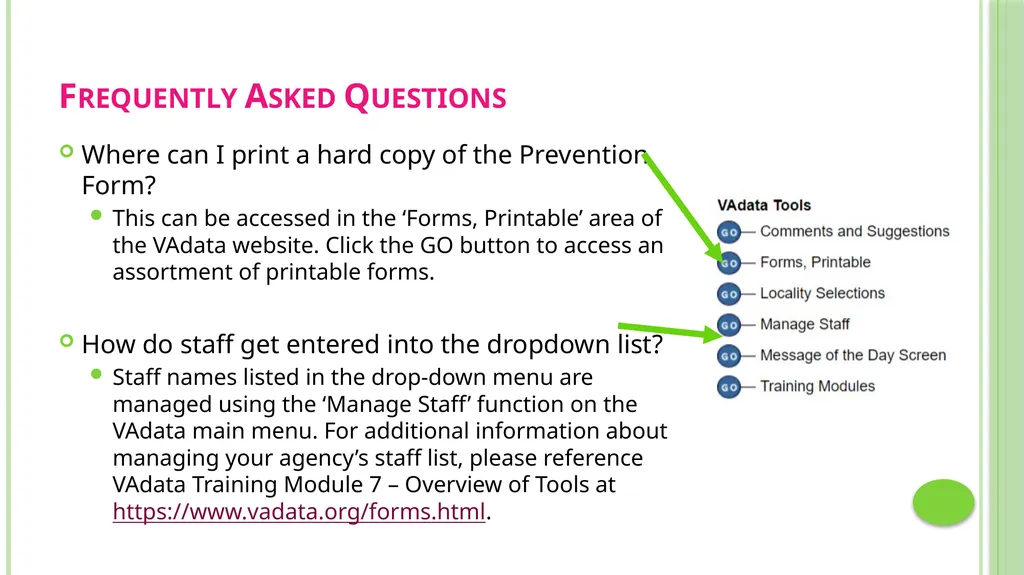
This can be accessed in the ‘Forms, Printable’ area of the VAdata website. Click the GO button to access an assortment of printable forms.
How do staff get entered into the dropdown list?
Staff names listed in the drop-down menu are managed using the ‘Manage Staff’ function on the VAdata main menu. For additional information about managing your agency’s staff list, please reference VAdata Training Module 7 – Overview of Tools at https://www.vadata.org/forms.html.<br>
This can be accessed in the ‘Forms, Printable’ area of the VAdata website. Click the GO button to access an assortment of printable forms.
How do staff get entered into the dropdown list?
Staff names listed in the drop-down menu are managed using the ‘Manage Staff’ function on the VAdata main menu. For additional information about managing your agency’s staff list, please reference VAdata Training Module 7 – Overview of Tools at https://www.vadata.org/forms.html.<br>
33
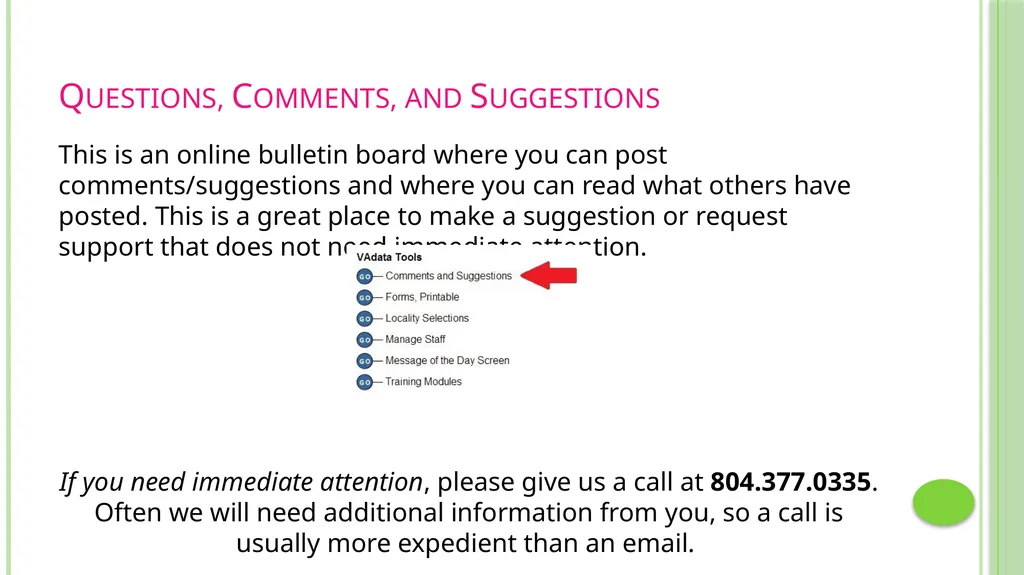
Questions, Comments, and Suggestions This is an online bulletin board where you can post comments/suggestions and where you can read what others have posted. This is a great place to make a suggestion or request support that does not need immediate attention.
If you need immediate attention, please give us a call at 804.377.0335. Often we will need additional information from you, so a call is usually more expedient than an email.<br>
If you need immediate attention, please give us a call at 804.377.0335. Often we will need additional information from you, so a call is usually more expedient than an email.<br>