
Programing Concept Ken Youssefi/Ping Hsu
LO
Published · 36 slides · 0 views
1 / 1
Description
Programing Concept Ken YoussefiPing Hsu Introduction to Engineering E10 1 ENGR 10 Introduction to Engineering (Part A) Ken YoussefiPing Hsu Introduction to Engineering E10 2 What is Computer Programming ? One thing that you will
Related Topics
Share
Embed code
Download this presentation From Below
"Programing Concept Ken Youssefi/Ping Hsu" is the property of its rightful owner. Permission is granted to download and print the materials on this website for personal, non-commercial use only, and to display it on your personal computer provided you do not modify the materials and that you retain all copyright notices contained in the materials. By downloading content from our website, you accept the terms of this agreement.
Presentation Transcript
01
Programing Concept Ken Youssefi/Ping Hsu Introduction to Engineering – E10 1 ENGR 10
Introduction to Engineering (Part A)<br>
02
Ken Youssefi/Ping Hsu Introduction to Engineering – E10 2 What is Computer Programming ? One thing that you will realize quickly is that a computer is very dumb, but obedient. It does exactly what you tell it to do, which is not always what you wanted.<br>
03
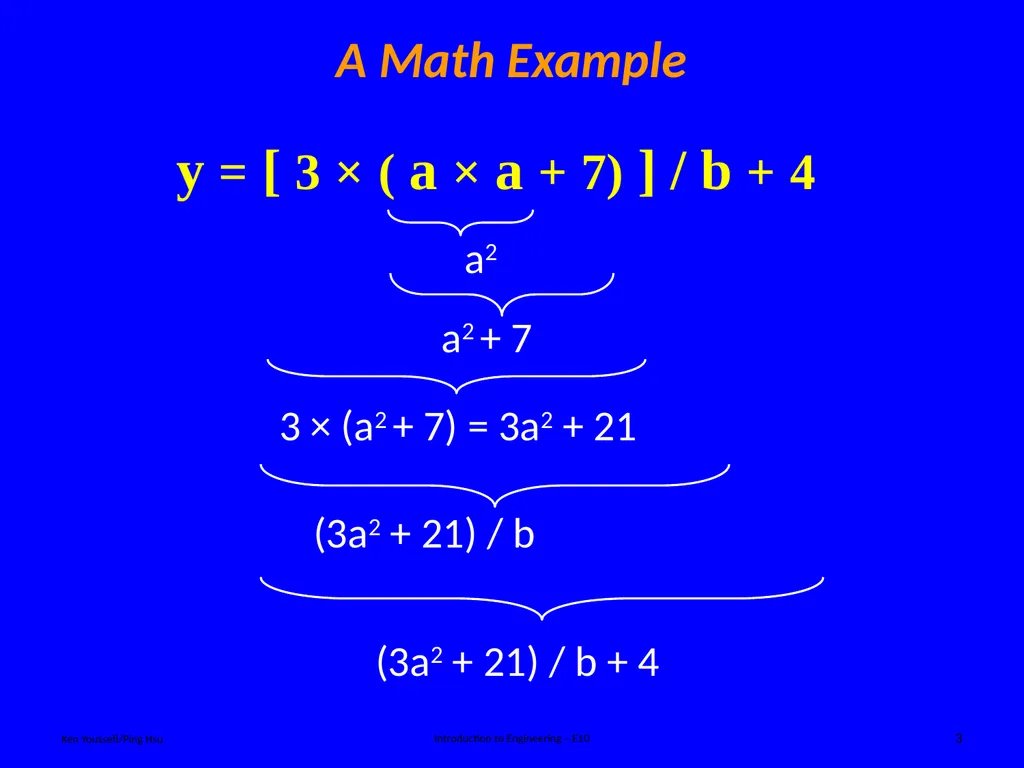
A Math Example Ken Youssefi/Ping Hsu Introduction to Engineering – E10 3 y = [ 3 × ( a × a + 7) ] / b + 4<br>
04
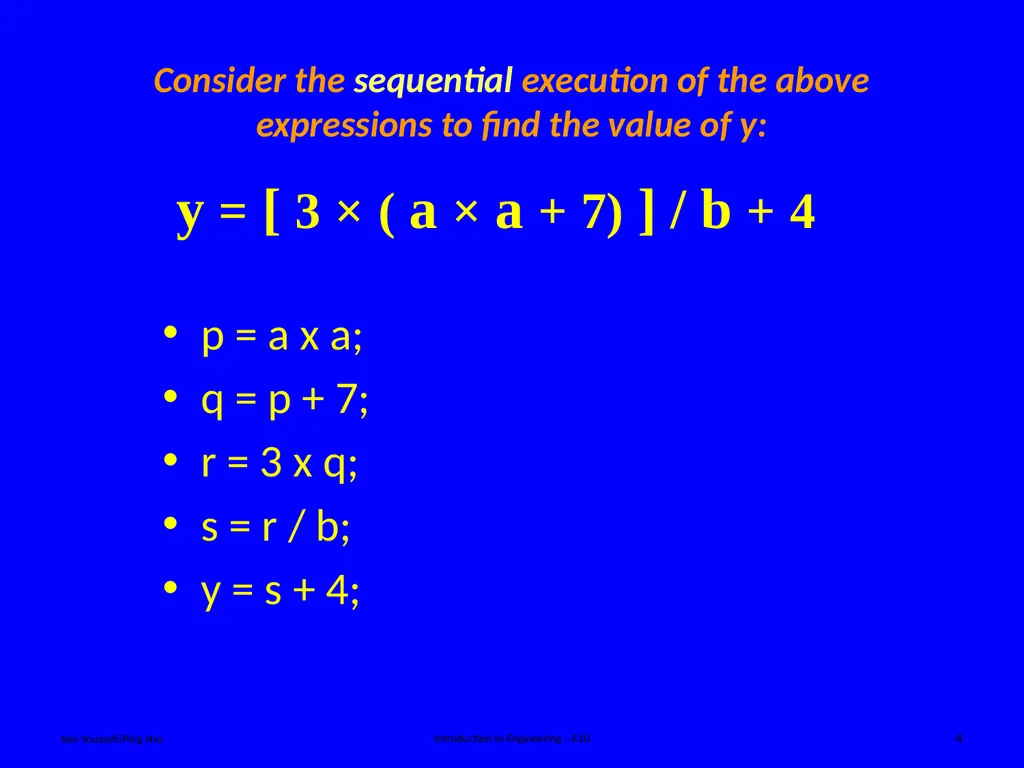
Consider the sequential execution of the above expressions to find the value of y: Ken Youssefi/Ping Hsu Introduction to Engineering – E10 4 p = a x a;
q = p + 7;
r = 3 x q;
s = r / b;
y = s + 4; y = [ 3 × ( a × a + 7) ] / b + 4<br>
q = p + 7;
r = 3 x q;
s = r / b;
y = s + 4; y = [ 3 × ( a × a + 7) ] / b + 4<br>
05
Ken Youssefi/Ping Hsu Introduction to Engineering – E10 5 What is a Programming Language? Computers only understand the binary language. Programming languages were developed to make it easier for us to communicate with computers. There are many different languages. The main choices, used by professional programmers, are: C, C++ and Java.<br>
06
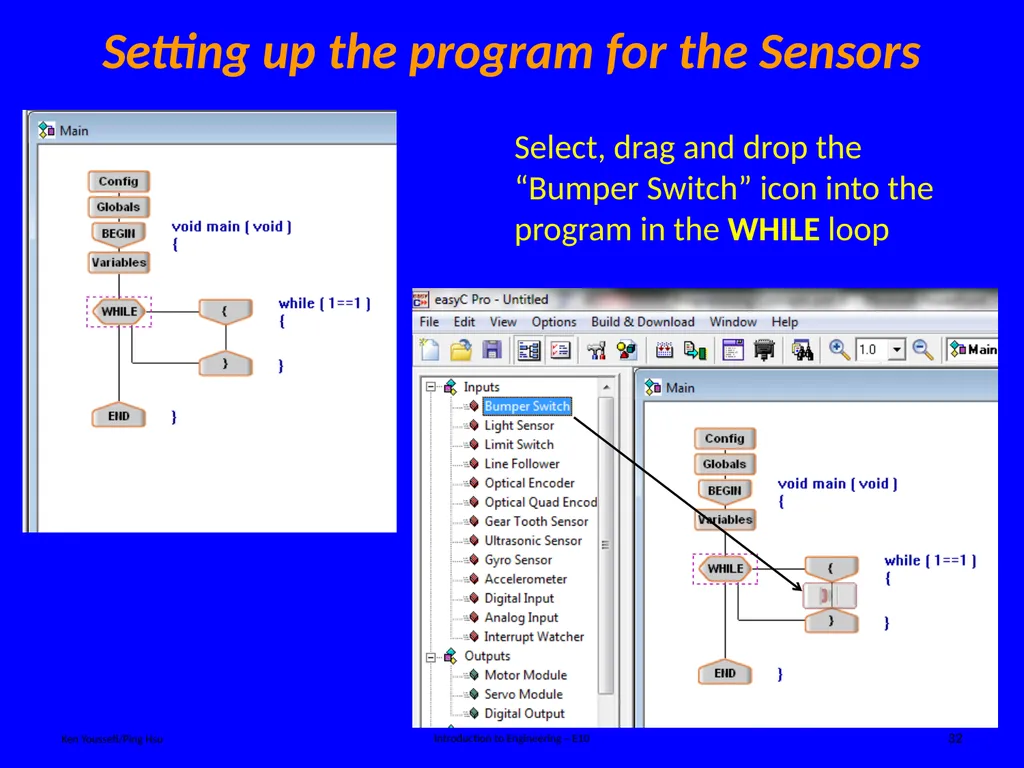
Ken Youssefi/Ping Hsu Introduction to Engineering – E10 6 What is a Programming Language? Object Oriented Programming (OOP) is a modern (more user friendly) programming concept where the programmer creates "objects" like real-life objects, with both properties and abilities. C++, Java are examples of widely used OOPs; MATLAB, Perl, EasyC are examples of special purpose OOPs; there are many more.<br>
07
Ken Youssefi/Ping Hsu Introduction to Engineering – E10 7 Java runs on more than one platform without needing to be recompiled. Java runs inside web browsers, letting programmers create little applications which can run on websites. But Java historically is slower than compiled languages. Java What is a Programming Language? EasyC (VEX Robot)
Over time, special purpose languages have been
developed for specific applications - to make the
programmers job easier. EasyC is a C++ based language
specifically for telling the VEX robot what to do. A compiler is a computer program (or set of instructions) that transforms source code written in a programming language (the source language) into another computer language (the target language, often having a binary form known as object code)<br>
Over time, special purpose languages have been
developed for specific applications - to make the
programmers job easier. EasyC is a C++ based language
specifically for telling the VEX robot what to do. A compiler is a computer program (or set of instructions) that transforms source code written in a programming language (the source language) into another computer language (the target language, often having a binary form known as object code)<br>
08
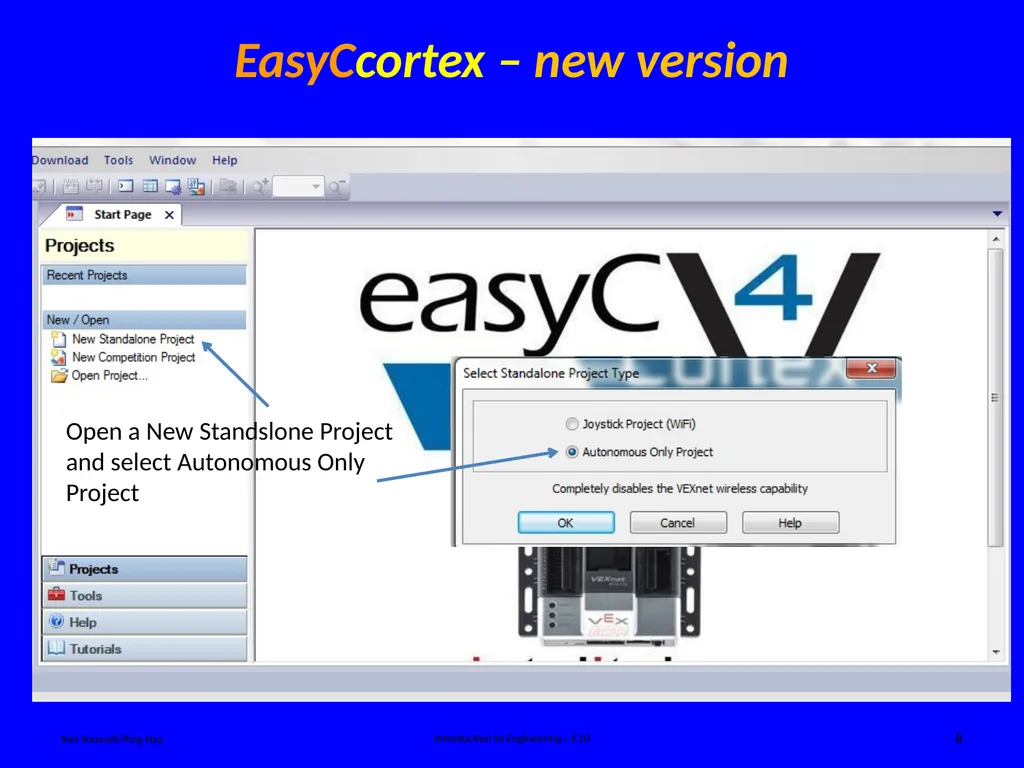
Ken Youssefi/Ping Hsu Introduction to Engineering – E10 8 EasyCcortex – new version<br>
09
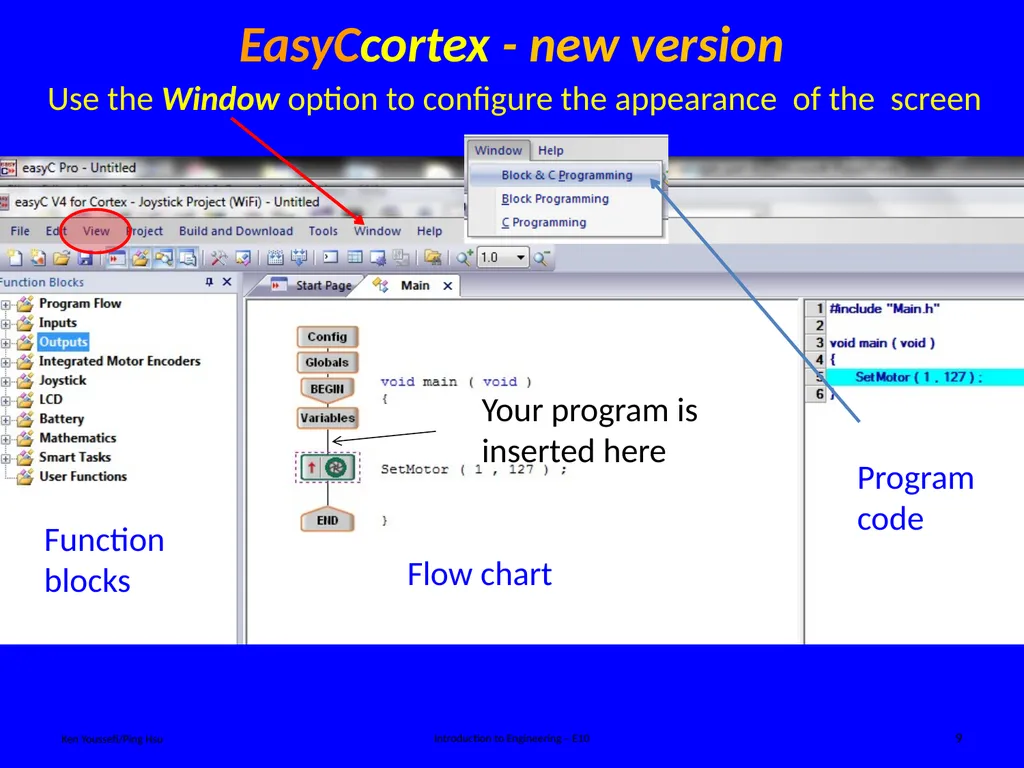
Ken Youssefi/Ping Hsu Introduction to Engineering – E10 9 Function blocks Flow chart Program code EasyCcortex - new version Use the Window option to configure the appearance of the screen<br>
10
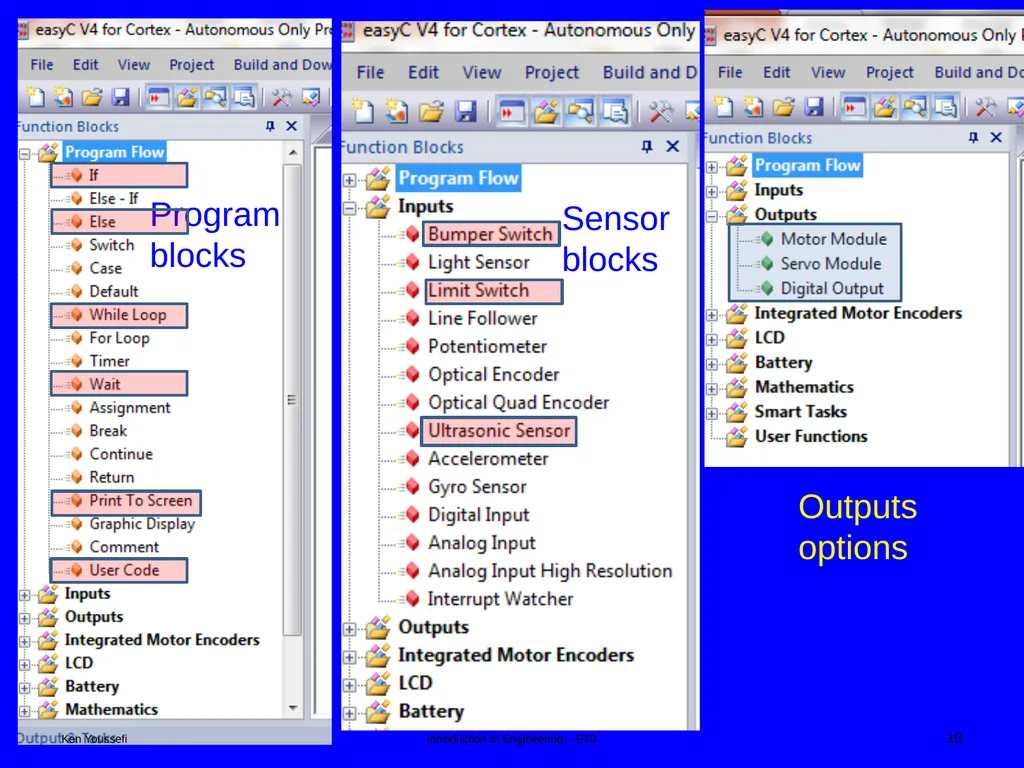
Program blocks Ken Youssefi Introduction to Engineering – E10 10<br>
11
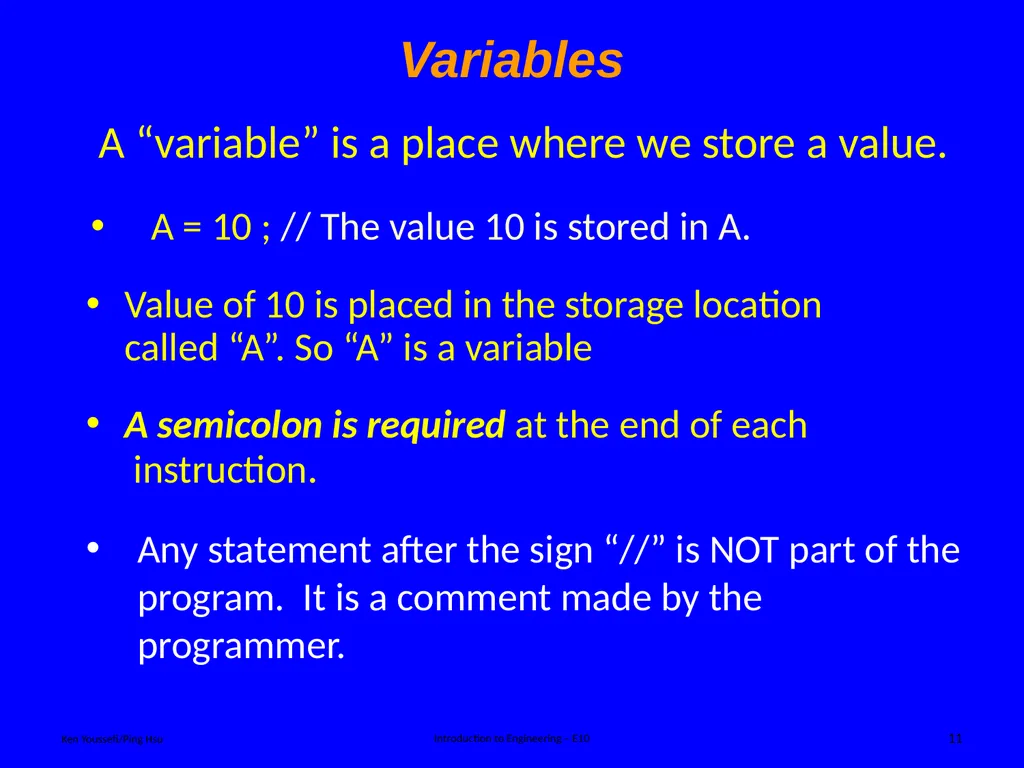
Variables Ken Youssefi/Ping Hsu Introduction to Engineering – E10 11 A semicolon is required at the end of each instruction. A “variable” is a place where we store a value. A = 10 ; // The value 10 is stored in A. Any statement after the sign “//” is NOT part of the program. It is a comment made by the programmer. Value of 10 is placed in the storage location called “A”. So “A” is a variable<br>
12
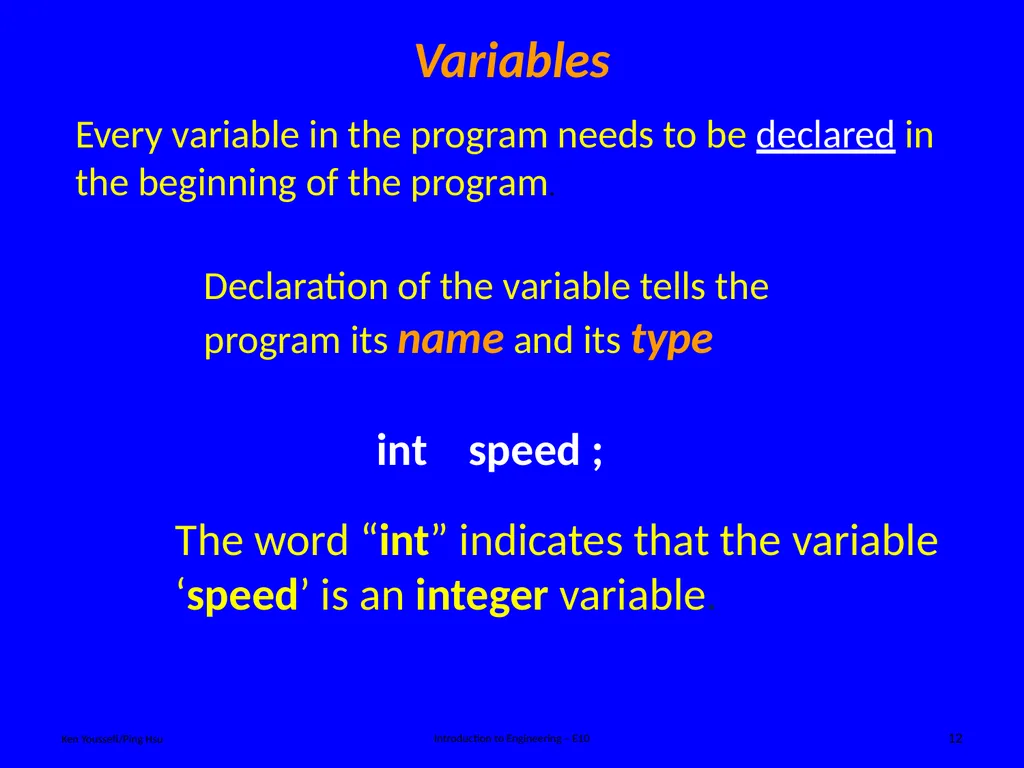
Variables Ken Youssefi/Ping Hsu Introduction to Engineering – E10 12 Every variable in the program needs to be declared in the beginning of the program. Declaration of the variable tells the program its name and its type<br>
13
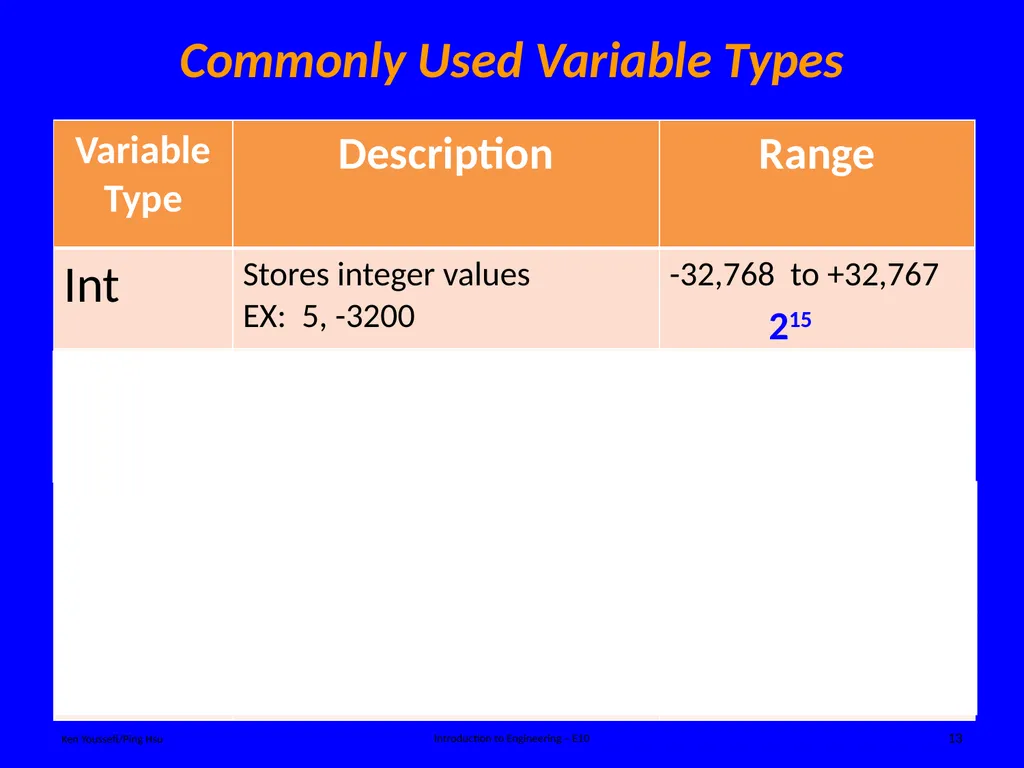
Commonly Used Variable Types Ken Youssefi/Ping Hsu Introduction to Engineering – E10 13 215 231<br>
14
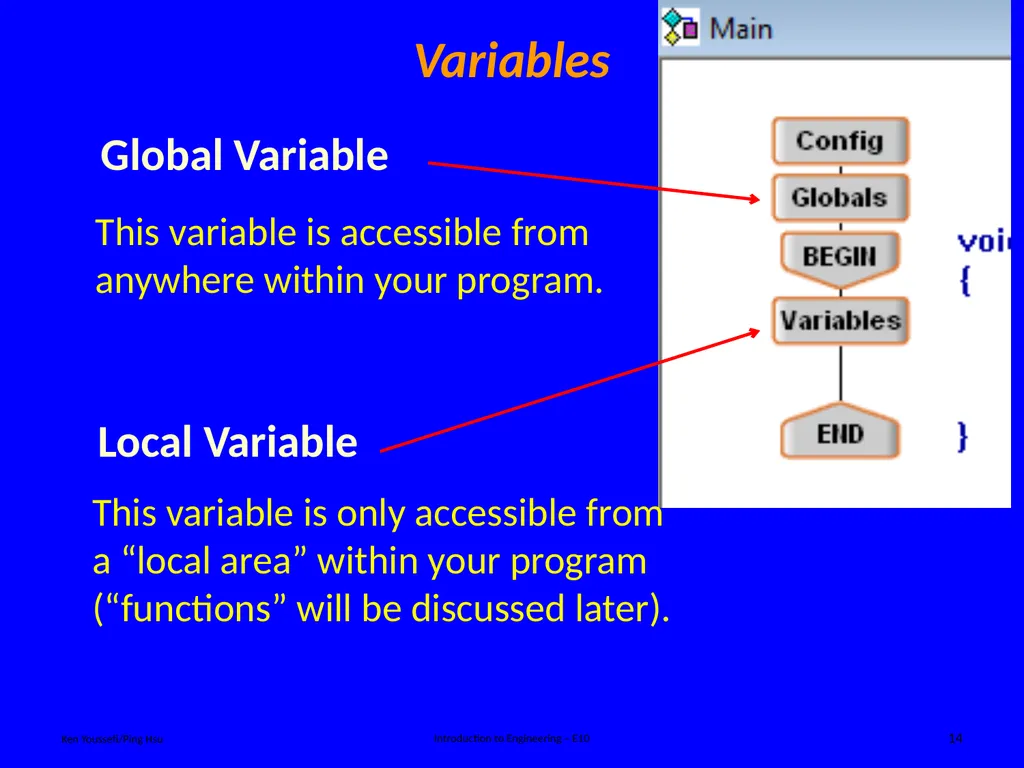
Variables Ken Youssefi/Ping Hsu Introduction to Engineering – E10 14 This variable is accessible from anywhere within your program. Global Variable<br>
15
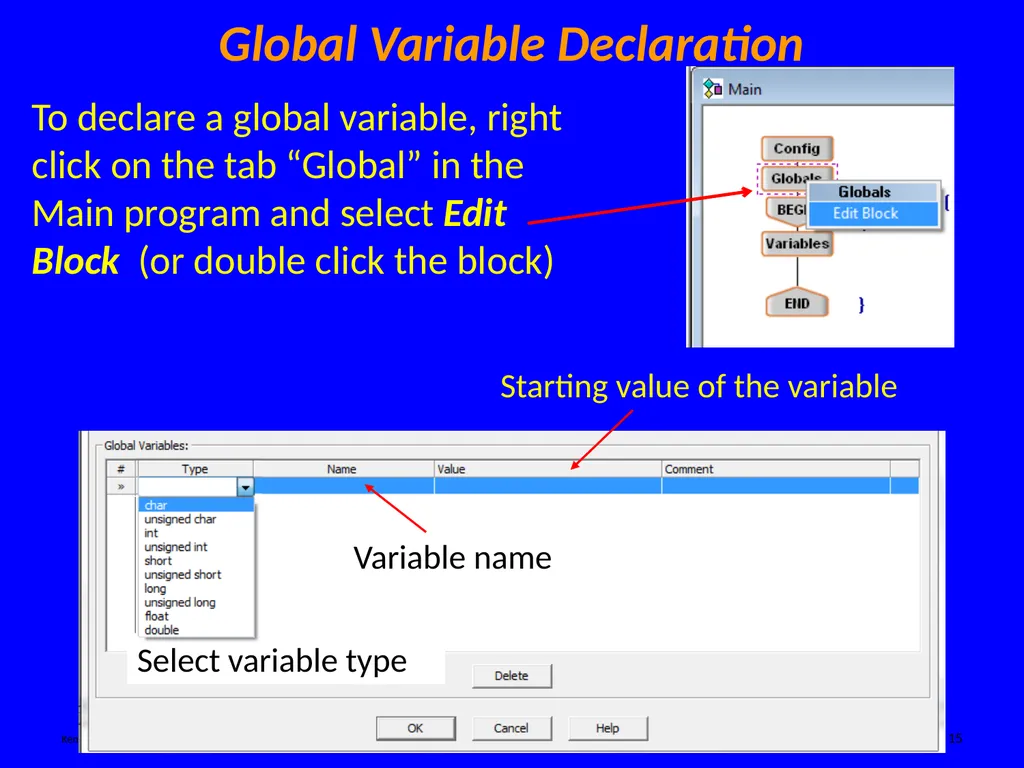
Global Variable Declaration Ken Youssefi/Ping Hsu Introduction to Engineering – E10 15 To declare a global variable, right click on the tab “Global” in the Main program and select Edit Block (or double click the block) Starting value of the variable Variable name<br>
16
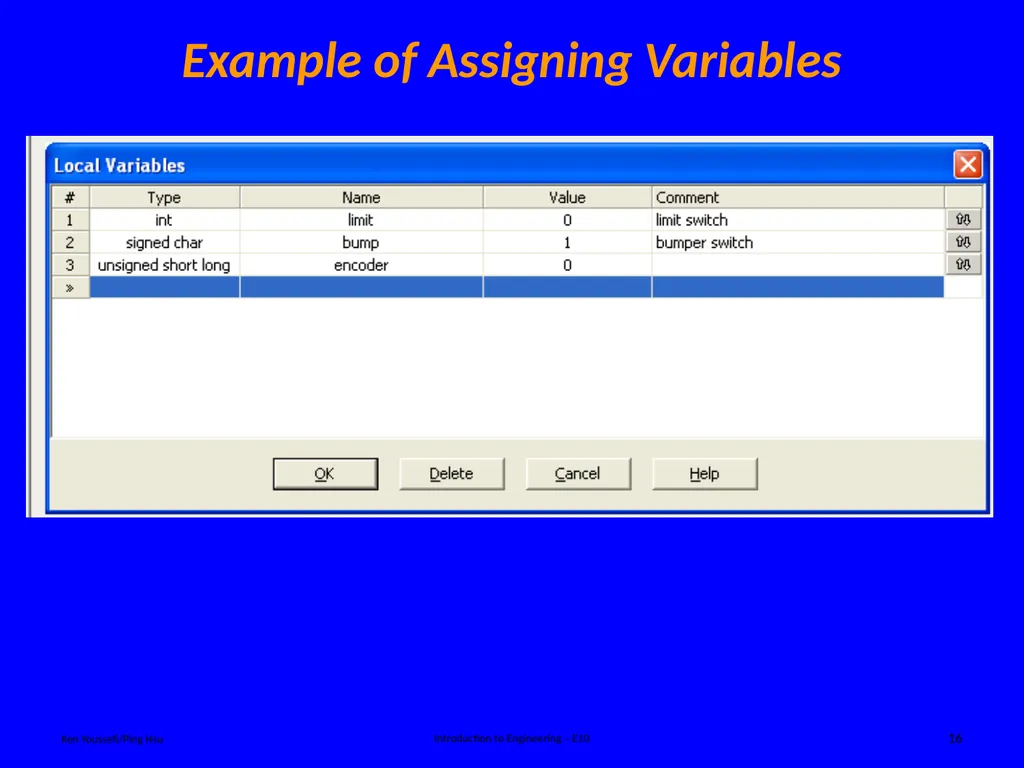
Example of Assigning Variables Ken Youssefi/Ping Hsu Introduction to Engineering – E10 16<br>
17
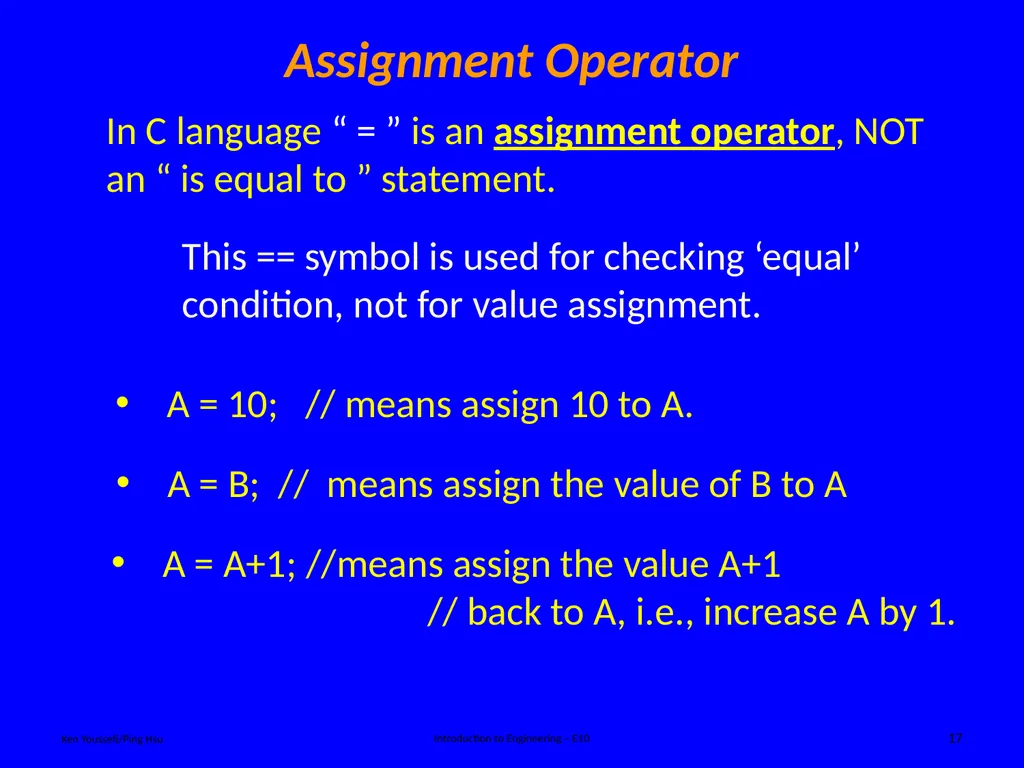
Assignment Operator Ken Youssefi/Ping Hsu Introduction to Engineering – E10 17 In C language “ = ” is an assignment operator, NOT an “ is equal to ” statement. A = A+1; //means assign the value A+1
// back to A, i.e., increase A by 1. A = 10; // means assign 10 to A. A = B; // means assign the value of B to A This == symbol is used for checking ‘equal’ condition, not for value assignment.<br>
// back to A, i.e., increase A by 1. A = 10; // means assign 10 to A. A = B; // means assign the value of B to A This == symbol is used for checking ‘equal’ condition, not for value assignment.<br>
18
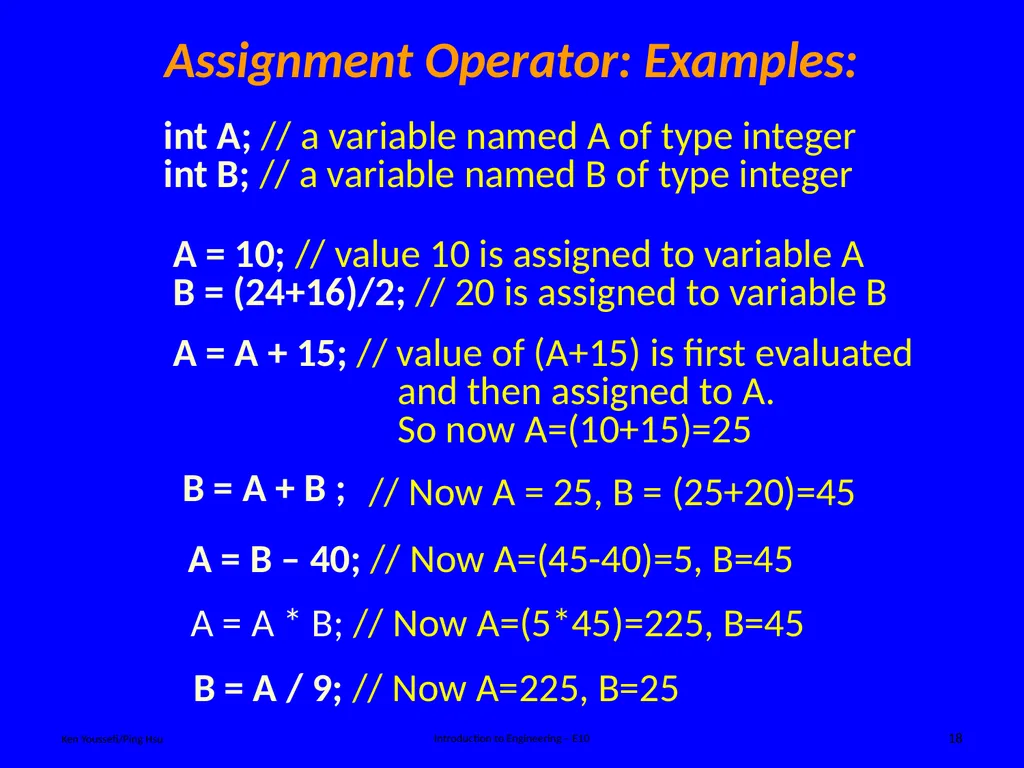
Assignment Operator: Examples: Ken Youssefi/Ping Hsu Introduction to Engineering – E10 18 int A; // a variable named A of type integer
int B; // a variable named B of type integer A = 10; // value 10 is assigned to variable A
B = (24+16)/2; // 20 is assigned to variable B A = A + 15; // value of (A+15) is first evaluated
and then assigned to A.
So now A=(10+15)=25 B = A + B ; A = B – 40; // Now A=(45-40)=5, B=45 A = A * B; // Now A=(5*45)=225, B=45 B = A / 9; // Now A=225, B=25 // Now A = 25, B = (25+20)=45<br>
int B; // a variable named B of type integer A = 10; // value 10 is assigned to variable A
B = (24+16)/2; // 20 is assigned to variable B A = A + 15; // value of (A+15) is first evaluated
and then assigned to A.
So now A=(10+15)=25 B = A + B ; A = B – 40; // Now A=(45-40)=5, B=45 A = A * B; // Now A=(5*45)=225, B=45 B = A / 9; // Now A=225, B=25 // Now A = 25, B = (25+20)=45<br>
19
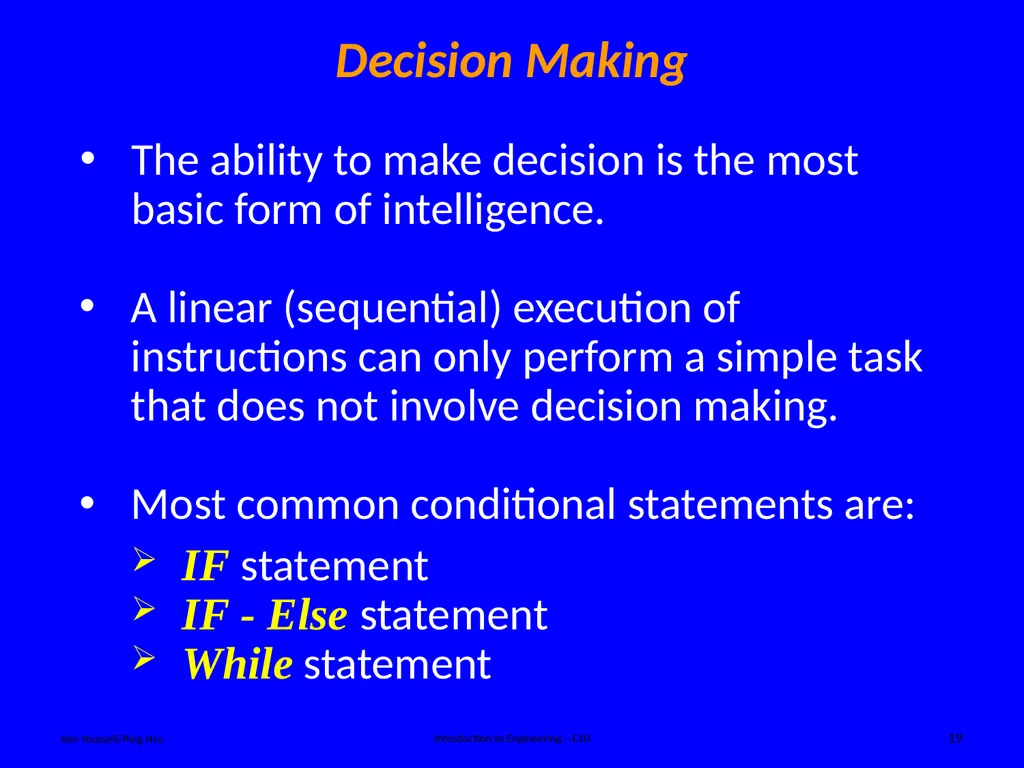
Decision Making Ken Youssefi/Ping Hsu Introduction to Engineering – E10 19 A linear (sequential) execution of instructions can only perform a simple task that does not involve decision making. Most common conditional statements are:
IF statement
IF - Else statement
While statement The ability to make decision is the most basic form of intelligence.<br>
IF statement
IF - Else statement
While statement The ability to make decision is the most basic form of intelligence.<br>
20
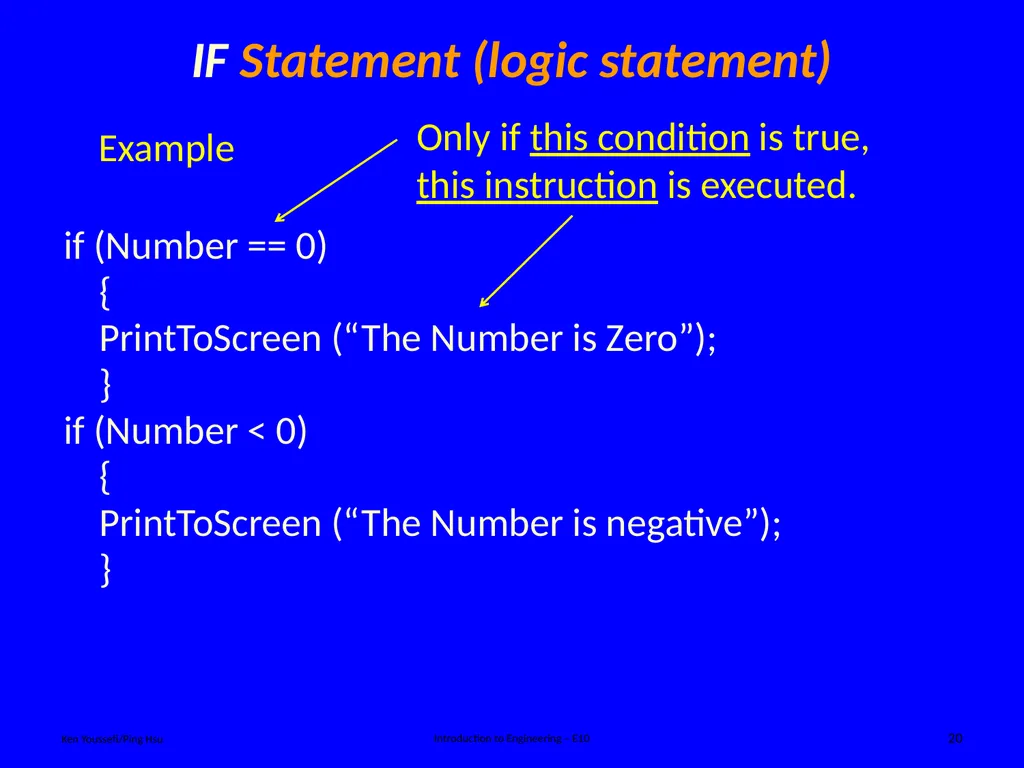
IF Statement (logic statement) Ken Youssefi/Ping Hsu Introduction to Engineering – E10 20 if (Number == 0)
{
PrintToScreen (“The Number is Zero”);
}
if (Number < 0)
{
PrintToScreen (“The Number is negative”);
} Example Only if this condition is true, this instruction is executed.<br>
{
PrintToScreen (“The Number is Zero”);
}
if (Number < 0)
{
PrintToScreen (“The Number is negative”);
} Example Only if this condition is true, this instruction is executed.<br>
21
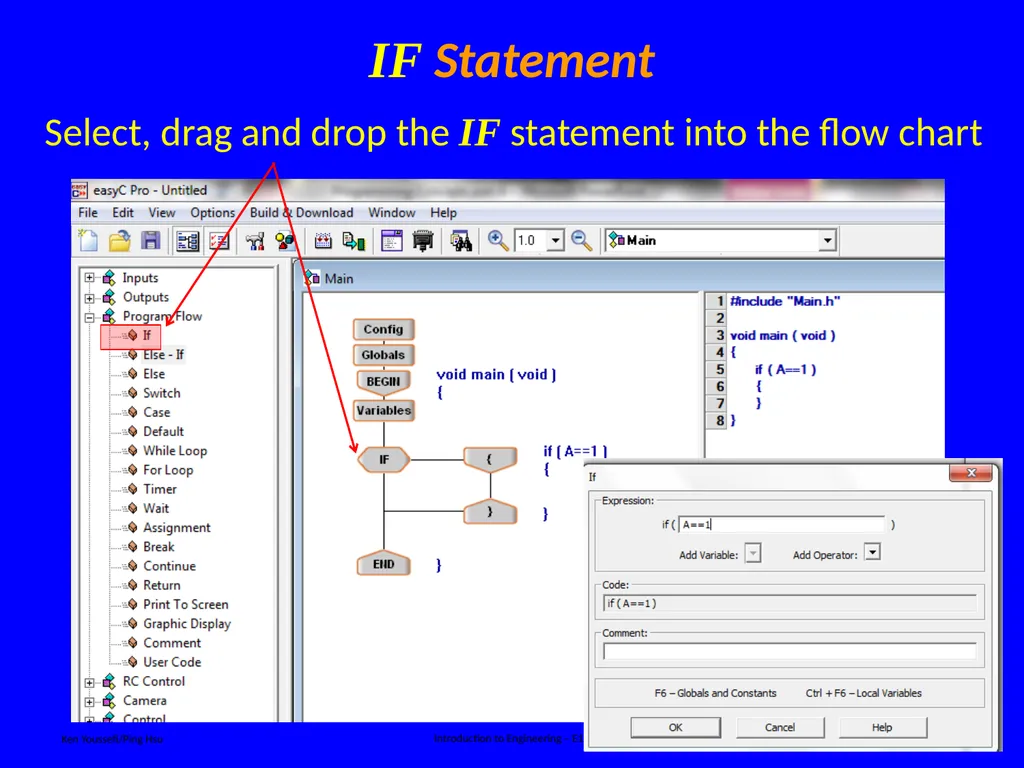
IF Statement Ken Youssefi/Ping Hsu Introduction to Engineering – E10 21 Select, drag and drop the IF statement into the flow chart<br>
22
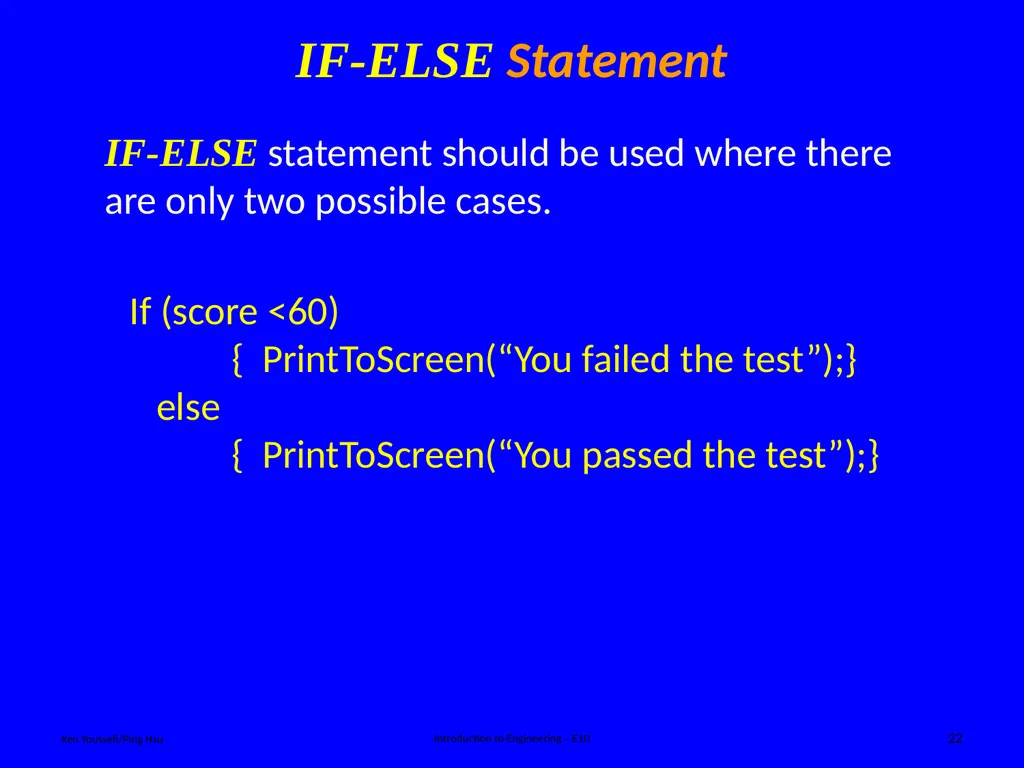
IF-ELSE Statement Ken Youssefi/Ping Hsu Introduction to Engineering – E10 22 IF-ELSE statement should be used where there are only two possible cases. If (score <60)
{ PrintToScreen(“You failed the test”);}
else
{ PrintToScreen(“You passed the test”);}<br>
{ PrintToScreen(“You failed the test”);}
else
{ PrintToScreen(“You passed the test”);}<br>
23
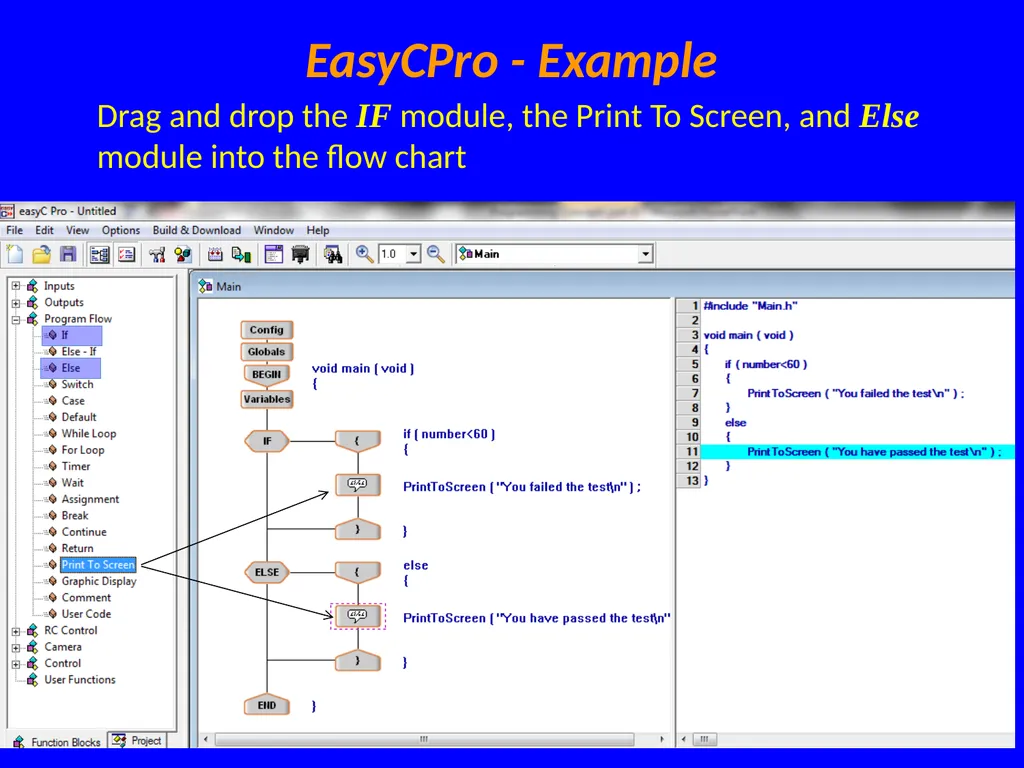
EasyCPro - Example Ken Youssefi/Ping Hsu Introduction to Engineering – E10 23 Drag and drop the IF module, the Print To Screen, and Else module into the flow chart<br>
24
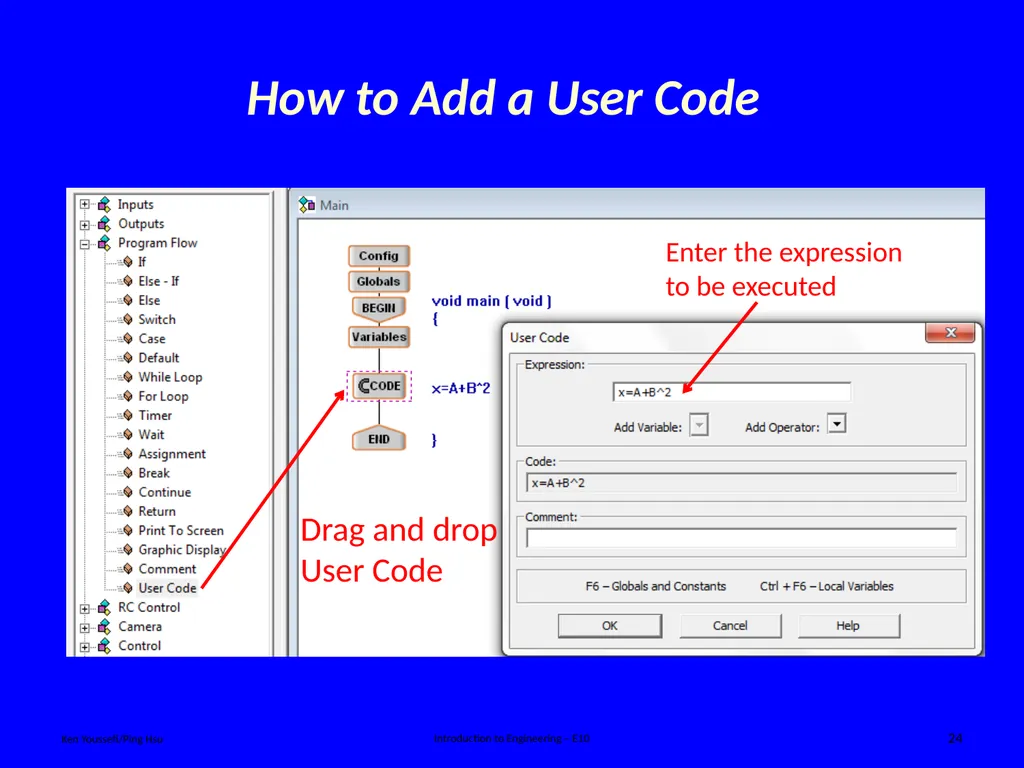
Ken Youssefi/Ping Hsu Introduction to Engineering – E10 24 How to Add a User Code Enter the expression to be executed Drag and drop User Code<br>
25
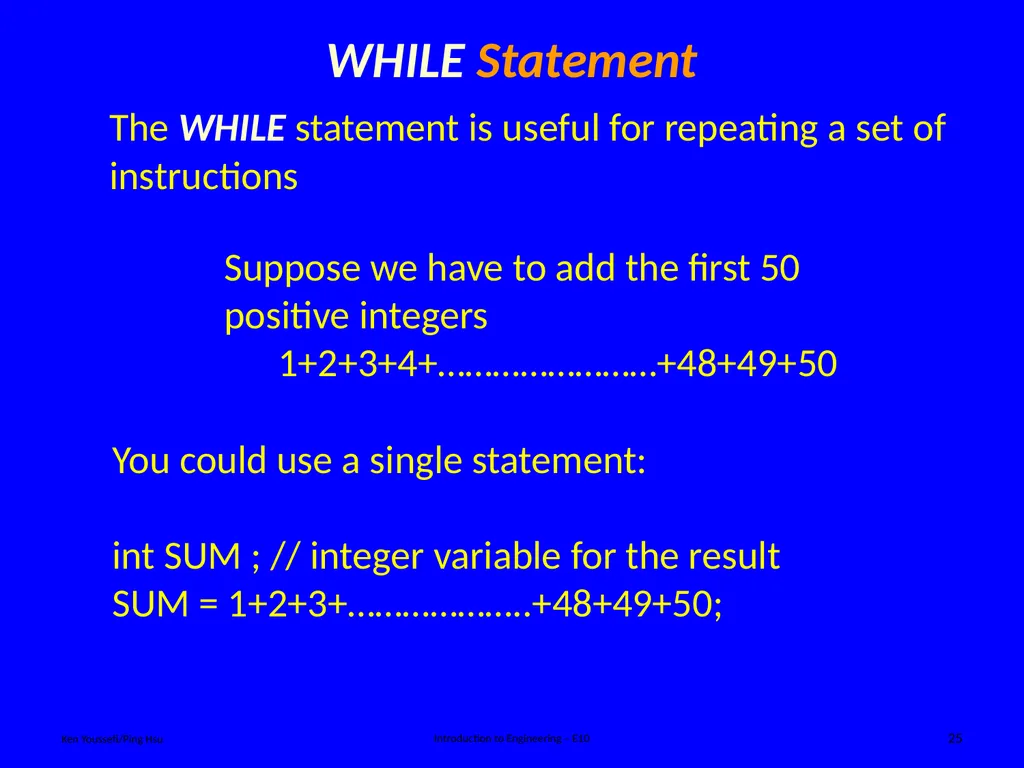
WHILE Statement Ken Youssefi/Ping Hsu Introduction to Engineering – E10 25 The WHILE statement is useful for repeating a set of instructions Suppose we have to add the first 50 positive integers
1+2+3+4+……………………+48+49+50 You could use a single statement:
int SUM ; // integer variable for the result
SUM = 1+2+3+………………..+48+49+50;<br>
1+2+3+4+……………………+48+49+50 You could use a single statement:
int SUM ; // integer variable for the result
SUM = 1+2+3+………………..+48+49+50;<br>
26
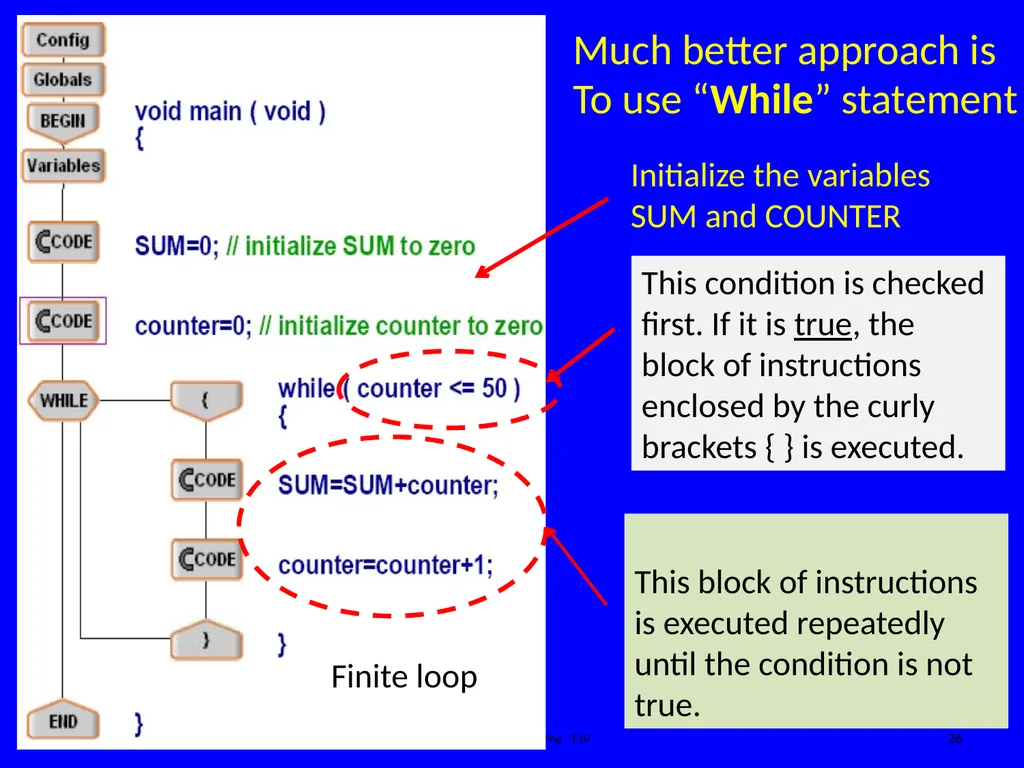
Ken Youssefi/Ping Hsu Introduction to Engineering – E10 26 Much better approach is
To use “While” statement Finite loop<br>
To use “While” statement Finite loop<br>
27
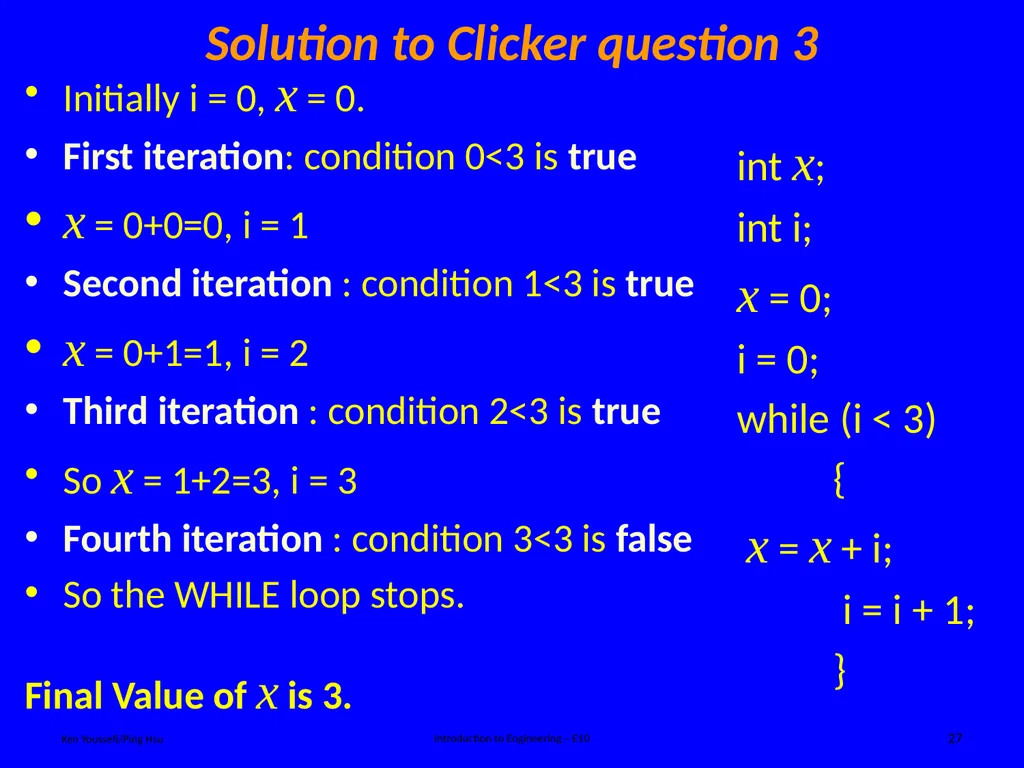
Solution to Clicker question 3 Ken Youssefi/Ping Hsu Introduction to Engineering – E10 27 Initially i = 0, x = 0.
First iteration: condition 0<3 is true
x = 0+0=0, i = 1
Second iteration : condition 1<3 is true
x = 0+1=1, i = 2
Third iteration : condition 2<3 is true
So x = 1+2=3, i = 3
Fourth iteration : condition 3<3 is false
So the WHILE loop stops.
Final Value of x is 3. int x;
int i;
x = 0;
i = 0;
while (i < 3)
{
x = x + i;
i = i + 1;
}<br>
First iteration: condition 0<3 is true
x = 0+0=0, i = 1
Second iteration : condition 1<3 is true
x = 0+1=1, i = 2
Third iteration : condition 2<3 is true
So x = 1+2=3, i = 3
Fourth iteration : condition 3<3 is false
So the WHILE loop stops.
Final Value of x is 3. int x;
int i;
x = 0;
i = 0;
while (i < 3)
{
x = x + i;
i = i + 1;
}<br>
28
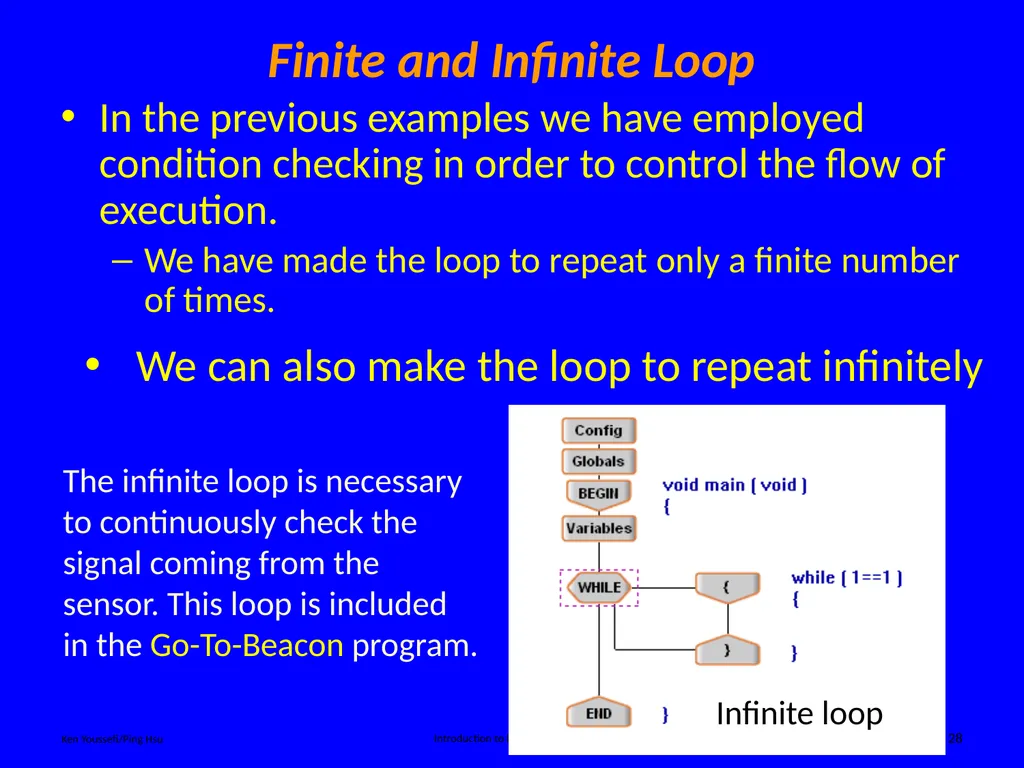
Finite and Infinite Loop Ken Youssefi/Ping Hsu Introduction to Engineering – E10 28 In the previous examples we have employed condition checking in order to control the flow of execution.
We have made the loop to repeat only a finite number of times. The infinite loop is necessary to continuously check the signal coming from the sensor. This loop is included in the Go-To-Beacon program. Infinite loop<br>
We have made the loop to repeat only a finite number of times. The infinite loop is necessary to continuously check the signal coming from the sensor. This loop is included in the Go-To-Beacon program. Infinite loop<br>
29
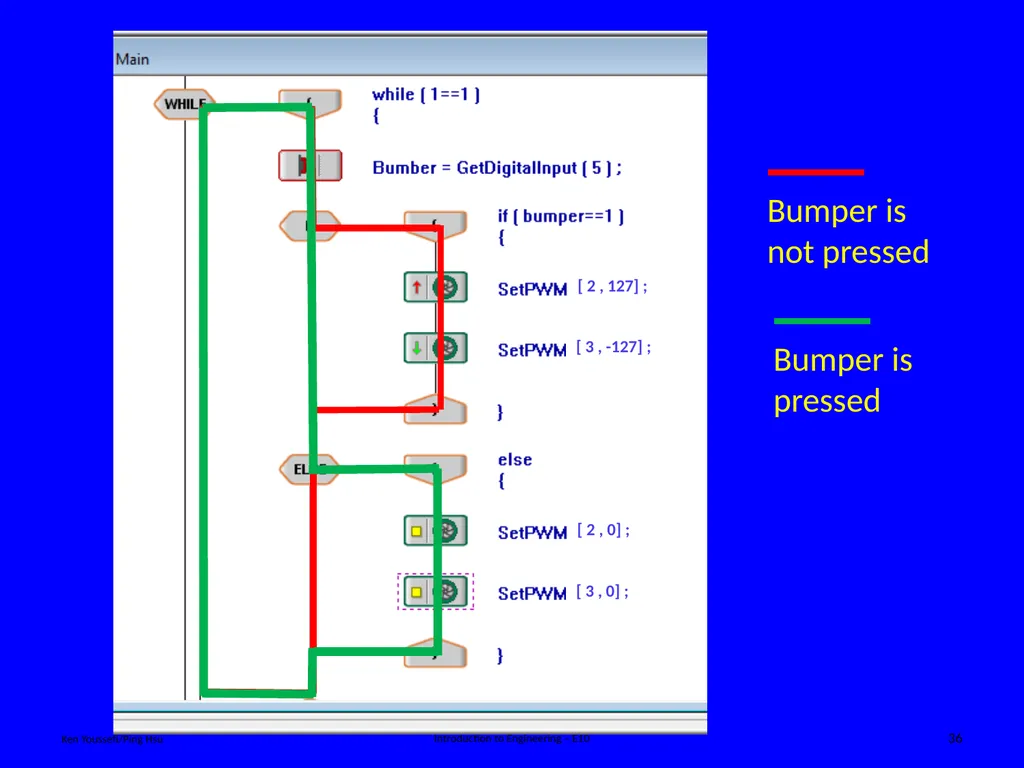
Ken Youssefi/Ping Hsu Introduction to Engineering – E10 29 Write a short program so that the robot moves forward as long as it has not encounter any obstacles (bumper sensor is not pressed), and it stops when bumper is activated (hit an obstruction). Most commonly used logic statements:
IF statement
IF – ELSE statement (for two cases only)
ELSE – IF statement (for more than two cases)
WHILE loop (finite or infinite) statement In Summary<br>
IF statement
IF – ELSE statement (for two cases only)
ELSE – IF statement (for more than two cases)
WHILE loop (finite or infinite) statement In Summary<br>
30
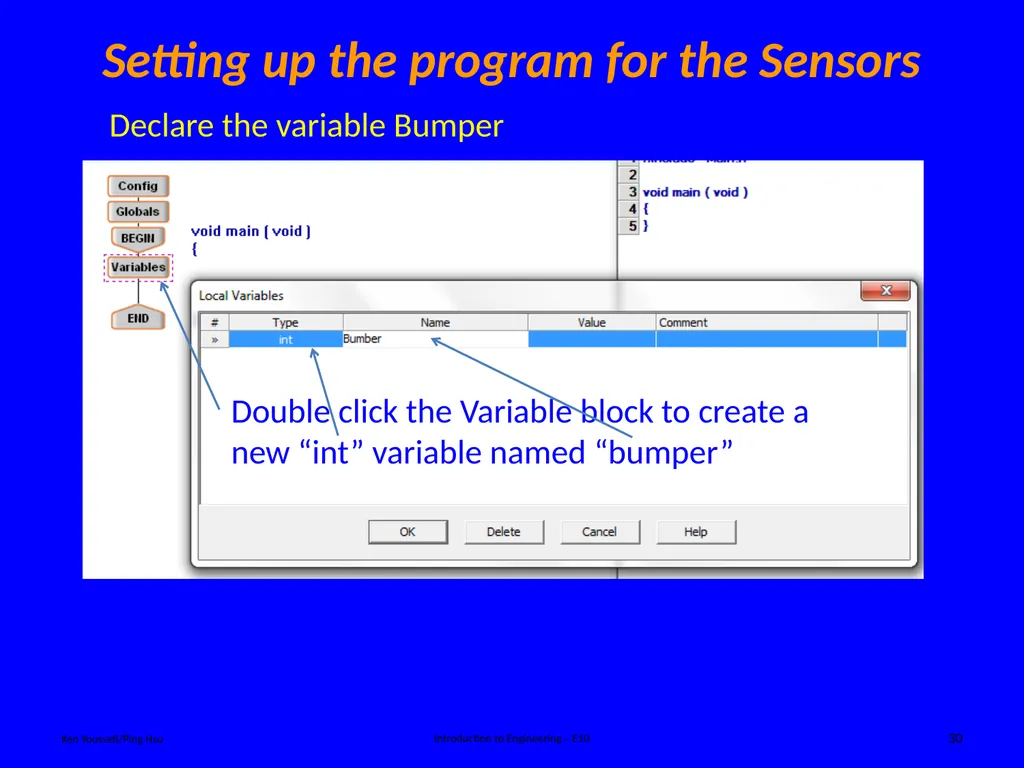
Setting up the program for the Sensors Ken Youssefi/Ping Hsu Introduction to Engineering – E10 30 Double click the Variable block to create a new “int” variable named “bumper” Declare the variable Bumper<br>
31
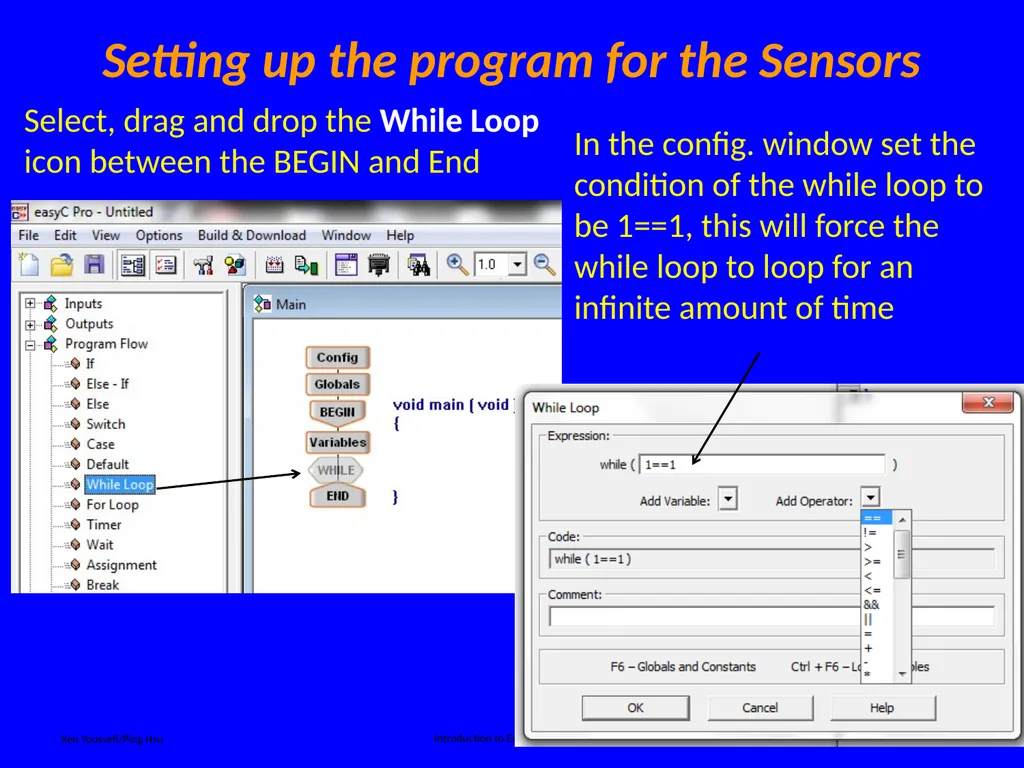
Setting up the program for the Sensors Ken Youssefi/Ping Hsu Introduction to Engineering – E10 31 Select, drag and drop the While Loop icon between the BEGIN and End<br>
32
Setting up the program for the Sensors Ken Youssefi/Ping Hsu Introduction to Engineering – E10 32<br>
33
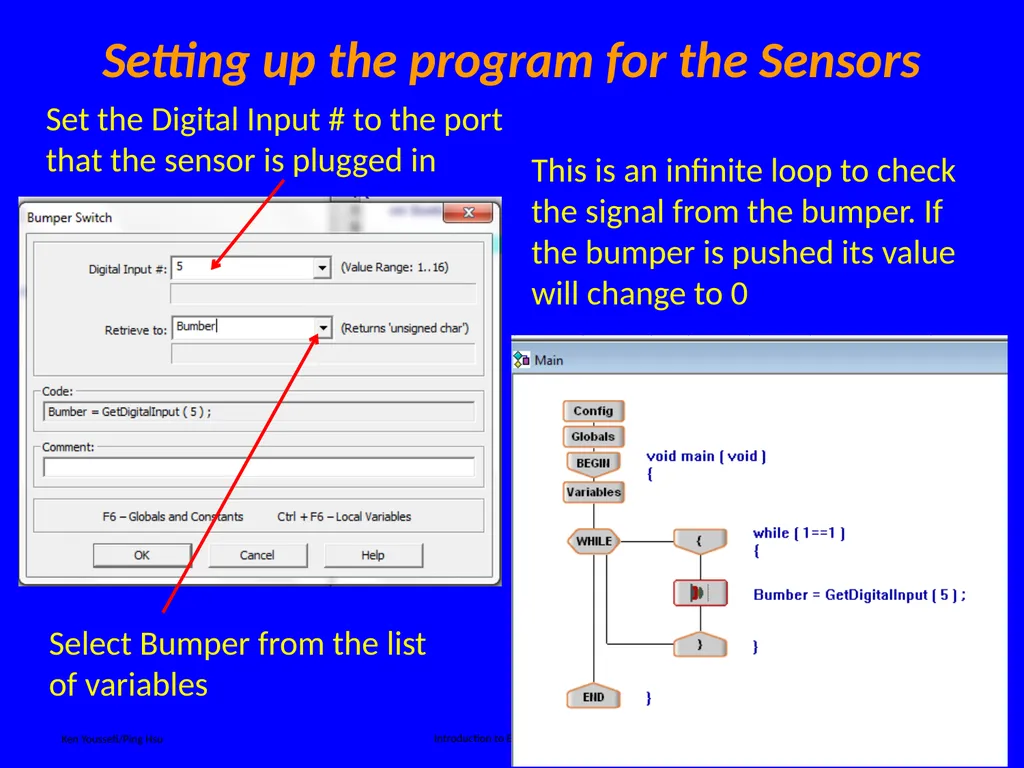
Setting up the program for the Sensors Ken Youssefi/Ping Hsu Introduction to Engineering – E10 33 Set the Digital Input # to the port that the sensor is plugged in Select Bumper from the list of variables<br>
34
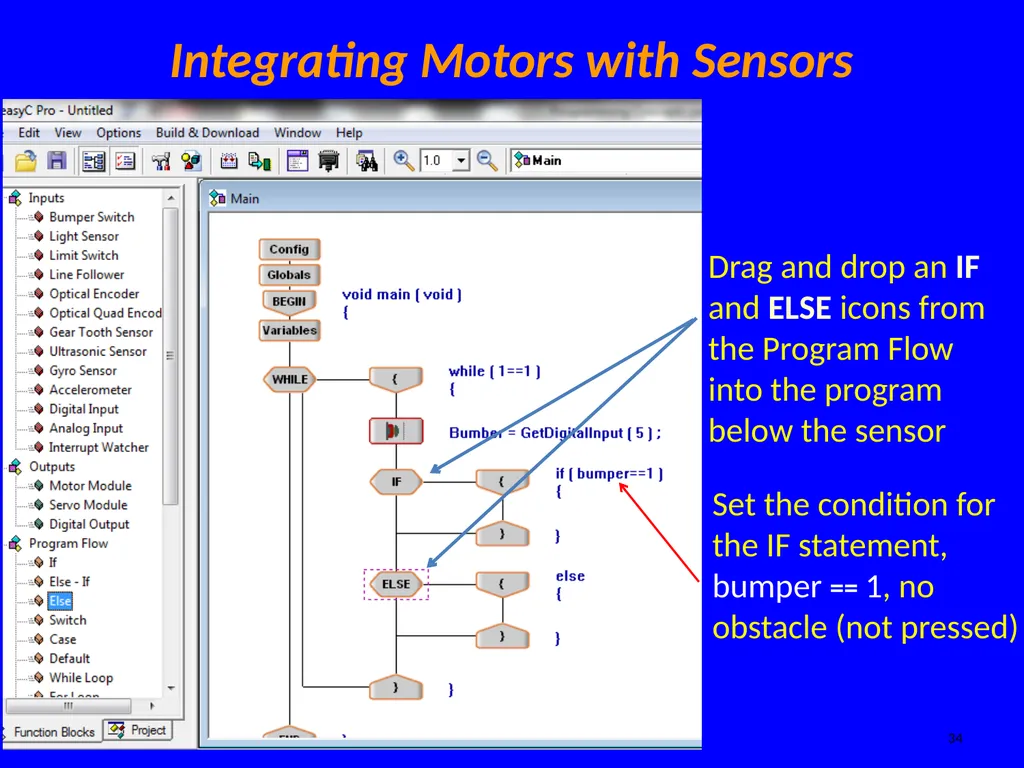
Integrating Motors with Sensors Ken Youssefi/Ping Hsu Introduction to Engineering – E10 34 Drag and drop an IF and ELSE icons from the Program Flow into the program below the sensor<br>
35
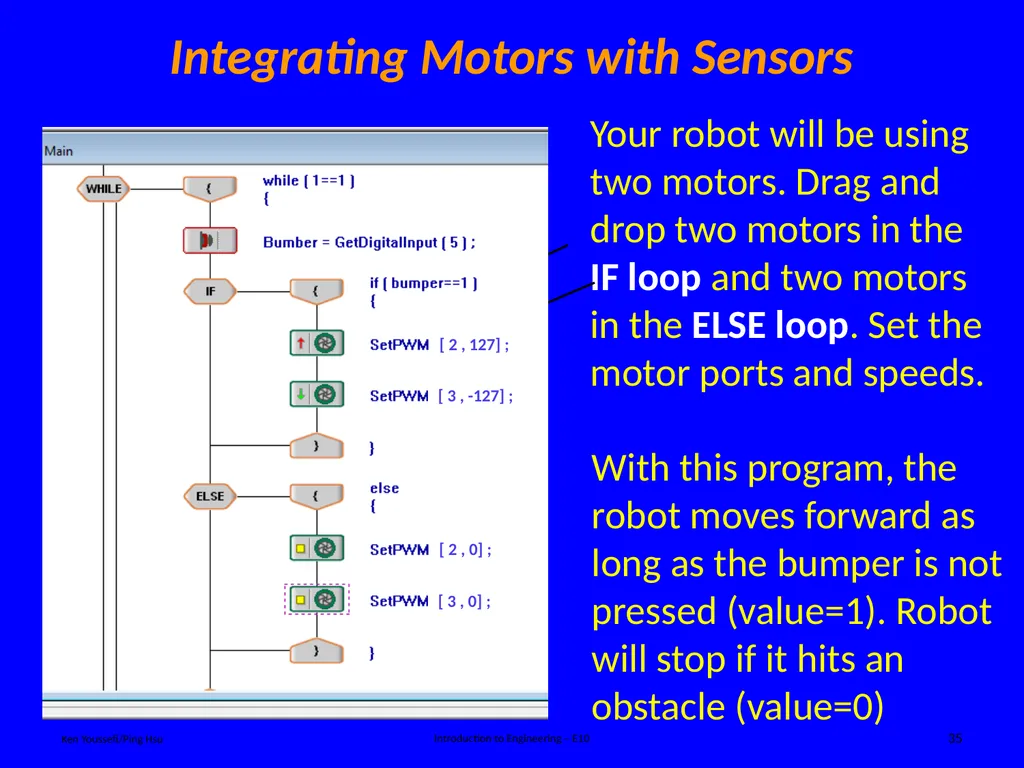
Integrating Motors with Sensors Ken Youssefi/Ping Hsu Introduction to Engineering – E10 35 Your robot will be using two motors. Drag and drop two motors in the IF loop and two motors in the ELSE loop. Set the motor ports and speeds. Go forward Stop With this program, the robot moves forward as long as the bumper is not pressed (value=1). Robot will stop if it hits an obstacle (value=0)<br>
36
Ken Youssefi/Ping Hsu Introduction to Engineering – E10 36<br>