
PROJECT LIFE CYCLE AND EFFORT ESTIMATION Software
KB
Published · 72 slides · 0 views
1 / 1


Description
PROJECT LIFE CYCLE AND EFFORT ESTIMATION Software Process and Process Models UNIT - II Dr.T.Logeswari Dept of CS Software Process and Process Models Software Processes is a coherent set of activities for specifying, designing, implementing
Related Topics
Share
Embed code
Download this presentation From Below
"PROJECT LIFE CYCLE AND EFFORT ESTIMATION Software" is the property of its rightful owner. Permission is granted to download and print the materials on this website for personal, non-commercial use only, and to display it on your personal computer provided you do not modify the materials and that you retain all copyright notices contained in the materials. By downloading content from our website, you accept the terms of this agreement.
Presentation Transcript
01
PROJECT LIFE CYCLE AND EFFORT ESTIMATION
Software Process and Process Models
UNIT - II Dr.T.Logeswari
Dept of CS<br>
Dept of CS<br>
02
Software Process and Process Models
Software Processes is a coherent set of activities for specifying, designing, implementing and testing software systems. A software process model is an abstract representation of a process that presents a description of a process from some particular perspective.
There are many different software processes but all involve:
Specification – defining what the system should do;
Design and implementation – defining the organization of the system and implementing the system;
Validation – checking that it does what the customer wants;
Evolution – changing the system in response to changing customer needs.<br>
Software Processes is a coherent set of activities for specifying, designing, implementing and testing software systems. A software process model is an abstract representation of a process that presents a description of a process from some particular perspective.
There are many different software processes but all involve:
Specification – defining what the system should do;
Design and implementation – defining the organization of the system and implementing the system;
Validation – checking that it does what the customer wants;
Evolution – changing the system in response to changing customer needs.<br>
03
Types of Software Process Model
Software Process and Software Development Lifecycle Model
One of the basic notions of the software development process is SDLC models which stands for Software Development Life Cycle models.
Waterfall model
V model
Incremental model
RAD model
Agile model
Iterative model
Spiral model
Prototype model<br>
Software Process and Software Development Lifecycle Model
One of the basic notions of the software development process is SDLC models which stands for Software Development Life Cycle models.
Waterfall model
V model
Incremental model
RAD model
Agile model
Iterative model
Spiral model
Prototype model<br>
04
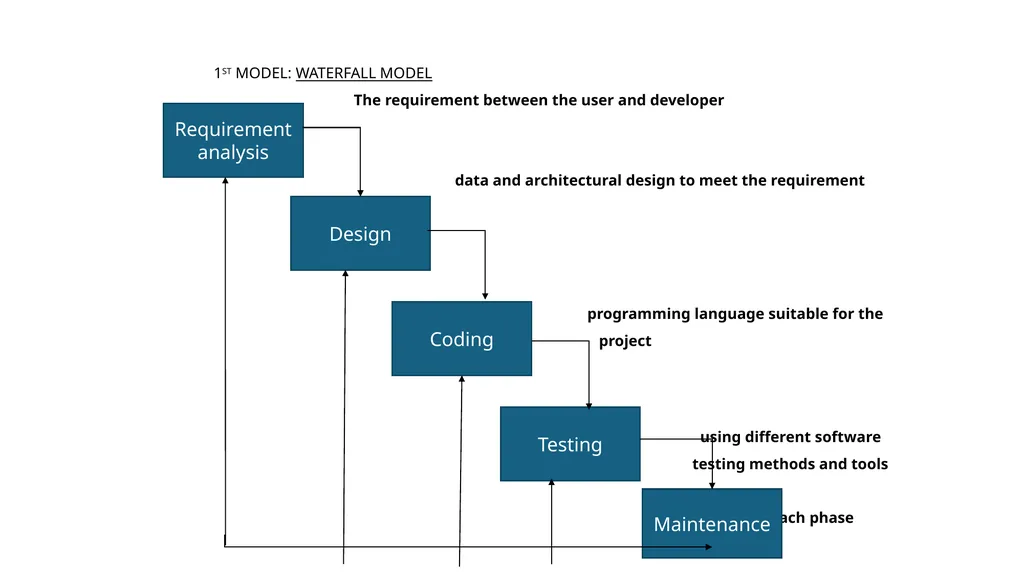
Waterfall Model This model is a software life cycle where the stages are depicted as cascading from one to another.
It was described by W.W. Royce in 1970. As the figure implies one development stage should be completed before the next begins<br>
It was described by W.W. Royce in 1970. As the figure implies one development stage should be completed before the next begins<br>
05
1ST MODEL: WATERFALL MODEL
The requirement between the user and developer
data and architectural design to meet the requirement
programming language suitable for the
project
using different software
testing methods and tools
each phase Requirement analysis Design Coding Testing Maintenance<br>
The requirement between the user and developer
data and architectural design to meet the requirement
programming language suitable for the
project
using different software
testing methods and tools
each phase Requirement analysis Design Coding Testing Maintenance<br>
06
V Model
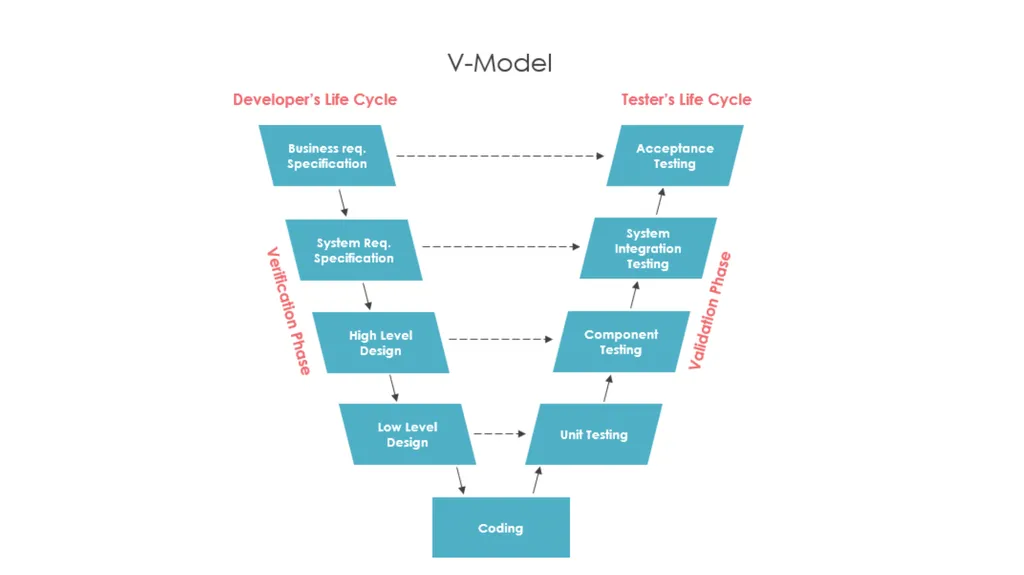
The V-model represents a development process that may be considered an extension of the waterfall model and is an example of the more general V-model.
Instead of moving down in a linear way, the process steps are bent upwards after the coding phase, to form the typical V shape.
The V-Model demonstrates the relationships between each phase of the development life cycle and its associated phase of testing.
The horizontal and vertical axes represent time or project completeness (left-to-right) and level of abstraction (coarsest-grain abstraction uppermost), respectively.<br>
The V-model represents a development process that may be considered an extension of the waterfall model and is an example of the more general V-model.
Instead of moving down in a linear way, the process steps are bent upwards after the coding phase, to form the typical V shape.
The V-Model demonstrates the relationships between each phase of the development life cycle and its associated phase of testing.
The horizontal and vertical axes represent time or project completeness (left-to-right) and level of abstraction (coarsest-grain abstraction uppermost), respectively.<br>
07
Incremental model
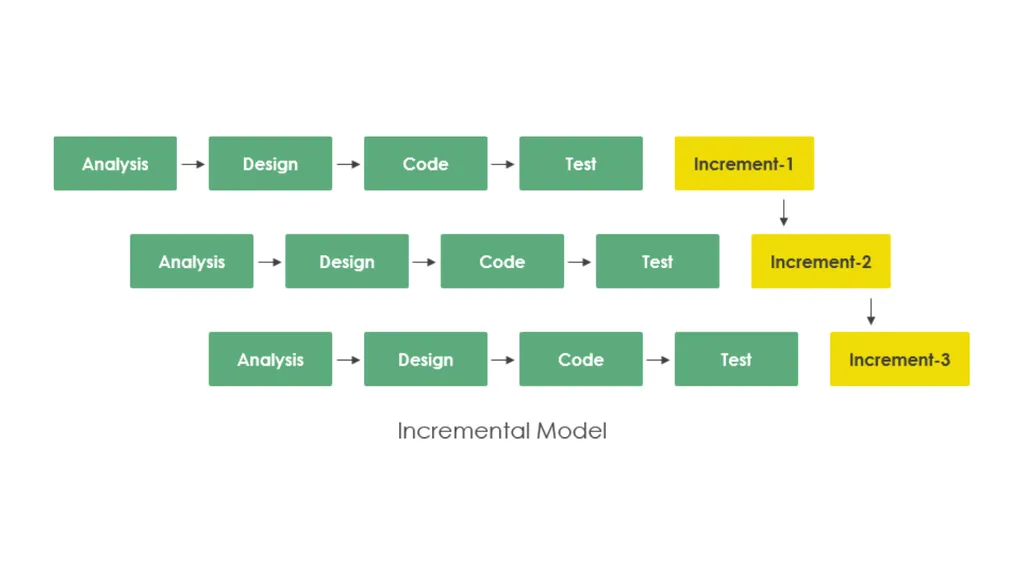
The incremental build model is a method of software development where the model is designed, implemented and tested incrementally (a little more is added each time) until the product is finished.
It involves both development and maintenance. The product is defined as finished when it satisfies all of its requirements.
Each iteration passes through the requirements, design, coding and testing phases.
And each subsequent release of the system adds function to the previous release until all designed functionally has been implemented.
This model combines the elements of the waterfall model with the iterative philosophy of prototyping.<br>
The incremental build model is a method of software development where the model is designed, implemented and tested incrementally (a little more is added each time) until the product is finished.
It involves both development and maintenance. The product is defined as finished when it satisfies all of its requirements.
Each iteration passes through the requirements, design, coding and testing phases.
And each subsequent release of the system adds function to the previous release until all designed functionally has been implemented.
This model combines the elements of the waterfall model with the iterative philosophy of prototyping.<br>
08
Iterative Model
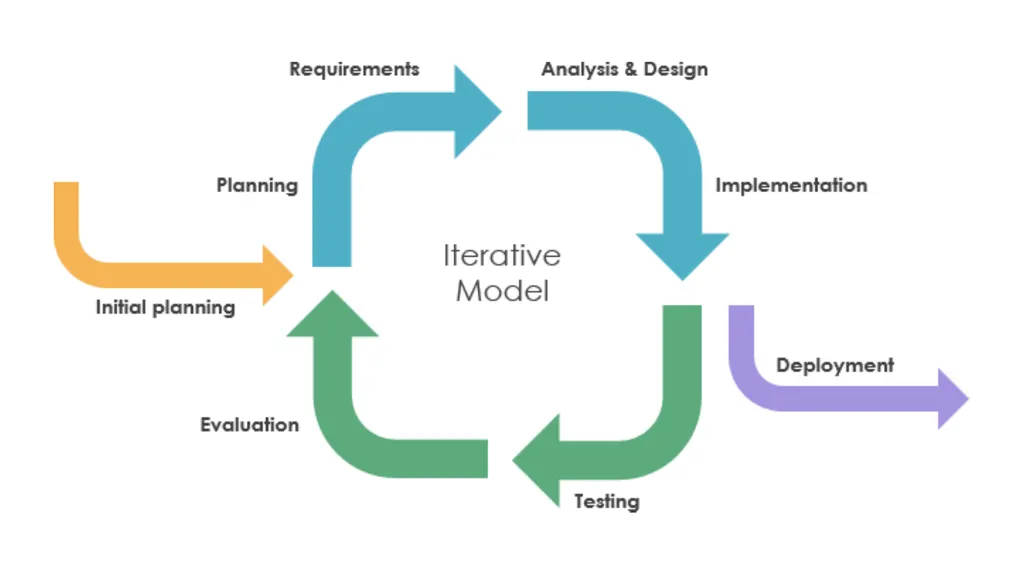
In other words, the iterative approach begins by specifying and implementing just part of the software, which can then be reviewed and prioritized in order to identify further requirements.
This iterative process is then repeated by delivering a new version of the software for each iteration.
In a light-weight iterative project the code may represent the major source of documentation of the system; however, in a critical iterative project a formal software specification may also be required.<br>
In other words, the iterative approach begins by specifying and implementing just part of the software, which can then be reviewed and prioritized in order to identify further requirements.
This iterative process is then repeated by delivering a new version of the software for each iteration.
In a light-weight iterative project the code may represent the major source of documentation of the system; however, in a critical iterative project a formal software specification may also be required.<br>
09
RAD model
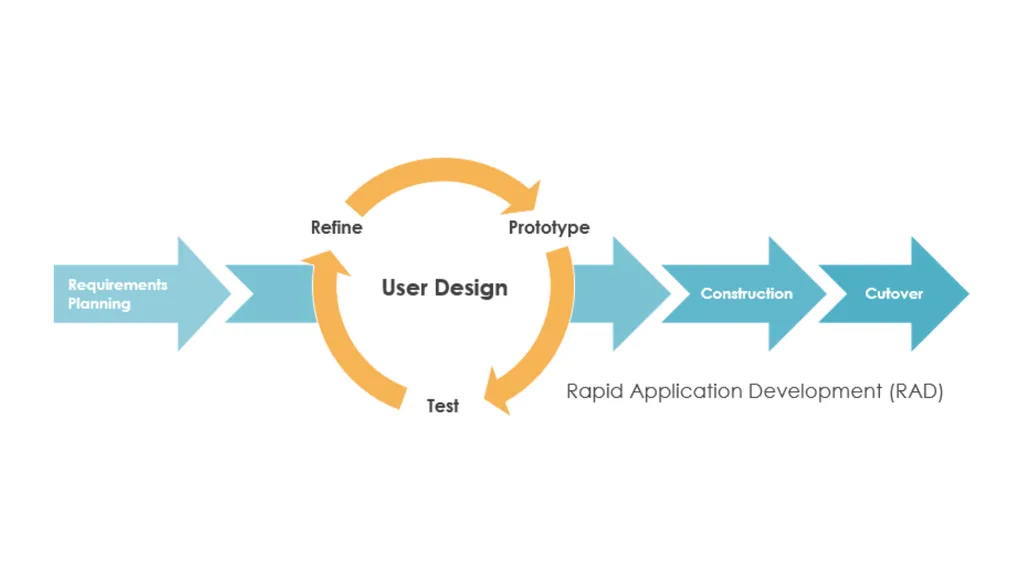
Rapid application development was a response to plan-driven waterfall processes, developed in the 1970s and 1980s, such as the Structured Systems Analysis and Design Method (SSADM).
Rapid application development (RAD) is often referred as the adaptive software development.
RAD is an incremental prototyping approach to software development that end users can produce better feedback when examining a live system, as opposed to working strictly with documentation. It puts less emphasis on planning and more emphasis on an adaptive process.
RAD may resulted in a lower level of rejection when the application is placed into production, but this success most often comes at the expense of a dramatic overruns in project costs and schedule.<br>
Rapid application development was a response to plan-driven waterfall processes, developed in the 1970s and 1980s, such as the Structured Systems Analysis and Design Method (SSADM).
Rapid application development (RAD) is often referred as the adaptive software development.
RAD is an incremental prototyping approach to software development that end users can produce better feedback when examining a live system, as opposed to working strictly with documentation. It puts less emphasis on planning and more emphasis on an adaptive process.
RAD may resulted in a lower level of rejection when the application is placed into production, but this success most often comes at the expense of a dramatic overruns in project costs and schedule.<br>
10
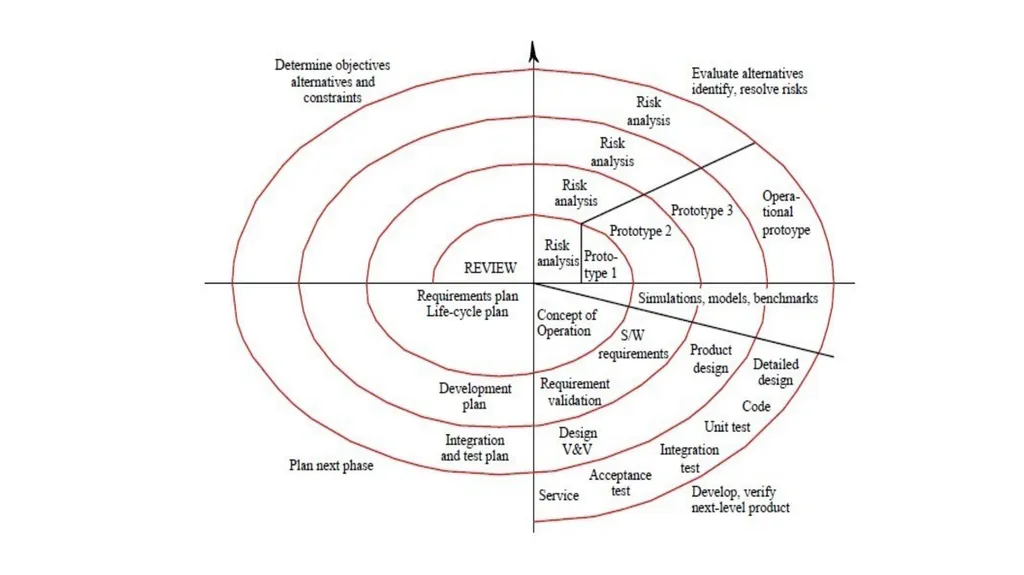
Boehmia’s Spiral Model Spiral model was proposed by Boehm in 1988.
Each loop in the spiral represents a phase of the software process.
Innermost loop is concerned with system feasibility, next loop system requirement, followed by system design and so on<br>
Each loop in the spiral represents a phase of the software process.
Innermost loop is concerned with system feasibility, next loop system requirement, followed by system design and so on<br>
11
It has 2 distinguishing features:
One is cyclic approach for increment process system’s. Degree of implementation while decreasing the degree of risk.
Other is a set of anchor point milestone for ensuring satisfactory system solution.<br>
One is cyclic approach for increment process system’s. Degree of implementation while decreasing the degree of risk.
Other is a set of anchor point milestone for ensuring satisfactory system solution.<br>
12
Each loop is split into 4 sectors
Objective setting – Project risks are identified, alternative strategies depending on these risks may be planned.
2. Risk assessment and reduction - Project risks are identified detailed analysis carried steps taken to reduce risks.
Ex: A prototype system (Toy like implementation with limited functional capabilities
and low reliability just for the purpose of examining)
Development and Validation – Choosing the most appropriate development model.
Planning – Project is reviewed and decisions are made whether to continue with further loop of the spiral.<br>
Objective setting – Project risks are identified, alternative strategies depending on these risks may be planned.
2. Risk assessment and reduction - Project risks are identified detailed analysis carried steps taken to reduce risks.
Ex: A prototype system (Toy like implementation with limited functional capabilities
and low reliability just for the purpose of examining)
Development and Validation – Choosing the most appropriate development model.
Planning – Project is reviewed and decisions are made whether to continue with further loop of the spiral.<br>
13
Agile model
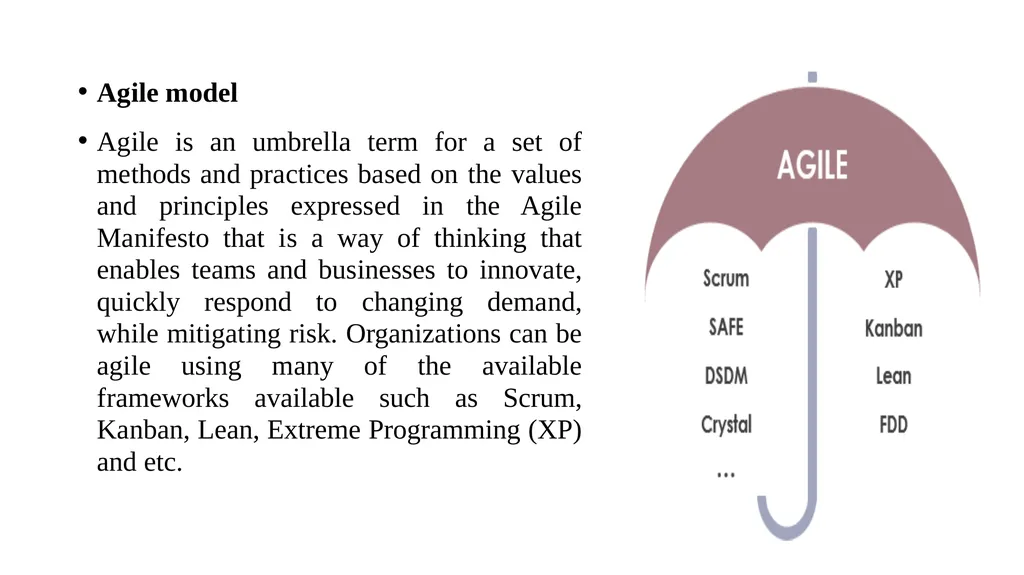
Agile is an umbrella term for a set of methods and practices based on the values and principles expressed in the Agile Manifesto that is a way of thinking that enables teams and businesses to innovate, quickly respond to changing demand, while mitigating risk. Organizations can be agile using many of the available frameworks available such as Scrum, Kanban, Lean, Extreme Programming (XP) and etc.<br>
Agile is an umbrella term for a set of methods and practices based on the values and principles expressed in the Agile Manifesto that is a way of thinking that enables teams and businesses to innovate, quickly respond to changing demand, while mitigating risk. Organizations can be agile using many of the available frameworks available such as Scrum, Kanban, Lean, Extreme Programming (XP) and etc.<br>
14
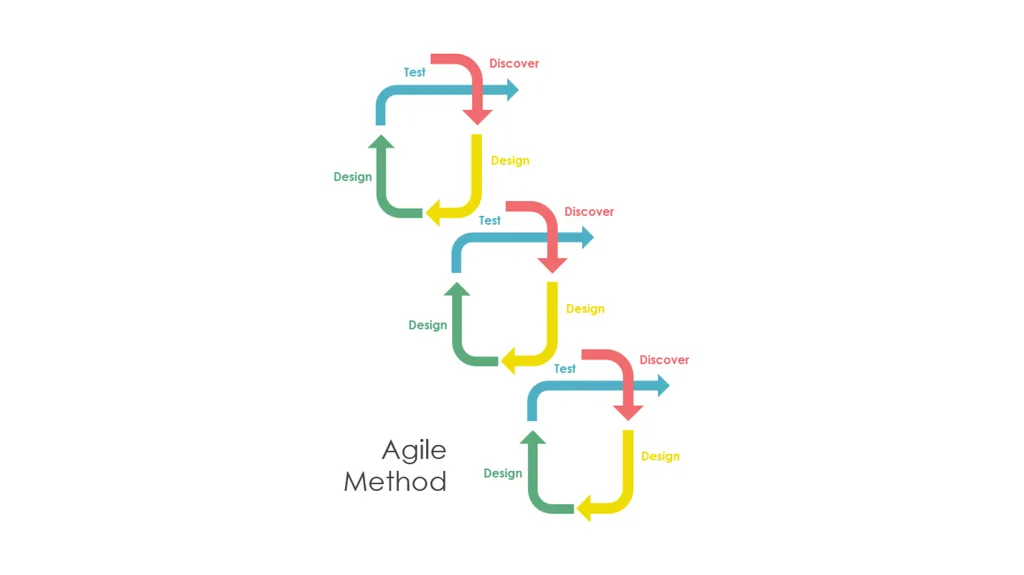
The primary goal of being Agile is empowered the development team the ability to create and respond to change in order to succeed in an uncertain and turbulent environment.
Agile software development approach is typically operated in rapid and small cycles.
This results in more frequent incremental releases with each release building on previous functionality.
Thorough testing is done to ensure that software quality is maintained<br>
Agile software development approach is typically operated in rapid and small cycles.
This results in more frequent incremental releases with each release building on previous functionality.
Thorough testing is done to ensure that software quality is maintained<br>
15
PROJECT LIFE CYCLE AND EFFORT ESTIMATION
Choice of Process Models
UNIT - II Dr.T.Logeswari
Dept of CS<br>
Dept of CS<br>
16
The no. of inter related activities to create a final product can be organized in different ways and we can call these Process Models.
A software process model is a simplified representation of a software process. Each model represents a process from a specific perspective. These generic models are abstractions of the process that can be used to explain different approaches to the software development.
Any software process must include the following four activities:
1. Software specification (or requirements engineering): Define the main functionalities of the software and the constrains around them.
2. Software design and implementation: The software is to be designed and programmed.
3. Software verification and validation: The software must conform to its specification and meets the customer needs.
4. Software evolution (software maintenance): The software is being modified to meet customer and market requirements changes.<br>
A software process model is a simplified representation of a software process. Each model represents a process from a specific perspective. These generic models are abstractions of the process that can be used to explain different approaches to the software development.
Any software process must include the following four activities:
1. Software specification (or requirements engineering): Define the main functionalities of the software and the constrains around them.
2. Software design and implementation: The software is to be designed and programmed.
3. Software verification and validation: The software must conform to its specification and meets the customer needs.
4. Software evolution (software maintenance): The software is being modified to meet customer and market requirements changes.<br>
17
The various Process Models are
Water Fall Model
Spiral Model Prototype
Model Incremental
Delivery<br>
Water Fall Model
Spiral Model Prototype
Model Incremental
Delivery<br>
18
Software Prototyping
A prototype is a version of a system or part of the system that’s developed quickly to check the customer’s requirements or feasibility of some design decisions.
So, a prototype is useful when a customer or developer is not sure of the requirements, or of algorithms, efficiency, business rules, response time, etc.
In prototyping, the client is involved throughout the development process, which increases the likelihood of client acceptance of the final implementation.
While some prototypes are developed with the expectation that they will be discarded, it is possible in some cases to evolve from prototype to working system.<br>
A prototype is a version of a system or part of the system that’s developed quickly to check the customer’s requirements or feasibility of some design decisions.
So, a prototype is useful when a customer or developer is not sure of the requirements, or of algorithms, efficiency, business rules, response time, etc.
In prototyping, the client is involved throughout the development process, which increases the likelihood of client acceptance of the final implementation.
While some prototypes are developed with the expectation that they will be discarded, it is possible in some cases to evolve from prototype to working system.<br>
19
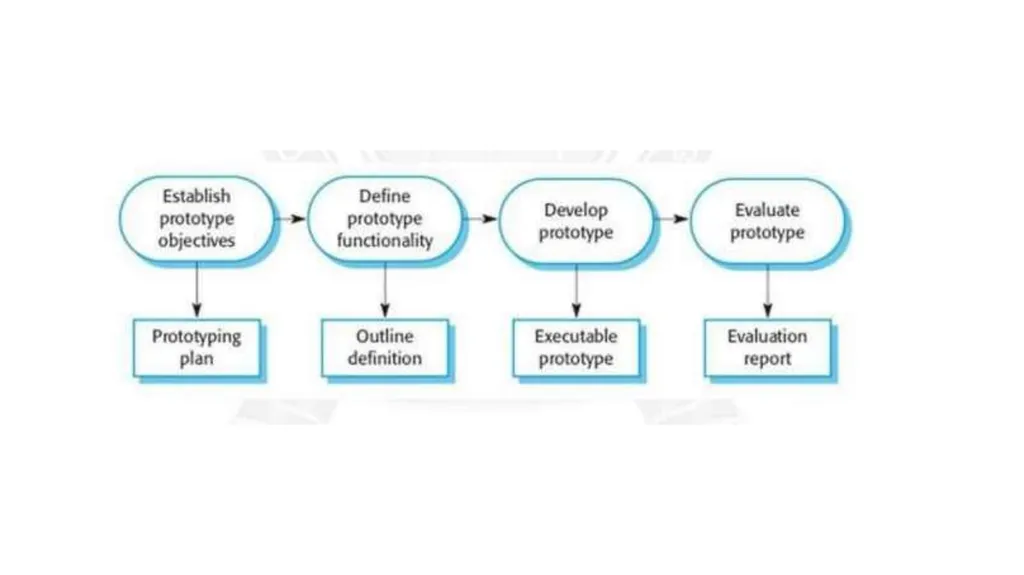
The phases of a prototype are:
1. Establish objectives: The objectives of the prototype should be made explicit from the start of the process. Is it to validate system requirements, or demonstrate feasibility, etc.
2. Define prototype functionality: Decide what are the inputs and the expected output from a prototype. To reduce the prototyping costs and accelerate the delivery schedule, you may ignore some functionality, such as response time and memory utilization unless they are relevant to the objective of the prototype.
3. Develop the prototype: The initial prototype is developed that includes only user interfaces.
4. Evaluate the prototype: Once the users are trained to use the prototype, they then discover requirements errors. Using the feedback both the specifications and the prototype can be improved. If changes are introduced, then a repeat of steps 3 and 4 may be needed<br>
1. Establish objectives: The objectives of the prototype should be made explicit from the start of the process. Is it to validate system requirements, or demonstrate feasibility, etc.
2. Define prototype functionality: Decide what are the inputs and the expected output from a prototype. To reduce the prototyping costs and accelerate the delivery schedule, you may ignore some functionality, such as response time and memory utilization unless they are relevant to the objective of the prototype.
3. Develop the prototype: The initial prototype is developed that includes only user interfaces.
4. Evaluate the prototype: Once the users are trained to use the prototype, they then discover requirements errors. Using the feedback both the specifications and the prototype can be improved. If changes are introduced, then a repeat of steps 3 and 4 may be needed<br>
20
Incremental Delivery
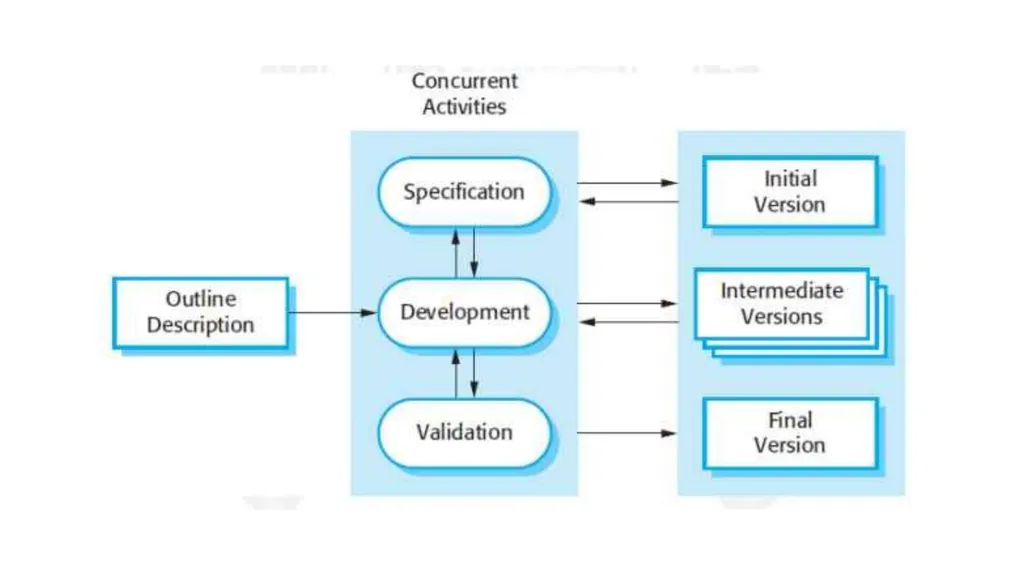
Incremental development is based on the idea of developing an initial implementation, exposing this to user feedback, and evolving it through several versions until an acceptable system has been developed.
The activities of a process are not separated but interleaved with feedback involved across those activities.
Each system increment reflects a piece of the functionality that is needed by the customer.
Generally, the early increments of the system should include the most important or most urgently required functionality.
This means that the customer can evaluate the system at early stage in the development to see if it delivers what’s required.
If not, then only the current increment has to be changed and, possibly, new functionality defined for later increments.<br>
Incremental development is based on the idea of developing an initial implementation, exposing this to user feedback, and evolving it through several versions until an acceptable system has been developed.
The activities of a process are not separated but interleaved with feedback involved across those activities.
Each system increment reflects a piece of the functionality that is needed by the customer.
Generally, the early increments of the system should include the most important or most urgently required functionality.
This means that the customer can evaluate the system at early stage in the development to see if it delivers what’s required.
If not, then only the current increment has to be changed and, possibly, new functionality defined for later increments.<br>
21
PROJECT LIFE CYCLE AND EFFORT ESTIMATION
Mental Delivery
UNIT - II Dr.T.Logeswari
Dept of CS<br>
Dept of CS<br>
22
Communication and Collaboration:
Effective communication is essential for project success. Project managers and team members need to communicate clearly and regularly to ensure everyone is on the same page.
Collaboration fosters a positive team environment and helps in addressing issues and challenges collectively.
Adaptability and Resilience:
The ability to adapt to changes in requirements, technology, or project scope is crucial. Being resilient in the face of challenges helps the team overcome obstacles and continue progressing.<br>
Effective communication is essential for project success. Project managers and team members need to communicate clearly and regularly to ensure everyone is on the same page.
Collaboration fosters a positive team environment and helps in addressing issues and challenges collectively.
Adaptability and Resilience:
The ability to adapt to changes in requirements, technology, or project scope is crucial. Being resilient in the face of challenges helps the team overcome obstacles and continue progressing.<br>
23
Leadership and Motivation:
Strong leadership skills are vital for guiding the team and making decisions that align with project goals.
Motivating the team and maintaining morale contribute to a positive work environment and can lead to higher productivity.
Problem-Solving and Decision-Making:
The project manager and team members should be adept at problem-solving and making informed decisions. Quick and effective decision-making is crucial to keep the project on track.<br>
Strong leadership skills are vital for guiding the team and making decisions that align with project goals.
Motivating the team and maintaining morale contribute to a positive work environment and can lead to higher productivity.
Problem-Solving and Decision-Making:
The project manager and team members should be adept at problem-solving and making informed decisions. Quick and effective decision-making is crucial to keep the project on track.<br>
24
Time and Stress Management:
Managing time effectively and handling stress are essential skills. Project managers need to create realistic timelines and help the team manage workload and stress levels.
Continuous Learning:
The software industry is dynamic, and staying updated on new technologies and methodologies is essential. Encouraging a culture of continuous learning helps the team adapt to changes and improve their skills.<br>
Managing time effectively and handling stress are essential skills. Project managers need to create realistic timelines and help the team manage workload and stress levels.
Continuous Learning:
The software industry is dynamic, and staying updated on new technologies and methodologies is essential. Encouraging a culture of continuous learning helps the team adapt to changes and improve their skills.<br>
25
PROJECT LIFE CYCLE AND EFFORT ESTIMATION
Rapid Application Development
UNIT - II Dr.T.Logeswari
Dept of CS<br>
Dept of CS<br>
26
RAD is a linear sequential software development process model that emphasizes a concise development cycle using an element-based construction approach. If the requirements are well understood and described, and the project scope is a constraint, the RAD process enables a development team to create a fully functional system within a concise time period.
RAD (Rapid Application Development) is a concept that products can be developed faster and of higher quality through:
Gathering requirements using workshops or focus groups
Prototyping and early, reiterative user testing of designs
The re-use of software components
A rigidly paced schedule that refers design improvements to the next product version
Less formality in reviews and other team communication<br>
RAD (Rapid Application Development) is a concept that products can be developed faster and of higher quality through:
Gathering requirements using workshops or focus groups
Prototyping and early, reiterative user testing of designs
The re-use of software components
A rigidly paced schedule that refers design improvements to the next product version
Less formality in reviews and other team communication<br>
27
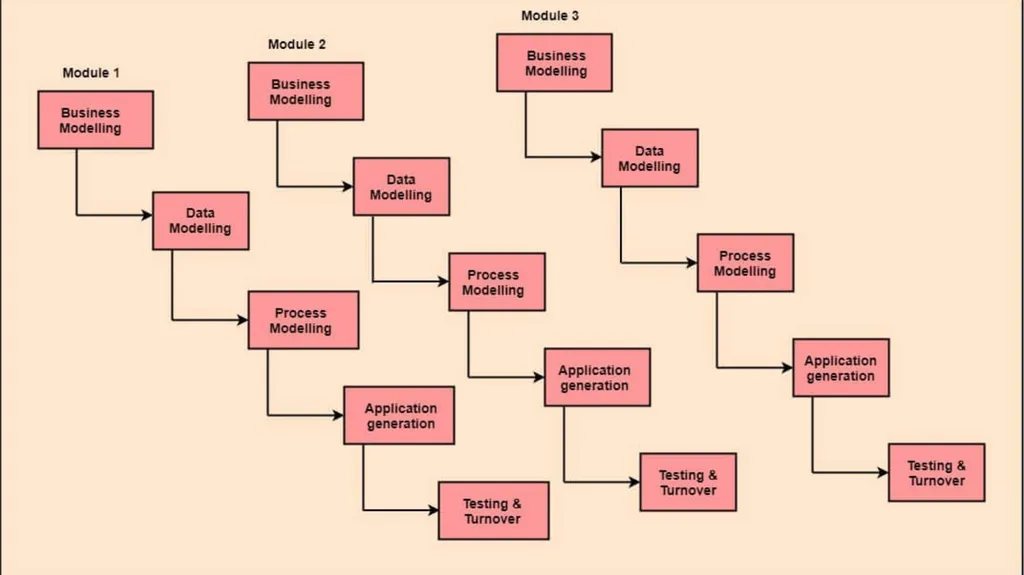
The various phases of RAD are as follows:
Business Modelling: The information flow among business functions is defined by answering questions like what data drives the business process, what data is generated, who generates it, where does the information go, who process it and so on.
Data Modelling: The data collected from business modeling is refined into a set of data objects (entities) that are needed to support the business. The attributes (character of each entity) are identified, and the relation between these data objects (entities) is defined.
Process Modelling: The information object defined in the data modeling phase are transformed to achieve the data flow necessary to implement a business function. Processing descriptions are created for adding, modifying, deleting, or retrieving a data object.
Application Generation: Automated tools are used to facilitate construction of the software; even they use the 4th GL techniques.
Testing & Turnover: Many of the programming components have already been tested since RAD emphasis reuse. This reduces the overall testing time. But the new part must be tested, and all interfaces must be fully exercised.<br>
Business Modelling: The information flow among business functions is defined by answering questions like what data drives the business process, what data is generated, who generates it, where does the information go, who process it and so on.
Data Modelling: The data collected from business modeling is refined into a set of data objects (entities) that are needed to support the business. The attributes (character of each entity) are identified, and the relation between these data objects (entities) is defined.
Process Modelling: The information object defined in the data modeling phase are transformed to achieve the data flow necessary to implement a business function. Processing descriptions are created for adding, modifying, deleting, or retrieving a data object.
Application Generation: Automated tools are used to facilitate construction of the software; even they use the 4th GL techniques.
Testing & Turnover: Many of the programming components have already been tested since RAD emphasis reuse. This reduces the overall testing time. But the new part must be tested, and all interfaces must be fully exercised.<br>
28
PROJECT LIFE CYCLE AND EFFORT ESTIMATION
Agile Methods
UNIT - II Dr.T.Logeswari
Dept of CS<br>
Dept of CS<br>
29
What is Agile project management?
Agile project management is a process for managing a project that involves constant collaboration and working in iterations. It works off the basis that a project can be continuously improved upon throughout its life cycle and adapt to changes quickly.
What are the benefits of using Agile methodology?
Agile is one of the most popular approaches to project management because it is flexible, it is adaptable to changes and it encourages customer feedback<br>
Agile project management is a process for managing a project that involves constant collaboration and working in iterations. It works off the basis that a project can be continuously improved upon throughout its life cycle and adapt to changes quickly.
What are the benefits of using Agile methodology?
Agile is one of the most popular approaches to project management because it is flexible, it is adaptable to changes and it encourages customer feedback<br>
30
Many teams embrace the Agile approach for the following reasons:
Rapid progress: By effectively reducing the time it takes to complete various stages of a project, teams can elicit feedback in real time and produce working prototypes or demos throughout the process
Customer and stakeholder alignment: Through focusing on customer concerns and stakeholder feedback, the Agile team is well positioned to produce results that satisfy the right people
Continuous improvement: As an iterative approach, Agile project management allows teams to chip away at tasks until they reach the best end result<br>
Rapid progress: By effectively reducing the time it takes to complete various stages of a project, teams can elicit feedback in real time and produce working prototypes or demos throughout the process
Customer and stakeholder alignment: Through focusing on customer concerns and stakeholder feedback, the Agile team is well positioned to produce results that satisfy the right people
Continuous improvement: As an iterative approach, Agile project management allows teams to chip away at tasks until they reach the best end result<br>
31
Types of Agile methodologies
Agile project management is not a singular framework but an umbrella term that includes a wide range of methodologies, including Scrum, Kanban, Extreme Programming (XP), and the Adaptive Project Framework (APF).
Scrum: It is ideal for projects with rapidly changing requirements, using short sprints.
Kanban: It visualizes project progress and is great for tasks requiring steady output.
Lean: It streamlines processes, eliminating waste for customer value.
Extreme Programming (XP): It enhances software quality and responsiveness to customer satisfaction.
Adaptive Project Framework (APF): Works well for projects with unclear details, as it adapts to constantly evolving client needs.<br>
Agile project management is not a singular framework but an umbrella term that includes a wide range of methodologies, including Scrum, Kanban, Extreme Programming (XP), and the Adaptive Project Framework (APF).
Scrum: It is ideal for projects with rapidly changing requirements, using short sprints.
Kanban: It visualizes project progress and is great for tasks requiring steady output.
Lean: It streamlines processes, eliminating waste for customer value.
Extreme Programming (XP): It enhances software quality and responsiveness to customer satisfaction.
Adaptive Project Framework (APF): Works well for projects with unclear details, as it adapts to constantly evolving client needs.<br>
32
How to implement Agile methodology into projects
1. Choose the right Agile framework
Your first priority is to select the right Agile framework for your team.
Scrum: Principle-based project management
Kanban: Visual workflows and processes
Scrumban: Hybrid of Scrum and Kanban
XP: Customer-focused product development
APF: Versatile teamwork<br>
1. Choose the right Agile framework
Your first priority is to select the right Agile framework for your team.
Scrum: Principle-based project management
Kanban: Visual workflows and processes
Scrumban: Hybrid of Scrum and Kanban
XP: Customer-focused product development
APF: Versatile teamwork<br>
33
2. Assemble your Agile team
An Agile team isn’t like any ordinary team.
If you want to find success with any of the Agile methodologies, you need to build a team with clear roles and responsibilities and a culture of collaboration.
3. Plan the project
Now that you’ve selected one of the Agile methods and assembled your A-team, it’s time to plan out your project. Meticulous planning is one of the secret ingredients of successful Agile project management.
You might also draw up a product backlog during the planning phase, which is most common in software development projects. The product backlog allows you to assign a priority level to your tasks so everyone on the team knows what they should focus on.<br>
An Agile team isn’t like any ordinary team.
If you want to find success with any of the Agile methodologies, you need to build a team with clear roles and responsibilities and a culture of collaboration.
3. Plan the project
Now that you’ve selected one of the Agile methods and assembled your A-team, it’s time to plan out your project. Meticulous planning is one of the secret ingredients of successful Agile project management.
You might also draw up a product backlog during the planning phase, which is most common in software development projects. The product backlog allows you to assign a priority level to your tasks so everyone on the team knows what they should focus on.<br>
34
4. Manage stakeholder expectations
Before you get your project underway, it’s important to check in with any key stakeholders to make sure you factor in their feedback.
5. Measure success
Measuring project success is key to making meaningful progress with your Agile methodology of choice.
By paying attention to what worked and what didn’t during the project management process, you can extract key lessons to apply to future Agile projects.
There are various ways to effectively track progress and measure success with Agile projects:
Daily standups: Brief meetings to discuss obstacles and find solutions
Sprint reviews: Informal sit-down meetings to present work and solicit team feedback
Retrospectives: Reflections on past work to inspire and influence future progress<br>
Before you get your project underway, it’s important to check in with any key stakeholders to make sure you factor in their feedback.
5. Measure success
Measuring project success is key to making meaningful progress with your Agile methodology of choice.
By paying attention to what worked and what didn’t during the project management process, you can extract key lessons to apply to future Agile projects.
There are various ways to effectively track progress and measure success with Agile projects:
Daily standups: Brief meetings to discuss obstacles and find solutions
Sprint reviews: Informal sit-down meetings to present work and solicit team feedback
Retrospectives: Reflections on past work to inspire and influence future progress<br>
35
PROJECT LIFE CYCLE AND EFFORT ESTIMATION
Extreme Programming
UNIT - II Dr.T.Logeswari
Dept of CS<br>
Dept of CS<br>
36
Extreme programming (XP) is one of the most important software development frameworks of Agile models. It is used to improve software quality and responsiveness to customer requirements.
Principles of Extreme programming:
Coding: The concept of coding which is used in the XP model is slightly different from traditional coding. Here, the coding activity includes drawing diagrams (modeling) that will be transformed into code, scripting a web-based system, and choosing among several alternative solutions.
Testing: The XP model gives high importance to testing and considers it to be the primary factor in developing fault-free software.
Listening: The developers need to carefully listen to the customers if they have to develop good quality software. Sometimes programmers may not have the depth knowledge of the system to be developed. So, the programmers should understand properly the functionality of the system and they have to listen to the customers.<br>
Principles of Extreme programming:
Coding: The concept of coding which is used in the XP model is slightly different from traditional coding. Here, the coding activity includes drawing diagrams (modeling) that will be transformed into code, scripting a web-based system, and choosing among several alternative solutions.
Testing: The XP model gives high importance to testing and considers it to be the primary factor in developing fault-free software.
Listening: The developers need to carefully listen to the customers if they have to develop good quality software. Sometimes programmers may not have the depth knowledge of the system to be developed. So, the programmers should understand properly the functionality of the system and they have to listen to the customers.<br>
37
Designing: Without a proper design, a system implementation becomes too complex, and very difficult to understand the solution, thus making maintenance expensive. A good design results elimination of complex dependencies within a system. So, effective use of suitable design is emphasized.
Feedback: One of the most important aspects of the XP model is to gain feedback to understand the exact customer needs. Frequent contact with the customer makes the development effective.
Simplicity: The main principle of the XP model is to develop a simple system that will work efficiently in the present time, rather than trying to build something that would take time and may never be used. It focuses on some specific features that are immediately needed, rather than engaging time and effort on speculations of future requirements.
Pair Programming: XP encourages pair programming where two developers work together at the same workstation. This approach helps in knowledge sharing, reduces errors, and improves code quality.
Continuous Integration: In XP, developers integrate their code into a shared repository several times a day. This helps to detect and resolve integration issues early on in the development process.<br>
Feedback: One of the most important aspects of the XP model is to gain feedback to understand the exact customer needs. Frequent contact with the customer makes the development effective.
Simplicity: The main principle of the XP model is to develop a simple system that will work efficiently in the present time, rather than trying to build something that would take time and may never be used. It focuses on some specific features that are immediately needed, rather than engaging time and effort on speculations of future requirements.
Pair Programming: XP encourages pair programming where two developers work together at the same workstation. This approach helps in knowledge sharing, reduces errors, and improves code quality.
Continuous Integration: In XP, developers integrate their code into a shared repository several times a day. This helps to detect and resolve integration issues early on in the development process.<br>
38
Refactoring: XP encourages refactoring, which is the process of restructuring existing code to make it more efficient and maintainable. Refactoring helps to keep the codebase clean, organized, and easy to understand.
Collective Code Ownership: In XP, there is no individual ownership of code. Instead, the entire team is responsible for the codebase. This approach ensures that all team members have a sense of ownership and responsibility towards the code.
Planning Game: XP follows a planning game, where the customer and the development team collaborate to prioritize and plan development tasks. This approach helps to ensure that the team is working on the most important features and delivers value to the customer.
On-site Customer: XP requires an on-site customer who works closely with the development team throughout the project. This approach helps to ensure that the customer’s needs are understood and met, and also facilitates communication and feedback.<br>
Collective Code Ownership: In XP, there is no individual ownership of code. Instead, the entire team is responsible for the codebase. This approach ensures that all team members have a sense of ownership and responsibility towards the code.
Planning Game: XP follows a planning game, where the customer and the development team collaborate to prioritize and plan development tasks. This approach helps to ensure that the team is working on the most important features and delivers value to the customer.
On-site Customer: XP requires an on-site customer who works closely with the development team throughout the project. This approach helps to ensure that the customer’s needs are understood and met, and also facilitates communication and feedback.<br>
39
PROJECT LIFE CYCLE AND EFFORT ESTIMATION
SCRUM
UNIT - II Dr.T.Logeswari
Dept of CS<br>
Dept of CS<br>
40
Scrum is the type of Agile framework. It is a framework within which people can address complex adaptive problem while productivity and creativity of delivering product is at highest possible values. Scrum uses Iterative process. Silent features of Scrum are:
Scrum is light-weighted framework
Scrum emphasizes self-organization
Scrum is simple to understand
Scrum framework help the team to work together<br>
Scrum is light-weighted framework
Scrum emphasizes self-organization
Scrum is simple to understand
Scrum framework help the team to work together<br>
41
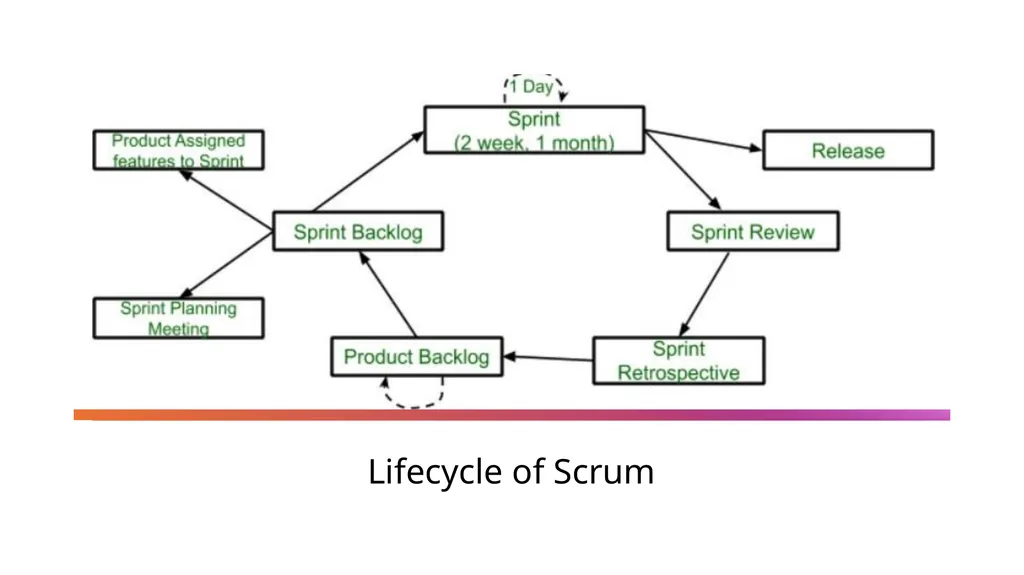
Lifecycle of Scrum<br>
42
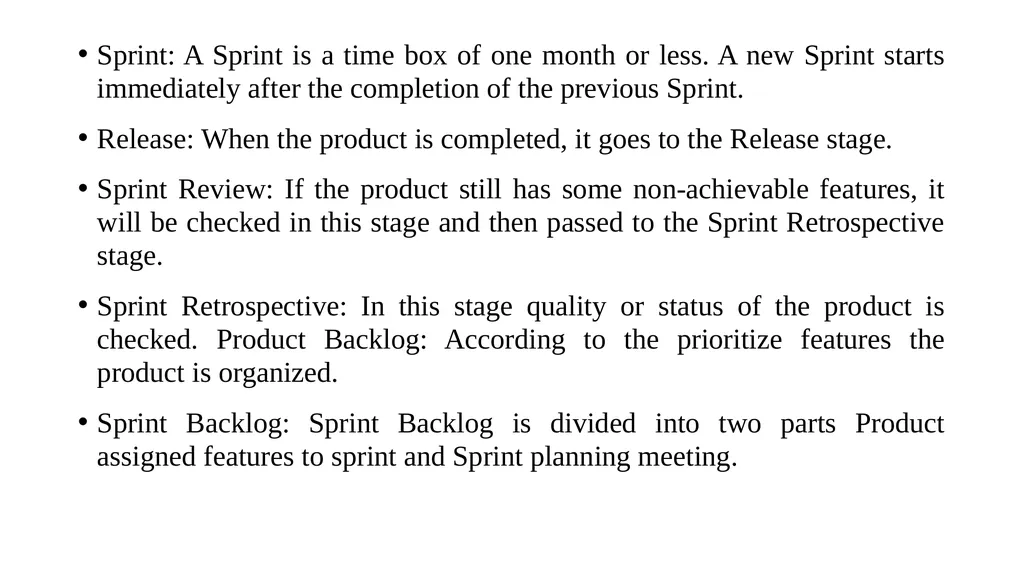
Sprint: A Sprint is a time box of one month or less. A new Sprint starts immediately after the completion of the previous Sprint.
Release: When the product is completed, it goes to the Release stage.
Sprint Review: If the product still has some non-achievable features, it will be checked in this stage and then passed to the Sprint Retrospective stage.
Sprint Retrospective: In this stage quality or status of the product is checked. Product Backlog: According to the prioritize features the product is organized.
Sprint Backlog: Sprint Backlog is divided into two parts Product assigned features to sprint and Sprint planning meeting.<br>
Release: When the product is completed, it goes to the Release stage.
Sprint Review: If the product still has some non-achievable features, it will be checked in this stage and then passed to the Sprint Retrospective stage.
Sprint Retrospective: In this stage quality or status of the product is checked. Product Backlog: According to the prioritize features the product is organized.
Sprint Backlog: Sprint Backlog is divided into two parts Product assigned features to sprint and Sprint planning meeting.<br>
43
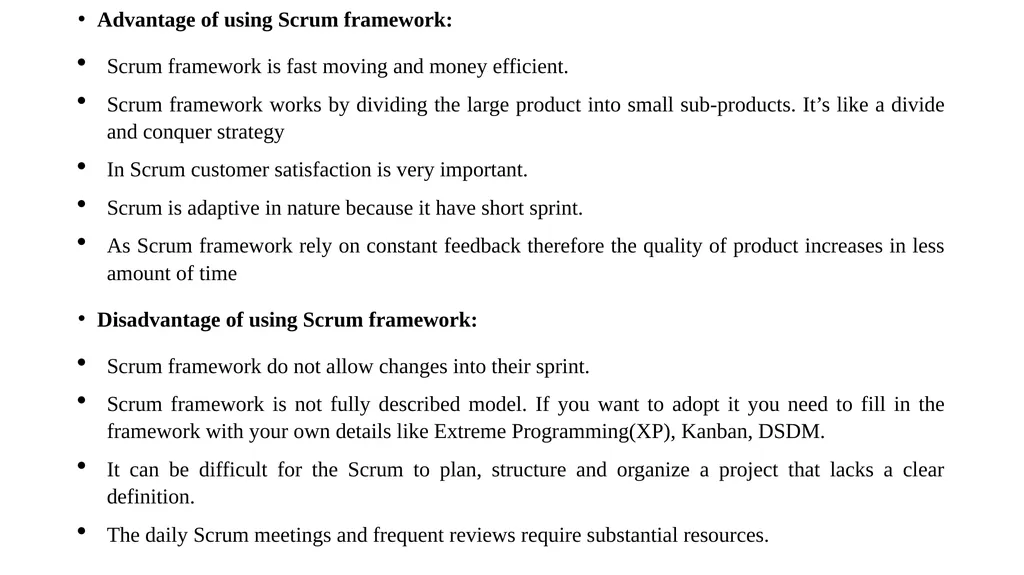
Advantage of using Scrum framework:
Scrum framework is fast moving and money efficient.
Scrum framework works by dividing the large product into small sub-products. It’s like a divide and conquer strategy
In Scrum customer satisfaction is very important.
Scrum is adaptive in nature because it have short sprint.
As Scrum framework rely on constant feedback therefore the quality of product increases in less amount of time
Disadvantage of using Scrum framework:
Scrum framework do not allow changes into their sprint.
Scrum framework is not fully described model. If you want to adopt it you need to fill in the framework with your own details like Extreme Programming(XP), Kanban, DSDM.
It can be difficult for the Scrum to plan, structure and organize a project that lacks a clear definition.
The daily Scrum meetings and frequent reviews require substantial resources.<br>
Scrum framework is fast moving and money efficient.
Scrum framework works by dividing the large product into small sub-products. It’s like a divide and conquer strategy
In Scrum customer satisfaction is very important.
Scrum is adaptive in nature because it have short sprint.
As Scrum framework rely on constant feedback therefore the quality of product increases in less amount of time
Disadvantage of using Scrum framework:
Scrum framework do not allow changes into their sprint.
Scrum framework is not fully described model. If you want to adopt it you need to fill in the framework with your own details like Extreme Programming(XP), Kanban, DSDM.
It can be difficult for the Scrum to plan, structure and organize a project that lacks a clear definition.
The daily Scrum meetings and frequent reviews require substantial resources.<br>
44
PROJECT LIFE CYCLE AND EFFORT ESTIMATION
Managing Interactive Processes
UNIT - II Dr.T.Logeswari
Dept of CS<br>
Dept of CS<br>
45
Managing Interactive Processes
There are two levels of development:
The macro processes
The micro process
Macro process
Establish core requirements (conceptualization).
Develop a model of the desired behavior (analysis).
Create an architecture (design).
Evolve the implementation (evolution).
Manage post-delivery evolution (maintenance).<br>
There are two levels of development:
The macro processes
The micro process
Macro process
Establish core requirements (conceptualization).
Develop a model of the desired behavior (analysis).
Create an architecture (design).
Evolve the implementation (evolution).
Manage post-delivery evolution (maintenance).<br>
46
Micro process
Identify the classes and objects at a given level of abstraction.
Identify the semantics of these classes and objects.
Identify the relationships among these classes and objects.
Specify the interface and then the implementation of these classes and objects
In principle, the micro process represents the daily activity of the individual developer, or of a small team of developers.
The macro process serves as the controlling framework of the micro process. It represents the activities of the entire development team on the scale of weeks to months at a time.
The basic philosophy of the macro process is that of incremental development: the system as a whole is built up step by step, each successive version consisting of the previous ones plus a number of new functions.<br>
Identify the classes and objects at a given level of abstraction.
Identify the semantics of these classes and objects.
Identify the relationships among these classes and objects.
Specify the interface and then the implementation of these classes and objects
In principle, the micro process represents the daily activity of the individual developer, or of a small team of developers.
The macro process serves as the controlling framework of the micro process. It represents the activities of the entire development team on the scale of weeks to months at a time.
The basic philosophy of the macro process is that of incremental development: the system as a whole is built up step by step, each successive version consisting of the previous ones plus a number of new functions.<br>
47
PROJECT LIFE CYCLE AND EFFORT ESTIMATION
Basics Of Software Estimation
UNIT - II Dr.T.Logeswari
Dept of CS<br>
Dept of CS<br>
48
Basics of Software Estimation
Estimation techniques are of utmost importance in software development life cycle, where the time required to complete a particular task is estimated before a project begins. Estimation is the process of finding an estimate, or approximation, which is a value that can be used for some purpose even if input data may be incomplete, uncertain, or unstable.
The four basic steps in software project estimation are:
1) Estimate the size of the development product. This generally ends up in either Lines of Code (LOC) or Function Points (FP), but there are other possible units of measure. A discussion of the pros & cons of each is discussed in some of the material referenced at the end of this report.
2) Estimate the effort in person-months or person-hours.
3) Estimate the schedule in calendar months.
4) Estimate the project cost in dollars (or local currency)<br>
Estimation techniques are of utmost importance in software development life cycle, where the time required to complete a particular task is estimated before a project begins. Estimation is the process of finding an estimate, or approximation, which is a value that can be used for some purpose even if input data may be incomplete, uncertain, or unstable.
The four basic steps in software project estimation are:
1) Estimate the size of the development product. This generally ends up in either Lines of Code (LOC) or Function Points (FP), but there are other possible units of measure. A discussion of the pros & cons of each is discussed in some of the material referenced at the end of this report.
2) Estimate the effort in person-months or person-hours.
3) Estimate the schedule in calendar months.
4) Estimate the project cost in dollars (or local currency)<br>
49
Estimation is based on −
Past Data/Past Experience
Available Documents/Knowledge
Assumptions
Identified Risks
Estimation need not be a one-time task in a project. It can take place during −
Acquiring a Project.
Planning the Project.
Execution of the Project as the need arises.
Project scope must be understood before the estimation process begins. It will be helpful to have historical Project Data.
Planning requires technical managers and the software team to make an initial commitment as it leads to responsibility and accountability.
Past experience can aid greatly.
Plans should be iterative and allow adjustments as time passes and more details are known.<br>
Past Data/Past Experience
Available Documents/Knowledge
Assumptions
Identified Risks
Estimation need not be a one-time task in a project. It can take place during −
Acquiring a Project.
Planning the Project.
Execution of the Project as the need arises.
Project scope must be understood before the estimation process begins. It will be helpful to have historical Project Data.
Planning requires technical managers and the software team to make an initial commitment as it leads to responsibility and accountability.
Past experience can aid greatly.
Plans should be iterative and allow adjustments as time passes and more details are known.<br>
50
General Project Estimation Approach
Step 1 − Understand the scope of the software to be built.
Step 2 − Generate an estimate of the software size.
Start with the statement of scope.
Decompose the software into functions that can each be estimated individually.
Calculate the size of each function.
Derive effort and cost estimates by applying the size values to your baseline productivity metrics.
Combine function estimates to produce an overall estimate for the entire project.<br>
Step 1 − Understand the scope of the software to be built.
Step 2 − Generate an estimate of the software size.
Start with the statement of scope.
Decompose the software into functions that can each be estimated individually.
Calculate the size of each function.
Derive effort and cost estimates by applying the size values to your baseline productivity metrics.
Combine function estimates to produce an overall estimate for the entire project.<br>
51
Step 3 − Generate an estimate of the effort and cost. You can arrive at the effort and cost estimates by breaking down a project into related software engineering activities.
Identify the sequence of activities that need to be performed for the project to be completed.
Divide activities into tasks that can be measured.
Estimate the effort (in person hours/days) required to complete each task.
Combine effort estimates of tasks of activity to produce an estimate for the activity.
Obtain cost units (i.e., cost/unit effort) for each activity from the database.
Compute the total effort and cost for each activity.
Combine effort and cost estimates for each activity to produce an overall effort and cost estimate for the entire project.<br>
Identify the sequence of activities that need to be performed for the project to be completed.
Divide activities into tasks that can be measured.
Estimate the effort (in person hours/days) required to complete each task.
Combine effort estimates of tasks of activity to produce an estimate for the activity.
Obtain cost units (i.e., cost/unit effort) for each activity from the database.
Compute the total effort and cost for each activity.
Combine effort and cost estimates for each activity to produce an overall effort and cost estimate for the entire project.<br>
52
Step 4 − Reconcile estimates: Compare the resulting values from Step 3 to those obtained from Step 2. If both sets of estimates agree, then your numbers are highly reliable
Step 5 − Determine the cause of divergence and then reconcile the estimates.<br>
Step 5 − Determine the cause of divergence and then reconcile the estimates.<br>
53
PROJECT LIFE CYCLE AND EFFORT ESTIMATION
Effort And Cost Estimation Techniques
UNIT - II Dr.T.Logeswari
Dept of CS<br>
Dept of CS<br>
54
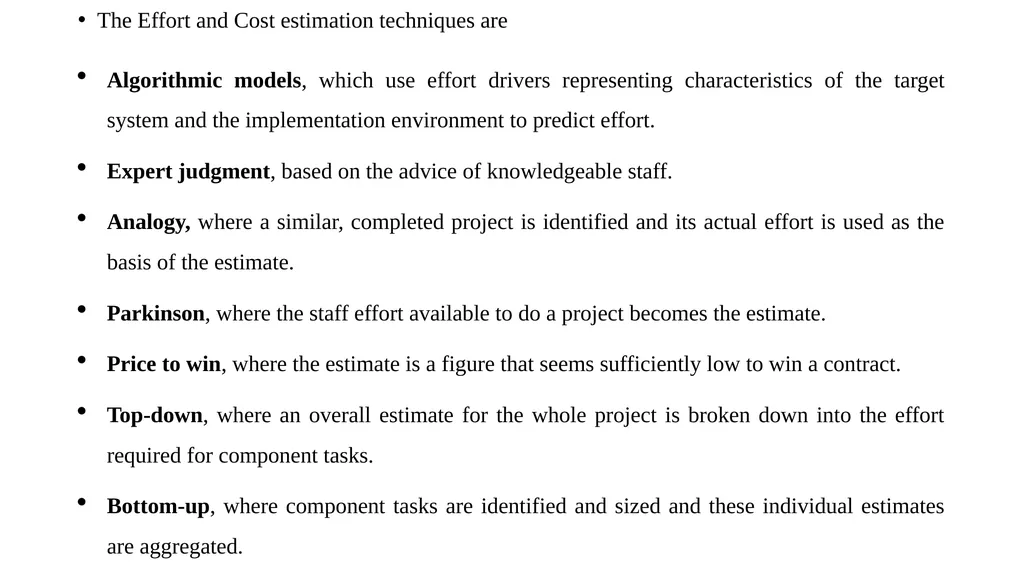
The Effort and Cost estimation techniques are
Algorithmic models, which use effort drivers representing characteristics of the target system and the implementation environment to predict effort.
Expert judgment, based on the advice of knowledgeable staff.
Analogy, where a similar, completed project is identified and its actual effort is used as the basis of the estimate.
Parkinson, where the staff effort available to do a project becomes the estimate.
Price to win, where the estimate is a figure that seems sufficiently low to win a contract.
Top-down, where an overall estimate for the whole project is broken down into the effort required for component tasks.
Bottom-up, where component tasks are identified and sized and these individual estimates are aggregated.<br>
Algorithmic models, which use effort drivers representing characteristics of the target system and the implementation environment to predict effort.
Expert judgment, based on the advice of knowledgeable staff.
Analogy, where a similar, completed project is identified and its actual effort is used as the basis of the estimate.
Parkinson, where the staff effort available to do a project becomes the estimate.
Price to win, where the estimate is a figure that seems sufficiently low to win a contract.
Top-down, where an overall estimate for the whole project is broken down into the effort required for component tasks.
Bottom-up, where component tasks are identified and sized and these individual estimates are aggregated.<br>
55
PROJECT LIFE CYCLE AND EFFORT ESTIMATION
COSMIC Full Function Points
UNIT - II Dr.T.Logeswari
Dept of CS<br>
Dept of CS<br>
56
COSMIC Full Function Points
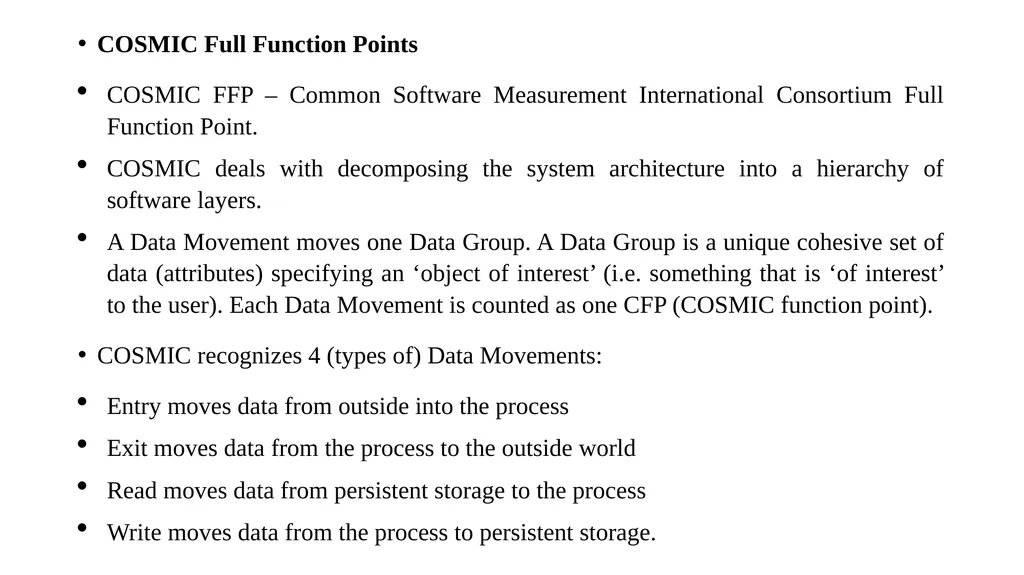
COSMIC FFP – Common Software Measurement International Consortium Full Function Point.
COSMIC deals with decomposing the system architecture into a hierarchy of software layers.
A Data Movement moves one Data Group. A Data Group is a unique cohesive set of data (attributes) specifying an ‘object of interest’ (i.e. something that is ‘of interest’ to the user). Each Data Movement is counted as one CFP (COSMIC function point).
COSMIC recognizes 4 (types of) Data Movements:
Entry moves data from outside into the process
Exit moves data from the process to the outside world
Read moves data from persistent storage to the process
Write moves data from the process to persistent storage.<br>
COSMIC FFP – Common Software Measurement International Consortium Full Function Point.
COSMIC deals with decomposing the system architecture into a hierarchy of software layers.
A Data Movement moves one Data Group. A Data Group is a unique cohesive set of data (attributes) specifying an ‘object of interest’ (i.e. something that is ‘of interest’ to the user). Each Data Movement is counted as one CFP (COSMIC function point).
COSMIC recognizes 4 (types of) Data Movements:
Entry moves data from outside into the process
Exit moves data from the process to the outside world
Read moves data from persistent storage to the process
Write moves data from the process to persistent storage.<br>
57
Function Points
Function points were defined in 1979 in Measuring Application Development Productivity by Allan Albrecht at IBM.
The functional user requirements of the software are identified and each one is categorized into one of five types: outputs, inquiries, inputs, internal files, and external interfaces.
Once the function is identified and categorized into a type, it is then assessed for complexity and assigned a number of function points.
Each of these functional user requirements maps to an end-user business function, such as a data entry for an Input or a user query for an Inquiry.
This distinction is important because it tends to make the functions measured in function points map easily into user-oriented requirements, but it also tends to hide internal functions (e.g. algorithms), which also require resources to implement.
There is currently no ISO recognized FSM Method that includes algorithmic complexity in the sizing result. Recently there have been different approaches proposed to deal with this perceived weakness, implemented in several commercial software products.<br>
Function points were defined in 1979 in Measuring Application Development Productivity by Allan Albrecht at IBM.
The functional user requirements of the software are identified and each one is categorized into one of five types: outputs, inquiries, inputs, internal files, and external interfaces.
Once the function is identified and categorized into a type, it is then assessed for complexity and assigned a number of function points.
Each of these functional user requirements maps to an end-user business function, such as a data entry for an Input or a user query for an Inquiry.
This distinction is important because it tends to make the functions measured in function points map easily into user-oriented requirements, but it also tends to hide internal functions (e.g. algorithms), which also require resources to implement.
There is currently no ISO recognized FSM Method that includes algorithmic complexity in the sizing result. Recently there have been different approaches proposed to deal with this perceived weakness, implemented in several commercial software products.<br>
58
The variations of the Albrecht- based IFPUG method designed to make up for this (and other weaknesses) include:
Early and easy function points – Adjusts for problem and data complexity with two questions that yield a somewhat subjective complexity measurement; simplifies measurement by eliminating the need to count data elements.
Engineering function points – Elements (variable names) and operators (e.g., arithmetic, equality/inequality, Boolean) are counted. This variation highlights computational function.
The intent is similar to that of the operator/operand-based Halstead complexity measures.
Bang measure – Defines a function metric based on twelve primitive (simple) counts that affect or show Bang, defined as "the measure of true function to be delivered as perceived by the user." Bang measure may be helpful in evaluating a software unit's value in terms of how much useful function it provides, although there is little evidence in the literature of such application.<br>
Early and easy function points – Adjusts for problem and data complexity with two questions that yield a somewhat subjective complexity measurement; simplifies measurement by eliminating the need to count data elements.
Engineering function points – Elements (variable names) and operators (e.g., arithmetic, equality/inequality, Boolean) are counted. This variation highlights computational function.
The intent is similar to that of the operator/operand-based Halstead complexity measures.
Bang measure – Defines a function metric based on twelve primitive (simple) counts that affect or show Bang, defined as "the measure of true function to be delivered as perceived by the user." Bang measure may be helpful in evaluating a software unit's value in terms of how much useful function it provides, although there is little evidence in the literature of such application.<br>
59
The use of Bang measure could apply when re-engineering (either complete or piecewise) is being considered, as discussed in Maintenance of Operational Systems—An Overview.
Feature points – Adds changes to improve applicability to systems with significant internal processing (e.g., operating systems, communications systems). This allows accounting for functions not readily perceivable by the user, but essential for proper operation.
Weighted Micro Function Points – One of the newer models (2009) which adjusts function points using weights derived from program flow complexity, operand and operator vocabulary, object usage, and algorithm.<br>
Feature points – Adds changes to improve applicability to systems with significant internal processing (e.g., operating systems, communications systems). This allows accounting for functions not readily perceivable by the user, but essential for proper operation.
Weighted Micro Function Points – One of the newer models (2009) which adjusts function points using weights derived from program flow complexity, operand and operator vocabulary, object usage, and algorithm.<br>
60
PROJECT LIFE CYCLE AND EFFORT ESTIMATION
COCOMO II A Parametric Productivity Model – Staffing Pattern.
UNIT - II Dr.T.Logeswari
Dept of CS<br>
Dept of CS<br>
61
COCOMO II A Parametric Productivity Model
COnstructive COst MOdel II (COCOMO II) is a model that allows one to estimate the cost, effort, and schedule when planning a new software development activity.
It consists of three submodels, each one offering increased fidelity the further along one is in the project planning and design process.
Listed in increasing fidelity, these sub models are called the Applications Composition, Early Design, and Post-architecture models.<br>
COnstructive COst MOdel II (COCOMO II) is a model that allows one to estimate the cost, effort, and schedule when planning a new software development activity.
It consists of three submodels, each one offering increased fidelity the further along one is in the project planning and design process.
Listed in increasing fidelity, these sub models are called the Applications Composition, Early Design, and Post-architecture models.<br>
62
COCOMO II can be used for the following major decision situations
Making investment or other financial decisions involving a software development effort
Setting project budgets and schedules as a basis for planning and control
Deciding on or negotiating tradeoffs among software cost, schedule, functionality, performance or quality factors
Making software cost and schedule risk management decisions
Deciding which parts of a software system to develop, reuse, lease, or purchase
Making legacy software inventory decisions: what parts to modify, phase out, outsource, etc<br>
Making investment or other financial decisions involving a software development effort
Setting project budgets and schedules as a basis for planning and control
Deciding on or negotiating tradeoffs among software cost, schedule, functionality, performance or quality factors
Making software cost and schedule risk management decisions
Deciding which parts of a software system to develop, reuse, lease, or purchase
Making legacy software inventory decisions: what parts to modify, phase out, outsource, etc<br>
63
Setting mixed investment strategies to improve organization's software capability, via reuse, tools, process maturity, outsourcing, etc
Deciding how to implement a process improvement strategy, such as that provided in the SEI CMM
The original COCOMO model was first published by Dr. Barry Boehm in 1981, and reflected the software development practices of the day.
In the ensuing decade and a half, software development techniques changed dramatically.
These changes included a move away from mainframe overnight batch processing to desktop-based real-time turnaround; a greatly increased emphasis on reusing existing software and building new systems using off-the-shelf software components; and spending as much effort to design and manage the software development process as was once spent creating the software product.<br>
Deciding how to implement a process improvement strategy, such as that provided in the SEI CMM
The original COCOMO model was first published by Dr. Barry Boehm in 1981, and reflected the software development practices of the day.
In the ensuing decade and a half, software development techniques changed dramatically.
These changes included a move away from mainframe overnight batch processing to desktop-based real-time turnaround; a greatly increased emphasis on reusing existing software and building new systems using off-the-shelf software components; and spending as much effort to design and manage the software development process as was once spent creating the software product.<br>