
Python Dictionaries Chapter 9 Python for Everybody
MS
Published · 30 slides · 0 views
1 / 1

Description
Python Dictionaries Chapter 9 Python for Everybody www.py4e.com What is a Collection? A collection is nice because we can put more than one value in it and carry them all around in one convenient package We have a bunch of values in a
Related Topics
Download this presentation From Below
"Python Dictionaries Chapter 9 Python for Everybody" is the property of its rightful owner. Permission is granted to download and print the materials on this website for personal, non-commercial use only, and to display it on your personal computer provided you do not modify the materials and that you retain all copyright notices contained in the materials. By downloading content from our website, you accept the terms of this agreement.
Share
Embed code
Presentation Transcript
01
Python Dictionaries Chapter 9 Python for Everybody
www.py4e.com<br>
www.py4e.com<br>
02
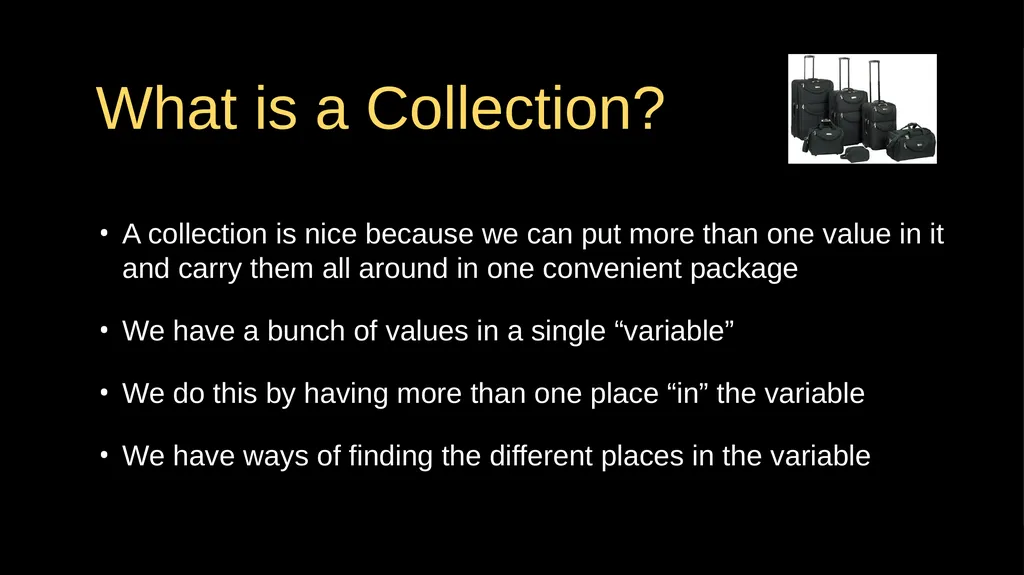
What is a Collection? A collection is nice because we can put more than one value in it and carry them all around in one convenient package
We have a bunch of values in a single “variable”
We do this by having more than one place “in” the variable
We have ways of finding the different places in the variable<br>
We have a bunch of values in a single “variable”
We do this by having more than one place “in” the variable
We have ways of finding the different places in the variable<br>
03
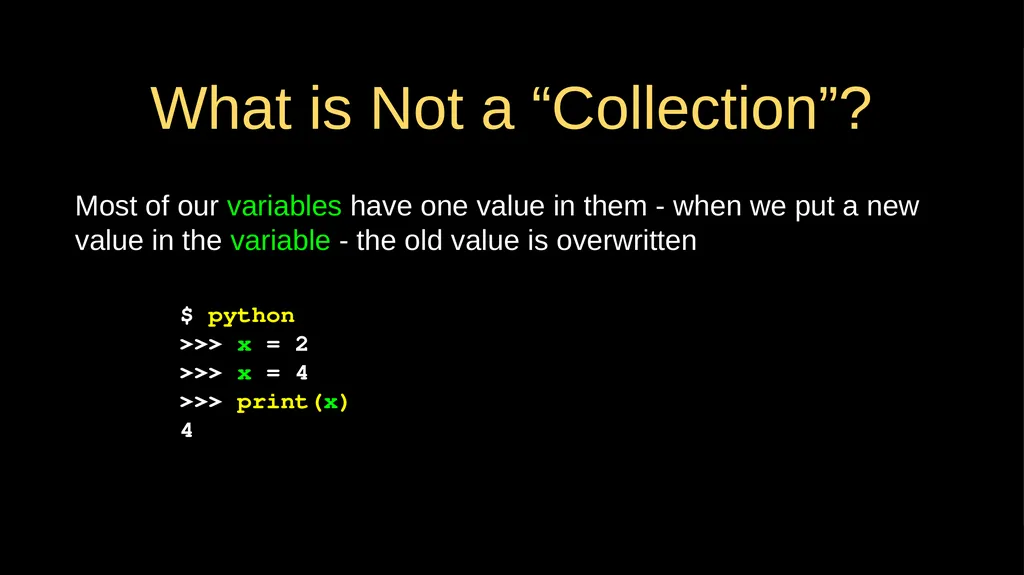
What is Not a “Collection”? Most of our variables have one value in them - when we put a new value in the variable - the old value is overwritten $ python
>>> x = 2
>>> x = 4
>>> print(x)
4<br>
>>> x = 2
>>> x = 4
>>> print(x)
4<br>
04
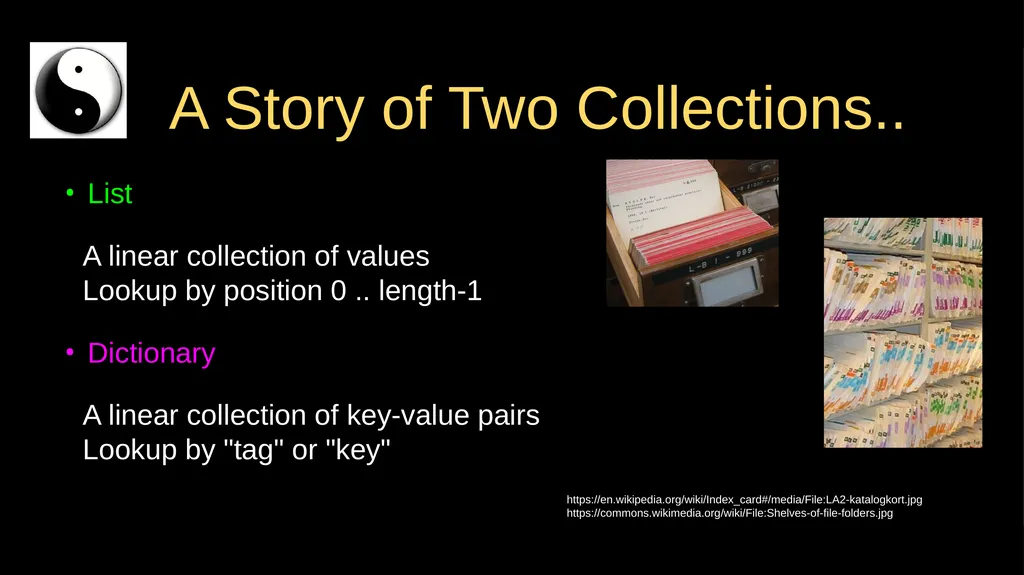
A Story of Two Collections.. List
A linear collection of values Lookup by position 0 .. length-1
Dictionary
A linear collection of key-value pairs Lookup by "tag" or "key" https://en.wikipedia.org/wiki/Index_card#/media/File:LA2-katalogkort.jpg
https://commons.wikimedia.org/wiki/File:Shelves-of-file-folders.jpg<br>
A linear collection of values Lookup by position 0 .. length-1
Dictionary
A linear collection of key-value pairs Lookup by "tag" or "key" https://en.wikipedia.org/wiki/Index_card#/media/File:LA2-katalogkort.jpg
https://commons.wikimedia.org/wiki/File:Shelves-of-file-folders.jpg<br>
05
Dictionaries Dictionaries are Python’s most powerful data collection
Dictionaries allow us to do fast database-like operations in Python
Similar concepts in different programming languages
- Associative Arrays - Perl / PHP
- Properties or Map or HashMap - Java
- Property Bag - C# / .Net<br>
Dictionaries allow us to do fast database-like operations in Python
Similar concepts in different programming languages
- Associative Arrays - Perl / PHP
- Properties or Map or HashMap - Java
- Property Bag - C# / .Net<br>
06
Dictionaries over time in Python Prior to Python 3.7 dictionaries did not keep entries in the order of insertion
Python 3.7 (2018) and later dictionaries keep entries in the order they were inserted
"insertion order" is not "always sorted order"<br>
Python 3.7 (2018) and later dictionaries keep entries in the order they were inserted
"insertion order" is not "always sorted order"<br>
07
Below the Abstraction Python lists, dictionaries, and tuples are "abstract objects" designed to be easy to use
For now we will just understand them and use them and thank the creators of Python for making them easy for us
Using Python collections is easy. Creating the code to support them is tricky and uses Computer Science concepts like dynamic memory, arrays, linked lists, hash maps and trees.
But that implementation detail is for a later course…<br>
For now we will just understand them and use them and thank the creators of Python for making them easy for us
Using Python collections is easy. Creating the code to support them is tricky and uses Computer Science concepts like dynamic memory, arrays, linked lists, hash maps and trees.
But that implementation detail is for a later course…<br>
08
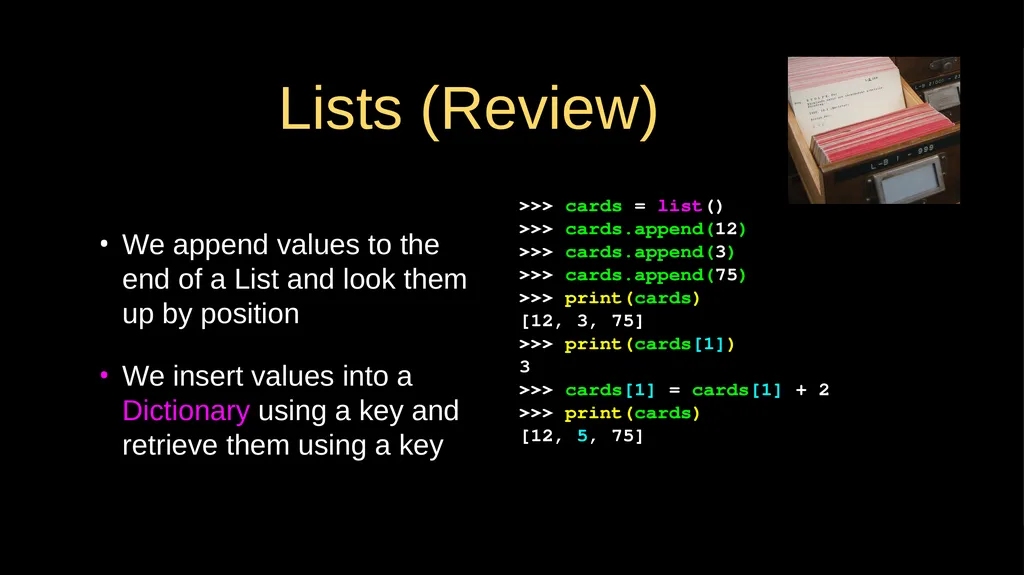
We append values to the end of a List and look them up by position
We insert values into a Dictionary using a key and retrieve them using a key >>> cards = list()
>>> cards.append(12)
>>> cards.append(3)
>>> cards.append(75)
>>> print(cards)
[12, 3, 75]
>>> print(cards[1])
3
>>> cards[1] = cards[1] + 2
>>> print(cards)
[12, 5, 75] Lists (Review)<br>
We insert values into a Dictionary using a key and retrieve them using a key >>> cards = list()
>>> cards.append(12)
>>> cards.append(3)
>>> cards.append(75)
>>> print(cards)
[12, 3, 75]
>>> print(cards[1])
3
>>> cards[1] = cards[1] + 2
>>> print(cards)
[12, 5, 75] Lists (Review)<br>
09
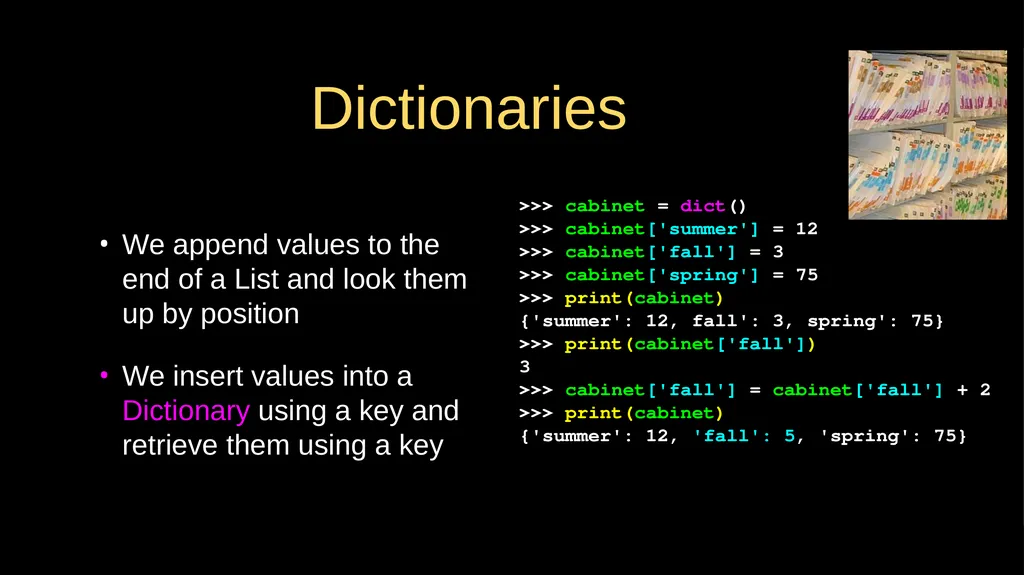
We append values to the end of a List and look them up by position
We insert values into a Dictionary using a key and retrieve them using a key >>> cabinet = dict()
>>> cabinet['summer'] = 12
>>> cabinet['fall'] = 3
>>> cabinet['spring'] = 75
>>> print(cabinet)
{'summer': 12, fall': 3, spring': 75}
>>> print(cabinet['fall'])
3
>>> cabinet['fall'] = cabinet['fall'] + 2
>>> print(cabinet)
{'summer': 12, 'fall': 5, 'spring': 75} Dictionaries<br>
We insert values into a Dictionary using a key and retrieve them using a key >>> cabinet = dict()
>>> cabinet['summer'] = 12
>>> cabinet['fall'] = 3
>>> cabinet['spring'] = 75
>>> print(cabinet)
{'summer': 12, fall': 3, spring': 75}
>>> print(cabinet['fall'])
3
>>> cabinet['fall'] = cabinet['fall'] + 2
>>> print(cabinet)
{'summer': 12, 'fall': 5, 'spring': 75} Dictionaries<br>
10
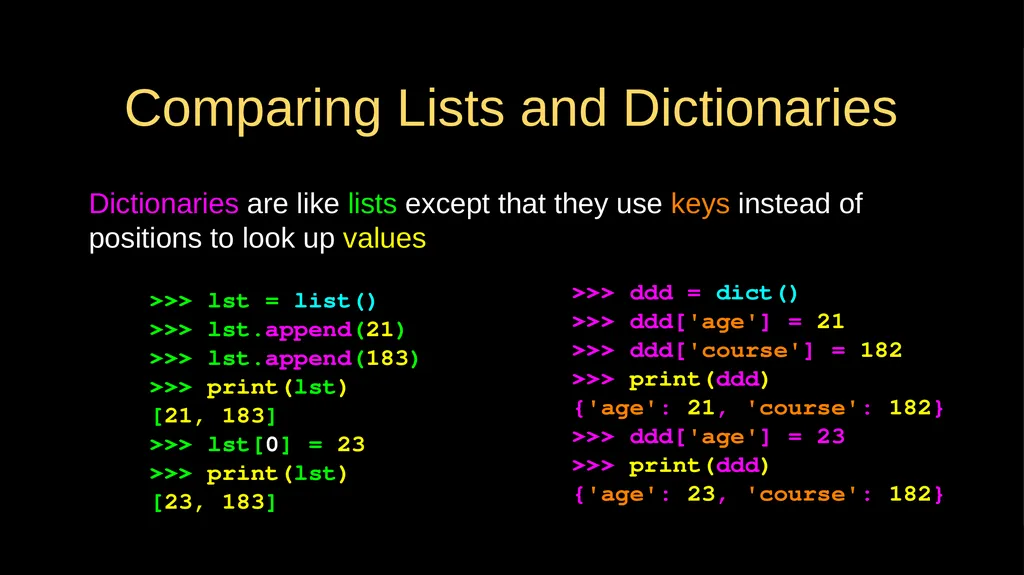
Comparing Lists and Dictionaries Dictionaries are like lists except that they use keys instead of positions to look up values >>> lst = list()
>>> lst.append(21)
>>> lst.append(183)
>>> print(lst)
[21, 183]
>>> lst[0] = 23
>>> print(lst)
[23, 183] >>> ddd = dict()
>>> ddd['age'] = 21
>>> ddd['course'] = 182
>>> print(ddd)
{'age': 21, 'course': 182}
>>> ddd['age'] = 23
>>> print(ddd)
{'age': 23, 'course': 182}<br>
>>> lst.append(21)
>>> lst.append(183)
>>> print(lst)
[21, 183]
>>> lst[0] = 23
>>> print(lst)
[23, 183] >>> ddd = dict()
>>> ddd['age'] = 21
>>> ddd['course'] = 182
>>> print(ddd)
{'age': 21, 'course': 182}
>>> ddd['age'] = 23
>>> print(ddd)
{'age': 23, 'course': 182}<br>
11
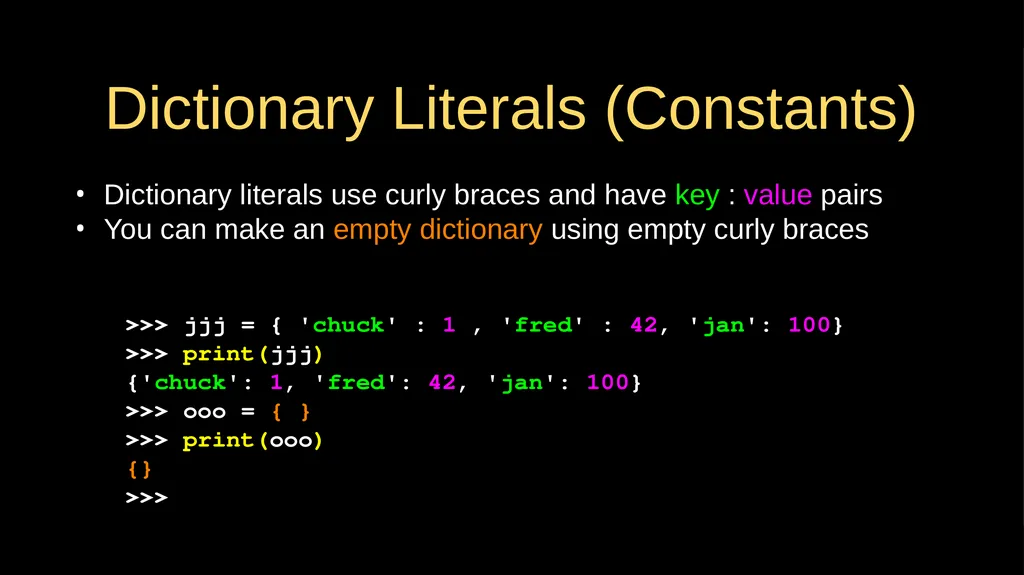
Dictionary Literals (Constants) Dictionary literals use curly braces and have key : value pairs
You can make an empty dictionary using empty curly braces >>> jjj = { 'chuck' : 1 , 'fred' : 42, 'jan': 100}
>>> print(jjj)
{'chuck': 1, 'fred': 42, 'jan': 100}
>>> ooo = { }
>>> print(ooo)
{}
>>><br>
You can make an empty dictionary using empty curly braces >>> jjj = { 'chuck' : 1 , 'fred' : 42, 'jan': 100}
>>> print(jjj)
{'chuck': 1, 'fred': 42, 'jan': 100}
>>> ooo = { }
>>> print(ooo)
{}
>>><br>
12
Most Common Name?<br>
13
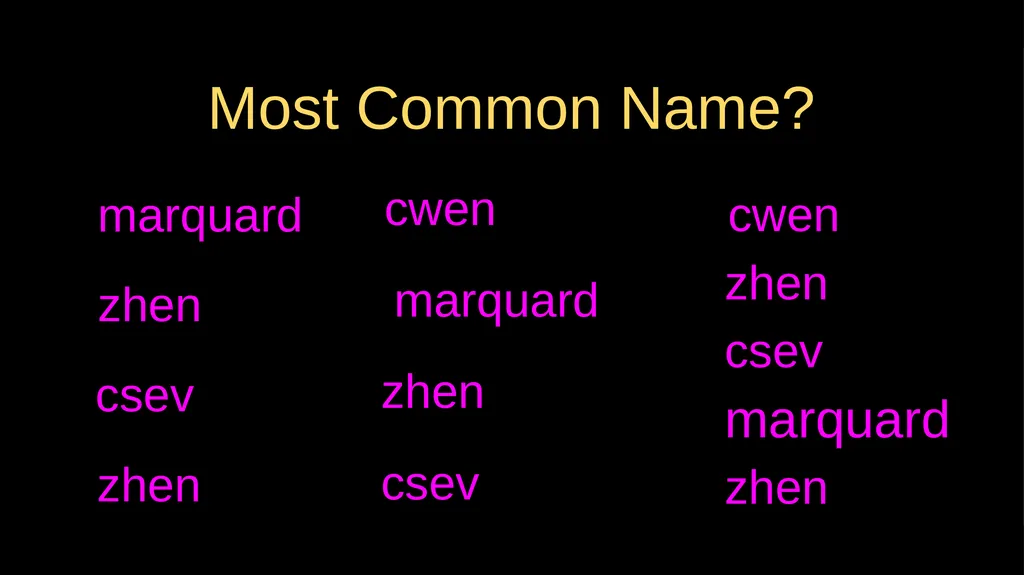
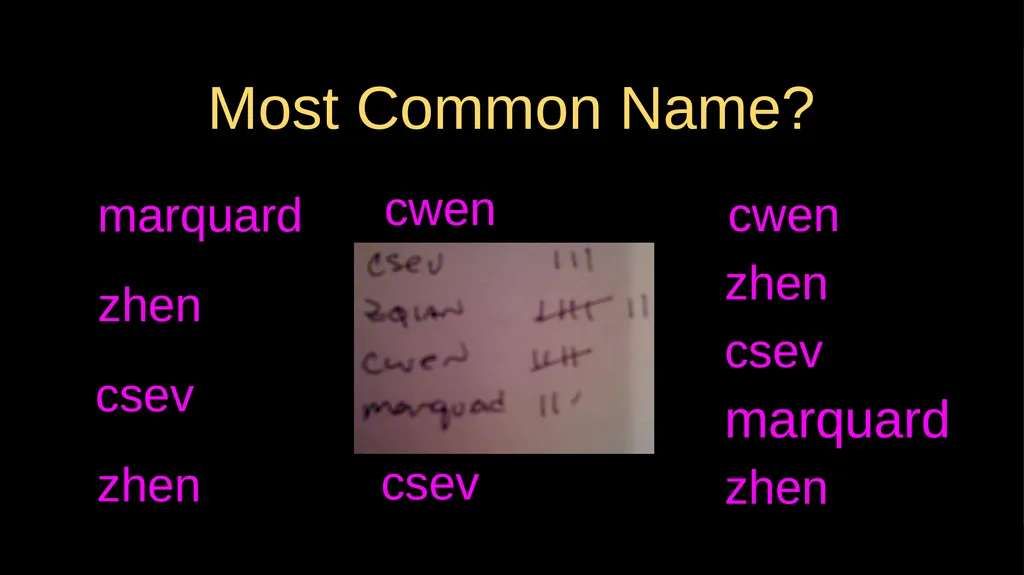
Most Common Name? csev zhen zhen marquard zhen cwen csev marquard zhen marquard csev cwen zhen<br>
14
Most Common Name? csev zhen zhen marquard zhen cwen csev marquard zhen marquard csev cwen zhen<br>
15
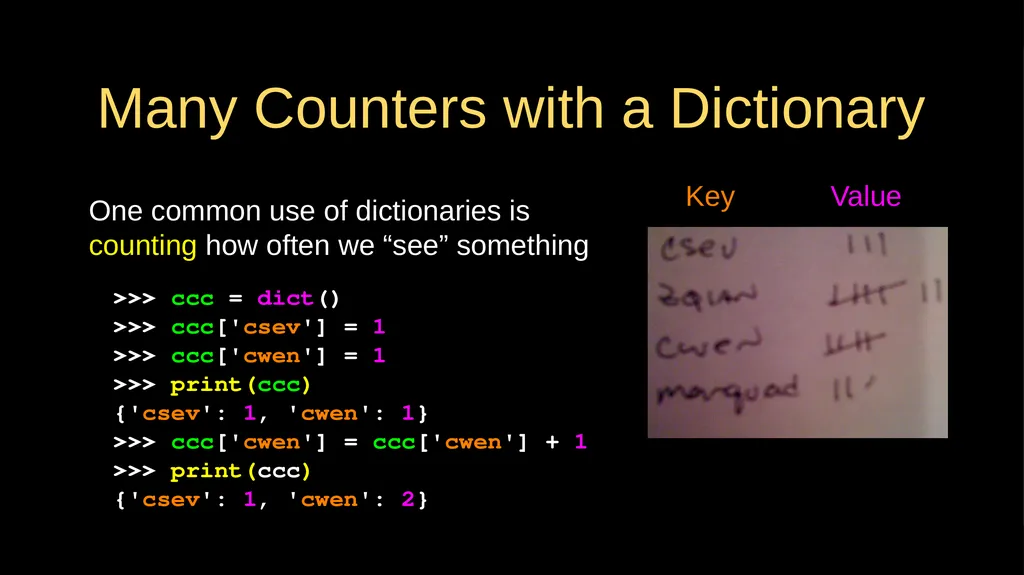
Many Counters with a Dictionary One common use of dictionaries is counting how often we “see” something Key Value >>> ccc = dict()
>>> ccc['csev'] = 1
>>> ccc['cwen'] = 1
>>> print(ccc)
{'csev': 1, 'cwen': 1}
>>> ccc['cwen'] = ccc['cwen'] + 1
>>> print(ccc)
{'csev': 1, 'cwen': 2}<br>
>>> ccc['csev'] = 1
>>> ccc['cwen'] = 1
>>> print(ccc)
{'csev': 1, 'cwen': 1}
>>> ccc['cwen'] = ccc['cwen'] + 1
>>> print(ccc)
{'csev': 1, 'cwen': 2}<br>
16
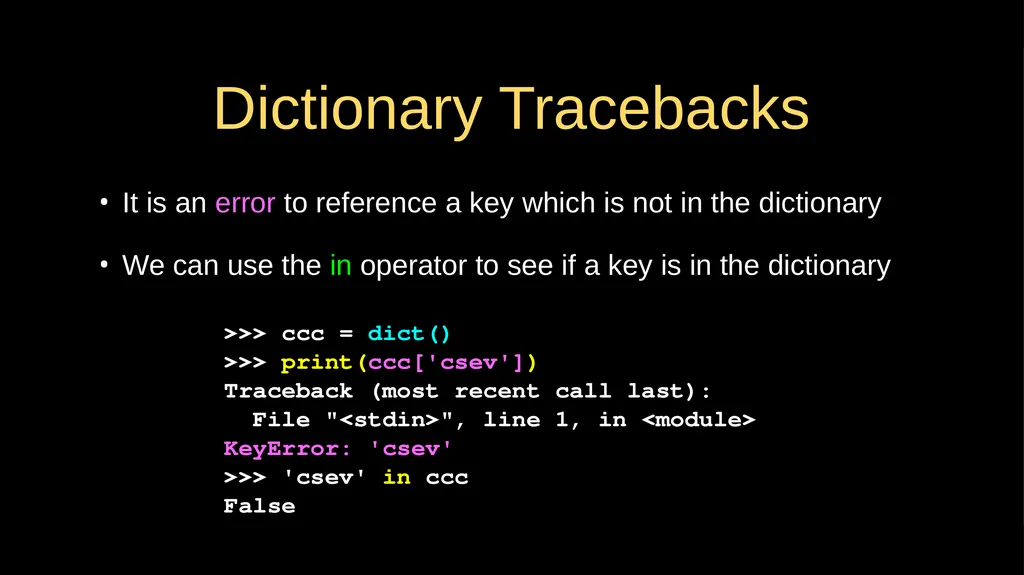
Dictionary Tracebacks It is an error to reference a key which is not in the dictionary
We can use the in operator to see if a key is in the dictionary >>> ccc = dict()
>>> print(ccc['csev'])
Traceback (most recent call last):
File "<stdin>", line 1, in <module>
KeyError: 'csev'
>>> 'csev' in ccc
False<br>
We can use the in operator to see if a key is in the dictionary >>> ccc = dict()
>>> print(ccc['csev'])
Traceback (most recent call last):
File "<stdin>", line 1, in <module>
KeyError: 'csev'
>>> 'csev' in ccc
False<br>
17
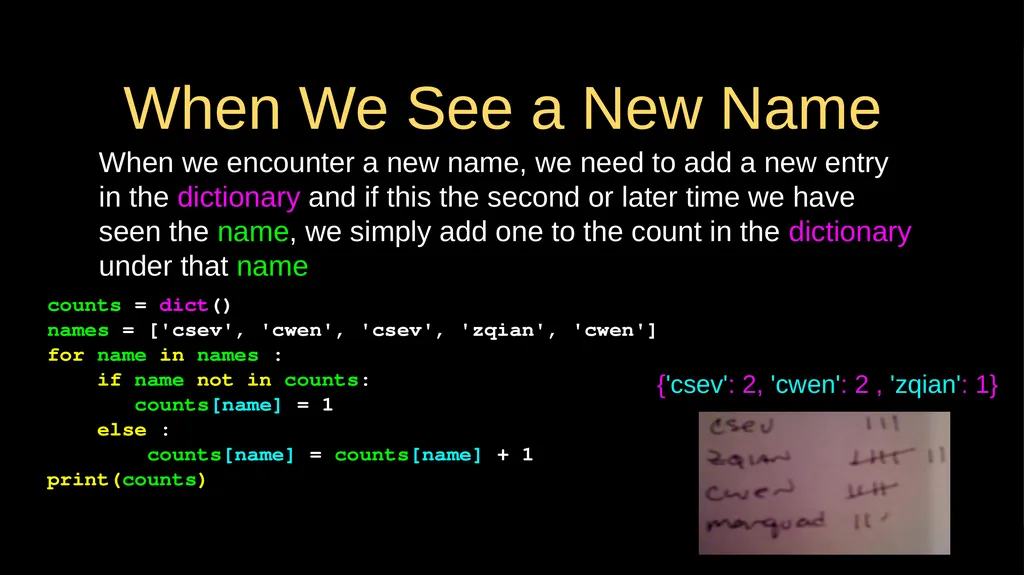
When We See a New Name When we encounter a new name, we need to add a new entry in the dictionary and if this the second or later time we have seen the name, we simply add one to the count in the dictionary under that name counts = dict()
names = ['csev', 'cwen', 'csev', 'zqian', 'cwen']
for name in names :
if name not in counts:
counts[name] = 1
else :
counts[name] = counts[name] + 1
print(counts) {'csev': 2, 'cwen': 2 , 'zqian': 1}<br>
names = ['csev', 'cwen', 'csev', 'zqian', 'cwen']
for name in names :
if name not in counts:
counts[name] = 1
else :
counts[name] = counts[name] + 1
print(counts) {'csev': 2, 'cwen': 2 , 'zqian': 1}<br>
18
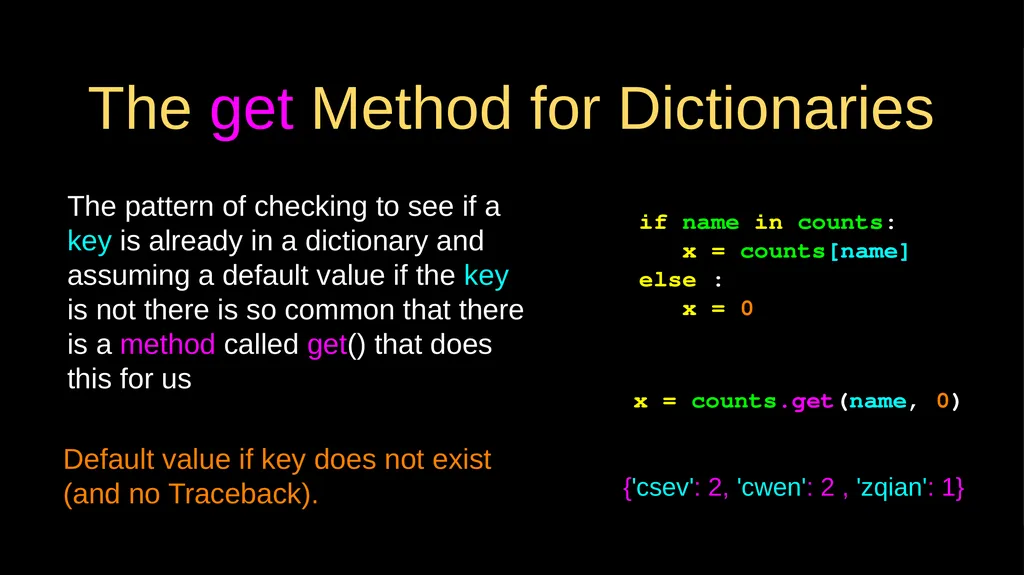
The get Method for Dictionaries The pattern of checking to see if a key is already in a dictionary and assuming a default value if the key is not there is so common that there is a method called get() that does this for us if name in counts:
x = counts[name]
else :
x = 0 x = counts.get(name, 0) Default value if key does not exist (and no Traceback). {'csev': 2, 'cwen': 2 , 'zqian': 1}<br>
x = counts[name]
else :
x = 0 x = counts.get(name, 0) Default value if key does not exist (and no Traceback). {'csev': 2, 'cwen': 2 , 'zqian': 1}<br>
19
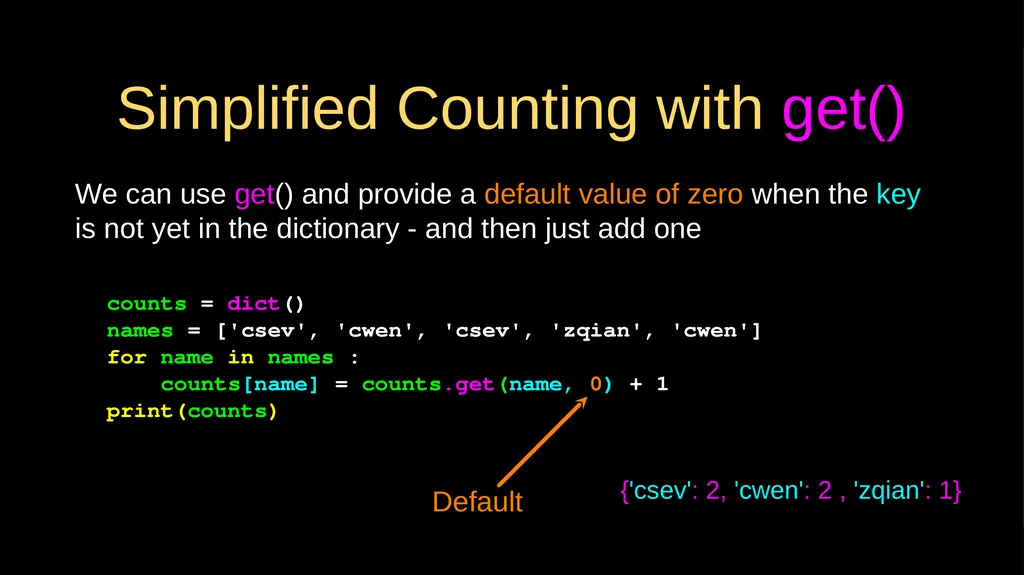
Simplified Counting with get() We can use get() and provide a default value of zero when the key is not yet in the dictionary - and then just add one counts = dict()
names = ['csev', 'cwen', 'csev', 'zqian', 'cwen']
for name in names :
counts[name] = counts.get(name, 0) + 1
print(counts) Default {'csev': 2, 'cwen': 2 , 'zqian': 1}<br>
names = ['csev', 'cwen', 'csev', 'zqian', 'cwen']
for name in names :
counts[name] = counts.get(name, 0) + 1
print(counts) Default {'csev': 2, 'cwen': 2 , 'zqian': 1}<br>
20
Counting Words in Text<br>
21
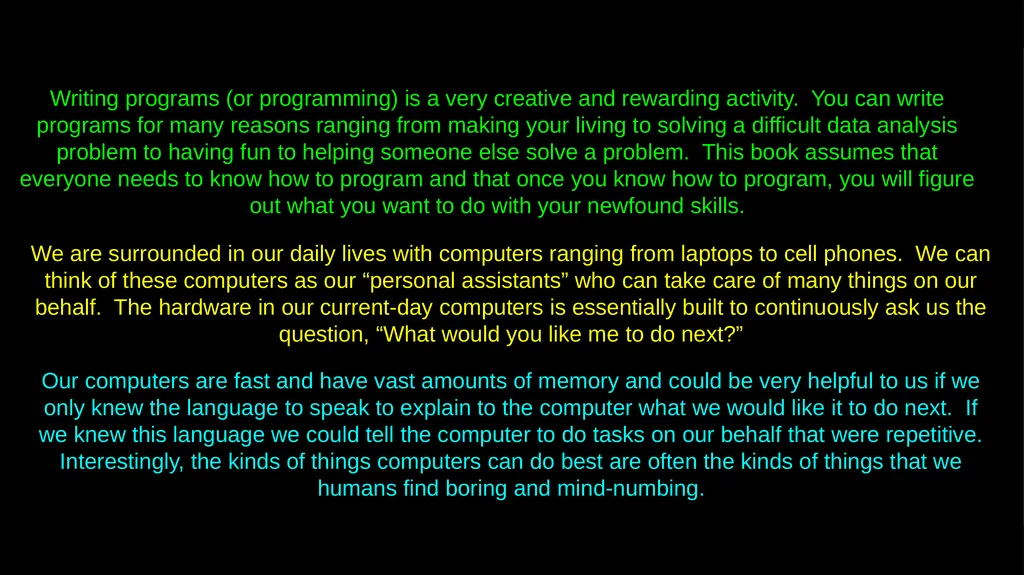
Writing programs (or programming) is a very creative and rewarding activity. You can write programs for many reasons ranging from making your living to solving a difficult data analysis problem to having fun to helping someone else solve a problem. This book assumes that everyone needs to know how to program and that once you know how to program, you will figure out what you want to do with your newfound skills. We are surrounded in our daily lives with computers ranging from laptops to cell phones. We can think of these computers as our “personal assistants” who can take care of many things on our behalf. The hardware in our current-day computers is essentially built to continuously ask us the question, “What would you like me to do next?” Our computers are fast and have vast amounts of memory and could be very helpful to us if we only knew the language to speak to explain to the computer what we would like it to do next. If we knew this language we could tell the computer to do tasks on our behalf that were repetitive. Interestingly, the kinds of things computers can do best are often the kinds of things that we humans find boring and mind-numbing.<br>
22
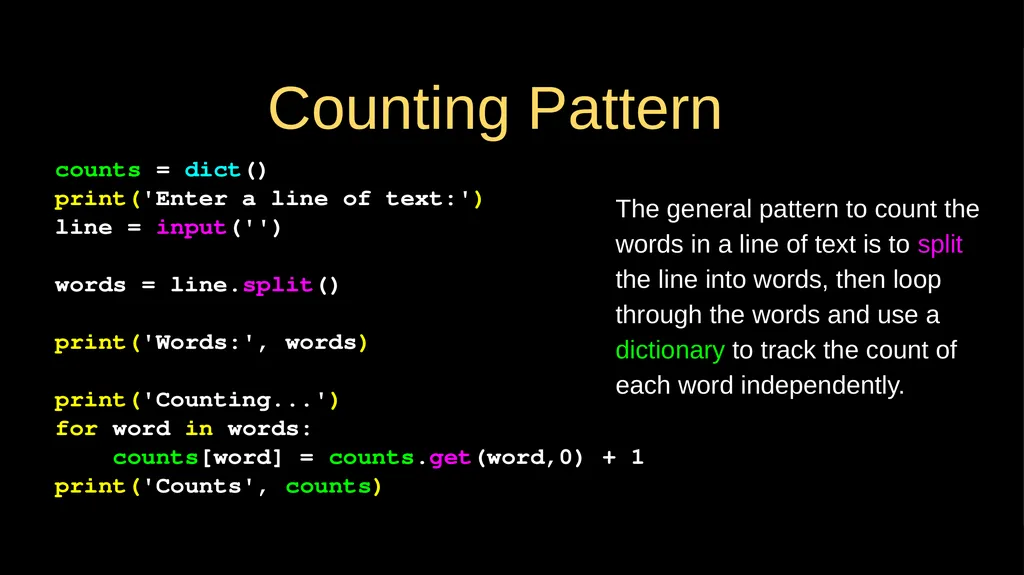
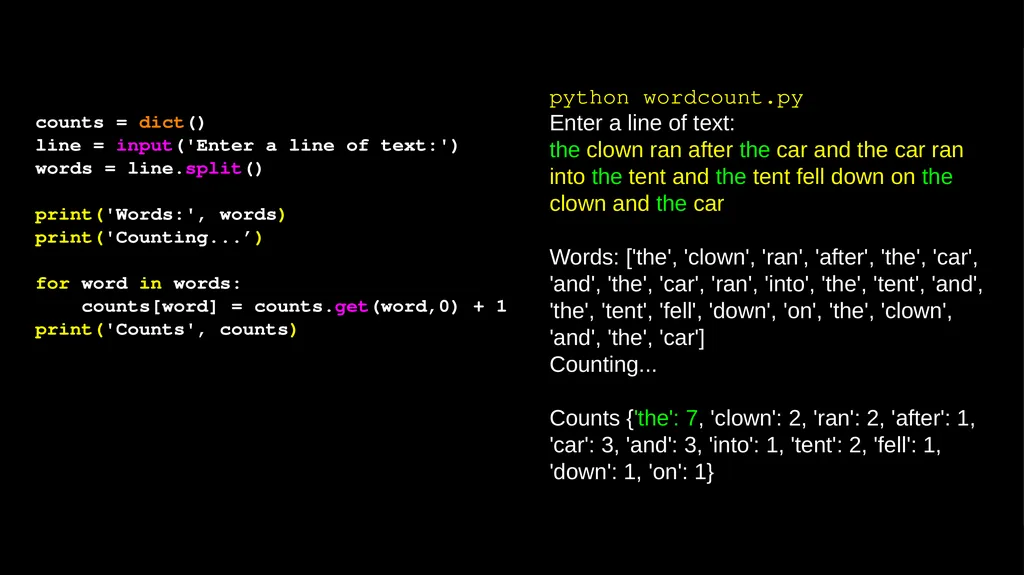
Counting Pattern counts = dict()
print('Enter a line of text:')
line = input('')
words = line.split()
print('Words:', words)
print('Counting...')
for word in words:
counts[word] = counts.get(word,0) + 1
print('Counts', counts) The general pattern to count the words in a line of text is to split the line into words, then loop through the words and use a dictionary to track the count of each word independently.<br>
print('Enter a line of text:')
line = input('')
words = line.split()
print('Words:', words)
print('Counting...')
for word in words:
counts[word] = counts.get(word,0) + 1
print('Counts', counts) The general pattern to count the words in a line of text is to split the line into words, then loop through the words and use a dictionary to track the count of each word independently.<br>
23
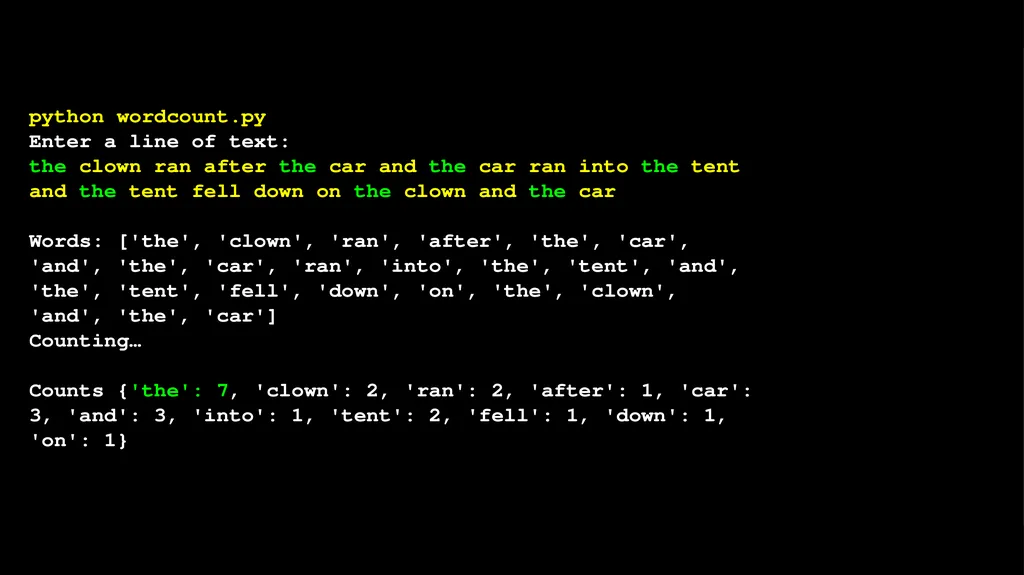
python wordcount.py
Enter a line of text:
the clown ran after the car and the car ran into the tent and the tent fell down on the clown and the car
Words: ['the', 'clown', 'ran', 'after', 'the', 'car', 'and', 'the', 'car', 'ran', 'into', 'the', 'tent', 'and', 'the', 'tent', 'fell', 'down', 'on', 'the', 'clown', 'and', 'the', 'car']
Counting…
Counts {'the': 7, 'clown': 2, 'ran': 2, 'after': 1, 'car': 3, 'and': 3, 'into': 1, 'tent': 2, 'fell': 1, 'down': 1, 'on': 1}<br>
Enter a line of text:
the clown ran after the car and the car ran into the tent and the tent fell down on the clown and the car
Words: ['the', 'clown', 'ran', 'after', 'the', 'car', 'and', 'the', 'car', 'ran', 'into', 'the', 'tent', 'and', 'the', 'tent', 'fell', 'down', 'on', 'the', 'clown', 'and', 'the', 'car']
Counting…
Counts {'the': 7, 'clown': 2, 'ran': 2, 'after': 1, 'car': 3, 'and': 3, 'into': 1, 'tent': 2, 'fell': 1, 'down': 1, 'on': 1}<br>
24
counts = dict()
line = input('Enter a line of text:')
words = line.split()
print('Words:', words)
print('Counting...’)
for word in words:
counts[word] = counts.get(word,0) + 1
print('Counts', counts) python wordcount.py
Enter a line of text:
the clown ran after the car and the car ran into the tent and the tent fell down on the clown and the car
Words: ['the', 'clown', 'ran', 'after', 'the', 'car', 'and', 'the', 'car', 'ran', 'into', 'the', 'tent', 'and', 'the', 'tent', 'fell', 'down', 'on', 'the', 'clown', 'and', 'the', 'car']
Counting...
Counts {'the': 7, 'clown': 2, 'ran': 2, 'after': 1, 'car': 3, 'and': 3, 'into': 1, 'tent': 2, 'fell': 1, 'down': 1, 'on': 1}<br>
line = input('Enter a line of text:')
words = line.split()
print('Words:', words)
print('Counting...’)
for word in words:
counts[word] = counts.get(word,0) + 1
print('Counts', counts) python wordcount.py
Enter a line of text:
the clown ran after the car and the car ran into the tent and the tent fell down on the clown and the car
Words: ['the', 'clown', 'ran', 'after', 'the', 'car', 'and', 'the', 'car', 'ran', 'into', 'the', 'tent', 'and', 'the', 'tent', 'fell', 'down', 'on', 'the', 'clown', 'and', 'the', 'car']
Counting...
Counts {'the': 7, 'clown': 2, 'ran': 2, 'after': 1, 'car': 3, 'and': 3, 'into': 1, 'tent': 2, 'fell': 1, 'down': 1, 'on': 1}<br>
25
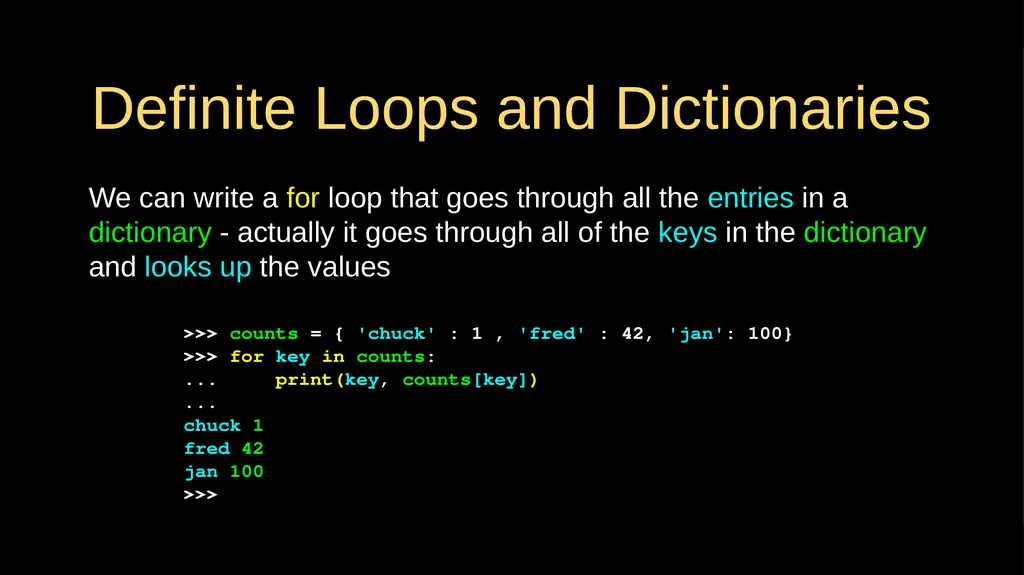
Definite Loops and Dictionaries We can write a for loop that goes through all the entries in a dictionary - actually it goes through all of the keys in the dictionary and looks up the values >>> counts = { 'chuck' : 1 , 'fred' : 42, 'jan': 100}
>>> for key in counts:
... print(key, counts[key])
...
chuck 1
fred 42
jan 100
>>><br>
>>> for key in counts:
... print(key, counts[key])
...
chuck 1
fred 42
jan 100
>>><br>
26
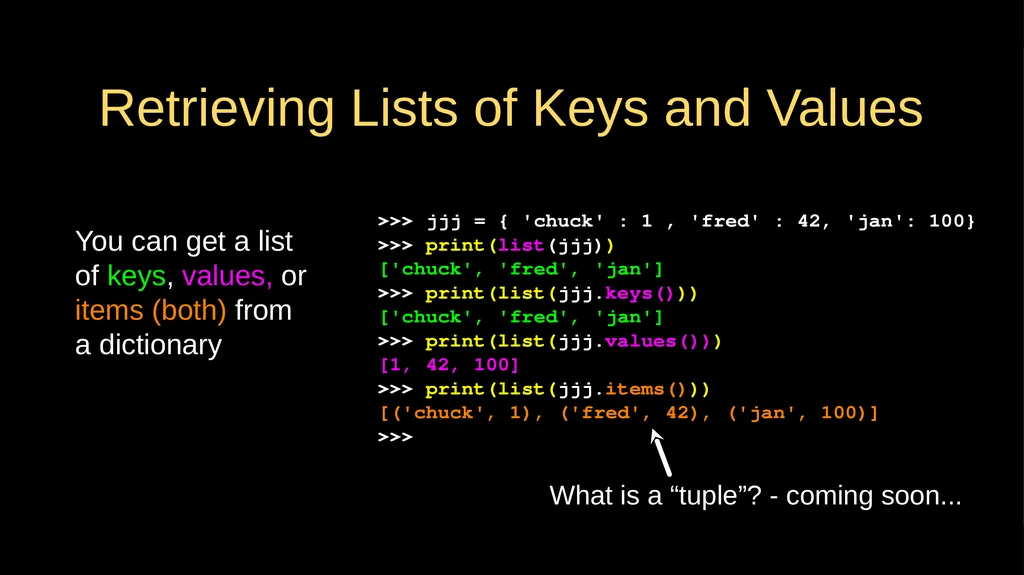
Retrieving Lists of Keys and Values You can get a list of keys, values, or items (both) from a dictionary >>> jjj = { 'chuck' : 1 , 'fred' : 42, 'jan': 100}
>>> print(list(jjj))
['chuck', 'fred', 'jan']
>>> print(list(jjj.keys()))
['chuck', 'fred', 'jan']
>>> print(list(jjj.values()))
[1, 42, 100]
>>> print(list(jjj.items()))
[('chuck', 1), ('fred', 42), ('jan', 100)]
>>> What is a “tuple”? - coming soon...<br>
>>> print(list(jjj))
['chuck', 'fred', 'jan']
>>> print(list(jjj.keys()))
['chuck', 'fred', 'jan']
>>> print(list(jjj.values()))
[1, 42, 100]
>>> print(list(jjj.items()))
[('chuck', 1), ('fred', 42), ('jan', 100)]
>>> What is a “tuple”? - coming soon...<br>
27
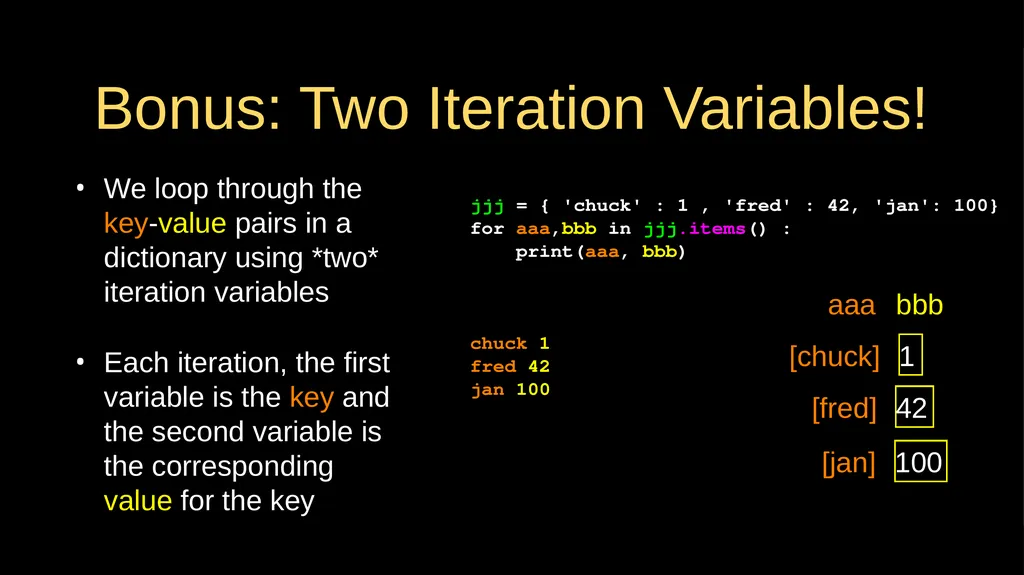
Bonus: Two Iteration Variables! We loop through the key-value pairs in a dictionary using *two* iteration variables
Each iteration, the first variable is the key and the second variable is the corresponding value for the key jjj = { 'chuck' : 1 , 'fred' : 42, 'jan': 100}
for aaa,bbb in jjj.items() :
print(aaa, bbb)
chuck 1
fred 42
jan 100 [chuck] 1 [fred] 42 aaa bbb [jan] 100<br>
Each iteration, the first variable is the key and the second variable is the corresponding value for the key jjj = { 'chuck' : 1 , 'fred' : 42, 'jan': 100}
for aaa,bbb in jjj.items() :
print(aaa, bbb)
chuck 1
fred 42
jan 100 [chuck] 1 [fred] 42 aaa bbb [jan] 100<br>
28
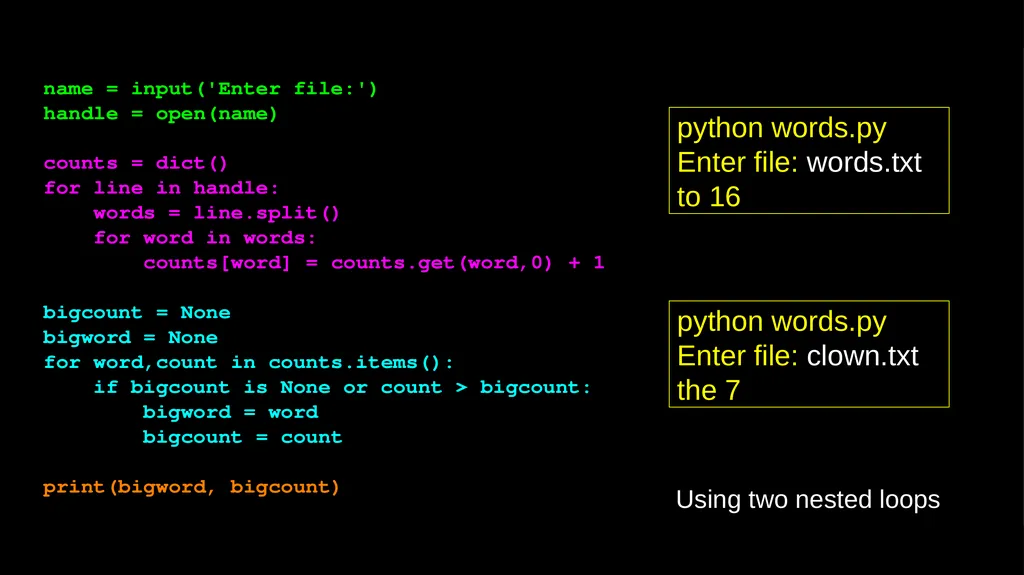
name = input('Enter file:')
handle = open(name)
counts = dict()
for line in handle:
words = line.split()
for word in words:
counts[word] = counts.get(word,0) + 1
bigcount = None
bigword = None
for word,count in counts.items():
if bigcount is None or count > bigcount:
bigword = word
bigcount = count
print(bigword, bigcount) python words.py
Enter file: clown.txt
the 7 python words.py
Enter file: words.txt
to 16 Using two nested loops<br>
handle = open(name)
counts = dict()
for line in handle:
words = line.split()
for word in words:
counts[word] = counts.get(word,0) + 1
bigcount = None
bigword = None
for word,count in counts.items():
if bigcount is None or count > bigcount:
bigword = word
bigcount = count
print(bigword, bigcount) python words.py
Enter file: clown.txt
the 7 python words.py
Enter file: words.txt
to 16 Using two nested loops<br>
29
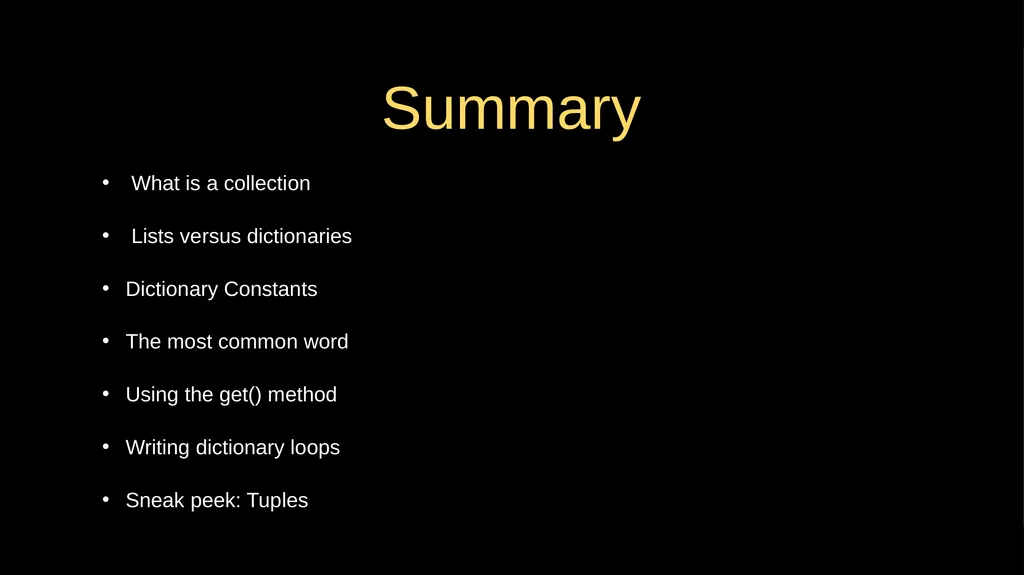
Summary What is a collection
Lists versus dictionaries
Dictionary Constants
The most common word
Using the get() method
Writing dictionary loops
Sneak peek: Tuples<br>
Lists versus dictionaries
Dictionary Constants
The most common word
Using the get() method
Writing dictionary loops
Sneak peek: Tuples<br>
30
Acknowledgements / Contributions These slides are Copyright 2010- Charles R. Severance (www.dr-chuck.com) of the University of Michigan School of Information and open.umich.edu and made available under a Creative Commons Attribution 4.0 License. Please maintain this last slide in all copies of the document to comply with the attribution requirements of the license. If you make a change, feel free to add your name and organization to the list of contributors on this page as you republish the materials.
Initial Development: Charles Severance, University of Michigan School of Information
… Insert new Contributors or translation credits here ...<br>
Initial Development: Charles Severance, University of Michigan School of Information
… Insert new Contributors or translation credits here ...<br>