
SAP Business ByDesign – Business Scenario Explorer
DJ
Published · 19 slides · 0 views

1 / 1
Description
SAP Business ByDesign Business Scenario Explorer Procure-to-Pay (Services) SAP Business ByDesign Procure to Pay (Services) Scenario Overview Open Legend Scenario Description The Procure-to-Pay (Services) business scenario allows you to
Related Topics
Share
Embed code
Download this presentation From Below
"SAP Business ByDesign – Business Scenario Explorer" is the property of its rightful owner. Permission is granted to download and print the materials on this website for personal, non-commercial use only, and to display it on your personal computer provided you do not modify the materials and that you retain all copyright notices contained in the materials. By downloading content from our website, you accept the terms of this agreement.
Presentation Transcript
01
SAP Business ByDesign –
Business Scenario Explorer
Procure-to-Pay (Services)<br>
02
SAP Business ByDesign – Procure to Pay (Services)
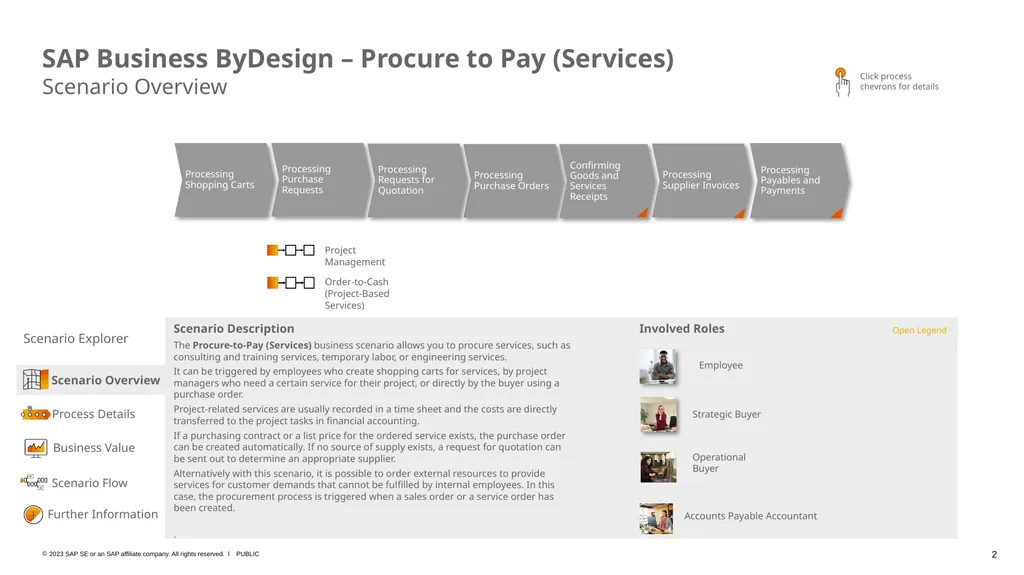
Scenario Overview Open Legend Scenario Description The Procure-to-Pay (Services) business scenario allows you to procure services, such as consulting and training services, temporary labor, or engineering services.
It can be triggered by employees who create shopping carts for services, by project managers who need a certain service for their project, or directly by the buyer using a purchase order.
Project-related services are usually recorded in a time sheet and the costs are directly transferred to the project tasks in financial accounting.
If a purchasing contract or a list price for the ordered service exists, the purchase order can be created automatically. If no source of supply exists, a request for quotation can be sent out to determine an appropriate supplier.
Alternatively with this scenario, it is possible to order external resources to provide services for customer demands that cannot be fulfilled by internal employees. In this case, the procurement process is triggered when a sales order or a service order has been created.
. Click process chevrons for details Strategic Buyer Accounts Payable Accountant Operational Buyer Involved Roles Employee Scenario Explorer<br>
03
SAP Business ByDesign – Procure to Pay (Services)
Scenario Overview Open Legend Scenario Description The Procure-to-Pay (Services) business scenario allows you to procure services, such as consulting and training services, temporary labor, or engineering services.
It can be triggered by employees who create shopping carts for services, by project managers who need a certain service for their project, or directly by the buyer using a purchase order.
Project-related services are usually recorded in a time sheet and the costs are directly transferred to the project tasks in financial accounting.
If a purchasing contract or a list price for the ordered service exists, the purchase order can be created automatically. If no source of supply exists, a request for quotation can be sent out to determine an appropriate supplier.
Alternatively with this scenario, it is possible to order external resources to provide services for customer demands that cannot be fulfilled by internal employees. In this case, the procurement process is triggered when a sales order or a service order has been created.
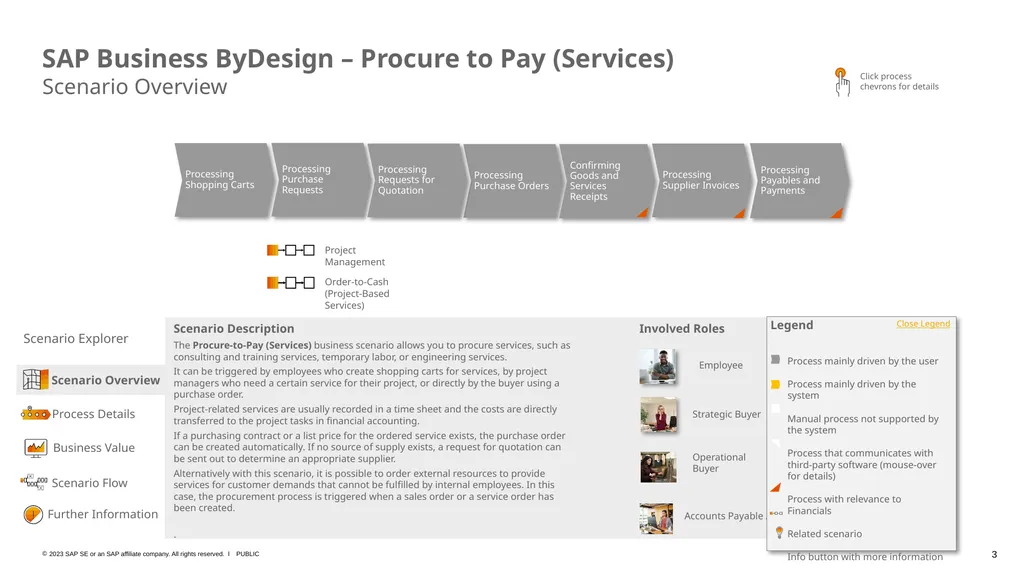
. Click process chevrons for details Strategic Buyer Accounts Payable Accountant Operational Buyer Involved Roles Employee Open Legend Open Legend Open Legend Open Legend Open Legend Process mainly driven by the user
Process mainly driven by the system
Manual process not supported by the system
Process that communicates with third-party software (mouse-over for details)
Process with relevance to Financials
Related scenario
Info button with more information Close Legend Legend Scenario Explorer<br>
04
SAP Business ByDesign – Procure to Pay (Services)
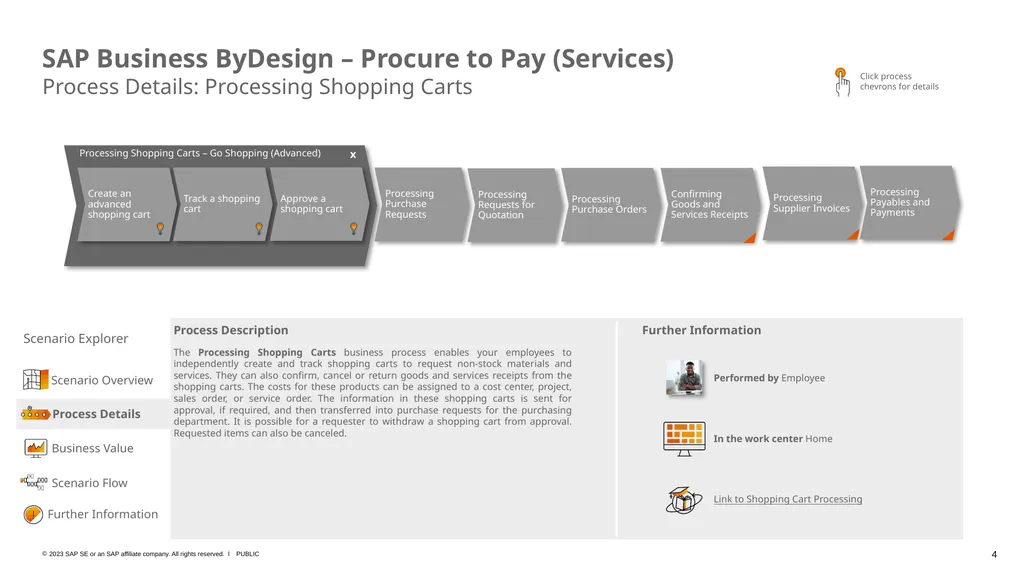
Process Details: Processing Shopping Carts Click process
chevrons for details Process Description The Processing Shopping Carts business process enables your employees to independently create and track shopping carts to request non-stock materials and services. They can also confirm, cancel or return goods and services receipts from the shopping carts. The costs for these products can be assigned to a cost center, project, sales order, or service order. The information in these shopping carts is sent for approval, if required, and then transferred into purchase requests for the purchasing department. It is possible for a requester to withdraw a shopping cart from approval. Requested items can also be canceled. Further Information Link to Shopping Cart Processing In the work center Home Performed by Employee Scenario Explorer<br>
05
SAP Business ByDesign – Procure to Pay (Services)
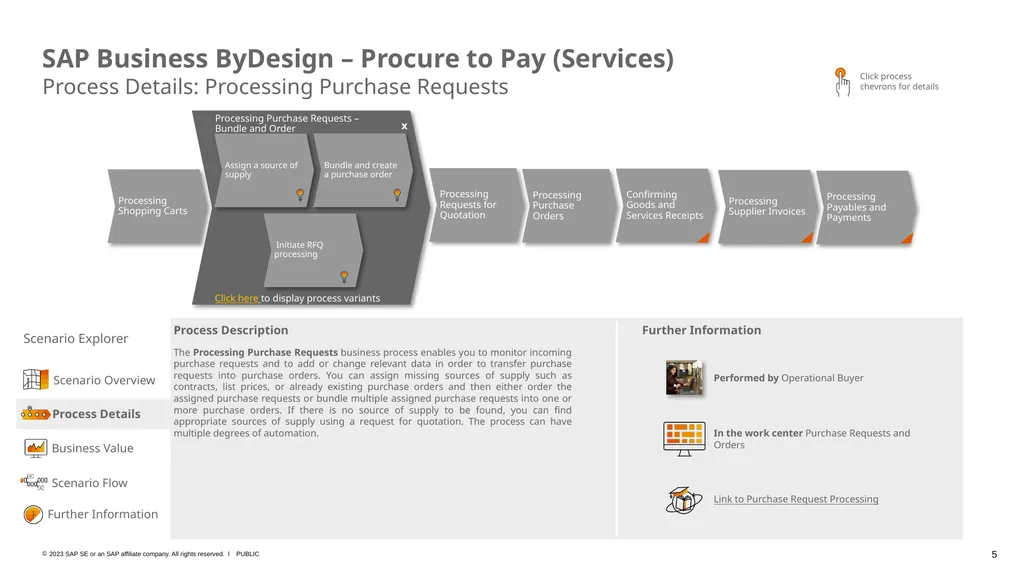
Process Details: Processing Purchase Requests Click process
chevrons for details Process Description The Processing Purchase Requests business process enables you to monitor incoming purchase requests and to add or change relevant data in order to transfer purchase requests into purchase orders. You can assign missing sources of supply such as contracts, list prices, or already existing purchase orders and then either order the assigned purchase requests or bundle multiple assigned purchase requests into one or more purchase orders. If there is no source of supply to be found, you can find appropriate sources of supply using a request for quotation. The process can have multiple degrees of automation. Further Information Link to Purchase Request Processing In the work center Purchase Requests and Orders Performed by Operational Buyer Scenario Explorer<br>
06
SAP Business ByDesign – Procure to Pay (Services)
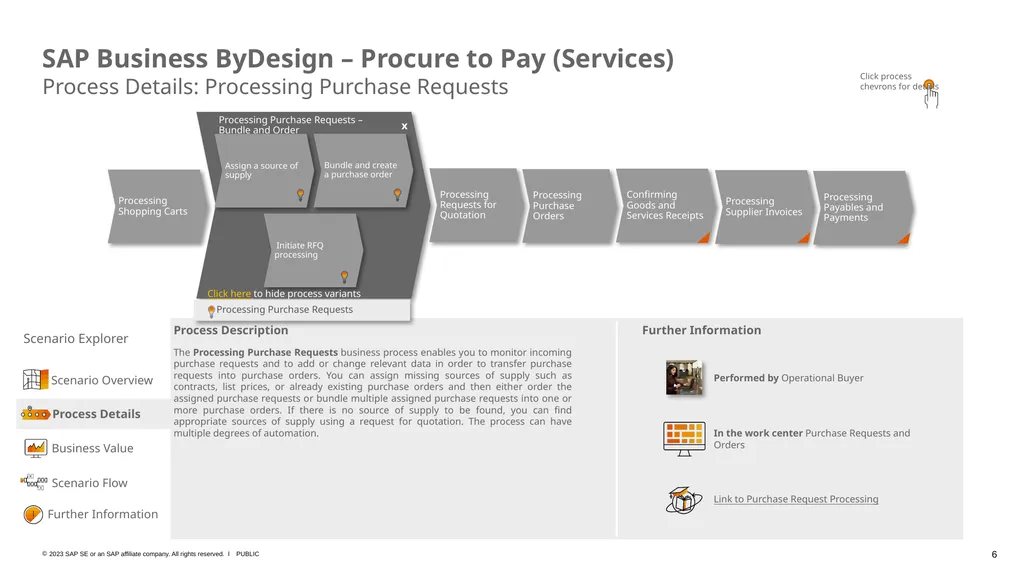
Process Details: Processing Purchase Requests Click process
chevrons for details Process Description The Processing Purchase Requests business process enables you to monitor incoming purchase requests and to add or change relevant data in order to transfer purchase requests into purchase orders. You can assign missing sources of supply such as contracts, list prices, or already existing purchase orders and then either order the assigned purchase requests or bundle multiple assigned purchase requests into one or more purchase orders. If there is no source of supply to be found, you can find appropriate sources of supply using a request for quotation. The process can have multiple degrees of automation. Further Information Link to Purchase Request Processing In the work center Purchase Requests and Orders Performed by Operational Buyer Scenario Explorer<br>
07
SAP Business ByDesign – Procure to Pay (Services)
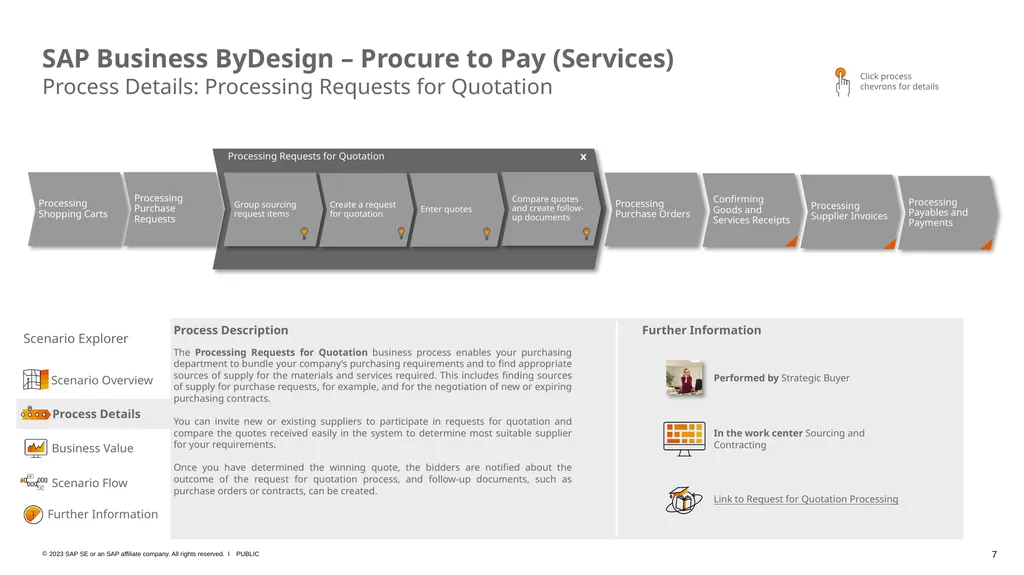
Process Details: Processing Requests for Quotation Click process
chevrons for details Process Description The Processing Requests for Quotation business process enables your purchasing department to bundle your company’s purchasing requirements and to find appropriate sources of supply for the materials and services required. This includes finding sources of supply for purchase requests, for example, and for the negotiation of new or expiring purchasing contracts.
You can invite new or existing suppliers to participate in requests for quotation and compare the quotes received easily in the system to determine most suitable supplier for your requirements.
Once you have determined the winning quote, the bidders are notified about the outcome of the request for quotation process, and follow-up documents, such as purchase orders or contracts, can be created. Further Information Link to Request for Quotation Processing In the work center Sourcing and Contracting Performed by Strategic Buyer Processing Requests for Quotation Processing Shopping Carts x Processing Purchase Requests Group sourcing request items Create a request for quotation Processing Supplier Invoices Compare quotes and create follow-up documents Processing Purchase Orders Confirming Goods and Services Receipts Enter quotes Processing Payables and Payments Scenario Explorer<br>
08
SAP Business ByDesign – Procure to Pay (Services)
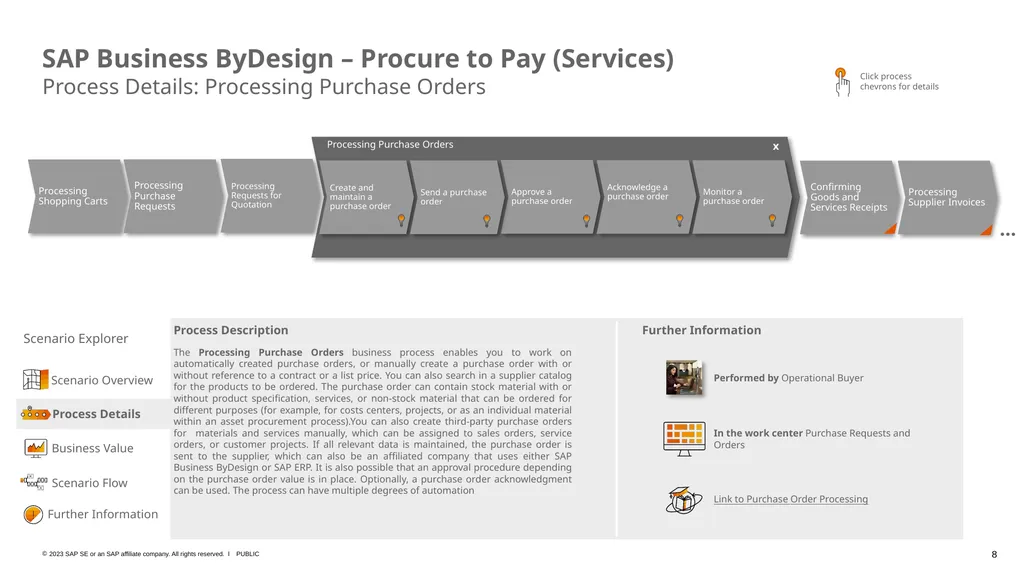
Process Details: Processing Purchase Orders Click process
chevrons for details Process Description The Processing Purchase Orders business process enables you to work on automatically created purchase orders, or manually create a purchase order with or without reference to a contract or a list price. You can also search in a supplier catalog for the products to be ordered. The purchase order can contain stock material with or without product specification, services, or non-stock material that can be ordered for different purposes (for example, for costs centers, projects, or as an individual material within an asset procurement process).You can also create third-party purchase orders for materials and services manually, which can be assigned to sales orders, service orders, or customer projects. If all relevant data is maintained, the purchase order is sent to the supplier, which can also be an affiliated company that uses either SAP Business ByDesign or SAP ERP. It is also possible that an approval procedure depending on the purchase order value is in place. Optionally, a purchase order acknowledgment can be used. The process can have multiple degrees of automation Further Information Link to Purchase Order Processing In the work center Purchase Requests and Orders Performed by Operational Buyer Processing Purchase Orders Processing Shopping Carts x Processing Purchase Requests Processing Requests for Quotation Create and maintain a purchase order Processing Supplier Invoices Approve a purchase order Acknowledge a purchase order Monitor a purchase order Confirming Goods and Services Receipts Send a purchase order … Scenario Explorer<br>
09
SAP Business ByDesign – Procure to Pay (Services)
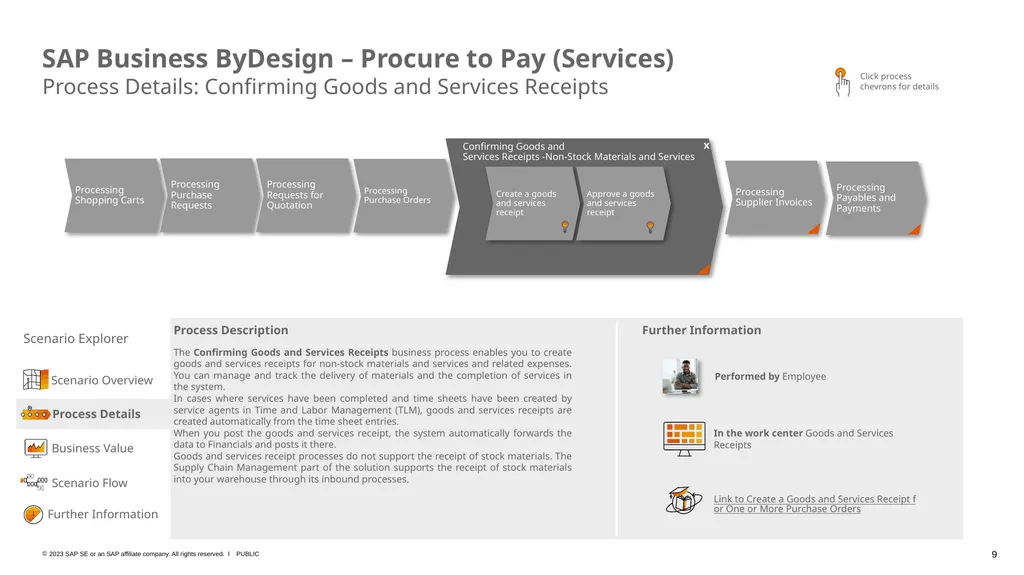
Process Details: Confirming Goods and Services Receipts Click process
chevrons for details Process Description The Confirming Goods and Services Receipts business process enables you to create goods and services receipts for non-stock materials and services and related expenses. You can manage and track the delivery of materials and the completion of services in the system.
In cases where services have been completed and time sheets have been created by service agents in Time and Labor Management (TLM), goods and services receipts are created automatically from the time sheet entries.
When you post the goods and services receipt, the system automatically forwards the data to Financials and posts it there.
Goods and services receipt processes do not support the receipt of stock materials. The Supply Chain Management part of the solution supports the receipt of stock materials into your warehouse through its inbound processes. Further Information Link to Create a Goods and Services Receipt for One or More Purchase Orders In the work center Goods and Services Receipts Performed by Employee Confirming Goods and Services Receipts -Non-Stock Materials and Services Processing Shopping Carts x Processing Purchase Requests Processing Purchase Orders Create a goods and services receipt Processing Requests for Quotation Approve a goods and services receipt Processing Supplier Invoices Processing Payables and Payments Scenario Explorer<br>
10
SAP Business ByDesign – Procure to Pay (Services)
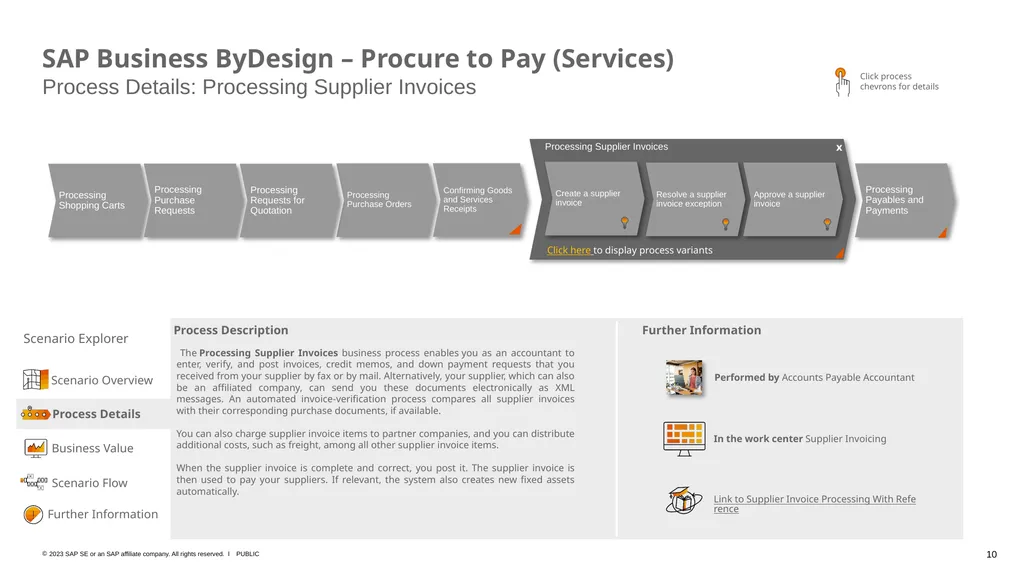
Process Details: Processing Supplier Invoices Click process
chevrons for details Process Description The Processing Supplier Invoices business process enables you as an accountant to enter, verify, and post invoices, credit memos, and down payment requests that you received from your supplier by fax or by mail. Alternatively, your supplier, which can also be an affiliated company, can send you these documents electronically as XML messages. An automated invoice-verification process compares all supplier invoices with their corresponding purchase documents, if available.
You can also charge supplier invoice items to partner companies, and you can distribute additional costs, such as freight, among all other supplier invoice items.
When the supplier invoice is complete and correct, you post it. The supplier invoice is then used to pay your suppliers. If relevant, the system also creates new fixed assets automatically. Further Information Link to Supplier Invoice Processing With Reference In the work center Supplier Invoicing Performed by Accounts Payable Accountant Processing Supplier Invoices Processing Shopping Carts x Processing Purchase Requests Processing Purchase Orders Confirming Goods and Services Receipts Processing Requests for Quotation Create a supplier invoice Resolve a supplier invoice exception Approve a supplier invoice Processing Payables and Payments Click here to display process variants Scenario Explorer<br>
11
SAP Business ByDesign – Procure to Pay (Services)
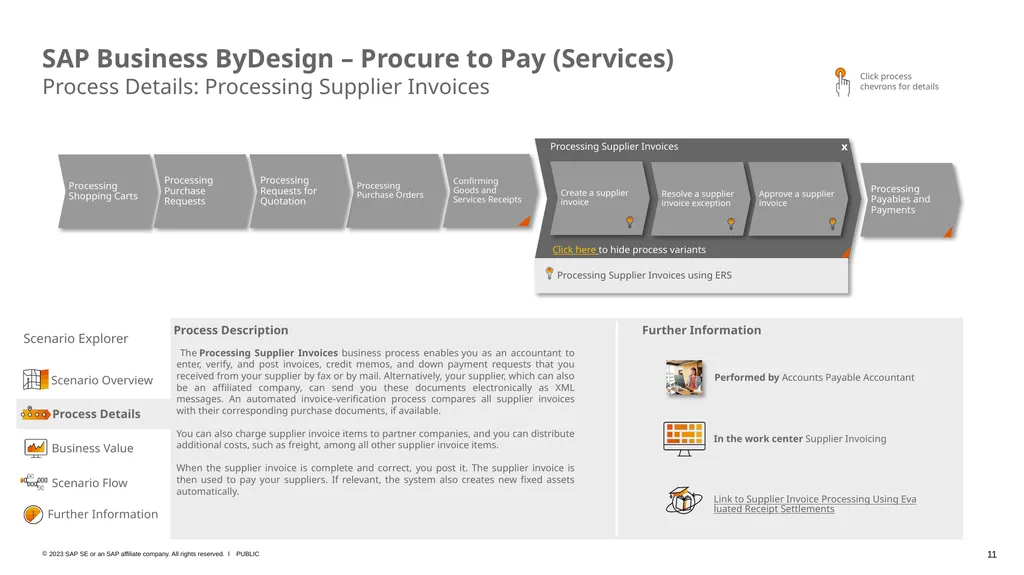
Process Details: Processing Supplier Invoices Click process
chevrons for details Process Description The Processing Supplier Invoices business process enables you as an accountant to enter, verify, and post invoices, credit memos, and down payment requests that you received from your supplier by fax or by mail. Alternatively, your supplier, which can also be an affiliated company, can send you these documents electronically as XML messages. An automated invoice-verification process compares all supplier invoices with their corresponding purchase documents, if available.
You can also charge supplier invoice items to partner companies, and you can distribute additional costs, such as freight, among all other supplier invoice items.
When the supplier invoice is complete and correct, you post it. The supplier invoice is then used to pay your suppliers. If relevant, the system also creates new fixed assets automatically. Further Information Link to Supplier Invoice Processing Using Evaluated Receipt Settlements In the work center Supplier Invoicing Performed by Accounts Payable Accountant Processing Supplier Invoices Processing Shopping Carts x Processing Purchase Requests Processing Purchase Orders Confirming Goods and Services Receipts Processing Requests for Quotation Create a supplier invoice Resolve a supplier invoice exception Approve a supplier invoice Processing Payables and Payments Click here to hide process variants Processing Supplier Invoices using ERS Scenario Explorer<br>
12
SAP Business ByDesign – Procure to Pay (Services)
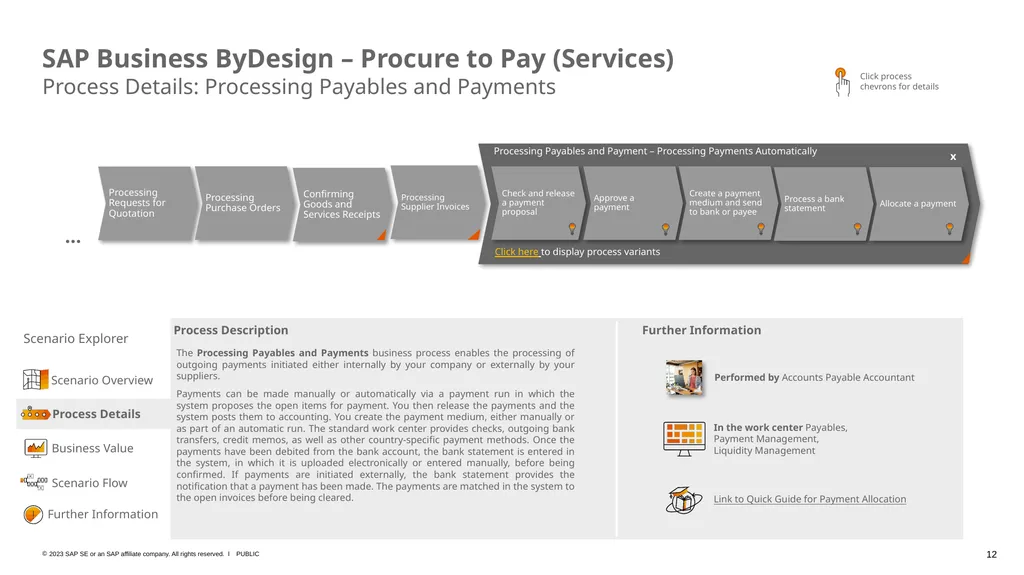
Process Details: Processing Payables and Payments Click process
chevrons for details Process Description The Processing Payables and Payments business process enables the processing of outgoing payments initiated either internally by your company or externally by your suppliers.
Payments can be made manually or automatically via a payment run in which the system proposes the open items for payment. You then release the payments and the system posts them to accounting. You create the payment medium, either manually or as part of an automatic run. The standard work center provides checks, outgoing bank transfers, credit memos, as well as other country-specific payment methods. Once the payments have been debited from the bank account, the bank statement is entered in the system, in which it is uploaded electronically or entered manually, before being confirmed. If payments are initiated externally, the bank statement provides the notification that a payment has been made. The payments are matched in the system to the open invoices before being cleared. Further Information Link to Quick Guide for Payment Allocation In the work center Payables,
Payment Management,
Liquidity Management Performed by Accounts Payable Accountant Processing Payables and Payment – Processing Payments Automatically Processing Requests for Quotation x Processing Purchase Orders Processing Supplier Invoices Confirming Goods and Services Receipts Check and release a payment proposal Approve a payment Create a payment medium and send to bank or payee Process a bank statement Allocate a payment Click here to display process variants … Scenario Explorer<br>
13
SAP Business ByDesign – Procure to Pay (Services)
Process Details: Processing Payables and Payments Click process
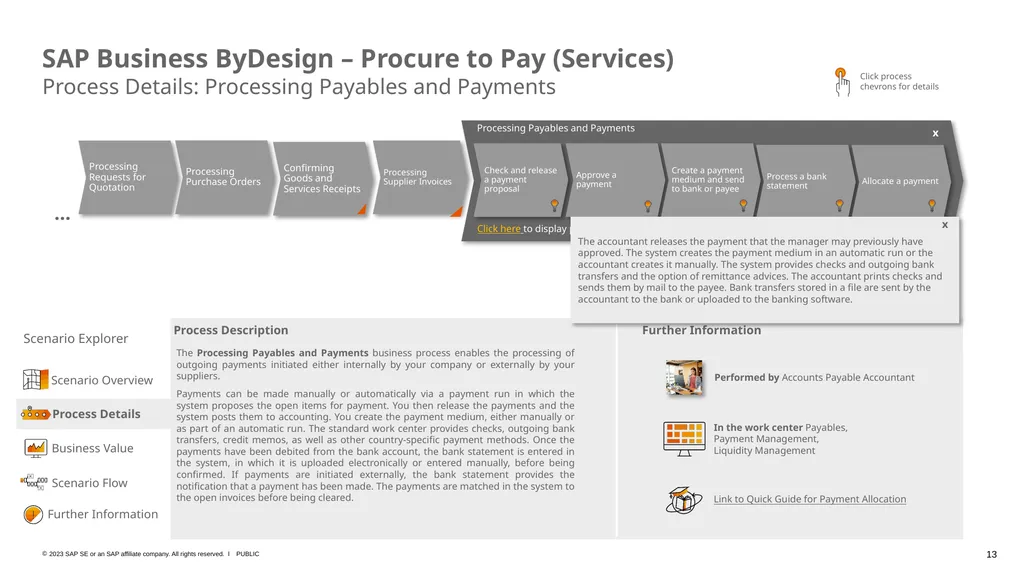
chevrons for details Process Description The Processing Payables and Payments business process enables the processing of outgoing payments initiated either internally by your company or externally by your suppliers.
Payments can be made manually or automatically via a payment run in which the system proposes the open items for payment. You then release the payments and the system posts them to accounting. You create the payment medium, either manually or as part of an automatic run. The standard work center provides checks, outgoing bank transfers, credit memos, as well as other country-specific payment methods. Once the payments have been debited from the bank account, the bank statement is entered in the system, in which it is uploaded electronically or entered manually, before being confirmed. If payments are initiated externally, the bank statement provides the notification that a payment has been made. The payments are matched in the system to the open invoices before being cleared. Further Information Link to Quick Guide for Payment Allocation In the work center Payables,
Payment Management,
Liquidity Management Performed by Accounts Payable Accountant Processing Payables and Payments Processing Requests for Quotation x Processing Purchase Orders Processing Supplier Invoices Confirming Goods and Services Receipts Check and release a payment proposal Approve a payment Create a payment medium and send to bank or payee Process a bank statement Allocate a payment Click here to display process variants The accountant releases the payment that the manager may previously have approved. The system creates the payment medium in an automatic run or the accountant creates it manually. The system provides checks and outgoing bank transfers and the option of remittance advices. The accountant prints checks and sends them by mail to the payee. Bank transfers stored in a file are sent by the accountant to the bank or uploaded to the banking software. x … Scenario Explorer<br>
14
SAP Business ByDesign – Procure to Pay (Services)
Process Details: Processing Payables and Payments Click process
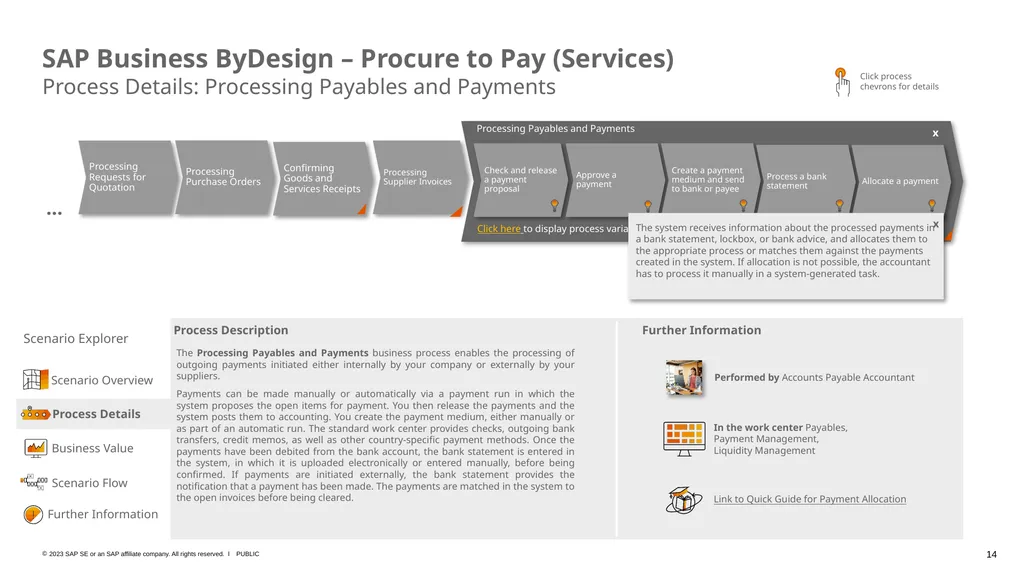
chevrons for details Process Description The Processing Payables and Payments business process enables the processing of outgoing payments initiated either internally by your company or externally by your suppliers.
Payments can be made manually or automatically via a payment run in which the system proposes the open items for payment. You then release the payments and the system posts them to accounting. You create the payment medium, either manually or as part of an automatic run. The standard work center provides checks, outgoing bank transfers, credit memos, as well as other country-specific payment methods. Once the payments have been debited from the bank account, the bank statement is entered in the system, in which it is uploaded electronically or entered manually, before being confirmed. If payments are initiated externally, the bank statement provides the notification that a payment has been made. The payments are matched in the system to the open invoices before being cleared. Further Information Link to Quick Guide for Payment Allocation In the work center Payables,
Payment Management,
Liquidity Management Performed by Accounts Payable Accountant Processing Payables and Payments Processing Requests for Quotation x Processing Purchase Orders Processing Supplier Invoices Confirming Goods and Services Receipts Check and release a payment proposal Approve a payment Create a payment medium and send to bank or payee Process a bank statement Allocate a payment Click here to display process variants The system receives information about the processed payments in a bank statement, lockbox, or bank advice, and allocates them to the appropriate process or matches them against the payments created in the system. If allocation is not possible, the accountant has to process it manually in a system-generated task. x … Scenario Explorer<br>
15
SAP Business ByDesign – Procure to Pay (Services)
Process Details: Processing Payables and Payments Click process
chevrons for details Process Description The Processing Payables and Payments business process enables the processing of outgoing payments initiated either internally by your company or externally by your suppliers.
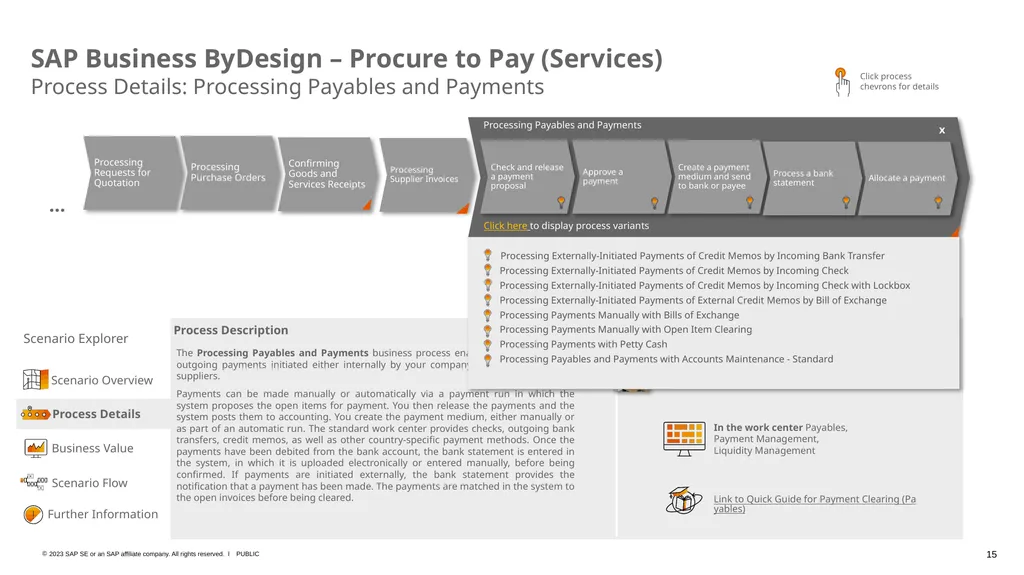
Payments can be made manually or automatically via a payment run in which the system proposes the open items for payment. You then release the payments and the system posts them to accounting. You create the payment medium, either manually or as part of an automatic run. The standard work center provides checks, outgoing bank transfers, credit memos, as well as other country-specific payment methods. Once the payments have been debited from the bank account, the bank statement is entered in the system, in which it is uploaded electronically or entered manually, before being confirmed. If payments are initiated externally, the bank statement provides the notification that a payment has been made. The payments are matched in the system to the open invoices before being cleared. Further Information Link to Quick Guide for Payment Clearing (Payables) In the work center Payables,
Payment Management,
Liquidity Management Performed by Accounts Payable Accountant Processing Payables and Payments Processing Requests for Quotation x Processing Purchase Orders Processing Supplier Invoices Confirming Goods and Services Receipts Check and release a payment proposal Approve a payment Create a payment medium and send to bank or payee Process a bank statement Allocate a payment Click here to display process variants Processing Externally-Initiated Payments of Credit Memos by Incoming Bank Transfer
Processing Externally-Initiated Payments of Credit Memos by Incoming Check
Processing Externally-Initiated Payments of Credit Memos by Incoming Check with Lockbox
Processing Externally-Initiated Payments of External Credit Memos by Bill of Exchange
Processing Payments Manually with Bills of Exchange
Processing Payments Manually with Open Item Clearing
Processing Payments with Petty Cash
Processing Payables and Payments with Accounts Maintenance - Standard … Scenario Explorer<br>
16
SAP Business ByDesign – Procure to Pay (Services)
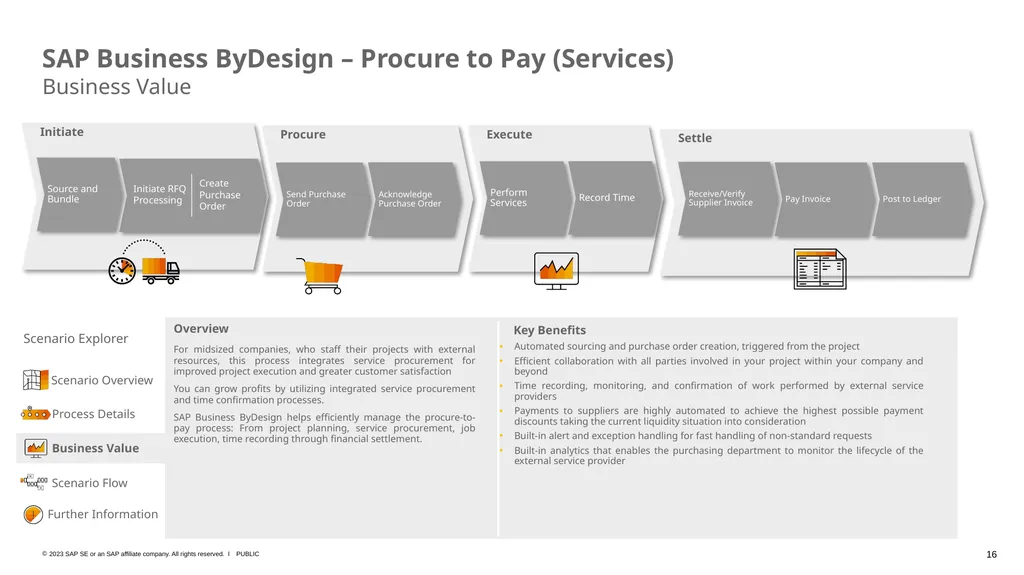
Business Value Overview For midsized companies, who staff their projects with external resources, this process integrates service procurement for improved project execution and greater customer satisfaction
You can grow profits by utilizing integrated service procurement and time confirmation processes.
SAP Business ByDesign helps efficiently manage the procure-to-pay process: From project planning, service procurement, job execution, time recording through financial settlement. Automated sourcing and purchase order creation, triggered from the project
Efficient collaboration with all parties involved in your project within your company and beyond
Time recording, monitoring, and confirmation of work performed by external service providers
Payments to suppliers are highly automated to achieve the highest possible payment discounts taking the current liquidity situation into consideration
Built-in alert and exception handling for fast handling of non-standard requests
Built-in analytics that enables the purchasing department to monitor the lifecycle of the external service provider Key Benefits Scenario Explorer<br>
17
SAP Business ByDesign – Procure to Pay (Services)
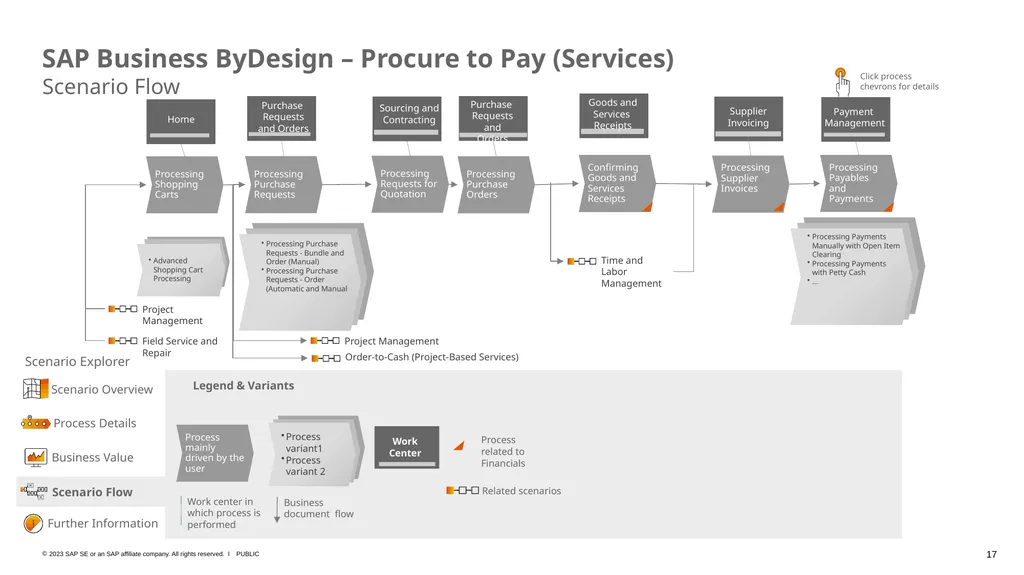
Scenario Flow Advanced Shopping Cart Processing Home Purchase
Requests and Orders Sourcing and
Contracting Goods and
Services
Receipts Supplier
Invoicing Payment
Management Processing Shopping Carts Processing Purchase Requests Confirming Goods and Services Receipts Processing Supplier Invoices Processing Payables and Payments Scenario Explorer Click process chevrons for details Purchase
Requests and Orders Processing Requests for Quotation Processing Purchase Orders Processing Purchase Requests - Bundle and Order (Manual)
Processing Purchase Requests - Order (Automatic and Manual Processing Payments Manually with Open Item Clearing
Processing Payments with Petty Cash
… Work center in which process is performed Business
document flow Process related to Financials Related scenarios Work Center Process mainly driven by the user Legend & Variants<br>
18
SAP Business ByDesign – Procure to Pay (Services)
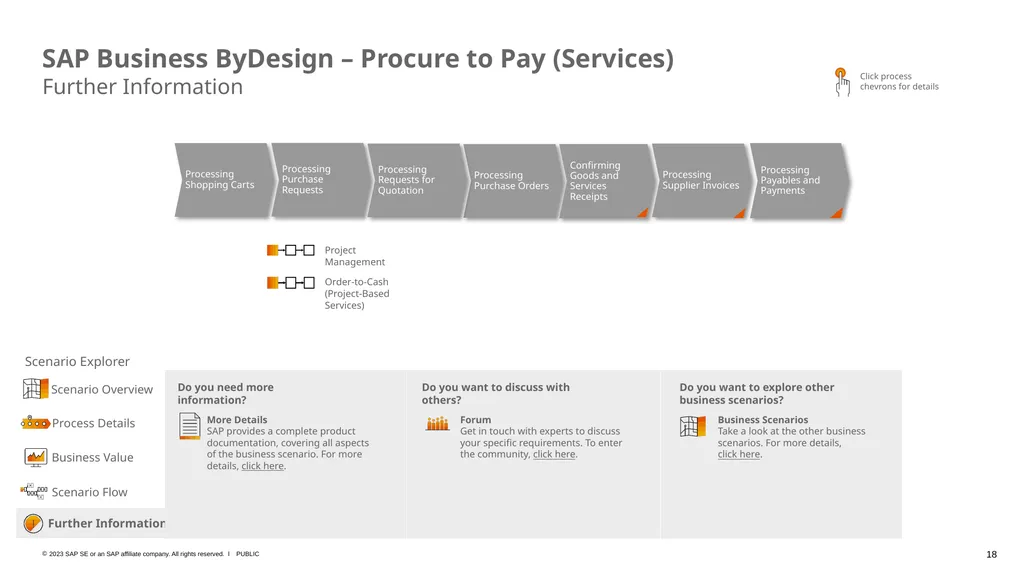
Further Information Scenario Explorer Click process
chevrons for details Forum
Get in touch with experts to discuss your specific requirements. To enter the community, click here. More Details SAP provides a complete product documentation, covering all aspects of the business scenario. For more details, click here. Do you need more information? Do you want to discuss with others? Business Scenarios
Take a look at the other business scenarios. For more details, click here. Do you want to explore other business scenarios?<br>
19
Thank You © 2023 SAP SE or an SAP affiliate company. All rights reserved. See Legal Notice on www.sap.com/legal-notice for use terms, disclaimers, disclosures, or restrictions related to SAP Materials for general audiences.<br>