
Scenario/Processes Payroll Services Scenario
DP
Published · 19 slides · 0 views
1 / 1
Description
ScenarioProcesses Payroll Services Scenario Overview Posting and Closing Collecting Transferring Payroll Input Data Processing Payroll Calculation Initiating Payment Performing Statutory Reporting Scenario Explorer Open Legend HR
Related Topics
Share
Embed code
Download this presentation From Below
"Scenario/Processes Payroll Services Scenario" is the property of its rightful owner. Permission is granted to download and print the materials on this website for personal, non-commercial use only, and to display it on your personal computer provided you do not modify the materials and that you retain all copyright notices contained in the materials. By downloading content from our website, you accept the terms of this agreement.
Presentation Transcript
01
Scenario/Processes Payroll Services
Scenario Overview Posting and Closing Collecting/
Transferring Payroll Input Data Processing Payroll Calculation Initiating Payment Performing Statutory Reporting Scenario
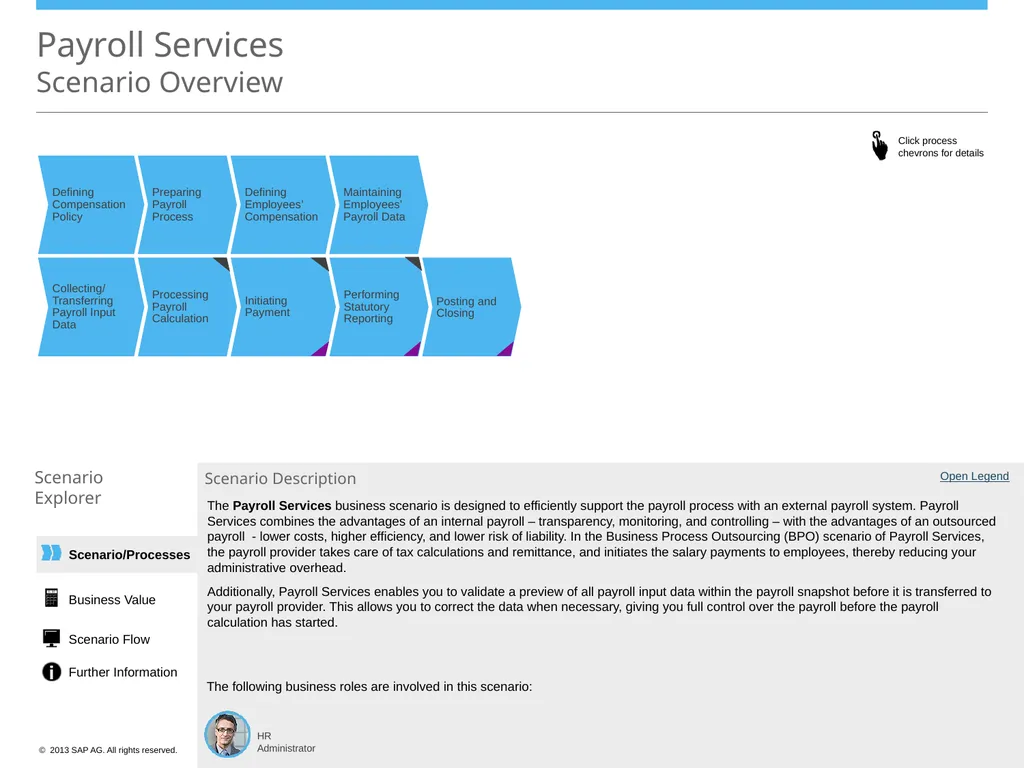
Explorer Open Legend HR Administrator Scenario Description The following business roles are involved in this scenario: Defining Compensation Policy Preparing Payroll Process Defining Employees’ Compensation Maintaining Employees’ Payroll Data The Payroll Services business scenario is designed to efficiently support the payroll process with an external payroll system. Payroll Services combines the advantages of an internal payroll – transparency, monitoring, and controlling – with the advantages of an outsourced payroll - lower costs, higher efficiency, and lower risk of liability. In the Business Process Outsourcing (BPO) scenario of Payroll Services, the payroll provider takes care of tax calculations and remittance, and initiates the salary payments to employees, thereby reducing your administrative overhead.
Additionally, Payroll Services enables you to validate a preview of all payroll input data within the payroll snapshot before it is transferred to your payroll provider. This allows you to correct the data when necessary, giving you full control over the payroll before the payroll calculation has started. Business Value Scenario Flow Further Information<br>
Transferring Payroll Input Data Processing Payroll Calculation Initiating Payment Performing Statutory Reporting Scenario
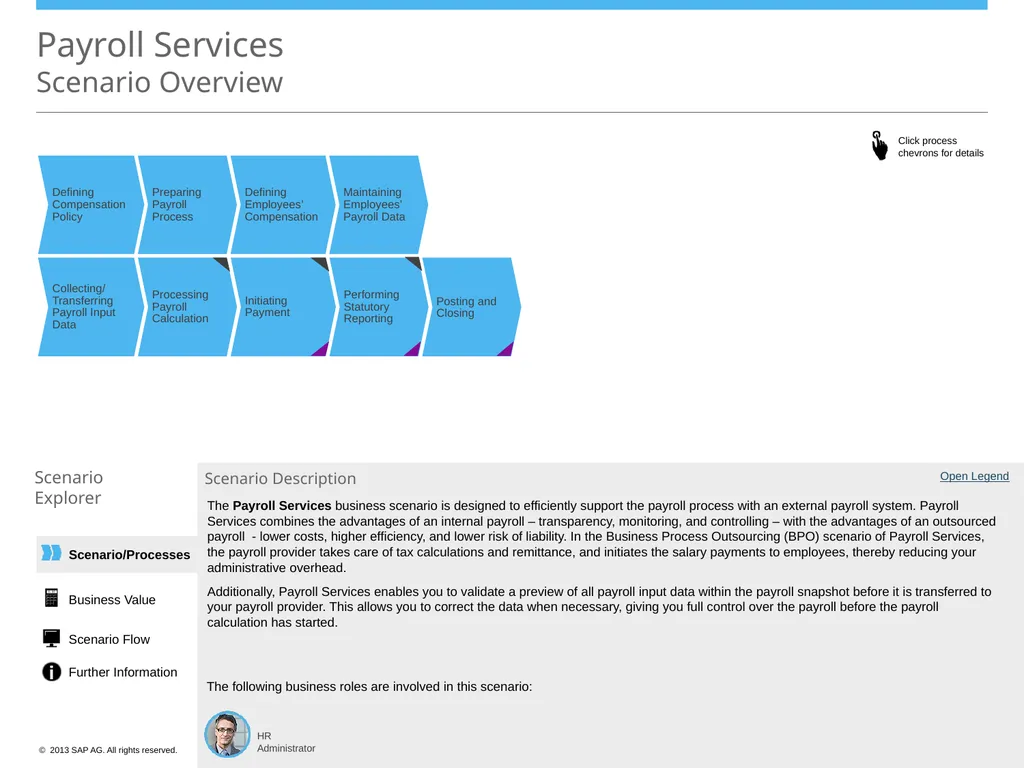
Explorer Open Legend HR Administrator Scenario Description The following business roles are involved in this scenario: Defining Compensation Policy Preparing Payroll Process Defining Employees’ Compensation Maintaining Employees’ Payroll Data The Payroll Services business scenario is designed to efficiently support the payroll process with an external payroll system. Payroll Services combines the advantages of an internal payroll – transparency, monitoring, and controlling – with the advantages of an outsourced payroll - lower costs, higher efficiency, and lower risk of liability. In the Business Process Outsourcing (BPO) scenario of Payroll Services, the payroll provider takes care of tax calculations and remittance, and initiates the salary payments to employees, thereby reducing your administrative overhead.
Additionally, Payroll Services enables you to validate a preview of all payroll input data within the payroll snapshot before it is transferred to your payroll provider. This allows you to correct the data when necessary, giving you full control over the payroll before the payroll calculation has started. Business Value Scenario Flow Further Information<br>
02
Scenario/Processes The Payroll Services business scenario is designed to efficiently support the payroll process with an external payroll system. Payroll Services combines the advantages of an internal payroll – transparency, monitoring, and controlling – with the advantages of an outsourced payroll - lower costs, higher efficiency, and lower risk of liability. In the Business Process Outsourcing (BPO) scenario of Payroll Services, the payroll provider takes care of tax calculations and remittance, and initiates the salary payments to employees, thereby reducing your administrative overhead.
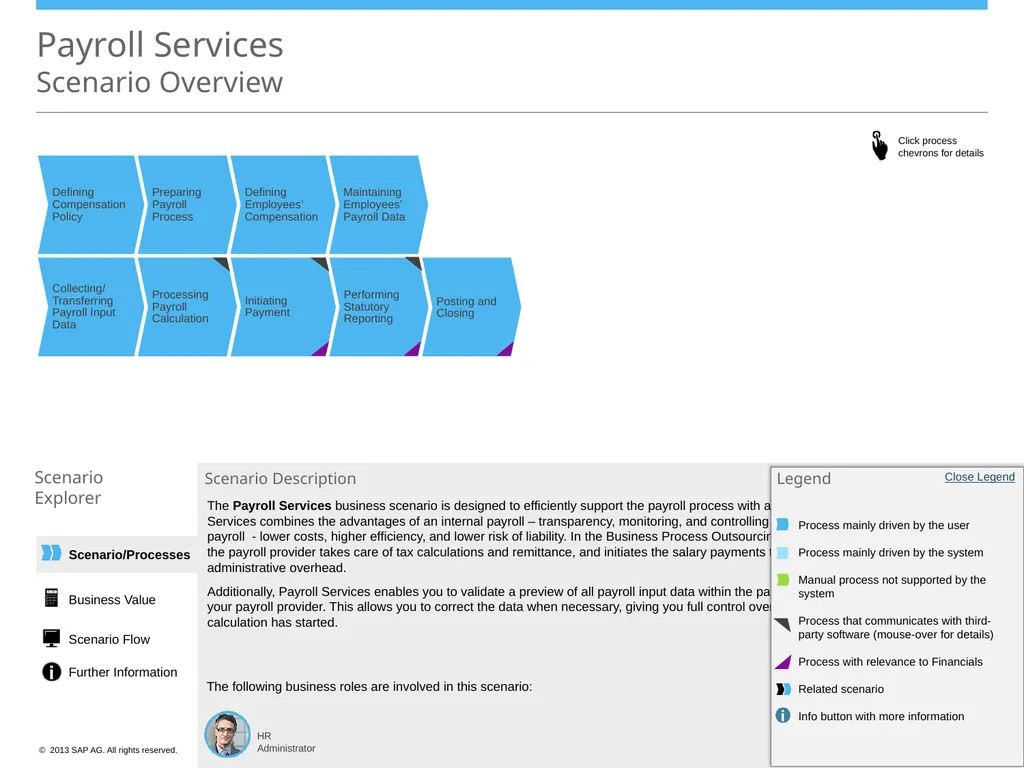
Additionally, Payroll Services enables you to validate a preview of all payroll input data within the payroll snapshot before it is transferred to your payroll provider. This allows you to correct the data when necessary, giving you full control over the payroll before the payroll calculation has started. Payroll Services Scenario Overview HR Administrator Scenario Description The following business roles are involved in this scenario: Open Legend Open Legend <Role Name> <Role Name> <Role Name> Legend Process mainly driven by the user
Process mainly driven by the system
Manual process not supported by the system
Process that communicates with third-party software (mouse-over for details)
Process with relevance to Financials
Related scenario
Info button with more information Close Legend Business Value Scenario Flow Further Information Posting and Closing Collecting/
Transferring Payroll Input Data Processing Payroll Calculation Initiating Payment Performing Statutory Reporting Defining Compensation Policy Preparing Payroll Process Defining Employees’ Compensation Maintaining Employees’ Payroll Data Scenario
Explorer<br>
Additionally, Payroll Services enables you to validate a preview of all payroll input data within the payroll snapshot before it is transferred to your payroll provider. This allows you to correct the data when necessary, giving you full control over the payroll before the payroll calculation has started. Payroll Services Scenario Overview HR Administrator Scenario Description The following business roles are involved in this scenario: Open Legend Open Legend <Role Name> <Role Name> <Role Name> Legend Process mainly driven by the user
Process mainly driven by the system
Manual process not supported by the system
Process that communicates with third-party software (mouse-over for details)
Process with relevance to Financials
Related scenario
Info button with more information Close Legend Business Value Scenario Flow Further Information Posting and Closing Collecting/
Transferring Payroll Input Data Processing Payroll Calculation Initiating Payment Performing Statutory Reporting Defining Compensation Policy Preparing Payroll Process Defining Employees’ Compensation Maintaining Employees’ Payroll Data Scenario
Explorer<br>
03
Scenario/Processes Defining Compensation Policy with Compensation Structure Payroll Services
Process Details: Defining Compensation Policy Scenario
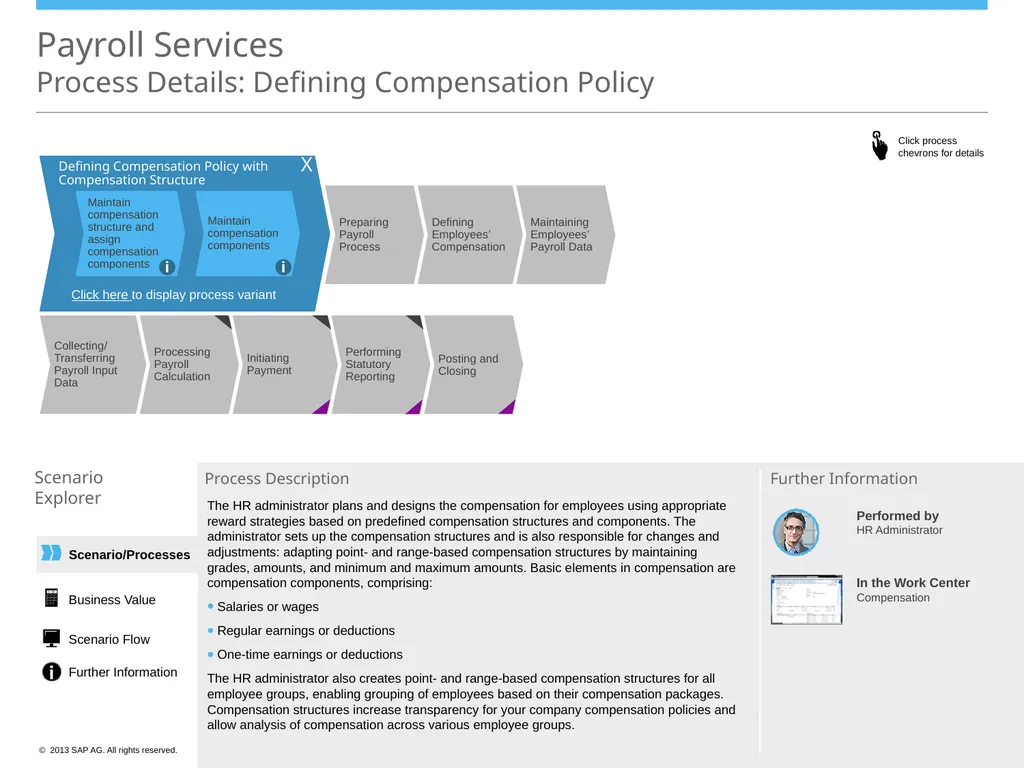
Explorer Process Description Maintain compensation structure and assign compensation components Maintain compensation components Performed by
HR Administrator In the Work Center
Compensation Further Information X i i Posting and Closing Collecting/
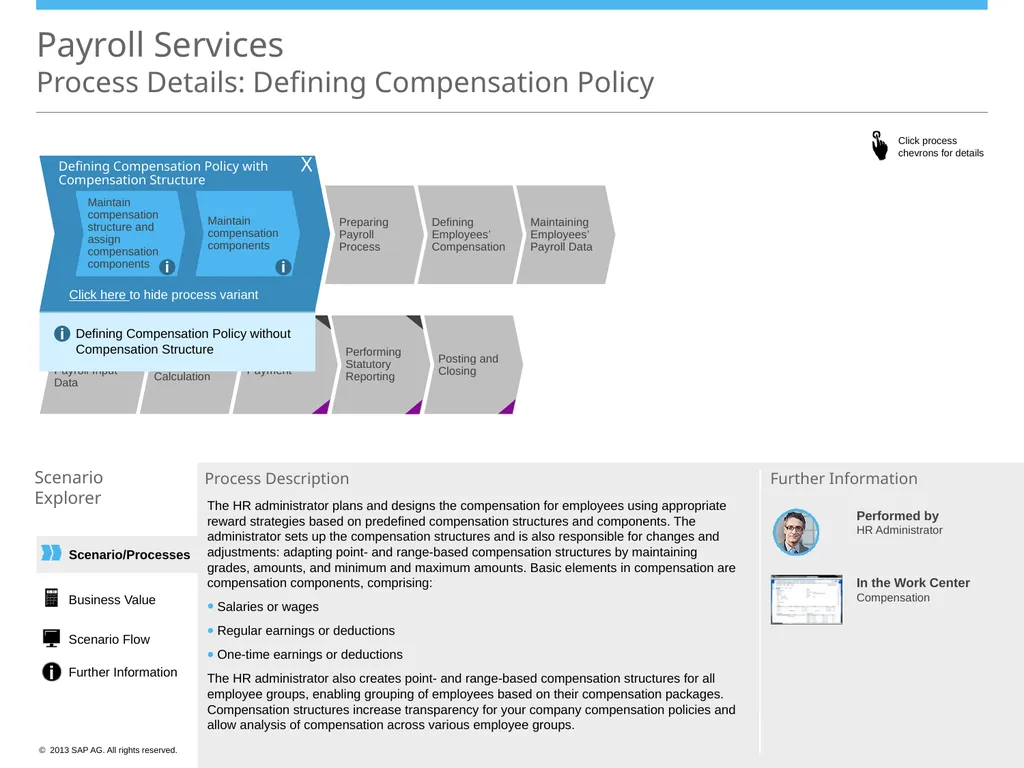
Transferring Payroll Input Data Processing Payroll Calculation Initiating Payment Performing Statutory Reporting Preparing Payroll Process Defining Employees’ Compensation Maintaining Employees’ Payroll Data Click here to display process variant The HR administrator plans and designs the compensation for employees using appropriate reward strategies based on predefined compensation structures and components. The administrator sets up the compensation structures and is also responsible for changes and adjustments: adapting point- and range-based compensation structures by maintaining grades, amounts, and minimum and maximum amounts. Basic elements in compensation are compensation components, comprising:
Salaries or wages
Regular earnings or deductions
One-time earnings or deductions
The HR administrator also creates point- and range-based compensation structures for all employee groups, enabling grouping of employees based on their compensation packages. Compensation structures increase transparency for your company compensation policies and allow analysis of compensation across various employee groups. Business Value Scenario Flow Further Information<br>
Explorer Process Description Maintain compensation structure and assign compensation components Maintain compensation components Performed by
HR Administrator In the Work Center
Compensation Further Information X i i Posting and Closing Collecting/
Transferring Payroll Input Data Processing Payroll Calculation Initiating Payment Performing Statutory Reporting Preparing Payroll Process Defining Employees’ Compensation Maintaining Employees’ Payroll Data Click here to display process variant The HR administrator plans and designs the compensation for employees using appropriate reward strategies based on predefined compensation structures and components. The administrator sets up the compensation structures and is also responsible for changes and adjustments: adapting point- and range-based compensation structures by maintaining grades, amounts, and minimum and maximum amounts. Basic elements in compensation are compensation components, comprising:
Salaries or wages
Regular earnings or deductions
One-time earnings or deductions
The HR administrator also creates point- and range-based compensation structures for all employee groups, enabling grouping of employees based on their compensation packages. Compensation structures increase transparency for your company compensation policies and allow analysis of compensation across various employee groups. Business Value Scenario Flow Further Information<br>
04
Scenario/Processes Defining Compensation Policy with Compensation Structure Payroll Services
Process Details: Defining Compensation Policy Scenario
Explorer Process Description Maintain compensation structure and assign compensation components Maintain compensation components Further Information X i i Posting and Closing Collecting/
Transferring Payroll Input Data Processing Payroll Calculation Initiating Payment Performing Statutory Reporting Preparing Payroll Process Defining Employees’ Compensation Maintaining Employees’ Payroll Data Click here to hide process variant Defining Compensation Policy without Compensation Structure i The HR administrator plans and designs the compensation for employees using appropriate reward strategies based on predefined compensation structures and components. The administrator sets up the compensation structures and is also responsible for changes and adjustments: adapting point- and range-based compensation structures by maintaining grades, amounts, and minimum and maximum amounts. Basic elements in compensation are compensation components, comprising:
Salaries or wages
Regular earnings or deductions
One-time earnings or deductions
The HR administrator also creates point- and range-based compensation structures for all employee groups, enabling grouping of employees based on their compensation packages. Compensation structures increase transparency for your company compensation policies and allow analysis of compensation across various employee groups. Performed by
HR Administrator In the Work Center
Compensation Business Value Scenario Flow Further Information<br>
Explorer Process Description Maintain compensation structure and assign compensation components Maintain compensation components Further Information X i i Posting and Closing Collecting/
Transferring Payroll Input Data Processing Payroll Calculation Initiating Payment Performing Statutory Reporting Preparing Payroll Process Defining Employees’ Compensation Maintaining Employees’ Payroll Data Click here to hide process variant Defining Compensation Policy without Compensation Structure i The HR administrator plans and designs the compensation for employees using appropriate reward strategies based on predefined compensation structures and components. The administrator sets up the compensation structures and is also responsible for changes and adjustments: adapting point- and range-based compensation structures by maintaining grades, amounts, and minimum and maximum amounts. Basic elements in compensation are compensation components, comprising:
Salaries or wages
Regular earnings or deductions
One-time earnings or deductions
The HR administrator also creates point- and range-based compensation structures for all employee groups, enabling grouping of employees based on their compensation packages. Compensation structures increase transparency for your company compensation policies and allow analysis of compensation across various employee groups. Performed by
HR Administrator In the Work Center
Compensation Business Value Scenario Flow Further Information<br>
05
Scenario/Processes Payroll Services
Process Details: Preparing Payroll Process Scenario
Explorer Process Description In the Work Centers
Payroll Processing
Compensation Further Information Defining Compensation Policy Defining Employees’ Compensation Maintaining Employees’ Payroll Data Preparing Payroll
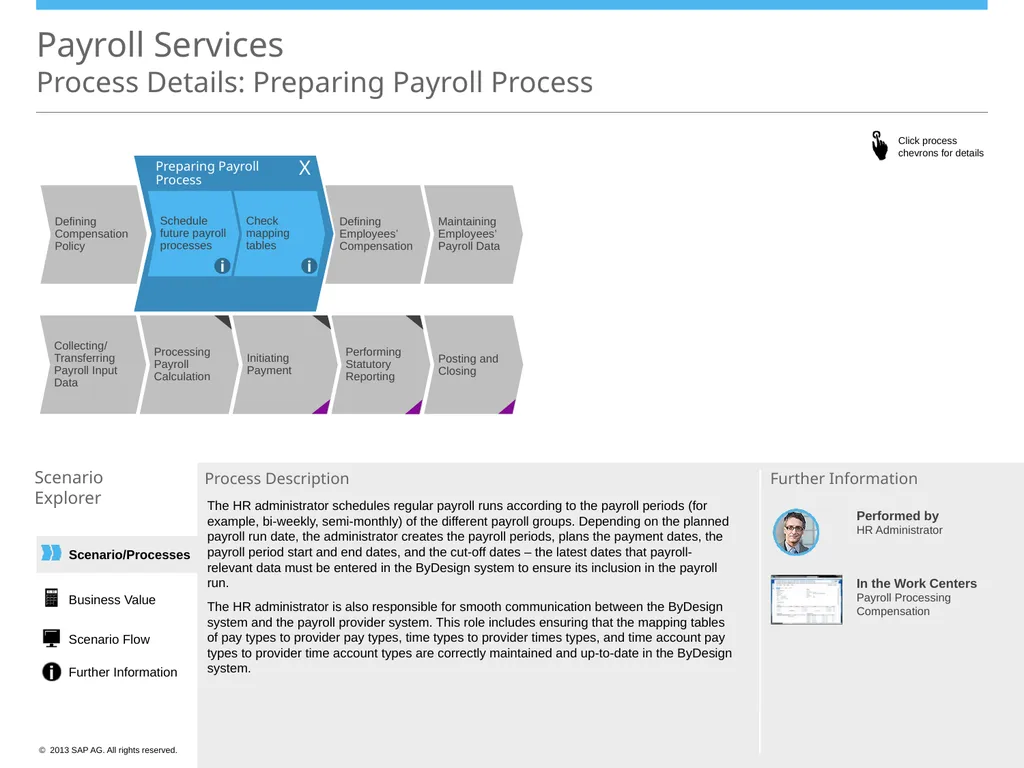
Process Check mapping tables Schedule future payroll processes X i i The HR administrator schedules regular payroll runs according to the payroll periods (for example, bi-weekly, semi-monthly) of the different payroll groups. Depending on the planned payroll run date, the administrator creates the payroll periods, plans the payment dates, the payroll period start and end dates, and the cut-off dates – the latest dates that payroll-relevant data must be entered in the ByDesign system to ensure its inclusion in the payroll run.
The HR administrator is also responsible for smooth communication between the ByDesign system and the payroll provider system. This role includes ensuring that the mapping tables of pay types to provider pay types, time types to provider times types, and time account pay types to provider time account types are correctly maintained and up-to-date in the ByDesign system. Performed by
HR Administrator Business Value Scenario Flow Further Information Posting and Closing Collecting/
Transferring Payroll Input Data Processing Payroll Calculation Initiating Payment Performing Statutory Reporting<br>
Explorer Process Description In the Work Centers
Payroll Processing
Compensation Further Information Defining Compensation Policy Defining Employees’ Compensation Maintaining Employees’ Payroll Data Preparing Payroll
Process Check mapping tables Schedule future payroll processes X i i The HR administrator schedules regular payroll runs according to the payroll periods (for example, bi-weekly, semi-monthly) of the different payroll groups. Depending on the planned payroll run date, the administrator creates the payroll periods, plans the payment dates, the payroll period start and end dates, and the cut-off dates – the latest dates that payroll-relevant data must be entered in the ByDesign system to ensure its inclusion in the payroll run.
The HR administrator is also responsible for smooth communication between the ByDesign system and the payroll provider system. This role includes ensuring that the mapping tables of pay types to provider pay types, time types to provider times types, and time account pay types to provider time account types are correctly maintained and up-to-date in the ByDesign system. Performed by
HR Administrator Business Value Scenario Flow Further Information Posting and Closing Collecting/
Transferring Payroll Input Data Processing Payroll Calculation Initiating Payment Performing Statutory Reporting<br>
06
Scenario/Processes Payroll Services
Process Details: Defining Employees’ Compensation Scenario
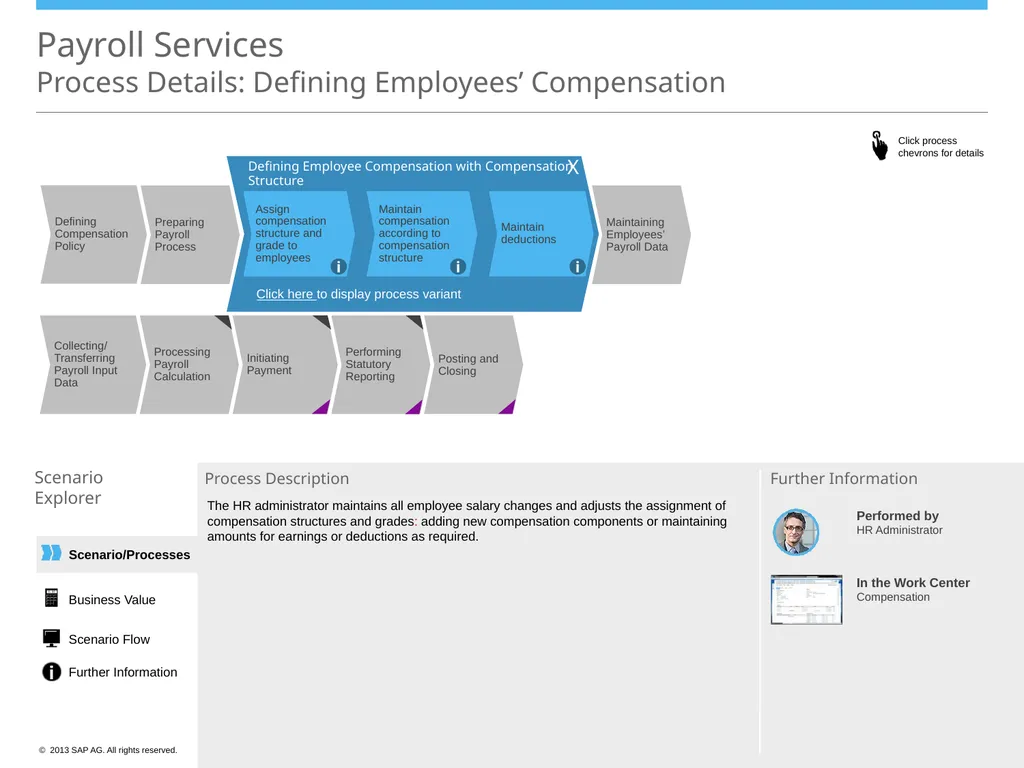
Explorer Process Description Preparing Payroll Process Maintaining Employees’ Payroll Data Defining Employee Compensation with Compensation Structure X Assign compensation structure and grade to employees Maintain compensation according to compensation structure Maintain deductions i i i Click here to display process variant The HR administrator maintains all employee salary changes and adjusts the assignment of compensation structures and grades: adding new compensation components or maintaining amounts for earnings or deductions as required. In the Work Center
Compensation Further Information Business Value Scenario Flow Further Information Posting and Closing Collecting/
Transferring Payroll Input Data Processing Payroll Calculation Initiating Payment Performing Statutory Reporting Defining Compensation Policy Performed by
HR Administrator<br>
Explorer Process Description Preparing Payroll Process Maintaining Employees’ Payroll Data Defining Employee Compensation with Compensation Structure X Assign compensation structure and grade to employees Maintain compensation according to compensation structure Maintain deductions i i i Click here to display process variant The HR administrator maintains all employee salary changes and adjusts the assignment of compensation structures and grades: adding new compensation components or maintaining amounts for earnings or deductions as required. In the Work Center
Compensation Further Information Business Value Scenario Flow Further Information Posting and Closing Collecting/
Transferring Payroll Input Data Processing Payroll Calculation Initiating Payment Performing Statutory Reporting Defining Compensation Policy Performed by
HR Administrator<br>
07
Preparing Payroll Process Posting and Closing Collecting/
Transferring Payroll Input Data Processing Payroll Calculation Initiating Payment Performing Statutory Reporting Defining Compensation Policy Scenario/Processes Payroll Services Process Details: Defining Employees’ Compensation Scenario
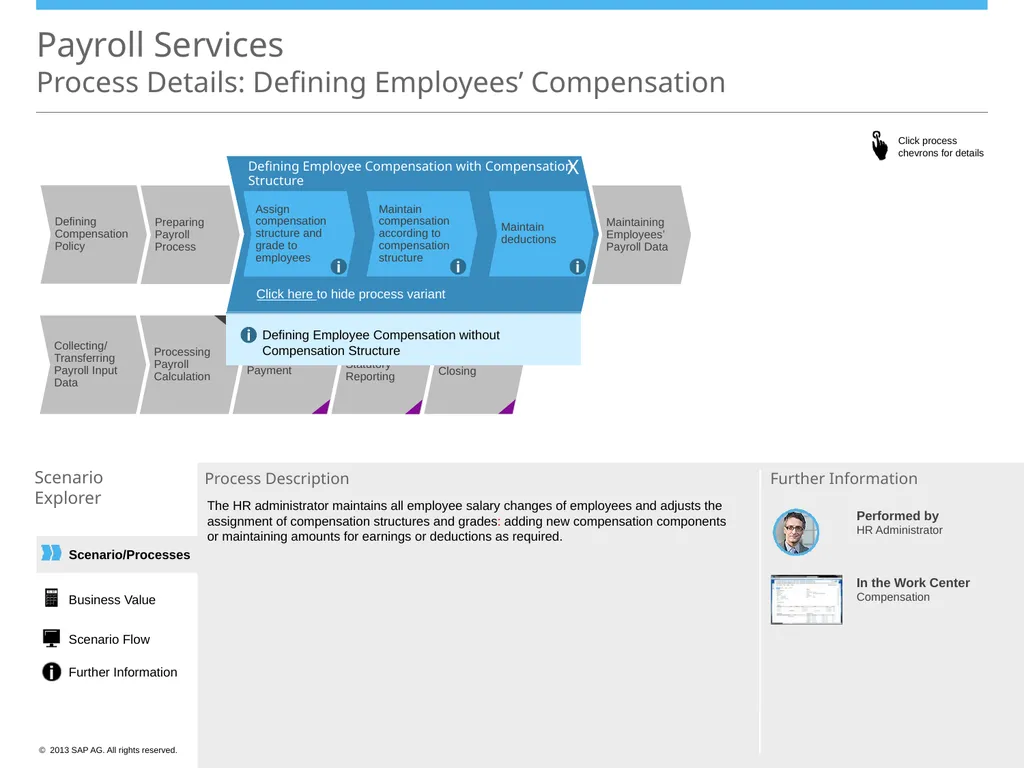
Explorer Process Description Further Information Maintaining Employees’ Payroll Data Defining Employee Compensation with Compensation Structure X Assign compensation structure and grade to employees Maintain compensation according to compensation structure Maintain deductions i i i Click here to hide process variant Defining Employee Compensation without Compensation Structure i The HR administrator maintains all employee salary changes of employees and adjusts the assignment of compensation structures and grades: adding new compensation components or maintaining amounts for earnings or deductions as required. Business Value Scenario Flow Further Information Performed by
HR Administrator In the Work Center
Compensation<br>
Transferring Payroll Input Data Processing Payroll Calculation Initiating Payment Performing Statutory Reporting Defining Compensation Policy Scenario/Processes Payroll Services Process Details: Defining Employees’ Compensation Scenario
Explorer Process Description Further Information Maintaining Employees’ Payroll Data Defining Employee Compensation with Compensation Structure X Assign compensation structure and grade to employees Maintain compensation according to compensation structure Maintain deductions i i i Click here to hide process variant Defining Employee Compensation without Compensation Structure i The HR administrator maintains all employee salary changes of employees and adjusts the assignment of compensation structures and grades: adding new compensation components or maintaining amounts for earnings or deductions as required. Business Value Scenario Flow Further Information Performed by
HR Administrator In the Work Center
Compensation<br>
08
Scenario/Processes Payroll Services
Process Details: Maintaining Employees’ Payroll Data Scenario
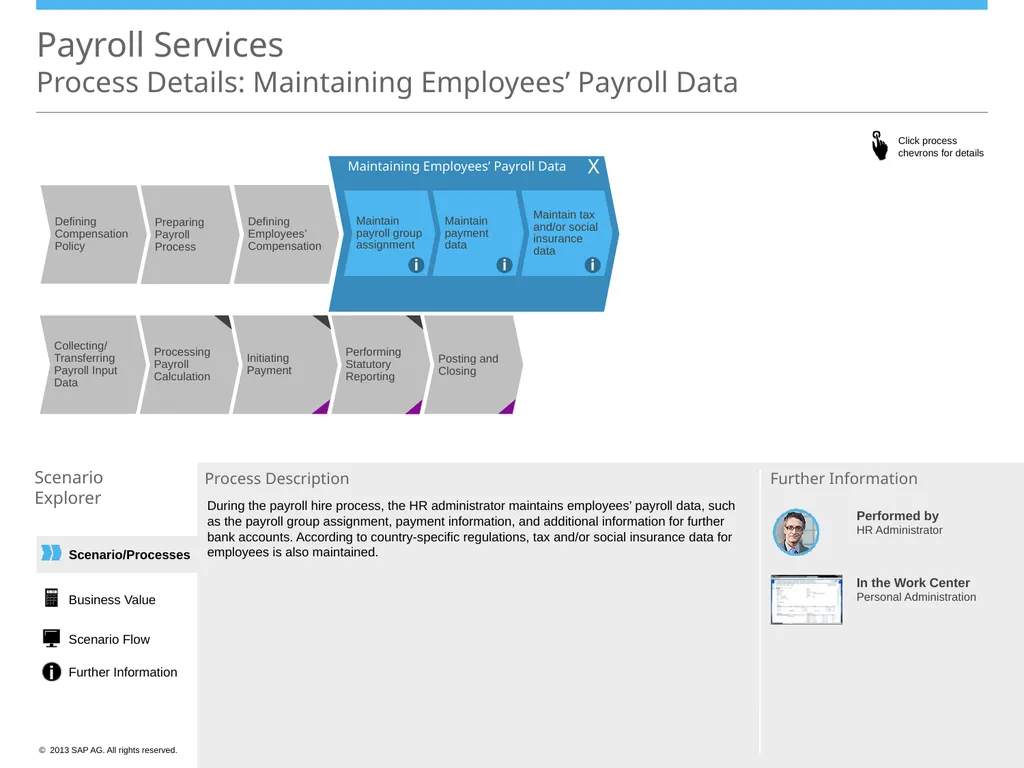
Explorer Process Description Further Information Defining Employees’ Compensation Maintaining Employees’ Payroll Data Maintain payroll group assignment Maintain payment data Maintain tax and/or social insurance data X i i i X During the payroll hire process, the HR administrator maintains employees’ payroll data, such as the payroll group assignment, payment information, and additional information for further bank accounts. According to country-specific regulations, tax and/or social insurance data for employees is also maintained. In the Work Center
Personal Administration Business Value Scenario Flow Further Information Posting and Closing Collecting/
Transferring Payroll Input Data Processing Payroll Calculation Initiating Payment Performing Statutory Reporting Preparing Payroll Process Defining Compensation Policy Performed by
HR Administrator<br>
Explorer Process Description Further Information Defining Employees’ Compensation Maintaining Employees’ Payroll Data Maintain payroll group assignment Maintain payment data Maintain tax and/or social insurance data X i i i X During the payroll hire process, the HR administrator maintains employees’ payroll data, such as the payroll group assignment, payment information, and additional information for further bank accounts. According to country-specific regulations, tax and/or social insurance data for employees is also maintained. In the Work Center
Personal Administration Business Value Scenario Flow Further Information Posting and Closing Collecting/
Transferring Payroll Input Data Processing Payroll Calculation Initiating Payment Performing Statutory Reporting Preparing Payroll Process Defining Compensation Policy Performed by
HR Administrator<br>
09
Scenario/Processes Payroll Services
Process Details: Collecting & Transferring Payroll Input Data Scenario
Explorer Process Description Further Information Posting and Closing Processing Payroll Calculation Initiating Payment Performing Statutory Reporting X Collecting Payroll Input Data and Transferring Data using
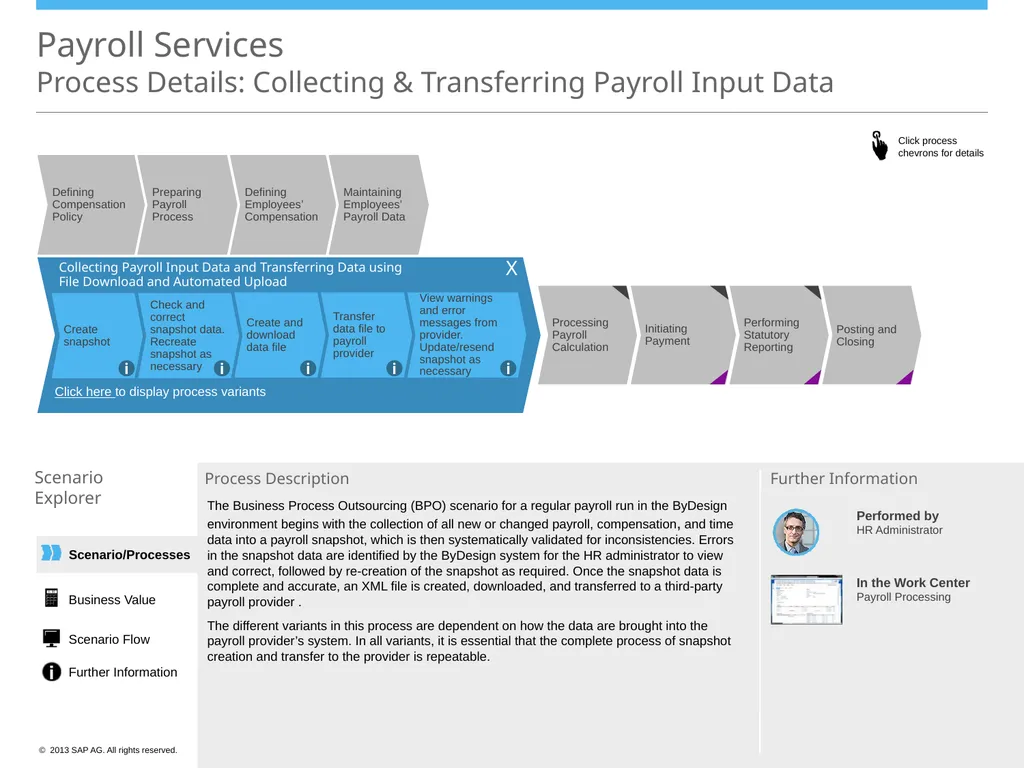
File Download and Automated Upload View warnings and error messages from provider. Update/resend snapshot as necessary Transfer data file to payroll provider Create and download data file Check and correct snapshot data. Recreate snapshot as necessary Create snapshot i i i i i Click here to display process variants X The Business Process Outsourcing (BPO) scenario for a regular payroll run in the ByDesign environment begins with the collection of all new or changed payroll, compensation, and time data into a payroll snapshot, which is then systematically validated for inconsistencies. Errors in the snapshot data are identified by the ByDesign system for the HR administrator to view and correct, followed by re-creation of the snapshot as required. Once the snapshot data is complete and accurate, an XML file is created, downloaded, and transferred to a third-party payroll provider .
The different variants in this process are dependent on how the data are brought into the payroll provider’s system. In all variants, it is essential that the complete process of snapshot creation and transfer to the provider is repeatable. In the Work Center
Payroll Processing Business Value Scenario Flow Further Information Defining Compensation Policy Preparing Payroll Process Defining Employees’ Compensation Maintaining Employees’ Payroll Data Performed by
HR Administrator<br>
Explorer Process Description Further Information Posting and Closing Processing Payroll Calculation Initiating Payment Performing Statutory Reporting X Collecting Payroll Input Data and Transferring Data using
File Download and Automated Upload View warnings and error messages from provider. Update/resend snapshot as necessary Transfer data file to payroll provider Create and download data file Check and correct snapshot data. Recreate snapshot as necessary Create snapshot i i i i i Click here to display process variants X The Business Process Outsourcing (BPO) scenario for a regular payroll run in the ByDesign environment begins with the collection of all new or changed payroll, compensation, and time data into a payroll snapshot, which is then systematically validated for inconsistencies. Errors in the snapshot data are identified by the ByDesign system for the HR administrator to view and correct, followed by re-creation of the snapshot as required. Once the snapshot data is complete and accurate, an XML file is created, downloaded, and transferred to a third-party payroll provider .
The different variants in this process are dependent on how the data are brought into the payroll provider’s system. In all variants, it is essential that the complete process of snapshot creation and transfer to the provider is repeatable. In the Work Center
Payroll Processing Business Value Scenario Flow Further Information Defining Compensation Policy Preparing Payroll Process Defining Employees’ Compensation Maintaining Employees’ Payroll Data Performed by
HR Administrator<br>
10
Collecting Payroll Input Data and Transferring Data using
File Download and Automated Upload Scenario/Processes Payroll Services Process Details: Collecting & Transferring Payroll Input Data Scenario
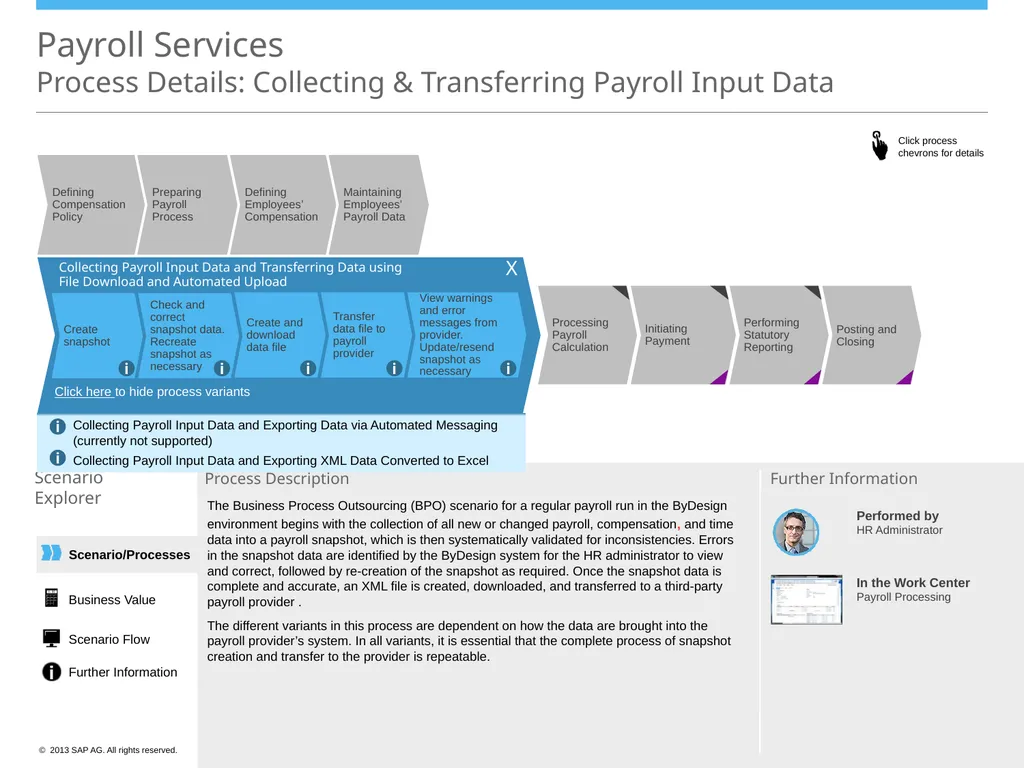
Explorer Process Description Further Information X Click here to hide process variants Collecting Payroll Input Data and Exporting Data via Automated Messaging (currently not supported)
Collecting Payroll Input Data and Exporting XML Data Converted to Excel i i View warnings and error messages from provider. Update/resend snapshot as necessary Transfer data file to payroll provider Create and download data file Check and correct snapshot data. Recreate snapshot as necessary Create snapshot i i i i i The Business Process Outsourcing (BPO) scenario for a regular payroll run in the ByDesign environment begins with the collection of all new or changed payroll, compensation, and time data into a payroll snapshot, which is then systematically validated for inconsistencies. Errors in the snapshot data are identified by the ByDesign system for the HR administrator to view and correct, followed by re-creation of the snapshot as required. Once the snapshot data is complete and accurate, an XML file is created, downloaded, and transferred to a third-party payroll provider .
The different variants in this process are dependent on how the data are brought into the payroll provider’s system. In all variants, it is essential that the complete process of snapshot creation and transfer to the provider is repeatable. Business Value Scenario Flow Further Information Defining Compensation Policy Preparing Payroll Process Defining Employees’ Compensation Maintaining Employees’ Payroll Data Posting and Closing Processing Payroll Calculation Initiating Payment Performing Statutory Reporting Performed by
HR Administrator In the Work Center
Payroll Processing<br>
File Download and Automated Upload Scenario/Processes Payroll Services Process Details: Collecting & Transferring Payroll Input Data Scenario
Explorer Process Description Further Information X Click here to hide process variants Collecting Payroll Input Data and Exporting Data via Automated Messaging (currently not supported)
Collecting Payroll Input Data and Exporting XML Data Converted to Excel i i View warnings and error messages from provider. Update/resend snapshot as necessary Transfer data file to payroll provider Create and download data file Check and correct snapshot data. Recreate snapshot as necessary Create snapshot i i i i i The Business Process Outsourcing (BPO) scenario for a regular payroll run in the ByDesign environment begins with the collection of all new or changed payroll, compensation, and time data into a payroll snapshot, which is then systematically validated for inconsistencies. Errors in the snapshot data are identified by the ByDesign system for the HR administrator to view and correct, followed by re-creation of the snapshot as required. Once the snapshot data is complete and accurate, an XML file is created, downloaded, and transferred to a third-party payroll provider .
The different variants in this process are dependent on how the data are brought into the payroll provider’s system. In all variants, it is essential that the complete process of snapshot creation and transfer to the provider is repeatable. Business Value Scenario Flow Further Information Defining Compensation Policy Preparing Payroll Process Defining Employees’ Compensation Maintaining Employees’ Payroll Data Posting and Closing Processing Payroll Calculation Initiating Payment Performing Statutory Reporting Performed by
HR Administrator In the Work Center
Payroll Processing<br>
11
Scenario/Processes Processing Payroll: Gross-to-Net
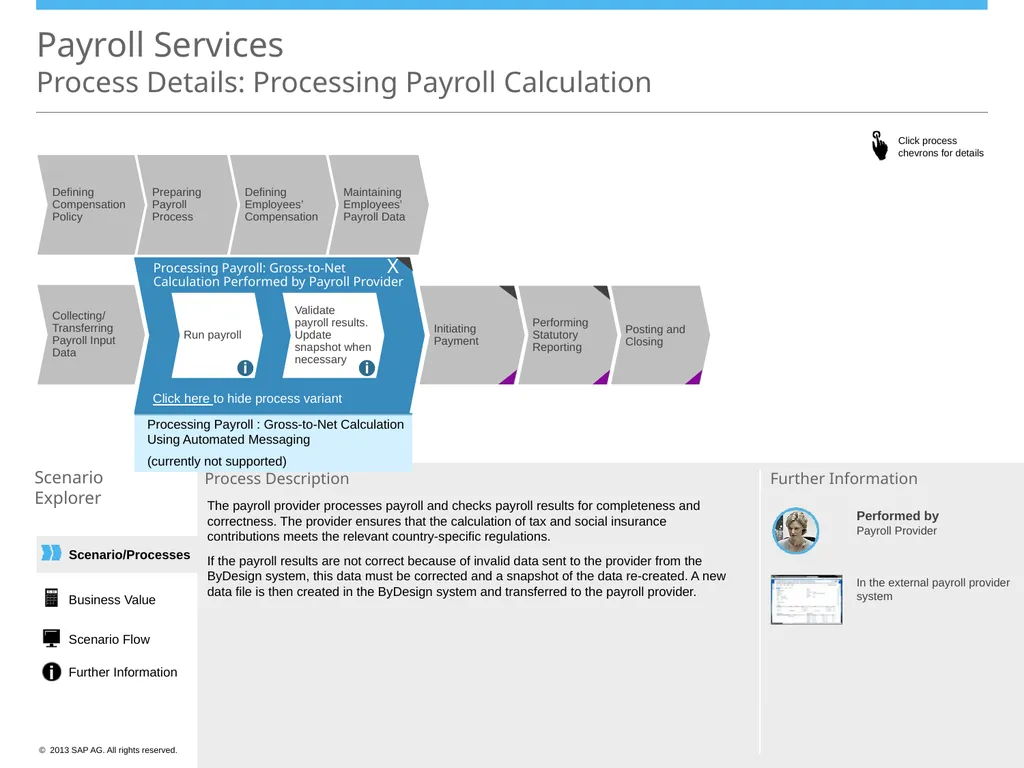
Calculation Performed by Payroll Provider Payroll Services Process Details: Processing Payroll Calculation Scenario
Explorer Process Description In the external payroll provider system Further Information Validate payroll results. Update snapshot when necessary Run payroll i i X Click here to display process variant Performed by
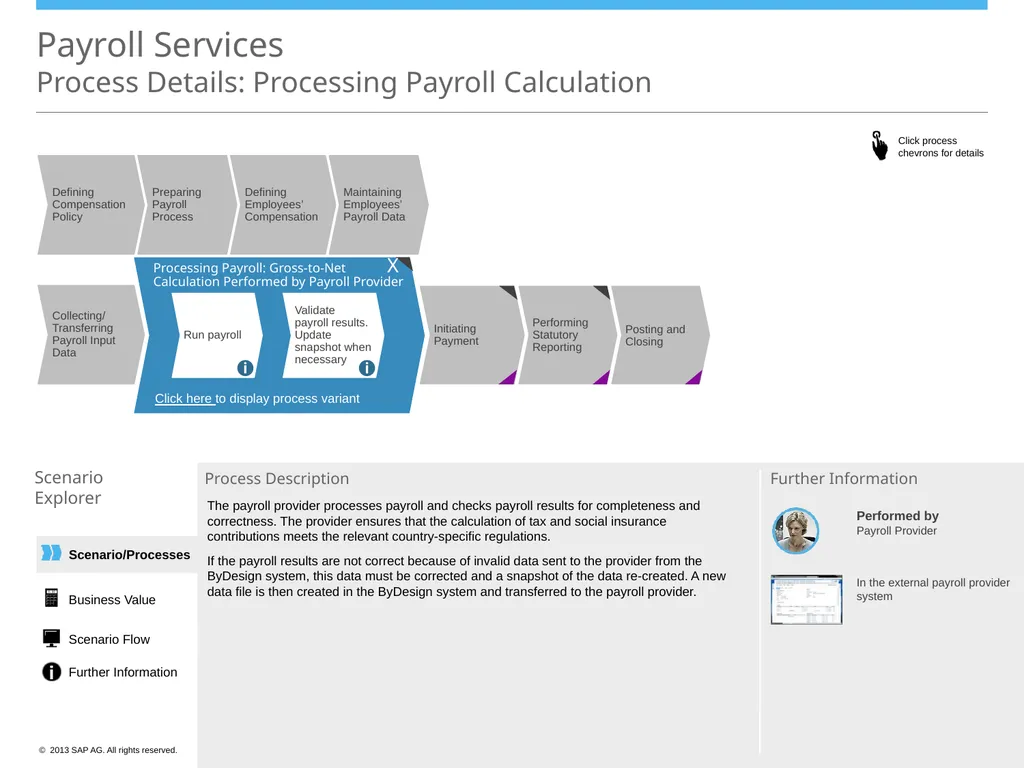
Payroll Provider The payroll provider processes payroll and checks payroll results for completeness and correctness. The provider ensures that the calculation of tax and social insurance contributions meets the relevant country-specific regulations.
If the payroll results are not correct because of invalid data sent to the provider from the ByDesign system, this data must be corrected and a snapshot of the data re-created. A new data file is then created in the ByDesign system and transferred to the payroll provider. Business Value Scenario Flow Further Information Defining Compensation Policy Preparing Payroll Process Defining Employees’ Compensation Maintaining Employees’ Payroll Data Posting and Closing Initiating Payment Performing Statutory Reporting Collecting/
Transferring Payroll Input Data<br>
Calculation Performed by Payroll Provider Payroll Services Process Details: Processing Payroll Calculation Scenario
Explorer Process Description In the external payroll provider system Further Information Validate payroll results. Update snapshot when necessary Run payroll i i X Click here to display process variant Performed by
Payroll Provider The payroll provider processes payroll and checks payroll results for completeness and correctness. The provider ensures that the calculation of tax and social insurance contributions meets the relevant country-specific regulations.
If the payroll results are not correct because of invalid data sent to the provider from the ByDesign system, this data must be corrected and a snapshot of the data re-created. A new data file is then created in the ByDesign system and transferred to the payroll provider. Business Value Scenario Flow Further Information Defining Compensation Policy Preparing Payroll Process Defining Employees’ Compensation Maintaining Employees’ Payroll Data Posting and Closing Initiating Payment Performing Statutory Reporting Collecting/
Transferring Payroll Input Data<br>
12
Scenario/Processes Payroll Services
Process Details: Processing Payroll Calculation Scenario
Explorer Process Description Further Information The payroll provider processes payroll and checks payroll results for completeness and correctness. The provider ensures that the calculation of tax and social insurance contributions meets the relevant country-specific regulations.
If the payroll results are not correct because of invalid data sent to the provider from the ByDesign system, this data must be corrected and a snapshot of the data re-created. A new data file is then created in the ByDesign system and transferred to the payroll provider. In the external payroll provider system Performed by
Payroll Provider Processing Payroll : Gross-to-Net Calculation Using Automated Messaging
(currently not supported) Business Value Scenario Flow Further Information Processing Payroll: Gross-to-Net
Calculation Performed by Payroll Provider Validate payroll results. Update snapshot when necessary Run payroll i i X Click here to hide process variant Posting and Closing Initiating Payment Performing Statutory Reporting Collecting/
Transferring Payroll Input Data Defining Compensation Policy Preparing Payroll Process Defining Employees’ Compensation Maintaining Employees’ Payroll Data<br>
Explorer Process Description Further Information The payroll provider processes payroll and checks payroll results for completeness and correctness. The provider ensures that the calculation of tax and social insurance contributions meets the relevant country-specific regulations.
If the payroll results are not correct because of invalid data sent to the provider from the ByDesign system, this data must be corrected and a snapshot of the data re-created. A new data file is then created in the ByDesign system and transferred to the payroll provider. In the external payroll provider system Performed by
Payroll Provider Processing Payroll : Gross-to-Net Calculation Using Automated Messaging
(currently not supported) Business Value Scenario Flow Further Information Processing Payroll: Gross-to-Net
Calculation Performed by Payroll Provider Validate payroll results. Update snapshot when necessary Run payroll i i X Click here to hide process variant Posting and Closing Initiating Payment Performing Statutory Reporting Collecting/
Transferring Payroll Input Data Defining Compensation Policy Preparing Payroll Process Defining Employees’ Compensation Maintaining Employees’ Payroll Data<br>
13
Defining Compensation Policy Preparing Payroll Process Defining Employees’ Compensation Maintaining Employees’ Payroll Data Scenario/Processes Payroll Services
Process Details: Initiating Payment Scenario
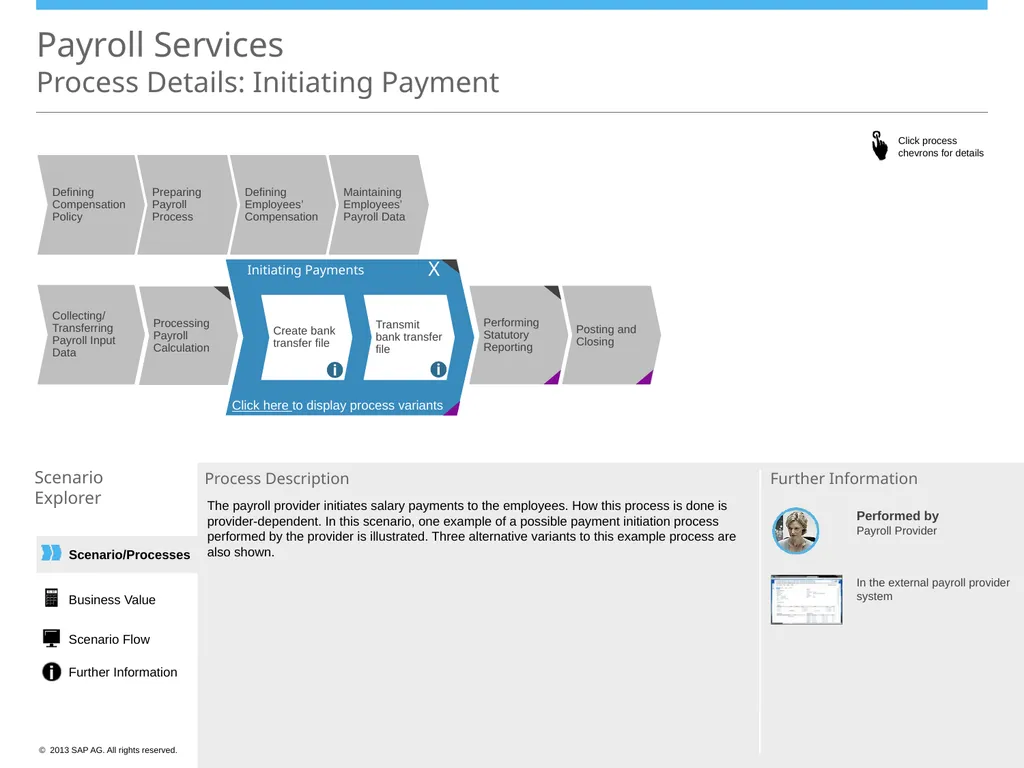
Explorer Process Description Further Information Processing Payroll Calculation Initiating Payments Transmit bank transfer file Create bank transfer file i i X Click here to display process variants The payroll provider initiates salary payments to the employees. How this process is done is provider-dependent. In this scenario, one example of a possible payment initiation process performed by the provider is illustrated. Three alternative variants to this example process are also shown. In the external payroll provider system Performed by
Payroll Provider Business Value Scenario Flow Further Information Posting and Closing Performing Statutory Reporting Collecting/
Transferring Payroll Input Data<br>
Explorer Process Description Further Information Processing Payroll Calculation Initiating Payments Transmit bank transfer file Create bank transfer file i i X Click here to display process variants The payroll provider initiates salary payments to the employees. How this process is done is provider-dependent. In this scenario, one example of a possible payment initiation process performed by the provider is illustrated. Three alternative variants to this example process are also shown. In the external payroll provider system Performed by
Payroll Provider Business Value Scenario Flow Further Information Posting and Closing Performing Statutory Reporting Collecting/
Transferring Payroll Input Data<br>
14
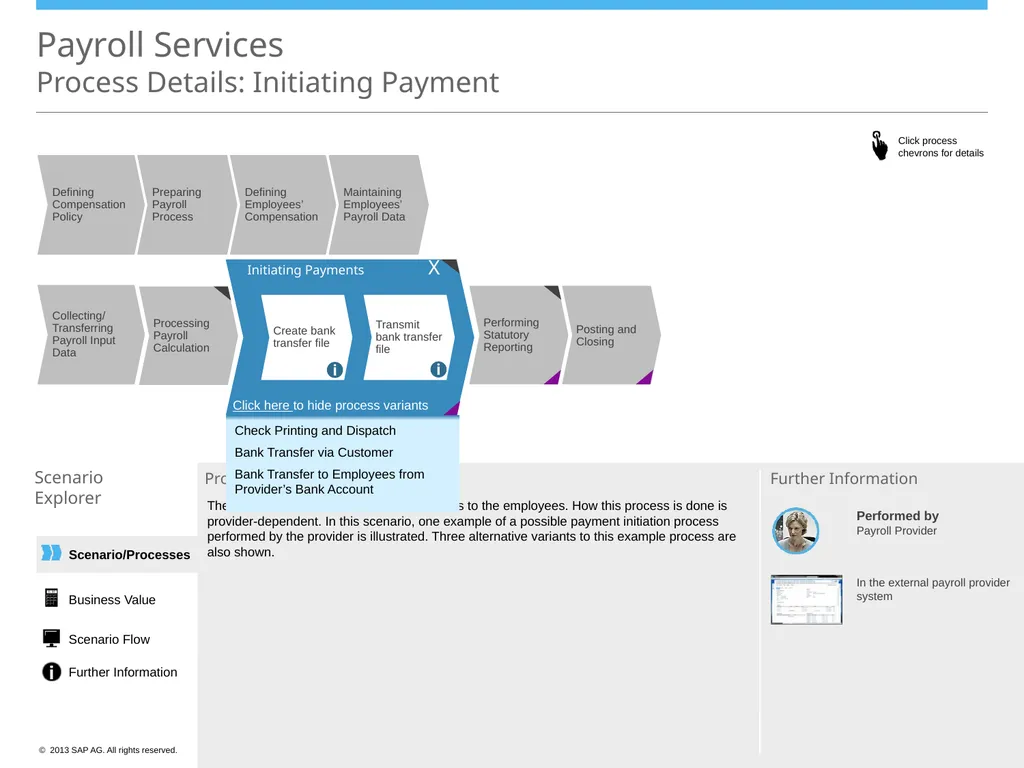
Defining Compensation Policy Preparing Payroll Process Defining Employees’ Compensation Maintaining Employees’ Payroll Data Processing Payroll Calculation Initiating Payments Transmit bank transfer file Create bank transfer file i i X Click here to hide process variants Posting and Closing Performing Statutory Reporting Collecting/
Transferring Payroll Input Data Scenario/Processes Payroll Services Process Details: Initiating Payment Scenario
Explorer Process Description Further Information The payroll provider initiates salary payments to the employees. How this process is done is provider-dependent. In this scenario, one example of a possible payment initiation process performed by the provider is illustrated. Three alternative variants to this example process are also shown. In the external payroll provider system Performed by
Payroll Provider Business Value Scenario Flow Further Information Check Printing and Dispatch
Bank Transfer via Customer
Bank Transfer to Employees from Provider’s Bank Account<br>
Transferring Payroll Input Data Scenario/Processes Payroll Services Process Details: Initiating Payment Scenario
Explorer Process Description Further Information The payroll provider initiates salary payments to the employees. How this process is done is provider-dependent. In this scenario, one example of a possible payment initiation process performed by the provider is illustrated. Three alternative variants to this example process are also shown. In the external payroll provider system Performed by
Payroll Provider Business Value Scenario Flow Further Information Check Printing and Dispatch
Bank Transfer via Customer
Bank Transfer to Employees from Provider’s Bank Account<br>
15
Scenario/Processes Payroll Services
Process Details: Performing Statutory Reporting Scenario
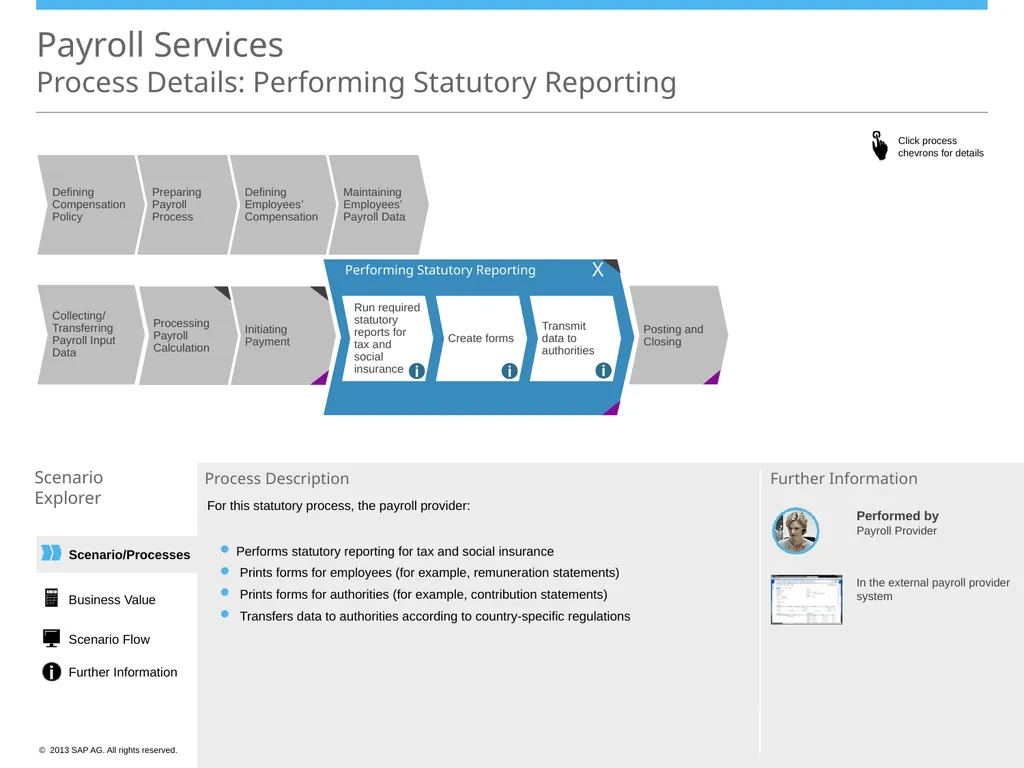
Explorer Process Description For this statutory process, the payroll provider:
Performs statutory reporting for tax and social insurance
Prints forms for employees (for example, remuneration statements)
Prints forms for authorities (for example, contribution statements)
Transfers data to authorities according to country-specific regulations Further Information Initiating Payment Performing Statutory Reporting Run required statutory reports for tax and social insurance Create forms Transmit data to authorities i i i X In the external payroll provider system Performed by
Payroll Provider Business Value Scenario Flow Further Information Processing Payroll Calculation Collecting/
Transferring Payroll Input Data Posting and Closing Defining Compensation Policy Preparing Payroll Process Defining Employees’ Compensation Maintaining Employees’ Payroll Data<br>
Explorer Process Description For this statutory process, the payroll provider:
Performs statutory reporting for tax and social insurance
Prints forms for employees (for example, remuneration statements)
Prints forms for authorities (for example, contribution statements)
Transfers data to authorities according to country-specific regulations Further Information Initiating Payment Performing Statutory Reporting Run required statutory reports for tax and social insurance Create forms Transmit data to authorities i i i X In the external payroll provider system Performed by
Payroll Provider Business Value Scenario Flow Further Information Processing Payroll Calculation Collecting/
Transferring Payroll Input Data Posting and Closing Defining Compensation Policy Preparing Payroll Process Defining Employees’ Compensation Maintaining Employees’ Payroll Data<br>
16
Scenario/Processes Payroll Services
Process Details: Posting and Closing Scenario
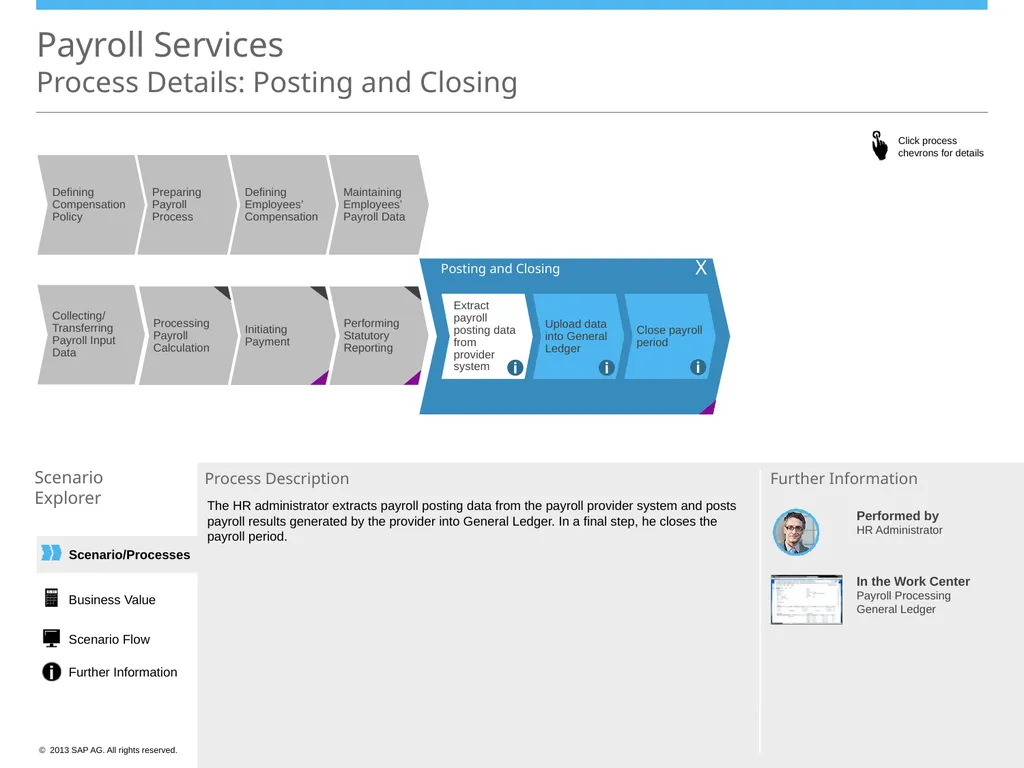
Explorer Process Description The HR administrator extracts payroll posting data from the payroll provider system and posts payroll results generated by the provider into General Ledger. In a final step, he closes the payroll period. In the Work Center
Payroll Processing
General Ledger Further Information Performing Statutory Reporting Posting and Closing Extract payroll posting data from provider system Upload data into General Ledger Close payroll period i i i X Business Value Scenario Flow Further Information Initiating Payment Processing Payroll Calculation Collecting/
Transferring Payroll Input Data Performed by
HR Administrator Defining Compensation Policy Preparing Payroll Process Defining Employees’ Compensation Maintaining Employees’ Payroll Data<br>
Explorer Process Description The HR administrator extracts payroll posting data from the payroll provider system and posts payroll results generated by the provider into General Ledger. In a final step, he closes the payroll period. In the Work Center
Payroll Processing
General Ledger Further Information Performing Statutory Reporting Posting and Closing Extract payroll posting data from provider system Upload data into General Ledger Close payroll period i i i X Business Value Scenario Flow Further Information Initiating Payment Processing Payroll Calculation Collecting/
Transferring Payroll Input Data Performed by
HR Administrator Defining Compensation Policy Preparing Payroll Process Defining Employees’ Compensation Maintaining Employees’ Payroll Data<br>
17
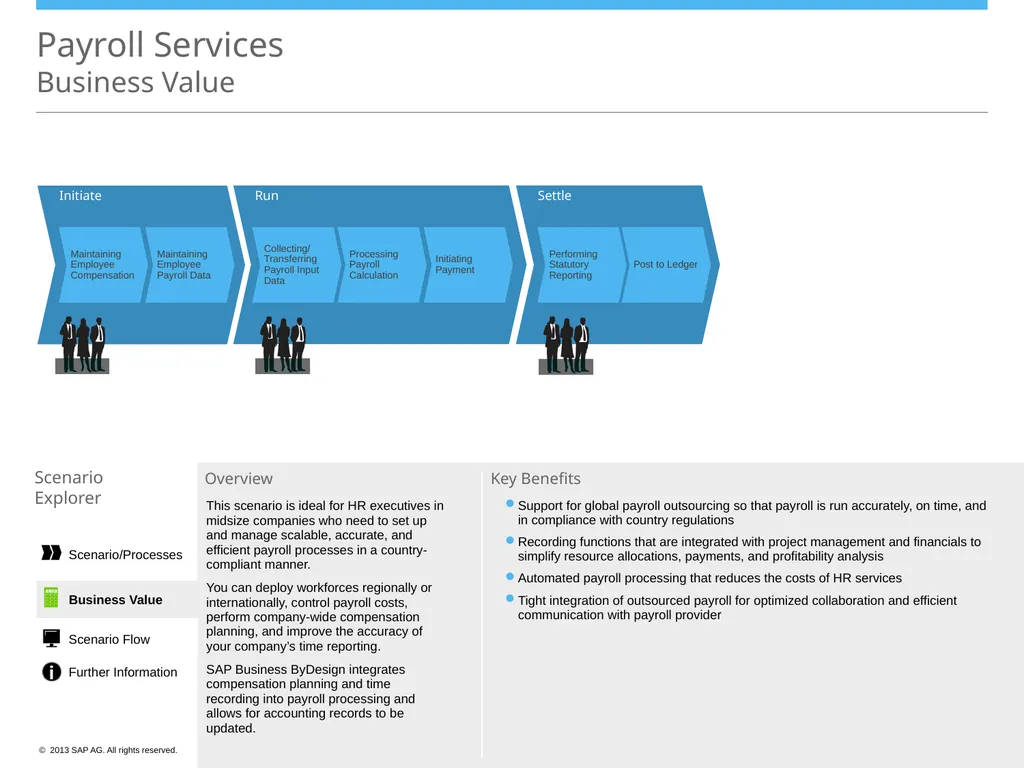
Initiate Maintaining Employee Compensation Maintaining Employee Payroll Data Payroll Services
Business Value Scenario
Explorer Overview This scenario is ideal for HR executives in midsize companies who need to set up and manage scalable, accurate, and efficient payroll processes in a country-compliant manner.
You can deploy workforces regionally or internationally, control payroll costs, perform company-wide compensation planning, and improve the accuracy of your company’s time reporting.
SAP Business ByDesign integrates compensation planning and time recording into payroll processing and allows for accounting records to be updated. Support for global payroll outsourcing so that payroll is run accurately, on time, and in compliance with country regulations
Recording functions that are integrated with project management and financials to simplify resource allocations, payments, and profitability analysis
Automated payroll processing that reduces the costs of HR services
Tight integration of outsourced payroll for optimized collaboration and efficient communication with payroll provider Key Benefits Run Collecting/
Transferring Payroll Input Data Processing Payroll Calculation Initiating Payment Settle Performing Statutory Reporting Post to Ledger Business Value Scenario/Processes Scenario Flow Further Information<br>
Explorer Overview This scenario is ideal for HR executives in midsize companies who need to set up and manage scalable, accurate, and efficient payroll processes in a country-compliant manner.
You can deploy workforces regionally or internationally, control payroll costs, perform company-wide compensation planning, and improve the accuracy of your company’s time reporting.
SAP Business ByDesign integrates compensation planning and time recording into payroll processing and allows for accounting records to be updated. Support for global payroll outsourcing so that payroll is run accurately, on time, and in compliance with country regulations
Recording functions that are integrated with project management and financials to simplify resource allocations, payments, and profitability analysis
Automated payroll processing that reduces the costs of HR services
Tight integration of outsourced payroll for optimized collaboration and efficient communication with payroll provider Key Benefits Run Collecting/
Transferring Payroll Input Data Processing Payroll Calculation Initiating Payment Settle Performing Statutory Reporting Post to Ledger Business Value Scenario/Processes Scenario Flow Further Information<br>
18
Initiating Payment Collecting/
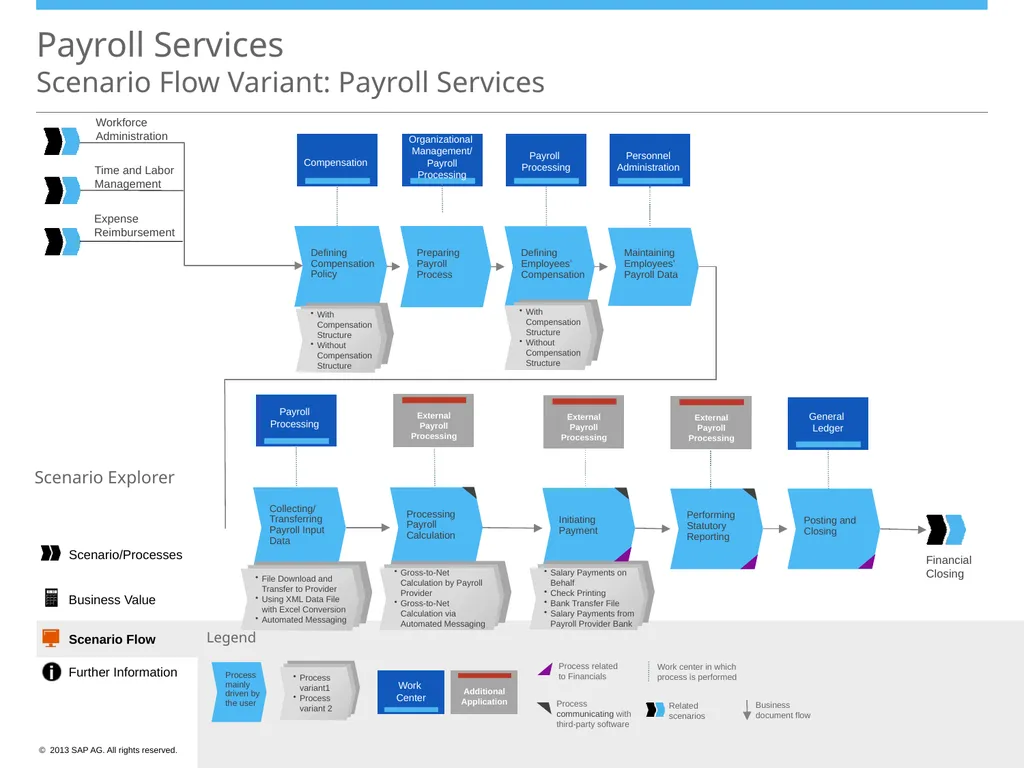
Transferring Payroll Input Data Processing Payroll Calculation Payroll Services Scenario Flow Variant: Payroll Services Legend Work center in which process is performed Business
document flow Process related to Financials Related scenarios Process mainly driven by the user Scenario Explorer Work
Center Additional Application Defining Compensation Policy Defining Employees’ Compensation Maintaining Employees’ Payroll Data Workforce
Administration Time and Labor Management Expense Reimbursement Preparing Payroll Process Performing Statutory Reporting Posting and Closing Financial
Closing Compensation Organizational
Management/ Payroll Processing Payroll
Processing Personnel
Administration External
Payroll
Processing Payroll
Processing General
Ledger External
Payroll
Processing External
Payroll
Processing Process communicating with third-party software Business Value Scenario/Processes Scenario Flow Further Information<br>
Transferring Payroll Input Data Processing Payroll Calculation Payroll Services Scenario Flow Variant: Payroll Services Legend Work center in which process is performed Business
document flow Process related to Financials Related scenarios Process mainly driven by the user Scenario Explorer Work
Center Additional Application Defining Compensation Policy Defining Employees’ Compensation Maintaining Employees’ Payroll Data Workforce
Administration Time and Labor Management Expense Reimbursement Preparing Payroll Process Performing Statutory Reporting Posting and Closing Financial
Closing Compensation Organizational
Management/ Payroll Processing Payroll
Processing Personnel
Administration External
Payroll
Processing Payroll
Processing General
Ledger External
Payroll
Processing External
Payroll
Processing Process communicating with third-party software Business Value Scenario/Processes Scenario Flow Further Information<br>
19
Payroll Services
Further Information Scenario
Explorer Forum
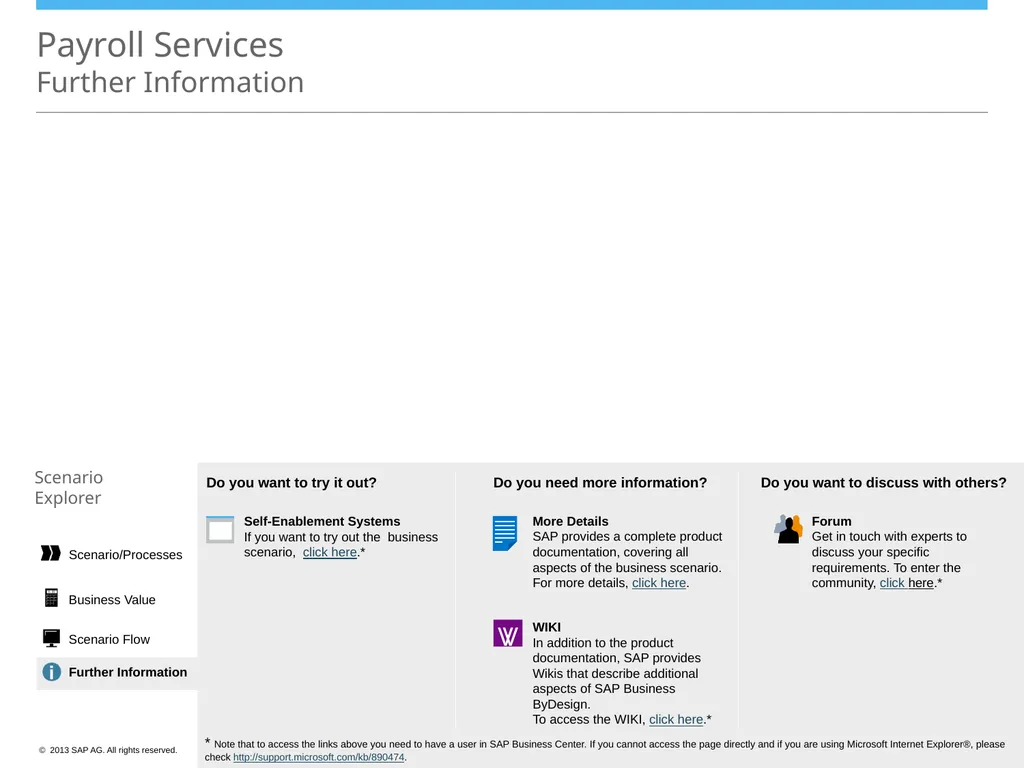
Get in touch with experts to discuss your specific requirements. To enter the community, click here.* More Details SAP provides a complete product documentation, covering all aspects of the business scenario. For more details, click here. Self-Enablement Systems
If you want to try out the business scenario, click here.* WIKI
In addition to the product documentation, SAP provides Wikis that describe additional aspects of SAP Business ByDesign.
To access the WIKI, click here.* Do you want to try it out? Do you need more information? Do you want to discuss with others? * Note that to access the links above you need to have a user in SAP Business Center. If you cannot access the page directly and if you are using Microsoft Internet Explorer®, please check http://support.microsoft.com/kb/890474. Further Information Business Value Scenario Flow Scenario/Processes<br>
Explorer Forum
Get in touch with experts to discuss your specific requirements. To enter the community, click here.* More Details SAP provides a complete product documentation, covering all aspects of the business scenario. For more details, click here. Self-Enablement Systems
If you want to try out the business scenario, click here.* WIKI
In addition to the product documentation, SAP provides Wikis that describe additional aspects of SAP Business ByDesign.
To access the WIKI, click here.* Do you want to try it out? Do you need more information? Do you want to discuss with others? * Note that to access the links above you need to have a user in SAP Business Center. If you cannot access the page directly and if you are using Microsoft Internet Explorer®, please check http://support.microsoft.com/kb/890474. Further Information Business Value Scenario Flow Scenario/Processes<br>