Session 5 Tux Paint Tools Basics 1 Chapter 2: Fun with Paint Getting Started with Tux Paint Important Tools in Tux Paint Topics covered 2 Chapter 2: Fun with Paint 3 Working with TUX Paint 4 Tux Paint is a fun computer program that helps
"Session 5 Tux Paint Tools Basics 1 Chapter 2: Fun" is the property of its rightful owner. Permission is granted to
download and print the materials on this website for personal, non-commercial use only, and to display it
on your personal computer provided you do not modify the materials and that you retain all copyright
notices contained in the materials. By downloading content from our website, you accept the terms of this
agreement.
Presentation Transcript
01
Session 5 Tux Paint Tools Basics 1<br>
02
Chapter 2: Fun with Paint
Getting Started with Tux Paint
Important Tools in Tux Paint Topics covered 2<br>
03
Chapter 2: Fun with Paint 3<br>
04
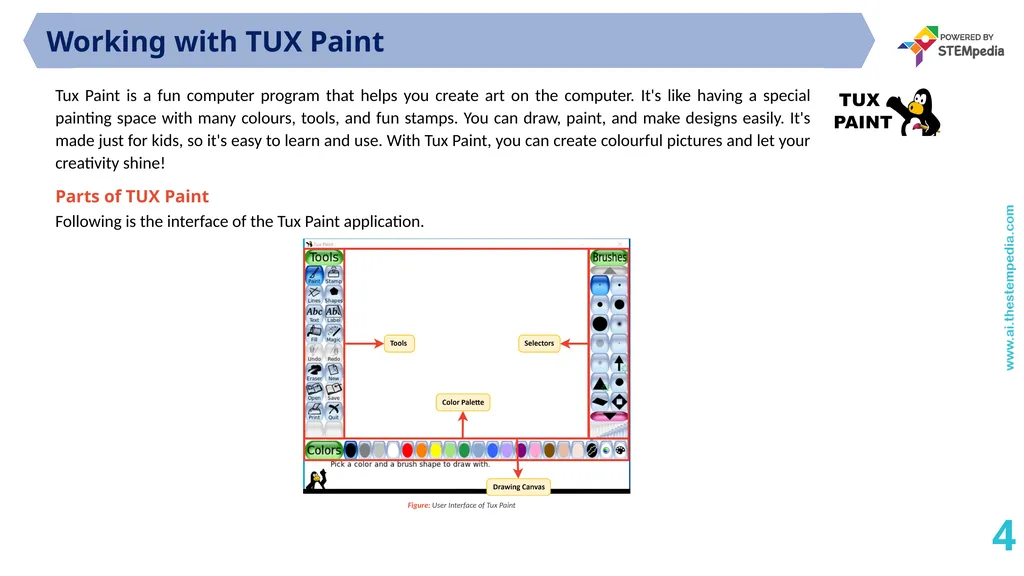
Working with TUX Paint 4 Tux Paint is a fun computer program that helps you create art on the computer. It's like having a special painting space with many colours, tools, and fun stamps. You can draw, paint, and make designs easily. It's made just for kids, so it's easy to learn and use. With Tux Paint, you can create colourful pictures and let your creativity shine! Parts of TUX Paint
Following is the interface of the Tux Paint application.<br>
05
Working with TUX Paint 5 Important Tools in TUX Paint
Circle Tool
This tool is like magic! When you click it, you can make perfect circles on your painting. Just click where you want the middle of the circle to be and move your mouse to complete the circle big or small. You can use it to draw things like the sun or round balloons.
Rectangle Tool
This tool is super cool! When you choose it, click where you want one corner of your rectangle, and then move your mouse to make it longer or shorter. It's great for drawing things like buildings or boxes. Just click, drag, and there you have a rectangle!
And don't forget, you can make your circles and rectangles look the way you want by using different colours and sizes in Tux Paint. Have a blast exploring and showing off your creative ideas!
Fill Colour Tool
This tool is like a magical paintbrush. When you pick it and click on a part of your picture, it colours that part and everything connected to it with the same colour. It's like painting without using your hand! You can quickly colour big areas the same colour, like making a colourful sky or a field. Just click and see the magic happen!<br>
06
Working with TUX Paint 6<br>
07
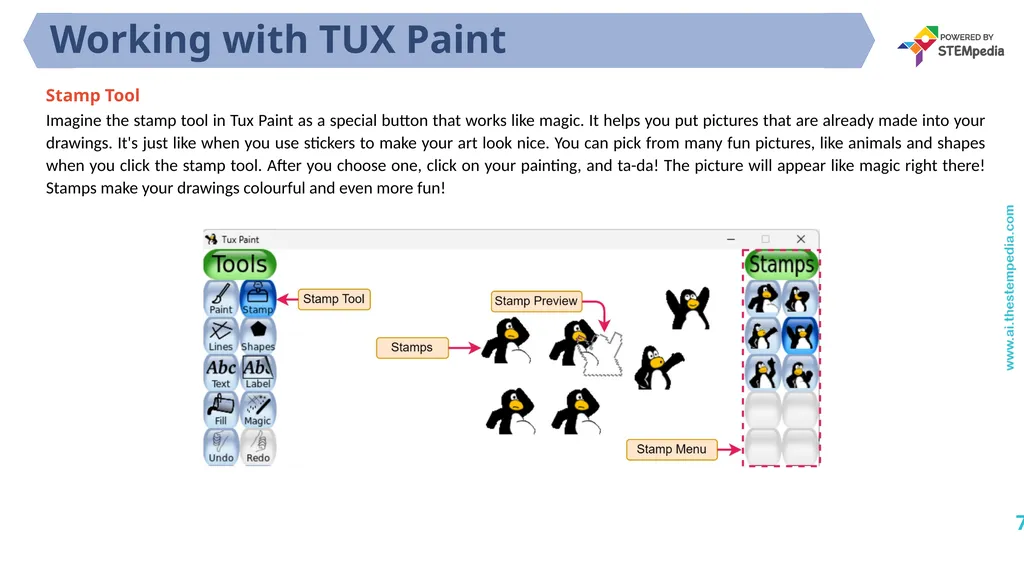
Working with TUX Paint 7 Stamp Tool
Imagine the stamp tool in Tux Paint as a special button that works like magic. It helps you put pictures that are already made into your drawings. It's just like when you use stickers to make your art look nice. You can pick from many fun pictures, like animals and shapes when you click the stamp tool. After you choose one, click on your painting, and ta-da! The picture will appear like magic right there! Stamps make your drawings colourful and even more fun!<br>
08
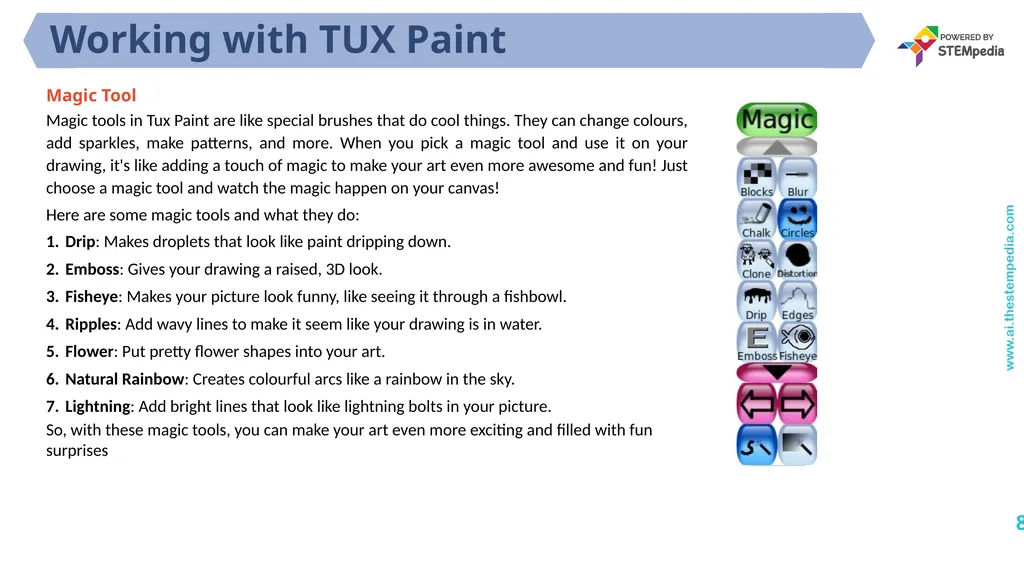
Working with TUX Paint 8 Magic Tool
Magic tools in Tux Paint are like special brushes that do cool things. They can change colours, add sparkles, make patterns, and more. When you pick a magic tool and use it on your drawing, it's like adding a touch of magic to make your art even more awesome and fun! Just choose a magic tool and watch the magic happen on your canvas!
Here are some magic tools and what they do:
Drip: Makes droplets that look like paint dripping down.
Emboss: Gives your drawing a raised, 3D look.
Fisheye: Makes your picture look funny, like seeing it through a fishbowl.
Ripples: Add wavy lines to make it seem like your drawing is in water.
Flower: Put pretty flower shapes into your art.
Natural Rainbow: Creates colourful arcs like a rainbow in the sky.
Lightning: Add bright lines that look like lightning bolts in your picture.
So, with these magic tools, you can make your art even more exciting and filled with fun surprises<br>