
Software Defined Networking: Mininet Tutorial
PT
Published · 24 slides · 0 views

1 / 1


Description
Software Defined Networking: Mininet Tutorial James Won-Ki Hong Department of Computer Science and Engineering POSTECH, Korea jwkhongpostech.ac.kr Outline Introduction Motivation Installation Mininet Tutorial Command line interface usage
Related Topics
Share
Embed code
Download this presentation From Below
"Software Defined Networking: Mininet Tutorial" is the property of its rightful owner. Permission is granted to download and print the materials on this website for personal, non-commercial use only, and to display it on your personal computer provided you do not modify the materials and that you retain all copyright notices contained in the materials. By downloading content from our website, you accept the terms of this agreement.
Presentation Transcript
01
Software Defined Networking:
Mininet Tutorial James Won-Ki Hong
Department of Computer Science and Engineering
POSTECH, Korea
jwkhong@postech.ac.kr<br>
Department of Computer Science and Engineering
POSTECH, Korea
jwkhong@postech.ac.kr<br>
02
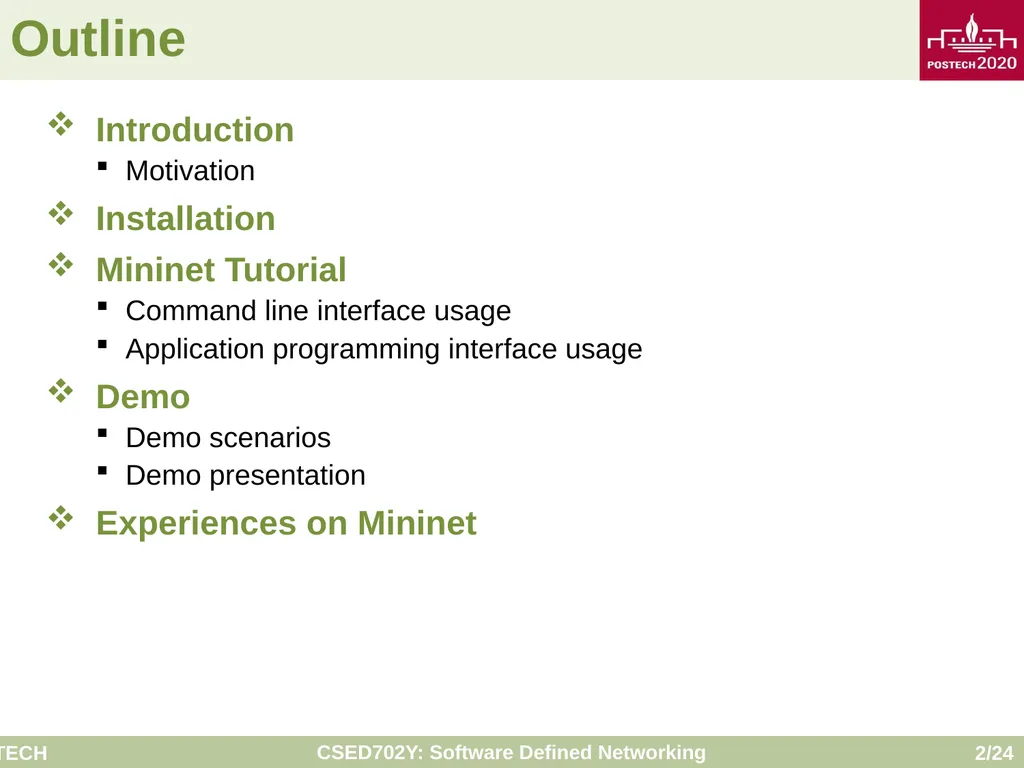
Outline Introduction
Motivation
Installation
Mininet Tutorial
Command line interface usage
Application programming interface usage
Demo
Demo scenarios
Demo presentation
Experiences on Mininet<br>
Motivation
Installation
Mininet Tutorial
Command line interface usage
Application programming interface usage
Demo
Demo scenarios
Demo presentation
Experiences on Mininet<br>
03
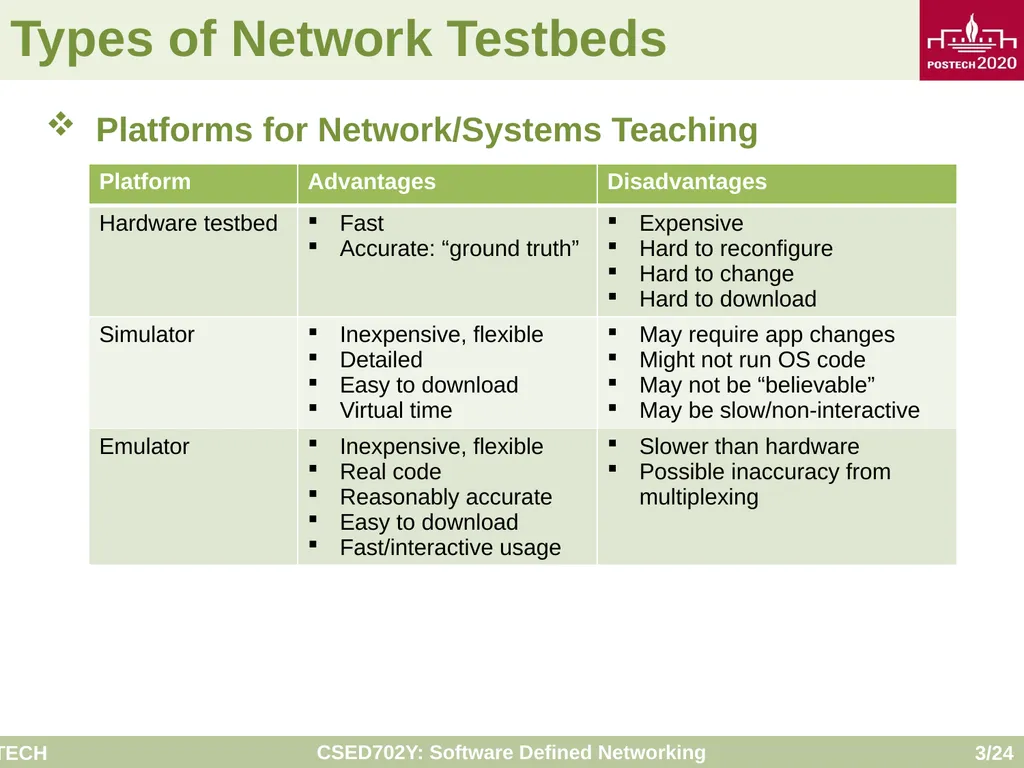
Types of Network Testbeds Platforms for Network/Systems Teaching<br>
04
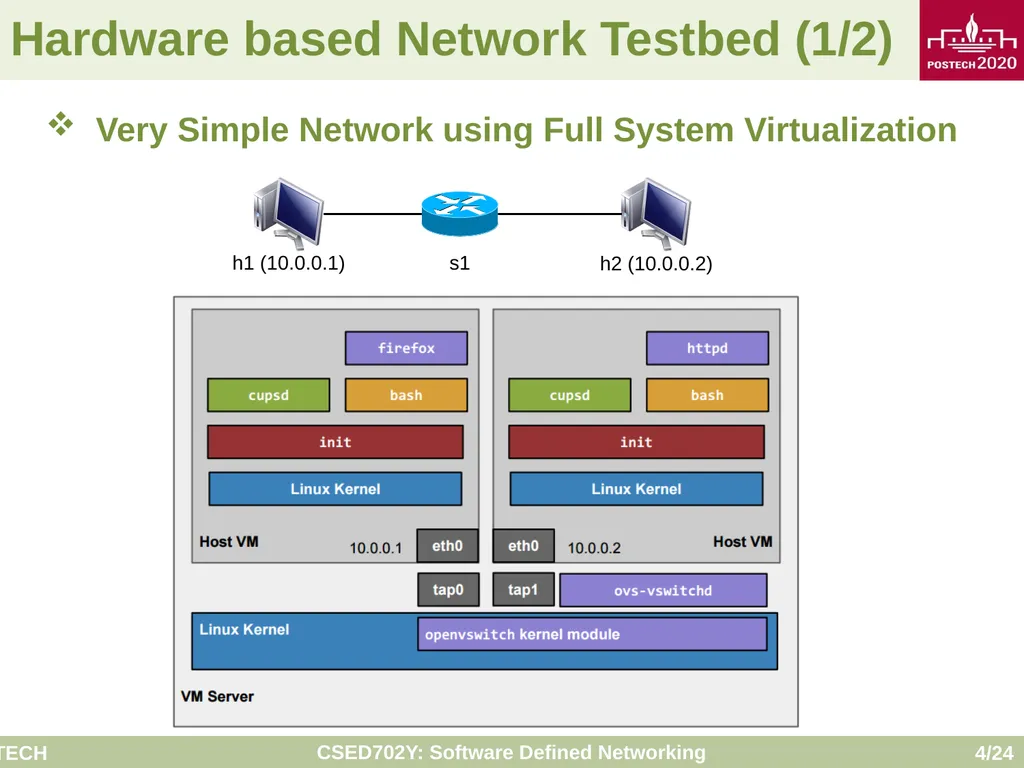
Hardware based Network Testbed (1/2) Very Simple Network using Full System Virtualization<br>
05
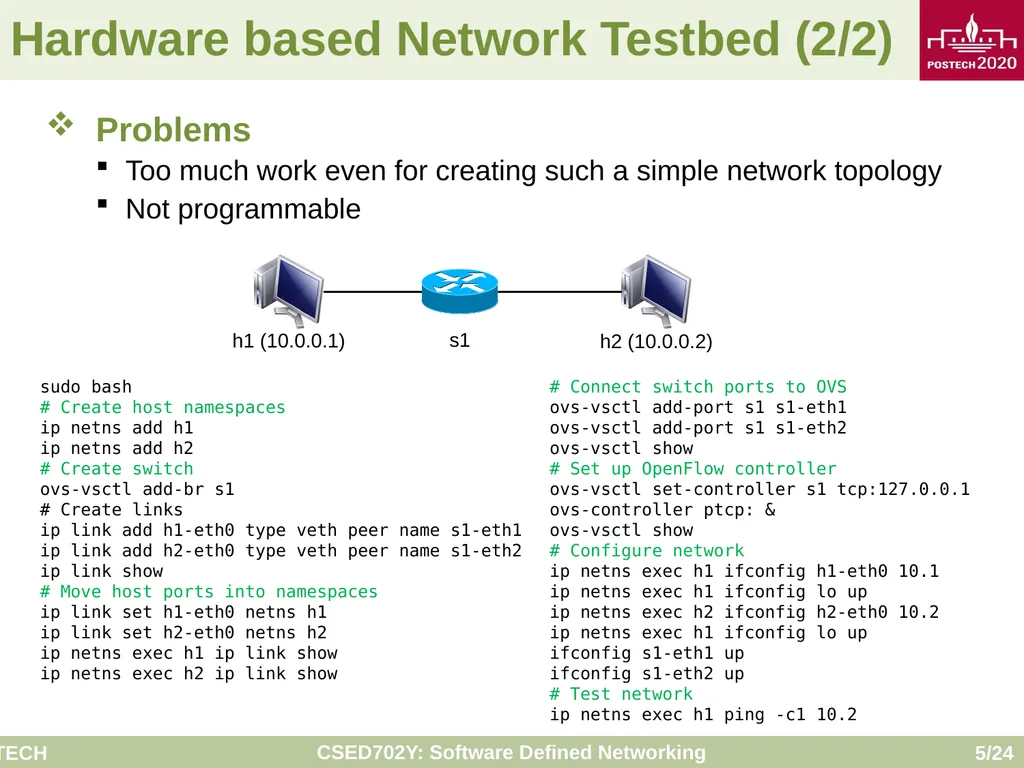
Hardware based Network Testbed (2/2) Problems
Too much work even for creating such a simple network topology
Not programmable sudo bash
# Create host namespaces
ip netns add h1
ip netns add h2
# Create switch
ovs-vsctl add-br s1
# Create links
ip link add h1-eth0 type veth peer name s1-eth1
ip link add h2-eth0 type veth peer name s1-eth2
ip link show
# Move host ports into namespaces
ip link set h1-eth0 netns h1
ip link set h2-eth0 netns h2
ip netns exec h1 ip link show
ip netns exec h2 ip link show # Connect switch ports to OVS
ovs-vsctl add-port s1 s1-eth1
ovs-vsctl add-port s1 s1-eth2
ovs-vsctl show
# Set up OpenFlow controller
ovs-vsctl set-controller s1 tcp:127.0.0.1
ovs-controller ptcp: &
ovs-vsctl show
# Configure network
ip netns exec h1 ifconfig h1-eth0 10.1
ip netns exec h1 ifconfig lo up
ip netns exec h2 ifconfig h2-eth0 10.2
ip netns exec h1 ifconfig lo up
ifconfig s1-eth1 up
ifconfig s1-eth2 up
# Test network
ip netns exec h1 ping -c1 10.2<br>
Too much work even for creating such a simple network topology
Not programmable sudo bash
# Create host namespaces
ip netns add h1
ip netns add h2
# Create switch
ovs-vsctl add-br s1
# Create links
ip link add h1-eth0 type veth peer name s1-eth1
ip link add h2-eth0 type veth peer name s1-eth2
ip link show
# Move host ports into namespaces
ip link set h1-eth0 netns h1
ip link set h2-eth0 netns h2
ip netns exec h1 ip link show
ip netns exec h2 ip link show # Connect switch ports to OVS
ovs-vsctl add-port s1 s1-eth1
ovs-vsctl add-port s1 s1-eth2
ovs-vsctl show
# Set up OpenFlow controller
ovs-vsctl set-controller s1 tcp:127.0.0.1
ovs-controller ptcp: &
ovs-vsctl show
# Configure network
ip netns exec h1 ifconfig h1-eth0 10.1
ip netns exec h1 ifconfig lo up
ip netns exec h2 ifconfig h2-eth0 10.2
ip netns exec h1 ifconfig lo up
ifconfig s1-eth1 up
ifconfig s1-eth2 up
# Test network
ip netns exec h1 ping -c1 10.2<br>
06
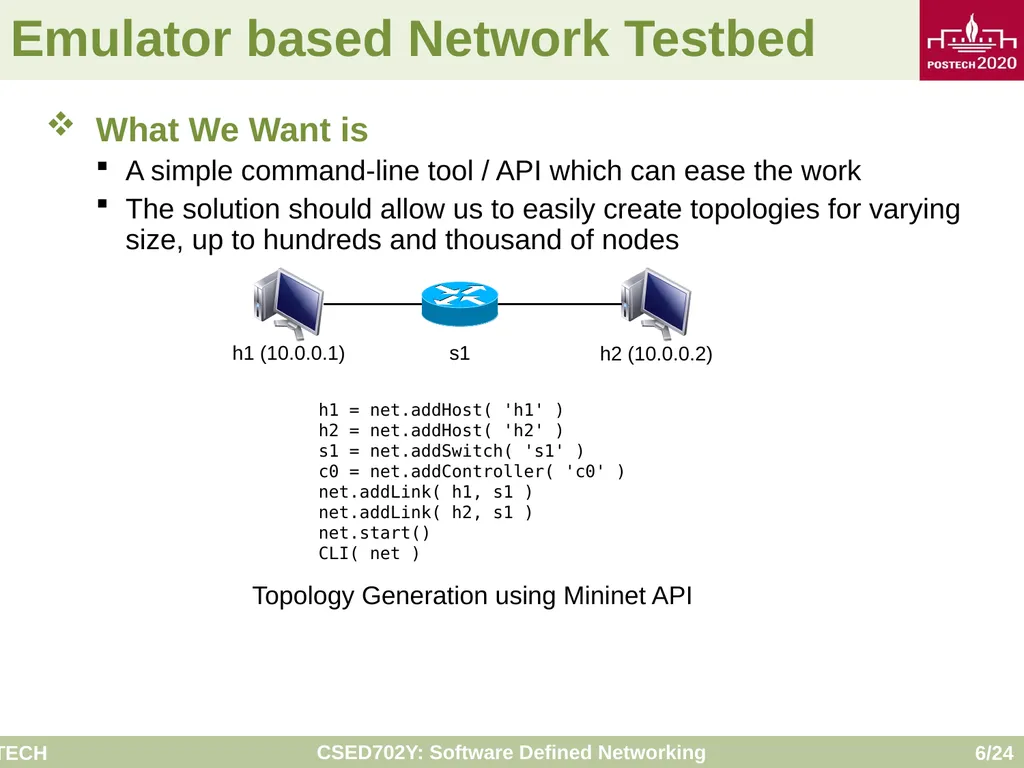
Emulator based Network Testbed What We Want is
A simple command-line tool / API which can ease the work
The solution should allow us to easily create topologies for varying size, up to hundreds and thousand of nodes h1 = net.addHost( 'h1' )
h2 = net.addHost( 'h2' )
s1 = net.addSwitch( 's1' )
c0 = net.addController( 'c0' )
net.addLink( h1, s1 )
net.addLink( h2, s1 )
net.start()
CLI( net ) Topology Generation using Mininet API<br>
A simple command-line tool / API which can ease the work
The solution should allow us to easily create topologies for varying size, up to hundreds and thousand of nodes h1 = net.addHost( 'h1' )
h2 = net.addHost( 'h2' )
s1 = net.addSwitch( 's1' )
c0 = net.addController( 'c0' )
net.addLink( h1, s1 )
net.addLink( h2, s1 )
net.start()
CLI( net ) Topology Generation using Mininet API<br>
07
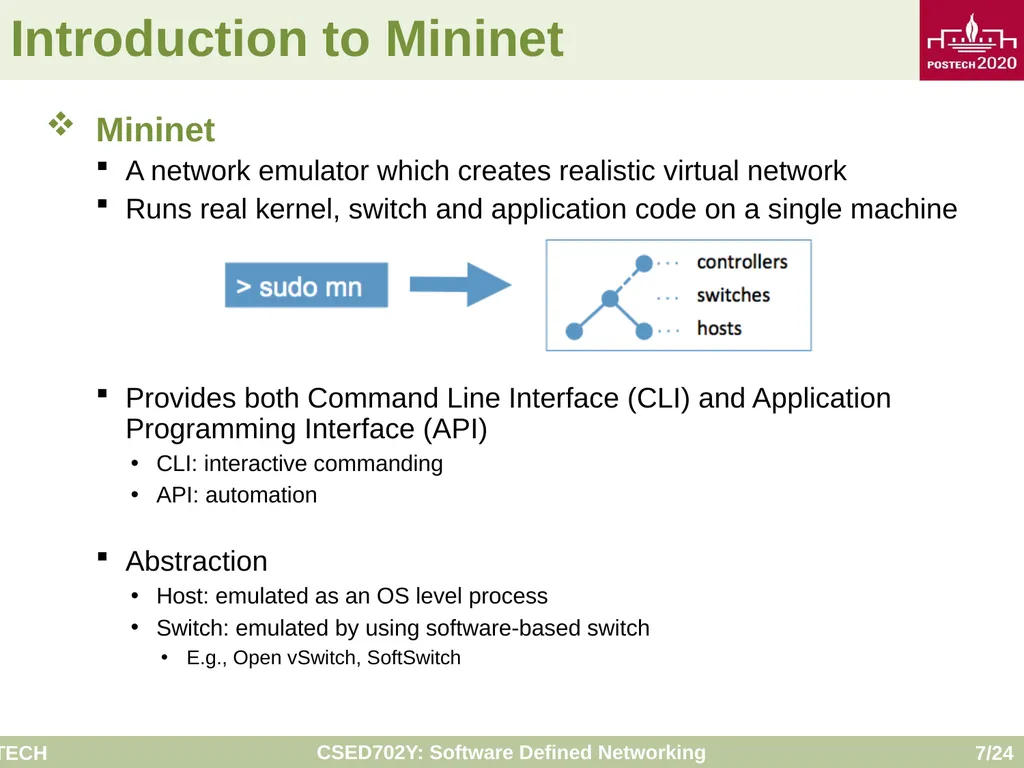
Introduction to Mininet Mininet
A network emulator which creates realistic virtual network
Runs real kernel, switch and application code on a single machine
Provides both Command Line Interface (CLI) and Application Programming Interface (API)
CLI: interactive commanding
API: automation
Abstraction
Host: emulated as an OS level process
Switch: emulated by using software-based switch
E.g., Open vSwitch, SoftSwitch<br>
A network emulator which creates realistic virtual network
Runs real kernel, switch and application code on a single machine
Provides both Command Line Interface (CLI) and Application Programming Interface (API)
CLI: interactive commanding
API: automation
Abstraction
Host: emulated as an OS level process
Switch: emulated by using software-based switch
E.g., Open vSwitch, SoftSwitch<br>
08
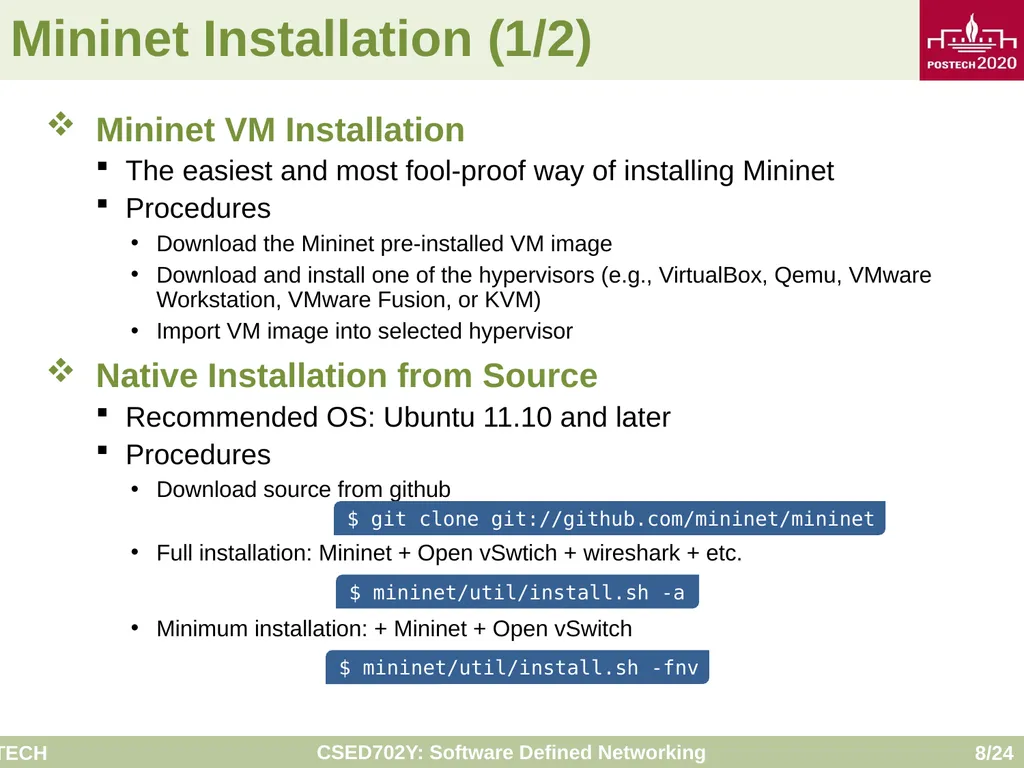
Mininet Installation (1/2) Mininet VM Installation
The easiest and most fool-proof way of installing Mininet
Procedures
Download the Mininet pre-installed VM image
Download and install one of the hypervisors (e.g., VirtualBox, Qemu, VMware Workstation, VMware Fusion, or KVM)
Import VM image into selected hypervisor
Native Installation from Source
Recommended OS: Ubuntu 11.10 and later
Procedures
Download source from github
Full installation: Mininet + Open vSwtich + wireshark + etc.
Minimum installation: + Mininet + Open vSwitch $ git clone git://github.com/mininet/mininet $ mininet/util/install.sh -a $ mininet/util/install.sh -fnv<br>
The easiest and most fool-proof way of installing Mininet
Procedures
Download the Mininet pre-installed VM image
Download and install one of the hypervisors (e.g., VirtualBox, Qemu, VMware Workstation, VMware Fusion, or KVM)
Import VM image into selected hypervisor
Native Installation from Source
Recommended OS: Ubuntu 11.10 and later
Procedures
Download source from github
Full installation: Mininet + Open vSwtich + wireshark + etc.
Minimum installation: + Mininet + Open vSwitch $ git clone git://github.com/mininet/mininet $ mininet/util/install.sh -a $ mininet/util/install.sh -fnv<br>
09
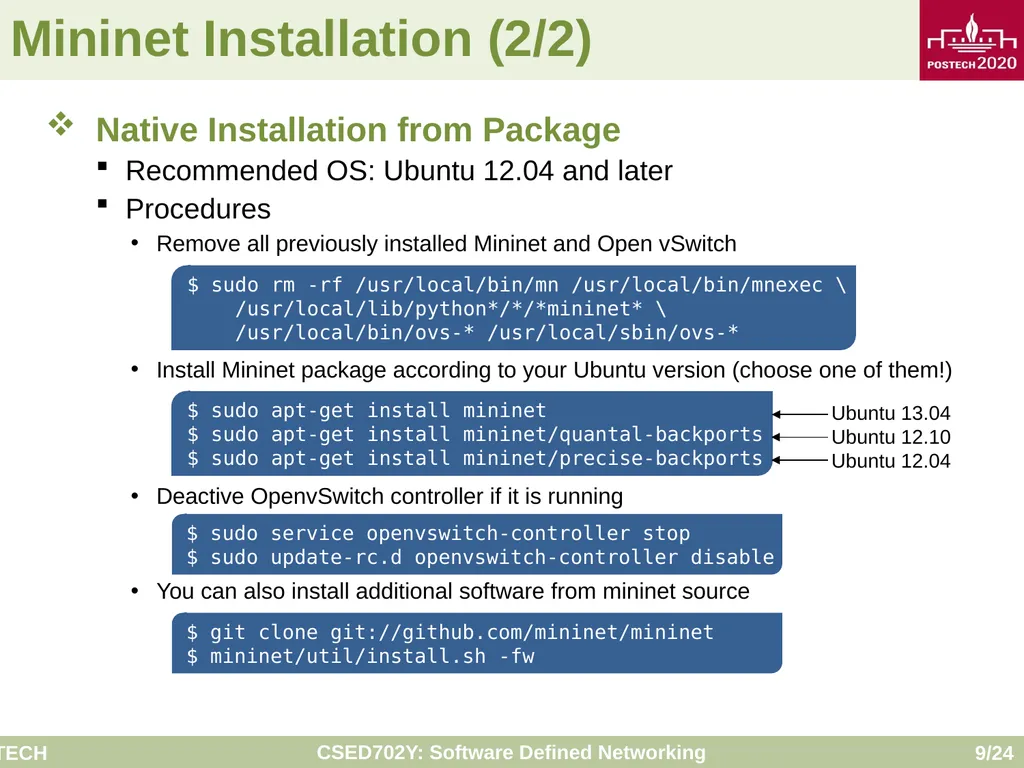
Mininet Installation (2/2) Native Installation from Package
Recommended OS: Ubuntu 12.04 and later
Procedures
Remove all previously installed Mininet and Open vSwitch
Install Mininet package according to your Ubuntu version (choose one of them!)
Deactive OpenvSwitch controller if it is running
You can also install additional software from mininet source $ sudo rm -rf /usr/local/bin/mn /usr/local/bin/mnexec \
/usr/local/lib/python*/*/*mininet* \
/usr/local/bin/ovs-* /usr/local/sbin/ovs-* $ sudo apt-get install mininet
$ sudo apt-get install mininet/quantal-backports
$ sudo apt-get install mininet/precise-backports Ubuntu 13.04
Ubuntu 12.10
Ubuntu 12.04 $ sudo service openvswitch-controller stop
$ sudo update-rc.d openvswitch-controller disable $ git clone git://github.com/mininet/mininet
$ mininet/util/install.sh -fw<br>
Recommended OS: Ubuntu 12.04 and later
Procedures
Remove all previously installed Mininet and Open vSwitch
Install Mininet package according to your Ubuntu version (choose one of them!)
Deactive OpenvSwitch controller if it is running
You can also install additional software from mininet source $ sudo rm -rf /usr/local/bin/mn /usr/local/bin/mnexec \
/usr/local/lib/python*/*/*mininet* \
/usr/local/bin/ovs-* /usr/local/sbin/ovs-* $ sudo apt-get install mininet
$ sudo apt-get install mininet/quantal-backports
$ sudo apt-get install mininet/precise-backports Ubuntu 13.04
Ubuntu 12.10
Ubuntu 12.04 $ sudo service openvswitch-controller stop
$ sudo update-rc.d openvswitch-controller disable $ git clone git://github.com/mininet/mininet
$ mininet/util/install.sh -fw<br>
10
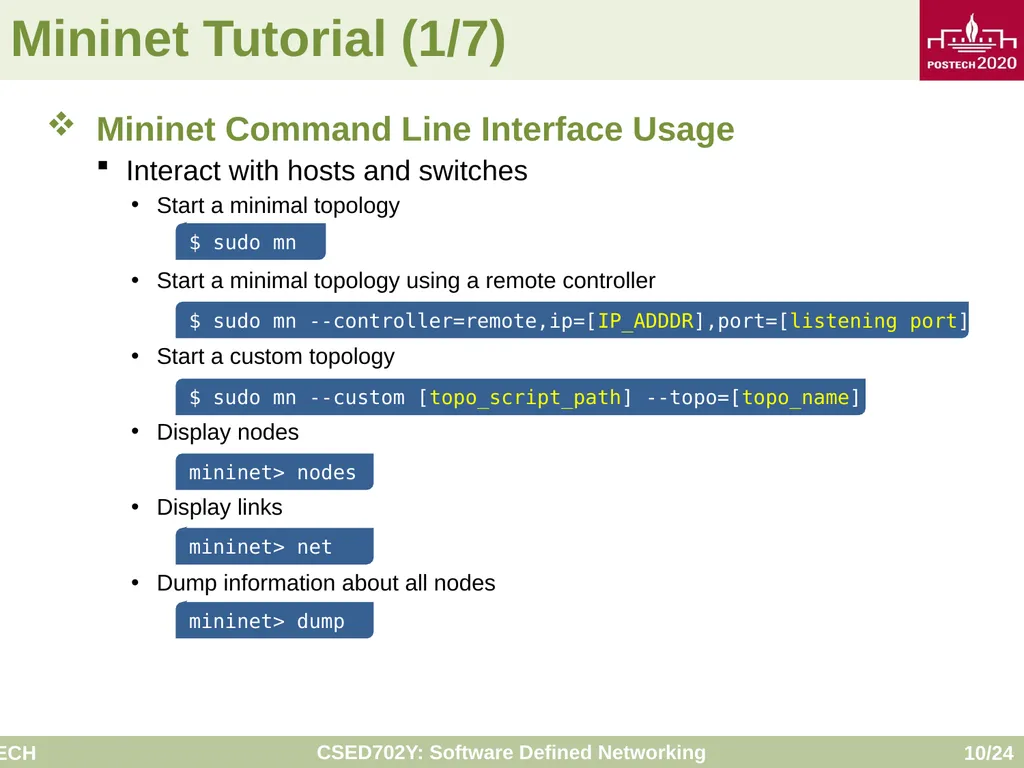
Mininet Tutorial (1/7) Mininet Command Line Interface Usage
Interact with hosts and switches
Start a minimal topology
Start a minimal topology using a remote controller
Start a custom topology
Display nodes
Display links
Dump information about all nodes $ sudo mn mininet> nodes mininet> net mininet> dump $ sudo mn --controller=remote,ip=[IP_ADDDR],port=[listening port] $ sudo mn --custom [topo_script_path] --topo=[topo_name]<br>
Interact with hosts and switches
Start a minimal topology
Start a minimal topology using a remote controller
Start a custom topology
Display nodes
Display links
Dump information about all nodes $ sudo mn mininet> nodes mininet> net mininet> dump $ sudo mn --controller=remote,ip=[IP_ADDDR],port=[listening port] $ sudo mn --custom [topo_script_path] --topo=[topo_name]<br>
11
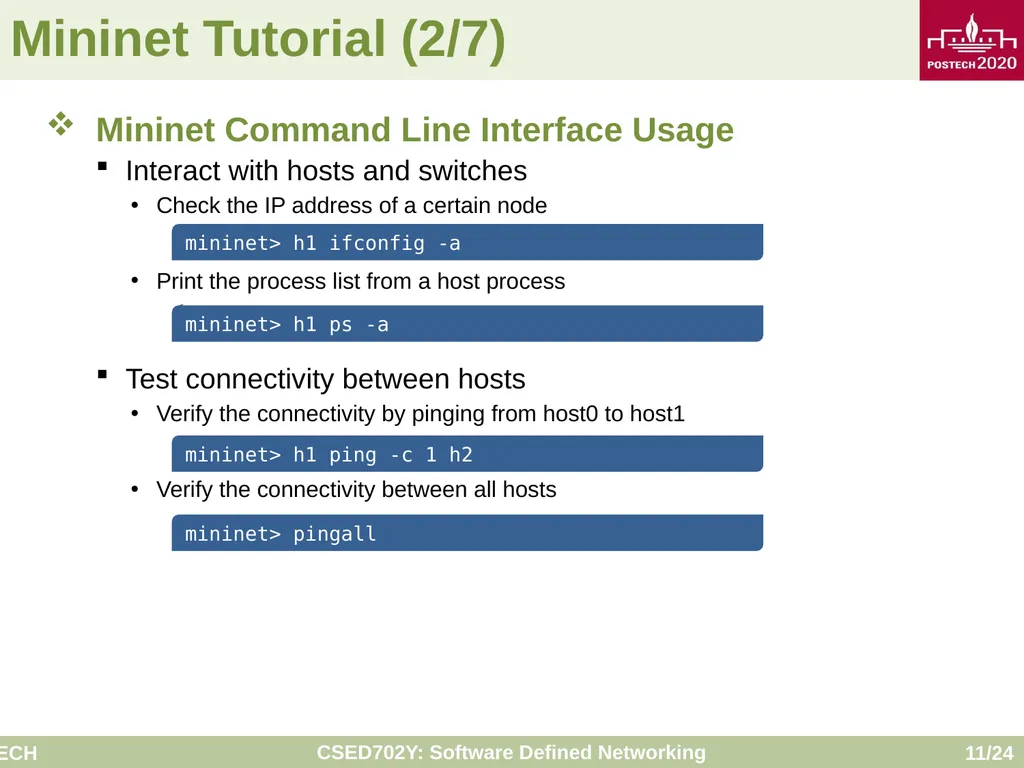
Mininet Tutorial (2/7) Mininet Command Line Interface Usage
Interact with hosts and switches
Check the IP address of a certain node
Print the process list from a host process
Test connectivity between hosts
Verify the connectivity by pinging from host0 to host1
Verify the connectivity between all hosts mininet> h1 ifconfig -a mininet> h1 ps -a mininet> h1 ping -c 1 h2 mininet> pingall<br>
Interact with hosts and switches
Check the IP address of a certain node
Print the process list from a host process
Test connectivity between hosts
Verify the connectivity by pinging from host0 to host1
Verify the connectivity between all hosts mininet> h1 ifconfig -a mininet> h1 ps -a mininet> h1 ping -c 1 h2 mininet> pingall<br>
12
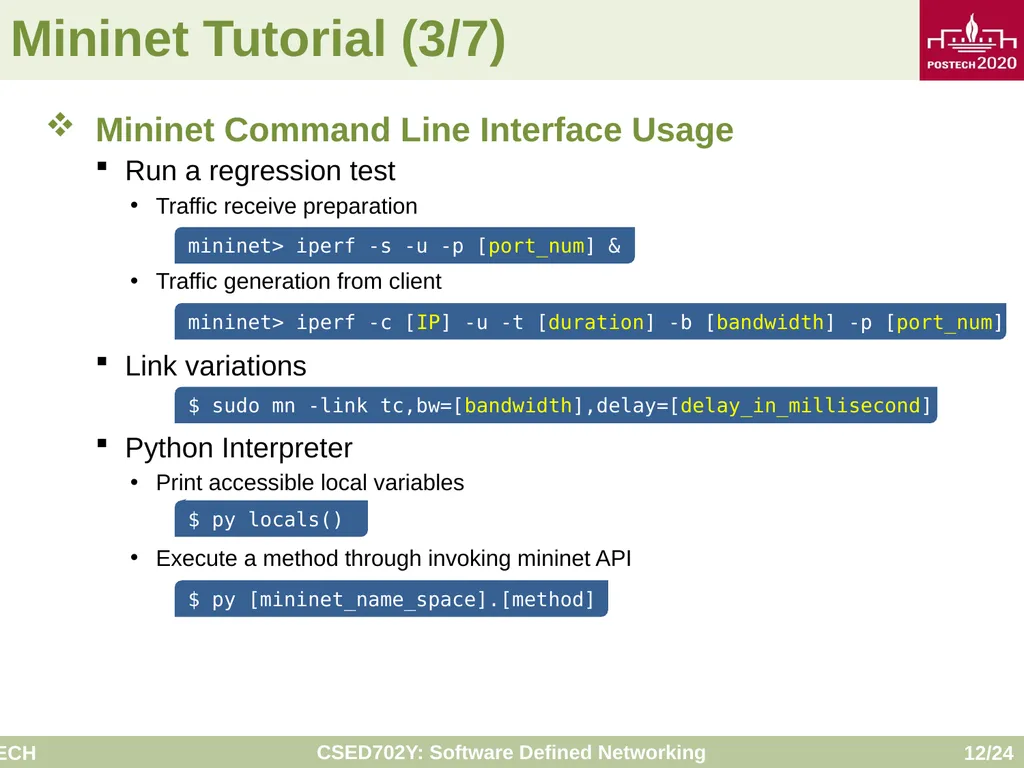
Mininet Tutorial (3/7) Mininet Command Line Interface Usage
Run a regression test
Traffic receive preparation
Traffic generation from client
Link variations
Python Interpreter
Print accessible local variables
Execute a method through invoking mininet API $ sudo mn -link tc,bw=[bandwidth],delay=[delay_in_millisecond] mininet> iperf -s -u -p [port_num] & mininet> iperf -c [IP] -u -t [duration] -b [bandwidth] -p [port_num] & $ py locals() $ py [mininet_name_space].[method]<br>
Run a regression test
Traffic receive preparation
Traffic generation from client
Link variations
Python Interpreter
Print accessible local variables
Execute a method through invoking mininet API $ sudo mn -link tc,bw=[bandwidth],delay=[delay_in_millisecond] mininet> iperf -s -u -p [port_num] & mininet> iperf -c [IP] -u -t [duration] -b [bandwidth] -p [port_num] & $ py locals() $ py [mininet_name_space].[method]<br>
13
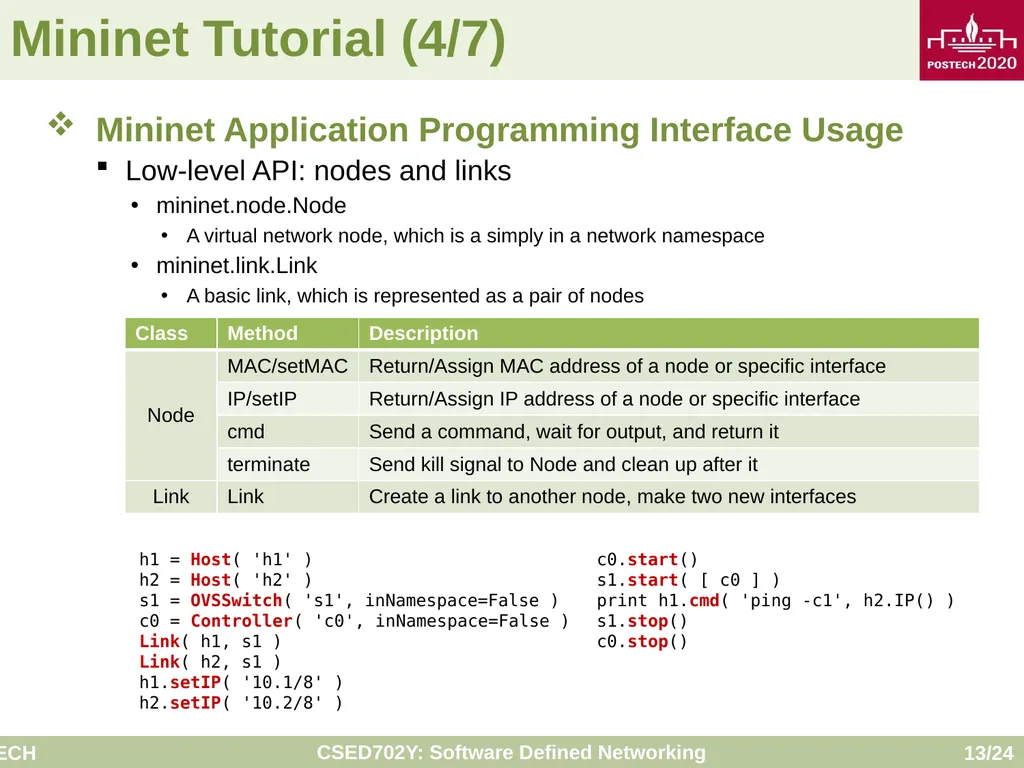
Mininet Tutorial (4/7) Mininet Application Programming Interface Usage
Low-level API: nodes and links
mininet.node.Node
A virtual network node, which is a simply in a network namespace
mininet.link.Link
A basic link, which is represented as a pair of nodes h1 = Host( 'h1' )
h2 = Host( 'h2' )
s1 = OVSSwitch( 's1', inNamespace=False )
c0 = Controller( 'c0', inNamespace=False )
Link( h1, s1 )
Link( h2, s1 )
h1.setIP( '10.1/8' )
h2.setIP( '10.2/8' ) c0.start()
s1.start( [ c0 ] )
print h1.cmd( 'ping -c1', h2.IP() )
s1.stop()
c0.stop()<br>
Low-level API: nodes and links
mininet.node.Node
A virtual network node, which is a simply in a network namespace
mininet.link.Link
A basic link, which is represented as a pair of nodes h1 = Host( 'h1' )
h2 = Host( 'h2' )
s1 = OVSSwitch( 's1', inNamespace=False )
c0 = Controller( 'c0', inNamespace=False )
Link( h1, s1 )
Link( h2, s1 )
h1.setIP( '10.1/8' )
h2.setIP( '10.2/8' ) c0.start()
s1.start( [ c0 ] )
print h1.cmd( 'ping -c1', h2.IP() )
s1.stop()
c0.stop()<br>
14
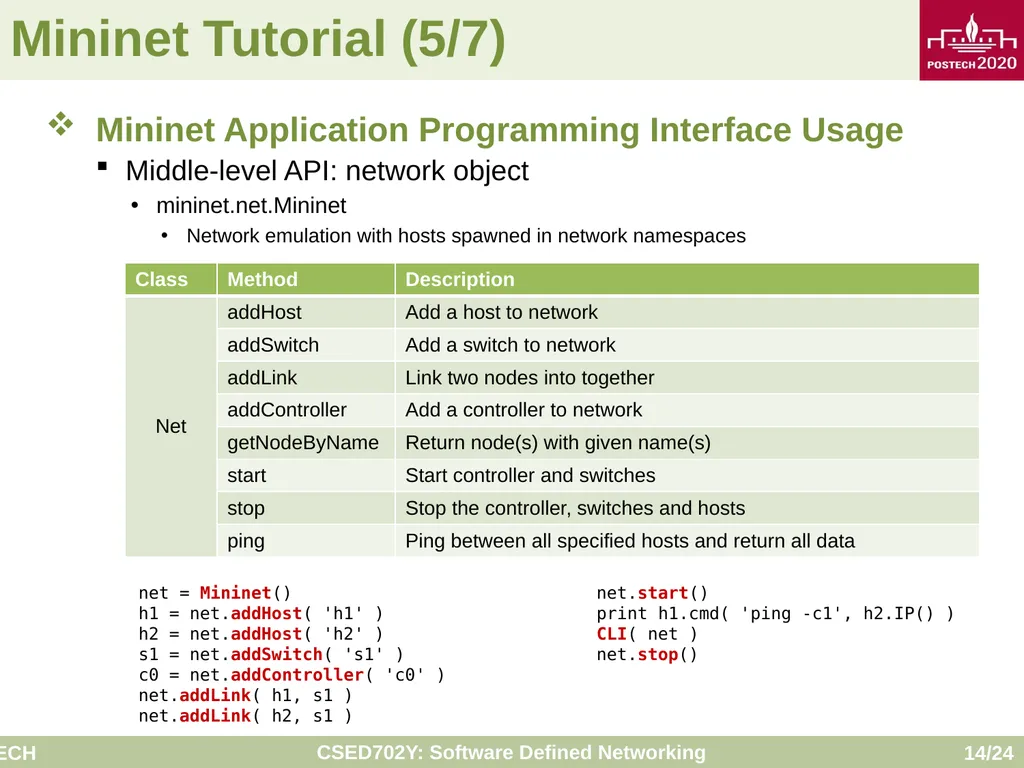
Mininet Tutorial (5/7) Mininet Application Programming Interface Usage
Middle-level API: network object
mininet.net.Mininet
Network emulation with hosts spawned in network namespaces net = Mininet()
h1 = net.addHost( 'h1' )
h2 = net.addHost( 'h2' )
s1 = net.addSwitch( 's1' )
c0 = net.addController( 'c0' )
net.addLink( h1, s1 )
net.addLink( h2, s1 ) net.start()
print h1.cmd( 'ping -c1', h2.IP() )
CLI( net )
net.stop()<br>
Middle-level API: network object
mininet.net.Mininet
Network emulation with hosts spawned in network namespaces net = Mininet()
h1 = net.addHost( 'h1' )
h2 = net.addHost( 'h2' )
s1 = net.addSwitch( 's1' )
c0 = net.addController( 'c0' )
net.addLink( h1, s1 )
net.addLink( h2, s1 ) net.start()
print h1.cmd( 'ping -c1', h2.IP() )
CLI( net )
net.stop()<br>
15
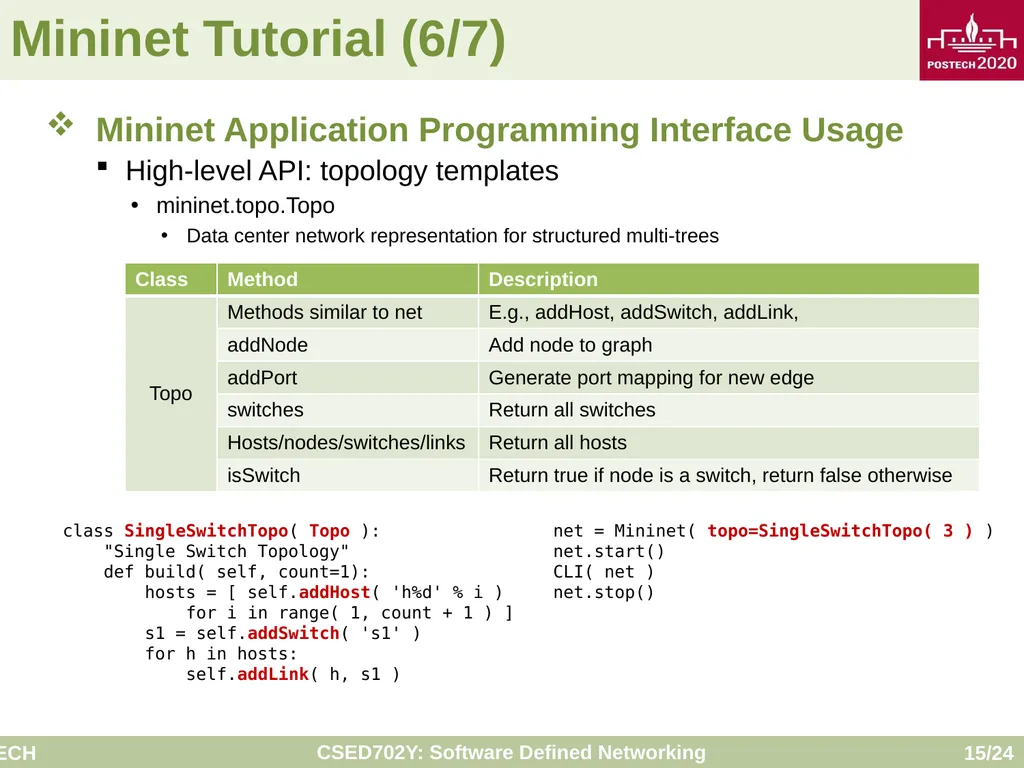
Mininet Tutorial (6/7) Mininet Application Programming Interface Usage
High-level API: topology templates
mininet.topo.Topo
Data center network representation for structured multi-trees class SingleSwitchTopo( Topo ):
"Single Switch Topology"
def build( self, count=1):
hosts = [ self.addHost( 'h%d' % i )
for i in range( 1, count + 1 ) ]
s1 = self.addSwitch( 's1' )
for h in hosts:
self.addLink( h, s1 ) net = Mininet( topo=SingleSwitchTopo( 3 ) )
net.start()
CLI( net )
net.stop()<br>
High-level API: topology templates
mininet.topo.Topo
Data center network representation for structured multi-trees class SingleSwitchTopo( Topo ):
"Single Switch Topology"
def build( self, count=1):
hosts = [ self.addHost( 'h%d' % i )
for i in range( 1, count + 1 ) ]
s1 = self.addSwitch( 's1' )
for h in hosts:
self.addLink( h, s1 ) net = Mininet( topo=SingleSwitchTopo( 3 ) )
net.start()
CLI( net )
net.stop()<br>
16
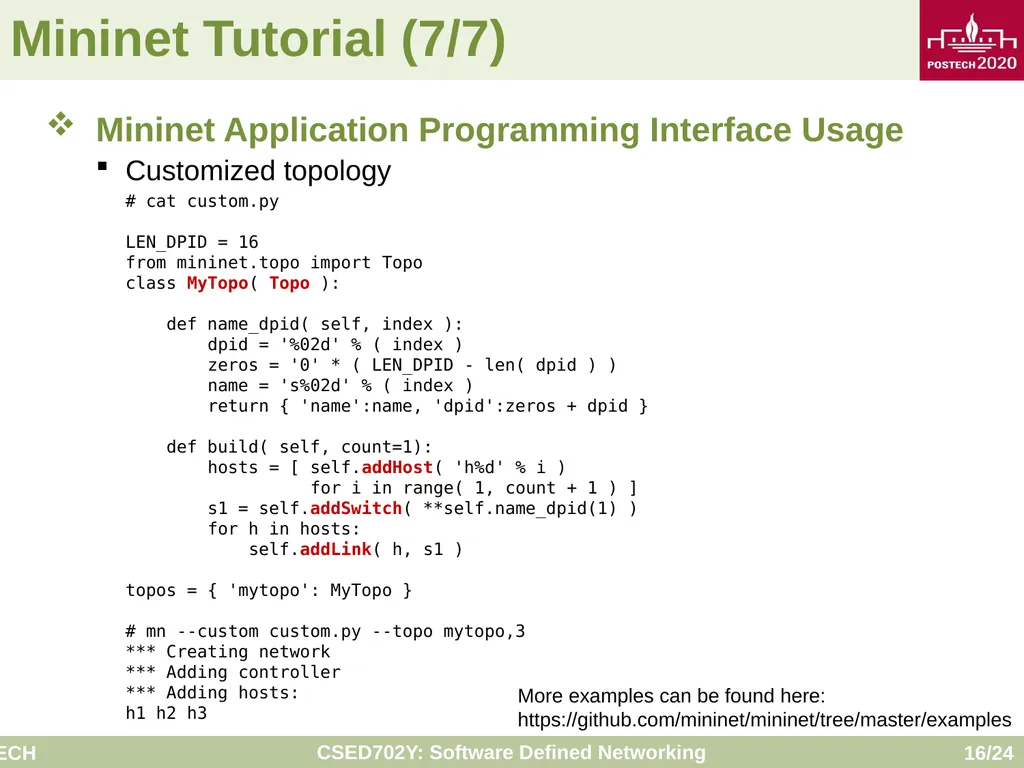
Mininet Tutorial (7/7) Mininet Application Programming Interface Usage
Customized topology # cat custom.py
LEN_DPID = 16
from mininet.topo import Topo
class MyTopo( Topo ):
def name_dpid( self, index ):
dpid = '%02d' % ( index )
zeros = '0' * ( LEN_DPID - len( dpid ) )
name = 's%02d' % ( index )
return { 'name':name, 'dpid':zeros + dpid }
def build( self, count=1):
hosts = [ self.addHost( 'h%d' % i )
for i in range( 1, count + 1 ) ]
s1 = self.addSwitch( **self.name_dpid(1) )
for h in hosts:
self.addLink( h, s1 )
topos = { 'mytopo': MyTopo }
# mn --custom custom.py --topo mytopo,3
*** Creating network
*** Adding controller
*** Adding hosts:
h1 h2 h3 More examples can be found here:
https://github.com/mininet/mininet/tree/master/examples<br>
Customized topology # cat custom.py
LEN_DPID = 16
from mininet.topo import Topo
class MyTopo( Topo ):
def name_dpid( self, index ):
dpid = '%02d' % ( index )
zeros = '0' * ( LEN_DPID - len( dpid ) )
name = 's%02d' % ( index )
return { 'name':name, 'dpid':zeros + dpid }
def build( self, count=1):
hosts = [ self.addHost( 'h%d' % i )
for i in range( 1, count + 1 ) ]
s1 = self.addSwitch( **self.name_dpid(1) )
for h in hosts:
self.addLink( h, s1 )
topos = { 'mytopo': MyTopo }
# mn --custom custom.py --topo mytopo,3
*** Creating network
*** Adding controller
*** Adding hosts:
h1 h2 h3 More examples can be found here:
https://github.com/mininet/mininet/tree/master/examples<br>
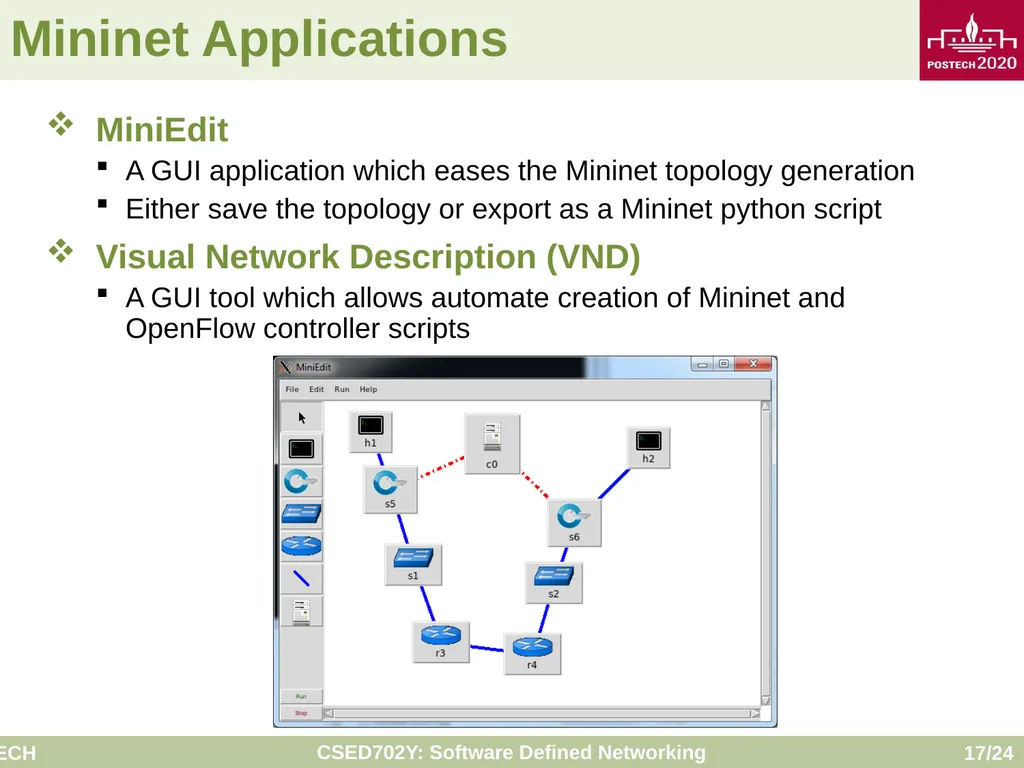
17
Mininet Applications MiniEdit
A GUI application which eases the Mininet topology generation
Either save the topology or export as a Mininet python script
Visual Network Description (VND)
A GUI tool which allows automate creation of Mininet and OpenFlow controller scripts<br>
A GUI application which eases the Mininet topology generation
Either save the topology or export as a Mininet python script
Visual Network Description (VND)
A GUI tool which allows automate creation of Mininet and OpenFlow controller scripts<br>
18
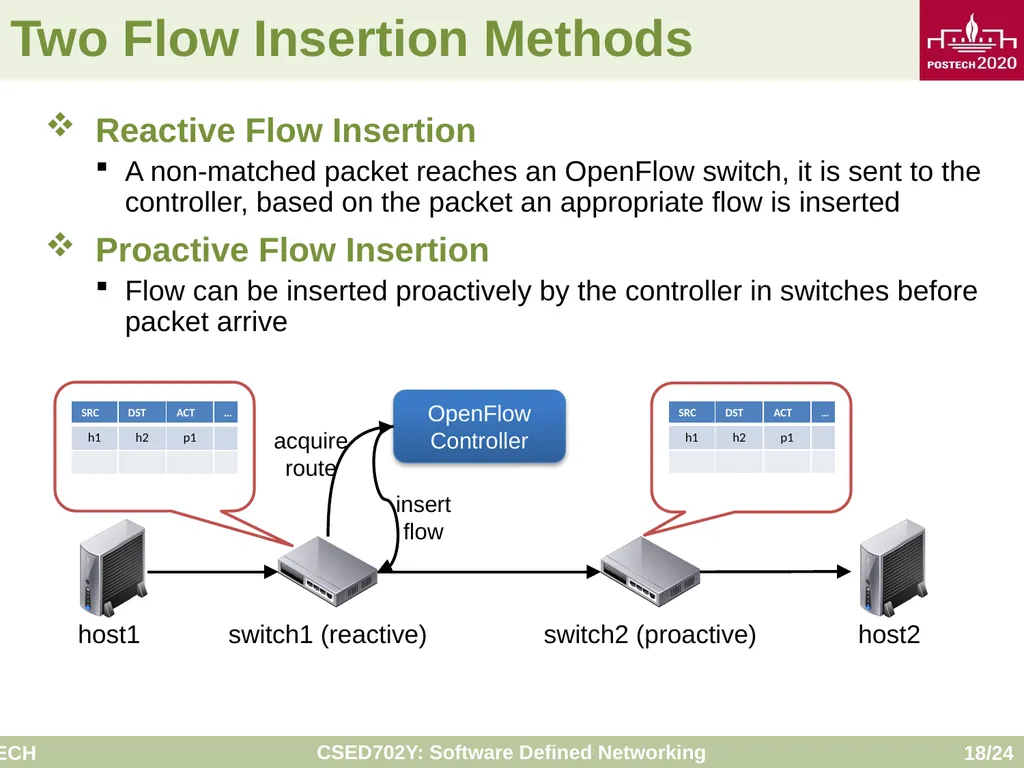
Two Flow Insertion Methods Reactive Flow Insertion
A non-matched packet reaches an OpenFlow switch, it is sent to the controller, based on the packet an appropriate flow is inserted
Proactive Flow Insertion
Flow can be inserted proactively by the controller in switches before packet arrive OpenFlow Controller host1 host2 switch1 (reactive) switch2 (proactive) acquire route insert flow<br>
A non-matched packet reaches an OpenFlow switch, it is sent to the controller, based on the packet an appropriate flow is inserted
Proactive Flow Insertion
Flow can be inserted proactively by the controller in switches before packet arrive OpenFlow Controller host1 host2 switch1 (reactive) switch2 (proactive) acquire route insert flow<br>
19
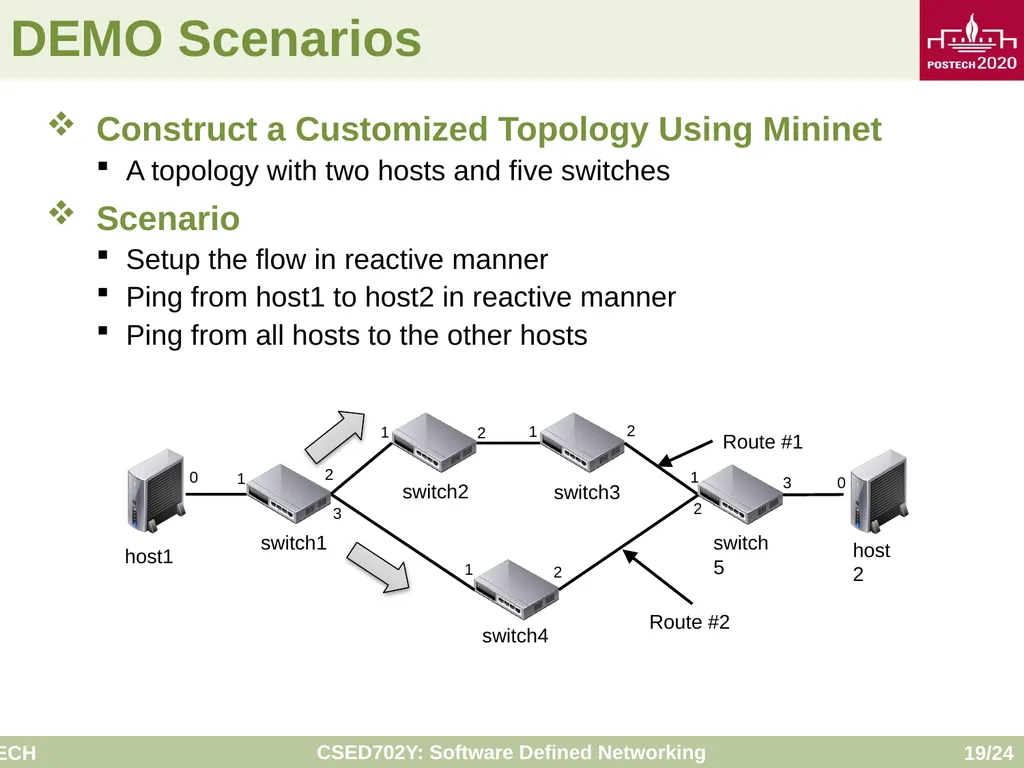
DEMO Scenarios Construct a Customized Topology Using Mininet
A topology with two hosts and five switches
Scenario
Setup the flow in reactive manner
Ping from host1 to host2 in reactive manner
Ping from all hosts to the other hosts<br>
A topology with two hosts and five switches
Scenario
Setup the flow in reactive manner
Ping from host1 to host2 in reactive manner
Ping from all hosts to the other hosts<br>
20
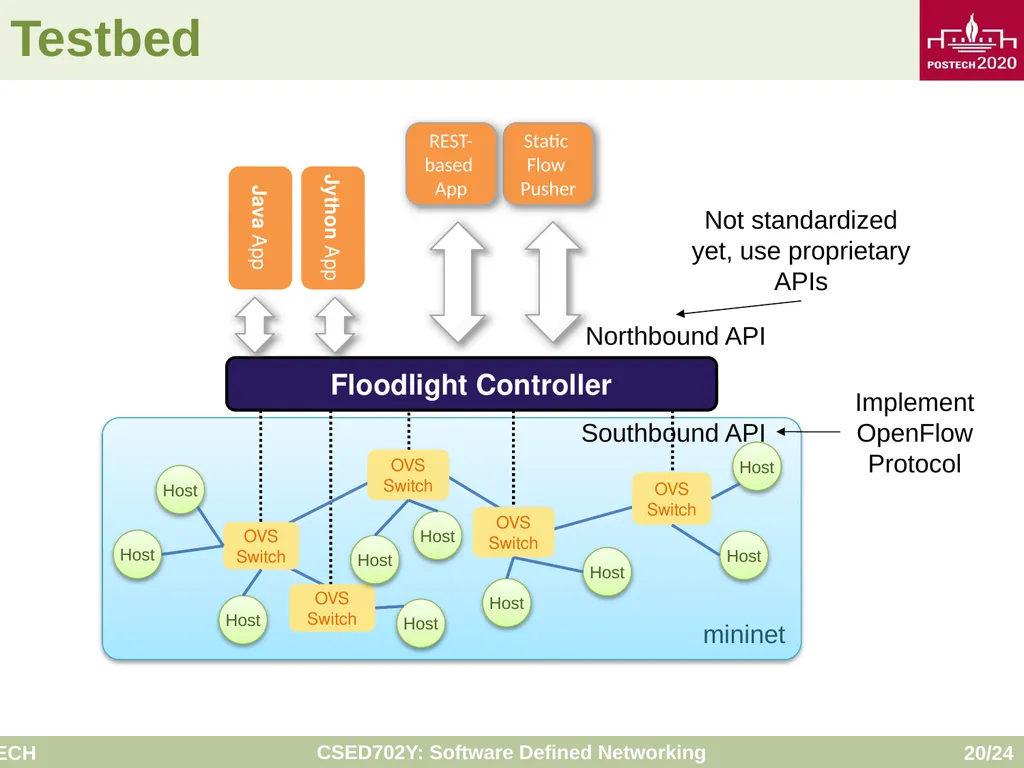
Testbed mininet Implement OpenFlow Protocol Not standardized yet, use proprietary APIs<br>
21
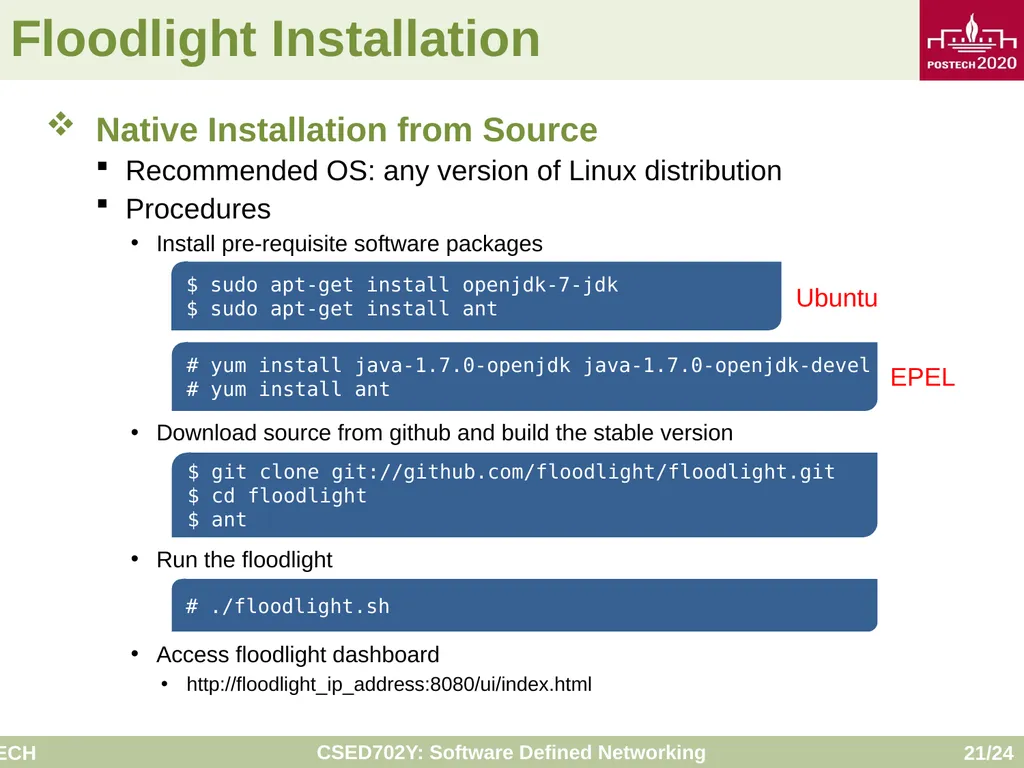
Floodlight Installation Native Installation from Source
Recommended OS: any version of Linux distribution
Procedures
Install pre-requisite software packages
Download source from github and build the stable version
Run the floodlight
Access floodlight dashboard
http://floodlight_ip_address:8080/ui/index.html $ sudo apt-get install openjdk-7-jdk
$ sudo apt-get install ant # yum install java-1.7.0-openjdk java-1.7.0-openjdk-devel
# yum install ant Ubuntu EPEL $ git clone git://github.com/floodlight/floodlight.git
$ cd floodlight
$ ant # ./floodlight.sh<br>
Recommended OS: any version of Linux distribution
Procedures
Install pre-requisite software packages
Download source from github and build the stable version
Run the floodlight
Access floodlight dashboard
http://floodlight_ip_address:8080/ui/index.html $ sudo apt-get install openjdk-7-jdk
$ sudo apt-get install ant # yum install java-1.7.0-openjdk java-1.7.0-openjdk-devel
# yum install ant Ubuntu EPEL $ git clone git://github.com/floodlight/floodlight.git
$ cd floodlight
$ ant # ./floodlight.sh<br>
22
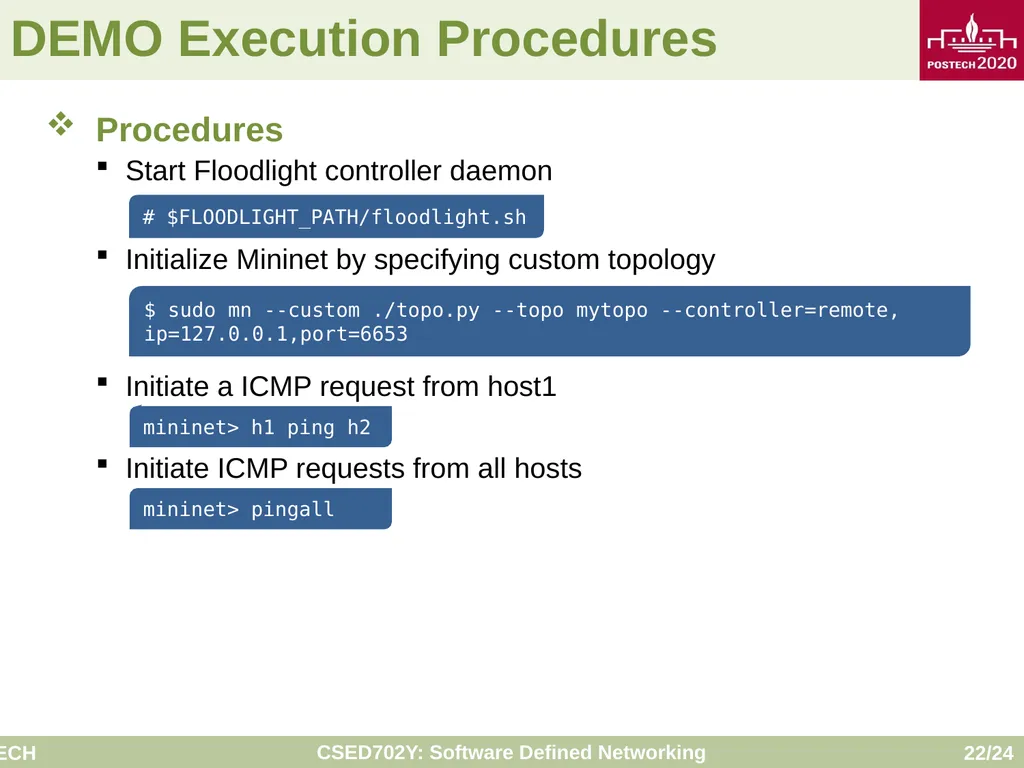
DEMO Execution Procedures Procedures
Start Floodlight controller daemon
Initialize Mininet by specifying custom topology
Initiate a ICMP request from host1
Initiate ICMP requests from all hosts # $FLOODLIGHT_PATH/floodlight.sh $ sudo mn --custom ./topo.py --topo mytopo --controller=remote, ip=127.0.0.1,port=6653 mininet> h1 ping h2 mininet> pingall<br>
Start Floodlight controller daemon
Initialize Mininet by specifying custom topology
Initiate a ICMP request from host1
Initiate ICMP requests from all hosts # $FLOODLIGHT_PATH/floodlight.sh $ sudo mn --custom ./topo.py --topo mytopo --controller=remote, ip=127.0.0.1,port=6653 mininet> h1 ping h2 mininet> pingall<br>
23
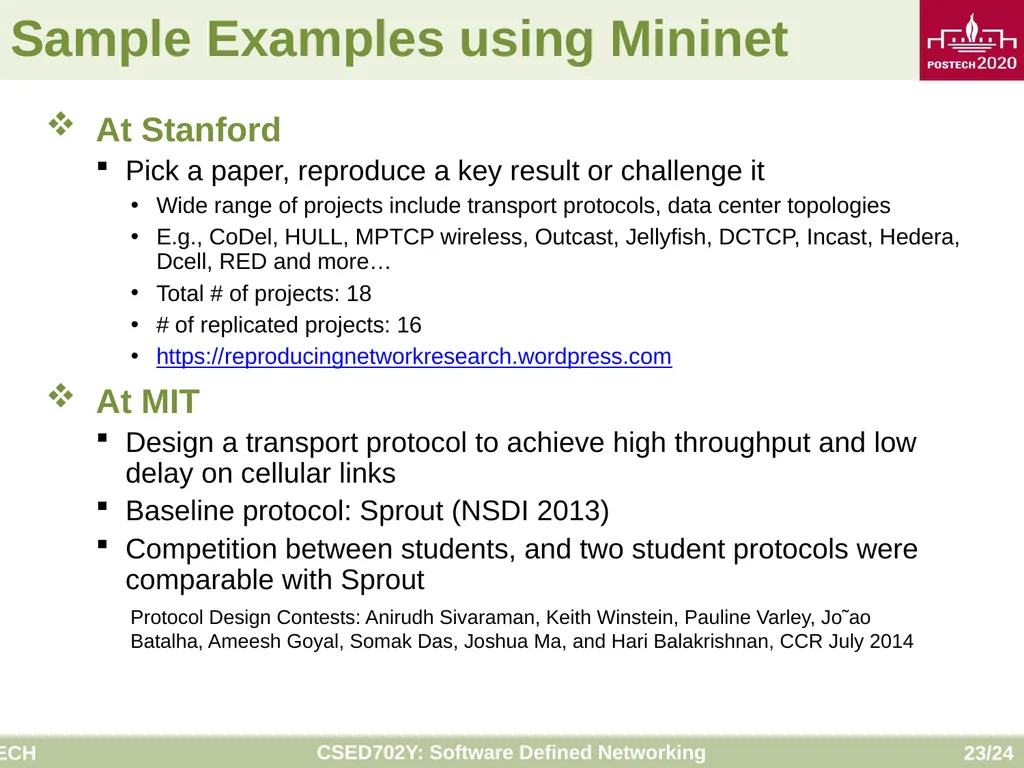
Sample Examples using Mininet At Stanford
Pick a paper, reproduce a key result or challenge it
Wide range of projects include transport protocols, data center topologies
E.g., CoDel, HULL, MPTCP wireless, Outcast, Jellyfish, DCTCP, Incast, Hedera, Dcell, RED and more…
Total # of projects: 18
# of replicated projects: 16
https://reproducingnetworkresearch.wordpress.com
At MIT
Design a transport protocol to achieve high throughput and low delay on cellular links
Baseline protocol: Sprout (NSDI 2013)
Competition between students, and two student protocols were comparable with Sprout Protocol Design Contests: Anirudh Sivaraman, Keith Winstein, Pauline Varley, Jo˜ao Batalha, Ameesh Goyal, Somak Das, Joshua Ma, and Hari Balakrishnan, CCR July 2014<br>
Pick a paper, reproduce a key result or challenge it
Wide range of projects include transport protocols, data center topologies
E.g., CoDel, HULL, MPTCP wireless, Outcast, Jellyfish, DCTCP, Incast, Hedera, Dcell, RED and more…
Total # of projects: 18
# of replicated projects: 16
https://reproducingnetworkresearch.wordpress.com
At MIT
Design a transport protocol to achieve high throughput and low delay on cellular links
Baseline protocol: Sprout (NSDI 2013)
Competition between students, and two student protocols were comparable with Sprout Protocol Design Contests: Anirudh Sivaraman, Keith Winstein, Pauline Varley, Jo˜ao Batalha, Ameesh Goyal, Somak Das, Joshua Ma, and Hari Balakrishnan, CCR July 2014<br>
24
Q&A<br>