Step 2 Using LinkedIn for your Job Search Career
Description: Step 2 Using LinkedIn for your Job Search Career Services LinkedIn Learning Module 2 Career Services 487-2313 www.mtu.educareer LinkedIn can be Powerful Job Search Tool There are new reports that up to 96 of recruiters are using
Related Topics
Download Presentation
"Step 2 Using LinkedIn for your Job Search Career" is the property of its rightful owner. Permission is granted to download and print the materials on this website for personal, non-commercial use only, and to display it on your personal computer provided you do not modify the materials and that you retain all copyright notices contained in the materials. By downloading content from our website, you accept the terms of this agreement.
Presentation Transcript
slide1. Step 2
Using LinkedIn for your Job Search Career Services – LinkedIn Learning Module 2<br>
slide2. Career Services | 487-2313 | www.mtu.edu/career LinkedIn can be Powerful Job Search Tool There are new reports that up to 96% of recruiters are using LinkedIn to source their talent, and almost 100% use to initially screen applicants
Your LinkedIn profile is…
Your first impression
Your virtual handshake
Your professional online presence
First and foremost, ensure your profile is strong and effective!<br>
slide3. Career Services | 487-2313 | www.mtu.edu/career Using LinkedIn to Help You With Your Job Search
Priorities:
Keywords to optimize your findability
Personalized Connection Invitations
“Active” vs. “On”<br>
slide4. Keywords Using the right keywords in your profile is critical to your visibility on LinkedIn.
Keywords are the words and phrases found in job descriptions, and they’re the words recruiters will take from their job descriptions and use in their LinkedIn searches.<br>
slide5. Career Services | 487-2313 | www.mtu.edu/career How to Discover Your Best Keywords Job-Hunt sponsor Indeed.com has the largest collection of job postings in the world. To help job seekers understand how employers are describing jobs, Indeed provides an excellent (and free!) tool to analyze frequently used job description keywords, called: JobTrends. Go to the Indeed.com/jobtrends<br>
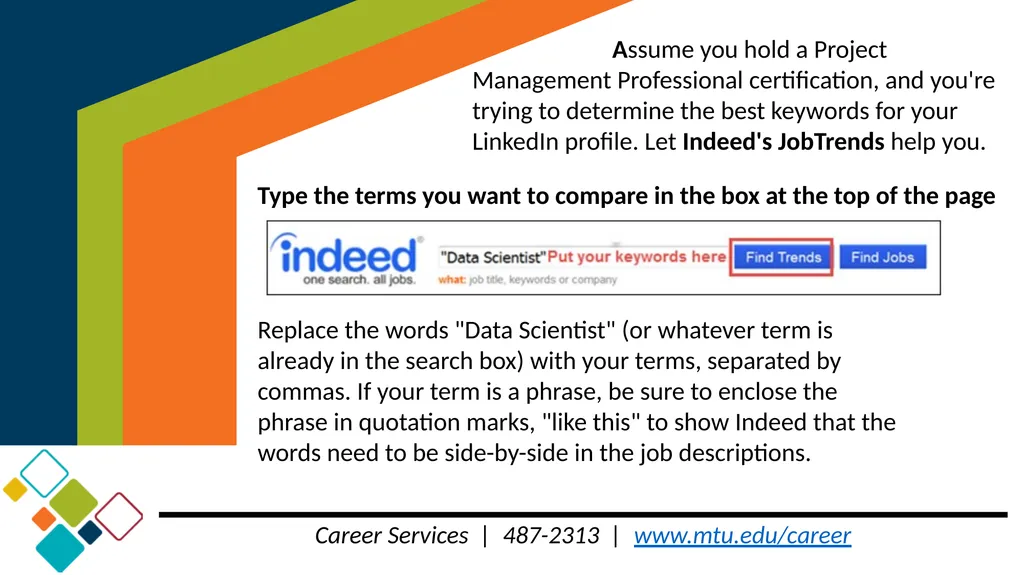
slide6. Career Services | 487-2313 | www.mtu.edu/career Type the terms you want to compare in the box at the top of the page Replace the words "Data Scientist" (or whatever term is already in the search box) with your terms, separated by commas. If your term is a phrase, be sure to enclose the phrase in quotation marks, "like this" to show Indeed that the words need to be side-by-side in the job descriptions. Assume you hold a Project Management Professional certification, and you're trying to determine the best keywords for your LinkedIn profile. Let Indeed's JobTrends help you.<br>
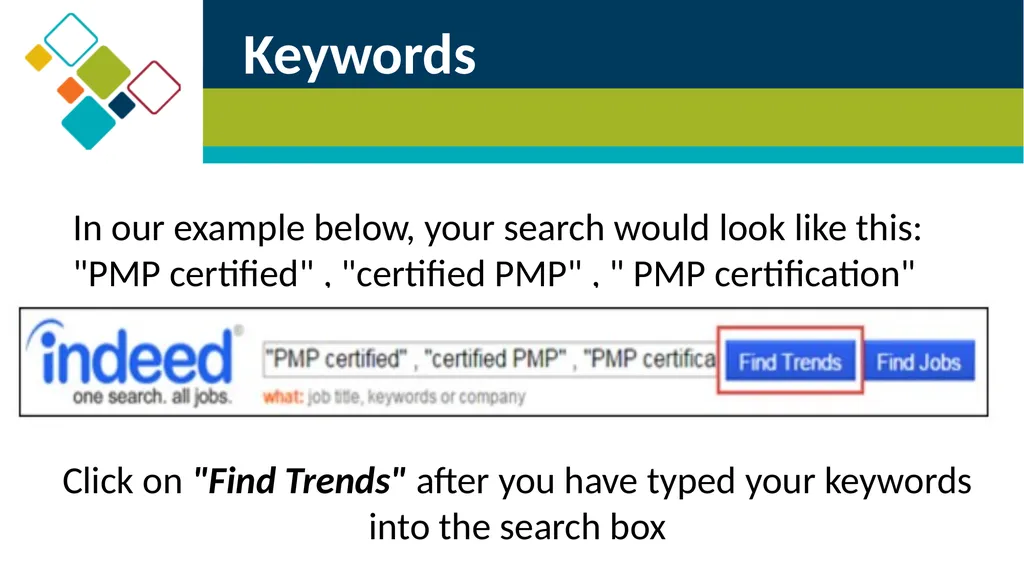
slide7. In our example below, your search would look like this: "PMP certified" , "certified PMP" , " PMP certification" Keywords Click on "Find Trends" after you have typed your keywords into the search box<br>
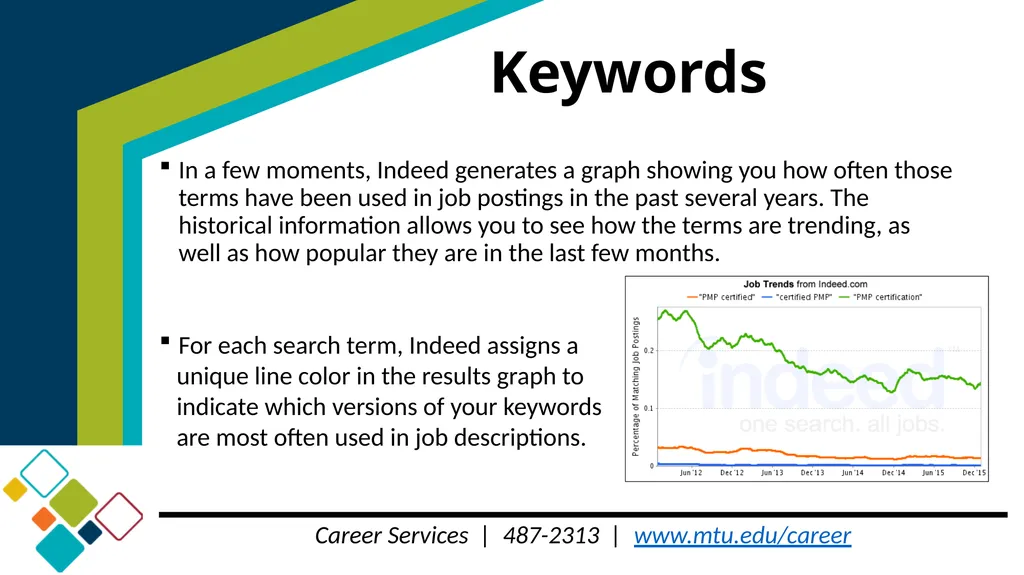
slide8. Career Services | 487-2313 | www.mtu.edu/career In a few moments, Indeed generates a graph showing you how often those terms have been used in job postings in the past several years. The historical information allows you to see how the terms are trending, as well as how popular they are in the last few months.
For each search term, Indeed assigns a
unique line color in the results graph to
indicate which versions of your keywords
are most often used in job descriptions. Keywords<br>
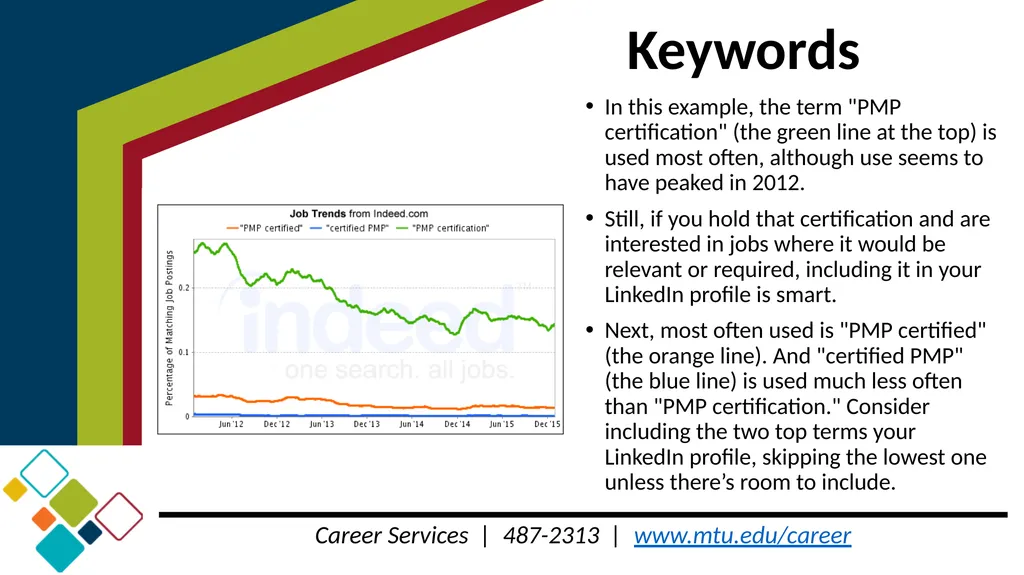
slide9. Career Services | 487-2313 | www.mtu.edu/career Keywords In this example, the term "PMP certification" (the green line at the top) is used most often, although use seems to have peaked in 2012.
Still, if you hold that certification and are interested in jobs where it would be relevant or required, including it in your LinkedIn profile is smart.
Next, most often used is "PMP certified" (the orange line). And "certified PMP" (the blue line) is used much less often than "PMP certification." Consider including the two top terms your LinkedIn profile, skipping the lowest one unless there’s room to include.<br>
slide10. LinkedIn is All About Networking! Networking is the most effective way to get a job in any and all industries. Make that initial connection to professionals in your industry, but LinkedIn gives you numerous and diverse opportunities to “talk” to them.
Networking can get you the inside advantage of the “hidden” job market. People hire people they know, trust, and like. That can only happen with direct interaction. But, it can start with indirect interaction – that’s the beauty and magic of networking.
Personal Industry Connections > Online Job Applications<br>
slide11. Personalize Your Invitations to Connect Experts are adamant about this point, and research supports that you’ll have a far greater chance of having your invitations accepted if you take the time to write a personal invitation.
Key Components:
How you met, how you know them…or know of them/found them
Shared connection
Article they wrote, commented on, or are mentioned in
Targeted connection
Identify commonalities
Tell who you are and why you want to connect
Warm, polite end note<br>
slide12. Being “Active” vs “On”
LinkedIn can be a powerful job search tool if actively utilized Many are “on” LinkedIn…meaning they have a profile.
Define Active!
Having a strong and effective profile is your first priority and may bring recruiters right to you, but, experts say that you should check “in” with LinkedIn 3 times a day: 8:00 – 9:00, noon, and 4:00 – 6:00. Many check late evening, as well.
Define Check-in!
Personal, genuine engagement is key to professional success throughout your career
Industry focused for career development (but not limited to!)<br>
slide13. Career Services | 487-2313 | www.mtu.edu/career Make lots of connections (2 different thoughts out there – quality vs. quantity. At this early stage in your education and career, more is better!)
Friends
Professors
Advisors
Supervisors
Michigan Tech Alumni!!! Be an Active and Engaged LinkedIn User<br>
slide14. Career Services | 487-2313 | www.mtu.edu/career Be an Active and Engaged LinkedIn User Update your status – once a week?
Ongoing project
Technical or professional skill
Add to “following” list - group/company/thought leader
Daily likes/comments - this will “update” your feed
Endorsements and recommendations – ask for and give often
Ask via LinkedIn or personal email/phone call
Give details about why you’re asking and subject focus
Write content – ensure it enhances your professional credibility!<br>
slide15. Career Services | 487-2313 | www.mtu.edu/career Be an Active and Engaged LinkedIn User Industry Related Followings:
Thought Leaders
Companies
Regional, National, and International Industry Organizations
Universities and National Labs<br>
slide16. Be an Active and Engaged LinkedIn User Search for and Apply to Jobs Posted on LinkedIn
Find using regular and advanced search
Gives you skill match, tells you who’s applied, how you rank
Contact information for job poster
How many of your connections work there
How many Michigan Tech alumni work there
LinkedIn Job Search App for your smart phone<br>
slide17. Career Services | 487-2313 | www.mtu.edu/career Target Companies (especially those that target Michigan Tech students in their recruiting efforts)
Advanced Company Search
Advanced People Search
Target Industries
General search Be an Active and Engaged LinkedIn User<br>
slide18. Career Services | 487-2313 | www.mtu.edu/career Be an Active and Engaged LinkedIn User GROUP, GROUPS, GROUPS
Get closer to key contacts without paying for an upgrade.
Joining groups allows recruiters to message or connect with you for free and visa versa. Find job postings, too.
One career expert recently reported 425% page views, and the only thing she did different was start and participate in a few group discussions.<br>
slide19. Groups
be actively involved to be more visible Check out what’s happening in the group before becoming active
Like posts/discussions/comments (thank others for their comments)
Join a discussion
Start your own discussion:
Ask a question
Share your expertise
Share relevant articles (that haven’t been shared before – see #1)
Don’t be afraid to use a bit of humor in your questions/answers/comments.
People hire people they like.<br>
slide20. Next Lunch-n-Learn…Looking for your internship, co-op or full-time position? We can help! We invite you to visit Career Services for help with LinkedIn or any of your job search needs!
220 Administration Building
career@mtu.edu
906.487.2313
www.mtu.edu/career
Schedule your appointment on…<br>

Using LinkedIn for your Job Search Career Services – LinkedIn Learning Module 2<br>
slide2. Career Services | 487-2313 | www.mtu.edu/career LinkedIn can be Powerful Job Search Tool There are new reports that up to 96% of recruiters are using LinkedIn to source their talent, and almost 100% use to initially screen applicants
Your LinkedIn profile is…
Your first impression
Your virtual handshake
Your professional online presence
First and foremost, ensure your profile is strong and effective!<br>
slide3. Career Services | 487-2313 | www.mtu.edu/career Using LinkedIn to Help You With Your Job Search
Priorities:
Keywords to optimize your findability
Personalized Connection Invitations
“Active” vs. “On”<br>
slide4. Keywords Using the right keywords in your profile is critical to your visibility on LinkedIn.
Keywords are the words and phrases found in job descriptions, and they’re the words recruiters will take from their job descriptions and use in their LinkedIn searches.<br>
slide5. Career Services | 487-2313 | www.mtu.edu/career How to Discover Your Best Keywords Job-Hunt sponsor Indeed.com has the largest collection of job postings in the world. To help job seekers understand how employers are describing jobs, Indeed provides an excellent (and free!) tool to analyze frequently used job description keywords, called: JobTrends. Go to the Indeed.com/jobtrends<br>
slide6. Career Services | 487-2313 | www.mtu.edu/career Type the terms you want to compare in the box at the top of the page Replace the words "Data Scientist" (or whatever term is already in the search box) with your terms, separated by commas. If your term is a phrase, be sure to enclose the phrase in quotation marks, "like this" to show Indeed that the words need to be side-by-side in the job descriptions. Assume you hold a Project Management Professional certification, and you're trying to determine the best keywords for your LinkedIn profile. Let Indeed's JobTrends help you.<br>
slide7. In our example below, your search would look like this: "PMP certified" , "certified PMP" , " PMP certification" Keywords Click on "Find Trends" after you have typed your keywords into the search box<br>
slide8. Career Services | 487-2313 | www.mtu.edu/career In a few moments, Indeed generates a graph showing you how often those terms have been used in job postings in the past several years. The historical information allows you to see how the terms are trending, as well as how popular they are in the last few months.
For each search term, Indeed assigns a
unique line color in the results graph to
indicate which versions of your keywords
are most often used in job descriptions. Keywords<br>
slide9. Career Services | 487-2313 | www.mtu.edu/career Keywords In this example, the term "PMP certification" (the green line at the top) is used most often, although use seems to have peaked in 2012.
Still, if you hold that certification and are interested in jobs where it would be relevant or required, including it in your LinkedIn profile is smart.
Next, most often used is "PMP certified" (the orange line). And "certified PMP" (the blue line) is used much less often than "PMP certification." Consider including the two top terms your LinkedIn profile, skipping the lowest one unless there’s room to include.<br>
slide10. LinkedIn is All About Networking! Networking is the most effective way to get a job in any and all industries. Make that initial connection to professionals in your industry, but LinkedIn gives you numerous and diverse opportunities to “talk” to them.
Networking can get you the inside advantage of the “hidden” job market. People hire people they know, trust, and like. That can only happen with direct interaction. But, it can start with indirect interaction – that’s the beauty and magic of networking.
Personal Industry Connections > Online Job Applications<br>
slide11. Personalize Your Invitations to Connect Experts are adamant about this point, and research supports that you’ll have a far greater chance of having your invitations accepted if you take the time to write a personal invitation.
Key Components:
How you met, how you know them…or know of them/found them
Shared connection
Article they wrote, commented on, or are mentioned in
Targeted connection
Identify commonalities
Tell who you are and why you want to connect
Warm, polite end note<br>
slide12. Being “Active” vs “On”
LinkedIn can be a powerful job search tool if actively utilized Many are “on” LinkedIn…meaning they have a profile.
Define Active!
Having a strong and effective profile is your first priority and may bring recruiters right to you, but, experts say that you should check “in” with LinkedIn 3 times a day: 8:00 – 9:00, noon, and 4:00 – 6:00. Many check late evening, as well.
Define Check-in!
Personal, genuine engagement is key to professional success throughout your career
Industry focused for career development (but not limited to!)<br>
slide13. Career Services | 487-2313 | www.mtu.edu/career Make lots of connections (2 different thoughts out there – quality vs. quantity. At this early stage in your education and career, more is better!)
Friends
Professors
Advisors
Supervisors
Michigan Tech Alumni!!! Be an Active and Engaged LinkedIn User<br>
slide14. Career Services | 487-2313 | www.mtu.edu/career Be an Active and Engaged LinkedIn User Update your status – once a week?
Ongoing project
Technical or professional skill
Add to “following” list - group/company/thought leader
Daily likes/comments - this will “update” your feed
Endorsements and recommendations – ask for and give often
Ask via LinkedIn or personal email/phone call
Give details about why you’re asking and subject focus
Write content – ensure it enhances your professional credibility!<br>
slide15. Career Services | 487-2313 | www.mtu.edu/career Be an Active and Engaged LinkedIn User Industry Related Followings:
Thought Leaders
Companies
Regional, National, and International Industry Organizations
Universities and National Labs<br>
slide16. Be an Active and Engaged LinkedIn User Search for and Apply to Jobs Posted on LinkedIn
Find using regular and advanced search
Gives you skill match, tells you who’s applied, how you rank
Contact information for job poster
How many of your connections work there
How many Michigan Tech alumni work there
LinkedIn Job Search App for your smart phone<br>
slide17. Career Services | 487-2313 | www.mtu.edu/career Target Companies (especially those that target Michigan Tech students in their recruiting efforts)
Advanced Company Search
Advanced People Search
Target Industries
General search Be an Active and Engaged LinkedIn User<br>
slide18. Career Services | 487-2313 | www.mtu.edu/career Be an Active and Engaged LinkedIn User GROUP, GROUPS, GROUPS
Get closer to key contacts without paying for an upgrade.
Joining groups allows recruiters to message or connect with you for free and visa versa. Find job postings, too.
One career expert recently reported 425% page views, and the only thing she did different was start and participate in a few group discussions.<br>
slide19. Groups
be actively involved to be more visible Check out what’s happening in the group before becoming active
Like posts/discussions/comments (thank others for their comments)
Join a discussion
Start your own discussion:
Ask a question
Share your expertise
Share relevant articles (that haven’t been shared before – see #1)
Don’t be afraid to use a bit of humor in your questions/answers/comments.
People hire people they like.<br>
slide20. Next Lunch-n-Learn…Looking for your internship, co-op or full-time position? We can help! We invite you to visit Career Services for help with LinkedIn or any of your job search needs!
220 Administration Building
career@mtu.edu
906.487.2313
www.mtu.edu/career
Schedule your appointment on…<br>