
Strings Chapter 6 Python for Everybody
MS
Published · 33 slides · 0 views
1 / 1
Description
Strings Chapter 6 Python for Everybody www.py4e.com String Data Type A string is a sequence of characters A string literal uses quotes Hello or Hello For strings, means concatenate When a string contains numbers, it is still a
Related Topics
Share
Embed code
Download this presentation From Below
"Strings Chapter 6 Python for Everybody" is the property of its rightful owner. Permission is granted to download and print the materials on this website for personal, non-commercial use only, and to display it on your personal computer provided you do not modify the materials and that you retain all copyright notices contained in the materials. By downloading content from our website, you accept the terms of this agreement.
Presentation Transcript
01
Strings Chapter 6 Python for Everybody
www.py4e.com<br>
www.py4e.com<br>
02
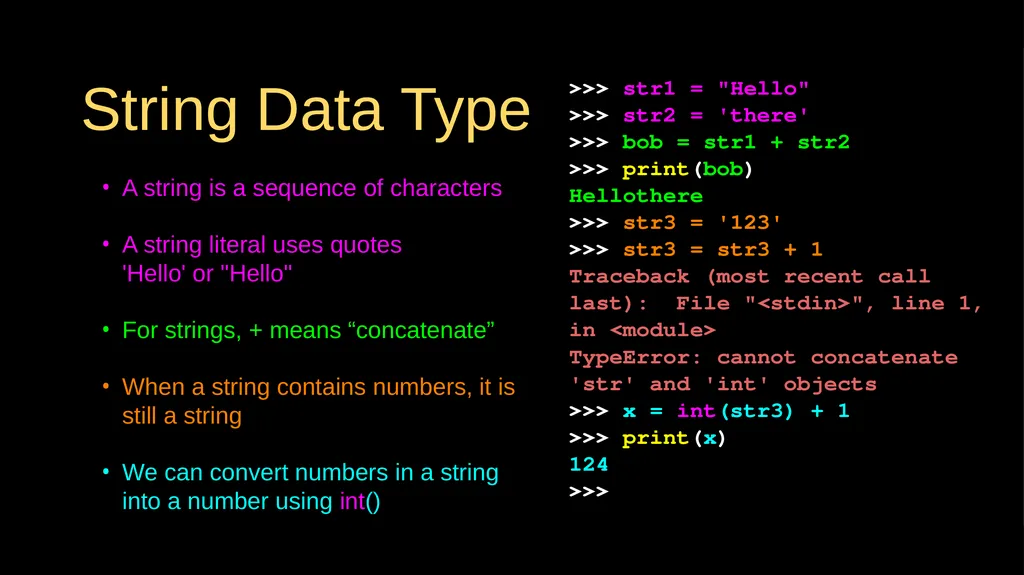
String Data Type A string is a sequence of characters
A string literal uses quotes 'Hello' or "Hello"
For strings, + means “concatenate”
When a string contains numbers, it is still a string
We can convert numbers in a string into a number using int() >>> str1 = "Hello"
>>> str2 = 'there'
>>> bob = str1 + str2
>>> print(bob)
Hellothere
>>> str3 = '123'
>>> str3 = str3 + 1
Traceback (most recent call last): File "<stdin>", line 1, in <module>
TypeError: cannot concatenate 'str' and 'int' objects
>>> x = int(str3) + 1
>>> print(x)
124
>>><br>
A string literal uses quotes 'Hello' or "Hello"
For strings, + means “concatenate”
When a string contains numbers, it is still a string
We can convert numbers in a string into a number using int() >>> str1 = "Hello"
>>> str2 = 'there'
>>> bob = str1 + str2
>>> print(bob)
Hellothere
>>> str3 = '123'
>>> str3 = str3 + 1
Traceback (most recent call last): File "<stdin>", line 1, in <module>
TypeError: cannot concatenate 'str' and 'int' objects
>>> x = int(str3) + 1
>>> print(x)
124
>>><br>
03
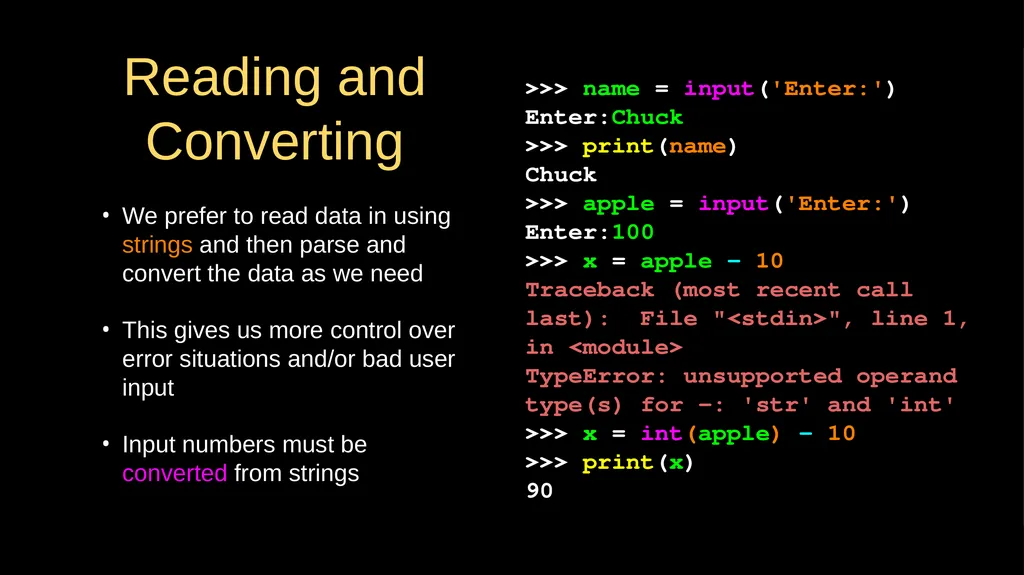
Reading and Converting We prefer to read data in using strings and then parse and convert the data as we need
This gives us more control over error situations and/or bad user input
Input numbers must be converted from strings >>> name = input('Enter:')
Enter:Chuck
>>> print(name)
Chuck
>>> apple = input('Enter:')
Enter:100
>>> x = apple – 10
Traceback (most recent call last): File "<stdin>", line 1, in <module>
TypeError: unsupported operand type(s) for -: 'str' and 'int'
>>> x = int(apple) – 10
>>> print(x)
90<br>
This gives us more control over error situations and/or bad user input
Input numbers must be converted from strings >>> name = input('Enter:')
Enter:Chuck
>>> print(name)
Chuck
>>> apple = input('Enter:')
Enter:100
>>> x = apple – 10
Traceback (most recent call last): File "<stdin>", line 1, in <module>
TypeError: unsupported operand type(s) for -: 'str' and 'int'
>>> x = int(apple) – 10
>>> print(x)
90<br>
04
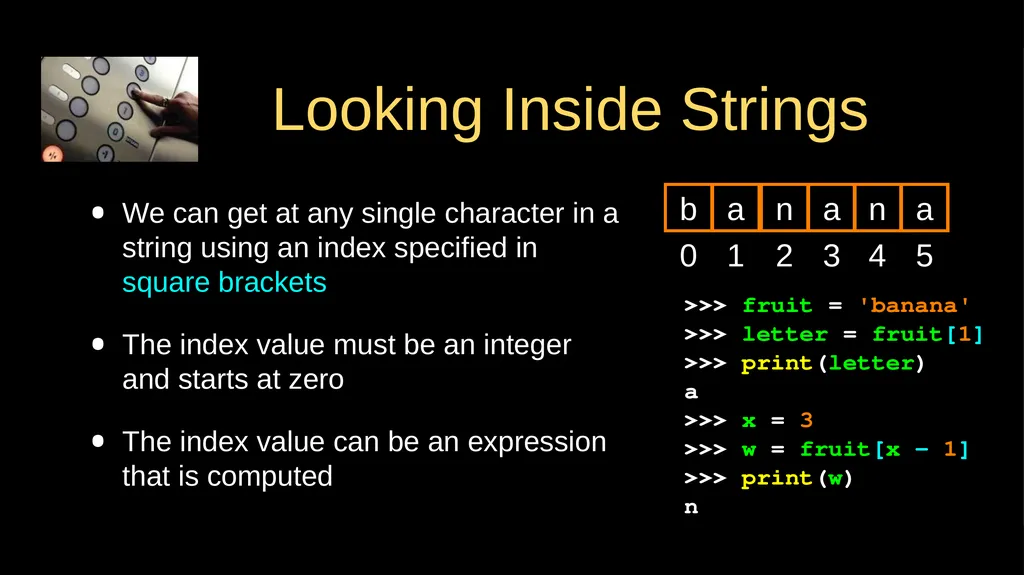
Looking Inside Strings We can get at any single character in a string using an index specified in square brackets
The index value must be an integer and starts at zero
The index value can be an expression that is computed >>> fruit = 'banana'
>>> letter = fruit[1]
>>> print(letter)
a
>>> x = 3
>>> w = fruit[x - 1]
>>> print(w)
n 0 b 1 a 2 n 3 a 4 n 5 a<br>
The index value must be an integer and starts at zero
The index value can be an expression that is computed >>> fruit = 'banana'
>>> letter = fruit[1]
>>> print(letter)
a
>>> x = 3
>>> w = fruit[x - 1]
>>> print(w)
n 0 b 1 a 2 n 3 a 4 n 5 a<br>
05
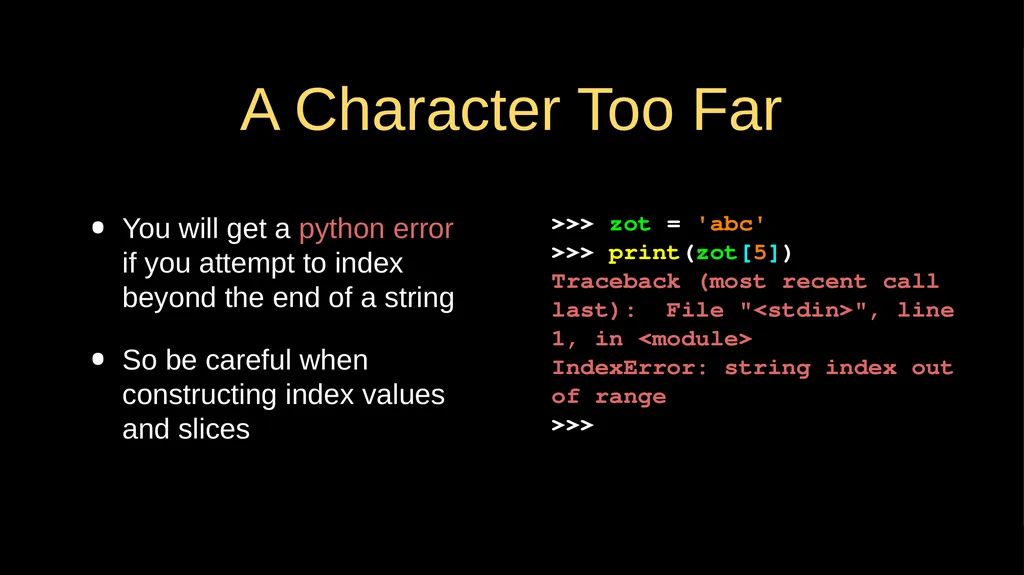
A Character Too Far You will get a python error if you attempt to index beyond the end of a string
So be careful when constructing index values and slices >>> zot = 'abc'
>>> print(zot[5])
Traceback (most recent call last): File "<stdin>", line 1, in <module>
IndexError: string index out of range
>>><br>
So be careful when constructing index values and slices >>> zot = 'abc'
>>> print(zot[5])
Traceback (most recent call last): File "<stdin>", line 1, in <module>
IndexError: string index out of range
>>><br>
06
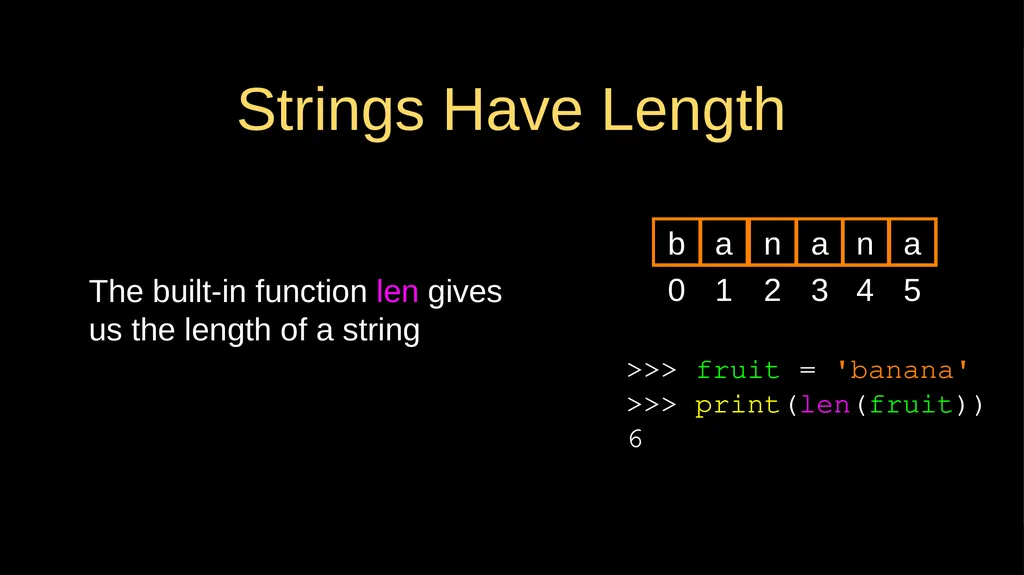
Strings Have Length The built-in function len gives us the length of a string >>> fruit = 'banana'
>>> print(len(fruit))
6 0 b 1 a 2 n 3 a 4 n 5 a<br>
>>> print(len(fruit))
6 0 b 1 a 2 n 3 a 4 n 5 a<br>
07
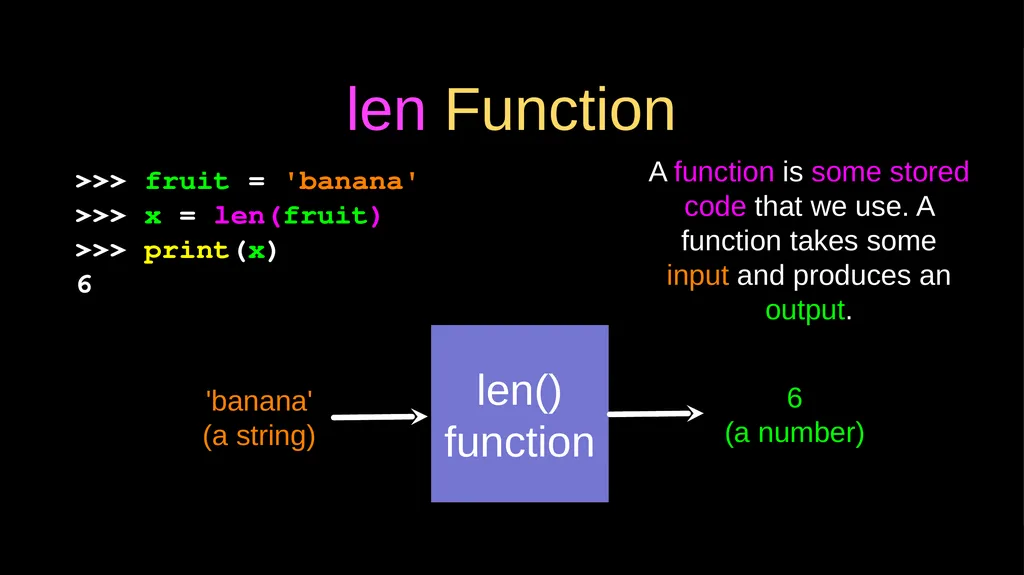
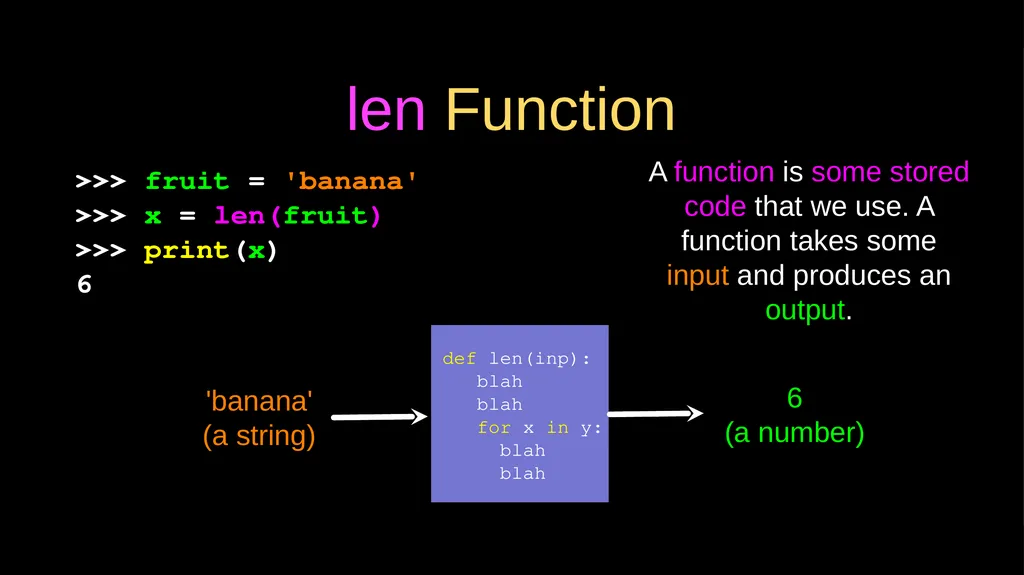
len Function >>> fruit = 'banana'
>>> x = len(fruit)
>>> print(x)
6 len()
function 'banana'
(a string) 6
(a number) A function is some stored code that we use. A function takes some input and produces an output.<br>
>>> x = len(fruit)
>>> print(x)
6 len()
function 'banana'
(a string) 6
(a number) A function is some stored code that we use. A function takes some input and produces an output.<br>
08
len Function def len(inp):
blah
blah
for x in y:
blah
blah 'banana'
(a string) 6
(a number) A function is some stored code that we use. A function takes some input and produces an output. >>> fruit = 'banana'
>>> x = len(fruit)
>>> print(x)
6<br>
blah
blah
for x in y:
blah
blah 'banana'
(a string) 6
(a number) A function is some stored code that we use. A function takes some input and produces an output. >>> fruit = 'banana'
>>> x = len(fruit)
>>> print(x)
6<br>
09
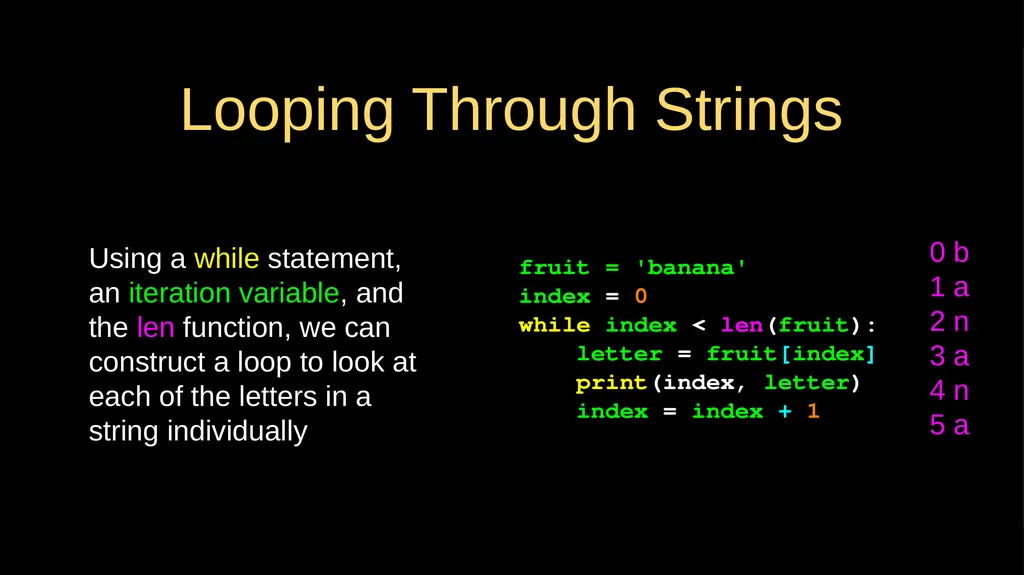
Looping Through Strings Using a while statement, an iteration variable, and the len function, we can construct a loop to look at each of the letters in a string individually fruit = 'banana'
index = 0
while index < len(fruit):
letter = fruit[index]
print(index, letter)
index = index + 1 0 b
1 a
2 n
3 a
4 n
5 a<br>
index = 0
while index < len(fruit):
letter = fruit[index]
print(index, letter)
index = index + 1 0 b
1 a
2 n
3 a
4 n
5 a<br>
10
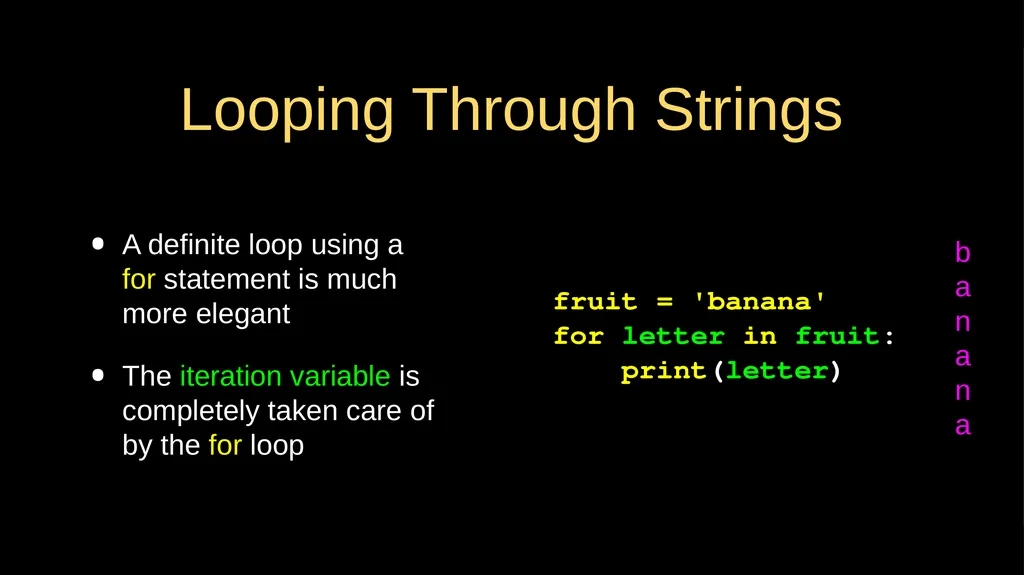
Looping Through Strings A definite loop using a for statement is much more elegant
The iteration variable is completely taken care of by the for loop b
a
n
a
n
a fruit = 'banana'
for letter in fruit:
print(letter)<br>
The iteration variable is completely taken care of by the for loop b
a
n
a
n
a fruit = 'banana'
for letter in fruit:
print(letter)<br>
11
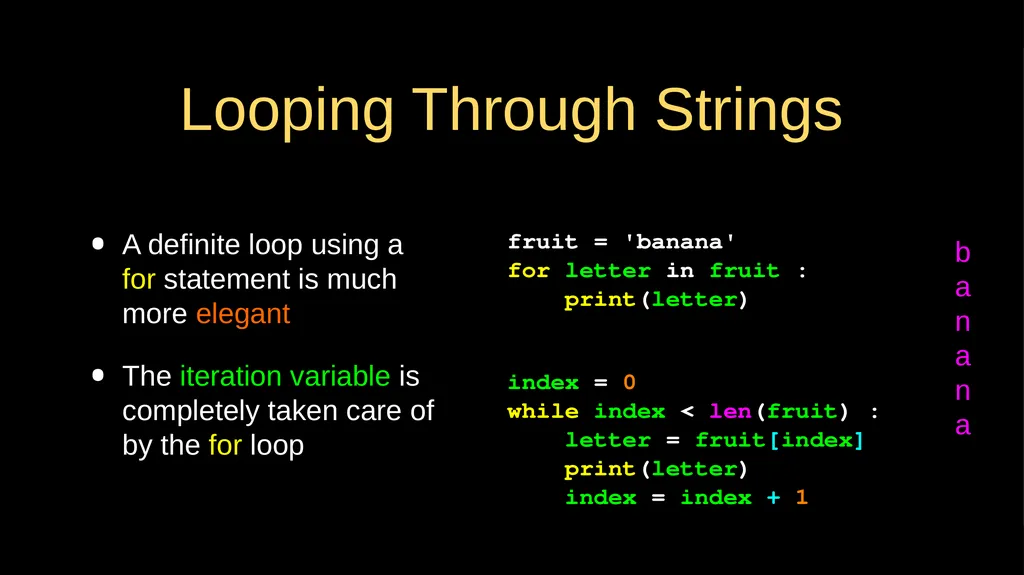
Looping Through Strings A definite loop using a for statement is much more elegant
The iteration variable is completely taken care of by the for loop index = 0
while index < len(fruit) :
letter = fruit[index]
print(letter)
index = index + 1 fruit = 'banana'
for letter in fruit :
print(letter) b
a
n
a
n
a<br>
The iteration variable is completely taken care of by the for loop index = 0
while index < len(fruit) :
letter = fruit[index]
print(letter)
index = index + 1 fruit = 'banana'
for letter in fruit :
print(letter) b
a
n
a
n
a<br>
12
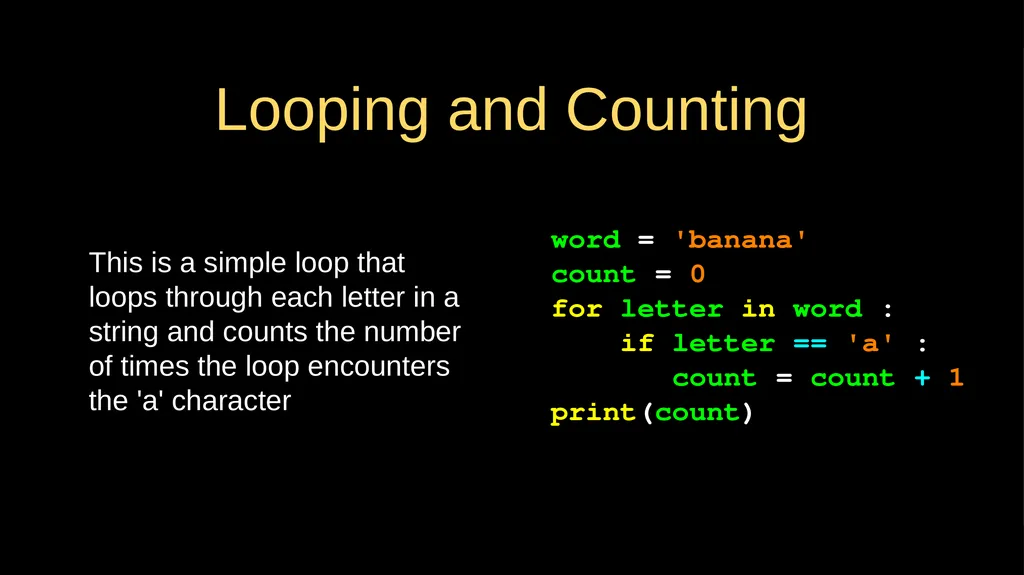
Looping and Counting This is a simple loop that loops through each letter in a string and counts the number of times the loop encounters the 'a' character word = 'banana'
count = 0
for letter in word :
if letter == 'a' :
count = count + 1
print(count)<br>
count = 0
for letter in word :
if letter == 'a' :
count = count + 1
print(count)<br>
13
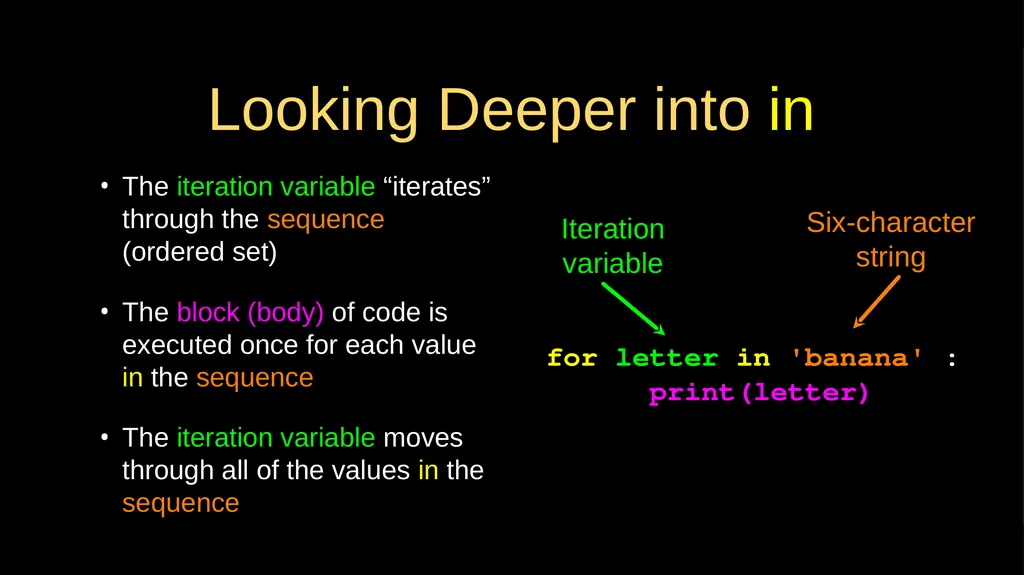
Looking Deeper into in The iteration variable “iterates” through the sequence (ordered set)
The block (body) of code is executed once for each value in the sequence
The iteration variable moves through all of the values in the sequence for letter in 'banana' :
print(letter) Iteration variable Six-character string<br>
The block (body) of code is executed once for each value in the sequence
The iteration variable moves through all of the values in the sequence for letter in 'banana' :
print(letter) Iteration variable Six-character string<br>
14
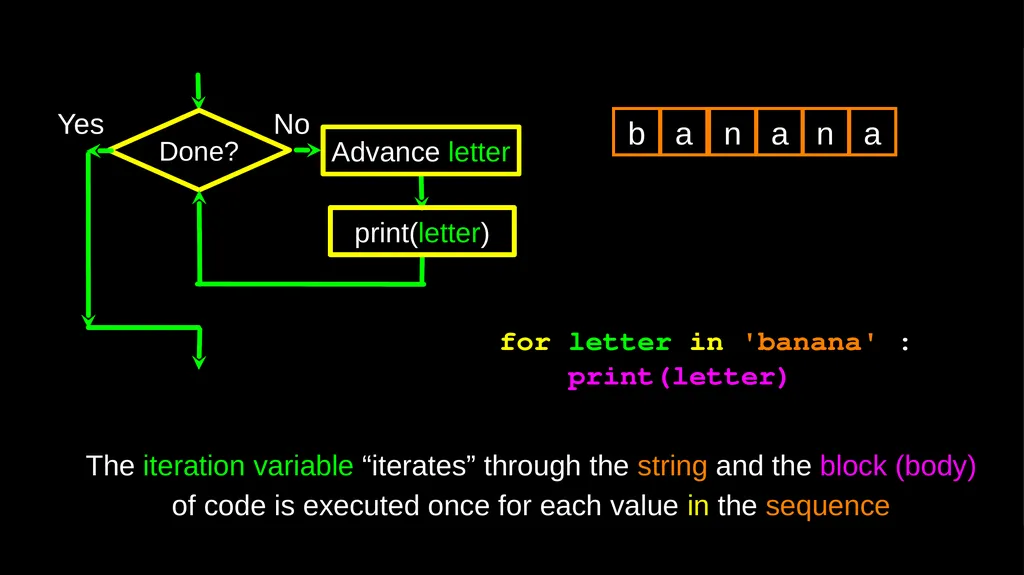
Done? Yes print(letter) Advance letter for letter in 'banana' :
print(letter) b a n a n a The iteration variable “iterates” through the string and the block (body) of code is executed once for each value in the sequence No<br>
print(letter) b a n a n a The iteration variable “iterates” through the string and the block (body) of code is executed once for each value in the sequence No<br>
15
More String Operations<br>
16
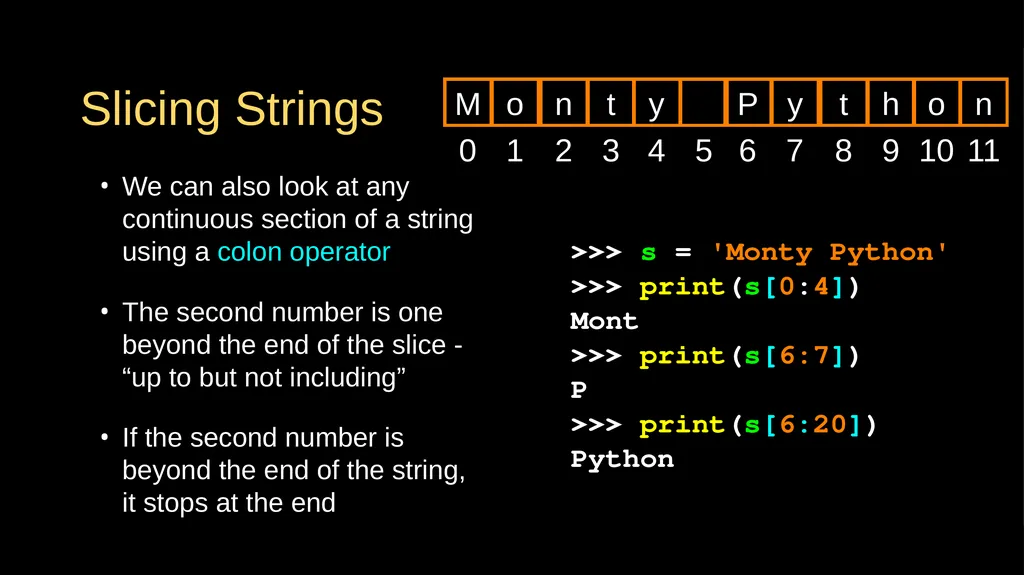
Slicing Strings We can also look at any continuous section of a string using a colon operator
The second number is one beyond the end of the slice - “up to but not including”
If the second number is beyond the end of the string, it stops at the end >>> s = 'Monty Python'
>>> print(s[0:4])
Mont
>>> print(s[6:7])
P
>>> print(s[6:20])
Python 0 M 1 o 2 n 3 t 4 y 5 6 P 7 y 8 t 9 h 10 o 11 n<br>
The second number is one beyond the end of the slice - “up to but not including”
If the second number is beyond the end of the string, it stops at the end >>> s = 'Monty Python'
>>> print(s[0:4])
Mont
>>> print(s[6:7])
P
>>> print(s[6:20])
Python 0 M 1 o 2 n 3 t 4 y 5 6 P 7 y 8 t 9 h 10 o 11 n<br>
17
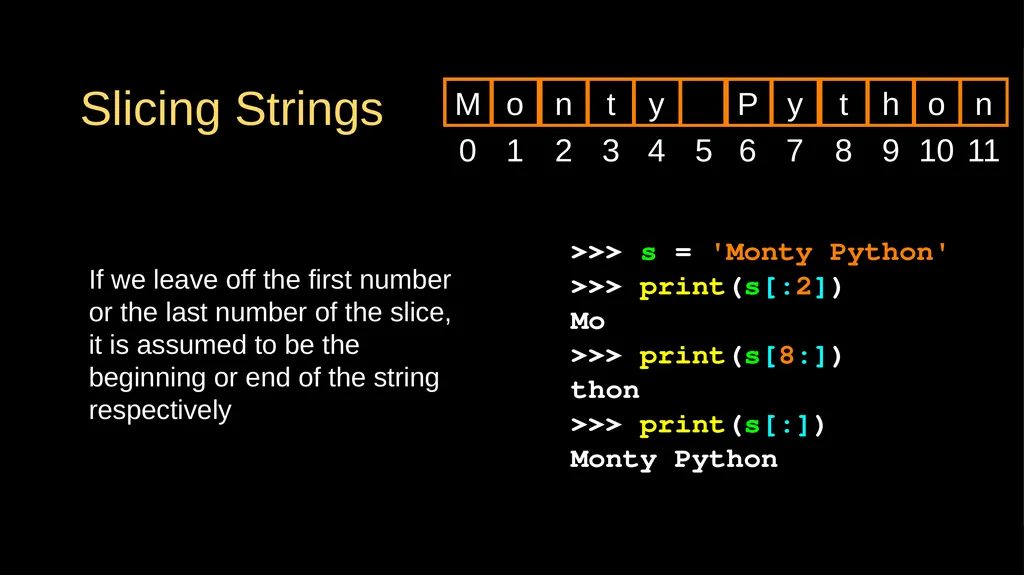
>>> s = 'Monty Python'
>>> print(s[:2])
Mo
>>> print(s[8:])
thon
>>> print(s[:])
Monty Python Slicing Strings If we leave off the first number or the last number of the slice, it is assumed to be the beginning or end of the string respectively 0 M 1 o 2 n 3 t 4 y 5 6 P 7 y 8 t 9 h 10 o 11 n<br>
>>> print(s[:2])
Mo
>>> print(s[8:])
thon
>>> print(s[:])
Monty Python Slicing Strings If we leave off the first number or the last number of the slice, it is assumed to be the beginning or end of the string respectively 0 M 1 o 2 n 3 t 4 y 5 6 P 7 y 8 t 9 h 10 o 11 n<br>
18
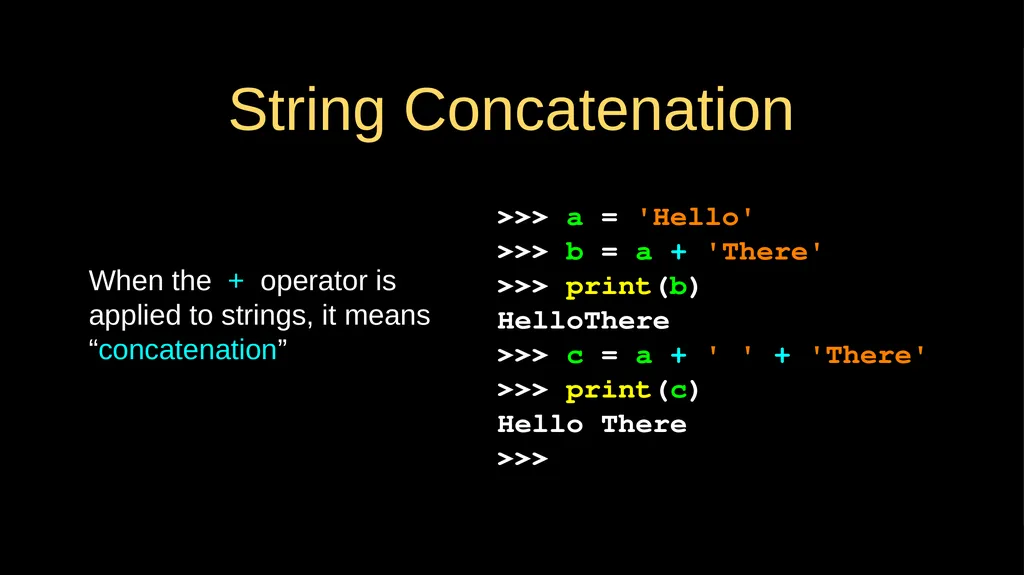
String Concatenation When the + operator is applied to strings, it means “concatenation” >>> a = 'Hello'
>>> b = a + 'There'
>>> print(b)
HelloThere
>>> c = a + ' ' + 'There'
>>> print(c)
Hello There
>>><br>
>>> b = a + 'There'
>>> print(b)
HelloThere
>>> c = a + ' ' + 'There'
>>> print(c)
Hello There
>>><br>
19
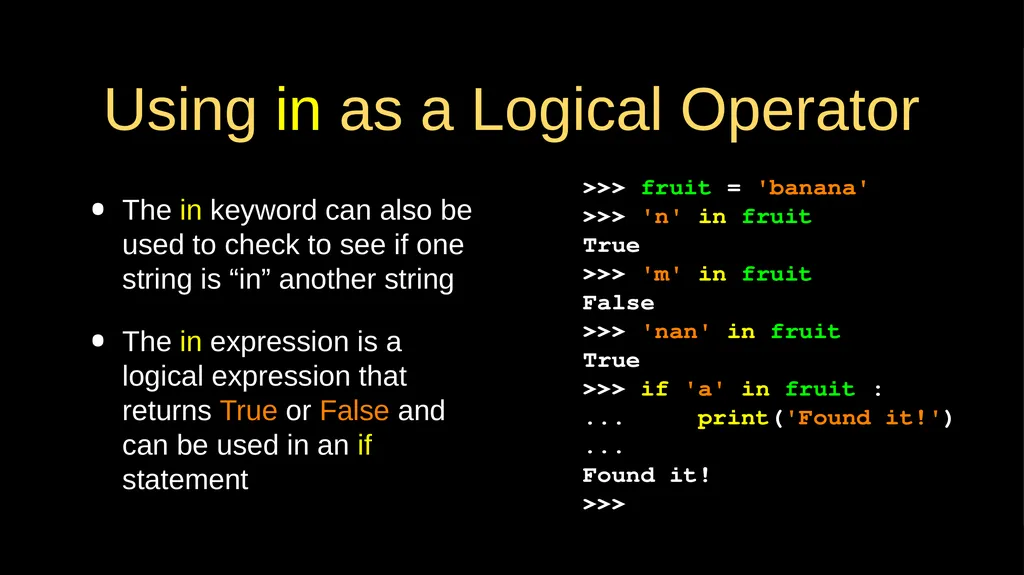
Using in as a Logical Operator The in keyword can also be used to check to see if one string is “in” another string
The in expression is a logical expression that returns True or False and can be used in an if statement >>> fruit = 'banana'
>>> 'n' in fruit
True
>>> 'm' in fruit
False
>>> 'nan' in fruit
True
>>> if 'a' in fruit :
... print('Found it!')
...
Found it!
>>><br>
The in expression is a logical expression that returns True or False and can be used in an if statement >>> fruit = 'banana'
>>> 'n' in fruit
True
>>> 'm' in fruit
False
>>> 'nan' in fruit
True
>>> if 'a' in fruit :
... print('Found it!')
...
Found it!
>>><br>
20
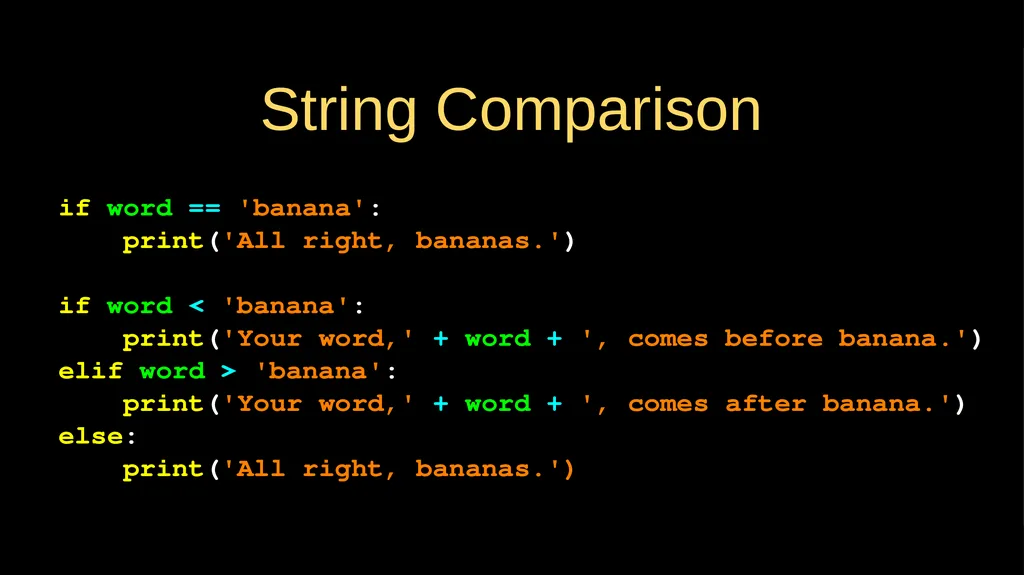
String Comparison if word == 'banana':
print('All right, bananas.')
if word < 'banana':
print('Your word,' + word + ', comes before banana.')
elif word > 'banana':
print('Your word,' + word + ', comes after banana.')
else:
print('All right, bananas.')<br>
print('All right, bananas.')
if word < 'banana':
print('Your word,' + word + ', comes before banana.')
elif word > 'banana':
print('Your word,' + word + ', comes after banana.')
else:
print('All right, bananas.')<br>
21
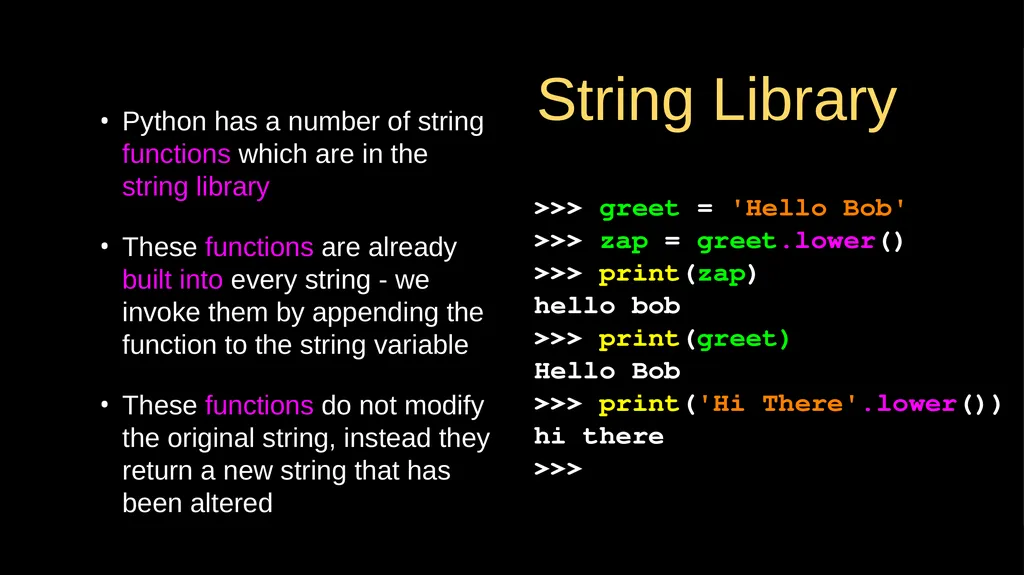
String Library Python has a number of string functions which are in the string library
These functions are already built into every string - we invoke them by appending the function to the string variable
These functions do not modify the original string, instead they return a new string that has been altered >>> greet = 'Hello Bob'
>>> zap = greet.lower()
>>> print(zap)
hello bob
>>> print(greet)
Hello Bob
>>> print('Hi There'.lower())
hi there
>>><br>
These functions are already built into every string - we invoke them by appending the function to the string variable
These functions do not modify the original string, instead they return a new string that has been altered >>> greet = 'Hello Bob'
>>> zap = greet.lower()
>>> print(zap)
hello bob
>>> print(greet)
Hello Bob
>>> print('Hi There'.lower())
hi there
>>><br>
22
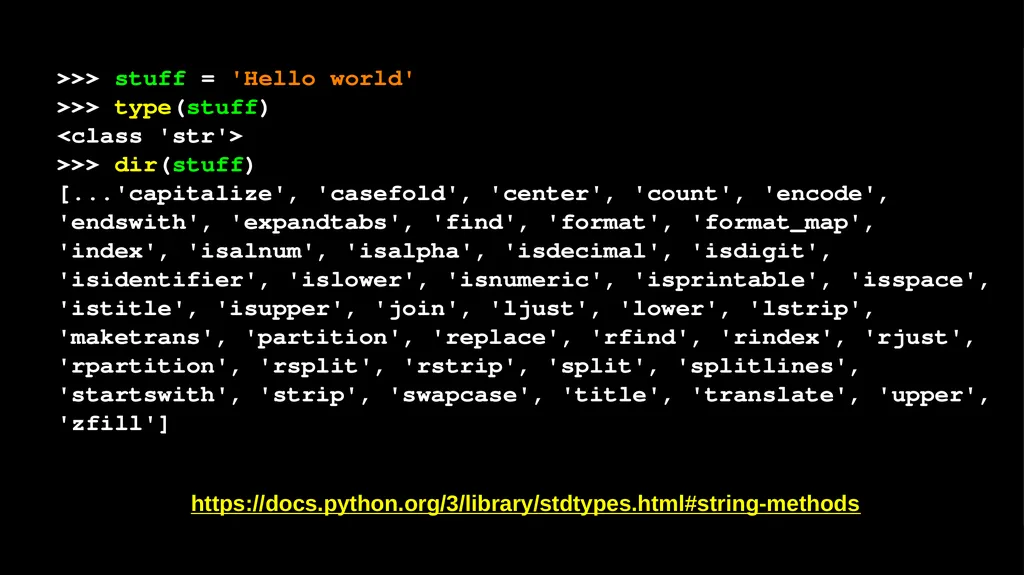
>>> stuff = 'Hello world'
>>> type(stuff)
<class 'str'>
>>> dir(stuff)
[...'capitalize', 'casefold', 'center', 'count', 'encode', 'endswith', 'expandtabs', 'find', 'format', 'format_map', 'index', 'isalnum', 'isalpha', 'isdecimal', 'isdigit', 'isidentifier', 'islower', 'isnumeric', 'isprintable', 'isspace', 'istitle', 'isupper', 'join', 'ljust', 'lower', 'lstrip', 'maketrans', 'partition', 'replace', 'rfind', 'rindex', 'rjust', 'rpartition', 'rsplit', 'rstrip', 'split', 'splitlines', 'startswith', 'strip', 'swapcase', 'title', 'translate', 'upper', 'zfill']
https://docs.python.org/3/library/stdtypes.html#string-methods<br>
>>> type(stuff)
<class 'str'>
>>> dir(stuff)
[...'capitalize', 'casefold', 'center', 'count', 'encode', 'endswith', 'expandtabs', 'find', 'format', 'format_map', 'index', 'isalnum', 'isalpha', 'isdecimal', 'isdigit', 'isidentifier', 'islower', 'isnumeric', 'isprintable', 'isspace', 'istitle', 'isupper', 'join', 'ljust', 'lower', 'lstrip', 'maketrans', 'partition', 'replace', 'rfind', 'rindex', 'rjust', 'rpartition', 'rsplit', 'rstrip', 'split', 'splitlines', 'startswith', 'strip', 'swapcase', 'title', 'translate', 'upper', 'zfill']
https://docs.python.org/3/library/stdtypes.html#string-methods<br>
23
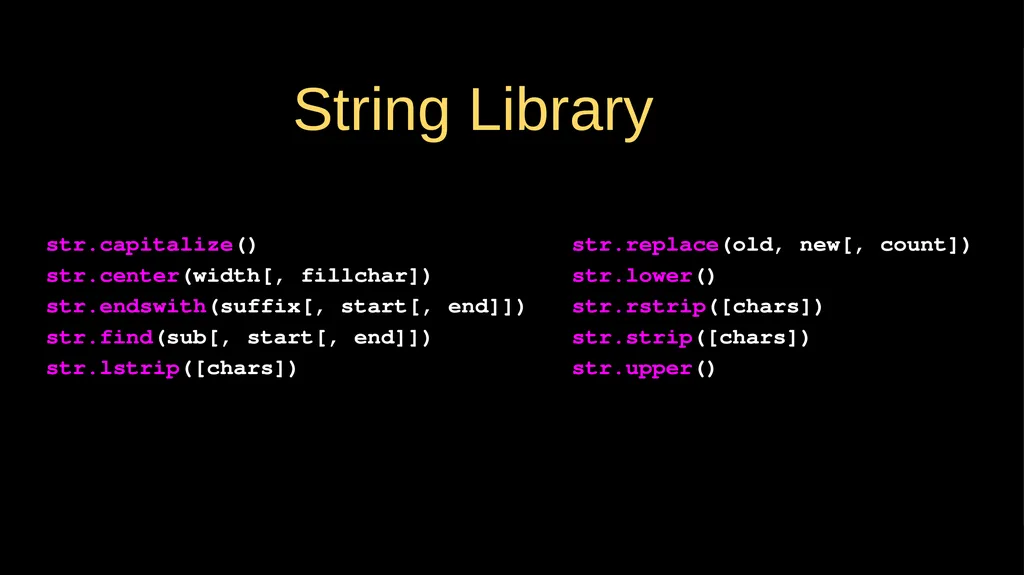
str.capitalize()
str.center(width[, fillchar])
str.endswith(suffix[, start[, end]])
str.find(sub[, start[, end]])
str.lstrip([chars]) str.replace(old, new[, count])
str.lower()
str.rstrip([chars])
str.strip([chars])
str.upper() String Library<br>
str.center(width[, fillchar])
str.endswith(suffix[, start[, end]])
str.find(sub[, start[, end]])
str.lstrip([chars]) str.replace(old, new[, count])
str.lower()
str.rstrip([chars])
str.strip([chars])
str.upper() String Library<br>
24
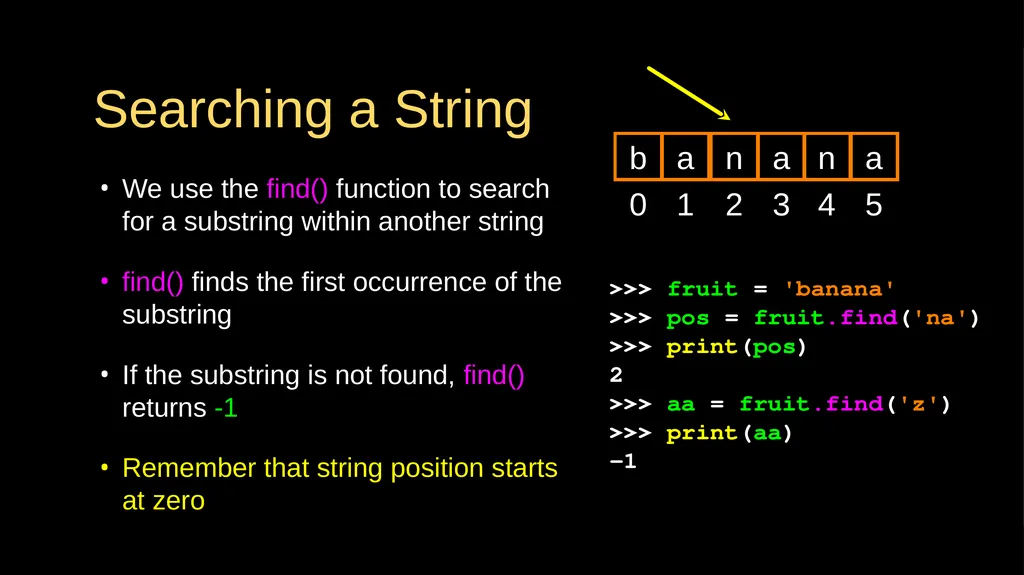
Searching a String We use the find() function to search for a substring within another string
find() finds the first occurrence of the substring
If the substring is not found, find() returns -1
Remember that string position starts at zero >>> fruit = 'banana'
>>> pos = fruit.find('na')
>>> print(pos)
2
>>> aa = fruit.find('z')
>>> print(aa)
-1 0 b 1 a 2 n 3 a 4 n 5 a<br>
find() finds the first occurrence of the substring
If the substring is not found, find() returns -1
Remember that string position starts at zero >>> fruit = 'banana'
>>> pos = fruit.find('na')
>>> print(pos)
2
>>> aa = fruit.find('z')
>>> print(aa)
-1 0 b 1 a 2 n 3 a 4 n 5 a<br>
25
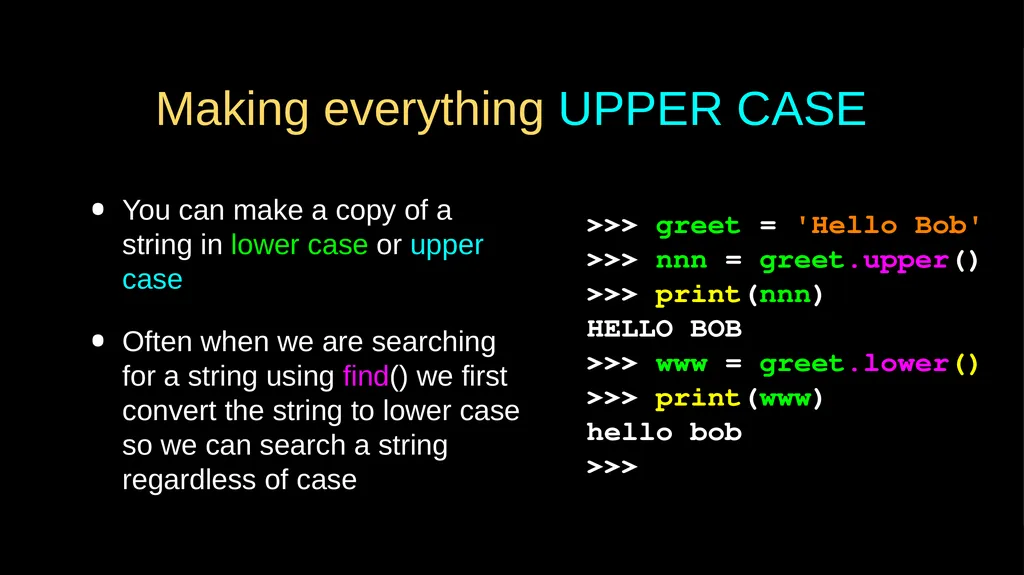
Making everything UPPER CASE You can make a copy of a string in lower case or upper case
Often when we are searching for a string using find() we first convert the string to lower case so we can search a string regardless of case >>> greet = 'Hello Bob'
>>> nnn = greet.upper()
>>> print(nnn)
HELLO BOB
>>> www = greet.lower()
>>> print(www)
hello bob
>>><br>
Often when we are searching for a string using find() we first convert the string to lower case so we can search a string regardless of case >>> greet = 'Hello Bob'
>>> nnn = greet.upper()
>>> print(nnn)
HELLO BOB
>>> www = greet.lower()
>>> print(www)
hello bob
>>><br>
26
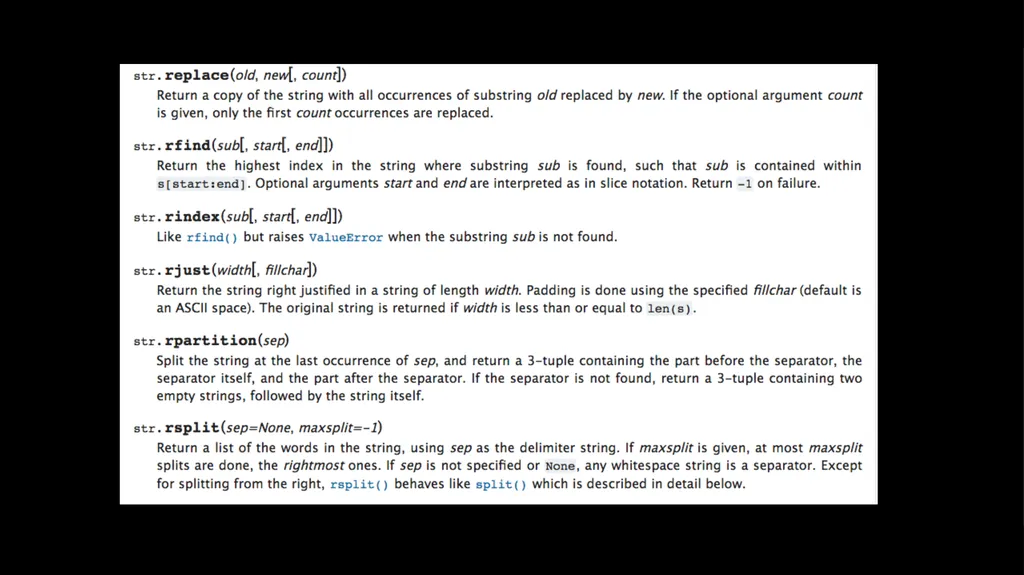
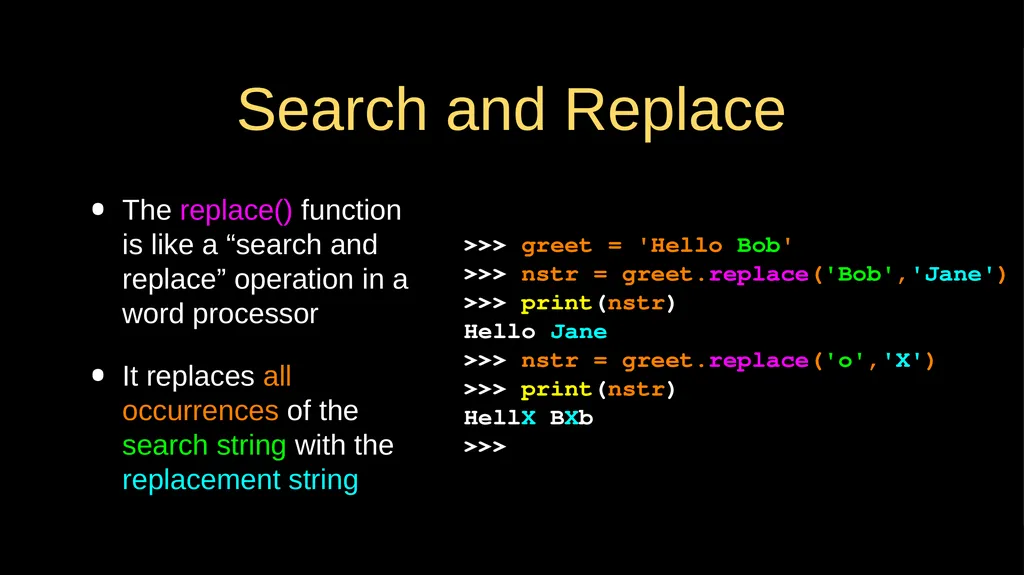
Search and Replace The replace() function is like a “search and replace” operation in a word processor
It replaces all occurrences of the search string with the replacement string >>> greet = 'Hello Bob'
>>> nstr = greet.replace('Bob','Jane')
>>> print(nstr)
Hello Jane
>>> nstr = greet.replace('o','X')
>>> print(nstr)
HellX BXb
>>><br>
It replaces all occurrences of the search string with the replacement string >>> greet = 'Hello Bob'
>>> nstr = greet.replace('Bob','Jane')
>>> print(nstr)
Hello Jane
>>> nstr = greet.replace('o','X')
>>> print(nstr)
HellX BXb
>>><br>
27
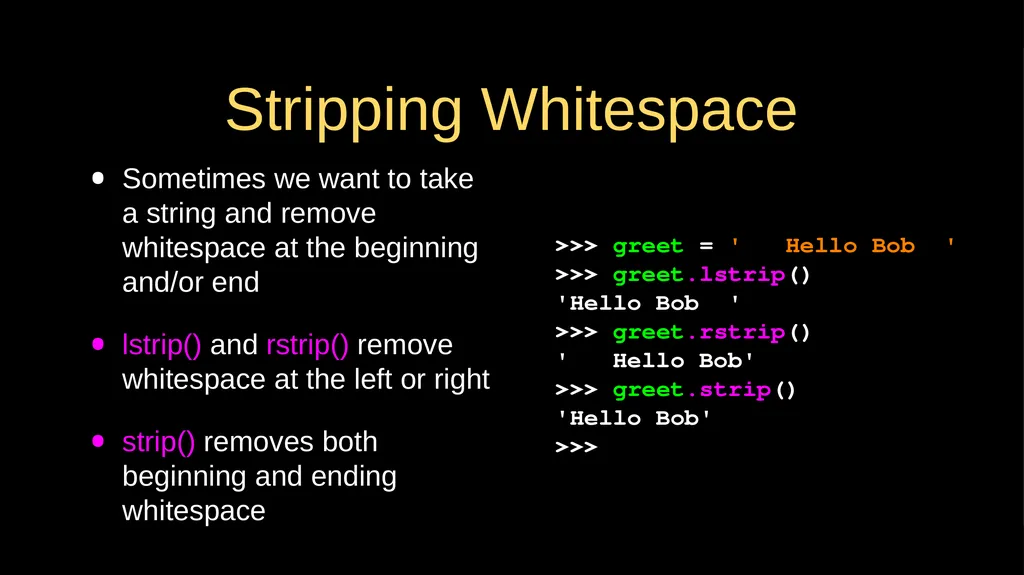
Stripping Whitespace Sometimes we want to take a string and remove whitespace at the beginning and/or end
lstrip() and rstrip() remove whitespace at the left or right
strip() removes both beginning and ending whitespace >>> greet = ' Hello Bob '
>>> greet.lstrip()
'Hello Bob '
>>> greet.rstrip()
' Hello Bob'
>>> greet.strip()
'Hello Bob'
>>><br>
lstrip() and rstrip() remove whitespace at the left or right
strip() removes both beginning and ending whitespace >>> greet = ' Hello Bob '
>>> greet.lstrip()
'Hello Bob '
>>> greet.rstrip()
' Hello Bob'
>>> greet.strip()
'Hello Bob'
>>><br>
28
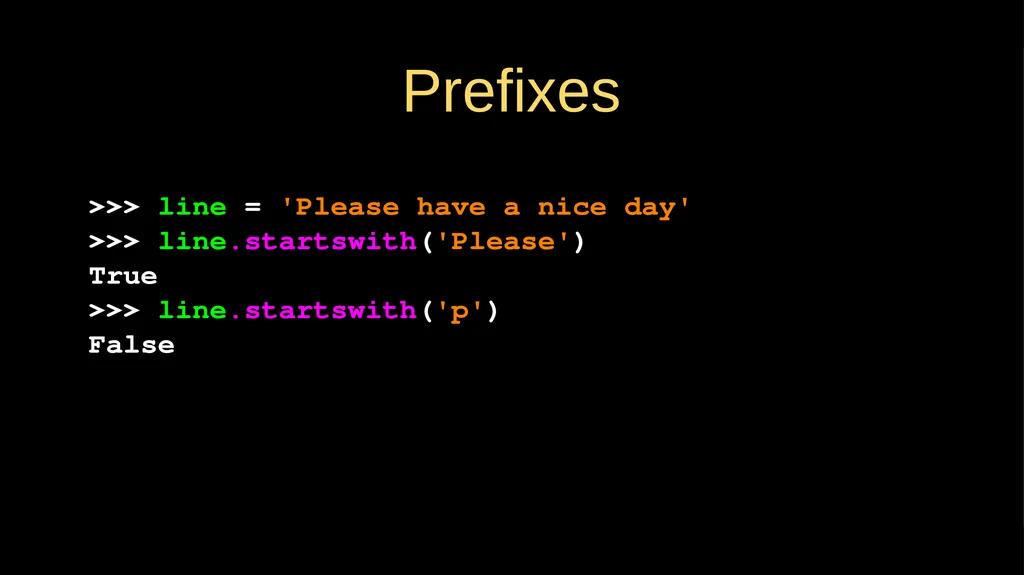
>>> line = 'Please have a nice day'
>>> line.startswith('Please')
True
>>> line.startswith('p')
False Prefixes<br>
>>> line.startswith('Please')
True
>>> line.startswith('p')
False Prefixes<br>
29
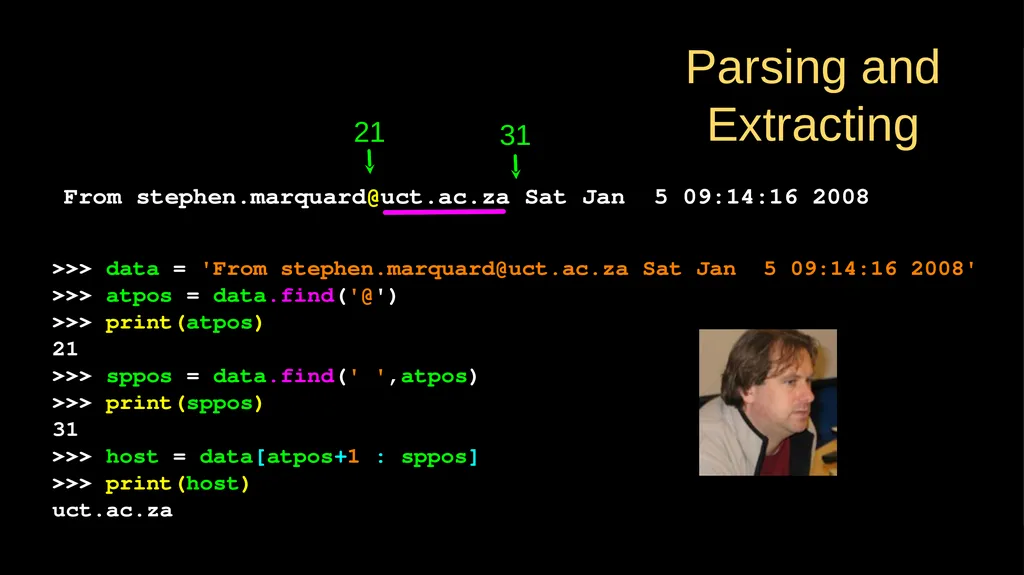
>>> data = 'From stephen.marquard@uct.ac.za Sat Jan 5 09:14:16 2008'
>>> atpos = data.find('@')
>>> print(atpos)
21
>>> sppos = data.find(' ',atpos)
>>> print(sppos)
31
>>> host = data[atpos+1 : sppos]
>>> print(host)
uct.ac.za From stephen.marquard@uct.ac.za Sat Jan 5 09:14:16 2008 21 31 Parsing and Extracting<br>
>>> atpos = data.find('@')
>>> print(atpos)
21
>>> sppos = data.find(' ',atpos)
>>> print(sppos)
31
>>> host = data[atpos+1 : sppos]
>>> print(host)
uct.ac.za From stephen.marquard@uct.ac.za Sat Jan 5 09:14:16 2008 21 31 Parsing and Extracting<br>
30
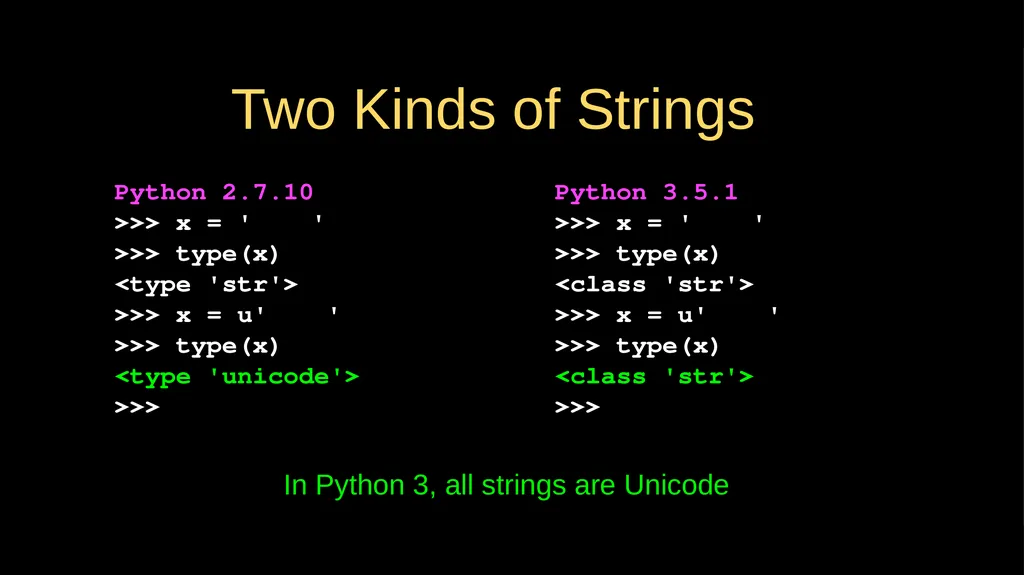
Two Kinds of Strings Python 3.5.1
>>> x = '이광춘'
>>> type(x)
<class 'str'>
>>> x = u'이광춘'
>>> type(x)
<class 'str'>
>>> Python 2.7.10
>>> x = '이광춘'
>>> type(x)
<type 'str'>
>>> x = u'이광춘'
>>> type(x)
<type 'unicode'>
>>> In Python 3, all strings are Unicode<br>
>>> x = '이광춘'
>>> type(x)
<class 'str'>
>>> x = u'이광춘'
>>> type(x)
<class 'str'>
>>> Python 2.7.10
>>> x = '이광춘'
>>> type(x)
<type 'str'>
>>> x = u'이광춘'
>>> type(x)
<type 'unicode'>
>>> In Python 3, all strings are Unicode<br>
31
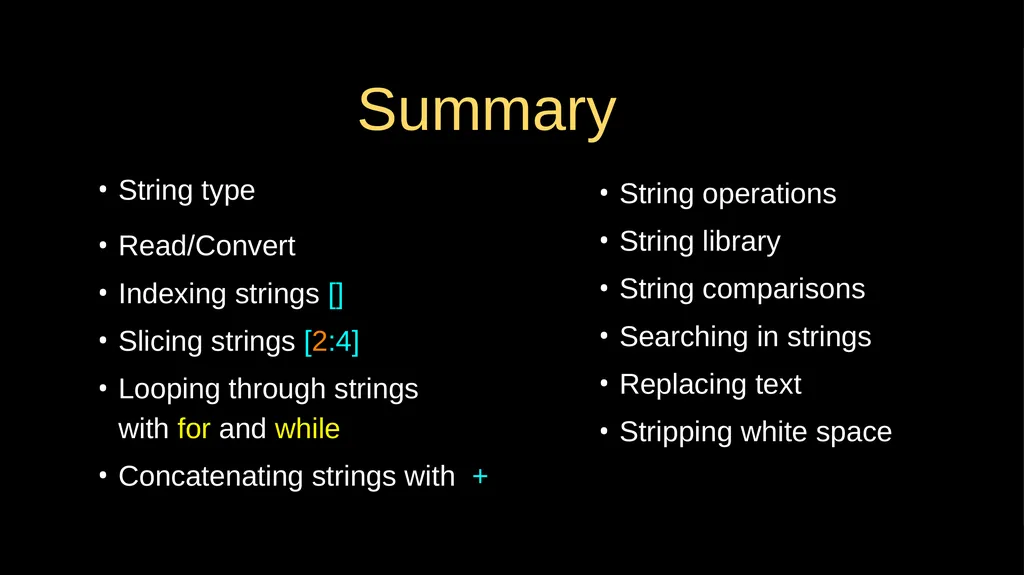
Summary String type
Read/Convert
Indexing strings []
Slicing strings [2:4]
Looping through strings with for and while
Concatenating strings with + String operations
String library
String comparisons
Searching in strings
Replacing text
Stripping white space<br>
Read/Convert
Indexing strings []
Slicing strings [2:4]
Looping through strings with for and while
Concatenating strings with + String operations
String library
String comparisons
Searching in strings
Replacing text
Stripping white space<br>
32
Acknowledgements / Contributions These slides are Copyright 2010- Charles R. Severance (www.dr-chuck.com) of the University of Michigan School of Information and open.umich.edu and made available under a Creative Commons Attribution 4.0 License. Please maintain this last slide in all copies of the document to comply with the attribution requirements of the license. If you make a change, feel free to add your name and organization to the list of contributors on this page as you republish the materials.
Initial Development: Charles Severance, University of Michigan School of Information
… Insert new Contributors and Translators here ...<br>
Initial Development: Charles Severance, University of Michigan School of Information
… Insert new Contributors and Translators here ...<br>