
Supplier Capacity Worksheet Shared Equipment


Description: Supplier Capacity Worksheet Shared Equipment Capacity Run Rate Analysis Worksheet This guide is your introduction to the new Supplier Capacity Worksheet. GHSP will now require that this document be filled out prior to all new business
Related Topics
Download Presentation
"Supplier Capacity Worksheet Shared Equipment" is the property of its rightful owner. Permission is granted to download and print the materials on this website for personal, non-commercial use only, and to display it on your personal computer provided you do not modify the materials and that you retain all copyright notices contained in the materials. By downloading content from our website, you accept the terms of this agreement.
Presentation Transcript
slide1. Supplier Capacity Worksheet<br>
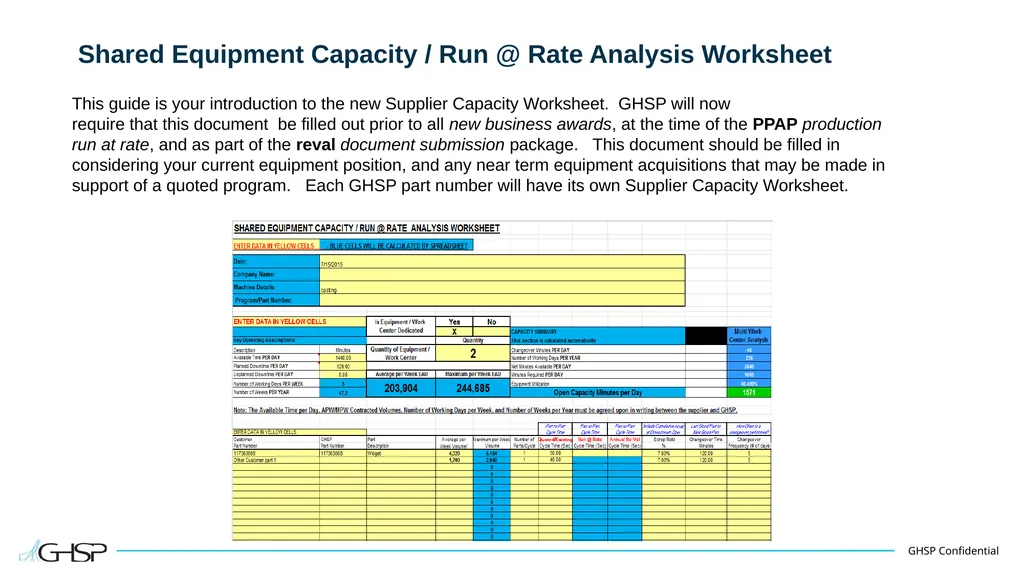
slide2. Shared Equipment Capacity / Run @ Rate Analysis Worksheet This guide is your introduction to the new Supplier Capacity Worksheet. GHSP will now
require that this document be filled out prior to all new business awards, at the time of the PPAP production run at rate, and as part of the reval document submission package. This document should be filled in considering your current equipment position, and any near term equipment acquisitions that may be made in support of a quoted program. Each GHSP part number will have its own Supplier Capacity Worksheet.<br>
slide3. Blue Cells The Blue colored cells are fixed cells that make automatic calculations or are title cells for a yellow cell immediately next to it. Suppliers will not have to fill in any Blue cells.<br>
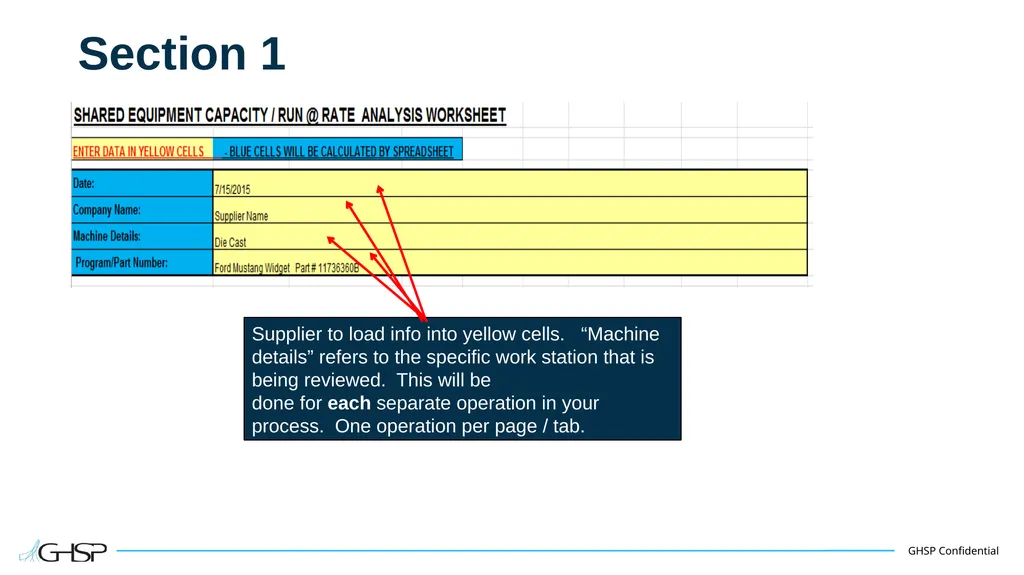
slide4. Section 1 Supplier to load info into yellow cells. “Machine details” refers to the specific work station that is being reviewed. This will be
done for each separate operation in your process. One operation per page / tab.<br>
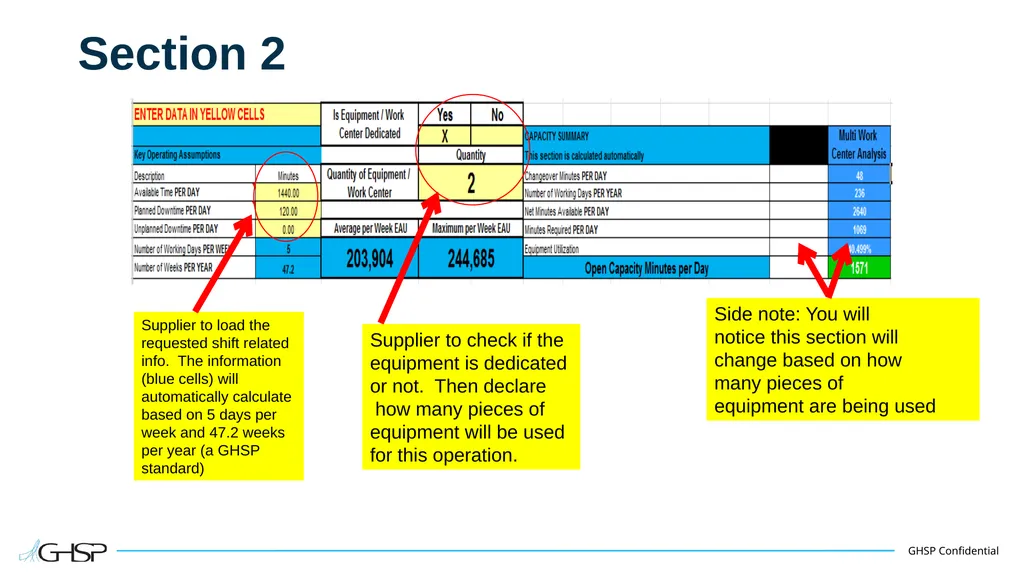
slide5. Section 2 Supplier to load the
requested shift related info. The information (blue cells) will automatically calculate based on 5 days per week and 47.2 weeks per year (a GHSP standard) Supplier to check if the
equipment is dedicated
or not. Then declare
how many pieces of
equipment will be used
for this operation. Side note: You will
notice this section will
change based on how
many pieces of
equipment are being used<br>
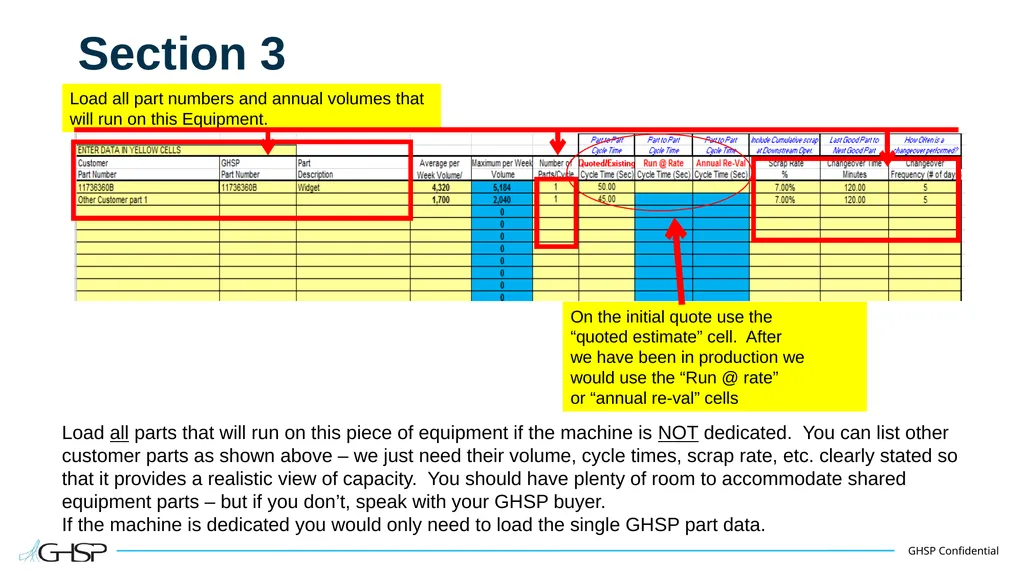
slide6. Section 3 Load all parts that will run on this piece of equipment if the machine is NOT dedicated. You can list other customer parts as shown above – we just need their volume, cycle times, scrap rate, etc. clearly stated so that it provides a realistic view of capacity. You should have plenty of room to accommodate shared equipment parts – but if you don’t, speak with your GHSP buyer.
If the machine is dedicated you would only need to load the single GHSP part data. On the initial quote use the
“quoted estimate” cell. After
we have been in production we
would use the “Run @ rate”
or “annual re-val” cells Load all part numbers and annual volumes that will run on this Equipment.<br>
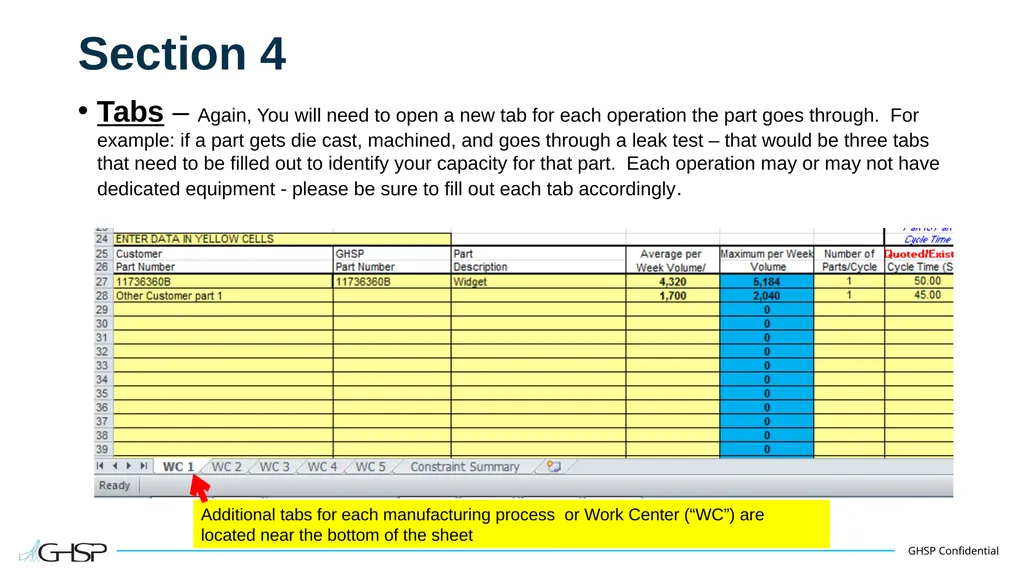
slide7. Section 4 Tabs – Again, You will need to open a new tab for each operation the part goes through. For example: if a part gets die cast, machined, and goes through a leak test – that would be three tabs that need to be filled out to identify your capacity for that part. Each operation may or may not have dedicated equipment - please be sure to fill out each tab accordingly. Additional tabs for each manufacturing process or Work Center (“WC”) are located near the bottom of the sheet<br>
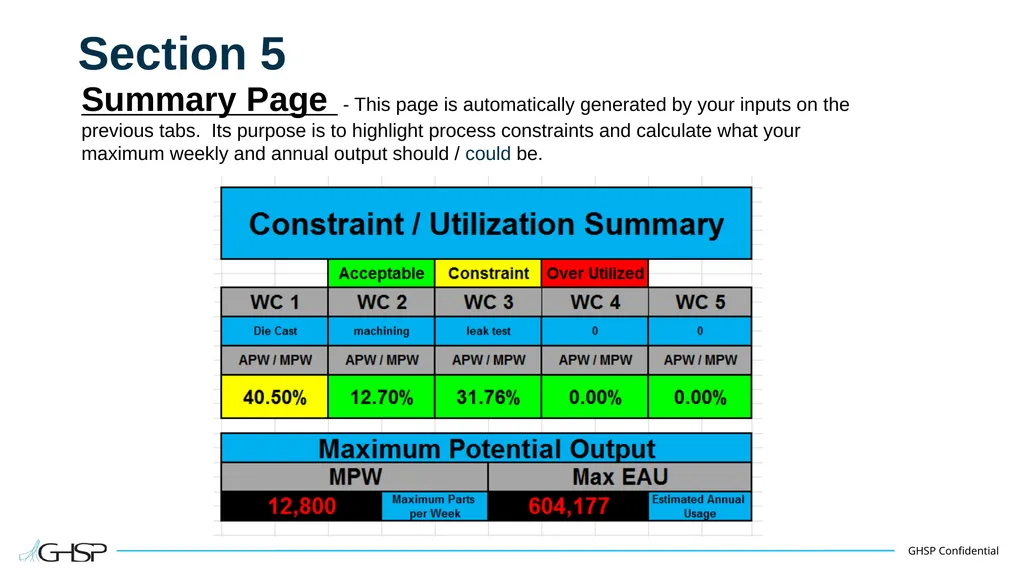
slide8. Section 5 Summary Page - This page is automatically generated by your inputs on the
previous tabs. Its purpose is to highlight process constraints and calculate what your
maximum weekly and annual output should / could be.<br>
slide9. Additional Information You will be required to submit this form to your GHSP Buyer: 1) Pre- new business award, 2) At the time of the PPAP production run at rate, and 3) As part of the reval submissions in January of each year.
When you submit each part number file you will need to use the following naming pattern: Part number, Description, Current month, Current year. (example below)
“123456 Ford Mustang widget January 2015”
If you have questions about this worksheet, please contact your GHSP buyer.<br>
slide2. Shared Equipment Capacity / Run @ Rate Analysis Worksheet This guide is your introduction to the new Supplier Capacity Worksheet. GHSP will now
require that this document be filled out prior to all new business awards, at the time of the PPAP production run at rate, and as part of the reval document submission package. This document should be filled in considering your current equipment position, and any near term equipment acquisitions that may be made in support of a quoted program. Each GHSP part number will have its own Supplier Capacity Worksheet.<br>
slide3. Blue Cells The Blue colored cells are fixed cells that make automatic calculations or are title cells for a yellow cell immediately next to it. Suppliers will not have to fill in any Blue cells.<br>
slide4. Section 1 Supplier to load info into yellow cells. “Machine details” refers to the specific work station that is being reviewed. This will be
done for each separate operation in your process. One operation per page / tab.<br>
slide5. Section 2 Supplier to load the
requested shift related info. The information (blue cells) will automatically calculate based on 5 days per week and 47.2 weeks per year (a GHSP standard) Supplier to check if the
equipment is dedicated
or not. Then declare
how many pieces of
equipment will be used
for this operation. Side note: You will
notice this section will
change based on how
many pieces of
equipment are being used<br>
slide6. Section 3 Load all parts that will run on this piece of equipment if the machine is NOT dedicated. You can list other customer parts as shown above – we just need their volume, cycle times, scrap rate, etc. clearly stated so that it provides a realistic view of capacity. You should have plenty of room to accommodate shared equipment parts – but if you don’t, speak with your GHSP buyer.
If the machine is dedicated you would only need to load the single GHSP part data. On the initial quote use the
“quoted estimate” cell. After
we have been in production we
would use the “Run @ rate”
or “annual re-val” cells Load all part numbers and annual volumes that will run on this Equipment.<br>
slide7. Section 4 Tabs – Again, You will need to open a new tab for each operation the part goes through. For example: if a part gets die cast, machined, and goes through a leak test – that would be three tabs that need to be filled out to identify your capacity for that part. Each operation may or may not have dedicated equipment - please be sure to fill out each tab accordingly. Additional tabs for each manufacturing process or Work Center (“WC”) are located near the bottom of the sheet<br>
slide8. Section 5 Summary Page - This page is automatically generated by your inputs on the
previous tabs. Its purpose is to highlight process constraints and calculate what your
maximum weekly and annual output should / could be.<br>
slide9. Additional Information You will be required to submit this form to your GHSP Buyer: 1) Pre- new business award, 2) At the time of the PPAP production run at rate, and 3) As part of the reval submissions in January of each year.
When you submit each part number file you will need to use the following naming pattern: Part number, Description, Current month, Current year. (example below)
“123456 Ford Mustang widget January 2015”
If you have questions about this worksheet, please contact your GHSP buyer.<br>