
TRAINING ON LOCATION CODES Subcontractor
MY
Published · 16 slides · 0 views

1 / 1


Description
TRAINING ON LOCATION CODES Subcontractor Timekeeping Picture taken by: Sharon Amoroso March 2022 Author: Sharon Amoroso 1 2 TABLE OF CONTENTS INTRODUCTION AND SUMMARY PURPOSE: There are certain tax and International reporting requirements
Related Topics
Share
Embed code
Download this presentation From Below
"TRAINING ON LOCATION CODES Subcontractor" is the property of its rightful owner. Permission is granted to download and print the materials on this website for personal, non-commercial use only, and to display it on your personal computer provided you do not modify the materials and that you retain all copyright notices contained in the materials. By downloading content from our website, you accept the terms of this agreement.
Presentation Transcript
01
TRAINING ON LOCATION CODES Subcontractor Timekeeping Picture taken by: Sharon Amoroso March 2022
Author: Sharon Amoroso 1<br>
Author: Sharon Amoroso 1<br>
02
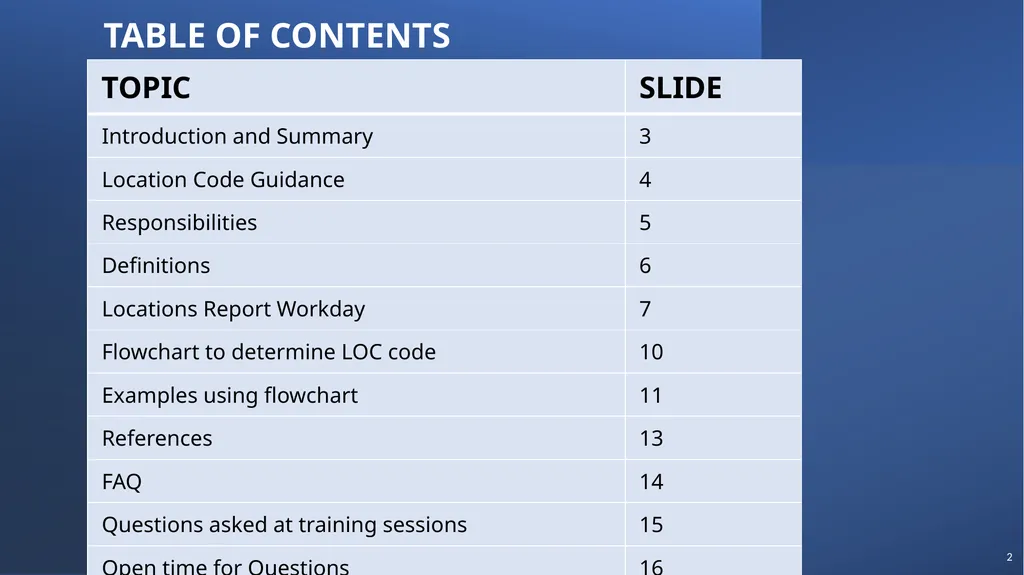
2 TABLE OF CONTENTS<br>
03
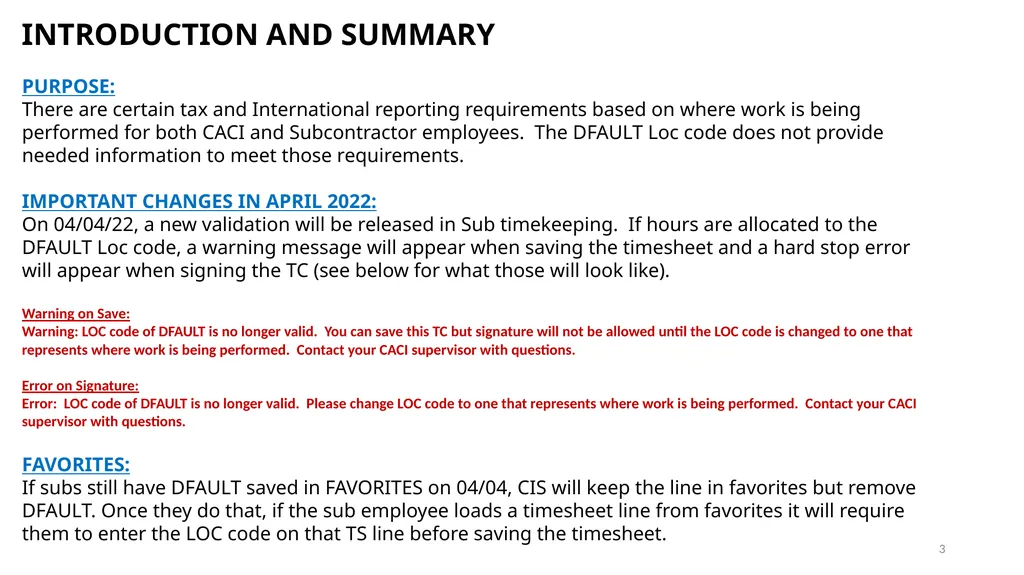
INTRODUCTION AND SUMMARY
PURPOSE:
There are certain tax and International reporting requirements based on where work is being performed for both CACI and Subcontractor employees. The DFAULT Loc code does not provide needed information to meet those requirements.
IMPORTANT CHANGES IN APRIL 2022:
On 04/04/22, a new validation will be released in Sub timekeeping. If hours are allocated to the DFAULT Loc code, a warning message will appear when saving the timesheet and a hard stop error will appear when signing the TC (see below for what those will look like).
Warning on Save:
Warning: LOC code of DFAULT is no longer valid. You can save this TC but signature will not be allowed until the LOC code is changed to one that represents where work is being performed. Contact your CACI supervisor with questions.
Error on Signature:
Error: LOC code of DFAULT is no longer valid. Please change LOC code to one that represents where work is being performed. Contact your CACI supervisor with questions.
FAVORITES:
If subs still have DFAULT saved in FAVORITES on 04/04, CIS will keep the line in favorites but remove DFAULT. Once they do that, if the sub employee loads a timesheet line from favorites it will require them to enter the LOC code on that TS line before saving the timesheet. 3<br>
PURPOSE:
There are certain tax and International reporting requirements based on where work is being performed for both CACI and Subcontractor employees. The DFAULT Loc code does not provide needed information to meet those requirements.
IMPORTANT CHANGES IN APRIL 2022:
On 04/04/22, a new validation will be released in Sub timekeeping. If hours are allocated to the DFAULT Loc code, a warning message will appear when saving the timesheet and a hard stop error will appear when signing the TC (see below for what those will look like).
Warning on Save:
Warning: LOC code of DFAULT is no longer valid. You can save this TC but signature will not be allowed until the LOC code is changed to one that represents where work is being performed. Contact your CACI supervisor with questions.
Error on Signature:
Error: LOC code of DFAULT is no longer valid. Please change LOC code to one that represents where work is being performed. Contact your CACI supervisor with questions.
FAVORITES:
If subs still have DFAULT saved in FAVORITES on 04/04, CIS will keep the line in favorites but remove DFAULT. Once they do that, if the sub employee loads a timesheet line from favorites it will require them to enter the LOC code on that TS line before saving the timesheet. 3<br>
04
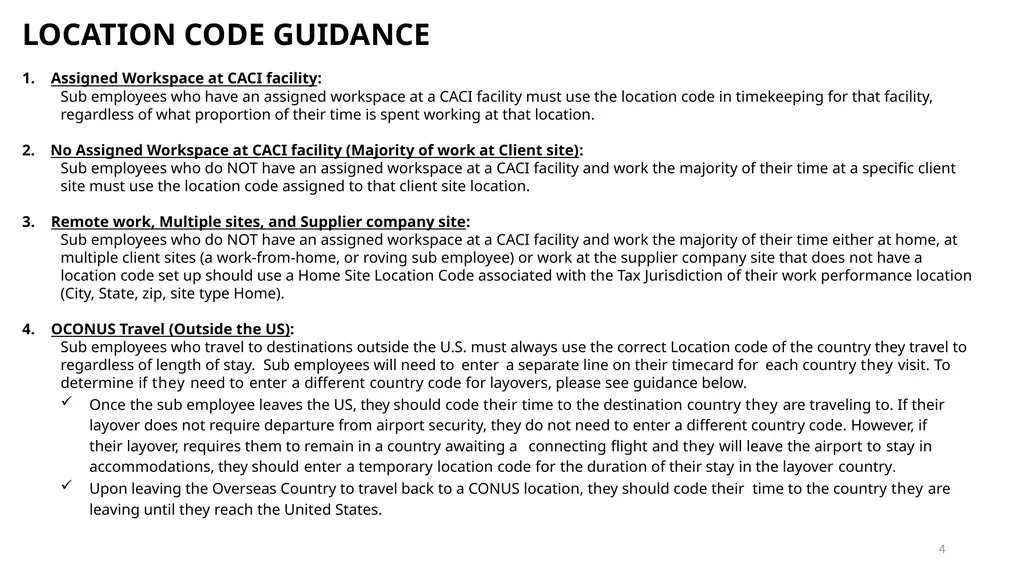
4 LOCATION CODE GUIDANCE
Assigned Workspace at CACI facility:
Sub employees who have an assigned workspace at a CACI facility must use the location code in timekeeping for that facility, regardless of what proportion of their time is spent working at that location.
2. No Assigned Workspace at CACI facility (Majority of work at Client site):
Sub employees who do NOT have an assigned workspace at a CACI facility and work the majority of their time at a specific client site must use the location code assigned to that client site location.
Remote work, Multiple sites, and Supplier company site:
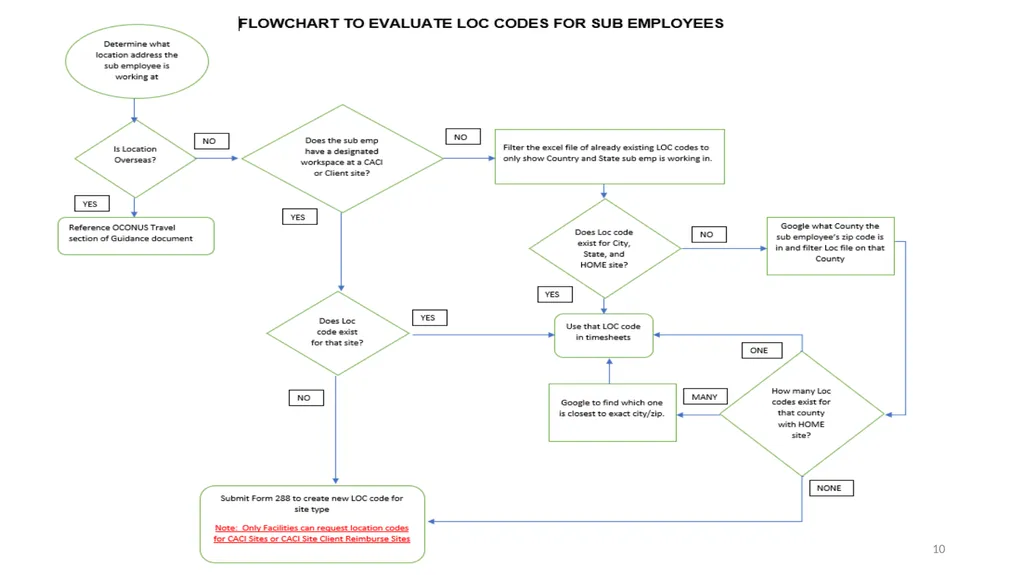
Sub employees who do NOT have an assigned workspace at a CACI facility and work the majority of their time either at home, at multiple client sites (a work-from-home, or roving sub employee) or work at the supplier company site that does not have a location code set up should use a Home Site Location Code associated with the Tax Jurisdiction of their work performance location (City, State, zip, site type Home).
OCONUS Travel (Outside the US):
Sub employees who travel to destinations outside the U.S. must always use the correct Location code of the country they travel to regardless of length of stay. Sub employees will need to enter a separate line on their timecard for each country they visit. To determine if they need to enter a different country code for layovers, please see guidance below.
Once the sub employee leaves the US, they should code their time to the destination country they are traveling to. If their layover does not require departure from airport security, they do not need to enter a different country code. However, if their layover, requires them to remain in a country awaiting a connecting flight and they will leave the airport to stay in accommodations, they should enter a temporary location code for the duration of their stay in the layover country.
Upon leaving the Overseas Country to travel back to a CONUS location, they should code their time to the country they are leaving until they reach the United States.<br>
Assigned Workspace at CACI facility:
Sub employees who have an assigned workspace at a CACI facility must use the location code in timekeeping for that facility, regardless of what proportion of their time is spent working at that location.
2. No Assigned Workspace at CACI facility (Majority of work at Client site):
Sub employees who do NOT have an assigned workspace at a CACI facility and work the majority of their time at a specific client site must use the location code assigned to that client site location.
Remote work, Multiple sites, and Supplier company site:
Sub employees who do NOT have an assigned workspace at a CACI facility and work the majority of their time either at home, at multiple client sites (a work-from-home, or roving sub employee) or work at the supplier company site that does not have a location code set up should use a Home Site Location Code associated with the Tax Jurisdiction of their work performance location (City, State, zip, site type Home).
OCONUS Travel (Outside the US):
Sub employees who travel to destinations outside the U.S. must always use the correct Location code of the country they travel to regardless of length of stay. Sub employees will need to enter a separate line on their timecard for each country they visit. To determine if they need to enter a different country code for layovers, please see guidance below.
Once the sub employee leaves the US, they should code their time to the destination country they are traveling to. If their layover does not require departure from airport security, they do not need to enter a different country code. However, if their layover, requires them to remain in a country awaiting a connecting flight and they will leave the airport to stay in accommodations, they should enter a temporary location code for the duration of their stay in the layover country.
Upon leaving the Overseas Country to travel back to a CONUS location, they should code their time to the country they are leaving until they reach the United States.<br>
05
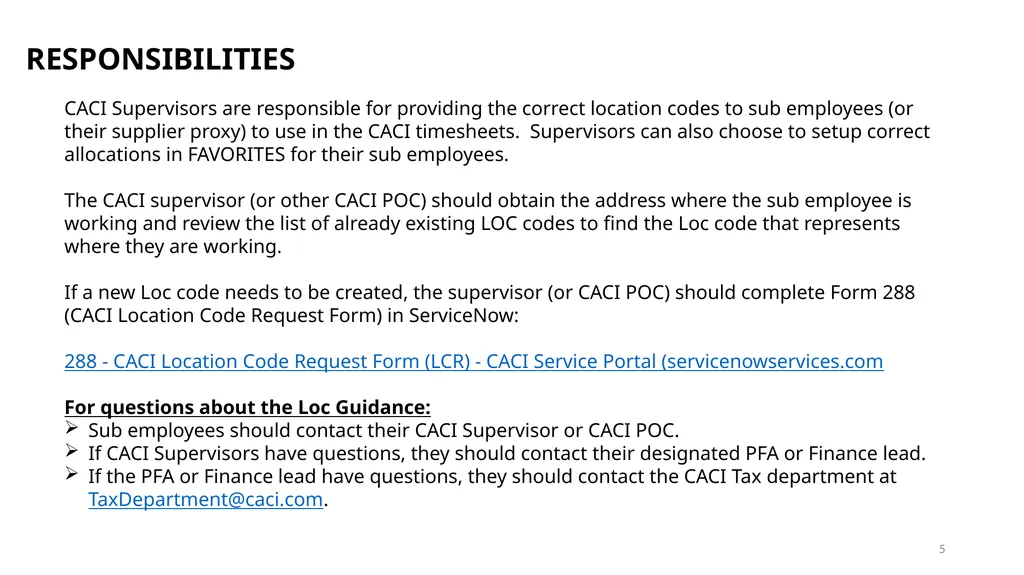
5 RESPONSIBILITIES
CACI Supervisors are responsible for providing the correct location codes to sub employees (or their supplier proxy) to use in the CACI timesheets. Supervisors can also choose to setup correct allocations in FAVORITES for their sub employees.
The CACI supervisor (or other CACI POC) should obtain the address where the sub employee is working and review the list of already existing LOC codes to find the Loc code that represents where they are working.
If a new Loc code needs to be created, the supervisor (or CACI POC) should complete Form 288 (CACI Location Code Request Form) in ServiceNow:
288 - CACI Location Code Request Form (LCR) - CACI Service Portal (servicenowservices.com
For questions about the Loc Guidance:
Sub employees should contact their CACI Supervisor or CACI POC.
If CACI Supervisors have questions, they should contact their designated PFA or Finance lead.
If the PFA or Finance lead have questions, they should contact the CACI Tax department at TaxDepartment@caci.com.<br>
CACI Supervisors are responsible for providing the correct location codes to sub employees (or their supplier proxy) to use in the CACI timesheets. Supervisors can also choose to setup correct allocations in FAVORITES for their sub employees.
The CACI supervisor (or other CACI POC) should obtain the address where the sub employee is working and review the list of already existing LOC codes to find the Loc code that represents where they are working.
If a new Loc code needs to be created, the supervisor (or CACI POC) should complete Form 288 (CACI Location Code Request Form) in ServiceNow:
288 - CACI Location Code Request Form (LCR) - CACI Service Portal (servicenowservices.com
For questions about the Loc Guidance:
Sub employees should contact their CACI Supervisor or CACI POC.
If CACI Supervisors have questions, they should contact their designated PFA or Finance lead.
If the PFA or Finance lead have questions, they should contact the CACI Tax department at TaxDepartment@caci.com.<br>
06
6 DEFINITIONS
Location Name:
The combination of the Location Code, city, state, and "nickname" are used to describe the location. The "nickname" can be a common name used to reference the location. The field can be left blank if a "nickname" is not applicable. The Vista Location Code Table stores this field as "Location Description," but it is displayed as "Location Name" in most records. Example: 001 ARLINGTON, VA (BALLSTON)
CACI Site:
A facility that is leased or owned by a CACI company.
CACI Site Reimbursed by the Client:
A facility that is leased by a CACI company but reimbursed by a client organization.
Client Site:
A non-CACI facility that is not leased or owned by a CACI company where employees perform work; the facility may be leased or owned by a client organization.
Work from Home Site:
A sub employee's home. A sub employee who spends most of his/her time working from home is considered to be located at their home for purposes of assigning a Location Code.
Tax Jurisdiction:
Defined by City, County, State, and Country. Tax jurisdictions do not necessarily match municipal boundaries or ZIP code boundaries.<br>
Location Name:
The combination of the Location Code, city, state, and "nickname" are used to describe the location. The "nickname" can be a common name used to reference the location. The field can be left blank if a "nickname" is not applicable. The Vista Location Code Table stores this field as "Location Description," but it is displayed as "Location Name" in most records. Example: 001 ARLINGTON, VA (BALLSTON)
CACI Site:
A facility that is leased or owned by a CACI company.
CACI Site Reimbursed by the Client:
A facility that is leased by a CACI company but reimbursed by a client organization.
Client Site:
A non-CACI facility that is not leased or owned by a CACI company where employees perform work; the facility may be leased or owned by a client organization.
Work from Home Site:
A sub employee's home. A sub employee who spends most of his/her time working from home is considered to be located at their home for purposes of assigning a Location Code.
Tax Jurisdiction:
Defined by City, County, State, and Country. Tax jurisdictions do not necessarily match municipal boundaries or ZIP code boundaries.<br>
07
7 LOCATION CODE REPORT
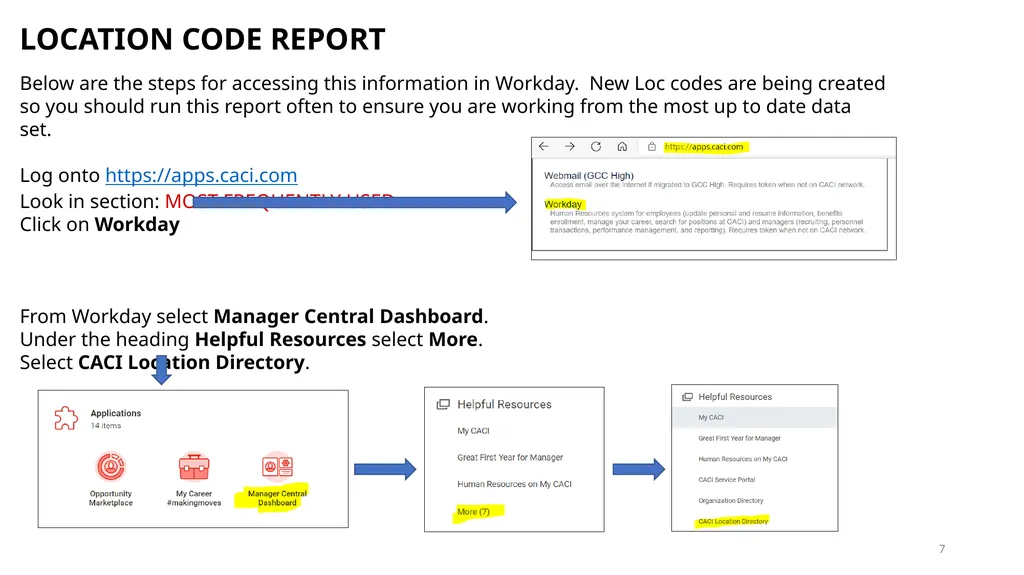
Below are the steps for accessing this information in Workday. New Loc codes are being created so you should run this report often to ensure you are working from the most up to date data set.
Log onto https://apps.caci.com
Look in section: MOST FREQUENTLY USED
Click on Workday
From Workday select Manager Central Dashboard.
Under the heading Helpful Resources select More.
Select CACI Location Directory.<br>
Below are the steps for accessing this information in Workday. New Loc codes are being created so you should run this report often to ensure you are working from the most up to date data set.
Log onto https://apps.caci.com
Look in section: MOST FREQUENTLY USED
Click on Workday
From Workday select Manager Central Dashboard.
Under the heading Helpful Resources select More.
Select CACI Location Directory.<br>
08
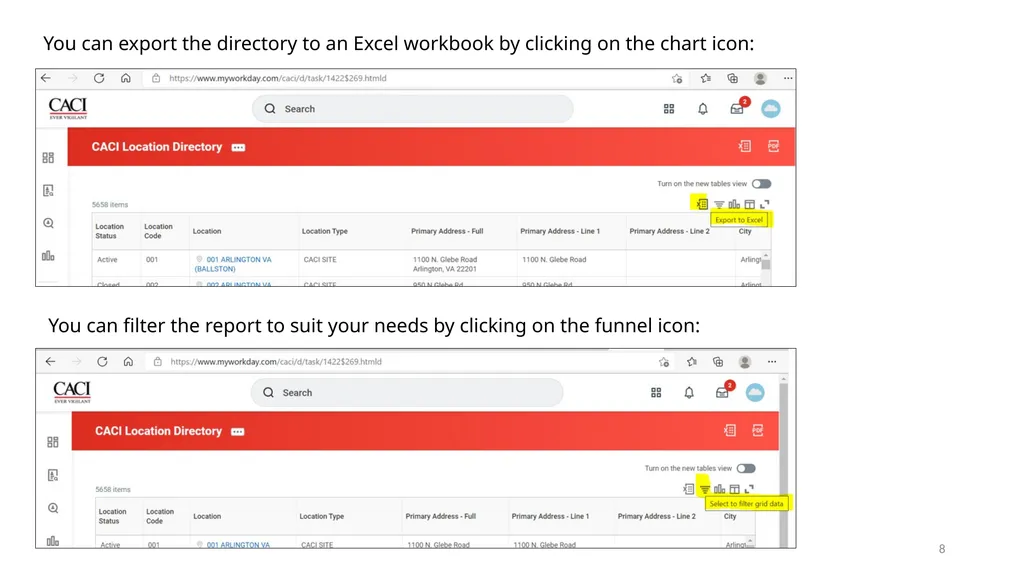
8 You can export the directory to an Excel workbook by clicking on the chart icon: You can filter the report to suit your needs by clicking on the funnel icon:<br>
09
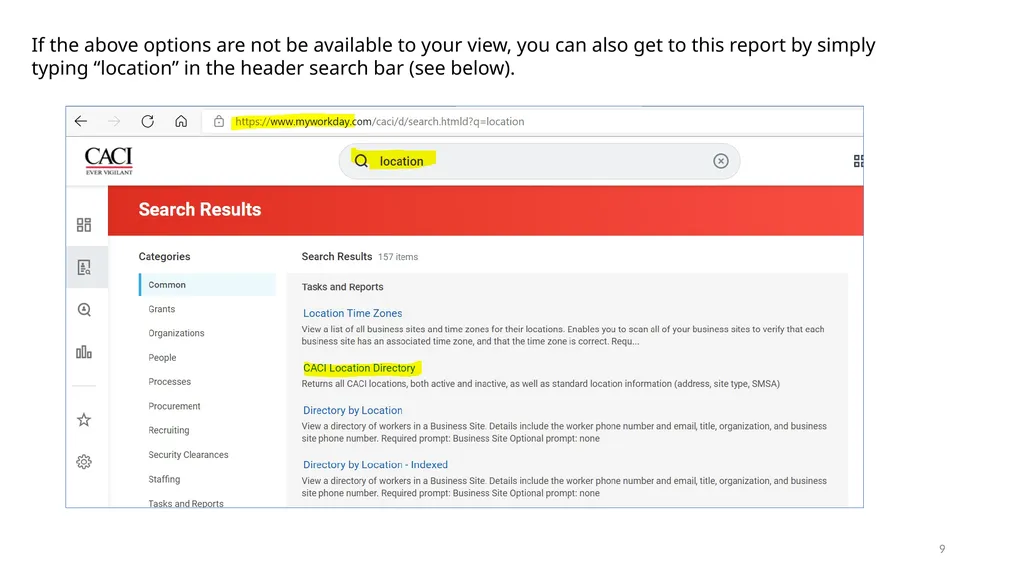
9 If the above options are not be available to your view, you can also get to this report by simply typing “location” in the header search bar (see below).<br>
10
10<br>
11
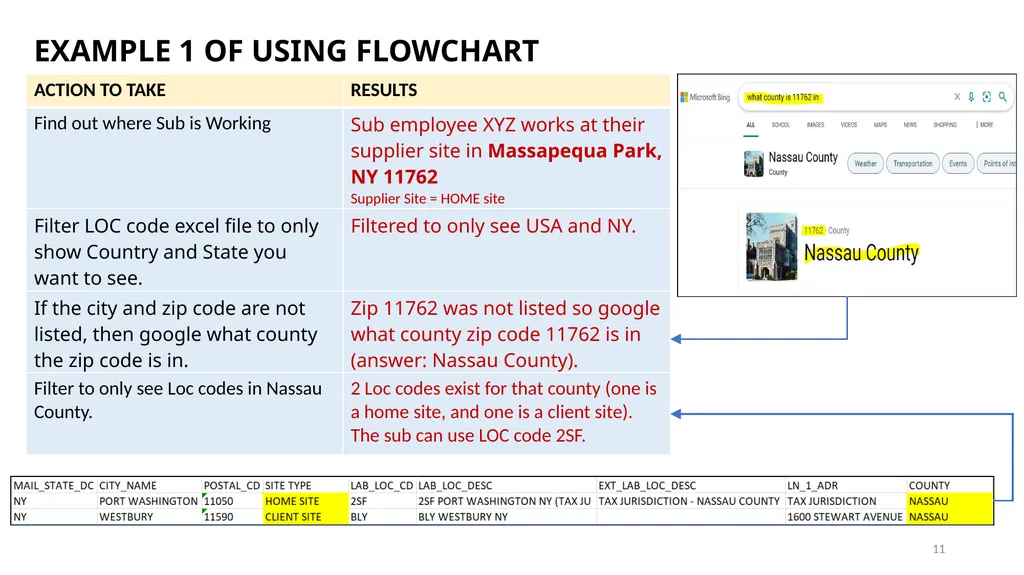
11 EXAMPLE 1 OF USING FLOWCHART<br>
12
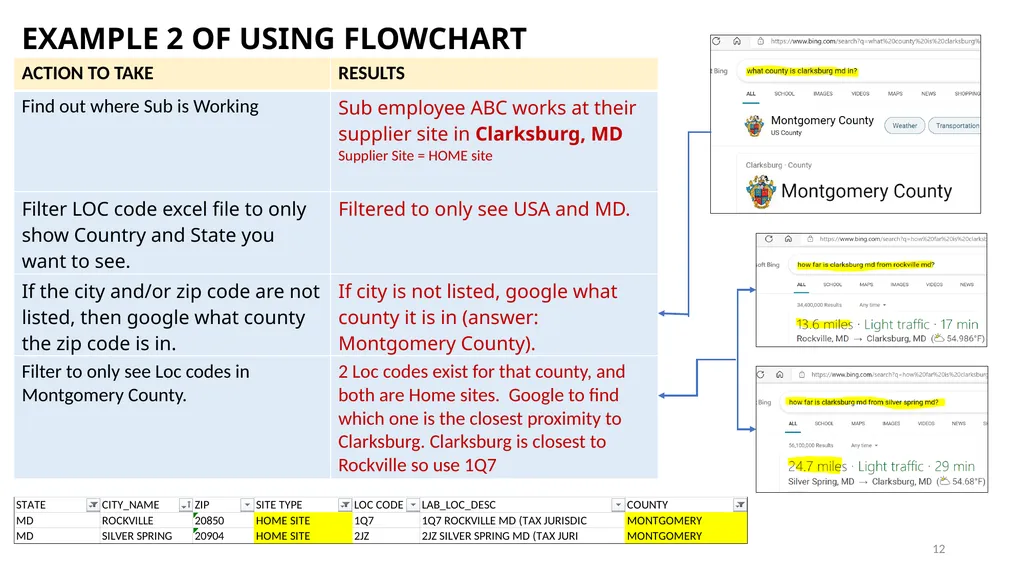
12 EXAMPLE 2 OF USING FLOWCHART<br>
13
13 REFERENCES
If you have questions about what LOC code to use for your sub employees, start by contacting your designated PFA or Finance Lead. If the PFA or Finance Lead cannot answer your question, they should contact the CACI tax department at: taxdepartment@caci.com
If you run into any errors when attempting to enter or update a Loc code or favorites in sub employee timekeeping, contact the CACI Sub ET Admin group at: subetadmin@caci.com
If you have technical issues running the report in Workday, contact the CACI Technical Assistance group at: cistac@caci.com
If you have any questions concerning Loc codes for subs working outside of the US, contact the CACI International Business group at: lnternationalBusOps@caci.com.<br>
If you have questions about what LOC code to use for your sub employees, start by contacting your designated PFA or Finance Lead. If the PFA or Finance Lead cannot answer your question, they should contact the CACI tax department at: taxdepartment@caci.com
If you run into any errors when attempting to enter or update a Loc code or favorites in sub employee timekeeping, contact the CACI Sub ET Admin group at: subetadmin@caci.com
If you have technical issues running the report in Workday, contact the CACI Technical Assistance group at: cistac@caci.com
If you have any questions concerning Loc codes for subs working outside of the US, contact the CACI International Business group at: lnternationalBusOps@caci.com.<br>
14
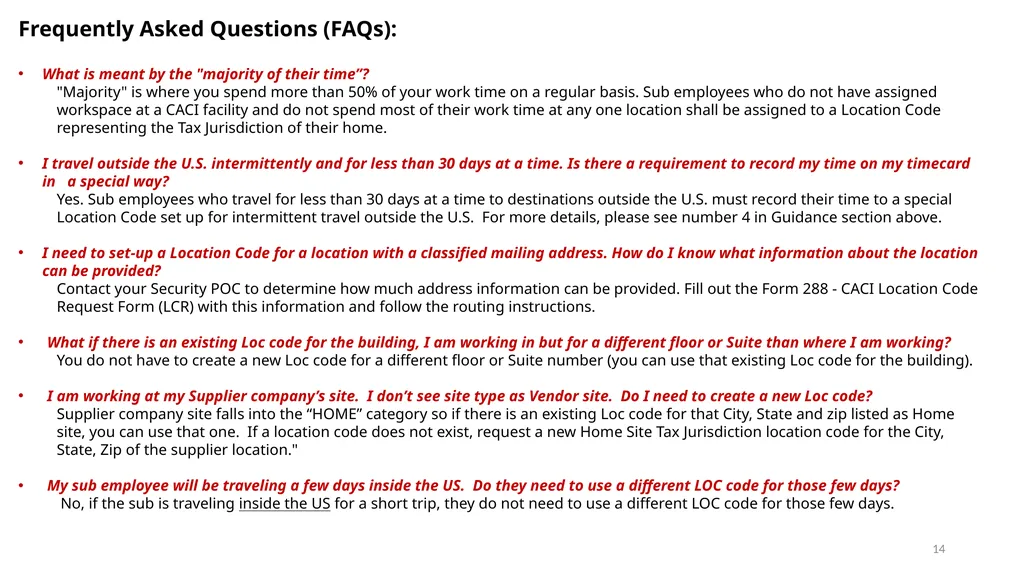
14 Frequently Asked Questions (FAQs):
What is meant by the "majority of their time”?
"Majority" is where you spend more than 50% of your work time on a regular basis. Sub employees who do not have assigned workspace at a CACI facility and do not spend most of their work time at any one location shall be assigned to a Location Code representing the Tax Jurisdiction of their home.
I travel outside the U.S. intermittently and for less than 30 days at a time. Is there a requirement to record my time on my timecard in a special way?
Yes. Sub employees who travel for less than 30 days at a time to destinations outside the U.S. must record their time to a special Location Code set up for intermittent travel outside the U.S. For more details, please see number 4 in Guidance section above.
I need to set-up a Location Code for a location with a classified mailing address. How do I know what information about the location can be provided?
Contact your Security POC to determine how much address information can be provided. Fill out the Form 288 - CACI Location Code Request Form (LCR) with this information and follow the routing instructions.
What if there is an existing Loc code for the building, I am working in but for a different floor or Suite than where I am working?
You do not have to create a new Loc code for a different floor or Suite number (you can use that existing Loc code for the building).
I am working at my Supplier company’s site. I don’t see site type as Vendor site. Do I need to create a new Loc code?
Supplier company site falls into the “HOME” category so if there is an existing Loc code for that City, State and zip listed as Home site, you can use that one. If a location code does not exist, request a new Home Site Tax Jurisdiction location code for the City, State, Zip of the supplier location."
My sub employee will be traveling a few days inside the US. Do they need to use a different LOC code for those few days?
No, if the sub is traveling inside the US for a short trip, they do not need to use a different LOC code for those few days.<br>
What is meant by the "majority of their time”?
"Majority" is where you spend more than 50% of your work time on a regular basis. Sub employees who do not have assigned workspace at a CACI facility and do not spend most of their work time at any one location shall be assigned to a Location Code representing the Tax Jurisdiction of their home.
I travel outside the U.S. intermittently and for less than 30 days at a time. Is there a requirement to record my time on my timecard in a special way?
Yes. Sub employees who travel for less than 30 days at a time to destinations outside the U.S. must record their time to a special Location Code set up for intermittent travel outside the U.S. For more details, please see number 4 in Guidance section above.
I need to set-up a Location Code for a location with a classified mailing address. How do I know what information about the location can be provided?
Contact your Security POC to determine how much address information can be provided. Fill out the Form 288 - CACI Location Code Request Form (LCR) with this information and follow the routing instructions.
What if there is an existing Loc code for the building, I am working in but for a different floor or Suite than where I am working?
You do not have to create a new Loc code for a different floor or Suite number (you can use that existing Loc code for the building).
I am working at my Supplier company’s site. I don’t see site type as Vendor site. Do I need to create a new Loc code?
Supplier company site falls into the “HOME” category so if there is an existing Loc code for that City, State and zip listed as Home site, you can use that one. If a location code does not exist, request a new Home Site Tax Jurisdiction location code for the City, State, Zip of the supplier location."
My sub employee will be traveling a few days inside the US. Do they need to use a different LOC code for those few days?
No, if the sub is traveling inside the US for a short trip, they do not need to use a different LOC code for those few days.<br>
15
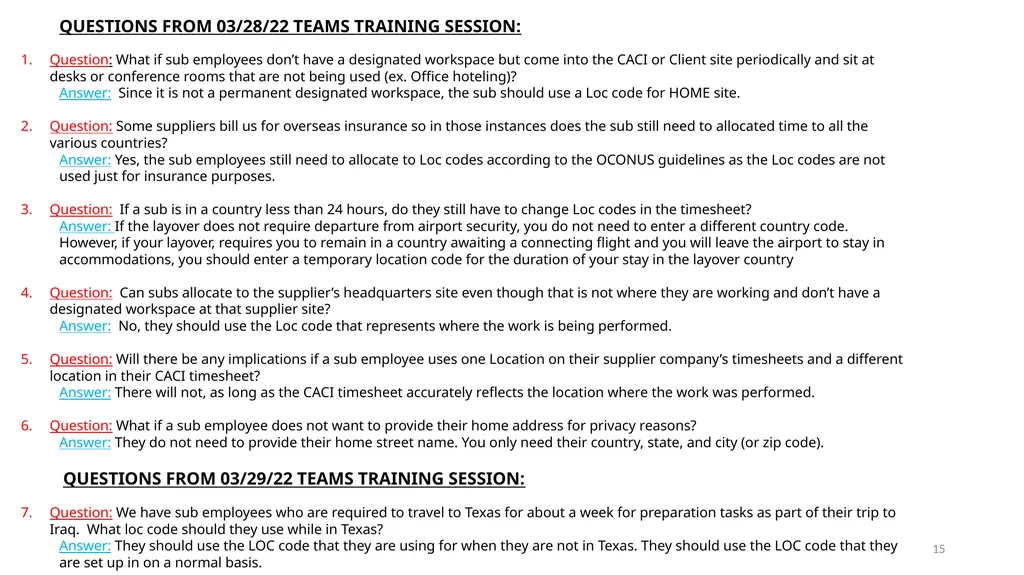
15 QUESTIONS FROM 03/28/22 TEAMS TRAINING SESSION:
Question: What if sub employees don’t have a designated workspace but come into the CACI or Client site periodically and sit at desks or conference rooms that are not being used (ex. Office hoteling)?
Answer: Since it is not a permanent designated workspace, the sub should use a Loc code for HOME site.
Question: Some suppliers bill us for overseas insurance so in those instances does the sub still need to allocated time to all the various countries?
Answer: Yes, the sub employees still need to allocate to Loc codes according to the OCONUS guidelines as the Loc codes are not used just for insurance purposes.
Question: If a sub is in a country less than 24 hours, do they still have to change Loc codes in the timesheet?
Answer: If the layover does not require departure from airport security, you do not need to enter a different country code. However, if your layover, requires you to remain in a country awaiting a connecting flight and you will leave the airport to stay in accommodations, you should enter a temporary location code for the duration of your stay in the layover country
Question: Can subs allocate to the supplier’s headquarters site even though that is not where they are working and don’t have a designated workspace at that supplier site?
Answer: No, they should use the Loc code that represents where the work is being performed.
Question: Will there be any implications if a sub employee uses one Location on their supplier company’s timesheets and a different location in their CACI timesheet?
Answer: There will not, as long as the CACI timesheet accurately reflects the location where the work was performed.
Question: What if a sub employee does not want to provide their home address for privacy reasons?
Answer: They do not need to provide their home street name. You only need their country, state, and city (or zip code).
QUESTIONS FROM 03/29/22 TEAMS TRAINING SESSION:
Question: We have sub employees who are required to travel to Texas for about a week for preparation tasks as part of their trip to Iraq. What loc code should they use while in Texas?
Answer: They should use the LOC code that they are using for when they are not in Texas. They should use the LOC code that they are set up in on a normal basis.<br>
Question: What if sub employees don’t have a designated workspace but come into the CACI or Client site periodically and sit at desks or conference rooms that are not being used (ex. Office hoteling)?
Answer: Since it is not a permanent designated workspace, the sub should use a Loc code for HOME site.
Question: Some suppliers bill us for overseas insurance so in those instances does the sub still need to allocated time to all the various countries?
Answer: Yes, the sub employees still need to allocate to Loc codes according to the OCONUS guidelines as the Loc codes are not used just for insurance purposes.
Question: If a sub is in a country less than 24 hours, do they still have to change Loc codes in the timesheet?
Answer: If the layover does not require departure from airport security, you do not need to enter a different country code. However, if your layover, requires you to remain in a country awaiting a connecting flight and you will leave the airport to stay in accommodations, you should enter a temporary location code for the duration of your stay in the layover country
Question: Can subs allocate to the supplier’s headquarters site even though that is not where they are working and don’t have a designated workspace at that supplier site?
Answer: No, they should use the Loc code that represents where the work is being performed.
Question: Will there be any implications if a sub employee uses one Location on their supplier company’s timesheets and a different location in their CACI timesheet?
Answer: There will not, as long as the CACI timesheet accurately reflects the location where the work was performed.
Question: What if a sub employee does not want to provide their home address for privacy reasons?
Answer: They do not need to provide their home street name. You only need their country, state, and city (or zip code).
QUESTIONS FROM 03/29/22 TEAMS TRAINING SESSION:
Question: We have sub employees who are required to travel to Texas for about a week for preparation tasks as part of their trip to Iraq. What loc code should they use while in Texas?
Answer: They should use the LOC code that they are using for when they are not in Texas. They should use the LOC code that they are set up in on a normal basis.<br>
16
OTHER QUESTIONS? 16 Picture taken by: Sharon Amoroso<br>