UMMS Access Center One Call Work Flow Comparison 81820 Abbreviation Key: Epic Modules Transfer Center, Unit Manager, TC Transport Coord. ACP Access Center Physician CIP Central Intensivist Physician NS Nursing Supervisor NC-
"UMMS Access Center & One Call Work Flow Comparison" is the property of its rightful owner. Permission is granted to
download and print the materials on this website for personal, non-commercial use only, and to display it
on your personal computer provided you do not modify the materials and that you retain all copyright
notices contained in the materials. By downloading content from our website, you accept the terms of this
agreement.
Share
Embed code
Presentation Transcript
01
UMMS Access Center & One Call Work Flow Comparison 8/18/20 Abbreviation Key:
Epic Modules – Transfer Center, Unit Manager,
TC – Transport Coord.
ACP – Access Center Physician
CIP – Central Intensivist Physician
NS – Nursing Supervisor
NC- Nursing Coordinators
CN – Charge nurse
LOC – Level of Care<br>
02
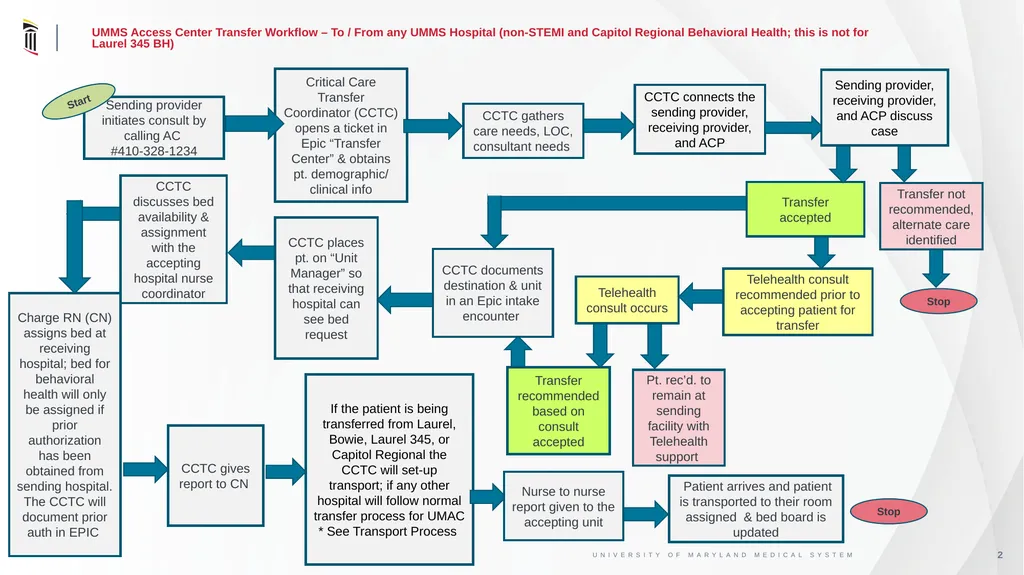
UMMS Access Center Transfer Workflow – To / From any UMMS Hospital (non-STEMI and Capitol Regional Behavioral Health; this is not for Laurel 345 BH) Sending provider initiates consult by calling AC
#410-328-1234 Critical Care Transfer Coordinator (CCTC) opens a ticket in Epic “Transfer Center” & obtains pt. demographic/ clinical info Telehealth consult occurs Start CCTC gives report to CN Telehealth consult recommended prior to accepting patient for transfer Transfer accepted Transfer not recommended, alternate care identified CCTC connects the sending provider, receiving provider, and ACP CCTC gathers care needs, LOC, consultant needs Sending provider, receiving provider, and ACP discuss case Stop Pt. rec’d. to remain at sending facility with Telehealth support CCTC discusses bed availability & assignment with the accepting hospital nurse coordinator Charge RN (CN) assigns bed at receiving hospital; bed for behavioral health will only be assigned if prior authorization has been obtained from sending hospital. The CCTC will document prior auth in EPIC CCTC places pt. on “Unit Manager” so that receiving hospital can see bed request CCTC documents destination & unit in an Epic intake encounter Transfer recommended based on consult accepted If the patient is being transferred from Laurel, Bowie, Laurel 345, or Capitol Regional the CCTC will set-up transport; if any other hospital will follow normal transfer process for UMAC * See Transport Process Patient arrives and patient is transported to their room assigned & bed board is updated Stop Nurse to nurse report given to the accepting unit<br>
03
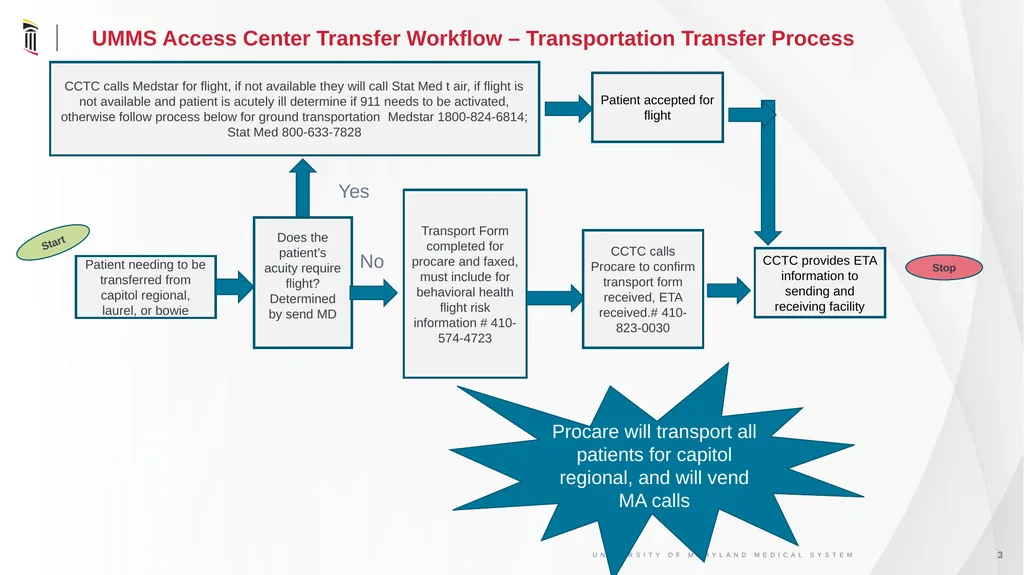
UMMS Access Center Transfer Workflow – Transportation Transfer Process Patient needing to be transferred from capitol regional, laurel, or bowie Transport Form completed for procare and faxed, must include for behavioral health flight risk information # 410-574-4723 Start CCTC provides ETA information to sending and receiving facility CCTC calls Procare to confirm transport form received, ETA received.# 410-823-0030 Stop Procare will transport all patients for capitol regional, and will vend MA calls Does the patient’s acuity require flight? Determined by send MD Yes CCTC calls Medstar for flight, if not available they will call Stat Med t air, if flight is not available and patient is acutely ill determine if 911 needs to be activated, otherwise follow process below for ground transportation Medstar 1800-824-6814; Stat Med 800-633-7828 No Patient accepted for flight<br>
04
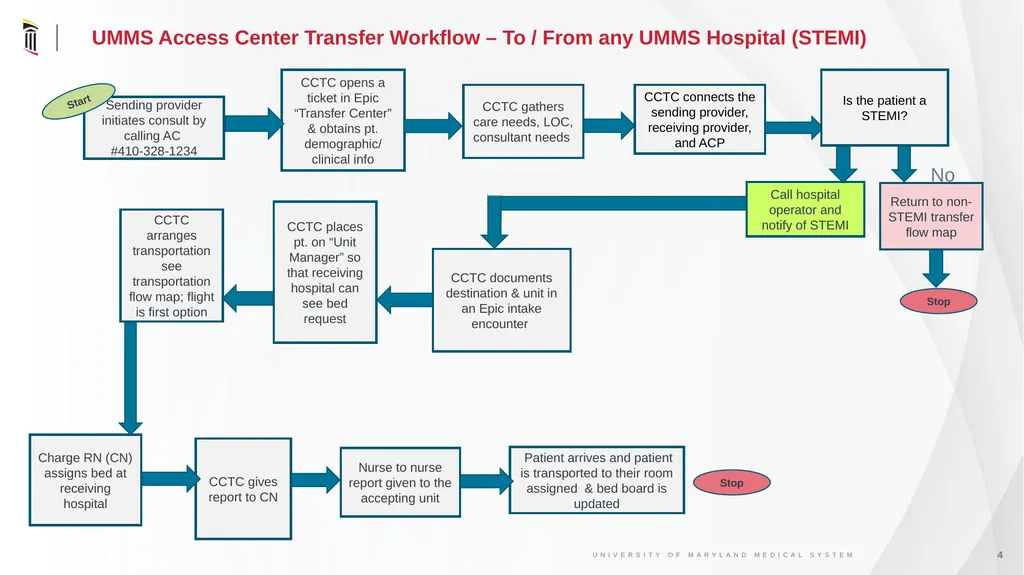
UMMS Access Center Transfer Workflow – To / From any UMMS Hospital (STEMI) Sending provider initiates consult by calling AC
#410-328-1234 CCTC opens a ticket in Epic “Transfer Center” & obtains pt. demographic/ clinical info Start CCTC gives report to CN Call hospital operator and notify of STEMI Return to non-STEMI transfer flow map CCTC connects the sending provider, receiving provider, and ACP CCTC gathers care needs, LOC, consultant needs Is the patient a STEMI? Stop CCTC arranges transportation see transportation flow map; flight is first option Charge RN (CN) assigns bed at receiving hospital CCTC documents destination & unit in an Epic intake encounter Patient arrives and patient is transported to their room assigned & bed board is updated Stop Nurse to nurse report given to the accepting unit No CCTC places pt. on “Unit Manager” so that receiving hospital can see bed request<br>
05
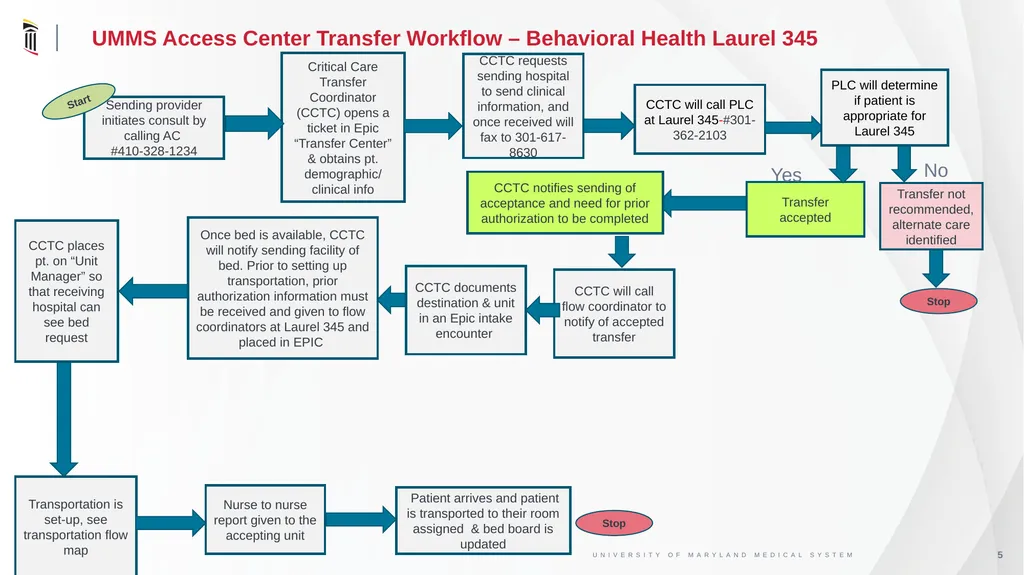
UMMS Access Center Transfer Workflow – Behavioral Health Laurel 345 Sending provider initiates consult by calling AC
#410-328-1234 Critical Care Transfer Coordinator (CCTC) opens a ticket in Epic “Transfer Center” & obtains pt. demographic/ clinical info Start Transportation is set-up, see transportation flow map Transfer accepted Transfer not recommended, alternate care identified CCTC will call PLC at Laurel 345-#301-362-2103 CCTC requests sending hospital to send clinical information, and once received will fax to 301-617-8630 PLC will determine if patient is appropriate for Laurel 345 Stop Once bed is available, CCTC will notify sending facility of bed. Prior to setting up transportation, prior authorization information must be received and given to flow coordinators at Laurel 345 and placed in EPIC CCTC will call flow coordinator to notify of accepted transfer CCTC notifies sending of acceptance and need for prior authorization to be completed Patient arrives and patient is transported to their room assigned & bed board is updated Stop Nurse to nurse report given to the accepting unit No Yes CCTC documents destination & unit in an Epic intake encounter CCTC places pt. on “Unit Manager” so that receiving hospital can see bed request<br>