
UNIT-1 DBMS What is Data? Data is a collection of
LD
Published · 14 slides · 0 views
1 / 1
Description
UNIT-1 DBMS What is Data? Data is a collection of a distinct small unit of information. It can be used in a variety of forms like text, numbers, media, bytes, etc. it can be stored in pieces of paper or electronic memory, etc. Word Data
Related Topics
Share
Embed code
Download this presentation From Below
"UNIT-1 DBMS What is Data? Data is a collection of" is the property of its rightful owner. Permission is granted to download and print the materials on this website for personal, non-commercial use only, and to display it on your personal computer provided you do not modify the materials and that you retain all copyright notices contained in the materials. By downloading content from our website, you accept the terms of this agreement.
Presentation Transcript
01
UNIT-1 DBMS<br>
02
What is Data?
Data is a collection of a distinct small unit of information. It can be used in a variety of forms like text, numbers, media, bytes, etc. it can be stored in pieces of paper or electronic memory, etc.
Word 'Data' is originated from the word 'datum' that means 'single piece of information.' It is plural of the word datum.
In computing, Data is information that can be translated into a form for efficient movement and processing. Data is interchangeable.
What is Database?
A database is an organized collection of data, so that it can be easily accessed and managed.
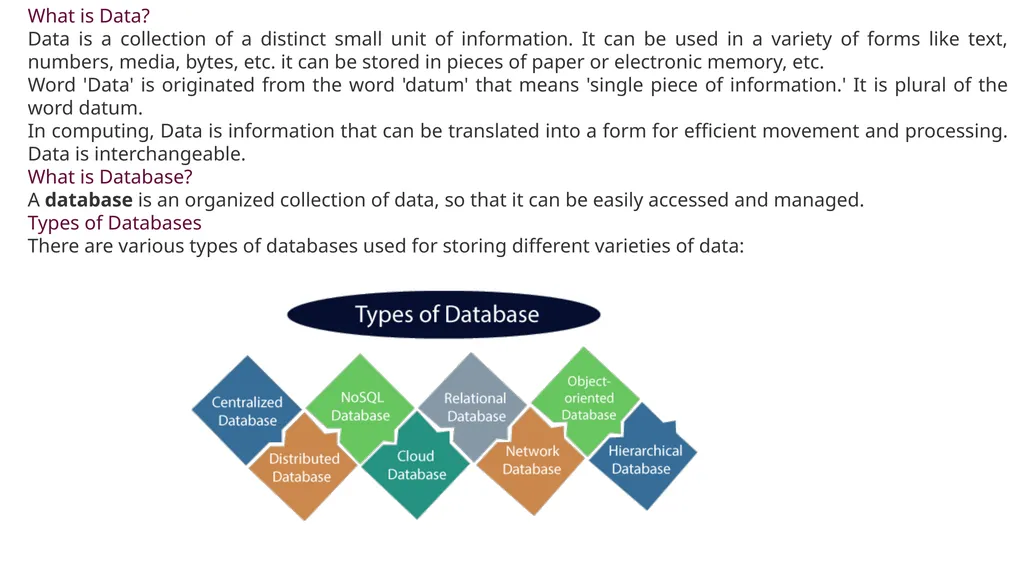
Types of Databases
There are various types of databases used for storing different varieties of data:<br>
Data is a collection of a distinct small unit of information. It can be used in a variety of forms like text, numbers, media, bytes, etc. it can be stored in pieces of paper or electronic memory, etc.
Word 'Data' is originated from the word 'datum' that means 'single piece of information.' It is plural of the word datum.
In computing, Data is information that can be translated into a form for efficient movement and processing. Data is interchangeable.
What is Database?
A database is an organized collection of data, so that it can be easily accessed and managed.
Types of Databases
There are various types of databases used for storing different varieties of data:<br>
03
1) Centralized Database
It is the type of database that stores data at a centralized database system. It comforts the users to access the stored data from different locations through several applications. These applications contain the authentication process to let users access data securely. An example of a Centralized database can be Central Library that carries a central database of each library in a college/university.
Advantages of Centralized Database
It has decreased the risk of data management, i.e., manipulation of data will not affect the core data.
Data consistency is maintained as it manages data in a central repository.
It provides better data quality, which enables organizations to establish data standards.
It is less costly because fewer vendors are required to handle the data sets.
Disadvantages of Centralized Database
The size of the centralized database is large, which increases the response time for fetching the data.
It is not easy to update such an extensive database system.
If any server failure occurs, entire data will be lost, which could be a huge loss.
2) Distributed Database
Unlike a centralized database system, in distributed systems, data is distributed among different database systems of an organization. These database systems are connected via communication links. Such links help the end-users to access the data easily. Examples of the Distributed database are Apache Cassandra, HBase, Ignite, etc.
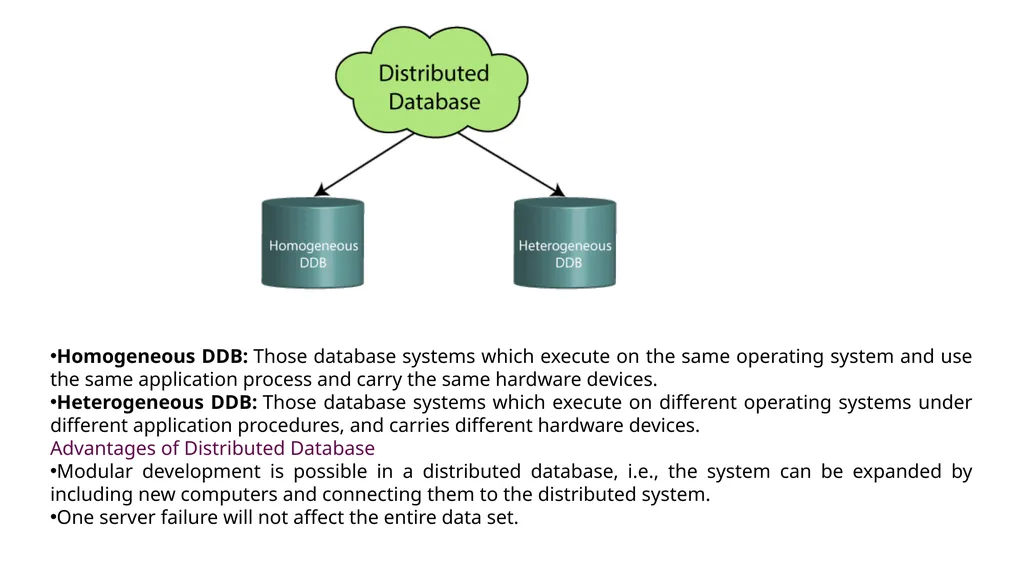
We can further divide a distributed database system into:<br>
It is the type of database that stores data at a centralized database system. It comforts the users to access the stored data from different locations through several applications. These applications contain the authentication process to let users access data securely. An example of a Centralized database can be Central Library that carries a central database of each library in a college/university.
Advantages of Centralized Database
It has decreased the risk of data management, i.e., manipulation of data will not affect the core data.
Data consistency is maintained as it manages data in a central repository.
It provides better data quality, which enables organizations to establish data standards.
It is less costly because fewer vendors are required to handle the data sets.
Disadvantages of Centralized Database
The size of the centralized database is large, which increases the response time for fetching the data.
It is not easy to update such an extensive database system.
If any server failure occurs, entire data will be lost, which could be a huge loss.
2) Distributed Database
Unlike a centralized database system, in distributed systems, data is distributed among different database systems of an organization. These database systems are connected via communication links. Such links help the end-users to access the data easily. Examples of the Distributed database are Apache Cassandra, HBase, Ignite, etc.
We can further divide a distributed database system into:<br>
04
Homogeneous DDB: Those database systems which execute on the same operating system and use the same application process and carry the same hardware devices.
Heterogeneous DDB: Those database systems which execute on different operating systems under different application procedures, and carries different hardware devices.
Advantages of Distributed Database
Modular development is possible in a distributed database, i.e., the system can be expanded by including new computers and connecting them to the distributed system.
One server failure will not affect the entire data set.<br>
Heterogeneous DDB: Those database systems which execute on different operating systems under different application procedures, and carries different hardware devices.
Advantages of Distributed Database
Modular development is possible in a distributed database, i.e., the system can be expanded by including new computers and connecting them to the distributed system.
One server failure will not affect the entire data set.<br>
05
3) Relational Database
This database is based on the relational data model, which stores data in the form of rows(tuple) and columns(attributes), and together forms a table(relation). A relational database uses SQL for storing, manipulating, as well as maintaining the data. E.F. Codd invented the database in 1970. Each table in the database carries a key that makes the data unique from others. Examples of Relational databases are MySQL, Microsoft SQL Server, Oracle, etc.
Properties of Relational Database
There are following four commonly known properties of a relational model known as ACID properties, where:
A means Atomicity: This ensures the data operation will complete either with success or with failure. It follows the 'all or nothing' strategy. For example, a transaction will either be committed or will abort.
C means Consistency: If we perform any operation over the data, its value before and after the operation should be preserved. For example, the account balance before and after the transaction should be correct, i.e., it should remain conserved.
I means Isolation: There can be concurrent users for accessing data at the same time from the database. Thus, isolation between the data should remain isolated. For example, when multiple transactions occur at the same time, one transaction effects should not be visible to the other transactions in the database.
D means Durability: It ensures that once it completes the operation and commits the data, data changes should remain permanent.<br>
This database is based on the relational data model, which stores data in the form of rows(tuple) and columns(attributes), and together forms a table(relation). A relational database uses SQL for storing, manipulating, as well as maintaining the data. E.F. Codd invented the database in 1970. Each table in the database carries a key that makes the data unique from others. Examples of Relational databases are MySQL, Microsoft SQL Server, Oracle, etc.
Properties of Relational Database
There are following four commonly known properties of a relational model known as ACID properties, where:
A means Atomicity: This ensures the data operation will complete either with success or with failure. It follows the 'all or nothing' strategy. For example, a transaction will either be committed or will abort.
C means Consistency: If we perform any operation over the data, its value before and after the operation should be preserved. For example, the account balance before and after the transaction should be correct, i.e., it should remain conserved.
I means Isolation: There can be concurrent users for accessing data at the same time from the database. Thus, isolation between the data should remain isolated. For example, when multiple transactions occur at the same time, one transaction effects should not be visible to the other transactions in the database.
D means Durability: It ensures that once it completes the operation and commits the data, data changes should remain permanent.<br>
06
4) NoSQL Database
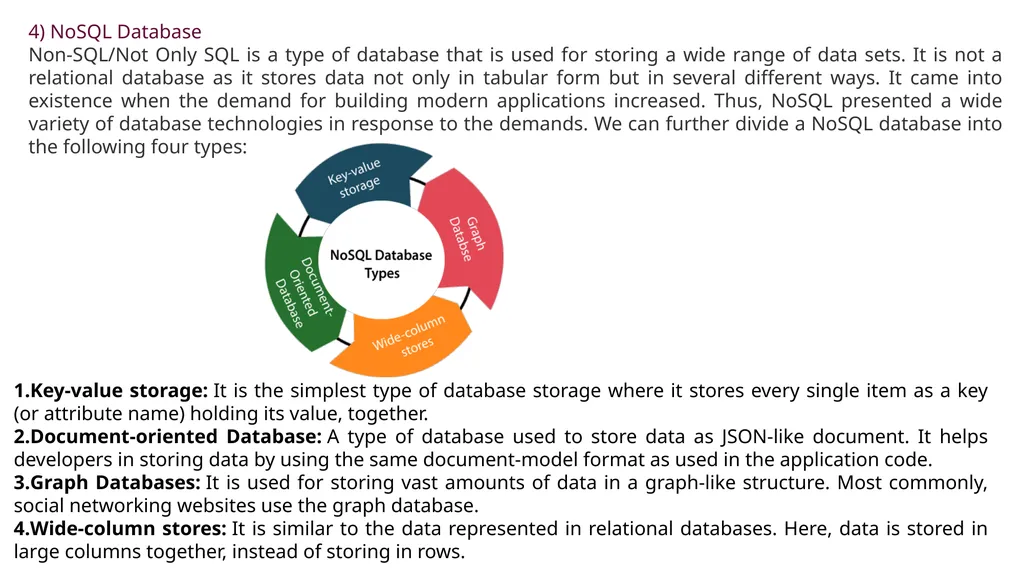
Non-SQL/Not Only SQL is a type of database that is used for storing a wide range of data sets. It is not a relational database as it stores data not only in tabular form but in several different ways. It came into existence when the demand for building modern applications increased. Thus, NoSQL presented a wide variety of database technologies in response to the demands. We can further divide a NoSQL database into the following four types: Key-value storage: It is the simplest type of database storage where it stores every single item as a key (or attribute name) holding its value, together.
Document-oriented Database: A type of database used to store data as JSON-like document. It helps developers in storing data by using the same document-model format as used in the application code.
Graph Databases: It is used for storing vast amounts of data in a graph-like structure. Most commonly, social networking websites use the graph database.
Wide-column stores: It is similar to the data represented in relational databases. Here, data is stored in large columns together, instead of storing in rows.<br>
Non-SQL/Not Only SQL is a type of database that is used for storing a wide range of data sets. It is not a relational database as it stores data not only in tabular form but in several different ways. It came into existence when the demand for building modern applications increased. Thus, NoSQL presented a wide variety of database technologies in response to the demands. We can further divide a NoSQL database into the following four types: Key-value storage: It is the simplest type of database storage where it stores every single item as a key (or attribute name) holding its value, together.
Document-oriented Database: A type of database used to store data as JSON-like document. It helps developers in storing data by using the same document-model format as used in the application code.
Graph Databases: It is used for storing vast amounts of data in a graph-like structure. Most commonly, social networking websites use the graph database.
Wide-column stores: It is similar to the data represented in relational databases. Here, data is stored in large columns together, instead of storing in rows.<br>
07
Advantages of NoSQL Database
It enables good productivity in the application development as it is not required to store data in a structured format.
It is a better option for managing and handling large data sets.
It provides high scalability.
Users can quickly access data from the database through key-value.
5) Cloud Database
A type of database where data is stored in a virtual environment and executes over the cloud computing platform. It provides users with various cloud computing services (SaaS, PaaS, IaaS, etc.) for accessing the database. There are numerous cloud platforms, but the best options are:
Amazon Web Services(AWS)
Microsoft Azure
Kamatera
PhonixNAP
ScienceSoft
Google Cloud SQL, etc.
6) Object-oriented Databases
The type of database that uses the object-based data model approach for storing data in the database system. The data is represented and stored as objects which are similar to the objects used in the object-oriented programming language.<br>
It enables good productivity in the application development as it is not required to store data in a structured format.
It is a better option for managing and handling large data sets.
It provides high scalability.
Users can quickly access data from the database through key-value.
5) Cloud Database
A type of database where data is stored in a virtual environment and executes over the cloud computing platform. It provides users with various cloud computing services (SaaS, PaaS, IaaS, etc.) for accessing the database. There are numerous cloud platforms, but the best options are:
Amazon Web Services(AWS)
Microsoft Azure
Kamatera
PhonixNAP
ScienceSoft
Google Cloud SQL, etc.
6) Object-oriented Databases
The type of database that uses the object-based data model approach for storing data in the database system. The data is represented and stored as objects which are similar to the objects used in the object-oriented programming language.<br>
08
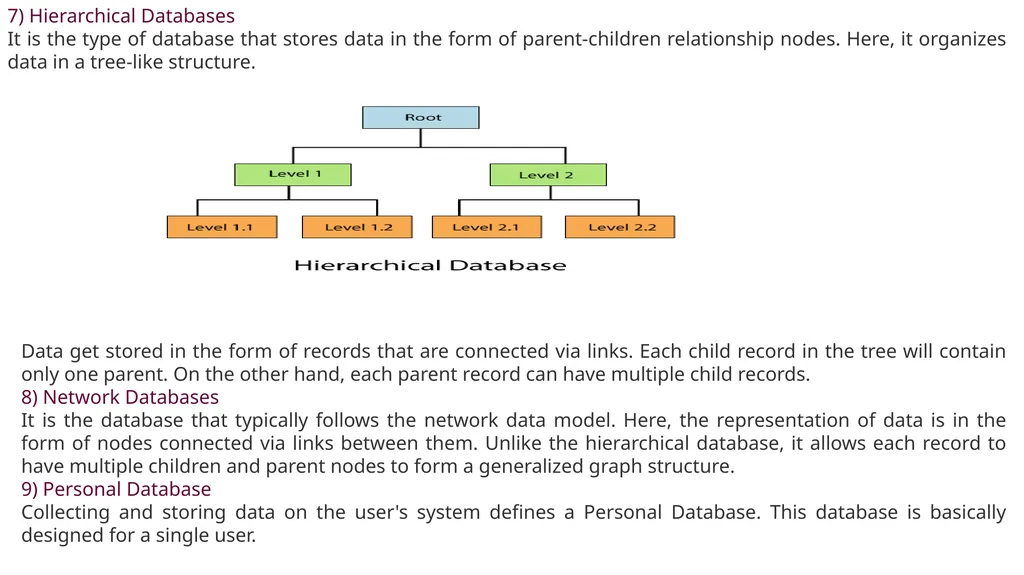
7) Hierarchical Databases
It is the type of database that stores data in the form of parent-children relationship nodes. Here, it organizes data in a tree-like structure. Data get stored in the form of records that are connected via links. Each child record in the tree will contain only one parent. On the other hand, each parent record can have multiple child records.
8) Network Databases
It is the database that typically follows the network data model. Here, the representation of data is in the form of nodes connected via links between them. Unlike the hierarchical database, it allows each record to have multiple children and parent nodes to form a generalized graph structure.
9) Personal Database
Collecting and storing data on the user's system defines a Personal Database. This database is basically designed for a single user.<br>
It is the type of database that stores data in the form of parent-children relationship nodes. Here, it organizes data in a tree-like structure. Data get stored in the form of records that are connected via links. Each child record in the tree will contain only one parent. On the other hand, each parent record can have multiple child records.
8) Network Databases
It is the database that typically follows the network data model. Here, the representation of data is in the form of nodes connected via links between them. Unlike the hierarchical database, it allows each record to have multiple children and parent nodes to form a generalized graph structure.
9) Personal Database
Collecting and storing data on the user's system defines a Personal Database. This database is basically designed for a single user.<br>
09
Advantage of Personal Database
It is simple and easy to handle.
It occupies less storage space as it is small in size.
10) Operational Database
The type of database which creates and updates the database in real-time. It is basically designed for executing and handling the daily data operations in several businesses. For example, An organization uses operational databases for managing per day transactions.
11) Enterprise Database
Large organizations or enterprises use this database for managing a massive amount of data. It helps organizations to increase and improve their efficiency. Such a database allows simultaneous access to users.
Advantages of Enterprise Database:
Multi processes are supportable over the Enterprise database.
It allows executing parallel queries on the system.<br>
It is simple and easy to handle.
It occupies less storage space as it is small in size.
10) Operational Database
The type of database which creates and updates the database in real-time. It is basically designed for executing and handling the daily data operations in several businesses. For example, An organization uses operational databases for managing per day transactions.
11) Enterprise Database
Large organizations or enterprises use this database for managing a massive amount of data. It helps organizations to increase and improve their efficiency. Such a database allows simultaneous access to users.
Advantages of Enterprise Database:
Multi processes are supportable over the Enterprise database.
It allows executing parallel queries on the system.<br>
10
What is RDBMS
RDBMS stands for Relational Database Management Systems..
All modern database management systems like SQL, MS SQL Server, IBM DB2, ORACLE, My-SQL and Microsoft Access are based on RDBMS.
It is called Relational Data Base Management System (RDBMS) because it is based on relational model introduced by E.F. Codd.
How it works
Data is represented in terms of tuples (rows) in RDBMS. Relational database is most commonly used database. It contains number of tables and each table has its own primary key.
Due to a collection of organized set of tables, data can be accessed easily in RDBMS.
Brief History of RDBMS
During 1970 to 1972, E.F. Codd published a paper to propose the use of relational database model.
RDBMS is originally based on that E.F. Codd's relational model invention.
What is table
The RDBMS database uses tables to store data. A table is a collection of related data entries and contains rows and columns to store data.
A table is the simplest example of data storage in RDBMS.
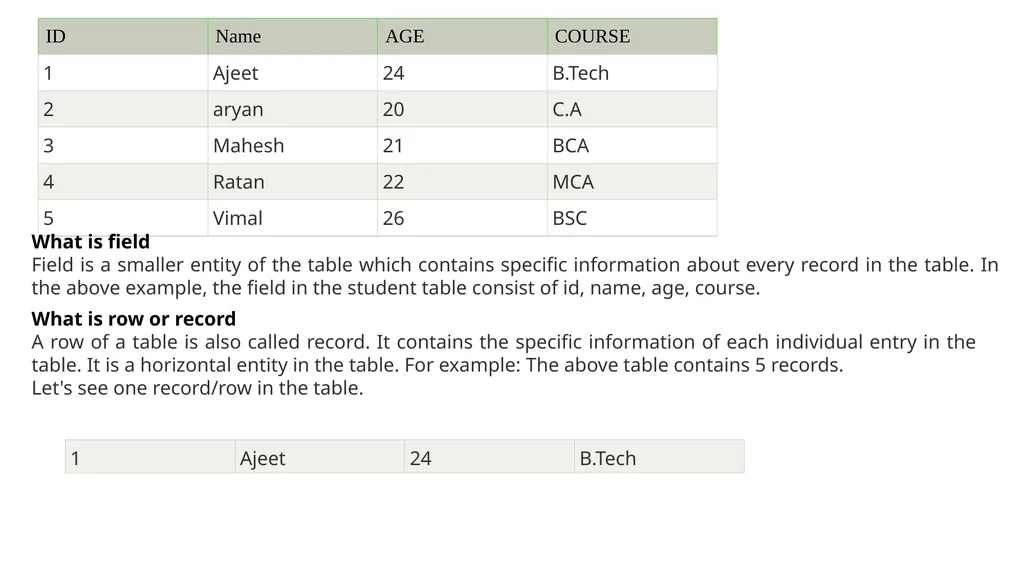
Let's see the example of student table.<br>
RDBMS stands for Relational Database Management Systems..
All modern database management systems like SQL, MS SQL Server, IBM DB2, ORACLE, My-SQL and Microsoft Access are based on RDBMS.
It is called Relational Data Base Management System (RDBMS) because it is based on relational model introduced by E.F. Codd.
How it works
Data is represented in terms of tuples (rows) in RDBMS. Relational database is most commonly used database. It contains number of tables and each table has its own primary key.
Due to a collection of organized set of tables, data can be accessed easily in RDBMS.
Brief History of RDBMS
During 1970 to 1972, E.F. Codd published a paper to propose the use of relational database model.
RDBMS is originally based on that E.F. Codd's relational model invention.
What is table
The RDBMS database uses tables to store data. A table is a collection of related data entries and contains rows and columns to store data.
A table is the simplest example of data storage in RDBMS.
Let's see the example of student table.<br>
11
What is field
Field is a smaller entity of the table which contains specific information about every record in the table. In the above example, the field in the student table consist of id, name, age, course. What is row or record
A row of a table is also called record. It contains the specific information of each individual entry in the table. It is a horizontal entity in the table. For example: The above table contains 5 records.
Let's see one record/row in the table.<br>
Field is a smaller entity of the table which contains specific information about every record in the table. In the above example, the field in the student table consist of id, name, age, course. What is row or record
A row of a table is also called record. It contains the specific information of each individual entry in the table. It is a horizontal entity in the table. For example: The above table contains 5 records.
Let's see one record/row in the table.<br>
12
What is column
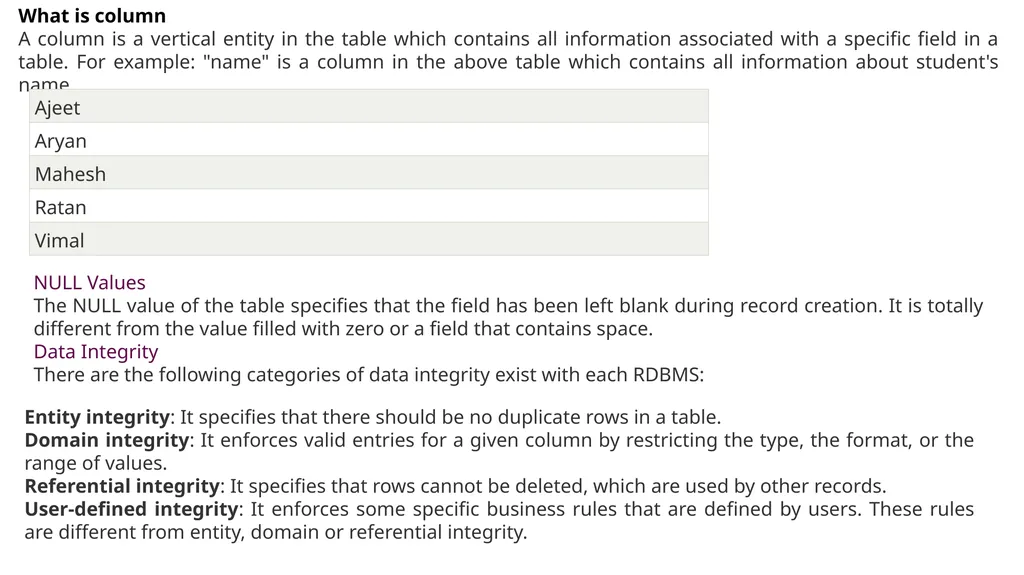
A column is a vertical entity in the table which contains all information associated with a specific field in a table. For example: "name" is a column in the above table which contains all information about student's name. NULL Values
The NULL value of the table specifies that the field has been left blank during record creation. It is totally different from the value filled with zero or a field that contains space.
Data Integrity
There are the following categories of data integrity exist with each RDBMS: Entity integrity: It specifies that there should be no duplicate rows in a table.
Domain integrity: It enforces valid entries for a given column by restricting the type, the format, or the range of values.
Referential integrity: It specifies that rows cannot be deleted, which are used by other records.
User-defined integrity: It enforces some specific business rules that are defined by users. These rules are different from entity, domain or referential integrity.<br>
A column is a vertical entity in the table which contains all information associated with a specific field in a table. For example: "name" is a column in the above table which contains all information about student's name. NULL Values
The NULL value of the table specifies that the field has been left blank during record creation. It is totally different from the value filled with zero or a field that contains space.
Data Integrity
There are the following categories of data integrity exist with each RDBMS: Entity integrity: It specifies that there should be no duplicate rows in a table.
Domain integrity: It enforces valid entries for a given column by restricting the type, the format, or the range of values.
Referential integrity: It specifies that rows cannot be deleted, which are used by other records.
User-defined integrity: It enforces some specific business rules that are defined by users. These rules are different from entity, domain or referential integrity.<br>
13
Difference between DBMS and RDBMS
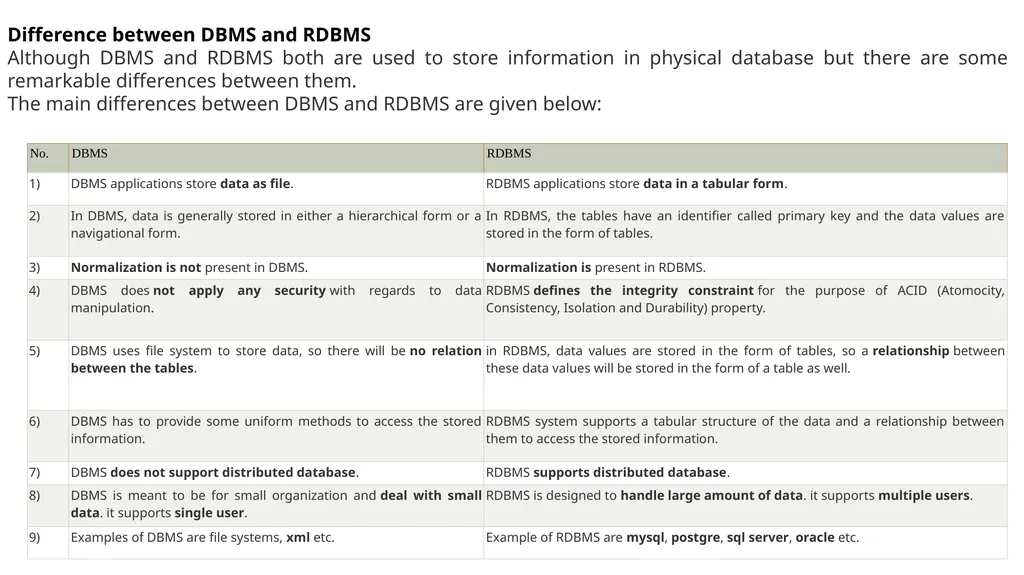
Although DBMS and RDBMS both are used to store information in physical database but there are some remarkable differences between them.
The main differences between DBMS and RDBMS are given below:<br>
Although DBMS and RDBMS both are used to store information in physical database but there are some remarkable differences between them.
The main differences between DBMS and RDBMS are given below:<br>
14
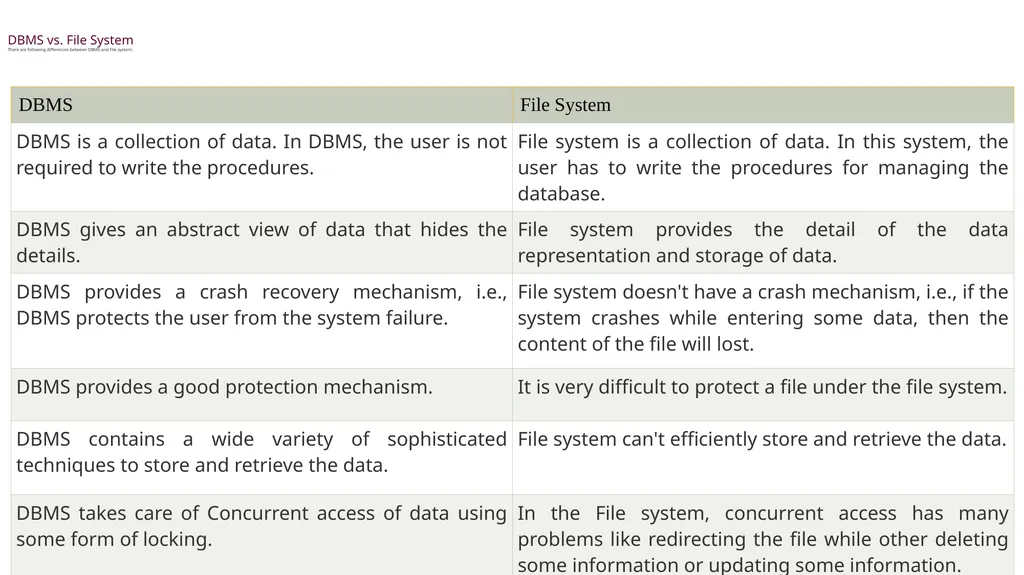
DBMS vs. File System
There are following differences between DBMS and File system:<br>