VASE+ Job Aid – Moderna 18+ Booster Formulation
Description: VASE Job Aid Moderna 18 Booster Formulation (CVX 221) In this job aid, users will learn how to select the Moderna CVX 221 formulation for booster doses for registrants who are 18 years and older. This formulation is approved for use in
Related Topics
Download Presentation
"VASE+ Job Aid – Moderna 18+ Booster Formulation" is the property of its rightful owner. Permission is granted to download and print the materials on this website for personal, non-commercial use only, and to display it on your personal computer provided you do not modify the materials and that you retain all copyright notices contained in the materials. By downloading content from our website, you accept the terms of this agreement.
Presentation Transcript
slide1. VASE+Job Aid – Moderna 18+ Booster Formulation (CVX 221) In this job aid, users will learn how to select the Moderna CVX 221 formulation for booster doses for registrants who are 18 years and older. This formulation is approved for use in registrants ages 6-11 years old as a primary series, and for use in registrants 18 years and older as a booster dose.
Please note that there is no change to the workflow for registering patients. Version 1.0 Accessing Moderna CVX 221 lots To access the Moderna CVX 221 lots within a clinic, the following conditions must be met:
There is a Moderna 12+ clinic scheduled at a particular site on a particular day
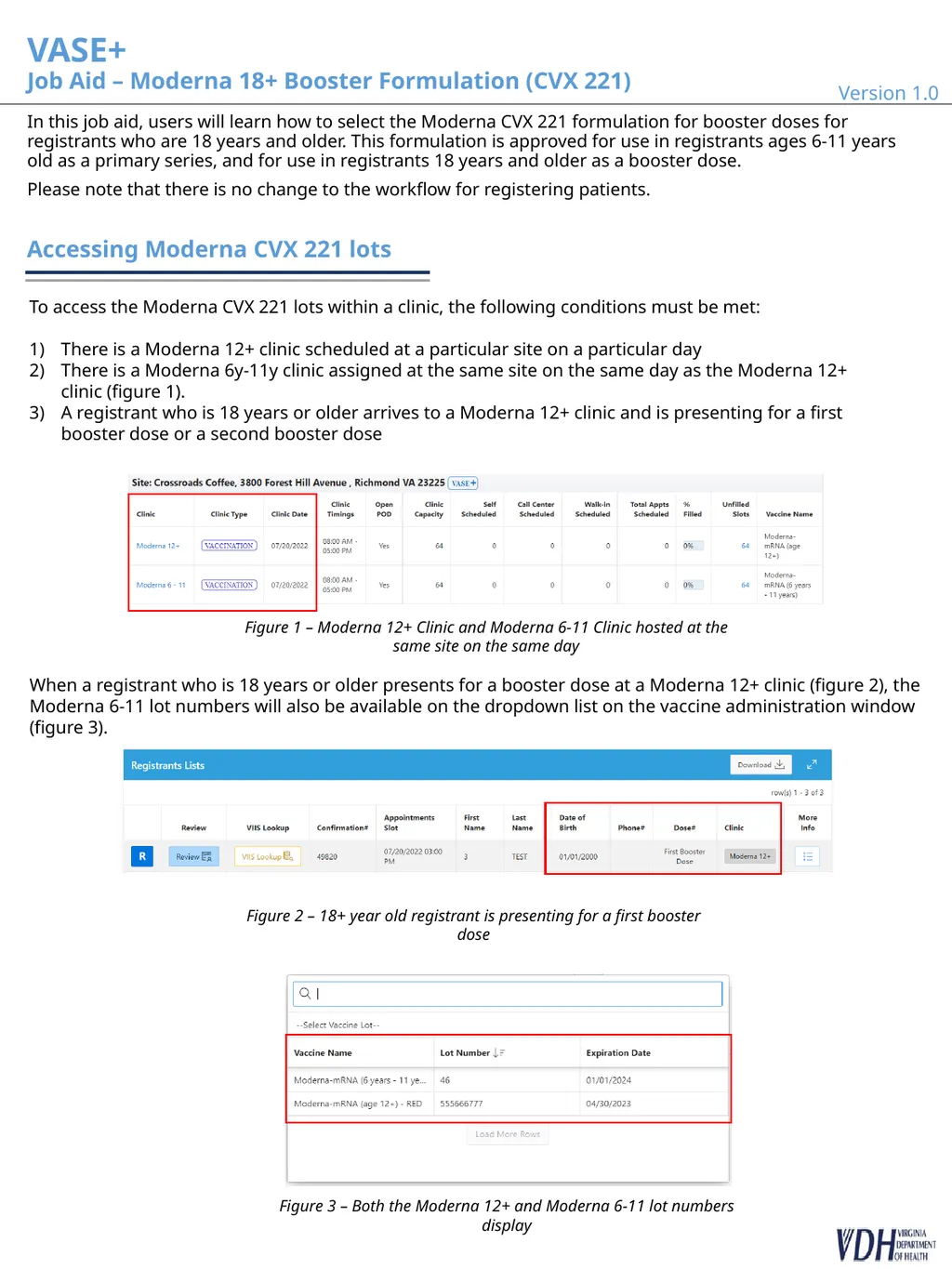
There is a Moderna 6y-11y clinic assigned at the same site on the same day as the Moderna 12+ clinic (figure 1).
A registrant who is 18 years or older arrives to a Moderna 12+ clinic and is presenting for a first booster dose or a second booster dose Figure 1 – Moderna 12+ Clinic and Moderna 6-11 Clinic hosted at the same site on the same day Figure 2 – 18+ year old registrant is presenting for a first booster dose When a registrant who is 18 years or older presents for a booster dose at a Moderna 12+ clinic (figure 2), the Moderna 6-11 lot numbers will also be available on the dropdown list on the vaccine administration window (figure 3). Figure 3 – Both the Moderna 12+ and Moderna 6-11 lot numbers display<br>
slide2. NOTE:
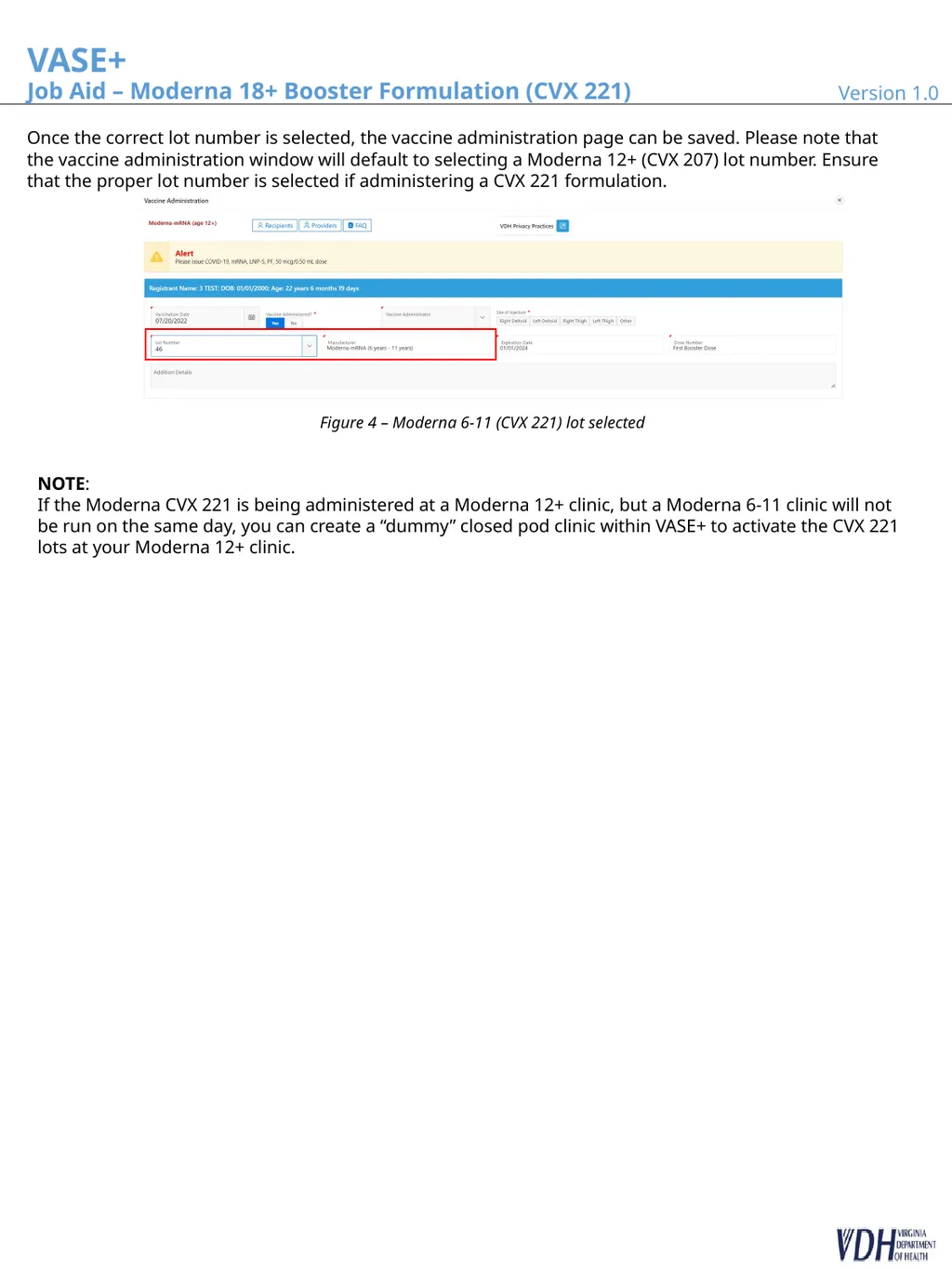
If the Moderna CVX 221 is being administered at a Moderna 12+ clinic, but a Moderna 6-11 clinic will not be run on the same day, you can create a “dummy” closed pod clinic within VASE+ to activate the CVX 221 lots at your Moderna 12+ clinic. Version 1.0 2 Once the correct lot number is selected, the vaccine administration page can be saved. Please note that the vaccine administration window will default to selecting a Moderna 12+ (CVX 207) lot number. Ensure that the proper lot number is selected if administering a CVX 221 formulation. Figure 4 – Moderna 6-11 (CVX 221) lot selected VASE+Job Aid – Moderna 18+ Booster Formulation (CVX 221)<br>

Please note that there is no change to the workflow for registering patients. Version 1.0 Accessing Moderna CVX 221 lots To access the Moderna CVX 221 lots within a clinic, the following conditions must be met:
There is a Moderna 12+ clinic scheduled at a particular site on a particular day
There is a Moderna 6y-11y clinic assigned at the same site on the same day as the Moderna 12+ clinic (figure 1).
A registrant who is 18 years or older arrives to a Moderna 12+ clinic and is presenting for a first booster dose or a second booster dose Figure 1 – Moderna 12+ Clinic and Moderna 6-11 Clinic hosted at the same site on the same day Figure 2 – 18+ year old registrant is presenting for a first booster dose When a registrant who is 18 years or older presents for a booster dose at a Moderna 12+ clinic (figure 2), the Moderna 6-11 lot numbers will also be available on the dropdown list on the vaccine administration window (figure 3). Figure 3 – Both the Moderna 12+ and Moderna 6-11 lot numbers display<br>
slide2. NOTE:
If the Moderna CVX 221 is being administered at a Moderna 12+ clinic, but a Moderna 6-11 clinic will not be run on the same day, you can create a “dummy” closed pod clinic within VASE+ to activate the CVX 221 lots at your Moderna 12+ clinic. Version 1.0 2 Once the correct lot number is selected, the vaccine administration page can be saved. Please note that the vaccine administration window will default to selecting a Moderna 12+ (CVX 207) lot number. Ensure that the proper lot number is selected if administering a CVX 221 formulation. Figure 4 – Moderna 6-11 (CVX 221) lot selected VASE+Job Aid – Moderna 18+ Booster Formulation (CVX 221)<br>