
Agile Development 2.0/Scrum Programs Process
LO
Published · 124 slides · 0 views

1 / 1


Description
Agile Development 2.0Scrum Programs Process Workshop Presentation Vancouver Release September 2023 Asset number: 0001352 Speaker Name User instructions Who: This deck is built for delivery of a ServiceNow productcapability. The delivery
Related Topics
Share
Embed code
Download this presentation From Below
"Agile Development 2.0/Scrum Programs Process" is the property of its rightful owner. Permission is granted to download and print the materials on this website for personal, non-commercial use only, and to display it on your personal computer provided you do not modify the materials and that you retain all copyright notices contained in the materials. By downloading content from our website, you accept the terms of this agreement.
Presentation Transcript
01
Agile Development 2.0/Scrum Programs Process Workshop Presentation
Vancouver Release September 2023 Asset number: 0001352 Speaker Name<br>
Vancouver Release September 2023 Asset number: 0001352 Speaker Name<br>
02
User instructions Who: This deck is built for delivery of a ServiceNow product/capability. The delivery of this deck may be undertaken by Customers, ServiceNow Partners and ServiceNow Expert Services. Assigned Business Process Analysts and/or Technical Consultants will normally be responsible for its delivery.
Why: We want to make it easier for you by spending more time on the implementation and build, not creating workshop materials. The purpose of this presentation is to outline the baseline process explaining the configurable options with the objective of determining the to-be process and corresponding configuration requirements, usually in the form of user stories PLEASE REMOVE THIS SLIDE BEFORE PRESENTING<br>
Why: We want to make it easier for you by spending more time on the implementation and build, not creating workshop materials. The purpose of this presentation is to outline the baseline process explaining the configurable options with the objective of determining the to-be process and corresponding configuration requirements, usually in the form of user stories PLEASE REMOVE THIS SLIDE BEFORE PRESENTING<br>
03
User instructions How:
Customers (self–implementation) – use the deck as it is or add to your corporate template. Alternatively, utilize individual slides to enhance your internal communications
Partner or Co-Delivery implementations - use the deck and add your logo, following the instructions on a following slide.
ServiceNow Expert Services
remove the PartnerLogo using the Slide Master (View > Slide Master > select the vertical line and the PartnerLogo at the bottom of the Master Slide and delete. If you see any other instances of PartnerLogo just follow the same process from that slide). If you have any issues, please contact the Now Create Team via the Teams channel
Tailor the presentation for the needs of your specific implementation PLEASE REMOVE THIS SLIDE BEFORE PRESENTING<br>
Customers (self–implementation) – use the deck as it is or add to your corporate template. Alternatively, utilize individual slides to enhance your internal communications
Partner or Co-Delivery implementations - use the deck and add your logo, following the instructions on a following slide.
ServiceNow Expert Services
remove the PartnerLogo using the Slide Master (View > Slide Master > select the vertical line and the PartnerLogo at the bottom of the Master Slide and delete. If you see any other instances of PartnerLogo just follow the same process from that slide). If you have any issues, please contact the Now Create Team via the Teams channel
Tailor the presentation for the needs of your specific implementation PLEASE REMOVE THIS SLIDE BEFORE PRESENTING<br>
04
FAQs How can I provide feedback on this asset or other parts of Now Create? Now Create has several feedback buttons throughout the portal, using the thumbs up/thumbs down buttons. Click on those icons and a small form will appear for you to leave specific feedback regarding the asset you are accessing.
If we use this deck, or slides from this deck, are we breaking any copyright? No. We designed this deck to be used by our whole ecosystem.
What should I do if I don’t need all of the content contained within this, or other assets? You can either hide or delete the slide(s). You may also want to move the slide(s) to the end of the presentation, review it when you have finished updating the asset for your own use, and then deleting any content you don’t need. Remember to regularly check Now Create to make sure you have the most up-to-date asset. PLEASE REMOVE THIS SLIDE BEFORE PRESENTING<br>
If we use this deck, or slides from this deck, are we breaking any copyright? No. We designed this deck to be used by our whole ecosystem.
What should I do if I don’t need all of the content contained within this, or other assets? You can either hide or delete the slide(s). You may also want to move the slide(s) to the end of the presentation, review it when you have finished updating the asset for your own use, and then deleting any content you don’t need. Remember to regularly check Now Create to make sure you have the most up-to-date asset. PLEASE REMOVE THIS SLIDE BEFORE PRESENTING<br>
05
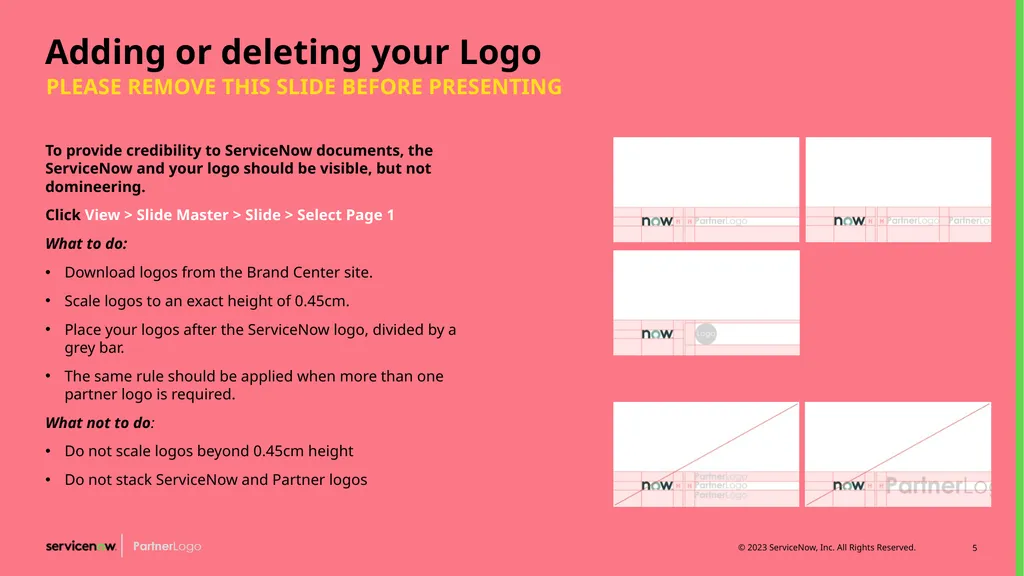
Adding or deleting your Logo To provide credibility to ServiceNow documents, the ServiceNow and your logo should be visible, but not domineering.
Click View > Slide Master > Slide > Select Page 1
What to do:
Download logos from the Brand Center site.
Scale logos to an exact height of 0.45cm.
Place your logos after the ServiceNow logo, divided by a grey bar.
The same rule should be applied when more than one partner logo is required.
What not to do:
Do not scale logos beyond 0.45cm height
Do not stack ServiceNow and Partner logos PLEASE REMOVE THIS SLIDE BEFORE PRESENTING<br>
Click View > Slide Master > Slide > Select Page 1
What to do:
Download logos from the Brand Center site.
Scale logos to an exact height of 0.45cm.
Place your logos after the ServiceNow logo, divided by a grey bar.
The same rule should be applied when more than one partner logo is required.
What not to do:
Do not scale logos beyond 0.45cm height
Do not stack ServiceNow and Partner logos PLEASE REMOVE THIS SLIDE BEFORE PRESENTING<br>
06
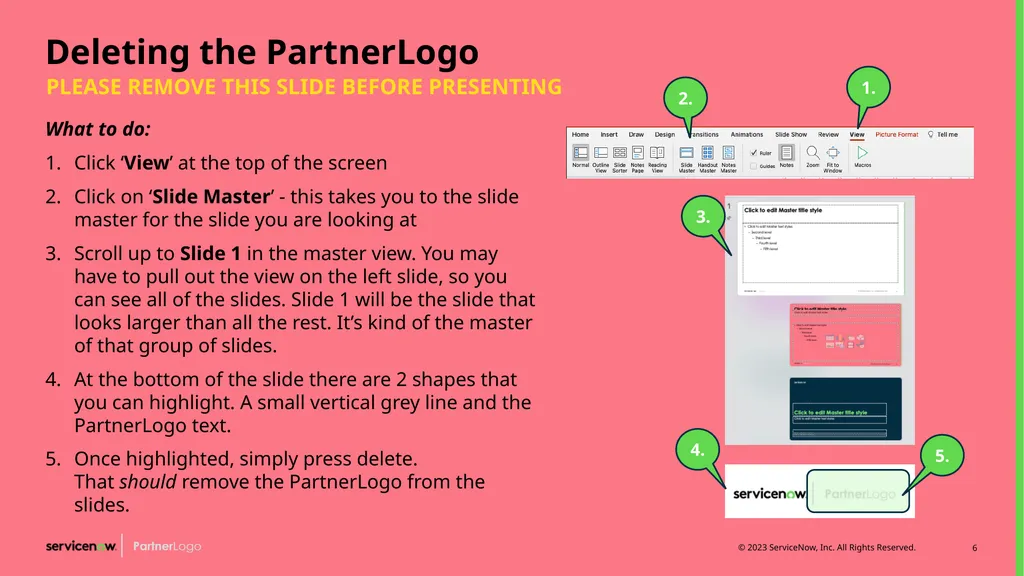
Deleting the PartnerLogo What to do:
Click ‘View’ at the top of the screen
Click on ‘Slide Master’ - this takes you to the slide master for the slide you are looking at
Scroll up to Slide 1 in the master view. You may have to pull out the view on the left slide, so you can see all of the slides. Slide 1 will be the slide that looks larger than all the rest. It’s kind of the master of that group of slides.
At the bottom of the slide there are 2 shapes that you can highlight. A small vertical grey line and the PartnerLogo text.
Once highlighted, simply press delete. That should remove the PartnerLogo from the slides. PLEASE REMOVE THIS SLIDE BEFORE PRESENTING 1. 2. 3. 4. 5.<br>
Click ‘View’ at the top of the screen
Click on ‘Slide Master’ - this takes you to the slide master for the slide you are looking at
Scroll up to Slide 1 in the master view. You may have to pull out the view on the left slide, so you can see all of the slides. Slide 1 will be the slide that looks larger than all the rest. It’s kind of the master of that group of slides.
At the bottom of the slide there are 2 shapes that you can highlight. A small vertical grey line and the PartnerLogo text.
Once highlighted, simply press delete. That should remove the PartnerLogo from the slides. PLEASE REMOVE THIS SLIDE BEFORE PRESENTING 1. 2. 3. 4. 5.<br>
07
Housekeeping<br>
08
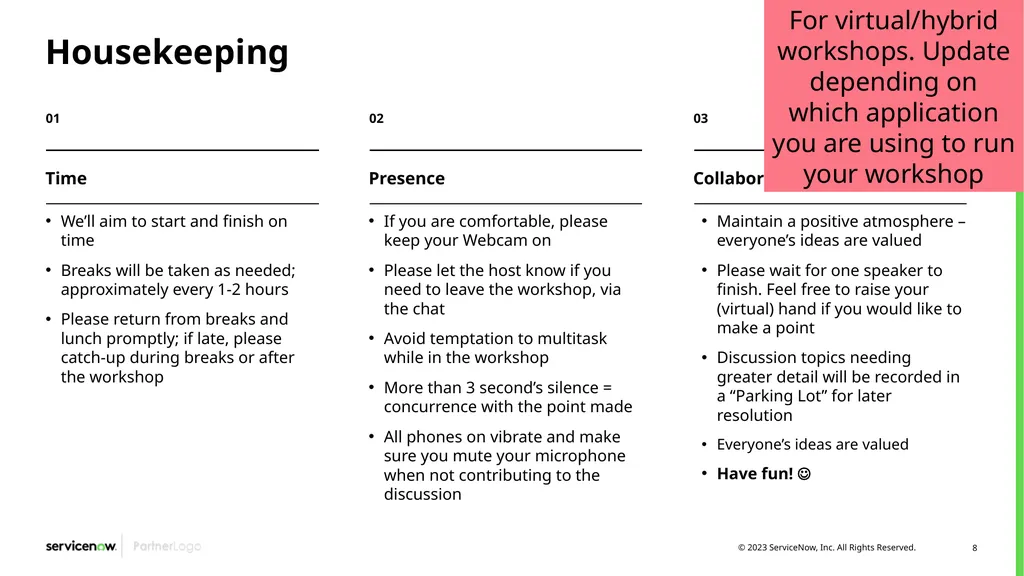
Housekeeping We’ll aim to start and finish on time
Breaks will be taken as needed; approximately every 1-2 hours
Please return from breaks and lunch promptly; if late, please catch-up during breaks or after the workshop If you are comfortable, please keep your Webcam on
Please let the host know if you need to leave the workshop, via the chat
Avoid temptation to multitask while in the workshop
More than 3 second’s silence = concurrence with the point made
All phones on vibrate and make sure you mute your microphone when not contributing to the discussion Maintain a positive atmosphere – everyone’s ideas are valued
Please wait for one speaker to finish. Feel free to raise your (virtual) hand if you would like to make a point
Discussion topics needing greater detail will be recorded in a “Parking Lot” for later resolution
Everyone’s ideas are valued
Have fun! Time Presence Collaboration For virtual/hybrid workshops. Update depending on which application you are using to run your workshop<br>
Breaks will be taken as needed; approximately every 1-2 hours
Please return from breaks and lunch promptly; if late, please catch-up during breaks or after the workshop If you are comfortable, please keep your Webcam on
Please let the host know if you need to leave the workshop, via the chat
Avoid temptation to multitask while in the workshop
More than 3 second’s silence = concurrence with the point made
All phones on vibrate and make sure you mute your microphone when not contributing to the discussion Maintain a positive atmosphere – everyone’s ideas are valued
Please wait for one speaker to finish. Feel free to raise your (virtual) hand if you would like to make a point
Discussion topics needing greater detail will be recorded in a “Parking Lot” for later resolution
Everyone’s ideas are valued
Have fun! Time Presence Collaboration For virtual/hybrid workshops. Update depending on which application you are using to run your workshop<br>
09
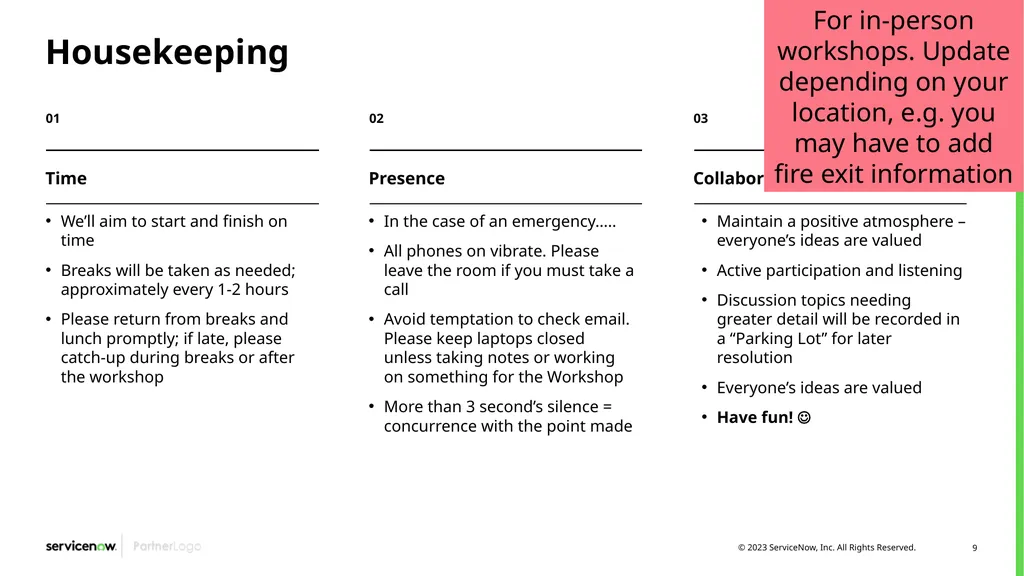
Housekeeping We’ll aim to start and finish on time
Breaks will be taken as needed; approximately every 1-2 hours
Please return from breaks and lunch promptly; if late, please catch-up during breaks or after the workshop In the case of an emergency…..
All phones on vibrate. Please leave the room if you must take a call
Avoid temptation to check email. Please keep laptops closed unless taking notes or working on something for the Workshop
More than 3 second’s silence = concurrence with the point made Maintain a positive atmosphere – everyone’s ideas are valued
Active participation and listening
Discussion topics needing greater detail will be recorded in a “Parking Lot” for later resolution
Everyone’s ideas are valued
Have fun! Time Presence Collaboration For in-person workshops. Update depending on your location, e.g. you may have to add fire exit information<br>
Breaks will be taken as needed; approximately every 1-2 hours
Please return from breaks and lunch promptly; if late, please catch-up during breaks or after the workshop In the case of an emergency…..
All phones on vibrate. Please leave the room if you must take a call
Avoid temptation to check email. Please keep laptops closed unless taking notes or working on something for the Workshop
More than 3 second’s silence = concurrence with the point made Maintain a positive atmosphere – everyone’s ideas are valued
Active participation and listening
Discussion topics needing greater detail will be recorded in a “Parking Lot” for later resolution
Everyone’s ideas are valued
Have fun! Time Presence Collaboration For in-person workshops. Update depending on your location, e.g. you may have to add fire exit information<br>
10
Agenda<br>
11
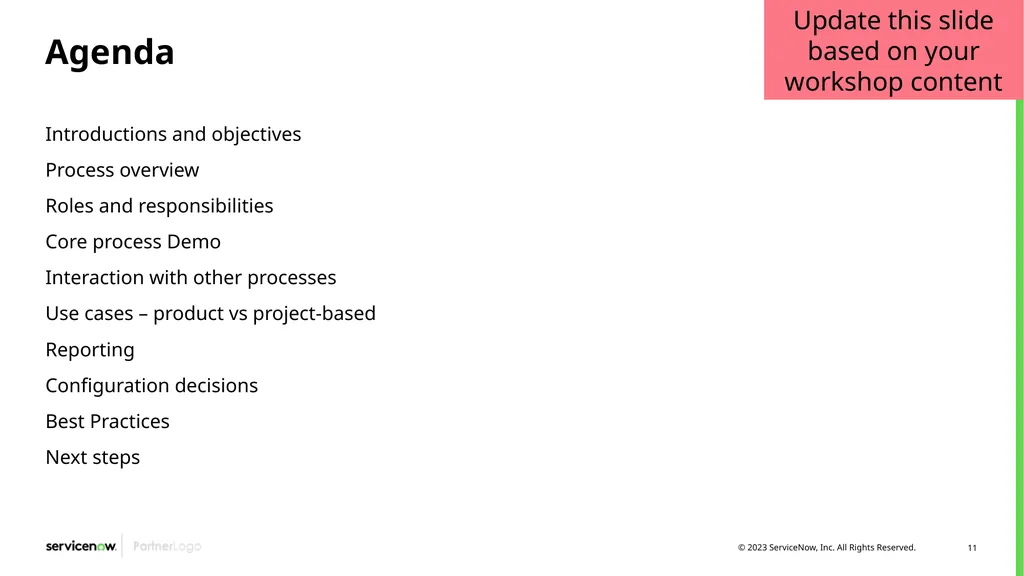
Agenda Introductions and objectives
Process overview
Roles and responsibilities
Core process Demo
Interaction with other processes
Use cases – product vs project-based
Reporting
Configuration decisions
Best Practices
Next steps Update this slide based on your workshop content<br>
Process overview
Roles and responsibilities
Core process Demo
Interaction with other processes
Use cases – product vs project-based
Reporting
Configuration decisions
Best Practices
Next steps Update this slide based on your workshop content<br>
12
Introductions<br>
13
Introductions Name
Role
Exposure to ServiceNow
Your Expectations from the Agile Development 2.0 process and application<br>
Role
Exposure to ServiceNow
Your Expectations from the Agile Development 2.0 process and application<br>
14
Workshop objectives<br>
15
Workshop objectives Define objectives and outcomes for Agile
Document challenges with current Agile practice
Review Agile Development leading practices and ServiceNow’s SPM solution
Define Agile Development end state and implementation roadmap
Discuss governance process, including roles and security<br>
Document challenges with current Agile practice
Review Agile Development leading practices and ServiceNow’s SPM solution
Define Agile Development end state and implementation roadmap
Discuss governance process, including roles and security<br>
16
Agile development
overview<br>
17
Agile development Prioritize, plan, and manage agile portfolios for optimal business value. Simplify execution so your teams can deliver products and services faster.<br>
18
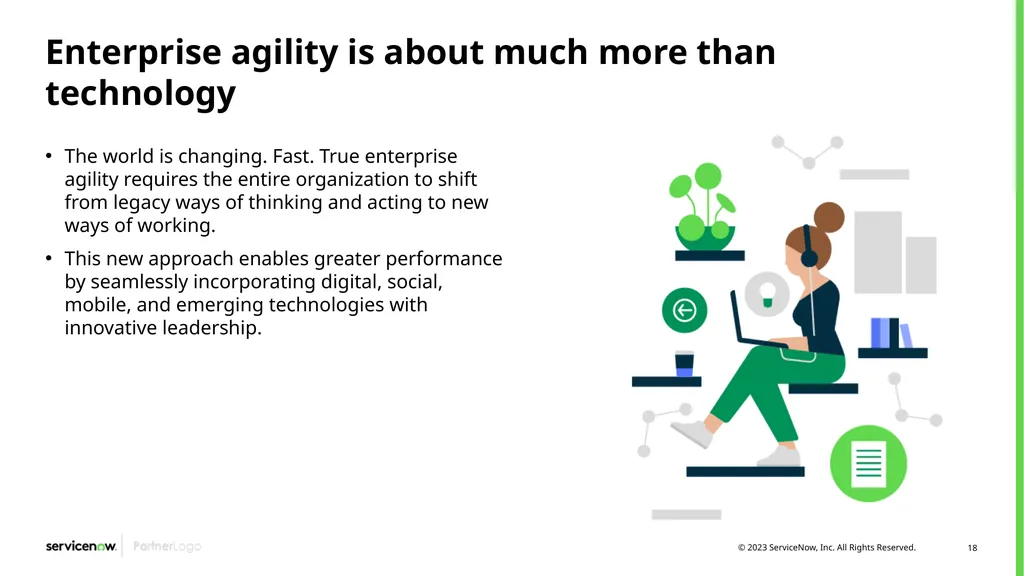
Enterprise agility is about much more than technology The world is changing. Fast. True enterprise agility requires the entire organization to shift from legacy ways of thinking and acting to new ways of working.
This new approach enables greater performance by seamlessly incorporating digital, social, mobile, and emerging technologies with innovative leadership.<br>
This new approach enables greater performance by seamlessly incorporating digital, social, mobile, and emerging technologies with innovative leadership.<br>
19
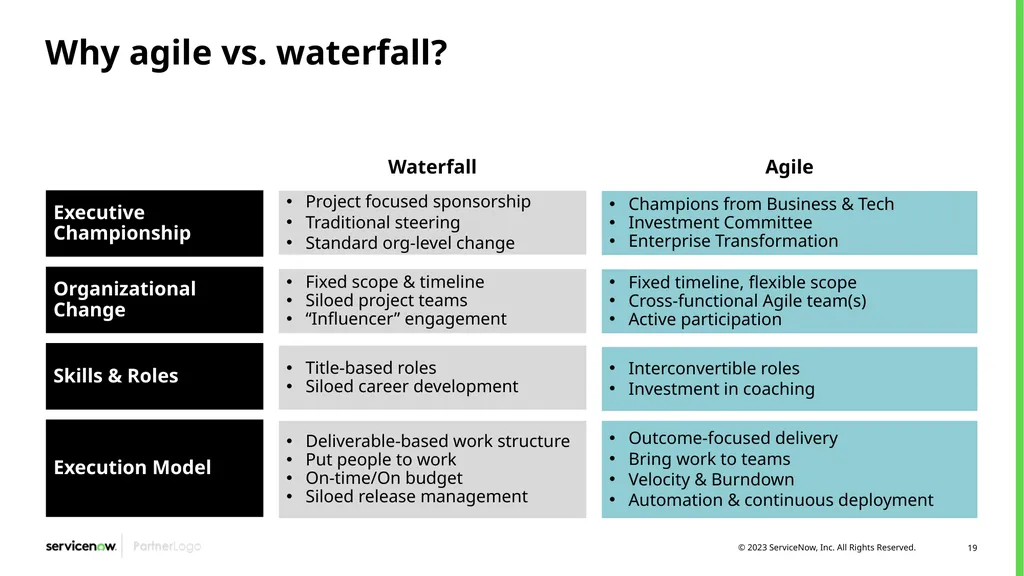
Why agile vs. waterfall? Executive Championship Project focused sponsorship
Traditional steering
Standard org-level change Organizational Change Skills & Roles Execution Model Fixed scope & timeline
Siloed project teams
“Influencer” engagement Title-based roles
Siloed career development Deliverable-based work structure
Put people to work
On-time/On budget
Siloed release management Champions from Business & Tech
Investment Committee
Enterprise Transformation Fixed timeline, flexible scope
Cross-functional Agile team(s)
Active participation Interconvertible roles
Investment in coaching Outcome-focused delivery
Bring work to teams
Velocity & Burndown
Automation & continuous deployment Waterfall Agile<br>
Traditional steering
Standard org-level change Organizational Change Skills & Roles Execution Model Fixed scope & timeline
Siloed project teams
“Influencer” engagement Title-based roles
Siloed career development Deliverable-based work structure
Put people to work
On-time/On budget
Siloed release management Champions from Business & Tech
Investment Committee
Enterprise Transformation Fixed timeline, flexible scope
Cross-functional Agile team(s)
Active participation Interconvertible roles
Investment in coaching Outcome-focused delivery
Bring work to teams
Velocity & Burndown
Automation & continuous deployment Waterfall Agile<br>
20
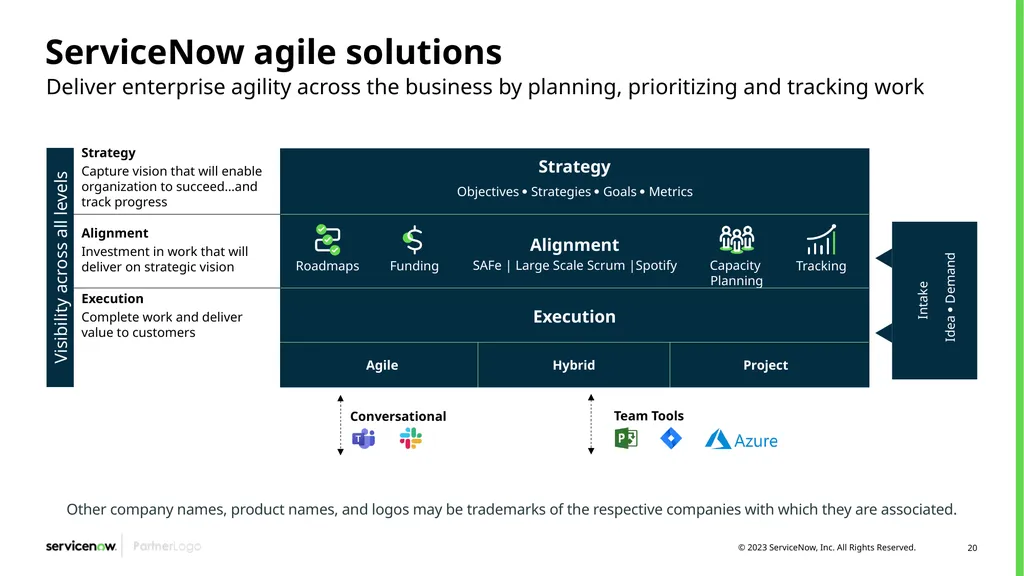
ServiceNow agile solutions Deliver enterprise agility across the business by planning, prioritizing and tracking work Other company names, product names, and logos may be trademarks of the respective companies with which they are associated. Visibility across all levels Strategy
Capture vision that will enable organization to succeed…and track progress Alignment
Investment in work that will deliver on strategic vision Execution
Complete work and deliver value to customers Strategy Objectives Strategies Goals Metrics Execution Agile Hybrid Project SAFe | Large Scale Scrum |Spotify Capacity Planning Tracking Roadmaps Funding Intake Idea Demand Alignment Conversational Team Tools<br>
Capture vision that will enable organization to succeed…and track progress Alignment
Investment in work that will deliver on strategic vision Execution
Complete work and deliver value to customers Strategy Objectives Strategies Goals Metrics Execution Agile Hybrid Project SAFe | Large Scale Scrum |Spotify Capacity Planning Tracking Roadmaps Funding Intake Idea Demand Alignment Conversational Team Tools<br>
21
Agile development 2.0 introduction The ServiceNow Agile Development 2.0 application provides an agile software development environment for product-based or project-based efforts, using the Scrum framework.
It offers you the flexibility to implement a pure agile approach over the entire life-cycle of a product, or a hybrid approach using agile methods within a traditional project structure.<br>
It offers you the flexibility to implement a pure agile approach over the entire life-cycle of a product, or a hybrid approach using agile methods within a traditional project structure.<br>
22
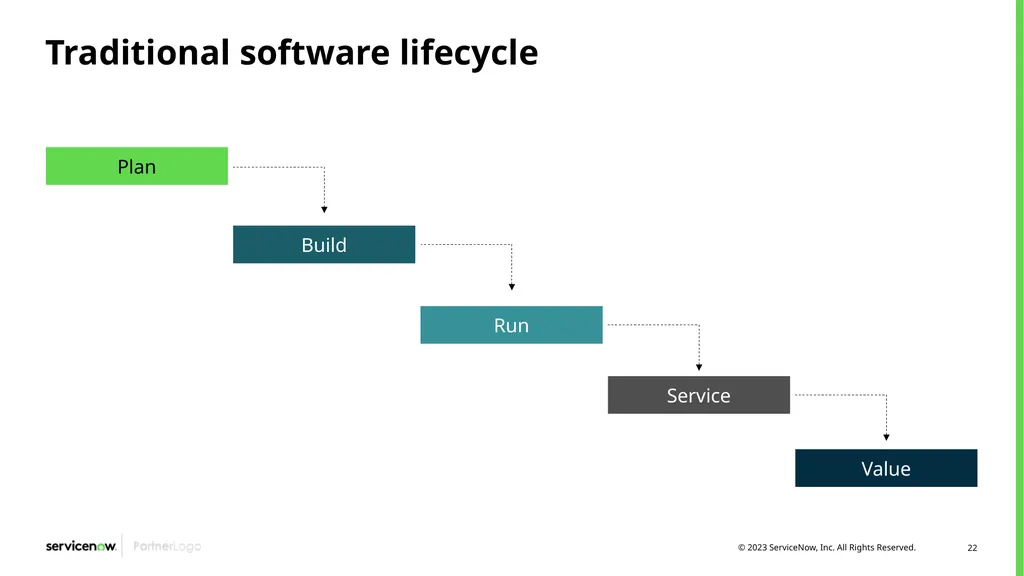
Traditional software lifecycle<br>
23
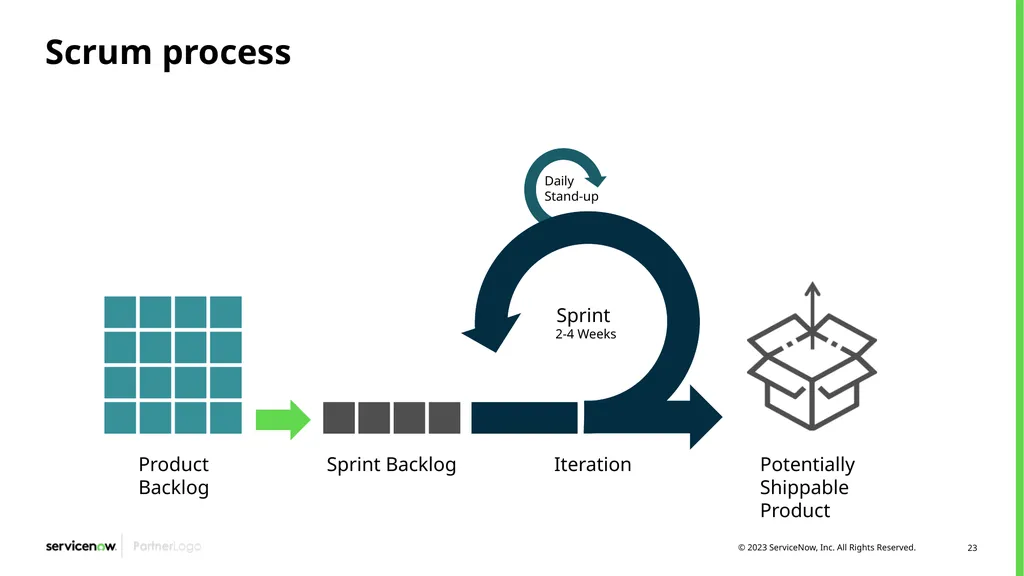
Scrum process Product
Backlog Sprint Backlog Iteration Potentially
Shippable
Product Sprint
2-4 Weeks Daily
Stand-up<br>
24
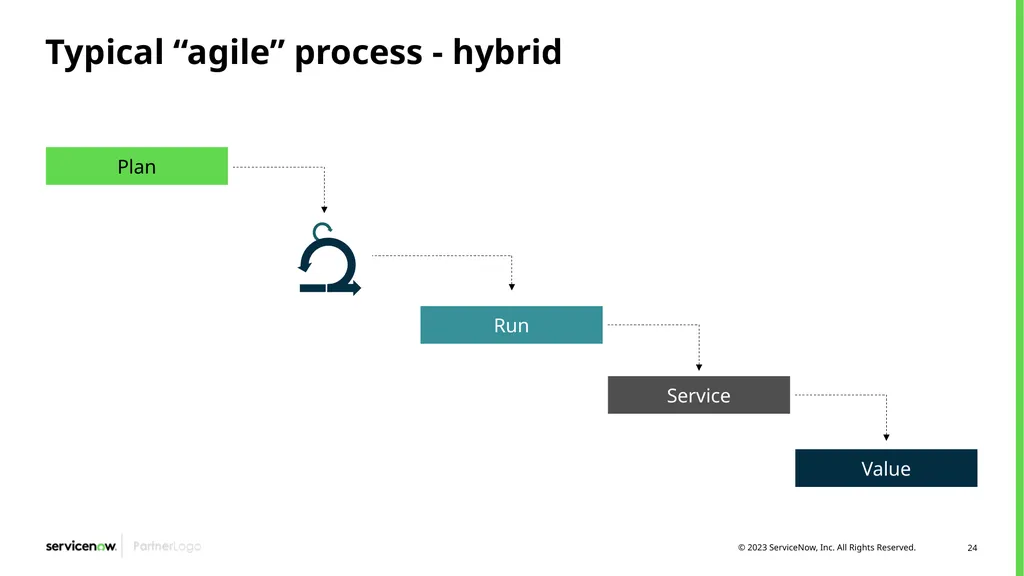
Typical “agile” process - hybrid<br>
25
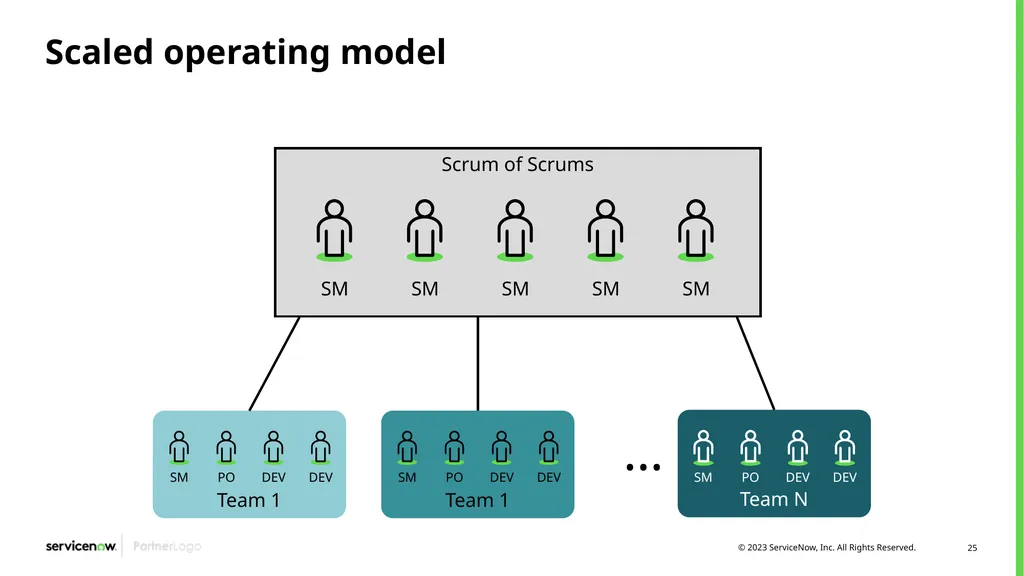
Scaled operating model Scrum of Scrums Team 1 Team 1 Team N SM SM SM SM SM SM PO DEV DEV SM PO DEV DEV SM PO DEV DEV …<br>
26
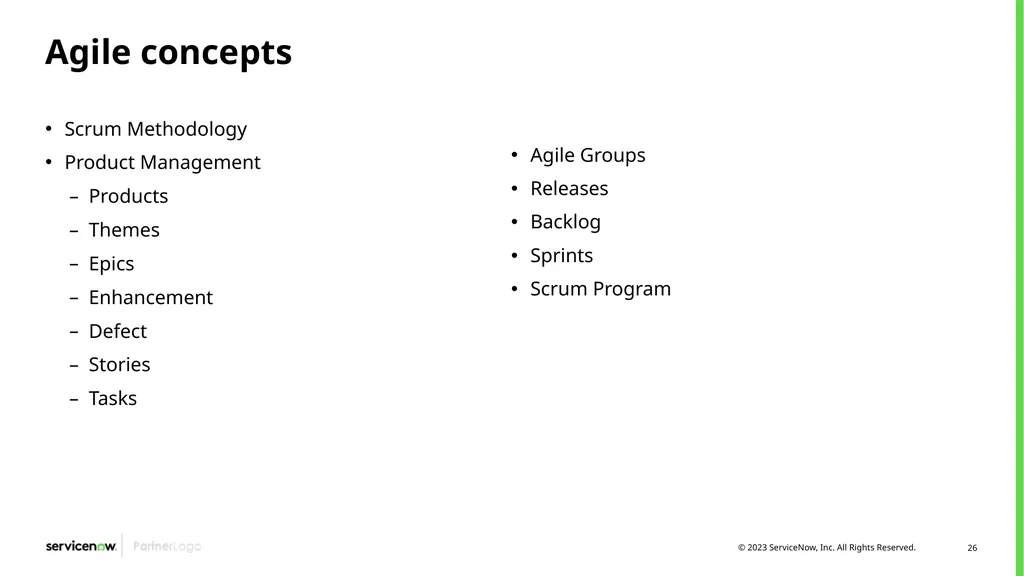
Agile concepts Scrum Methodology
Product Management
Products
Themes
Epics
Enhancement
Defect
Stories
Tasks Agile Groups
Releases
Backlog
Sprints
Scrum Program<br>
Product Management
Products
Themes
Epics
Enhancement
Defect
Stories
Tasks Agile Groups
Releases
Backlog
Sprints
Scrum Program<br>
27
Agile concepts – scrum methodology Scrum is one of the most popular methodologies of agile development. It has the following characteristics:
A short, fixed schedule of cycles with adjustable scope, called sprints, to address rapidly changing development needs
A repeating sequence of events, milestones, and meetings
A practice of implementing and testing new requirements, called stories, to ensure that some work is release-ready after each sprint<br>
A short, fixed schedule of cycles with adjustable scope, called sprints, to address rapidly changing development needs
A repeating sequence of events, milestones, and meetings
A practice of implementing and testing new requirements, called stories, to ensure that some work is release-ready after each sprint<br>
28
Agile concepts – product management A scrum product is an arbitrary classification that represents an item under development. A product organizes themes, epics, and stories of similar functionality into a single context.
In Scrum, Products don’t have an end date
You can create a new Product from the list of Products
You can associate Teams that work on your Product
A scrum Theme is the highest level of the story hierarchy. It describes a view of a tangible product (such as a trading application) or an abstract goal (such as performance tuning). A product owner breaks down a theme into one or more epics.
An Epic groups the related user stories together or describes a block of requirements that have not yet been rationalized into stories.
A Story is a brief statement of a product requirement or a business case. Typically, stories are expressed in plain language to help the reader understand what the software should accomplish. Product owners create stories. A scrum user then divides the stories into one or more scrum tasks.
Scrum Tasks are the discrete pieces of work required to complete a story.<br>
In Scrum, Products don’t have an end date
You can create a new Product from the list of Products
You can associate Teams that work on your Product
A scrum Theme is the highest level of the story hierarchy. It describes a view of a tangible product (such as a trading application) or an abstract goal (such as performance tuning). A product owner breaks down a theme into one or more epics.
An Epic groups the related user stories together or describes a block of requirements that have not yet been rationalized into stories.
A Story is a brief statement of a product requirement or a business case. Typically, stories are expressed in plain language to help the reader understand what the software should accomplish. Product owners create stories. A scrum user then divides the stories into one or more scrum tasks.
Scrum Tasks are the discrete pieces of work required to complete a story.<br>
29
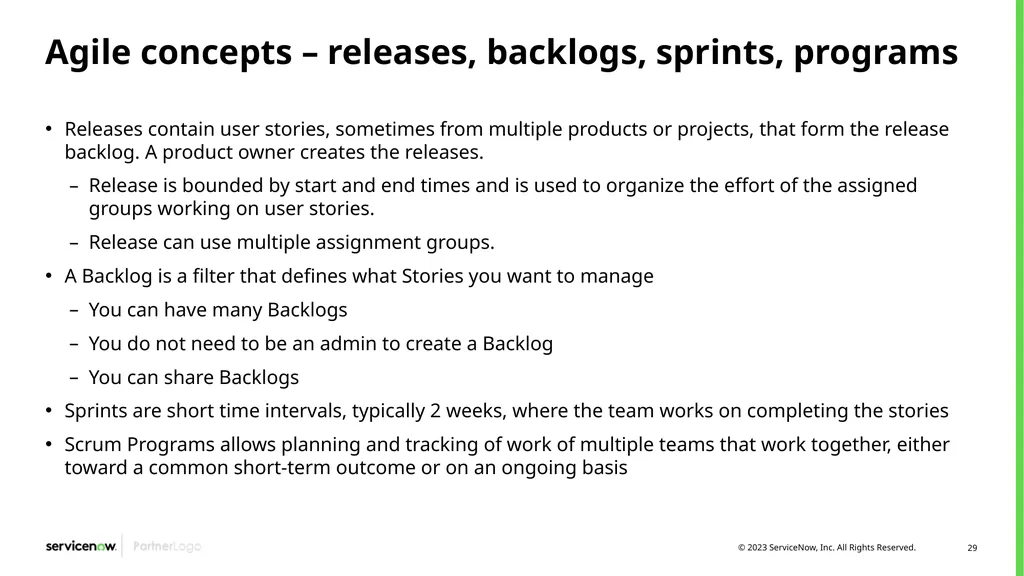
Agile concepts – releases, backlogs, sprints, programs Releases contain user stories, sometimes from multiple products or projects, that form the release backlog. A product owner creates the releases.
Release is bounded by start and end times and is used to organize the effort of the assigned groups working on user stories.
Release can use multiple assignment groups.
A Backlog is a filter that defines what Stories you want to manage
You can have many Backlogs
You do not need to be an admin to create a Backlog
You can share Backlogs
Sprints are short time intervals, typically 2 weeks, where the team works on completing the stories
Scrum Programs allows planning and tracking of work of multiple teams that work together, either toward a common short-term outcome or on an ongoing basis<br>
Release is bounded by start and end times and is used to organize the effort of the assigned groups working on user stories.
Release can use multiple assignment groups.
A Backlog is a filter that defines what Stories you want to manage
You can have many Backlogs
You do not need to be an admin to create a Backlog
You can share Backlogs
Sprints are short time intervals, typically 2 weeks, where the team works on completing the stories
Scrum Programs allows planning and tracking of work of multiple teams that work together, either toward a common short-term outcome or on an ongoing basis<br>
30
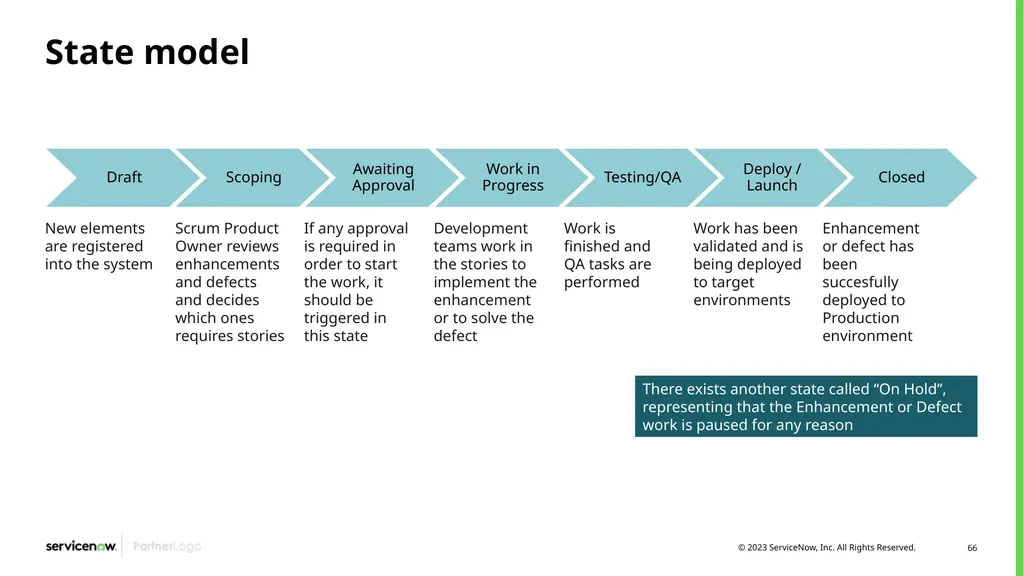
Agile concepts – enhancements and defects Enhancements and defects are objects included in Agile Application 2.0. They are both similar objects within ServiceNow that share the same state model and the same information.
Enhancement: Allows planning and tracking new improvement opportunities for existing applications or products
Defect: Record of a reported product bug or potential product issue<br>
Enhancement: Allows planning and tracking new improvement opportunities for existing applications or products
Defect: Record of a reported product bug or potential product issue<br>
31
Agile concepts – agile teams A Scrum Team in ServiceNow is a standard Group (sys_user_group)
The Group Type field is set to Agile Team
There is a Record Producer to create the Agile Team / Group record<br>
The Group Type field is set to Agile Team
There is a Record Producer to create the Agile Team / Group record<br>
32
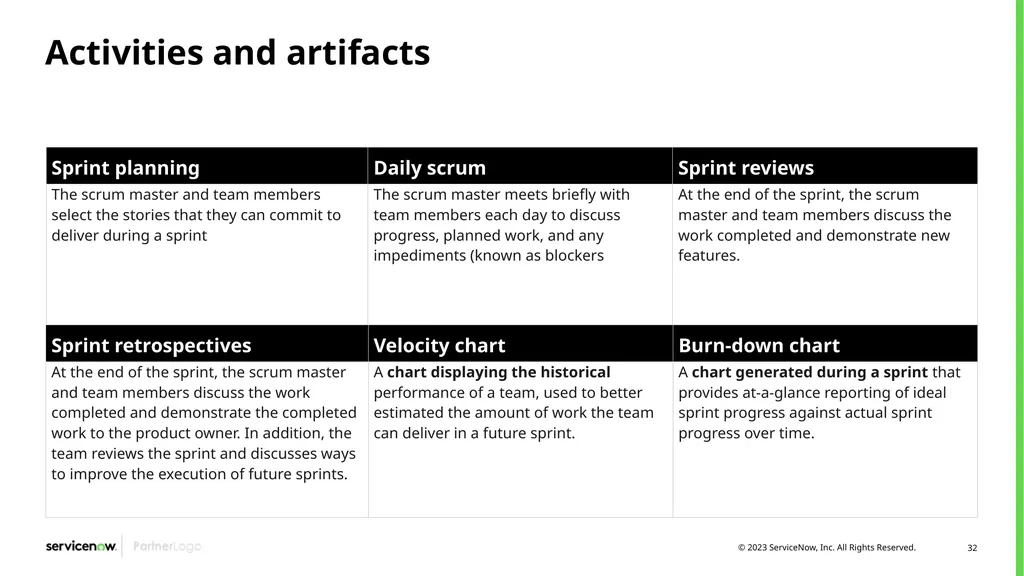
Activities and artifacts<br>
33
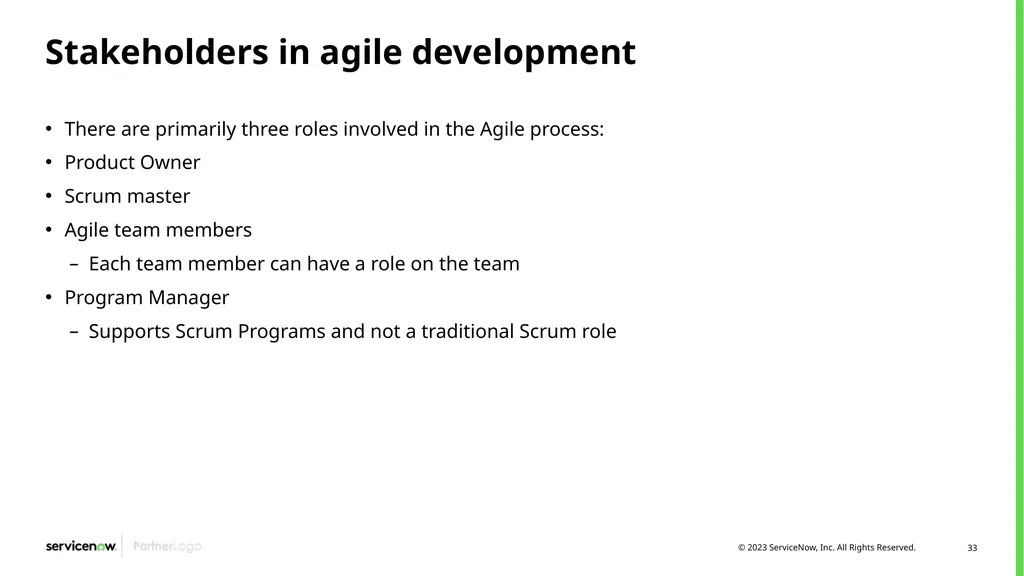
Stakeholders in agile development There are primarily three roles involved in the Agile process:
Product Owner
Scrum master
Agile team members
Each team member can have a role on the team
Program Manager
Supports Scrum Programs and not a traditional Scrum role<br>
Product Owner
Scrum master
Agile team members
Each team member can have a role on the team
Program Manager
Supports Scrum Programs and not a traditional Scrum role<br>
34
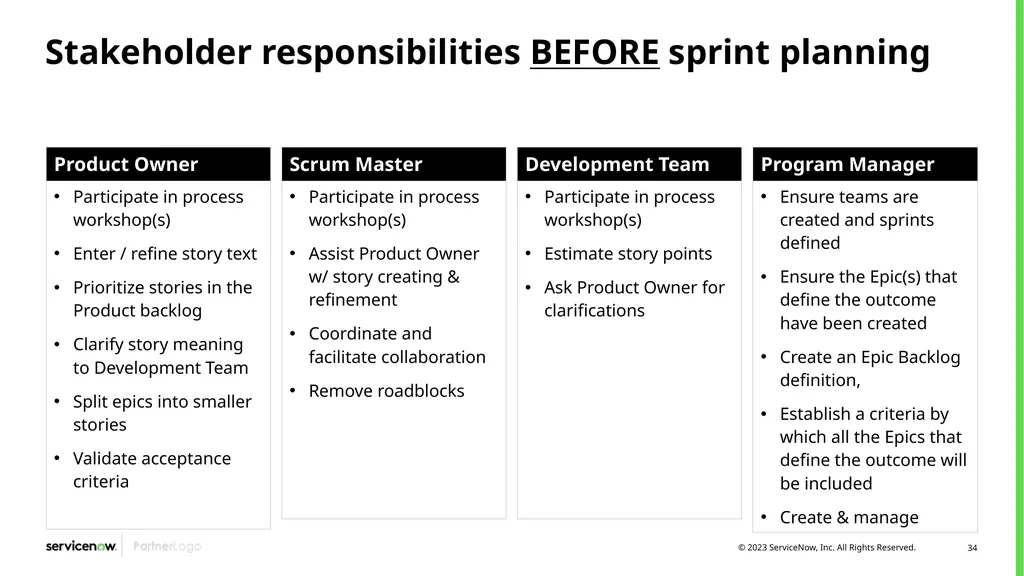
Stakeholder responsibilities BEFORE sprint planning<br>
35
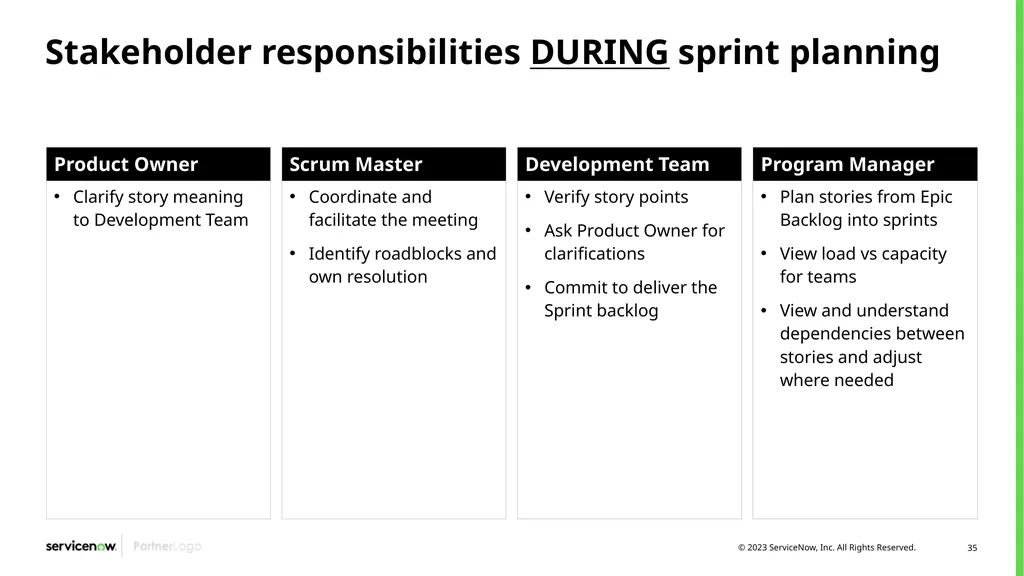
Stakeholder responsibilities DURING sprint planning<br>
36
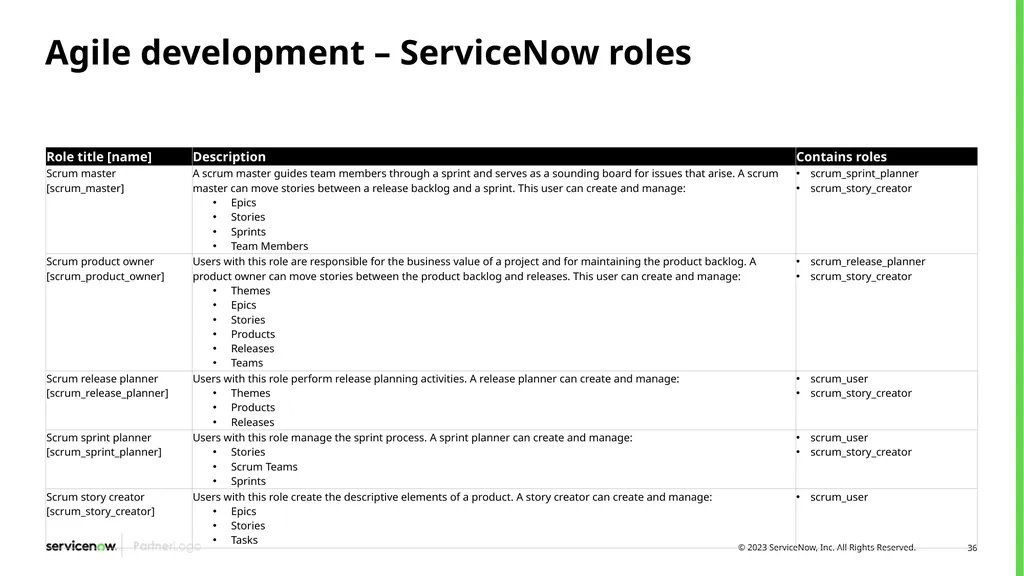
Agile development – ServiceNow roles<br>
37
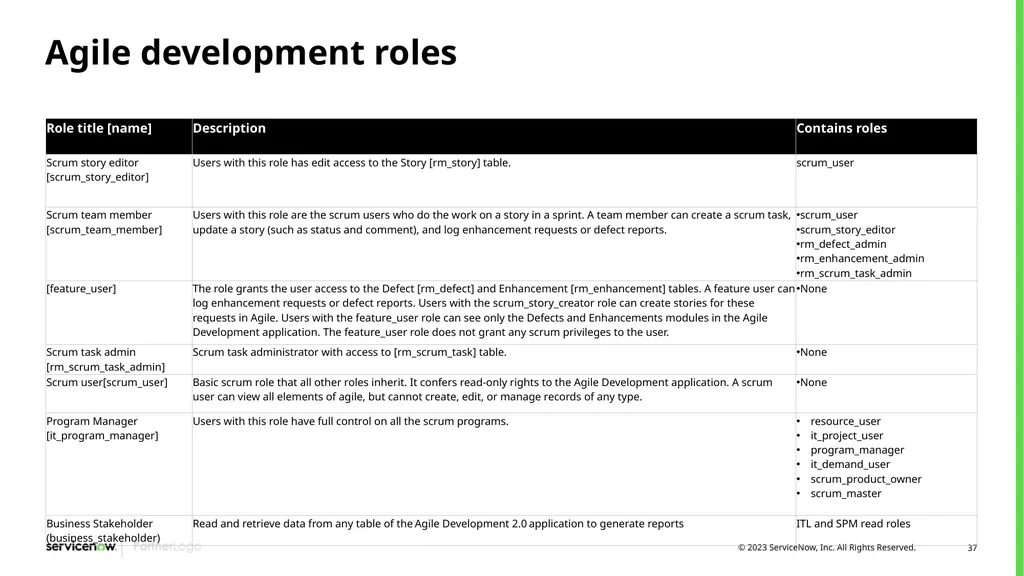
Agile development roles<br>
38
Agile features overview and demo<br>
39
Agile 2.0 features review and demo Create a product – add themes and epics
Create an Agile group
Create a sprint
Create backlog – Agile Board
Manage Stories
Plan and track sprint – Agile Board
Create and track releases
Create Enhancements and Defects<br>
Create an Agile group
Create a sprint
Create backlog – Agile Board
Manage Stories
Plan and track sprint – Agile Board
Create and track releases
Create Enhancements and Defects<br>
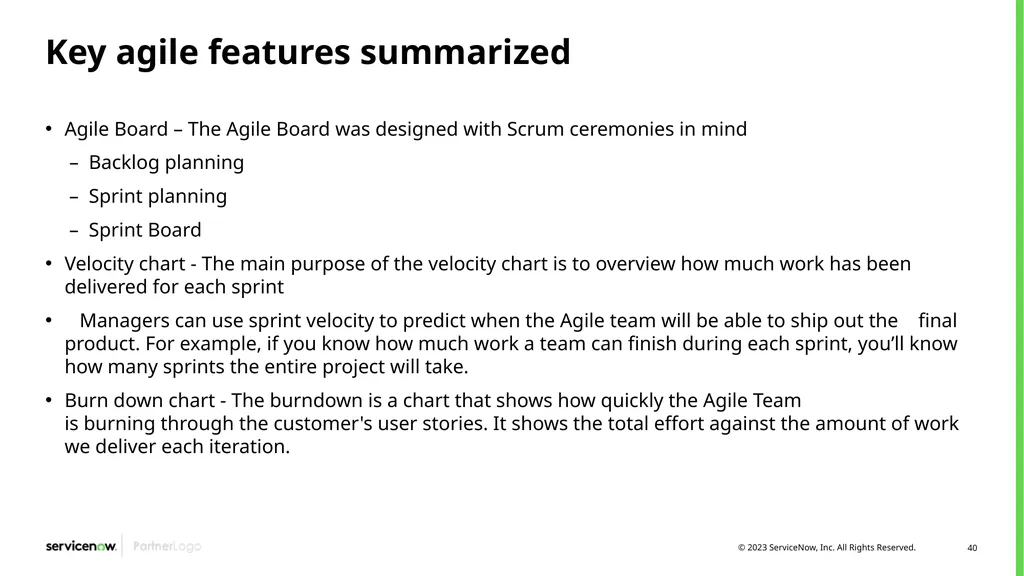
40
Key agile features summarized Agile Board – The Agile Board was designed with Scrum ceremonies in mind
Backlog planning
Sprint planning
Sprint Board
Velocity chart - The main purpose of the velocity chart is to overview how much work has been delivered for each sprint
Managers can use sprint velocity to predict when the Agile team will be able to ship out the final product. For example, if you know how much work a team can finish during each sprint, you’ll know how many sprints the entire project will take.
Burn down chart - The burndown is a chart that shows how quickly the Agile Team is burning through the customer's user stories. It shows the total effort against the amount of work we deliver each iteration.<br>
Backlog planning
Sprint planning
Sprint Board
Velocity chart - The main purpose of the velocity chart is to overview how much work has been delivered for each sprint
Managers can use sprint velocity to predict when the Agile team will be able to ship out the final product. For example, if you know how much work a team can finish during each sprint, you’ll know how many sprints the entire project will take.
Burn down chart - The burndown is a chart that shows how quickly the Agile Team is burning through the customer's user stories. It shows the total effort against the amount of work we deliver each iteration.<br>
41
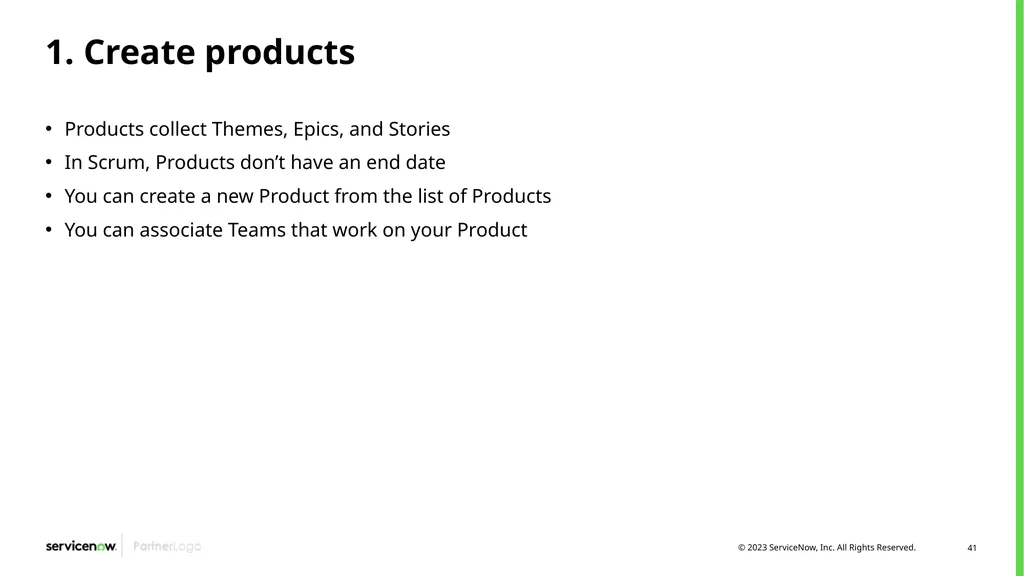
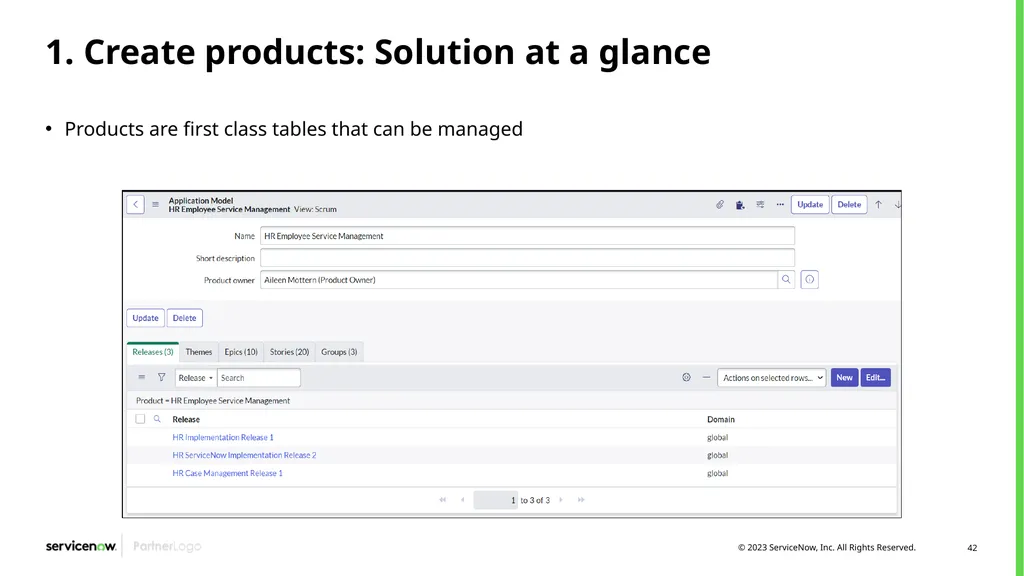
1. Create products Products collect Themes, Epics, and Stories
In Scrum, Products don’t have an end date
You can create a new Product from the list of Products
You can associate Teams that work on your Product<br>
In Scrum, Products don’t have an end date
You can create a new Product from the list of Products
You can associate Teams that work on your Product<br>
42
1. Create products: Solution at a glance Products are first class tables that can be managed<br>
43
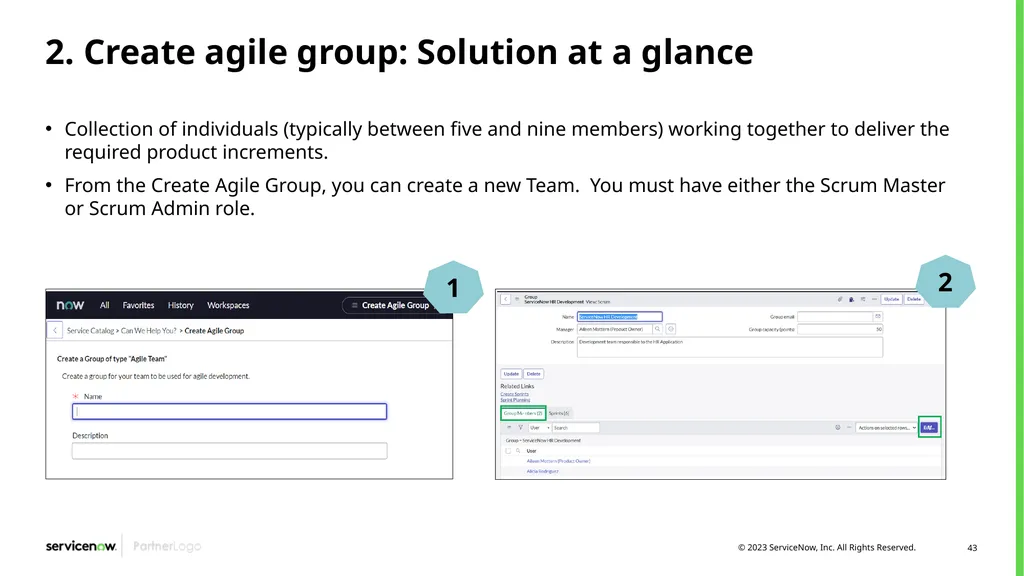
2. Create agile group: Solution at a glance Collection of individuals (typically between five and nine members) working together to deliver the required product increments.
From the Create Agile Group, you can create a new Team. You must have either the Scrum Master or Scrum Admin role. 1 2<br>
From the Create Agile Group, you can create a new Team. You must have either the Scrum Master or Scrum Admin role. 1 2<br>
44
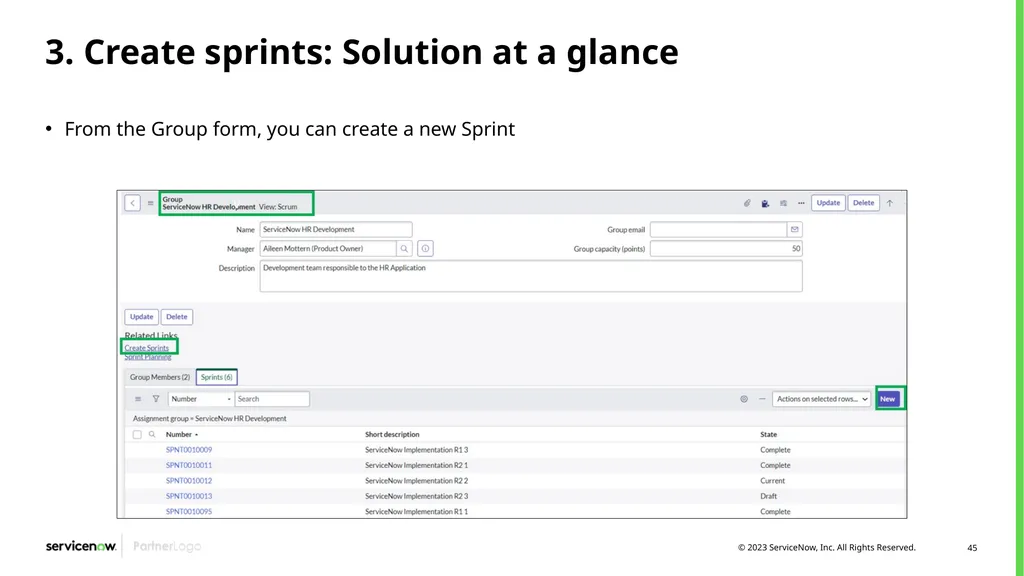
3. Create sprints From an Agile Team
Create a new Sprint from the Sprints related List
Add members to the group and assign Scrum Roles from the group Members related list
View / Set team story points
In ServiceNow Agile 2.0, Teams own Sprints
From Sprint Planning.
From the Agile board -> Sprint planning<br>
Create a new Sprint from the Sprints related List
Add members to the group and assign Scrum Roles from the group Members related list
View / Set team story points
In ServiceNow Agile 2.0, Teams own Sprints
From Sprint Planning.
From the Agile board -> Sprint planning<br>
45
3. Create sprints: Solution at a glance From the Group form, you can create a new Sprint<br>
46
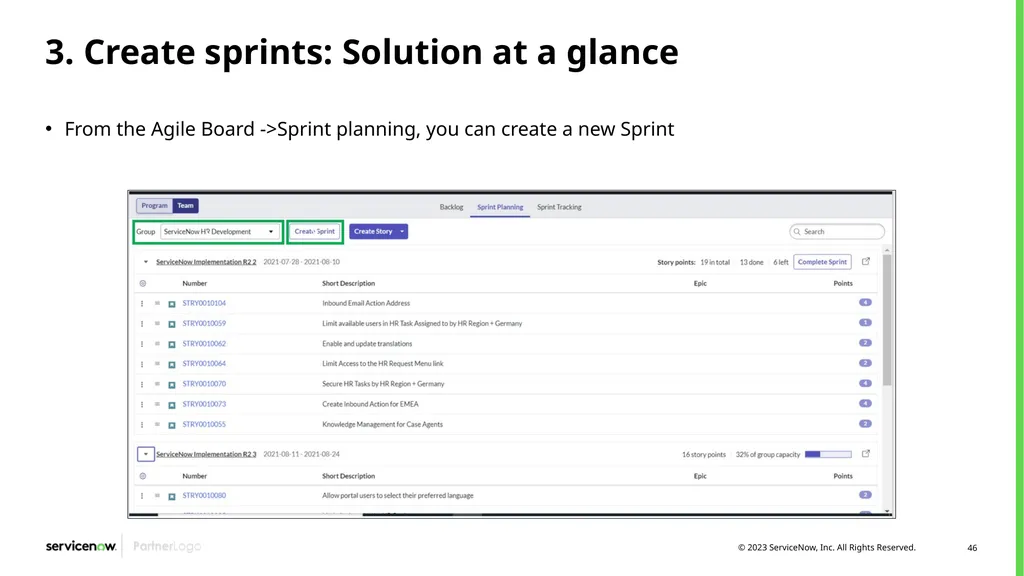
3. Create sprints: Solution at a glance From the Agile Board ->Sprint planning, you can create a new Sprint<br>
47
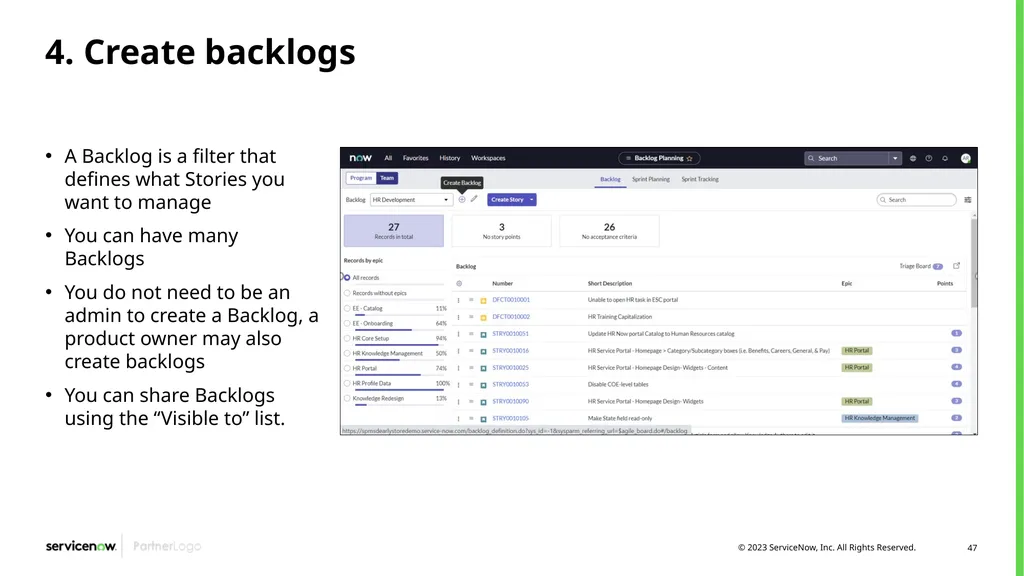
4. Create backlogs A Backlog is a filter that defines what Stories you want to manage
You can have many Backlogs
You do not need to be an admin to create a Backlog, a product owner may also create backlogs
You can share Backlogs using the “Visible to” list.<br>
You can have many Backlogs
You do not need to be an admin to create a Backlog, a product owner may also create backlogs
You can share Backlogs using the “Visible to” list.<br>
48
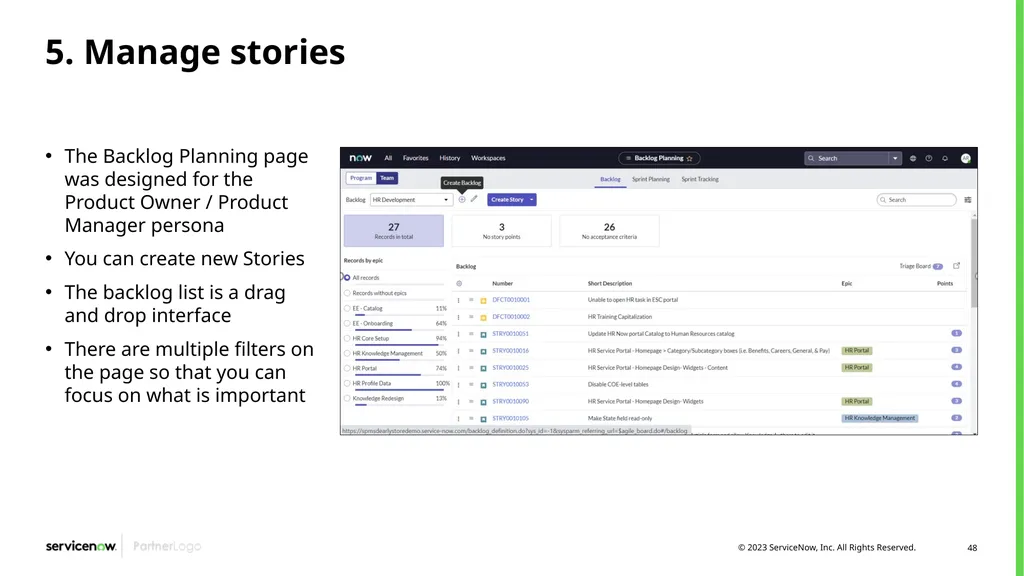
5. Manage stories The Backlog Planning page was designed for the Product Owner / Product Manager persona
You can create new Stories
The backlog list is a drag and drop interface
There are multiple filters on the page so that you can focus on what is important<br>
You can create new Stories
The backlog list is a drag and drop interface
There are multiple filters on the page so that you can focus on what is important<br>
49
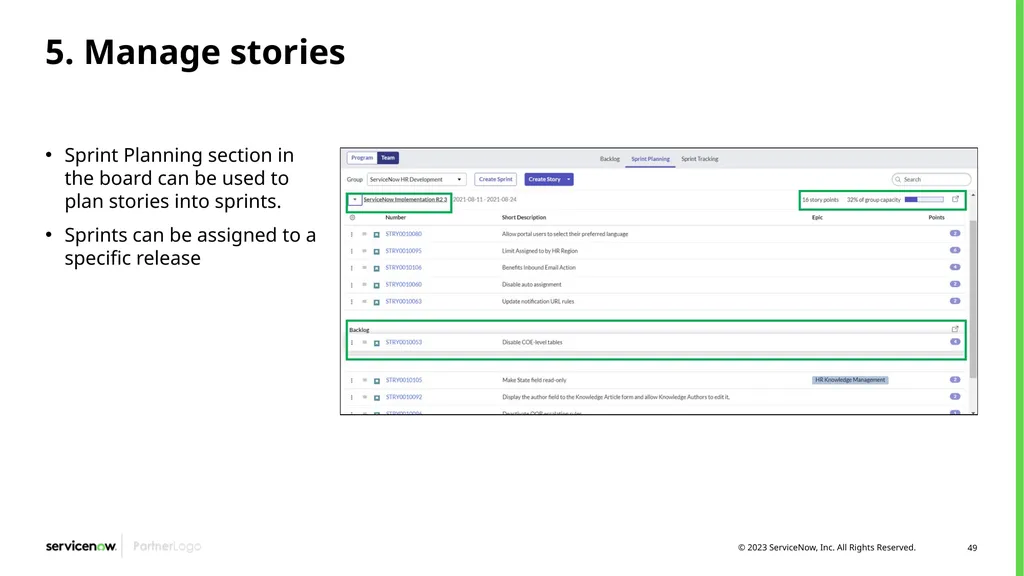
5. Manage stories Sprint Planning section in the board can be used to plan stories into sprints.
Sprints can be assigned to a specific release<br>
Sprints can be assigned to a specific release<br>
50
Story “definition of ready” Story is well documented
Acceptance criteria are defined
If the story requires UX changes, UX mockups are linked in the story. Customizations can be identified there
Story has been reviewed with Scrum team
Story points have been assigned to the story<br>
Acceptance criteria are defined
If the story requires UX changes, UX mockups are linked in the story. Customizations can be identified there
Story has been reviewed with Scrum team
Story points have been assigned to the story<br>
51
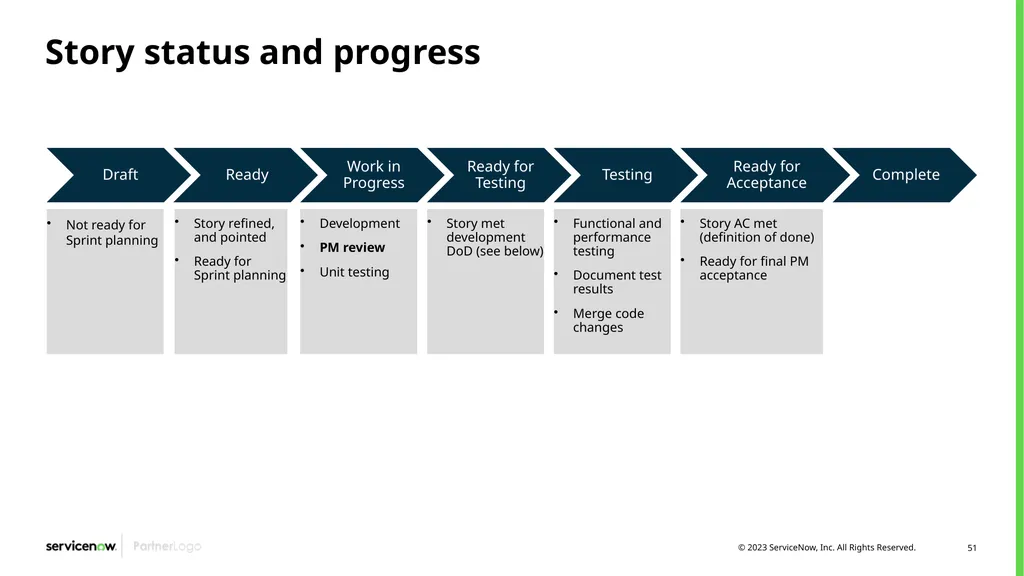
Story status and progress<br>
52
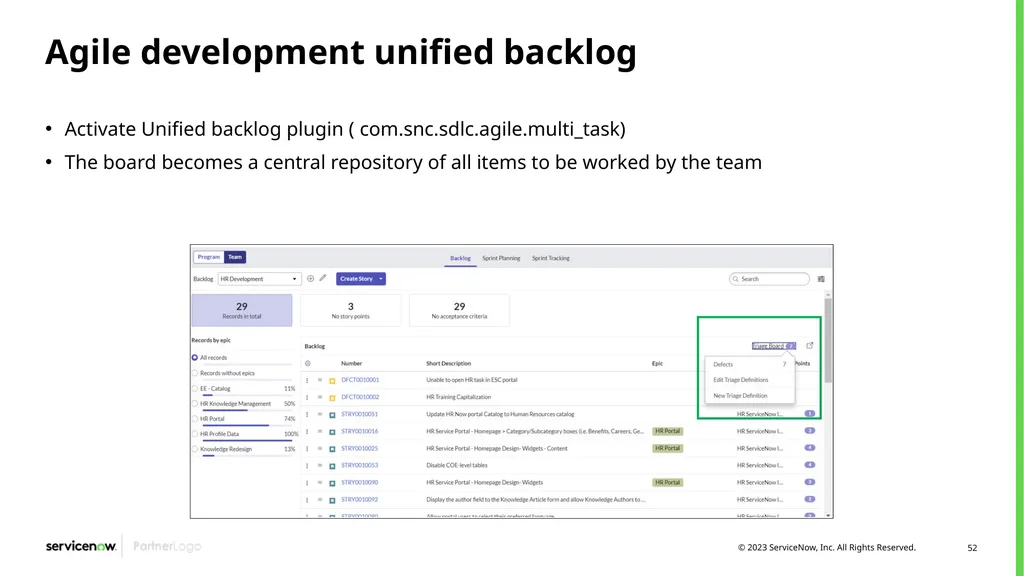
Agile development unified backlog Activate Unified backlog plugin ( com.snc.sdlc.agile.multi_task)
The board becomes a central repository of all items to be worked by the team<br>
The board becomes a central repository of all items to be worked by the team<br>
53
6. Plan sprints The Sprint Planning page allows teams to create and plan Sprints
You can validate that the total points planned in a Sprint is within the Team’s capacity
Use drag and drop to add stories to the sprint backlog
Start and close sprints<br>
You can validate that the total points planned in a Sprint is within the Team’s capacity
Use drag and drop to add stories to the sprint backlog
Start and close sprints<br>
54
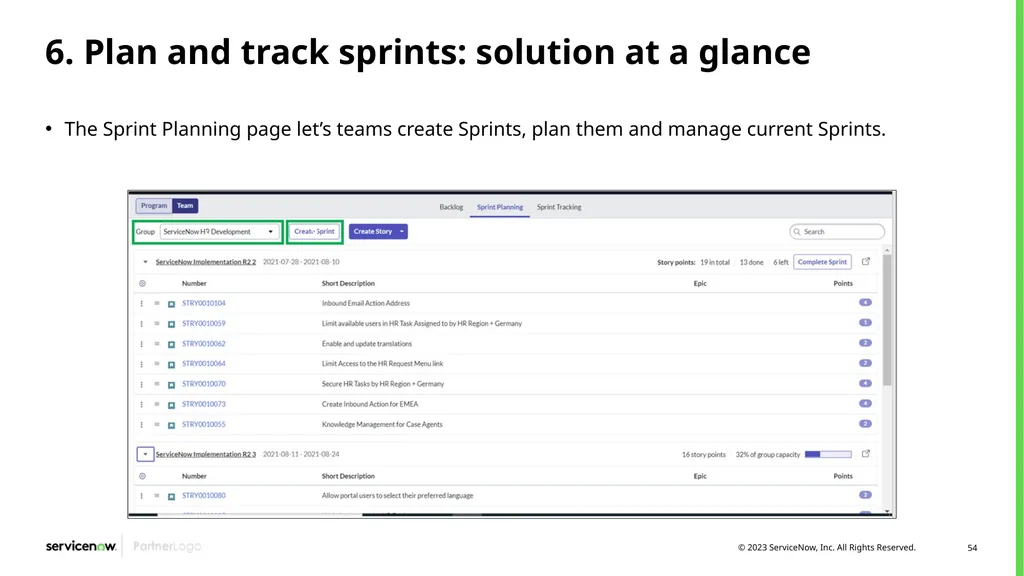
6. Plan and track sprints: solution at a glance The Sprint Planning page let’s teams create Sprints, plan them and manage current Sprints.<br>
55
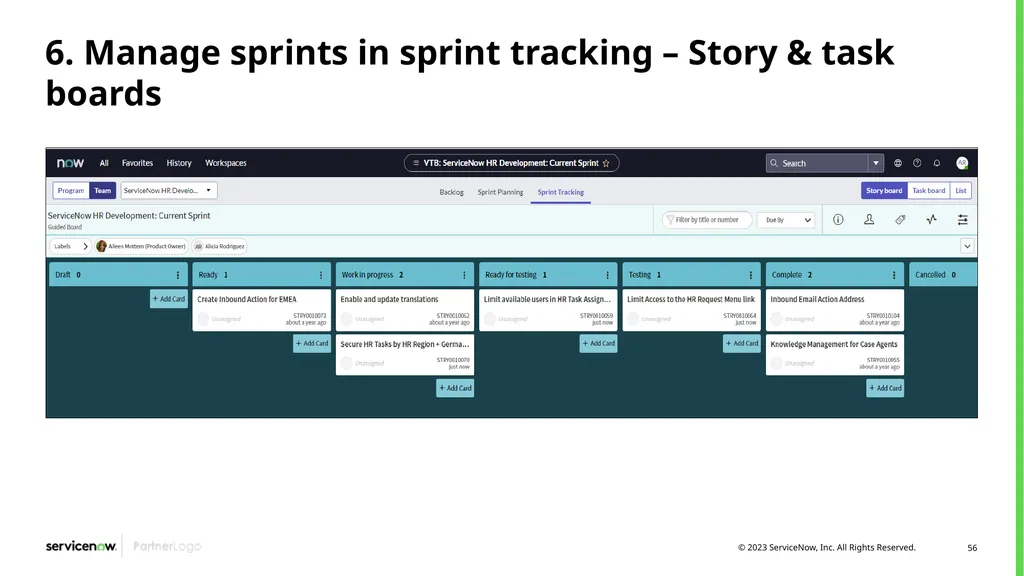
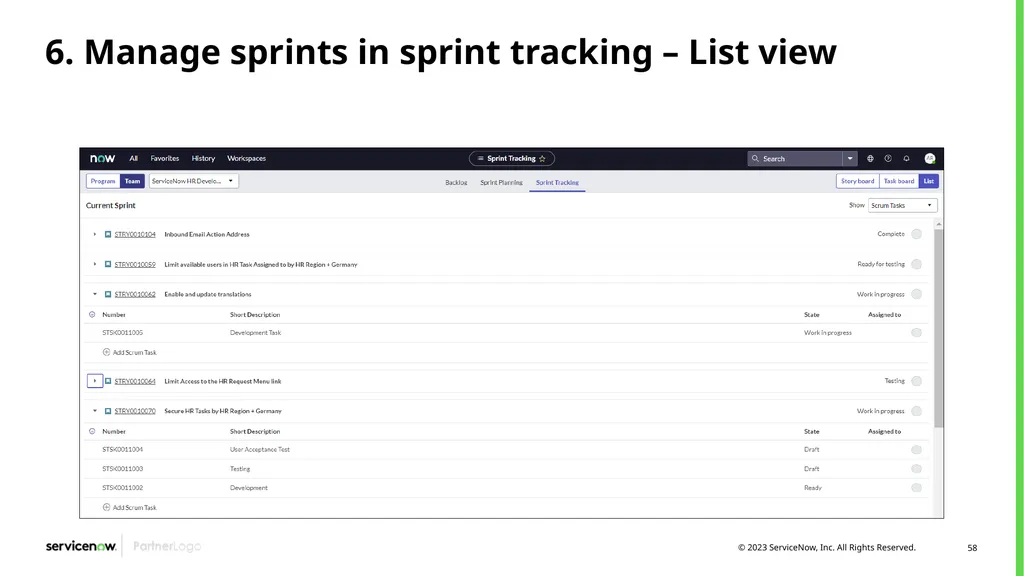
6. Manage sprints in sprint tracking View, create and manage Sprint Stories progress in the Story board
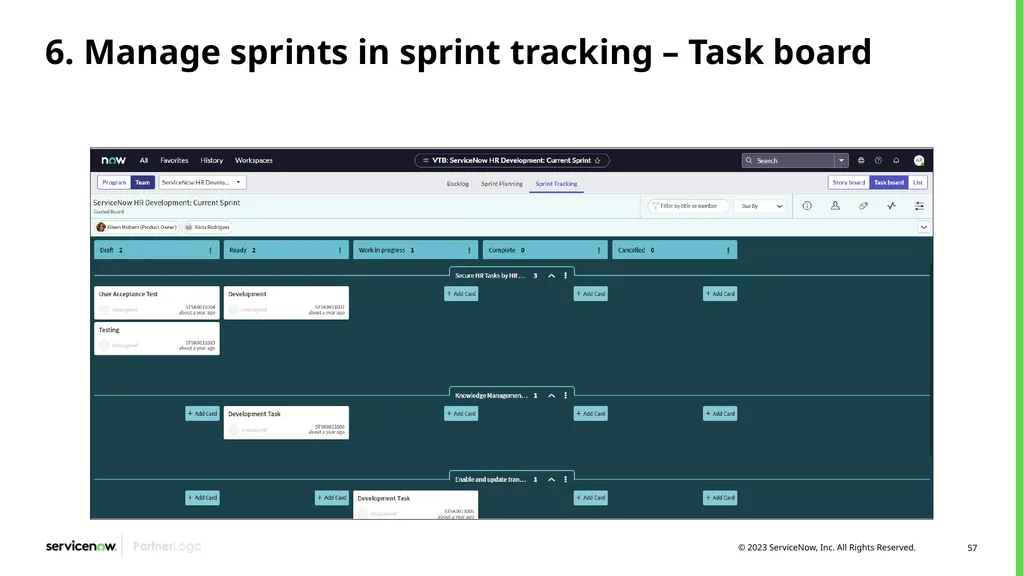
View, create and manage Scrum Tasks associated to Stories in the Task Board
The List view allows you to
review the current Stories,
create and manage Story Tasks
and Story related Tests
Tag by priority the stories
Review how stories are moving by each tea member<br>
View, create and manage Scrum Tasks associated to Stories in the Task Board
The List view allows you to
review the current Stories,
create and manage Story Tasks
and Story related Tests
Tag by priority the stories
Review how stories are moving by each tea member<br>
56
6. Manage sprints in sprint tracking – Story & task boards<br>
57
6. Manage sprints in sprint tracking – Task board<br>
58
6. Manage sprints in sprint tracking – List view<br>
59
7. Create a release Releases contain user stories, sometimes from multiple products or projects, that form the release backlog. A product owner creates the releases. The set of stories in a release are known as a release backlog (only stories included in the sprints that fall inside start/end dates of the release are part of the release backlog)
A release is bounded by start and end times and is used to organize the effort of the assigned groups working on user stories.
When you associate a Product to the Release, the Product’s groups are assigned to the release.
Within the Groups related list
You set the Start and End Sprints for each assigned group
Sprints for selected groups may be created from the Actions on selected rows
Release backlog can be executed in two ways
Project-based execution - Allows release backlog to be executed as one or more projects
Non-project-based execution - Allows release backlog to be executed by one or more assignment groups using their sprint schedules within a release<br>
A release is bounded by start and end times and is used to organize the effort of the assigned groups working on user stories.
When you associate a Product to the Release, the Product’s groups are assigned to the release.
Within the Groups related list
You set the Start and End Sprints for each assigned group
Sprints for selected groups may be created from the Actions on selected rows
Release backlog can be executed in two ways
Project-based execution - Allows release backlog to be executed as one or more projects
Non-project-based execution - Allows release backlog to be executed by one or more assignment groups using their sprint schedules within a release<br>
60
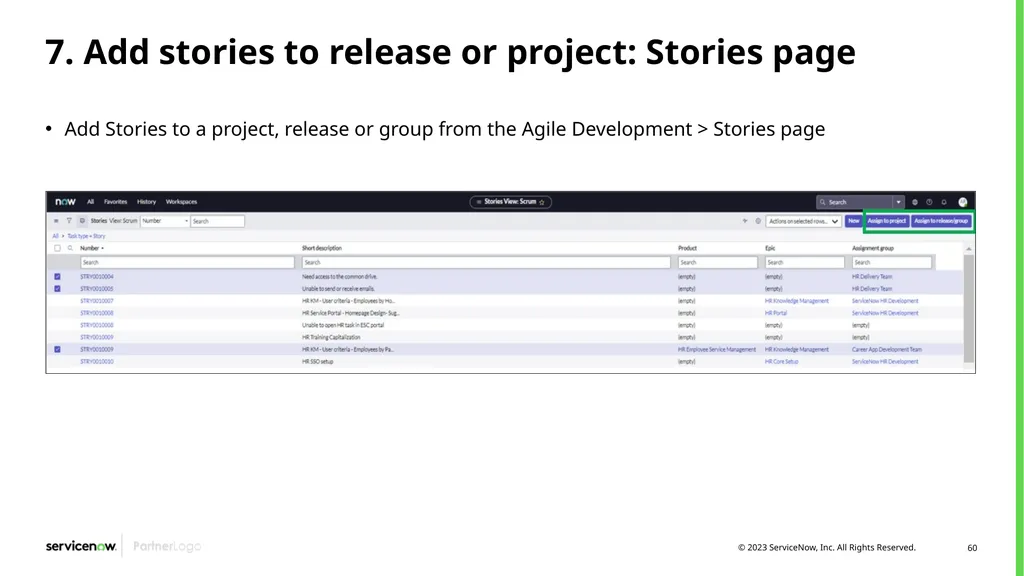
7. Add stories to release or project: Stories page Add Stories to a project, release or group from the Agile Development > Stories page<br>
61
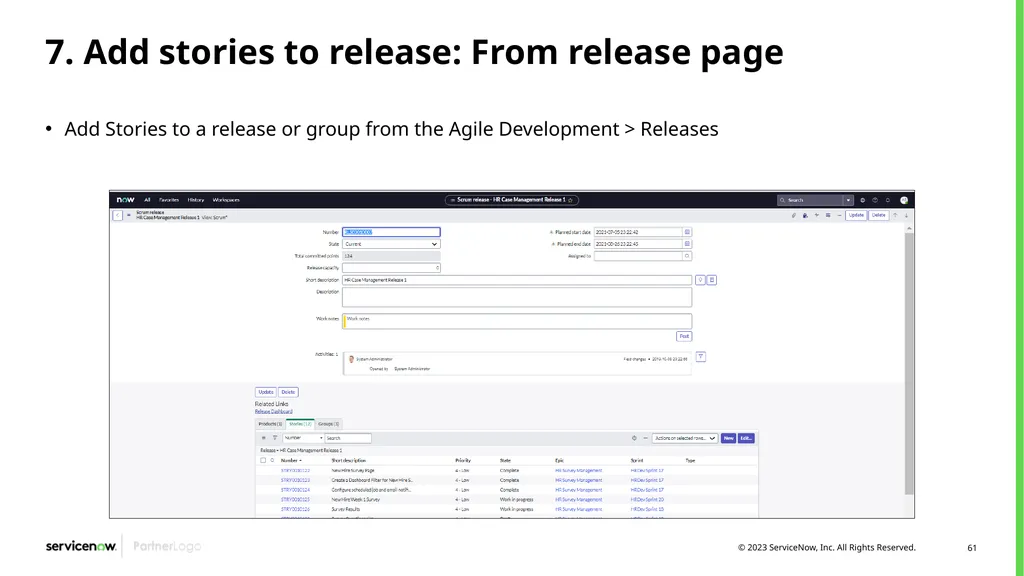
7. Add stories to release: From release page Add Stories to a release or group from the Agile Development > Releases<br>
62
Enhancements and defects Enhancements and defects are objects included in Agile Application 2.0. They are both similar objects within ServiceNow that share the same state model and the same information
Enhancement: allows planning and tracking new improvement opportunities for existing applications or products
Defect: record of a reported product bug or potential product issue<br>
Enhancement: allows planning and tracking new improvement opportunities for existing applications or products
Defect: record of a reported product bug or potential product issue<br>
63
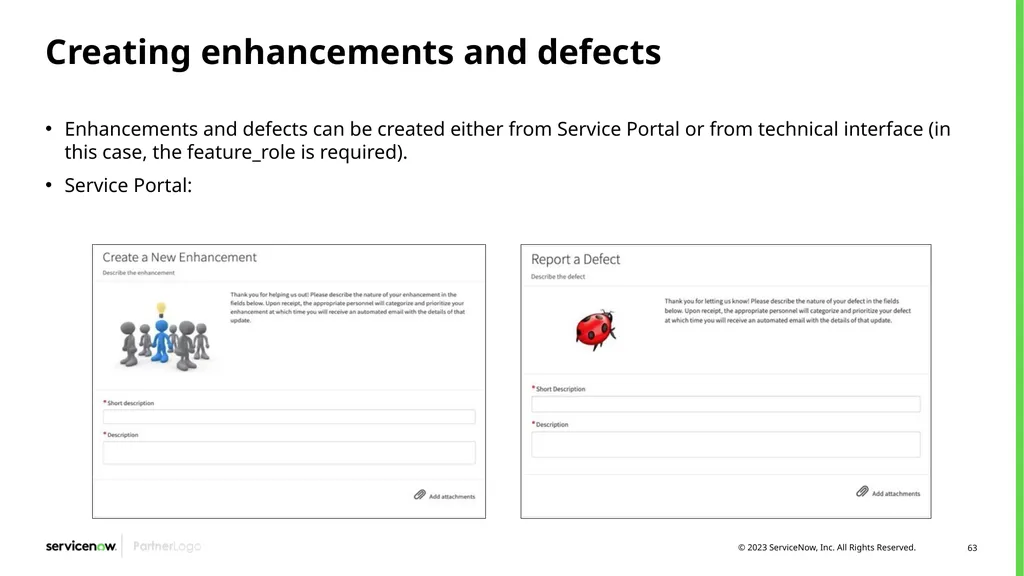
Creating enhancements and defects Enhancements and defects can be created either from Service Portal or from technical interface (in this case, the feature_role is required).
Service Portal:<br>
Service Portal:<br>
64
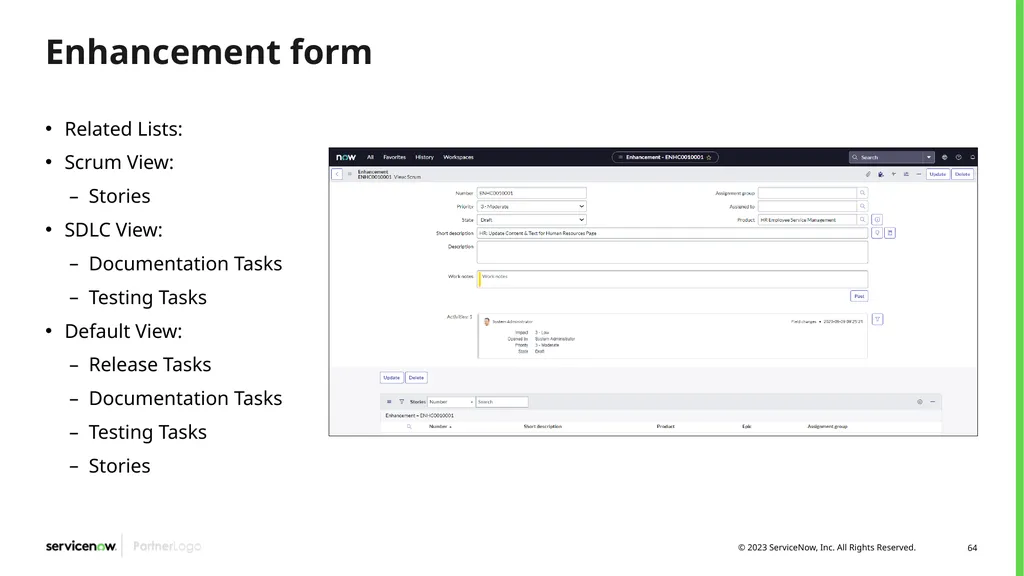
Enhancement form Related Lists:
Scrum View:
Stories
SDLC View:
Documentation Tasks
Testing Tasks
Default View:
Release Tasks
Documentation Tasks
Testing Tasks
Stories<br>
Scrum View:
Stories
SDLC View:
Documentation Tasks
Testing Tasks
Default View:
Release Tasks
Documentation Tasks
Testing Tasks
Stories<br>
65
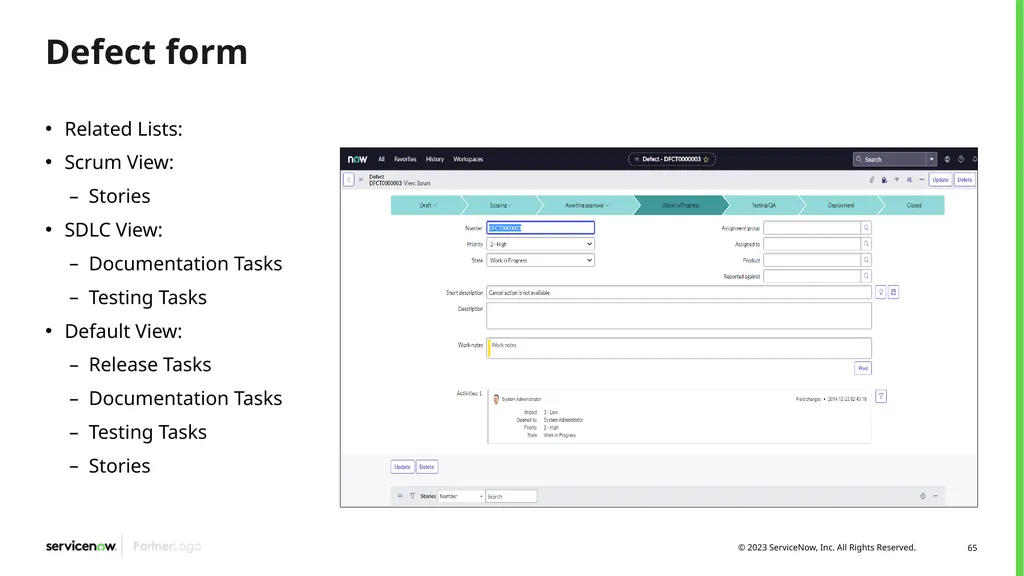
Defect form Related Lists:
Scrum View:
Stories
SDLC View:
Documentation Tasks
Testing Tasks
Default View:
Release Tasks
Documentation Tasks
Testing Tasks
Stories<br>
Scrum View:
Stories
SDLC View:
Documentation Tasks
Testing Tasks
Default View:
Release Tasks
Documentation Tasks
Testing Tasks
Stories<br>
66
State model Draft Scoping Awaiting Approval Work in Progress Testing/QA Deploy / Launch Closed New elements are registered into the system Scrum Product Owner reviews enhancements and defects and decides which ones requires stories If any approval is required in order to start the work, it should be triggered in this state Development teams work in the stories to implement the enhancement or to solve the defect Work is finished and QA tasks are performed Work has been validated and is being deployed to target environments Enhancement or defect has been succesfully deployed to Production environment There exists another state called “On Hold”, representing that the Enhancement or Defect work is paused for any reason<br>
67
Scrum program – Features overview demo<br>
68
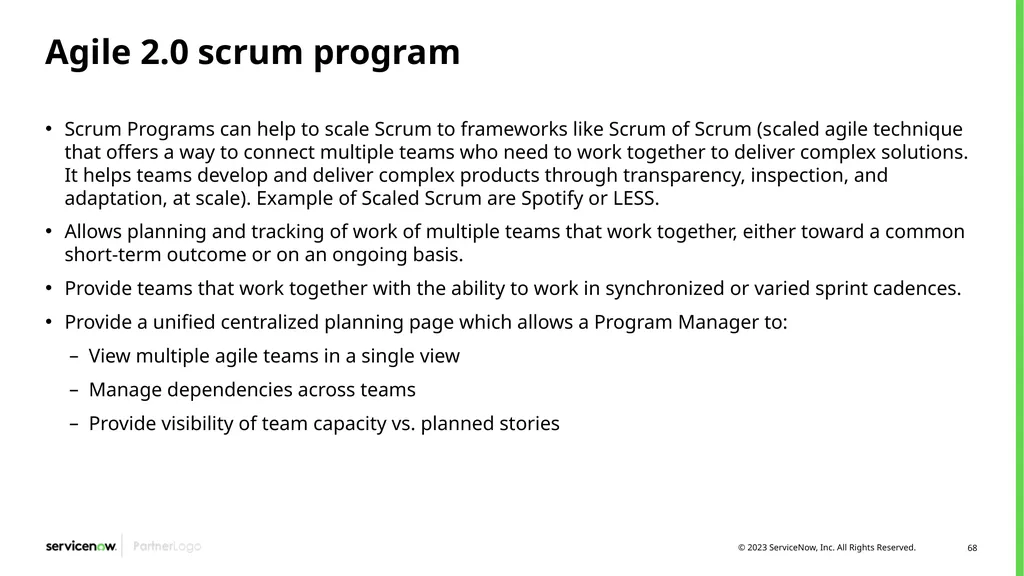
Agile 2.0 scrum program Scrum Programs can help to scale Scrum to frameworks like Scrum of Scrum (scaled agile technique that offers a way to connect multiple teams who need to work together to deliver complex solutions. It helps teams develop and deliver complex products through transparency, inspection, and adaptation, at scale). Example of Scaled Scrum are Spotify or LESS.
Allows planning and tracking of work of multiple teams that work together, either toward a common short-term outcome or on an ongoing basis.
Provide teams that work together with the ability to work in synchronized or varied sprint cadences.
Provide a unified centralized planning page which allows a Program Manager to:
View multiple agile teams in a single view
Manage dependencies across teams
Provide visibility of team capacity vs. planned stories<br>
Allows planning and tracking of work of multiple teams that work together, either toward a common short-term outcome or on an ongoing basis.
Provide teams that work together with the ability to work in synchronized or varied sprint cadences.
Provide a unified centralized planning page which allows a Program Manager to:
View multiple agile teams in a single view
Manage dependencies across teams
Provide visibility of team capacity vs. planned stories<br>
69
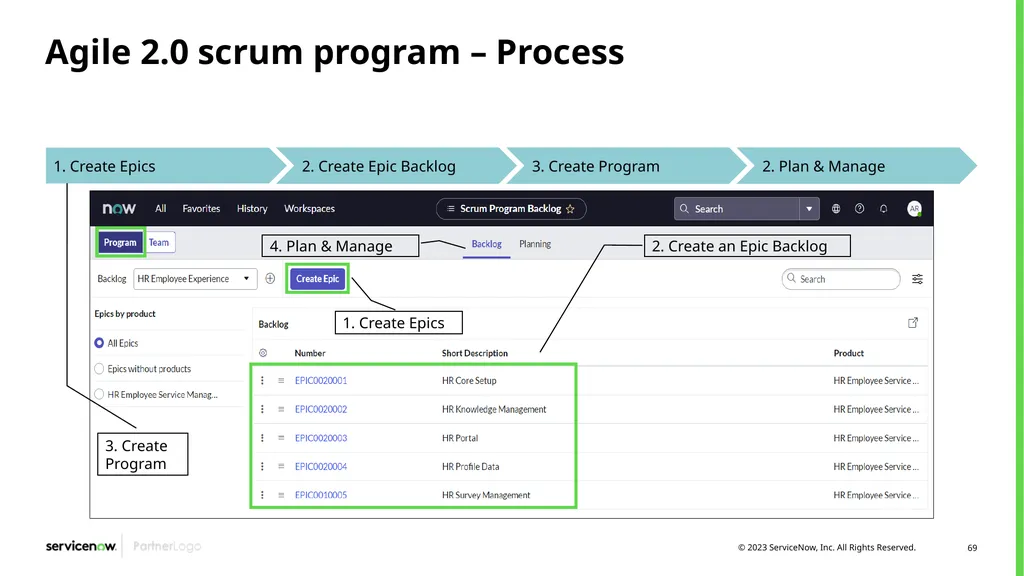
Agile 2.0 scrum program – Process 1. Create Epics 2. Create an Epic Backlog 4. Plan & Manage 3. Create Program<br>
70
Agile 2.0 scrum program – Steps to show in the demo Define Agile Teams (if required)
Define Epics and decompose into Stories
Create Epic Backlog
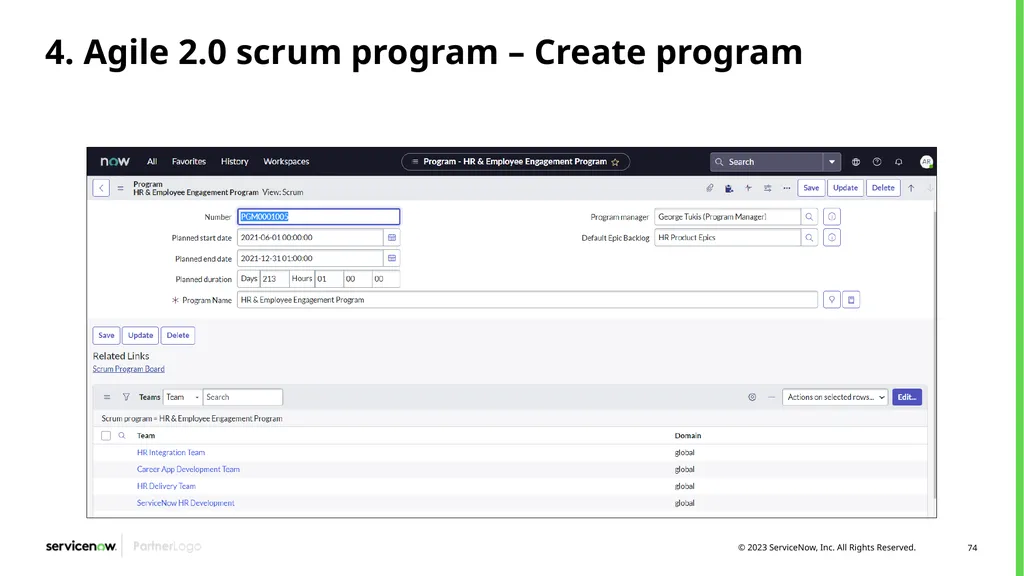
Create Scrum Program
Add appropriate teams to the program
Define start and end dates for the program
Define a default Epic Backlog for the Scrum Program
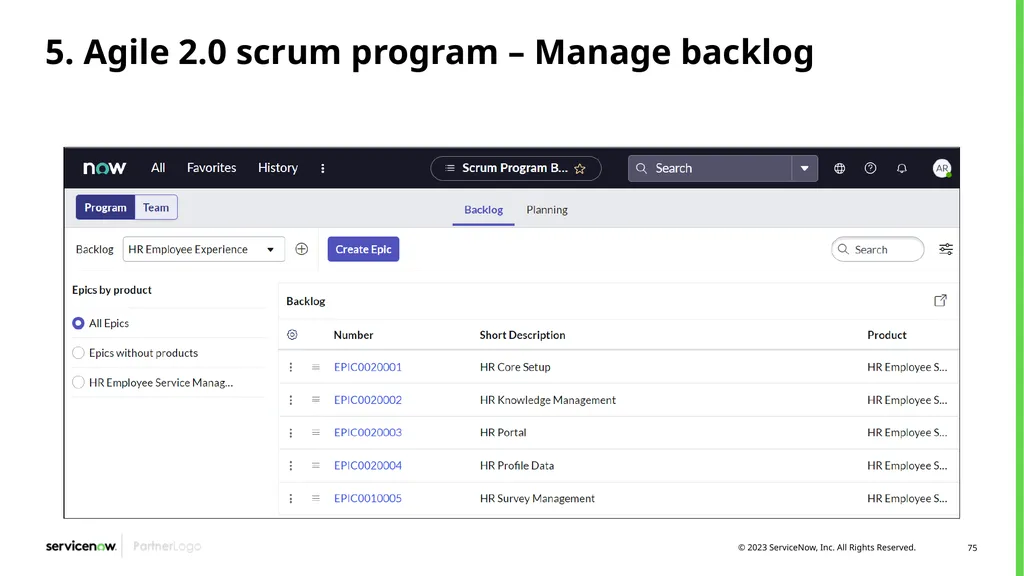
Use the Backlog page of the Program level of the Agile Board to rank and prepare Epics
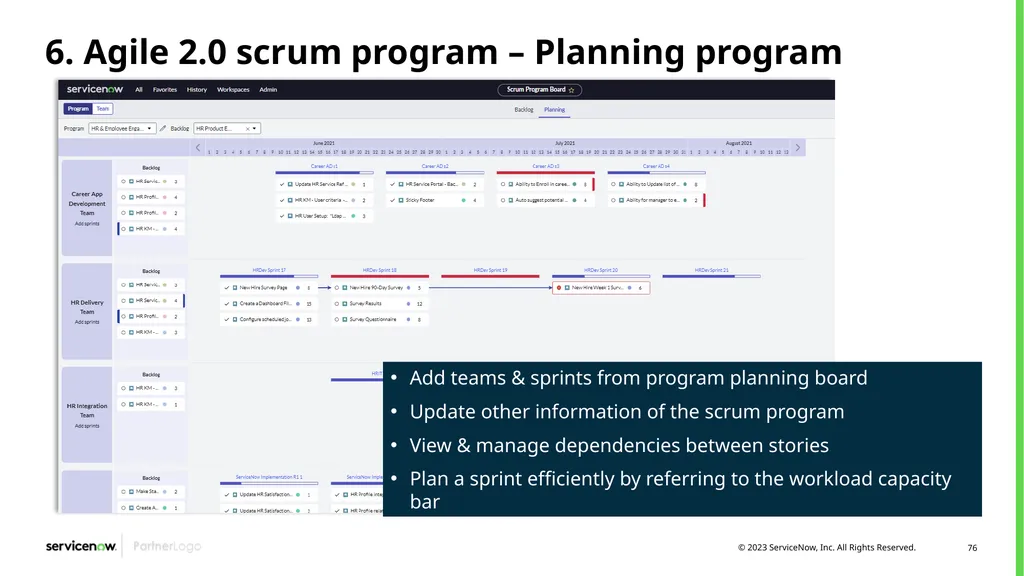
Use the Planning page on the Program level of the Agile Board to create a realistic plan<br>
Define Epics and decompose into Stories
Create Epic Backlog
Create Scrum Program
Add appropriate teams to the program
Define start and end dates for the program
Define a default Epic Backlog for the Scrum Program
Use the Backlog page of the Program level of the Agile Board to rank and prepare Epics
Use the Planning page on the Program level of the Agile Board to create a realistic plan<br>
71
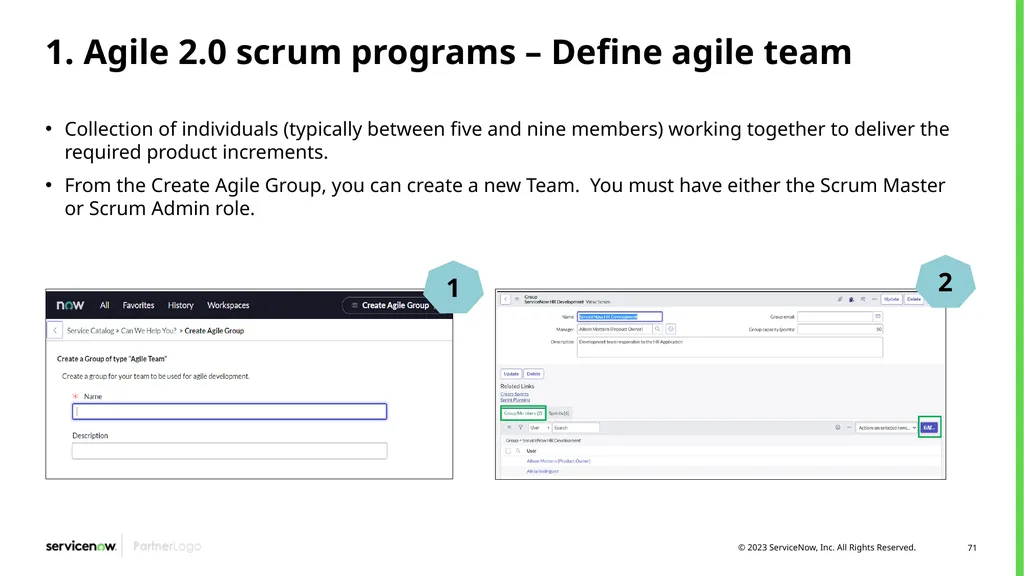
1. Agile 2.0 scrum programs – Define agile team Collection of individuals (typically between five and nine members) working together to deliver the required product increments.
From the Create Agile Group, you can create a new Team. You must have either the Scrum Master or Scrum Admin role.<br>
From the Create Agile Group, you can create a new Team. You must have either the Scrum Master or Scrum Admin role.<br>
72
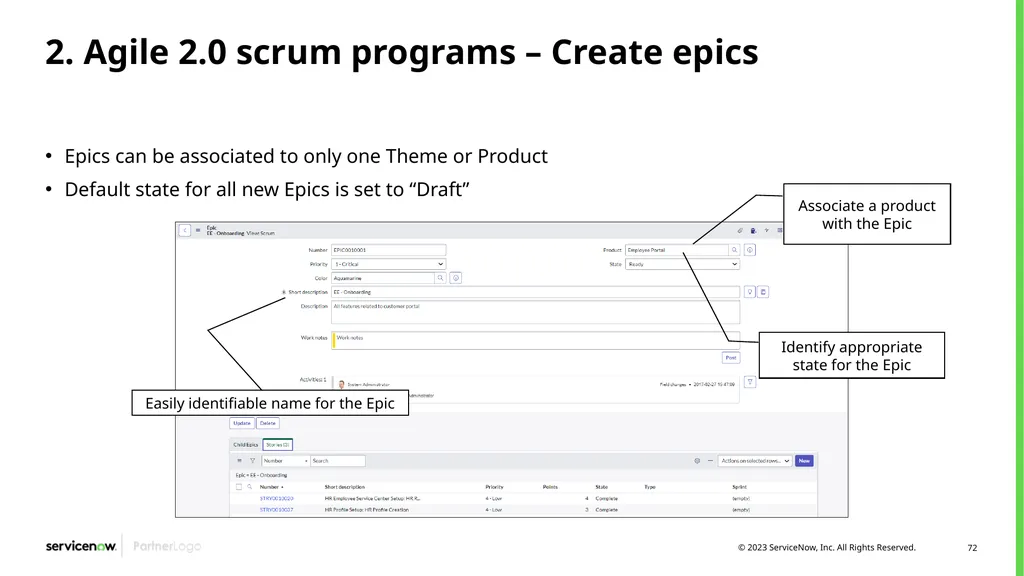
2. Agile 2.0 scrum programs – Create epics Epics can be associated to only one Theme or Product
Default state for all new Epics is set to “Draft” Identify appropriate state for the Epic Associate a product with the Epic Easily identifiable name for the Epic<br>
Default state for all new Epics is set to “Draft” Identify appropriate state for the Epic Associate a product with the Epic Easily identifiable name for the Epic<br>
73
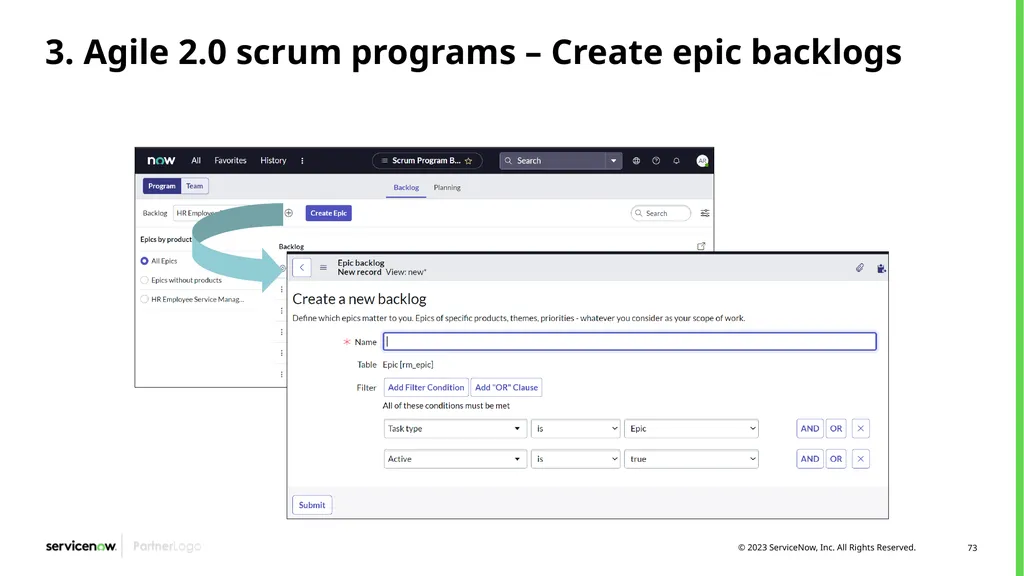
3. Agile 2.0 scrum programs – Create epic backlogs<br>
74
4. Agile 2.0 scrum program – Create program<br>
75
5. Agile 2.0 scrum program – Manage backlog<br>
76
6. Agile 2.0 scrum program – Planning program Add teams & sprints from program planning board
Update other information of the scrum program
View & manage dependencies between stories
Plan a sprint efficiently by referring to the workload capacity bar<br>
Update other information of the scrum program
View & manage dependencies between stories
Plan a sprint efficiently by referring to the workload capacity bar<br>
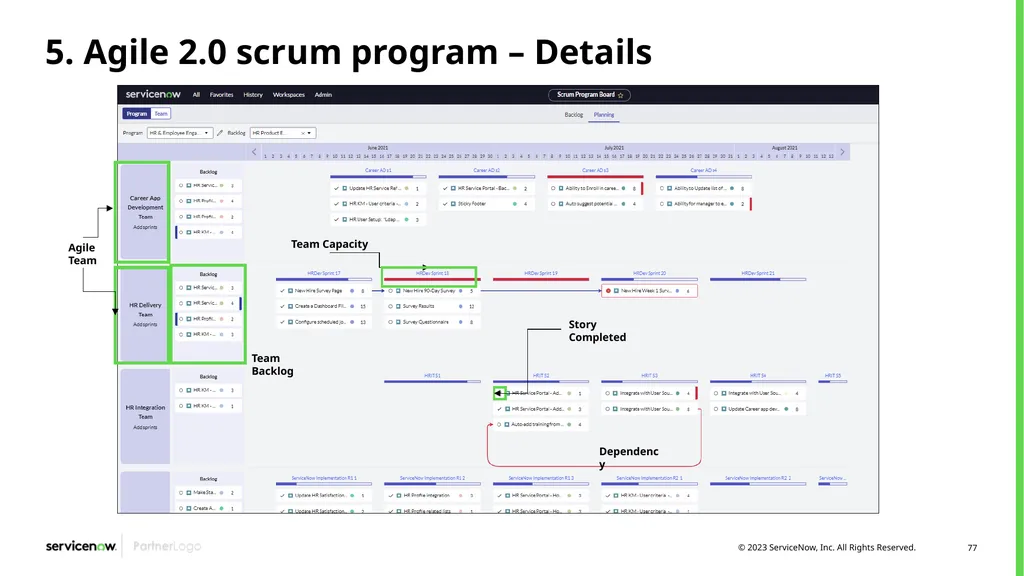
77
5. Agile 2.0 scrum program – Details<br>
78
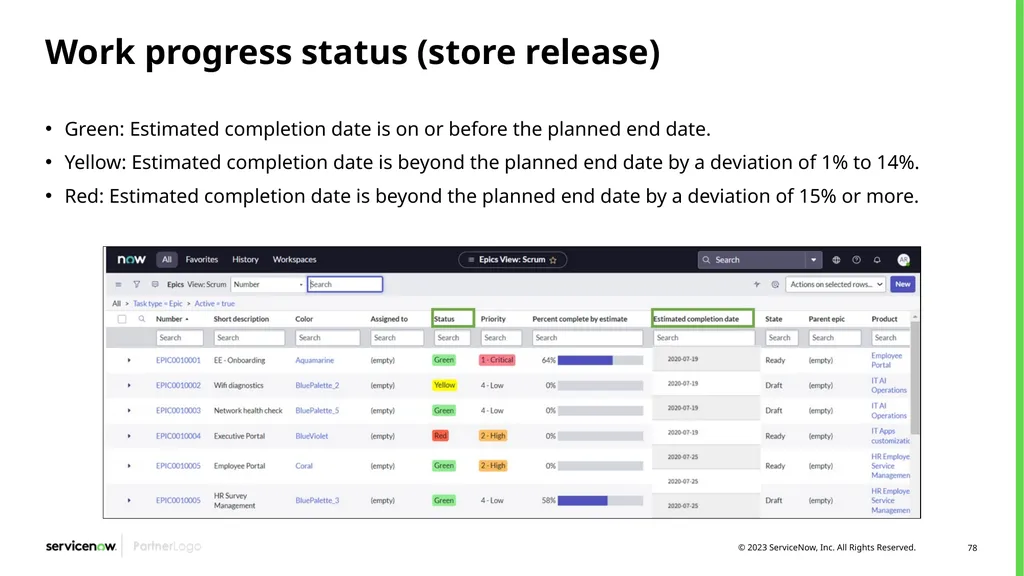
Work progress status (store release) Green: Estimated completion date is on or before the planned end date.
Yellow: Estimated completion date is beyond the planned end date by a deviation of 1% to 14%.
Red: Estimated completion date is beyond the planned end date by a deviation of 15% or more.<br>
Yellow: Estimated completion date is beyond the planned end date by a deviation of 1% to 14%.
Red: Estimated completion date is beyond the planned end date by a deviation of 15% or more.<br>
79
Interaction with other processes<br>
80
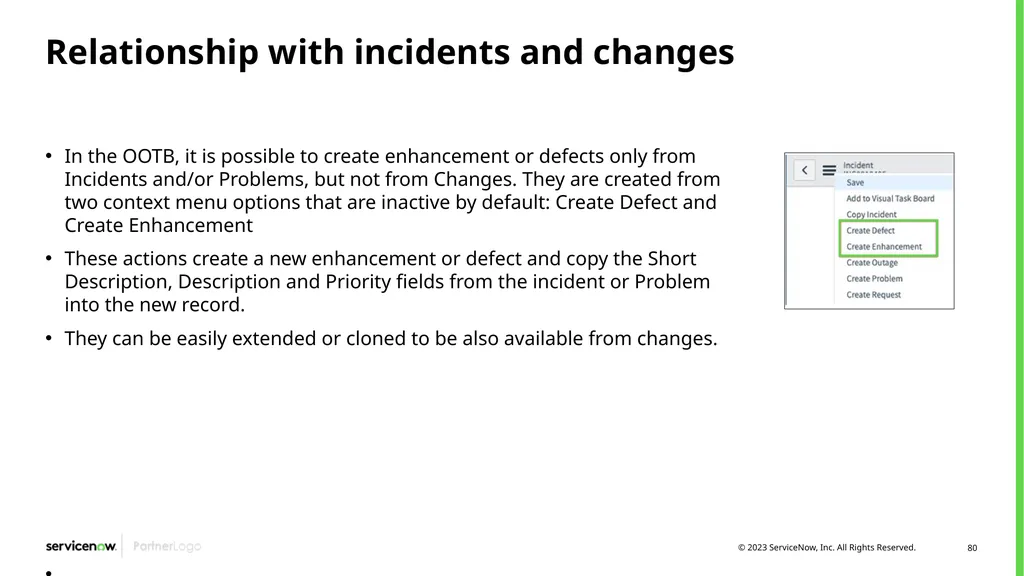
Relationship with incidents and changes In the OOTB, it is possible to create enhancement or defects only from Incidents and/or Problems, but not from Changes. They are created from two context menu options that are inactive by default: Create Defect and Create Enhancement
These actions create a new enhancement or defect and copy the Short Description, Description and Priority fields from the incident or Problem into the new record.
They can be easily extended or cloned to be also available from changes.<br>
These actions create a new enhancement or defect and copy the Short Description, Description and Priority fields from the incident or Problem into the new record.
They can be easily extended or cloned to be also available from changes.<br>
81
Agile & test reporting<br>
82
Reporting vs. Performance Analytics in agile development Agile Development & Test
Performance Analytics:
6 Dashboards
Agile 2.0 Epic Dashboard
Agile 2.0 Release Dashboard
Agile 2.0 Prior Release Dashboard
Agile 2.0 Sprint Dashboard
Agile 2.0 Prior Sprint Dashboard
Agile 2.0 Team Dashboard
Includes Capability to create an unlimited number of Agile Development related KPIs to track and trend on dashboards.<br>
Performance Analytics:
6 Dashboards
Agile 2.0 Epic Dashboard
Agile 2.0 Release Dashboard
Agile 2.0 Prior Release Dashboard
Agile 2.0 Sprint Dashboard
Agile 2.0 Prior Sprint Dashboard
Agile 2.0 Team Dashboard
Includes Capability to create an unlimited number of Agile Development related KPIs to track and trend on dashboards.<br>
83
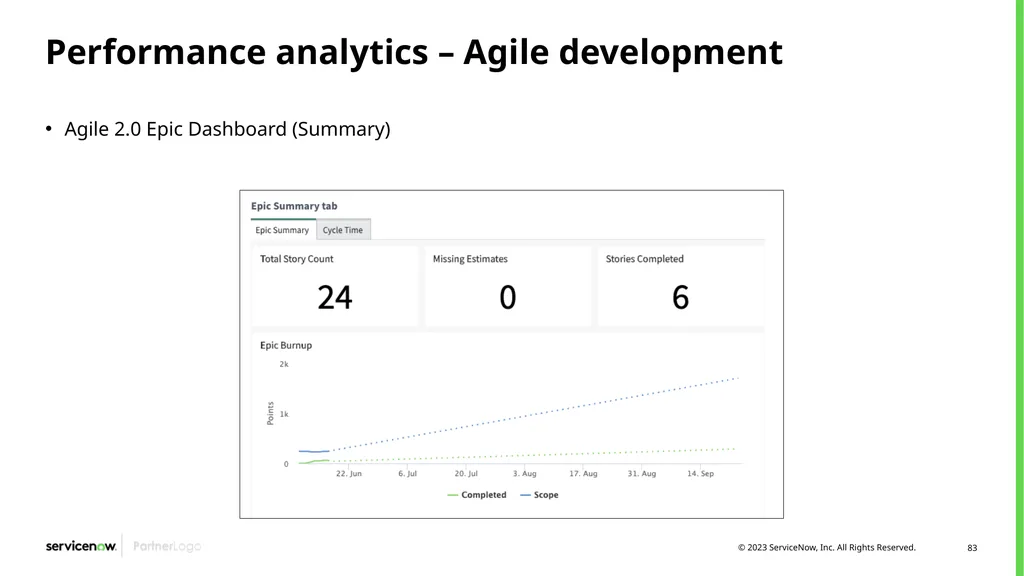
Performance analytics – Agile development Agile 2.0 Epic Dashboard (Summary)<br>
84
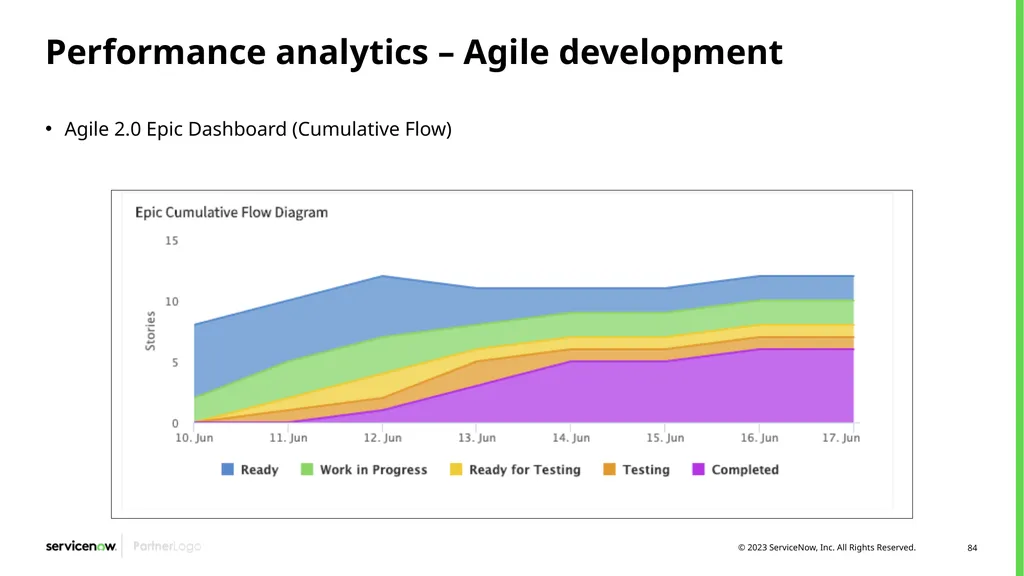
Performance analytics – Agile development Agile 2.0 Epic Dashboard (Cumulative Flow)<br>
85
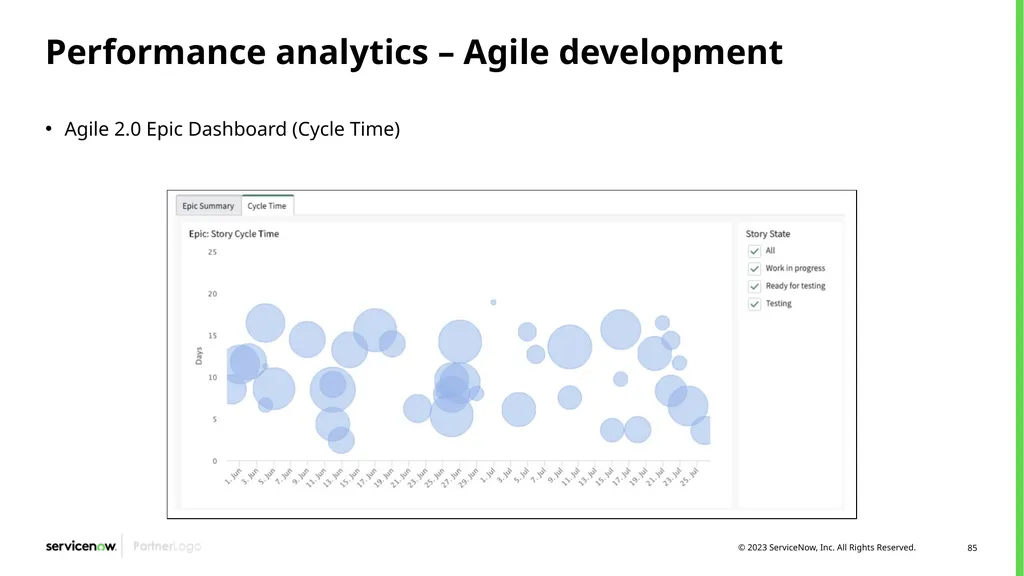
Performance analytics – Agile development Agile 2.0 Epic Dashboard (Cycle Time)<br>
86
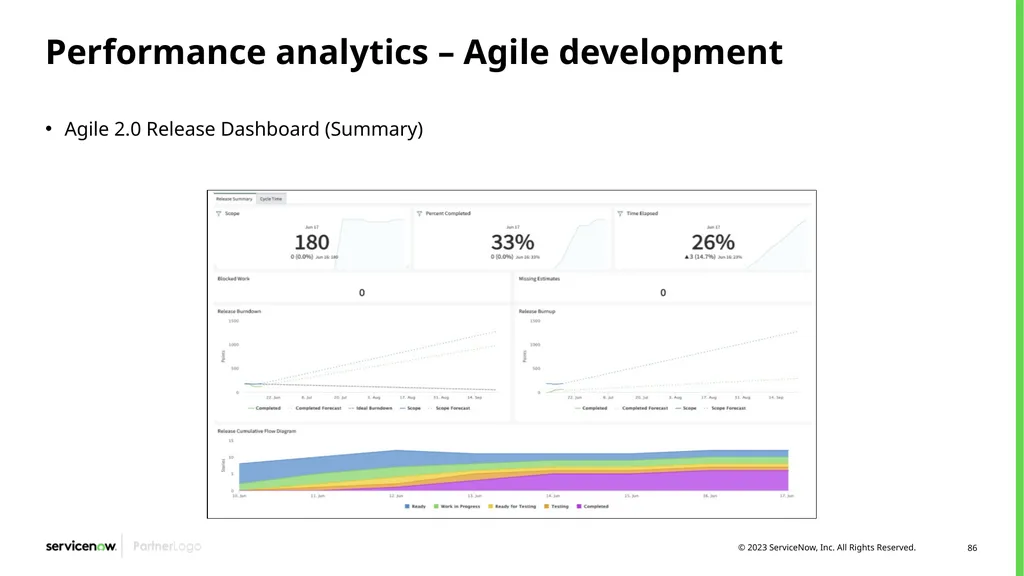
Performance analytics – Agile development Agile 2.0 Release Dashboard (Summary)<br>
87
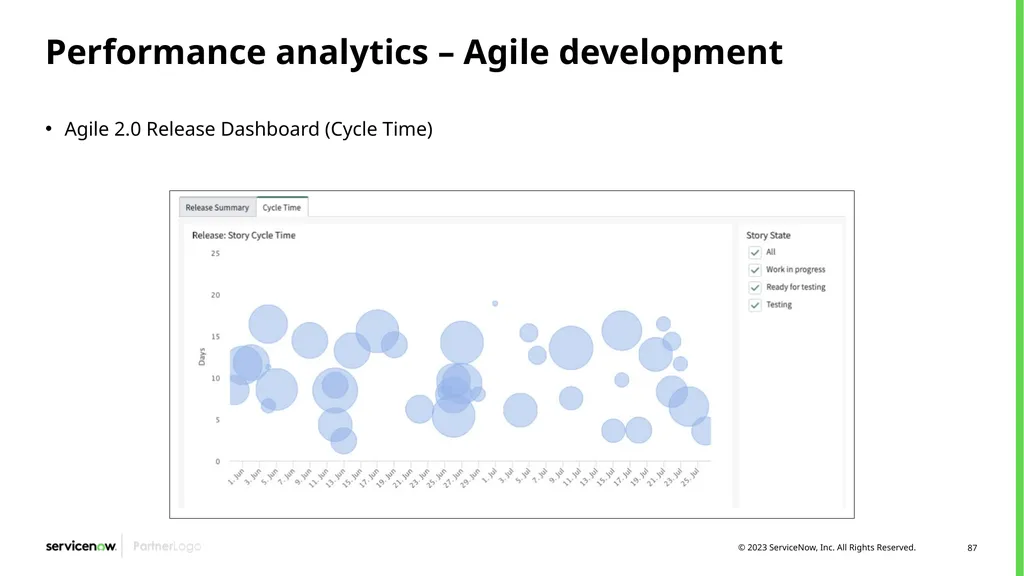
Performance analytics – Agile development Agile 2.0 Release Dashboard (Cycle Time)<br>
88
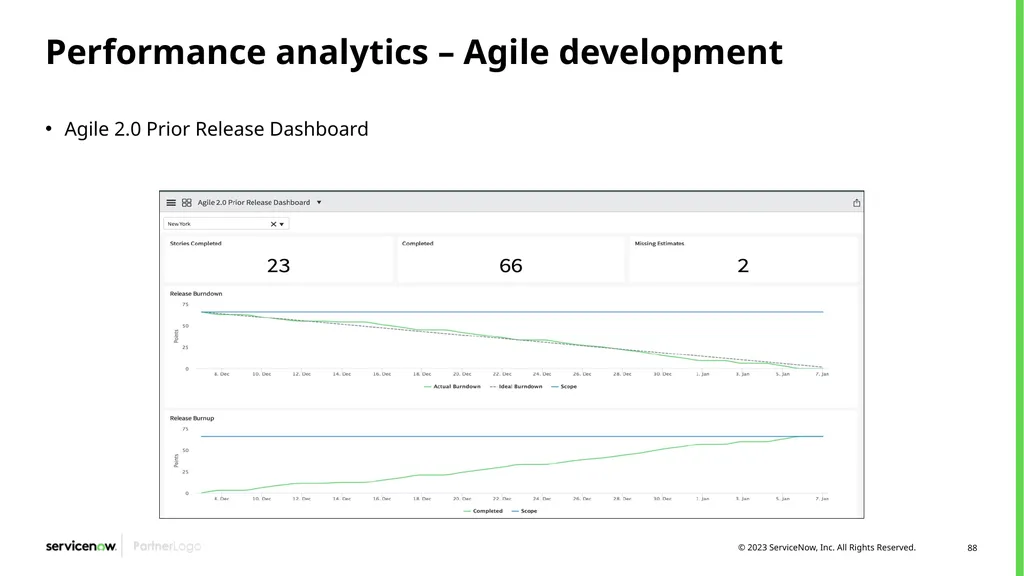
Performance analytics – Agile development Agile 2.0 Prior Release Dashboard<br>
89
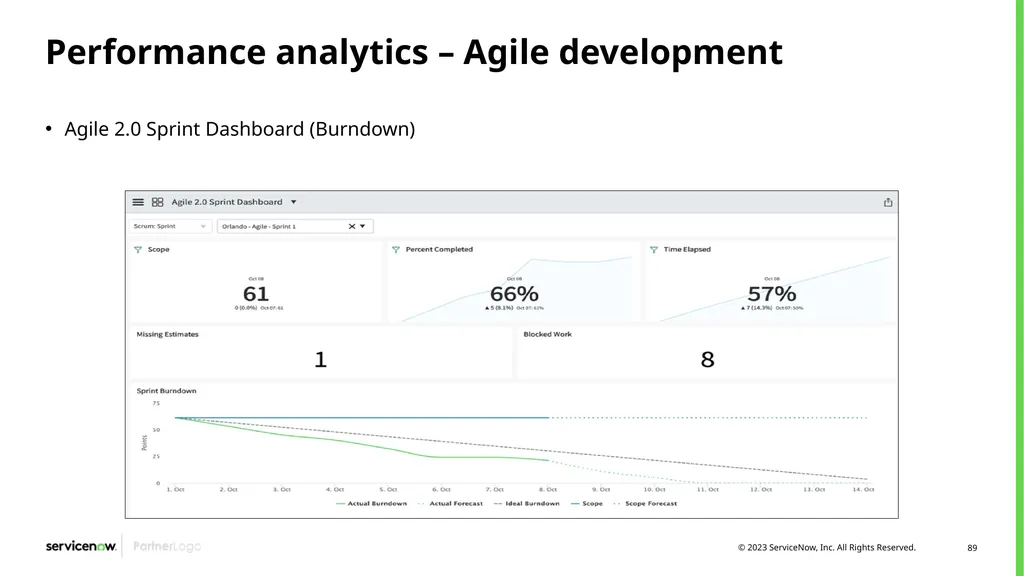
Performance analytics – Agile development Agile 2.0 Sprint Dashboard (Burndown)<br>
90
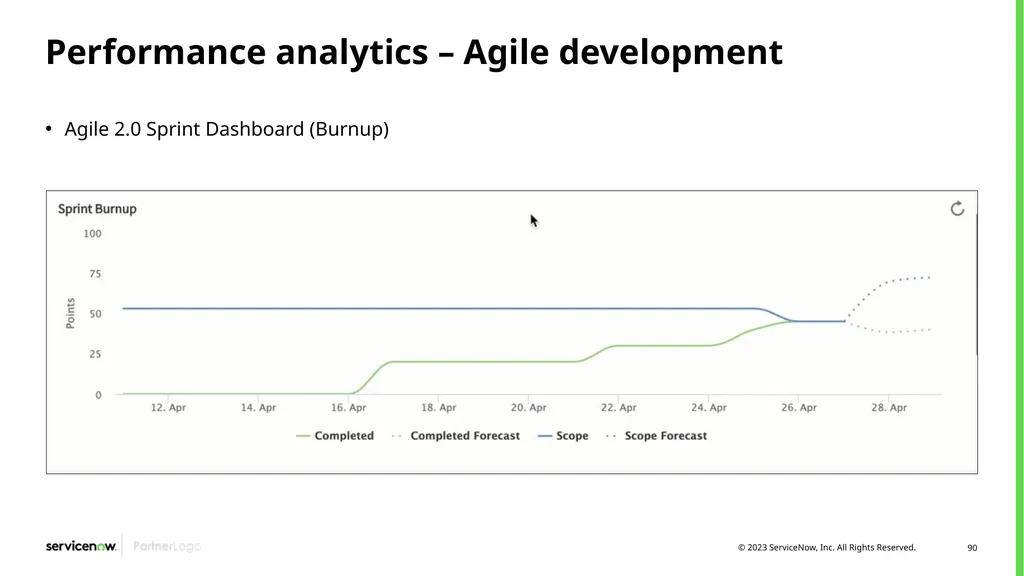
Performance analytics – Agile development Agile 2.0 Sprint Dashboard (Burnup)<br>
91
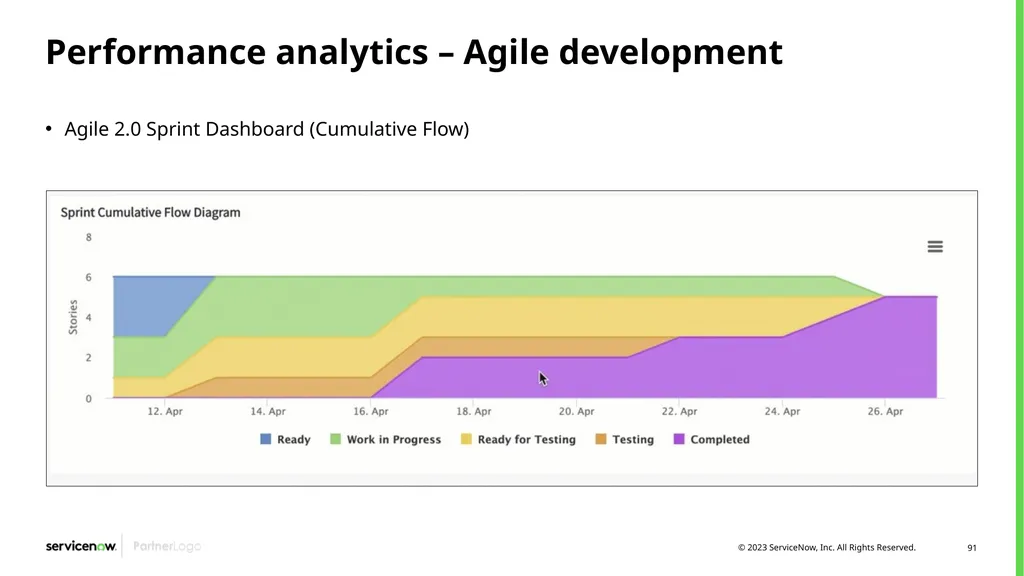
Performance analytics – Agile development Agile 2.0 Sprint Dashboard (Cumulative Flow)<br>
92
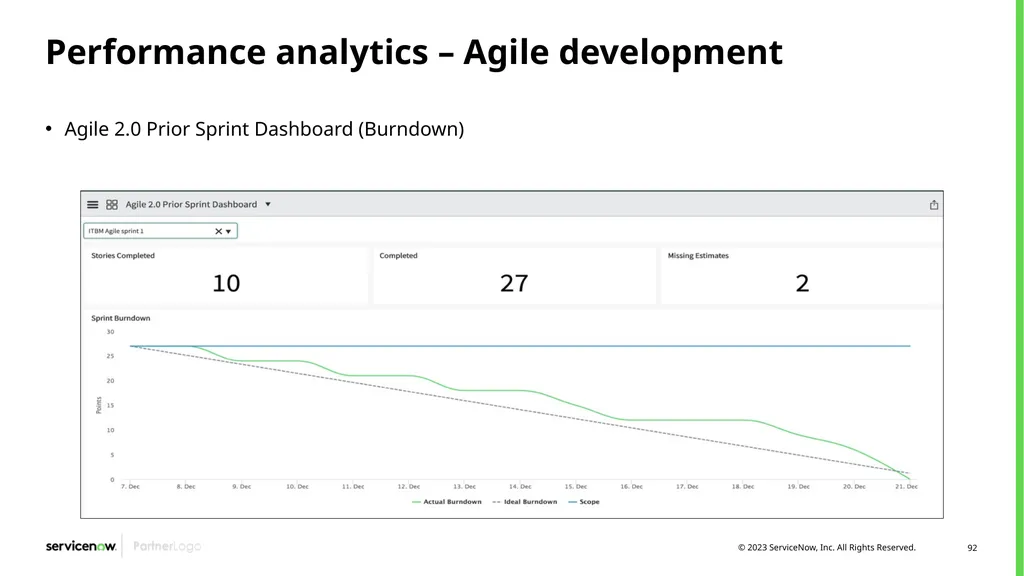
Performance analytics – Agile development Agile 2.0 Prior Sprint Dashboard (Burndown)<br>
93
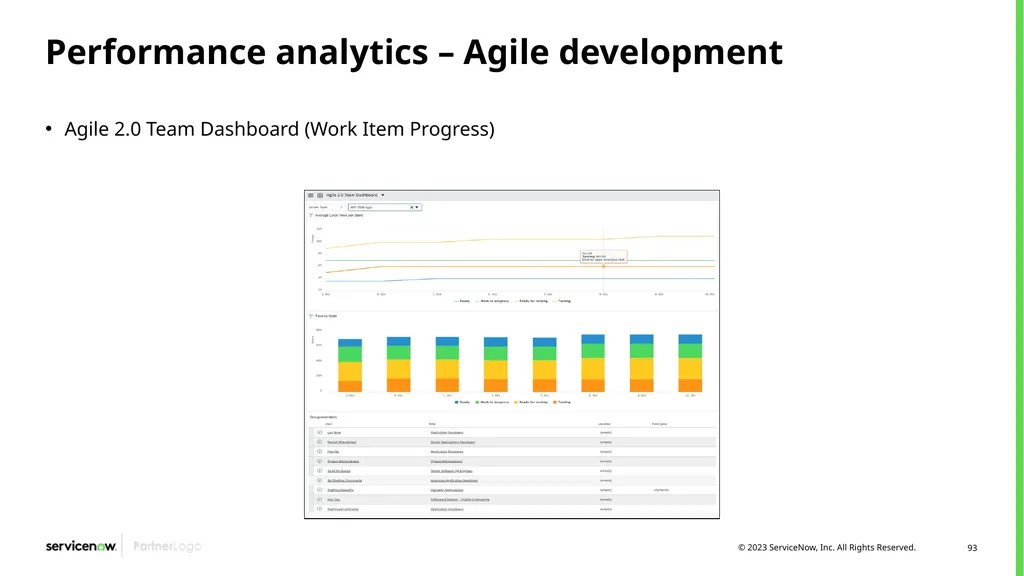
Performance analytics – Agile development Agile 2.0 Team Dashboard (Work Item Progress)<br>
94
Agile development use cases<br>
95
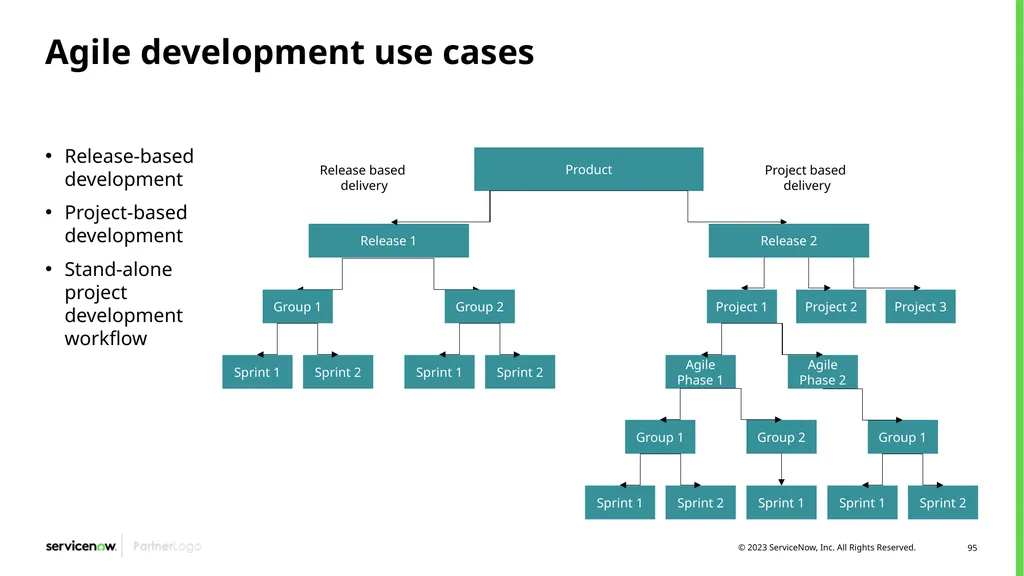
Agile development use cases Release-based development
Project-based development
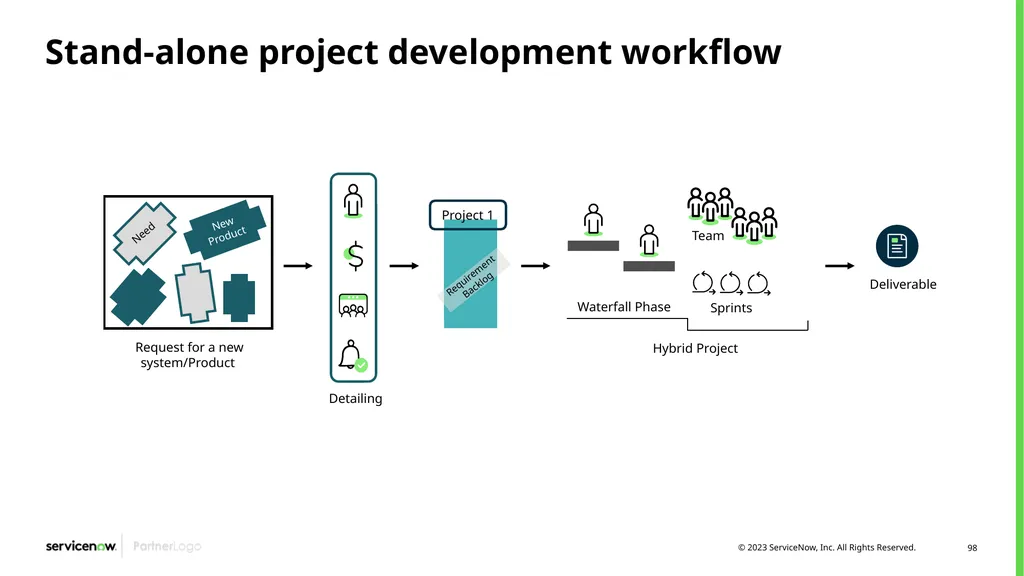
Stand-alone project development workflow Release based delivery Project based delivery<br>
Project-based development
Stand-alone project development workflow Release based delivery Project based delivery<br>
96
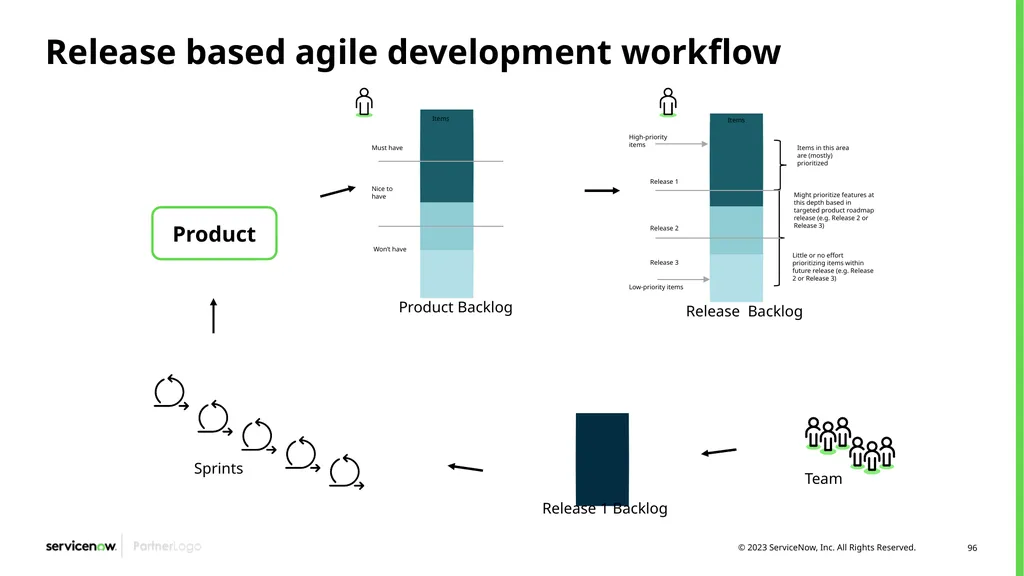
Release based agile development workflow<br>
97
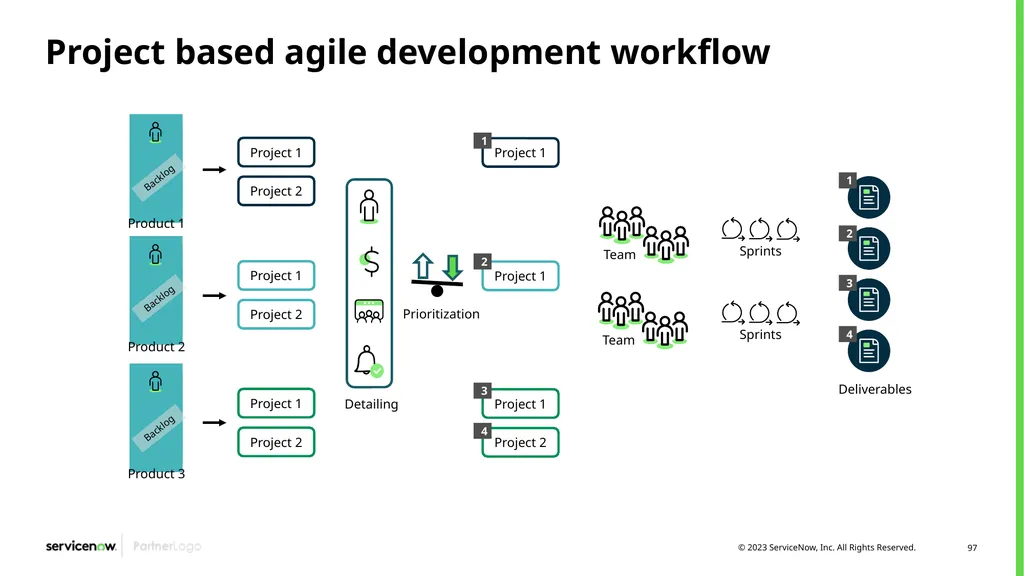
Project based agile development workflow<br>
98
Stand-alone project development workflow<br>
99
Scrum program Use Case
Organizations have multiple Agile teams working collaboratively to contribute to an outcome
That outcome could be a Demand, Project, Epic, Release
Usually defined as at least a scope of work, sometimes defined as a full-on iron triangle (scope, schedule, and cost) SAFe is not an option
Teams have work outside of (other than) the outcome itself, including other outcomes
Plans must be made collectively and sanity-checked
Progress must be tracked and compared to the desired outcome<br>
Organizations have multiple Agile teams working collaboratively to contribute to an outcome
That outcome could be a Demand, Project, Epic, Release
Usually defined as at least a scope of work, sometimes defined as a full-on iron triangle (scope, schedule, and cost) SAFe is not an option
Teams have work outside of (other than) the outcome itself, including other outcomes
Plans must be made collectively and sanity-checked
Progress must be tracked and compared to the desired outcome<br>
100
Best practices<br>
101
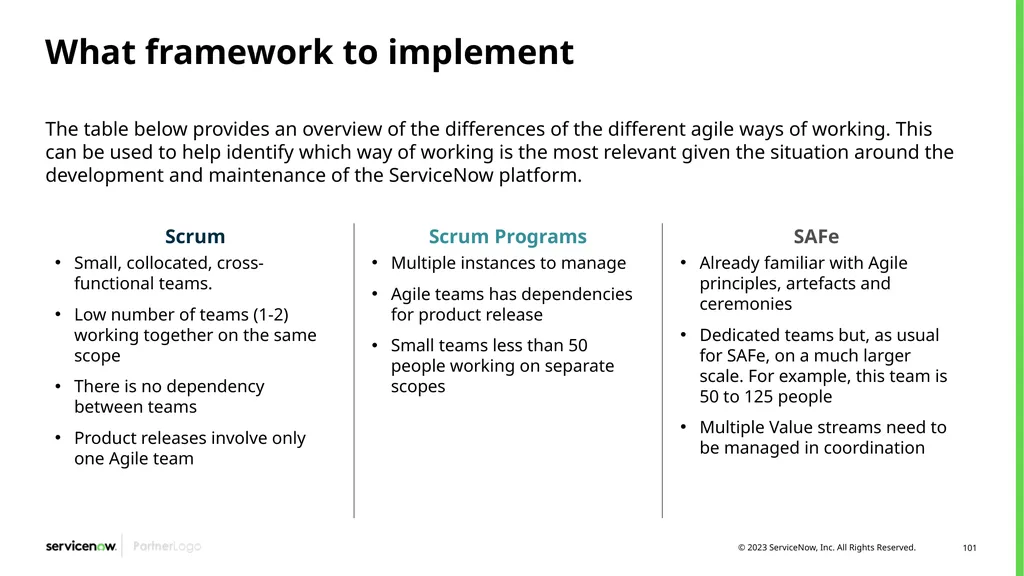
What framework to implement The table below provides an overview of the differences of the different agile ways of working. This can be used to help identify which way of working is the most relevant given the situation around the development and maintenance of the ServiceNow platform. Scrum Programs
Multiple instances to manage
Agile teams has dependencies for product release
Small teams less than 50 people working on separate scopes SAFe
Already familiar with Agile principles, artefacts and ceremonies
Dedicated teams but, as usual for SAFe, on a much larger scale. For example, this team is 50 to 125 people
Multiple Value streams need to be managed in coordination Scrum
Small, collocated, cross-functional teams.
Low number of teams (1-2) working together on the same scope
There is no dependency between teams
Product releases involve only one Agile team<br>
Multiple instances to manage
Agile teams has dependencies for product release
Small teams less than 50 people working on separate scopes SAFe
Already familiar with Agile principles, artefacts and ceremonies
Dedicated teams but, as usual for SAFe, on a much larger scale. For example, this team is 50 to 125 people
Multiple Value streams need to be managed in coordination Scrum
Small, collocated, cross-functional teams.
Low number of teams (1-2) working together on the same scope
There is no dependency between teams
Product releases involve only one Agile team<br>
102
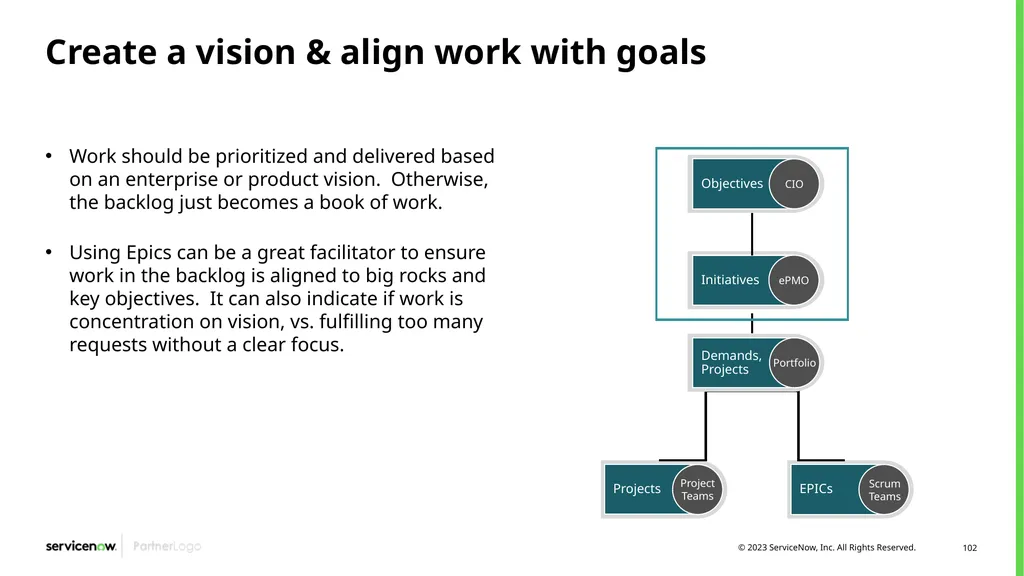
Initiatives Create a vision & align work with goals Work should be prioritized and delivered based on an enterprise or product vision. Otherwise, the backlog just becomes a book of work.
Using Epics can be a great facilitator to ensure work in the backlog is aligned to big rocks and key objectives. It can also indicate if work is concentration on vision, vs. fulfilling too many requests without a clear focus. ePMO<br>
Using Epics can be a great facilitator to ensure work in the backlog is aligned to big rocks and key objectives. It can also indicate if work is concentration on vision, vs. fulfilling too many requests without a clear focus. ePMO<br>
103
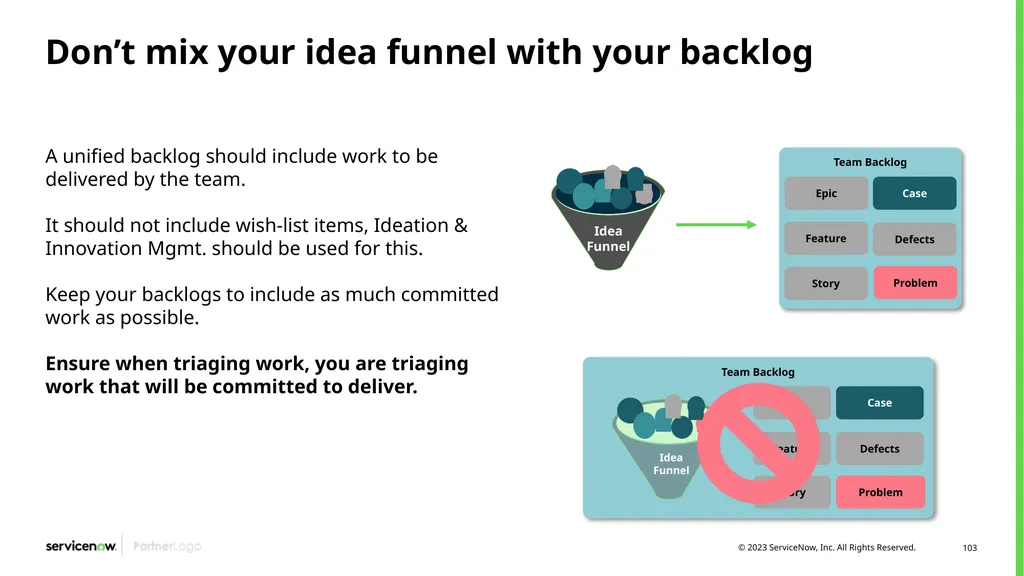
Don’t mix your idea funnel with your backlog A unified backlog should include work to be delivered by the team.
It should not include wish-list items, Ideation & Innovation Mgmt. should be used for this.
Keep your backlogs to include as much committed work as possible.
Ensure when triaging work, you are triaging work that will be committed to deliver.<br>
It should not include wish-list items, Ideation & Innovation Mgmt. should be used for this.
Keep your backlogs to include as much committed work as possible.
Ensure when triaging work, you are triaging work that will be committed to deliver.<br>
104
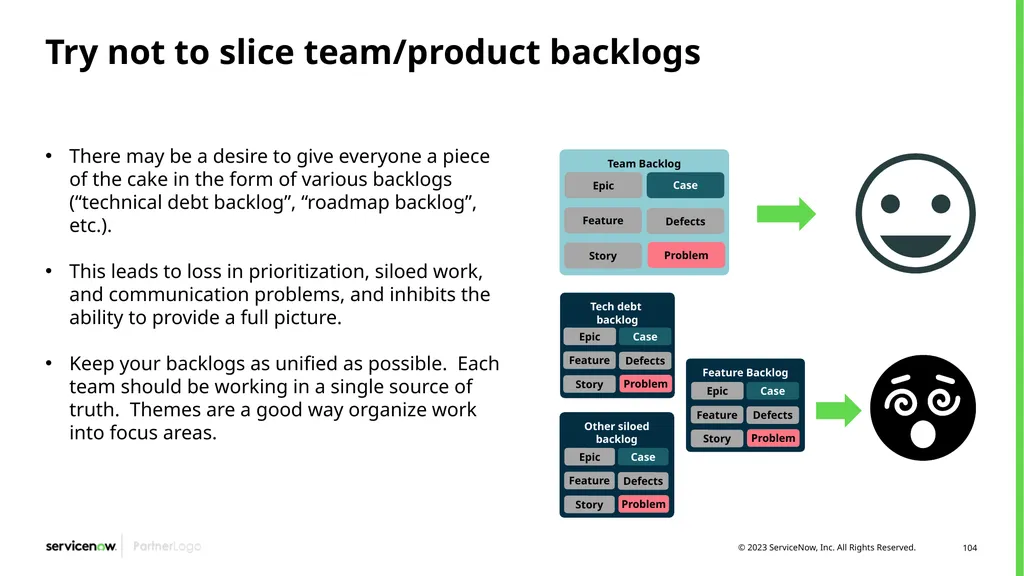
Try not to slice team/product backlogs There may be a desire to give everyone a piece of the cake in the form of various backlogs (“technical debt backlog”, “roadmap backlog”, etc.).
This leads to loss in prioritization, siloed work, and communication problems, and inhibits the ability to provide a full picture.
Keep your backlogs as unified as possible. Each team should be working in a single source of truth. Themes are a good way organize work into focus areas.<br>
This leads to loss in prioritization, siloed work, and communication problems, and inhibits the ability to provide a full picture.
Keep your backlogs as unified as possible. Each team should be working in a single source of truth. Themes are a good way organize work into focus areas.<br>
105
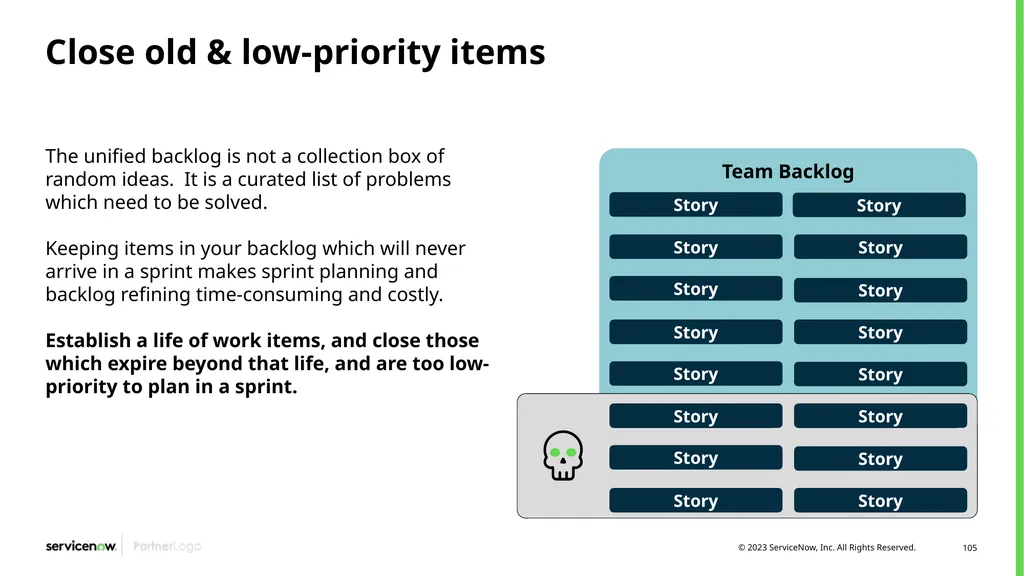
Close old & low-priority items The unified backlog is not a collection box of random ideas. It is a curated list of problems which need to be solved.
Keeping items in your backlog which will never arrive in a sprint makes sprint planning and backlog refining time-consuming and costly.
Establish a life of work items, and close those which expire beyond that life, and are too low-priority to plan in a sprint. Team Backlog<br>
Keeping items in your backlog which will never arrive in a sprint makes sprint planning and backlog refining time-consuming and costly.
Establish a life of work items, and close those which expire beyond that life, and are too low-priority to plan in a sprint. Team Backlog<br>
106
Story refinement & estimation<br>
107
How to assign story points Get inputs from everyone. Only the development team (not the Product Owner) can estimate the points, but it is important that estimates reflect the perspective of everyone involved in completing the story
Use non-consecutive point values. Sufficiently separate the values to make each estimate more clear-cut. Don’t split hairs by discussing whether a story is a 9 or a 10! Popular patterns are Fibonacci series (1, 2, 3, 5, 8, 13, 21, etc.) and powers of 2 (1, 2, 4, 8, 16, etc.). Anything estimated above a 16 should be broken into multiple stories and re-estimated<br>
Use non-consecutive point values. Sufficiently separate the values to make each estimate more clear-cut. Don’t split hairs by discussing whether a story is a 9 or a 10! Popular patterns are Fibonacci series (1, 2, 3, 5, 8, 13, 21, etc.) and powers of 2 (1, 2, 4, 8, 16, etc.). Anything estimated above a 16 should be broken into multiple stories and re-estimated<br>
108
How to assign story points Make informed estimates. The Product Owner should present the story and acceptance criteria to the development team and answer questions during an interactive backlog refinement meeting. The team should capture any details they need to remember when implementing the story.
Stabilize the team. Don’t make important decisions using estimates calculated during the early forming stages of a team’s evolution or while members are coming and going. Until a team's membership, estimation process, and velocity stabilize, the estimates will not be accurate<br>
Stabilize the team. Don’t make important decisions using estimates calculated during the early forming stages of a team’s evolution or while members are coming and going. Until a team's membership, estimation process, and velocity stabilize, the estimates will not be accurate<br>
109
How to assign story points Iterate and improve. Review the team’s performance during retrospectives and adjust as needed. Keep the reference stories current and recalibrate stories on the backlog regularly. You can guard against “point inflation” by comparing new estimates with stories estimated in the past
Don’t overthink it. The team should arrive at a consensus on the points for a story in a reasonable time. Don’t try to convert hours to points or vice versa when estimating. However, once story points are assigned, let development team members estimate their tasks in hours<br>
Don’t overthink it. The team should arrive at a consensus on the points for a story in a reasonable time. Don’t try to convert hours to points or vice versa when estimating. However, once story points are assigned, let development team members estimate their tasks in hours<br>
110
Use a prioritization framework Every user story is an investment decision, in the form of product/service teamwork.
Establishing a prioritization model enables the team to create a more objective, understandable approach of “what is the most important thing I should be working on now?”.
Some effective frameworks which can be leveraged include: WSJF, Value vs. Complexity, RICE, etc.<br>
Establishing a prioritization model enables the team to create a more objective, understandable approach of “what is the most important thing I should be working on now?”.
Some effective frameworks which can be leveraged include: WSJF, Value vs. Complexity, RICE, etc.<br>
111
Unified backlog configuration practices Groups – Groups are a key component in properly creating unified backlogs. These tie the backlog to the team assigned to deliver the work.
Using Assignment Groups across the work items will allow effective triage of work to the team and sprint backlogs.
Triage Definitions – Provides the source of the work to be added to the backlog to be delivered.
In order to use Unified Backlog, you must first create one or more personal backlogs.
Once the personal backlogs are created, you can apply Triage Definitions to bring in work to the backlog.<br>
Using Assignment Groups across the work items will allow effective triage of work to the team and sprint backlogs.
Triage Definitions – Provides the source of the work to be added to the backlog to be delivered.
In order to use Unified Backlog, you must first create one or more personal backlogs.
Once the personal backlogs are created, you can apply Triage Definitions to bring in work to the backlog.<br>
112
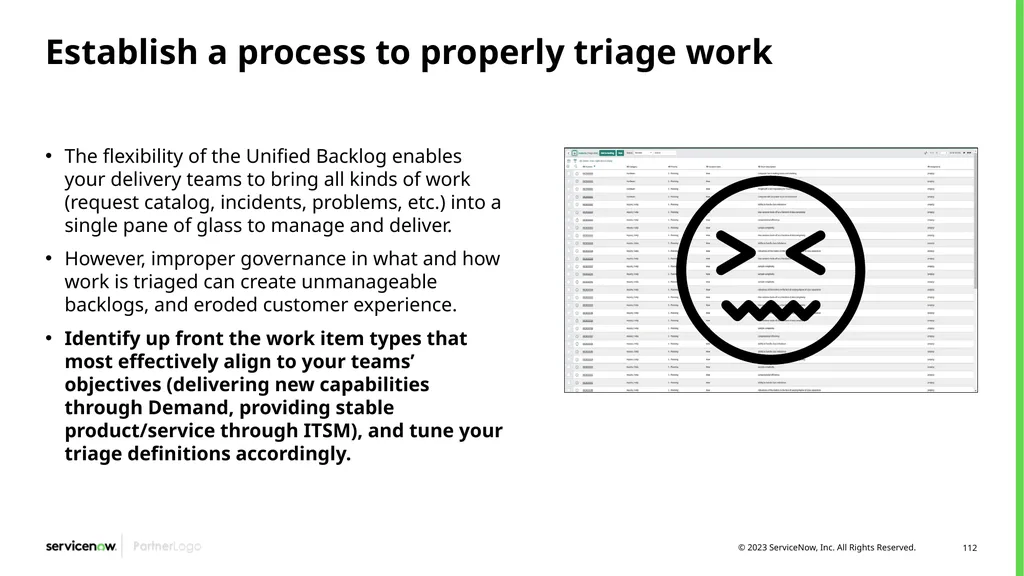
Establish a process to properly triage work The flexibility of the Unified Backlog enables your delivery teams to bring all kinds of work (request catalog, incidents, problems, etc.) into a single pane of glass to manage and deliver.
However, improper governance in what and how work is triaged can create unmanageable backlogs, and eroded customer experience.
Identify up front the work item types that most effectively align to your teams’ objectives (delivering new capabilities through Demand, providing stable product/service through ITSM), and tune your triage definitions accordingly.<br>
However, improper governance in what and how work is triaged can create unmanageable backlogs, and eroded customer experience.
Identify up front the work item types that most effectively align to your teams’ objectives (delivering new capabilities through Demand, providing stable product/service through ITSM), and tune your triage definitions accordingly.<br>
113
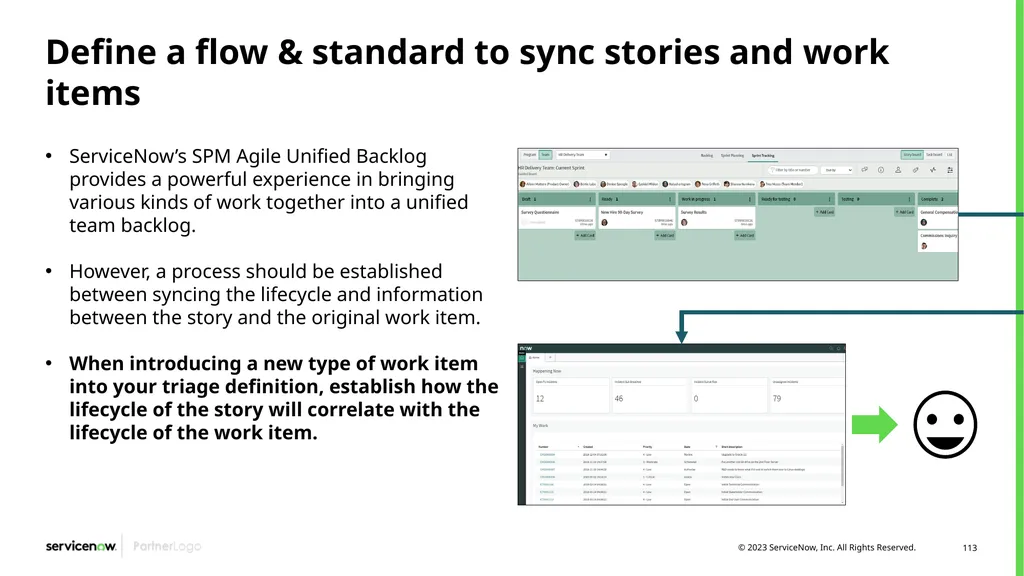
Define a flow & standard to sync stories and work items ServiceNow’s SPM Agile Unified Backlog provides a powerful experience in bringing various kinds of work together into a unified team backlog.
However, a process should be established between syncing the lifecycle and information between the story and the original work item.
When introducing a new type of work item into your triage definition, establish how the lifecycle of the story will correlate with the lifecycle of the work item.<br>
However, a process should be established between syncing the lifecycle and information between the story and the original work item.
When introducing a new type of work item into your triage definition, establish how the lifecycle of the story will correlate with the lifecycle of the work item.<br>
114
Configuration decisions<br>
115
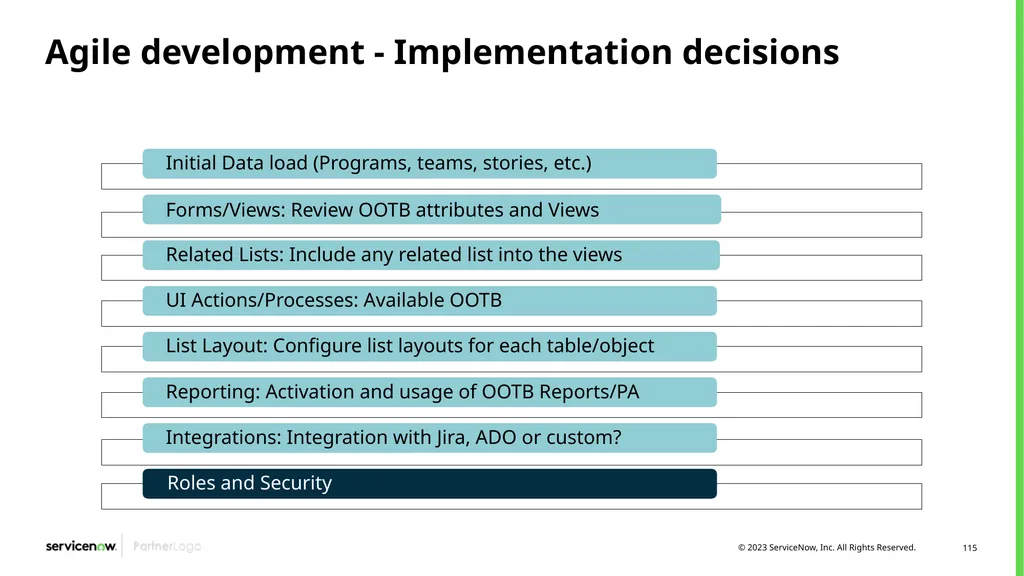
Agile development - Implementation decisions<br>
116
Requirement gathering Review story, release, product and epic state and confirm.
Review the attributes needed and value in choice list available. Always try to find the information in the available field list.
What view/s will be used? Sections, related list in the form? Agree if any change to OOTB is needed.
Review the UI actions and if any change is required.
Review the story process and state changes, is any automation required?
Review the columns by default for the different lists, any changes to column that need to be done by the admin?
Review the OOTB dashboard. Activate and run the jobs to populate some data. Is there any additional dashboard, widget or report needed?<br>
Review the attributes needed and value in choice list available. Always try to find the information in the available field list.
What view/s will be used? Sections, related list in the form? Agree if any change to OOTB is needed.
Review the UI actions and if any change is required.
Review the story process and state changes, is any automation required?
Review the columns by default for the different lists, any changes to column that need to be done by the admin?
Review the OOTB dashboard. Activate and run the jobs to populate some data. Is there any additional dashboard, widget or report needed?<br>
117
Requirement gathering Review the Integration Options content in Now Create and identify if Jira or ADO integration needs to be activated.
Is any additional integration needed?
Will unified backlog be used?
If used, when a new item is added from the triage, a new story is created and linked. Do we need to change automatically the status of the original record when the story state change?
If so, please agree mappings to implement (using flow designer)
Will Scrum Programs be used? If so, plan the activation.
Define the agile teams, team member and capacity.
Will enhancements be used? Will Defect be reported?
Is needed to Track and update the status of the stories and scrum tasks of the current sprint from the mobile?<br>
Is any additional integration needed?
Will unified backlog be used?
If used, when a new item is added from the triage, a new story is created and linked. Do we need to change automatically the status of the original record when the story state change?
If so, please agree mappings to implement (using flow designer)
Will Scrum Programs be used? If so, plan the activation.
Define the agile teams, team member and capacity.
Will enhancements be used? Will Defect be reported?
Is needed to Track and update the status of the stories and scrum tasks of the current sprint from the mobile?<br>
118
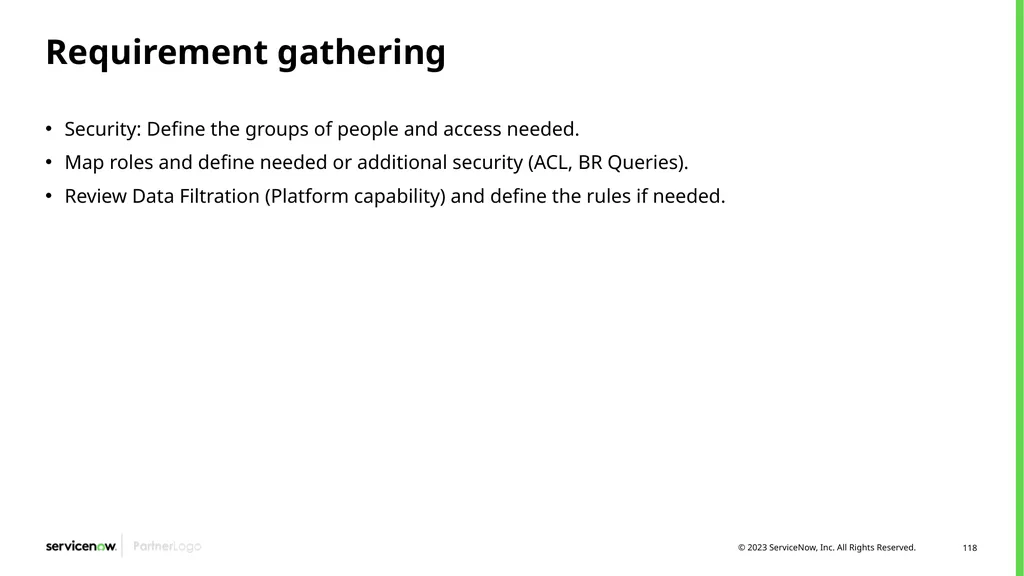
Requirement gathering Security: Define the groups of people and access needed.
Map roles and define needed or additional security (ACL, BR Queries).
Review Data Filtration (Platform capability) and define the rules if needed.<br>
Map roles and define needed or additional security (ACL, BR Queries).
Review Data Filtration (Platform capability) and define the rules if needed.<br>
119
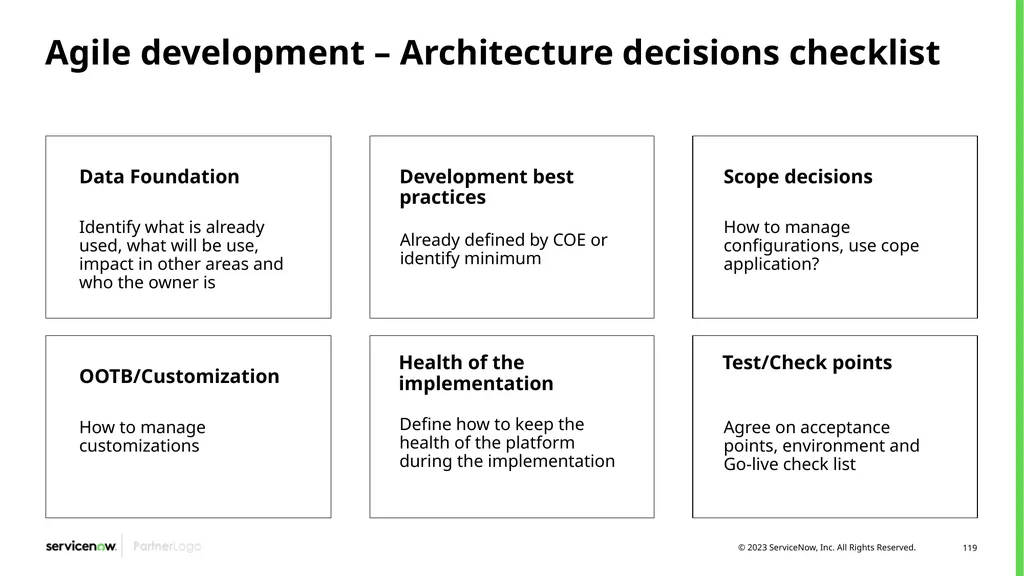
Agile development – Architecture decisions checklist Data Foundation Identify what is already used, what will be use, impact in other areas and who the owner is Development best practices Already defined by COE or identify minimum OOTB/Customization How to manage customizations Health of the implementation Define how to keep the health of the platform during the implementation Scope decisions How to manage configurations, use cope application? Test/Check points Agree on acceptance points, environment and Go-live check list<br>
120
It’s a wrap<br>
121
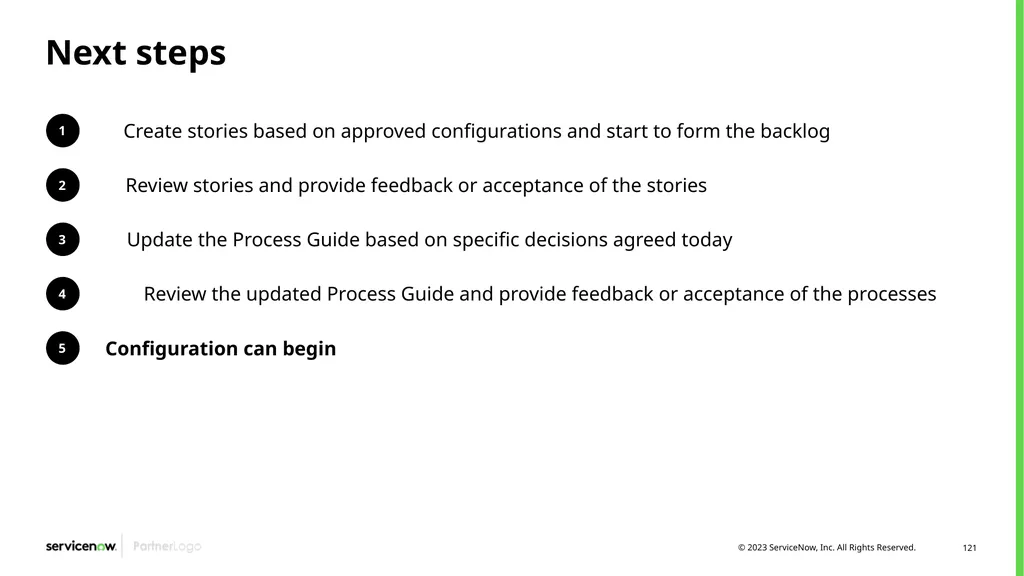
Next steps 1 Create stories based on approved configurations and start to form the backlog 2 Review stories and provide feedback or acceptance of the stories 3 Update the Process Guide based on specific decisions agreed today 4 Review the updated Process Guide and provide feedback or acceptance of the processes 5 Configuration can begin<br>
122
Questions?<br>
123
Thank you<br>
124
Appendix Use the Appendix to add any other useful slides that could be called on during the workshop<br>