
CentreSuite – User Guide Card program Why the
TF
Published · 18 slides · 0 views
1 / 1
Description
CentreSuite User Guide Card program Why the change End of the contract with US Bank and we need to be BPS compliant Update software platform Improvements in how we calculate taxes on the p-card Increase efficiencies Access for Ontarians
Related Topics
Share
Embed code
Download this presentation From Below
"CentreSuite – User Guide Card program Why the" is the property of its rightful owner. Permission is granted to download and print the materials on this website for personal, non-commercial use only, and to display it on your personal computer provided you do not modify the materials and that you retain all copyright notices contained in the materials. By downloading content from our website, you accept the terms of this agreement.
Presentation Transcript
01
CentreSuite – User Guide Card program<br>
02
Why the change End of the contract with US Bank and we need to be BPS compliant
Update software platform
Improvements in how we calculate taxes on the p-card
Increase efficiencies<br>
Update software platform
Improvements in how we calculate taxes on the p-card
Increase efficiencies<br>
03
Access for Ontarians with Disabilities Act (AODA) As per Ontario Regulation 191/11 made under the Accessibility
for Ontarians with Disabilities Act, 2005, Queen's will incorporate
accessibility criteria and features when procuring, goods,
services and facilities, except where it is not practical to do so.<br>
for Ontarians with Disabilities Act, 2005, Queen's will incorporate
accessibility criteria and features when procuring, goods,
services and facilities, except where it is not practical to do so.<br>
04
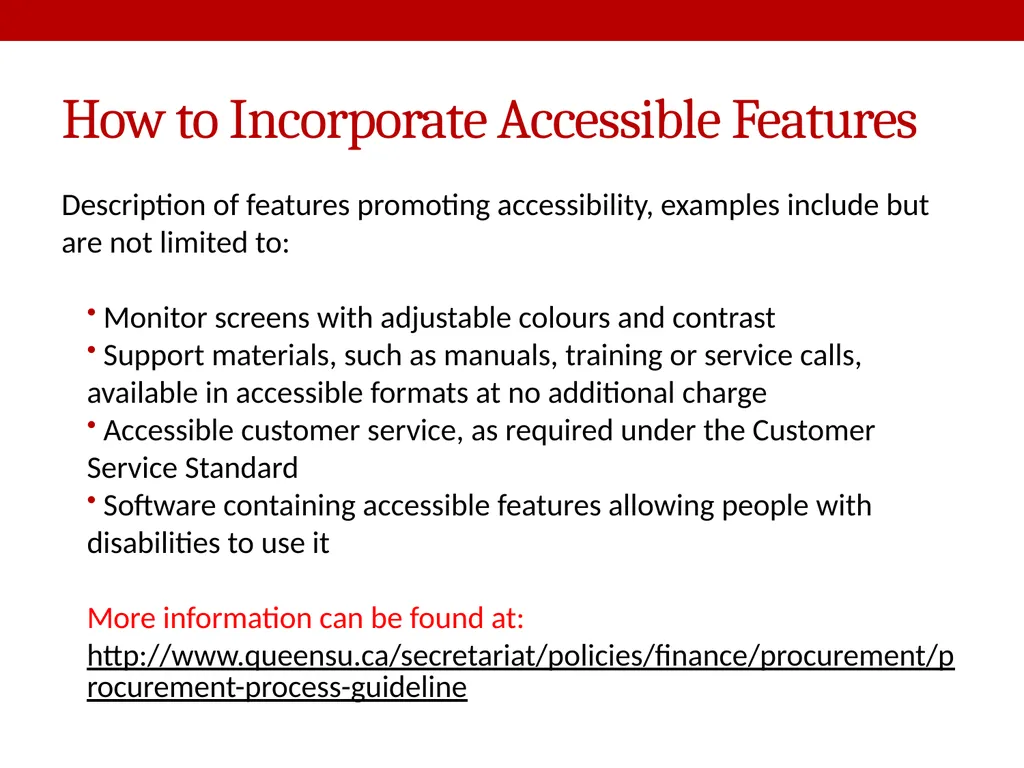
How to Incorporate Accessible Features Description of features promoting accessibility, examples include but are not limited to:
Monitor screens with adjustable colours and contrast
Support materials, such as manuals, training or service calls, available in accessible formats at no additional charge
Accessible customer service, as required under the Customer Service Standard
Software containing accessible features allowing people with disabilities to use it
More information can be found at:
http://www.queensu.ca/secretariat/policies/finance/procurement/procurement-process-guideline<br>
Monitor screens with adjustable colours and contrast
Support materials, such as manuals, training or service calls, available in accessible formats at no additional charge
Accessible customer service, as required under the Customer Service Standard
Software containing accessible features allowing people with disabilities to use it
More information can be found at:
http://www.queensu.ca/secretariat/policies/finance/procurement/procurement-process-guideline<br>
05
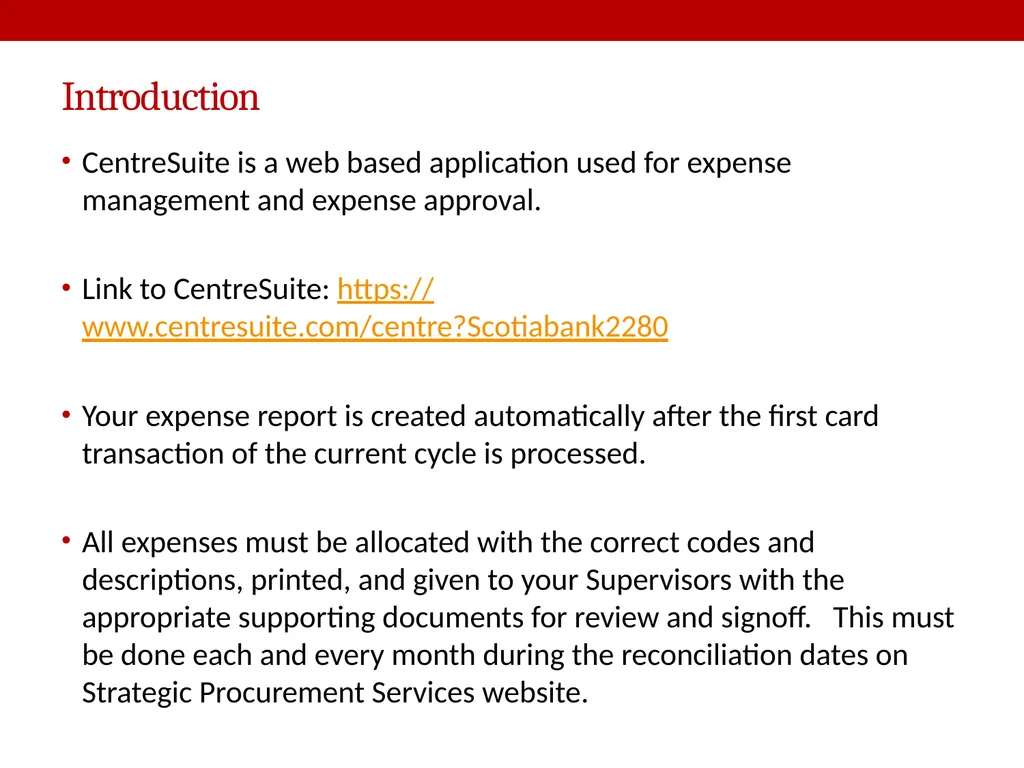
Introduction CentreSuite is a web based application used for expense management and expense approval.
Link to CentreSuite: https://www.centresuite.com/centre?Scotiabank2280
Your expense report is created automatically after the first card transaction of the current cycle is processed.
All expenses must be allocated with the correct codes and descriptions, printed, and given to your Supervisors with the appropriate supporting documents for review and signoff. This must be done each and every month during the reconciliation dates on Strategic Procurement Services website.<br>
Link to CentreSuite: https://www.centresuite.com/centre?Scotiabank2280
Your expense report is created automatically after the first card transaction of the current cycle is processed.
All expenses must be allocated with the correct codes and descriptions, printed, and given to your Supervisors with the appropriate supporting documents for review and signoff. This must be done each and every month during the reconciliation dates on Strategic Procurement Services website.<br>
06
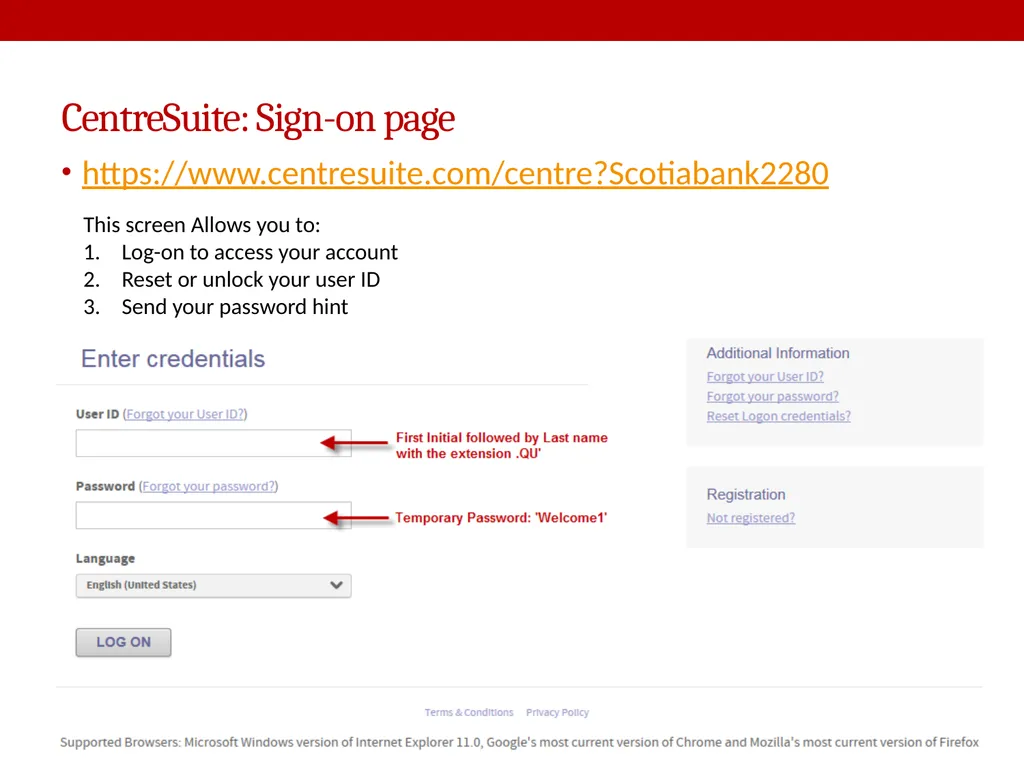
CentreSuite: Sign-on page https://www.centresuite.com/centre?Scotiabank2280 This screen Allows you to:
Log-on to access your account
Reset or unlock your user ID
Send your password hint<br>
Log-on to access your account
Reset or unlock your user ID
Send your password hint<br>
07
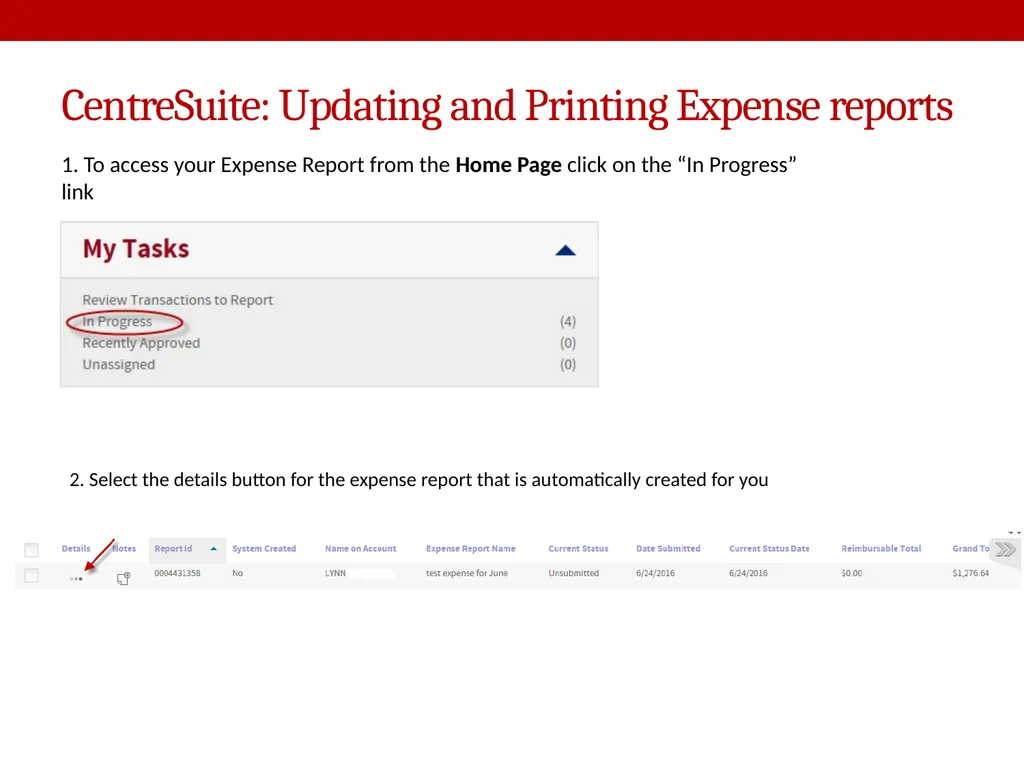
CentreSuite: Updating and Printing Expense reports 1. To access your Expense Report from the Home Page click on the “In Progress” link 2. Select the details button for the expense report that is automatically created for you<br>
08
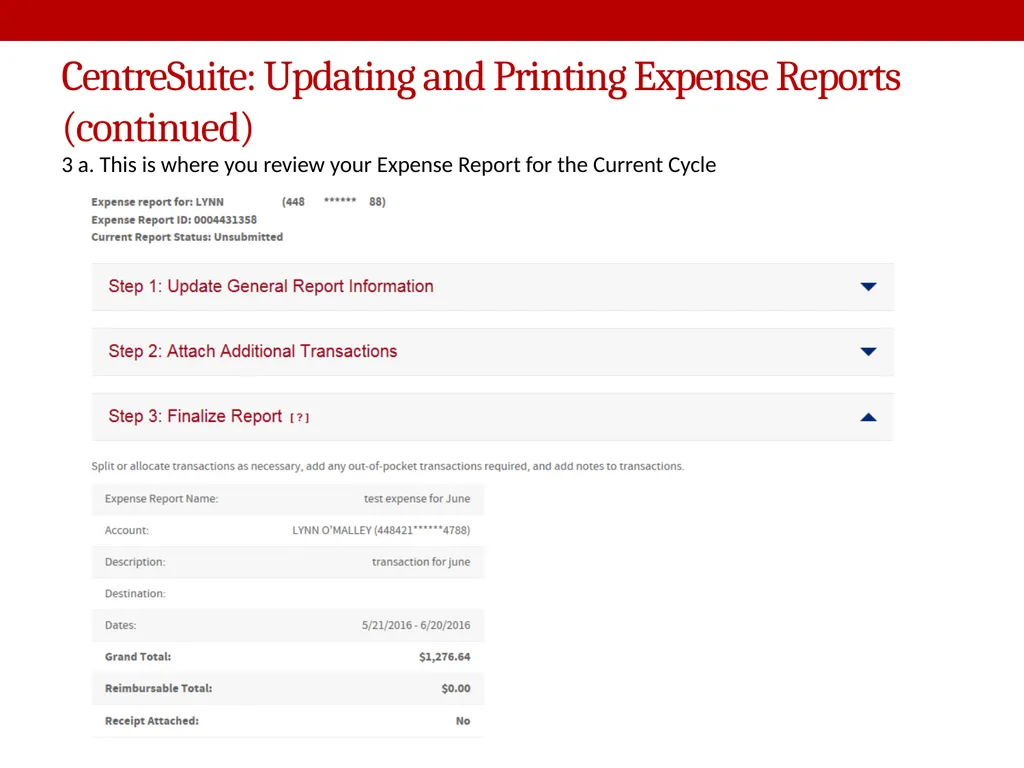
CentreSuite: Updating and Printing Expense Reports (continued) 3 a. This is where you review your Expense Report for the Current Cycle<br>
09
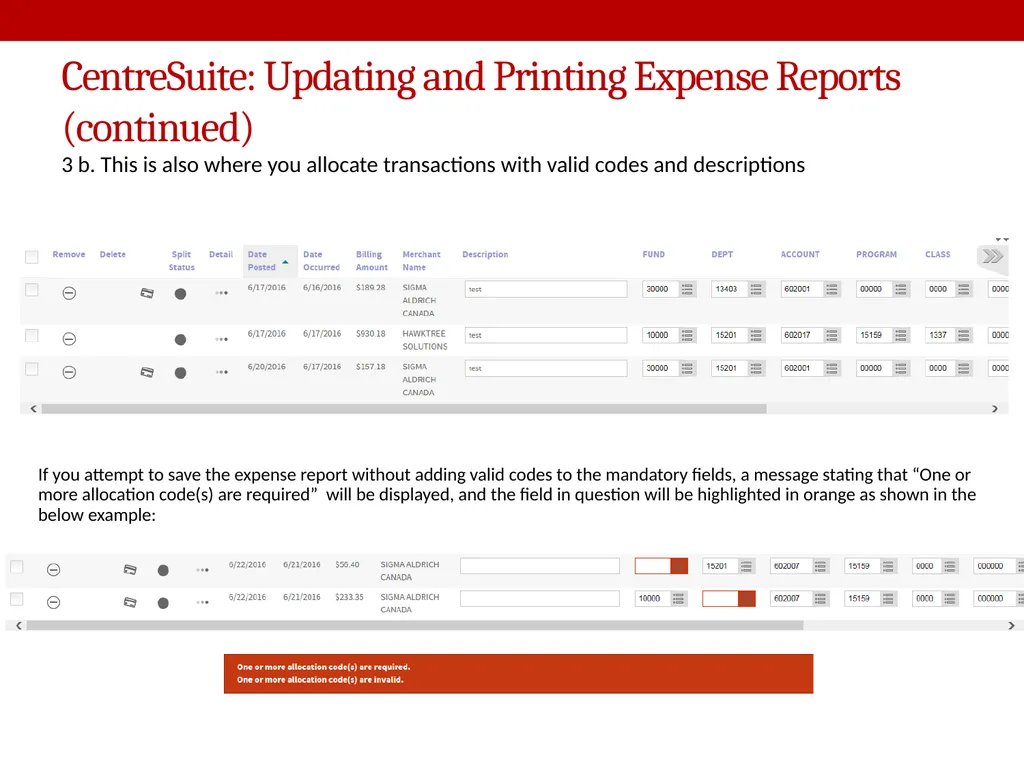
CentreSuite: Updating and Printing Expense Reports (continued) 3 b. This is also where you allocate transactions with valid codes and descriptions If you attempt to save the expense report without adding valid codes to the mandatory fields, a message stating that “One or more allocation code(s) are required” will be displayed, and the field in question will be highlighted in orange as shown in the below example:<br>
10
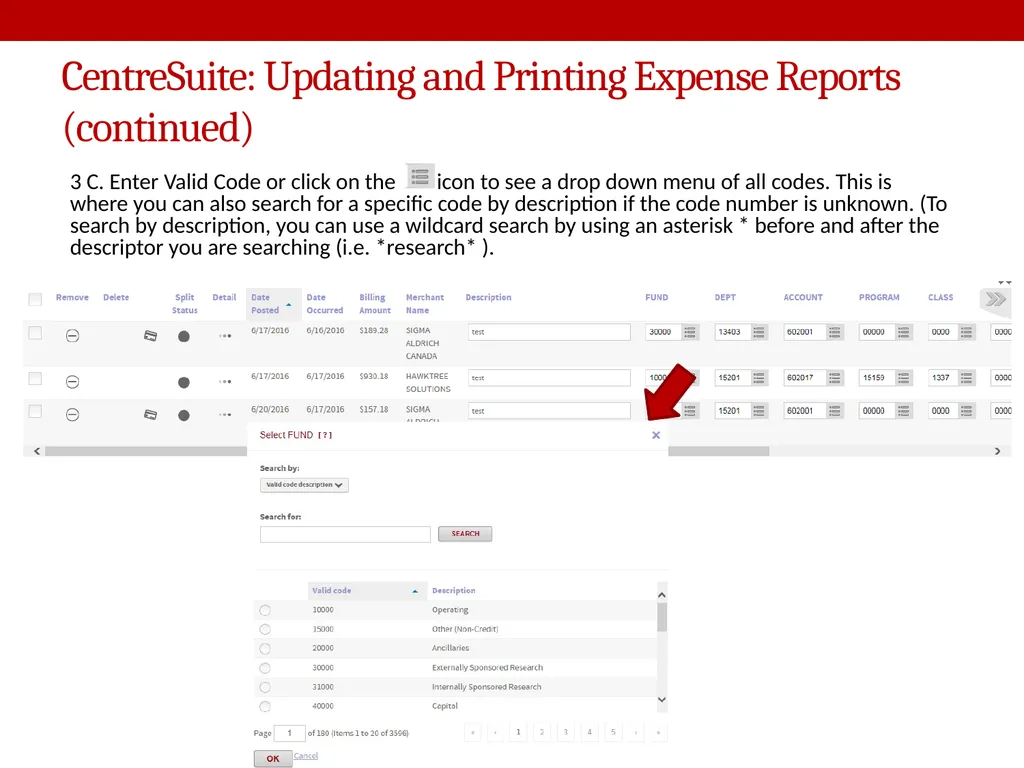
CentreSuite: Updating and Printing Expense Reports (continued) 3 C. Enter Valid Code or click on the icon to see a drop down menu of all codes. This is where you can also search for a specific code by description if the code number is unknown. (To search by description, you can use a wildcard search by using an asterisk * before and after the descriptor you are searching (i.e. *research* ).<br>
11
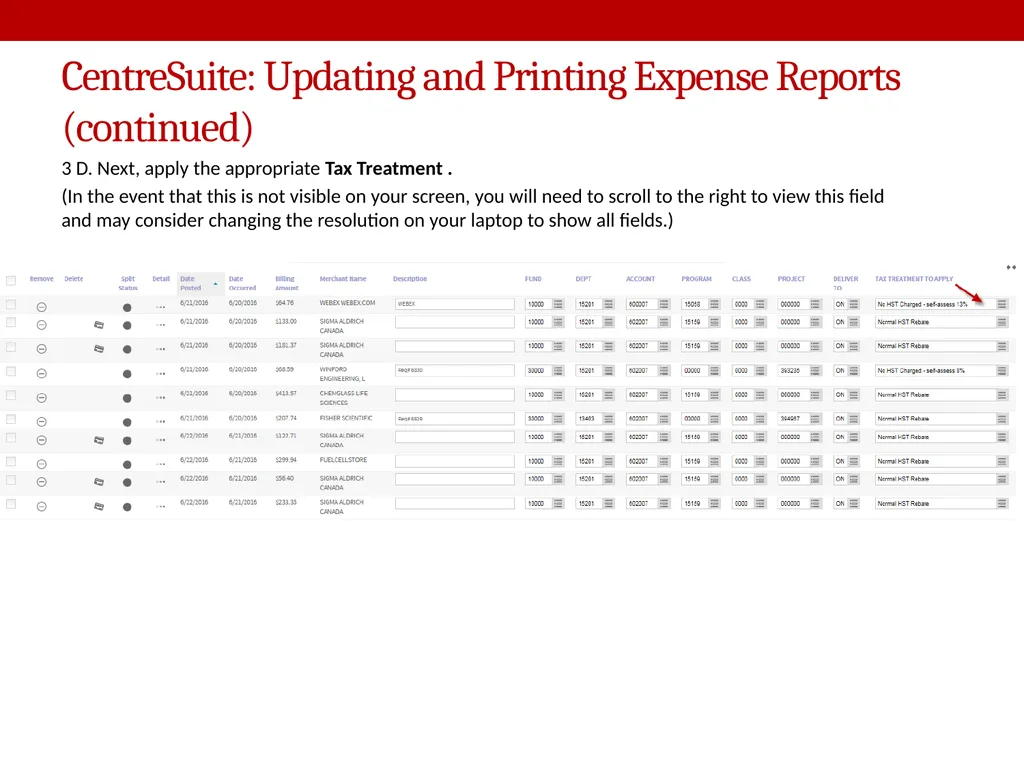
CentreSuite: Updating and Printing Expense Reports (continued) 3 D. Next, apply the appropriate Tax Treatment .
(In the event that this is not visible on your screen, you will need to scroll to the right to view this field and may consider changing the resolution on your laptop to show all fields.)<br>
(In the event that this is not visible on your screen, you will need to scroll to the right to view this field and may consider changing the resolution on your laptop to show all fields.)<br>
12
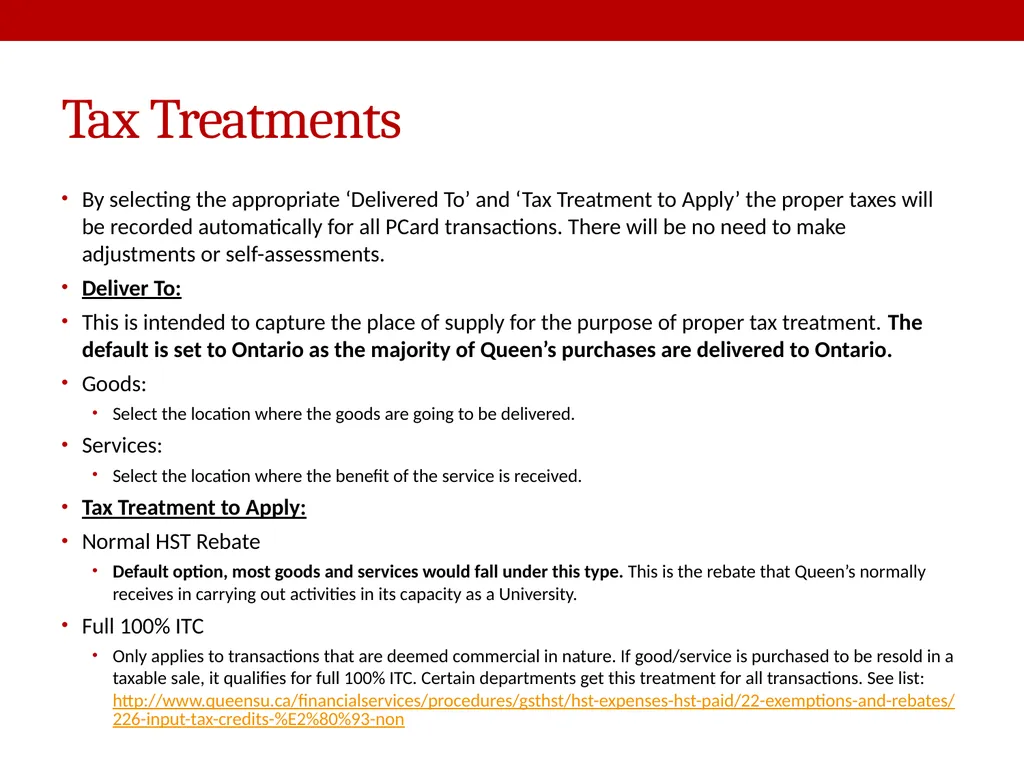
Tax Treatments By selecting the appropriate ‘Delivered To’ and ‘Tax Treatment to Apply’ the proper taxes will be recorded automatically for all PCard transactions. There will be no need to make adjustments or self-assessments.
Deliver To:
This is intended to capture the place of supply for the purpose of proper tax treatment. The default is set to Ontario as the majority of Queen’s purchases are delivered to Ontario.
Goods:
Select the location where the goods are going to be delivered.
Services:
Select the location where the benefit of the service is received.
Tax Treatment to Apply:
Normal HST Rebate
Default option, most goods and services would fall under this type. This is the rebate that Queen’s normally receives in carrying out activities in its capacity as a University.
Full 100% ITC
Only applies to transactions that are deemed commercial in nature. If good/service is purchased to be resold in a taxable sale, it qualifies for full 100% ITC. Certain departments get this treatment for all transactions. See list: http://www.queensu.ca/financialservices/procedures/gsthst/hst-expenses-hst-paid/22-exemptions-and-rebates/226-input-tax-credits-%E2%80%93-non<br>
Deliver To:
This is intended to capture the place of supply for the purpose of proper tax treatment. The default is set to Ontario as the majority of Queen’s purchases are delivered to Ontario.
Goods:
Select the location where the goods are going to be delivered.
Services:
Select the location where the benefit of the service is received.
Tax Treatment to Apply:
Normal HST Rebate
Default option, most goods and services would fall under this type. This is the rebate that Queen’s normally receives in carrying out activities in its capacity as a University.
Full 100% ITC
Only applies to transactions that are deemed commercial in nature. If good/service is purchased to be resold in a taxable sale, it qualifies for full 100% ITC. Certain departments get this treatment for all transactions. See list: http://www.queensu.ca/financialservices/procedures/gsthst/hst-expenses-hst-paid/22-exemptions-and-rebates/226-input-tax-credits-%E2%80%93-non<br>
13
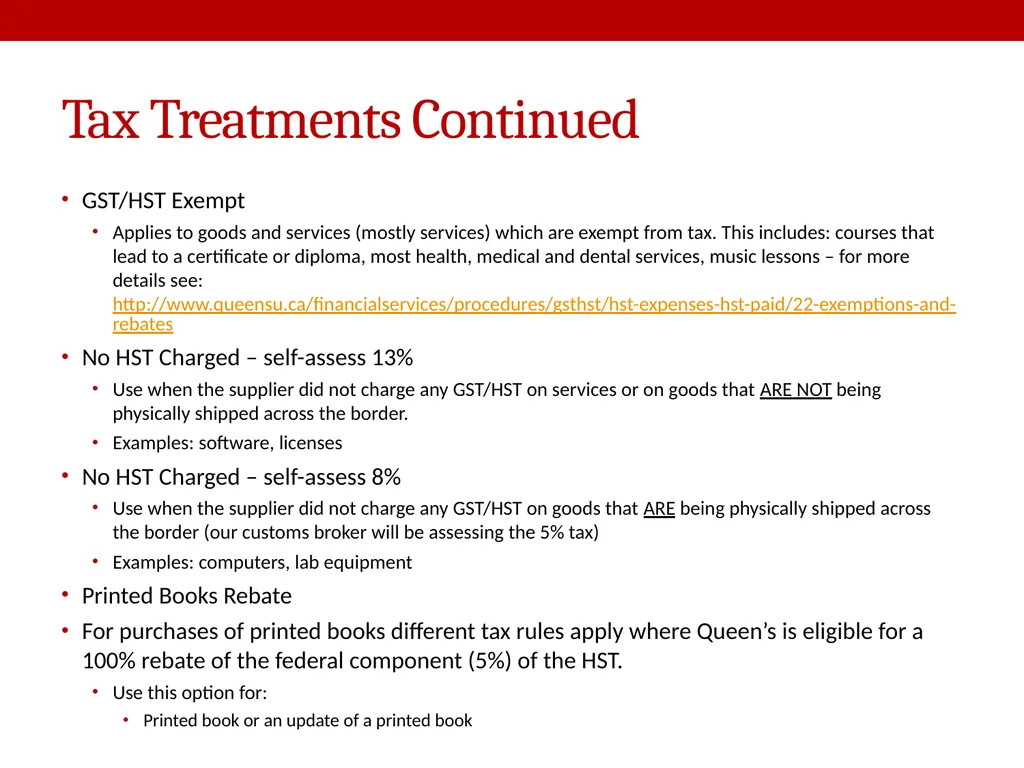
Tax Treatments Continued GST/HST Exempt
Applies to goods and services (mostly services) which are exempt from tax. This includes: courses that lead to a certificate or diploma, most health, medical and dental services, music lessons – for more details see: http://www.queensu.ca/financialservices/procedures/gsthst/hst-expenses-hst-paid/22-exemptions-and-rebates
No HST Charged – self-assess 13%
Use when the supplier did not charge any GST/HST on services or on goods that ARE NOT being physically shipped across the border.
Examples: software, licenses
No HST Charged – self-assess 8%
Use when the supplier did not charge any GST/HST on goods that ARE being physically shipped across the border (our customs broker will be assessing the 5% tax)
Examples: computers, lab equipment
Printed Books Rebate
For purchases of printed books different tax rules apply where Queen’s is eligible for a 100% rebate of the federal component (5%) of the HST.
Use this option for:
Printed book or an update of a printed book<br>
Applies to goods and services (mostly services) which are exempt from tax. This includes: courses that lead to a certificate or diploma, most health, medical and dental services, music lessons – for more details see: http://www.queensu.ca/financialservices/procedures/gsthst/hst-expenses-hst-paid/22-exemptions-and-rebates
No HST Charged – self-assess 13%
Use when the supplier did not charge any GST/HST on services or on goods that ARE NOT being physically shipped across the border.
Examples: software, licenses
No HST Charged – self-assess 8%
Use when the supplier did not charge any GST/HST on goods that ARE being physically shipped across the border (our customs broker will be assessing the 5% tax)
Examples: computers, lab equipment
Printed Books Rebate
For purchases of printed books different tax rules apply where Queen’s is eligible for a 100% rebate of the federal component (5%) of the HST.
Use this option for:
Printed book or an update of a printed book<br>
14
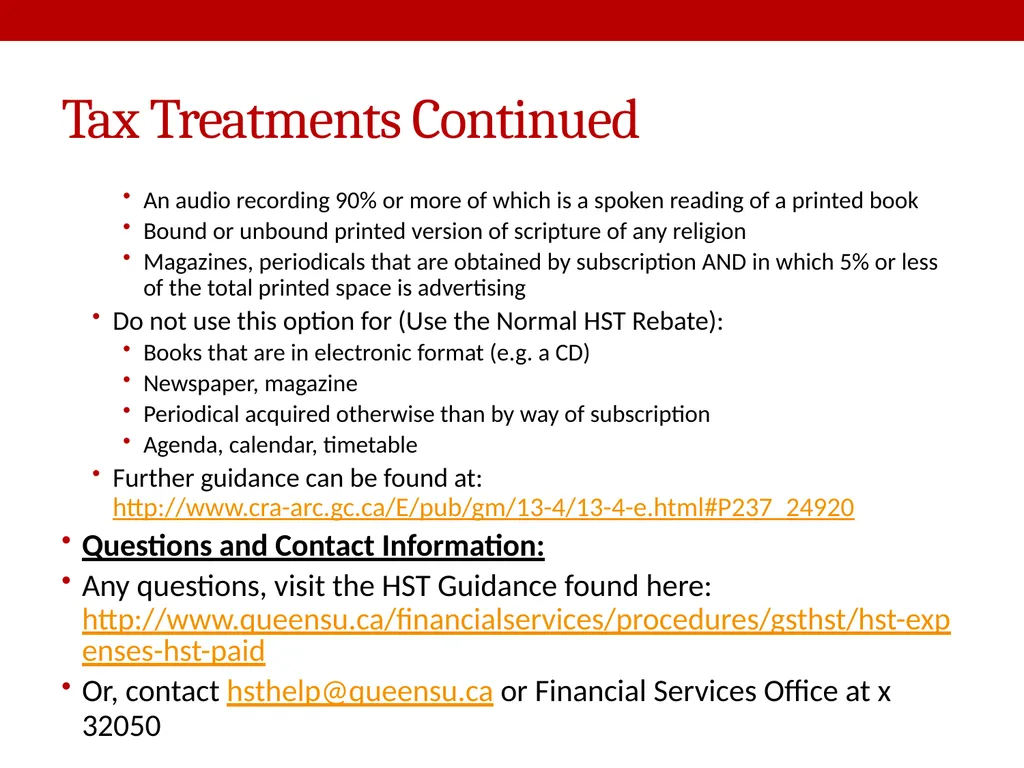
Tax Treatments Continued An audio recording 90% or more of which is a spoken reading of a printed book
Bound or unbound printed version of scripture of any religion
Magazines, periodicals that are obtained by subscription AND in which 5% or less of the total printed space is advertising
Do not use this option for (Use the Normal HST Rebate):
Books that are in electronic format (e.g. a CD)
Newspaper, magazine
Periodical acquired otherwise than by way of subscription
Agenda, calendar, timetable
Further guidance can be found at: http://www.cra-arc.gc.ca/E/pub/gm/13-4/13-4-e.html#P237_24920
Questions and Contact Information:
Any questions, visit the HST Guidance found here: http://www.queensu.ca/financialservices/procedures/gsthst/hst-expenses-hst-paid
Or, contact hsthelp@queensu.ca or Financial Services Office at x 32050<br>
Bound or unbound printed version of scripture of any religion
Magazines, periodicals that are obtained by subscription AND in which 5% or less of the total printed space is advertising
Do not use this option for (Use the Normal HST Rebate):
Books that are in electronic format (e.g. a CD)
Newspaper, magazine
Periodical acquired otherwise than by way of subscription
Agenda, calendar, timetable
Further guidance can be found at: http://www.cra-arc.gc.ca/E/pub/gm/13-4/13-4-e.html#P237_24920
Questions and Contact Information:
Any questions, visit the HST Guidance found here: http://www.queensu.ca/financialservices/procedures/gsthst/hst-expenses-hst-paid
Or, contact hsthelp@queensu.ca or Financial Services Office at x 32050<br>
15
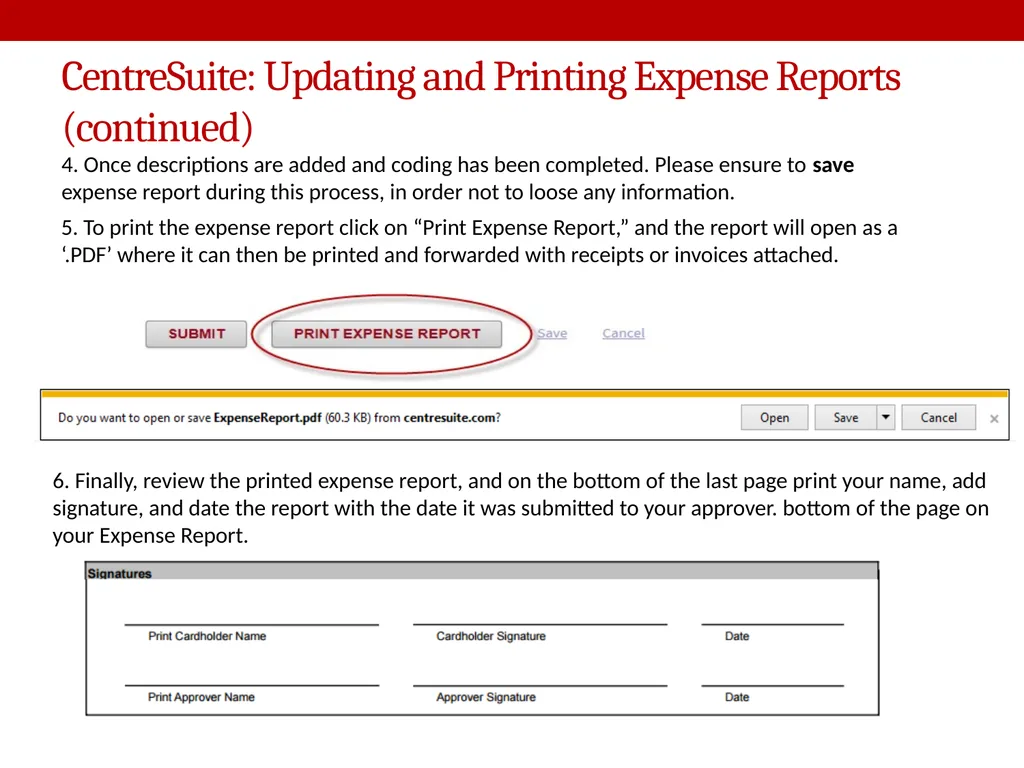
CentreSuite: Updating and Printing Expense Reports (continued) 4. Once descriptions are added and coding has been completed. Please ensure to save expense report during this process, in order not to loose any information. 5. To print the expense report click on “Print Expense Report,” and the report will open as a ‘.PDF’ where it can then be printed and forwarded with receipts or invoices attached. 6. Finally, review the printed expense report, and on the bottom of the last page print your name, add signature, and date the report with the date it was submitted to your approver. bottom of the page on your Expense Report.<br>
16
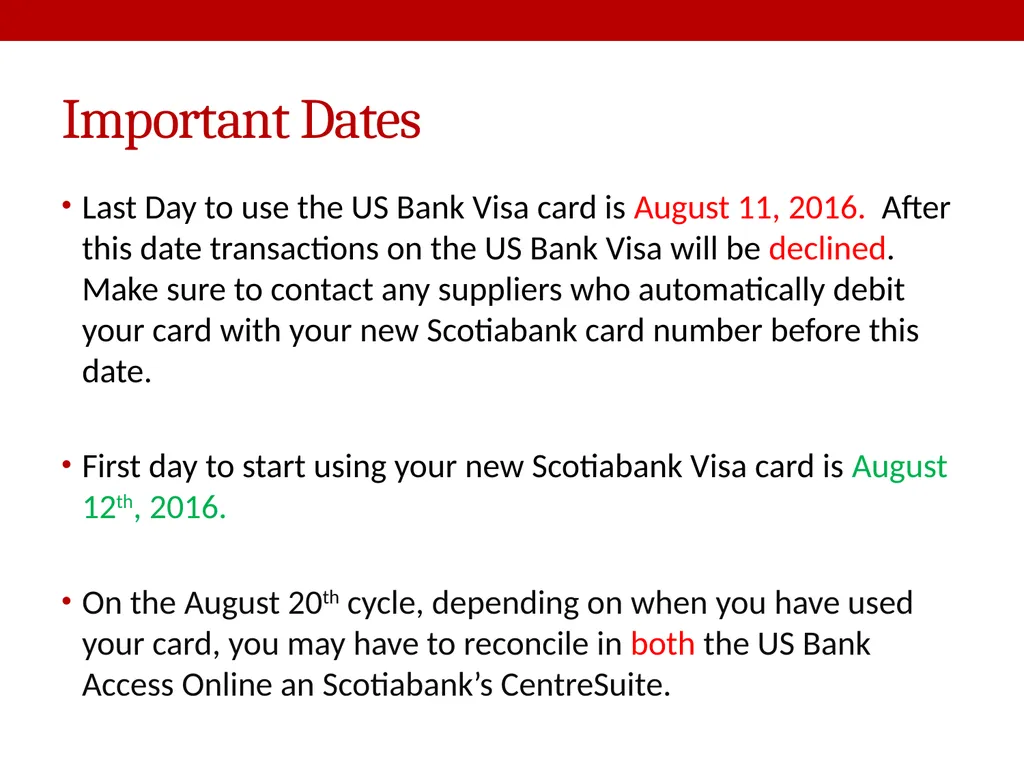
Important Dates Last Day to use the US Bank Visa card is August 11, 2016. After this date transactions on the US Bank Visa will be declined. Make sure to contact any suppliers who automatically debit your card with your new Scotiabank card number before this date.
First day to start using your new Scotiabank Visa card is August 12th, 2016.
On the August 20th cycle, depending on when you have used your card, you may have to reconcile in both the US Bank Access Online an Scotiabank’s CentreSuite.<br>
First day to start using your new Scotiabank Visa card is August 12th, 2016.
On the August 20th cycle, depending on when you have used your card, you may have to reconcile in both the US Bank Access Online an Scotiabank’s CentreSuite.<br>
17
WHAT’S NEXT Next phase of the procurement card program
Travel cards roll out in 2017
Policy Changes
In support of IT equipment purchase
Adding Rental Cars to P Card Use
E-Procurement ( SciQuest ) go live May 2017
Additional IT Support on queries – Ryan Luney luneyr@queensu.ca or ext 33007<br>
Travel cards roll out in 2017
Policy Changes
In support of IT equipment purchase
Adding Rental Cars to P Card Use
E-Procurement ( SciQuest ) go live May 2017
Additional IT Support on queries – Ryan Luney luneyr@queensu.ca or ext 33007<br>
18
Things to remember Scotiabank Card Service Centre
1-888-823-9657
outside Canada 1-416-750-6138
for card declines, lost or stolen cards, and frauds password resets.
LAST DAY TO USE US BANK CARDS AUGUST 11TH
FIRST DAY TO USE NEW CARDS AUGUST 12TH
https://www.centresuite.com/centre?Scotiabank2280<br>
1-888-823-9657
outside Canada 1-416-750-6138
for card declines, lost or stolen cards, and frauds password resets.
LAST DAY TO USE US BANK CARDS AUGUST 11TH
FIRST DAY TO USE NEW CARDS AUGUST 12TH
https://www.centresuite.com/centre?Scotiabank2280<br>