Console commands helpful for networking Dr. John
Description: Console commands helpful for networking Dr. John Abraham Professor Utrgv At the command prompt, ping the loopback address by typing ping 127.0.0.1 Ping the IP address of the computer. Ping the IP address of the default gateway. If the ping
Related Topics
Download Presentation
"Console commands helpful for networking Dr. John" is the property of its rightful owner. Permission is granted to download and print the materials on this website for personal, non-commercial use only, and to display it on your personal computer provided you do not modify the materials and that you retain all copyright notices contained in the materials. By downloading content from our website, you accept the terms of this agreement.
Presentation Transcript
slide1. Console commands helpful for networking Dr. John Abraham
Professor
Utrgv<br>
slide2. At the command prompt, ping the loopback address by typing ping 127.0.0.1
Ping the IP address of the computer.
Ping the IP address of the default gateway. If the ping command fails, verify that the default gateway IP address is correct and that the gateway (router) is operational.
Ping the IP address of a remote host (a host that is on a different subnet). If the ping command fails, verify that the remote host IP address is correct, that the remote host is operational, and that all of the gateways (routers) between this computer and the remote host are operational.
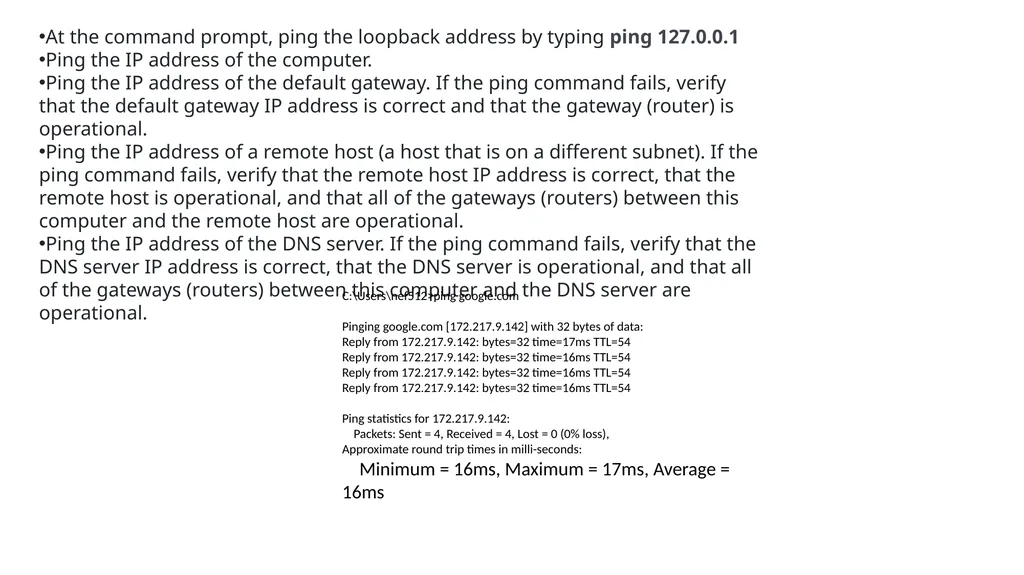
Ping the IP address of the DNS server. If the ping command fails, verify that the DNS server IP address is correct, that the DNS server is operational, and that all of the gateways (routers) between this computer and the DNS server are operational. C:\Users\nef512>ping google.com
Pinging google.com [172.217.9.142] with 32 bytes of data:
Reply from 172.217.9.142: bytes=32 time=17ms TTL=54
Reply from 172.217.9.142: bytes=32 time=16ms TTL=54
Ping statistics for 172.217.9.142:
Packets: Sent = 4, Received = 4, Lost = 0 (0% loss),
Approximate round trip times in milli-seconds:
Minimum = 16ms, Maximum = 17ms, Average = 16ms<br>
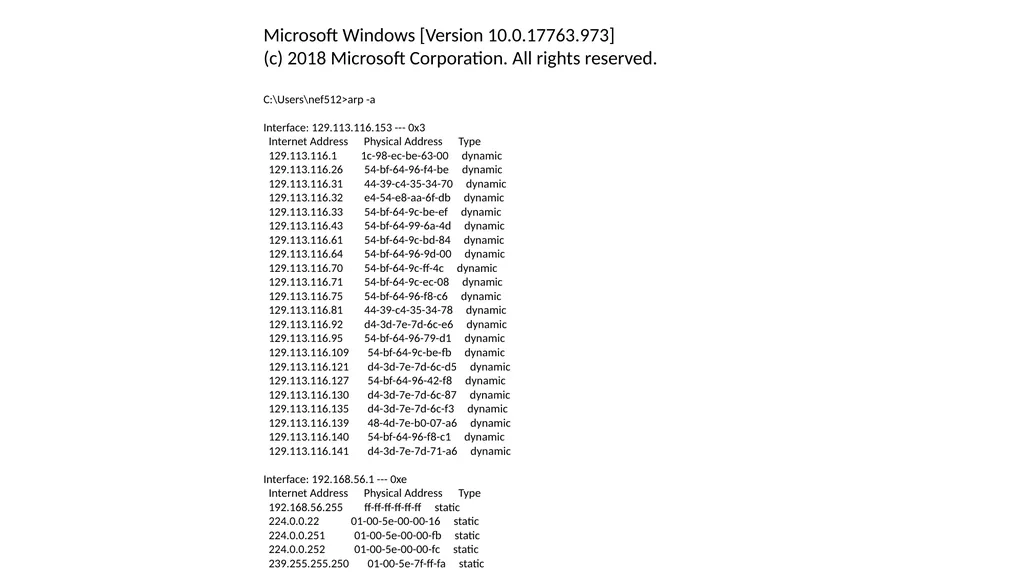
slide4. Microsoft Windows [Version 10.0.17763.973]
(c) 2018 Microsoft Corporation. All rights reserved.
C:\Users\nef512>arp -a
Interface: 129.113.116.153 --- 0x3
Internet Address Physical Address Type
129.113.116.1 1c-98-ec-be-63-00 dynamic
129.113.116.26 54-bf-64-96-f4-be dynamic
129.113.116.31 44-39-c4-35-34-70 dynamic
129.113.116.32 e4-54-e8-aa-6f-db dynamic
129.113.116.33 54-bf-64-9c-be-ef dynamic
129.113.116.43 54-bf-64-99-6a-4d dynamic
129.113.116.61 54-bf-64-9c-bd-84 dynamic
129.113.116.64 54-bf-64-96-9d-00 dynamic
129.113.116.70 54-bf-64-9c-ff-4c dynamic
129.113.116.71 54-bf-64-9c-ec-08 dynamic
129.113.116.75 54-bf-64-96-f8-c6 dynamic
129.113.116.81 44-39-c4-35-34-78 dynamic
129.113.116.92 d4-3d-7e-7d-6c-e6 dynamic
129.113.116.95 54-bf-64-96-79-d1 dynamic
129.113.116.109 54-bf-64-9c-be-fb dynamic
129.113.116.121 d4-3d-7e-7d-6c-d5 dynamic
129.113.116.127 54-bf-64-96-42-f8 dynamic
129.113.116.130 d4-3d-7e-7d-6c-87 dynamic
129.113.116.135 d4-3d-7e-7d-6c-f3 dynamic
129.113.116.139 48-4d-7e-b0-07-a6 dynamic
129.113.116.140 54-bf-64-96-f8-c1 dynamic
129.113.116.141 d4-3d-7e-7d-71-a6 dynamic
Interface: 192.168.56.1 --- 0xe
Internet Address Physical Address Type
192.168.56.255 ff-ff-ff-ff-ff-ff static
224.0.0.22 01-00-5e-00-00-16 static
224.0.0.251 01-00-5e-00-00-fb static
224.0.0.252 01-00-5e-00-00-fc static
239.255.255.250 01-00-5e-7f-ff-fa static<br>
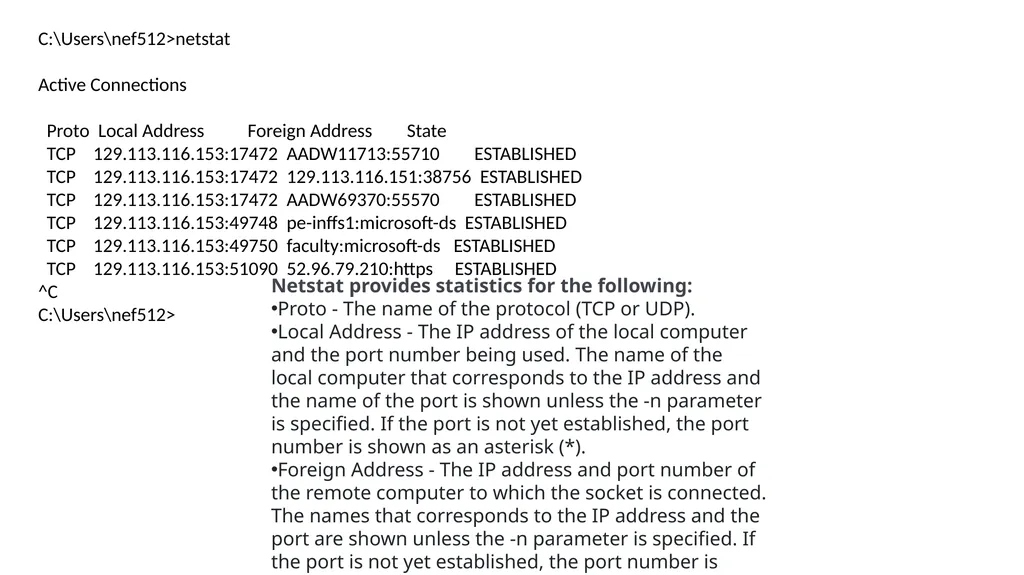
slide5. C:\Users\nef512>netstat
Active Connections
Proto Local Address Foreign Address State
TCP 129.113.116.153:17472 AADW11713:55710 ESTABLISHED
TCP 129.113.116.153:17472 129.113.116.151:38756 ESTABLISHED
TCP 129.113.116.153:17472 AADW69370:55570 ESTABLISHED
TCP 129.113.116.153:49748 pe-inffs1:microsoft-ds ESTABLISHED
TCP 129.113.116.153:49750 faculty:microsoft-ds ESTABLISHED
TCP 129.113.116.153:51090 52.96.79.210:https ESTABLISHED
^C
C:\Users\nef512> Netstat provides statistics for the following:
Proto - The name of the protocol (TCP or UDP).
Local Address - The IP address of the local computer and the port number being used. The name of the local computer that corresponds to the IP address and the name of the port is shown unless the -n parameter is specified. If the port is not yet established, the port number is shown as an asterisk (*).
Foreign Address - The IP address and port number of the remote computer to which the socket is connected. The names that corresponds to the IP address and the port are shown unless the -n parameter is specified. If the port is not yet established, the port number is shown as an asterisk (*).<br>
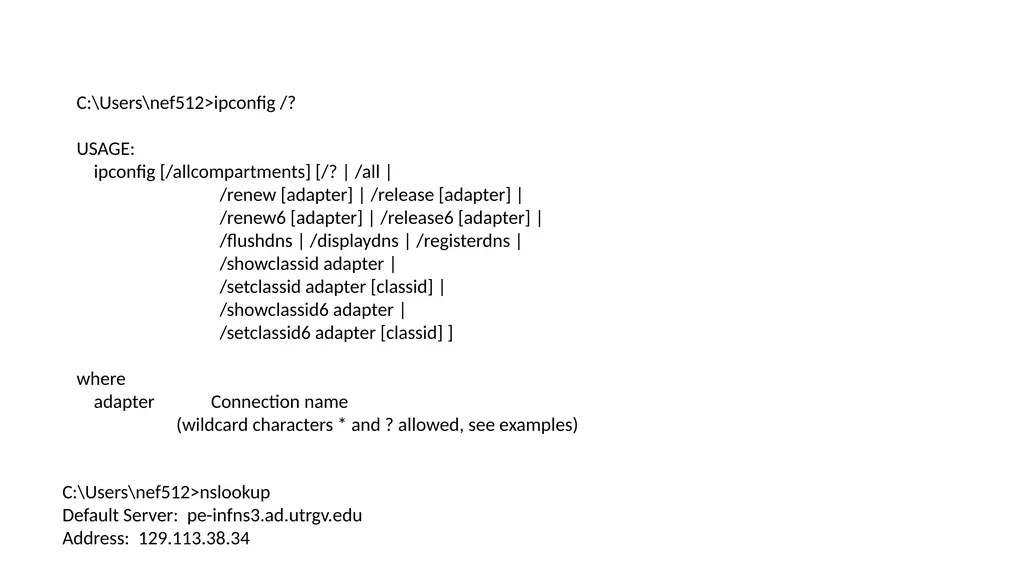
slide6. C:\Users\nef512>ipconfig /?
USAGE:
ipconfig [/allcompartments] [/? | /all |
/renew [adapter] | /release [adapter] |
/renew6 [adapter] | /release6 [adapter] |
/flushdns | /displaydns | /registerdns |
/showclassid adapter |
/setclassid adapter [classid] |
/showclassid6 adapter |
/setclassid6 adapter [classid] ]
where
adapter Connection name
(wildcard characters * and ? allowed, see examples) C:\Users\nef512>nslookup
Default Server: pe-infns3.ad.utrgv.edu
Address: 129.113.38.34
><br>
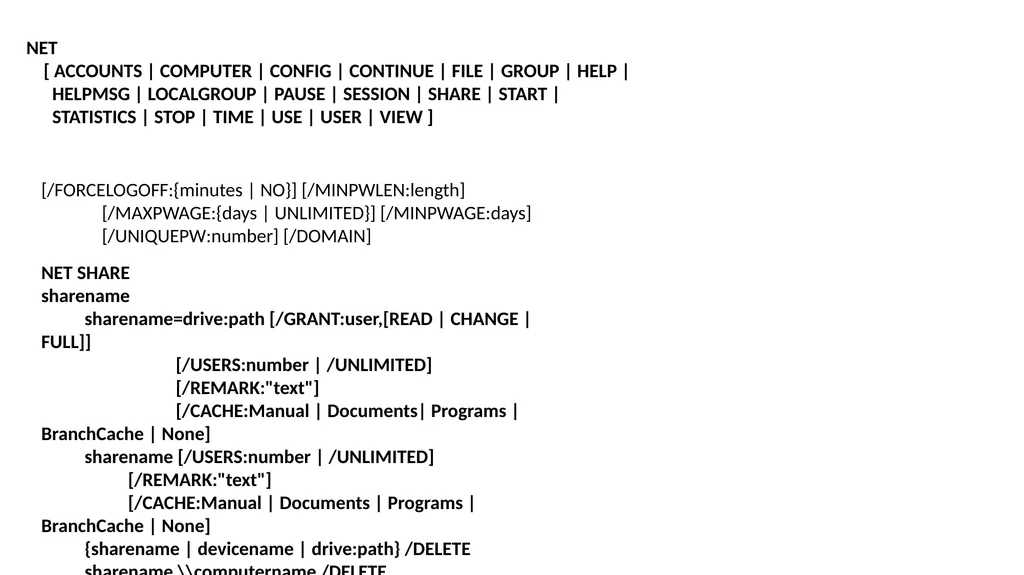
slide7. NET
[ ACCOUNTS | COMPUTER | CONFIG | CONTINUE | FILE | GROUP | HELP |
HELPMSG | LOCALGROUP | PAUSE | SESSION | SHARE | START |
STATISTICS | STOP | TIME | USE | USER | VIEW ] [/FORCELOGOFF:{minutes | NO}] [/MINPWLEN:length]
[/MAXPWAGE:{days | UNLIMITED}] [/MINPWAGE:days]
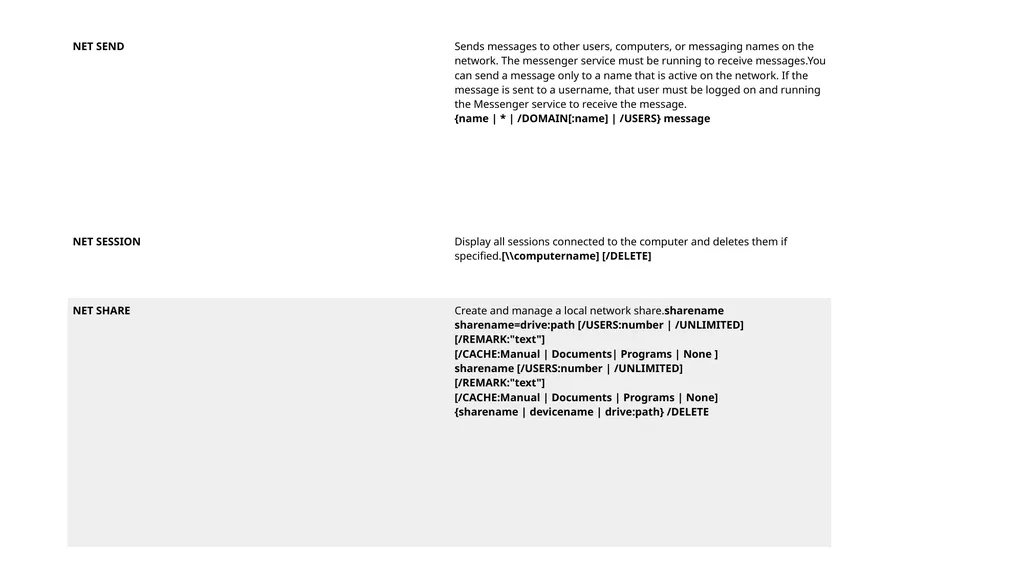
[/UNIQUEPW:number] [/DOMAIN] NET SHARE
sharename
sharename=drive:path [/GRANT:user,[READ | CHANGE | FULL]]
[/USERS:number | /UNLIMITED]
[/REMARK:"text"]
[/CACHE:Manual | Documents| Programs | BranchCache | None]
sharename [/USERS:number | /UNLIMITED]
[/REMARK:"text"]
[/CACHE:Manual | Documents | Programs | BranchCache | None]
{sharename | devicename | drive:path} /DELETE
sharename \\computername /DELETE<br>
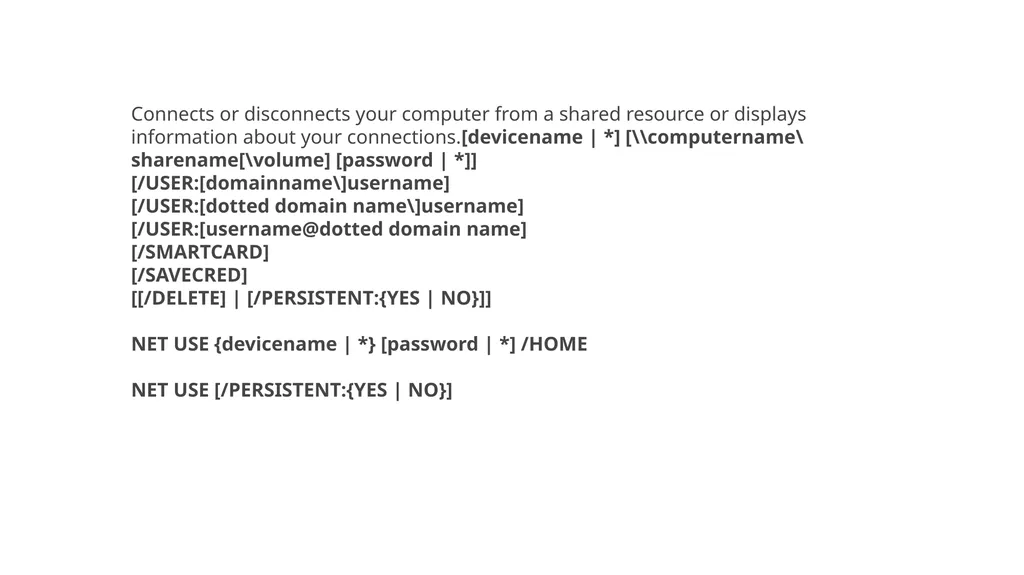
slide12. Connects or disconnects your computer from a shared resource or displays information about your connections.[devicename | *] [\\computername\sharename[\volume] [password | *]][/USER:[domainname\]username][/USER:[dotted domain name\]username][/USER:[username@dotted domain name][/SMARTCARD][/SAVECRED][[/DELETE] | [/PERSISTENT:{YES | NO}]]NET USE {devicename | *} [password | *] /HOMENET USE [/PERSISTENT:{YES | NO}]<br>
Professor
Utrgv<br>
slide2. At the command prompt, ping the loopback address by typing ping 127.0.0.1
Ping the IP address of the computer.
Ping the IP address of the default gateway. If the ping command fails, verify that the default gateway IP address is correct and that the gateway (router) is operational.
Ping the IP address of a remote host (a host that is on a different subnet). If the ping command fails, verify that the remote host IP address is correct, that the remote host is operational, and that all of the gateways (routers) between this computer and the remote host are operational.
Ping the IP address of the DNS server. If the ping command fails, verify that the DNS server IP address is correct, that the DNS server is operational, and that all of the gateways (routers) between this computer and the DNS server are operational. C:\Users\nef512>ping google.com
Pinging google.com [172.217.9.142] with 32 bytes of data:
Reply from 172.217.9.142: bytes=32 time=17ms TTL=54
Reply from 172.217.9.142: bytes=32 time=16ms TTL=54
Ping statistics for 172.217.9.142:
Packets: Sent = 4, Received = 4, Lost = 0 (0% loss),
Approximate round trip times in milli-seconds:
Minimum = 16ms, Maximum = 17ms, Average = 16ms<br>
slide4. Microsoft Windows [Version 10.0.17763.973]
(c) 2018 Microsoft Corporation. All rights reserved.
C:\Users\nef512>arp -a
Interface: 129.113.116.153 --- 0x3
Internet Address Physical Address Type
129.113.116.1 1c-98-ec-be-63-00 dynamic
129.113.116.26 54-bf-64-96-f4-be dynamic
129.113.116.31 44-39-c4-35-34-70 dynamic
129.113.116.32 e4-54-e8-aa-6f-db dynamic
129.113.116.33 54-bf-64-9c-be-ef dynamic
129.113.116.43 54-bf-64-99-6a-4d dynamic
129.113.116.61 54-bf-64-9c-bd-84 dynamic
129.113.116.64 54-bf-64-96-9d-00 dynamic
129.113.116.70 54-bf-64-9c-ff-4c dynamic
129.113.116.71 54-bf-64-9c-ec-08 dynamic
129.113.116.75 54-bf-64-96-f8-c6 dynamic
129.113.116.81 44-39-c4-35-34-78 dynamic
129.113.116.92 d4-3d-7e-7d-6c-e6 dynamic
129.113.116.95 54-bf-64-96-79-d1 dynamic
129.113.116.109 54-bf-64-9c-be-fb dynamic
129.113.116.121 d4-3d-7e-7d-6c-d5 dynamic
129.113.116.127 54-bf-64-96-42-f8 dynamic
129.113.116.130 d4-3d-7e-7d-6c-87 dynamic
129.113.116.135 d4-3d-7e-7d-6c-f3 dynamic
129.113.116.139 48-4d-7e-b0-07-a6 dynamic
129.113.116.140 54-bf-64-96-f8-c1 dynamic
129.113.116.141 d4-3d-7e-7d-71-a6 dynamic
Interface: 192.168.56.1 --- 0xe
Internet Address Physical Address Type
192.168.56.255 ff-ff-ff-ff-ff-ff static
224.0.0.22 01-00-5e-00-00-16 static
224.0.0.251 01-00-5e-00-00-fb static
224.0.0.252 01-00-5e-00-00-fc static
239.255.255.250 01-00-5e-7f-ff-fa static<br>
slide5. C:\Users\nef512>netstat
Active Connections
Proto Local Address Foreign Address State
TCP 129.113.116.153:17472 AADW11713:55710 ESTABLISHED
TCP 129.113.116.153:17472 129.113.116.151:38756 ESTABLISHED
TCP 129.113.116.153:17472 AADW69370:55570 ESTABLISHED
TCP 129.113.116.153:49748 pe-inffs1:microsoft-ds ESTABLISHED
TCP 129.113.116.153:49750 faculty:microsoft-ds ESTABLISHED
TCP 129.113.116.153:51090 52.96.79.210:https ESTABLISHED
^C
C:\Users\nef512> Netstat provides statistics for the following:
Proto - The name of the protocol (TCP or UDP).
Local Address - The IP address of the local computer and the port number being used. The name of the local computer that corresponds to the IP address and the name of the port is shown unless the -n parameter is specified. If the port is not yet established, the port number is shown as an asterisk (*).
Foreign Address - The IP address and port number of the remote computer to which the socket is connected. The names that corresponds to the IP address and the port are shown unless the -n parameter is specified. If the port is not yet established, the port number is shown as an asterisk (*).<br>
slide6. C:\Users\nef512>ipconfig /?
USAGE:
ipconfig [/allcompartments] [/? | /all |
/renew [adapter] | /release [adapter] |
/renew6 [adapter] | /release6 [adapter] |
/flushdns | /displaydns | /registerdns |
/showclassid adapter |
/setclassid adapter [classid] |
/showclassid6 adapter |
/setclassid6 adapter [classid] ]
where
adapter Connection name
(wildcard characters * and ? allowed, see examples) C:\Users\nef512>nslookup
Default Server: pe-infns3.ad.utrgv.edu
Address: 129.113.38.34
><br>
slide7. NET
[ ACCOUNTS | COMPUTER | CONFIG | CONTINUE | FILE | GROUP | HELP |
HELPMSG | LOCALGROUP | PAUSE | SESSION | SHARE | START |
STATISTICS | STOP | TIME | USE | USER | VIEW ] [/FORCELOGOFF:{minutes | NO}] [/MINPWLEN:length]
[/MAXPWAGE:{days | UNLIMITED}] [/MINPWAGE:days]
[/UNIQUEPW:number] [/DOMAIN] NET SHARE
sharename
sharename=drive:path [/GRANT:user,[READ | CHANGE | FULL]]
[/USERS:number | /UNLIMITED]
[/REMARK:"text"]
[/CACHE:Manual | Documents| Programs | BranchCache | None]
sharename [/USERS:number | /UNLIMITED]
[/REMARK:"text"]
[/CACHE:Manual | Documents | Programs | BranchCache | None]
{sharename | devicename | drive:path} /DELETE
sharename \\computername /DELETE<br>
slide12. Connects or disconnects your computer from a shared resource or displays information about your connections.[devicename | *] [\\computername\sharename[\volume] [password | *]][/USER:[domainname\]username][/USER:[dotted domain name\]username][/USER:[username@dotted domain name][/SMARTCARD][/SAVECRED][[/DELETE] | [/PERSISTENT:{YES | NO}]]NET USE {devicename | *} [password | *] /HOMENET USE [/PERSISTENT:{YES | NO}]<br>