
Control Flow and Arrays COE 301 Computer


Description: Control Flow and Arrays COE 301 Computer Organization Prof. Aiman El-Maleh College of Computer Sciences and Engineering King Fahd University of Petroleum and Minerals Adapted from slides of Dr. M. Mudawar, COE 301, KFUPM Presentation
Related Topics
Download Presentation
"Control Flow and Arrays COE 301 Computer" is the property of its rightful owner. Permission is granted to download and print the materials on this website for personal, non-commercial use only, and to display it on your personal computer provided you do not modify the materials and that you retain all copyright notices contained in the materials. By downloading content from our website, you accept the terms of this agreement.
Presentation Transcript
slide1. Control Flow and Arrays COE 301 Computer Organization
Prof. Aiman El-Maleh
College of Computer Sciences and Engineering
King Fahd University of Petroleum and Minerals
[Adapted from slides of Dr. M. Mudawar, COE 301, KFUPM]<br>
slide2. Presentation Outline Control Flow: Branch and Jump Instructions
Translating If Statements and Boolean Expressions
Arrays
Load and Store Instructions
Translating Loops and Traversing Arrays
Addressing Modes<br>
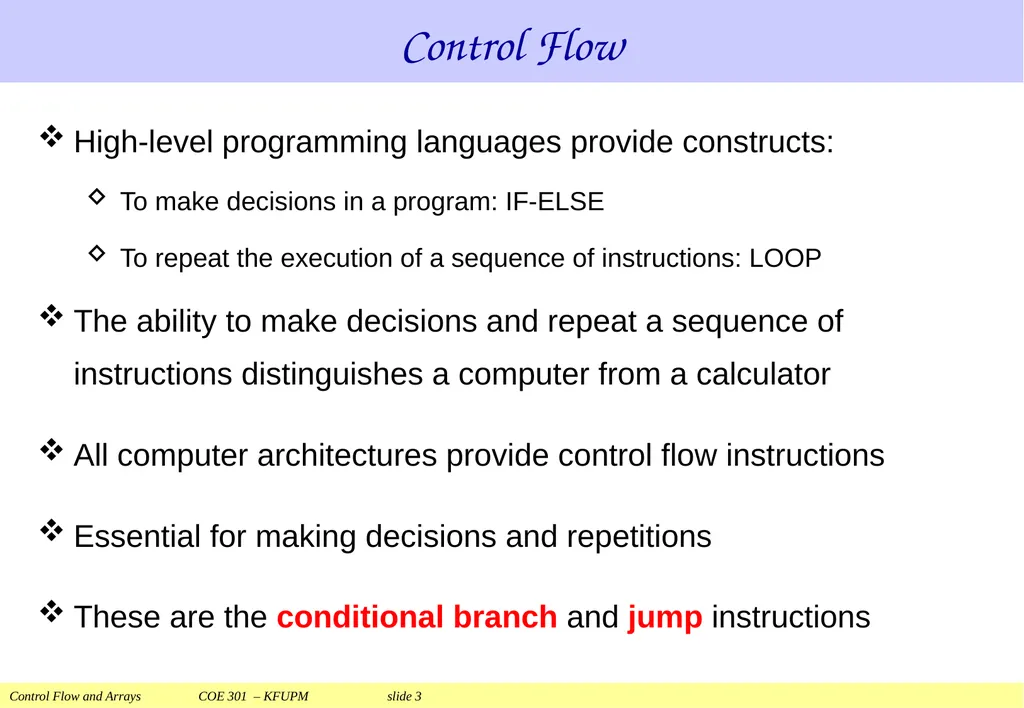
slide3. Control Flow High-level programming languages provide constructs:
To make decisions in a program: IF-ELSE
To repeat the execution of a sequence of instructions: LOOP
The ability to make decisions and repeat a sequence of instructions distinguishes a computer from a calculator
All computer architectures provide control flow instructions
Essential for making decisions and repetitions
These are the conditional branch and jump instructions<br>
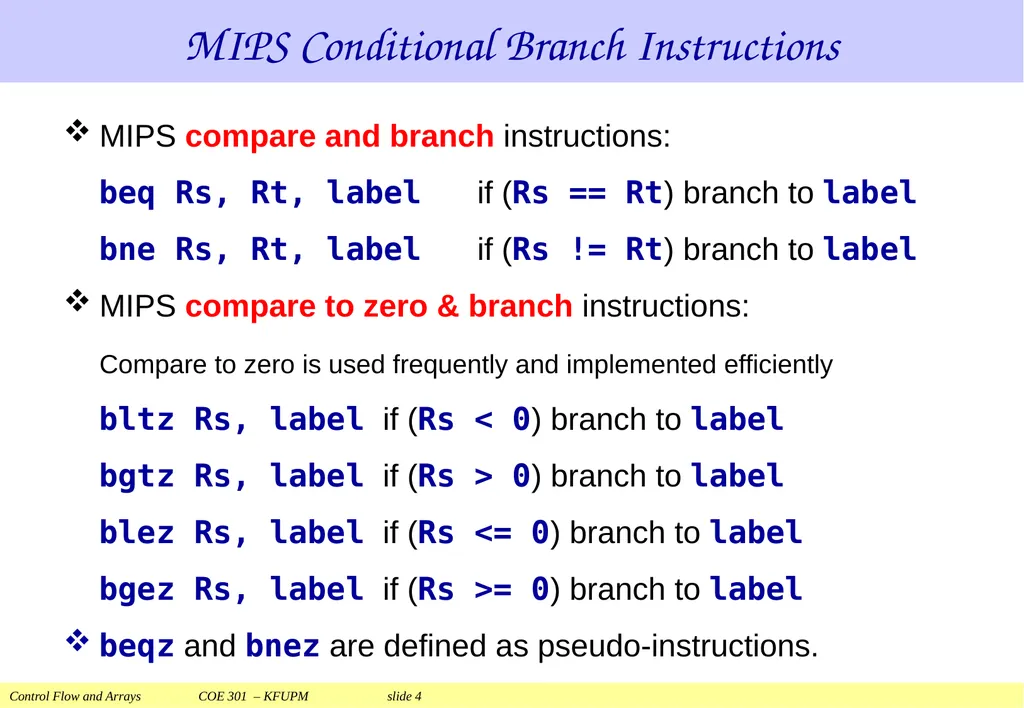
slide4. MIPS compare and branch instructions:
beq Rs, Rt, label if (Rs == Rt) branch to label
bne Rs, Rt, label if (Rs != Rt) branch to label
MIPS compare to zero & branch instructions:
Compare to zero is used frequently and implemented efficiently
bltz Rs, label if (Rs < 0) branch to label
bgtz Rs, label if (Rs > 0) branch to label
blez Rs, label if (Rs <= 0) branch to label
bgez Rs, label if (Rs >= 0) branch to label
beqz and bnez are defined as pseudo-instructions. MIPS Conditional Branch Instructions<br>
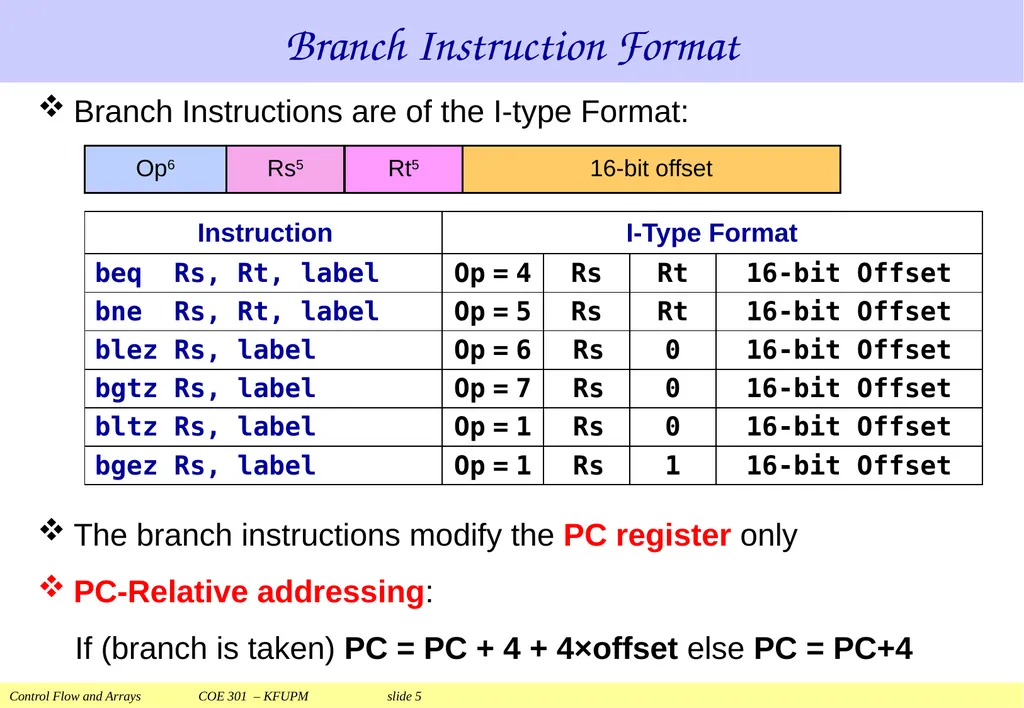
slide5. Branch Instruction Format The branch instructions modify the PC register only
PC-Relative addressing:
If (branch is taken) PC = PC + 4 + 4×offset else PC = PC+4 Branch Instructions are of the I-type Format:<br>
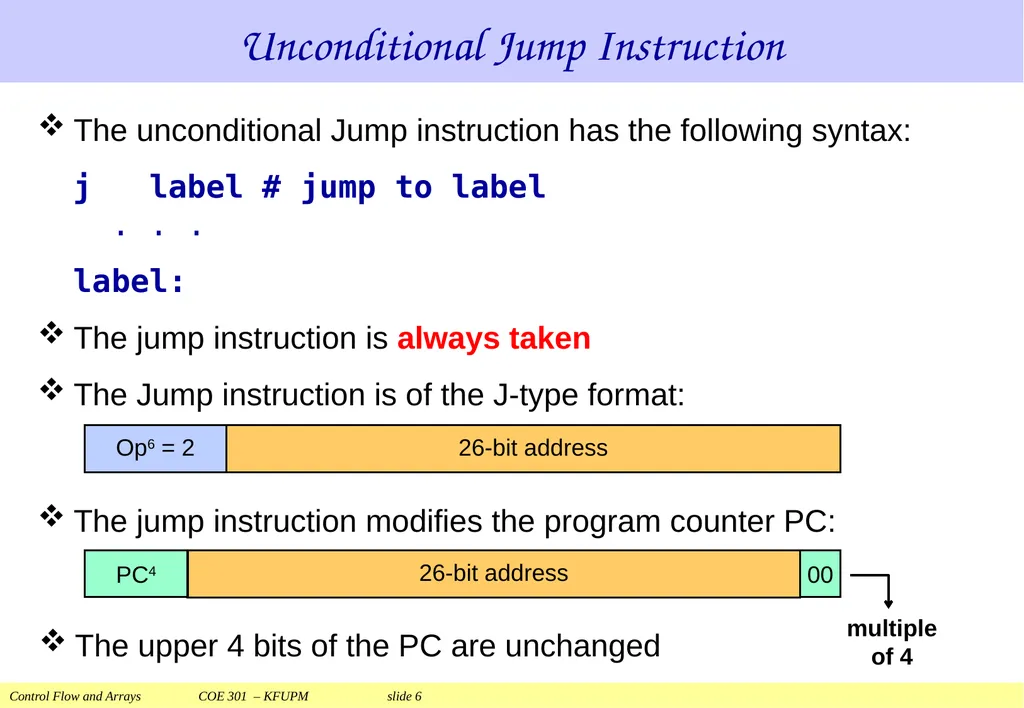
slide6. Unconditional Jump Instruction The unconditional Jump instruction has the following syntax:
j label # jump to label
. . .
label:
The jump instruction is always taken
The Jump instruction is of the J-type format:
The jump instruction modifies the program counter PC:
The upper 4 bits of the PC are unchanged<br>
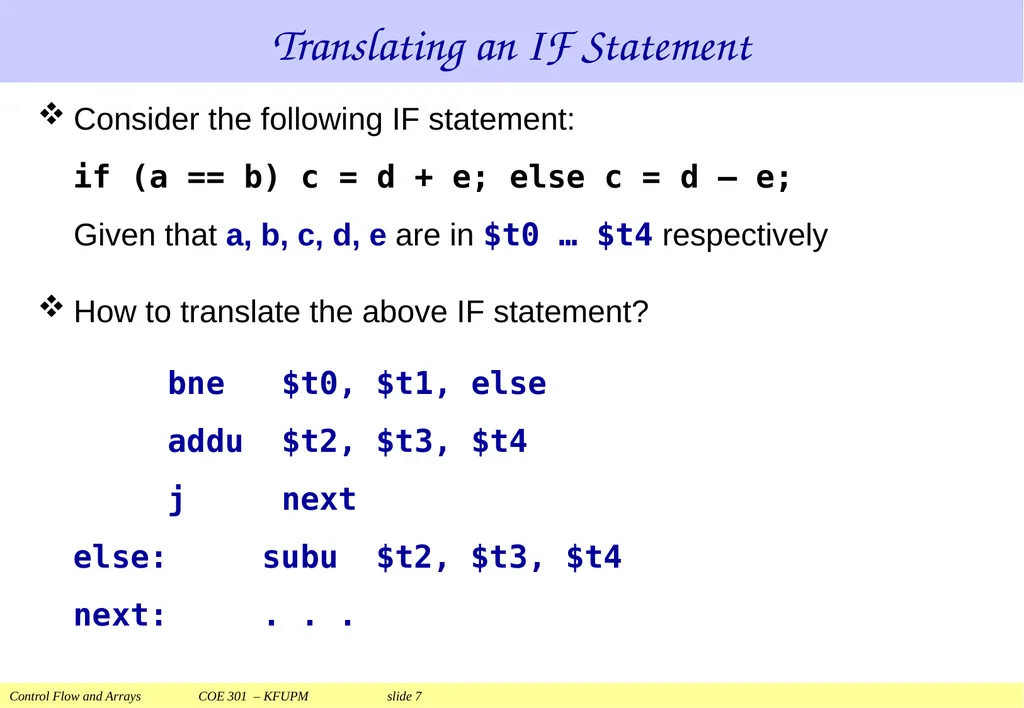
slide7. Translating an IF Statement Consider the following IF statement:
if (a == b) c = d + e; else c = d – e;
Given that a, b, c, d, e are in $t0 … $t4 respectively
How to translate the above IF statement?
bne $t0, $t1, else
addu $t2, $t3, $t4
j next
else: subu $t2, $t3, $t4
next: . . .<br>
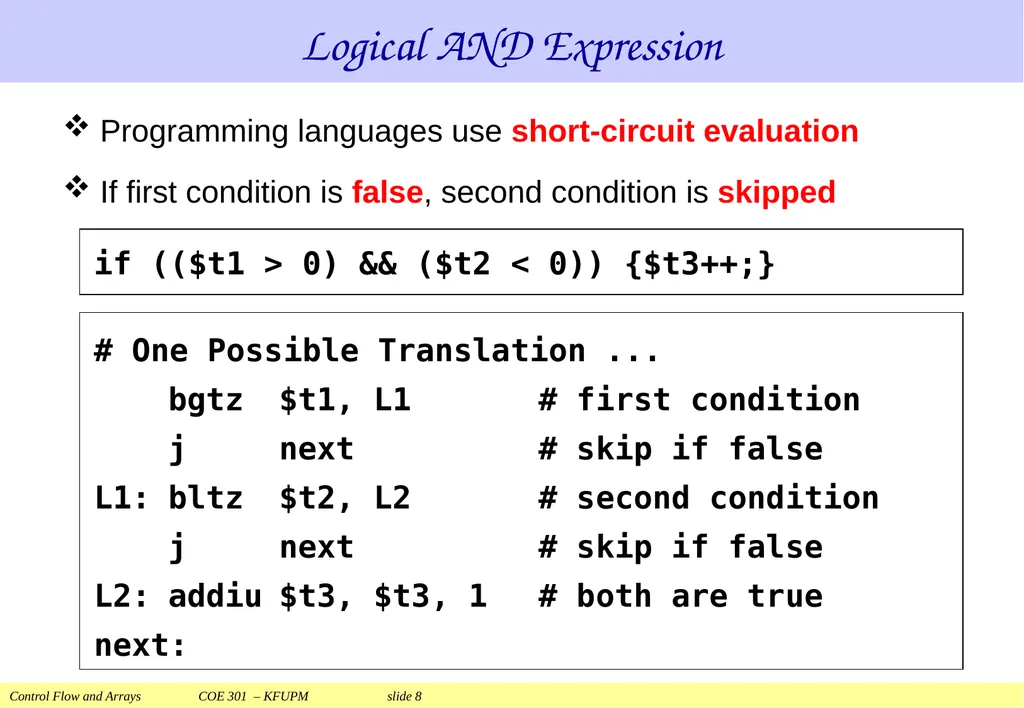
slide8. Logical AND Expression Programming languages use short-circuit evaluation
If first condition is false, second condition is skipped if (($t1 > 0) && ($t2 < 0)) {$t3++;} # One Possible Translation ...
bgtz $t1, L1 # first condition
j next # skip if false
L1: bltz $t2, L2 # second condition
j next # skip if false
L2: addiu $t3, $t3, 1 # both are true
next:<br>
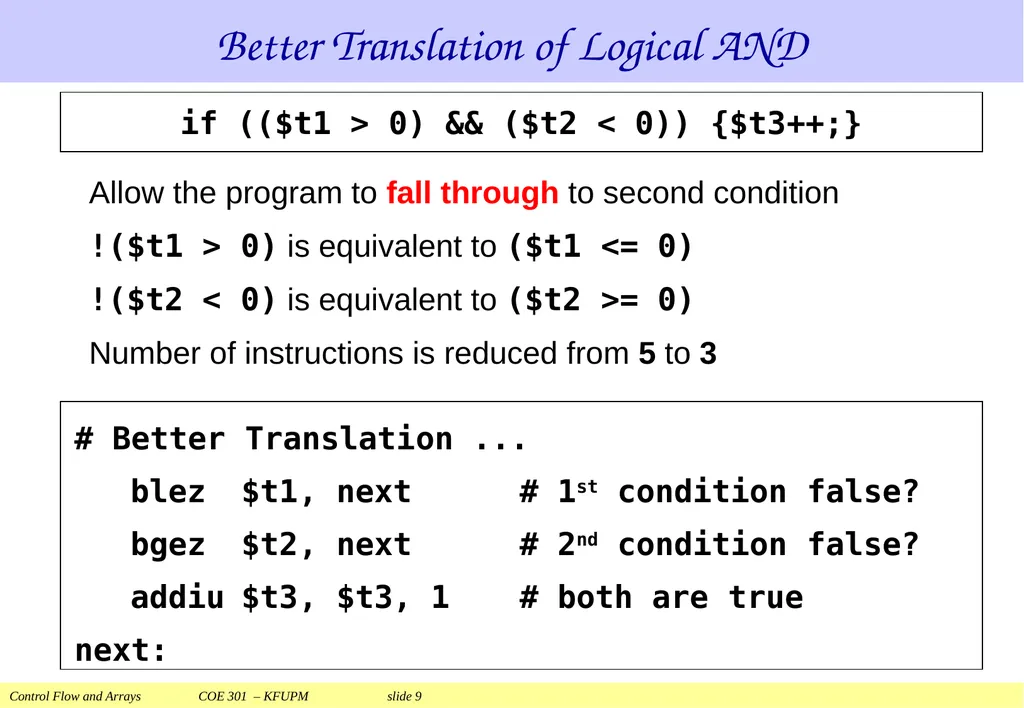
slide9. Better Translation of Logical AND Allow the program to fall through to second condition
!($t1 > 0) is equivalent to ($t1 <= 0)
!($t2 < 0) is equivalent to ($t2 >= 0)
Number of instructions is reduced from 5 to 3 if (($t1 > 0) && ($t2 < 0)) {$t3++;} # Better Translation ...
blez $t1, next # 1st condition false?
bgez $t2, next # 2nd condition false?
addiu $t3, $t3, 1 # both are true
next:<br>
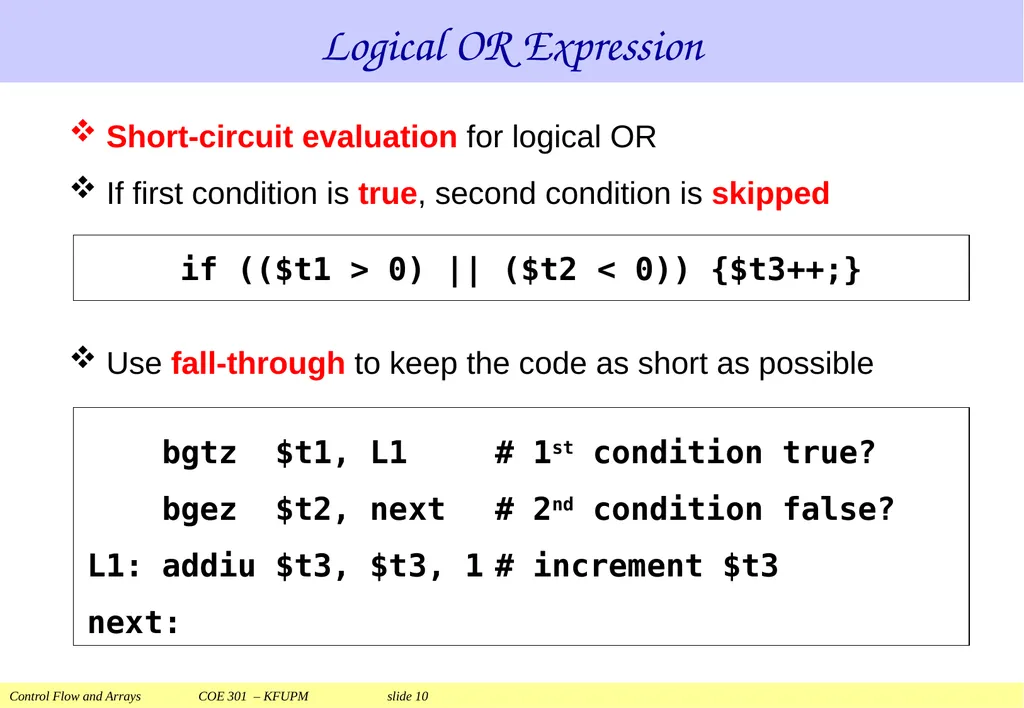
slide10. Logical OR Expression Short-circuit evaluation for logical OR
If first condition is true, second condition is skipped
Use fall-through to keep the code as short as possible bgtz $t1, L1 # 1st condition true?
bgez $t2, next # 2nd condition false?
L1: addiu $t3, $t3, 1 # increment $t3
next: if (($t1 > 0) || ($t2 < 0)) {$t3++;}<br>
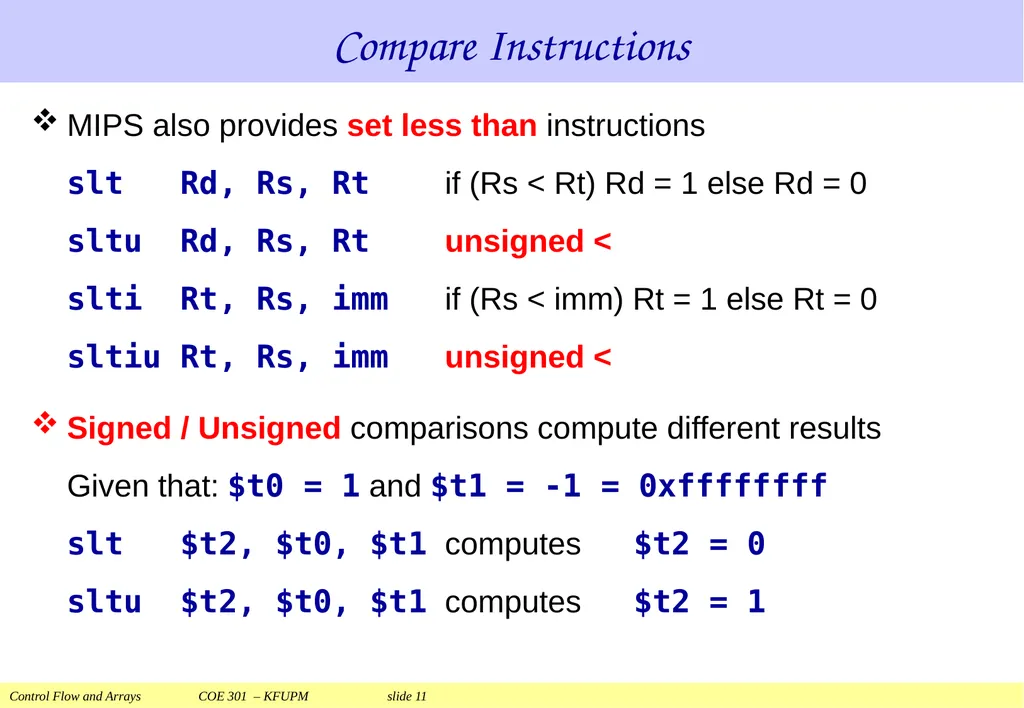
slide11. Compare Instructions MIPS also provides set less than instructions
slt Rd, Rs, Rt if (Rs < Rt) Rd = 1 else Rd = 0
sltu Rd, Rs, Rt unsigned <
slti Rt, Rs, imm if (Rs < imm) Rt = 1 else Rt = 0
sltiu Rt, Rs, imm unsigned <
Signed / Unsigned comparisons compute different results
Given that: $t0 = 1 and $t1 = -1 = 0xffffffff
slt $t2, $t0, $t1 computes $t2 = 0
sltu $t2, $t0, $t1 computes $t2 = 1<br>
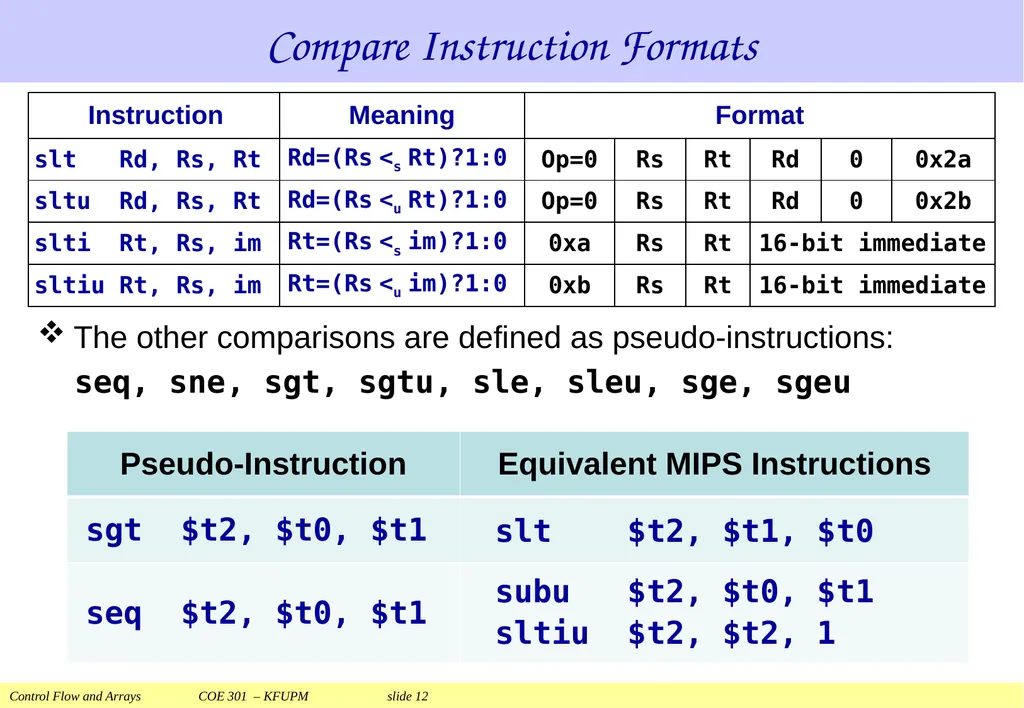
slide12. Compare Instruction Formats The other comparisons are defined as pseudo-instructions:
seq, sne, sgt, sgtu, sle, sleu, sge, sgeu subu $t2, $t0, $t1
sltiu $t2, $t2, 1 slt $t2, $t1, $t0<br>
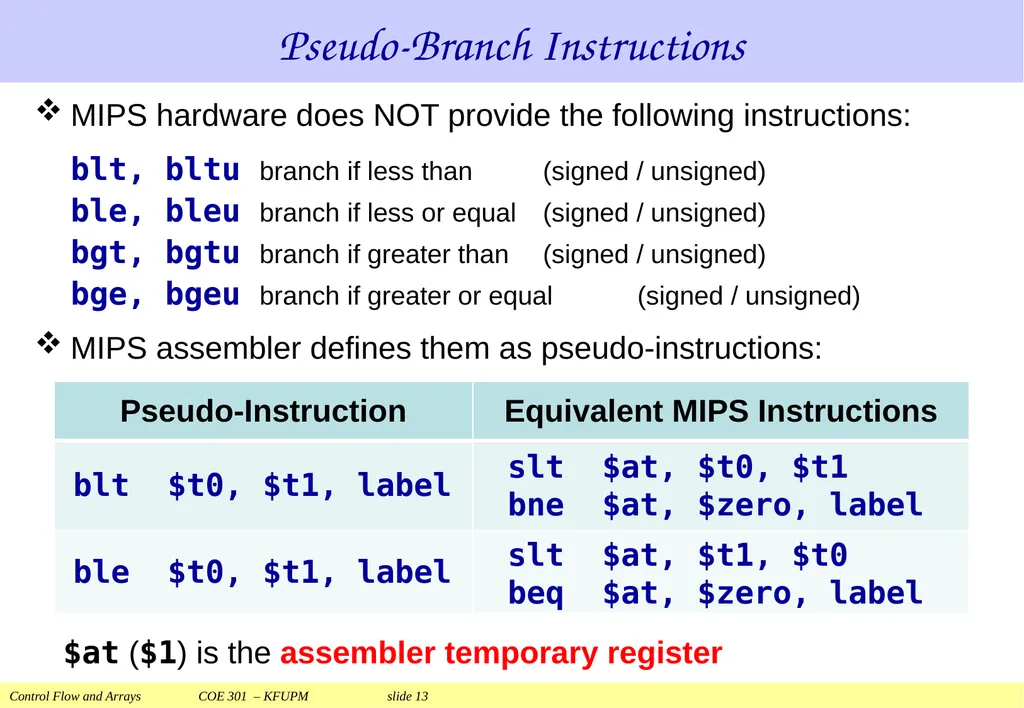
slide13. Pseudo-Branch Instructions MIPS hardware does NOT provide the following instructions:
blt, bltu branch if less than (signed / unsigned)
ble, bleu branch if less or equal (signed / unsigned)
bgt, bgtu branch if greater than (signed / unsigned)
bge, bgeu branch if greater or equal (signed / unsigned)
MIPS assembler defines them as pseudo-instructions: $at ($1) is the assembler temporary register slt $at, $t0, $t1
bne $at, $zero, label slt $at, $t1, $t0
beq $at, $zero, label<br>
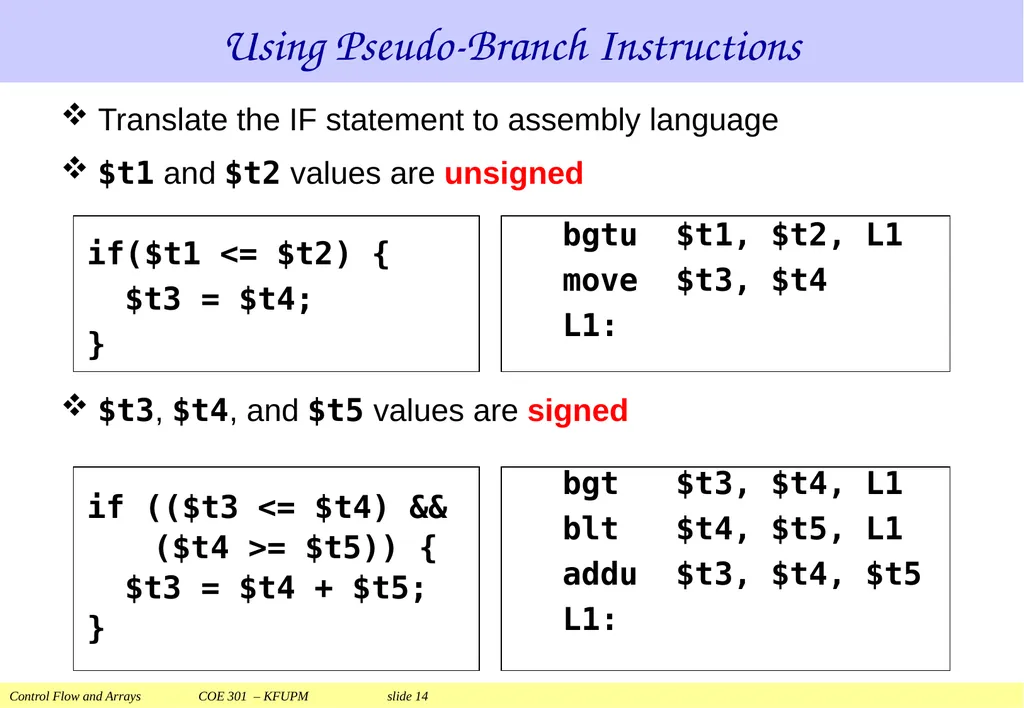
slide14. Using Pseudo-Branch Instructions Translate the IF statement to assembly language
$t1 and $t2 values are unsigned
$t3, $t4, and $t5 values are signed bgtu $t1, $t2, L1
move $t3, $t4
L1: if($t1 <= $t2) {
$t3 = $t4;
} if (($t3 <= $t4) &&
($t4 >= $t5)) {
$t3 = $t4 + $t5;
} bgt $t3, $t4, L1
blt $t4, $t5, L1
addu $t3, $t4, $t5
L1:<br>
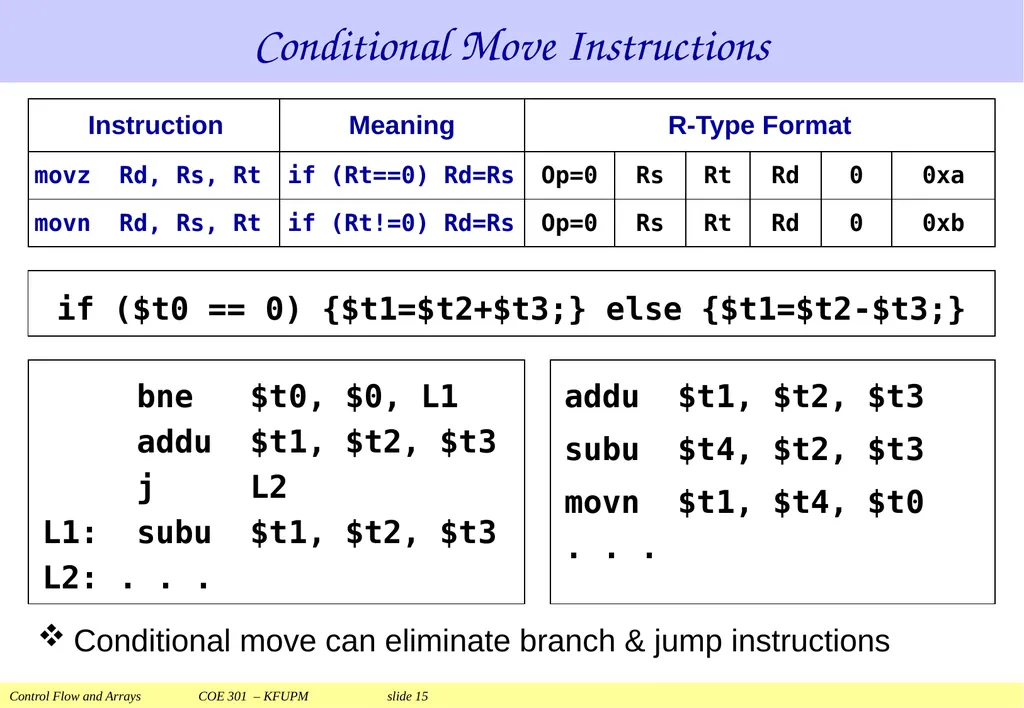
slide15. Conditional Move Instructions Conditional move can eliminate branch & jump instructions if ($t0 == 0) {$t1=$t2+$t3;} else {$t1=$t2-$t3;} bne $t0, $0, L1
addu $t1, $t2, $t3
j L2
L1: subu $t1, $t2, $t3
L2: . . . addu $t1, $t2, $t3
subu $t4, $t2, $t3
movn $t1, $t4, $t0
. . .<br>
slide16. Next . . . Control Flow: Branch and Jump Instructions
Translating If Statements and Boolean Expressions
Arrays
Load and Store Instructions
Translating Loops and Traversing Arrays
Addressing Modes<br>
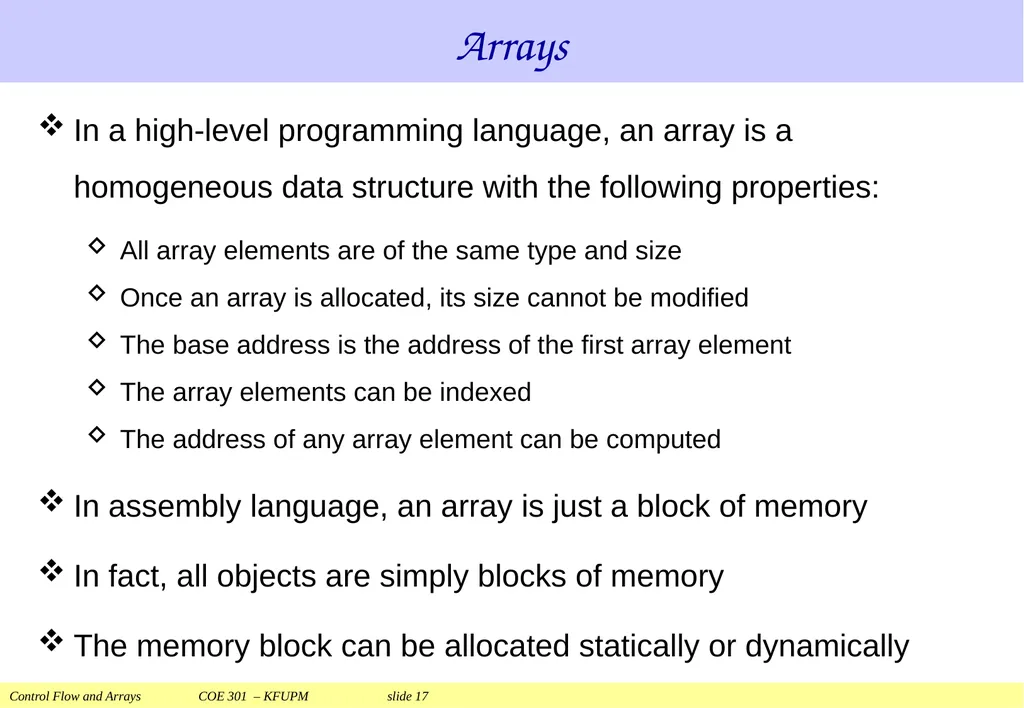
slide17. Arrays In a high-level programming language, an array is a homogeneous data structure with the following properties:
All array elements are of the same type and size
Once an array is allocated, its size cannot be modified
The base address is the address of the first array element
The array elements can be indexed
The address of any array element can be computed
In assembly language, an array is just a block of memory
In fact, all objects are simply blocks of memory
The memory block can be allocated statically or dynamically<br>
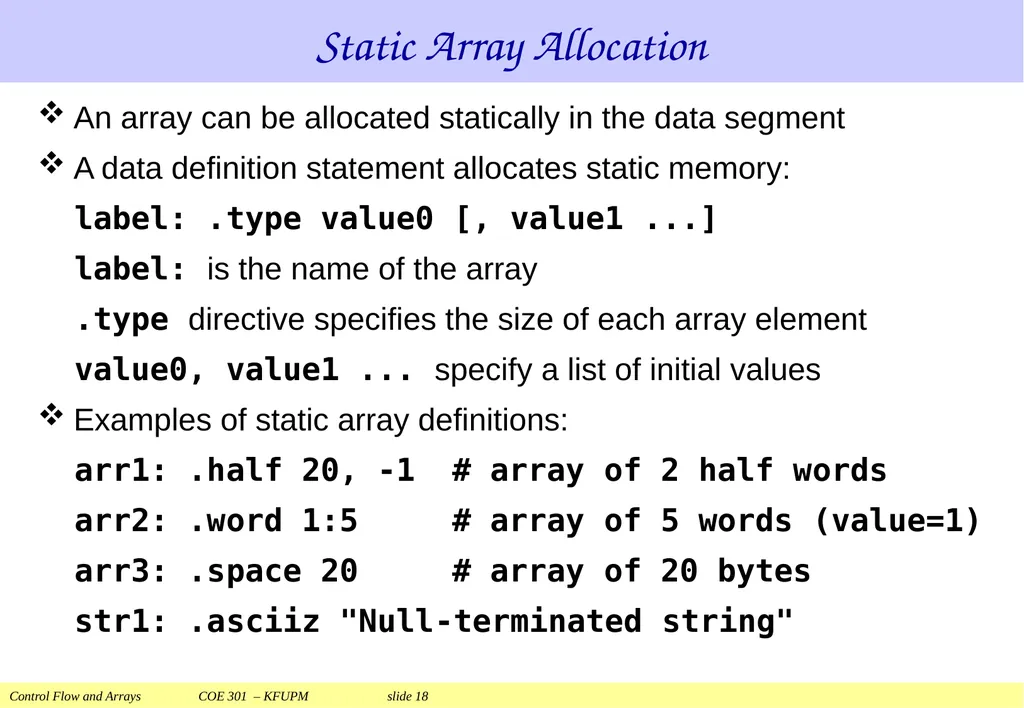
slide18. Static Array Allocation An array can be allocated statically in the data segment
A data definition statement allocates static memory:
label: .type value0 [, value1 ...]
label: is the name of the array
.type directive specifies the size of each array element
value0, value1 ... specify a list of initial values
Examples of static array definitions:
arr1: .half 20, -1 # array of 2 half words
arr2: .word 1:5 # array of 5 words (value=1)
arr3: .space 20 # array of 20 bytes
str1: .asciiz "Null-terminated string"<br>
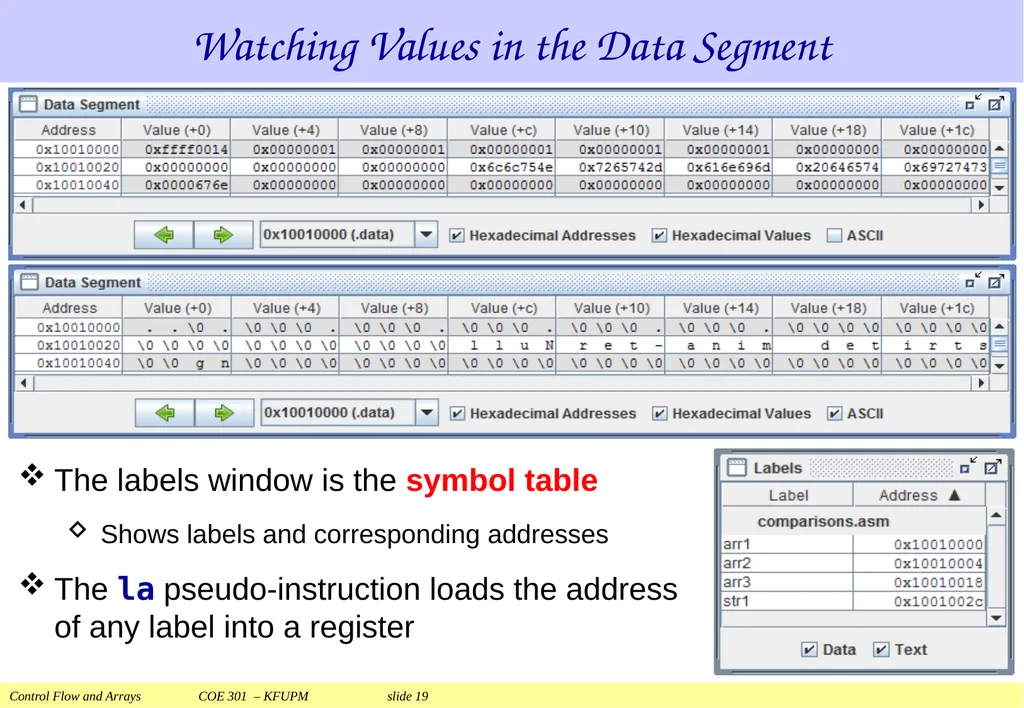
slide19. Watching Values in the Data Segment The labels window is the symbol table
Shows labels and corresponding addresses
The la pseudo-instruction loads the address of any label into a register<br>
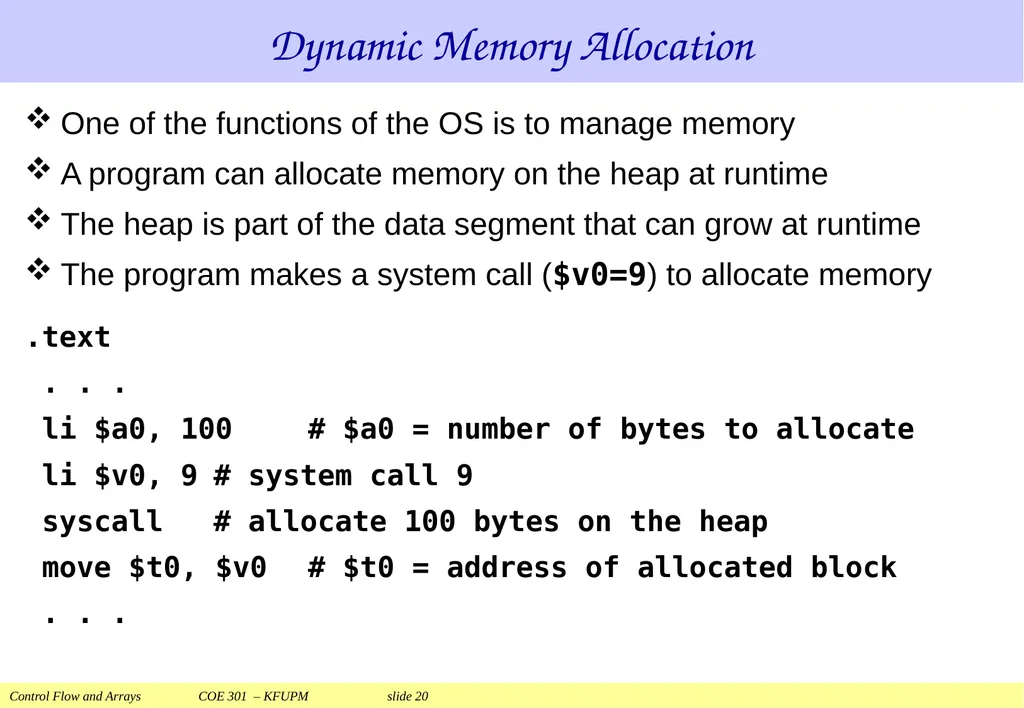
slide20. Dynamic Memory Allocation One of the functions of the OS is to manage memory
A program can allocate memory on the heap at runtime
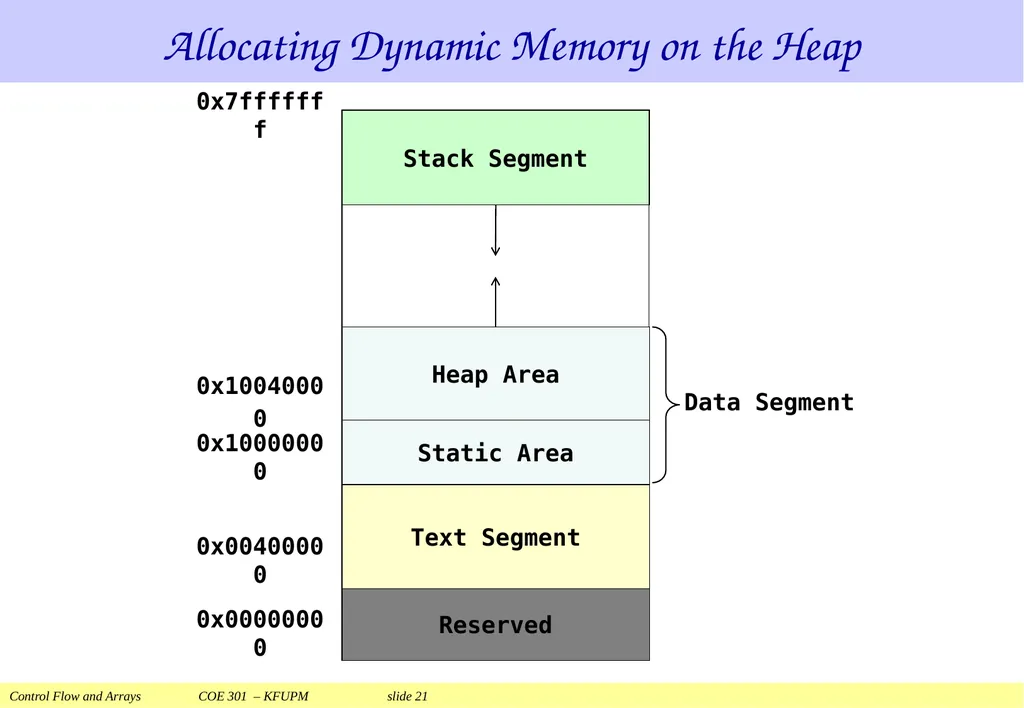
The heap is part of the data segment that can grow at runtime
The program makes a system call ($v0=9) to allocate memory
.text
. . .
li $a0, 100 # $a0 = number of bytes to allocate
li $v0, 9 # system call 9
syscall # allocate 100 bytes on the heap
move $t0, $v0 # $t0 = address of allocated block
. . .<br>
slide21. Allocating Dynamic Memory on the Heap<br>
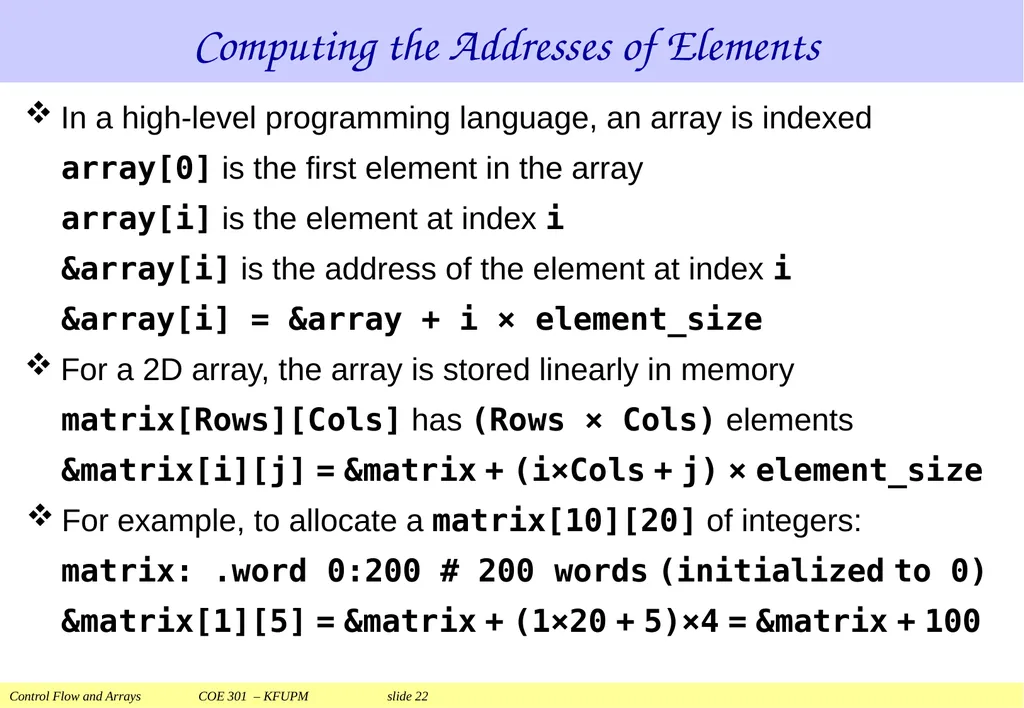
slide22. Computing the Addresses of Elements In a high-level programming language, an array is indexed
array[0] is the first element in the array
array[i] is the element at index i
&array[i] is the address of the element at index i
&array[i] = &array + i × element_size
For a 2D array, the array is stored linearly in memory
matrix[Rows][Cols] has (Rows × Cols) elements
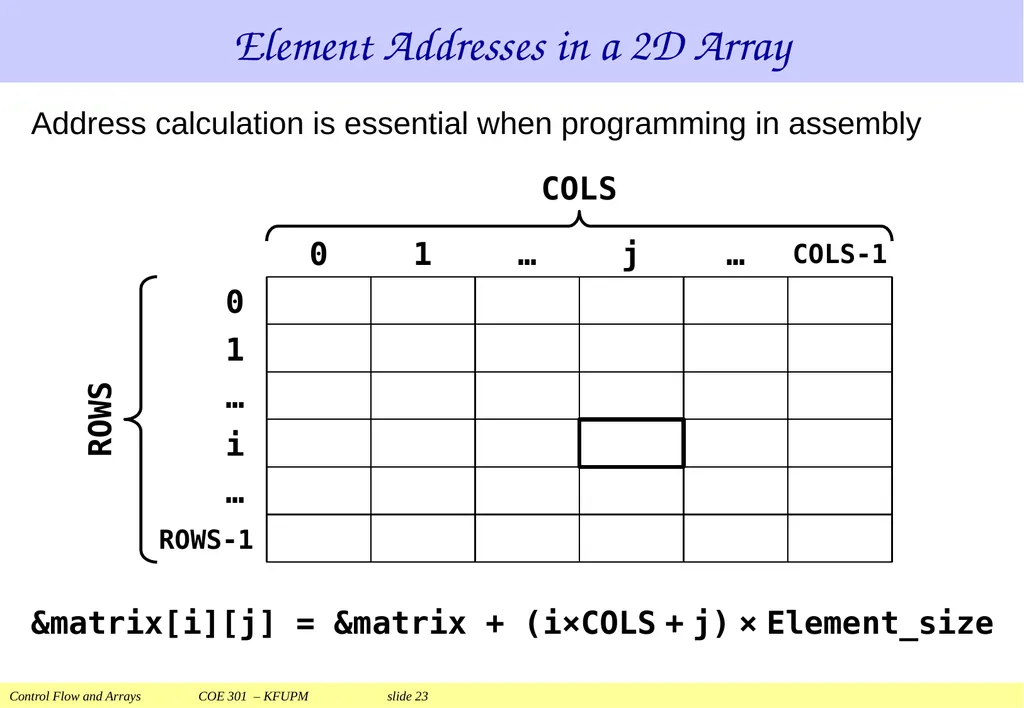
&matrix[i][j] = &matrix + (i×Cols + j) × element_size
For example, to allocate a matrix[10][20] of integers:
matrix: .word 0:200 # 200 words (initialized to 0)
&matrix[1][5] = &matrix + (1×20 + 5)×4 = &matrix + 100<br>
slide23. Element Addresses in a 2D Array &matrix[i][j] = &matrix + (i×COLS + j) × Element_size Address calculation is essential when programming in assembly<br>
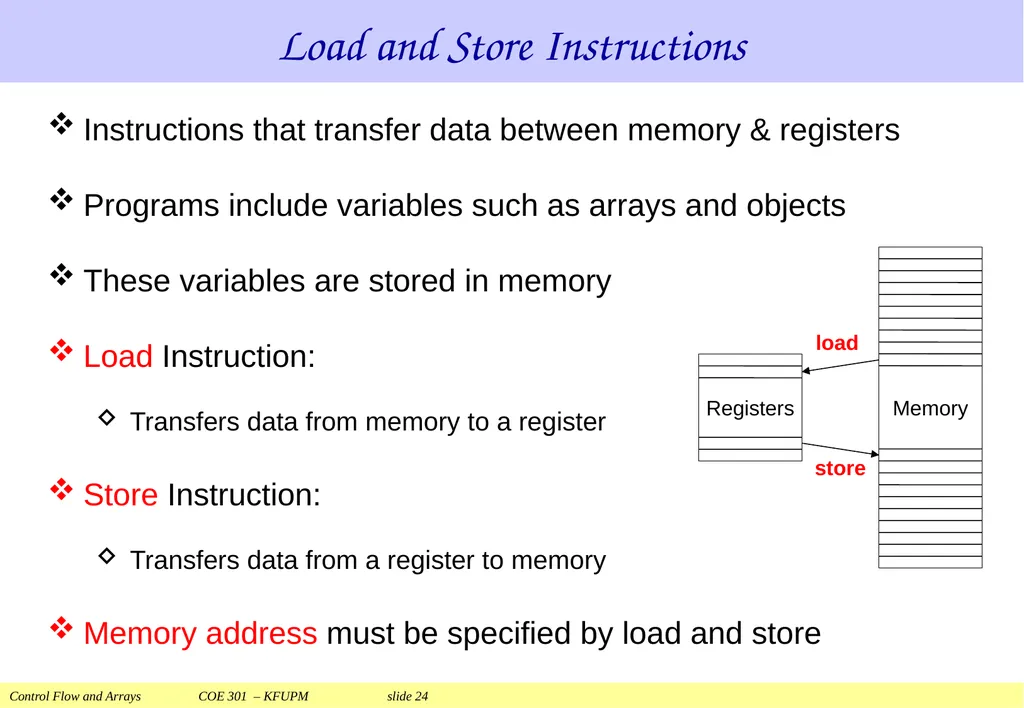
slide24. Load and Store Instructions Instructions that transfer data between memory & registers
Programs include variables such as arrays and objects
These variables are stored in memory
Load Instruction:
Transfers data from memory to a register
Store Instruction:
Transfers data from a register to memory
Memory address must be specified by load and store<br>
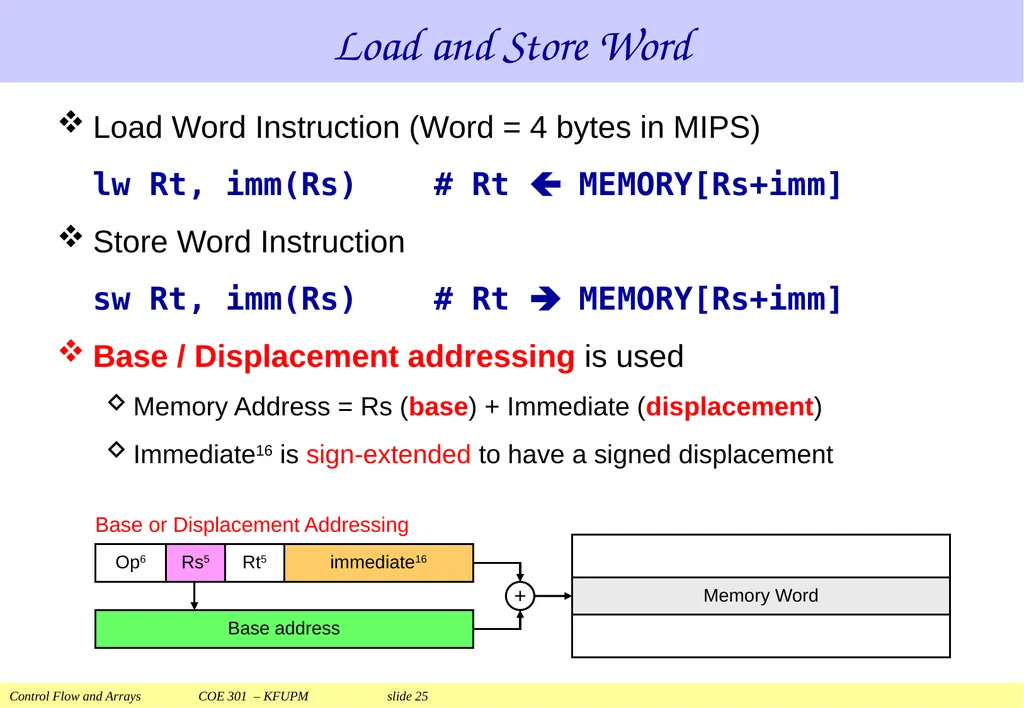
slide25. Load Word Instruction (Word = 4 bytes in MIPS)
lw Rt, imm(Rs) # Rt MEMORY[Rs+imm]
Store Word Instruction
sw Rt, imm(Rs) # Rt MEMORY[Rs+imm]
Base / Displacement addressing is used
Memory Address = Rs (base) + Immediate (displacement)
Immediate16 is sign-extended to have a signed displacement Load and Store Word<br>
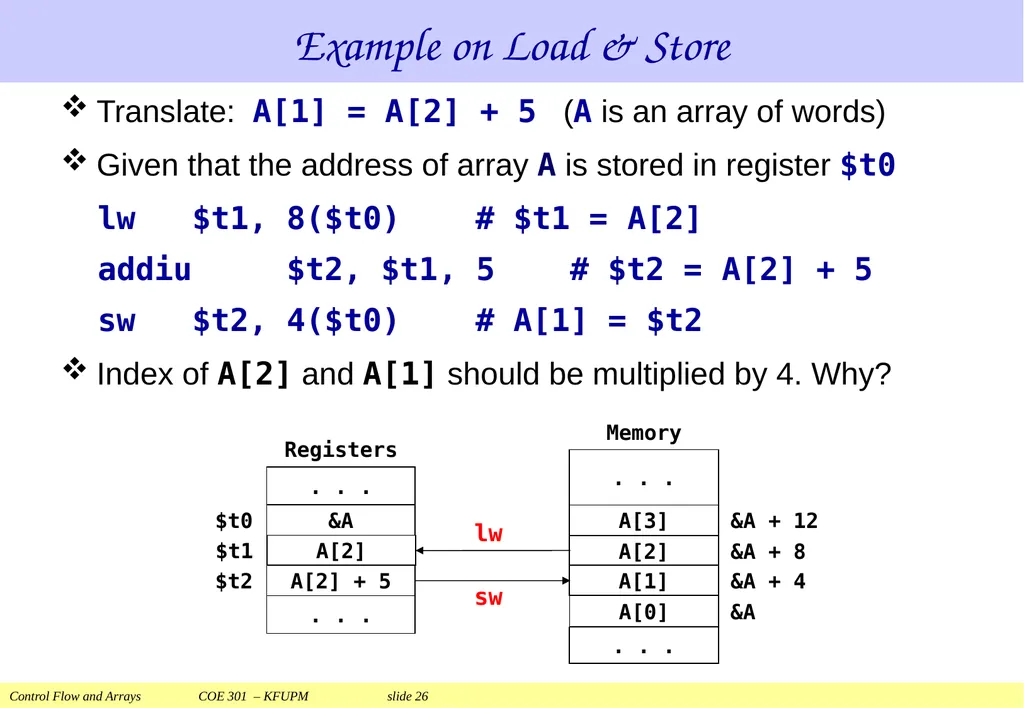
slide26. Example on Load & Store Translate: A[1] = A[2] + 5 (A is an array of words)
Given that the address of array A is stored in register $t0
lw $t1, 8($t0) # $t1 = A[2]
addiu $t2, $t1, 5 # $t2 = A[2] + 5
sw $t2, 4($t0) # A[1] = $t2
Index of A[2] and A[1] should be multiplied by 4. Why?<br>
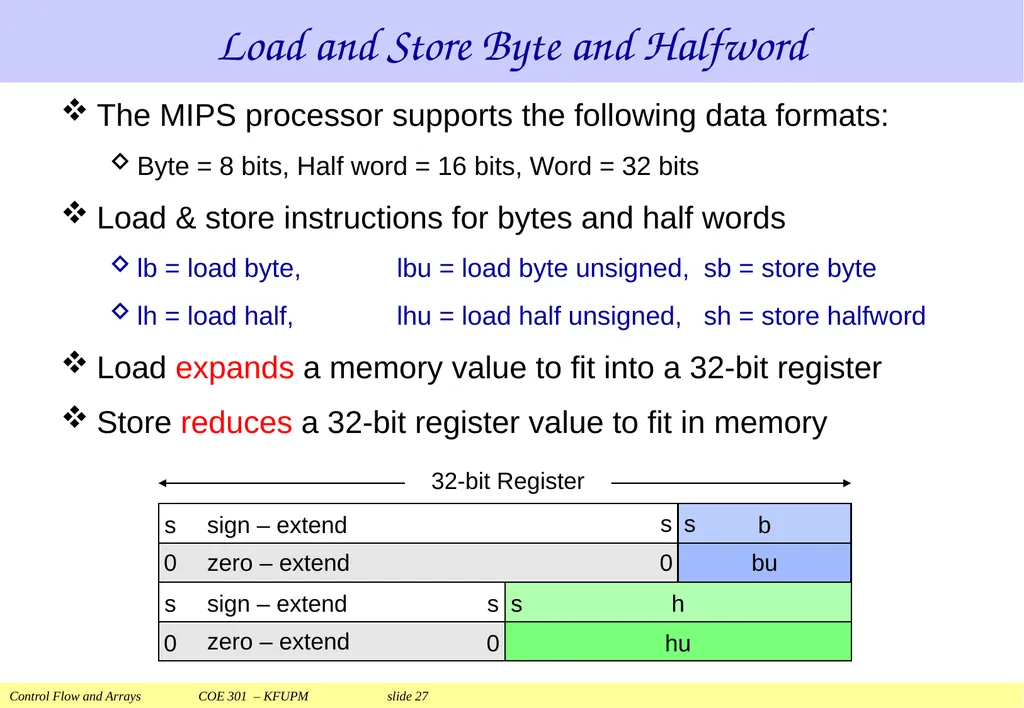
slide27. The MIPS processor supports the following data formats:
Byte = 8 bits, Half word = 16 bits, Word = 32 bits
Load & store instructions for bytes and half words
lb = load byte, lbu = load byte unsigned, sb = store byte
lh = load half, lhu = load half unsigned, sh = store halfword
Load expands a memory value to fit into a 32-bit register
Store reduces a 32-bit register value to fit in memory Load and Store Byte and Halfword<br>
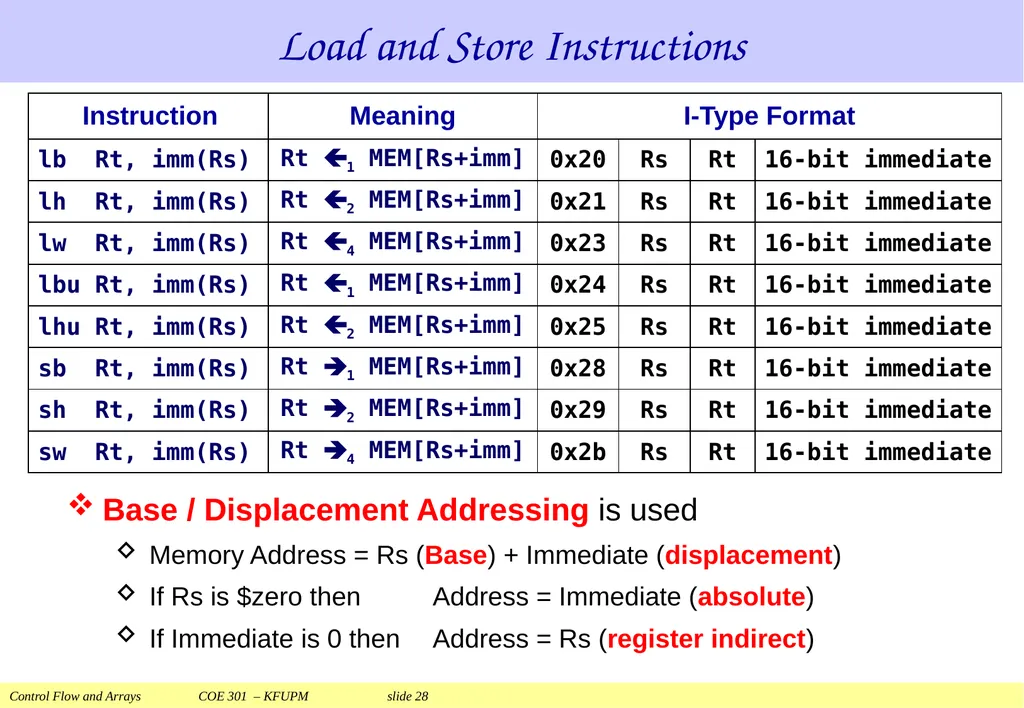
slide28. Load and Store Instructions Base / Displacement Addressing is used
Memory Address = Rs (Base) + Immediate (displacement)
If Rs is $zero then Address = Immediate (absolute)
If Immediate is 0 then Address = Rs (register indirect)<br>
slide29. Next . . . Control Flow: Branch and Jump Instructions
Translating If Statements and Boolean Expressions
Arrays
Load and Store Instructions
Translating Loops and Traversing Arrays
Addressing Modes<br>
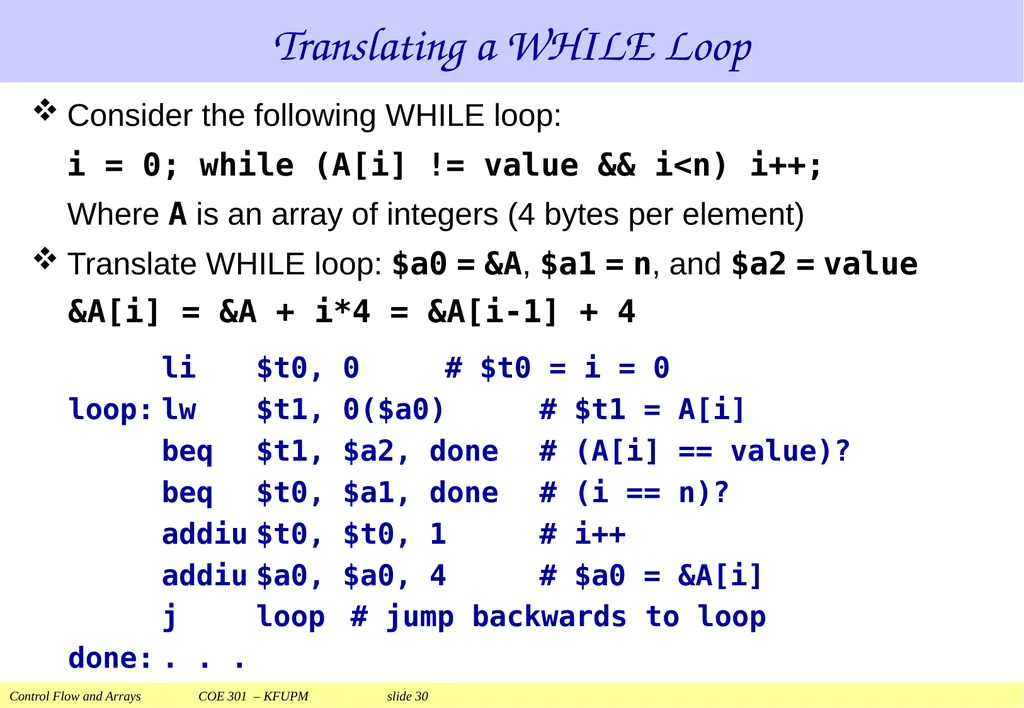
slide30. Translating a WHILE Loop Consider the following WHILE loop:
i = 0; while (A[i] != value && i<n) i++;
Where A is an array of integers (4 bytes per element)
Translate WHILE loop: $a0 = &A, $a1 = n, and $a2 = value
&A[i] = &A + i*4 = &A[i-1] + 4
li $t0, 0 # $t0 = i = 0
loop: lw $t1, 0($a0) # $t1 = A[i]
beq $t1, $a2, done # (A[i] == value)?
beq $t0, $a1, done # (i == n)?
addiu $t0, $t0, 1 # i++
addiu $a0, $a0, 4 # $a0 = &A[i]
j loop # jump backwards to loop
done: . . .<br>
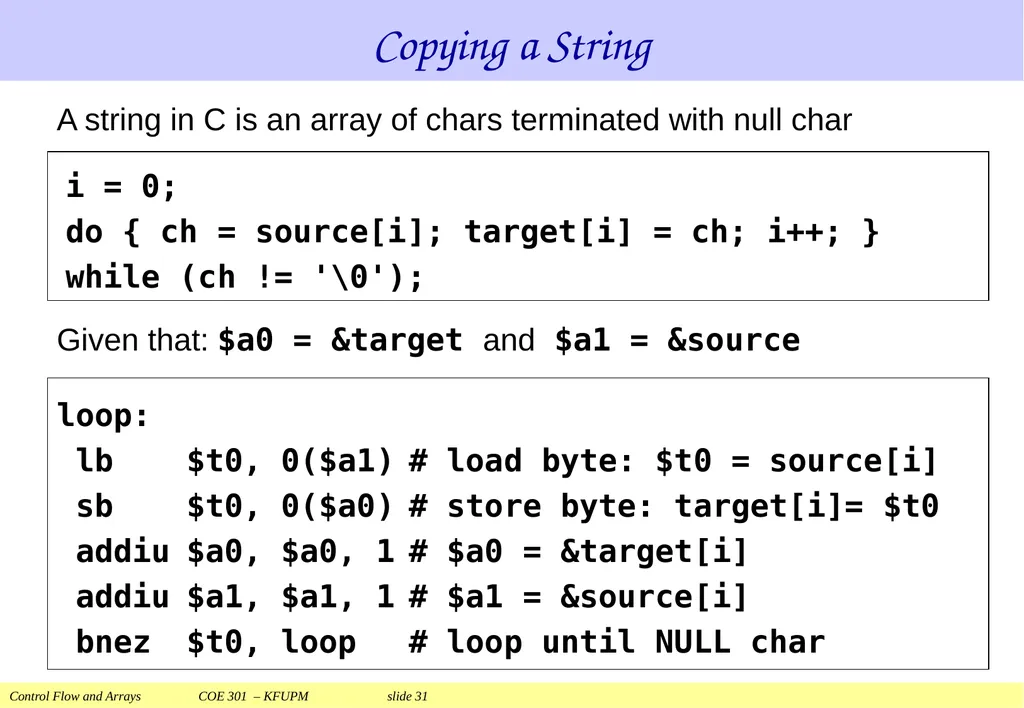
slide31. Copying a String loop:
lb $t0, 0($a1) # load byte: $t0 = source[i]
sb $t0, 0($a0) # store byte: target[i]= $t0
addiu $a0, $a0, 1 # $a0 = &target[i]
addiu $a1, $a1, 1 # $a1 = &source[i]
bnez $t0, loop # loop until NULL char A string in C is an array of chars terminated with null char i = 0;
do { ch = source[i]; target[i] = ch; i++; }
while (ch != '\0'); Given that: $a0 = &target and $a1 = &source<br>
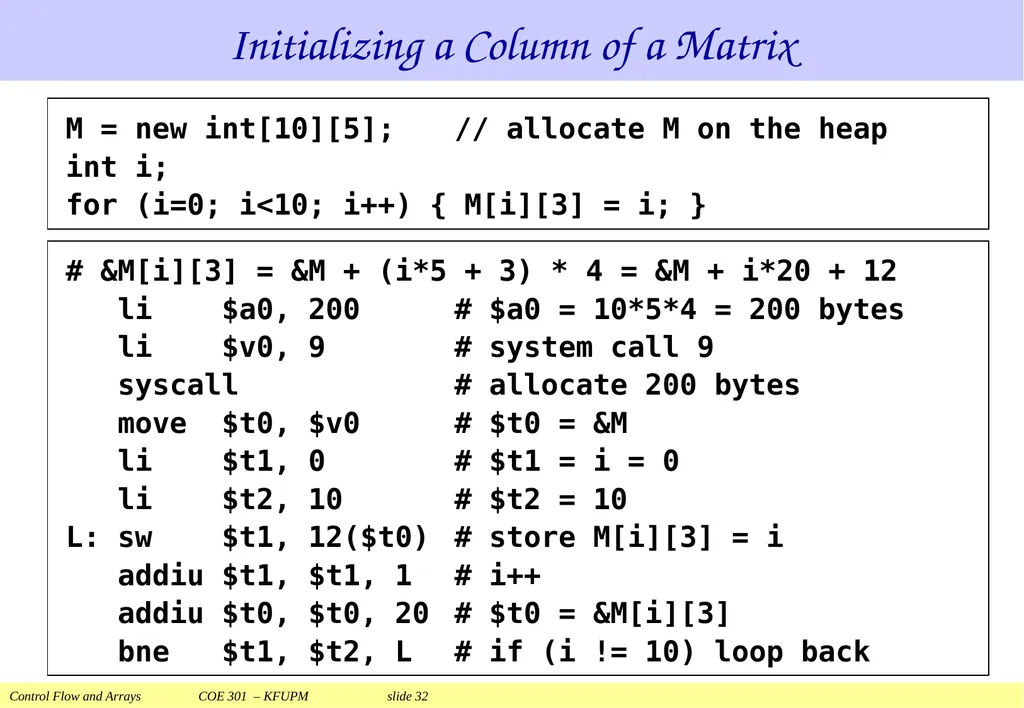
slide32. Initializing a Column of a Matrix M = new int[10][5]; // allocate M on the heap
int i;
for (i=0; i<10; i++) { M[i][3] = i; } # &M[i][3] = &M + (i*5 + 3) * 4 = &M + i*20 + 12
li $a0, 200 # $a0 = 10*5*4 = 200 bytes
li $v0, 9 # system call 9
syscall # allocate 200 bytes
move $t0, $v0 # $t0 = &M
li $t1, 0 # $t1 = i = 0
li $t2, 10 # $t2 = 10
L: sw $t1, 12($t0) # store M[i][3] = i
addiu $t1, $t1, 1 # i++
addiu $t0, $t0, 20 # $t0 = &M[i][3]
bne $t1, $t2, L # if (i != 10) loop back<br>
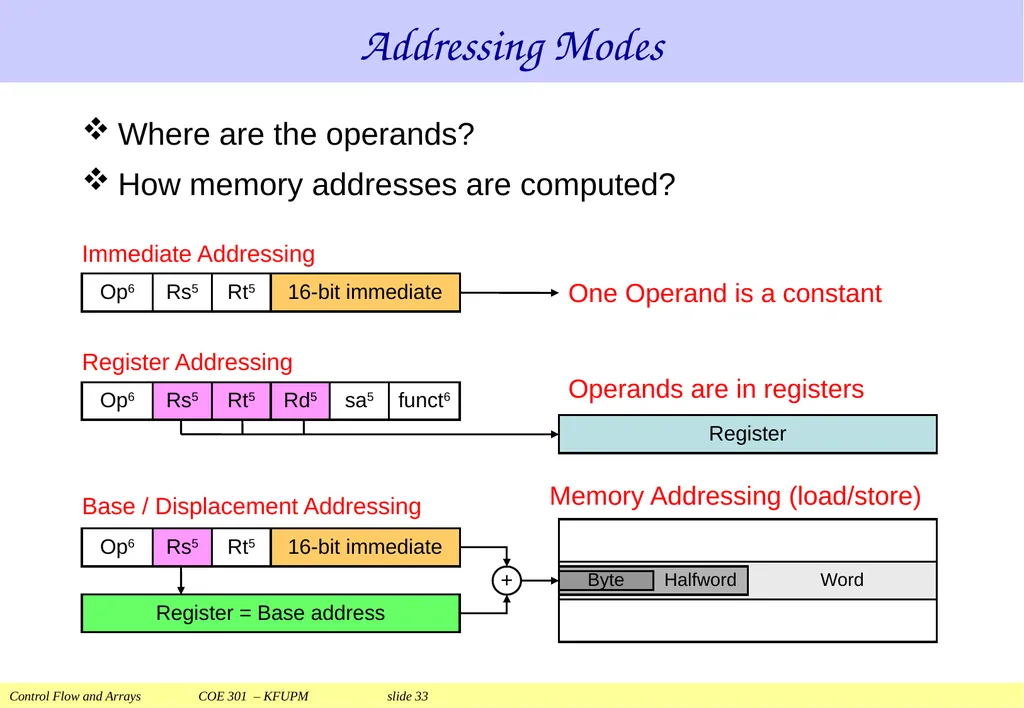
slide33. Addressing Modes Where are the operands?
How memory addresses are computed?<br>
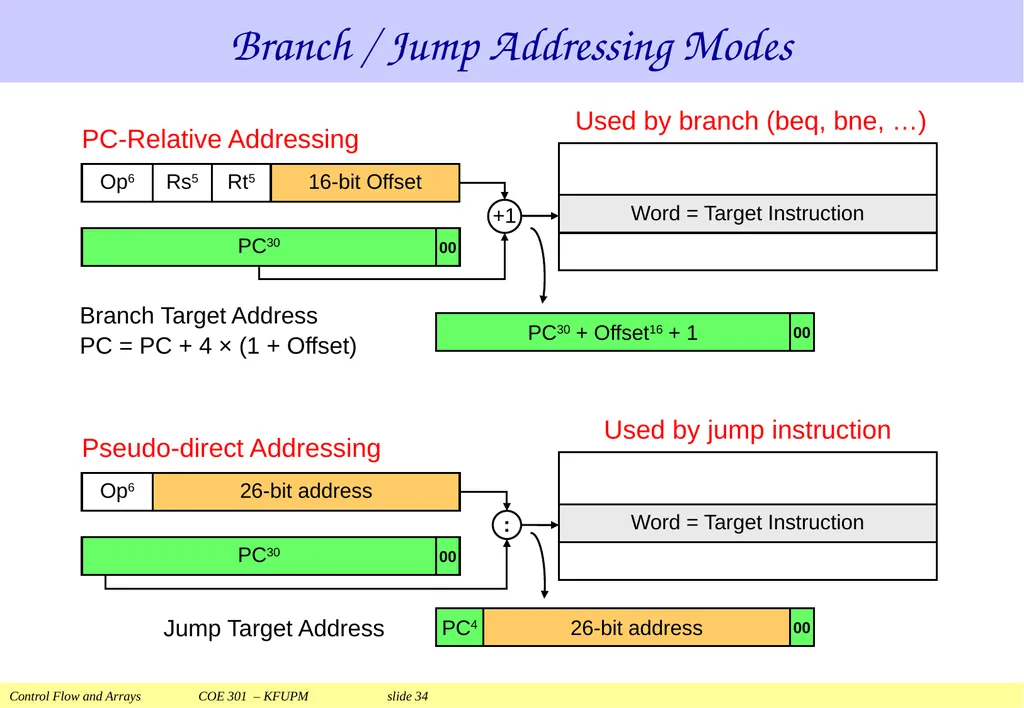
slide34. Branch / Jump Addressing Modes<br>
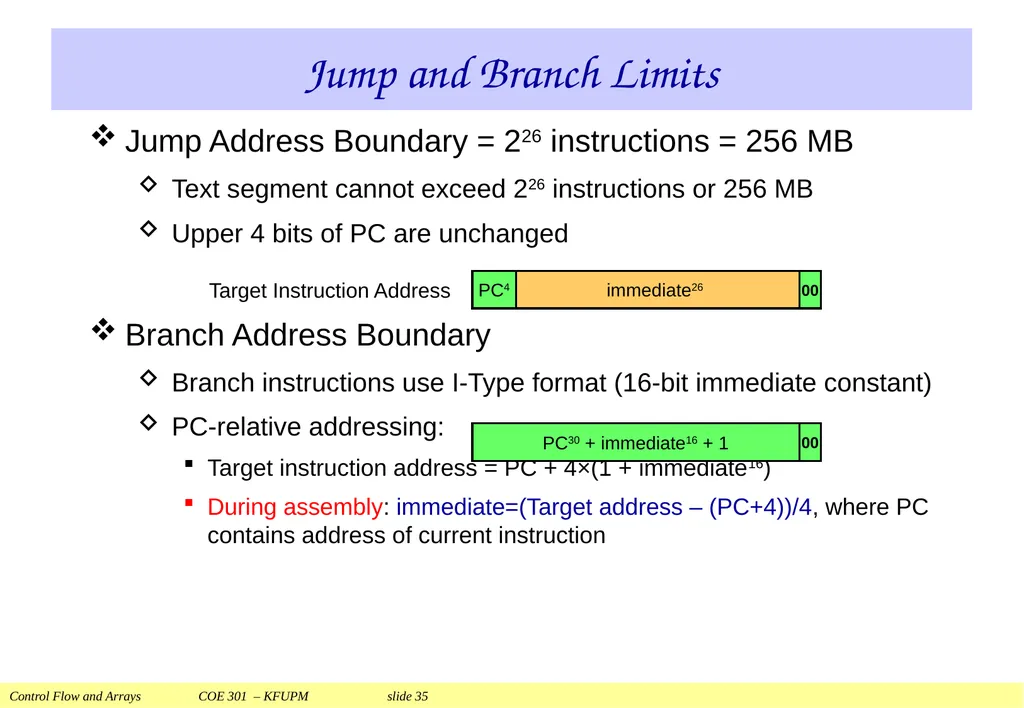
slide35. Jump and Branch Limits Jump Address Boundary = 226 instructions = 256 MB
Text segment cannot exceed 226 instructions or 256 MB
Upper 4 bits of PC are unchanged
Branch Address Boundary
Branch instructions use I-Type format (16-bit immediate constant)
PC-relative addressing:
Target instruction address = PC + 4×(1 + immediate16)
During assembly: immediate=(Target address – (PC+4))/4, where PC contains address of current instruction<br>
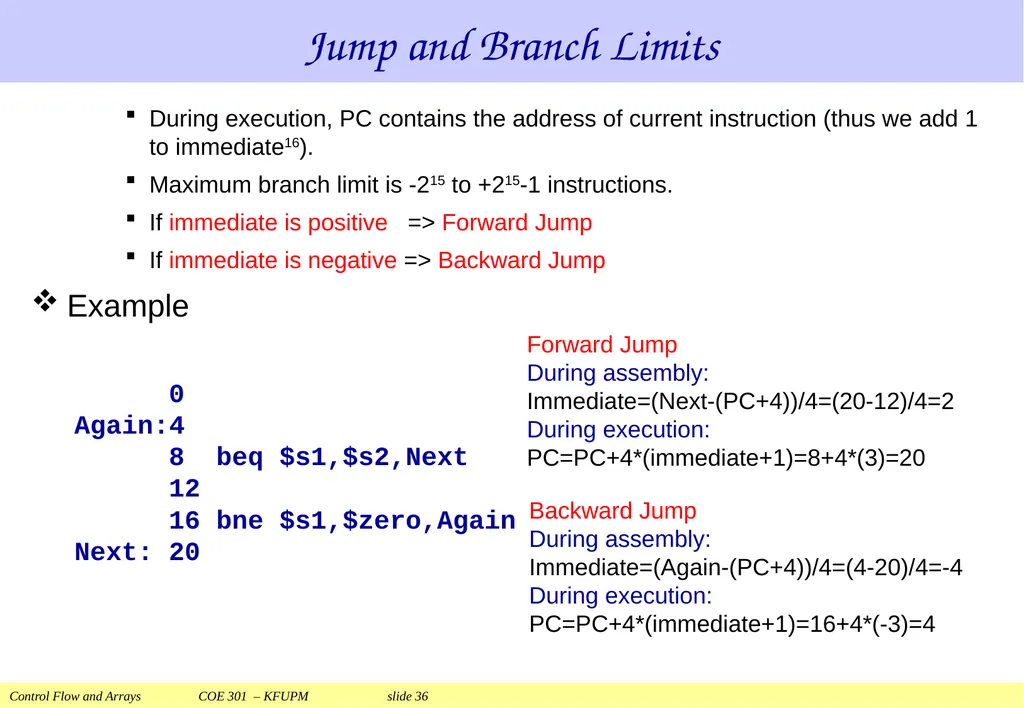
slide36. Jump and Branch Limits During execution, PC contains the address of current instruction (thus we add 1 to immediate16).
Maximum branch limit is -215 to +215-1 instructions.
If immediate is positive => Forward Jump
If immediate is negative => Backward Jump
Example 0
Again:4
8 beq $s1,$s2,Next
12
16 bne $s1,$zero,Again
Next: 20 Forward Jump
During assembly:
Immediate=(Next-(PC+4))/4=(20-12)/4=2
During execution:
PC=PC+4*(immediate+1)=8+4*(3)=20 Backward Jump
During assembly:
Immediate=(Again-(PC+4))/4=(4-20)/4=-4
During execution:
PC=PC+4*(immediate+1)=16+4*(-3)=4<br>
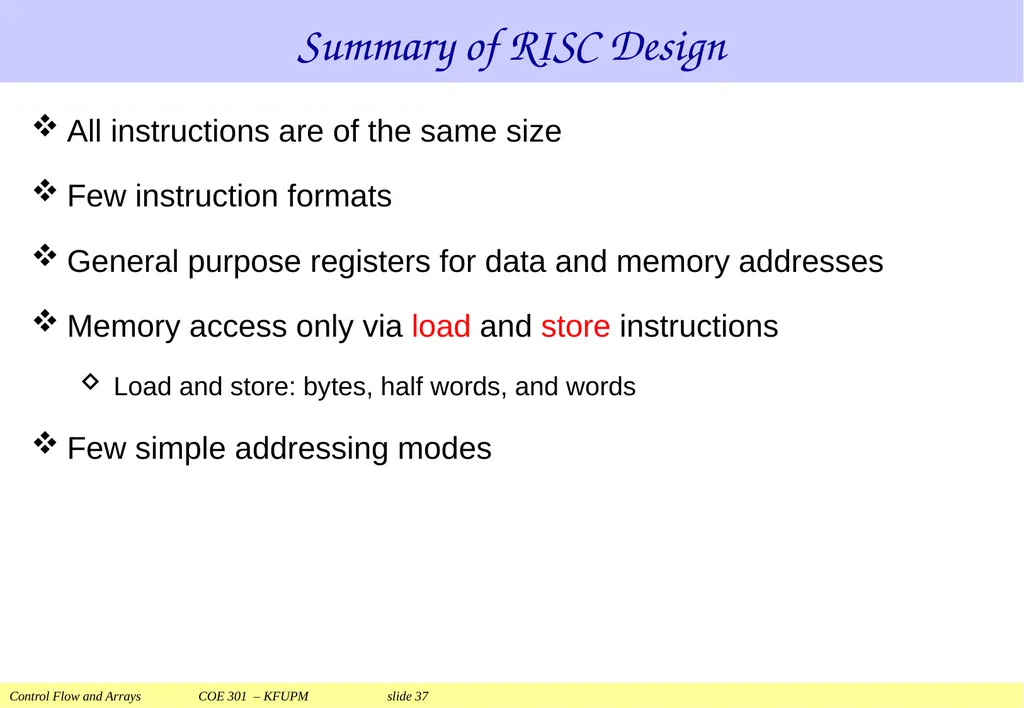
slide37. Summary of RISC Design All instructions are of the same size
Few instruction formats
General purpose registers for data and memory addresses
Memory access only via load and store instructions
Load and store: bytes, half words, and words
Few simple addressing modes<br>
Prof. Aiman El-Maleh
College of Computer Sciences and Engineering
King Fahd University of Petroleum and Minerals
[Adapted from slides of Dr. M. Mudawar, COE 301, KFUPM]<br>
slide2. Presentation Outline Control Flow: Branch and Jump Instructions
Translating If Statements and Boolean Expressions
Arrays
Load and Store Instructions
Translating Loops and Traversing Arrays
Addressing Modes<br>
slide3. Control Flow High-level programming languages provide constructs:
To make decisions in a program: IF-ELSE
To repeat the execution of a sequence of instructions: LOOP
The ability to make decisions and repeat a sequence of instructions distinguishes a computer from a calculator
All computer architectures provide control flow instructions
Essential for making decisions and repetitions
These are the conditional branch and jump instructions<br>
slide4. MIPS compare and branch instructions:
beq Rs, Rt, label if (Rs == Rt) branch to label
bne Rs, Rt, label if (Rs != Rt) branch to label
MIPS compare to zero & branch instructions:
Compare to zero is used frequently and implemented efficiently
bltz Rs, label if (Rs < 0) branch to label
bgtz Rs, label if (Rs > 0) branch to label
blez Rs, label if (Rs <= 0) branch to label
bgez Rs, label if (Rs >= 0) branch to label
beqz and bnez are defined as pseudo-instructions. MIPS Conditional Branch Instructions<br>
slide5. Branch Instruction Format The branch instructions modify the PC register only
PC-Relative addressing:
If (branch is taken) PC = PC + 4 + 4×offset else PC = PC+4 Branch Instructions are of the I-type Format:<br>
slide6. Unconditional Jump Instruction The unconditional Jump instruction has the following syntax:
j label # jump to label
. . .
label:
The jump instruction is always taken
The Jump instruction is of the J-type format:
The jump instruction modifies the program counter PC:
The upper 4 bits of the PC are unchanged<br>
slide7. Translating an IF Statement Consider the following IF statement:
if (a == b) c = d + e; else c = d – e;
Given that a, b, c, d, e are in $t0 … $t4 respectively
How to translate the above IF statement?
bne $t0, $t1, else
addu $t2, $t3, $t4
j next
else: subu $t2, $t3, $t4
next: . . .<br>
slide8. Logical AND Expression Programming languages use short-circuit evaluation
If first condition is false, second condition is skipped if (($t1 > 0) && ($t2 < 0)) {$t3++;} # One Possible Translation ...
bgtz $t1, L1 # first condition
j next # skip if false
L1: bltz $t2, L2 # second condition
j next # skip if false
L2: addiu $t3, $t3, 1 # both are true
next:<br>
slide9. Better Translation of Logical AND Allow the program to fall through to second condition
!($t1 > 0) is equivalent to ($t1 <= 0)
!($t2 < 0) is equivalent to ($t2 >= 0)
Number of instructions is reduced from 5 to 3 if (($t1 > 0) && ($t2 < 0)) {$t3++;} # Better Translation ...
blez $t1, next # 1st condition false?
bgez $t2, next # 2nd condition false?
addiu $t3, $t3, 1 # both are true
next:<br>
slide10. Logical OR Expression Short-circuit evaluation for logical OR
If first condition is true, second condition is skipped
Use fall-through to keep the code as short as possible bgtz $t1, L1 # 1st condition true?
bgez $t2, next # 2nd condition false?
L1: addiu $t3, $t3, 1 # increment $t3
next: if (($t1 > 0) || ($t2 < 0)) {$t3++;}<br>
slide11. Compare Instructions MIPS also provides set less than instructions
slt Rd, Rs, Rt if (Rs < Rt) Rd = 1 else Rd = 0
sltu Rd, Rs, Rt unsigned <
slti Rt, Rs, imm if (Rs < imm) Rt = 1 else Rt = 0
sltiu Rt, Rs, imm unsigned <
Signed / Unsigned comparisons compute different results
Given that: $t0 = 1 and $t1 = -1 = 0xffffffff
slt $t2, $t0, $t1 computes $t2 = 0
sltu $t2, $t0, $t1 computes $t2 = 1<br>
slide12. Compare Instruction Formats The other comparisons are defined as pseudo-instructions:
seq, sne, sgt, sgtu, sle, sleu, sge, sgeu subu $t2, $t0, $t1
sltiu $t2, $t2, 1 slt $t2, $t1, $t0<br>
slide13. Pseudo-Branch Instructions MIPS hardware does NOT provide the following instructions:
blt, bltu branch if less than (signed / unsigned)
ble, bleu branch if less or equal (signed / unsigned)
bgt, bgtu branch if greater than (signed / unsigned)
bge, bgeu branch if greater or equal (signed / unsigned)
MIPS assembler defines them as pseudo-instructions: $at ($1) is the assembler temporary register slt $at, $t0, $t1
bne $at, $zero, label slt $at, $t1, $t0
beq $at, $zero, label<br>
slide14. Using Pseudo-Branch Instructions Translate the IF statement to assembly language
$t1 and $t2 values are unsigned
$t3, $t4, and $t5 values are signed bgtu $t1, $t2, L1
move $t3, $t4
L1: if($t1 <= $t2) {
$t3 = $t4;
} if (($t3 <= $t4) &&
($t4 >= $t5)) {
$t3 = $t4 + $t5;
} bgt $t3, $t4, L1
blt $t4, $t5, L1
addu $t3, $t4, $t5
L1:<br>
slide15. Conditional Move Instructions Conditional move can eliminate branch & jump instructions if ($t0 == 0) {$t1=$t2+$t3;} else {$t1=$t2-$t3;} bne $t0, $0, L1
addu $t1, $t2, $t3
j L2
L1: subu $t1, $t2, $t3
L2: . . . addu $t1, $t2, $t3
subu $t4, $t2, $t3
movn $t1, $t4, $t0
. . .<br>
slide16. Next . . . Control Flow: Branch and Jump Instructions
Translating If Statements and Boolean Expressions
Arrays
Load and Store Instructions
Translating Loops and Traversing Arrays
Addressing Modes<br>
slide17. Arrays In a high-level programming language, an array is a homogeneous data structure with the following properties:
All array elements are of the same type and size
Once an array is allocated, its size cannot be modified
The base address is the address of the first array element
The array elements can be indexed
The address of any array element can be computed
In assembly language, an array is just a block of memory
In fact, all objects are simply blocks of memory
The memory block can be allocated statically or dynamically<br>
slide18. Static Array Allocation An array can be allocated statically in the data segment
A data definition statement allocates static memory:
label: .type value0 [, value1 ...]
label: is the name of the array
.type directive specifies the size of each array element
value0, value1 ... specify a list of initial values
Examples of static array definitions:
arr1: .half 20, -1 # array of 2 half words
arr2: .word 1:5 # array of 5 words (value=1)
arr3: .space 20 # array of 20 bytes
str1: .asciiz "Null-terminated string"<br>
slide19. Watching Values in the Data Segment The labels window is the symbol table
Shows labels and corresponding addresses
The la pseudo-instruction loads the address of any label into a register<br>
slide20. Dynamic Memory Allocation One of the functions of the OS is to manage memory
A program can allocate memory on the heap at runtime
The heap is part of the data segment that can grow at runtime
The program makes a system call ($v0=9) to allocate memory
.text
. . .
li $a0, 100 # $a0 = number of bytes to allocate
li $v0, 9 # system call 9
syscall # allocate 100 bytes on the heap
move $t0, $v0 # $t0 = address of allocated block
. . .<br>
slide21. Allocating Dynamic Memory on the Heap<br>
slide22. Computing the Addresses of Elements In a high-level programming language, an array is indexed
array[0] is the first element in the array
array[i] is the element at index i
&array[i] is the address of the element at index i
&array[i] = &array + i × element_size
For a 2D array, the array is stored linearly in memory
matrix[Rows][Cols] has (Rows × Cols) elements
&matrix[i][j] = &matrix + (i×Cols + j) × element_size
For example, to allocate a matrix[10][20] of integers:
matrix: .word 0:200 # 200 words (initialized to 0)
&matrix[1][5] = &matrix + (1×20 + 5)×4 = &matrix + 100<br>
slide23. Element Addresses in a 2D Array &matrix[i][j] = &matrix + (i×COLS + j) × Element_size Address calculation is essential when programming in assembly<br>
slide24. Load and Store Instructions Instructions that transfer data between memory & registers
Programs include variables such as arrays and objects
These variables are stored in memory
Load Instruction:
Transfers data from memory to a register
Store Instruction:
Transfers data from a register to memory
Memory address must be specified by load and store<br>
slide25. Load Word Instruction (Word = 4 bytes in MIPS)
lw Rt, imm(Rs) # Rt MEMORY[Rs+imm]
Store Word Instruction
sw Rt, imm(Rs) # Rt MEMORY[Rs+imm]
Base / Displacement addressing is used
Memory Address = Rs (base) + Immediate (displacement)
Immediate16 is sign-extended to have a signed displacement Load and Store Word<br>
slide26. Example on Load & Store Translate: A[1] = A[2] + 5 (A is an array of words)
Given that the address of array A is stored in register $t0
lw $t1, 8($t0) # $t1 = A[2]
addiu $t2, $t1, 5 # $t2 = A[2] + 5
sw $t2, 4($t0) # A[1] = $t2
Index of A[2] and A[1] should be multiplied by 4. Why?<br>
slide27. The MIPS processor supports the following data formats:
Byte = 8 bits, Half word = 16 bits, Word = 32 bits
Load & store instructions for bytes and half words
lb = load byte, lbu = load byte unsigned, sb = store byte
lh = load half, lhu = load half unsigned, sh = store halfword
Load expands a memory value to fit into a 32-bit register
Store reduces a 32-bit register value to fit in memory Load and Store Byte and Halfword<br>
slide28. Load and Store Instructions Base / Displacement Addressing is used
Memory Address = Rs (Base) + Immediate (displacement)
If Rs is $zero then Address = Immediate (absolute)
If Immediate is 0 then Address = Rs (register indirect)<br>
slide29. Next . . . Control Flow: Branch and Jump Instructions
Translating If Statements and Boolean Expressions
Arrays
Load and Store Instructions
Translating Loops and Traversing Arrays
Addressing Modes<br>
slide30. Translating a WHILE Loop Consider the following WHILE loop:
i = 0; while (A[i] != value && i<n) i++;
Where A is an array of integers (4 bytes per element)
Translate WHILE loop: $a0 = &A, $a1 = n, and $a2 = value
&A[i] = &A + i*4 = &A[i-1] + 4
li $t0, 0 # $t0 = i = 0
loop: lw $t1, 0($a0) # $t1 = A[i]
beq $t1, $a2, done # (A[i] == value)?
beq $t0, $a1, done # (i == n)?
addiu $t0, $t0, 1 # i++
addiu $a0, $a0, 4 # $a0 = &A[i]
j loop # jump backwards to loop
done: . . .<br>
slide31. Copying a String loop:
lb $t0, 0($a1) # load byte: $t0 = source[i]
sb $t0, 0($a0) # store byte: target[i]= $t0
addiu $a0, $a0, 1 # $a0 = &target[i]
addiu $a1, $a1, 1 # $a1 = &source[i]
bnez $t0, loop # loop until NULL char A string in C is an array of chars terminated with null char i = 0;
do { ch = source[i]; target[i] = ch; i++; }
while (ch != '\0'); Given that: $a0 = &target and $a1 = &source<br>
slide32. Initializing a Column of a Matrix M = new int[10][5]; // allocate M on the heap
int i;
for (i=0; i<10; i++) { M[i][3] = i; } # &M[i][3] = &M + (i*5 + 3) * 4 = &M + i*20 + 12
li $a0, 200 # $a0 = 10*5*4 = 200 bytes
li $v0, 9 # system call 9
syscall # allocate 200 bytes
move $t0, $v0 # $t0 = &M
li $t1, 0 # $t1 = i = 0
li $t2, 10 # $t2 = 10
L: sw $t1, 12($t0) # store M[i][3] = i
addiu $t1, $t1, 1 # i++
addiu $t0, $t0, 20 # $t0 = &M[i][3]
bne $t1, $t2, L # if (i != 10) loop back<br>
slide33. Addressing Modes Where are the operands?
How memory addresses are computed?<br>
slide34. Branch / Jump Addressing Modes<br>
slide35. Jump and Branch Limits Jump Address Boundary = 226 instructions = 256 MB
Text segment cannot exceed 226 instructions or 256 MB
Upper 4 bits of PC are unchanged
Branch Address Boundary
Branch instructions use I-Type format (16-bit immediate constant)
PC-relative addressing:
Target instruction address = PC + 4×(1 + immediate16)
During assembly: immediate=(Target address – (PC+4))/4, where PC contains address of current instruction<br>
slide36. Jump and Branch Limits During execution, PC contains the address of current instruction (thus we add 1 to immediate16).
Maximum branch limit is -215 to +215-1 instructions.
If immediate is positive => Forward Jump
If immediate is negative => Backward Jump
Example 0
Again:4
8 beq $s1,$s2,Next
12
16 bne $s1,$zero,Again
Next: 20 Forward Jump
During assembly:
Immediate=(Next-(PC+4))/4=(20-12)/4=2
During execution:
PC=PC+4*(immediate+1)=8+4*(3)=20 Backward Jump
During assembly:
Immediate=(Again-(PC+4))/4=(4-20)/4=-4
During execution:
PC=PC+4*(immediate+1)=16+4*(-3)=4<br>
slide37. Summary of RISC Design All instructions are of the same size
Few instruction formats
General purpose registers for data and memory addresses
Memory access only via load and store instructions
Load and store: bytes, half words, and words
Few simple addressing modes<br>