Cowork Copilot Studio Architecture Bootcamp Where Cowork sits Chat, Cowork and agents What makes up Cowork skills, plugins, Work IQ Licensing, billing and control Where Cowork fits in real work Lab delegating a task end to end 1 2 3 4
"Cowork Copilot Studio Architecture Bootcamp Where" is the property of its rightful owner. Permission is granted to
download and print the materials on this website for personal, non-commercial use only, and to display it
on your personal computer provided you do not modify the materials and that you retain all copyright
notices contained in the materials. By downloading content from our website, you accept the terms of this
agreement.
Presentation Transcript
01
Cowork Copilot Studio Architecture Bootcamp<br>
02
Where Cowork sits — Chat, Cowork and agents What makes up Cowork — skills, plugins, Work IQ Licensing, billing and control Where Cowork fits in real work Lab — delegating a task end to end 1 2 3 4 5 Agenda<br>
03
Copilot Cowork Moving from interactive chat to agentic workflow execution<br>
04
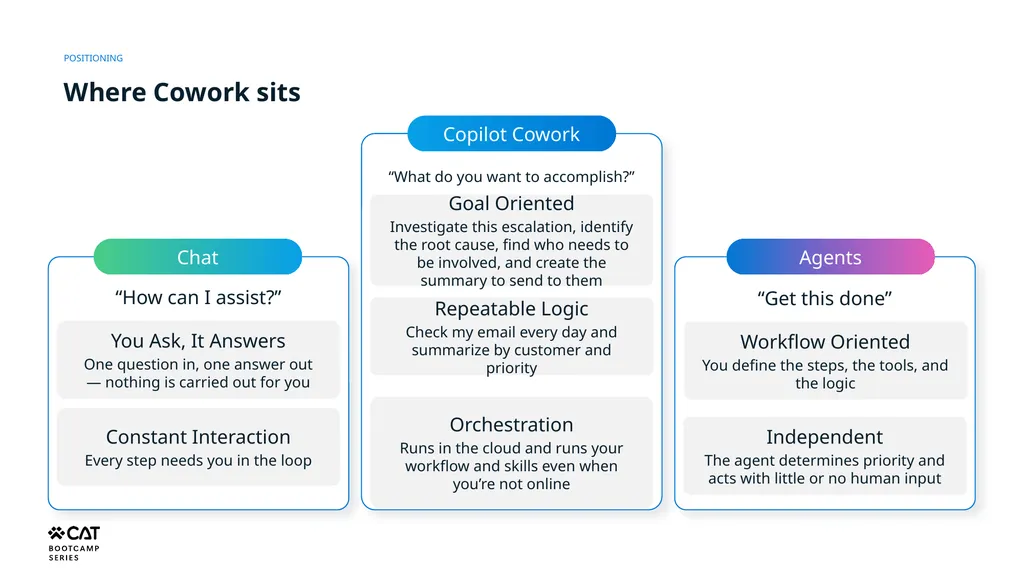
POSITIONING Where Cowork sits Chat Copilot Cowork Agents You Ask, It Answers
One question in, one answer out — nothing is carried out for you Constant Interaction
Every step needs you in the loop Goal Oriented
Investigate this escalation, identify the root cause, find who needs to be involved, and create the summary to send to them “How can I assist?” “What do you want to accomplish?” “Get this done” Repeatable Logic
Check my email every day and summarize by customer and priority Orchestration
Runs in the cloud and runs your workflow and skills even when you’re not online Workflow Oriented
You define the steps, the tools, and the logic Independent
The agent determines priority and acts with little or no human input<br>
05
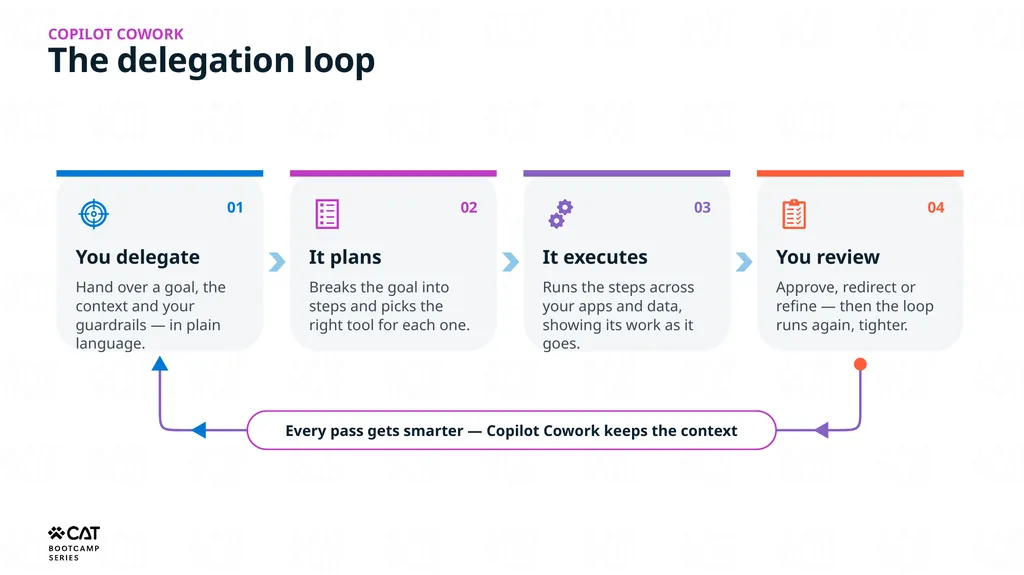
The delegation loop Copilot COWORK 01 You delegate Hand over a goal, the context and your guardrails — in plain language. 02 It plans Breaks the goal into steps and picks the right tool for each one. 03 It executes Runs the steps across your apps and data, showing its work as it goes. 04 You review Approve, redirect or refine — then the loop runs again, tighter. Every pass gets smarter — Copilot Cowork keeps the context<br>
06
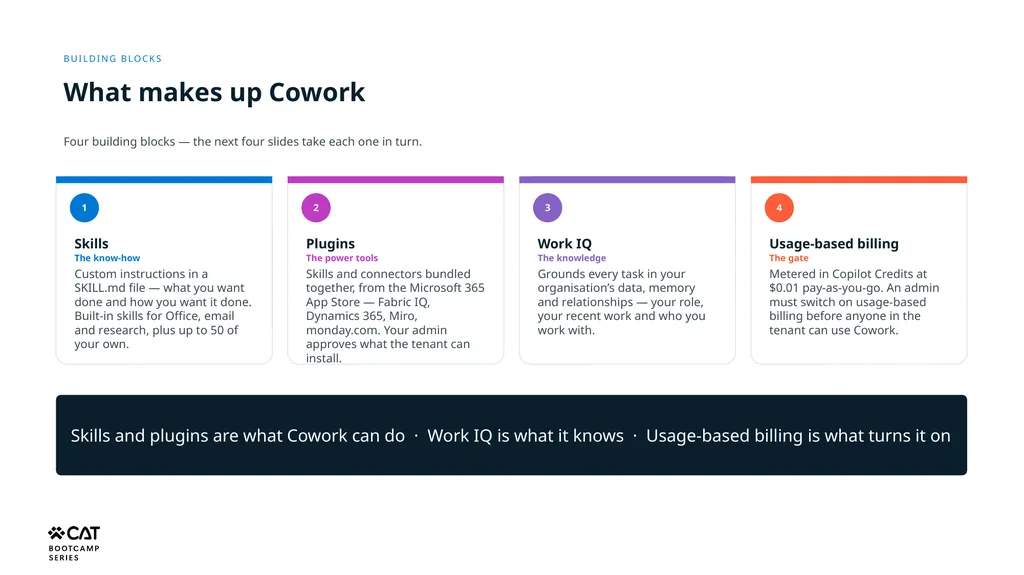
Building blocks What makes up Cowork Four building blocks — the next four slides take each one in turn. 1 Skills
The know-how
Custom instructions in a SKILL.md file — what you want done and how you want it done. Built-in skills for Office, email and research, plus up to 50 of your own. 2 Plugins
The power tools
Skills and connectors bundled together, from the Microsoft 365 App Store — Fabric IQ, Dynamics 365, Miro, monday.com. Your admin approves what the tenant can install. 3 Work IQ
The knowledge
Grounds every task in your organisation’s data, memory and relationships — your role, your recent work and who you work with. 4 Usage-based billing
The gate
Metered in Copilot Credits at $0.01 pay-as-you-go. An admin must switch on usage-based billing before anyone in the tenant can use Cowork. Skills and plugins are what Cowork can do · Work IQ is what it knows · Usage-based billing is what turns it on<br>
07
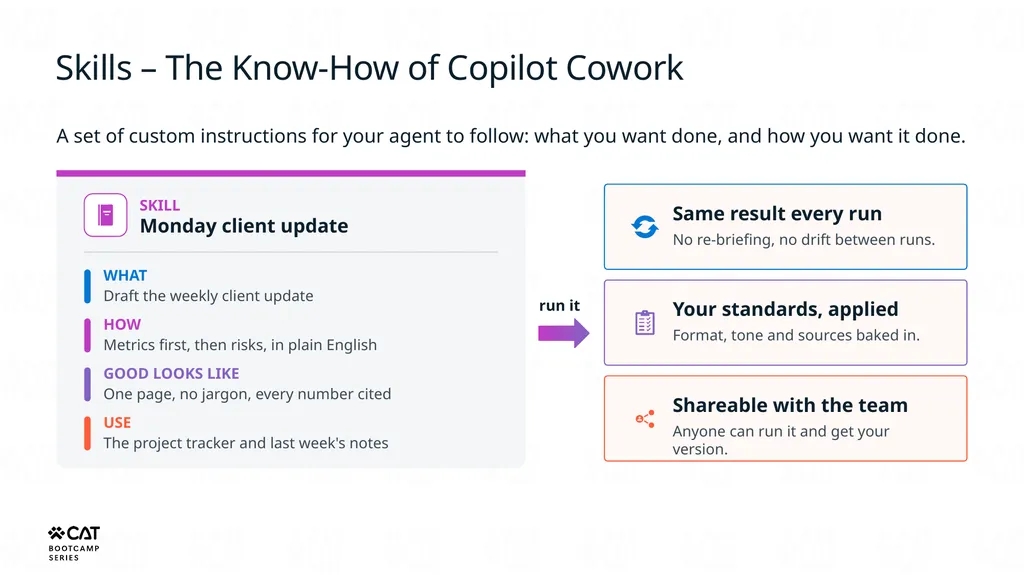
Skills – The Know-How of Copilot Cowork A set of custom instructions for your agent to follow: what you want done, and how you want it done. SKILL
Monday client update WHAT Draft the weekly client update HOW Metrics first, then risks, in plain English GOOD LOOKS LIKE One page, no jargon, every number cited USE The project tracker and last week's notes run it Same result every run No re-briefing, no drift between runs. Your standards, applied Format, tone and sources baked in. Shareable with the team Anyone can run it and get your version.<br>
08
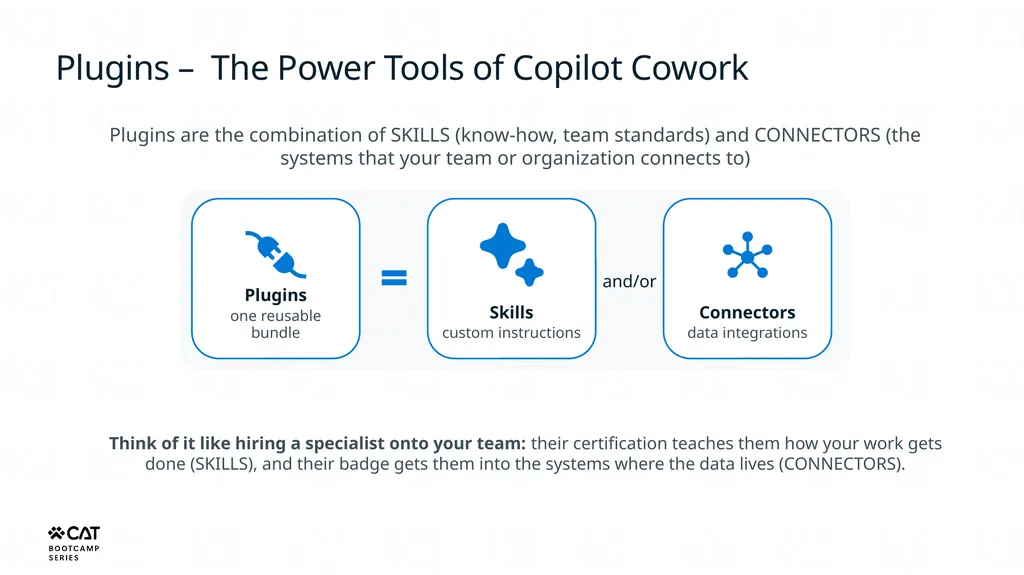
Plugins – The Power Tools of Copilot Cowork Plugins are the combination of SKILLS (know-how, team standards) and CONNECTORS (the systems that your team or organization connects to) Plugins
one reusable bundle Skills
custom instructions Connectors
data integrations and/or Think of it like hiring a specialist onto your team: their certification teaches them how your work gets done (SKILLS), and their badge gets them into the systems where the data lives (CONNECTORS).<br>
09
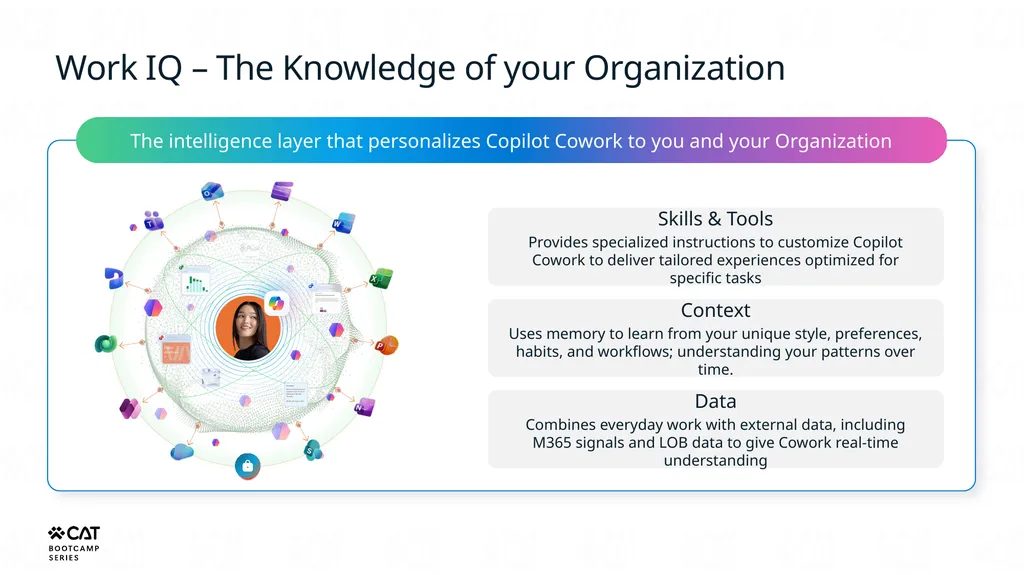
Work IQ – The Knowledge of your Organization The intelligence layer that personalizes Copilot Cowork to you and your Organization Skills & Tools
Provides specialized instructions to customize Copilot Cowork to deliver tailored experiences optimized for specific tasks Context
Uses memory to learn from your unique style, preferences, habits, and workflows; understanding your patterns over time. Data
Combines everyday work with external data, including M365 signals and LOB data to give Cowork real-time understanding<br>
10
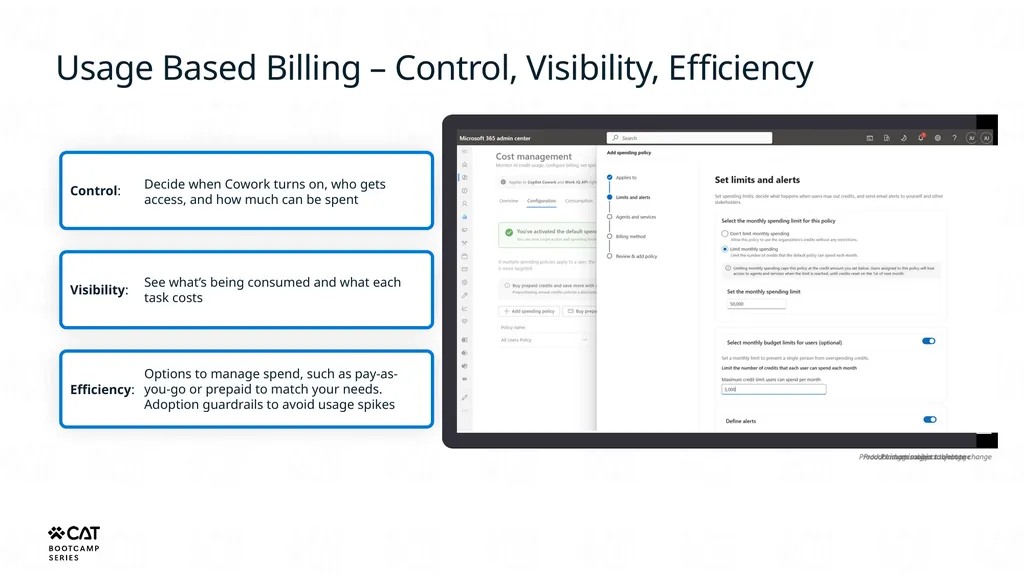
Usage Based Billing – Control, Visibility, Efficiency Control: Visibility: Efficiency: Decide when Cowork turns on, who gets access, and how much can be spent See what’s being consumed and what each task costs Options to manage spend, such as pay-as-you-go or prepaid to match your needs. Adoption guardrails to avoid usage spikes<br>
11
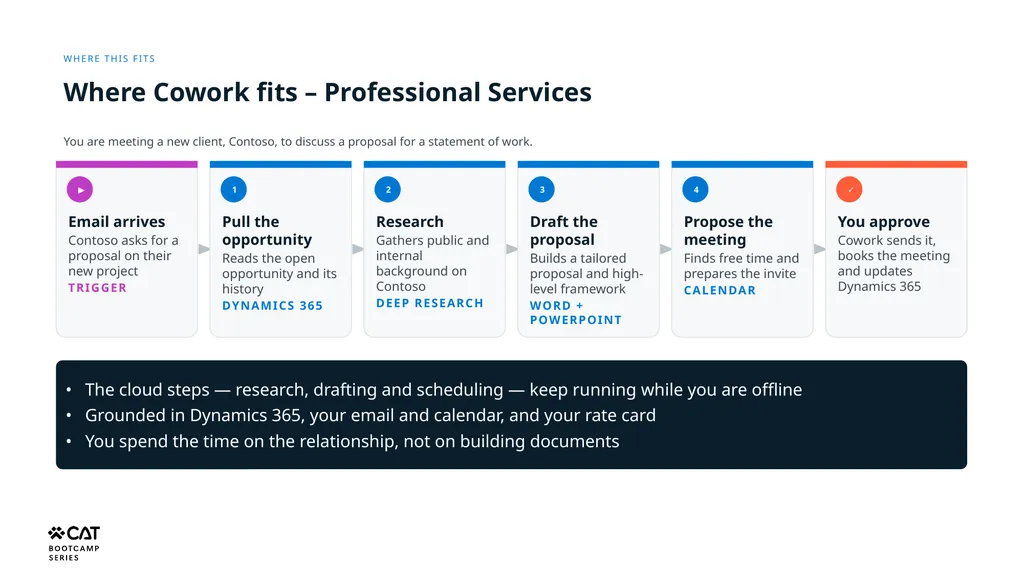
Where this fits Where Cowork fits – Professional Services You are meeting a new client, Contoso, to discuss a proposal for a statement of work. ▶ Email arrives
Contoso asks for a proposal on their new project
Trigger 1 Pull the opportunity
Reads the open opportunity and its history
Dynamics 365 2 Research
Gathers public and internal background on Contoso
Deep Research 3 Draft the proposal
Builds a tailored proposal and high-level framework
Word + PowerPoint 4 Propose the meeting
Finds free time and prepares the invite
Calendar ✓ You approve
Cowork sends it, books the meeting and updates Dynamics 365 • The cloud steps — research, drafting and scheduling — keep running while you are offline
• Grounded in Dynamics 365, your email and calendar, and your rate card
• You spend the time on the relationship, not on building documents<br>
12
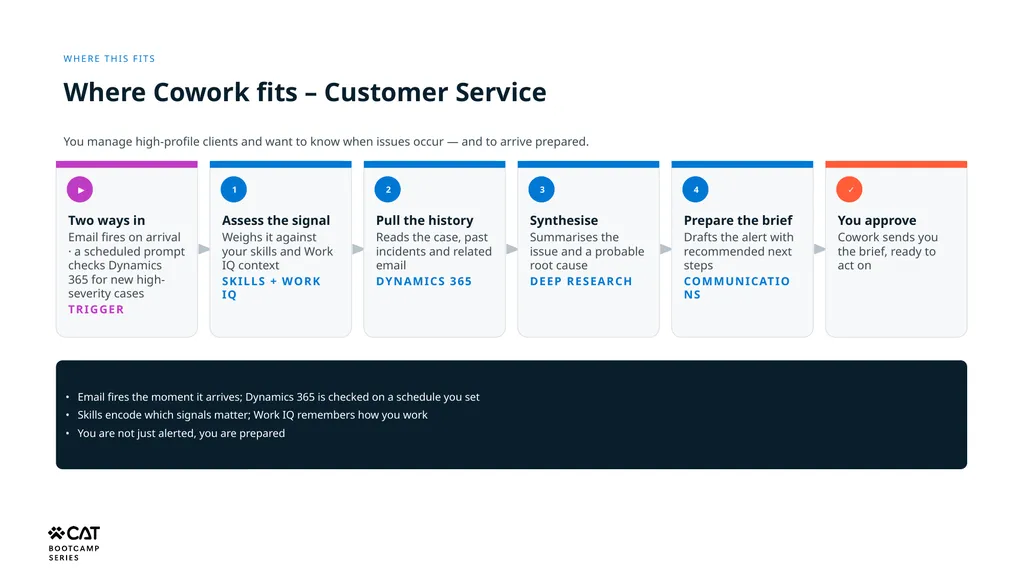
Where this fits Where Cowork fits – Customer Service You manage high-profile clients and want to know when issues occur — and to arrive prepared. ▶ Two ways in
Email fires on arrival · a scheduled prompt checks Dynamics 365 for new high-severity cases
Trigger 1 Assess the signal
Weighs it against your skills and Work IQ context
Skills + Work IQ 2 Pull the history
Reads the case, past incidents and related email
Dynamics 365 3 Synthesise
Summarises the issue and a probable root cause
Deep Research 4 Prepare the brief
Drafts the alert with recommended next steps
Communications ✓ You approve
Cowork sends you the brief, ready to act on • Email fires the moment it arrives; Dynamics 365 is checked on a schedule you set
• Skills encode which signals matter; Work IQ remembers how you work
• You are not just alerted, you are prepared<br>
13
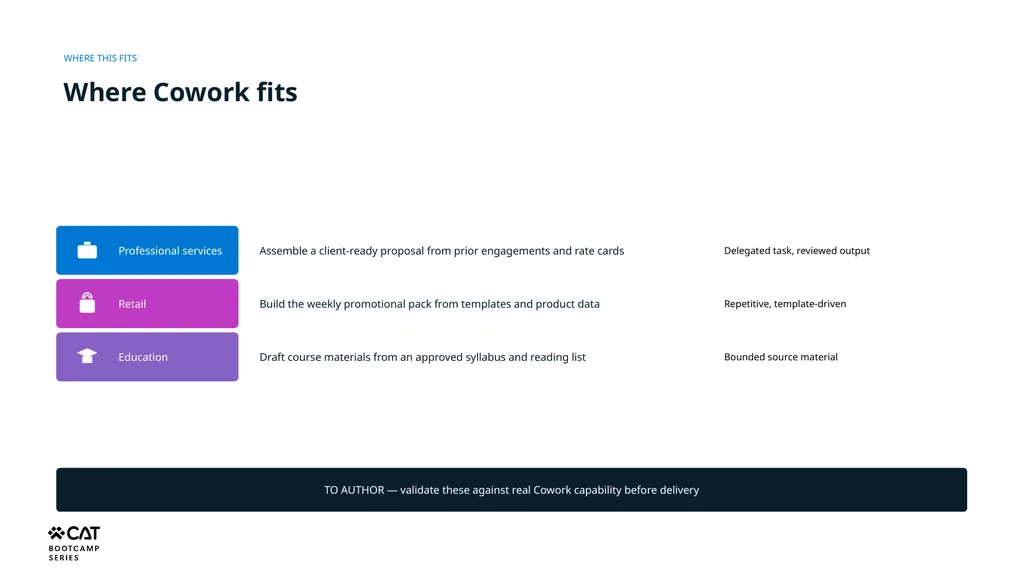
WHERE THIS FITS Where Cowork fits Professional services Assemble a client-ready proposal from prior engagements and rate cards Delegated task, reviewed output Retail Build the weekly promotional pack from templates and product data Repetitive, template-driven Education Draft course materials from an approved syllabus and reading list Bounded source material TO AUTHOR — validate these against real Cowork capability before delivery<br>