Creative Tips using Automic William E. Branch,
Description: Creative Tips using Automic William E. Branch, University of Tennessee Health science center oCtober 14 , 1:30pm Session ID 3.4 Introduction In 2017, UTHSC began the automation of Financial Aid. After a year of development, the automation
Related Topics
Download Presentation
"Creative Tips using Automic William E. Branch," is the property of its rightful owner. Permission is granted to download and print the materials on this website for personal, non-commercial use only, and to display it on your personal computer provided you do not modify the materials and that you retain all copyright notices contained in the materials. By downloading content from our website, you accept the terms of this agreement.
Presentation Transcript
slide1. Creative Tips using Automic William E. Branch, University of Tennessee Health science center
oCtober 14 , 1:30pm
Session ID 3.4<br>
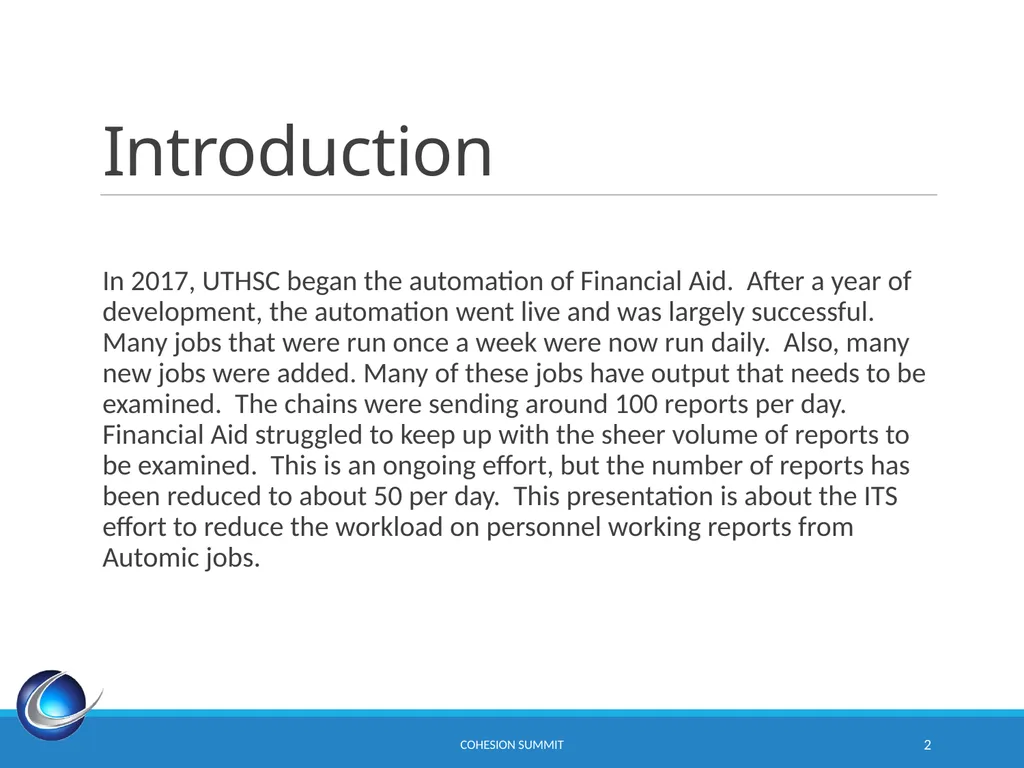
slide2. Introduction In 2017, UTHSC began the automation of Financial Aid. After a year of development, the automation went live and was largely successful. Many jobs that were run once a week were now run daily. Also, many new jobs were added. Many of these jobs have output that needs to be examined. The chains were sending around 100 reports per day. Financial Aid struggled to keep up with the sheer volume of reports to be examined. This is an ongoing effort, but the number of reports has been reduced to about 50 per day. This presentation is about the ITS effort to reduce the workload on personnel working reports from Automic jobs. CoHEsion Summit 2<br>
slide3. Agenda Substitution Variables
Notifications
Conditions
Output Scans
RORAPLT
RLPDLOC
RERIMXX CoHEsion Summit 3<br>
slide4. Substitution Variables<br>
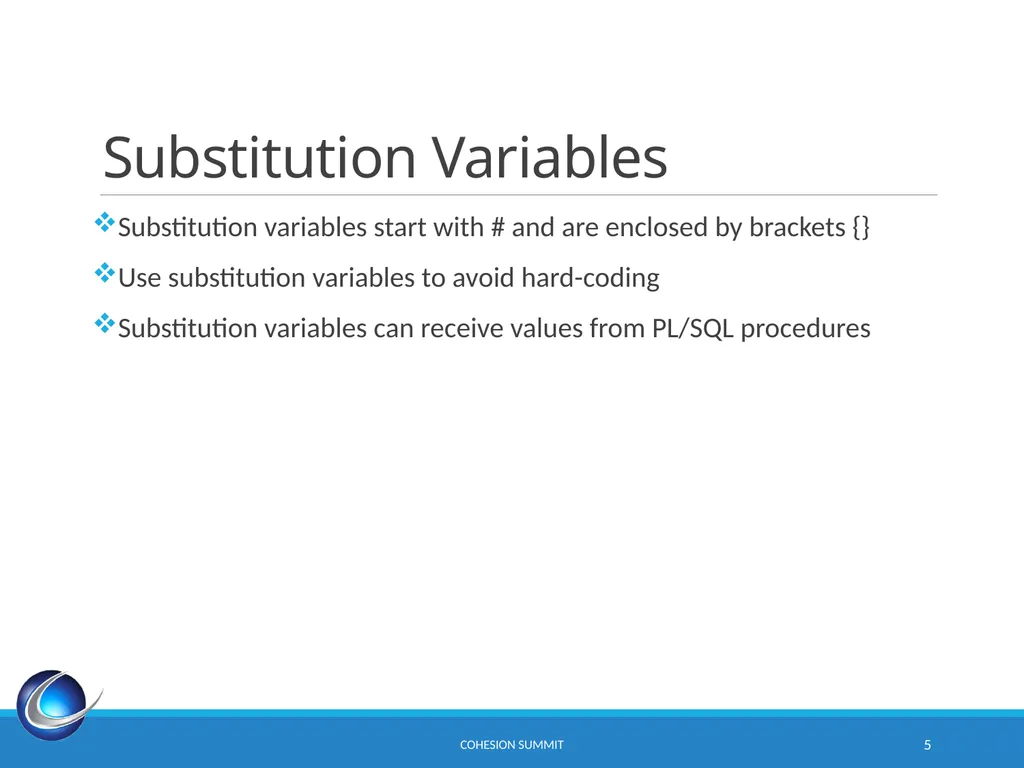
slide5. Substitution Variables Substitution variables start with # and are enclosed by brackets {}
Use substitution variables to avoid hard-coding
Substitution variables can receive values from PL/SQL procedures CoHEsion Summit 5<br>
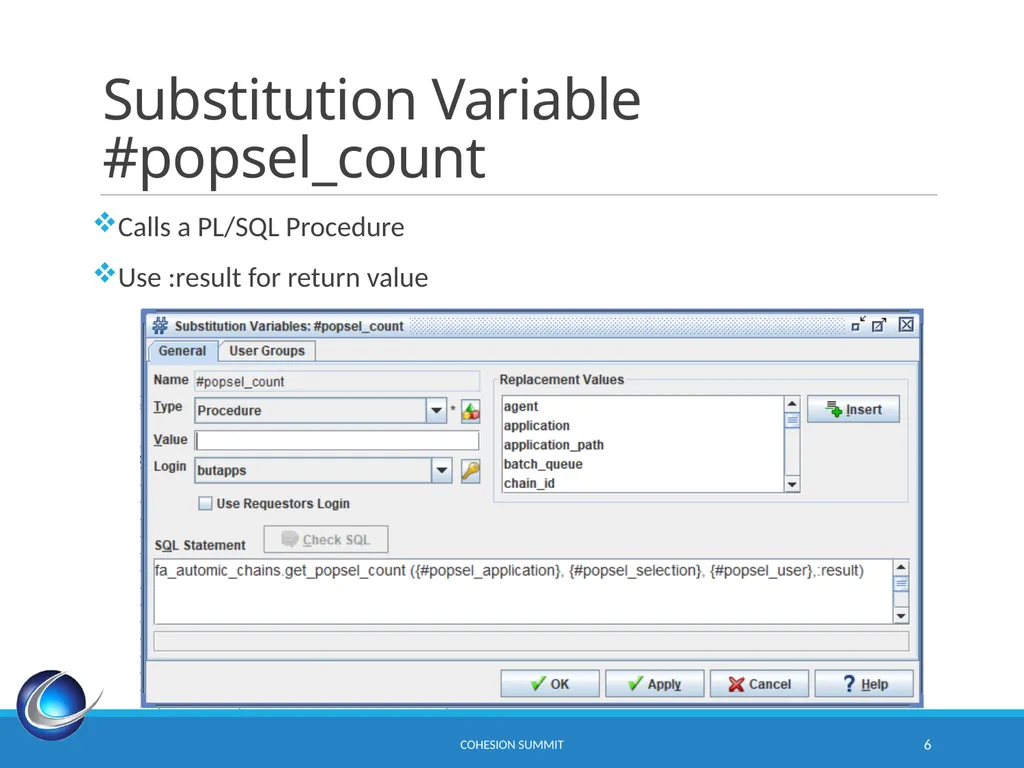
slide6. Substitution Variable #popsel_count Calls a PL/SQL Procedure
Use :result for return value CoHEsion Summit 6<br>
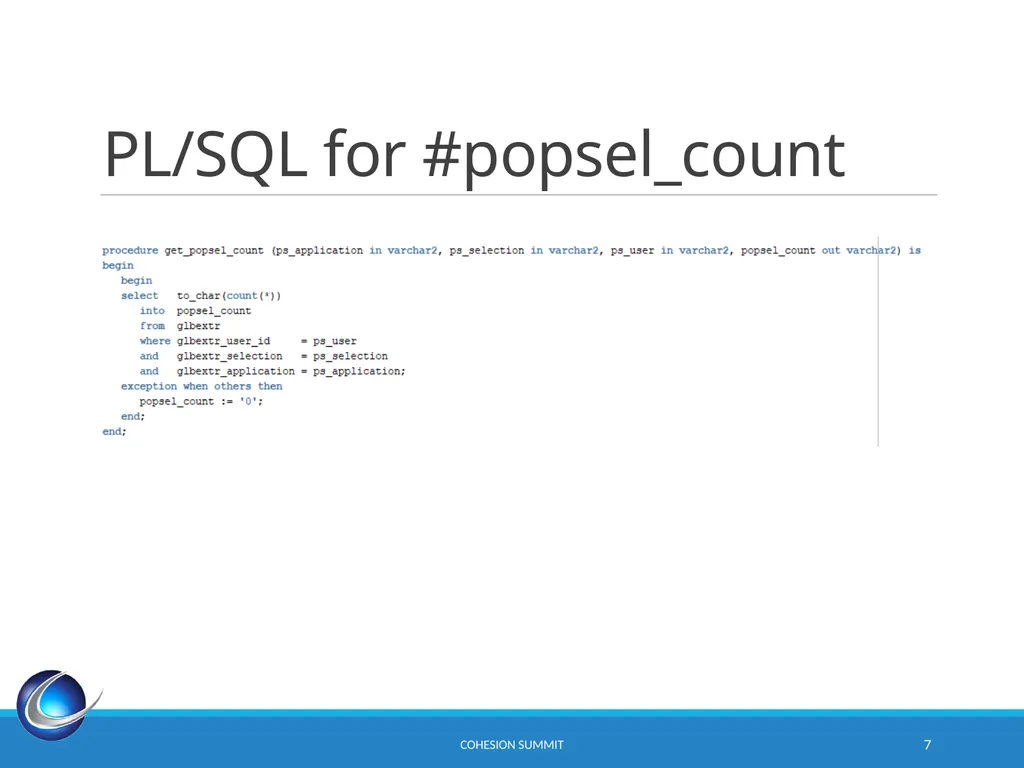
slide7. PL/SQL for #popsel_count CoHEsion Summit 7<br>
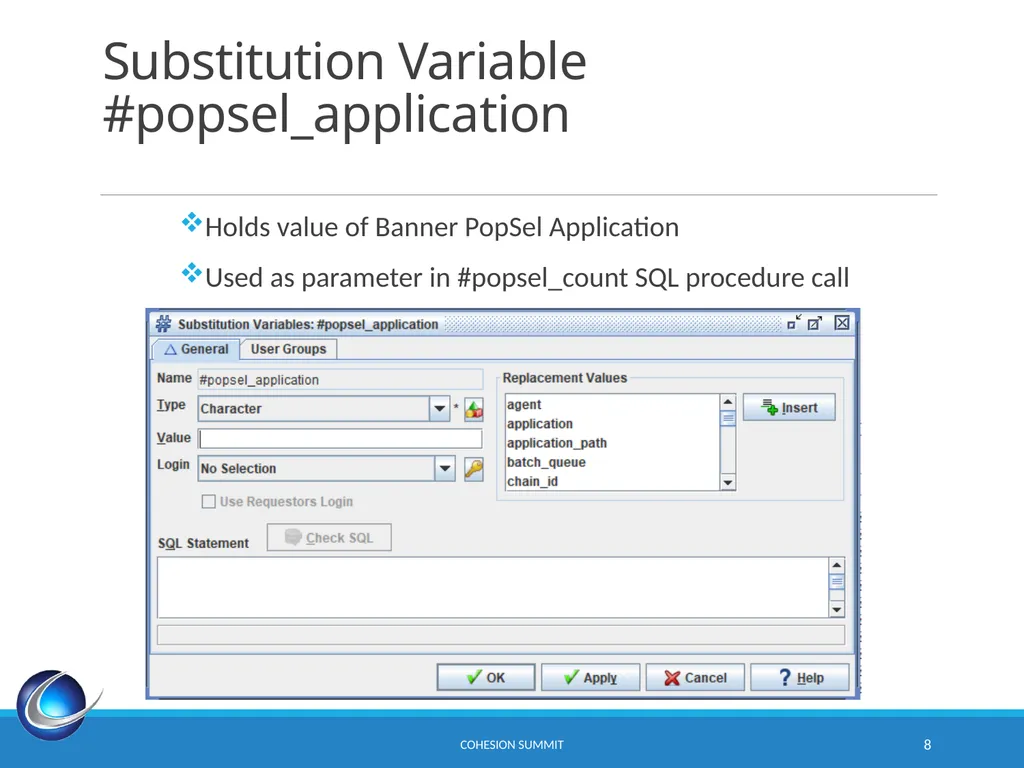
slide8. Substitution Variable #popsel_application CoHEsion Summit 8 Holds value of Banner PopSel Application
Used as parameter in #popsel_count SQL procedure call<br>
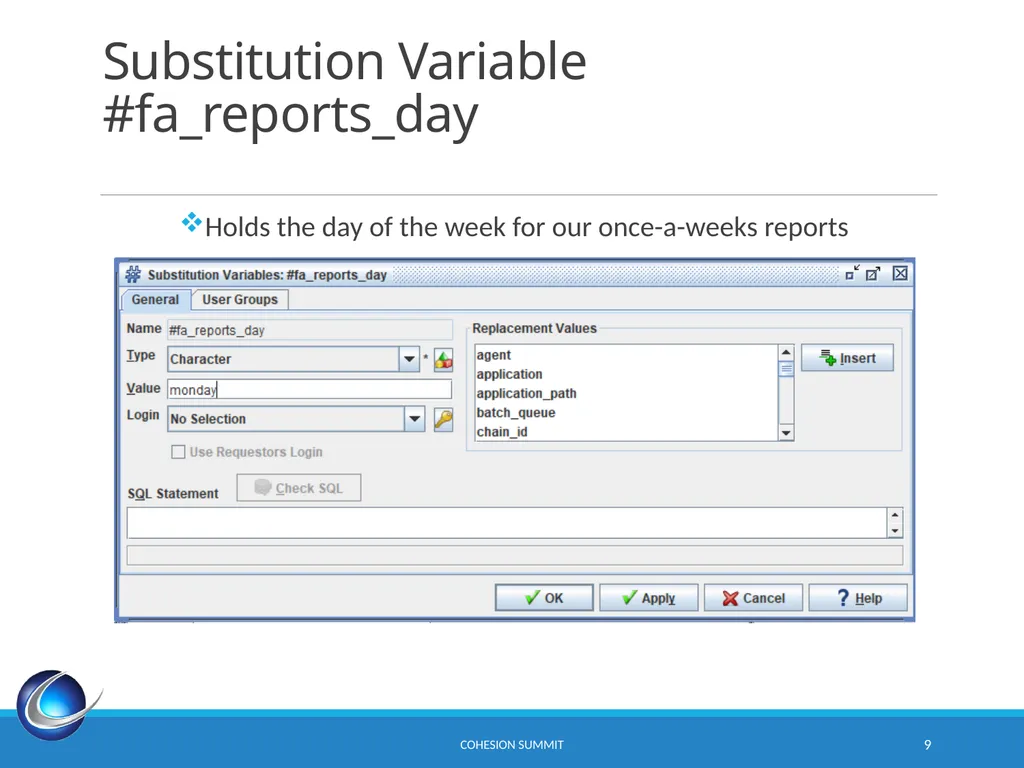
slide9. Substitution Variable #fa_reports_day CoHEsion Summit 9 Holds the day of the week for our once-a-weeks reports<br>
slide10. Notifications<br>
slide11. Notifications CoHEsion Summit 11 Based on task statuses
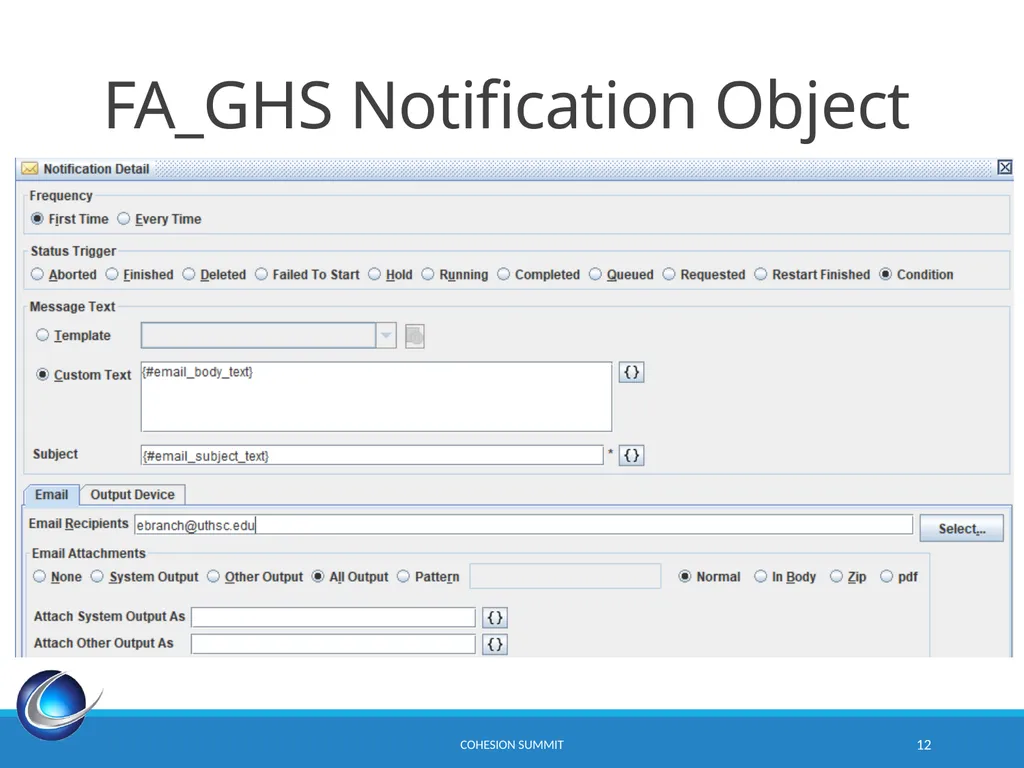
Consider avoiding creating notifications with specific text
Use substitution variables to create general purpose notifications<br>
slide12. FA_GHS Notification Object CoHEsion Summit 12<br>
slide13. Conditions<br>
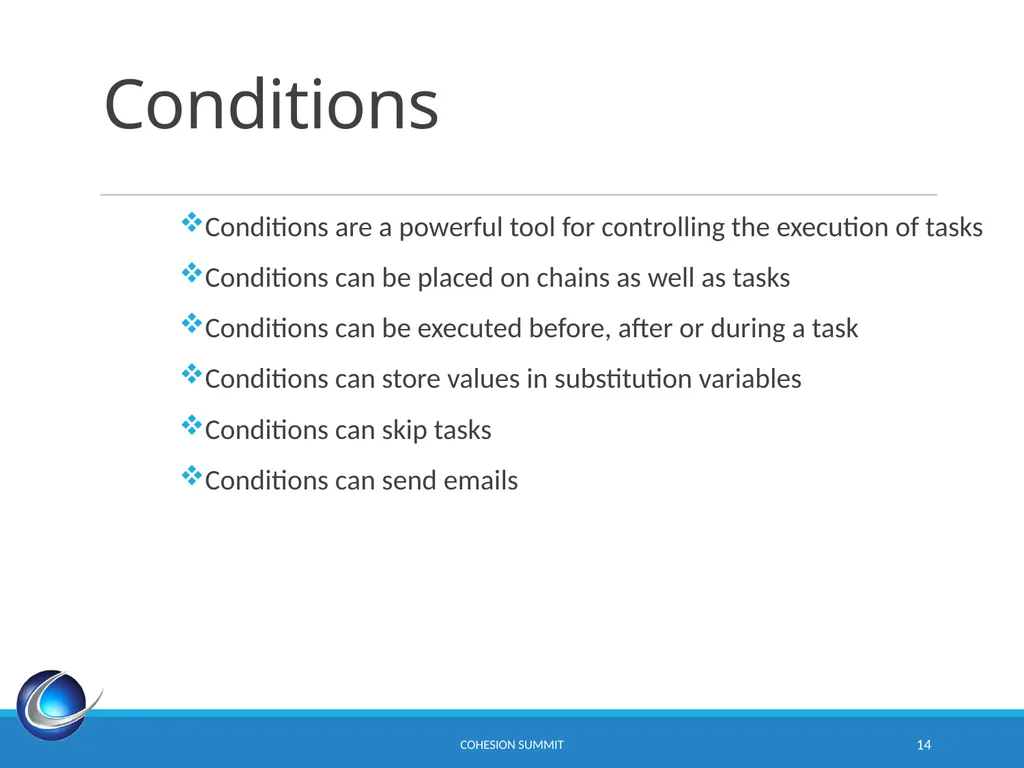
slide14. Conditions CoHEsion Summit 14 Conditions are a powerful tool for controlling the execution of tasks
Conditions can be placed on chains as well as tasks
Conditions can be executed before, after or during a task
Conditions can store values in substitution variables
Conditions can skip tasks
Conditions can send emails<br>
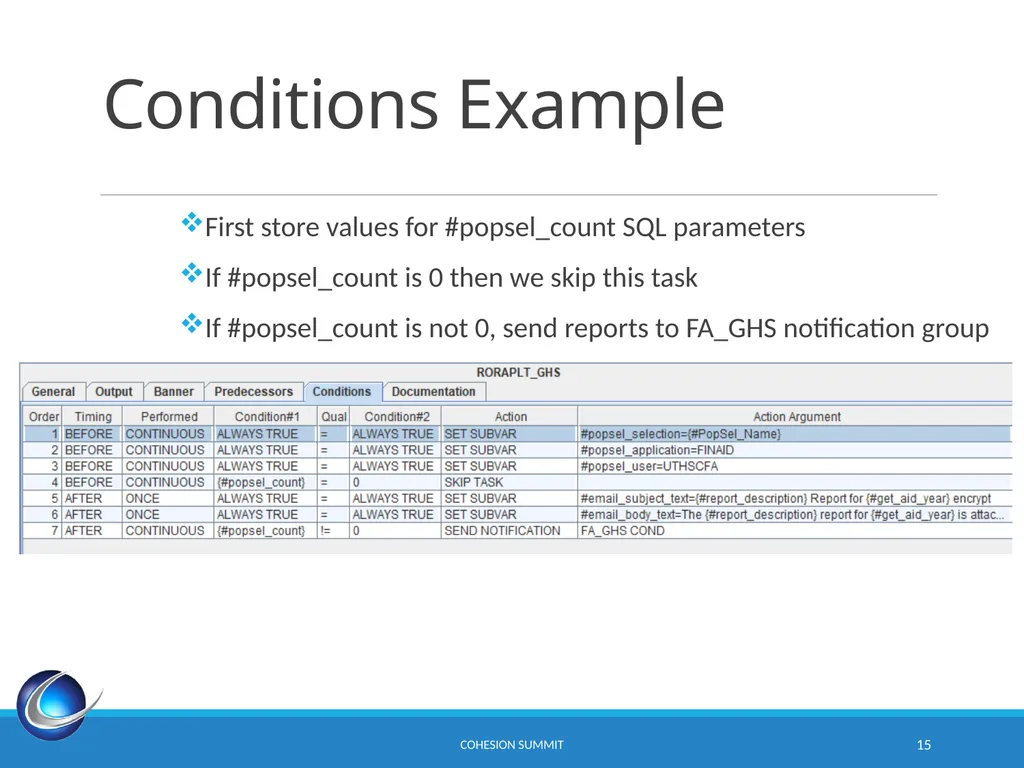
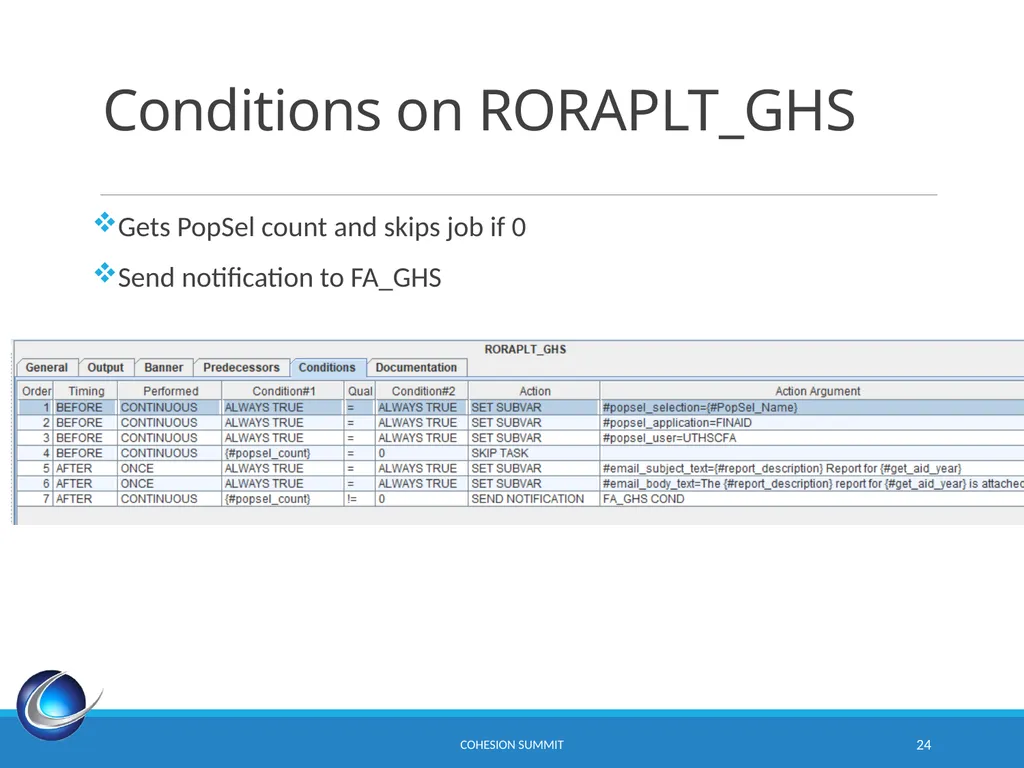
slide15. Conditions Example CoHEsion Summit 15 First store values for #popsel_count SQL parameters
If #popsel_count is 0 then we skip this task
If #popsel_count is not 0, send reports to FA_GHS notification group<br>
slide16. Output Scans Use title slides as dividers between topics or sections in your presentation<br>
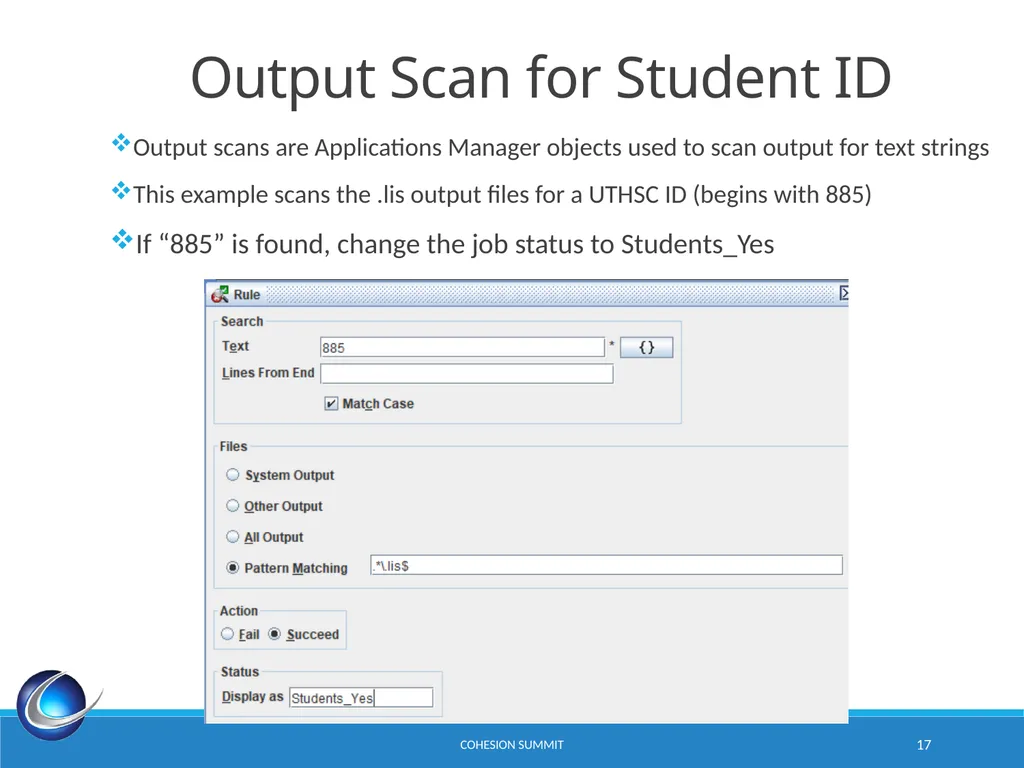
slide17. CoHEsion Summit 17 Output Scan for Student ID Output scans are Applications Manager objects used to scan output for text strings
This example scans the .lis output files for a UTHSC ID (begins with 885)
If “885” is found, change the job status to Students_Yes<br>
slide18. RORAPLT CHAIN<br>
slide19. RORAPLT CoHEsion Summit 19 RORAPLT is a simple applicant listing that lists the students in a PopSel. UTHSC has 8 different RORAPLT reports.
Our RORAPLT reports are divided by college, so users only see their assigned students
If the report is empty, do not send email notification.
Execute only on Mondays<br>
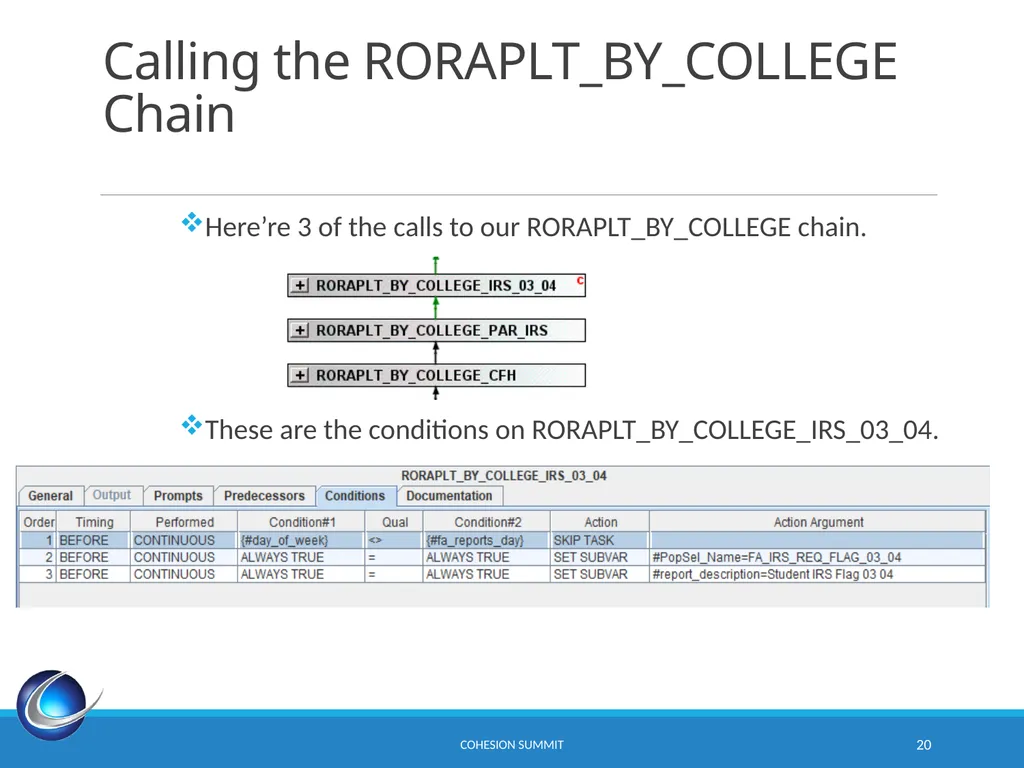
slide20. Calling the RORAPLT_BY_COLLEGE Chain CoHEsion Summit 20 Here’re 3 of the calls to our RORAPLT_BY_COLLEGE chain.
These are the conditions on RORAPLT_BY_COLLEGE_IRS_03_04.<br>
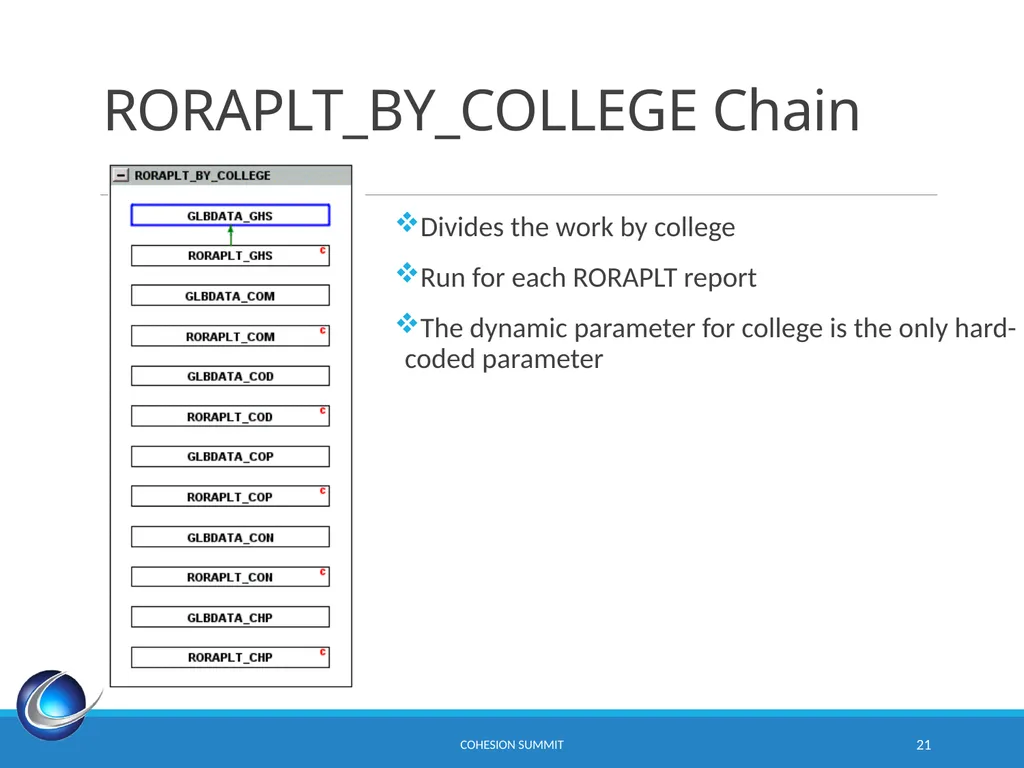
slide21. RORAPLT_BY_COLLEGE Chain CoHEsion Summit 21 Divides the work by college
Run for each RORAPLT report
The dynamic parameter for college is the only hard-coded parameter<br>
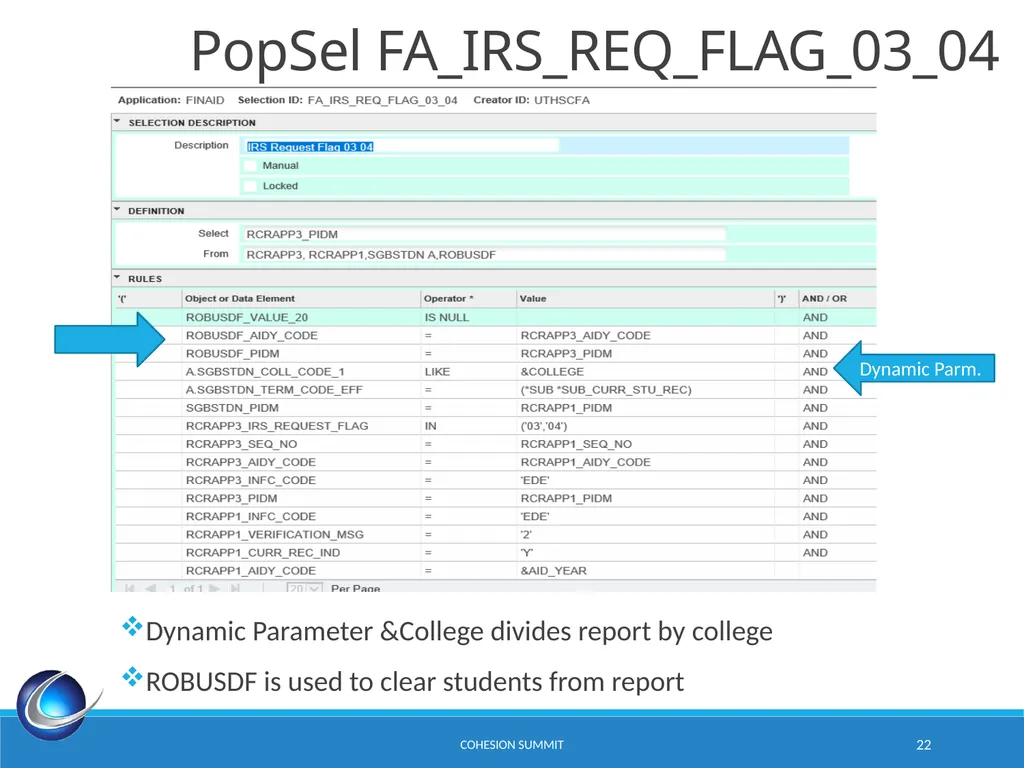
slide22. CoHEsion Summit 22 PopSel FA_IRS_REQ_FLAG_03_04 Dynamic Parm. Dynamic Parameter &College divides report by college
ROBUSDF is used to clear students from report<br>
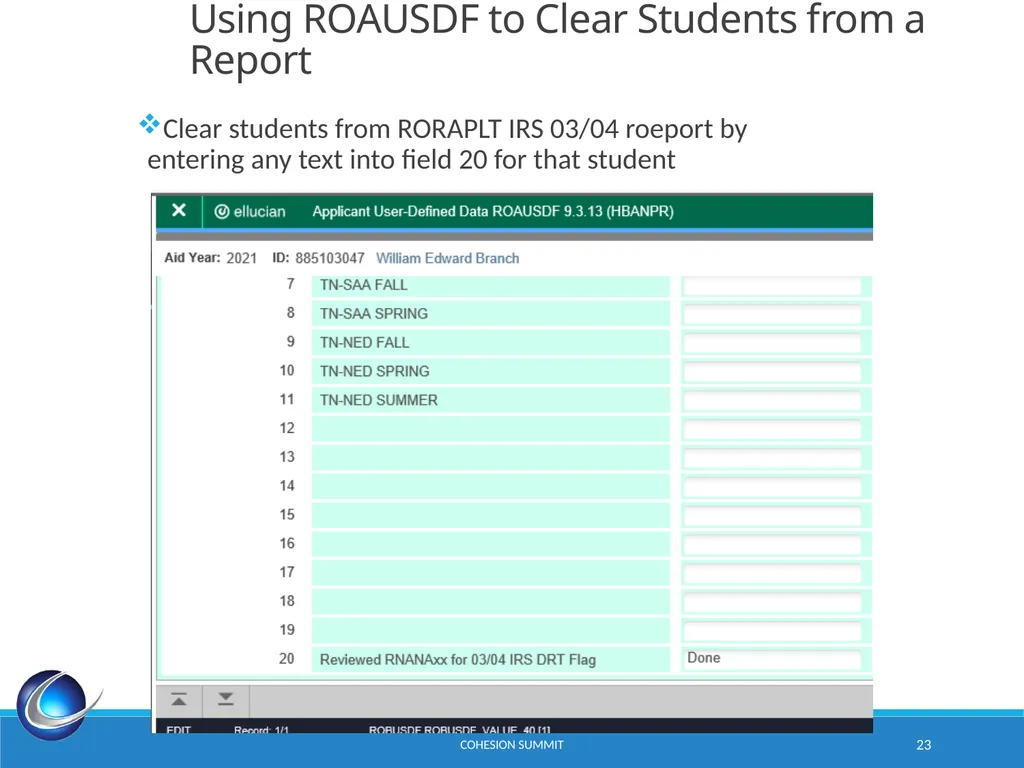
slide23. CoHEsion Summit 23 Using ROAUSDF to Clear Students from a Report Clear students from RORAPLT IRS 03/04 roeport by entering any text into field 20 for that student<br>
slide24. Conditions on RORAPLT_GHS CoHEsion Summit 24 Gets PopSel count and skips job if 0
Send notification to FA_GHS<br>
slide25. RLPDLOC Use title slides as dividers between topics or sections in your presentation<br>
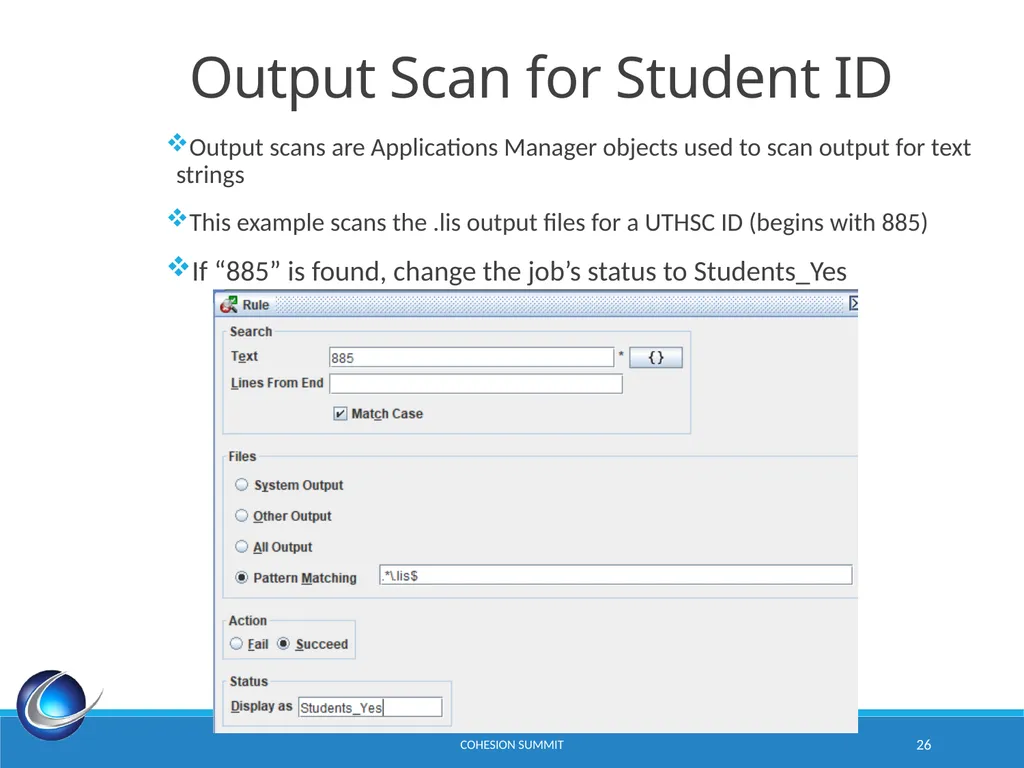
slide26. CoHEsion Summit 26 Output Scan for Student ID Output scans are Applications Manager objects used to scan output for text strings
This example scans the .lis output files for a UTHSC ID (begins with 885)
If “885” is found, change the job’s status to Students_Yes<br>
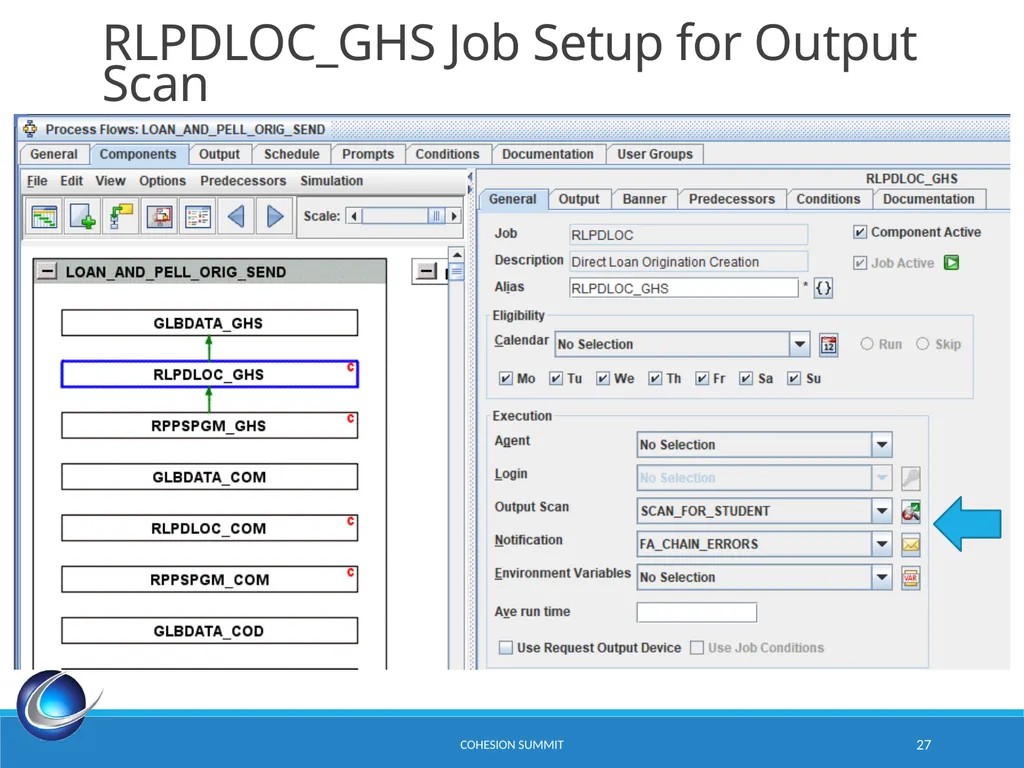
slide27. CoHEsion Summit 27 RLPDLOC_GHS Job Setup for Output Scan<br>
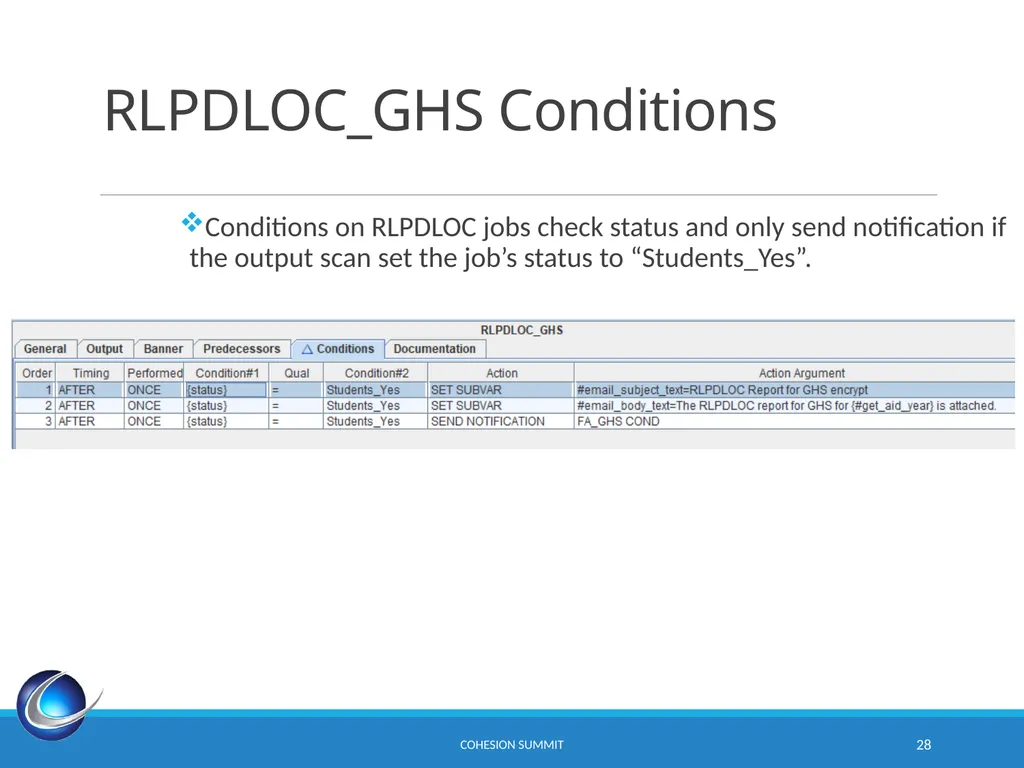
slide28. RLPDLOC_GHS Conditions CoHEsion Summit 28 Conditions on RLPDLOC jobs check status and only send notification if the output scan set the job’s status to “Students_Yes”.<br>
slide29. RERIMXX<br>
slide30. RERIMXX CoHEsion Summit 30 RERIMXX is Banner job that imports files from COD.
The RERIMXX job includes loan issues in its log file.
The goal is to alert users when issues are found<br>
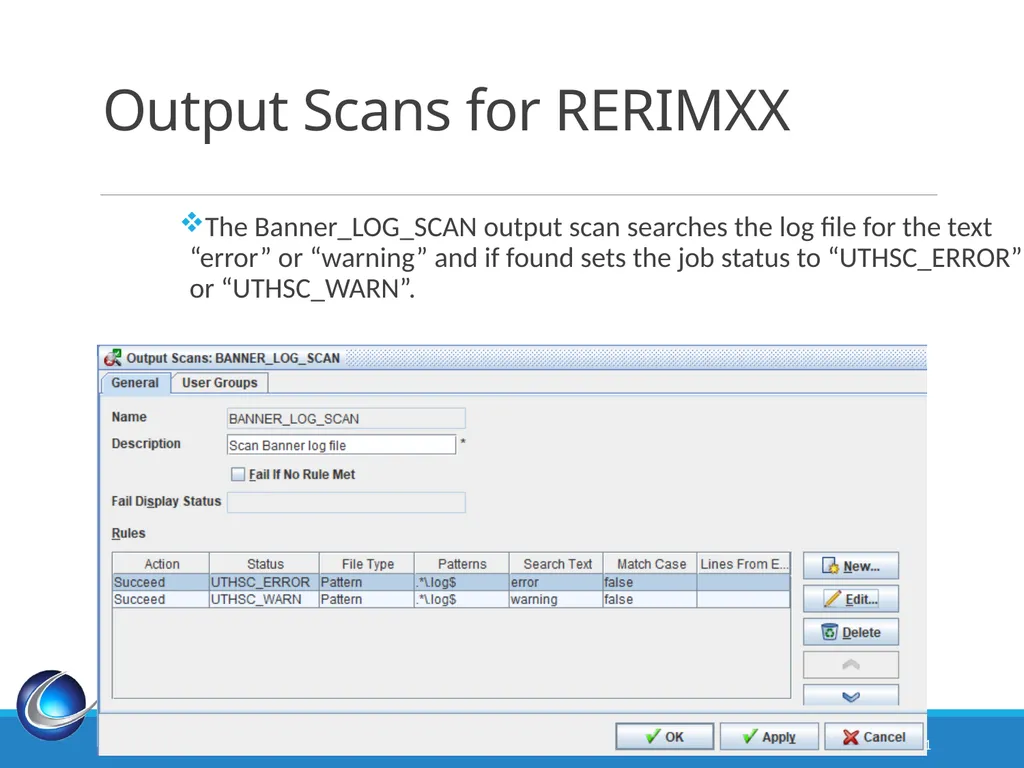
slide31. Output Scans for RERIMXX CoHEsion Summit 31 The Banner_LOG_SCAN output scan searches the log file for the text “error” or “warning” and if found sets the job status to “UTHSC_ERROR” or “UTHSC_WARN”.<br>
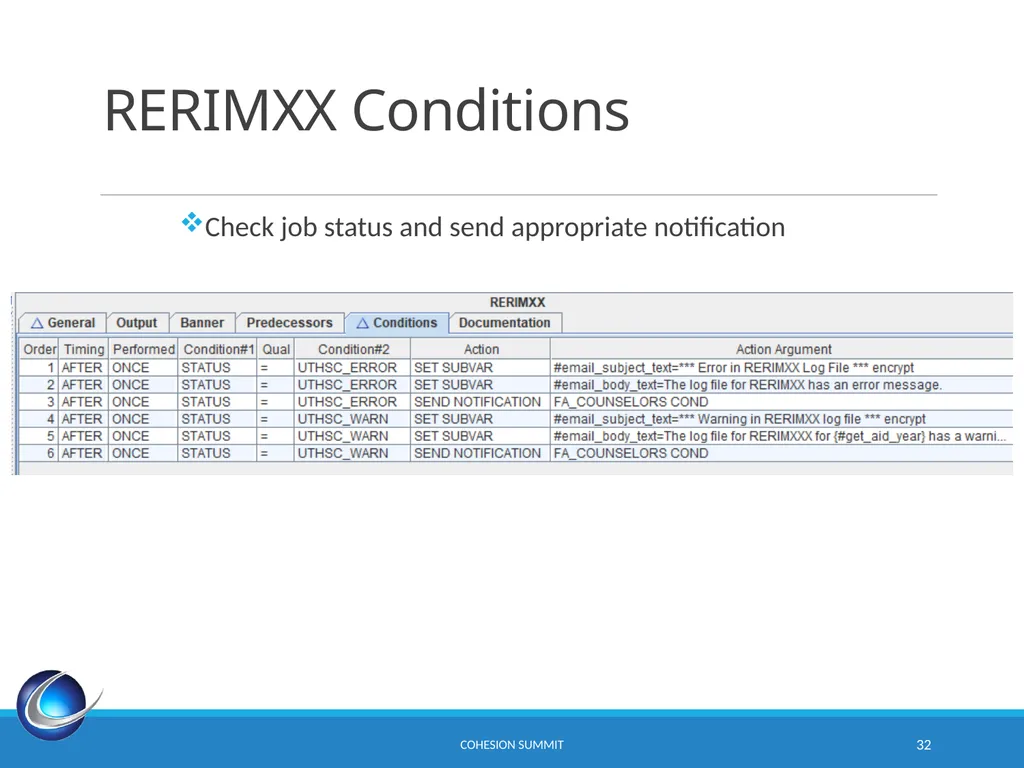
slide32. RERIMXX Conditions CoHEsion Summit 32 Check job status and send appropriate notification<br>
slide33. Summary Automic is a superb tool!
Master conditions, scans, substitution variables, notifications, etc. and you’ll see the possibilities.
Don’t think of Automic as just a scheduling tool. Instead think of Automic as an automation tool. CoHEsion Summit 33<br>

slide34. Questions? CoHEsion Summit 34<br>
slide35. Thank You! William E. Branch
ebranch@uthsc.edu
SESSION ID 3.4 CoHEsion Summit 35<br>
oCtober 14 , 1:30pm
Session ID 3.4<br>
slide2. Introduction In 2017, UTHSC began the automation of Financial Aid. After a year of development, the automation went live and was largely successful. Many jobs that were run once a week were now run daily. Also, many new jobs were added. Many of these jobs have output that needs to be examined. The chains were sending around 100 reports per day. Financial Aid struggled to keep up with the sheer volume of reports to be examined. This is an ongoing effort, but the number of reports has been reduced to about 50 per day. This presentation is about the ITS effort to reduce the workload on personnel working reports from Automic jobs. CoHEsion Summit 2<br>
slide3. Agenda Substitution Variables
Notifications
Conditions
Output Scans
RORAPLT
RLPDLOC
RERIMXX CoHEsion Summit 3<br>
slide4. Substitution Variables<br>
slide5. Substitution Variables Substitution variables start with # and are enclosed by brackets {}
Use substitution variables to avoid hard-coding
Substitution variables can receive values from PL/SQL procedures CoHEsion Summit 5<br>
slide6. Substitution Variable #popsel_count Calls a PL/SQL Procedure
Use :result for return value CoHEsion Summit 6<br>
slide7. PL/SQL for #popsel_count CoHEsion Summit 7<br>
slide8. Substitution Variable #popsel_application CoHEsion Summit 8 Holds value of Banner PopSel Application
Used as parameter in #popsel_count SQL procedure call<br>
slide9. Substitution Variable #fa_reports_day CoHEsion Summit 9 Holds the day of the week for our once-a-weeks reports<br>
slide10. Notifications<br>
slide11. Notifications CoHEsion Summit 11 Based on task statuses
Consider avoiding creating notifications with specific text
Use substitution variables to create general purpose notifications<br>
slide12. FA_GHS Notification Object CoHEsion Summit 12<br>
slide13. Conditions<br>
slide14. Conditions CoHEsion Summit 14 Conditions are a powerful tool for controlling the execution of tasks
Conditions can be placed on chains as well as tasks
Conditions can be executed before, after or during a task
Conditions can store values in substitution variables
Conditions can skip tasks
Conditions can send emails<br>
slide15. Conditions Example CoHEsion Summit 15 First store values for #popsel_count SQL parameters
If #popsel_count is 0 then we skip this task
If #popsel_count is not 0, send reports to FA_GHS notification group<br>
slide16. Output Scans Use title slides as dividers between topics or sections in your presentation<br>
slide17. CoHEsion Summit 17 Output Scan for Student ID Output scans are Applications Manager objects used to scan output for text strings
This example scans the .lis output files for a UTHSC ID (begins with 885)
If “885” is found, change the job status to Students_Yes<br>
slide18. RORAPLT CHAIN<br>
slide19. RORAPLT CoHEsion Summit 19 RORAPLT is a simple applicant listing that lists the students in a PopSel. UTHSC has 8 different RORAPLT reports.
Our RORAPLT reports are divided by college, so users only see their assigned students
If the report is empty, do not send email notification.
Execute only on Mondays<br>
slide20. Calling the RORAPLT_BY_COLLEGE Chain CoHEsion Summit 20 Here’re 3 of the calls to our RORAPLT_BY_COLLEGE chain.
These are the conditions on RORAPLT_BY_COLLEGE_IRS_03_04.<br>
slide21. RORAPLT_BY_COLLEGE Chain CoHEsion Summit 21 Divides the work by college
Run for each RORAPLT report
The dynamic parameter for college is the only hard-coded parameter<br>
slide22. CoHEsion Summit 22 PopSel FA_IRS_REQ_FLAG_03_04 Dynamic Parm. Dynamic Parameter &College divides report by college
ROBUSDF is used to clear students from report<br>
slide23. CoHEsion Summit 23 Using ROAUSDF to Clear Students from a Report Clear students from RORAPLT IRS 03/04 roeport by entering any text into field 20 for that student<br>
slide24. Conditions on RORAPLT_GHS CoHEsion Summit 24 Gets PopSel count and skips job if 0
Send notification to FA_GHS<br>
slide25. RLPDLOC Use title slides as dividers between topics or sections in your presentation<br>
slide26. CoHEsion Summit 26 Output Scan for Student ID Output scans are Applications Manager objects used to scan output for text strings
This example scans the .lis output files for a UTHSC ID (begins with 885)
If “885” is found, change the job’s status to Students_Yes<br>
slide27. CoHEsion Summit 27 RLPDLOC_GHS Job Setup for Output Scan<br>
slide28. RLPDLOC_GHS Conditions CoHEsion Summit 28 Conditions on RLPDLOC jobs check status and only send notification if the output scan set the job’s status to “Students_Yes”.<br>
slide29. RERIMXX<br>
slide30. RERIMXX CoHEsion Summit 30 RERIMXX is Banner job that imports files from COD.
The RERIMXX job includes loan issues in its log file.
The goal is to alert users when issues are found<br>
slide31. Output Scans for RERIMXX CoHEsion Summit 31 The Banner_LOG_SCAN output scan searches the log file for the text “error” or “warning” and if found sets the job status to “UTHSC_ERROR” or “UTHSC_WARN”.<br>
slide32. RERIMXX Conditions CoHEsion Summit 32 Check job status and send appropriate notification<br>
slide33. Summary Automic is a superb tool!
Master conditions, scans, substitution variables, notifications, etc. and you’ll see the possibilities.
Don’t think of Automic as just a scheduling tool. Instead think of Automic as an automation tool. CoHEsion Summit 33<br>

slide34. Questions? CoHEsion Summit 34<br>
slide35. Thank You! William E. Branch
ebranch@uthsc.edu
SESSION ID 3.4 CoHEsion Summit 35<br>