Engineering Design Journal Student Name: Project
Description: Engineering Design Journal Student Name: Project Title: Engineering Design Journal Record your steps through the engineering design process. Add slides as needed to document the process. https:ditchthattextbook.compowerpoint-templates

Related Topics
Download Presentation
"Engineering Design Journal Student Name: Project" is the property of its rightful owner. Permission is granted to download and print the materials on this website for personal, non-commercial use only, and to display it on your personal computer provided you do not modify the materials and that you retain all copyright notices contained in the materials. By downloading content from our website, you accept the terms of this agreement.
Presentation Transcript
slide1. Engineering Design Journal Student Name:
Project Title:<br>

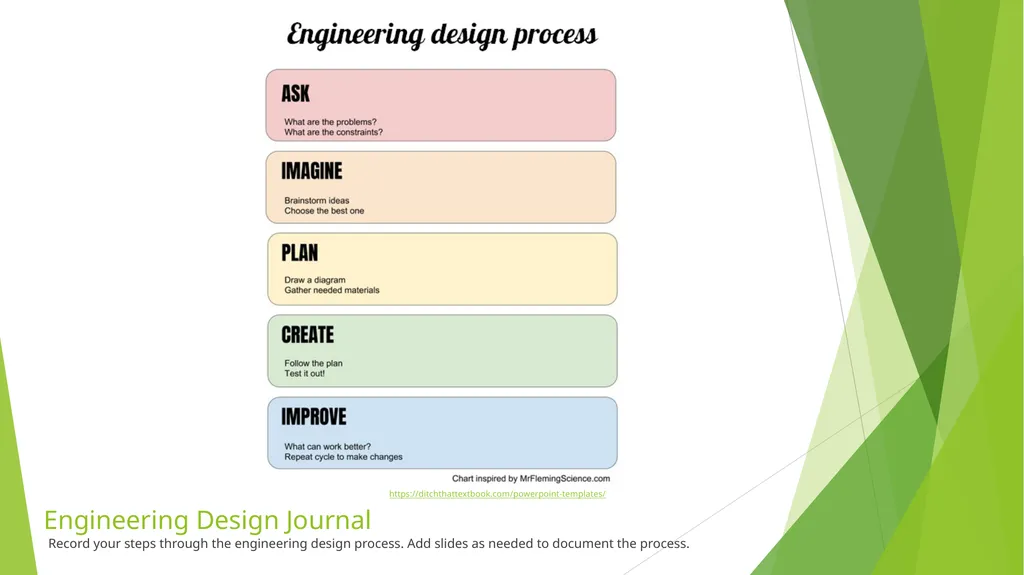
slide2. Engineering Design Journal Record your steps through the engineering design process. Add slides as needed to document the process. https://ditchthattextbook.com/powerpoint-templates/<br>
slide3. ASK What is the problem?
What do I need to know?
What are the project constraint?
What materials can I use?
How much time do I have?<br>
slide4. IMAGINE Brainstorm possible solutions. (Add brainstorming sketch here)
Choose the BEST solution.<br>
slide5. PLAN Draw a diagram. (Add design sketch here)
Make a list of the materials you will need.<br>
slide6. CREATE Follow your plan. Test it out! (Provide evidence of your design-sketch, photo or video)
What feedback did you receive?<br>
slide7. IMPROVE Modify your design so that it better meets the goal. Test it out!
Was the design functional? Why or why not?
What would you change about the design?
How closely did you follow the planning process?
How did you use ongoing feedback during the “create” phase of the project?<br>
Project Title:<br>
slide2. Engineering Design Journal Record your steps through the engineering design process. Add slides as needed to document the process. https://ditchthattextbook.com/powerpoint-templates/<br>
slide3. ASK What is the problem?
What do I need to know?
What are the project constraint?
What materials can I use?
How much time do I have?<br>
slide4. IMAGINE Brainstorm possible solutions. (Add brainstorming sketch here)
Choose the BEST solution.<br>
slide5. PLAN Draw a diagram. (Add design sketch here)
Make a list of the materials you will need.<br>
slide6. CREATE Follow your plan. Test it out! (Provide evidence of your design-sketch, photo or video)
What feedback did you receive?<br>
slide7. IMPROVE Modify your design so that it better meets the goal. Test it out!
Was the design functional? Why or why not?
What would you change about the design?
How closely did you follow the planning process?
How did you use ongoing feedback during the “create” phase of the project?<br>