"Epic Beaker Anatomic Pathology (AP) Implementation" is the property of its rightful owner. Permission is granted to
download and print the materials on this website for personal, non-commercial use only, and to display it
on your personal computer provided you do not modify the materials and that you retain all copyright
notices contained in the materials. By downloading content from our website, you accept the terms of this
agreement.
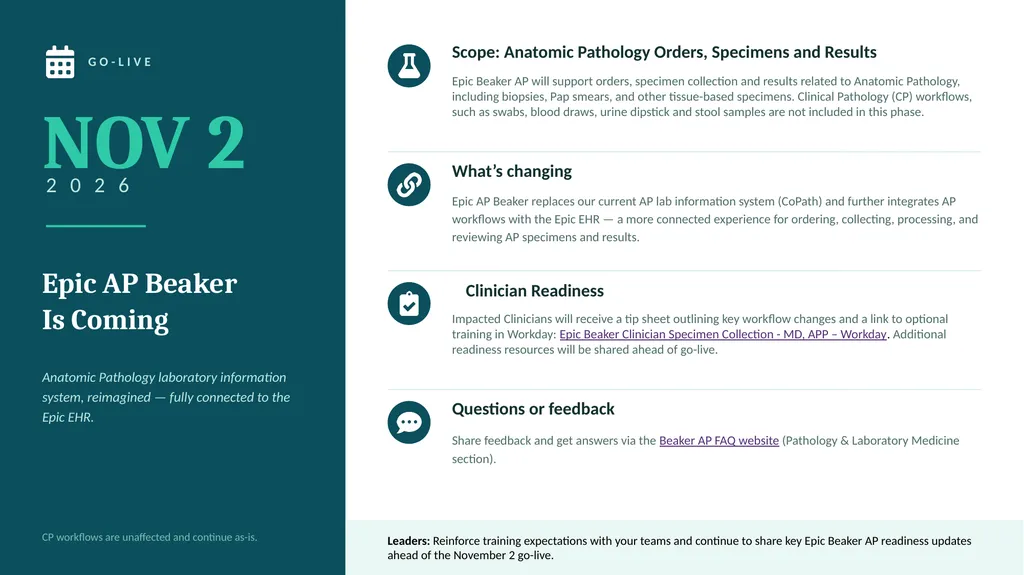
GO-LIVE NOV 2 2 0 2 6 Epic AP Beaker
Is Coming Anatomic Pathology laboratory information system, reimagined — fully connected to the Epic EHR. CP workflows are unaffected and continue as-is. Scope: Anatomic Pathology Orders, Specimens and Results Epic Beaker AP will support orders, specimen collection and results related to Anatomic Pathology, including biopsies, Pap smears, and other tissue-based specimens. Clinical Pathology (CP) workflows, such as swabs, blood draws, urine dipstick and stool samples are not included in this phase. What’s changing Epic AP Beaker replaces our current AP lab information system (CoPath) and further integrates AP workflows with the Epic EHR — a more connected experience for ordering, collecting, processing, and reviewing AP specimens and results. Clinician Readiness Impacted Clinicians will receive a tip sheet outlining key workflow changes and a link to optional training in Workday: Epic Beaker Clinician Specimen Collection - MD, APP – Workday. Additional readiness resources will be shared ahead of go-live. Questions or feedback Share feedback and get answers via the Beaker AP FAQ website (Pathology & Laboratory Medicine section). Leaders: Reinforce training expectations with your teams and continue to share key Epic Beaker AP readiness updates ahead of the November 2 go-live.<br>
03
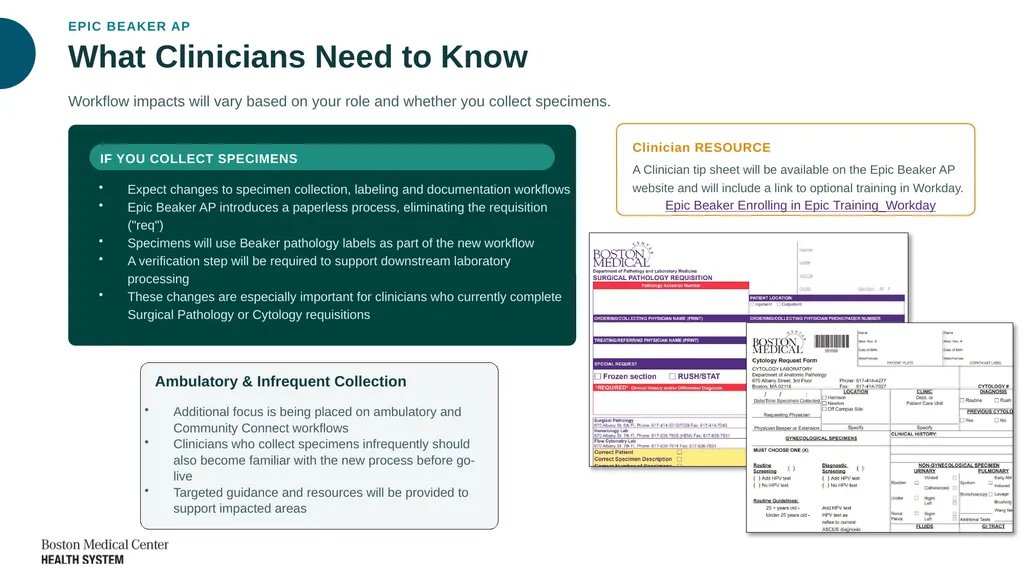
EPIC BEAKER AP What Clinicians Need to Know Workflow impacts will vary based on your role and whether you collect specimens. IF YOU COLLECT SPECIMENS Expect changes to specimen collection, labeling and documentation workflows
Epic Beaker AP introduces a paperless process, eliminating the requisition ("req")
Specimens will use Beaker pathology labels as part of the new workflow
A verification step will be required to support downstream laboratory processing
These changes are especially important for clinicians who currently complete Surgical Pathology or Cytology requisitions Ambulatory & Infrequent Collection Additional focus is being placed on ambulatory and Community Connect workflows
Clinicians who collect specimens infrequently should also become familiar with the new process before go-live
Targeted guidance and resources will be provided to support impacted areas Clinician RESOURCE A Clinician tip sheet will be available on the Epic Beaker AP website and will include a link to optional training in Workday.
Epic Beaker Enrolling in Epic Training_Workday<br>
04
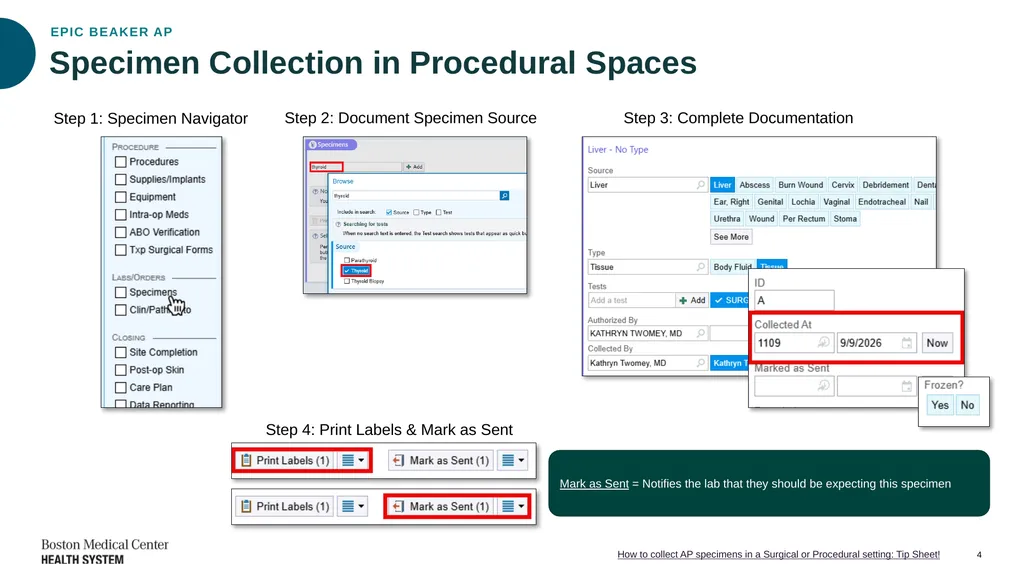
Step 1: Specimen Navigator 4 How to collect AP specimens in a Surgical or Procedural setting: Tip Sheet! Step 2: Document Specimen Source Step 3: Complete Documentation Step 4: Print Labels & Mark as Sent Mark as Sent = Notifies the lab that they should be expecting this specimen Specimen Collection in Procedural Spaces EPIC BEAKER AP<br>
05
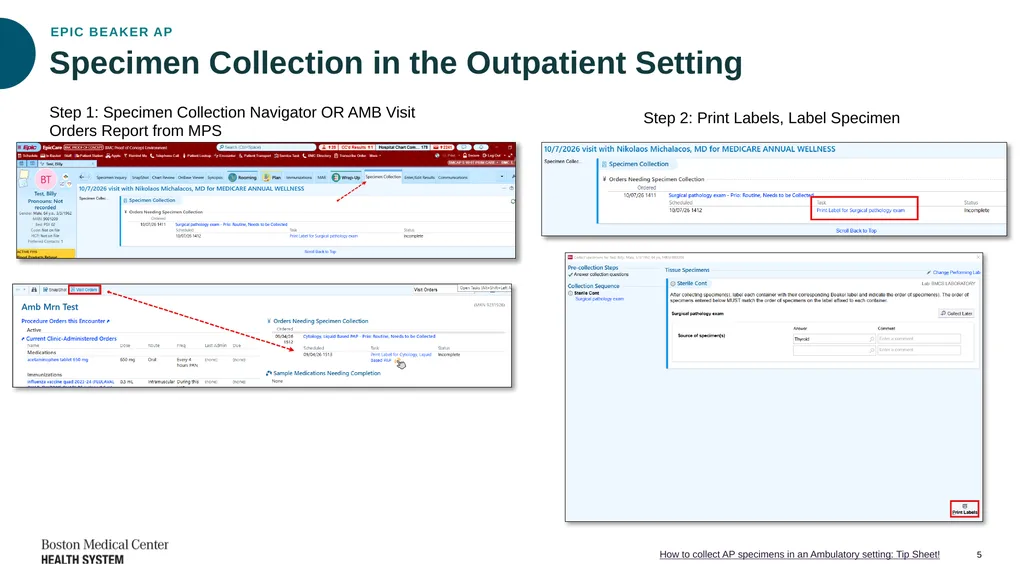
Step 1: Specimen Collection Navigator OR AMB Visit Orders Report from MPS 5 How to collect AP specimens in an Ambulatory setting: Tip Sheet! Step 2: Print Labels, Label Specimen Specimen Collection in the Outpatient Setting EPIC BEAKER AP<br>
06
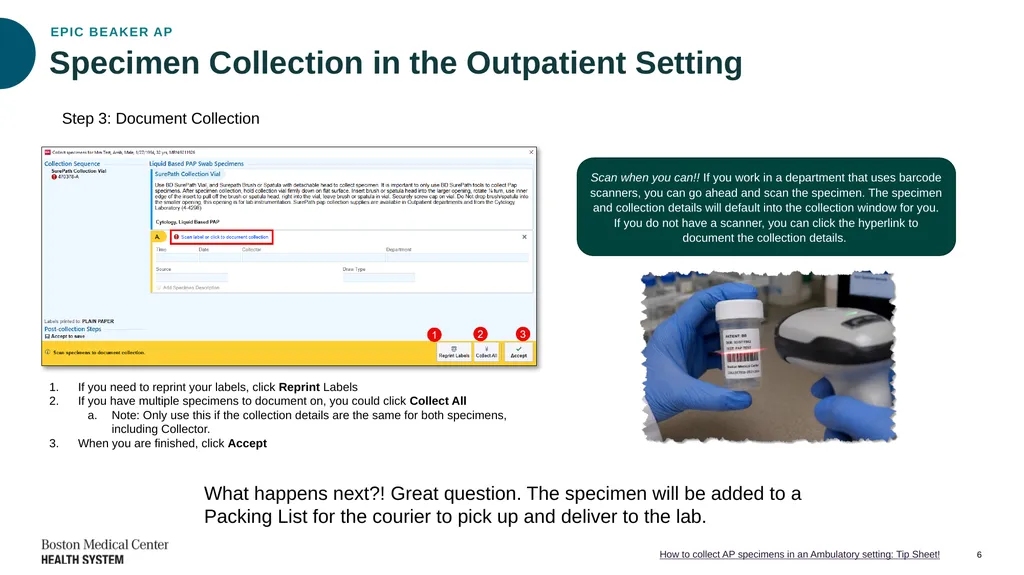
Step 3: Document Collection 6 How to collect AP specimens in an Ambulatory setting: Tip Sheet! If you need to reprint your labels, click Reprint Labels
If you have multiple specimens to document on, you could click Collect All
Note: Only use this if the collection details are the same for both specimens, including Collector.
When you are finished, click Accept Scan when you can!! If you work in a department that uses barcode scanners, you can go ahead and scan the specimen. The specimen and collection details will default into the collection window for you. If you do not have a scanner, you can click the hyperlink to document the collection details. What happens next?! Great question. The specimen will be added to a Packing List for the courier to pick up and deliver to the lab. Specimen Collection in the Outpatient Setting EPIC BEAKER AP<br>
07
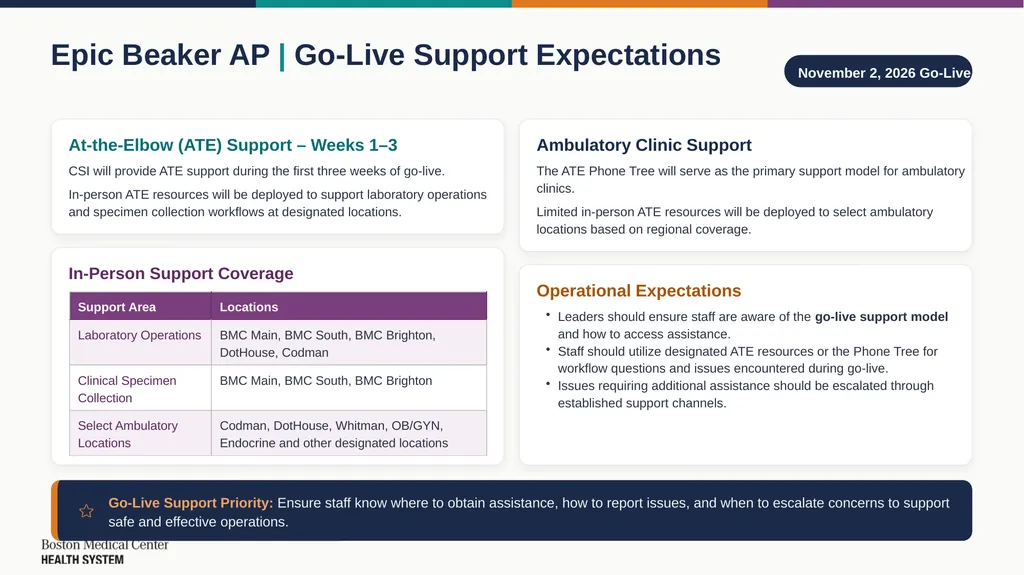
Epic Beaker AP | Go-Live Support Expectations November 2, 2026 Go-Live At-the-Elbow (ATE) Support – Weeks 1–3 CSI will provide ATE support during the first three weeks of go-live. In-person ATE resources will be deployed to support laboratory operations and specimen collection workflows at designated locations. In-Person Support Coverage Ambulatory Clinic Support The ATE Phone Tree will serve as the primary support model for ambulatory clinics. Limited in-person ATE resources will be deployed to select ambulatory locations based on regional coverage. Operational Expectations Leaders should ensure staff are aware of the go-live support model and how to access assistance.
Staff should utilize designated ATE resources or the Phone Tree for workflow questions and issues encountered during go-live.
Issues requiring additional assistance should be escalated through established support channels. Go-Live Support Priority: Ensure staff know where to obtain assistance, how to report issues, and when to escalate concerns to support safe and effective operations.<br>
08
Questions?<br>
09
Appendix<br>
10
EPIC BEAKER AP · GO-LIVE READINESS Device Installation & Testing Underway IN PROGRESS Prep for Epic Beaker AP implementation Installation, Testing & TDR Underway Device installation and testing, including Technical Dress Rehearsal (TDR), are underway in preparation for the Epic Beaker AP implementation. You may see team members in your area installing, testing, or validating equipment. Do Not Unplug or Move Validated Equipment Once equipment has been validated, please do not unplug or move it. Doing so may require retesting and delay completion of TDR.<br>
11
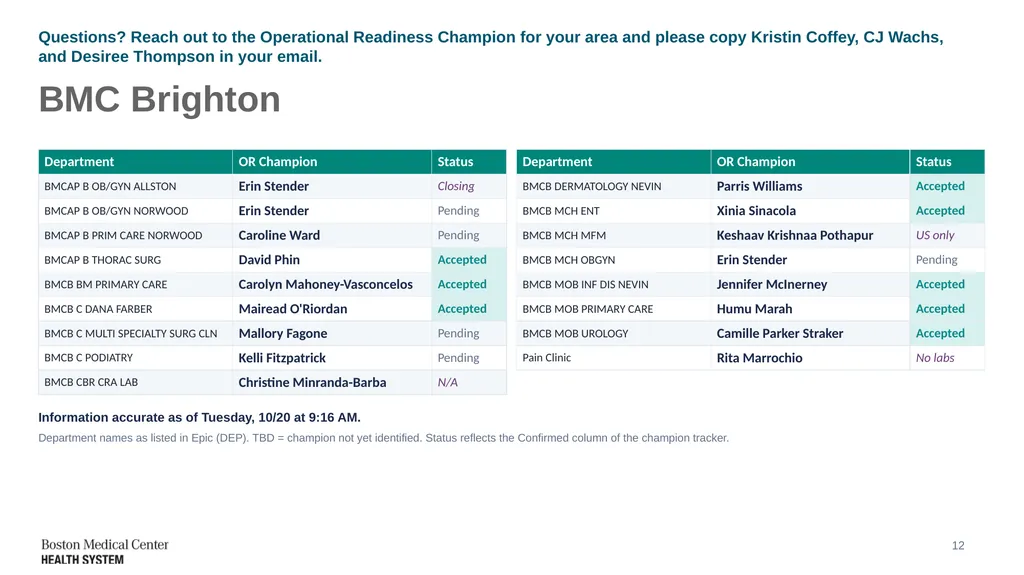
Questions? Reach out to the Operational Readiness Champion for your area and please copy Kristin Coffey, CJ Wachs, and Desiree Thompson in your email. BMC Brighton Information accurate as of Tuesday, 10/20 at 9:16 AM. Department names as listed in Epic (DEP). TBD = champion not yet identified. Status reflects the Confirmed column of the champion tracker. 12<br>
12
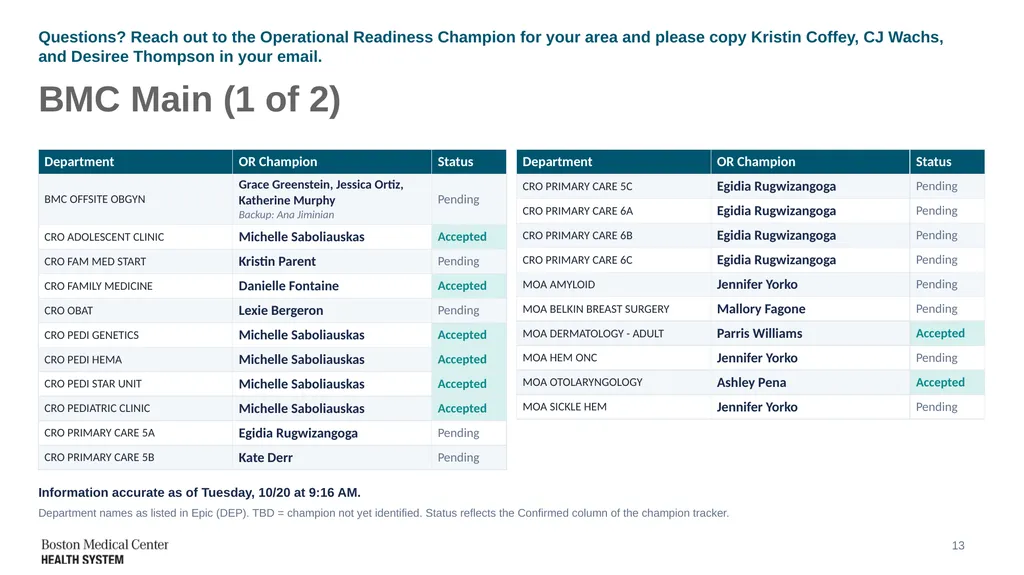
Questions? Reach out to the Operational Readiness Champion for your area and please copy Kristin Coffey, CJ Wachs, and Desiree Thompson in your email. BMC Main (1 of 2) Information accurate as of Tuesday, 10/20 at 9:16 AM. Department names as listed in Epic (DEP). TBD = champion not yet identified. Status reflects the Confirmed column of the champion tracker. 13<br>
13
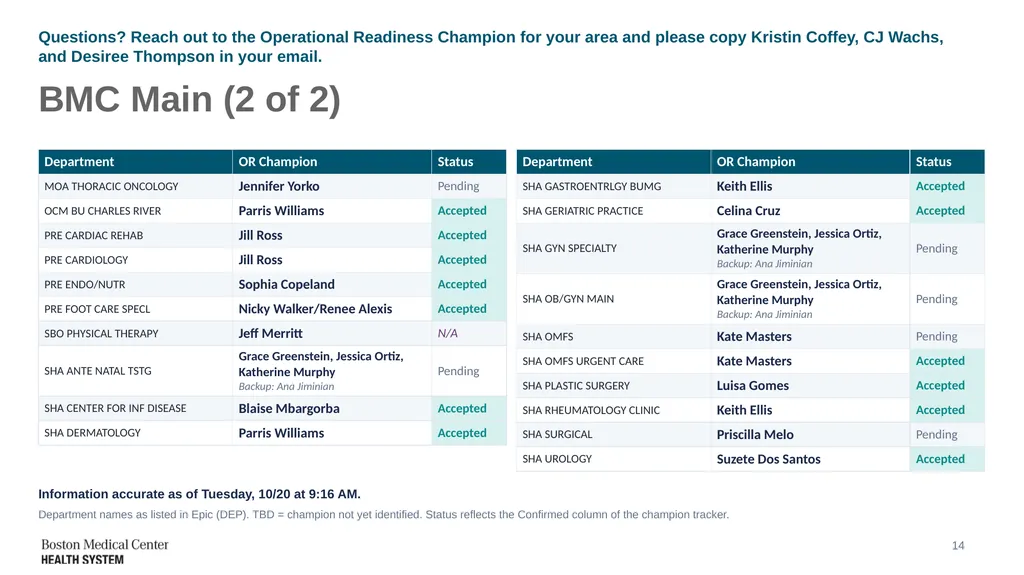
Questions? Reach out to the Operational Readiness Champion for your area and please copy Kristin Coffey, CJ Wachs, and Desiree Thompson in your email. BMC Main (2 of 2) Information accurate as of Tuesday, 10/20 at 9:16 AM. Department names as listed in Epic (DEP). TBD = champion not yet identified. Status reflects the Confirmed column of the champion tracker. 14<br>
14
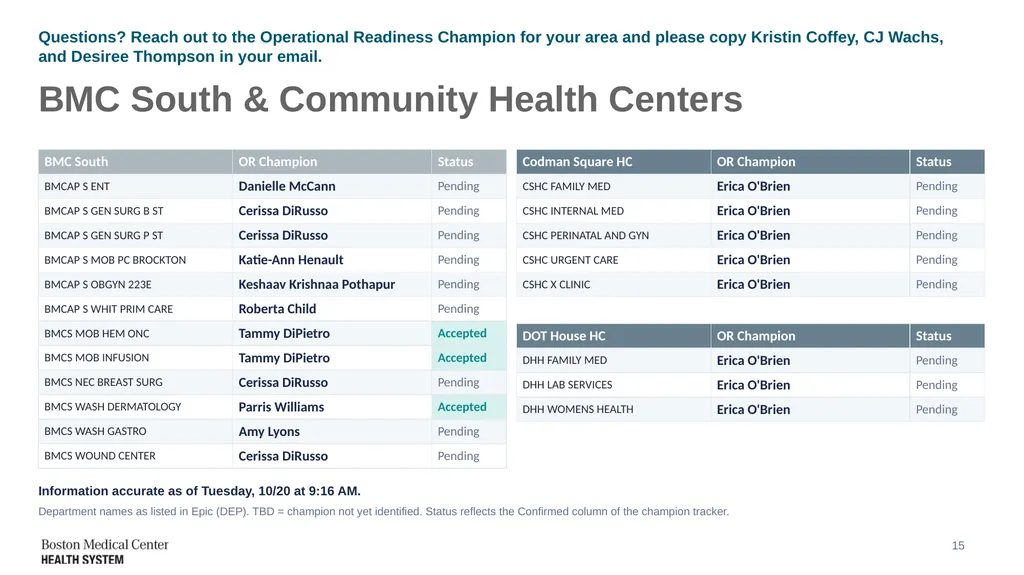
Questions? Reach out to the Operational Readiness Champion for your area and please copy Kristin Coffey, CJ Wachs, and Desiree Thompson in your email. BMC South & Community Health Centers Information accurate as of Tuesday, 10/20 at 9:16 AM. Department names as listed in Epic (DEP). TBD = champion not yet identified. Status reflects the Confirmed column of the champion tracker. 15<br>