
Human-Computer Interaction: Interaction Design and
GB
Published · 40 slides · 0 views
1 / 1

Description
Human-Computer Interaction: Interaction Design and Affordances CSCE 315 Programming Studio Project 3 Slides by John Keyser HCI Human-Computer Interaction (HCI) vs Computer-Human Interaction (CHI) Refer broadly to the same field HCI is
Related Topics
Share
Embed code
Download this presentation From Below
"Human-Computer Interaction: Interaction Design and" is the property of its rightful owner. Permission is granted to download and print the materials on this website for personal, non-commercial use only, and to display it on your personal computer provided you do not modify the materials and that you retain all copyright notices contained in the materials. By downloading content from our website, you accept the terms of this agreement.
Presentation Transcript
01
Human-Computer Interaction:
Interaction Design and Affordances CSCE 315 – Programming Studio
Project 3
Slides by John Keyser<br>
Project 3
Slides by John Keyser<br>
02
HCI Human-Computer Interaction (HCI) vs Computer-Human Interaction (CHI)
Refer broadly to the same field
HCI is generally preferred by researchers, since it emphasizes the importance of the human
Most prominent research group/conference is SIGCHI 2<br>
Refer broadly to the same field
HCI is generally preferred by researchers, since it emphasizes the importance of the human
Most prominent research group/conference is SIGCHI 2<br>
03
HCI Overview Broadly, the study of how people and technology interact, with particular focus on computing
Relies heavily on other fields beyond computing:
Psychology/behavioral/cognitive sciences
Design (in many forms)
Human factors (ergonomics/kinesthesiology)
Linguistics/language
Includes or works closely with other fields in computing (broadly defined):
Information science
Visualization/graphics
Vision
Artificial intelligence 3<br>
Relies heavily on other fields beyond computing:
Psychology/behavioral/cognitive sciences
Design (in many forms)
Human factors (ergonomics/kinesthesiology)
Linguistics/language
Includes or works closely with other fields in computing (broadly defined):
Information science
Visualization/graphics
Vision
Artificial intelligence 3<br>
04
Important Areas of HCI Design
How do you design things well so that people can use them?
Evaluation
How do you evaluate the way people actually use the computing product?
How do you use this evaluation to improve the product? 4<br>
How do you design things well so that people can use them?
Evaluation
How do you evaluate the way people actually use the computing product?
How do you use this evaluation to improve the product? 4<br>
05
The User Experience How a product behaves and is used by people in the real world
the way people feel about it and their pleasure and satisfaction when using it, looking at it, holding it, and opening or closing it
“every product that is used by someone has a user experience: newspapers, ketchup bottles, reclining armchairs, cardigan sweaters.” (Garrett, 2010)
“all aspects of the end-user's interaction with the company, its services, and its products. (Nielsen and Norman, 2014)
Cannot design a user experience, only design for a user experience www.id-book.com 5<br>
the way people feel about it and their pleasure and satisfaction when using it, looking at it, holding it, and opening or closing it
“every product that is used by someone has a user experience: newspapers, ketchup bottles, reclining armchairs, cardigan sweaters.” (Garrett, 2010)
“all aspects of the end-user's interaction with the company, its services, and its products. (Nielsen and Norman, 2014)
Cannot design a user experience, only design for a user experience www.id-book.com 5<br>
06
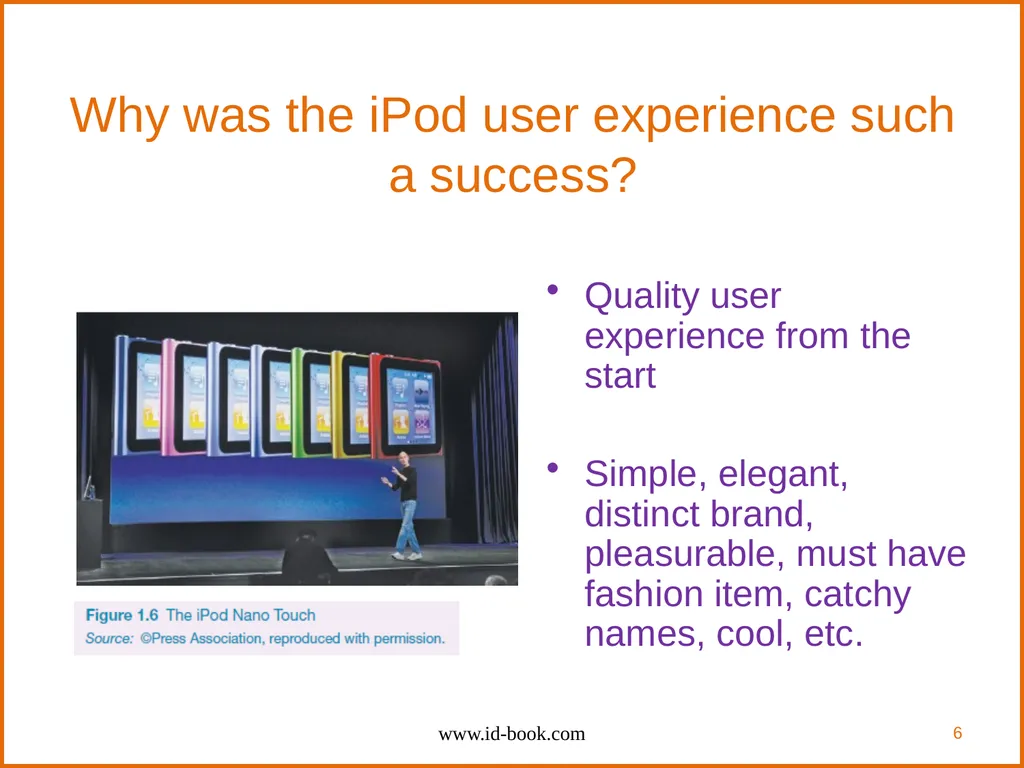
Why was the iPod user experience such a success? Quality user experience from the start
Simple, elegant, distinct brand, pleasurable, must have fashion item, catchy names, cool, etc. www.id-book.com 6<br>
Simple, elegant, distinct brand, pleasurable, must have fashion item, catchy names, cool, etc. www.id-book.com 6<br>
07
What is involved in the process of interaction design Establishing requirements
Developing alternatives
Prototyping
Evaluating www.id-book.com 7<br>
Developing alternatives
Prototyping
Evaluating www.id-book.com 7<br>
08
Core characteristics of interaction design Users should be involved through the development of the project
Specific usability and user experience goals need to be identified, clearly documented and agreed at the beginning of the project
Iteration is needed through the core activities www.id-book.com 8<br>
Specific usability and user experience goals need to be identified, clearly documented and agreed at the beginning of the project
Iteration is needed through the core activities www.id-book.com 8<br>
09
Why go to this length? Help designers:
understand how to design interactive products that fit with what people want, need and may desire
appreciate that one size does not fit all
e.g., teenagers are very different to grown-ups
identify any incorrect assumptions they may have about particular user groups
e.g., not all old people want or need big fonts
be aware of both people’s sensitivities and their capabilities www.id-book.com 9<br>
understand how to design interactive products that fit with what people want, need and may desire
appreciate that one size does not fit all
e.g., teenagers are very different to grown-ups
identify any incorrect assumptions they may have about particular user groups
e.g., not all old people want or need big fonts
be aware of both people’s sensitivities and their capabilities www.id-book.com 9<br>
10
Are cultural differences important? 5/21/2015 versus 21/5/2015?
Which should be used for international services and online forms?
Why is it that certain products, like the iPod, are universally accepted by people from all parts of the world whereas websites are reacted to differently by people from different cultures? www.id-book.com 10<br>
Which should be used for international services and online forms?
Why is it that certain products, like the iPod, are universally accepted by people from all parts of the world whereas websites are reacted to differently by people from different cultures? www.id-book.com 10<br>
11
Accessibility Degree to which a product is usable and accessible by as many people as possible
Focus on disability:
Have a mental or physical impairment
This has an adverse affect on their everyday lives
It is long term www.id-book.com 11<br>
Focus on disability:
Have a mental or physical impairment
This has an adverse affect on their everyday lives
It is long term www.id-book.com 11<br>
12
Anna, IKEA online sales agent Designed to be
different for UK and US
customers
What are the differences and which is which?
What should Anna’s appearance be like for other countries, like India, South Africa, or China? www.id-book.com 12<br>
What are the differences and which is which?
What should Anna’s appearance be like for other countries, like India, South Africa, or China? www.id-book.com 12<br>
13
Usability goals Effective to use
Efficient to use
Safe to use
Have good utility
Easy to learn
Easy to remember how to use www.id-book.com 13<br>
Efficient to use
Safe to use
Have good utility
Easy to learn
Easy to remember how to use www.id-book.com 13<br>
14
User experience goals Desirable aspects
satisfying helpful fun
enjoyable motivating provocative
engaging challenging surprising
pleasurable enhancing sociability rewarding
exciting supporting creativity emotionally fulfilling
entertaining cognitively stimulating
Undesirable aspects
boring unpleasant
frustrating patronizing
making one feel guilty making one feel stupid
annoying cutesy
childish gimmicky www.id-book.com 14<br>
satisfying helpful fun
enjoyable motivating provocative
engaging challenging surprising
pleasurable enhancing sociability rewarding
exciting supporting creativity emotionally fulfilling
entertaining cognitively stimulating
Undesirable aspects
boring unpleasant
frustrating patronizing
making one feel guilty making one feel stupid
annoying cutesy
childish gimmicky www.id-book.com 14<br>
15
Usability and user experience goals Selecting terms to convey a person’s feelings, emotions, etc., can help designers understand the multifaceted nature of the user experience
How do usability goals differ from user experience goals?
Are there trade-offs between the two kinds of goals?
e.g. can a product be both fun and safe?
How easy is it to measure usability versus user experience goals? www.id-book.com 15<br>
How do usability goals differ from user experience goals?
Are there trade-offs between the two kinds of goals?
e.g. can a product be both fun and safe?
How easy is it to measure usability versus user experience goals? www.id-book.com 15<br>
16
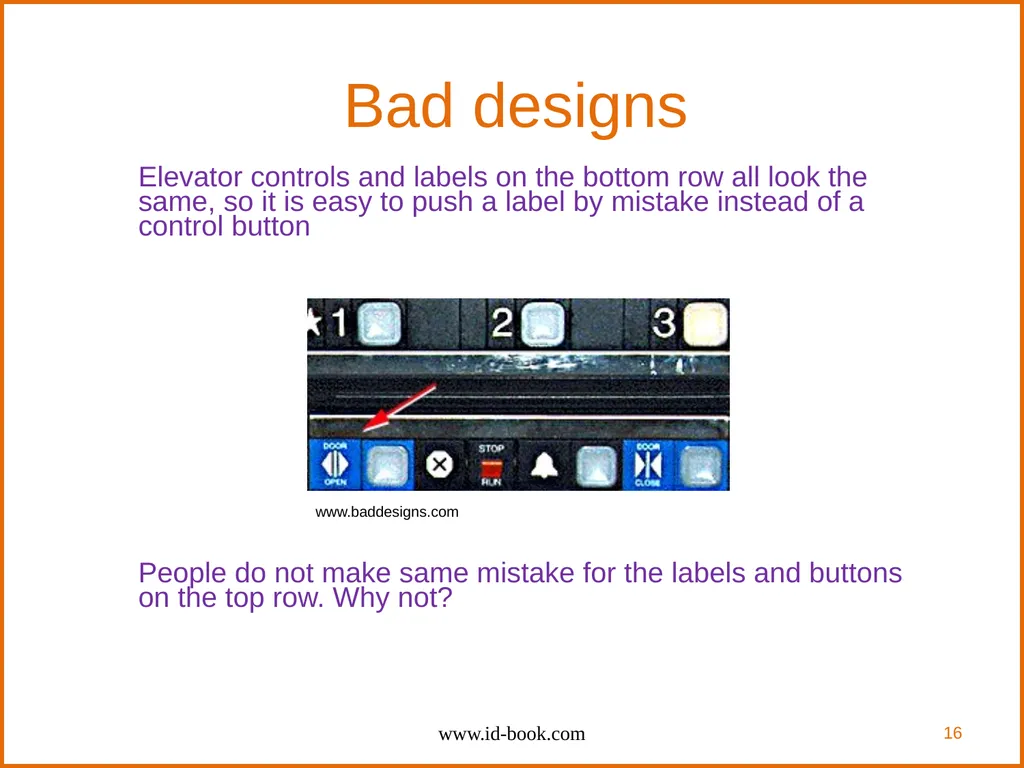
Bad designs Elevator controls and labels on the bottom row all look the same, so it is easy to push a label by mistake instead of a control button
People do not make same mistake for the labels and buttons on the top row. Why not? www.id-book.com 16 www.baddesigns.com<br>
People do not make same mistake for the labels and buttons on the top row. Why not? www.id-book.com 16 www.baddesigns.com<br>
17
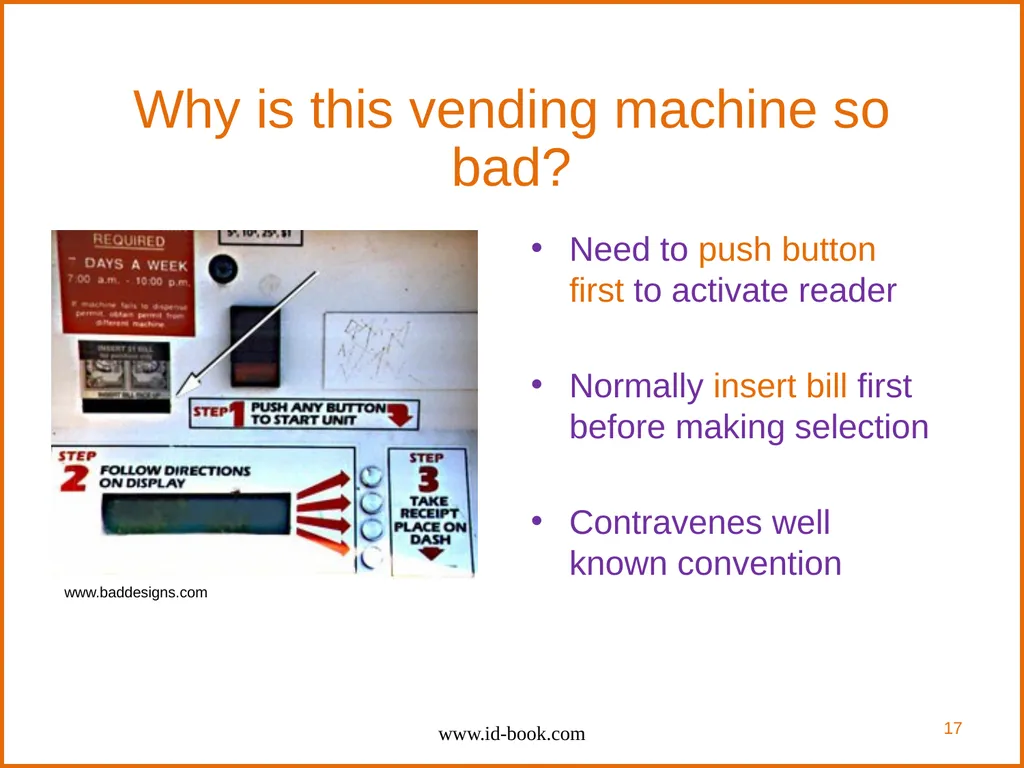
Why is this vending machine so bad? Need to push button first to activate reader
Normally insert bill first before making selection
Contravenes well known convention www.id-book.com www.baddesigns.com 17<br>
Normally insert bill first before making selection
Contravenes well known convention www.id-book.com www.baddesigns.com 17<br>
18
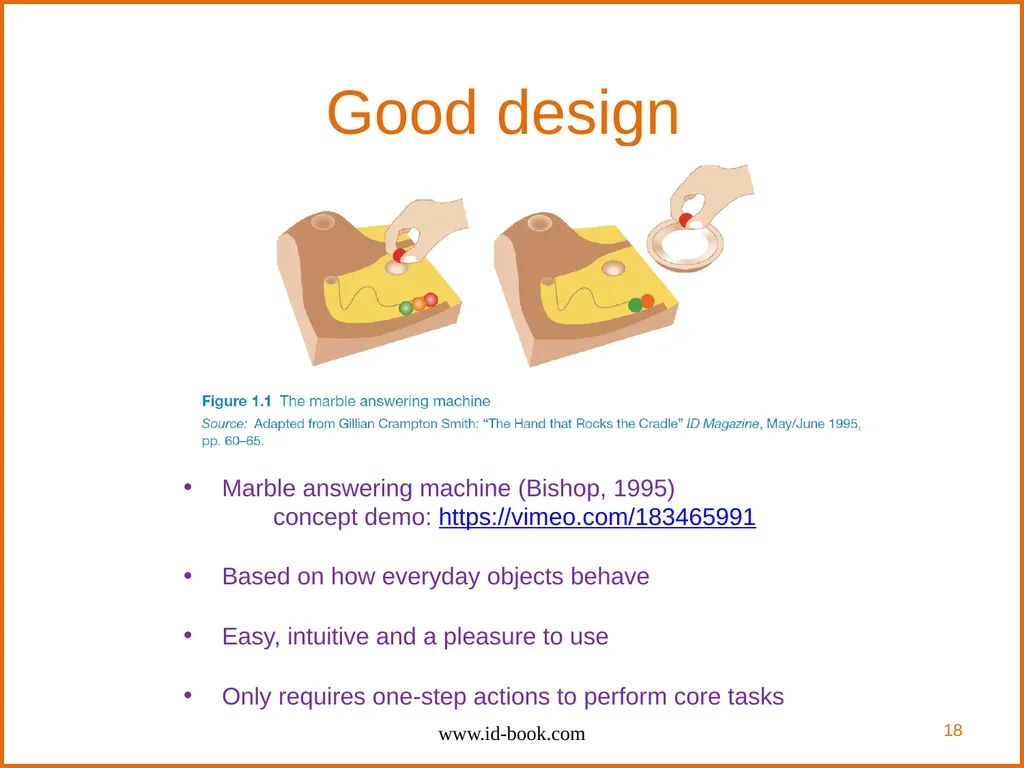
Good design Marble answering machine (Bishop, 1995)
concept demo: https://vimeo.com/183465991
Based on how everyday objects behave
Easy, intuitive and a pleasure to use
Only requires one-step actions to perform core tasks www.id-book.com 18<br>
concept demo: https://vimeo.com/183465991
Based on how everyday objects behave
Easy, intuitive and a pleasure to use
Only requires one-step actions to perform core tasks www.id-book.com 18<br>
19
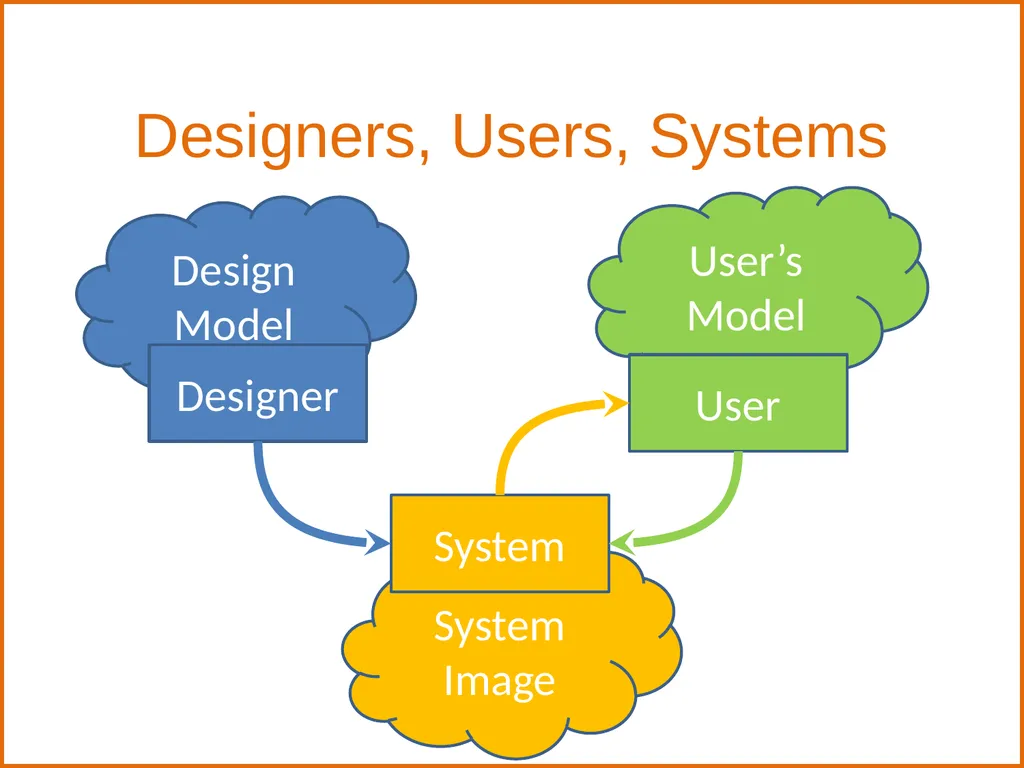
System Image Designers, Users, Systems System Design Model Designer User’s
Model User<br>
Model User<br>
20
Design principles Generalizable abstractions for thinking about different aspects of design
The do’s and don'ts of interaction design
What to provide and what not to provide at the interface
Derived from a mix of theory-based knowledge, experience and common-sense www.id-book.com 20<br>
The do’s and don'ts of interaction design
What to provide and what not to provide at the interface
Derived from a mix of theory-based knowledge, experience and common-sense www.id-book.com 20<br>
21
Interaction Design Autonomy
Enable users to make their own decisions, even if they are less efficient or aesthetically poor
Exercise responsible control
Consistency
Changing your interpretation of a user’s habitual action is one of the worst things you can do to a user
Induced inconsistency: It is just as important to be visually inconsistent when things act differently as it is to be visually consistent when things act the same. Make objects that act differently look different.
Discoverability
Any attempt to hide complexity will serve to increase it AskTOG – First Principles of Interaction Design 21<br>
Enable users to make their own decisions, even if they are less efficient or aesthetically poor
Exercise responsible control
Consistency
Changing your interpretation of a user’s habitual action is one of the worst things you can do to a user
Induced inconsistency: It is just as important to be visually inconsistent when things act differently as it is to be visually consistent when things act the same. Make objects that act differently look different.
Discoverability
Any attempt to hide complexity will serve to increase it AskTOG – First Principles of Interaction Design 21<br>
22
Interaction Design Explorable Interfaces
Give users well-marked roads and landmarks, then let them shift into four-wheel drive. Mimic the safety, consistency, and predictability of the natural landscape we’ve evolved to navigate successfully.
Allow undo, a way out
Make it attractive to stay in – clear, visible workflow
Metaphors
Choose metaphors that will enable users to instantly grasp the finest detail of the conceptual model
Bring metaphors ‘alive’ by appealing to people’s perceptions – sight, sound, touch, and proprioception/kinesthesia – as well as triggering their memories
Fitt’s Law
Time to acquire a target is a function of the distance to and size of the target
Time to acquire multiple targets is the sum of the time to acquire each AskTOG – First Principles of Interaction Design 22<br>
Give users well-marked roads and landmarks, then let them shift into four-wheel drive. Mimic the safety, consistency, and predictability of the natural landscape we’ve evolved to navigate successfully.
Allow undo, a way out
Make it attractive to stay in – clear, visible workflow
Metaphors
Choose metaphors that will enable users to instantly grasp the finest detail of the conceptual model
Bring metaphors ‘alive’ by appealing to people’s perceptions – sight, sound, touch, and proprioception/kinesthesia – as well as triggering their memories
Fitt’s Law
Time to acquire a target is a function of the distance to and size of the target
Time to acquire multiple targets is the sum of the time to acquire each AskTOG – First Principles of Interaction Design 22<br>
23
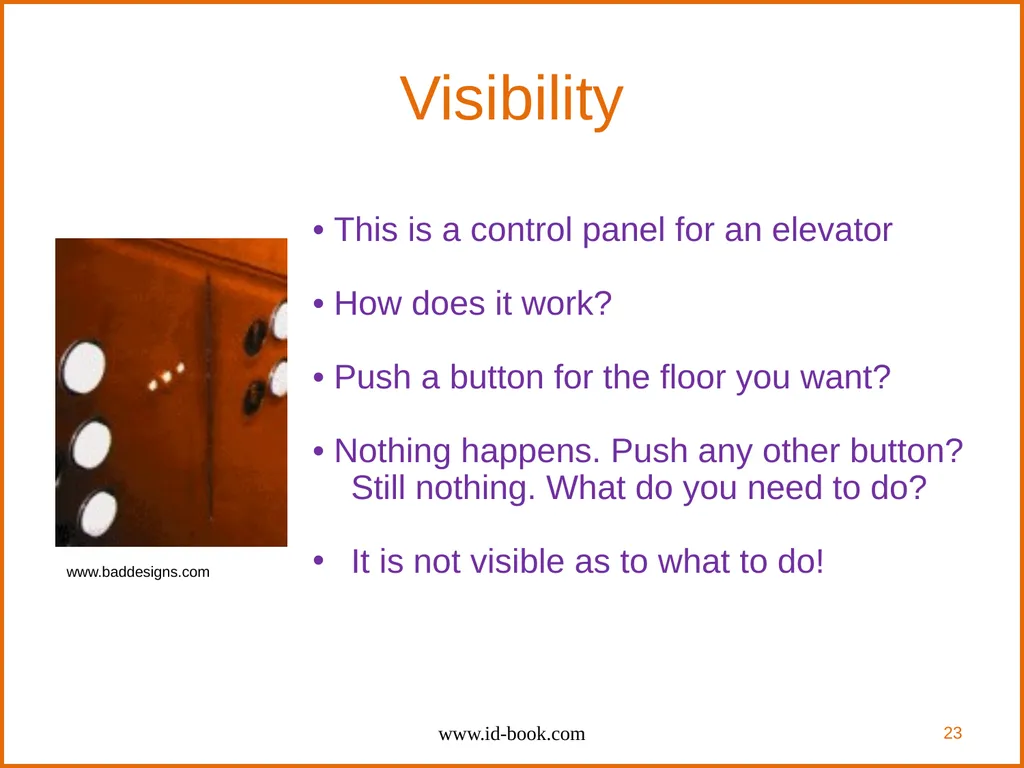
Visibility • This is a control panel for an elevator
• How does it work?
• Push a button for the floor you want?
• Nothing happens. Push any other button? Still nothing. What do you need to do?
It is not visible as to what to do! www.id-book.com 23 www.baddesigns.com<br>
• How does it work?
• Push a button for the floor you want?
• Nothing happens. Push any other button? Still nothing. What do you need to do?
It is not visible as to what to do! www.id-book.com 23 www.baddesigns.com<br>
24
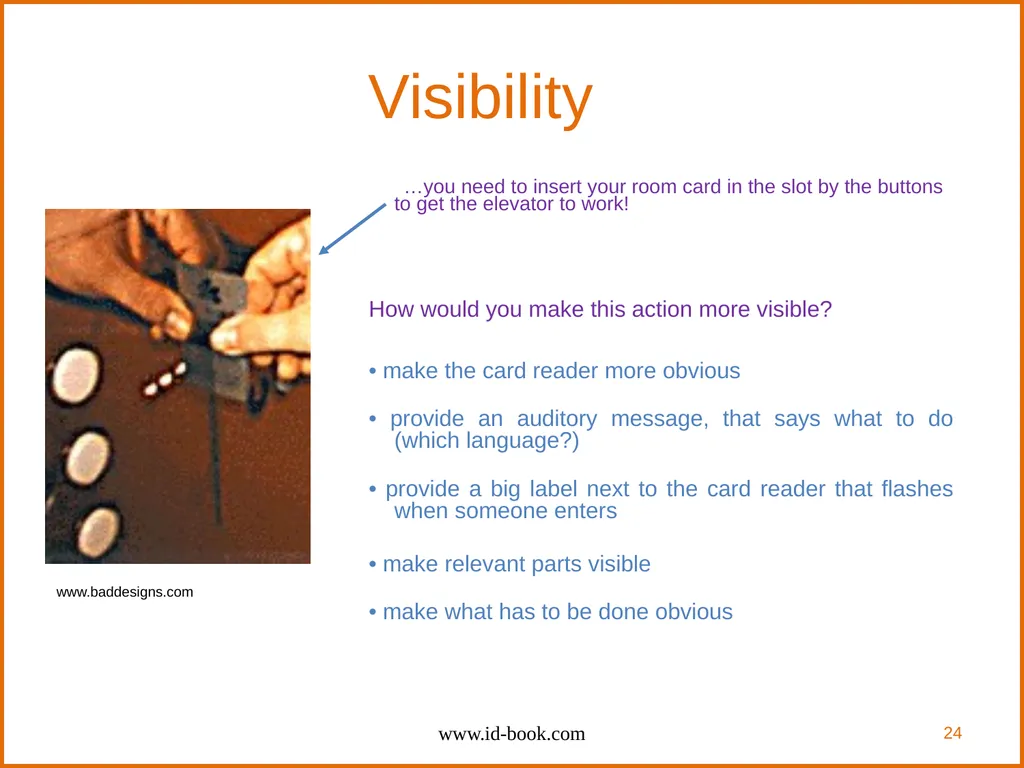
Visibility …you need to insert your room card in the slot by the buttons to get the elevator to work!
How would you make this action more visible?
• make the card reader more obvious
• provide an auditory message, that says what to do (which language?)
• provide a big label next to the card reader that flashes when someone enters
• make relevant parts visible
• make what has to be done obvious www.id-book.com 24 www.baddesigns.com<br>
How would you make this action more visible?
• make the card reader more obvious
• provide an auditory message, that says what to do (which language?)
• provide a big label next to the card reader that flashes when someone enters
• make relevant parts visible
• make what has to be done obvious www.id-book.com 24 www.baddesigns.com<br>
25
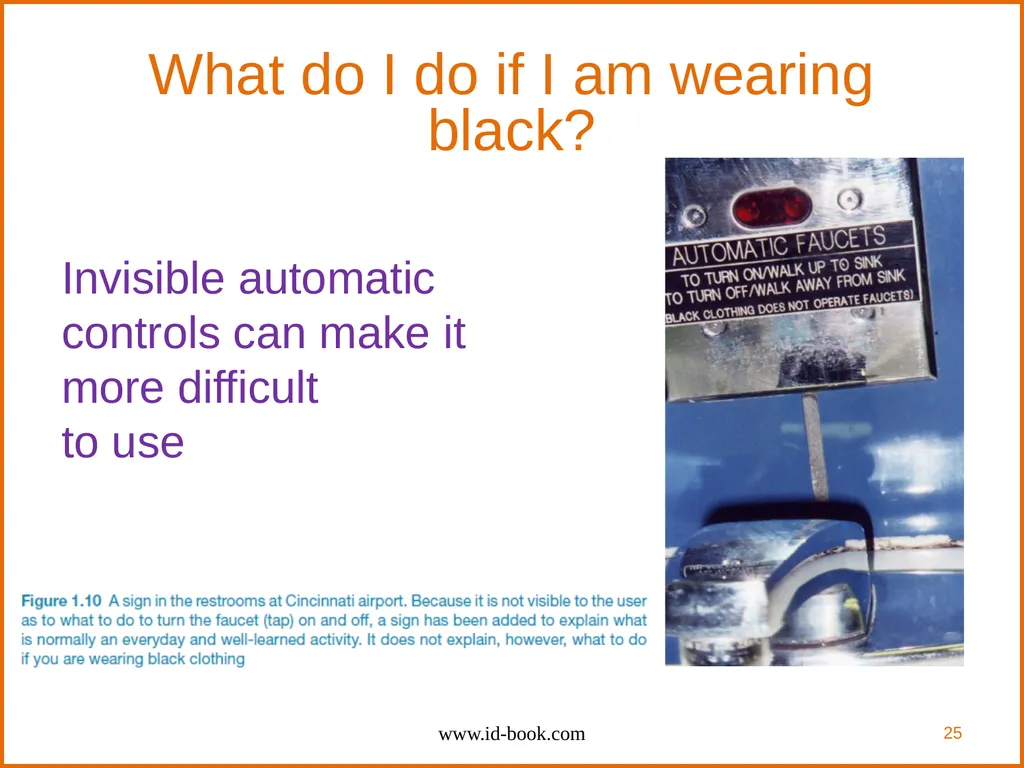
What do I do if I am wearing black? Invisible automatic
controls can make it
more difficult
to use www.id-book.com 25<br>
26
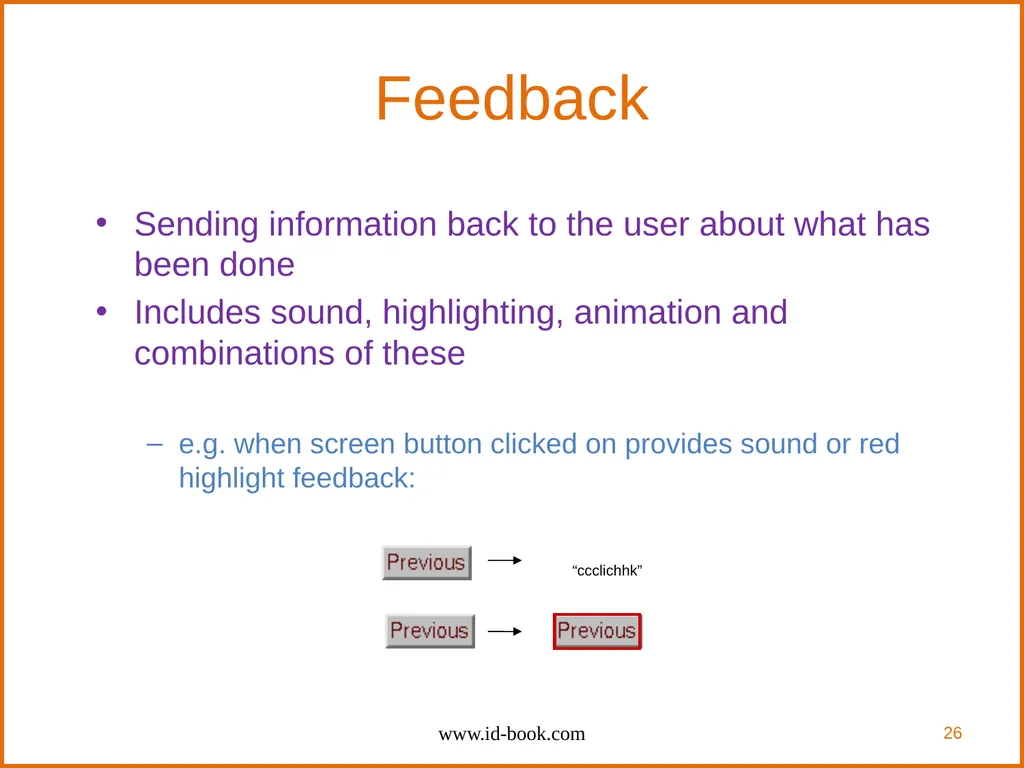
Feedback Sending information back to the user about what has been done
Includes sound, highlighting, animation and combinations of these
e.g. when screen button clicked on provides sound or red highlight feedback: www.id-book.com 26 “ccclichhk”<br>
Includes sound, highlighting, animation and combinations of these
e.g. when screen button clicked on provides sound or red highlight feedback: www.id-book.com 26 “ccclichhk”<br>
27
Constraints Restricting the possible actions that can be performed
Helps prevent user from selecting incorrect options
Physical objects can be designed to constrain things
e.g. only one way you can insert a key into a lock www.id-book.com 27<br>
Helps prevent user from selecting incorrect options
Physical objects can be designed to constrain things
e.g. only one way you can insert a key into a lock www.id-book.com 27<br>
28
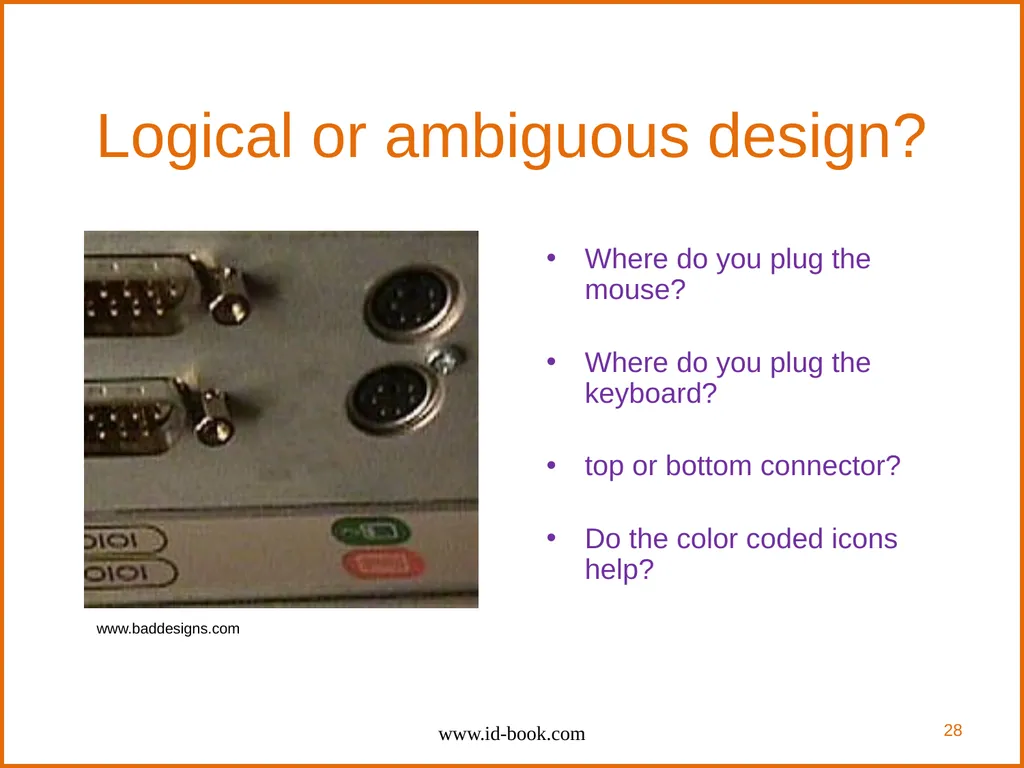
Logical or ambiguous design? Where do you plug the mouse?
Where do you plug the keyboard?
top or bottom connector?
Do the color coded icons help? www.id-book.com www.baddesigns.com 28<br>
Where do you plug the keyboard?
top or bottom connector?
Do the color coded icons help? www.id-book.com www.baddesigns.com 28<br>
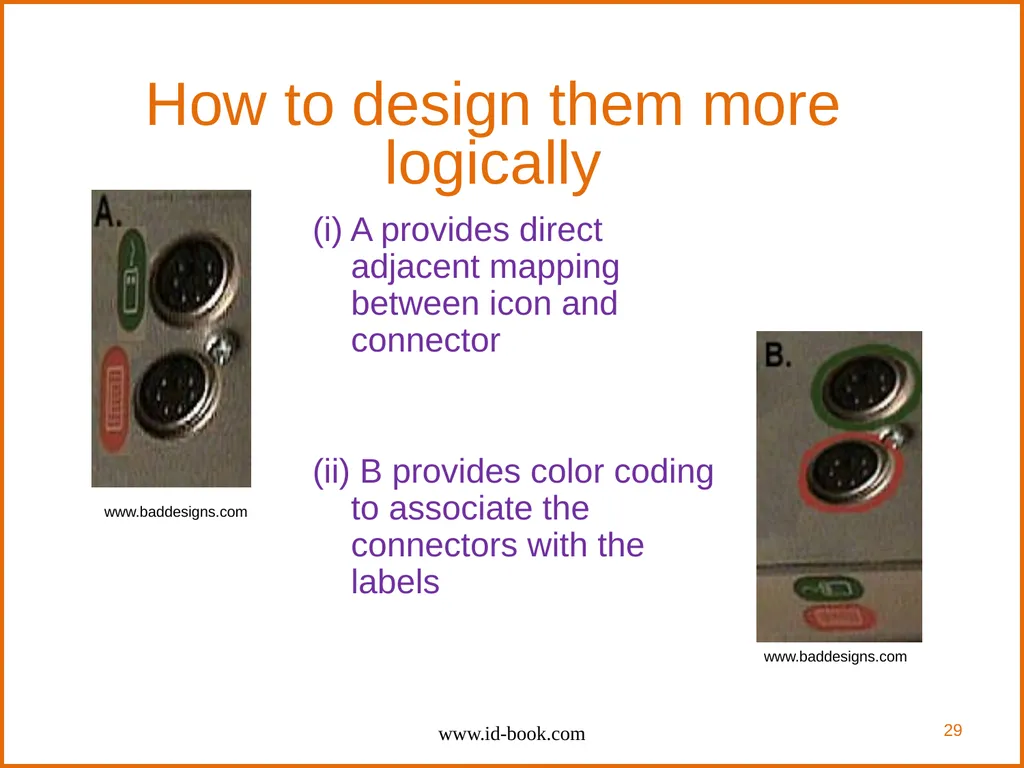
29
How to design them more logically (i) A provides direct adjacent mapping between icon and connector
(ii) B provides color coding to associate the connectors with the labels www.id-book.com www.baddesigns.com www.baddesigns.com 29<br>
(ii) B provides color coding to associate the connectors with the labels www.id-book.com www.baddesigns.com www.baddesigns.com 29<br>
30
Consistency Design interfaces to have similar operations and use similar elements for similar tasks
For example:
always use ctrl key plus first initial of the command for an operation – ctrl+C, ctrl+S, ctrl+O
Main benefit is consistent interfaces are easier to learn and use www.id-book.com 30<br>
For example:
always use ctrl key plus first initial of the command for an operation – ctrl+C, ctrl+S, ctrl+O
Main benefit is consistent interfaces are easier to learn and use www.id-book.com 30<br>
31
When consistency breaks down What happens if there is more than one command starting with the same letter?
e.g. save, spelling, select, style
Have to find other initials or combinations of keys, thereby breaking the consistency rule
e.g. ctrl+S, ctrl+Sp, ctrl+shift+L
Increases learning burden on user, making them more prone to errors www.id-book.com 31<br>
e.g. save, spelling, select, style
Have to find other initials or combinations of keys, thereby breaking the consistency rule
e.g. ctrl+S, ctrl+Sp, ctrl+shift+L
Increases learning burden on user, making them more prone to errors www.id-book.com 31<br>
32
Internal and external consistency Internal consistency refers to designing operations to behave the same within an application
Difficult to achieve with complex interfaces
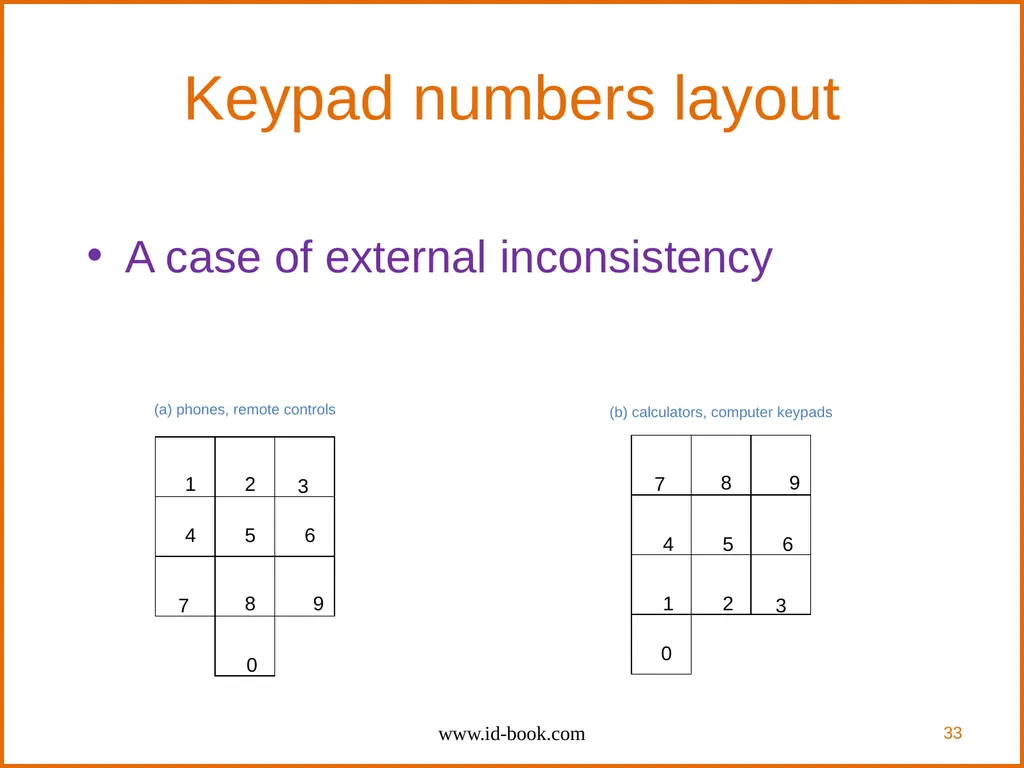
External consistency refers to designing operations, interfaces, etc., to be the same across applications and devices
Very rarely the case, based on different designer’s preference www.id-book.com 32<br>
Difficult to achieve with complex interfaces
External consistency refers to designing operations, interfaces, etc., to be the same across applications and devices
Very rarely the case, based on different designer’s preference www.id-book.com 32<br>
33
Keypad numbers layout A case of external inconsistency www.id-book.com 33 1 2 3 4 5 6 7 8 9 7 8 9 1 2 3 4 5 6 0 0 (a) phones, remote controls (b) calculators, computer keypads<br>
34
Affordances: to give a clue Refers to an attribute of an object that allows people to know how to use it
e.g. a mouse button invites pushing, a door handle affords pulling
“Affordance”: James J. Gibson (ecological psychology)
Norman (1988) used the term to discuss the design of everyday objects
Since has been much popularised in interaction design to discuss how to design interface objects
e.g. scrollbars to afford moving up and down, icons to afford clicking on www.id-book.com 34<br>
e.g. a mouse button invites pushing, a door handle affords pulling
“Affordance”: James J. Gibson (ecological psychology)
Norman (1988) used the term to discuss the design of everyday objects
Since has been much popularised in interaction design to discuss how to design interface objects
e.g. scrollbars to afford moving up and down, icons to afford clicking on www.id-book.com 34<br>
35
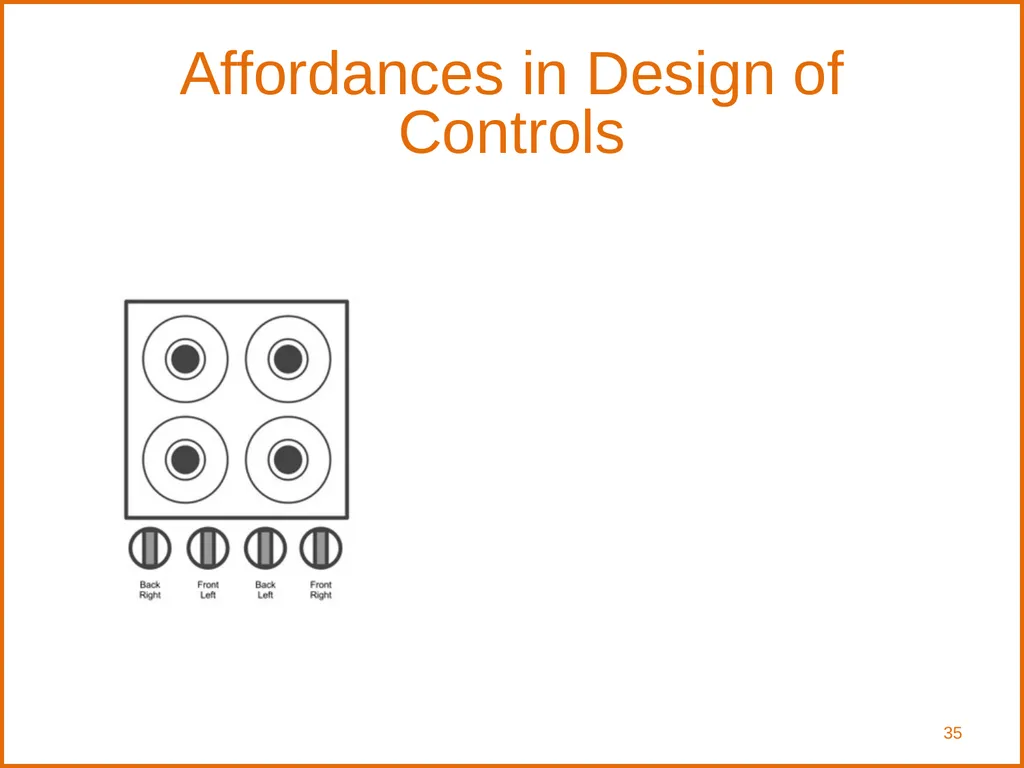
Affordances in Design of Controls 35<br>
36
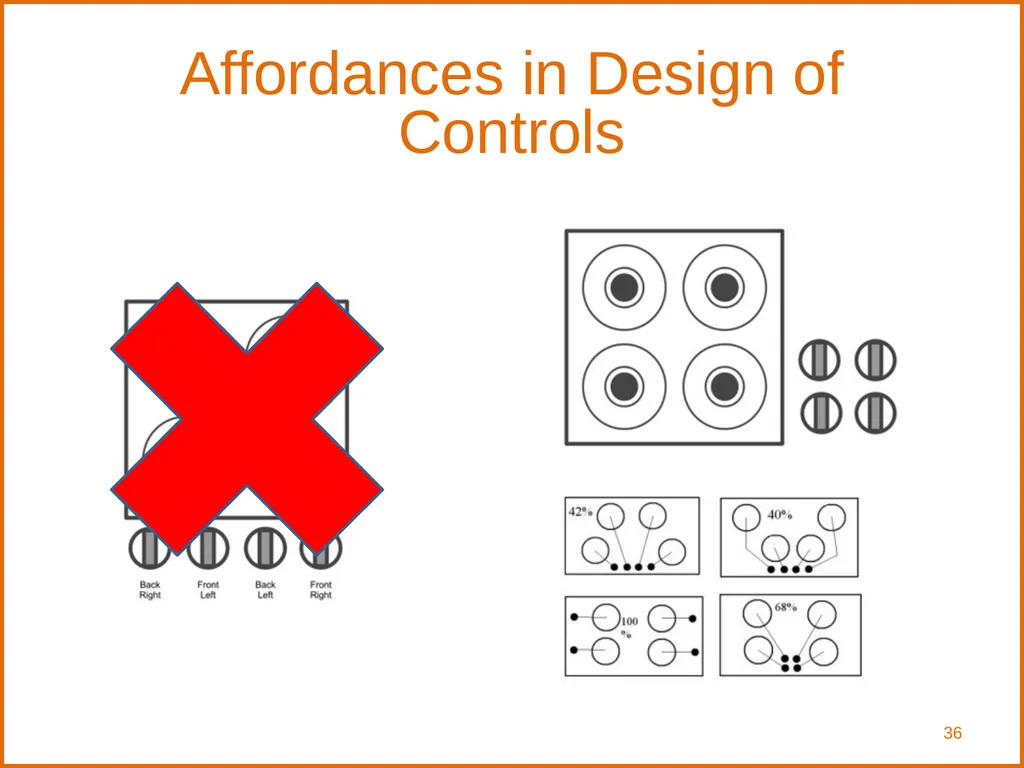
Affordances in Design of Controls 36<br>
37
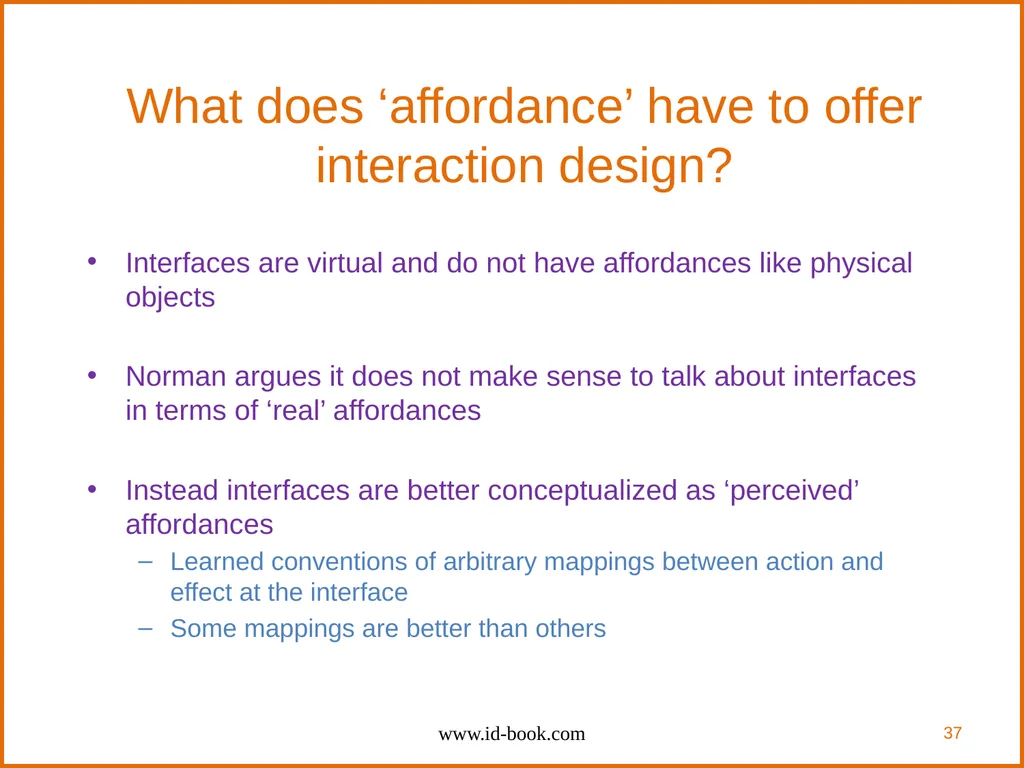
What does ‘affordance’ have to offer interaction design? Interfaces are virtual and do not have affordances like physical objects
Norman argues it does not make sense to talk about interfaces in terms of ‘real’ affordances
Instead interfaces are better conceptualized as ‘perceived’ affordances
Learned conventions of arbitrary mappings between action and effect at the interface
Some mappings are better than others www.id-book.com 37<br>
Norman argues it does not make sense to talk about interfaces in terms of ‘real’ affordances
Instead interfaces are better conceptualized as ‘perceived’ affordances
Learned conventions of arbitrary mappings between action and effect at the interface
Some mappings are better than others www.id-book.com 37<br>
38
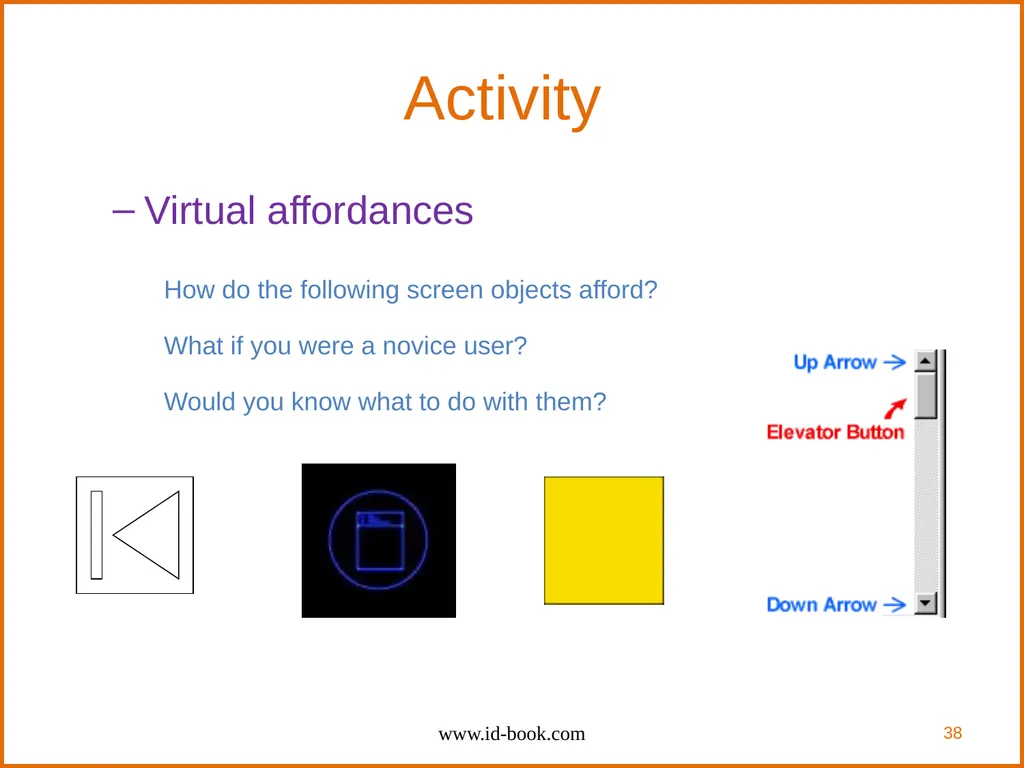
Activity Virtual affordances
How do the following screen objects afford?
What if you were a novice user?
Would you know what to do with them? www.id-book.com 38<br>
How do the following screen objects afford?
What if you were a novice user?
Would you know what to do with them? www.id-book.com 38<br>
39
Key points Interaction design is concerned with designing interactive products to support the way people communicate and interact in their everyday and working lives
It is concerned with how to create quality user experiences
It requires taking into account a number of interdependent factors, including context of use, type of activities, cultural differences, and user groups
It is multidisciplinary, involving many inputs from wide-reaching disciplines and fields www.id-book.com 39<br>
It is concerned with how to create quality user experiences
It requires taking into account a number of interdependent factors, including context of use, type of activities, cultural differences, and user groups
It is multidisciplinary, involving many inputs from wide-reaching disciplines and fields www.id-book.com 39<br>
40
References Many of the slides in this presentation are taken from the lecture material for:
Interaction Design, 4th edition, by Rogers, Sharp, and Preece, Wiley, 2014.
www.id-book.com
http://asktog.com/atc/principles-of-interaction-design/
Some ideas taken from Andruid Kerne’s web pages www.id-book.com 40<br>
Interaction Design, 4th edition, by Rogers, Sharp, and Preece, Wiley, 2014.
www.id-book.com
http://asktog.com/atc/principles-of-interaction-design/
Some ideas taken from Andruid Kerne’s web pages www.id-book.com 40<br>