
Identification and Reconciliation CMDB and IRE
MY
Published · 31 slides · 0 views
1 / 1


Description
Identification and Reconciliation CMDB and IRE March 2025 Asset Number: 0003544 Speaker Name The Identification and Reconciliation Engine is a framework which processes payloads in order to maintain the Configuration Management Database
Related Topics
Share
Embed code
Download this presentation From Below
"Identification and Reconciliation CMDB and IRE" is the property of its rightful owner. Permission is granted to download and print the materials on this website for personal, non-commercial use only, and to display it on your personal computer provided you do not modify the materials and that you retain all copyright notices contained in the materials. By downloading content from our website, you accept the terms of this agreement.
Presentation Transcript
01
Identification and Reconciliation CMDB and IRE March 2025 Asset Number: 0003544 Speaker Name<br>
02
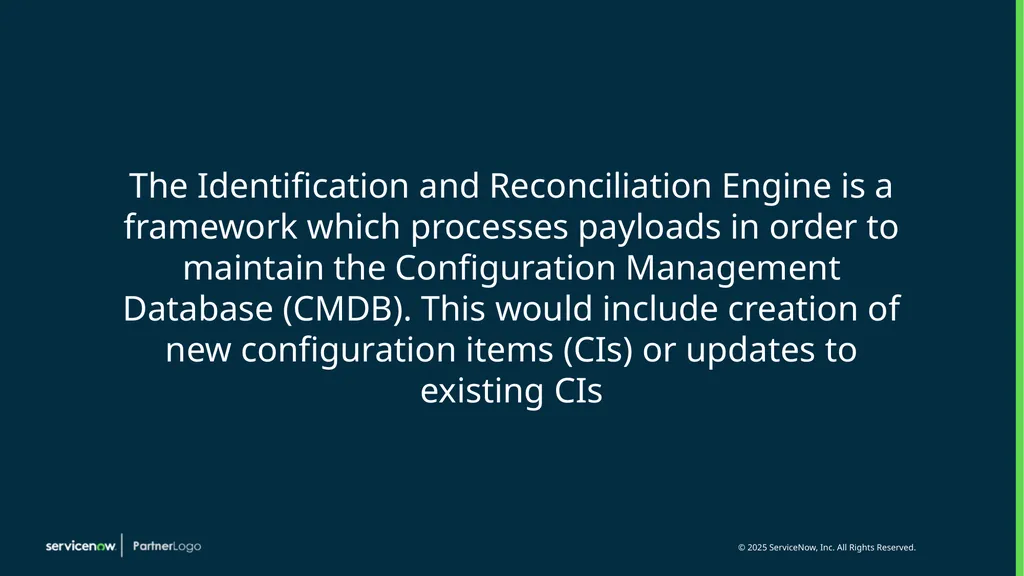
The Identification and Reconciliation Engine is a framework which processes payloads in order to maintain the Configuration Management Database (CMDB). This would include creation of new configuration items (CIs) or updates to existing CIs<br>
03
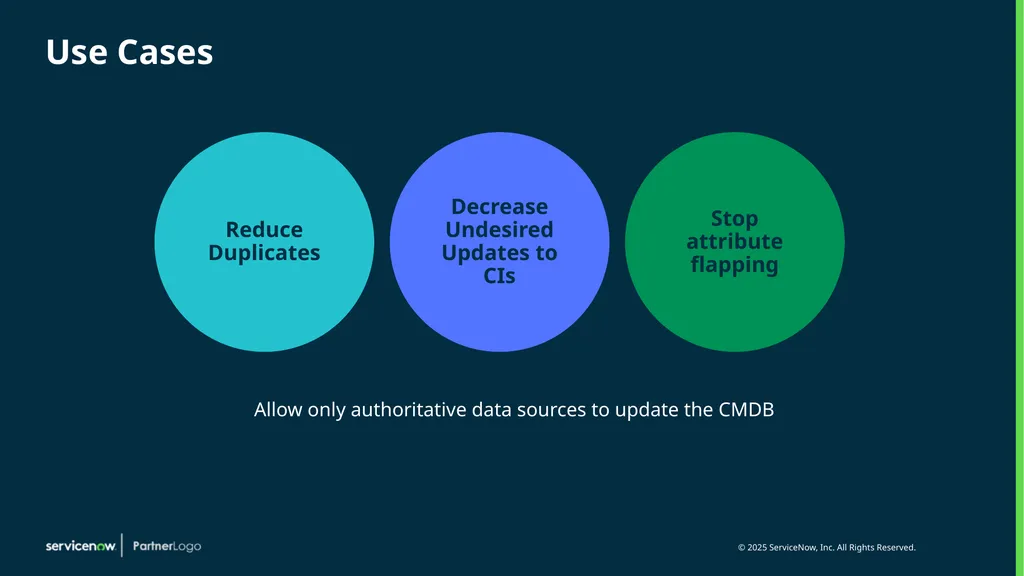
Reduce Duplicates Decrease Undesired Updates to CIs Stop attribute flapping Use Cases Allow only authoritative data sources to update the CMDB<br>
04
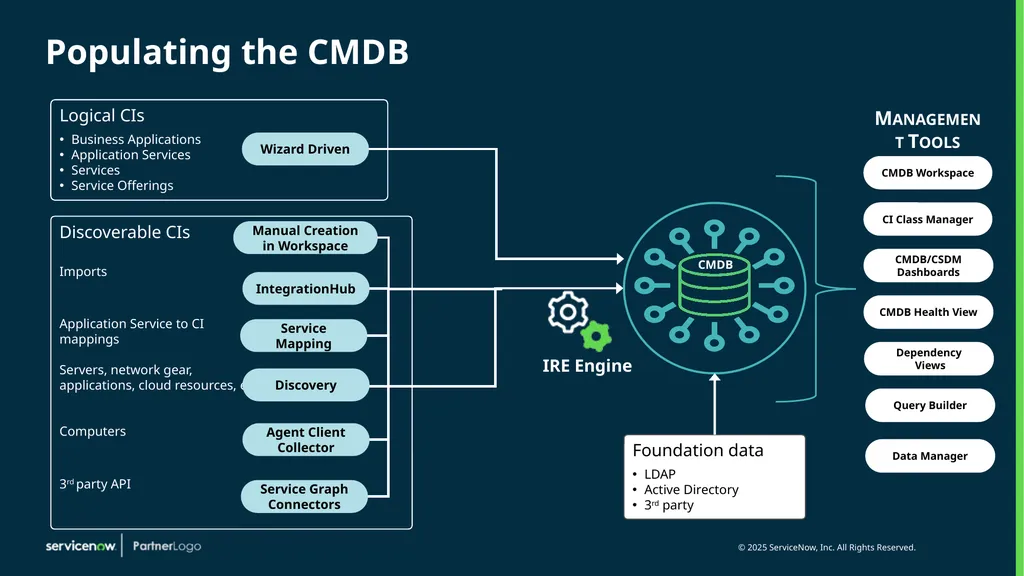
Populating the CMDB Logical CIs
Business Applications
Application Services
Services
Service Offerings Discoverable CIs
Imports
Application Service to CI mappings
Servers, network gear, applications, cloud resources, etc
Computers
3rd party API Foundation data
LDAP
Active Directory
3rd party IRE Engine Management Tools CMDB Wizard Driven IntegrationHub Service Mapping Discovery Agent Client Collector Service Graph Connectors CMDB Workspace CI Class Manager CMDB/CSDM Dashboards CMDB Health View Dependency
Views Query Builder Data Manager Manual Creation in Workspace<br>
Business Applications
Application Services
Services
Service Offerings Discoverable CIs
Imports
Application Service to CI mappings
Servers, network gear, applications, cloud resources, etc
Computers
3rd party API Foundation data
LDAP
Active Directory
3rd party IRE Engine Management Tools CMDB Wizard Driven IntegrationHub Service Mapping Discovery Agent Client Collector Service Graph Connectors CMDB Workspace CI Class Manager CMDB/CSDM Dashboards CMDB Health View Dependency
Views Query Builder Data Manager Manual Creation in Workspace<br>
05
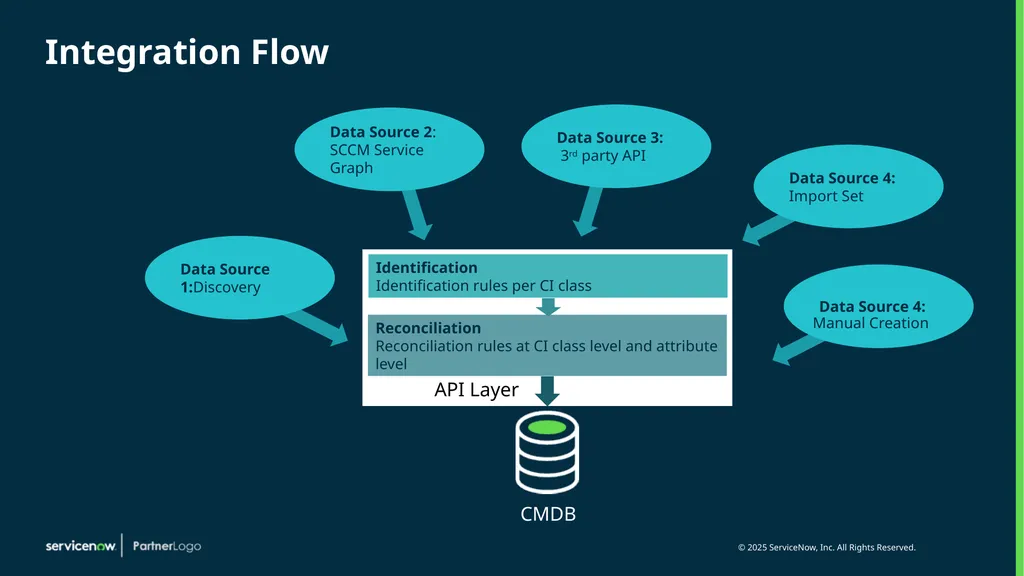
Integration Flow CMDB Data Source 4: Manual Creation<br>
06
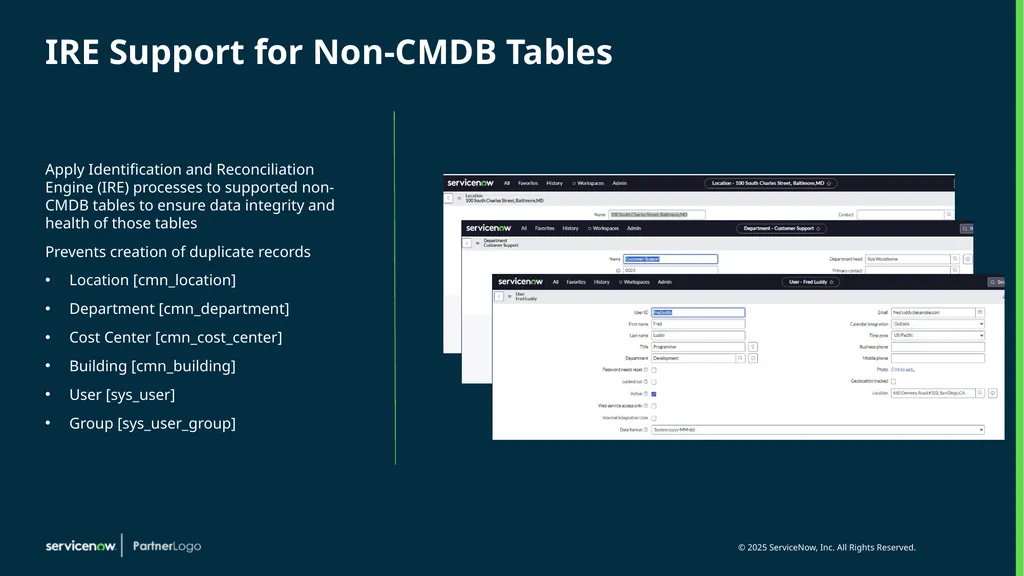
IRE Support for Non-CMDB Tables Apply Identification and Reconciliation Engine (IRE) processes to supported non-CMDB tables to ensure data integrity and health of those tables
Prevents creation of duplicate records
Location [cmn_location]
Department [cmn_department]
Cost Center [cmn_cost_center]
Building [cmn_building]
User [sys_user]
Group [sys_user_group]<br>
Prevents creation of duplicate records
Location [cmn_location]
Department [cmn_department]
Cost Center [cmn_cost_center]
Building [cmn_building]
User [sys_user]
Group [sys_user_group]<br>
07
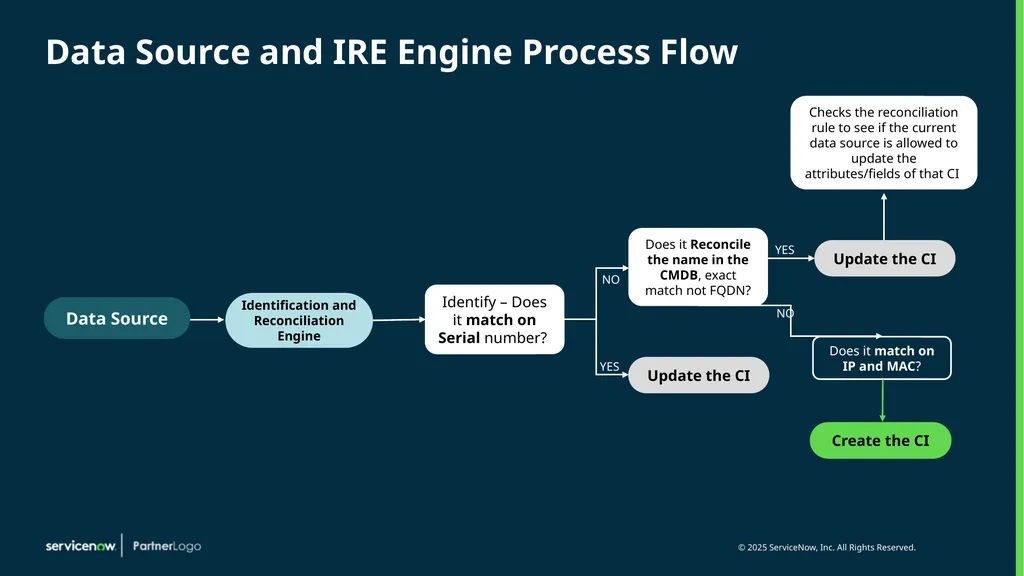
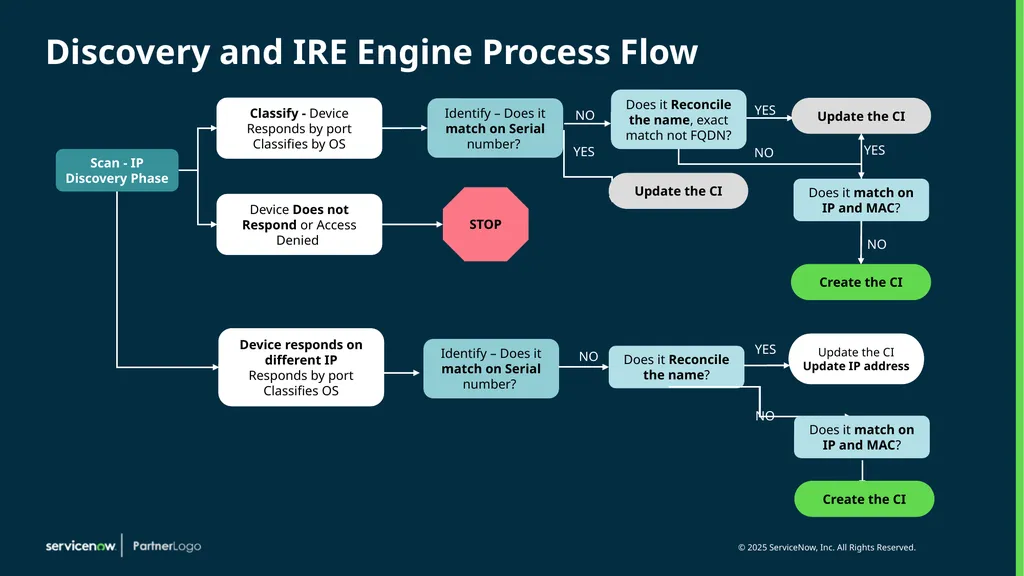
Data Source and IRE Engine Process Flow Identify – Does it match on Serial number? Does it Reconcile the name in the CMDB, exact match not FQDN? NO YES Does it match on IP and MAC? NO Checks the reconciliation rule to see if the current data source is allowed to update the attributes/fields of that CI Data Source Identification and Reconciliation
Engine Update the CI YES Update the CI Create the CI<br>
08
Discovery and IRE Engine Process Flow Update the CI Update the CI Create the CI Create the CI NO YES<br>
09
CMDB Improved Experience
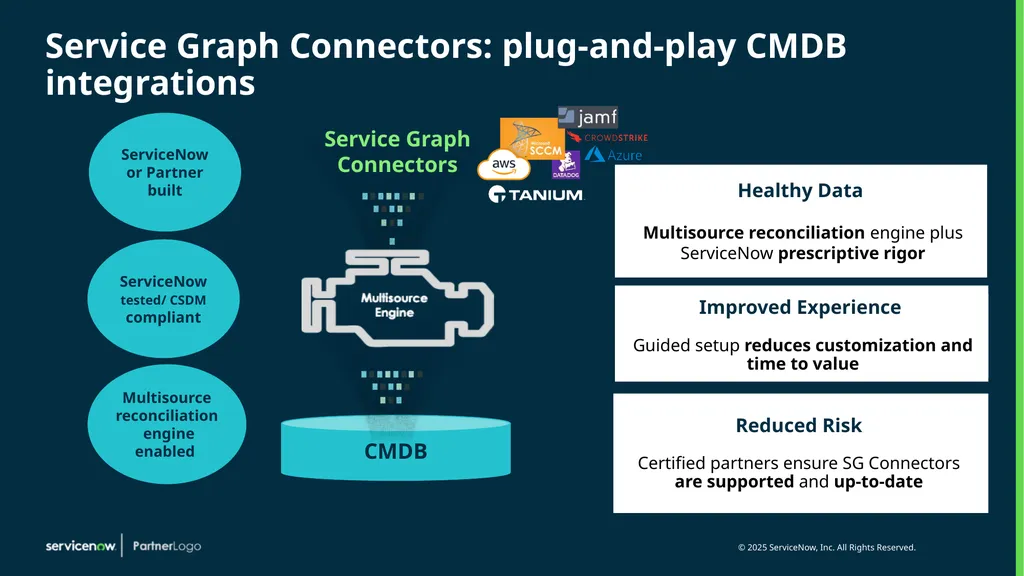
Guided setup reduces customization and time to value Healthy Data
Multisource reconciliation engine plus ServiceNow prescriptive rigor Service Graph Connectors ServiceNow or Partner built ServiceNow tested/ CSDM compliant Service Graph Connectors: plug-and-play CMDB integrations Multisource reconciliation engine enabled Reduced Risk
Certified partners ensure SG Connectors are supported and up-to-date<br>
Guided setup reduces customization and time to value Healthy Data
Multisource reconciliation engine plus ServiceNow prescriptive rigor Service Graph Connectors ServiceNow or Partner built ServiceNow tested/ CSDM compliant Service Graph Connectors: plug-and-play CMDB integrations Multisource reconciliation engine enabled Reduced Risk
Certified partners ensure SG Connectors are supported and up-to-date<br>
10
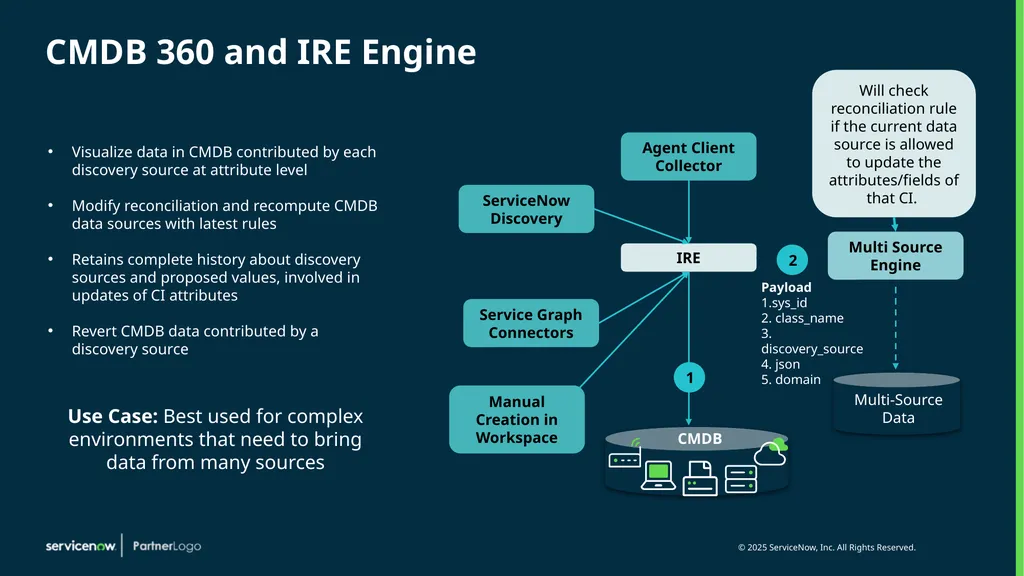
CMDB 360 and IRE Engine Visualize data in CMDB contributed by each discovery source at attribute level
Modify reconciliation and recompute CMDB data sources with latest rules
Retains complete history about discovery sources and proposed values, involved in updates of CI attributes
Revert CMDB data contributed by a discovery source Use Case: Best used for complex environments that need to bring data from many sources Agent Client Collector Manual Creation in Workspace<br>
Modify reconciliation and recompute CMDB data sources with latest rules
Retains complete history about discovery sources and proposed values, involved in updates of CI attributes
Revert CMDB data contributed by a discovery source Use Case: Best used for complex environments that need to bring data from many sources Agent Client Collector Manual Creation in Workspace<br>
11
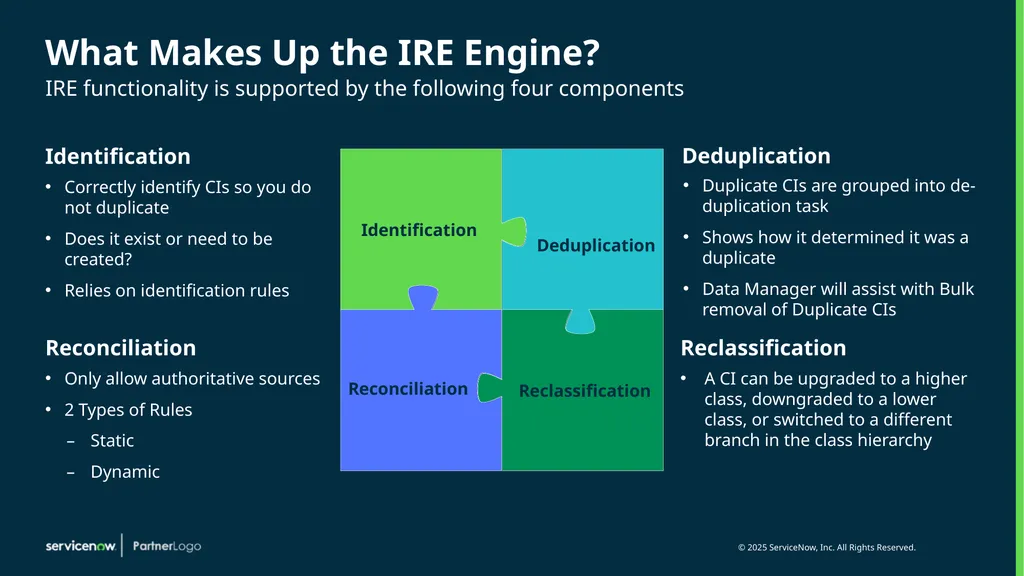
What Makes Up the IRE Engine? IRE functionality is supported by the following four components Identification Correctly identify CIs so you do not duplicate
Does it exist or need to be created?
Relies on identification rules Deduplication Duplicate CIs are grouped into de-duplication task
Shows how it determined it was a duplicate
Data Manager will assist with Bulk removal of Duplicate CIs Reclassification A CI can be upgraded to a higher class, downgraded to a lower class, or switched to a different branch in the class hierarchy Reconciliation Only allow authoritative sources
2 Types of Rules
Static
Dynamic<br>
Does it exist or need to be created?
Relies on identification rules Deduplication Duplicate CIs are grouped into de-duplication task
Shows how it determined it was a duplicate
Data Manager will assist with Bulk removal of Duplicate CIs Reclassification A CI can be upgraded to a higher class, downgraded to a lower class, or switched to a different branch in the class hierarchy Reconciliation Only allow authoritative sources
2 Types of Rules
Static
Dynamic<br>
12
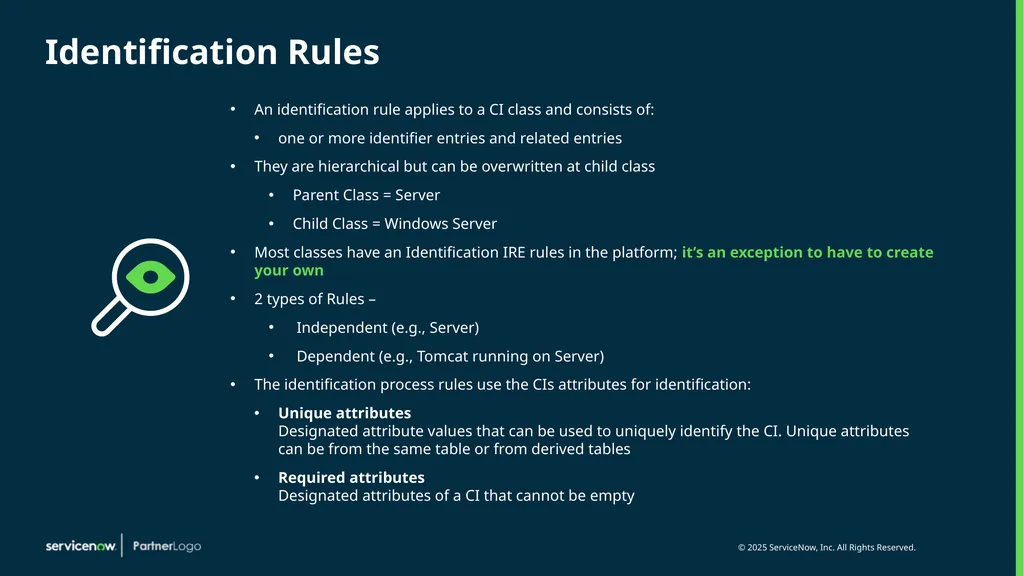
An identification rule applies to a CI class and consists of:
one or more identifier entries and related entries
They are hierarchical but can be overwritten at child class
Parent Class = Server
Child Class = Windows Server
Most classes have an Identification IRE rules in the platform; it’s an exception to have to create your own
2 types of Rules –
Independent (e.g., Server)
Dependent (e.g., Tomcat running on Server)
The identification process rules use the CIs attributes for identification:
Unique attributes Designated attribute values that can be used to uniquely identify the CI. Unique attributes can be from the same table or from derived tables
Required attributes Designated attributes of a CI that cannot be empty Identification Rules<br>
one or more identifier entries and related entries
They are hierarchical but can be overwritten at child class
Parent Class = Server
Child Class = Windows Server
Most classes have an Identification IRE rules in the platform; it’s an exception to have to create your own
2 types of Rules –
Independent (e.g., Server)
Dependent (e.g., Tomcat running on Server)
The identification process rules use the CIs attributes for identification:
Unique attributes Designated attribute values that can be used to uniquely identify the CI. Unique attributes can be from the same table or from derived tables
Required attributes Designated attributes of a CI that cannot be empty Identification Rules<br>
13
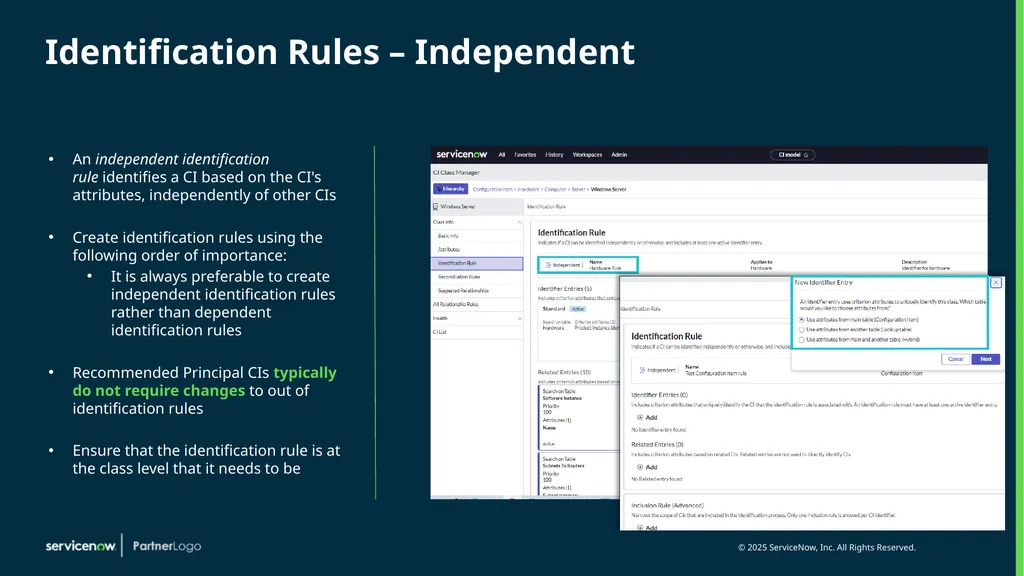
Identification Rules – Independent An independent identification rule identifies a CI based on the CI's attributes, independently of other CIs
Create identification rules using the following order of importance:
It is always preferable to create independent identification rules rather than dependent identification rules
Recommended Principal CIs typically do not require changes to out of identification rules
Ensure that the identification rule is at the class level that it needs to be<br>
Create identification rules using the following order of importance:
It is always preferable to create independent identification rules rather than dependent identification rules
Recommended Principal CIs typically do not require changes to out of identification rules
Ensure that the identification rule is at the class level that it needs to be<br>
14
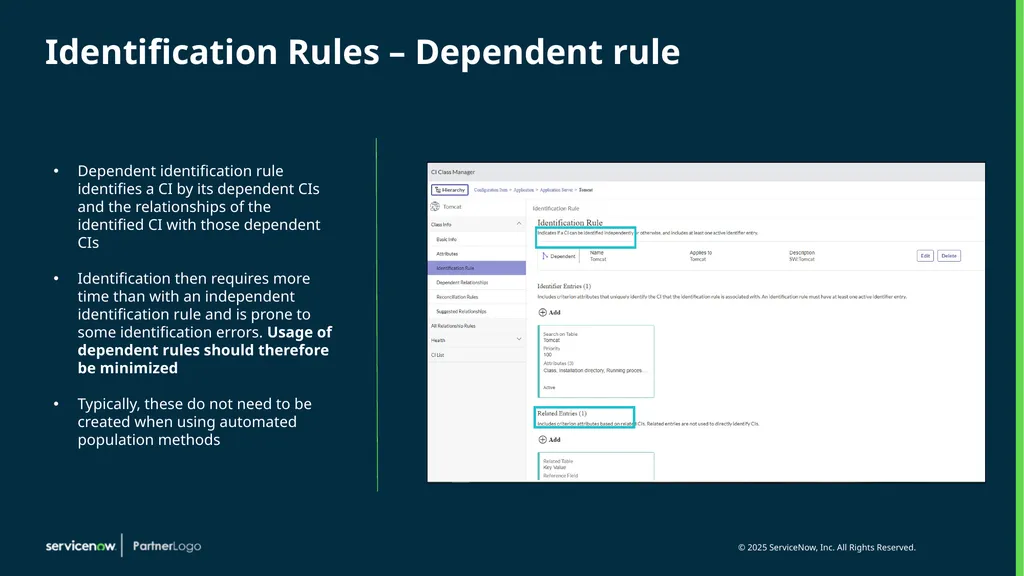
Identification Rules – Dependent rule Dependent identification rule identifies a CI by its dependent CIs and the relationships of the identified CI with those dependent CIs
Identification then requires more time than with an independent identification rule and is prone to some identification errors. Usage of dependent rules should therefore be minimized
Typically, these do not need to be created when using automated population methods<br>
Identification then requires more time than with an independent identification rule and is prone to some identification errors. Usage of dependent rules should therefore be minimized
Typically, these do not need to be created when using automated population methods<br>
15
Reconciliation Rules A dynamic reconciliation rule uses CMDB 360 data to choose a value such as the largest value that is reported, for updating a CI
Without reconciliation rules, discovery sources can overwrite each other's updates to attribute values
2 types of reconciliation rules:
Static reconciliation rules - are the legacy reconciliation rules that set priorities for the various discovery sources for updating CI attributes
Dynamic reconciliation rules – based on the attribute values processed by the CMDB/Multisource rather than on a discovery source priority
When both static and dynamic reconciliation rules exist for the same CI attribute, the dynamic reconciliation rule takes precedence over the static reconciliation rule
Reconciliation rules can't be dot-walked using reference fields
Static reconciliation rules affect reconciliation of stale CI attributes
A CI attribute is determined to be stale if it was not updated by the latest discovery source to update the CI within a time period<br>
Without reconciliation rules, discovery sources can overwrite each other's updates to attribute values
2 types of reconciliation rules:
Static reconciliation rules - are the legacy reconciliation rules that set priorities for the various discovery sources for updating CI attributes
Dynamic reconciliation rules – based on the attribute values processed by the CMDB/Multisource rather than on a discovery source priority
When both static and dynamic reconciliation rules exist for the same CI attribute, the dynamic reconciliation rule takes precedence over the static reconciliation rule
Reconciliation rules can't be dot-walked using reference fields
Static reconciliation rules affect reconciliation of stale CI attributes
A CI attribute is determined to be stale if it was not updated by the latest discovery source to update the CI within a time period<br>
16
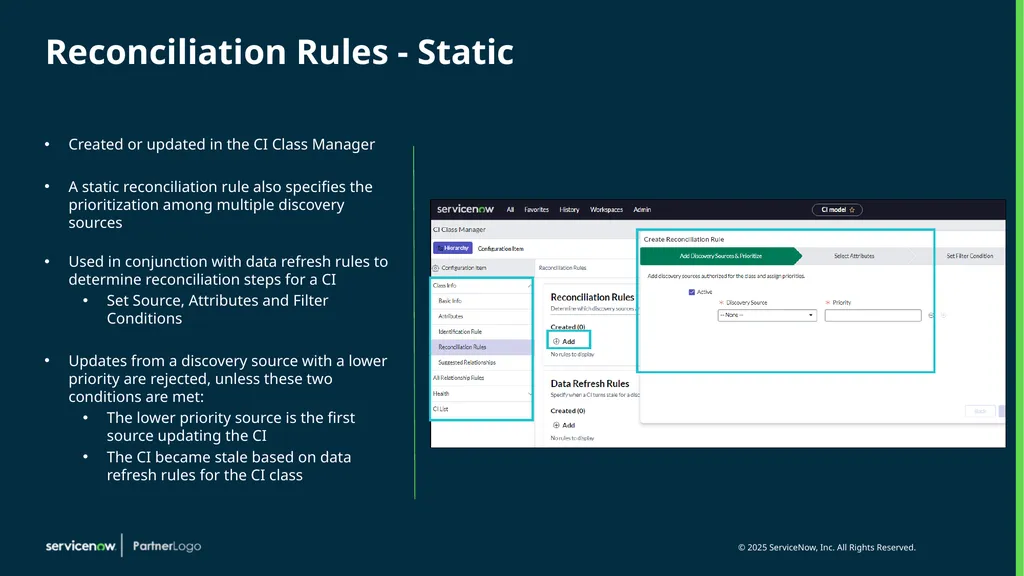
Reconciliation Rules - Static Created or updated in the CI Class Manager
A static reconciliation rule also specifies the prioritization among multiple discovery sources
Used in conjunction with data refresh rules to determine reconciliation steps for a CI
Set Source, Attributes and Filter Conditions
Updates from a discovery source with a lower priority are rejected, unless these two conditions are met:
The lower priority source is the first source updating the CI
The CI became stale based on data refresh rules for the CI class<br>
A static reconciliation rule also specifies the prioritization among multiple discovery sources
Used in conjunction with data refresh rules to determine reconciliation steps for a CI
Set Source, Attributes and Filter Conditions
Updates from a discovery source with a lower priority are rejected, unless these two conditions are met:
The lower priority source is the first source updating the CI
The CI became stale based on data refresh rules for the CI class<br>
17
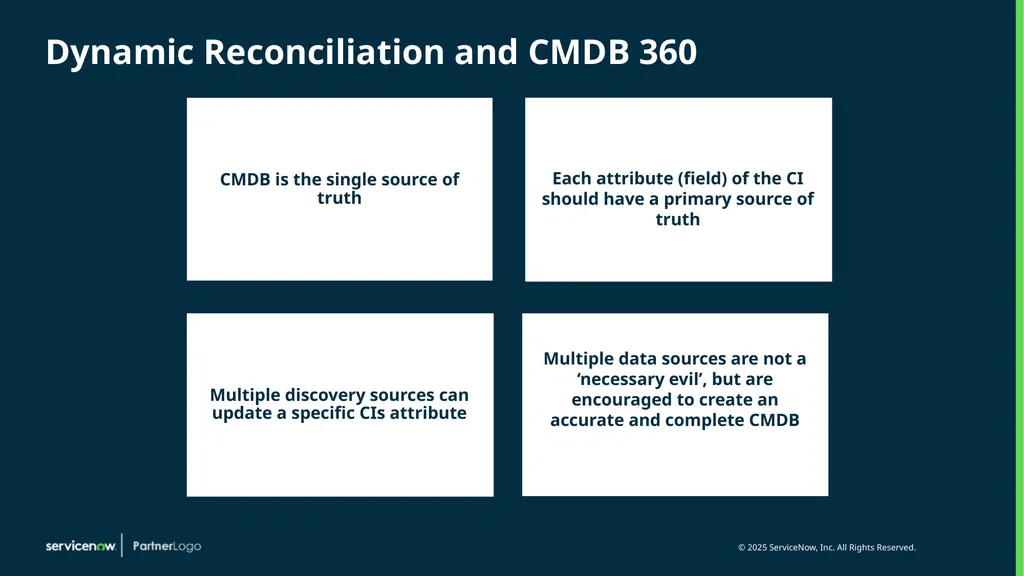
Dynamic Reconciliation and CMDB 360 Each attribute (field) of the CI should have a primary source of truth Multiple discovery sources can update a specific CIs attribute Multiple data sources are not a ‘necessary evil’, but are encouraged to create an accurate and complete CMDB<br>
18
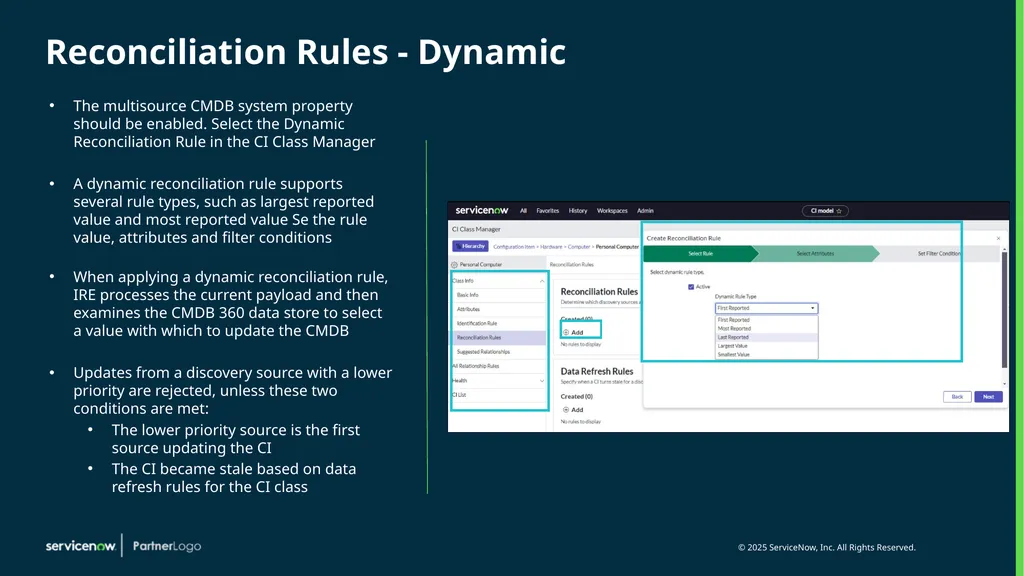
Reconciliation Rules - Dynamic The multisource CMDB system property should be enabled. Select the Dynamic Reconciliation Rule in the CI Class Manager
A dynamic reconciliation rule supports several rule types, such as largest reported value and most reported value Se the rule value, attributes and filter conditions
When applying a dynamic reconciliation rule, IRE processes the current payload and then examines the CMDB 360 data store to select a value with which to update the CMDB
Updates from a discovery source with a lower priority are rejected, unless these two conditions are met:
The lower priority source is the first source updating the CI
The CI became stale based on data refresh rules for the CI class<br>
A dynamic reconciliation rule supports several rule types, such as largest reported value and most reported value Se the rule value, attributes and filter conditions
When applying a dynamic reconciliation rule, IRE processes the current payload and then examines the CMDB 360 data store to select a value with which to update the CMDB
Updates from a discovery source with a lower priority are rejected, unless these two conditions are met:
The lower priority source is the first source updating the CI
The CI became stale based on data refresh rules for the CI class<br>
19
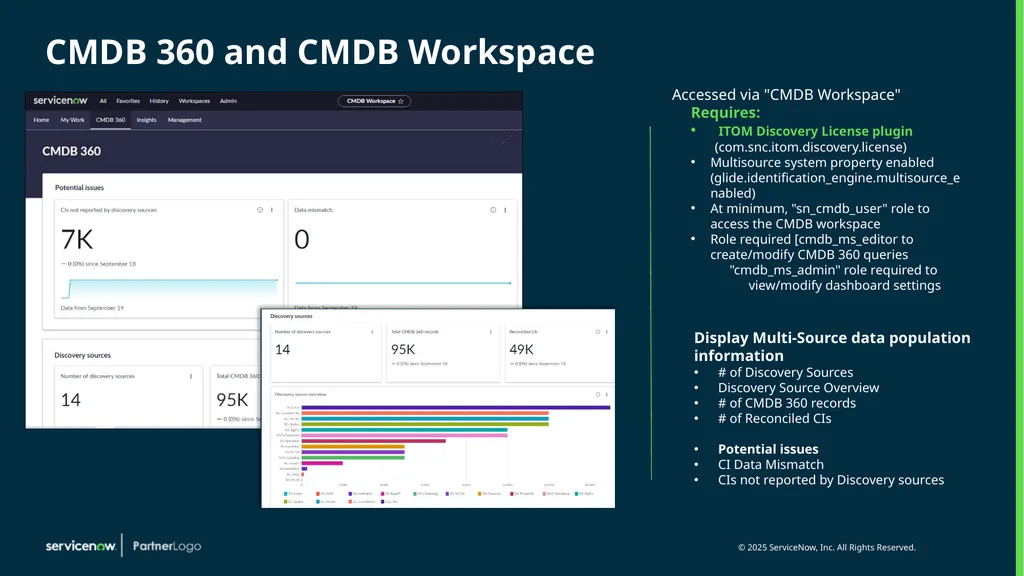
CMDB 360 and CMDB Workspace Accessed via "CMDB Workspace"
Requires:
ITOM Discovery License plugin (com.snc.itom.discovery.license)
Multisource system property enabled (glide.identification_engine.multisource_enabled)
At minimum, "sn_cmdb_user" role to access the CMDB workspace
Role required [cmdb_ms_editor to create/modify CMDB 360 queries
"cmdb_ms_admin" role required to view/modify dashboard settings Display Multi-Source data population information
# of Discovery Sources
Discovery Source Overview
# of CMDB 360 records
# of Reconciled CIs
Potential issues
CI Data Mismatch
CIs not reported by Discovery sources<br>
Requires:
ITOM Discovery License plugin (com.snc.itom.discovery.license)
Multisource system property enabled (glide.identification_engine.multisource_enabled)
At minimum, "sn_cmdb_user" role to access the CMDB workspace
Role required [cmdb_ms_editor to create/modify CMDB 360 queries
"cmdb_ms_admin" role required to view/modify dashboard settings Display Multi-Source data population information
# of Discovery Sources
Discovery Source Overview
# of CMDB 360 records
# of Reconciled CIs
Potential issues
CI Data Mismatch
CIs not reported by Discovery sources<br>
20
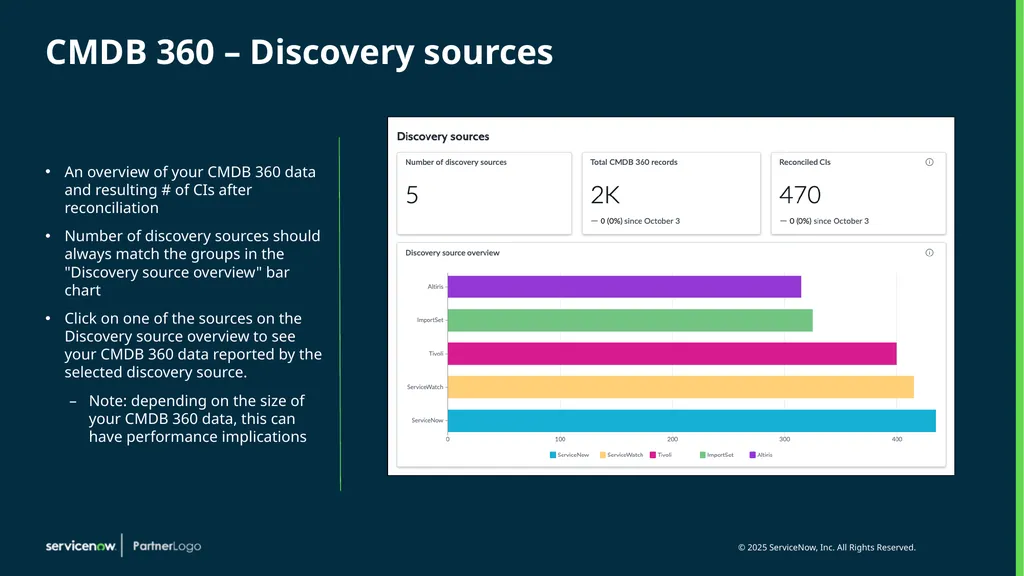
CMDB 360 – Discovery sources An overview of your CMDB 360 data and resulting # of CIs after reconciliation
Number of discovery sources should always match the groups in the "Discovery source overview" bar chart
Click on one of the sources on the Discovery source overview to see your CMDB 360 data reported by the selected discovery source.
Note: depending on the size of your CMDB 360 data, this can have performance implications<br>
Number of discovery sources should always match the groups in the "Discovery source overview" bar chart
Click on one of the sources on the Discovery source overview to see your CMDB 360 data reported by the selected discovery source.
Note: depending on the size of your CMDB 360 data, this can have performance implications<br>
21
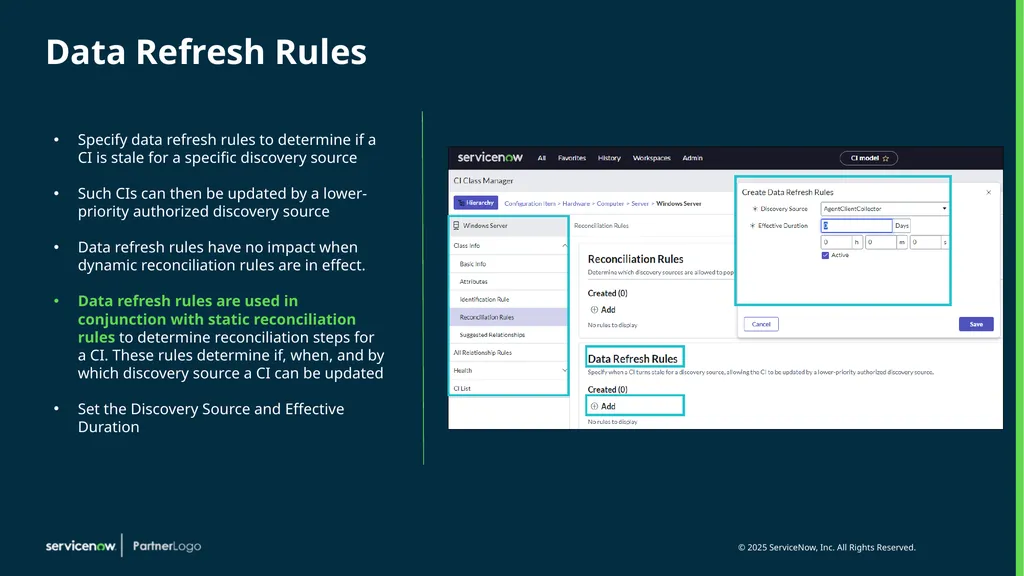
Data Refresh Rules Specify data refresh rules to determine if a CI is stale for a specific discovery source
Such CIs can then be updated by a lower-priority authorized discovery source
Data refresh rules have no impact when dynamic reconciliation rules are in effect.
Data refresh rules are used in conjunction with static reconciliation rules to determine reconciliation steps for a CI. These rules determine if, when, and by which discovery source a CI can be updated
Set the Discovery Source and Effective Duration<br>
Such CIs can then be updated by a lower-priority authorized discovery source
Data refresh rules have no impact when dynamic reconciliation rules are in effect.
Data refresh rules are used in conjunction with static reconciliation rules to determine reconciliation steps for a CI. These rules determine if, when, and by which discovery source a CI can be updated
Set the Discovery Source and Effective Duration<br>
22
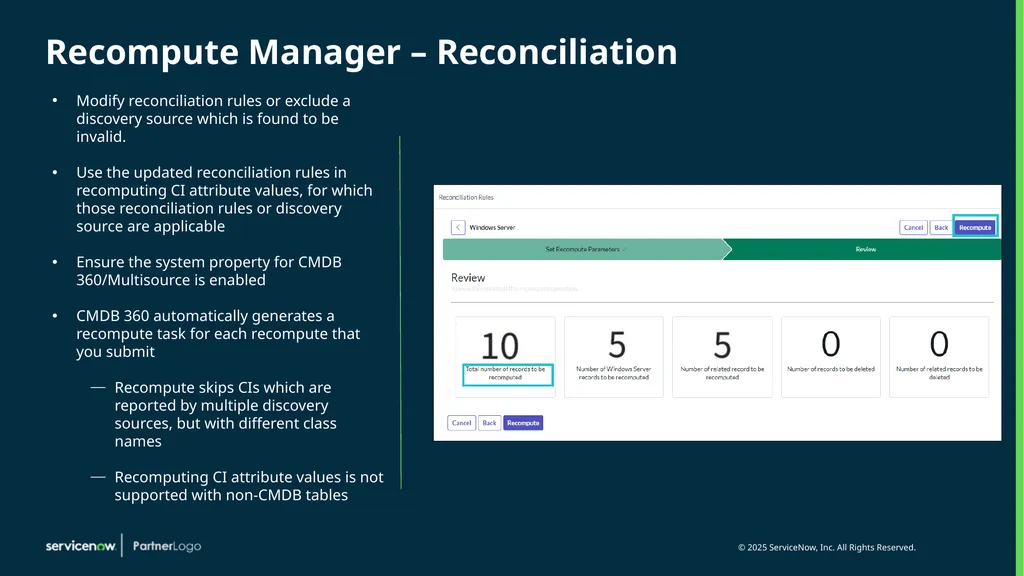
Recompute Manager – Reconciliation Modify reconciliation rules or exclude a discovery source which is found to be invalid.
Use the updated reconciliation rules in recomputing CI attribute values, for which those reconciliation rules or discovery source are applicable
Ensure the system property for CMDB 360/Multisource is enabled
CMDB 360 automatically generates a recompute task for each recompute that you submit
Recompute skips CIs which are reported by multiple discovery sources, but with different class names
Recomputing CI attribute values is not supported with non-CMDB tables<br>
Use the updated reconciliation rules in recomputing CI attribute values, for which those reconciliation rules or discovery source are applicable
Ensure the system property for CMDB 360/Multisource is enabled
CMDB 360 automatically generates a recompute task for each recompute that you submit
Recompute skips CIs which are reported by multiple discovery sources, but with different class names
Recomputing CI attribute values is not supported with non-CMDB tables<br>
23
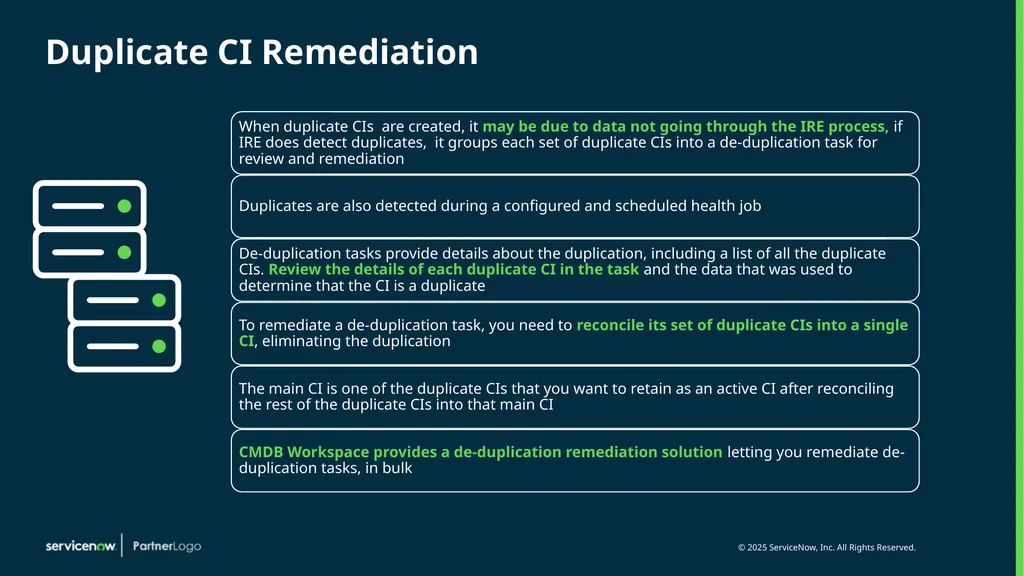
Duplicate CI Remediation .<br>
24
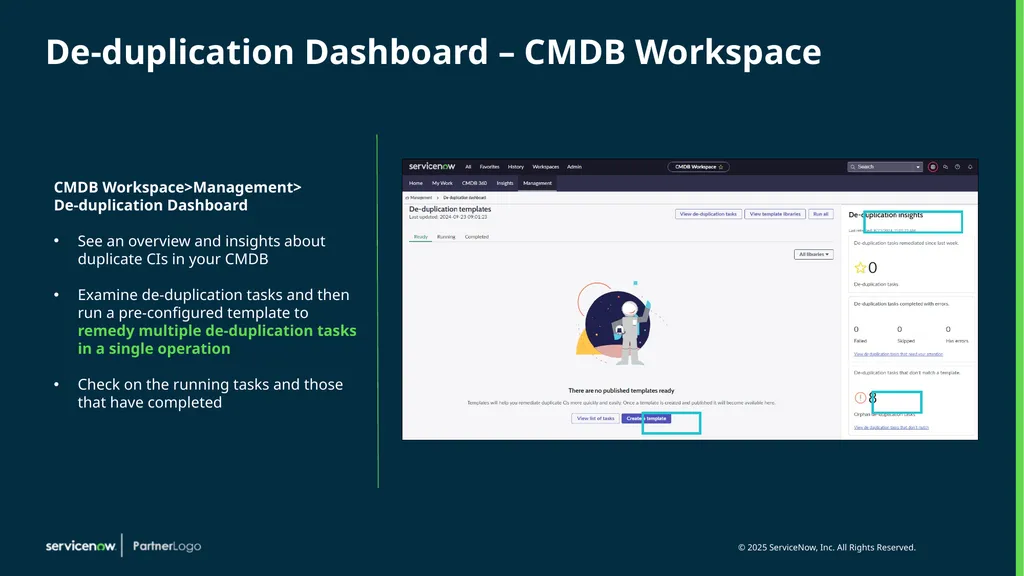
De-duplication Dashboard – CMDB Workspace CMDB Workspace>Management>
De-duplication Dashboard
See an overview and insights about duplicate CIs in your CMDB
Examine de-duplication tasks and then run a pre-configured template to remedy multiple de-duplication tasks in a single operation
Check on the running tasks and those that have completed<br>
De-duplication Dashboard
See an overview and insights about duplicate CIs in your CMDB
Examine de-duplication tasks and then run a pre-configured template to remedy multiple de-duplication tasks in a single operation
Check on the running tasks and those that have completed<br>
25
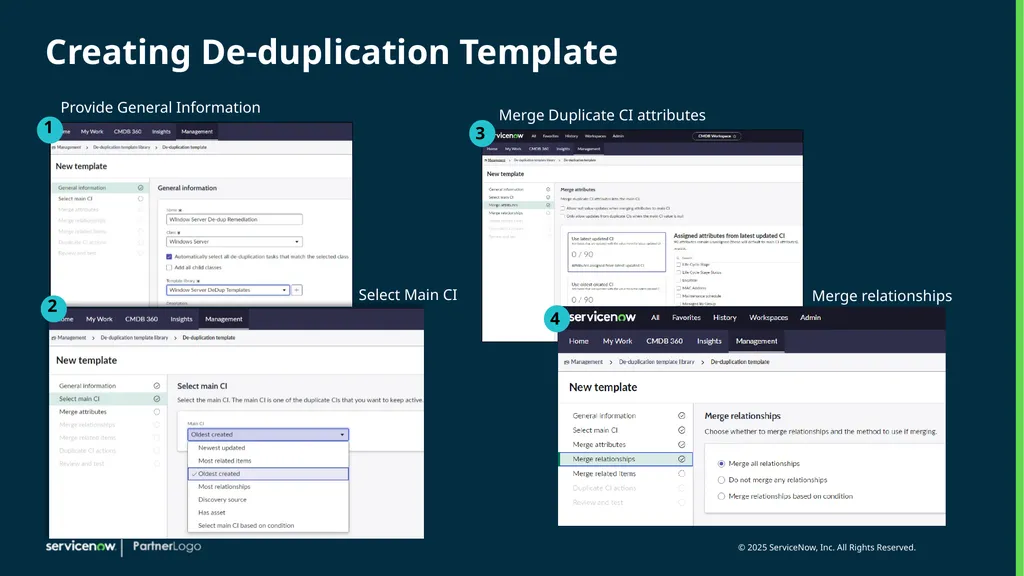
Creating De-duplication Template Provide General Information Merge Duplicate CI attributes Select Main CI Merge relationships<br>
26
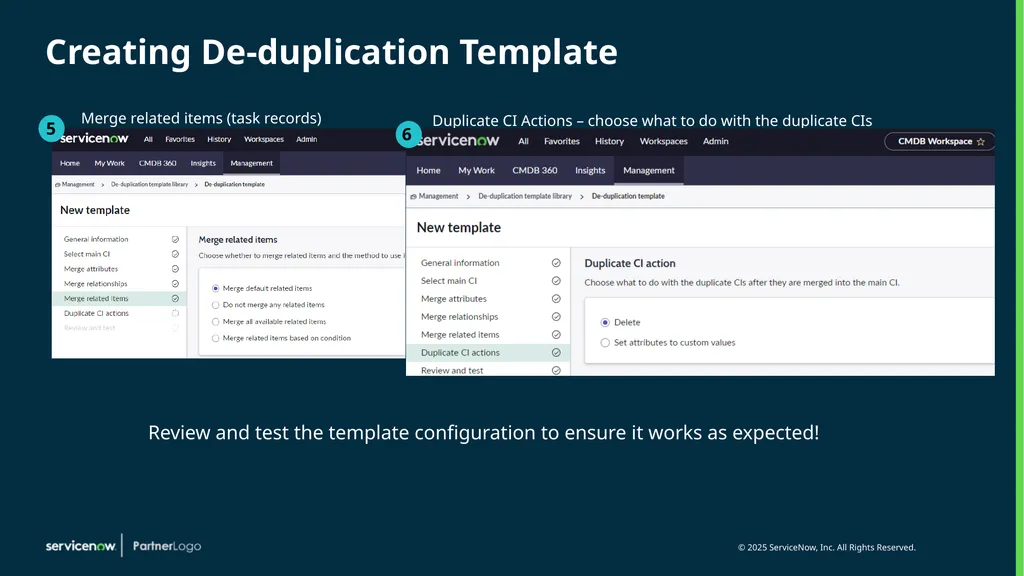
Creating De-duplication Template Merge related items (task records) Duplicate CI Actions – choose what to do with the duplicate CIs Review and test the template configuration to ensure it works as expected!<br>
27
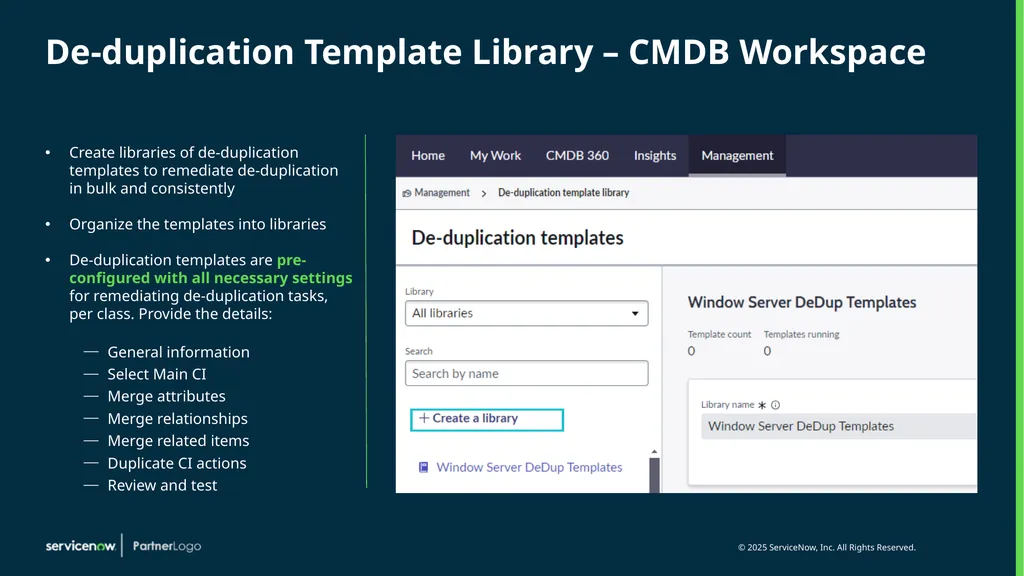
De-duplication Template Library – CMDB Workspace Create libraries of de-duplication templates to remediate de-duplication in bulk and consistently
Organize the templates into libraries
De-duplication templates are pre-configured with all necessary settings for remediating de-duplication tasks, per class. Provide the details:
General information
Select Main CI
Merge attributes
Merge relationships
Merge related items
Duplicate CI actions
Review and test<br>
Organize the templates into libraries
De-duplication templates are pre-configured with all necessary settings for remediating de-duplication tasks, per class. Provide the details:
General information
Select Main CI
Merge attributes
Merge relationships
Merge related items
Duplicate CI actions
Review and test<br>
28
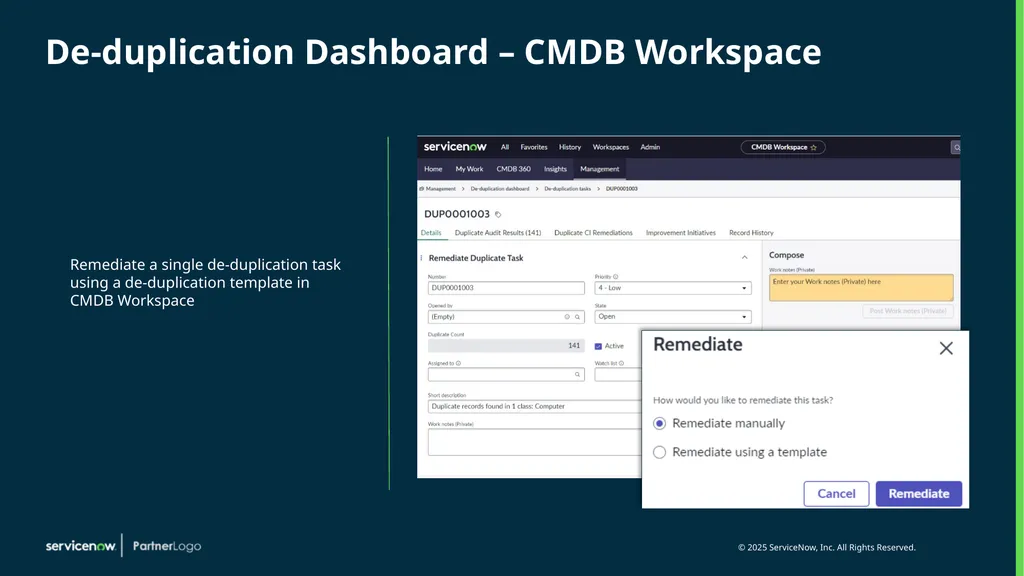
De-duplication Dashboard – CMDB Workspace Remediate a single de-duplication task using a de-duplication template in CMDB Workspace<br>
29
Questions? Contact info or other content can go here<br>
30
Next Steps Transition into what’s next – homework, action items, next steps 1 2 3 4 Next workshops 5 Other things to think about, other things we will provide so they can see OOB, etc.<br>
31
Thank You<br>