Lecture 11 Visual Git Tools: SourceTree and KDiff3
Description: Lecture 11 Visual Git Tools: SourceTree and KDiff3 Schedule Today (1114): SourceTree and other Visual Tools 1121: NO CLASS Thanksgiving Last Lecture (1128): Plumbing and Porcelain Last Class (125): Final Exam What weve done so far
Related Topics
Download Presentation
"Lecture 11 Visual Git Tools: SourceTree and KDiff3" is the property of its rightful owner. Permission is granted to download and print the materials on this website for personal, non-commercial use only, and to display it on your personal computer provided you do not modify the materials and that you retain all copyright notices contained in the materials. By downloading content from our website, you accept the terms of this agreement.
Presentation Transcript
slide1. Lecture 11
Visual Git Tools: SourceTree and KDiff3<br>
slide2. Schedule Today (11/14): SourceTree and other Visual Tools
11/21: NO CLASS – Thanksgiving
Last Lecture (11/28): Plumbing and Porcelain
Last Class (12/5): Final Exam<br>
slide3. What we’ve done so far Used git in the terminal
Best for learning (in my opinion!)
Hopefully no magic!
Used Github’s UI
Great for collaborating with others
Also check out GitLab and Bitbucket
Can’t do everything<br>
slide4. Why not just use the command line? Using vim for commit messages and interactive rebase
<<<<<<<<<<<<<<==============>>>>>>>>>>>>>>
git log --graph is impossible to read
Interactive add (git add -i) UI is horrible
Having to remember and type commands (aliases help with this)<br>
slide5. Atlassian SourceTree GUI for Git
https://www.sourcetreeapp.com/
Produced by Atlassian
You need an Atlassian account to install SourceTree for some reason<br>
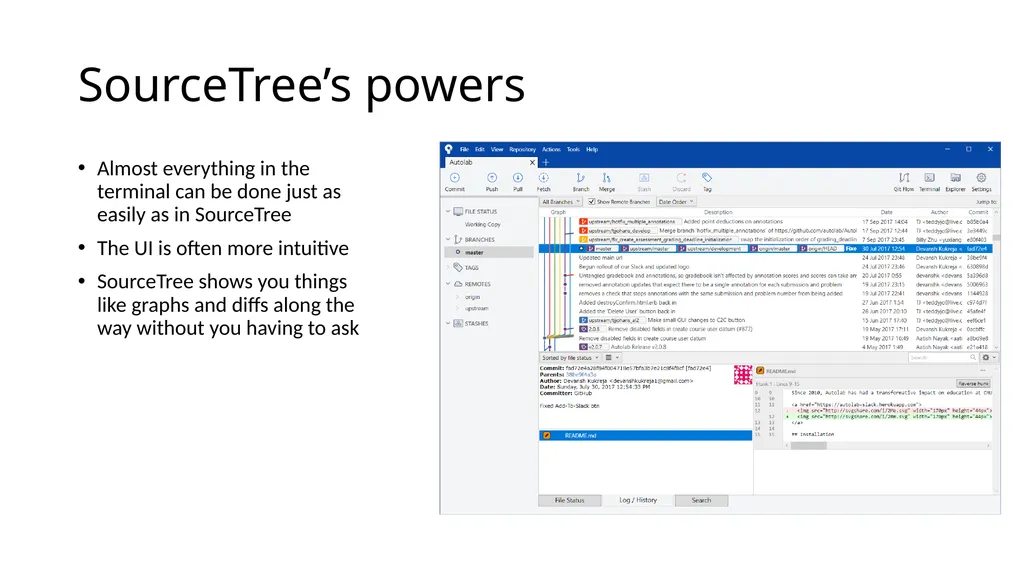
slide6. SourceTree’s powers Almost everything in the terminal can be done just as easily as in SourceTree
The UI is often more intuitive
SourceTree shows you things like graphs and diffs along the way without you having to ask<br>
slide7. KDiff3 Visual Merge Tool
http://kdiff3.sourceforge.net/
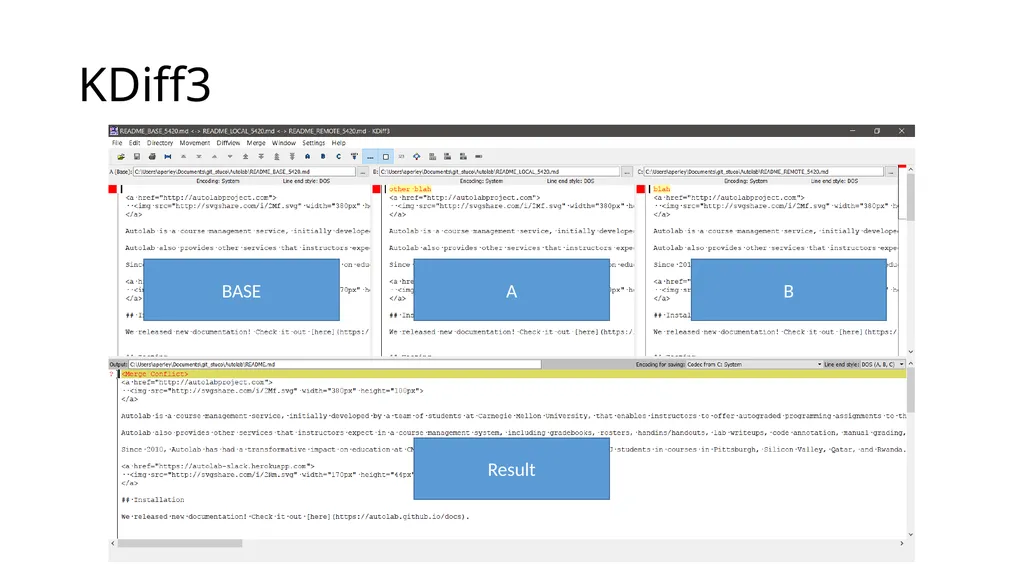
Kind of ugly but much easier than manually dealing with conflict markers
Performs a 3-way merge between BASE, A, and B
Can configure command line git to use it as well:
git config --global merge.tool kdiff3<br>
slide8. KDiff3 BASE A B Result<br>
slide9. Activity We’ve done this before…
Open your clone of your fork of the squirrel story repo in SourceTree
Fetch from upstream
Get your master branch up to date with upstream/master
Checkout the finally-finish-story branch locally
Squash the two commits on the finally-finish-story into one
Merge finally-finish-story into master
Make a tag called finished-story
Push master and the tag to your fork on Github<br>
Visual Git Tools: SourceTree and KDiff3<br>
slide2. Schedule Today (11/14): SourceTree and other Visual Tools
11/21: NO CLASS – Thanksgiving
Last Lecture (11/28): Plumbing and Porcelain
Last Class (12/5): Final Exam<br>
slide3. What we’ve done so far Used git in the terminal
Best for learning (in my opinion!)
Hopefully no magic!
Used Github’s UI
Great for collaborating with others
Also check out GitLab and Bitbucket
Can’t do everything<br>
slide4. Why not just use the command line? Using vim for commit messages and interactive rebase
<<<<<<<<<<<<<<==============>>>>>>>>>>>>>>
git log --graph is impossible to read
Interactive add (git add -i) UI is horrible
Having to remember and type commands (aliases help with this)<br>
slide5. Atlassian SourceTree GUI for Git
https://www.sourcetreeapp.com/
Produced by Atlassian
You need an Atlassian account to install SourceTree for some reason<br>
slide6. SourceTree’s powers Almost everything in the terminal can be done just as easily as in SourceTree
The UI is often more intuitive
SourceTree shows you things like graphs and diffs along the way without you having to ask<br>
slide7. KDiff3 Visual Merge Tool
http://kdiff3.sourceforge.net/
Kind of ugly but much easier than manually dealing with conflict markers
Performs a 3-way merge between BASE, A, and B
Can configure command line git to use it as well:
git config --global merge.tool kdiff3<br>
slide8. KDiff3 BASE A B Result<br>
slide9. Activity We’ve done this before…
Open your clone of your fork of the squirrel story repo in SourceTree
Fetch from upstream
Get your master branch up to date with upstream/master
Checkout the finally-finish-story branch locally
Squash the two commits on the finally-finish-story into one
Merge finally-finish-story into master
Make a tag called finished-story
Push master and the tag to your fork on Github<br>