Lets Talk SIS Security: Navigating the Differences between SMS 2.0 and Qmlativ Deb Ramlow, Product Line Manager Skyward Security in Qmlativ Separated users and screens Security Roles screens and reports Security Groups users that will
"Let’s Talk SIS Security: Navigating the" is the property of its rightful owner. Permission is granted to
download and print the materials on this website for personal, non-commercial use only, and to display it
on your personal computer provided you do not modify the materials and that you retain all copyright
notices contained in the materials. By downloading content from our website, you accept the terms of this
agreement.
Presentation Transcript
01
Let’s Talk SIS Security: Navigating the Differences between SMS 2.0 and Qmlativ Deb Ramlow, Product Line Manager
Skyward<br>
02
Security in Qmlativ Separated users and screens
Security Roles – screens and reports
Security Groups – users that will be doing the same tasks
Entities are assigned to users, not groups
Security Group Membership – entity that applies to the user for the group
Allows for fewer Security Groups<br>
03
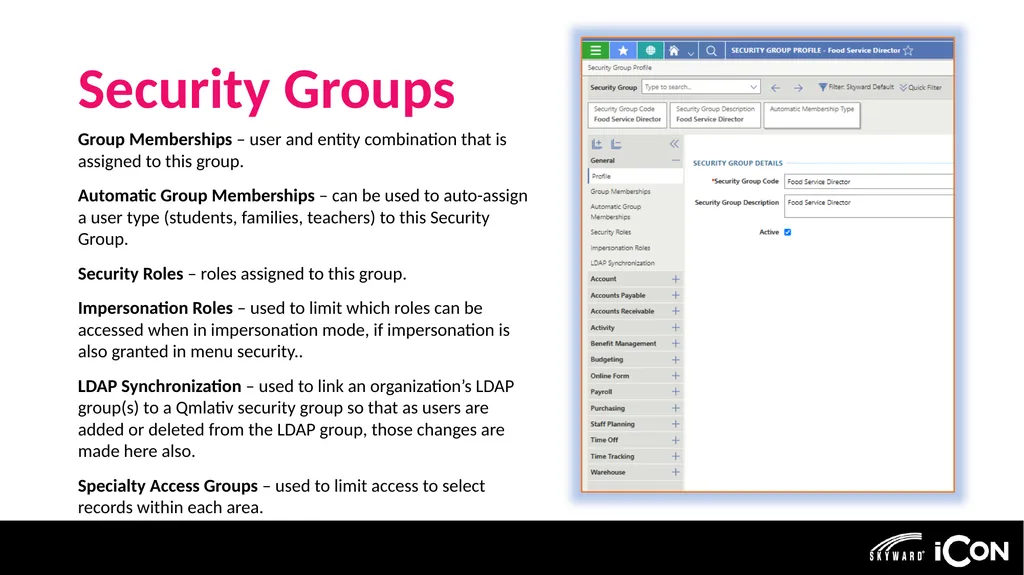
Security Groups Group Memberships – user and entity combination that is assigned to this group.
Automatic Group Memberships – can be used to auto-assign a user type (students, families, teachers) to this Security Group.
Security Roles – roles assigned to this group.
Impersonation Roles – used to limit which roles can be accessed when in impersonation mode, if impersonation is also granted in menu security..
LDAP Synchronization – used to link an organization’s LDAP group(s) to a Qmlativ security group so that as users are added or deleted from the LDAP group, those changes are made here also.
Specialty Access Groups – used to limit access to select records within each area.<br>
04
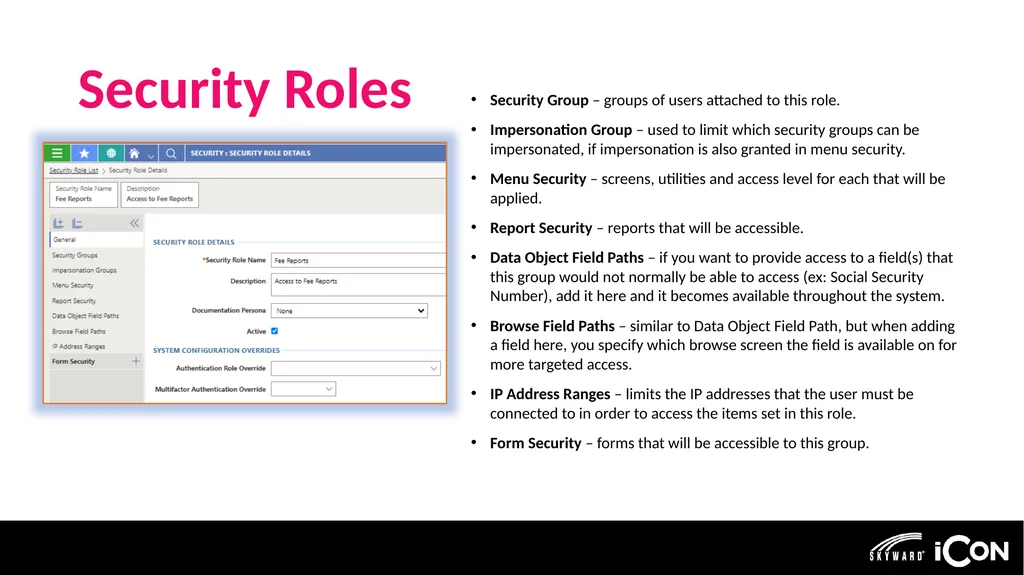
Security Roles Security Group – groups of users attached to this role.
Impersonation Group – used to limit which security groups can be impersonated, if impersonation is also granted in menu security.
Menu Security – screens, utilities and access level for each that will be applied.
Report Security – reports that will be accessible.
Data Object Field Paths – if you want to provide access to a field(s) that this group would not normally be able to access (ex: Social Security Number), add it here and it becomes available throughout the system.
Browse Field Paths – similar to Data Object Field Path, but when adding a field here, you specify which browse screen the field is available on for more targeted access.
IP Address Ranges – limits the IP addresses that the user must be connected to in order to access the items set in this role.
Form Security – forms that will be accessible to this group.<br>
05
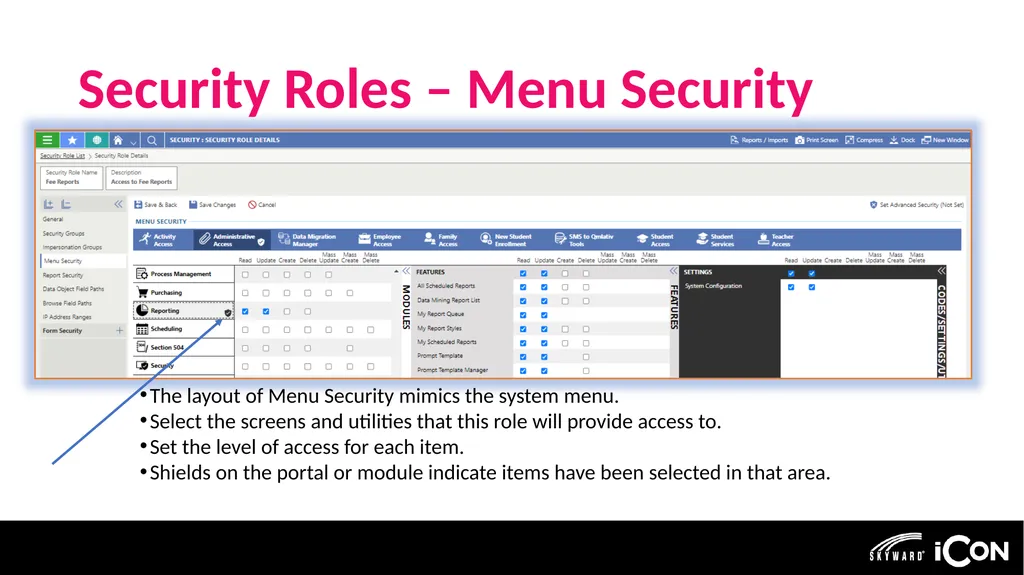
Security Roles – Menu Security The layout of Menu Security mimics the system menu.
Select the screens and utilities that this role will provide access to.
Set the level of access for each item.
Shields on the portal or module indicate items have been selected in that area.<br>
06
Setup Options Task-based Security Roles
Name of role is based on the activity it addresses.
Assign this “task” to the groups that need to do it.
Ex: Attendance Recording, Attendance View
Pro: When new screens/reports/utilities become available there are a small number of roles to update.
Con: Task roles may give broader access.
Job-based Security Roles
Name of the role matches a job in the organization.
Assign this role to the matching security group; usually 1:1 correlation.
Ex: Business Manager, Payroll, HR
Pro: Access is tailored to exactly what the group needs access to.
Con: When new screens/reports/utilities become available it is more work to figure out which roles need to be updated. This Photo by Unknown Author is licensed under CC BY<br>
07
Features and Reports Password Reset Request Summary
Lists users that have requested the “Reset my Password” link.
Helps in identifying potential bad actor access attempts.
Security Reports
Login and Usage History – list of users’ login activities to help identify bad actor access attempts.
Users without Security Groups – identify users that could be inactivated.
Workflow and Report Activity – reports on what was accessed by a selected user within a date range.<br>
08
Utilities Mass Delete Users
Clean up utility to delete user records when the user is no longer assigned to a security group.
Mass Update Utilities
Activity, Employee, Family, Staff, and Student user types
Used in conjunction with the User Type on a Security Group to auto-assign users of the selected type to the security group.
Usually, setup as a scheduled task so updates are done regularly. This Photo by Unknown Author is licensed under CC BY-SA<br>
09
Utilities Security Audit
A report of the current system settings.
Items that do not align with Skyward’s best practices will be highlighted in yellow or red.
Security Export/Import
Utilities used to transfer Security Groups and Roles from one environment to another.
The import completely overwrites any setup in the target environment.
Can include the Security Group Membership records. This Photo by Unknown Author is licensed under CC BY-SA<br>
10
Utilities This Photo by Unknown Author is licensed under CC BY-SA Staff External Sync
Used to update staff records that are exported from an external Human Resources or other third-party source.
Auto-assigns/unassigns security groups
Uses External Unique Identifier (EUI) field on the Name record to match records.
Source file is a complete list of staff regardless of whether changes are needed.
User Import
Utility to mass create or update secured user information.
May also be used to mass create staff and staff entity records.<br>
11
Impersonation Known in SMS 2.0 as Super User Access
Allows a user with these rights to login as another user.
Can be limited to designated Entities, Security Groups and Roles.
Does NOT log the impersonated user out of the system.<br>