Making Maps Accessible in PDF Documents Rob Haverty, Sr. Product Manager Adobe, Document Cloud Accessibility Agenda 2 Refresh on some basics of PDF accessibility Explore different types of maps Determine the message in the map Create the
"Making Maps Accessible in PDF Documents Rob" is the property of its rightful owner. Permission is granted to
download and print the materials on this website for personal, non-commercial use only, and to display it
on your personal computer provided you do not modify the materials and that you retain all copyright
notices contained in the materials. By downloading content from our website, you accept the terms of this
agreement.
Presentation Transcript
01
Making Maps Accessible in PDF Documents Rob Haverty, Sr. Product Manager Adobe, Document Cloud Accessibility<br>
02
Agenda 2 Refresh on some basics of PDF accessibility
Explore different types of maps
Determine the “message” in the map
Create the appropriate Alt Text for the map
Goals:
Understand the complexity of making maps accessible in PDFs
Learn some approaches for fixing inaccessible maps in PDFs<br>
03
Session 1 – Update on the Basics for PDF Accessibility 3<br>
04
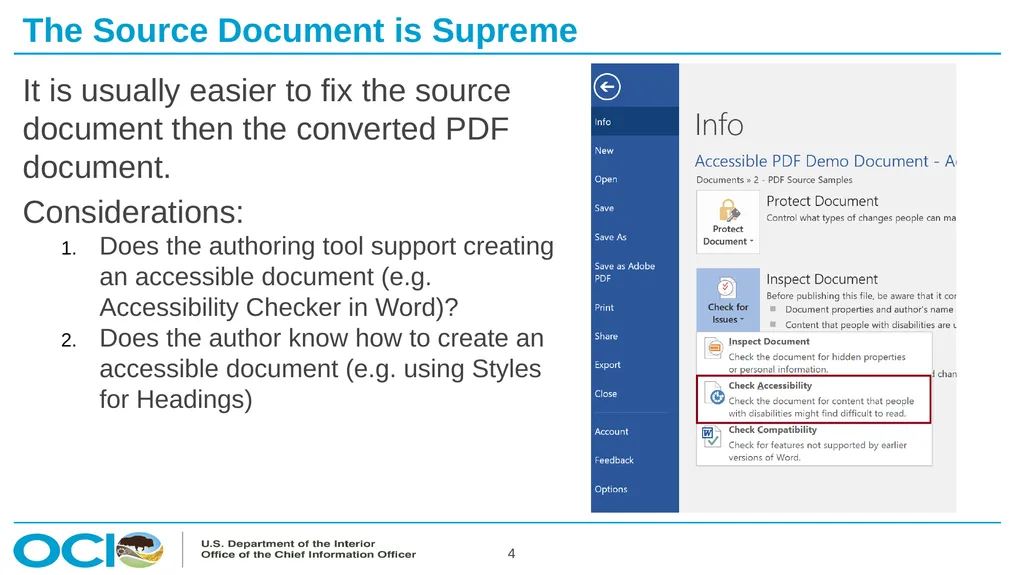
The Source Document is Supreme 4 It is usually easier to fix the source document then the converted PDF document.
Considerations:
Does the authoring tool support creating an accessible document (e.g. Accessibility Checker in Word)?
Does the author know how to create an accessible document (e.g. using Styles for Headings)<br>
05
Selecting Content to Tag 5 Create “New Tag”
Select “Selection Arrow” (should be blue)
Put focus on the new tag (should be highlighted blue)
Select entire content to be included in the tag (should be shaded blue)
Put focus back on the new tag (turns from grey to blue highlight)
Note: All three should be blue, Selection Arrow, Tag, and Content Selection
Right click on the new tag and select “Create Tag from Selection”<br>
06
Creating Artifacts 6 Open the Tag Tree and find a tag to Artifact
Open Reading Order tool
Select item number for content to be artifacted
Select “Background/Artifact” in Reading Order tool
Note tag is removed from the Tag Tree<br>
07
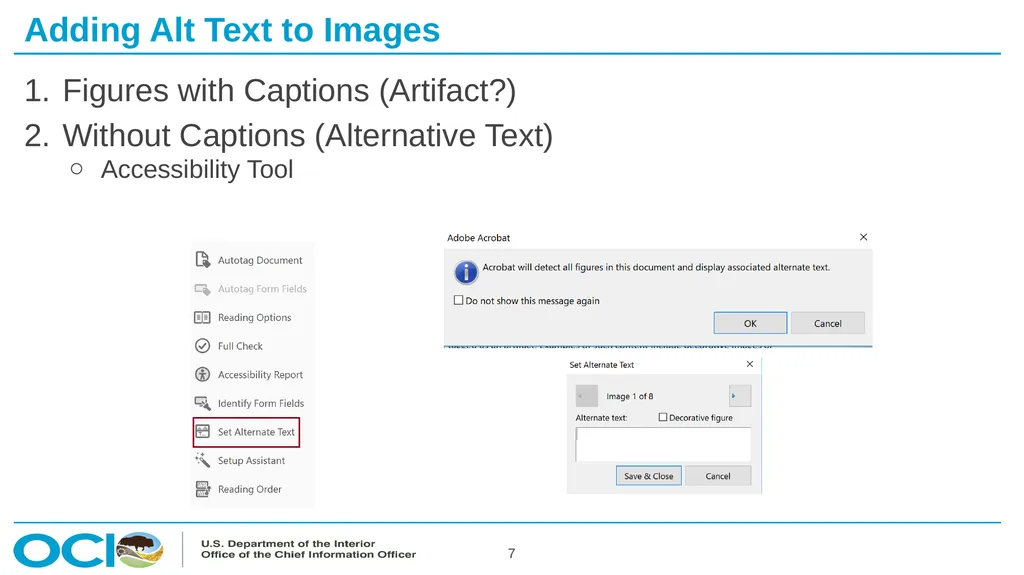
Adding Alt Text to Images 7 Figures with Captions (Artifact?)
Without Captions (Alternative Text)
Accessibility Tool<br>
08
8<br>
09
Session 2 – Let’s Look at Some Maps 9<br>
10
Demo 10<br>
11
Session 3 – Making Maps Accessible 11<br>
12
Demo 12<br>
13
13<br>
14
Training Options and Materials 14 Regular Webinars
https://events-ar.adobeconnect.com/content/connect/c1/881497641/en/events/catalog.html?OWASP_CSRFTOKEN=1e73e0edb7545f3f9fdd08e895e134213f26efe05c1067bb15b4fc6234076238
Webinar Recordings
http://adobe.lookbookhq.com/acrobataccessibility
Upcoming Train-the-Trainer session at Accessing Higher Ground Conference (Teaching you how to teach others how to create accessible PDFs). November 2019 in Colorado
www.accessinghigherground.org<br>
15
Acrobat Pro DC Helpful Links and Resources 15 Acrobat DC Accessibility
https://www.adobe.com/accessibility/products/acrobat.html
Adobe Acrobat DC Accessibility Features
https://www.adobe.com/accessibility/products/acrobat/acrobat-accessibility-features.html
Acrobat Reader DC Accessibility features
https://helpx.adobe.com/reader/using/accessibility-features.html
Acrobat DC and Reader DC Accessibility Blogs
https://theblog.adobe.com/document-cloud/ (search for PDF or Accessibility)
Using the Acrobat Pro DC Accessibility Checker
https://www.adobe.com/accessibility/products/acrobat/using-acrobat-pro-accessibility-checker.html
Create and verify PDF accessibility
https://helpx.adobe.com/acrobat/using/create-verify-pdf-accessibility.html
Acrobat Pro DC PDF Accessibility Repair Workflow
https://www.adobe.com/accessibility/products/acrobat/acrobat-pro-dc-pdf-accessibility-repair-workflow.html<br>
16
Contacts 16 Rob Haverty
Haverty@Adobe.com
Adobe Accessibility Website
www.Adobe.com/Accessibility
Accessibility Compliance
https://www.adobe.com/accessibility/compliance.html
Follow us on Twitter @AdobeAccess
PDF Standards
ISO 32000 (free)
ISO 14289 (PDF/UA) (purchase)<br>