
Module 2: Switching Concepts Instructor Materials
SB
Published · 20 slides · 0 views
1 / 1
Description
Module 2: Switching Concepts Instructor Materials Switching, Routing, and Wireless Essentials v7.0 (SRWE) Instructor Materials Module 2 Planning Guide This PowerPoint deck is divided in two parts: Instructor Planning Guide Information to
Related Topics
Share
Embed code
Download this presentation From Below
"Module 2: Switching Concepts Instructor Materials" is the property of its rightful owner. Permission is granted to download and print the materials on this website for personal, non-commercial use only, and to display it on your personal computer provided you do not modify the materials and that you retain all copyright notices contained in the materials. By downloading content from our website, you accept the terms of this agreement.
Presentation Transcript
01
Module 2: Switching Concepts Instructor Materials Switching, Routing, and Wireless Essentials v7.0 (SRWE)<br>
02
Instructor Materials – Module 2 Planning Guide This PowerPoint deck is divided in two parts:
Instructor Planning Guide
Information to help you become familiar with the module
Teaching aids
Instructor Class Presentation
Optional slides that you can use in the classroom
Begins on slide # 10
Note: Remove the Planning Guide from this presentation before sharing with anyone.
For additional help and resources go to the Instructor Home Page and Course Resources for this course. You also can visit the professional development site on netacad.com, the official Cisco Networking Academy Facebook page, or Instructor Only FB group.<br>
Instructor Planning Guide
Information to help you become familiar with the module
Teaching aids
Instructor Class Presentation
Optional slides that you can use in the classroom
Begins on slide # 10
Note: Remove the Planning Guide from this presentation before sharing with anyone.
For additional help and resources go to the Instructor Home Page and Course Resources for this course. You also can visit the professional development site on netacad.com, the official Cisco Networking Academy Facebook page, or Instructor Only FB group.<br>
03
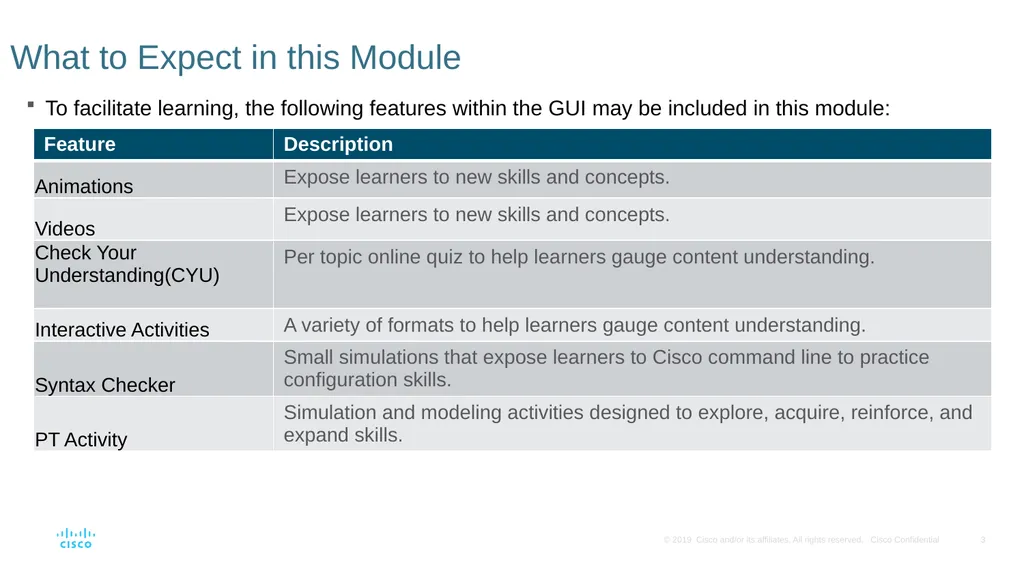
To facilitate learning, the following features within the GUI may be included in this module: What to Expect in this Module<br>
04
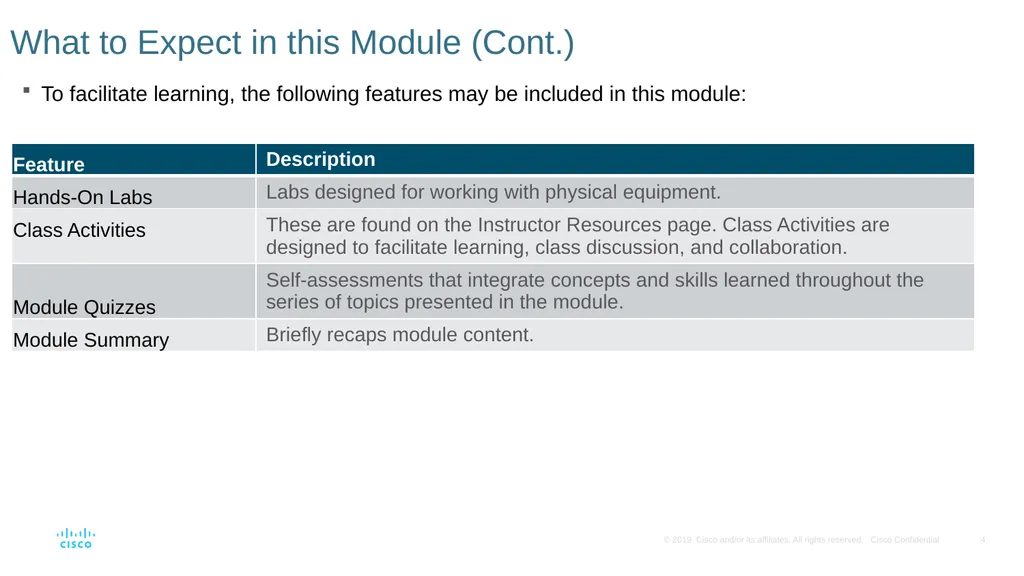
What to Expect in this Module (Cont.) To facilitate learning, the following features may be included in this module:<br>
05
Check Your Understanding Check Your Understanding activities are designed to let students quickly determine if they understand the content and can proceed, or if they need to review.
Check Your Understanding activities do not affect student grades.
There are no separate slides for these activities in the PPT. They are listed in the notes area of the slide that appears before these activities.<br>
Check Your Understanding activities do not affect student grades.
There are no separate slides for these activities in the PPT. They are listed in the notes area of the slide that appears before these activities.<br>
06
Module 2: Activities What activities are associated with this module?<br>
07
Module 2: Best Practices (Cont.) Prior to teaching Module 2, the instructor should:
Review the activities and assessments for this module.
Try to include as many questions as possible to keep students engaged during classroom presentation.
Topic 2.1
Explain the difference between a routing table and MAC address table.
It might be helpful to also explain the difference in function of a Layer 1 hub, which can only flood traffic. A layer 2 switch, which can 1. flood, if it is a broadcast or the unicast destination is unknown 2. forward traffic, when the unicast destination is in the table and 3. Filter traffic, when the switch receives a frame where the source and destination are on the same port. A layer 3 router can forward, if the destination is in the routing table or filter, if the destination is not in the table. Layer 3 is never allowed to flood traffic.
Compare and contrast the switching methods. Store-and-forward will not only eliminate CRC errors, but also runts and giants. Fragment-free can only eliminate runts.<br>
Review the activities and assessments for this module.
Try to include as many questions as possible to keep students engaged during classroom presentation.
Topic 2.1
Explain the difference between a routing table and MAC address table.
It might be helpful to also explain the difference in function of a Layer 1 hub, which can only flood traffic. A layer 2 switch, which can 1. flood, if it is a broadcast or the unicast destination is unknown 2. forward traffic, when the unicast destination is in the table and 3. Filter traffic, when the switch receives a frame where the source and destination are on the same port. A layer 3 router can forward, if the destination is in the routing table or filter, if the destination is not in the table. Layer 3 is never allowed to flood traffic.
Compare and contrast the switching methods. Store-and-forward will not only eliminate CRC errors, but also runts and giants. Fragment-free can only eliminate runts.<br>
08
Module 2: Best Practices (Cont.) Topic 2.2
Compare and contrast collision domains with broadcast domains. Ask the students what creates the problem of the collision domain. Then ask what is the solution. The problem is extending the network at layer 1, e.g. adding hubs (half-duplex) to the network. The solution is the layer 2 switch (full-duplex), which should eliminate the collision domain. However, if a connection from a switch that is in auto-negotiation fails, then we have the potential for a duplex mismatch. If one of the interfaces goes to half-duplex then a collision domain is created on that link even with the microsegmentation of the switch.
When discussing the broadcast domain, ask the class which layer causes this issue and which will be the solution. The issue is at layer 1 and / or layer 2 extending the LAN, both will flood traffic. The solution is the layer 3 router that will not flood broadcasts.<br>
Compare and contrast collision domains with broadcast domains. Ask the students what creates the problem of the collision domain. Then ask what is the solution. The problem is extending the network at layer 1, e.g. adding hubs (half-duplex) to the network. The solution is the layer 2 switch (full-duplex), which should eliminate the collision domain. However, if a connection from a switch that is in auto-negotiation fails, then we have the potential for a duplex mismatch. If one of the interfaces goes to half-duplex then a collision domain is created on that link even with the microsegmentation of the switch.
When discussing the broadcast domain, ask the class which layer causes this issue and which will be the solution. The issue is at layer 1 and / or layer 2 extending the LAN, both will flood traffic. The solution is the layer 3 router that will not flood broadcasts.<br>
09
Module 2: Best Practices (Cont.) Topic 2.2
A good analogy to describe the router with broadcasts is in the movie Lord of the Rings where Gandalf the grey in the Mines of Morea yells “You shall not pass!”. While the router interface that is part of LAN will listen to the broadcast, it will not pass nor flood the broadcast.
Consider what would happen if layer 3 passed broadcasts. Broadcasts are like an intercom at nationwide department or grocery store. They should be at the local store, but imagine the chaos if every time someone got onto the intercom it was flooded through to all of the stores in that chain! Imagine if someone sent a broadcast to their printer for a MAC address and it went to everyone on the internet because layer 3 flooded it! This is why layer 3 never has flooding as an option.
Also remember that a broadcast is like an intercom announcement and may be used to locate one device, just as an intercom might reach one person in the store. The broadcast can also be used to send messages to all devices.<br>
A good analogy to describe the router with broadcasts is in the movie Lord of the Rings where Gandalf the grey in the Mines of Morea yells “You shall not pass!”. While the router interface that is part of LAN will listen to the broadcast, it will not pass nor flood the broadcast.
Consider what would happen if layer 3 passed broadcasts. Broadcasts are like an intercom at nationwide department or grocery store. They should be at the local store, but imagine the chaos if every time someone got onto the intercom it was flooded through to all of the stores in that chain! Imagine if someone sent a broadcast to their printer for a MAC address and it went to everyone on the internet because layer 3 flooded it! This is why layer 3 never has flooding as an option.
Also remember that a broadcast is like an intercom announcement and may be used to locate one device, just as an intercom might reach one person in the store. The broadcast can also be used to send messages to all devices.<br>
10
Module 2: Switching Concepts Switching, Routing, and Wireless Essentials v7.0 (SRWE)<br>
11
Module Objectives Module Title: Switching Concepts
Module Objective: Explain how Layer 2 switches forward data.<br>
Module Objective: Explain how Layer 2 switches forward data.<br>
12
2.1 Frame Forwarding<br>
13
Frame Forwarding
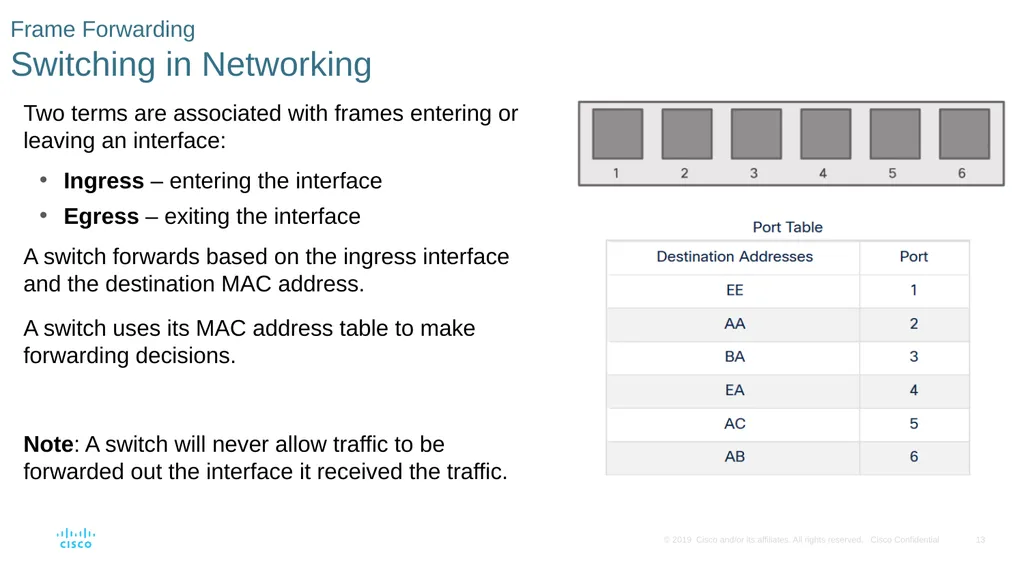
Switching in Networking Two terms are associated with frames entering or leaving an interface:
Ingress – entering the interface
Egress – exiting the interface
A switch forwards based on the ingress interface and the destination MAC address.
A switch uses its MAC address table to make forwarding decisions.
Note: A switch will never allow traffic to be forwarded out the interface it received the traffic.<br>
Ingress – entering the interface
Egress – exiting the interface
A switch forwards based on the ingress interface and the destination MAC address.
A switch uses its MAC address table to make forwarding decisions.
Note: A switch will never allow traffic to be forwarded out the interface it received the traffic.<br>
14
Frame Forwarding
The Switch MAC Address Table A switch will use the destination MAC address to determine the egress interface.
Before a switch can make this decision it must learn what interface the destination is located.
A switch builds a MAC address table, also known as a Content Addressable Memory (CAM) table, by recording the source MAC address into the table along with the port it was received.<br>
Before a switch can make this decision it must learn what interface the destination is located.
A switch builds a MAC address table, also known as a Content Addressable Memory (CAM) table, by recording the source MAC address into the table along with the port it was received.<br>
15
Frame Forwarding
The Switch Learn and Forward Method The switch uses a two step process:
Step 1. Learn – Examines Source Address
Adds the source MAC if not in table
Resets the time out setting back to 5 minutes if source is in the table
Step 2. Forward – Examines Destination Address
If the destination MAC is in the MAC address table it is forwarded out the specified port.
If a destination MAC is not in the table, it is flooded out all interfaces except the one it was received.<br>
Step 1. Learn – Examines Source Address
Adds the source MAC if not in table
Resets the time out setting back to 5 minutes if source is in the table
Step 2. Forward – Examines Destination Address
If the destination MAC is in the MAC address table it is forwarded out the specified port.
If a destination MAC is not in the table, it is flooded out all interfaces except the one it was received.<br>
16
Frame Forwarding
Video – MAC Address Tables on Connected Switches This video will cover the following:
How switches build MAC address tables
How switches forward frames based on the content of their MAC address tables<br>
How switches build MAC address tables
How switches forward frames based on the content of their MAC address tables<br>
17
Frame Forwarding
Switch Forwarding Methods Switches use software on application-specific-integrated circuits (ASICs) to make very quick decisions.
A switch will use one of two methods to make forwarding decisions after it receives a frame:
Store-and-forward switching - Receives the entire frame and ensures the frame is valid. Store-and-forward switching is Cisco’s preferred switching method.
Cut-through switching – Forwards the frame immediately after determining the destination MAC address of an incoming frame and the egress port.<br>
A switch will use one of two methods to make forwarding decisions after it receives a frame:
Store-and-forward switching - Receives the entire frame and ensures the frame is valid. Store-and-forward switching is Cisco’s preferred switching method.
Cut-through switching – Forwards the frame immediately after determining the destination MAC address of an incoming frame and the egress port.<br>
18
Frame Forwarding
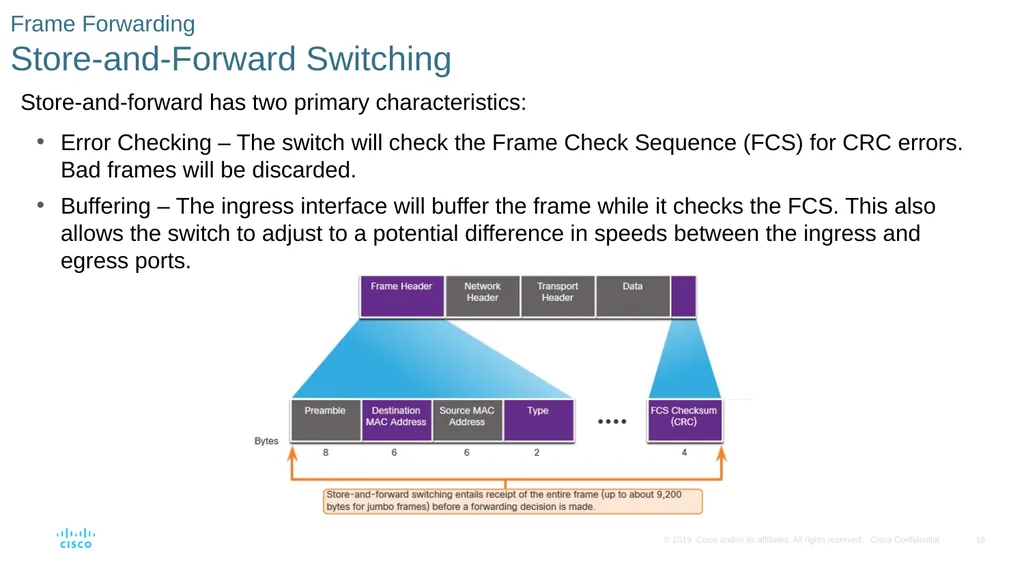
Store-and-Forward Switching Store-and-forward has two primary characteristics:
Error Checking – The switch will check the Frame Check Sequence (FCS) for CRC errors. Bad frames will be discarded.
Buffering – The ingress interface will buffer the frame while it checks the FCS. This also allows the switch to adjust to a potential difference in speeds between the ingress and egress ports.<br>
Error Checking – The switch will check the Frame Check Sequence (FCS) for CRC errors. Bad frames will be discarded.
Buffering – The ingress interface will buffer the frame while it checks the FCS. This also allows the switch to adjust to a potential difference in speeds between the ingress and egress ports.<br>
19
Frame Forwarding
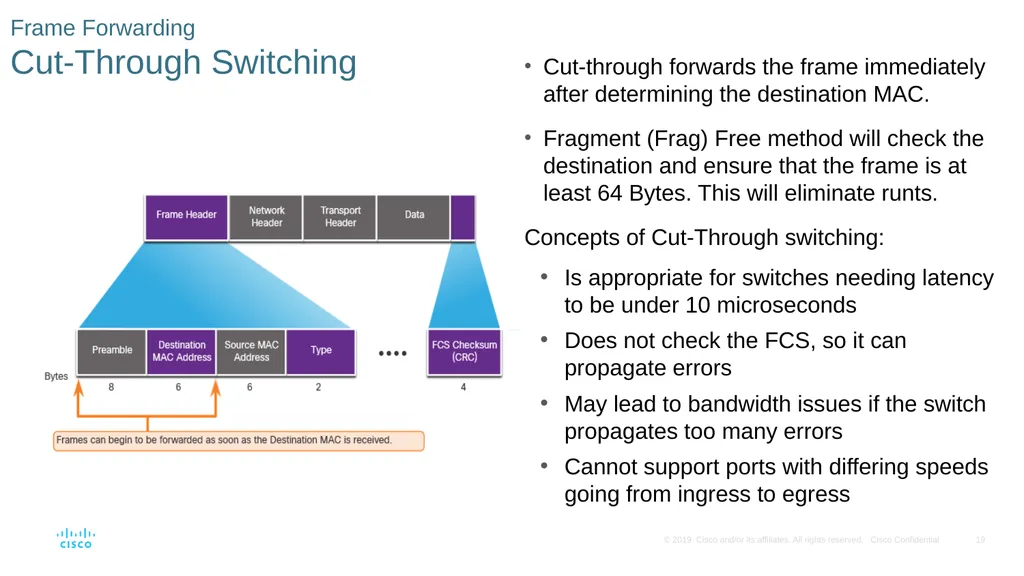
Cut-Through Switching Cut-through forwards the frame immediately after determining the destination MAC.
Fragment (Frag) Free method will check the destination and ensure that the frame is at least 64 Bytes. This will eliminate runts.
Concepts of Cut-Through switching:
Is appropriate for switches needing latency to be under 10 microseconds
Does not check the FCS, so it can propagate errors
May lead to bandwidth issues if the switch propagates too many errors
Cannot support ports with differing speeds going from ingress to egress<br>
Fragment (Frag) Free method will check the destination and ensure that the frame is at least 64 Bytes. This will eliminate runts.
Concepts of Cut-Through switching:
Is appropriate for switches needing latency to be under 10 microseconds
Does not check the FCS, so it can propagate errors
May lead to bandwidth issues if the switch propagates too many errors
Cannot support ports with differing speeds going from ingress to egress<br>
20
2.2 Switching Domains<br>
21
Switching Domains
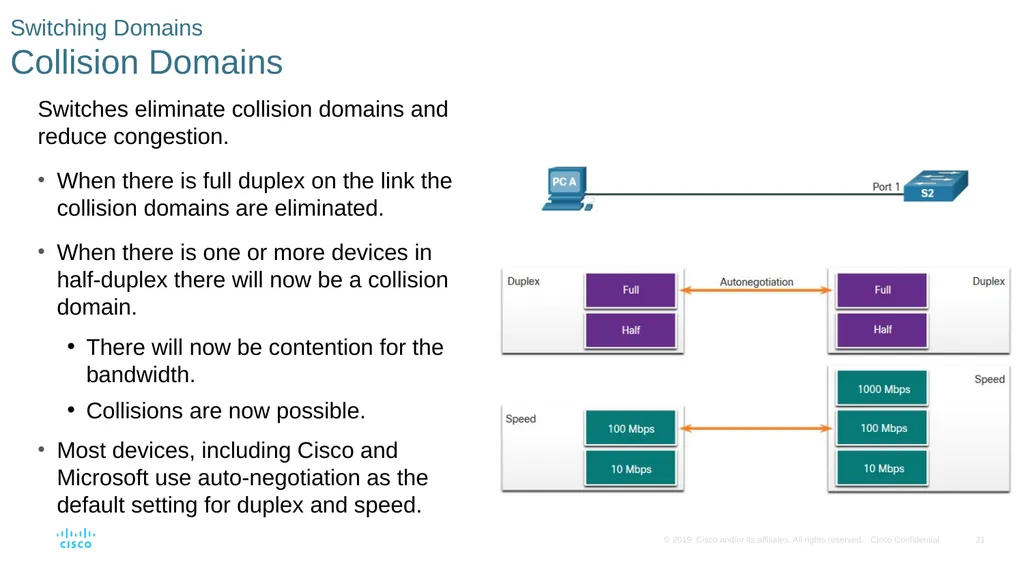
Collision Domains Switches eliminate collision domains and reduce congestion.
When there is full duplex on the link the collision domains are eliminated.
When there is one or more devices in half-duplex there will now be a collision domain.
There will now be contention for the bandwidth.
Collisions are now possible.
Most devices, including Cisco and Microsoft use auto-negotiation as the default setting for duplex and speed.<br>
When there is full duplex on the link the collision domains are eliminated.
When there is one or more devices in half-duplex there will now be a collision domain.
There will now be contention for the bandwidth.
Collisions are now possible.
Most devices, including Cisco and Microsoft use auto-negotiation as the default setting for duplex and speed.<br>
22
Switching Domains
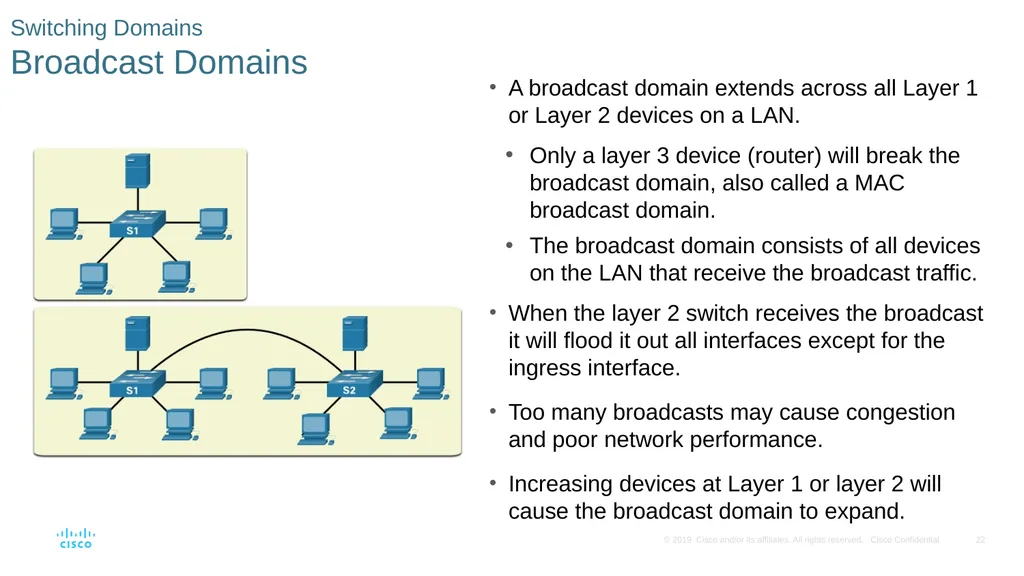
Broadcast Domains A broadcast domain extends across all Layer 1 or Layer 2 devices on a LAN.
Only a layer 3 device (router) will break the broadcast domain, also called a MAC broadcast domain.
The broadcast domain consists of all devices on the LAN that receive the broadcast traffic.
When the layer 2 switch receives the broadcast it will flood it out all interfaces except for the ingress interface.
Too many broadcasts may cause congestion and poor network performance.
Increasing devices at Layer 1 or layer 2 will cause the broadcast domain to expand.<br>
Only a layer 3 device (router) will break the broadcast domain, also called a MAC broadcast domain.
The broadcast domain consists of all devices on the LAN that receive the broadcast traffic.
When the layer 2 switch receives the broadcast it will flood it out all interfaces except for the ingress interface.
Too many broadcasts may cause congestion and poor network performance.
Increasing devices at Layer 1 or layer 2 will cause the broadcast domain to expand.<br>
23
Switching Domains
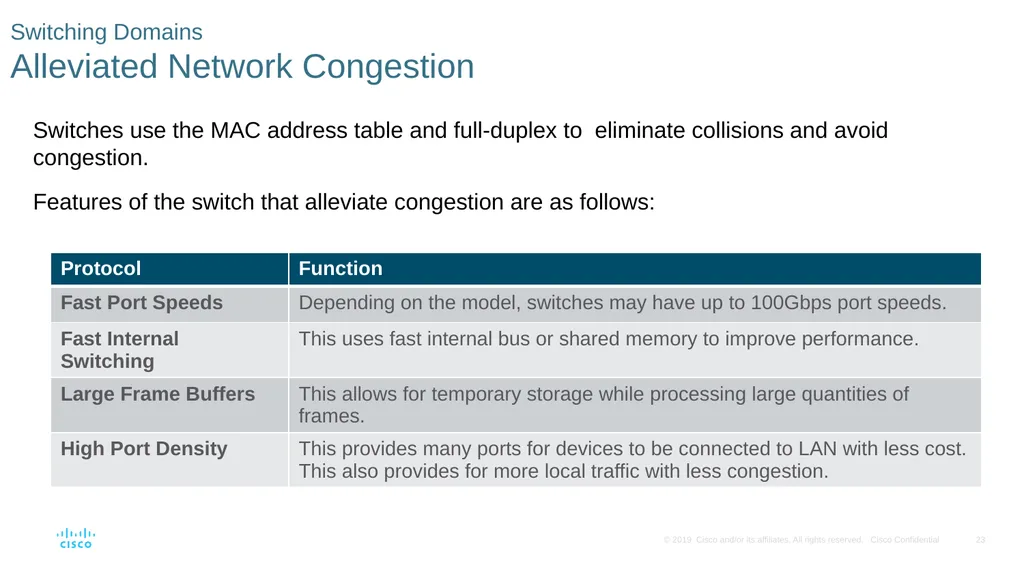
Alleviated Network Congestion Switches use the MAC address table and full-duplex to eliminate collisions and avoid congestion.
Features of the switch that alleviate congestion are as follows:<br>
Features of the switch that alleviate congestion are as follows:<br>
24
2.3 Module Practice and Quiz<br>
25
Module Practice and Quiz
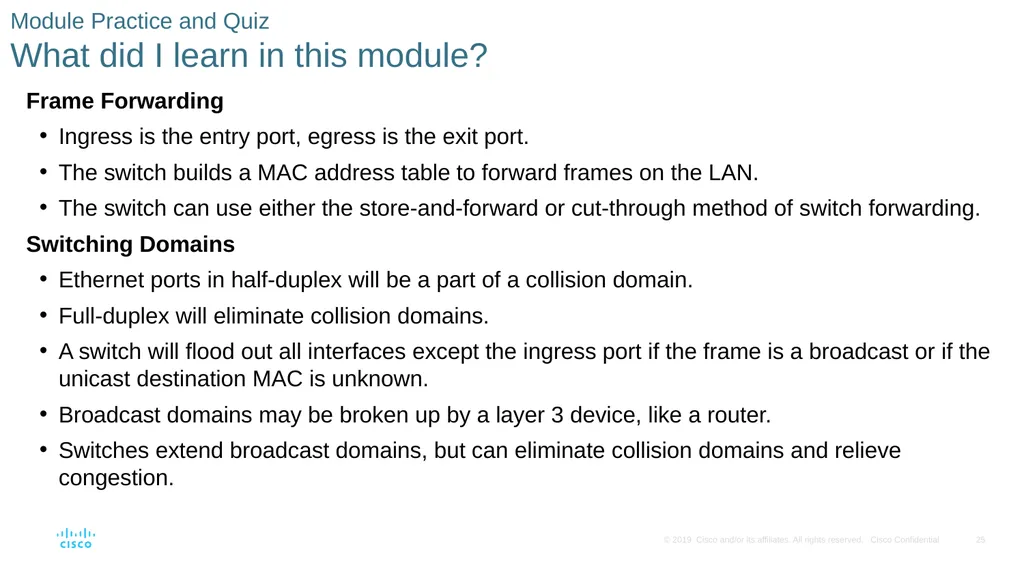
What did I learn in this module? Frame Forwarding
Ingress is the entry port, egress is the exit port.
The switch builds a MAC address table to forward frames on the LAN.
The switch can use either the store-and-forward or cut-through method of switch forwarding.
Switching Domains
Ethernet ports in half-duplex will be a part of a collision domain.
Full-duplex will eliminate collision domains.
A switch will flood out all interfaces except the ingress port if the frame is a broadcast or if the unicast destination MAC is unknown.
Broadcast domains may be broken up by a layer 3 device, like a router.
Switches extend broadcast domains, but can eliminate collision domains and relieve congestion.<br>
Ingress is the entry port, egress is the exit port.
The switch builds a MAC address table to forward frames on the LAN.
The switch can use either the store-and-forward or cut-through method of switch forwarding.
Switching Domains
Ethernet ports in half-duplex will be a part of a collision domain.
Full-duplex will eliminate collision domains.
A switch will flood out all interfaces except the ingress port if the frame is a broadcast or if the unicast destination MAC is unknown.
Broadcast domains may be broken up by a layer 3 device, like a router.
Switches extend broadcast domains, but can eliminate collision domains and relieve congestion.<br>
26
Module 2: Switching Concepts
New Terms and Commands content accessible memory (CAM)
MAC address table
store-and-forward switching
cut-through switching
automatic buffering
fragment free switching
collision domains
broadcast domains<br>
MAC address table
store-and-forward switching
cut-through switching
automatic buffering
fragment free switching
collision domains
broadcast domains<br>