
Orchestration, Harnesses & Component Models
MT
Published · 15 slides · 0 views
1 / 1
Description
Orchestration, Harnesses Component Models Copilot Studio Architecture Bootcamp HARNESSES Choose your harness before you build Microsoft 365 Copilot harness Customization of Microsoft 365 Copilot. Grounding, instructions and starter
Related Topics
Share
Embed code
Download this presentation From Below
"Orchestration, Harnesses & Component Models" is the property of its rightful owner. Permission is granted to download and print the materials on this website for personal, non-commercial use only, and to display it on your personal computer provided you do not modify the materials and that you retain all copyright notices contained in the materials. By downloading content from our website, you accept the terms of this agreement.
Presentation Transcript
01
Orchestration, Harnesses &
Component Models Copilot Studio Architecture Bootcamp<br>
Component Models Copilot Studio Architecture Bootcamp<br>
02
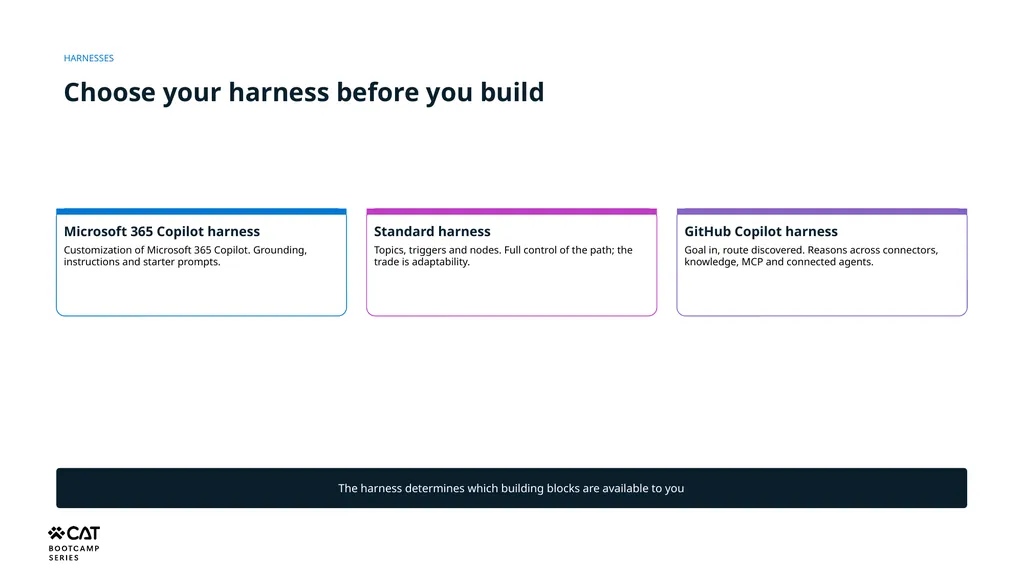
HARNESSES Choose your harness before you build Microsoft 365 Copilot harness
Customization of Microsoft 365 Copilot. Grounding, instructions and starter prompts. Standard harness
Topics, triggers and nodes. Full control of the path; the trade is adaptability. GitHub Copilot harness
Goal in, route discovered. Reasons across connectors, knowledge, MCP and connected agents. The harness determines which building blocks are available to you<br>
Customization of Microsoft 365 Copilot. Grounding, instructions and starter prompts. Standard harness
Topics, triggers and nodes. Full control of the path; the trade is adaptability. GitHub Copilot harness
Goal in, route discovered. Reasons across connectors, knowledge, MCP and connected agents. The harness determines which building blocks are available to you<br>
03
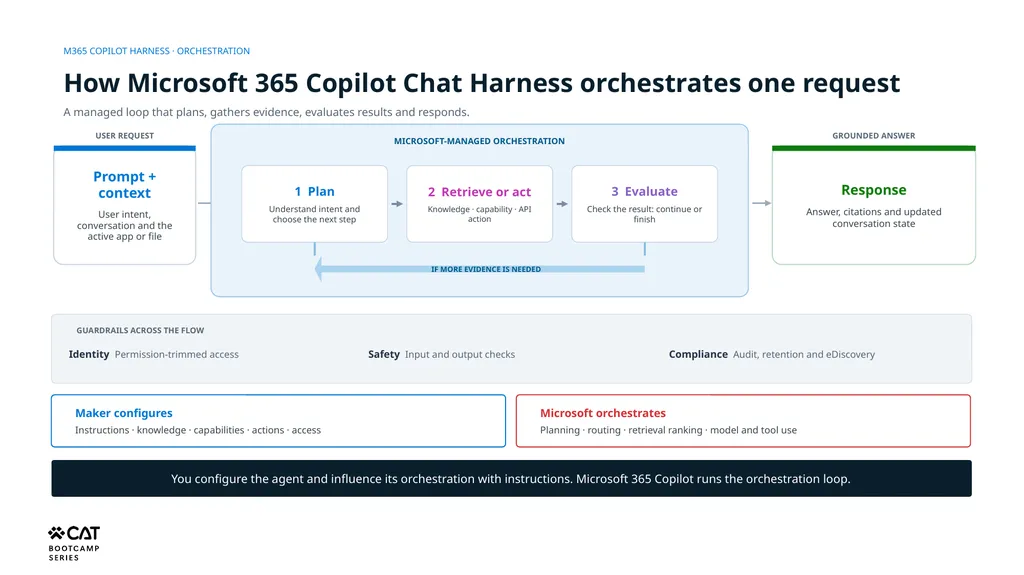
M365 COPILOT HARNESS · ORCHESTRATION How Microsoft 365 Copilot Chat Harness orchestrates one request A managed loop that plans, gathers evidence, evaluates results and responds. USER REQUEST Prompt + context
User intent, conversation and the active app or file MICROSOFT-MANAGED ORCHESTRATION 1 Plan
Understand intent and choose the next step 2 Retrieve or act
Knowledge · capability · API action 3 Evaluate
Check the result: continue or finish IF MORE EVIDENCE IS NEEDED GROUNDED ANSWER Response
Answer, citations and updated conversation state GUARDRAILS ACROSS THE FLOW Identity Permission-trimmed access Safety Input and output checks Compliance Audit, retention and eDiscovery Maker configures
Instructions · knowledge · capabilities · actions · access Microsoft orchestrates
Planning · routing · retrieval ranking · model and tool use You configure the agent and influence its orchestration with instructions. Microsoft 365 Copilot runs the orchestration loop.<br>
User intent, conversation and the active app or file MICROSOFT-MANAGED ORCHESTRATION 1 Plan
Understand intent and choose the next step 2 Retrieve or act
Knowledge · capability · API action 3 Evaluate
Check the result: continue or finish IF MORE EVIDENCE IS NEEDED GROUNDED ANSWER Response
Answer, citations and updated conversation state GUARDRAILS ACROSS THE FLOW Identity Permission-trimmed access Safety Input and output checks Compliance Audit, retention and eDiscovery Maker configures
Instructions · knowledge · capabilities · actions · access Microsoft orchestrates
Planning · routing · retrieval ranking · model and tool use You configure the agent and influence its orchestration with instructions. Microsoft 365 Copilot runs the orchestration loop.<br>
04
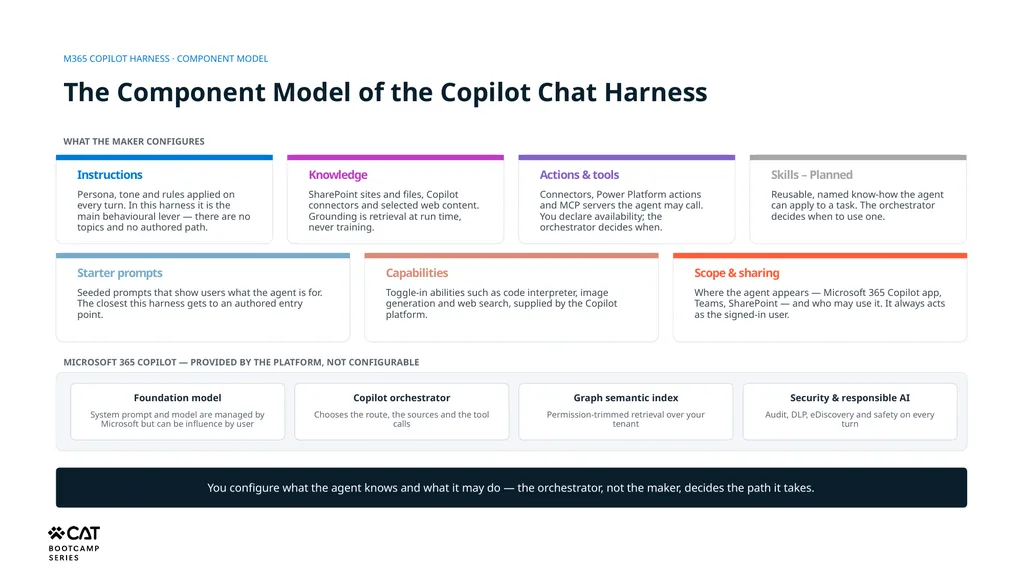
M365 COPILOT HARNESS · COMPONENT MODEL The Component Model of the Copilot Chat Harness You configure what the agent knows and what it may do — the orchestrator, not the maker, decides the path it takes. WHAT THE MAKER CONFIGURES Instructions Persona, tone and rules applied on every turn. In this harness it is the main behavioural lever — there are no topics and no authored path. Knowledge SharePoint sites and files, Copilot connectors and selected web content. Grounding is retrieval at run time, never training. Actions & tools Connectors, Power Platform actions and MCP servers the agent may call. You declare availability; the orchestrator decides when. Starter prompts Seeded prompts that show users what the agent is for. The closest this harness gets to an authored entry point. Capabilities Toggle-in abilities such as code interpreter, image generation and web search, supplied by the Copilot platform. Scope & sharing Where the agent appears — Microsoft 365 Copilot app, Teams, SharePoint — and who may use it. It always acts as the signed-in user. MICROSOFT 365 COPILOT — PROVIDED BY THE PLATFORM, NOT CONFIGURABLE Foundation model System prompt and model are managed by Microsoft but can be influence by user Copilot orchestrator Chooses the route, the sources and the tool calls Graph semantic index Permission-trimmed retrieval over your tenant Security & responsible AI Audit, DLP, eDiscovery and safety on every turn Skills – Planned Reusable, named know-how the agent can apply to a task. The orchestrator decides when to use one.<br>
05
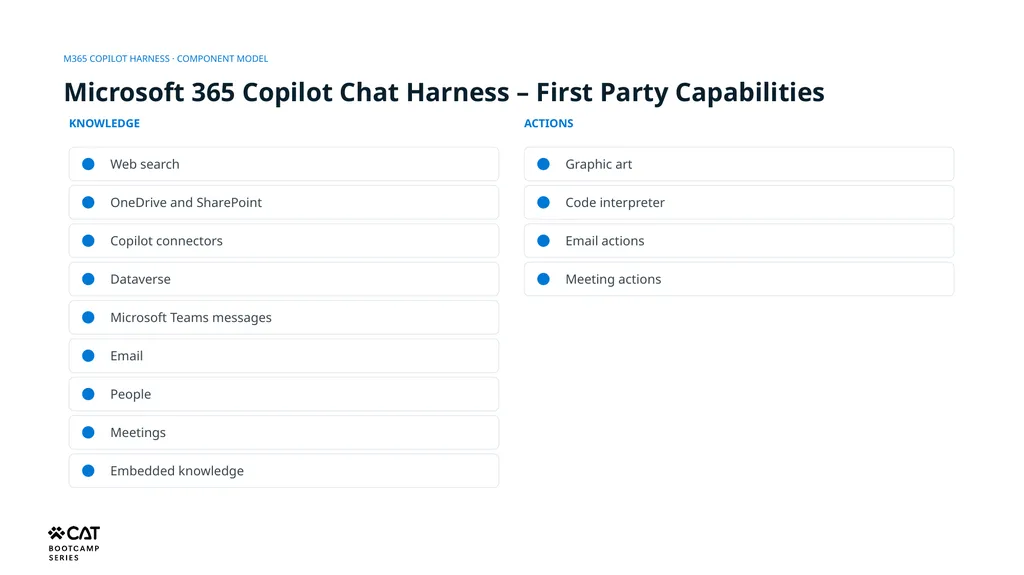
KNOWLEDGE ACTIONS Web search OneDrive and SharePoint Copilot connectors Dataverse Microsoft Teams messages Email People Meetings Embedded knowledge Graphic art Code interpreter Email actions Meeting actions M365 COPILOT HARNESS · COMPONENT MODEL Microsoft 365 Copilot Chat Harness – First Party Capabilities<br>
06
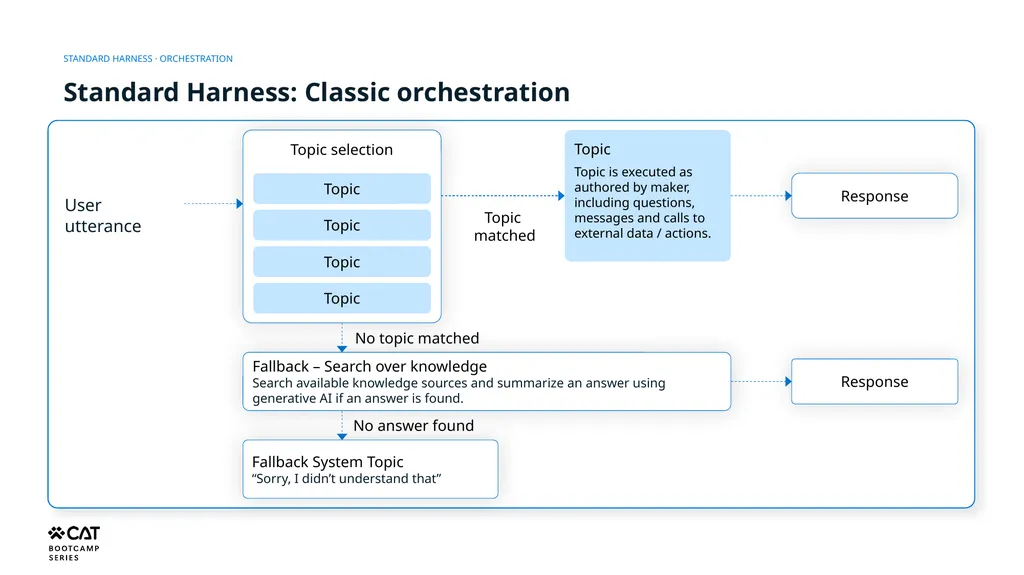
STANDARD HARNESS · ORCHESTRATION Standard Harness: Classic orchestration User utterance Topic selection Topic Topic Topic Topic Topic
matched Topic
Topic is executed as authored by maker, including questions, messages and calls to external data / actions. Response No topic matched Fallback – Search over knowledge
Search available knowledge sources and summarize an answer using generative AI if an answer is found. Response No answer found Fallback System Topic
“Sorry, I didn’t understand that”<br>
matched Topic
Topic is executed as authored by maker, including questions, messages and calls to external data / actions. Response No topic matched Fallback – Search over knowledge
Search available knowledge sources and summarize an answer using generative AI if an answer is found. Response No answer found Fallback System Topic
“Sorry, I didn’t understand that”<br>
07
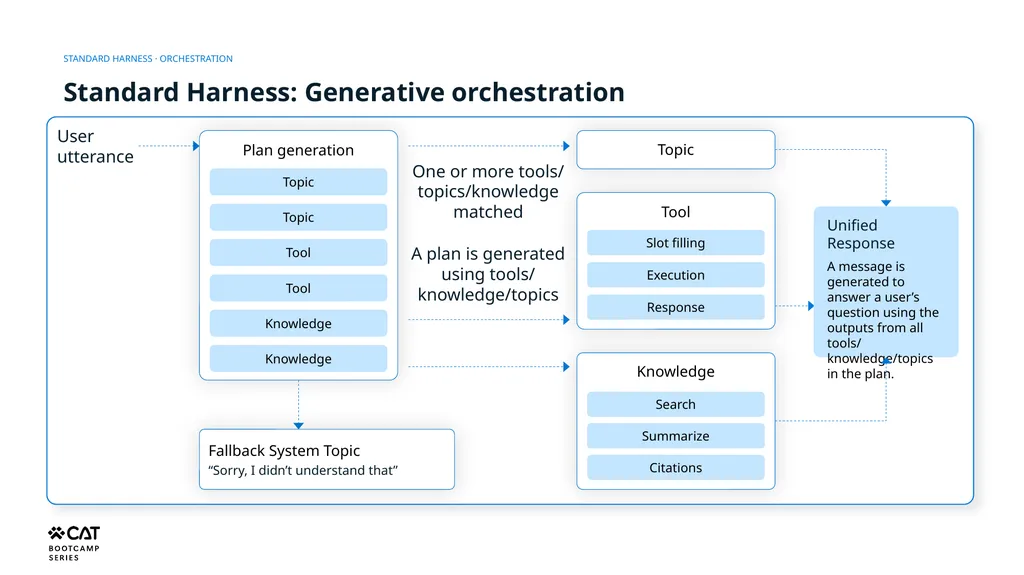
STANDARD HARNESS · ORCHESTRATION Standard Harness: Generative orchestration User utterance Plan generation Topic Topic Tool Tool Knowledge Knowledge One or more tools/ topics/knowledge matched Topic A plan is generated using tools/ knowledge/topics Tool Slot filling Execution Response Unified Response
A message is generated to answer a user’s question using the outputs from all tools/ knowledge/topics in the plan. Fallback System Topic
“Sorry, I didn’t understand that” Knowledge Search Summarize Citations<br>
A message is generated to answer a user’s question using the outputs from all tools/ knowledge/topics in the plan. Fallback System Topic
“Sorry, I didn’t understand that” Knowledge Search Summarize Citations<br>
08
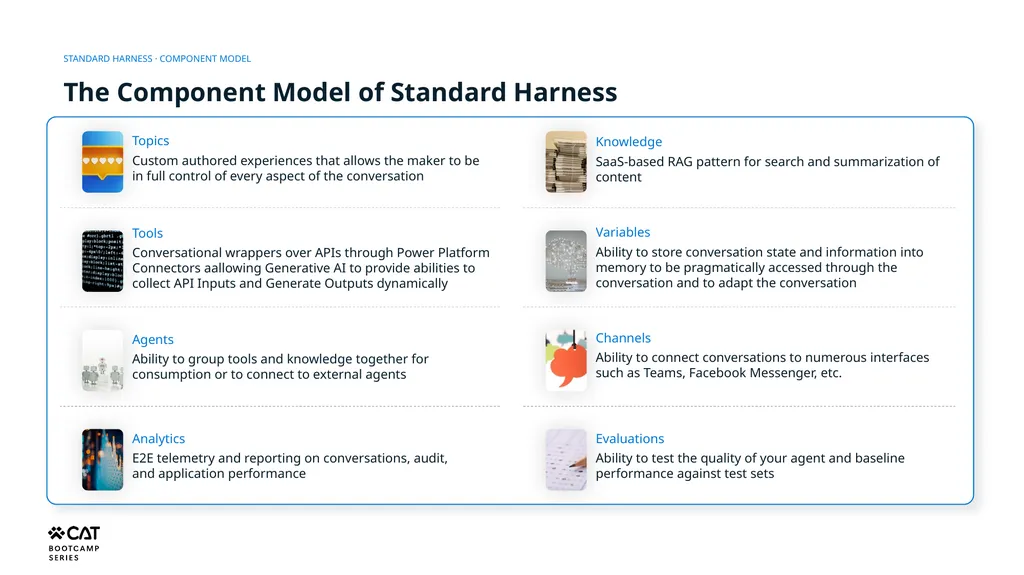
STANDARD HARNESS · COMPONENT MODEL The Component Model of Standard Harness Topics
Custom authored experiences that allows the maker to be in full control of every aspect of the conversation Knowledge
SaaS-based RAG pattern for search and summarization of content Tools
Conversational wrappers over APIs through Power Platform Connectors aallowing Generative AI to provide abilities to collect API Inputs and Generate Outputs dynamically Variables
Ability to store conversation state and information into memory to be pragmatically accessed through the conversation and to adapt the conversation Agents
Ability to group tools and knowledge together for consumption or to connect to external agents Channels
Ability to connect conversations to numerous interfaces such as Teams, Facebook Messenger, etc. Analytics
E2E telemetry and reporting on conversations, audit, and application performance Evaluations
Ability to test the quality of your agent and baseline performance against test sets<br>
Custom authored experiences that allows the maker to be in full control of every aspect of the conversation Knowledge
SaaS-based RAG pattern for search and summarization of content Tools
Conversational wrappers over APIs through Power Platform Connectors aallowing Generative AI to provide abilities to collect API Inputs and Generate Outputs dynamically Variables
Ability to store conversation state and information into memory to be pragmatically accessed through the conversation and to adapt the conversation Agents
Ability to group tools and knowledge together for consumption or to connect to external agents Channels
Ability to connect conversations to numerous interfaces such as Teams, Facebook Messenger, etc. Analytics
E2E telemetry and reporting on conversations, audit, and application performance Evaluations
Ability to test the quality of your agent and baseline performance against test sets<br>
09
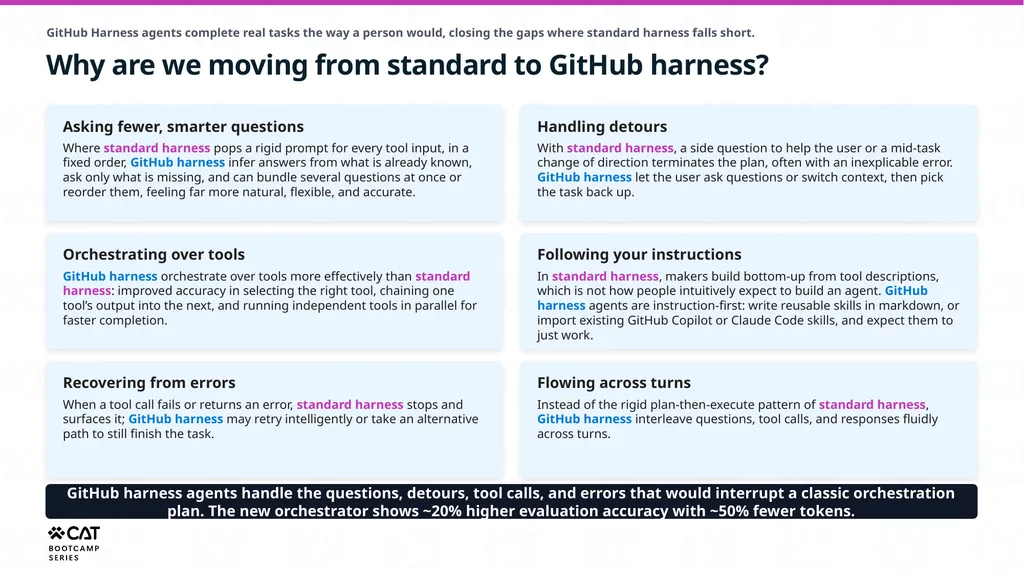
GitHub Harness agents complete real tasks the way a person would, closing the gaps where standard harness falls short. Why are we moving from standard to GitHub harness? Asking fewer, smarter questions
Where standard harness pops a rigid prompt for every tool input, in a fixed order, GitHub harness infer answers from what is already known, ask only what is missing, and can bundle several questions at once or reorder them, feeling far more natural, flexible, and accurate. Handling detours
With standard harness, a side question to help the user or a mid-task change of direction terminates the plan, often with an inexplicable error. GitHub harness let the user ask questions or switch context, then pick the task back up. Orchestrating over tools
GitHub harness orchestrate over tools more effectively than standard harness: improved accuracy in selecting the right tool, chaining one tool’s output into the next, and running independent tools in parallel for faster completion. Following your instructions
In standard harness, makers build bottom-up from tool descriptions, which is not how people intuitively expect to build an agent. GitHub harness agents are instruction-first: write reusable skills in markdown, or import existing GitHub Copilot or Claude Code skills, and expect them to just work. Recovering from errors
When a tool call fails or returns an error, standard harness stops and surfaces it; GitHub harness may retry intelligently or take an alternative path to still finish the task. Flowing across turns
Instead of the rigid plan-then-execute pattern of standard harness, GitHub harness interleave questions, tool calls, and responses fluidly across turns. GitHub harness agents handle the questions, detours, tool calls, and errors that would interrupt a classic orchestration plan. The new orchestrator shows ~20% higher evaluation accuracy with ~50% fewer tokens.<br>
Where standard harness pops a rigid prompt for every tool input, in a fixed order, GitHub harness infer answers from what is already known, ask only what is missing, and can bundle several questions at once or reorder them, feeling far more natural, flexible, and accurate. Handling detours
With standard harness, a side question to help the user or a mid-task change of direction terminates the plan, often with an inexplicable error. GitHub harness let the user ask questions or switch context, then pick the task back up. Orchestrating over tools
GitHub harness orchestrate over tools more effectively than standard harness: improved accuracy in selecting the right tool, chaining one tool’s output into the next, and running independent tools in parallel for faster completion. Following your instructions
In standard harness, makers build bottom-up from tool descriptions, which is not how people intuitively expect to build an agent. GitHub harness agents are instruction-first: write reusable skills in markdown, or import existing GitHub Copilot or Claude Code skills, and expect them to just work. Recovering from errors
When a tool call fails or returns an error, standard harness stops and surfaces it; GitHub harness may retry intelligently or take an alternative path to still finish the task. Flowing across turns
Instead of the rigid plan-then-execute pattern of standard harness, GitHub harness interleave questions, tool calls, and responses fluidly across turns. GitHub harness agents handle the questions, detours, tool calls, and errors that would interrupt a classic orchestration plan. The new orchestrator shows ~20% higher evaluation accuracy with ~50% fewer tokens.<br>
10
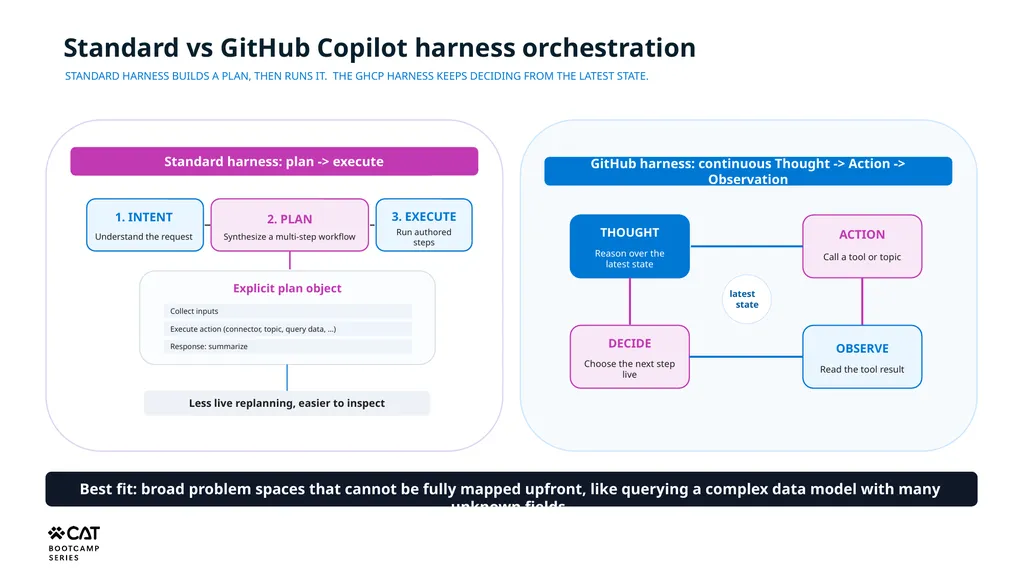
Standard vs GitHub Copilot harness orchestration GitHub harness: continuous Thought -> Action -> Observation Standard harness: plan -> execute THOUGHT Reason over the latest state ACTION Call a tool or topic OBSERVE Read the tool result DECIDE Choose the next step live latest
state STANDARD HARNESS BUILDS A PLAN, THEN RUNS IT. THE GHCP HARNESS KEEPS DECIDING FROM THE LATEST STATE.<br>
state STANDARD HARNESS BUILDS A PLAN, THEN RUNS IT. THE GHCP HARNESS KEEPS DECIDING FROM THE LATEST STATE.<br>
11
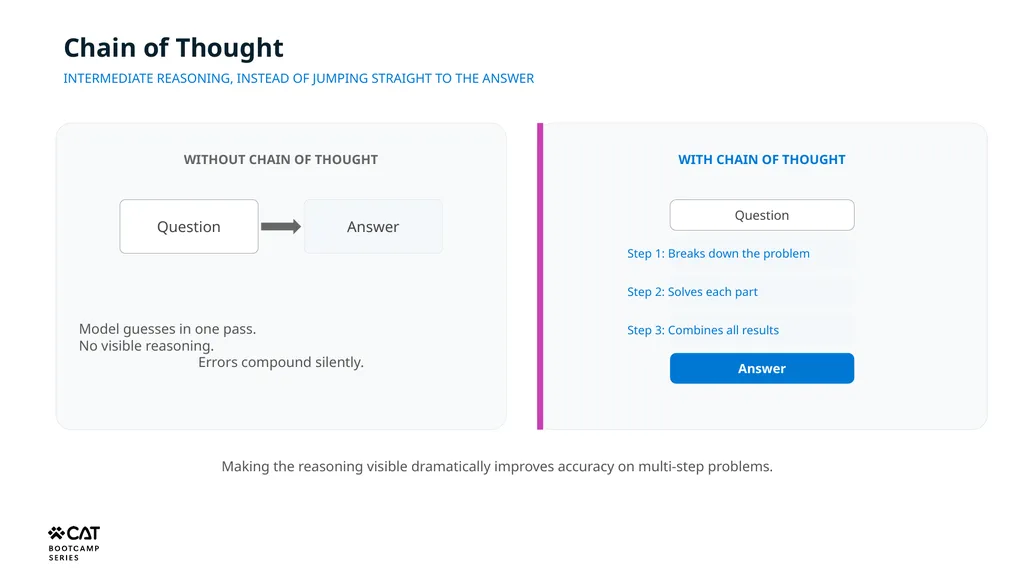
Chain of Thought INTERMEDIATE REASONING, INSTEAD OF JUMPING STRAIGHT TO THE ANSWER WITHOUT CHAIN OF THOUGHT Question Answer Model guesses in one pass.
No visible reasoning.
Errors compound silently. WITH CHAIN OF THOUGHT Question Step 1: Breaks down the problem Step 2: Solves each part Step 3: Combines all results Answer Making the reasoning visible dramatically improves accuracy on multi-step problems.<br>
No visible reasoning.
Errors compound silently. WITH CHAIN OF THOUGHT Question Step 1: Breaks down the problem Step 2: Solves each part Step 3: Combines all results Answer Making the reasoning visible dramatically improves accuracy on multi-step problems.<br>
12
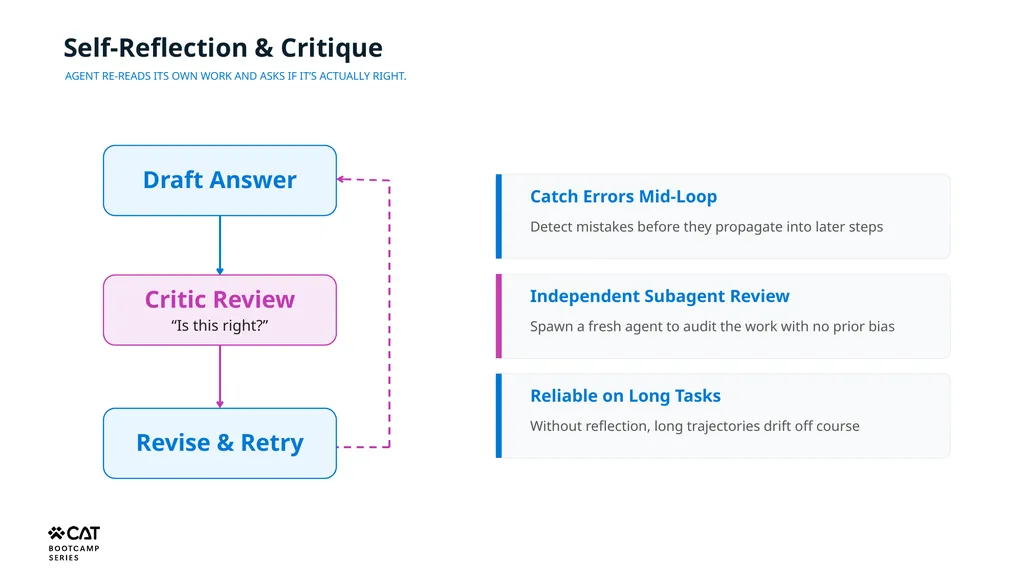
Self-Reflection & Critique AGENT RE-READS ITS OWN WORK AND ASKS IF IT’S ACTUALLY RIGHT. Draft Answer Catch Errors Mid-Loop Detect mistakes before they propagate into later steps Independent Subagent Review Spawn a fresh agent to audit the work with no prior bias Reliable on Long Tasks Without reflection, long trajectories drift off course Revise & Retry<br>
13
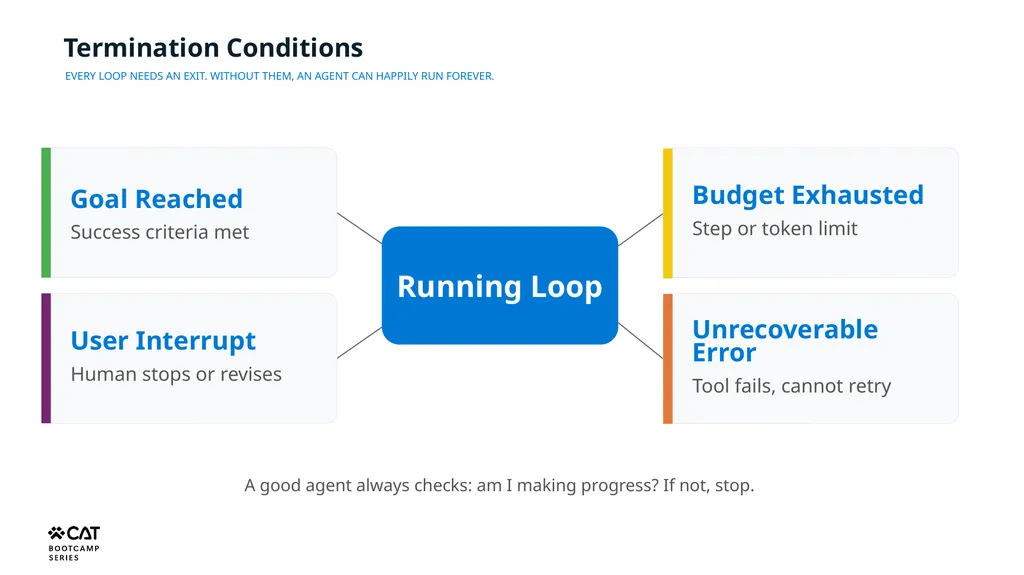
Termination Conditions EVERY LOOP NEEDS AN EXIT. WITHOUT THEM, AN AGENT CAN HAPPILY RUN FOREVER. Running Loop Goal Reached
Success criteria met Budget Exhausted
Step or token limit Unrecoverable Error
Tool fails, cannot retry User Interrupt
Human stops or revises A good agent always checks: am I making progress? If not, stop.<br>
Success criteria met Budget Exhausted
Step or token limit Unrecoverable Error
Tool fails, cannot retry User Interrupt
Human stops or revises A good agent always checks: am I making progress? If not, stop.<br>
14
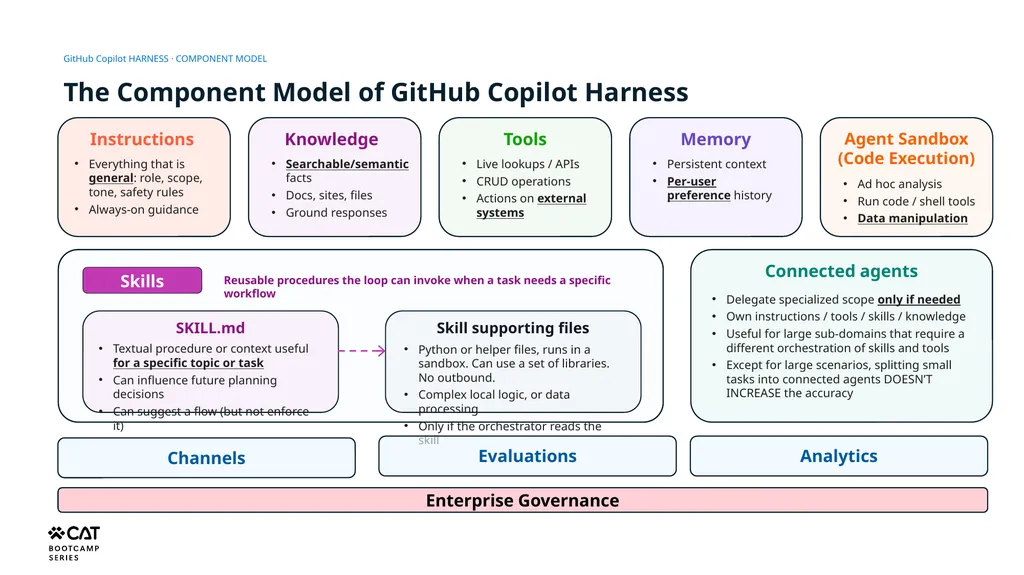
GitHub Copilot HARNESS · COMPONENT MODEL The Component Model of GitHub Copilot Harness Skills Reusable procedures the loop can invoke when a task needs a specific workflow SKILL.md Textual procedure or context useful for a specific topic or task
Can influence future planning decisions
Can suggest a flow (but not enforce it) Skill supporting files Python or helper files, runs in a sandbox. Can use a set of libraries. No outbound.
Complex local logic, or data processing
Only if the orchestrator reads the skill Connected agents Delegate specialized scope only if needed
Own instructions / tools / skills / knowledge
Useful for large sub-domains that require a different orchestration of skills and tools
Except for large scenarios, splitting small tasks into connected agents DOESN’T INCREASE the accuracy Design rule: choose the smallest component that makes the behavior reliable, inspectable, and safe inside the loop.<br>
Can influence future planning decisions
Can suggest a flow (but not enforce it) Skill supporting files Python or helper files, runs in a sandbox. Can use a set of libraries. No outbound.
Complex local logic, or data processing
Only if the orchestrator reads the skill Connected agents Delegate specialized scope only if needed
Own instructions / tools / skills / knowledge
Useful for large sub-domains that require a different orchestration of skills and tools
Except for large scenarios, splitting small tasks into connected agents DOESN’T INCREASE the accuracy Design rule: choose the smallest component that makes the behavior reliable, inspectable, and safe inside the loop.<br>
15
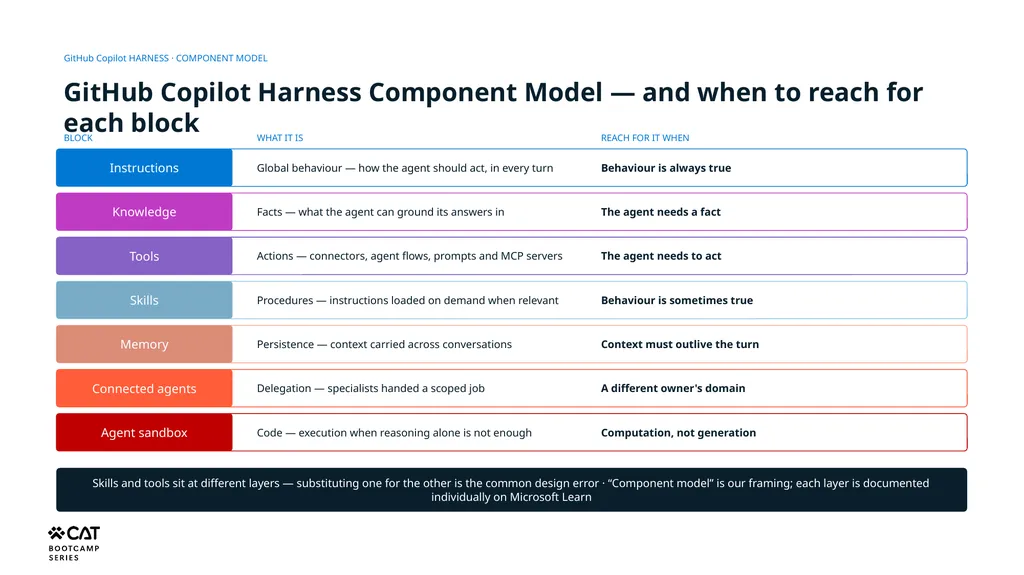
GitHub Copilot HARNESS · COMPONENT MODEL GitHub Copilot Harness Component Model — and when to reach for each block Instructions Global behaviour — how the agent should act, in every turn Knowledge Facts — what the agent can ground its answers in Tools Actions — connectors, agent flows, prompts and MCP servers Skills Procedures — instructions loaded on demand when relevant Memory Persistence — context carried across conversations Connected agents Delegation — specialists handed a scoped job Agent sandbox Code — execution when reasoning alone is not enough Skills and tools sit at different layers — substituting one for the other is the common design error · “Component model” is our framing; each layer is documented individually on Microsoft Learn Behaviour is always true The agent needs a fact The agent needs to act Behaviour is sometimes true Context must outlive the turn A different owner's domain Computation, not generation BLOCK WHAT IT IS REACH FOR IT WHEN<br>