
Primary Computing & e-Safety Primary Computing &
Description: Primary Computing e-Safety Primary Computing e-Safety Intent Within an ever changing and technological world, Grange Primary Academy understands and values the importance of teaching Computing from a young age. We acknowledge that
Related Topics
Download Presentation
"Primary Computing & e-Safety Primary Computing &" is the property of its rightful owner. Permission is granted to download and print the materials on this website for personal, non-commercial use only, and to display it on your personal computer provided you do not modify the materials and that you retain all copyright notices contained in the materials. By downloading content from our website, you accept the terms of this agreement.
Presentation Transcript
slide1. Primary Computing & e-Safety<br>
slide2. Primary Computing & e-Safety Intent
Within an ever changing and technological world, Grange Primary Academy understands and values the importance of teaching Computing from a young age. We acknowledge that future generations will rely heavily on their computational confidence and digital skills in order to support their progress within their chosen career paths.
Therefore, it is our school’s aim to equip children with the relevant skills and knowledge that is required to understand the three core areas of Computing (Computer Science, Information Technology and Digital Literacy) and to offer a broad and balanced approach to providing quality first teaching of this subject.
Computing is an integral part to a child’s education and everyday life. Consequently, we intend to support our pupils to access and understand the core principles of this subject through engaging and activities. Whilst ensuring they understand the advantages and disadvantages associated with online experiences, we want children to develop as respectful, responsible and confident users of technology, aware of measures that can be taken to keep themselves and others safe online.<br>
slide3. Primary Computing & e-Safety Implementation
We follow a broad and balanced Computing curriculum (based upon the National Curriculum) that builds on previous learning and provides both support and challenge for learners.
Computing at Grange Primary Academy at Key Stage 1 and 2 is taught across six units in each year group with the intention that each unit is taught over a half term. In EYFS, it is taught through by using technology to solve problems and produce creative outcomes. We follow the Teach Computing scheme of work.
All lessons at Grange Primary Academy are crafted around Rosenshine’s Ten Principals of Instruction and these inform the structure of each lesson in the United Learning Curriculum for Computing. We believe in the importance of co-operative learning and use Kagan structures to enable this. Our methods of teaching and learning are chosen to support the development of lively and enquiring minds, which critique and question.
The school uses the commercial scheme ‘Teach Computing’. This was selected because long term plans detail the’ Powerful Knowledge’ that is taught and ensure that there is a clear progression in key skills, both across a year and from year to year. Each unit provides opportunities for developing computational thinking concepts by using approaches including tinkering. Learning sequences also provide opportunities to develop creativity and solving problems within a meaningful context for applying what is learnt. This scheme also provides opportunities to develop pupil’s conceptual understanding alongside opportunities for them to be creative and to apply taught skills, as they become digitally literate. Learning through experimentation, discussion and making are at the core of the scheme. This ‘hands on’, practical approach supports the development of long term memory and gives pupils with limited technical English a context in which to learn and use new vocabulary<br>
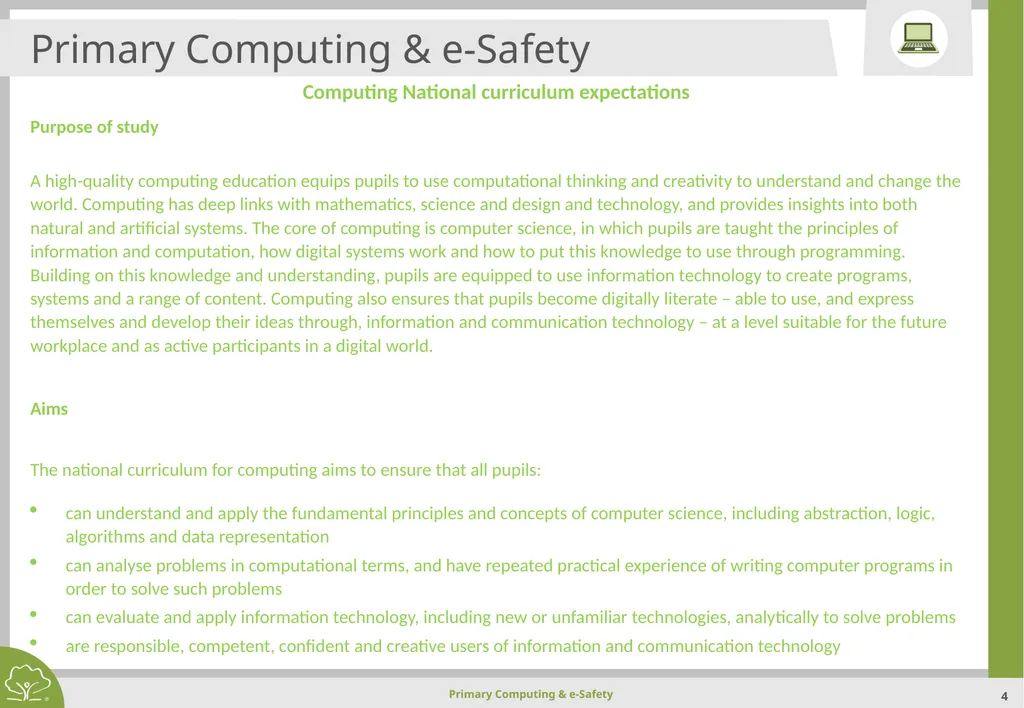
slide4. Primary Computing & e-Safety Computing National curriculum expectations
Purpose of study
A high-quality computing education equips pupils to use computational thinking and creativity to understand and change the world. Computing has deep links with mathematics, science and design and technology, and provides insights into both natural and artificial systems. The core of computing is computer science, in which pupils are taught the principles of information and computation, how digital systems work and how to put this knowledge to use through programming. Building on this knowledge and understanding, pupils are equipped to use information technology to create programs, systems and a range of content. Computing also ensures that pupils become digitally literate – able to use, and express themselves and develop their ideas through, information and communication technology – at a level suitable for the future workplace and as active participants in a digital world.
Aims
The national curriculum for computing aims to ensure that all pupils:
can understand and apply the fundamental principles and concepts of computer science, including abstraction, logic, algorithms and data representation
can analyse problems in computational terms, and have repeated practical experience of writing computer programs in order to solve such problems
can evaluate and apply information technology, including new or unfamiliar technologies, analytically to solve problems
are responsible, competent, confident and creative users of information and communication technology<br>
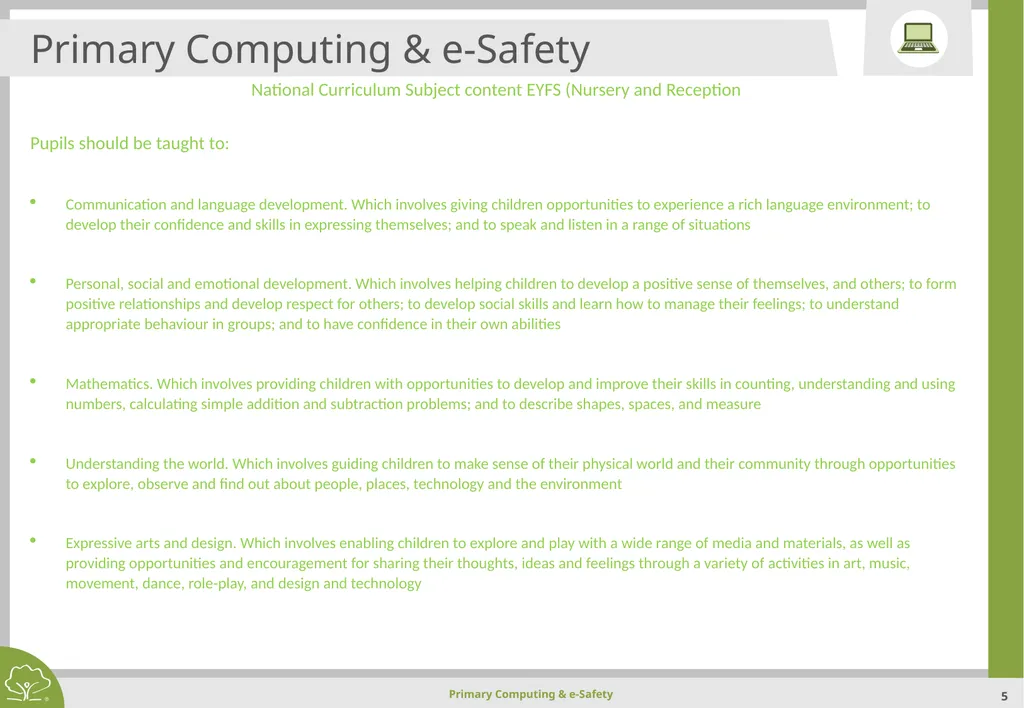
slide5. Primary Computing & e-Safety National Curriculum Subject content EYFS (Nursery and Reception
Pupils should be taught to:
Communication and language development. Which involves giving children opportunities to experience a rich language environment; to develop their confidence and skills in expressing themselves; and to speak and listen in a range of situations
Personal, social and emotional development. Which involves helping children to develop a positive sense of themselves, and others; to form positive relationships and develop respect for others; to develop social skills and learn how to manage their feelings; to understand appropriate behaviour in groups; and to have confidence in their own abilities
Mathematics. Which involves providing children with opportunities to develop and improve their skills in counting, understanding and using numbers, calculating simple addition and subtraction problems; and to describe shapes, spaces, and measure
Understanding the world. Which involves guiding children to make sense of their physical world and their community through opportunities to explore, observe and find out about people, places, technology and the environment
Expressive arts and design. Which involves enabling children to explore and play with a wide range of media and materials, as well as providing opportunities and encouragement for sharing their thoughts, ideas and feelings through a variety of activities in art, music, movement, dance, role-play, and design and technology<br>
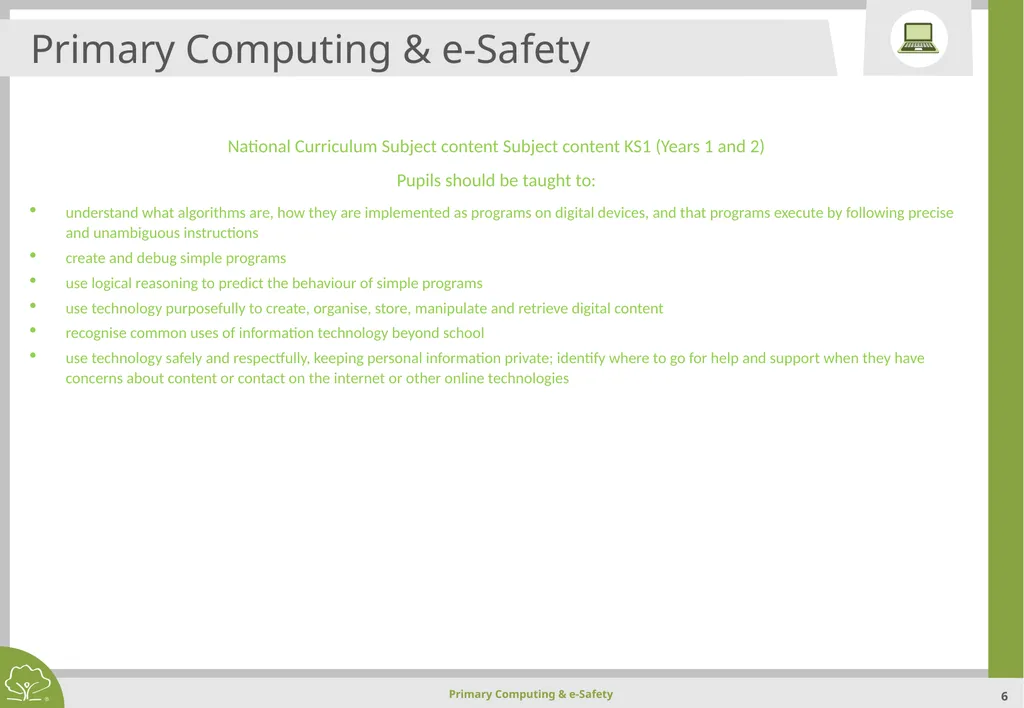
slide6. Primary Computing & e-Safety National Curriculum Subject content Subject content KS1 (Years 1 and 2)
Pupils should be taught to:
understand what algorithms are, how they are implemented as programs on digital devices, and that programs execute by following precise and unambiguous instructions
create and debug simple programs
use logical reasoning to predict the behaviour of simple programs
use technology purposefully to create, organise, store, manipulate and retrieve digital content
recognise common uses of information technology beyond school
use technology safely and respectfully, keeping personal information private; identify where to go for help and support when they have concerns about content or contact on the internet or other online technologies<br>
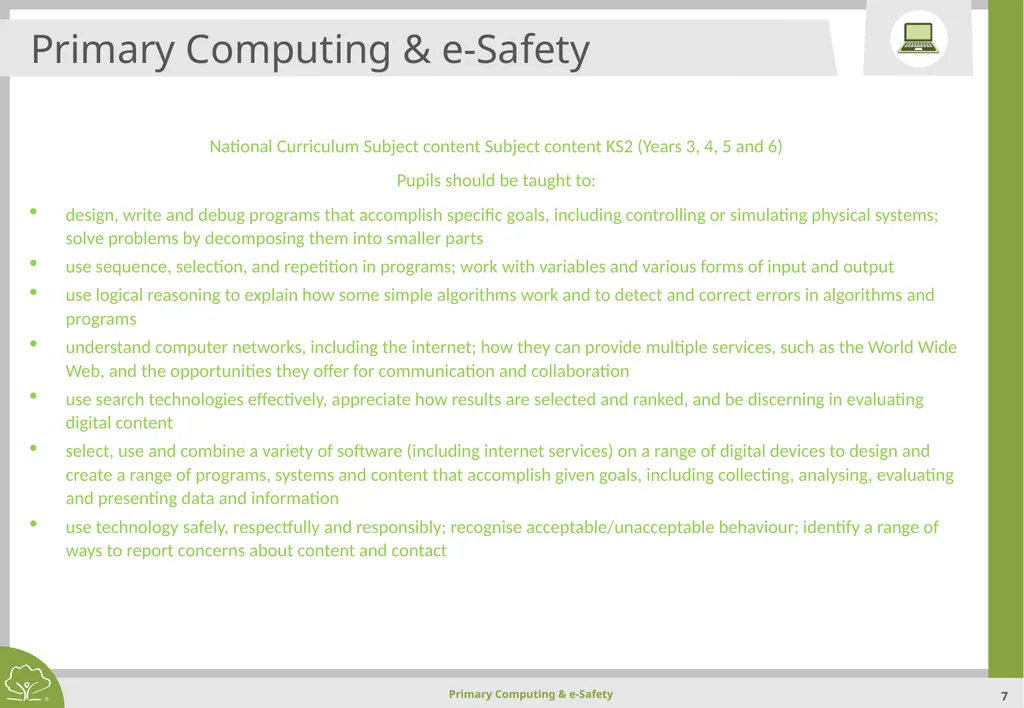
slide7. Primary Computing & e-Safety National Curriculum Subject content Subject content KS2 (Years 3, 4, 5 and 6)
Pupils should be taught to:
design, write and debug programs that accomplish specific goals, including controlling or simulating physical systems; solve problems by decomposing them into smaller parts
use sequence, selection, and repetition in programs; work with variables and various forms of input and output
use logical reasoning to explain how some simple algorithms work and to detect and correct errors in algorithms and programs
understand computer networks, including the internet; how they can provide multiple services, such as the World Wide Web, and the opportunities they offer for communication and collaboration
use search technologies effectively, appreciate how results are selected and ranked, and be discerning in evaluating digital content
select, use and combine a variety of software (including internet services) on a range of digital devices to design and create a range of programs, systems and content that accomplish given goals, including collecting, analysing, evaluating and presenting data and information
use technology safely, respectfully and responsibly; recognise acceptable/unacceptable behaviour; identify a range of ways to report concerns about content and contact<br>
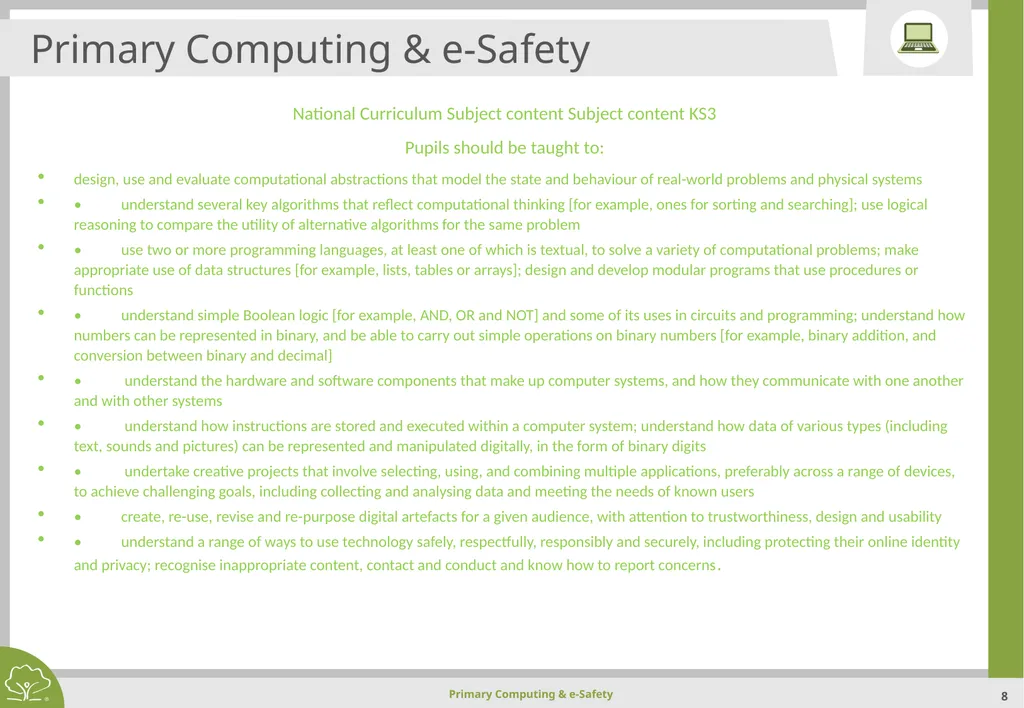
slide8. Primary Computing & e-Safety National Curriculum Subject content Subject content KS3
Pupils should be taught to:
design, use and evaluate computational abstractions that model the state and behaviour of real-world problems and physical systems
• understand several key algorithms that reflect computational thinking [for example, ones for sorting and searching]; use logical reasoning to compare the utility of alternative algorithms for the same problem
• use two or more programming languages, at least one of which is textual, to solve a variety of computational problems; make appropriate use of data structures [for example, lists, tables or arrays]; design and develop modular programs that use procedures or functions
• understand simple Boolean logic [for example, AND, OR and NOT] and some of its uses in circuits and programming; understand how numbers can be represented in binary, and be able to carry out simple operations on binary numbers [for example, binary addition, and conversion between binary and decimal]
• understand the hardware and software components that make up computer systems, and how they communicate with one another and with other systems
• understand how instructions are stored and executed within a computer system; understand how data of various types (including text, sounds and pictures) can be represented and manipulated digitally, in the form of binary digits
• undertake creative projects that involve selecting, using, and combining multiple applications, preferably across a range of devices, to achieve challenging goals, including collecting and analysing data and meeting the needs of known users
• create, re-use, revise and re-purpose digital artefacts for a given audience, with attention to trustworthiness, design and usability
• understand a range of ways to use technology safely, respectfully, responsibly and securely, including protecting their online identity and privacy; recognise inappropriate content, contact and conduct and know how to report concerns.<br>
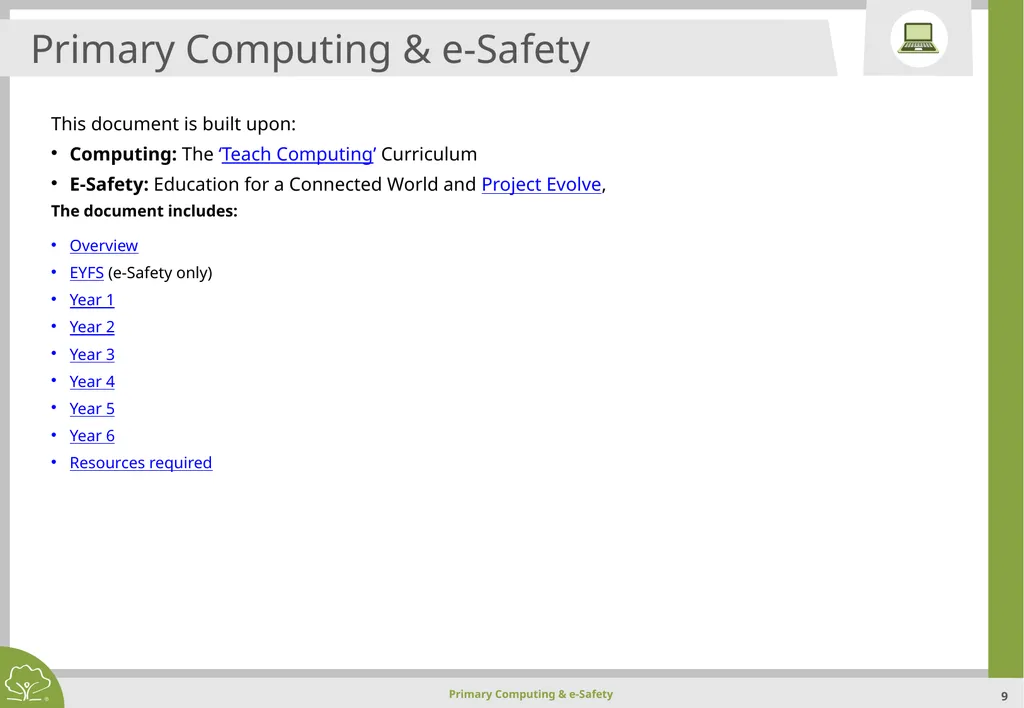
slide9. Primary Computing & e-Safety This document is built upon:
Computing: The ‘Teach Computing’ Curriculum
E-Safety: Education for a Connected World and Project Evolve,
The document includes:
Overview
EYFS (e-Safety only)
Year 1
Year 2
Year 3
Year 4
Year 5
Year 6
Resources required<br>
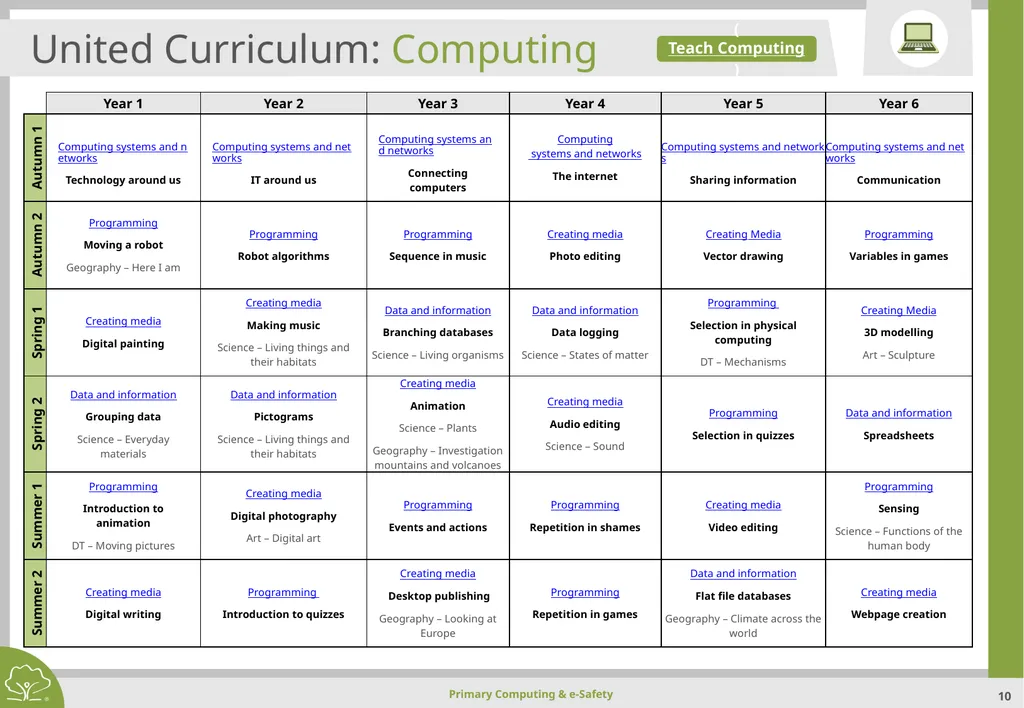
slide10. United Curriculum: Computing (Teach Computing)<br>
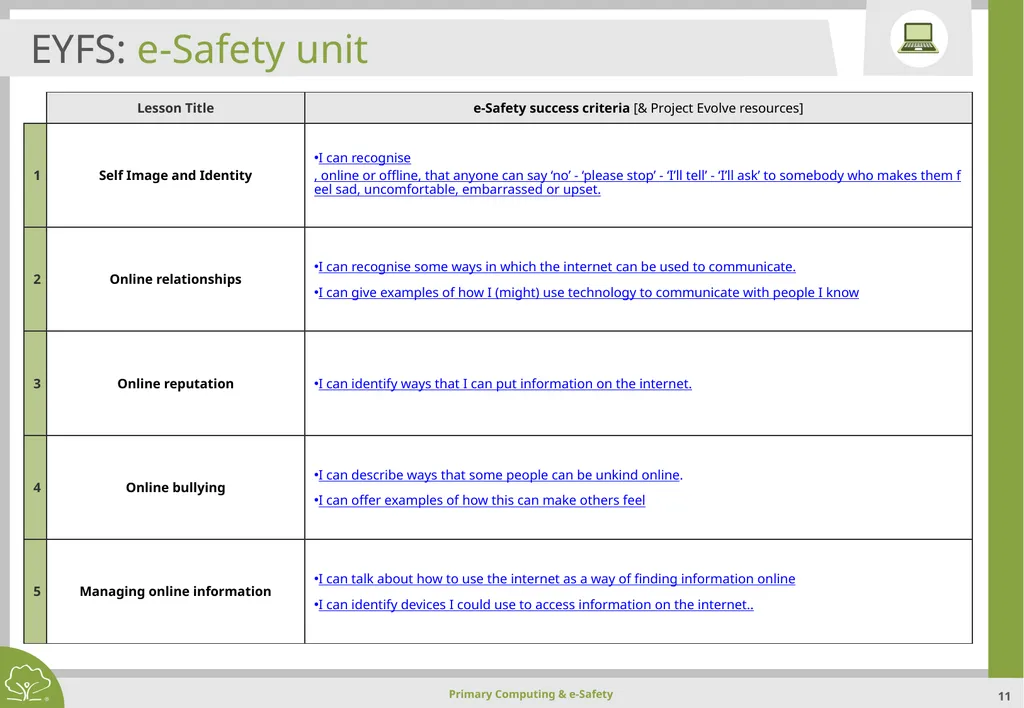
slide11. EYFS: e-Safety unit<br>
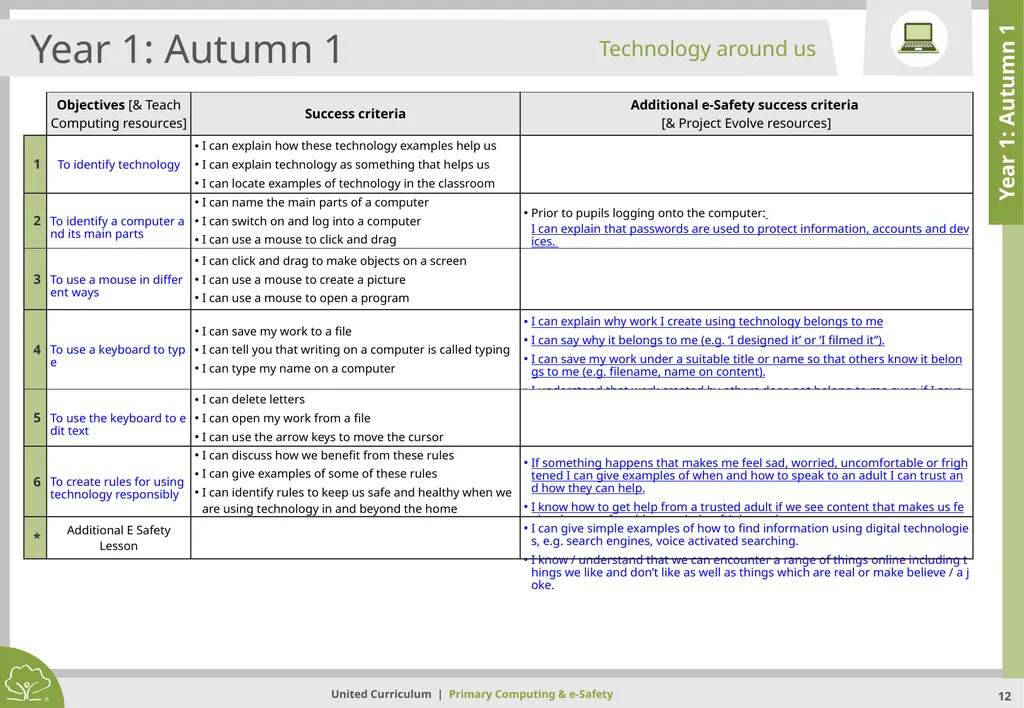
slide12. Year 1: Autumn 1 Year 1: Autumn 1 Technology around us<br>
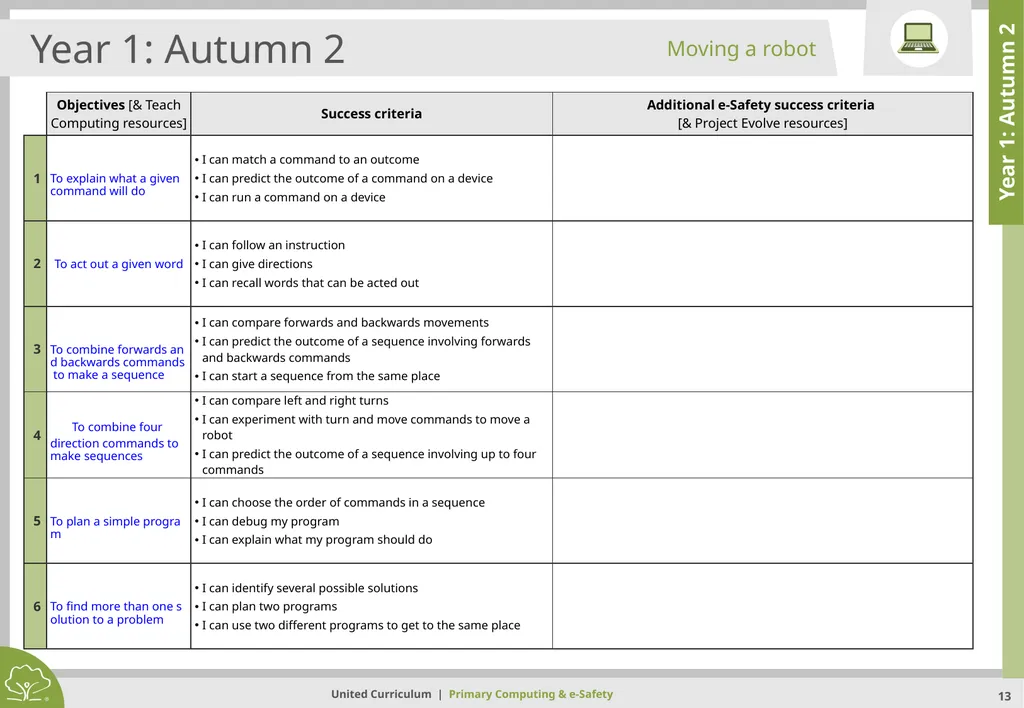
slide13. Year 1: Autumn 2 Year 1: Autumn 2 Moving a robot<br>
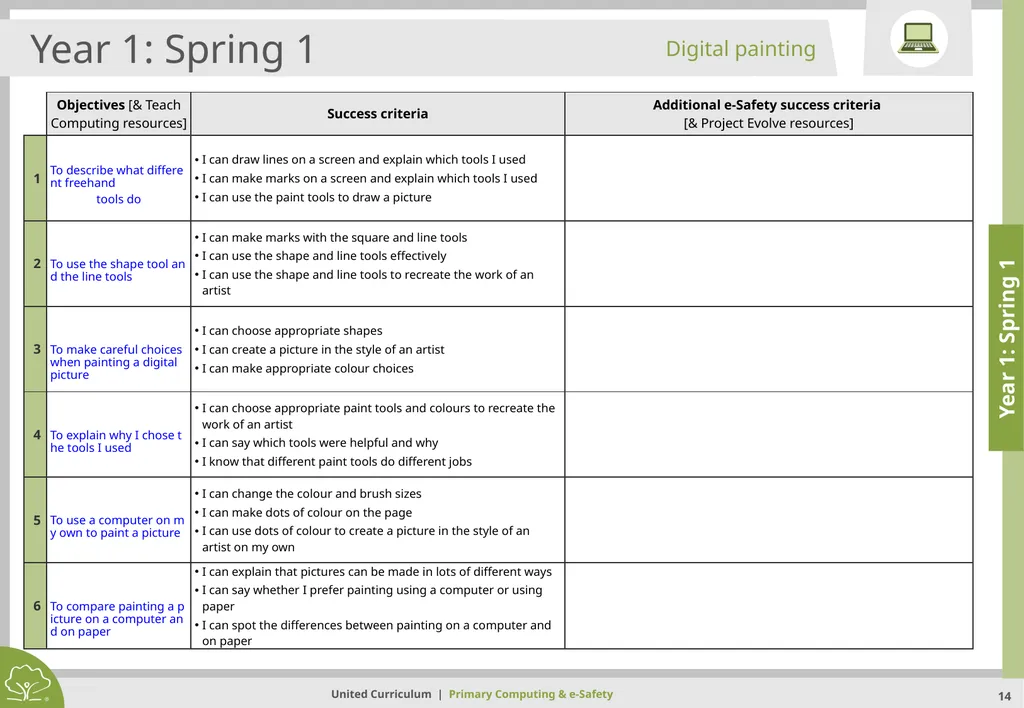
slide14. Year 1: Spring 1 Year 1: Spring 1 Digital painting<br>
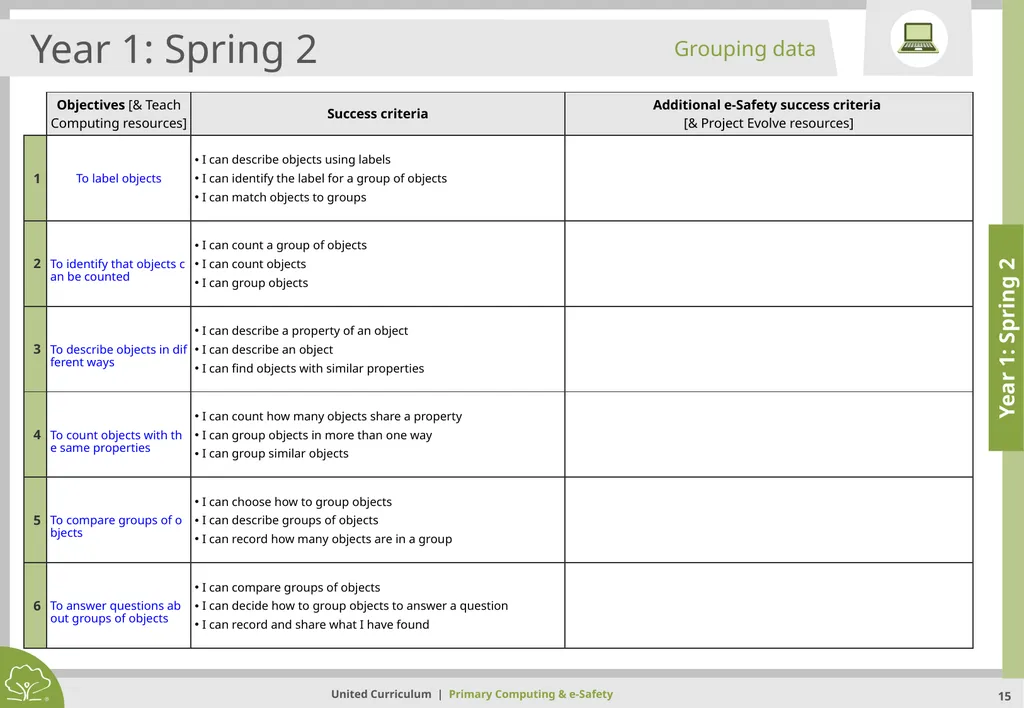
slide15. Year 1: Spring 2 Year 1: Spring 2 Grouping data<br>
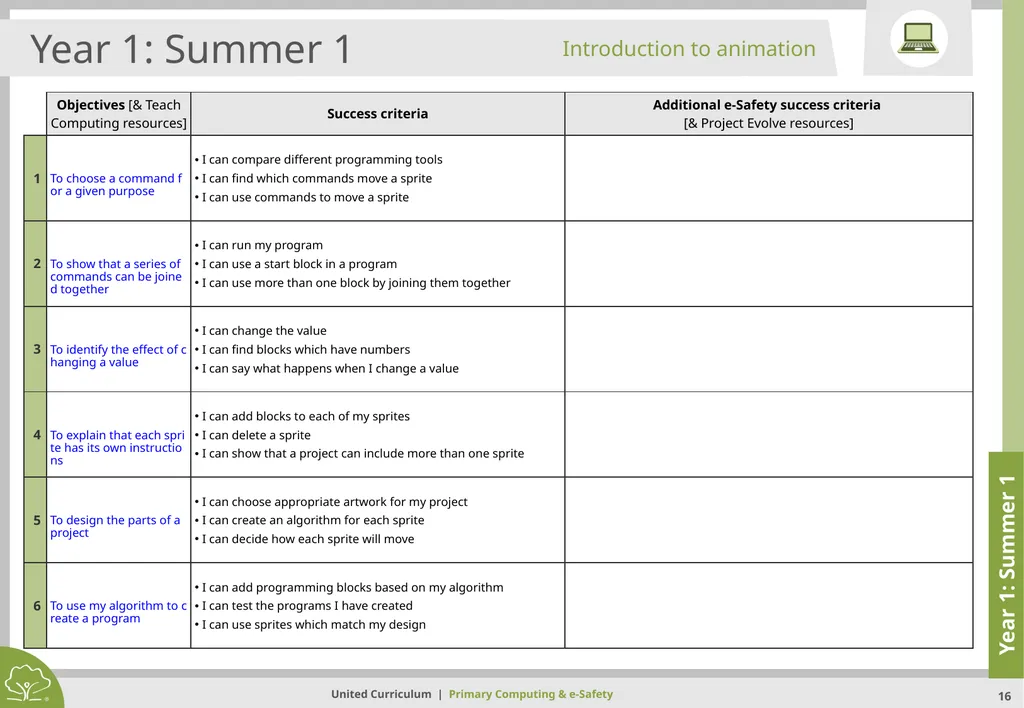
slide16. Year 1: Summer 1 Year 1: Summer 1 Introduction to animation<br>
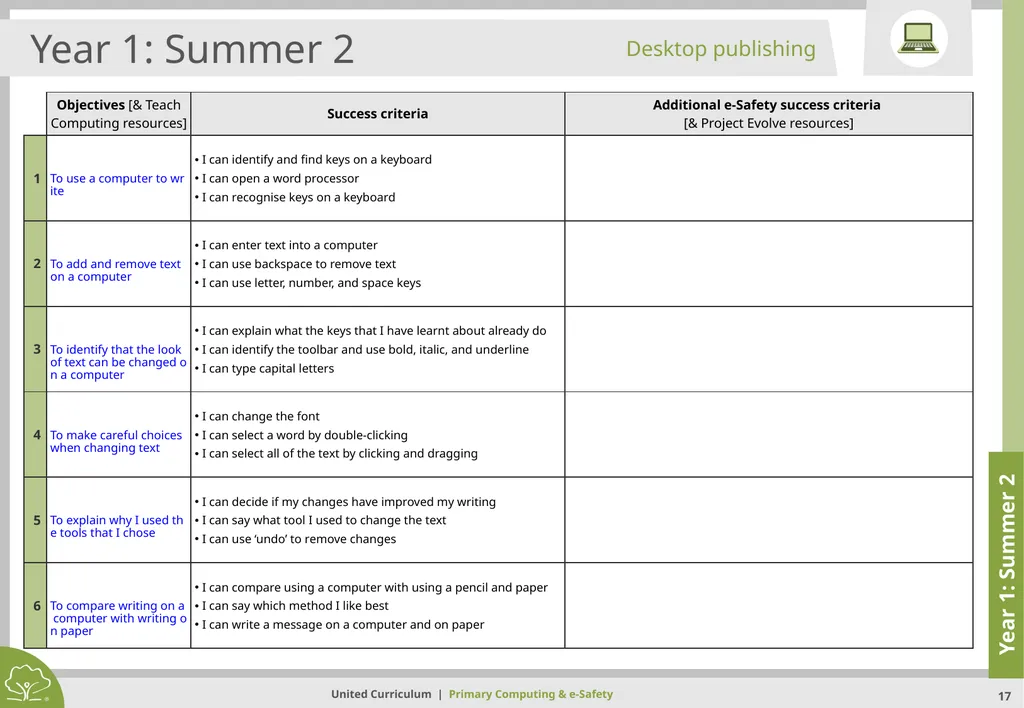
slide17. Year 1: Summer 2 Year 1: Summer 2 Desktop publishing<br>
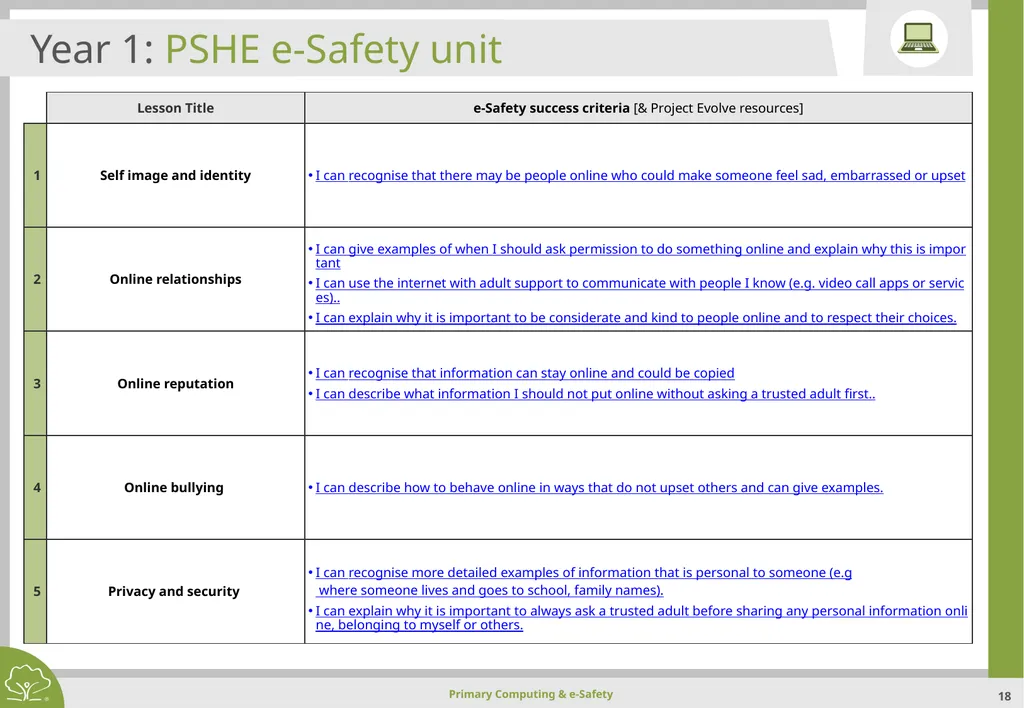
slide18. Year 1: PSHE e-Safety unit<br>
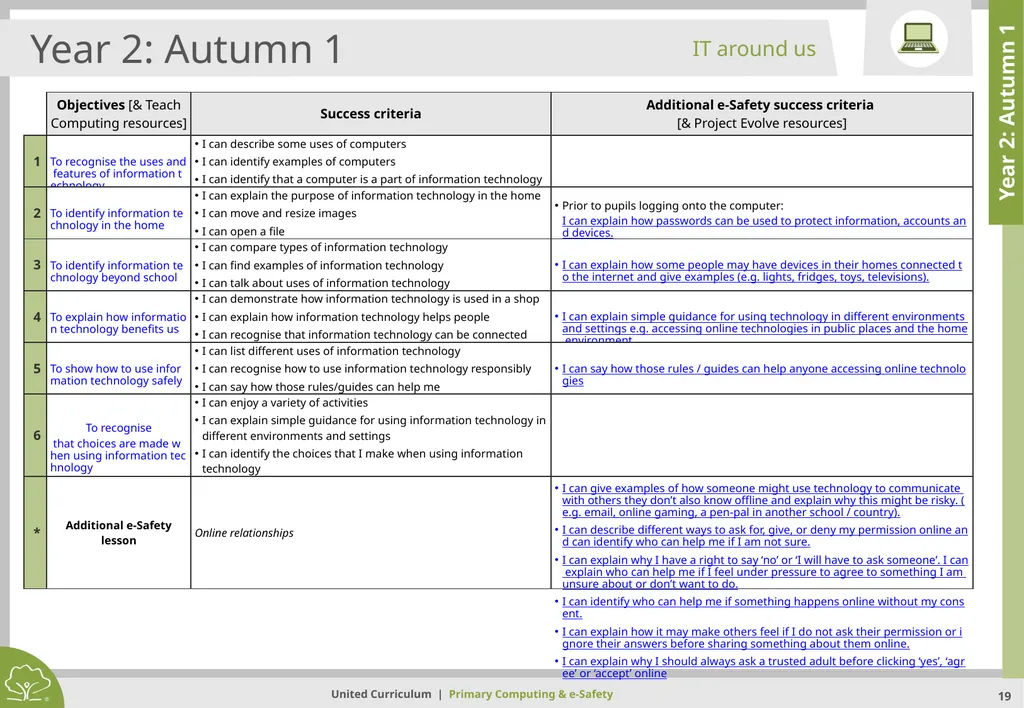
slide19. Year 2: Autumn 1 Year 2: Autumn 1 IT around us<br>
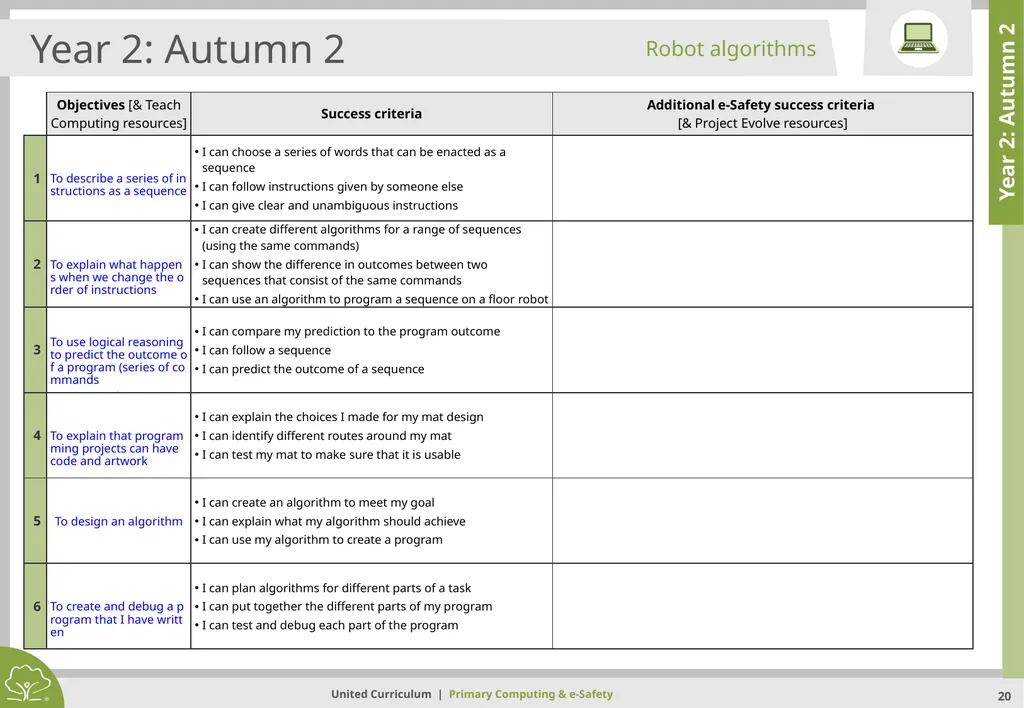
slide20. Year 2: Autumn 2 Year 2: Autumn 2 Robot algorithms<br>
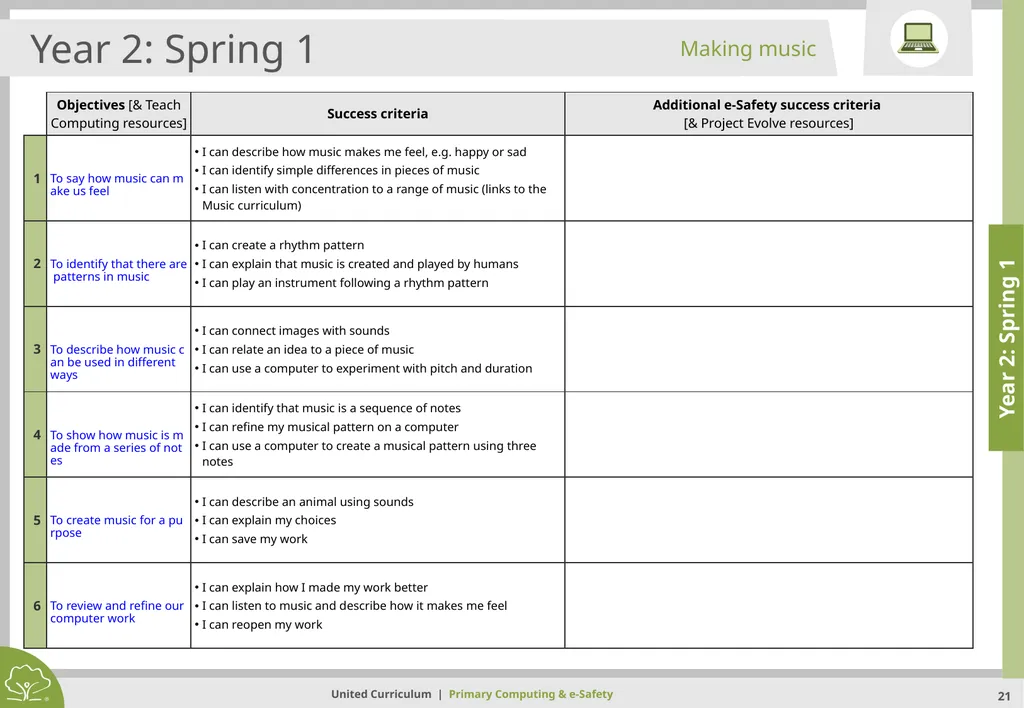
slide21. Year 2: Spring 1 Year 2: Spring 1 Making music<br>
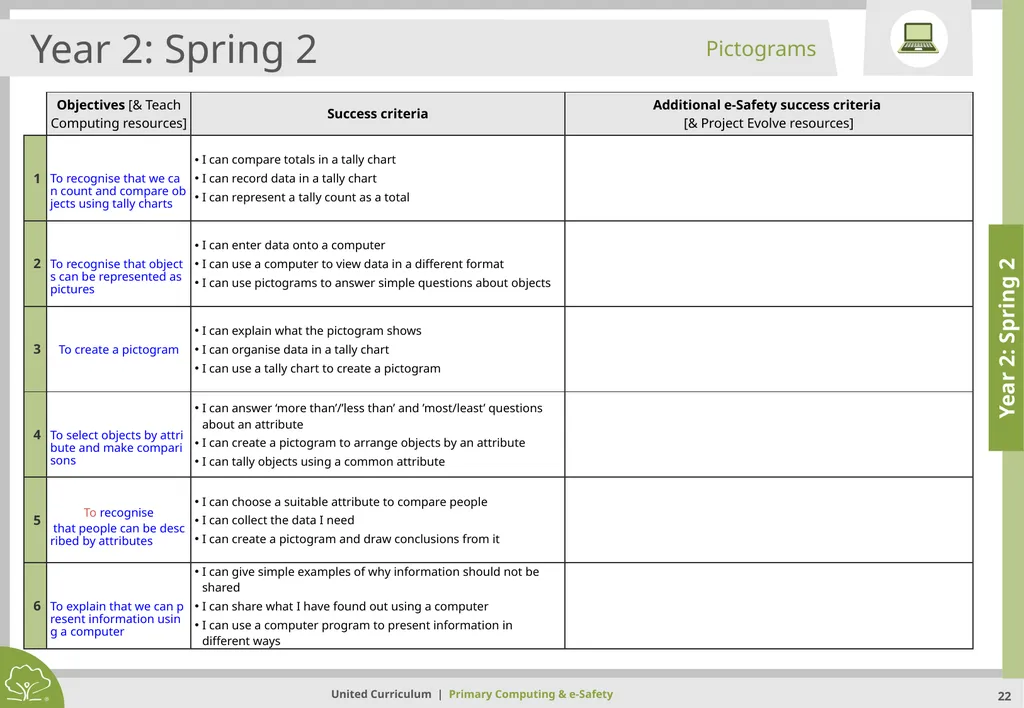
slide22. Year 2: Spring 2 Year 2: Spring 2 Pictograms<br>
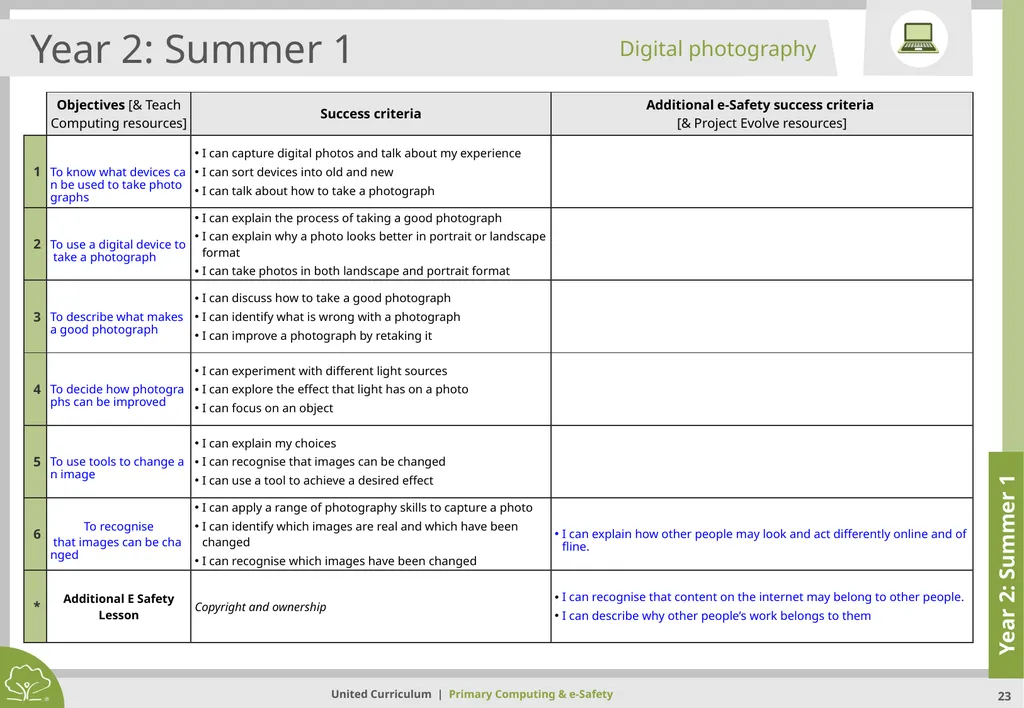
slide23. Year 2: Summer 1 Year 2: Summer 1 Digital photography<br>
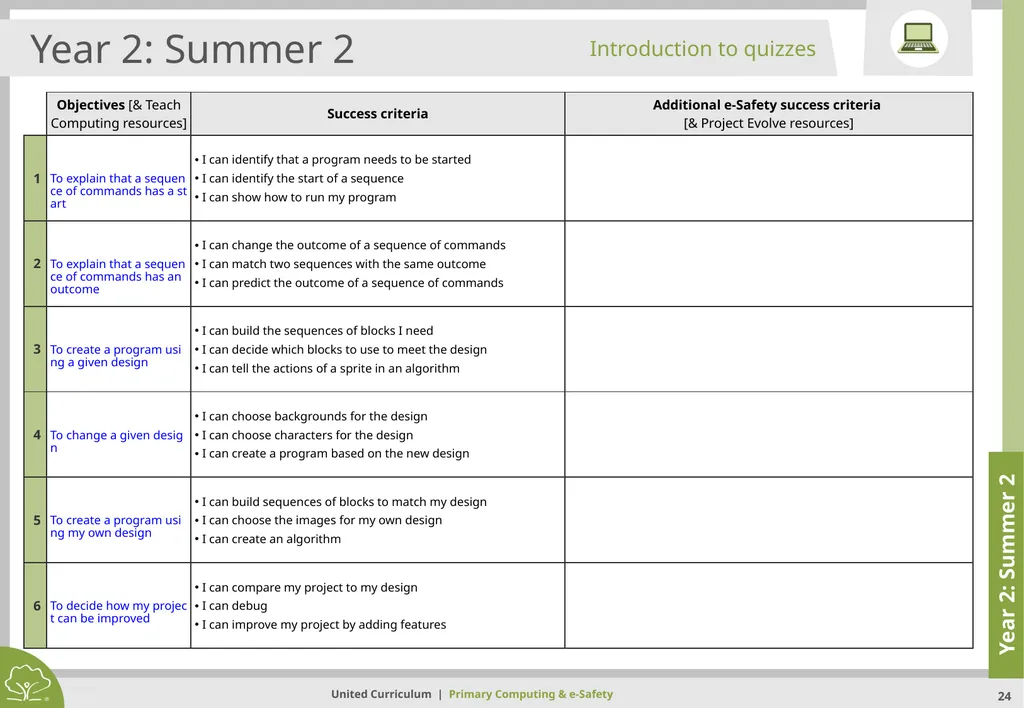
slide24. Year 2: Summer 2 Year 2: Summer 2 Introduction to quizzes<br>
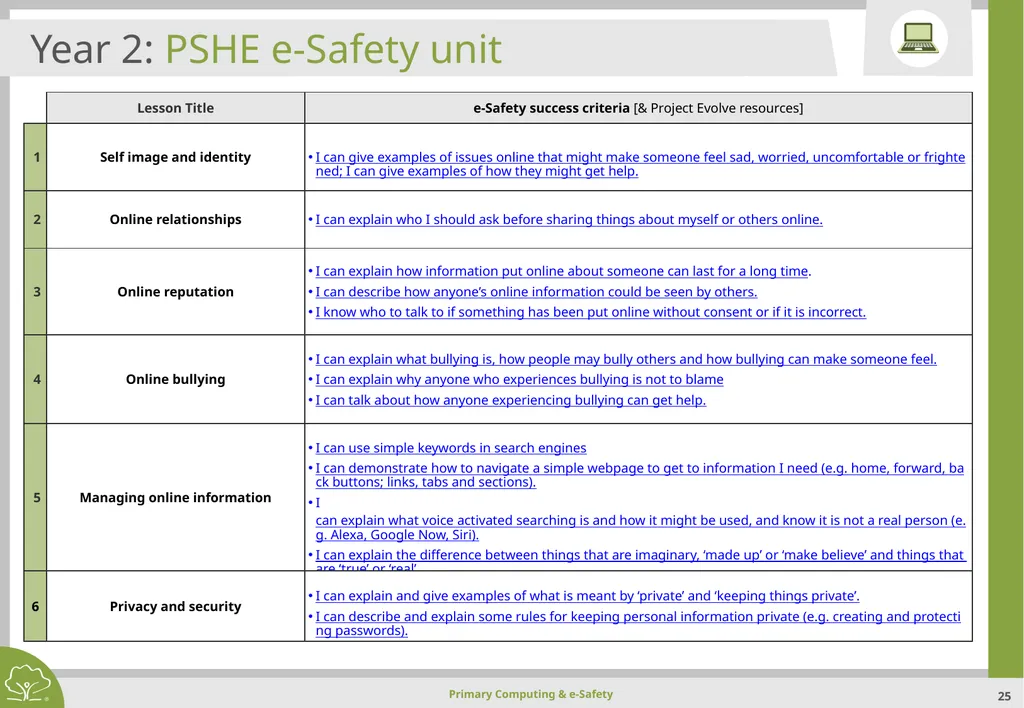
slide25. Year 2: PSHE e-Safety unit<br>
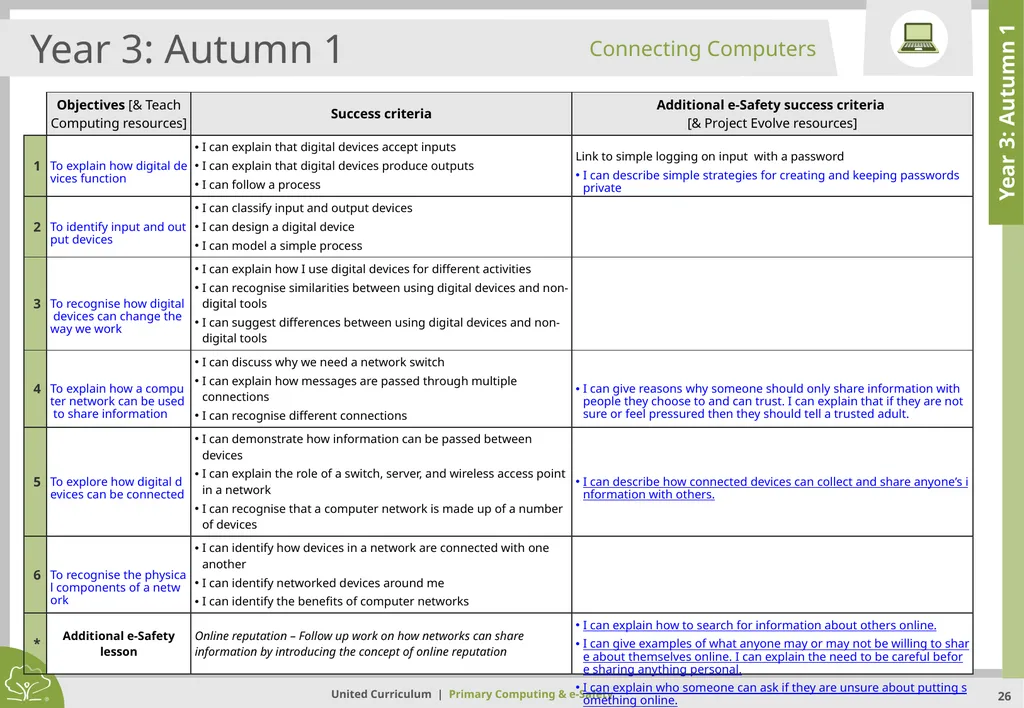
slide26. Year 3: Autumn 1 Year 3: Autumn 1 Connecting Computers<br>
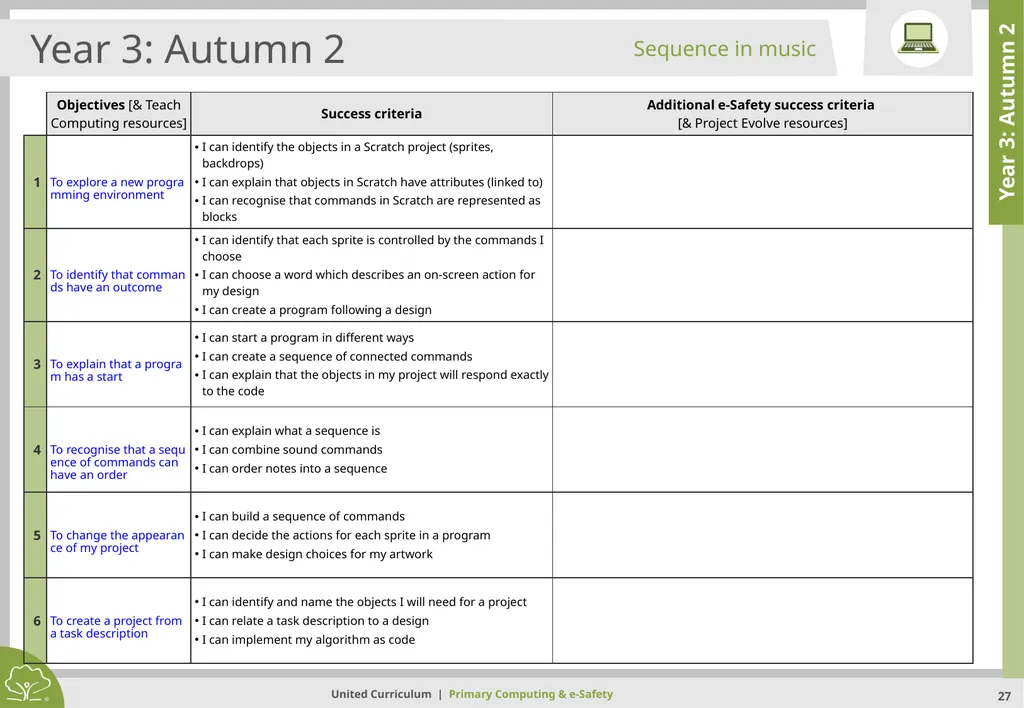
slide27. Year 3: Autumn 2 Year 3: Autumn 2 Sequence in music<br>
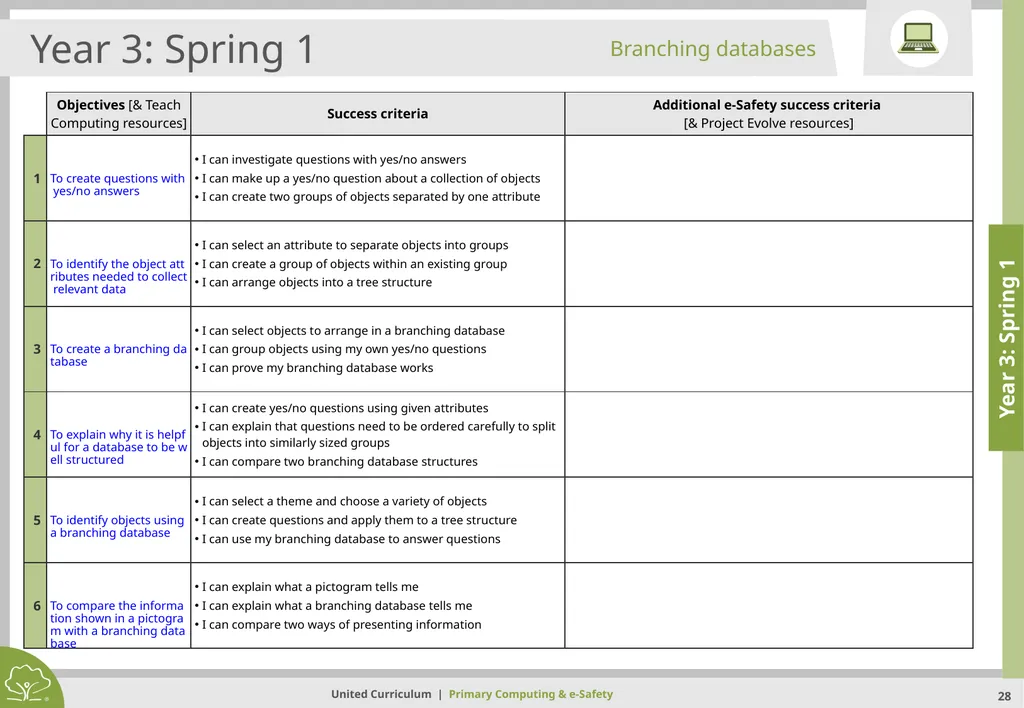
slide28. Year 3: Spring 1 Year 3: Spring 1 Branching databases<br>
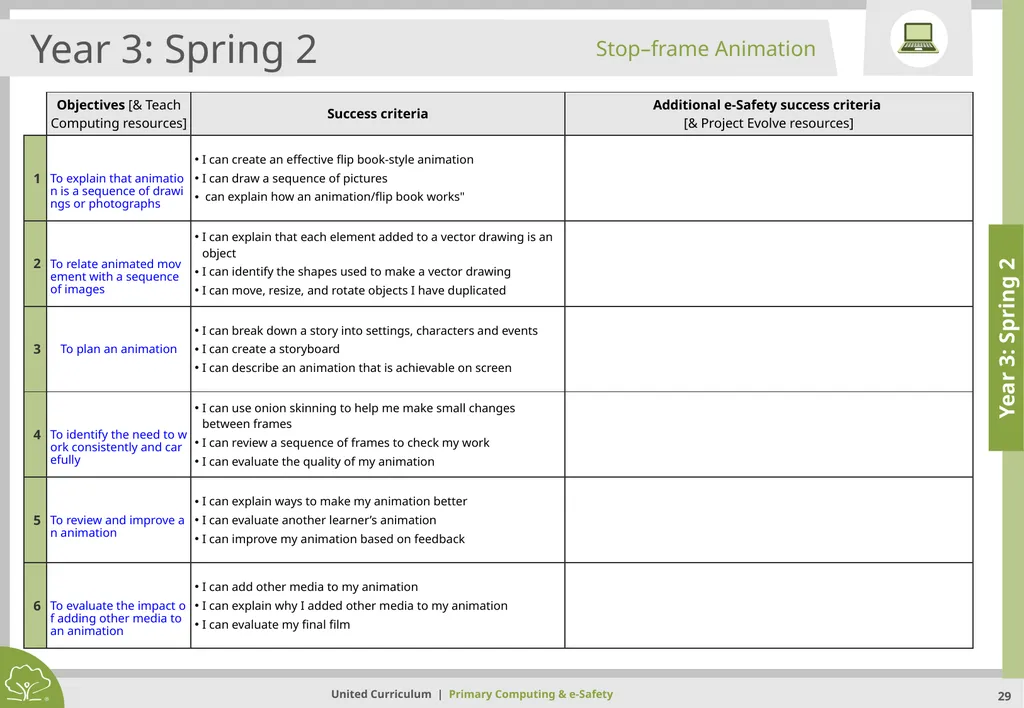
slide29. Year 3: Spring 2 Year 3: Spring 2 Stop–frame Animation<br>
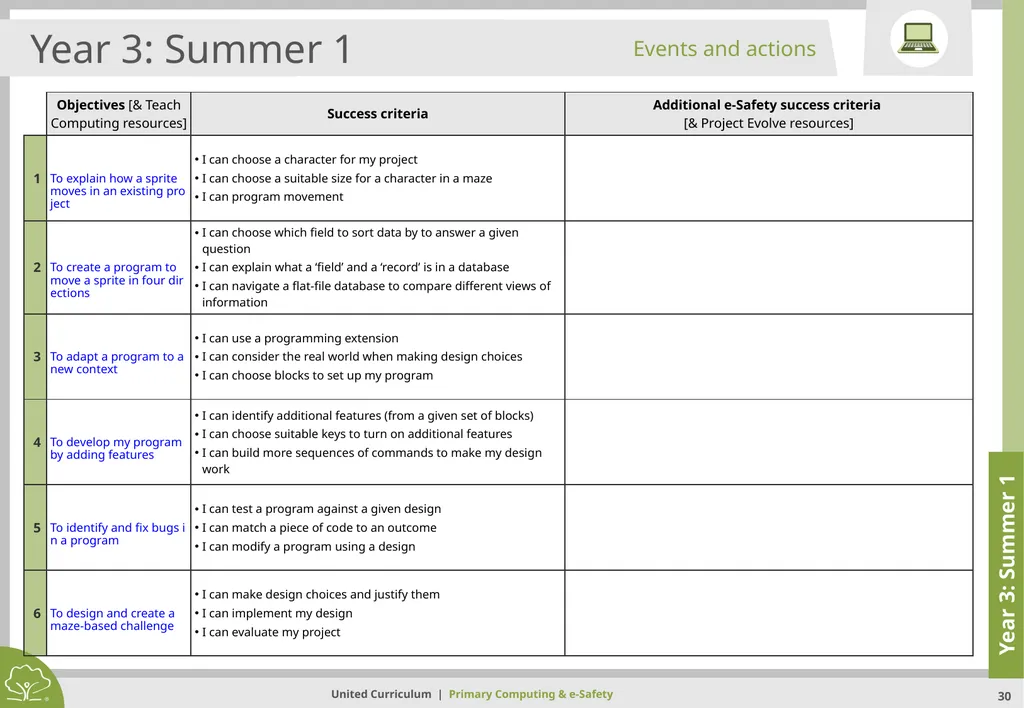
slide30. Year 3: Summer 1 Year 3: Summer 1 Events and actions<br>
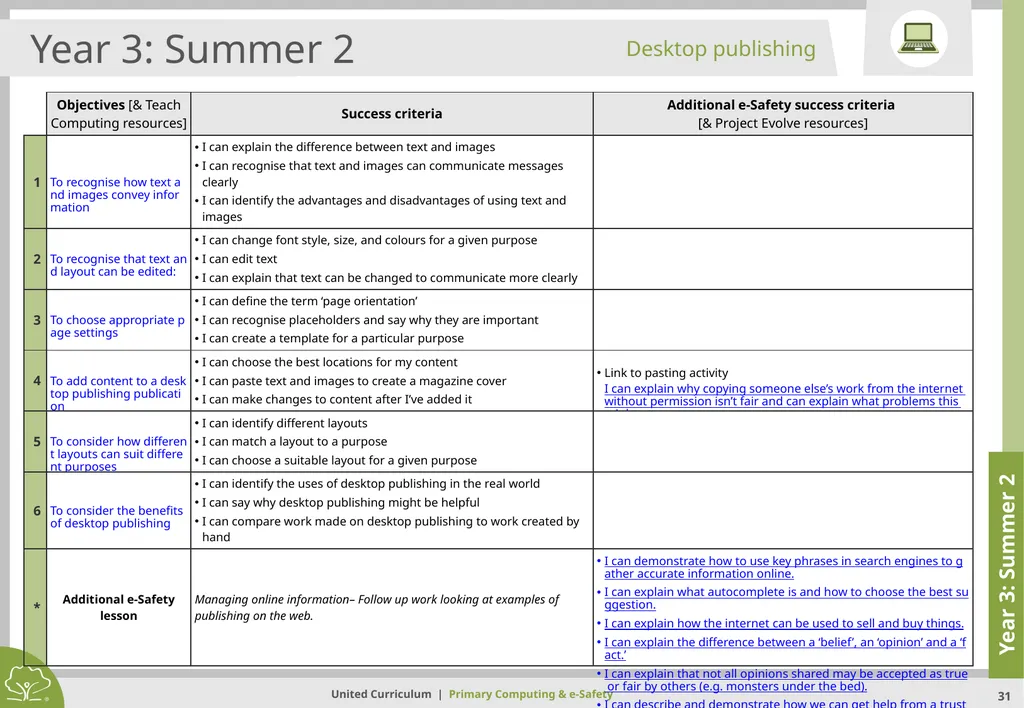
slide31. Year 3: Summer 2 Year 3: Summer 2 Desktop publishing<br>
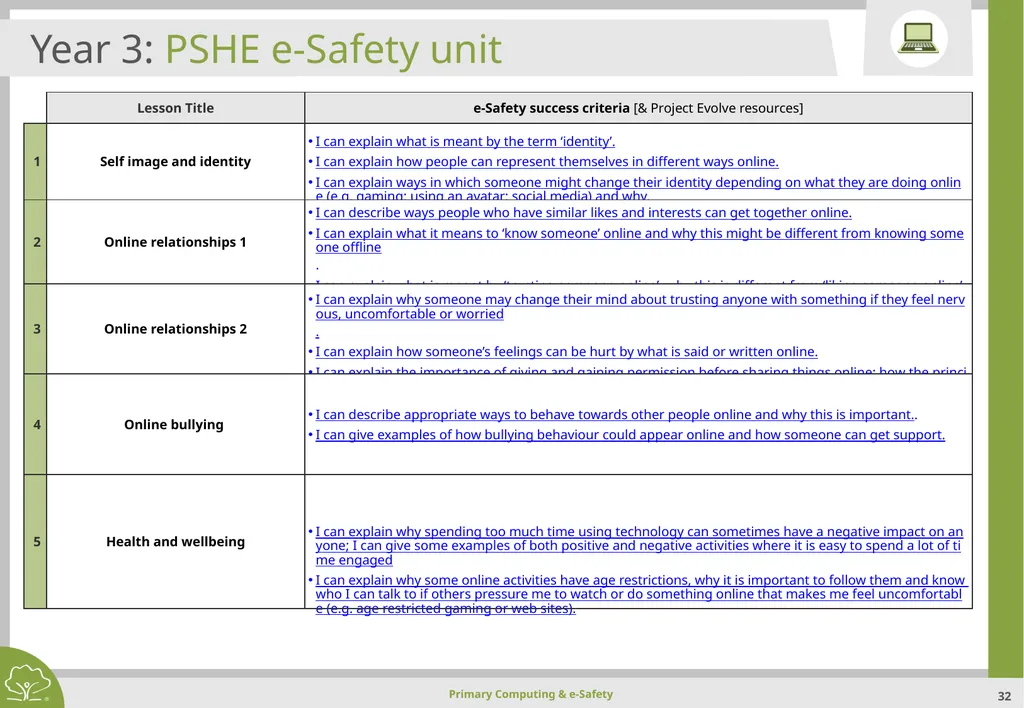
slide32. Year 3: PSHE e-Safety unit<br>
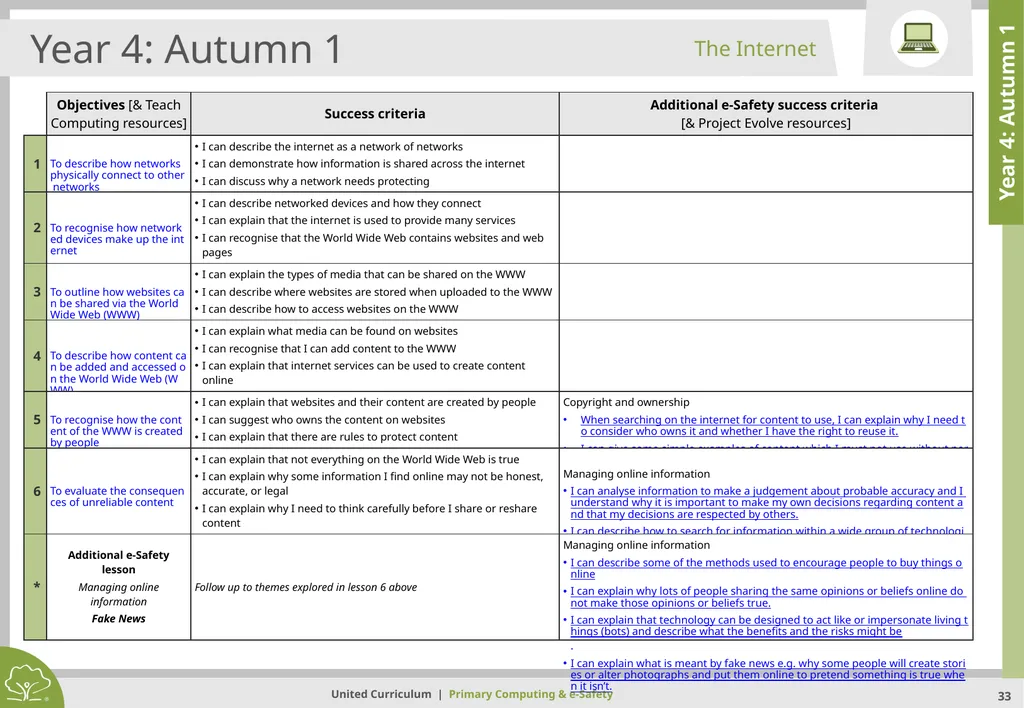
slide33. Year 4: Autumn 1 Year 4: Autumn 1 The Internet<br>
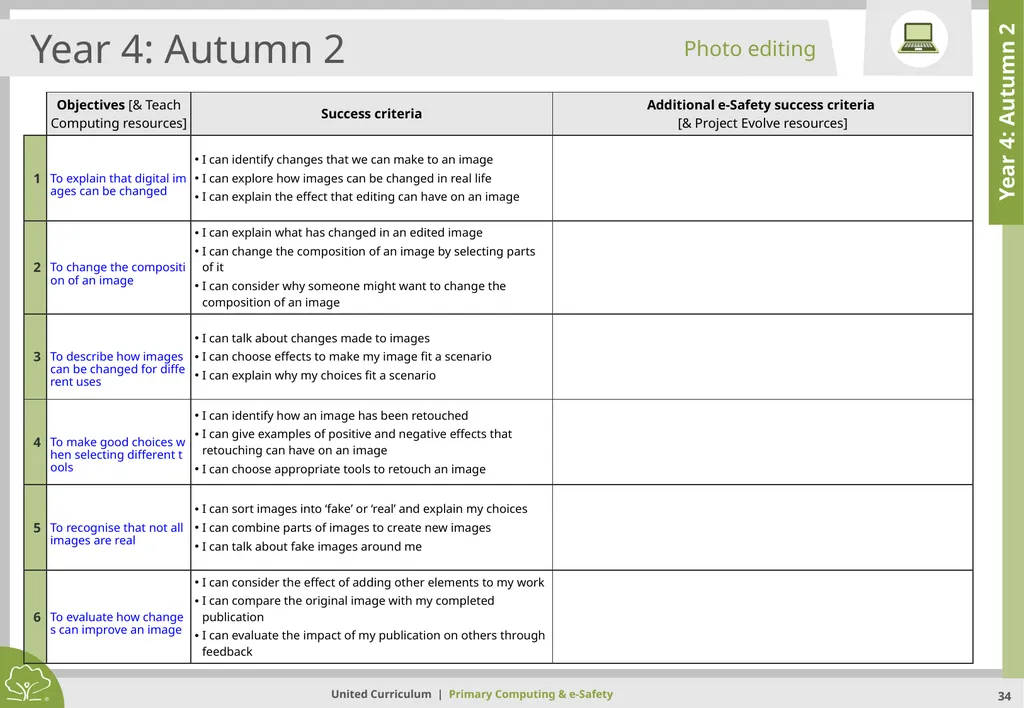
slide34. Year 4: Autumn 2 Year 4: Autumn 2 Photo editing<br>
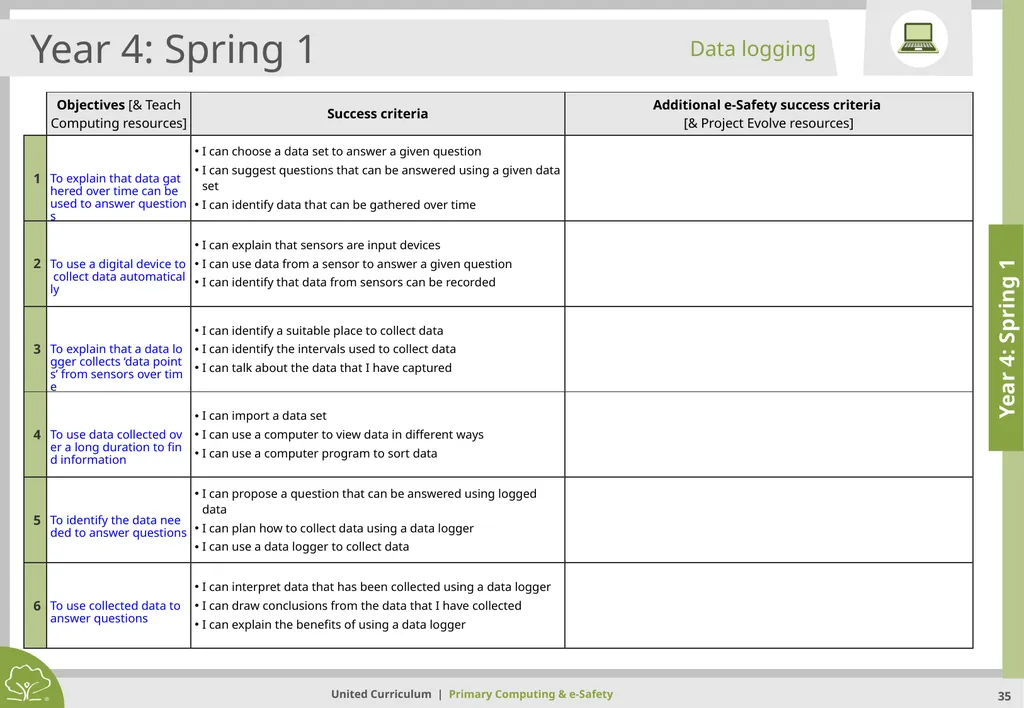
slide35. Year 4: Spring 1 Year 4: Spring 1 Data logging<br>
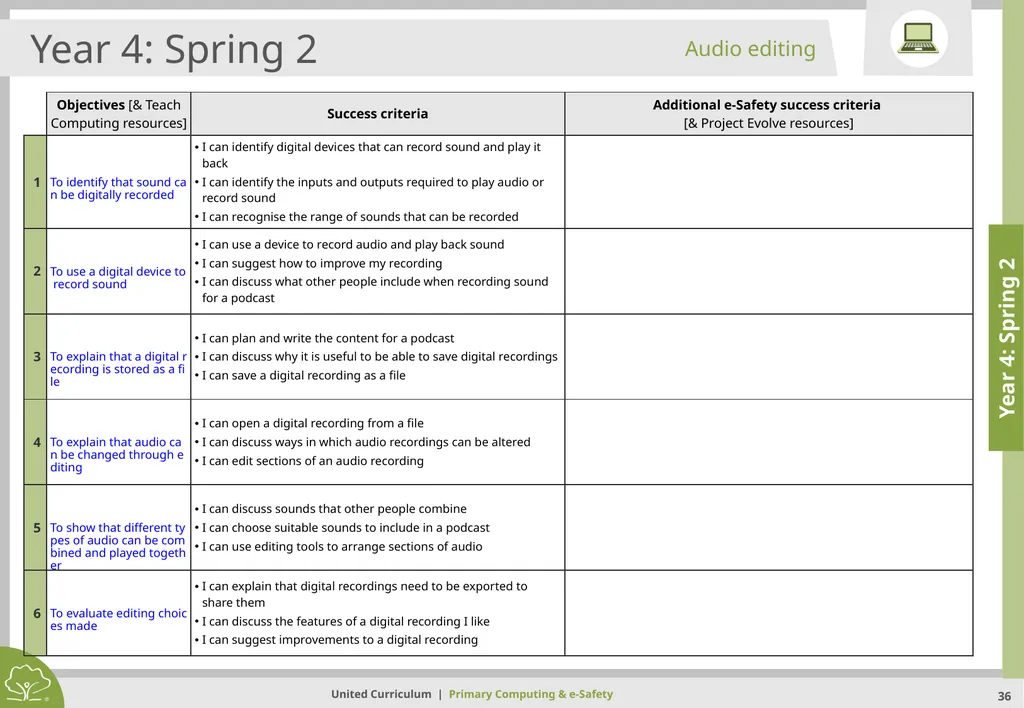
slide36. Year 4: Spring 2 Year 4: Spring 2 Audio editing<br>
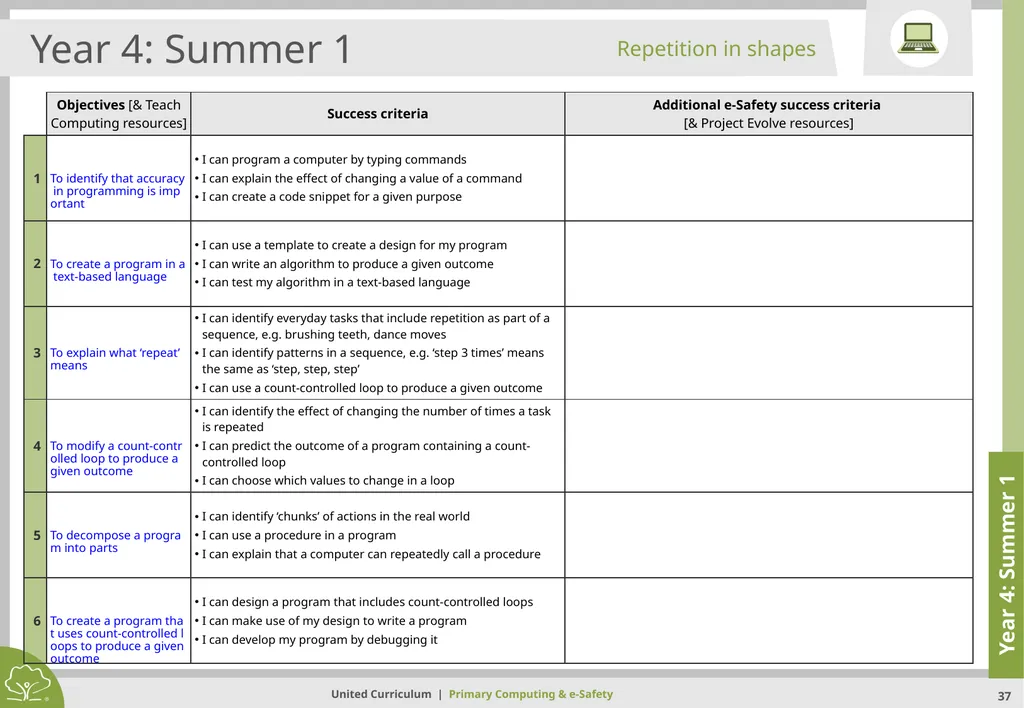
slide37. Year 4: Summer 1 Year 4: Summer 1 Repetition in shapes<br>
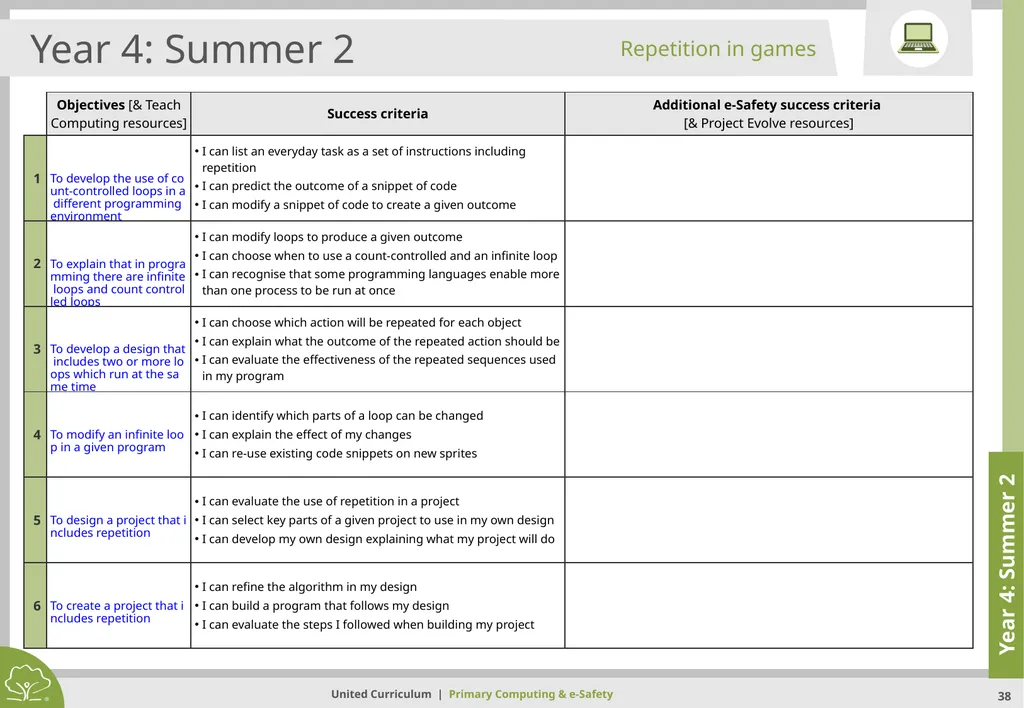
slide38. Year 4: Summer 2 Year 4: Summer 2 Repetition in games<br>
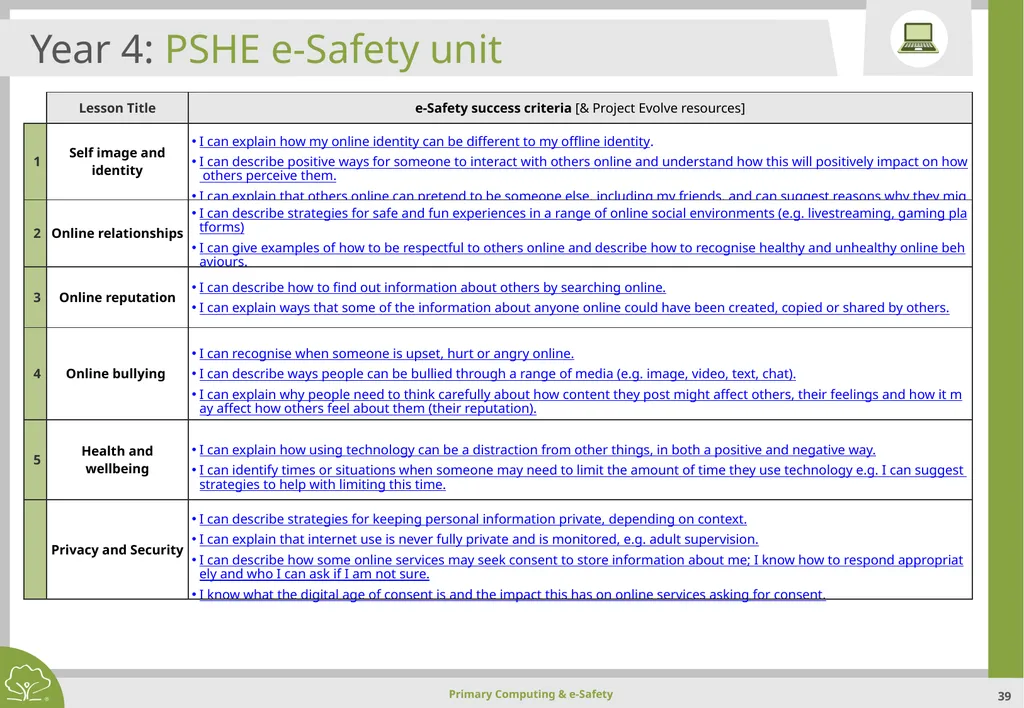
slide39. Year 4: PSHE e-Safety unit<br>
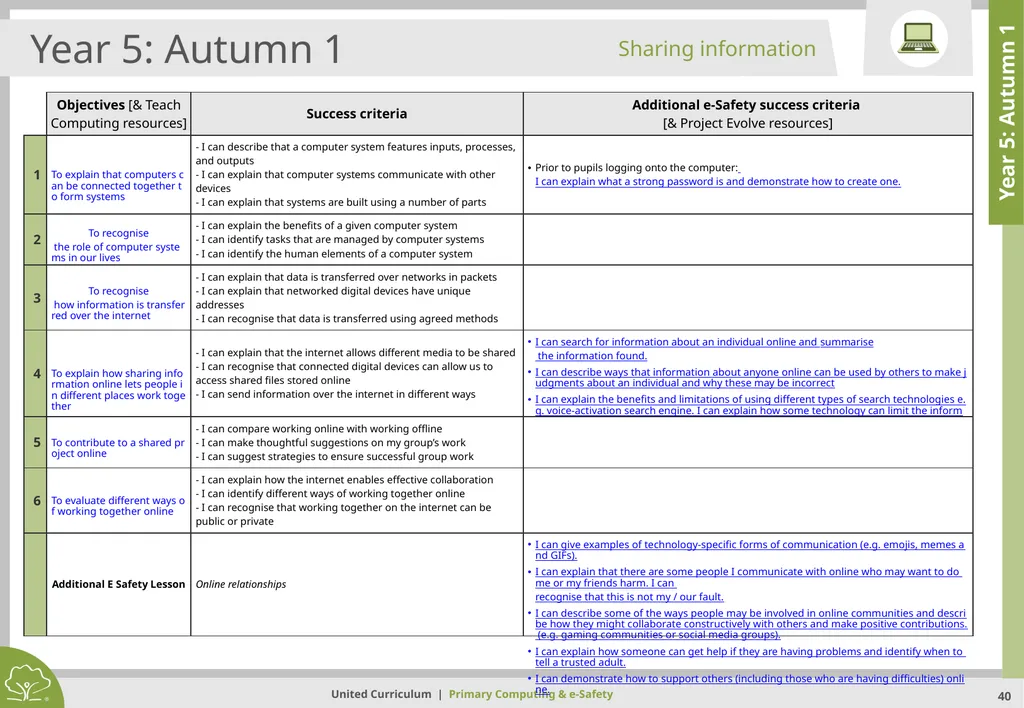
slide40. Year 5: Autumn 1 Year 5: Autumn 1 Sharing information<br>
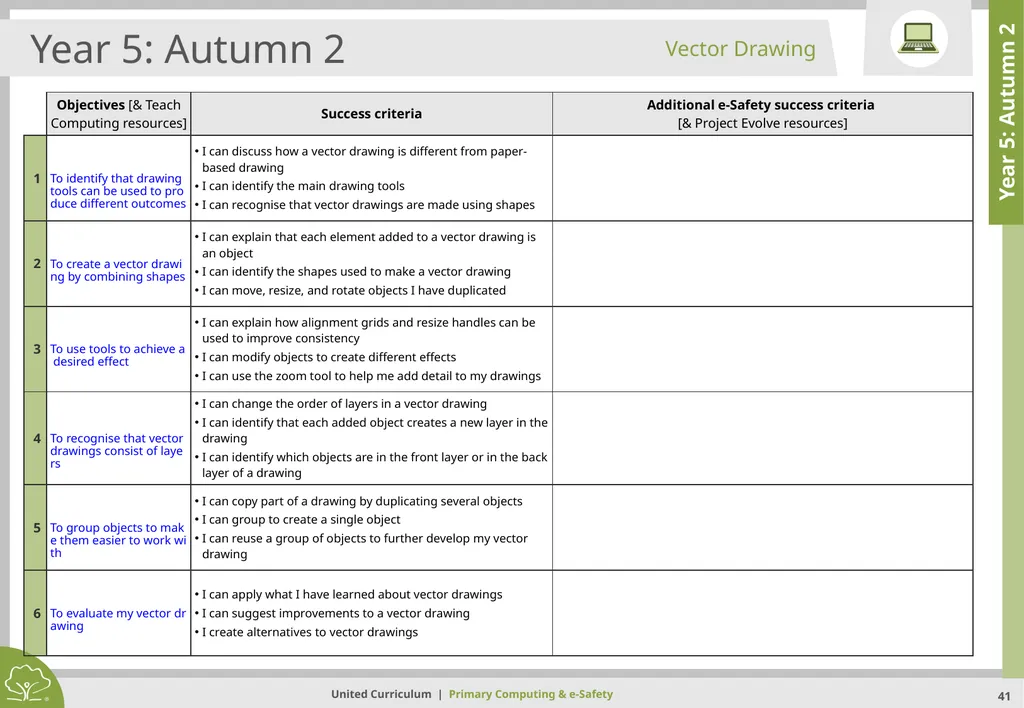
slide41. Year 5: Autumn 2 Year 5: Autumn 2 Vector Drawing<br>
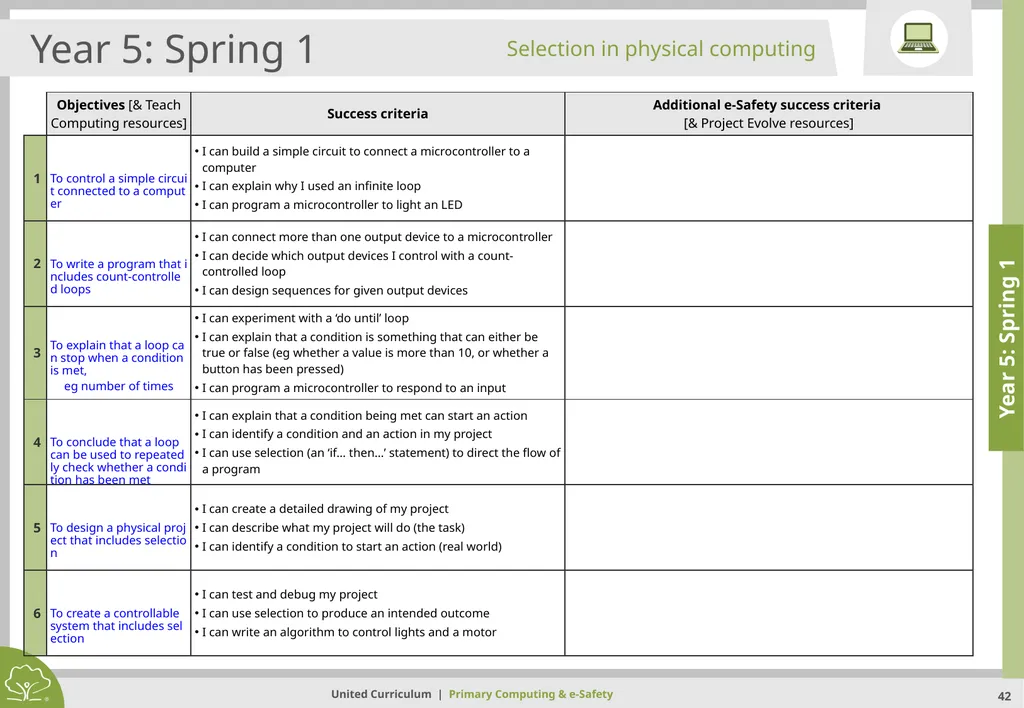
slide42. Year 5: Spring 1 Year 5: Spring 1 Selection in physical computing<br>
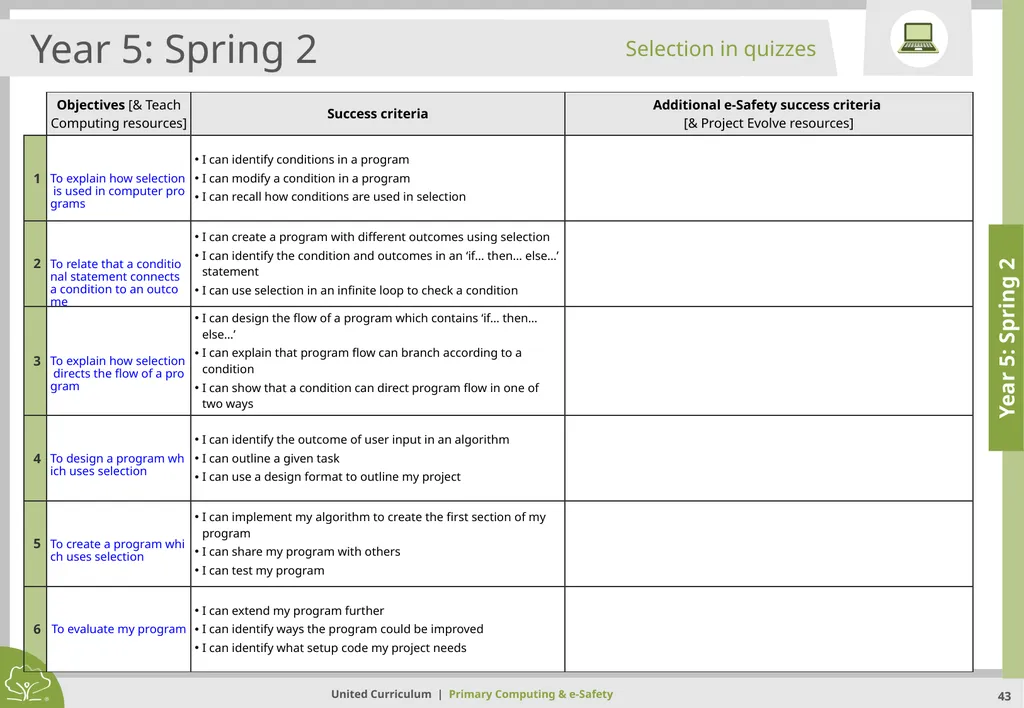
slide43. Year 5: Spring 2 Year 5: Spring 2 Selection in quizzes<br>
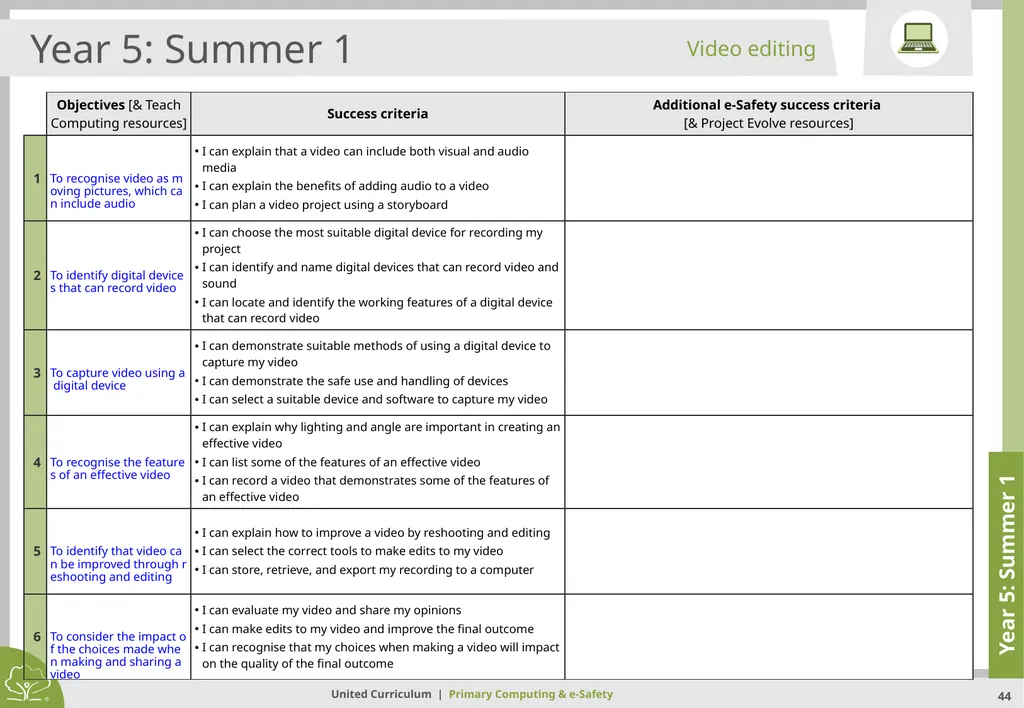
slide44. Year 5: Summer 1 Year 5: Summer 1 Video editing<br>
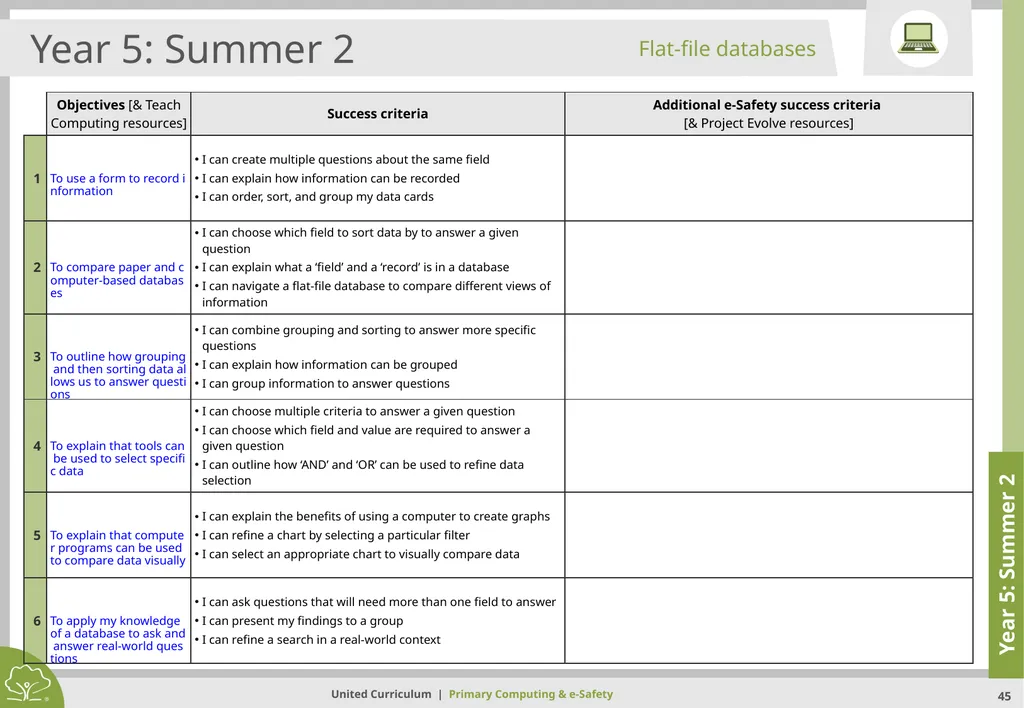
slide45. Year 5: Summer 2 Year 5: Summer 2 Flat-file databases<br>
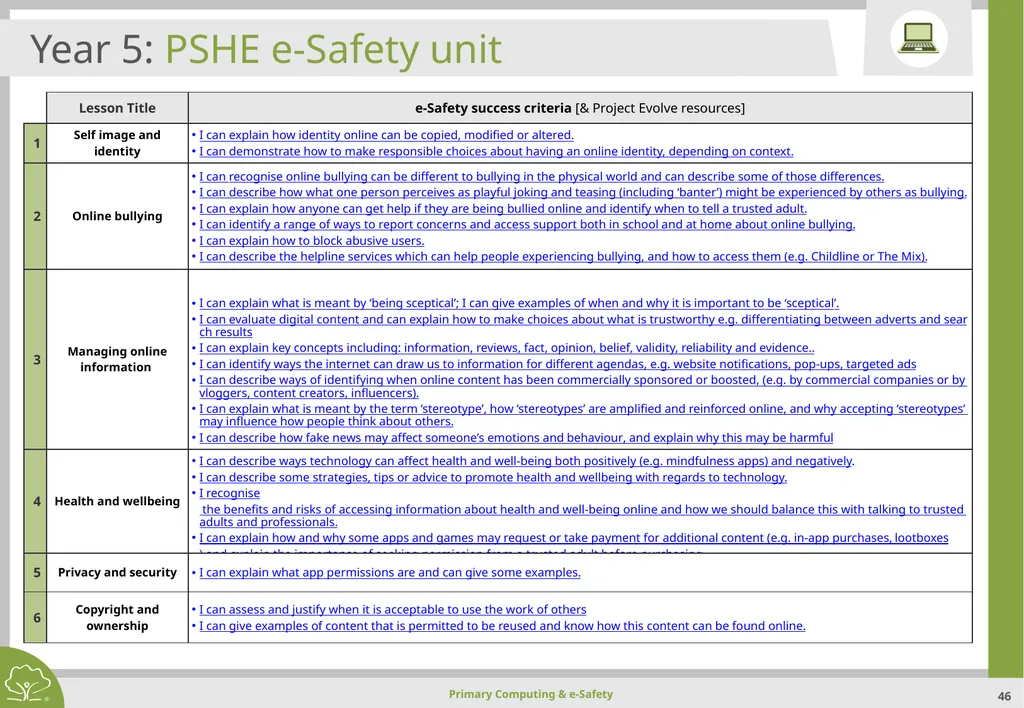
slide46. Year 5: PSHE e-Safety unit<br>
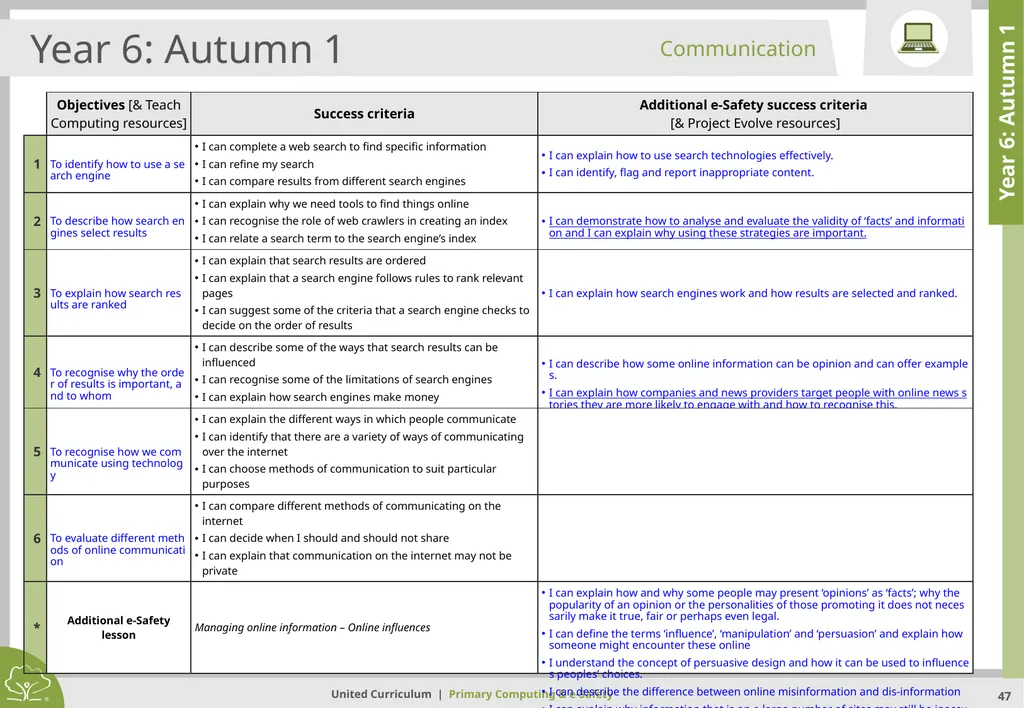
slide47. Year 6: Autumn 1 Year 6: Autumn 1 Communication<br>
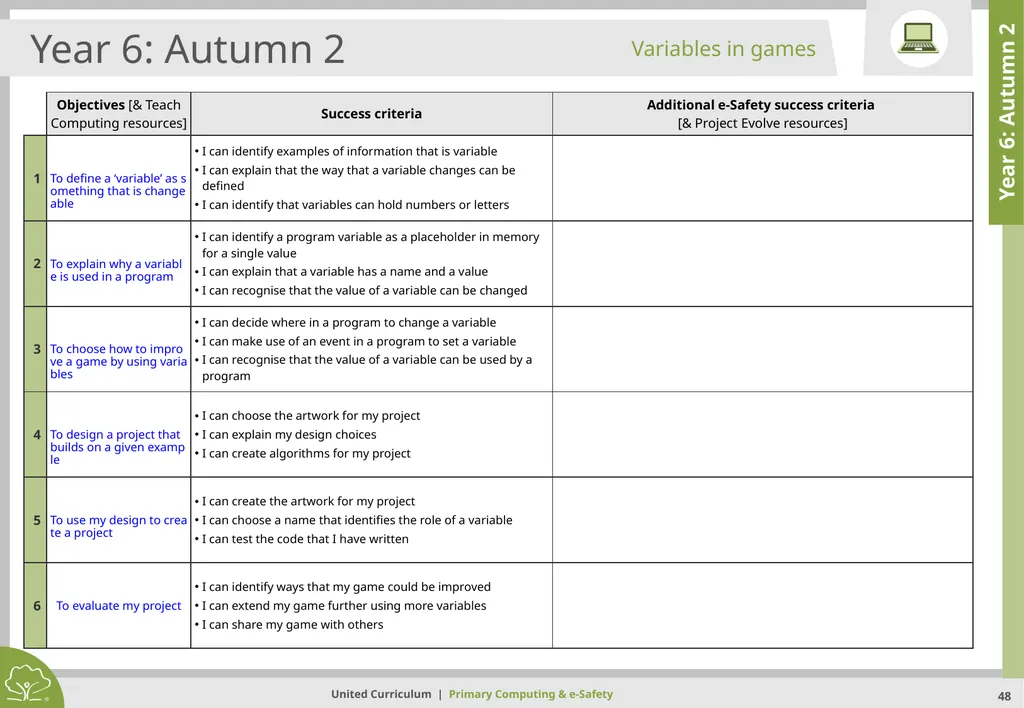
slide48. Year 6: Autumn 2 Year 6: Autumn 2 Variables in games<br>
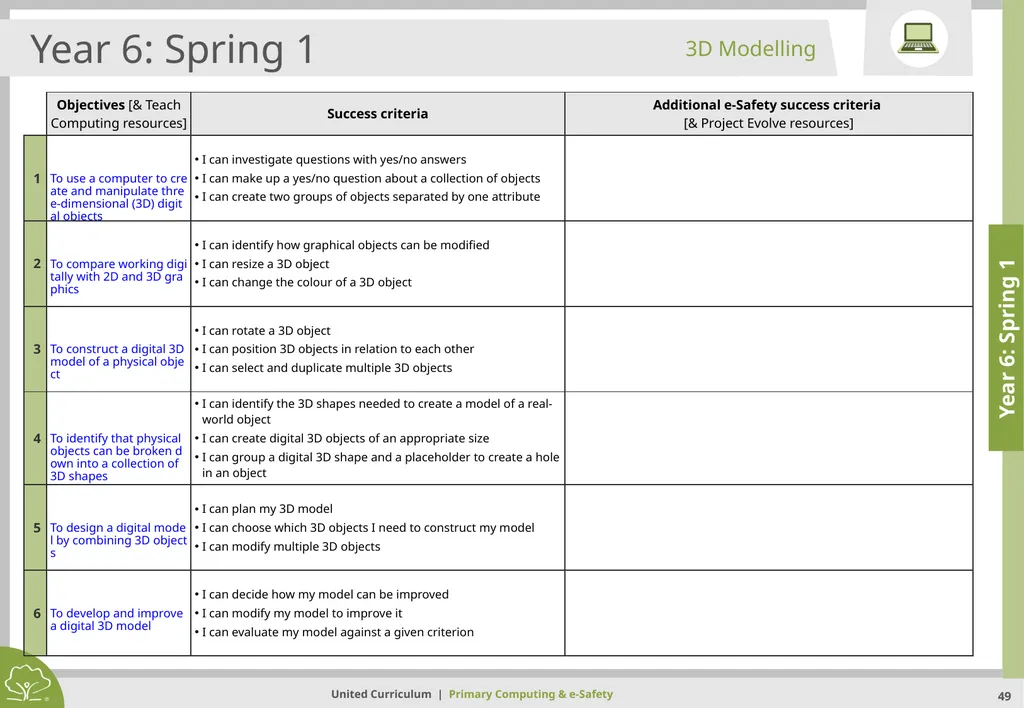
slide49. Year 6: Spring 1 Year 6: Spring 1 3D Modelling<br>
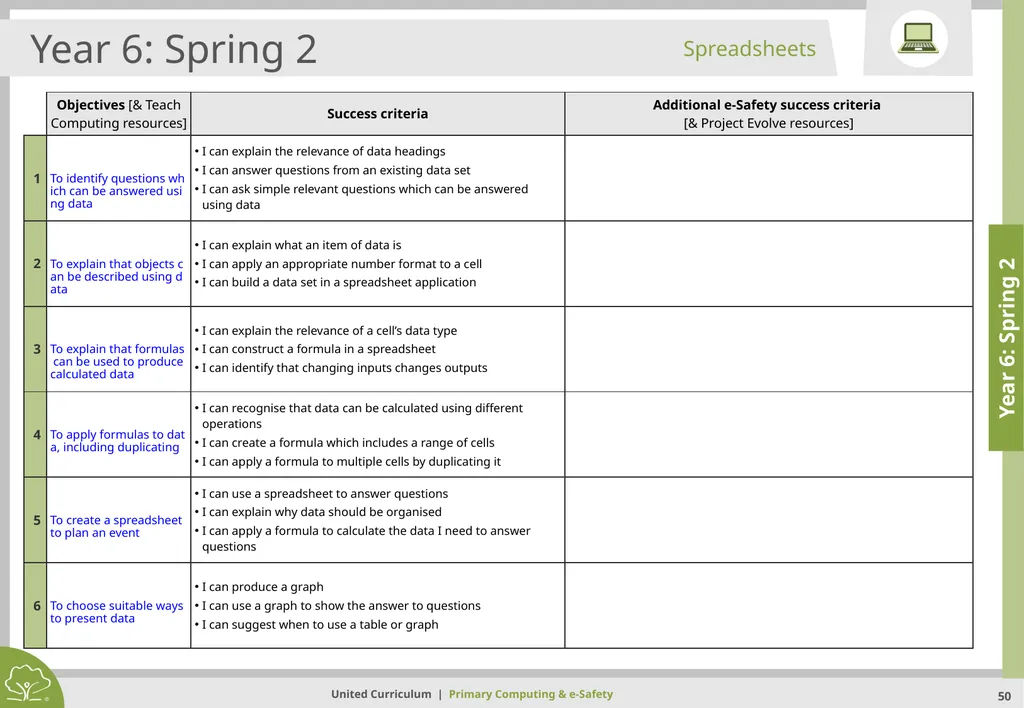
slide50. Year 6: Spring 2 Year 6: Spring 2 Spreadsheets<br>
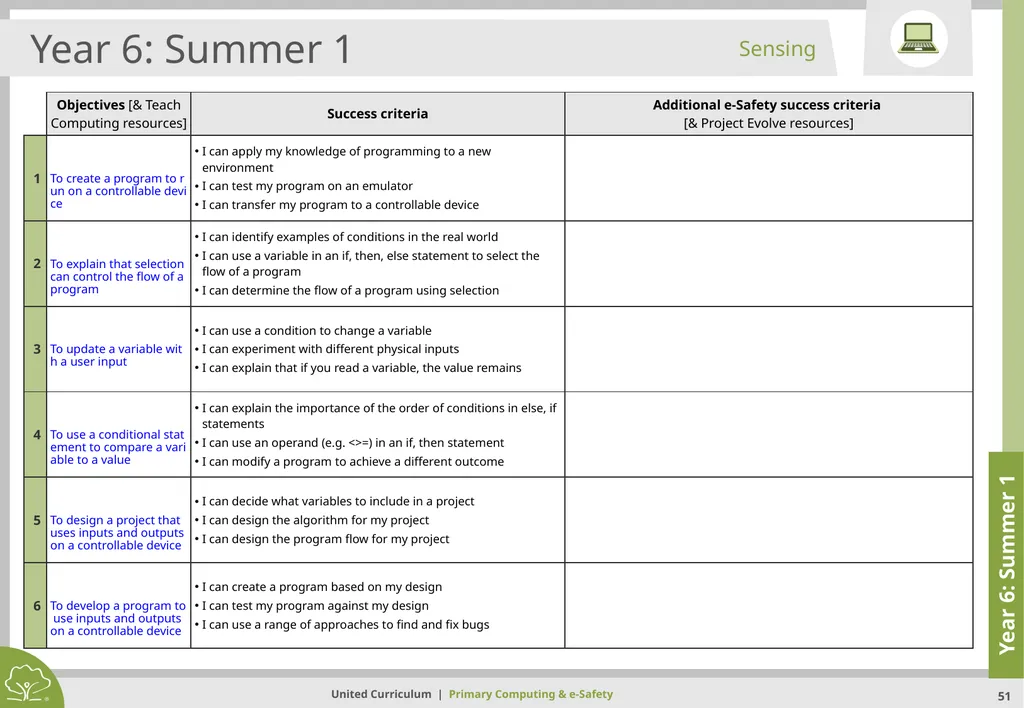
slide51. Year 6: Summer 1 Year 6: Summer 1 Sensing<br>
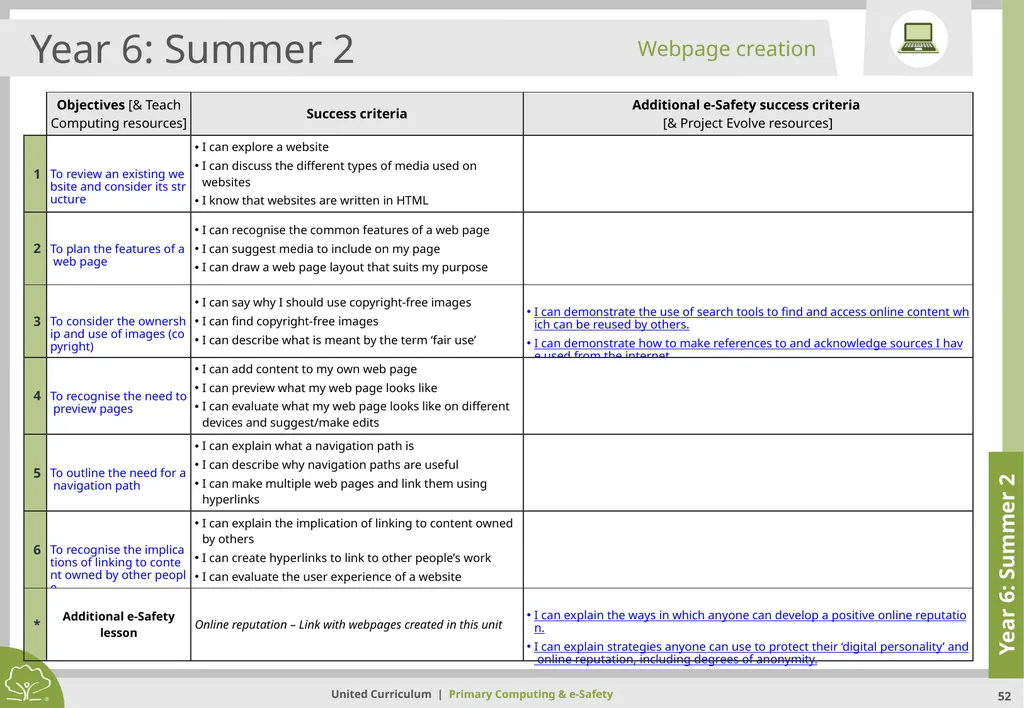
slide52. Year 6: Summer 2 Year 6: Summer 2 Webpage creation<br>
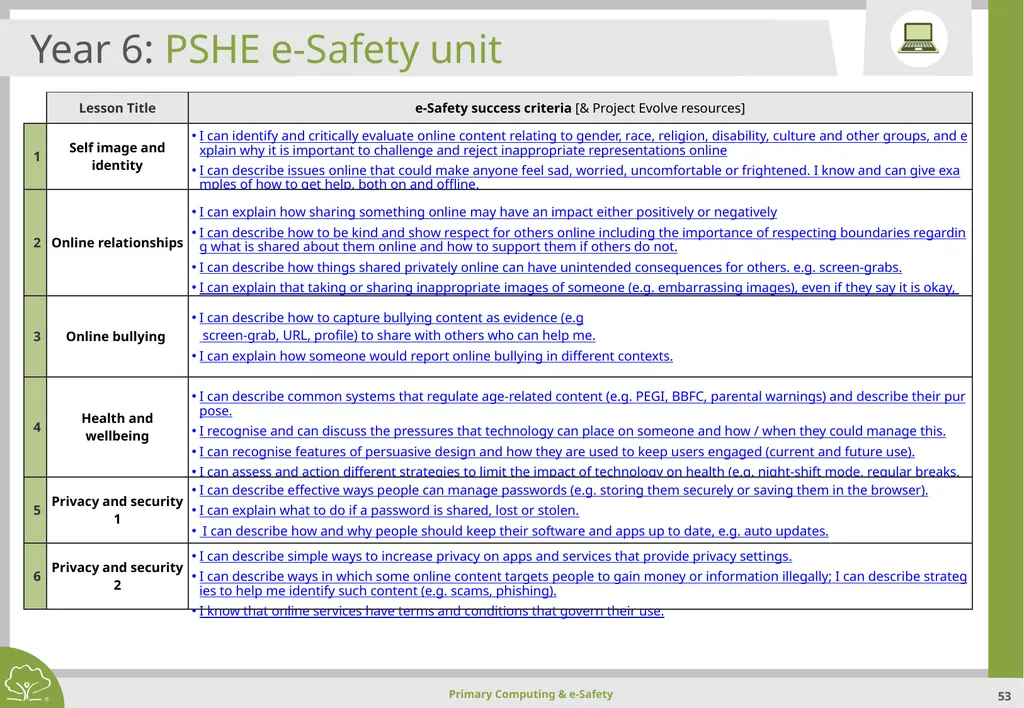
slide53. Year 6: PSHE e-Safety unit<br>
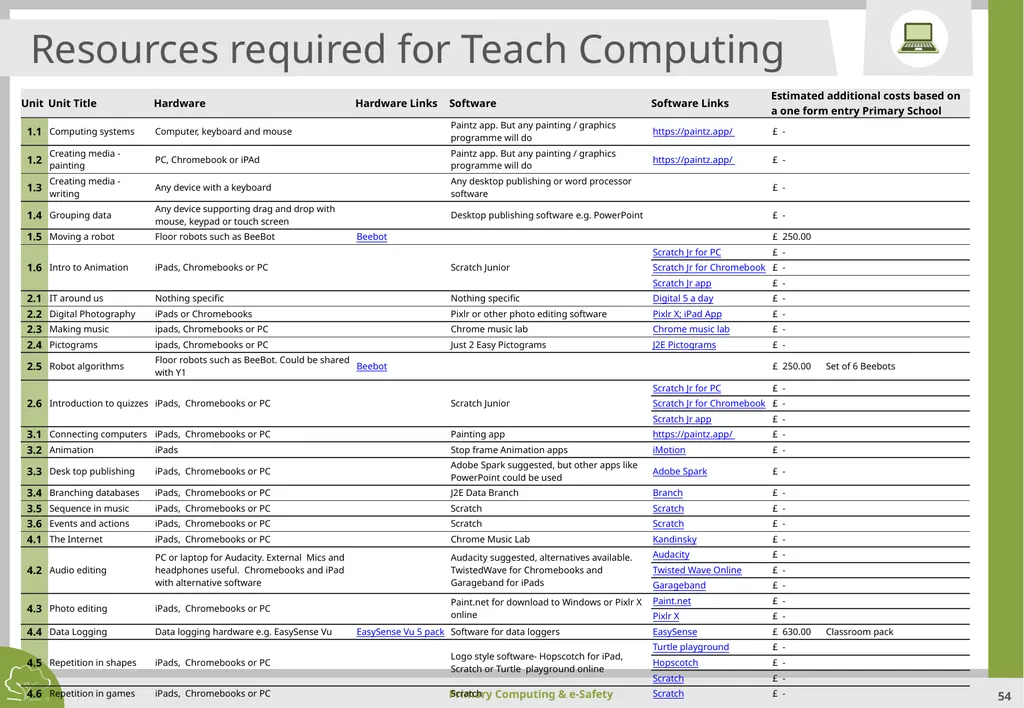
slide54. Resources required for Teach Computing<br>
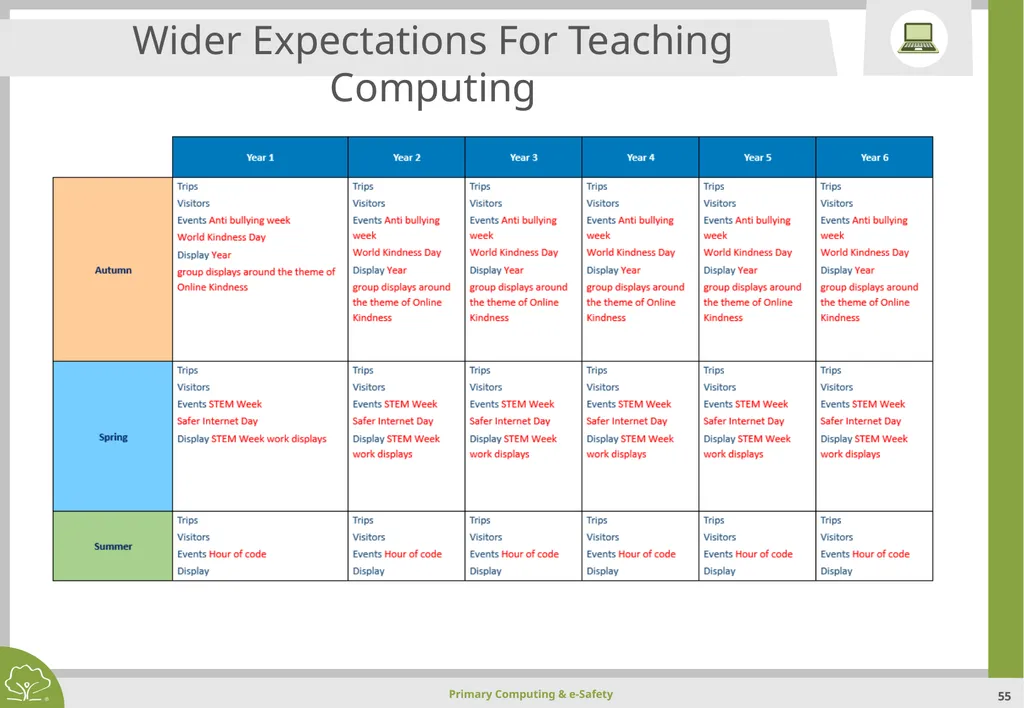
slide55. Wider Expectations For Teaching Computing<br>
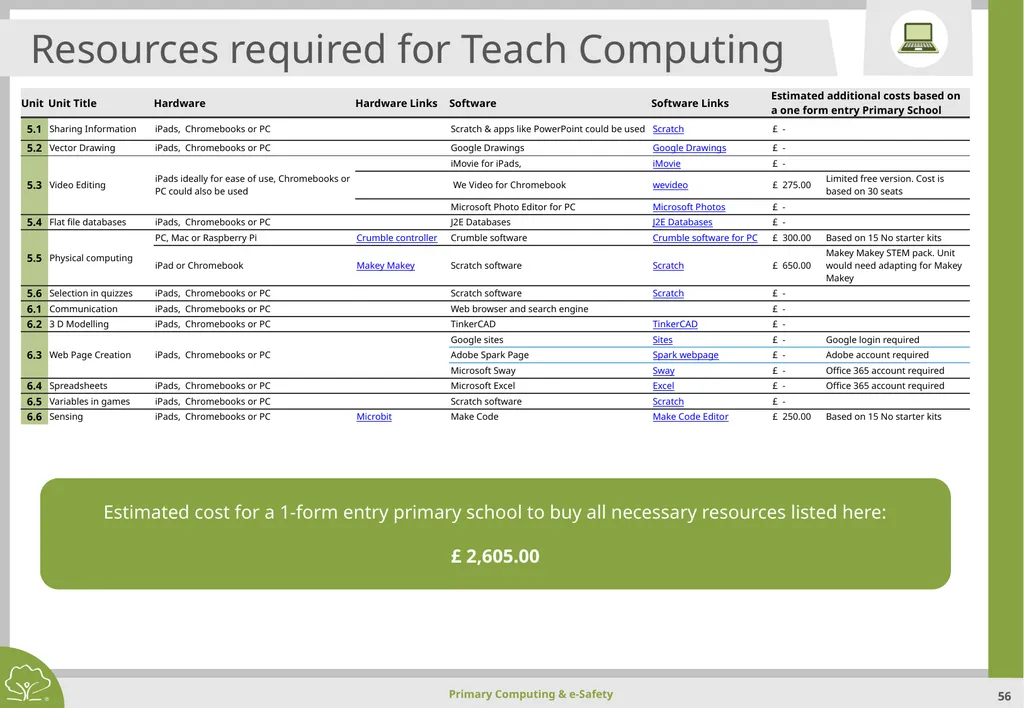
slide56. Resources required for Teach Computing Estimated cost for a 1-form entry primary school to buy all necessary resources listed here:
£ 2,605.00<br>
slide2. Primary Computing & e-Safety Intent
Within an ever changing and technological world, Grange Primary Academy understands and values the importance of teaching Computing from a young age. We acknowledge that future generations will rely heavily on their computational confidence and digital skills in order to support their progress within their chosen career paths.
Therefore, it is our school’s aim to equip children with the relevant skills and knowledge that is required to understand the three core areas of Computing (Computer Science, Information Technology and Digital Literacy) and to offer a broad and balanced approach to providing quality first teaching of this subject.
Computing is an integral part to a child’s education and everyday life. Consequently, we intend to support our pupils to access and understand the core principles of this subject through engaging and activities. Whilst ensuring they understand the advantages and disadvantages associated with online experiences, we want children to develop as respectful, responsible and confident users of technology, aware of measures that can be taken to keep themselves and others safe online.<br>
slide3. Primary Computing & e-Safety Implementation
We follow a broad and balanced Computing curriculum (based upon the National Curriculum) that builds on previous learning and provides both support and challenge for learners.
Computing at Grange Primary Academy at Key Stage 1 and 2 is taught across six units in each year group with the intention that each unit is taught over a half term. In EYFS, it is taught through by using technology to solve problems and produce creative outcomes. We follow the Teach Computing scheme of work.
All lessons at Grange Primary Academy are crafted around Rosenshine’s Ten Principals of Instruction and these inform the structure of each lesson in the United Learning Curriculum for Computing. We believe in the importance of co-operative learning and use Kagan structures to enable this. Our methods of teaching and learning are chosen to support the development of lively and enquiring minds, which critique and question.
The school uses the commercial scheme ‘Teach Computing’. This was selected because long term plans detail the’ Powerful Knowledge’ that is taught and ensure that there is a clear progression in key skills, both across a year and from year to year. Each unit provides opportunities for developing computational thinking concepts by using approaches including tinkering. Learning sequences also provide opportunities to develop creativity and solving problems within a meaningful context for applying what is learnt. This scheme also provides opportunities to develop pupil’s conceptual understanding alongside opportunities for them to be creative and to apply taught skills, as they become digitally literate. Learning through experimentation, discussion and making are at the core of the scheme. This ‘hands on’, practical approach supports the development of long term memory and gives pupils with limited technical English a context in which to learn and use new vocabulary<br>
slide4. Primary Computing & e-Safety Computing National curriculum expectations
Purpose of study
A high-quality computing education equips pupils to use computational thinking and creativity to understand and change the world. Computing has deep links with mathematics, science and design and technology, and provides insights into both natural and artificial systems. The core of computing is computer science, in which pupils are taught the principles of information and computation, how digital systems work and how to put this knowledge to use through programming. Building on this knowledge and understanding, pupils are equipped to use information technology to create programs, systems and a range of content. Computing also ensures that pupils become digitally literate – able to use, and express themselves and develop their ideas through, information and communication technology – at a level suitable for the future workplace and as active participants in a digital world.
Aims
The national curriculum for computing aims to ensure that all pupils:
can understand and apply the fundamental principles and concepts of computer science, including abstraction, logic, algorithms and data representation
can analyse problems in computational terms, and have repeated practical experience of writing computer programs in order to solve such problems
can evaluate and apply information technology, including new or unfamiliar technologies, analytically to solve problems
are responsible, competent, confident and creative users of information and communication technology<br>
slide5. Primary Computing & e-Safety National Curriculum Subject content EYFS (Nursery and Reception
Pupils should be taught to:
Communication and language development. Which involves giving children opportunities to experience a rich language environment; to develop their confidence and skills in expressing themselves; and to speak and listen in a range of situations
Personal, social and emotional development. Which involves helping children to develop a positive sense of themselves, and others; to form positive relationships and develop respect for others; to develop social skills and learn how to manage their feelings; to understand appropriate behaviour in groups; and to have confidence in their own abilities
Mathematics. Which involves providing children with opportunities to develop and improve their skills in counting, understanding and using numbers, calculating simple addition and subtraction problems; and to describe shapes, spaces, and measure
Understanding the world. Which involves guiding children to make sense of their physical world and their community through opportunities to explore, observe and find out about people, places, technology and the environment
Expressive arts and design. Which involves enabling children to explore and play with a wide range of media and materials, as well as providing opportunities and encouragement for sharing their thoughts, ideas and feelings through a variety of activities in art, music, movement, dance, role-play, and design and technology<br>
slide6. Primary Computing & e-Safety National Curriculum Subject content Subject content KS1 (Years 1 and 2)
Pupils should be taught to:
understand what algorithms are, how they are implemented as programs on digital devices, and that programs execute by following precise and unambiguous instructions
create and debug simple programs
use logical reasoning to predict the behaviour of simple programs
use technology purposefully to create, organise, store, manipulate and retrieve digital content
recognise common uses of information technology beyond school
use technology safely and respectfully, keeping personal information private; identify where to go for help and support when they have concerns about content or contact on the internet or other online technologies<br>
slide7. Primary Computing & e-Safety National Curriculum Subject content Subject content KS2 (Years 3, 4, 5 and 6)
Pupils should be taught to:
design, write and debug programs that accomplish specific goals, including controlling or simulating physical systems; solve problems by decomposing them into smaller parts
use sequence, selection, and repetition in programs; work with variables and various forms of input and output
use logical reasoning to explain how some simple algorithms work and to detect and correct errors in algorithms and programs
understand computer networks, including the internet; how they can provide multiple services, such as the World Wide Web, and the opportunities they offer for communication and collaboration
use search technologies effectively, appreciate how results are selected and ranked, and be discerning in evaluating digital content
select, use and combine a variety of software (including internet services) on a range of digital devices to design and create a range of programs, systems and content that accomplish given goals, including collecting, analysing, evaluating and presenting data and information
use technology safely, respectfully and responsibly; recognise acceptable/unacceptable behaviour; identify a range of ways to report concerns about content and contact<br>
slide8. Primary Computing & e-Safety National Curriculum Subject content Subject content KS3
Pupils should be taught to:
design, use and evaluate computational abstractions that model the state and behaviour of real-world problems and physical systems
• understand several key algorithms that reflect computational thinking [for example, ones for sorting and searching]; use logical reasoning to compare the utility of alternative algorithms for the same problem
• use two or more programming languages, at least one of which is textual, to solve a variety of computational problems; make appropriate use of data structures [for example, lists, tables or arrays]; design and develop modular programs that use procedures or functions
• understand simple Boolean logic [for example, AND, OR and NOT] and some of its uses in circuits and programming; understand how numbers can be represented in binary, and be able to carry out simple operations on binary numbers [for example, binary addition, and conversion between binary and decimal]
• understand the hardware and software components that make up computer systems, and how they communicate with one another and with other systems
• understand how instructions are stored and executed within a computer system; understand how data of various types (including text, sounds and pictures) can be represented and manipulated digitally, in the form of binary digits
• undertake creative projects that involve selecting, using, and combining multiple applications, preferably across a range of devices, to achieve challenging goals, including collecting and analysing data and meeting the needs of known users
• create, re-use, revise and re-purpose digital artefacts for a given audience, with attention to trustworthiness, design and usability
• understand a range of ways to use technology safely, respectfully, responsibly and securely, including protecting their online identity and privacy; recognise inappropriate content, contact and conduct and know how to report concerns.<br>
slide9. Primary Computing & e-Safety This document is built upon:
Computing: The ‘Teach Computing’ Curriculum
E-Safety: Education for a Connected World and Project Evolve,
The document includes:
Overview
EYFS (e-Safety only)
Year 1
Year 2
Year 3
Year 4
Year 5
Year 6
Resources required<br>
slide10. United Curriculum: Computing (Teach Computing)<br>
slide11. EYFS: e-Safety unit<br>
slide12. Year 1: Autumn 1 Year 1: Autumn 1 Technology around us<br>
slide13. Year 1: Autumn 2 Year 1: Autumn 2 Moving a robot<br>
slide14. Year 1: Spring 1 Year 1: Spring 1 Digital painting<br>
slide15. Year 1: Spring 2 Year 1: Spring 2 Grouping data<br>
slide16. Year 1: Summer 1 Year 1: Summer 1 Introduction to animation<br>
slide17. Year 1: Summer 2 Year 1: Summer 2 Desktop publishing<br>
slide18. Year 1: PSHE e-Safety unit<br>
slide19. Year 2: Autumn 1 Year 2: Autumn 1 IT around us<br>
slide20. Year 2: Autumn 2 Year 2: Autumn 2 Robot algorithms<br>
slide21. Year 2: Spring 1 Year 2: Spring 1 Making music<br>
slide22. Year 2: Spring 2 Year 2: Spring 2 Pictograms<br>
slide23. Year 2: Summer 1 Year 2: Summer 1 Digital photography<br>
slide24. Year 2: Summer 2 Year 2: Summer 2 Introduction to quizzes<br>
slide25. Year 2: PSHE e-Safety unit<br>
slide26. Year 3: Autumn 1 Year 3: Autumn 1 Connecting Computers<br>
slide27. Year 3: Autumn 2 Year 3: Autumn 2 Sequence in music<br>
slide28. Year 3: Spring 1 Year 3: Spring 1 Branching databases<br>
slide29. Year 3: Spring 2 Year 3: Spring 2 Stop–frame Animation<br>
slide30. Year 3: Summer 1 Year 3: Summer 1 Events and actions<br>
slide31. Year 3: Summer 2 Year 3: Summer 2 Desktop publishing<br>
slide32. Year 3: PSHE e-Safety unit<br>
slide33. Year 4: Autumn 1 Year 4: Autumn 1 The Internet<br>
slide34. Year 4: Autumn 2 Year 4: Autumn 2 Photo editing<br>
slide35. Year 4: Spring 1 Year 4: Spring 1 Data logging<br>
slide36. Year 4: Spring 2 Year 4: Spring 2 Audio editing<br>
slide37. Year 4: Summer 1 Year 4: Summer 1 Repetition in shapes<br>
slide38. Year 4: Summer 2 Year 4: Summer 2 Repetition in games<br>
slide39. Year 4: PSHE e-Safety unit<br>
slide40. Year 5: Autumn 1 Year 5: Autumn 1 Sharing information<br>
slide41. Year 5: Autumn 2 Year 5: Autumn 2 Vector Drawing<br>
slide42. Year 5: Spring 1 Year 5: Spring 1 Selection in physical computing<br>
slide43. Year 5: Spring 2 Year 5: Spring 2 Selection in quizzes<br>
slide44. Year 5: Summer 1 Year 5: Summer 1 Video editing<br>
slide45. Year 5: Summer 2 Year 5: Summer 2 Flat-file databases<br>
slide46. Year 5: PSHE e-Safety unit<br>
slide47. Year 6: Autumn 1 Year 6: Autumn 1 Communication<br>
slide48. Year 6: Autumn 2 Year 6: Autumn 2 Variables in games<br>
slide49. Year 6: Spring 1 Year 6: Spring 1 3D Modelling<br>
slide50. Year 6: Spring 2 Year 6: Spring 2 Spreadsheets<br>
slide51. Year 6: Summer 1 Year 6: Summer 1 Sensing<br>
slide52. Year 6: Summer 2 Year 6: Summer 2 Webpage creation<br>
slide53. Year 6: PSHE e-Safety unit<br>
slide54. Resources required for Teach Computing<br>
slide55. Wider Expectations For Teaching Computing<br>
slide56. Resources required for Teach Computing Estimated cost for a 1-form entry primary school to buy all necessary resources listed here:
£ 2,605.00<br>