
Projects Management Tool Survey of Projects

Description: Projects Management Tool Survey of Projects Management Tools Three comparative tool examples 1 Christian.olivettoego-gw.it Project Management Tool History Introduction Near the turn of the century, Frederick Taylor (18561915) began his
Related Topics
Download Presentation
"Projects Management Tool Survey of Projects" is the property of its rightful owner. Permission is granted to download and print the materials on this website for personal, non-commercial use only, and to display it on your personal computer provided you do not modify the materials and that you retain all copyright notices contained in the materials. By downloading content from our website, you accept the terms of this agreement.
Presentation Transcript
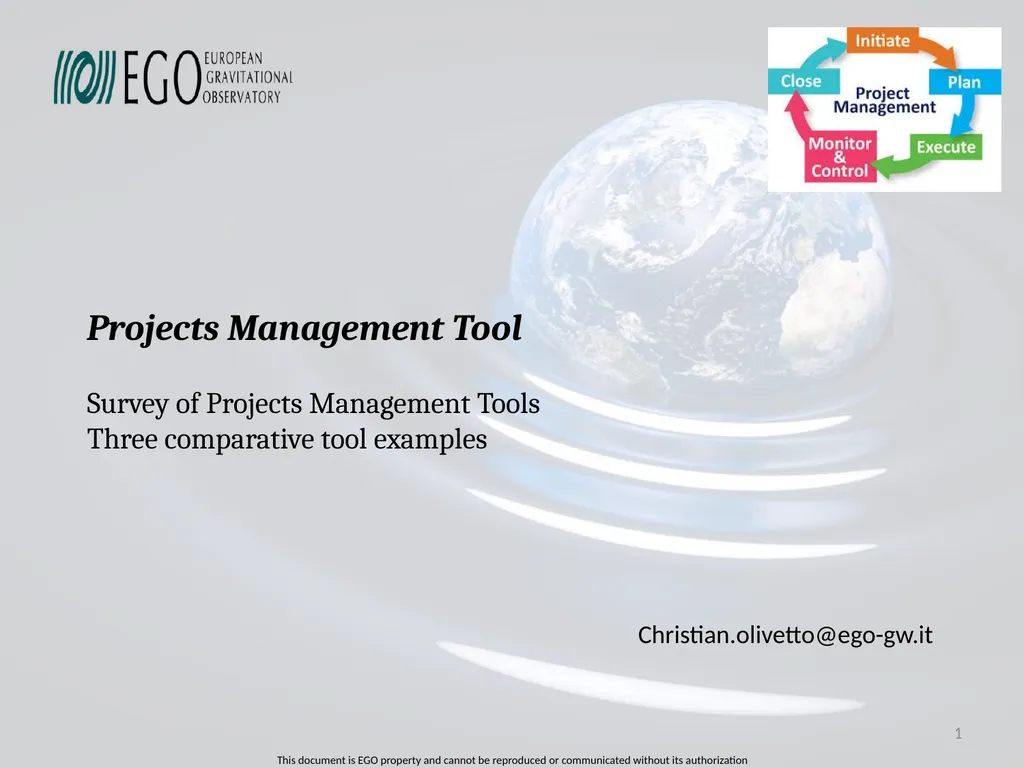
slide1. Projects Management Tool
Survey of Projects Management Tools
Three comparative tool examples 1 Christian.olivetto@ego-gw.it<br>
slide2. Project Management Tool History Introduction Near the turn of the century, Frederick Taylor (1856–1915) began his detailed studies of work.
Taylor's associate, Henry Gantt (1861–1919), studied in great detail the order of operations in work
During World War II, complex government and military projects and a shrinking war-time labor supply demanded new organizational structures. (D-DAY Project)
In the early 1960s, businesses began to apply general system theories to business interactions. (APOLLO project)
Within the last ten years, project management has continued to evolve. Significant trends are emerging:
Bottom-up planning
Top-Dow planning and reviewing
Dashboard involving (shcedule, budget, ressources, deliverables, report)
More collaborative work, …. 2 Source: MS Project support<br>
slide3. Project Management Tool Information source Lots of Project Management tool are available: > 100: How can we make the good choice ?
Comparaison of Project Management Software
https://en.wikipedia.org/wiki/Comparison_of_project_management_software
(see REDMINE = core of EASYREDMINE)
https://fr.wikipedia.org/wiki/Logiciel_de_gestion_de_projets
(In french but with a long list of product with features comparaison table) 3<br>
slide4. Project Management Tool Requirements To choose your tool you have to define your requirements specifications like:
Is it a question of managing a project portfolio or of piloting unitary projects?
Does the project involve several specialist or institution?
Is this a large-scale project requiring several teams?
Are the teams split up on several sites?
What are the needs for collaboration and communication?
What type of project management dashboard is most suitable?
What types of reporting will be required?
How is the documentation managed? 4<br>
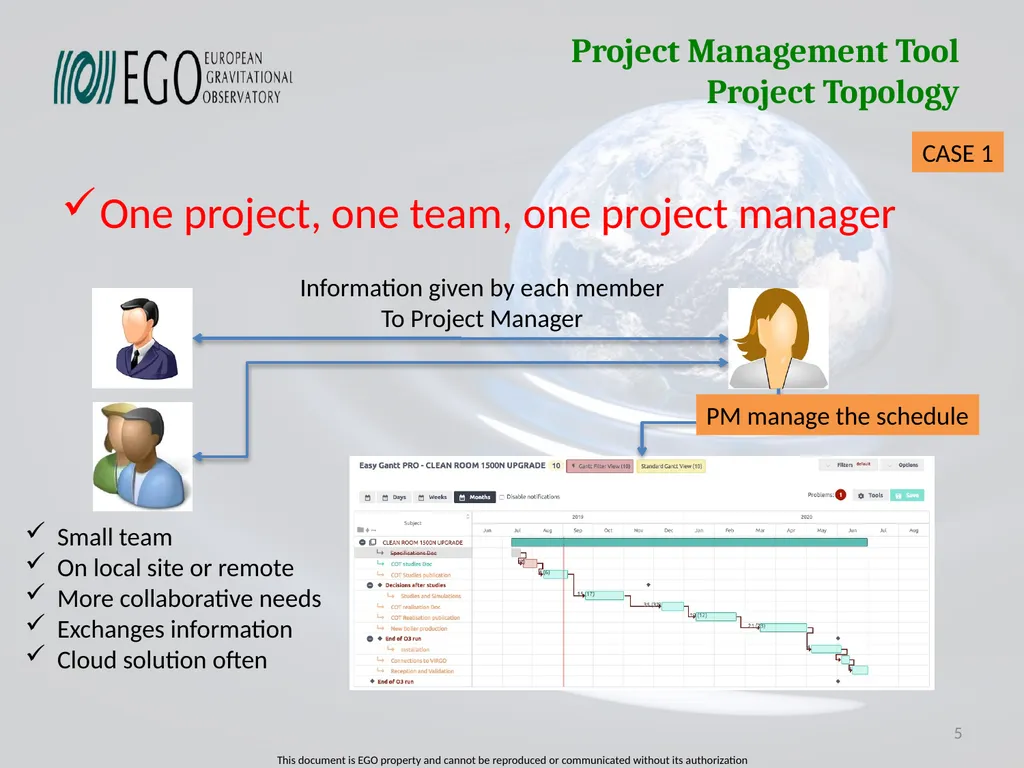
slide5. Project Management Tool Project Topology One project, one team, one project manager 5 Information given by each member
To Project Manager PM manage the schedule Small team
On local site or remote
More collaborative needs
Exchanges information
Cloud solution often CASE 1<br>
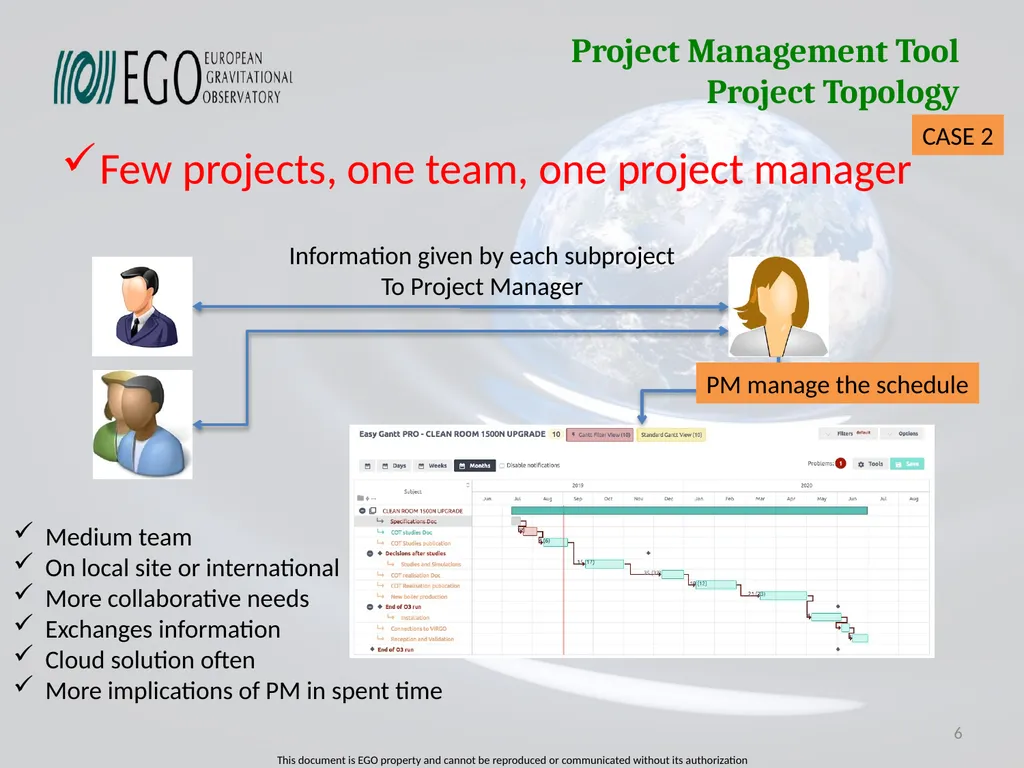
slide6. Project Management Tool Project Topology Few projects, one team, one project manager 6 Information given by each subproject
To Project Manager PM manage the schedule Medium team
On local site or international
More collaborative needs
Exchanges information
Cloud solution often
More implications of PM in spent time CASE 2<br>
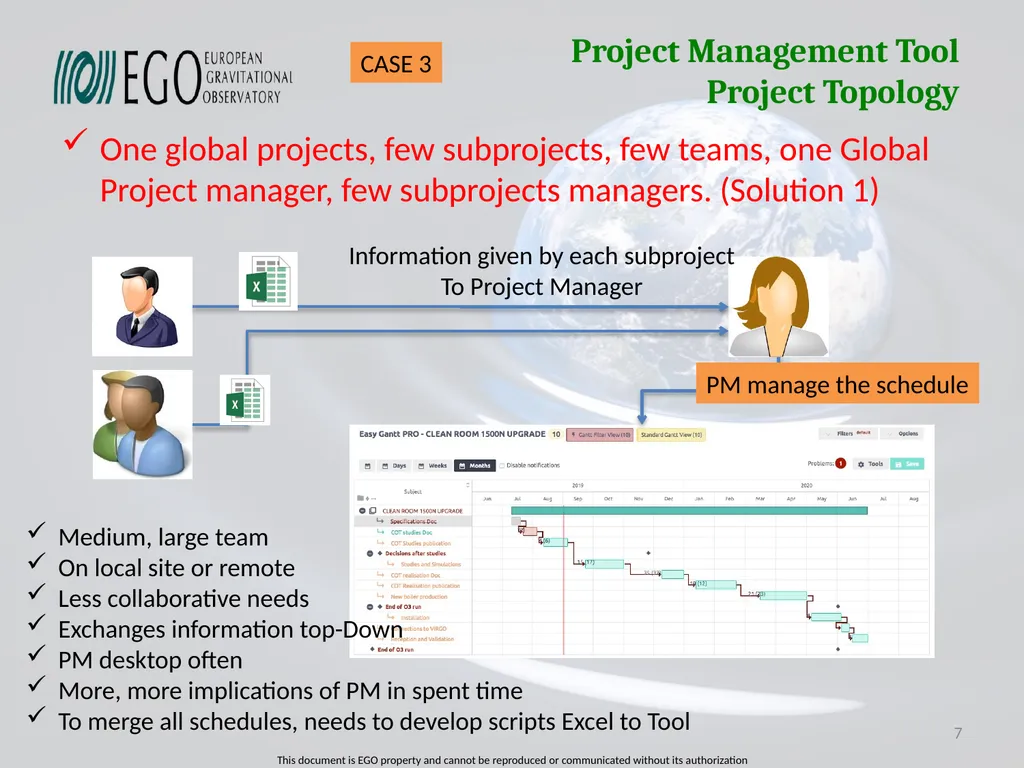
slide7. Project Management Tool Project Topology One global projects, few subprojects, few teams, one Global Project manager, few subprojects managers. (Solution 1) 7 Information given by each subproject
To Project Manager PM manage the schedule Medium, large team
On local site or remote
Less collaborative needs
Exchanges information top-Down
PM desktop often
More, more implications of PM in spent time
To merge all schedules, needs to develop scripts Excel to Tool CASE 3<br>
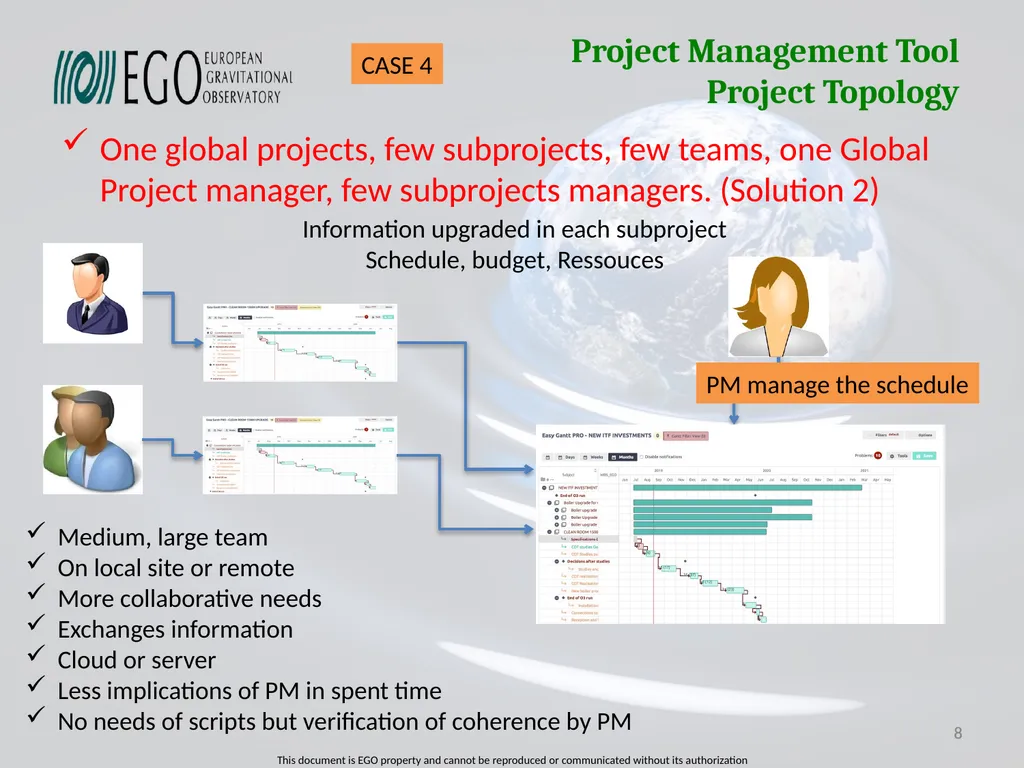
slide8. Project Management Tool Project Topology One global projects, few subprojects, few teams, one Global Project manager, few subprojects managers. (Solution 2) 8 8 Information upgraded in each subproject
Schedule, budget, Ressouces PM manage the schedule Medium, large team
On local site or remote
More collaborative needs
Exchanges information
Cloud or server
Less implications of PM in spent time
No needs of scripts but verification of coherence by PM CASE 4<br>
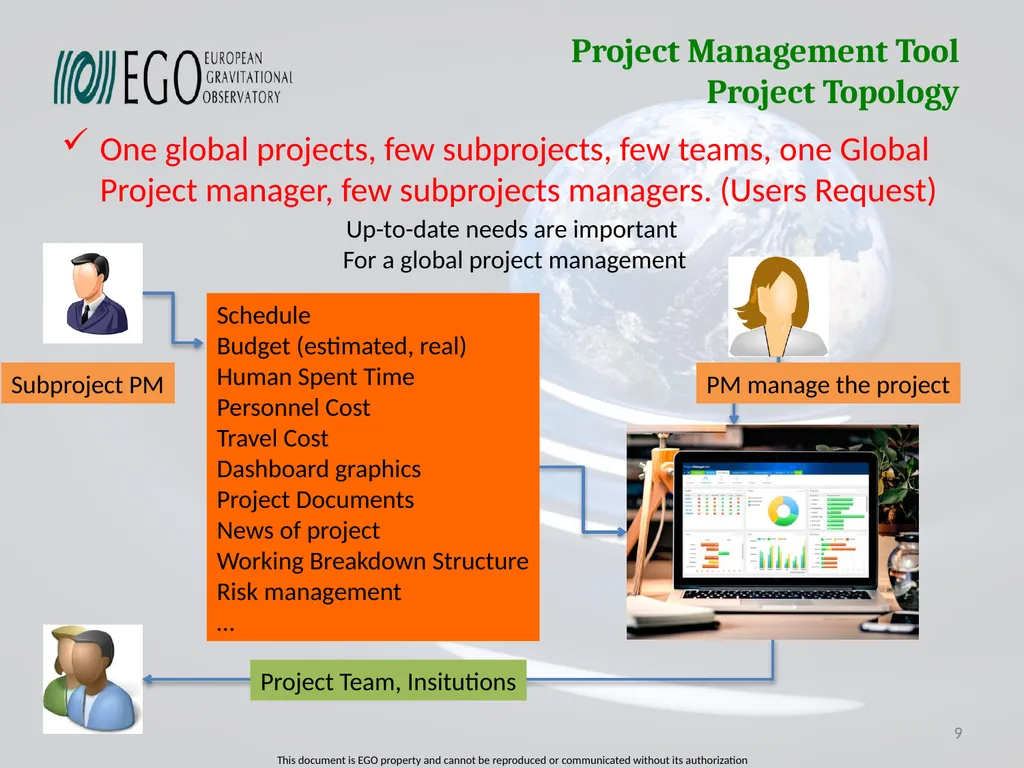
slide9. Project Management Tool Project Topology One global projects, few subprojects, few teams, one Global Project manager, few subprojects managers. (Users Request) 9 9 Up-to-date needs are important
For a global project management PM manage the project Schedule
Budget (estimated, real)
Human Spent Time
Personnel Cost
Travel Cost
Dashboard graphics
Project Documents
News of project
Working Breakdown Structure
Risk management
… Project Team, Insitutions Subproject PM<br>
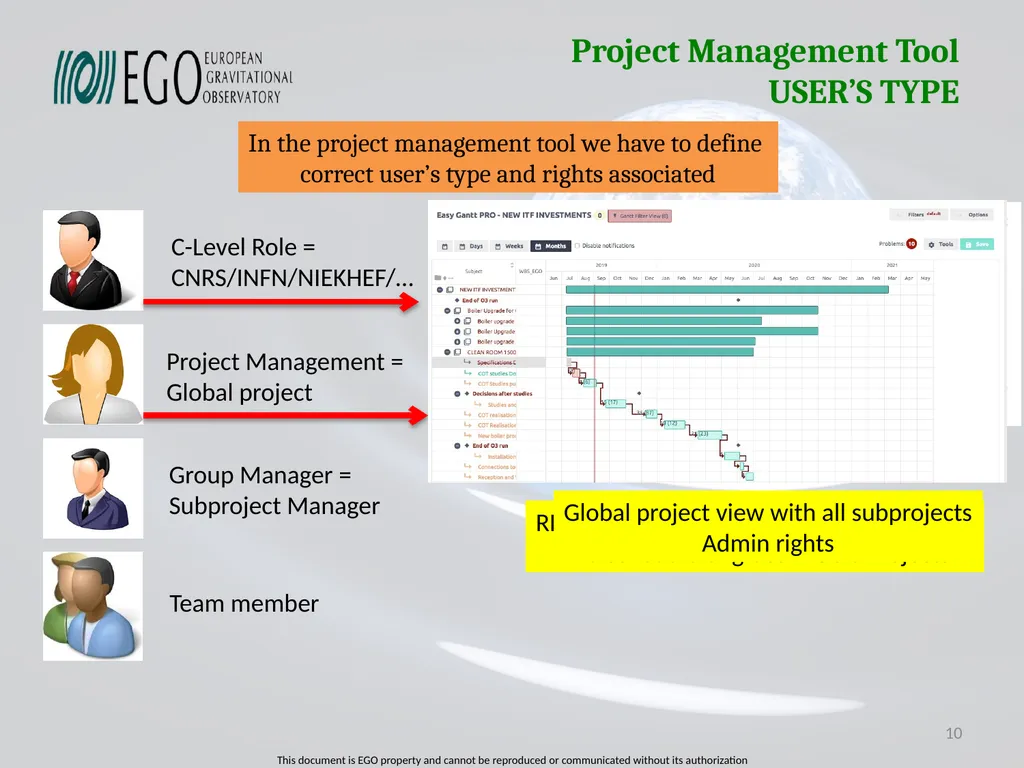
slide10. Project Management Tool USER’S TYPE 10 In the project management tool we have to define
correct user’s type and rights associated<br>
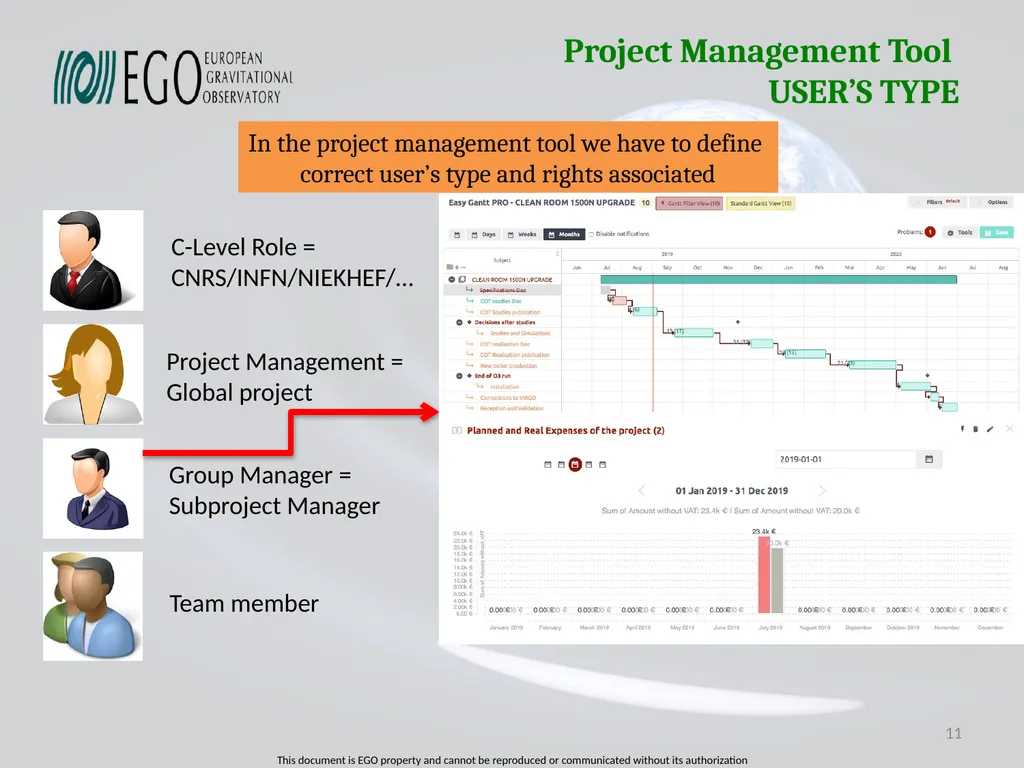
slide11. Project Management Tool USER’S TYPE 11 In the project management tool we have to define
correct user’s type and rights associated<br>
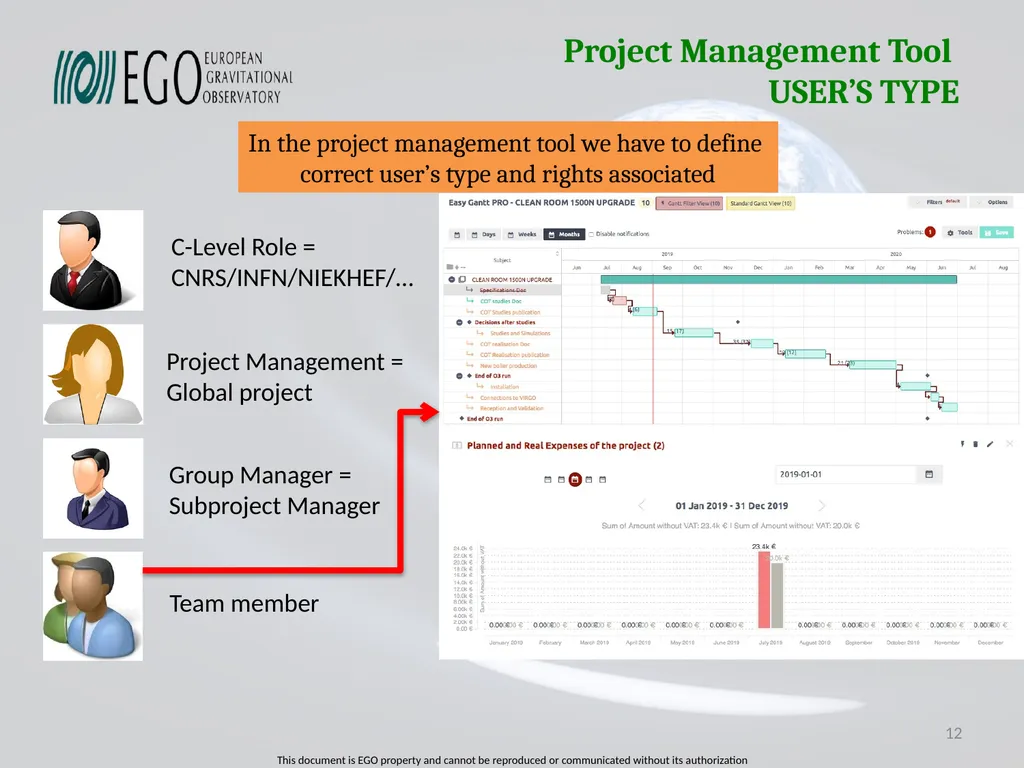
slide12. Project Management Tool USER’S TYPE 12 In the project management tool we have to define
correct user’s type and rights associated<br>
slide13. Project Management Tool MS Project Desktop MS project desktop (one standalone licence):
Leader of the market (First licence on DOS in 1984)
More than 20 Millions Project Manager use around the world
Price for one licence: 1600€
Main features:
Schedule (GANTT, PERT), Millestones, Critical path, % of advancement
Human ressource management affect to tasks, hardware ressource
Budget cost (personnel, hardware, estimated, real, cashflow)
Dashboard capability (creation graphics individualy, project overview on on sheet)
No possibility to manage roles rights
Automatic importation from excel (one file), more need coherence scripts development. 13 MS project wikipedia
MS project support with tutorials CASE 1, 2 or
3 with scripts<br>
slide14. Project Management Tool MS Project Server MS Project Server :
More than 10 K entreprise use Project Manager Server
Price for one licence: 2000€
Need licence for Share point server (7000€) and for 50 users (9000€)
Maintenance by year for 50 users (5400€/year)
Main features:
Schedule (GANTT, PERT), Millestones, Critical path, % of advancement
Human ressource management affect to tasks, hardware ressource
Budget cost (personnel, hardware, estimated, real, cashflow)
Dashboard capability (creation graphics individualy, project overview on on sheet)
Possibility to manage user’s role rights
Global merging of subprojects into one global project (some scripts has to been developed (return of CC-IN2P3 and CNES, has to be precised).
Cloud solution MS Project ONLINE: Price 25€/user/month (50 users:15000€/year)
Reports generation 14 MS project wikipedia
MS project support with tutorials
MS Project ONLINE CASE 1 to 4<br>
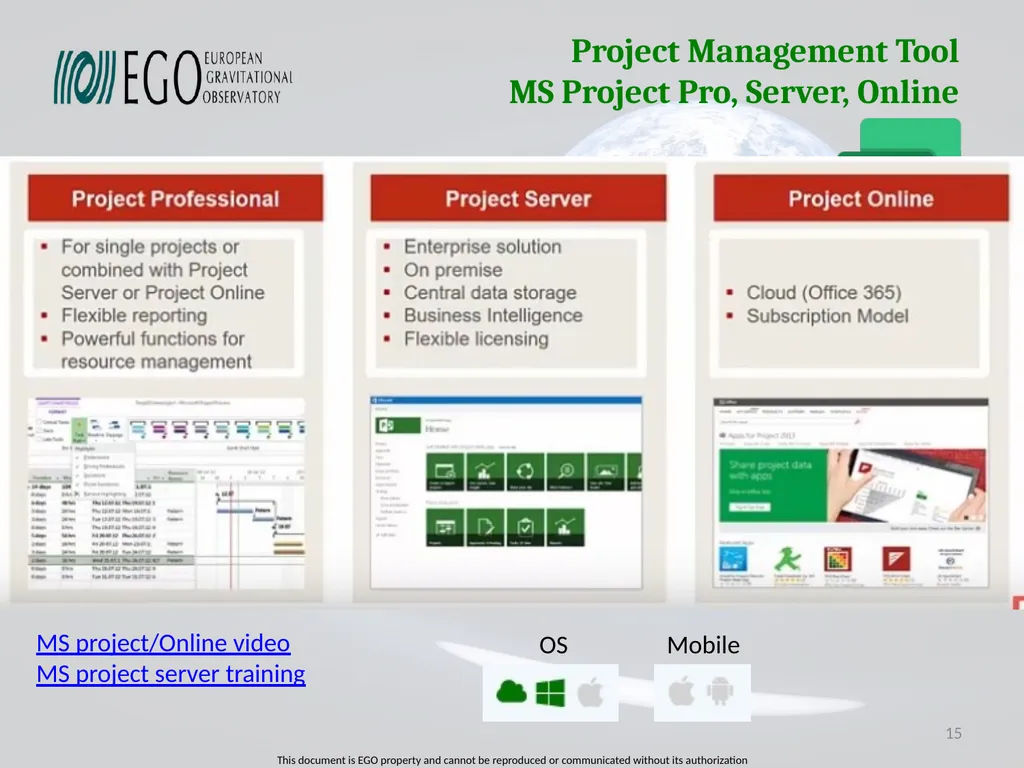
slide15. Project Management Tool MS Project Pro, Server, Online 15 MS project/Online video
MS project server training OS Mobile<br>
slide16. Project Management Tool EASYREDMINE EASYREDMINE (Cloud or Server plateform):
Based on REDMINE software Open Source (First version in 2006)
Price for cloud for 50 users: 4511€/year
Price for server plateform and 50 users: 6800€
Maintenance by year for 50 users (1200€/year)
Main features:
Schedule (GANTT, PERT), Millestones, Critical path, % of advancement
Human ressource management affect to tasks, hardware ressource
Budget cost (personnel, hardware, estimated, real, cashflow, travel)
Dashboard capability (creation graphics individualy, project overview page)
Possibility to manage user’s role rights
Global merging of subprojects schedule and informations (global millestones, )
Template project configuration to create a new project
Reports generation, Documents of projects. Work Beakdown Structure
Adding modules (Agenda, visioconference, Risk management, calculation fields) 16 REDMINE wikipedia
EASYREDMINE website
EASTREDMINE Webminaires CASE 1 to 4<br>
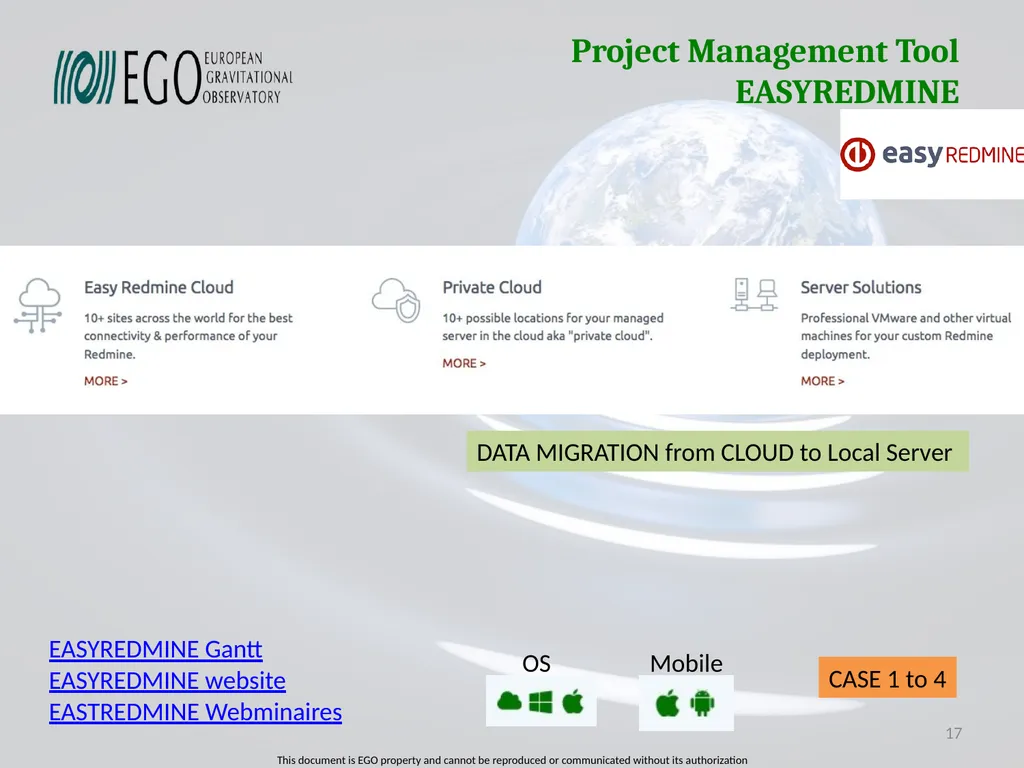
slide17. Project Management Tool EASYREDMINE 17 EASYREDMINE Gantt
EASYREDMINE website
EASTREDMINE Webminaires CASE 1 to 4 DATA MIGRATION from CLOUD to Local Server OS Mobile<br>
slide18. Project Management Tool ASANA ASANA (Cloud or Server plateform):
Moskovitz and Rosenstein left Facebook in 2008 and created ASANA,
(First version in 2011)
Price for cloud for 50 users: 6595€/year (Premium), 15000€ (Business)
Price for server plateform and 50 users: Not Available, Maintenance by year: NA
Main features:
Schedule (GANTT), Millestones, % of advancement
Human ressource management affect to tasks
Budget cost (personnel)
Dashboard capability (project overview page)
Possibility to manage team rights (public, private)
Template project configuration to create a new project
Reports generation, Documents of projects.
Collaborative work inside team 18 CASE 1, 2 (Premium)
CASE 4 ? (Enterprise) ASANA Website
ASANA guides<br>
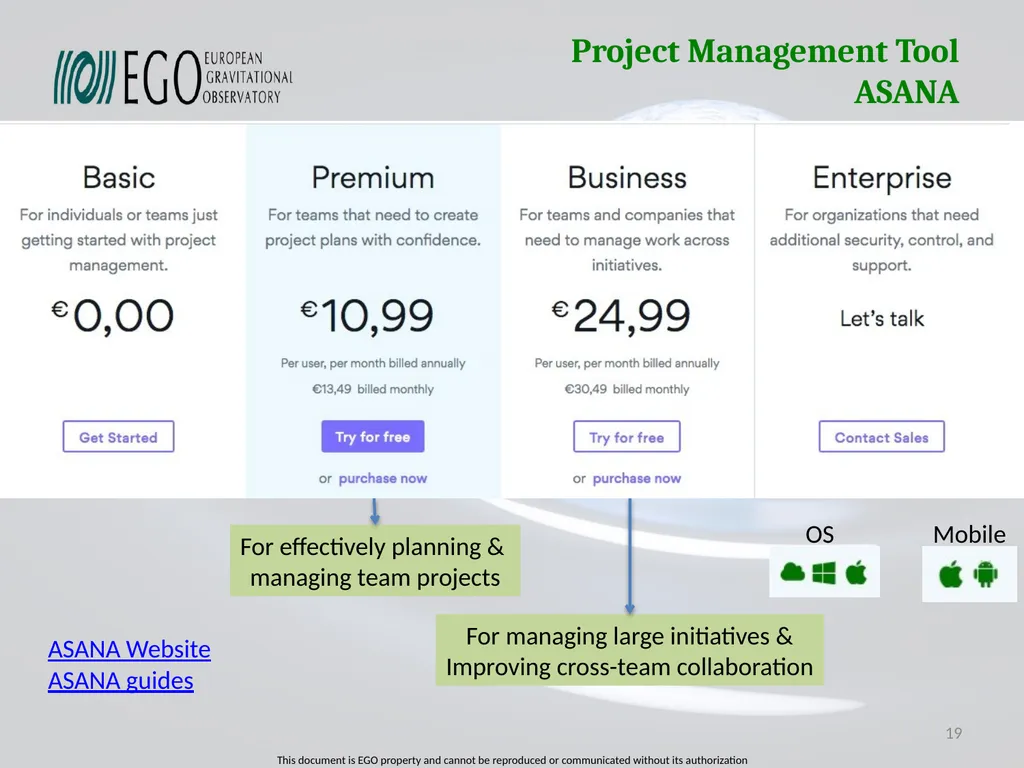
slide19. Project Management Tool ASANA 19 ASANA Website
ASANA guides For effectively planning &
managing team projects For managing large initiatives &
Improving cross-team collaboration OS Mobile<br>
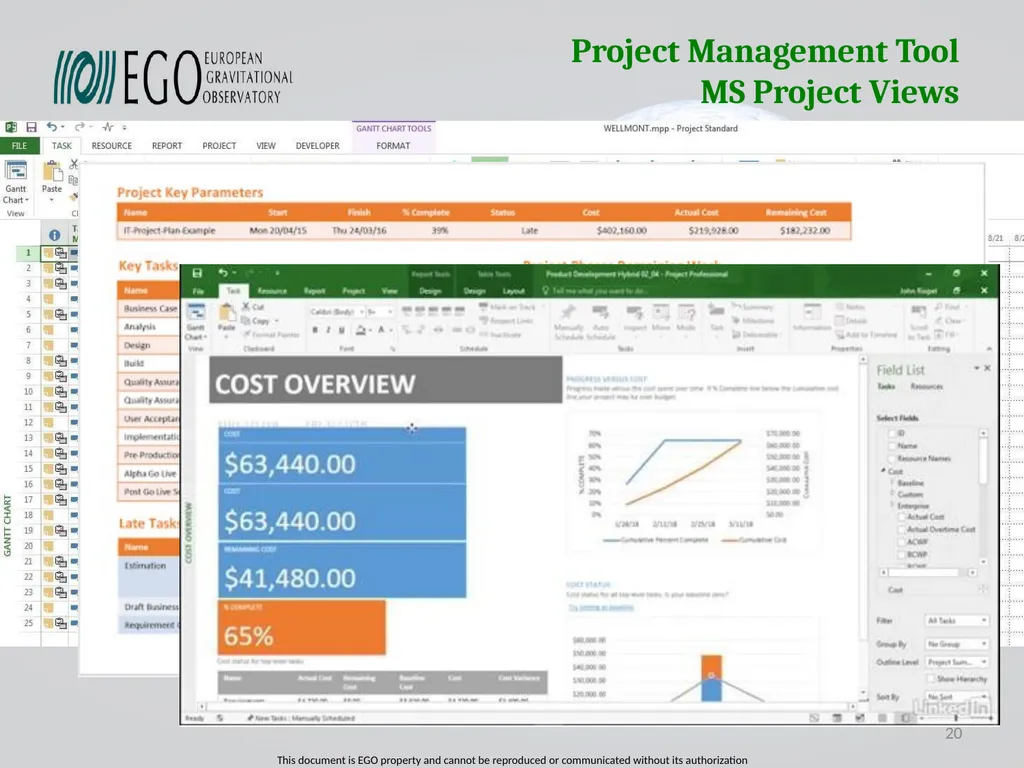
slide20. Project Management Tool MS Project Views 20<br>
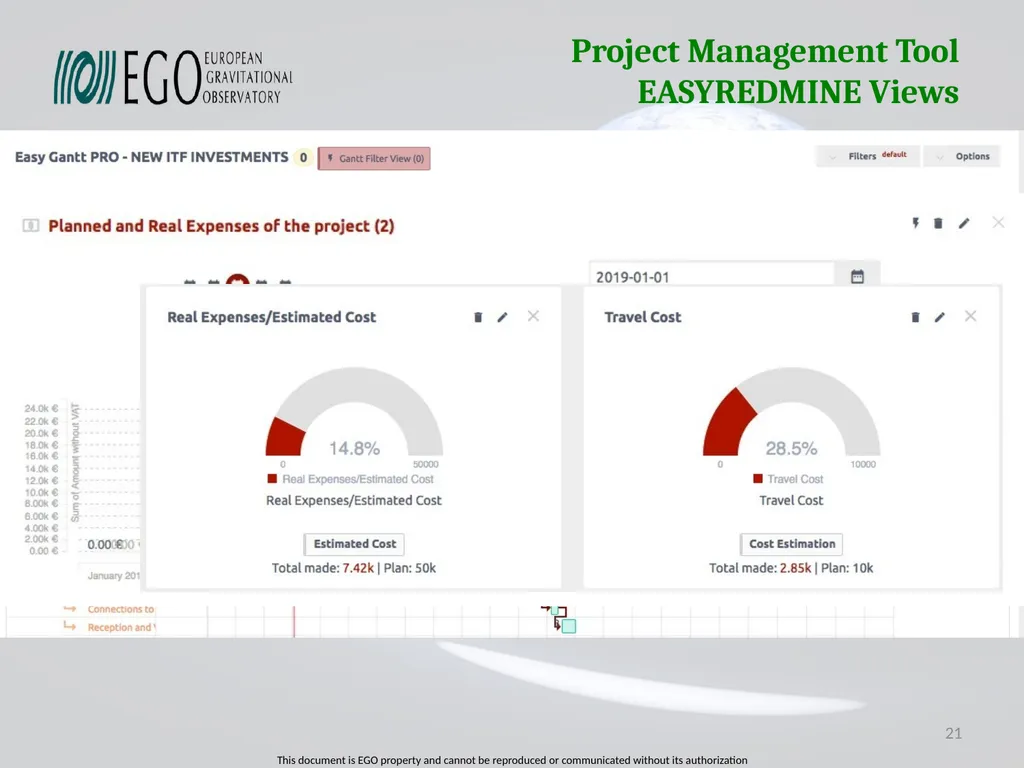
slide21. Project Management Tool EASYREDMINE Views 21<br>
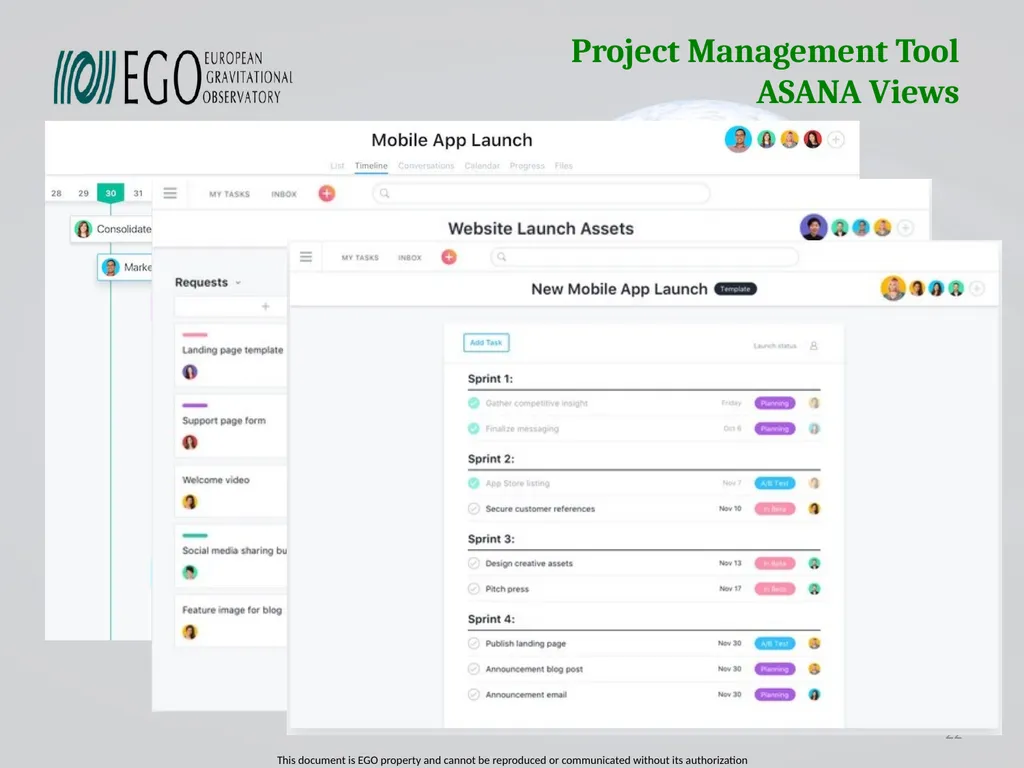
slide22. Project Management Tool ASANA Views 22<br>
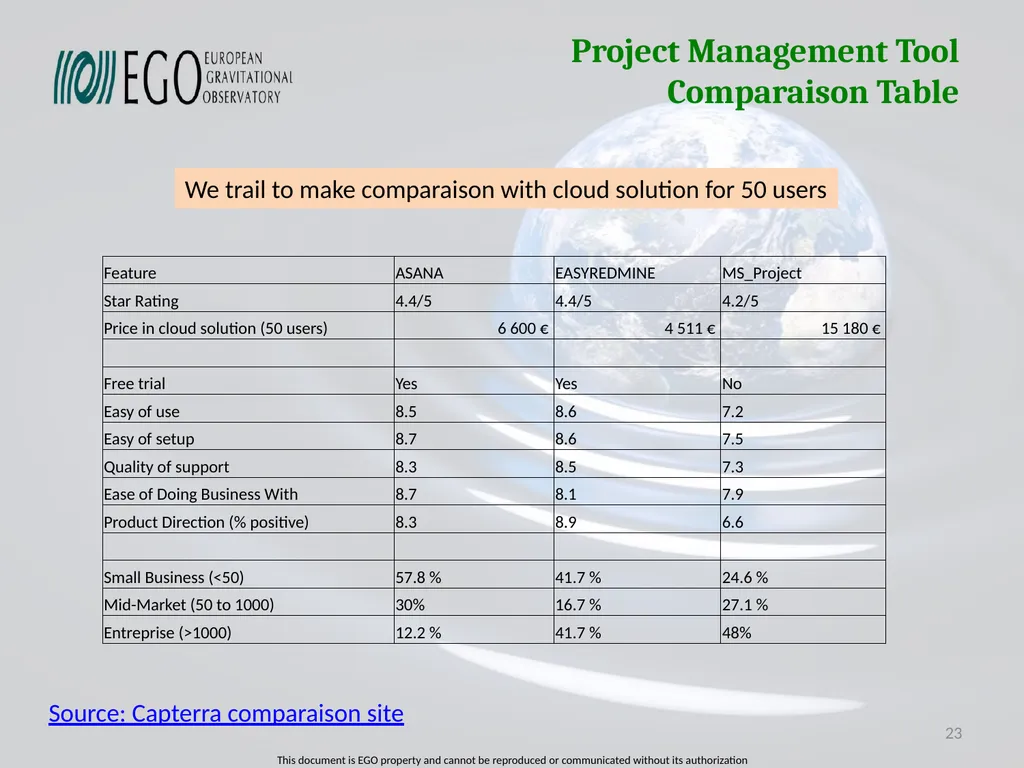
slide23. Project Management Tool Comparaison Table 23 Source: Capterra comparaison site We trail to make comparaison with cloud solution for 50 users<br>
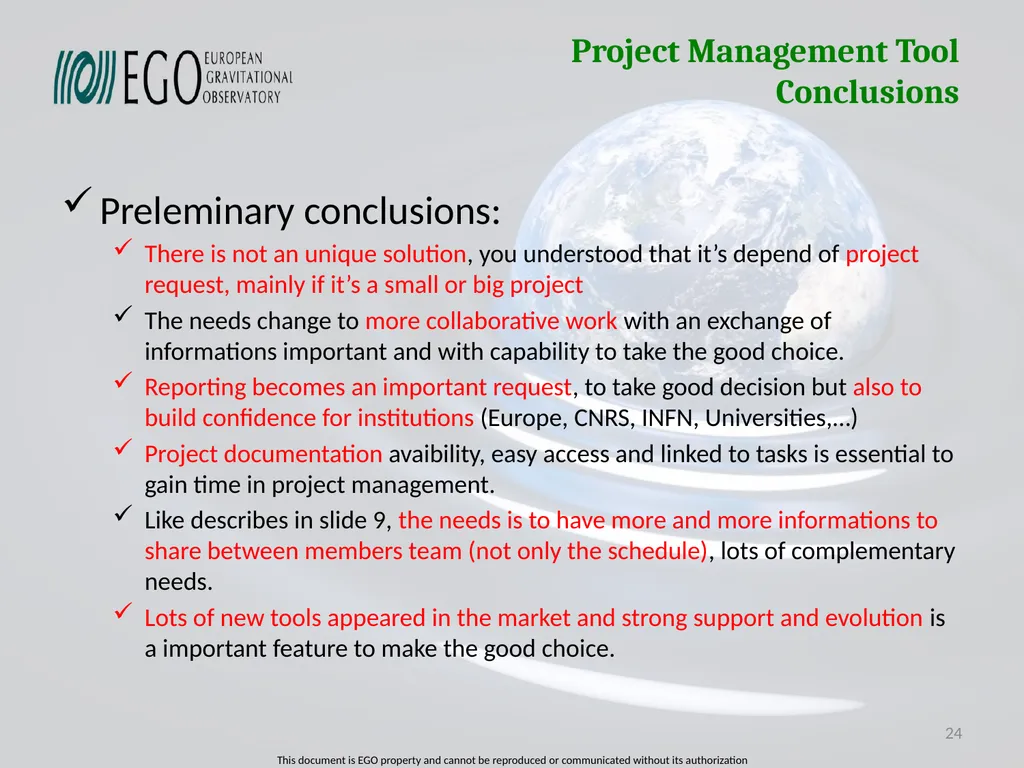
slide24. Project Management Tool Conclusions Preleminary conclusions:
There is not an unique solution, you understood that it’s depend of project request, mainly if it’s a small or big project
The needs change to more collaborative work with an exchange of informations important and with capability to take the good choice.
Reporting becomes an important request, to take good decision but also to build confidence for institutions (Europe, CNRS, INFN, Universities,…)
Project documentation avaibility, easy access and linked to tasks is essential to gain time in project management.
Like describes in slide 9, the needs is to have more and more informations to share between members team (not only the schedule), lots of complementary needs.
Lots of new tools appeared in the market and strong support and evolution is a important feature to make the good choice. 24<br>
slide25. Project Management Tool Conclusions Preleminary conclusions:
My feeling with all these informations is that for:
One team for one project with important of collaborative work:
ASANA: best choice in term of userfriendly
EASYREDMINE: best choice for evolution
Few projects with subprojects with important needs of reporting and merging information capability:
EASYREDMINE: all features are available, evolution with adding plugin
Lots of projects and important team with needs of reporting and merging information and on site Server
MS Project Server: complete Microsoft architecture (AD, SP, MS Project)
EASYREDMINE Server: Open Source and evolution with adding plugin 25 <20 <200 >200<br>
slide26. EASYREDMINE TRAINING SESSION LINKS AND TUTORIALS For any tool one of most important feature is a strong support for the user.
Documentation
User’s forum
FAQ
Tutorials vidéos
Tool support reactivity
However you have to have a strong accompagnement of new users on your tool configuration => Tutorials videos
Under development: Travel cost, EGO Project Template, Customize your report<br>
slide27. EASYREDMINE TRAINING SESSION LINKS AND TUTORIALS IN THIS TRAINING SESSION WE’LL BE ABLE TO:
Connect to Easyredmine: change password, configure your profil
https://ego-gw.easyredmine.com/login?
Tutorial Video #0
Define rights for each project’s member
Tutorial Video #1
Overview of Project’s informations and graphics
Tutorial Video #2
Creation of tasks
Tutorial Video #3
Task budget
Tutorial Video #4<br>
slide28. EASYREDMINE TRAINING SESSION LINKS AND TUTORIALS IN THIS TRAINING SESSION WE’LL BE ABLE TO:
Configure and insert new millestone
Millestone configuration
Tutorial Video #5
Configure Document Management System plugin
DMS configuration
Tutorial Video #6
Deposit a new document and versionning process
Tutorial Video #7
Linking project task to document(s) deposit in DMS
Tutorial Video #8<br>
slide2. Project Management Tool History Introduction Near the turn of the century, Frederick Taylor (1856–1915) began his detailed studies of work.
Taylor's associate, Henry Gantt (1861–1919), studied in great detail the order of operations in work
During World War II, complex government and military projects and a shrinking war-time labor supply demanded new organizational structures. (D-DAY Project)
In the early 1960s, businesses began to apply general system theories to business interactions. (APOLLO project)
Within the last ten years, project management has continued to evolve. Significant trends are emerging:
Bottom-up planning
Top-Dow planning and reviewing
Dashboard involving (shcedule, budget, ressources, deliverables, report)
More collaborative work, …. 2 Source: MS Project support<br>
slide3. Project Management Tool Information source Lots of Project Management tool are available: > 100: How can we make the good choice ?
Comparaison of Project Management Software
https://en.wikipedia.org/wiki/Comparison_of_project_management_software
(see REDMINE = core of EASYREDMINE)
https://fr.wikipedia.org/wiki/Logiciel_de_gestion_de_projets
(In french but with a long list of product with features comparaison table) 3<br>
slide4. Project Management Tool Requirements To choose your tool you have to define your requirements specifications like:
Is it a question of managing a project portfolio or of piloting unitary projects?
Does the project involve several specialist or institution?
Is this a large-scale project requiring several teams?
Are the teams split up on several sites?
What are the needs for collaboration and communication?
What type of project management dashboard is most suitable?
What types of reporting will be required?
How is the documentation managed? 4<br>
slide5. Project Management Tool Project Topology One project, one team, one project manager 5 Information given by each member
To Project Manager PM manage the schedule Small team
On local site or remote
More collaborative needs
Exchanges information
Cloud solution often CASE 1<br>
slide6. Project Management Tool Project Topology Few projects, one team, one project manager 6 Information given by each subproject
To Project Manager PM manage the schedule Medium team
On local site or international
More collaborative needs
Exchanges information
Cloud solution often
More implications of PM in spent time CASE 2<br>
slide7. Project Management Tool Project Topology One global projects, few subprojects, few teams, one Global Project manager, few subprojects managers. (Solution 1) 7 Information given by each subproject
To Project Manager PM manage the schedule Medium, large team
On local site or remote
Less collaborative needs
Exchanges information top-Down
PM desktop often
More, more implications of PM in spent time
To merge all schedules, needs to develop scripts Excel to Tool CASE 3<br>
slide8. Project Management Tool Project Topology One global projects, few subprojects, few teams, one Global Project manager, few subprojects managers. (Solution 2) 8 8 Information upgraded in each subproject
Schedule, budget, Ressouces PM manage the schedule Medium, large team
On local site or remote
More collaborative needs
Exchanges information
Cloud or server
Less implications of PM in spent time
No needs of scripts but verification of coherence by PM CASE 4<br>
slide9. Project Management Tool Project Topology One global projects, few subprojects, few teams, one Global Project manager, few subprojects managers. (Users Request) 9 9 Up-to-date needs are important
For a global project management PM manage the project Schedule
Budget (estimated, real)
Human Spent Time
Personnel Cost
Travel Cost
Dashboard graphics
Project Documents
News of project
Working Breakdown Structure
Risk management
… Project Team, Insitutions Subproject PM<br>
slide10. Project Management Tool USER’S TYPE 10 In the project management tool we have to define
correct user’s type and rights associated<br>
slide11. Project Management Tool USER’S TYPE 11 In the project management tool we have to define
correct user’s type and rights associated<br>
slide12. Project Management Tool USER’S TYPE 12 In the project management tool we have to define
correct user’s type and rights associated<br>
slide13. Project Management Tool MS Project Desktop MS project desktop (one standalone licence):
Leader of the market (First licence on DOS in 1984)
More than 20 Millions Project Manager use around the world
Price for one licence: 1600€
Main features:
Schedule (GANTT, PERT), Millestones, Critical path, % of advancement
Human ressource management affect to tasks, hardware ressource
Budget cost (personnel, hardware, estimated, real, cashflow)
Dashboard capability (creation graphics individualy, project overview on on sheet)
No possibility to manage roles rights
Automatic importation from excel (one file), more need coherence scripts development. 13 MS project wikipedia
MS project support with tutorials CASE 1, 2 or
3 with scripts<br>
slide14. Project Management Tool MS Project Server MS Project Server :
More than 10 K entreprise use Project Manager Server
Price for one licence: 2000€
Need licence for Share point server (7000€) and for 50 users (9000€)
Maintenance by year for 50 users (5400€/year)
Main features:
Schedule (GANTT, PERT), Millestones, Critical path, % of advancement
Human ressource management affect to tasks, hardware ressource
Budget cost (personnel, hardware, estimated, real, cashflow)
Dashboard capability (creation graphics individualy, project overview on on sheet)
Possibility to manage user’s role rights
Global merging of subprojects into one global project (some scripts has to been developed (return of CC-IN2P3 and CNES, has to be precised).
Cloud solution MS Project ONLINE: Price 25€/user/month (50 users:15000€/year)
Reports generation 14 MS project wikipedia
MS project support with tutorials
MS Project ONLINE CASE 1 to 4<br>
slide15. Project Management Tool MS Project Pro, Server, Online 15 MS project/Online video
MS project server training OS Mobile<br>
slide16. Project Management Tool EASYREDMINE EASYREDMINE (Cloud or Server plateform):
Based on REDMINE software Open Source (First version in 2006)
Price for cloud for 50 users: 4511€/year
Price for server plateform and 50 users: 6800€
Maintenance by year for 50 users (1200€/year)
Main features:
Schedule (GANTT, PERT), Millestones, Critical path, % of advancement
Human ressource management affect to tasks, hardware ressource
Budget cost (personnel, hardware, estimated, real, cashflow, travel)
Dashboard capability (creation graphics individualy, project overview page)
Possibility to manage user’s role rights
Global merging of subprojects schedule and informations (global millestones, )
Template project configuration to create a new project
Reports generation, Documents of projects. Work Beakdown Structure
Adding modules (Agenda, visioconference, Risk management, calculation fields) 16 REDMINE wikipedia
EASYREDMINE website
EASTREDMINE Webminaires CASE 1 to 4<br>
slide17. Project Management Tool EASYREDMINE 17 EASYREDMINE Gantt
EASYREDMINE website
EASTREDMINE Webminaires CASE 1 to 4 DATA MIGRATION from CLOUD to Local Server OS Mobile<br>
slide18. Project Management Tool ASANA ASANA (Cloud or Server plateform):
Moskovitz and Rosenstein left Facebook in 2008 and created ASANA,
(First version in 2011)
Price for cloud for 50 users: 6595€/year (Premium), 15000€ (Business)
Price for server plateform and 50 users: Not Available, Maintenance by year: NA
Main features:
Schedule (GANTT), Millestones, % of advancement
Human ressource management affect to tasks
Budget cost (personnel)
Dashboard capability (project overview page)
Possibility to manage team rights (public, private)
Template project configuration to create a new project
Reports generation, Documents of projects.
Collaborative work inside team 18 CASE 1, 2 (Premium)
CASE 4 ? (Enterprise) ASANA Website
ASANA guides<br>
slide19. Project Management Tool ASANA 19 ASANA Website
ASANA guides For effectively planning &
managing team projects For managing large initiatives &
Improving cross-team collaboration OS Mobile<br>
slide20. Project Management Tool MS Project Views 20<br>
slide21. Project Management Tool EASYREDMINE Views 21<br>
slide22. Project Management Tool ASANA Views 22<br>
slide23. Project Management Tool Comparaison Table 23 Source: Capterra comparaison site We trail to make comparaison with cloud solution for 50 users<br>
slide24. Project Management Tool Conclusions Preleminary conclusions:
There is not an unique solution, you understood that it’s depend of project request, mainly if it’s a small or big project
The needs change to more collaborative work with an exchange of informations important and with capability to take the good choice.
Reporting becomes an important request, to take good decision but also to build confidence for institutions (Europe, CNRS, INFN, Universities,…)
Project documentation avaibility, easy access and linked to tasks is essential to gain time in project management.
Like describes in slide 9, the needs is to have more and more informations to share between members team (not only the schedule), lots of complementary needs.
Lots of new tools appeared in the market and strong support and evolution is a important feature to make the good choice. 24<br>
slide25. Project Management Tool Conclusions Preleminary conclusions:
My feeling with all these informations is that for:
One team for one project with important of collaborative work:
ASANA: best choice in term of userfriendly
EASYREDMINE: best choice for evolution
Few projects with subprojects with important needs of reporting and merging information capability:
EASYREDMINE: all features are available, evolution with adding plugin
Lots of projects and important team with needs of reporting and merging information and on site Server
MS Project Server: complete Microsoft architecture (AD, SP, MS Project)
EASYREDMINE Server: Open Source and evolution with adding plugin 25 <20 <200 >200<br>
slide26. EASYREDMINE TRAINING SESSION LINKS AND TUTORIALS For any tool one of most important feature is a strong support for the user.
Documentation
User’s forum
FAQ
Tutorials vidéos
Tool support reactivity
However you have to have a strong accompagnement of new users on your tool configuration => Tutorials videos
Under development: Travel cost, EGO Project Template, Customize your report<br>
slide27. EASYREDMINE TRAINING SESSION LINKS AND TUTORIALS IN THIS TRAINING SESSION WE’LL BE ABLE TO:
Connect to Easyredmine: change password, configure your profil
https://ego-gw.easyredmine.com/login?
Tutorial Video #0
Define rights for each project’s member
Tutorial Video #1
Overview of Project’s informations and graphics
Tutorial Video #2
Creation of tasks
Tutorial Video #3
Task budget
Tutorial Video #4<br>
slide28. EASYREDMINE TRAINING SESSION LINKS AND TUTORIALS IN THIS TRAINING SESSION WE’LL BE ABLE TO:
Configure and insert new millestone
Millestone configuration
Tutorial Video #5
Configure Document Management System plugin
DMS configuration
Tutorial Video #6
Deposit a new document and versionning process
Tutorial Video #7
Linking project task to document(s) deposit in DMS
Tutorial Video #8<br>