Python 2 Thesis Support All Users: How to Add a Thesis Dashboard Python 2 Thesis Support Who needs a thesis dashboard? Thesis dashboards are needed for students writing a thesis, capstone or project report, or dissertation that will be
"Python 2 Thesis Support All Users: How to Add a" is the property of its rightful owner. Permission is granted to
download and print the materials on this website for personal, non-commercial use only, and to display it
on your personal computer provided you do not modify the materials and that you retain all copyright
notices contained in the materials. By downloading content from our website, you accept the terms of this
agreement.
Presentation Transcript
01
Python 2 Thesis Support All Users:
How to Add a Thesis Dashboard<br>
02
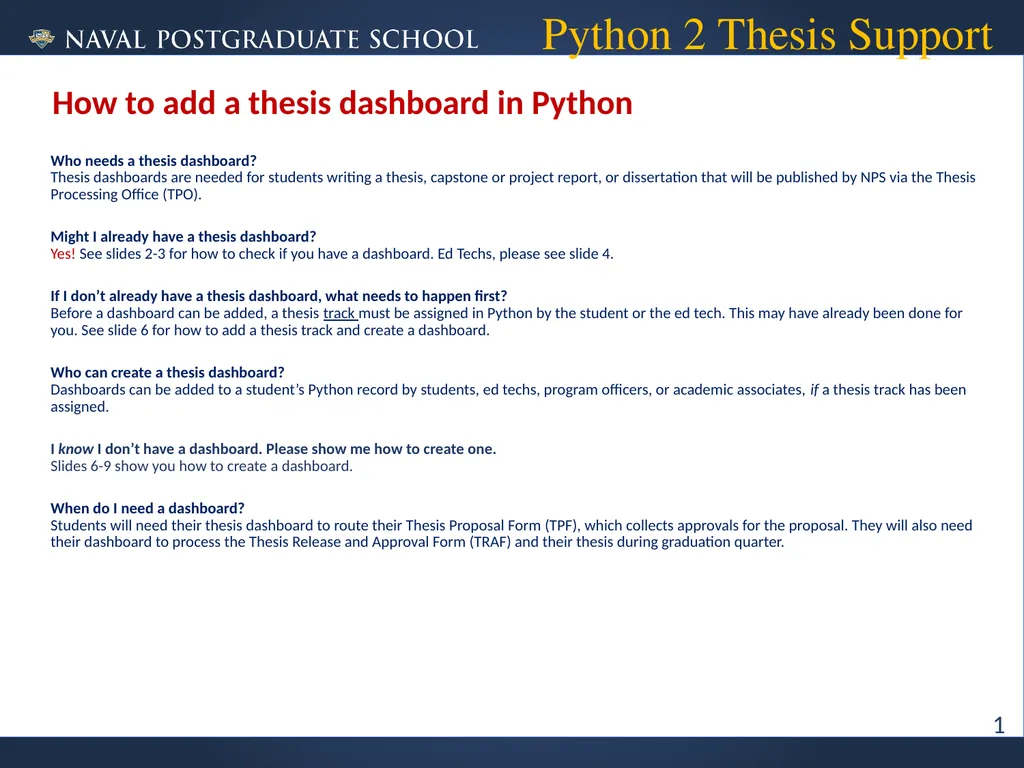
Python 2 Thesis Support Who needs a thesis dashboard? Thesis dashboards are needed for students writing a thesis, capstone or project report, or dissertation that will be published by NPS via the Thesis Processing Office (TPO).
Might I already have a thesis dashboard? Yes! See slides 2-3 for how to check if you have a dashboard. Ed Techs, please see slide 4.
If I don’t already have a thesis dashboard, what needs to happen first? Before a dashboard can be added, a thesis track must be assigned in Python by the student or the ed tech. This may have already been done for you. See slide 6 for how to add a thesis track and create a dashboard.
Who can create a thesis dashboard? Dashboards can be added to a student’s Python record by students, ed techs, program officers, or academic associates, if a thesis track has been assigned.
I know I don’t have a dashboard. Please show me how to create one. Slides 6-9 show you how to create a dashboard.
When do I need a dashboard? Students will need their thesis dashboard to route their Thesis Proposal Form (TPF), which collects approvals for the proposal. They will also need their dashboard to process the Thesis Release and Approval Form (TRAF) and their thesis during graduation quarter. How to add a thesis dashboard in Python 1<br>
03
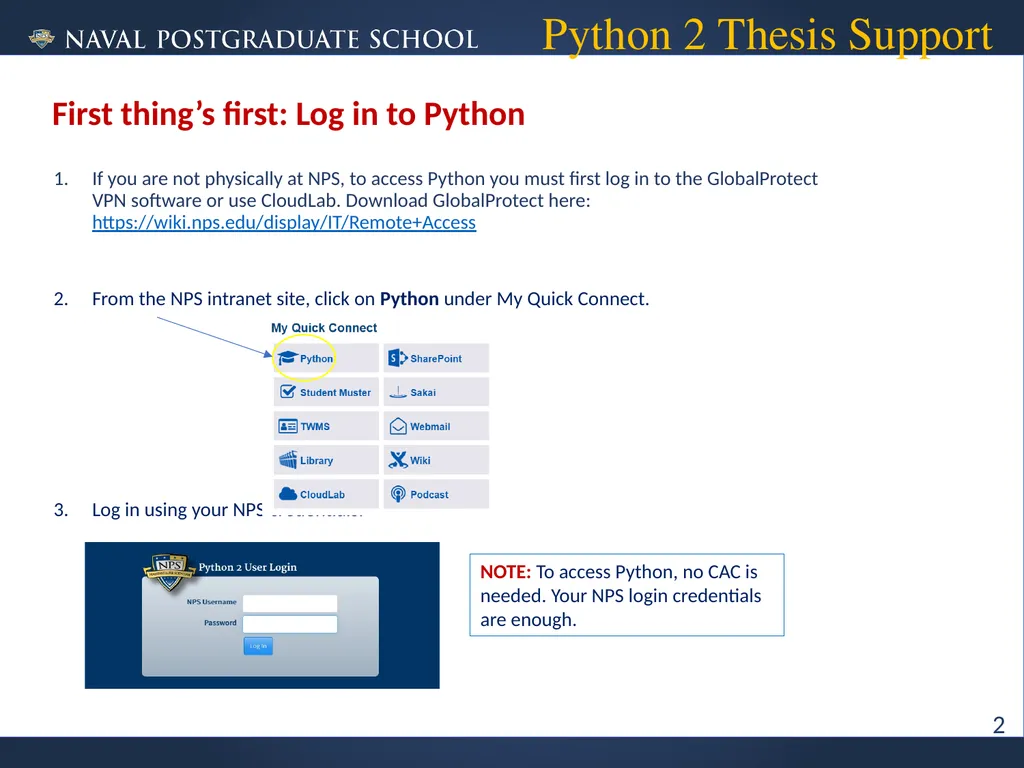
If you are not physically at NPS, to access Python you must first log in to the GlobalProtect VPN software or use CloudLab. Download GlobalProtect here: https://wiki.nps.edu/display/IT/Remote+Access
From the NPS intranet site, click on Python under My Quick Connect.
Log in using your NPS credentials. Python 2 Thesis Support First thing’s first: Log in to Python NOTE: To access Python, no CAC is needed. Your NPS login credentials are enough. 2<br>
04
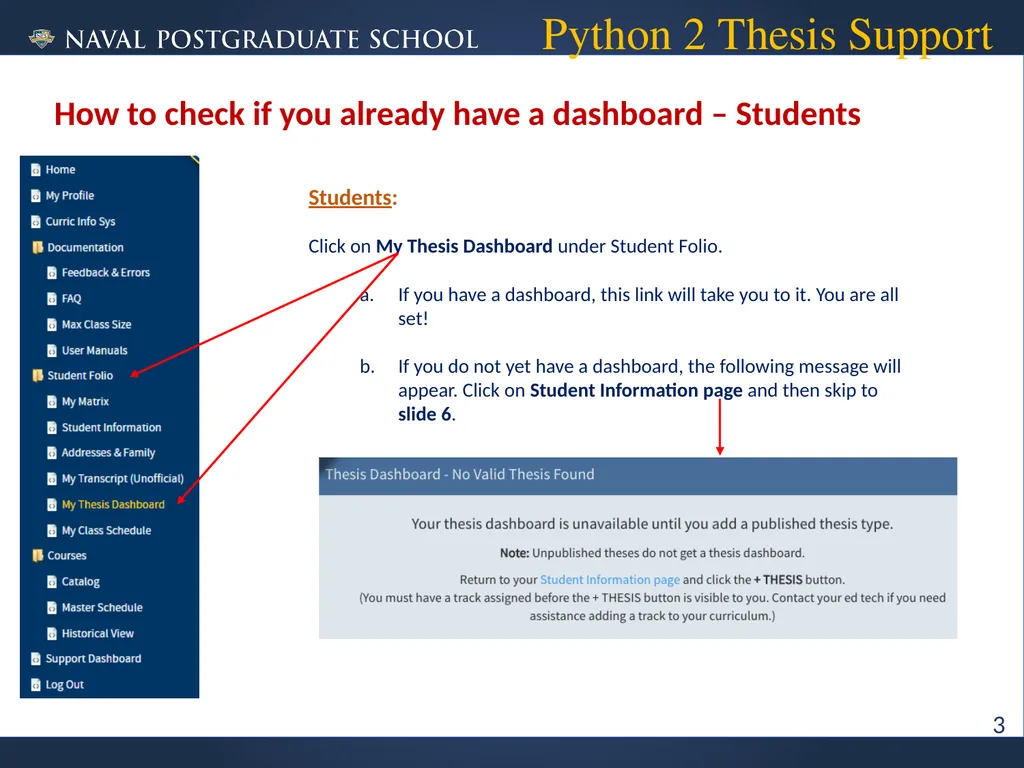
Python 2 Thesis Support How to check if you already have a dashboard – Students Students:
Click on My Thesis Dashboard under Student Folio.
If you have a dashboard, this link will take you to it. You are all set!
If you do not yet have a dashboard, the following message will appear. Click on Student Information page and then skip to slide 6. 3<br>
05
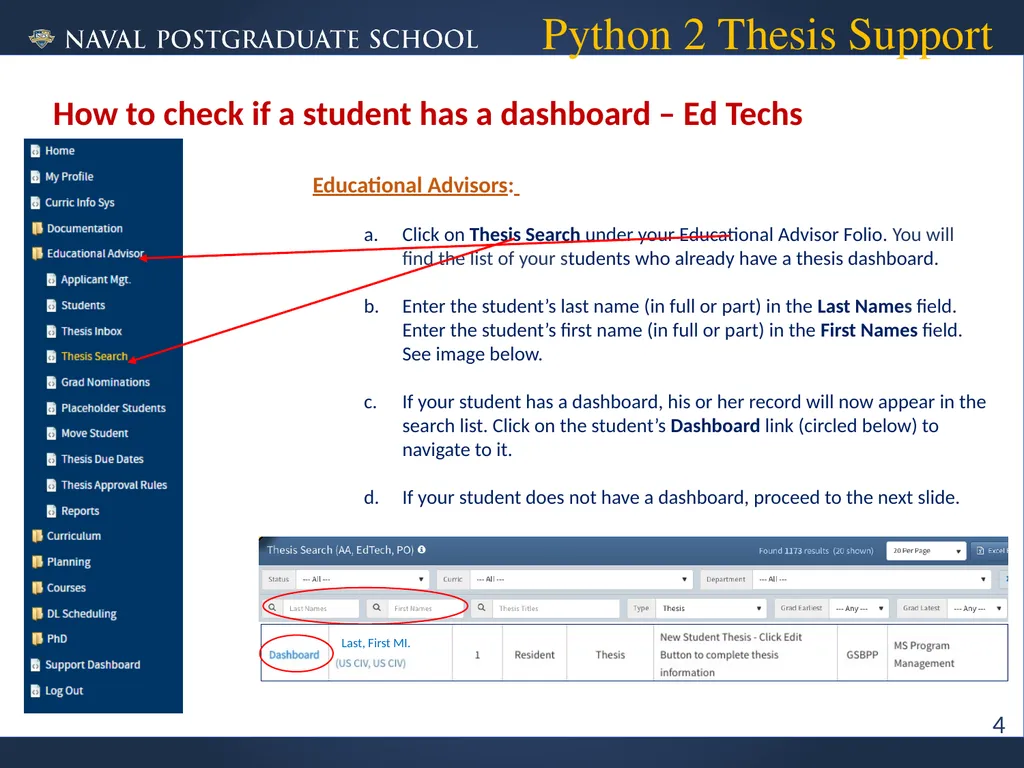
Python 2 Thesis Support How to check if a student has a dashboard – Ed Techs Educational Advisors:
Click on Thesis Search under your Educational Advisor Folio. You will find the list of your students who already have a thesis dashboard.
Enter the student’s last name (in full or part) in the Last Names field. Enter the student’s first name (in full or part) in the First Names field. See image below.
If your student has a dashboard, his or her record will now appear in the search list. Click on the student’s Dashboard link (circled below) to navigate to it.
If your student does not have a dashboard, proceed to the next slide. 4<br>
06
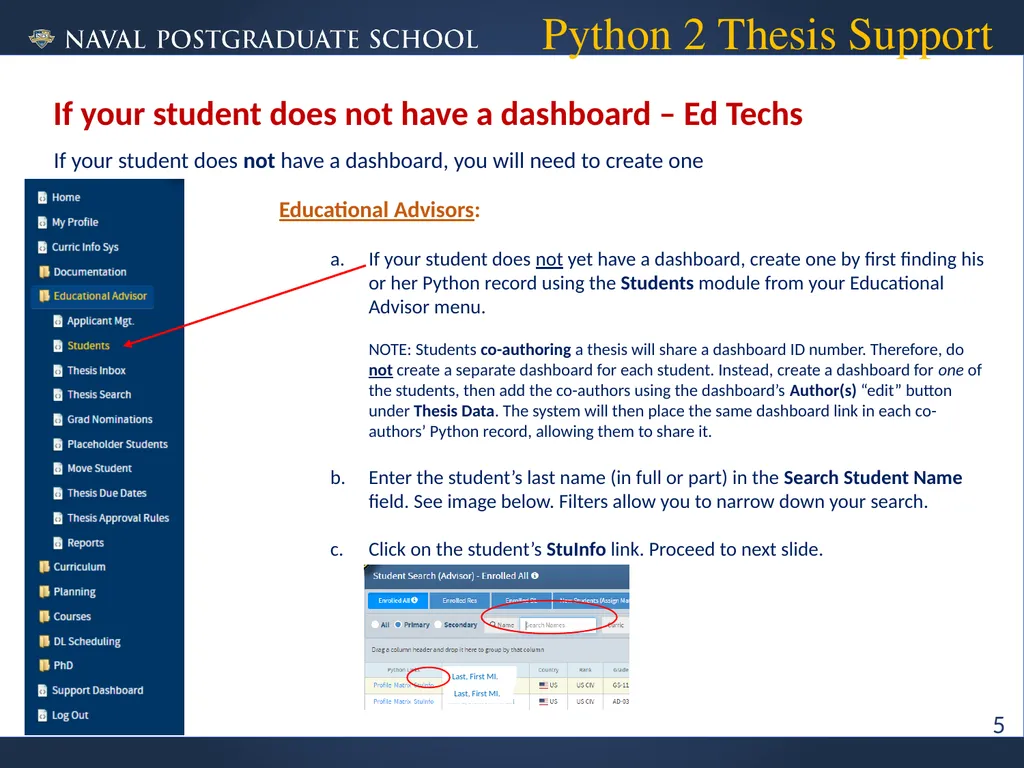
If your student does not have a dashboard, you will need to create one Python 2 Thesis Support If your student does not have a dashboard – Ed Techs Educational Advisors:
If your student does not yet have a dashboard, create one by first finding his or her Python record using the Students module from your Educational Advisor menu. NOTE: Students co-authoring a thesis will share a dashboard ID number. Therefore, do not create a separate dashboard for each student. Instead, create a dashboard for one of the students, then add the co-authors using the dashboard’s Author(s) “edit” button under Thesis Data. The system will then place the same dashboard link in each co-authors’ Python record, allowing them to share it.
Enter the student’s last name (in full or part) in the Search Student Name field. See image below. Filters allow you to narrow down your search.
Click on the student’s StuInfo link. Proceed to next slide. 5 Last, First MI. Last, First MI.<br>
07
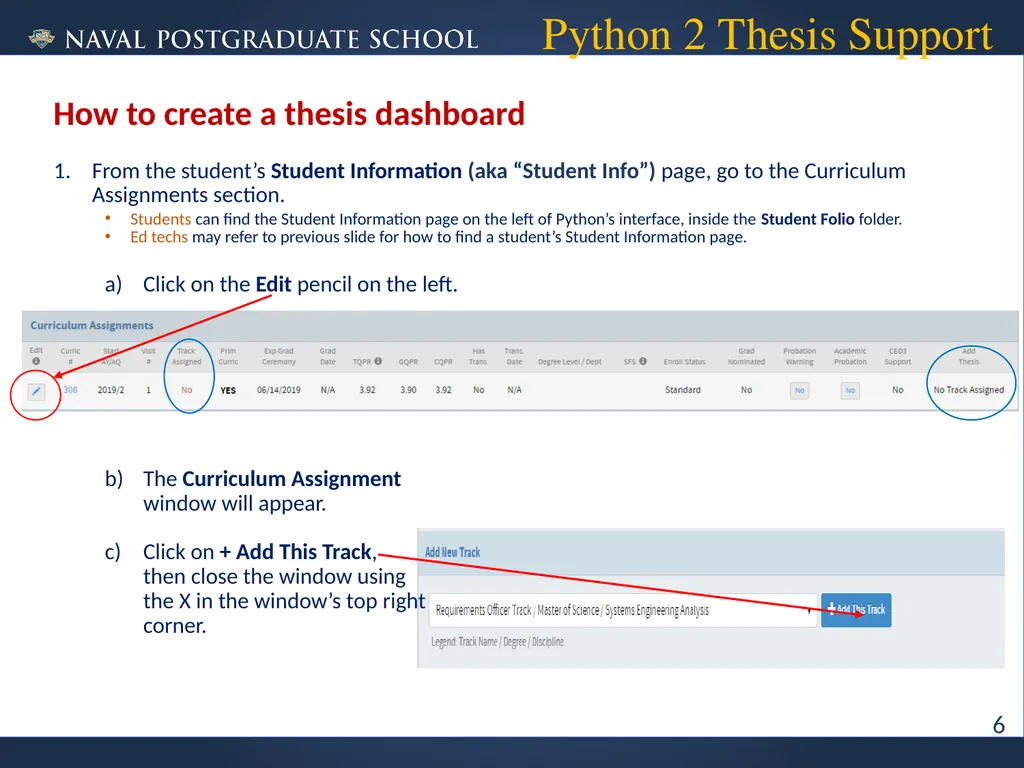
From the student’s Student Information (aka “Student Info”) page, go to the Curriculum Assignments section.
Students can find the Student Information page on the left of Python’s interface, inside the Student Folio folder.
Ed techs may refer to previous slide for how to find a student’s Student Information page.
Click on the Edit pencil on the left.
The Curriculum Assignment window will appear.
Click on + Add This Track, then close the window using the X in the window’s top right corner. Python 2 Thesis Support How to create a thesis dashboard 6<br>
08
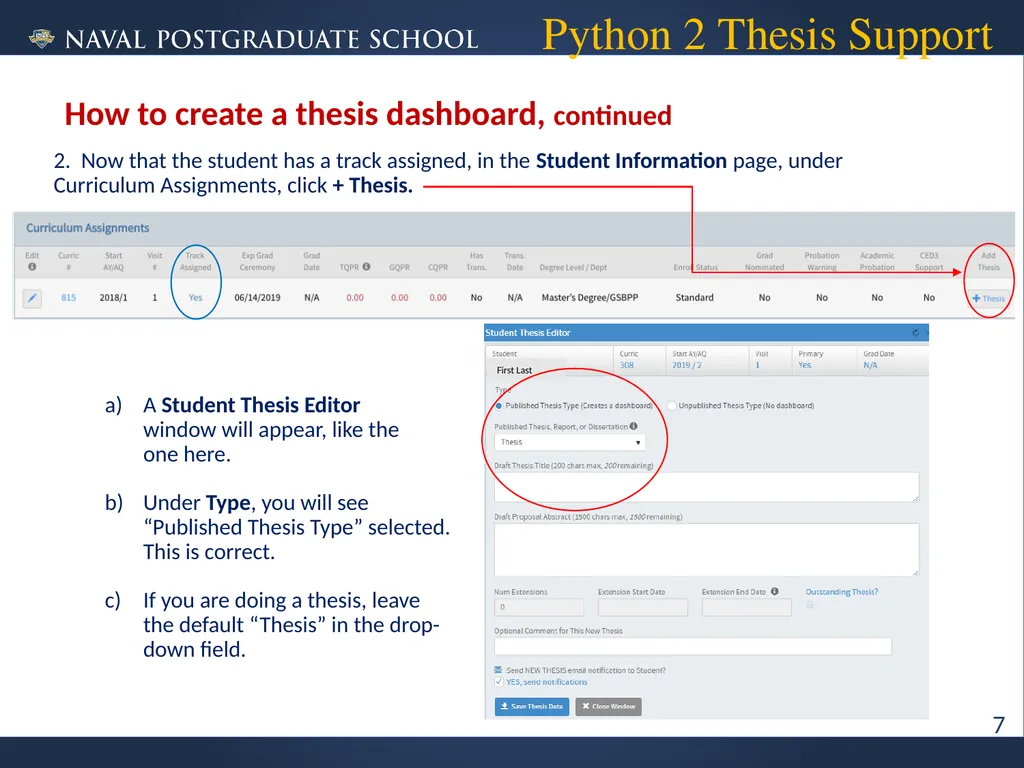
2. Now that the student has a track assigned, in the Student Information page, under Curriculum Assignments, click + Thesis.
A Student Thesis Editor window will appear, like the one here.
Under Type, you will see “Published Thesis Type” selected. This is correct.
If you are doing a thesis, leave the default “Thesis” in the drop- down field. Python 2 Thesis Support How to create a thesis dashboard, continued 7 First Last<br>
09
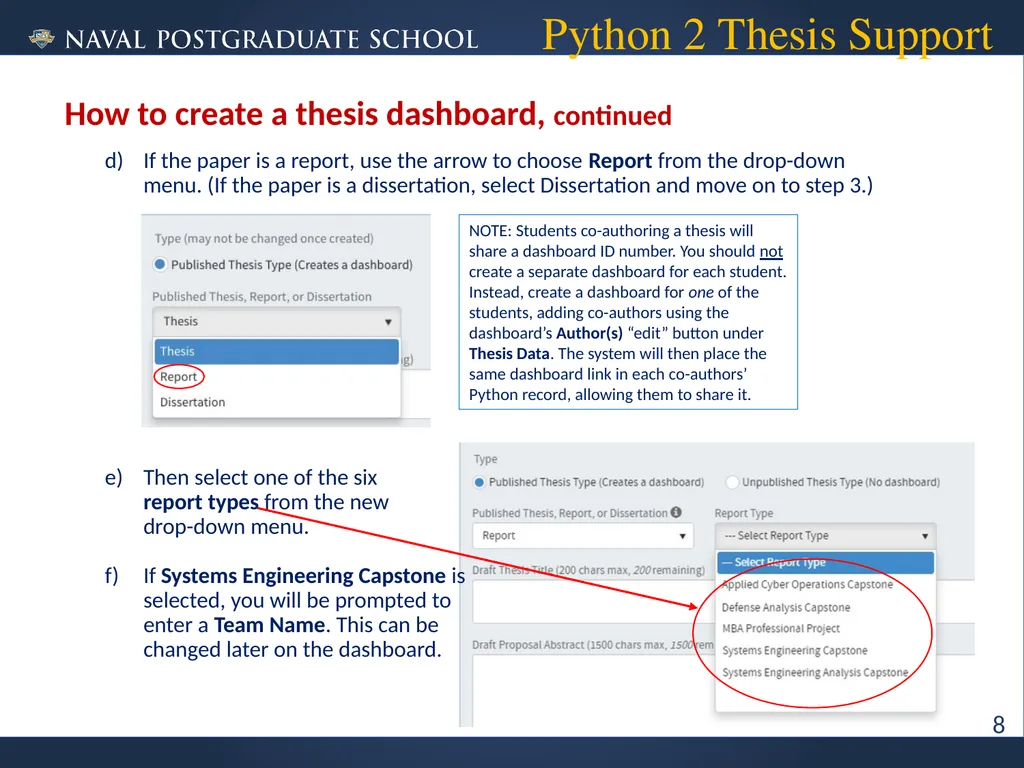
If the paper is a report, use the arrow to choose Report from the drop-down menu. (If the paper is a dissertation, select Dissertation and move on to step 3.)
Then select one of the six report types from the new drop-down menu.
If Systems Engineering Capstone is selected, you will be prompted to enter a Team Name. This can be changed later on the dashboard. Python 2 Thesis Support How to create a thesis dashboard, continued NOTE: Students co-authoring a thesis will share a dashboard ID number. You should not create a separate dashboard for each student. Instead, create a dashboard for one of the students, adding co-authors using the dashboard’s Author(s) “edit” button under Thesis Data. The system will then place the same dashboard link in each co-authors’ Python record, allowing them to share it. 8<br>
10
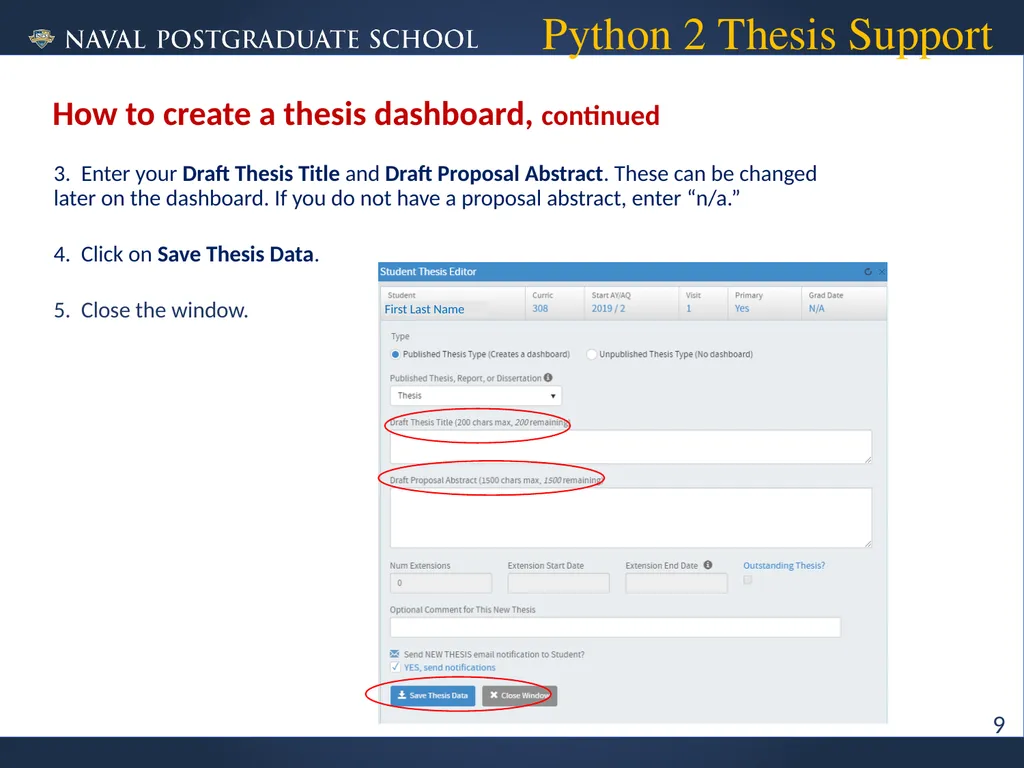
3. Enter your Draft Thesis Title and Draft Proposal Abstract. These can be changed later on the dashboard. If you do not have a proposal abstract, enter “n/a.”
4. Click on Save Thesis Data.
5. Close the window. Python 2 Thesis Support How to create a thesis dashboard, continued 9 First Last Name<br>
11
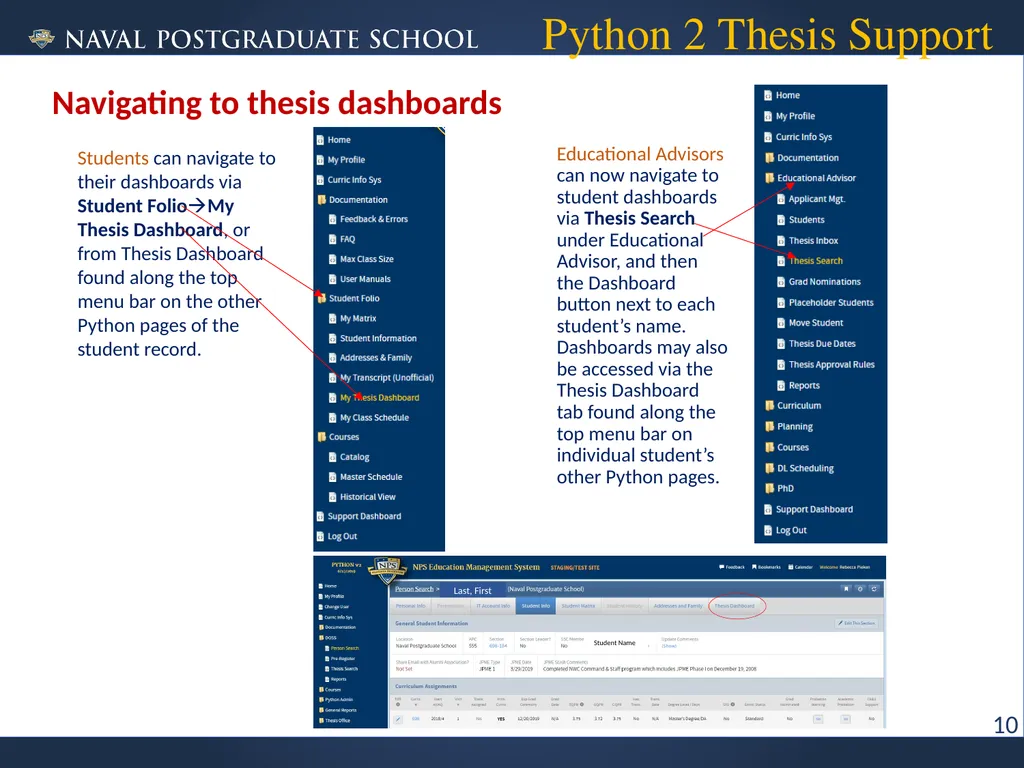
Python 2 Thesis Support Navigating to thesis dashboards Educational Advisors can now navigate to student dashboards via Thesis Search under Educational Advisor, and then the Dashboard button next to each student’s name. Dashboards may also be accessed via the Thesis Dashboard tab found along the top menu bar on individual student’s other Python pages. 10 Students can navigate to their dashboards via Student FolioMy Thesis Dashboard, or from Thesis Dashboard found along the top menu bar on the other Python pages of the student record. Last, First Student Name<br>
12
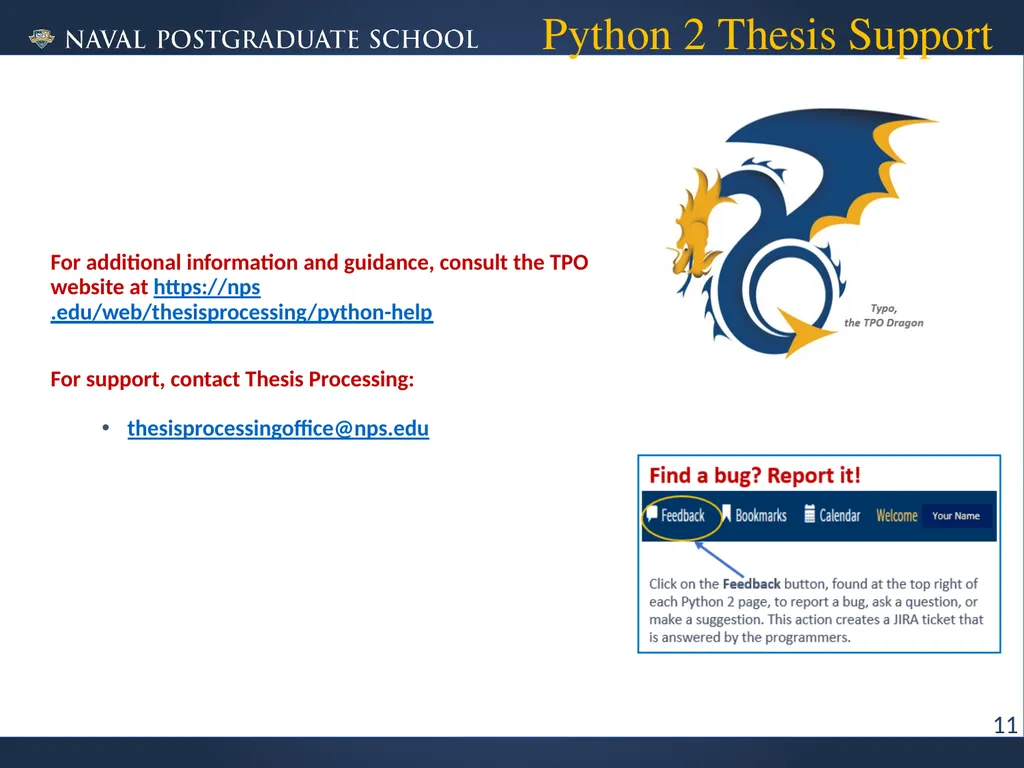
Python 2 Thesis Support For additional information and guidance, consult the TPO website at https://nps.edu/web/thesisprocessing/python-help
For support, contact Thesis Processing:
thesisprocessingoffice@nps.edu 11<br>