
STUDENT affairs FINANCE & ADMINISTRATION Finance
JO
Published · 20 slides · 0 views

1 / 1

Description
STUDENT affairs FINANCE ADMINISTRATION Finance Training Student Affairs Office of Finance Administration The Office oversees and manages the budgets and administrative functions of the Division. Additionally, the Office participates in
Related Topics
Share
Embed code
Download this presentation From Below
"STUDENT affairs FINANCE & ADMINISTRATION Finance" is the property of its rightful owner. Permission is granted to download and print the materials on this website for personal, non-commercial use only, and to display it on your personal computer provided you do not modify the materials and that you retain all copyright notices contained in the materials. By downloading content from our website, you accept the terms of this agreement.
Presentation Transcript
01
STUDENT affairs FINANCE & ADMINISTRATION Finance Training<br>
02
Student Affairs
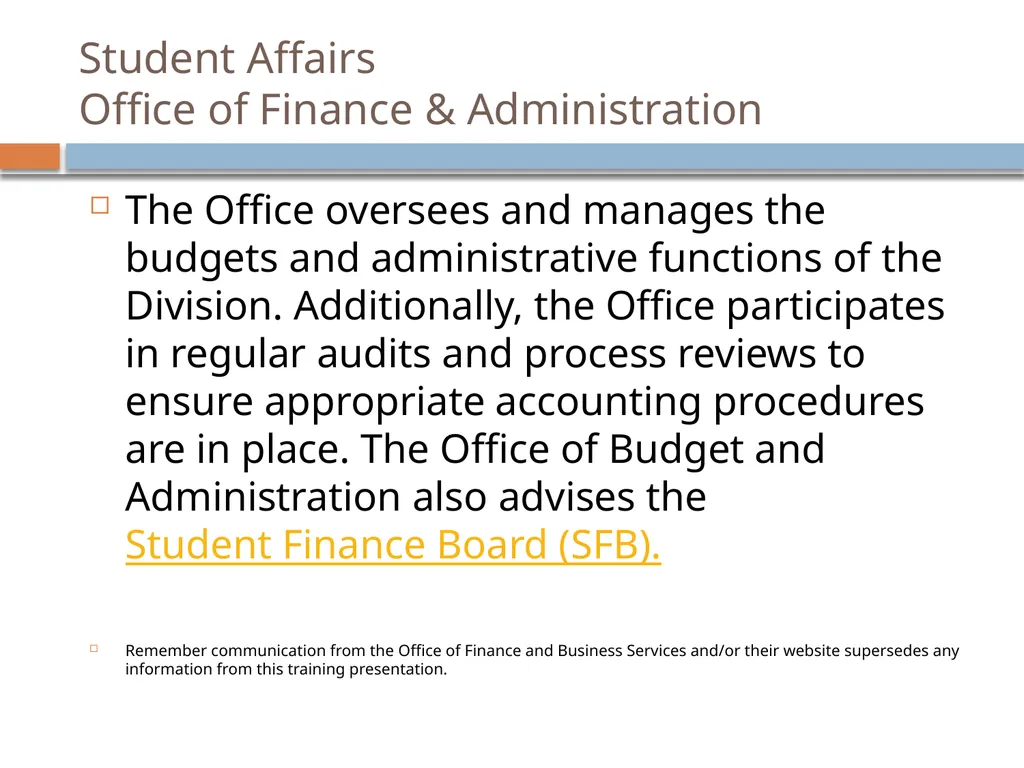
Office of Finance & Administration The Office oversees and manages the budgets and administrative functions of the Division. Additionally, the Office participates in regular audits and process reviews to ensure appropriate accounting procedures are in place. The Office of Budget and Administration also advises the Student Finance Board (SFB).
Remember communication from the Office of Finance and Business Services and/or their website supersedes any information from this training presentation.<br>
Remember communication from the Office of Finance and Business Services and/or their website supersedes any information from this training presentation.<br>
03
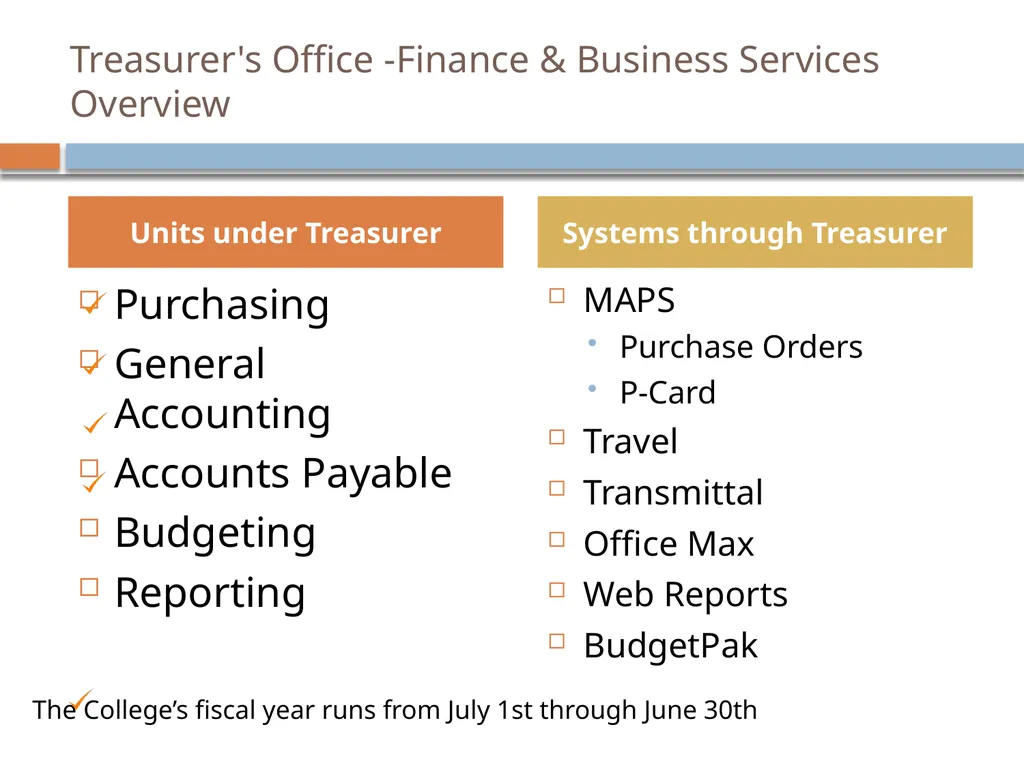
Treasurer's Office -Finance & Business Services Overview Purchasing
General Accounting
Accounts Payable
Budgeting
Reporting MAPS
Purchase Orders
P-Card
Travel
Transmittal
Office Max
Web Reports
BudgetPak Units under Treasurer Systems through Treasurer The College’s fiscal year runs from July 1st through June 30th<br>
General Accounting
Accounts Payable
Budgeting
Reporting MAPS
Purchase Orders
P-Card
Travel
Transmittal
Office Max
Web Reports
BudgetPak Units under Treasurer Systems through Treasurer The College’s fiscal year runs from July 1st through June 30th<br>
04
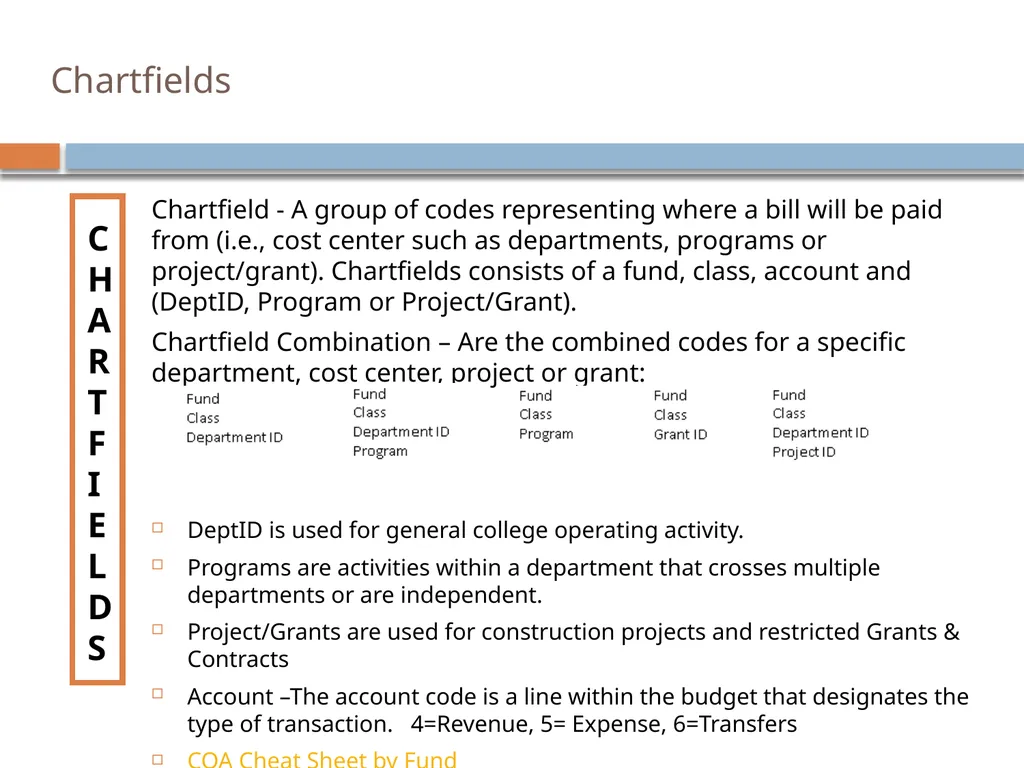
Chartfields CHARTFIELDS Chartfield - A group of codes representing where a bill will be paid from (i.e., cost center such as departments, programs or project/grant). Chartfields consists of a fund, class, account and (DeptID, Program or Project/Grant).
Chartfield Combination – Are the combined codes for a specific department, cost center, project or grant:
DeptID is used for general college operating activity.
Programs are activities within a department that crosses multiple departments or are independent.
Project/Grants are used for construction projects and restricted Grants & Contracts
Account –The account code is a line within the budget that designates the type of transaction. 4=Revenue, 5= Expense, 6=Transfers
COA Cheat Sheet by Fund<br>
Chartfield Combination – Are the combined codes for a specific department, cost center, project or grant:
DeptID is used for general college operating activity.
Programs are activities within a department that crosses multiple departments or are independent.
Project/Grants are used for construction projects and restricted Grants & Contracts
Account –The account code is a line within the budget that designates the type of transaction. 4=Revenue, 5= Expense, 6=Transfers
COA Cheat Sheet by Fund<br>
05
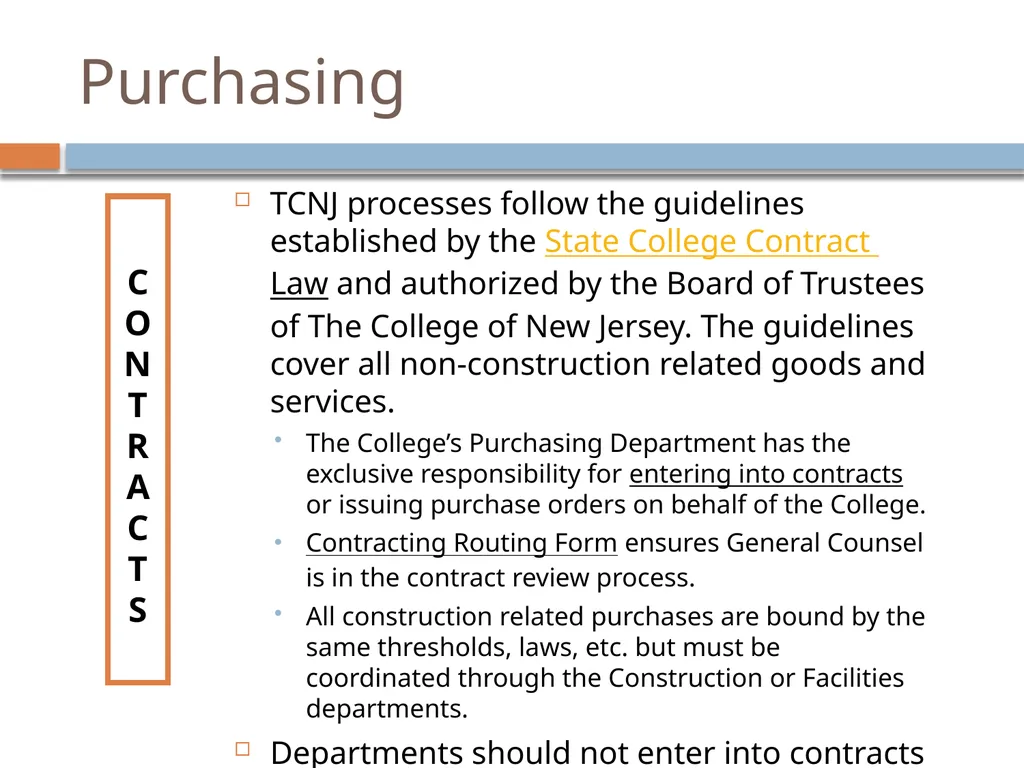
Purchasing CONTRACTS TCNJ processes follow the guidelines established by the State College Contract Law and authorized by the Board of Trustees of The College of New Jersey. The guidelines cover all non-construction related goods and services.
The College’s Purchasing Department has the exclusive responsibility for entering into contracts or issuing purchase orders on behalf of the College.
Contracting Routing Form ensures General Counsel is in the contract review process.
All construction related purchases are bound by the same thresholds, laws, etc. but must be coordinated through the Construction or Facilities departments.
Departments should not enter into contracts without Purchasing’s approval.<br>
The College’s Purchasing Department has the exclusive responsibility for entering into contracts or issuing purchase orders on behalf of the College.
Contracting Routing Form ensures General Counsel is in the contract review process.
All construction related purchases are bound by the same thresholds, laws, etc. but must be coordinated through the Construction or Facilities departments.
Departments should not enter into contracts without Purchasing’s approval.<br>
06
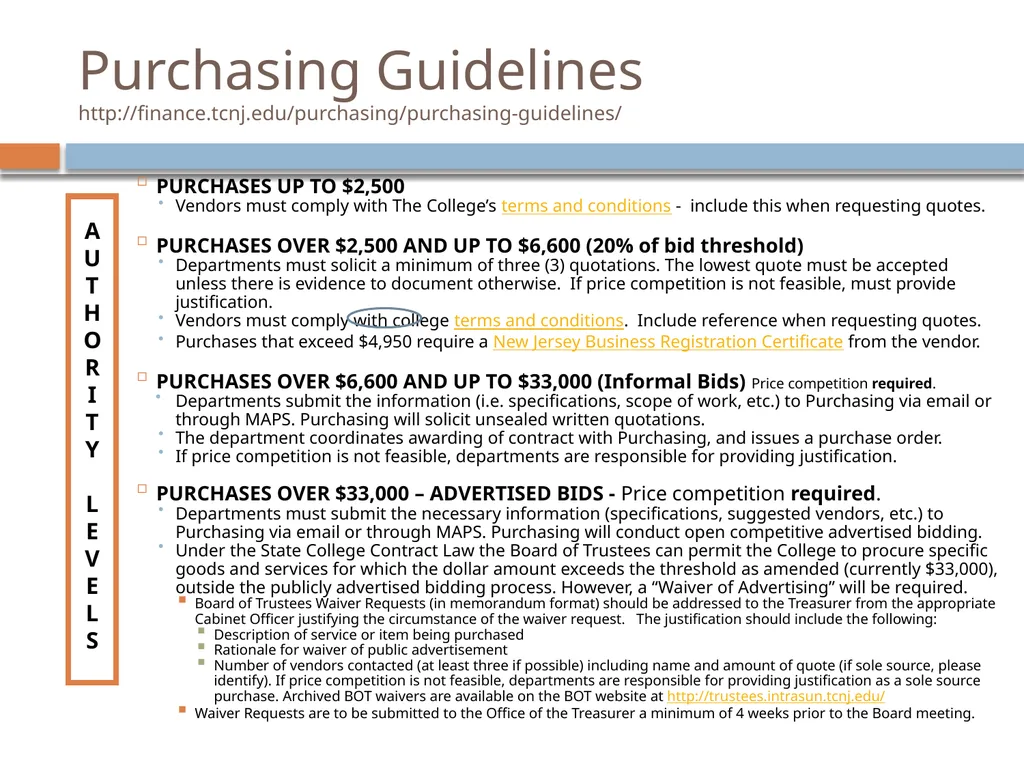
Purchasing Guidelines http://finance.tcnj.edu/purchasing/purchasing-guidelines/ AUTHORITY
LEVELS PURCHASES UP TO $2,500
Vendors must comply with The College’s terms and conditions - include this when requesting quotes.
PURCHASES OVER $2,500 AND UP TO $6,600 (20% of bid threshold)
Departments must solicit a minimum of three (3) quotations. The lowest quote must be accepted unless there is evidence to document otherwise. If price competition is not feasible, must provide justification.
Vendors must comply with college terms and conditions. Include reference when requesting quotes.
Purchases that exceed $4,950 require a New Jersey Business Registration Certificate from the vendor.
PURCHASES OVER $6,600 AND UP TO $33,000 (Informal Bids) Price competition required.
Departments submit the information (i.e. specifications, scope of work, etc.) to Purchasing via email or through MAPS. Purchasing will solicit unsealed written quotations.
The department coordinates awarding of contract with Purchasing, and issues a purchase order.
If price competition is not feasible, departments are responsible for providing justification.
PURCHASES OVER $33,000 – ADVERTISED BIDS - Price competition required.
Departments must submit the necessary information (specifications, suggested vendors, etc.) to Purchasing via email or through MAPS. Purchasing will conduct open competitive advertised bidding.
Under the State College Contract Law the Board of Trustees can permit the College to procure specific goods and services for which the dollar amount exceeds the threshold as amended (currently $33,000), outside the publicly advertised bidding process. However, a “Waiver of Advertising” will be required.
Board of Trustees Waiver Requests (in memorandum format) should be addressed to the Treasurer from the appropriate Cabinet Officer justifying the circumstance of the waiver request. The justification should include the following:
Description of service or item being purchased
Rationale for waiver of public advertisement
Number of vendors contacted (at least three if possible) including name and amount of quote (if sole source, please identify). If price competition is not feasible, departments are responsible for providing justification as a sole source purchase. Archived BOT waivers are available on the BOT website at http://trustees.intrasun.tcnj.edu/
Waiver Requests are to be submitted to the Office of the Treasurer a minimum of 4 weeks prior to the Board meeting.<br>
LEVELS PURCHASES UP TO $2,500
Vendors must comply with The College’s terms and conditions - include this when requesting quotes.
PURCHASES OVER $2,500 AND UP TO $6,600 (20% of bid threshold)
Departments must solicit a minimum of three (3) quotations. The lowest quote must be accepted unless there is evidence to document otherwise. If price competition is not feasible, must provide justification.
Vendors must comply with college terms and conditions. Include reference when requesting quotes.
Purchases that exceed $4,950 require a New Jersey Business Registration Certificate from the vendor.
PURCHASES OVER $6,600 AND UP TO $33,000 (Informal Bids) Price competition required.
Departments submit the information (i.e. specifications, scope of work, etc.) to Purchasing via email or through MAPS. Purchasing will solicit unsealed written quotations.
The department coordinates awarding of contract with Purchasing, and issues a purchase order.
If price competition is not feasible, departments are responsible for providing justification.
PURCHASES OVER $33,000 – ADVERTISED BIDS - Price competition required.
Departments must submit the necessary information (specifications, suggested vendors, etc.) to Purchasing via email or through MAPS. Purchasing will conduct open competitive advertised bidding.
Under the State College Contract Law the Board of Trustees can permit the College to procure specific goods and services for which the dollar amount exceeds the threshold as amended (currently $33,000), outside the publicly advertised bidding process. However, a “Waiver of Advertising” will be required.
Board of Trustees Waiver Requests (in memorandum format) should be addressed to the Treasurer from the appropriate Cabinet Officer justifying the circumstance of the waiver request. The justification should include the following:
Description of service or item being purchased
Rationale for waiver of public advertisement
Number of vendors contacted (at least three if possible) including name and amount of quote (if sole source, please identify). If price competition is not feasible, departments are responsible for providing justification as a sole source purchase. Archived BOT waivers are available on the BOT website at http://trustees.intrasun.tcnj.edu/
Waiver Requests are to be submitted to the Office of the Treasurer a minimum of 4 weeks prior to the Board meeting.<br>
07
Purchasing Requirements Highlights
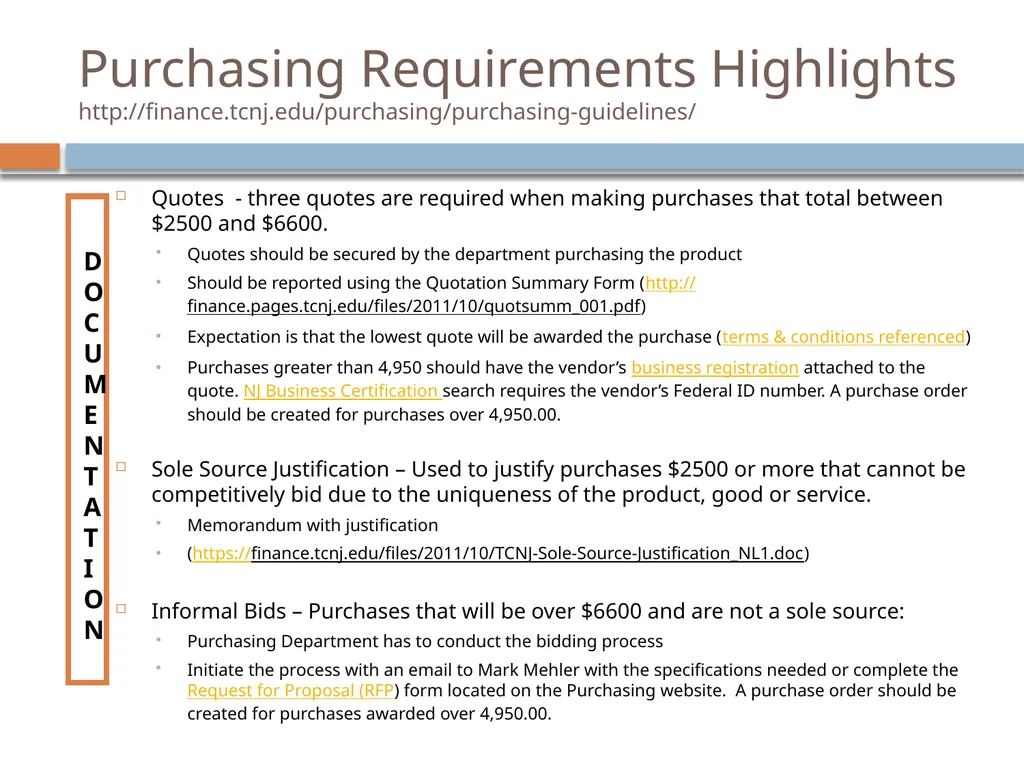
http://finance.tcnj.edu/purchasing/purchasing-guidelines/ DOCUMENTATION Quotes - three quotes are required when making purchases that total between $2500 and $6600.
Quotes should be secured by the department purchasing the product
Should be reported using the Quotation Summary Form (http://finance.pages.tcnj.edu/files/2011/10/quotsumm_001.pdf)
Expectation is that the lowest quote will be awarded the purchase (terms & conditions referenced)
Purchases greater than 4,950 should have the vendor’s business registration attached to the quote. NJ Business Certification search requires the vendor’s Federal ID number. A purchase order should be created for purchases over 4,950.00.
Sole Source Justification – Used to justify purchases $2500 or more that cannot be competitively bid due to the uniqueness of the product, good or service.
Memorandum with justification
(https://finance.tcnj.edu/files/2011/10/TCNJ-Sole-Source-Justification_NL1.doc)
Informal Bids – Purchases that will be over $6600 and are not a sole source:
Purchasing Department has to conduct the bidding process
Initiate the process with an email to Mark Mehler with the specifications needed or complete the Request for Proposal (RFP) form located on the Purchasing website. A purchase order should be created for purchases awarded over 4,950.00.<br>
Quotes should be secured by the department purchasing the product
Should be reported using the Quotation Summary Form (http://finance.pages.tcnj.edu/files/2011/10/quotsumm_001.pdf)
Expectation is that the lowest quote will be awarded the purchase (terms & conditions referenced)
Purchases greater than 4,950 should have the vendor’s business registration attached to the quote. NJ Business Certification search requires the vendor’s Federal ID number. A purchase order should be created for purchases over 4,950.00.
Sole Source Justification – Used to justify purchases $2500 or more that cannot be competitively bid due to the uniqueness of the product, good or service.
Memorandum with justification
(https://finance.tcnj.edu/files/2011/10/TCNJ-Sole-Source-Justification_NL1.doc)
Informal Bids – Purchases that will be over $6600 and are not a sole source:
Purchasing Department has to conduct the bidding process
Initiate the process with an email to Mark Mehler with the specifications needed or complete the Request for Proposal (RFP) form located on the Purchasing website. A purchase order should be created for purchases awarded over 4,950.00.<br>
08
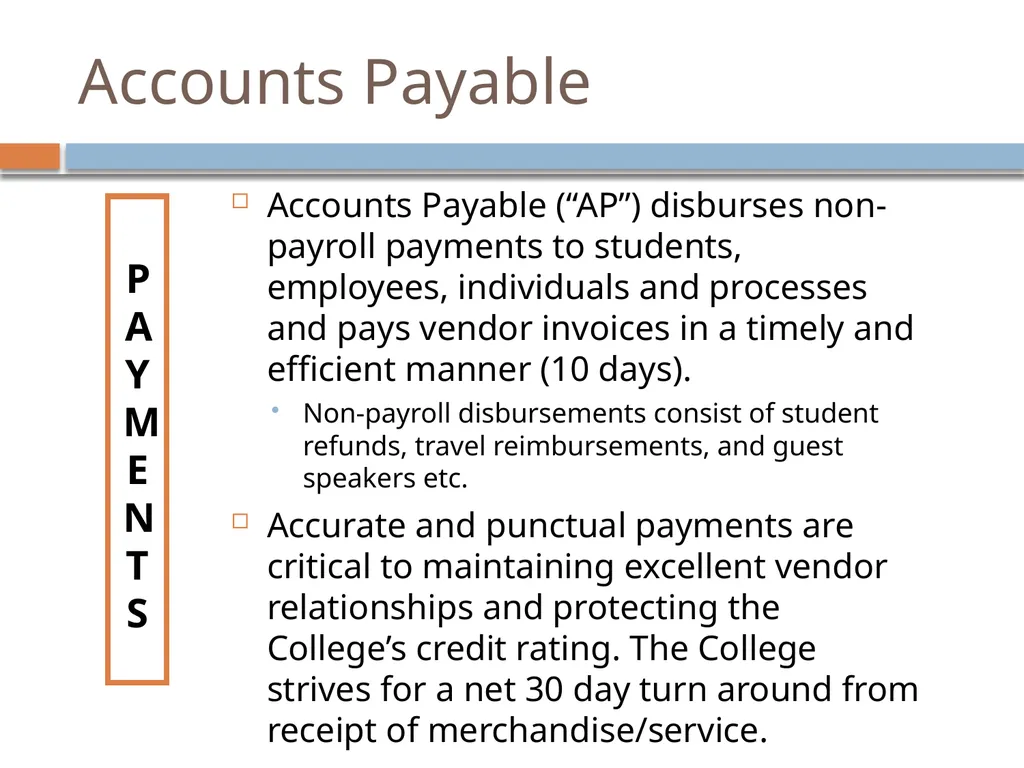
Accounts Payable PAYMENTS Accounts Payable (“AP”) disburses non-payroll payments to students, employees, individuals and processes and pays vendor invoices in a timely and efficient manner (10 days).
Non-payroll disbursements consist of student refunds, travel reimbursements, and guest speakers etc.
Accurate and punctual payments are critical to maintaining excellent vendor relationships and protecting the College’s credit rating. The College strives for a net 30 day turn around from receipt of merchandise/service.<br>
Non-payroll disbursements consist of student refunds, travel reimbursements, and guest speakers etc.
Accurate and punctual payments are critical to maintaining excellent vendor relationships and protecting the College’s credit rating. The College strives for a net 30 day turn around from receipt of merchandise/service.<br>
09
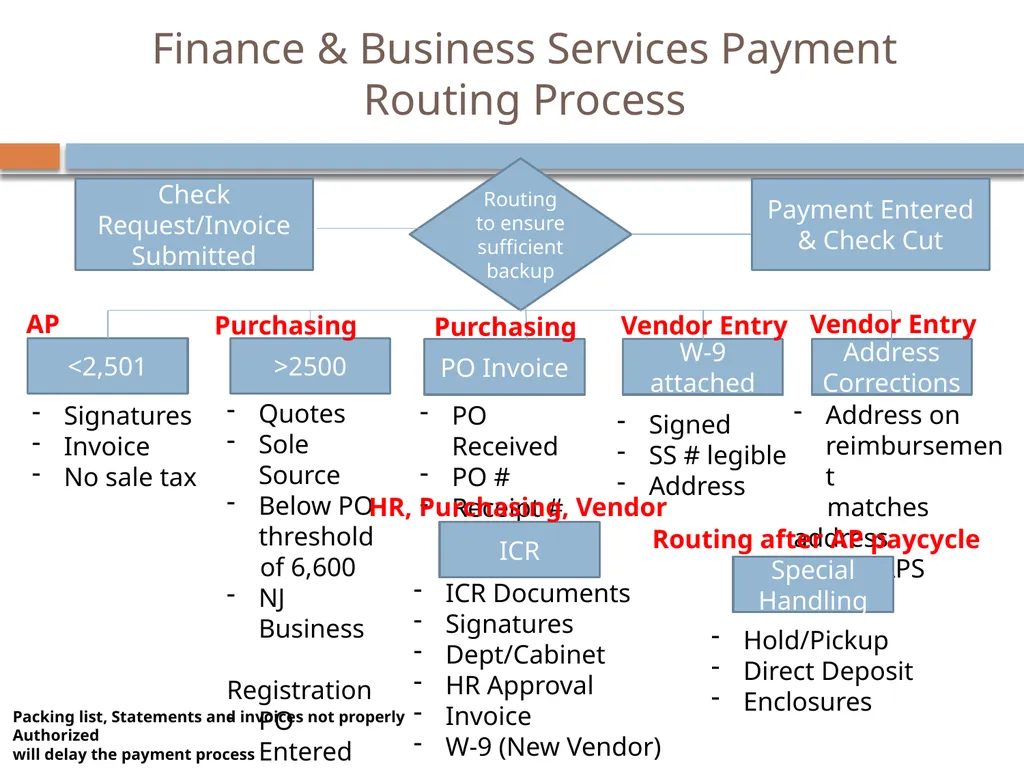
Finance & Business Services Payment Routing Process Check Request/Invoice Submitted Routing to ensure sufficient backup <2,501 >2500 PO Invoice W-9 attached Address Corrections Signatures
Invoice
No sale tax Packing list, Statements and invoices not properly Authorized
will delay the payment process Quotes
Sole Source
Below PO threshold
of 6,600
NJ Business
Registration
PO Entered
in MAPS PO Received
PO #
Receipt # Signed
SS # legible
Address Address on reimbursement
matches address
in MAPS Special Handling Hold/Pickup
Direct Deposit
Enclosures ICR ICR Documents
Signatures
Dept/Cabinet
HR Approval
Invoice
W-9 (New Vendor) AP Purchasing Purchasing Vendor Entry Vendor Entry Routing after AP paycycle HR, Purchasing, Vendor Payment Entered & Check Cut<br>
Invoice
No sale tax Packing list, Statements and invoices not properly Authorized
will delay the payment process Quotes
Sole Source
Below PO threshold
of 6,600
NJ Business
Registration
PO Entered
in MAPS PO Received
PO #
Receipt # Signed
SS # legible
Address Address on reimbursement
matches address
in MAPS Special Handling Hold/Pickup
Direct Deposit
Enclosures ICR ICR Documents
Signatures
Dept/Cabinet
HR Approval
Invoice
W-9 (New Vendor) AP Purchasing Purchasing Vendor Entry Vendor Entry Routing after AP paycycle HR, Purchasing, Vendor Payment Entered & Check Cut<br>
10
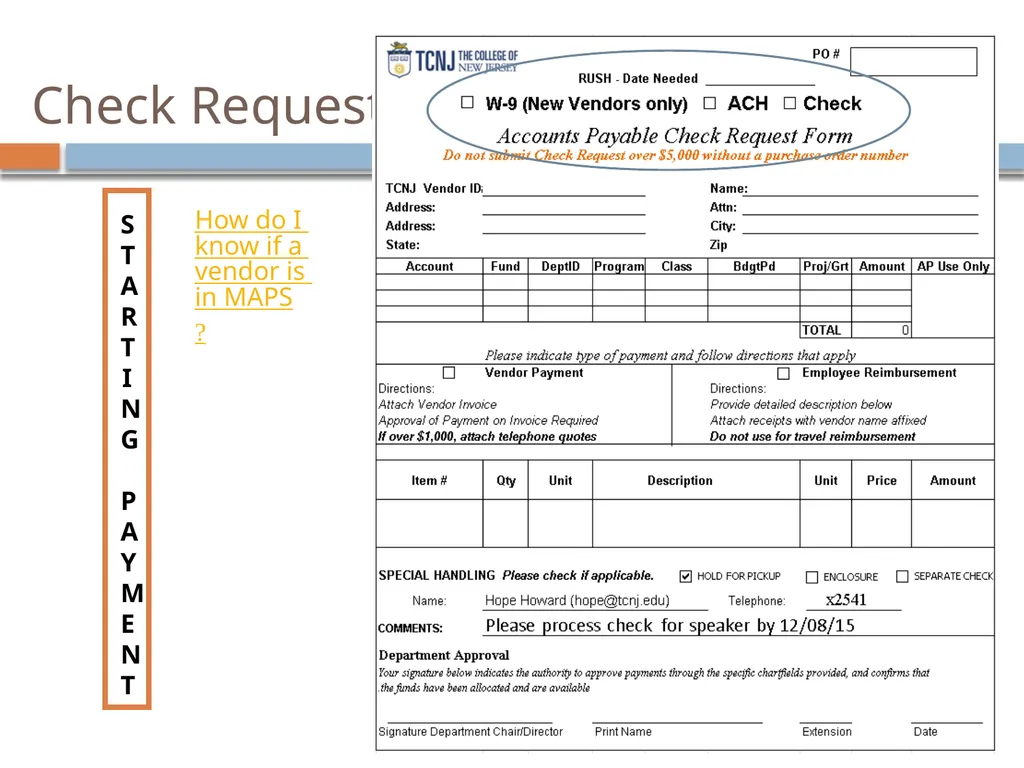
Check Request STARTING PAYMENT How do I know if a vendor is in MAPS?<br>
11
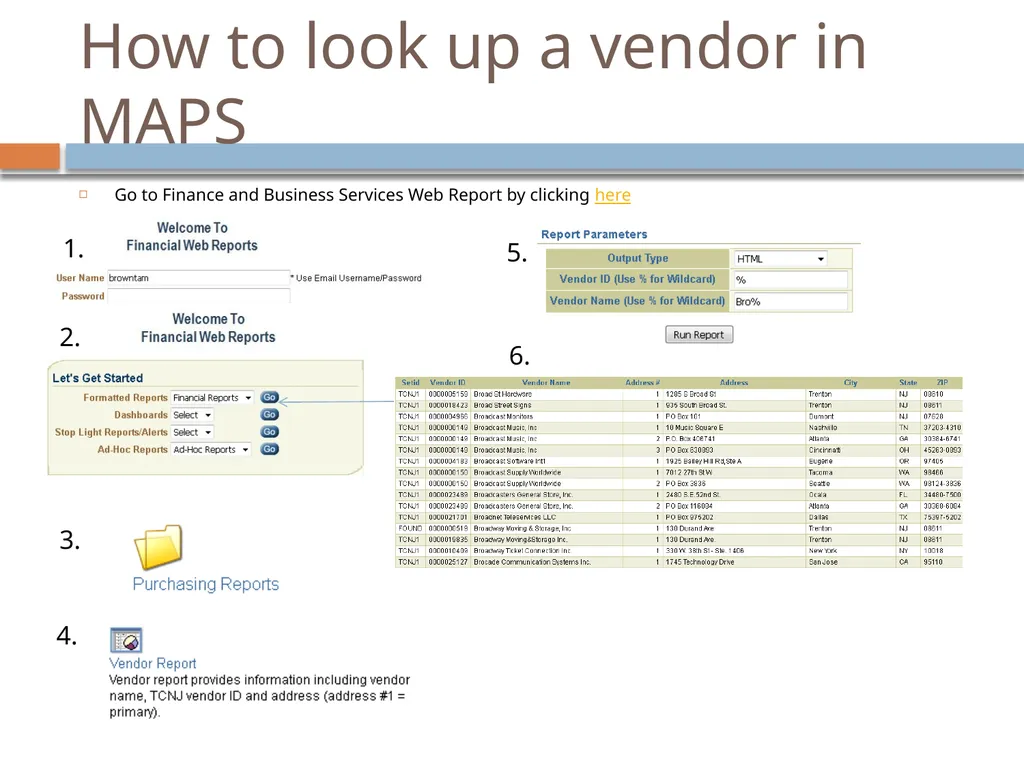
How to look up a vendor in MAPS Go to Finance and Business Services Web Report by clicking here 1. 2. 3. 4. 5. 6.<br>
12
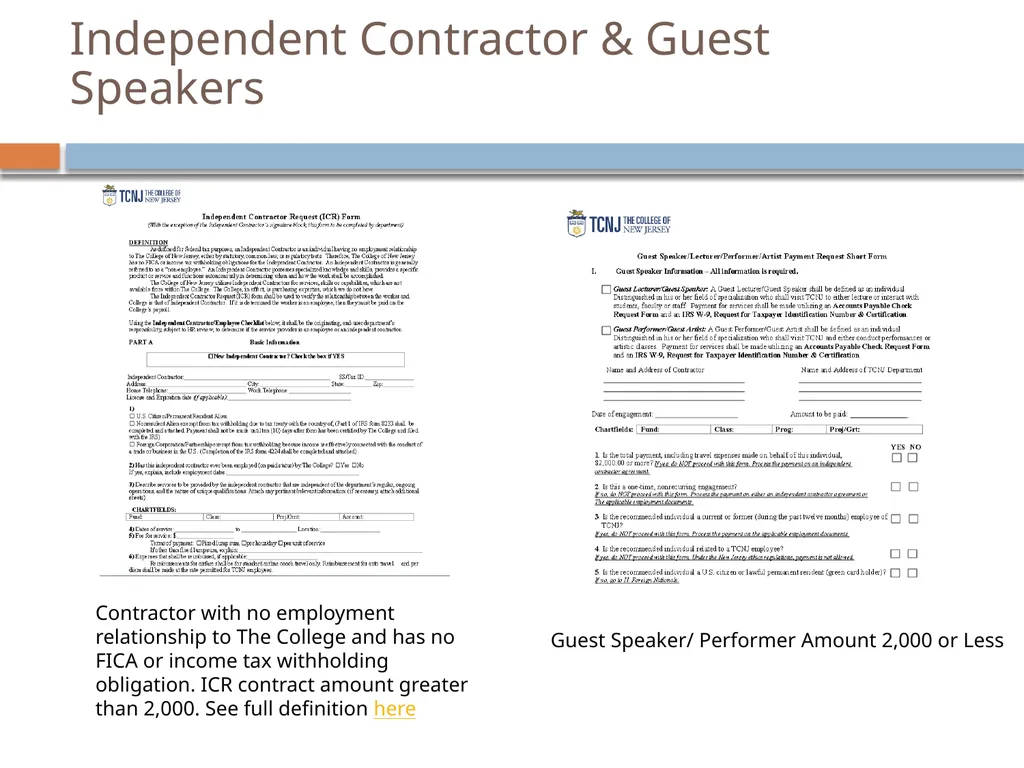
Independent Contractor & Guest Speakers Guest Speaker/ Performer Amount 2,000 or Less Contractor with no employment relationship to The College and has no FICA or income tax withholding obligation. ICR contract amount greater than 2,000. See full definition here<br>
13
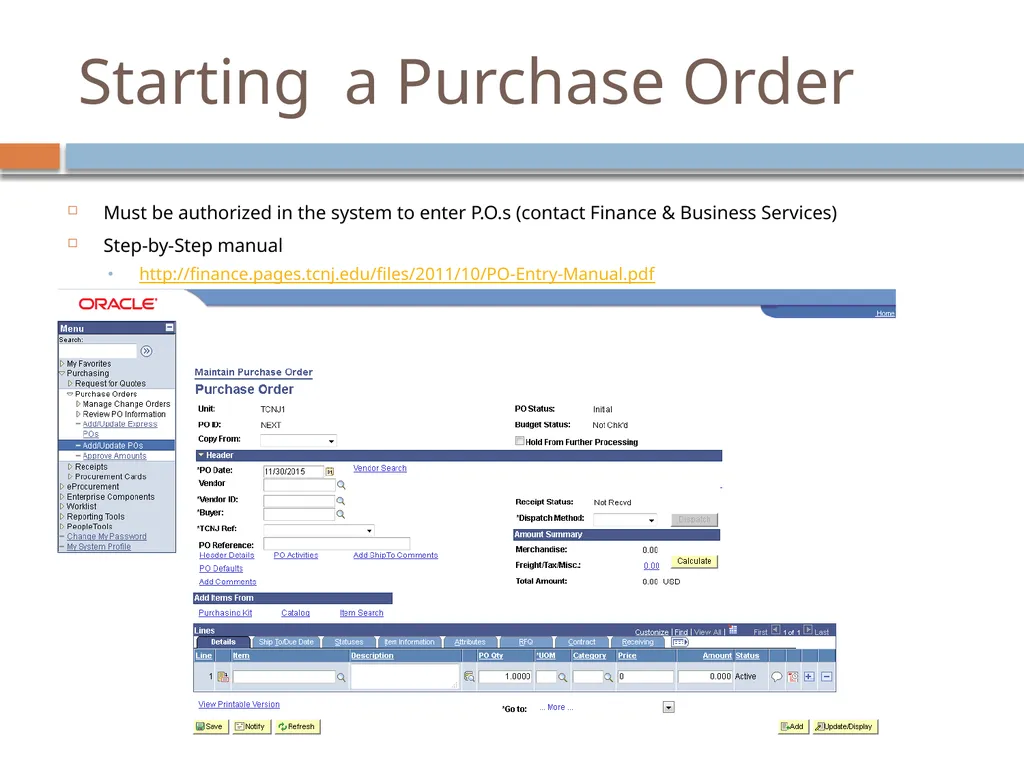
Starting a Purchase Order Must be authorized in the system to enter P.O.s (contact Finance & Business Services)
Step-by-Step manual
http://finance.pages.tcnj.edu/files/2011/10/PO-Entry-Manual.pdf<br>
Step-by-Step manual
http://finance.pages.tcnj.edu/files/2011/10/PO-Entry-Manual.pdf<br>
14
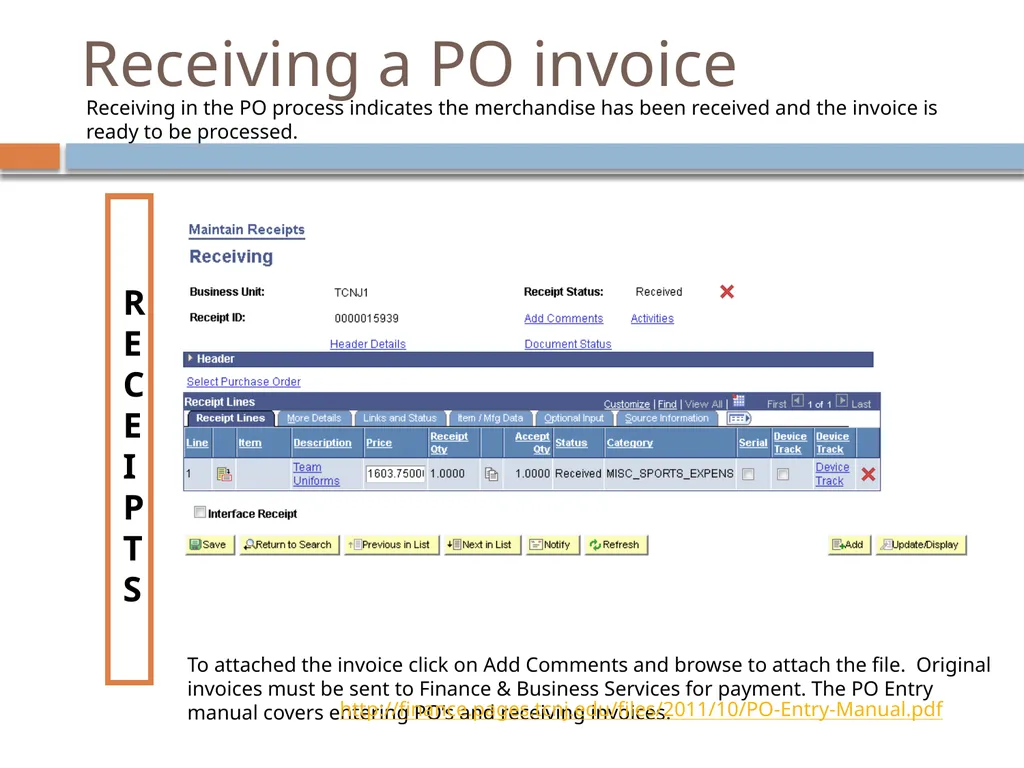
Receiving a PO invoice RECEIPTS To attached the invoice click on Add Comments and browse to attach the file. Original invoices must be sent to Finance & Business Services for payment. The PO Entry manual covers entering PO’s and receiving invoices. http://finance.pages.tcnj.edu/files/2011/10/PO-Entry-Manual.pdf Receiving in the PO process indicates the merchandise has been received and the invoice is ready to be processed.<br>
15
Check Distribution ISSUING CHECKS Properly authorized invoices and payment requests will be processed within ten (10) business days of receipt.
Accounts Payable issues checks once each week on Thursdays .
If rush checks must be printed outside the normal processing schedule, the department requiring the additional check processing must provide valid reason and receive approval from the Associate Treasurer of the College or the Director of General Accounting.
Discounts - A vendor’s agreement to reduce the price below the amount invoiced for the goods or services if payment is made within the discount period. The College benefits from these discounts, so please submit invoices before the discount period expires.
Credits – Vendor credits should be submitted to Finance &Business Services with a invoice so it can be applied to the appropriate payment.
Partial Payments – Payments should be submitted upon receipt of goods and/or services. Products partially received should be invoiced and submitted for payment.<br>
Accounts Payable issues checks once each week on Thursdays .
If rush checks must be printed outside the normal processing schedule, the department requiring the additional check processing must provide valid reason and receive approval from the Associate Treasurer of the College or the Director of General Accounting.
Discounts - A vendor’s agreement to reduce the price below the amount invoiced for the goods or services if payment is made within the discount period. The College benefits from these discounts, so please submit invoices before the discount period expires.
Credits – Vendor credits should be submitted to Finance &Business Services with a invoice so it can be applied to the appropriate payment.
Partial Payments – Payments should be submitted upon receipt of goods and/or services. Products partially received should be invoiced and submitted for payment.<br>
16
Web Reports READING YOUR
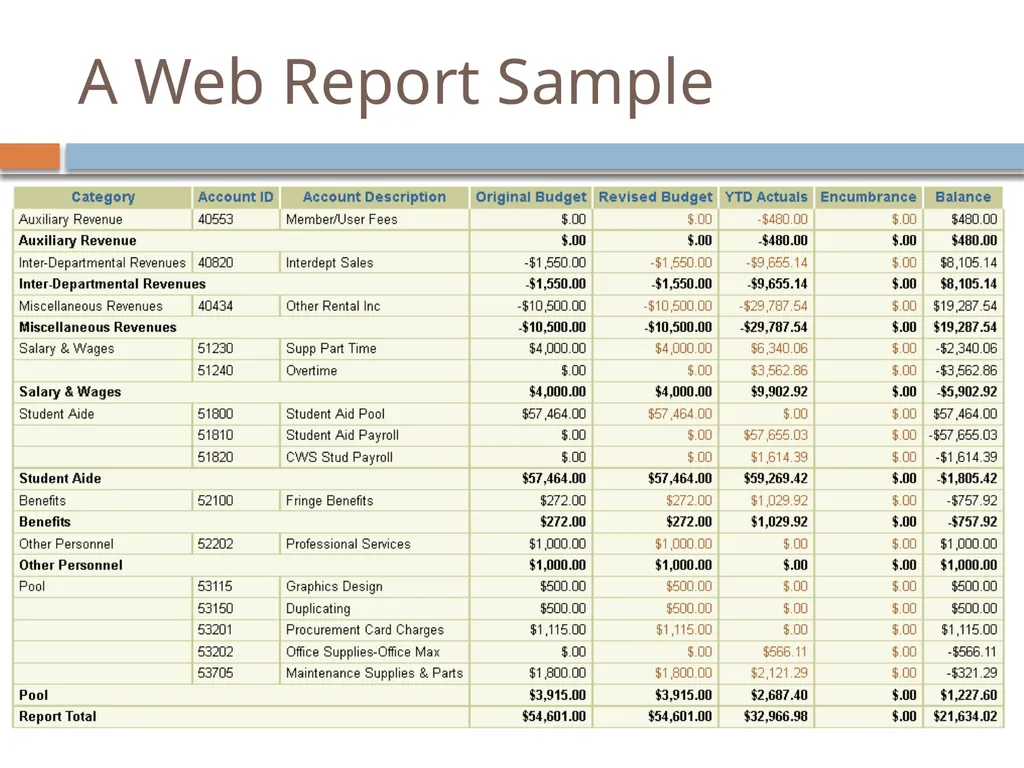
BUDGET Budgeted – amount requested and received at start of Fiscal Year
Revised Budget – reflects reallocations and (rare) supplemental funding
Actuals – reflects expenditures, revenues and journal entries
Encumbrances – reflects committed funds
purchase orders
travel requests
Balances<br>
BUDGET Budgeted – amount requested and received at start of Fiscal Year
Revised Budget – reflects reallocations and (rare) supplemental funding
Actuals – reflects expenditures, revenues and journal entries
Encumbrances – reflects committed funds
purchase orders
travel requests
Balances<br>
17
A Web Report Sample<br>
18
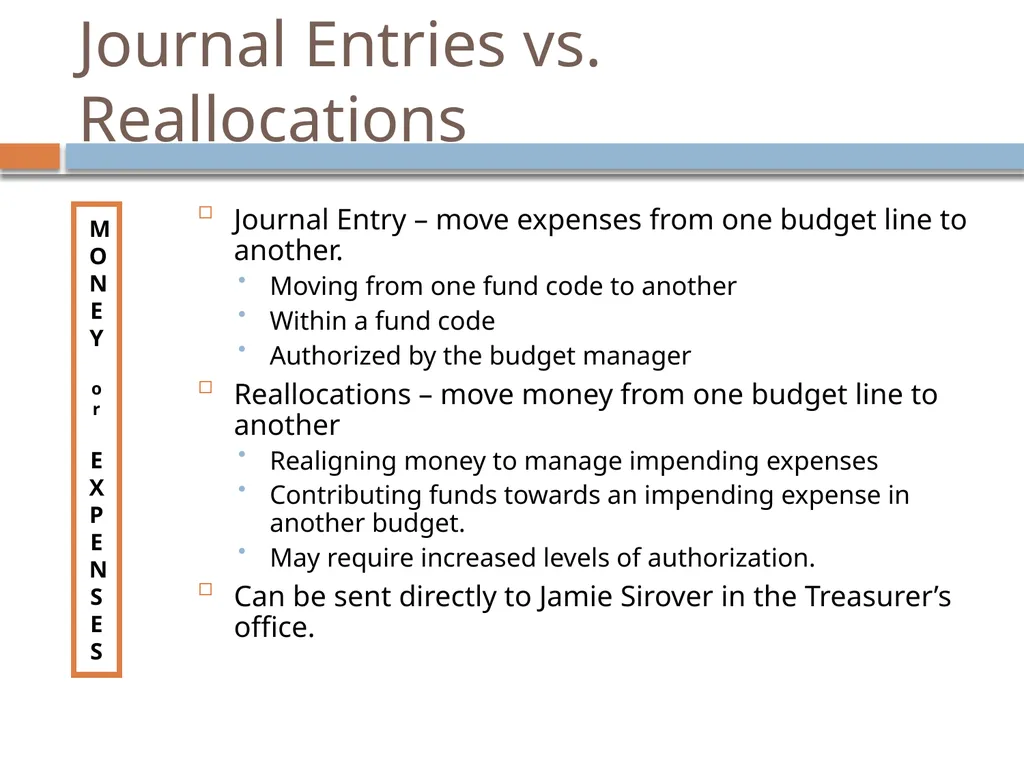
Journal Entries vs. Reallocations MONEY
or
EXPENSES Journal Entry – move expenses from one budget line to another.
Moving from one fund code to another
Within a fund code
Authorized by the budget manager
Reallocations – move money from one budget line to another
Realigning money to manage impending expenses
Contributing funds towards an impending expense in another budget.
May require increased levels of authorization.
Can be sent directly to Jamie Sirover in the Treasurer’s office.<br>
or
EXPENSES Journal Entry – move expenses from one budget line to another.
Moving from one fund code to another
Within a fund code
Authorized by the budget manager
Reallocations – move money from one budget line to another
Realigning money to manage impending expenses
Contributing funds towards an impending expense in another budget.
May require increased levels of authorization.
Can be sent directly to Jamie Sirover in the Treasurer’s office.<br>
19
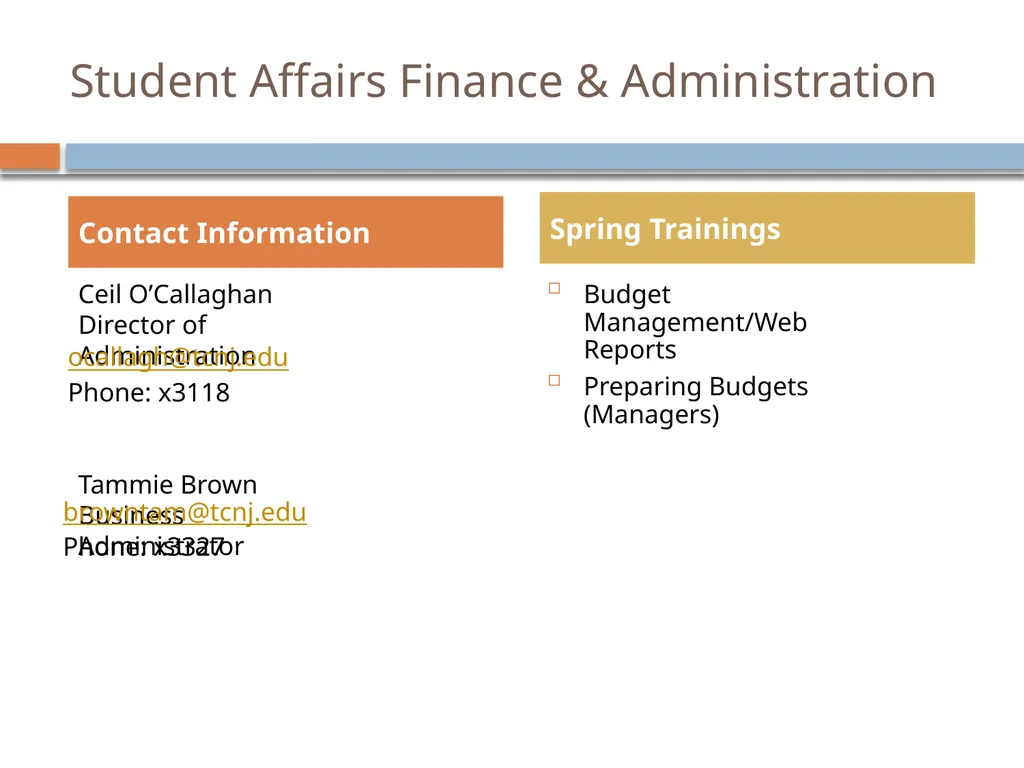
Student Affairs Finance & Administration Ceil O’Callaghan Director of Administration
Tammie Brown Business Administrator Budget Management/Web Reports
Preparing Budgets (Managers) Contact Information Spring Trainings ocallagh@tcnj.edu
Phone: x3118 browntam@tcnj.edu
Phone: x3327<br>
Tammie Brown Business Administrator Budget Management/Web Reports
Preparing Budgets (Managers) Contact Information Spring Trainings ocallagh@tcnj.edu
Phone: x3118 browntam@tcnj.edu
Phone: x3327<br>
20
Questions & Answers Q&A<br>