TOOLS FOR MARKETING David Goldstein President, Mekko Graphics davidmekkographics.com Introduction Mekko Graphics is used by marketing managers at consumer goods and B2B companies Category managers use it to develop data-driven insights to
"TOOLS FOR MARKETING David Goldstein President," is the property of its rightful owner. Permission is granted to
download and print the materials on this website for personal, non-commercial use only, and to display it
on your personal computer provided you do not modify the materials and that you retain all copyright
notices contained in the materials. By downloading content from our website, you accept the terms of this
agreement.
Presentation Transcript
01
TOOLS FOR MARKETING David Goldstein
President, Mekko Graphics
david@mekkographics.com<br>
02
Introduction Mekko Graphics is used by marketing managers at consumer goods and B2B companies
Category managers use it to develop data-driven insights to share with retail customers
Marketing staff use it to explore market opportunities and report to senior management
Mekko Graphics supports chart types and features that are valuable for marketing analyses and not found in PowerPoint or Excel:
Marimekko chart
Bar Mekko chart
Cascade, waterfall or bridge chart
Data rows, data columns and CAGR columns that align with the chart
Axis breaks, growth lines and comparison lines
Mekko Graphics has over 15 years experience satisfying the charting needs of:
Strategy consultants
Private equity firms
Strategy and marketing professionals at Fortune 500 companies 2<br>
03
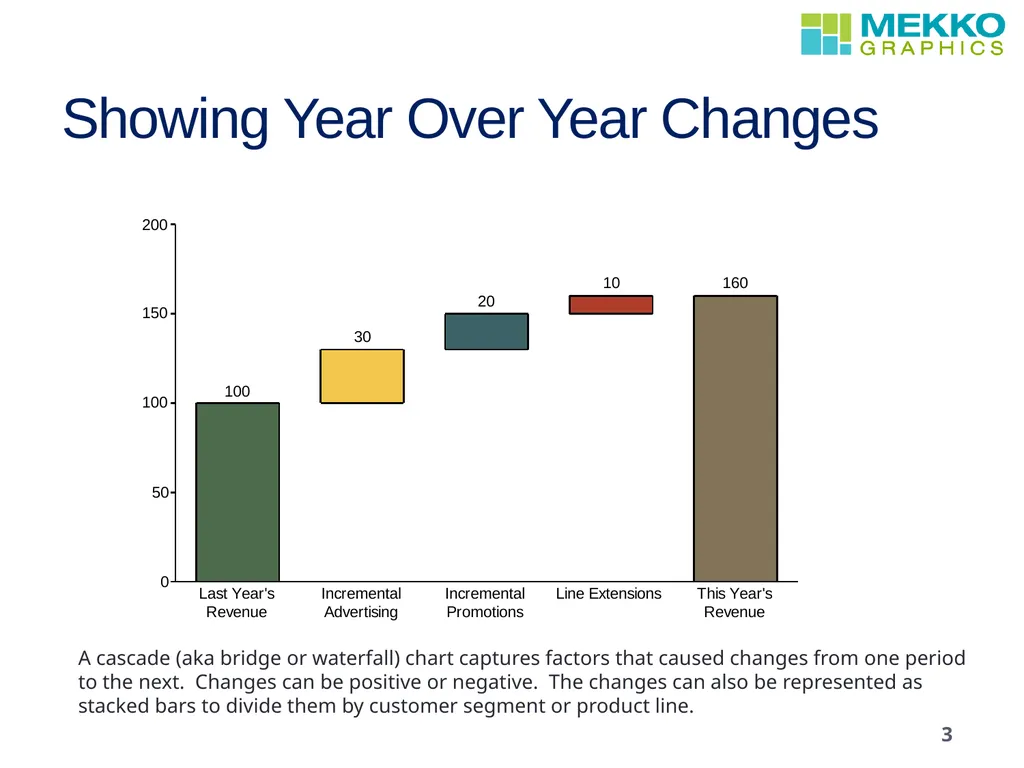
Showing Year Over Year Changes 3 A cascade (aka bridge or waterfall) chart captures factors that caused changes from one period to the next. Changes can be positive or negative. The changes can also be represented as stacked bars to divide them by customer segment or product line.<br>
04
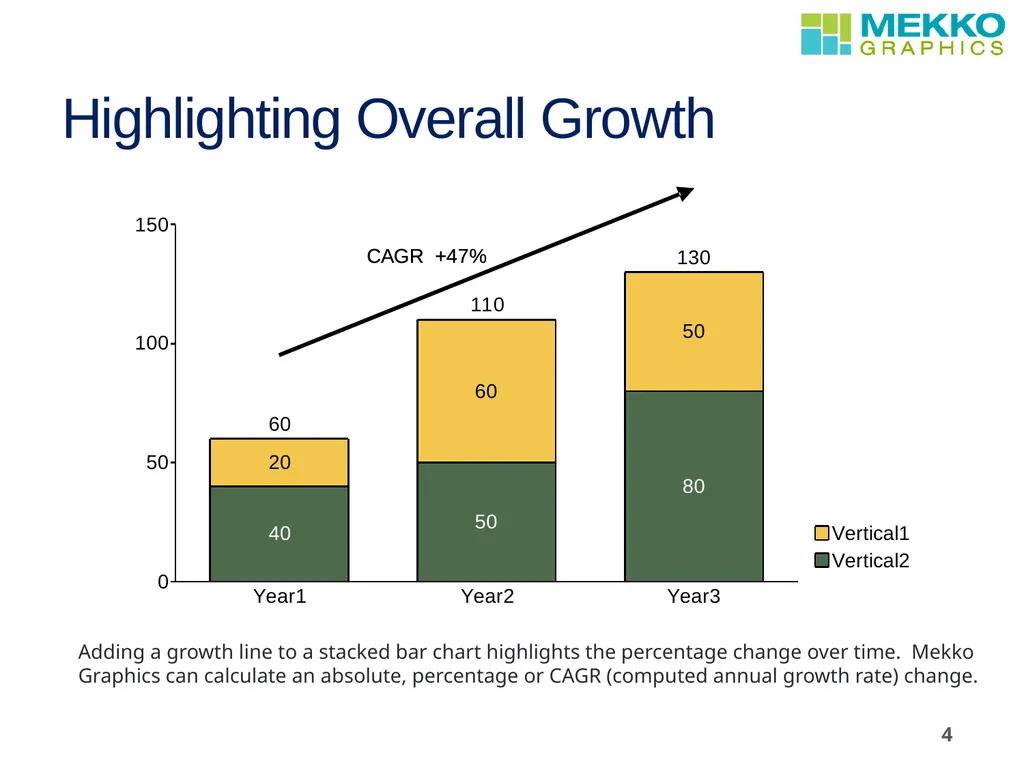
Highlighting Overall Growth 4 Adding a growth line to a stacked bar chart highlights the percentage change over time. Mekko Graphics can calculate an absolute, percentage or CAGR (computed annual growth rate) change.<br>
05
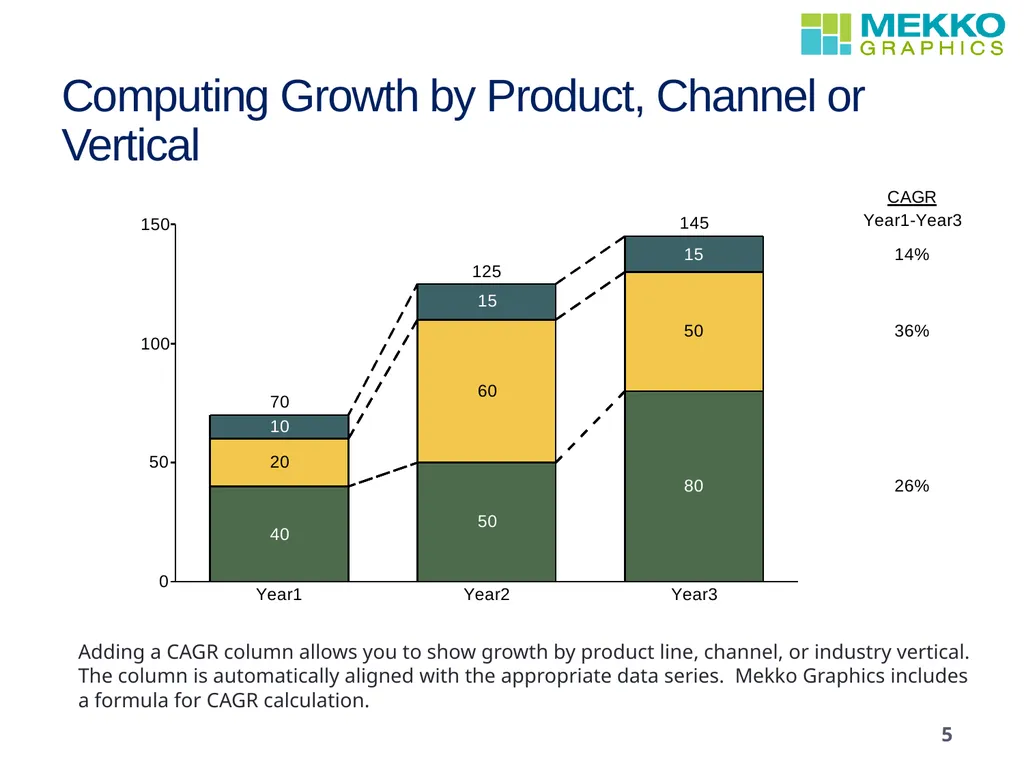
Computing Growth by Product, Channel or Vertical 5 Adding a CAGR column allows you to show growth by product line, channel, or industry vertical. The column is automatically aligned with the appropriate data series. Mekko Graphics includes a formula for CAGR calculation.<br>
06
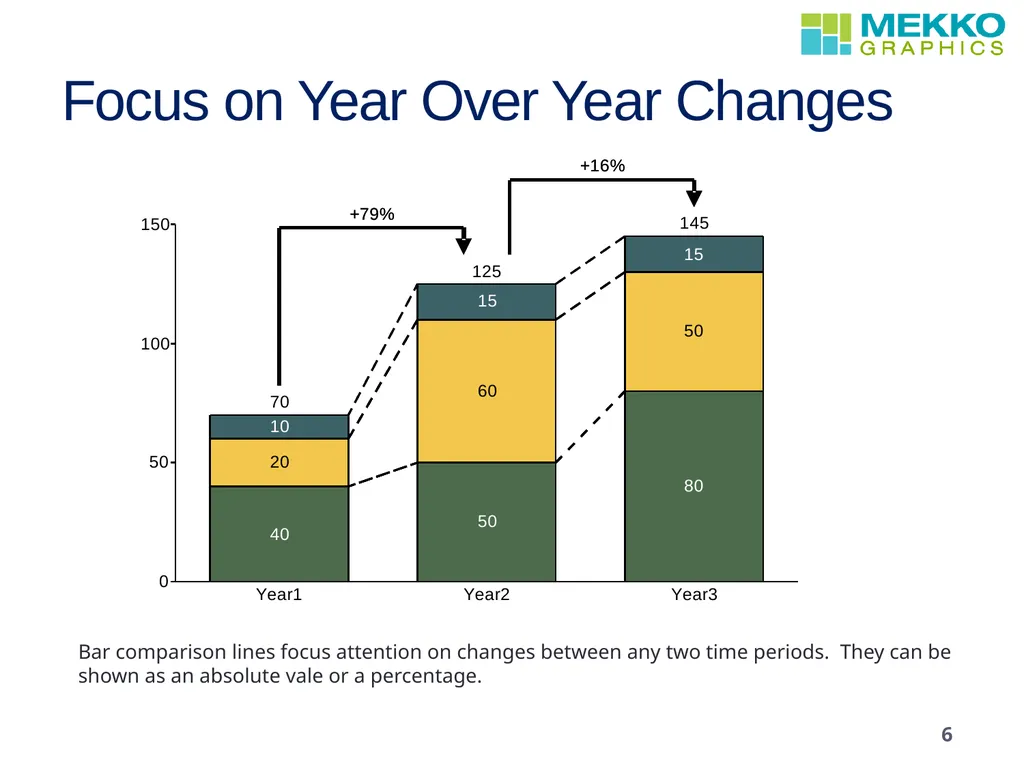
Focus on Year Over Year Changes 6 Bar comparison lines focus attention on changes between any two time periods. They can be shown as an absolute vale or a percentage.<br>
07
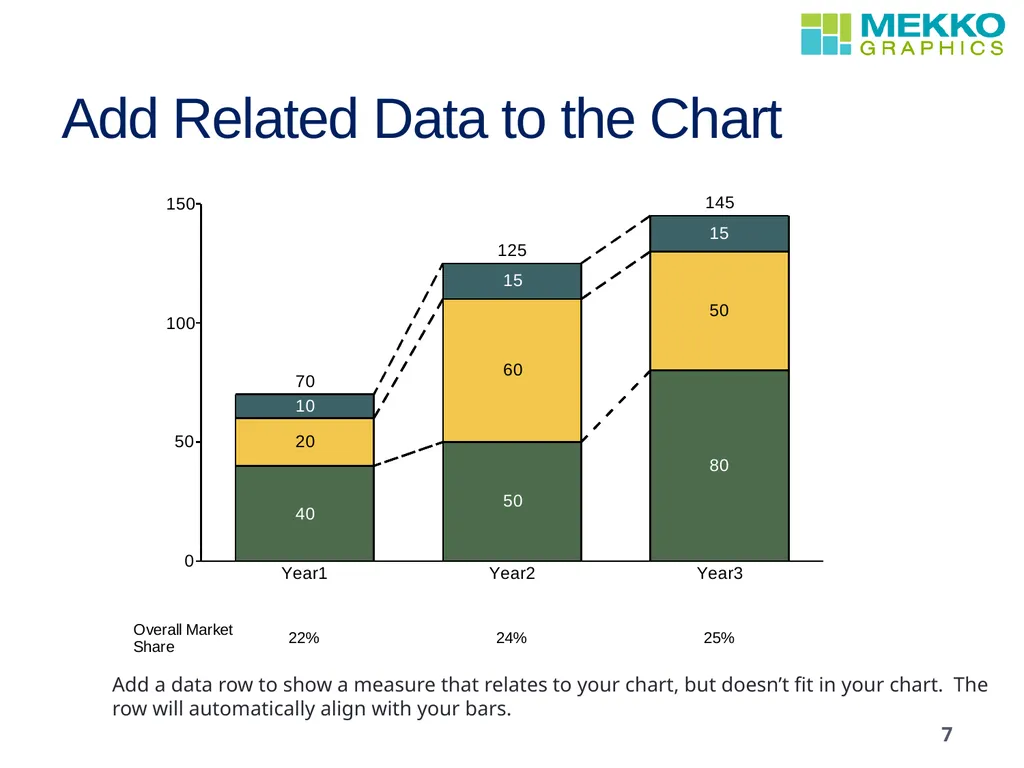
Add Related Data to the Chart 7 Add a data row to show a measure that relates to your chart, but doesn’t fit in your chart. The row will automatically align with your bars.<br>
08
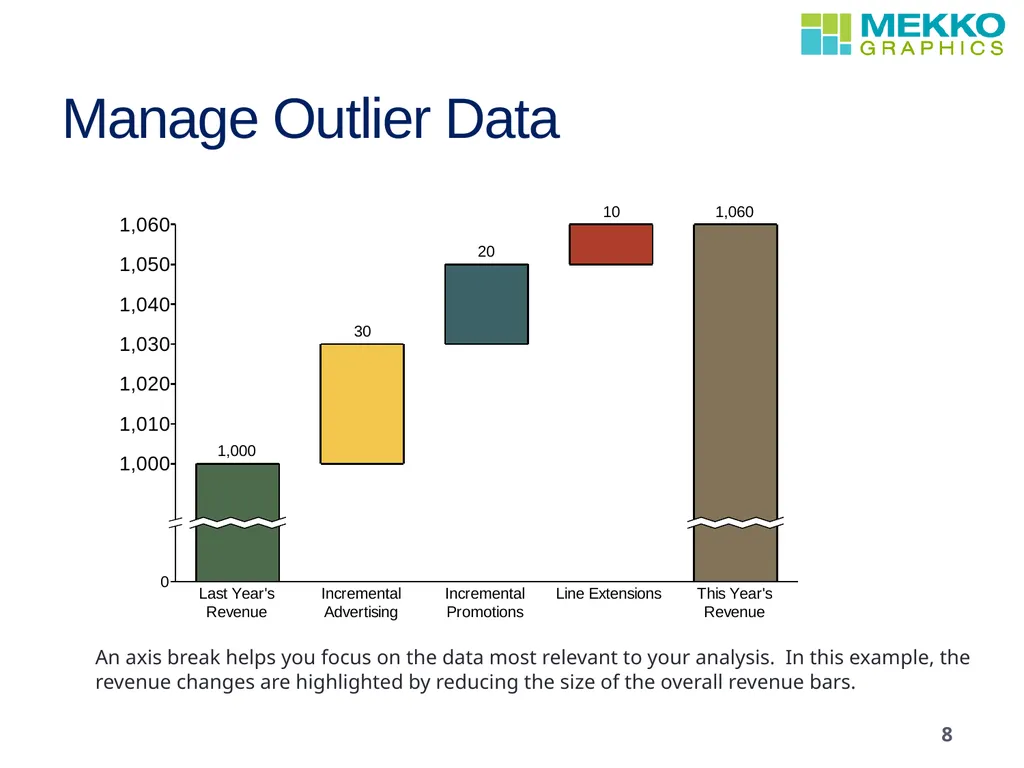
Manage Outlier Data 8 An axis break helps you focus on the data most relevant to your analysis. In this example, the revenue changes are highlighted by reducing the size of the overall revenue bars.<br>
09
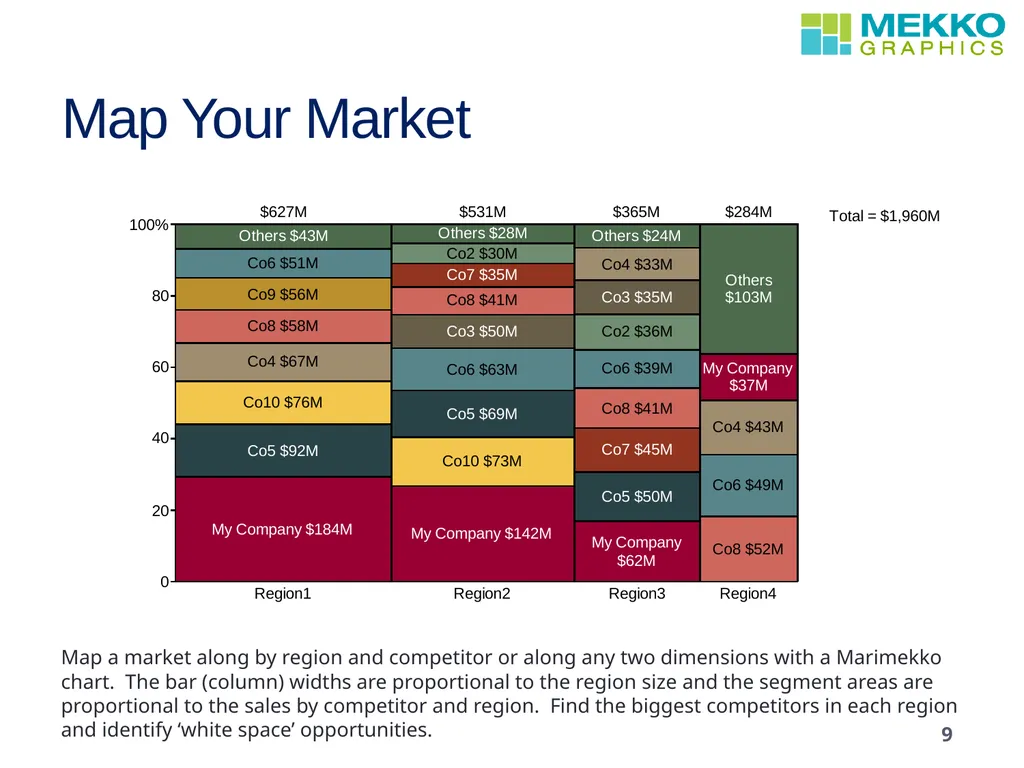
Map Your Market 9 Map a market along by region and competitor or along any two dimensions with a Marimekko chart. The bar (column) widths are proportional to the region size and the segment areas are proportional to the sales by competitor and region. Find the biggest competitors in each region and identify ‘white space’ opportunities.<br>
10
Learn More To learn more about creating persuasive charts, download the free
Mastering Chart Selection Guide, which includes a 30-day trial of the Mekko Graphics software. Questions or Comments?