
Transactions In DBMS “Transaction is a set of
PM
Published · 38 slides · 0 views

1 / 1
Description
Transactions In DBMS Transaction is a set of operations which are all logically related. or Transaction is a single logical unit of work formed by a set of operations. Operations in Transaction- The main operations in a transaction are-
Related Topics
Share
Embed code
Download this presentation From Below
"Transactions In DBMS “Transaction is a set of" is the property of its rightful owner. Permission is granted to download and print the materials on this website for personal, non-commercial use only, and to display it on your personal computer provided you do not modify the materials and that you retain all copyright notices contained in the materials. By downloading content from our website, you accept the terms of this agreement.
Presentation Transcript
01
Transactions In DBMS “Transaction is a set of operations which are all logically related.” or “Transaction is a single logical unit of work formed by a set of operations.”
Operations in Transaction-
The main operations in a transaction are-
1. Read Operation-
Read operation reads the data from the database and then stores it in the buffer in main memory.
For example- Read(A) instruction will read the value of A from the database and will store it in the buffer in main memory.
2. Write Operation-
Write operation writes the updated data value back to the database from the buffer.
For example- Write(A) will write the updated value of A from the buffer to the database.<br>
Operations in Transaction-
The main operations in a transaction are-
1. Read Operation-
Read operation reads the data from the database and then stores it in the buffer in main memory.
For example- Read(A) instruction will read the value of A from the database and will store it in the buffer in main memory.
2. Write Operation-
Write operation writes the updated data value back to the database from the buffer.
For example- Write(A) will write the updated value of A from the buffer to the database.<br>
02
Transaction States
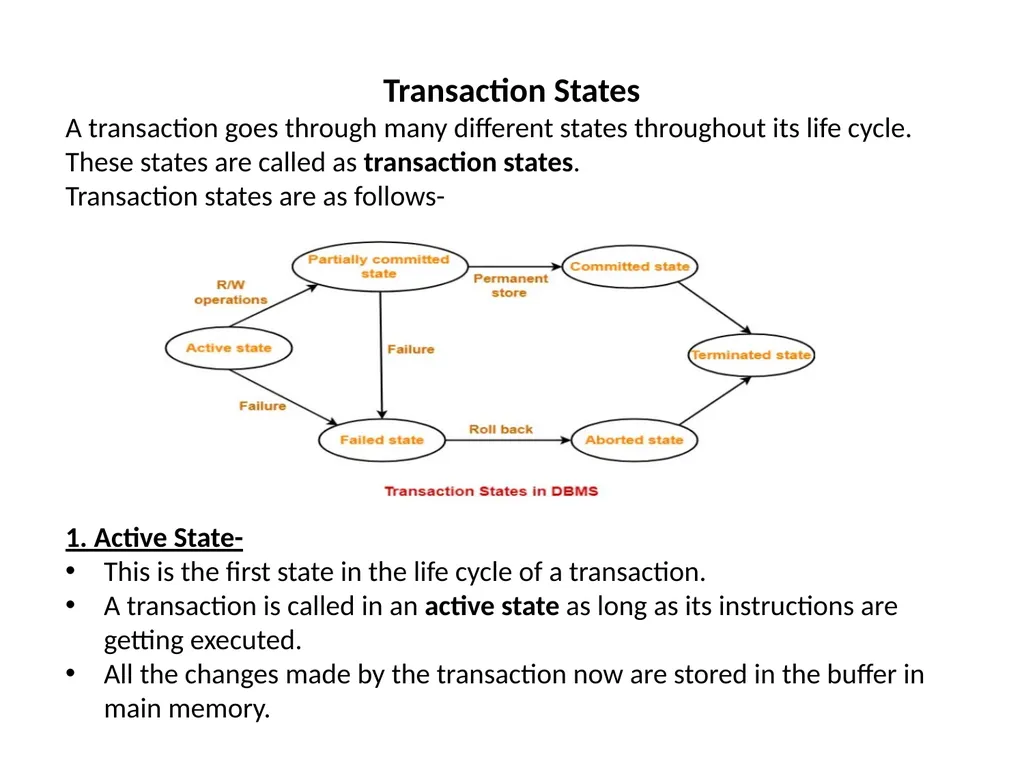
A transaction goes through many different states throughout its life cycle.
These states are called as transaction states.
Transaction states are as follows-
1. Active State-
This is the first state in the life cycle of a transaction.
A transaction is called in an active state as long as its instructions are getting executed.
All the changes made by the transaction now are stored in the buffer in main memory.<br>
A transaction goes through many different states throughout its life cycle.
These states are called as transaction states.
Transaction states are as follows-
1. Active State-
This is the first state in the life cycle of a transaction.
A transaction is called in an active state as long as its instructions are getting executed.
All the changes made by the transaction now are stored in the buffer in main memory.<br>
03
2. Partially Committed State- After the last instruction of transaction has executed, it enters into a partially committed state.
After entering this state, the transaction is considered to be partially committed.
It is not considered fully committed because all the changes made by the transaction are still stored in the buffer in main memory.
3. Committed State-
After all the changes made by the transaction have been successfully stored into the database, it enters into a committed state.
Now, the transaction is considered to be fully committed.
NOTE-
After a transaction has entered the committed state, it is not possible to roll back the transaction.
In other words, it is not possible to undo the changes that has been made by the transaction.<br>
After entering this state, the transaction is considered to be partially committed.
It is not considered fully committed because all the changes made by the transaction are still stored in the buffer in main memory.
3. Committed State-
After all the changes made by the transaction have been successfully stored into the database, it enters into a committed state.
Now, the transaction is considered to be fully committed.
NOTE-
After a transaction has entered the committed state, it is not possible to roll back the transaction.
In other words, it is not possible to undo the changes that has been made by the transaction.<br>
04
4. Failed State-
When a transaction is getting executed in the active state or partially committed state and some failure occurs due to which it becomes impossible to continue the execution, it enters into a failed state.
5. Aborted State-
After the transaction has failed and entered into a failed state, all the changes made by it have to be undone.
To undo the changes made by the transaction, it becomes necessary to roll back the transaction.
After the transaction has rolled back completely, it enters into an aborted state.
6. Terminated State-
This is the last state in the life cycle of a transaction.
After entering the committed state or aborted state, the transaction finally enters into a terminated state where its life cycle finally comes to an end.<br>
When a transaction is getting executed in the active state or partially committed state and some failure occurs due to which it becomes impossible to continue the execution, it enters into a failed state.
5. Aborted State-
After the transaction has failed and entered into a failed state, all the changes made by it have to be undone.
To undo the changes made by the transaction, it becomes necessary to roll back the transaction.
After the transaction has rolled back completely, it enters into an aborted state.
6. Terminated State-
This is the last state in the life cycle of a transaction.
After entering the committed state or aborted state, the transaction finally enters into a terminated state where its life cycle finally comes to an end.<br>
05
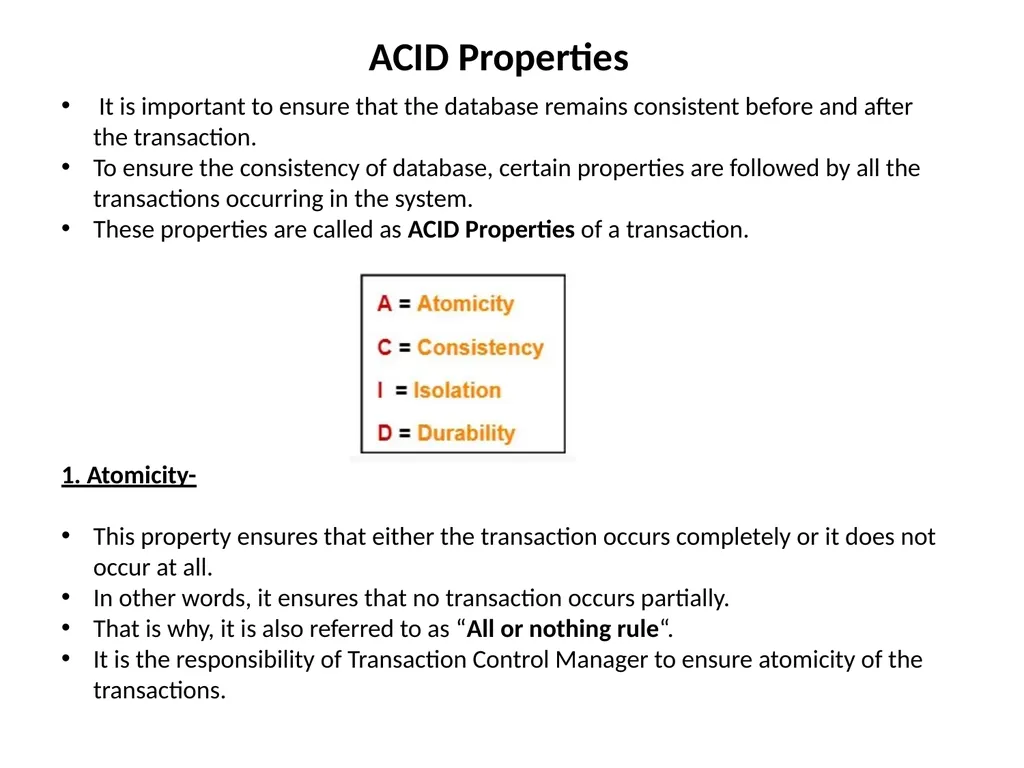
ACID Properties It is important to ensure that the database remains consistent before and after the transaction.
To ensure the consistency of database, certain properties are followed by all the transactions occurring in the system.
These properties are called as ACID Properties of a transaction.
1. Atomicity-
This property ensures that either the transaction occurs completely or it does not occur at all.
In other words, it ensures that no transaction occurs partially.
That is why, it is also referred to as “All or nothing rule“.
It is the responsibility of Transaction Control Manager to ensure atomicity of the transactions.<br>
To ensure the consistency of database, certain properties are followed by all the transactions occurring in the system.
These properties are called as ACID Properties of a transaction.
1. Atomicity-
This property ensures that either the transaction occurs completely or it does not occur at all.
In other words, it ensures that no transaction occurs partially.
That is why, it is also referred to as “All or nothing rule“.
It is the responsibility of Transaction Control Manager to ensure atomicity of the transactions.<br>
06
ACID Properties 2. Consistency-
This property ensures that integrity constraints are maintained.
It ensures that the database remains consistent before and after the transaction.
It is the responsibility of DBMS and application programmer to ensure consistency of the database.
3. Isolation-
This property ensures that multiple transactions can occur simultaneously without causing any inconsistency.
During execution, each transaction feels as if it is getting executed alone in the system.
A transaction does not realize that there are other transactions as well getting executed parallely.
Changes made by a transaction becomes visible to other transactions only after they are written in the memory.
The resultant state of the system after executing all the transactions is same as the state that would be achieved if the transactions were executed serially one after the other.
It is the responsibility of concurrency control manager to ensure isolation for all the transactions.<br>
This property ensures that integrity constraints are maintained.
It ensures that the database remains consistent before and after the transaction.
It is the responsibility of DBMS and application programmer to ensure consistency of the database.
3. Isolation-
This property ensures that multiple transactions can occur simultaneously without causing any inconsistency.
During execution, each transaction feels as if it is getting executed alone in the system.
A transaction does not realize that there are other transactions as well getting executed parallely.
Changes made by a transaction becomes visible to other transactions only after they are written in the memory.
The resultant state of the system after executing all the transactions is same as the state that would be achieved if the transactions were executed serially one after the other.
It is the responsibility of concurrency control manager to ensure isolation for all the transactions.<br>
07
ACID Properties 4. Durability-
This property ensures that all the changes made by a transaction after its successful execution are written successfully to the disk.
It also ensures that these changes exist permanently and are never lost even if there occurs a failure of any kind.
It is the responsibility of recovery manager to ensure durability in the database.<br>
This property ensures that all the changes made by a transaction after its successful execution are written successfully to the disk.
It also ensures that these changes exist permanently and are never lost even if there occurs a failure of any kind.
It is the responsibility of recovery manager to ensure durability in the database.<br>
08
Concurrency Problems in DBMS When multiple transactions execute concurrently in an uncontrolled or unrestricted manner, then it might lead to several problems.
Such problems are called as concurrency problems.
The concurrency problems are-
1.Dirty Read Problem
2.Unrepeatable Read Problem
3.Lost Update Problem
4. Phantom Read Problem
1. Dirty Read Problem-
Reading the data written by an uncommitted transaction is called as dirty read.
This read is called as dirty read because-
There is always a chance that the uncommitted transaction might roll back later.
Thus, uncommitted transaction might make other transactions read a value that does not even exist.
This leads to inconsistency of the database.<br>
Such problems are called as concurrency problems.
The concurrency problems are-
1.Dirty Read Problem
2.Unrepeatable Read Problem
3.Lost Update Problem
4. Phantom Read Problem
1. Dirty Read Problem-
Reading the data written by an uncommitted transaction is called as dirty read.
This read is called as dirty read because-
There is always a chance that the uncommitted transaction might roll back later.
Thus, uncommitted transaction might make other transactions read a value that does not even exist.
This leads to inconsistency of the database.<br>
09
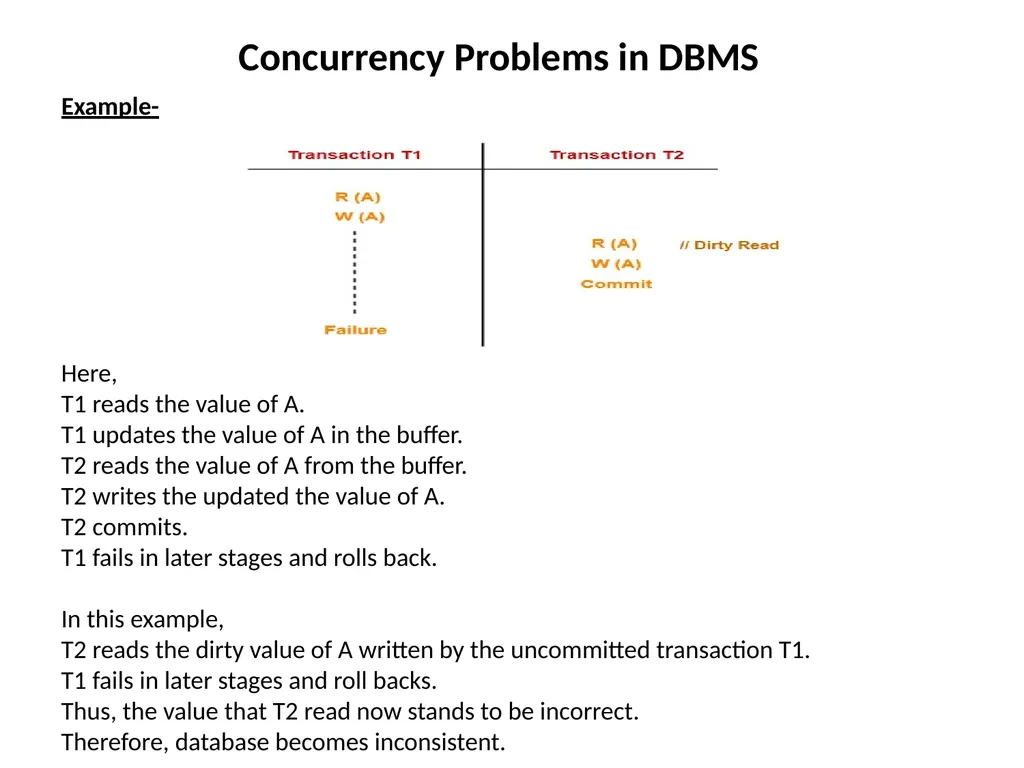
Concurrency Problems in DBMS Example- Here,
T1 reads the value of A.
T1 updates the value of A in the buffer.
T2 reads the value of A from the buffer.
T2 writes the updated the value of A.
T2 commits.
T1 fails in later stages and rolls back.
In this example,
T2 reads the dirty value of A written by the uncommitted transaction T1.
T1 fails in later stages and roll backs.
Thus, the value that T2 read now stands to be incorrect.
Therefore, database becomes inconsistent.<br>
T1 reads the value of A.
T1 updates the value of A in the buffer.
T2 reads the value of A from the buffer.
T2 writes the updated the value of A.
T2 commits.
T1 fails in later stages and rolls back.
In this example,
T2 reads the dirty value of A written by the uncommitted transaction T1.
T1 fails in later stages and roll backs.
Thus, the value that T2 read now stands to be incorrect.
Therefore, database becomes inconsistent.<br>
10
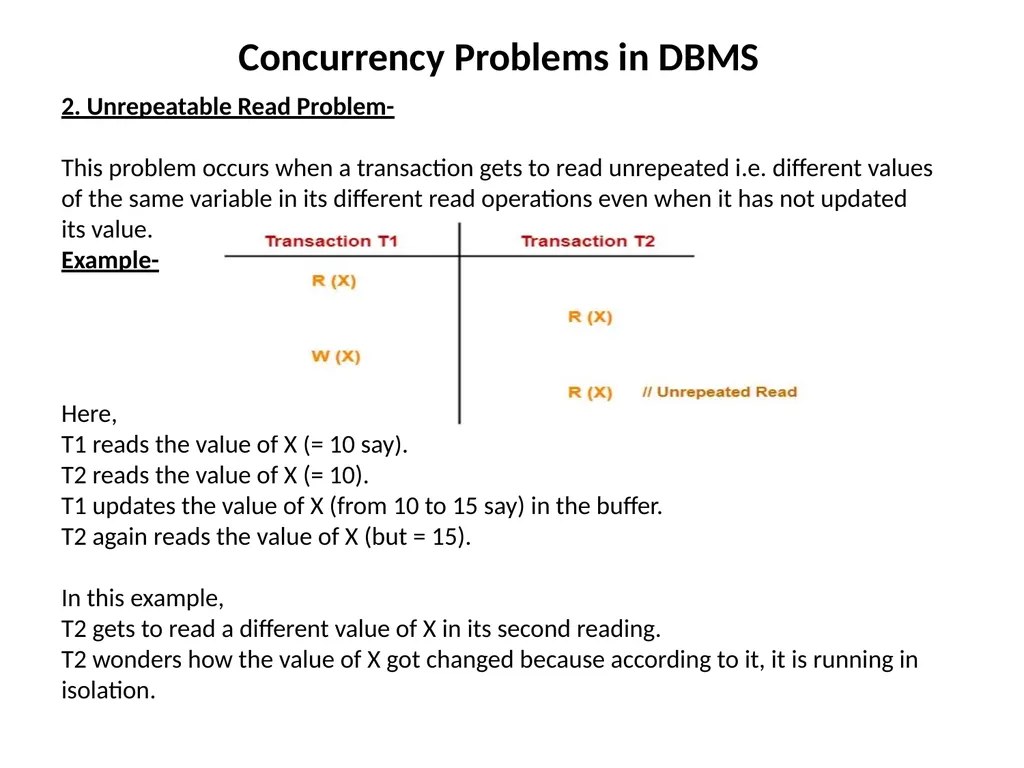
Concurrency Problems in DBMS 2. Unrepeatable Read Problem-
This problem occurs when a transaction gets to read unrepeated i.e. different values of the same variable in its different read operations even when it has not updated its value.
Example-
Here,
T1 reads the value of X (= 10 say).
T2 reads the value of X (= 10).
T1 updates the value of X (from 10 to 15 say) in the buffer.
T2 again reads the value of X (but = 15).
In this example,
T2 gets to read a different value of X in its second reading.
T2 wonders how the value of X got changed because according to it, it is running in isolation.<br>
This problem occurs when a transaction gets to read unrepeated i.e. different values of the same variable in its different read operations even when it has not updated its value.
Example-
Here,
T1 reads the value of X (= 10 say).
T2 reads the value of X (= 10).
T1 updates the value of X (from 10 to 15 say) in the buffer.
T2 again reads the value of X (but = 15).
In this example,
T2 gets to read a different value of X in its second reading.
T2 wonders how the value of X got changed because according to it, it is running in isolation.<br>
11
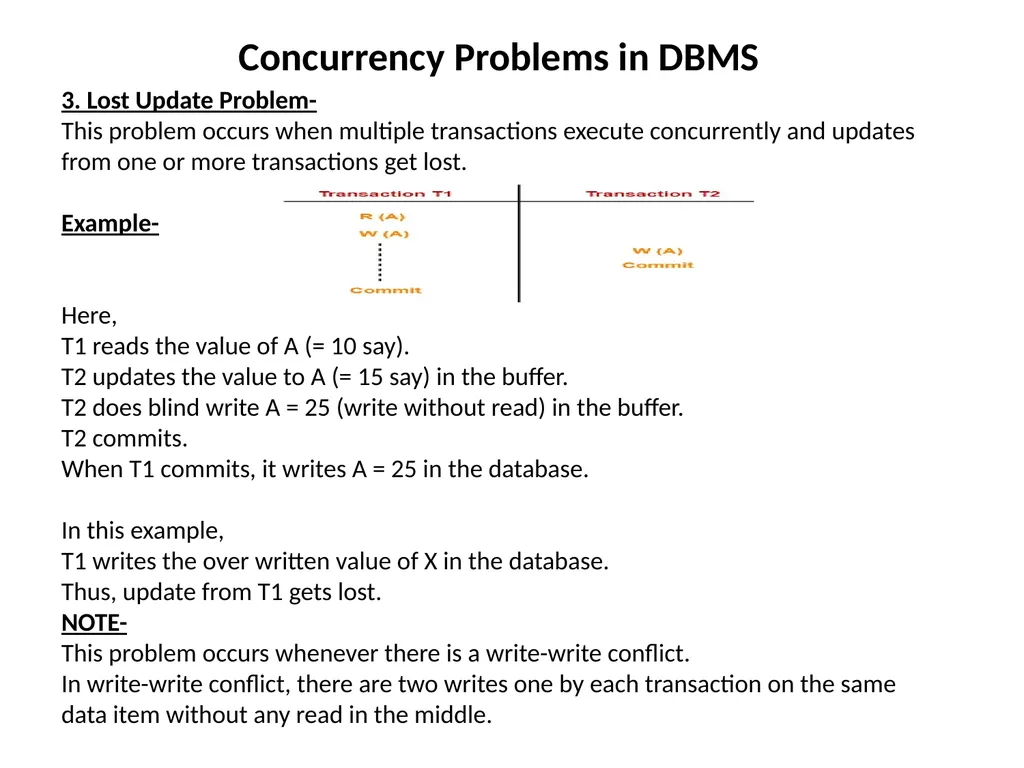
Concurrency Problems in DBMS 3. Lost Update Problem-
This problem occurs when multiple transactions execute concurrently and updates from one or more transactions get lost.
Example-
Here,
T1 reads the value of A (= 10 say).
T2 updates the value to A (= 15 say) in the buffer.
T2 does blind write A = 25 (write without read) in the buffer.
T2 commits.
When T1 commits, it writes A = 25 in the database.
In this example,
T1 writes the over written value of X in the database.
Thus, update from T1 gets lost.
NOTE-
This problem occurs whenever there is a write-write conflict.
In write-write conflict, there are two writes one by each transaction on the same data item without any read in the middle.<br>
This problem occurs when multiple transactions execute concurrently and updates from one or more transactions get lost.
Example-
Here,
T1 reads the value of A (= 10 say).
T2 updates the value to A (= 15 say) in the buffer.
T2 does blind write A = 25 (write without read) in the buffer.
T2 commits.
When T1 commits, it writes A = 25 in the database.
In this example,
T1 writes the over written value of X in the database.
Thus, update from T1 gets lost.
NOTE-
This problem occurs whenever there is a write-write conflict.
In write-write conflict, there are two writes one by each transaction on the same data item without any read in the middle.<br>
12
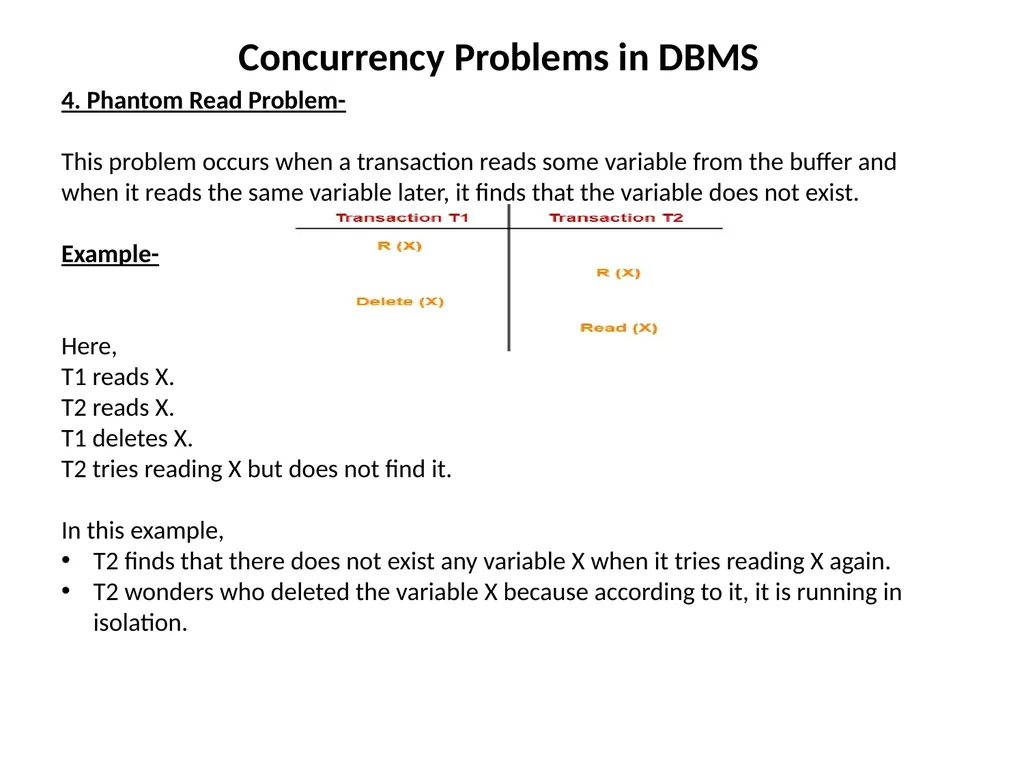
Concurrency Problems in DBMS 4. Phantom Read Problem-
This problem occurs when a transaction reads some variable from the buffer and when it reads the same variable later, it finds that the variable does not exist.
Example-
Here,
T1 reads X.
T2 reads X.
T1 deletes X.
T2 tries reading X but does not find it.
In this example,
T2 finds that there does not exist any variable X when it tries reading X again.
T2 wonders who deleted the variable X because according to it, it is running in isolation.<br>
This problem occurs when a transaction reads some variable from the buffer and when it reads the same variable later, it finds that the variable does not exist.
Example-
Here,
T1 reads X.
T2 reads X.
T1 deletes X.
T2 tries reading X but does not find it.
In this example,
T2 finds that there does not exist any variable X when it tries reading X again.
T2 wonders who deleted the variable X because according to it, it is running in isolation.<br>
13
Concurrency Problems in DBMS Avoiding Concurrency Problems-
To ensure consistency of the database, it is very important to prevent the occurrence of above problems.
Concurrency Control Protocols help to prevent the occurrence of above problems and maintain the consistency of the database.<br>
To ensure consistency of the database, it is very important to prevent the occurrence of above problems.
Concurrency Control Protocols help to prevent the occurrence of above problems and maintain the consistency of the database.<br>
14
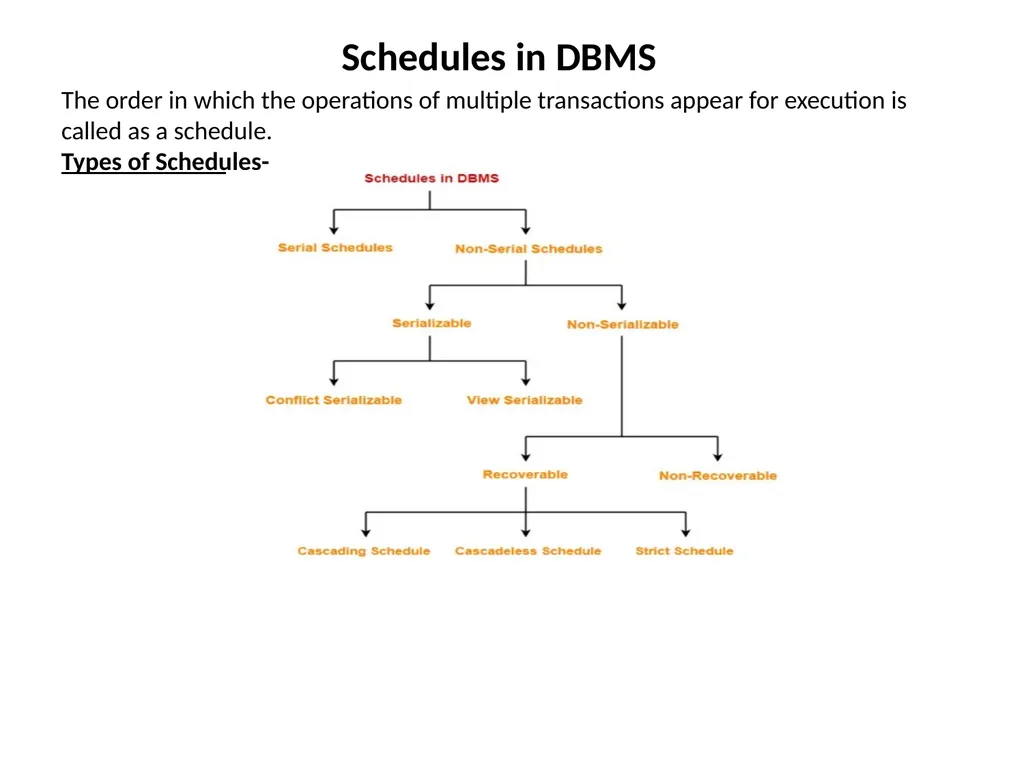
Schedules in DBMS The order in which the operations of multiple transactions appear for execution is called as a schedule.
Types of Schedules-<br>
Types of Schedules-<br>
15
Schedules in DBMS Serial Schedules-
In serial schedules,
All the transactions execute serially one after the other.
When one transaction executes, no other transaction is allowed to execute.
Characteristics-
Serial schedules are always-
Consistent
Recoverable
Cascadeless
Strict<br>
In serial schedules,
All the transactions execute serially one after the other.
When one transaction executes, no other transaction is allowed to execute.
Characteristics-
Serial schedules are always-
Consistent
Recoverable
Cascadeless
Strict<br>
16
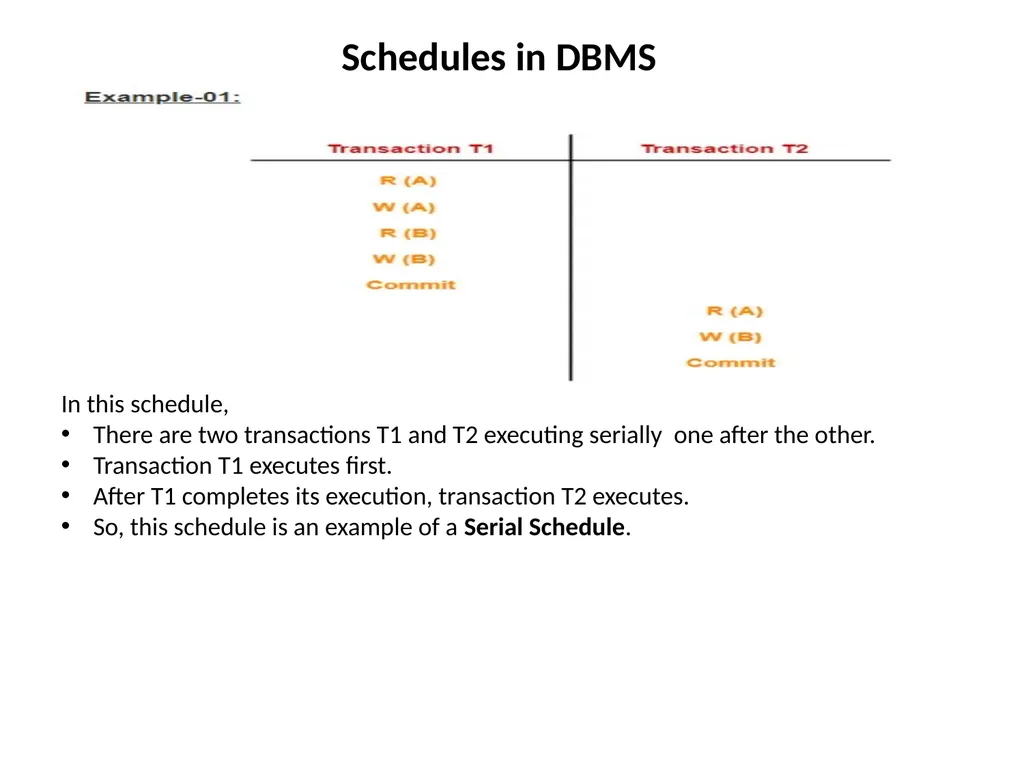
Schedules in DBMS In this schedule,
There are two transactions T1 and T2 executing serially one after the other.
Transaction T1 executes first.
After T1 completes its execution, transaction T2 executes.
So, this schedule is an example of a Serial Schedule.<br>
There are two transactions T1 and T2 executing serially one after the other.
Transaction T1 executes first.
After T1 completes its execution, transaction T2 executes.
So, this schedule is an example of a Serial Schedule.<br>
17
Schedules in DBMS Non-Serial Schedules-
In non-serial schedules,
Multiple transactions execute concurrently.
Operations of all the transactions are inter leaved or mixed with each other.
Characteristics-
Non-serial schedules are NOT always-
Consistent
Recoverable
Cascadeless
Strict<br>
In non-serial schedules,
Multiple transactions execute concurrently.
Operations of all the transactions are inter leaved or mixed with each other.
Characteristics-
Non-serial schedules are NOT always-
Consistent
Recoverable
Cascadeless
Strict<br>
18
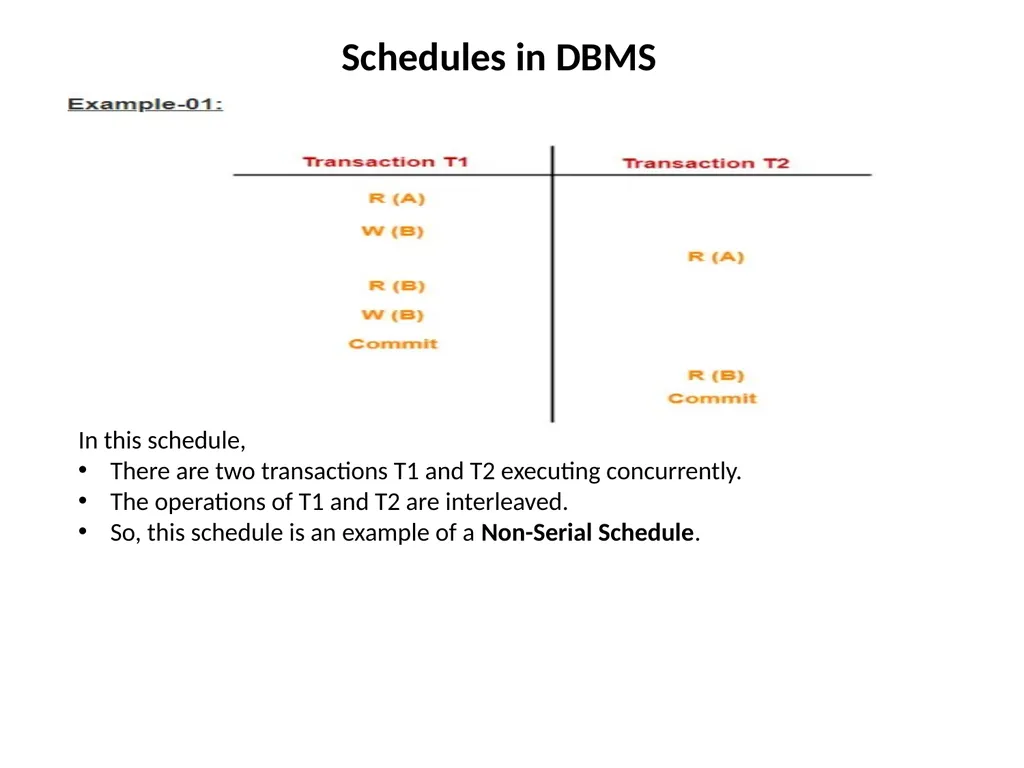
Schedules in DBMS In this schedule,
There are two transactions T1 and T2 executing concurrently.
The operations of T1 and T2 are interleaved.
So, this schedule is an example of a Non-Serial Schedule.<br>
There are two transactions T1 and T2 executing concurrently.
The operations of T1 and T2 are interleaved.
So, this schedule is an example of a Non-Serial Schedule.<br>
19
Serializability in DBMS Some non-serial schedules may lead to inconsistency of the database.
Serializability is a concept that helps to identify which non-serial schedules are correct and will maintain the consistency of the database.
Serializable Schedules-
If a given non-serial schedule of ‘n’ transactions is equivalent to some serial schedule of ‘n’ transactions, then it is called as a serializable schedule. Characteristics-
Serializable schedules behave exactly same as serial schedules.
Thus, serializable schedules are always-
Consistent
Recoverable
Cascadeless
Strict<br>
Serializability is a concept that helps to identify which non-serial schedules are correct and will maintain the consistency of the database.
Serializable Schedules-
If a given non-serial schedule of ‘n’ transactions is equivalent to some serial schedule of ‘n’ transactions, then it is called as a serializable schedule. Characteristics-
Serializable schedules behave exactly same as serial schedules.
Thus, serializable schedules are always-
Consistent
Recoverable
Cascadeless
Strict<br>
20
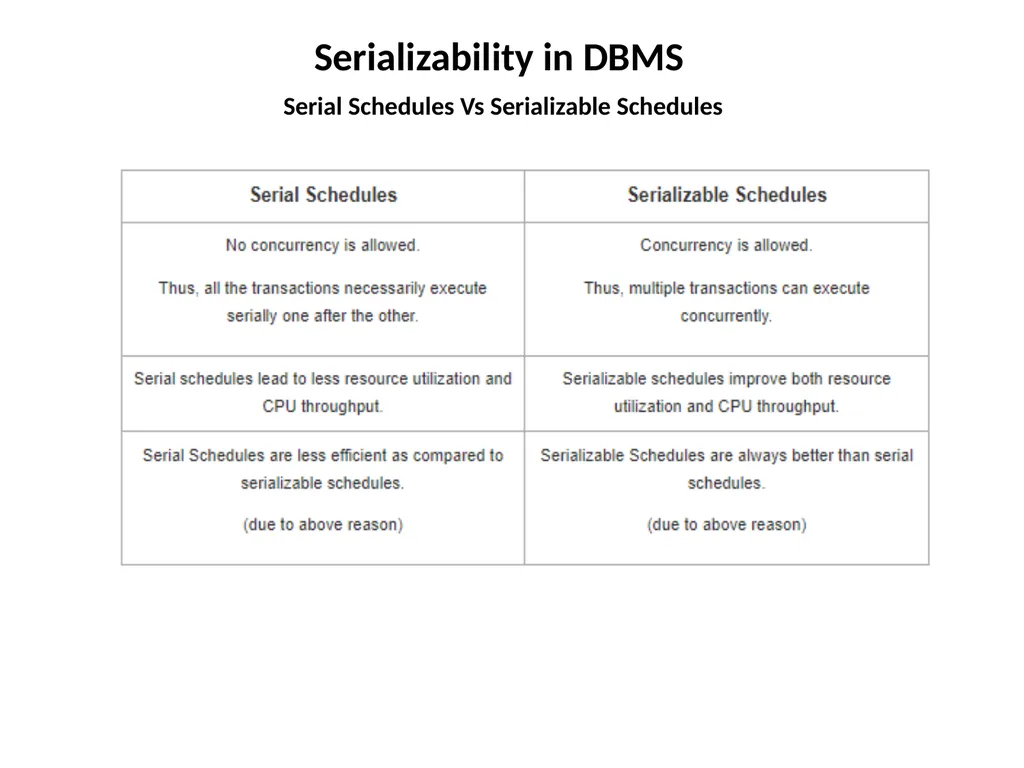
Serializability in DBMS Serial Schedules Vs Serializable Schedules<br>
21
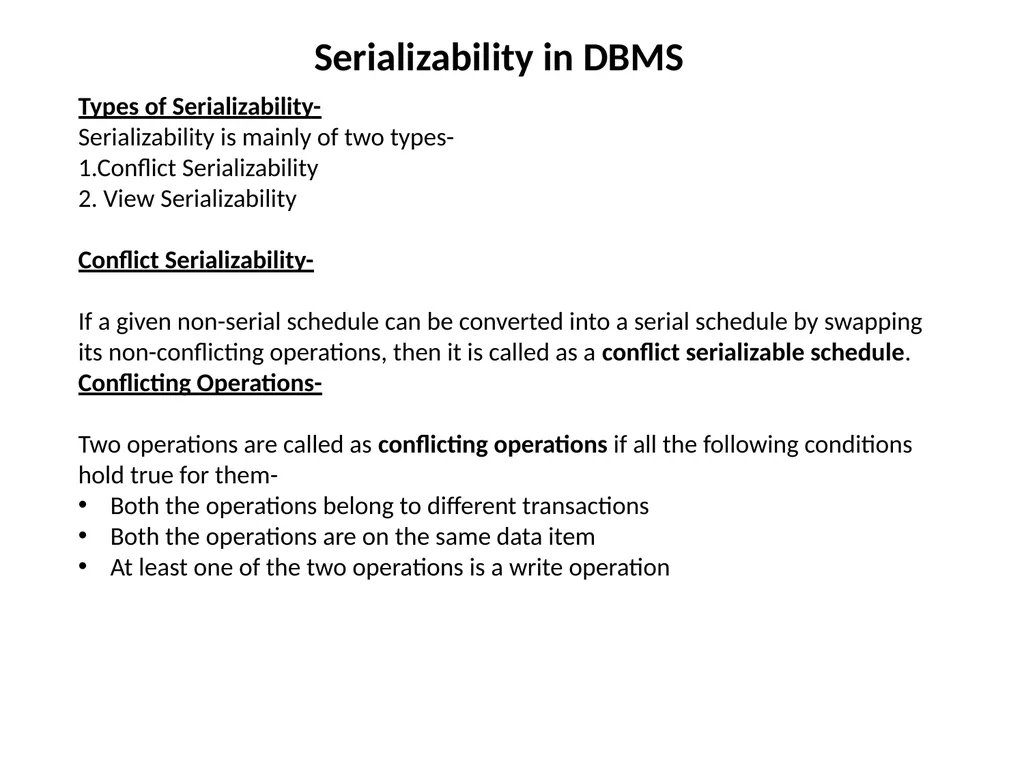
Serializability in DBMS Types of Serializability-
Serializability is mainly of two types-
1.Conflict Serializability
2. View Serializability
Conflict Serializability-
If a given non-serial schedule can be converted into a serial schedule by swapping its non-conflicting operations, then it is called as a conflict serializable schedule.
Conflicting Operations-
Two operations are called as conflicting operations if all the following conditions hold true for them-
Both the operations belong to different transactions
Both the operations are on the same data item
At least one of the two operations is a write operation<br>
Serializability is mainly of two types-
1.Conflict Serializability
2. View Serializability
Conflict Serializability-
If a given non-serial schedule can be converted into a serial schedule by swapping its non-conflicting operations, then it is called as a conflict serializable schedule.
Conflicting Operations-
Two operations are called as conflicting operations if all the following conditions hold true for them-
Both the operations belong to different transactions
Both the operations are on the same data item
At least one of the two operations is a write operation<br>
22
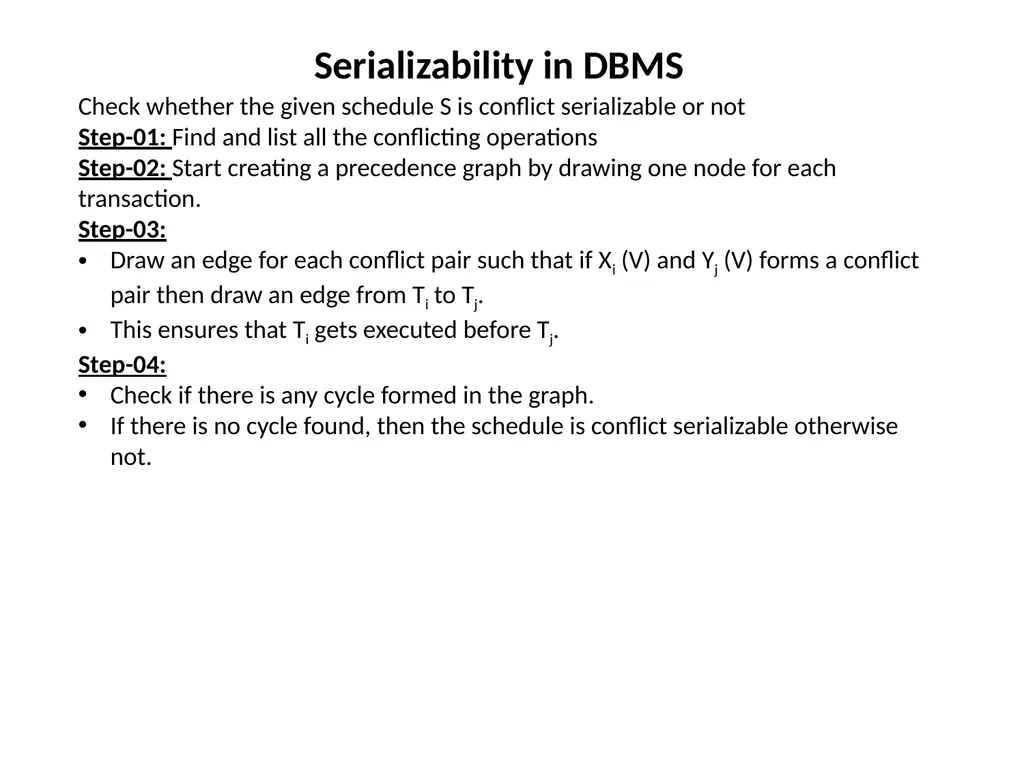
Serializability in DBMS Check whether the given schedule S is conflict serializable or not
Step-01: Find and list all the conflicting operations
Step-02: Start creating a precedence graph by drawing one node for each transaction.
Step-03:
Draw an edge for each conflict pair such that if Xi (V) and Yj (V) forms a conflict pair then draw an edge from Ti to Tj.
This ensures that Ti gets executed before Tj.
Step-04:
Check if there is any cycle formed in the graph.
If there is no cycle found, then the schedule is conflict serializable otherwise not.<br>
Step-01: Find and list all the conflicting operations
Step-02: Start creating a precedence graph by drawing one node for each transaction.
Step-03:
Draw an edge for each conflict pair such that if Xi (V) and Yj (V) forms a conflict pair then draw an edge from Ti to Tj.
This ensures that Ti gets executed before Tj.
Step-04:
Check if there is any cycle formed in the graph.
If there is no cycle found, then the schedule is conflict serializable otherwise not.<br>
23
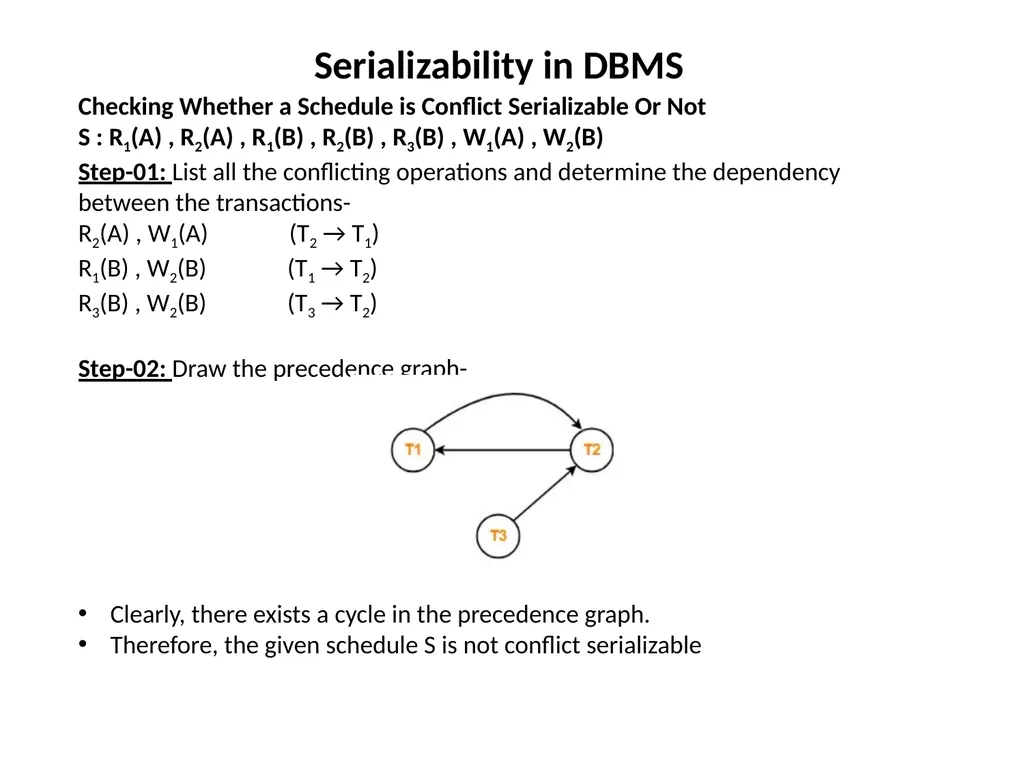
Serializability in DBMS Checking Whether a Schedule is Conflict Serializable Or Not
S : R1(A) , R2(A) , R1(B) , R2(B) , R3(B) , W1(A) , W2(B)
Step-01: List all the conflicting operations and determine the dependency between the transactions-
R2(A) , W1(A) (T2 → T1)
R1(B) , W2(B) (T1 → T2)
R3(B) , W2(B) (T3 → T2)
Step-02: Draw the precedence graph-
Clearly, there exists a cycle in the precedence graph.
Therefore, the given schedule S is not conflict serializable<br>
S : R1(A) , R2(A) , R1(B) , R2(B) , R3(B) , W1(A) , W2(B)
Step-01: List all the conflicting operations and determine the dependency between the transactions-
R2(A) , W1(A) (T2 → T1)
R1(B) , W2(B) (T1 → T2)
R3(B) , W2(B) (T3 → T2)
Step-02: Draw the precedence graph-
Clearly, there exists a cycle in the precedence graph.
Therefore, the given schedule S is not conflict serializable<br>
24
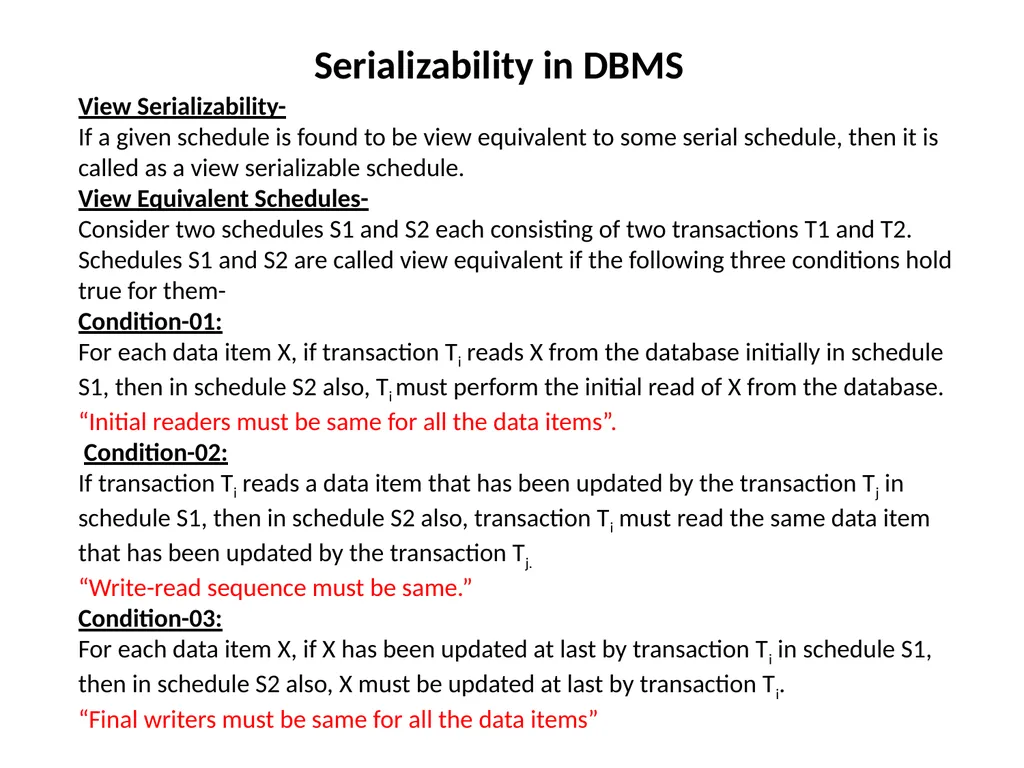
Serializability in DBMS View Serializability-
If a given schedule is found to be view equivalent to some serial schedule, then it is called as a view serializable schedule.
View Equivalent Schedules-
Consider two schedules S1 and S2 each consisting of two transactions T1 and T2.
Schedules S1 and S2 are called view equivalent if the following three conditions hold true for them-
Condition-01:
For each data item X, if transaction Ti reads X from the database initially in schedule S1, then in schedule S2 also, Ti must perform the initial read of X from the database.
“Initial readers must be same for all the data items”.
Condition-02:
If transaction Ti reads a data item that has been updated by the transaction Tj in schedule S1, then in schedule S2 also, transaction Ti must read the same data item that has been updated by the transaction Tj.
“Write-read sequence must be same.”
Condition-03:
For each data item X, if X has been updated at last by transaction Ti in schedule S1, then in schedule S2 also, X must be updated at last by transaction Ti.
“Final writers must be same for all the data items”<br>
If a given schedule is found to be view equivalent to some serial schedule, then it is called as a view serializable schedule.
View Equivalent Schedules-
Consider two schedules S1 and S2 each consisting of two transactions T1 and T2.
Schedules S1 and S2 are called view equivalent if the following three conditions hold true for them-
Condition-01:
For each data item X, if transaction Ti reads X from the database initially in schedule S1, then in schedule S2 also, Ti must perform the initial read of X from the database.
“Initial readers must be same for all the data items”.
Condition-02:
If transaction Ti reads a data item that has been updated by the transaction Tj in schedule S1, then in schedule S2 also, transaction Ti must read the same data item that has been updated by the transaction Tj.
“Write-read sequence must be same.”
Condition-03:
For each data item X, if X has been updated at last by transaction Ti in schedule S1, then in schedule S2 also, X must be updated at last by transaction Ti.
“Final writers must be same for all the data items”<br>
25
Serializability in DBMS Checking Whether a Schedule is View Serializable Or Not-
Method-01:
Check whether the given schedule is conflict serializable or not.
If the given schedule is conflict serializable, then it is surely view serializable.
If the given schedule is not conflict serializable, then it may or may not be view serializable. Go and check using other methods.
RULES:
All conflict serializable schedules are view serializable.
All view serializable schedules may or may not be conflict serializable
Method-02:
Check if there exists any blind write operation.
(Writing without reading is called as a blind write).
If there does not exist any blind write, then the schedule is surely not view serializable. Stop and report your answer.
If there exists any blind write, then the schedule may or may not be view serializable. Go and check using other methods.
RULE :
No blind write means not a view serializable schedule.<br>
Method-01:
Check whether the given schedule is conflict serializable or not.
If the given schedule is conflict serializable, then it is surely view serializable.
If the given schedule is not conflict serializable, then it may or may not be view serializable. Go and check using other methods.
RULES:
All conflict serializable schedules are view serializable.
All view serializable schedules may or may not be conflict serializable
Method-02:
Check if there exists any blind write operation.
(Writing without reading is called as a blind write).
If there does not exist any blind write, then the schedule is surely not view serializable. Stop and report your answer.
If there exists any blind write, then the schedule may or may not be view serializable. Go and check using other methods.
RULE :
No blind write means not a view serializable schedule.<br>
26
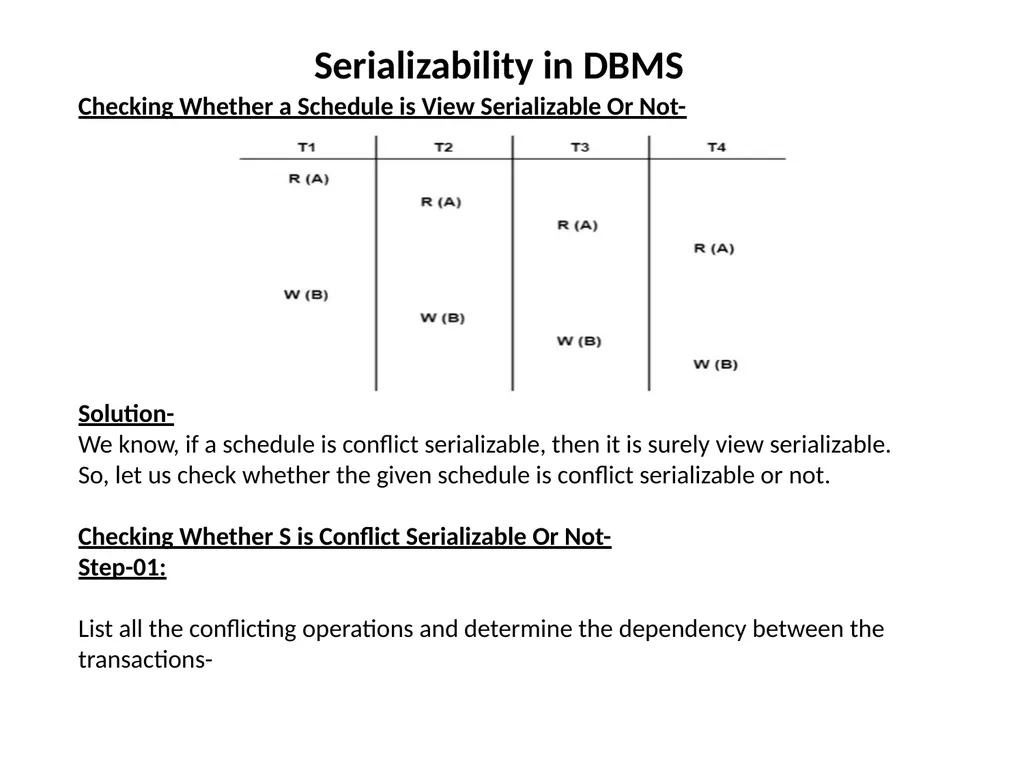
Serializability in DBMS Checking Whether a Schedule is View Serializable Or Not-
Solution-
We know, if a schedule is conflict serializable, then it is surely view serializable.
So, let us check whether the given schedule is conflict serializable or not.
Checking Whether S is Conflict Serializable Or Not-
Step-01:
List all the conflicting operations and determine the dependency between the transactions-<br>
Solution-
We know, if a schedule is conflict serializable, then it is surely view serializable.
So, let us check whether the given schedule is conflict serializable or not.
Checking Whether S is Conflict Serializable Or Not-
Step-01:
List all the conflicting operations and determine the dependency between the transactions-<br>
27
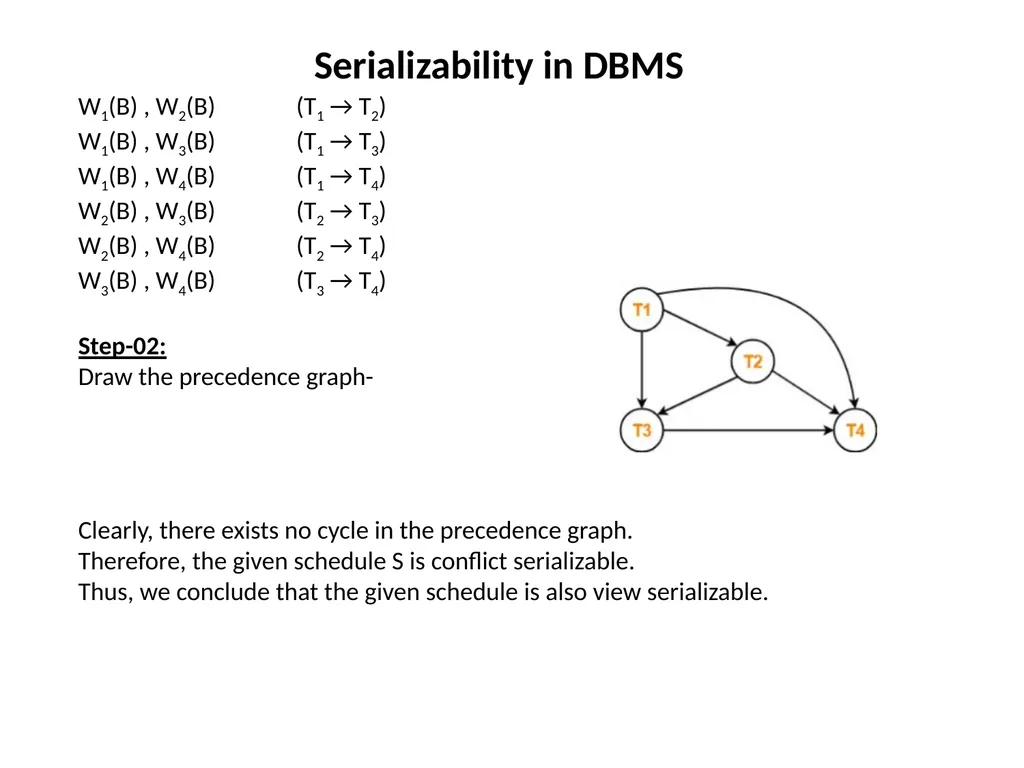
Serializability in DBMS W1(B) , W2(B) (T1 → T2)
W1(B) , W3(B) (T1 → T3)
W1(B) , W4(B) (T1 → T4)
W2(B) , W3(B) (T2 → T3)
W2(B) , W4(B) (T2 → T4)
W3(B) , W4(B) (T3 → T4)
Step-02:
Draw the precedence graph-
Clearly, there exists no cycle in the precedence graph.
Therefore, the given schedule S is conflict serializable.
Thus, we conclude that the given schedule is also view serializable.<br>
W1(B) , W3(B) (T1 → T3)
W1(B) , W4(B) (T1 → T4)
W2(B) , W3(B) (T2 → T3)
W2(B) , W4(B) (T2 → T4)
W3(B) , W4(B) (T3 → T4)
Step-02:
Draw the precedence graph-
Clearly, there exists no cycle in the precedence graph.
Therefore, the given schedule S is conflict serializable.
Thus, we conclude that the given schedule is also view serializable.<br>
28
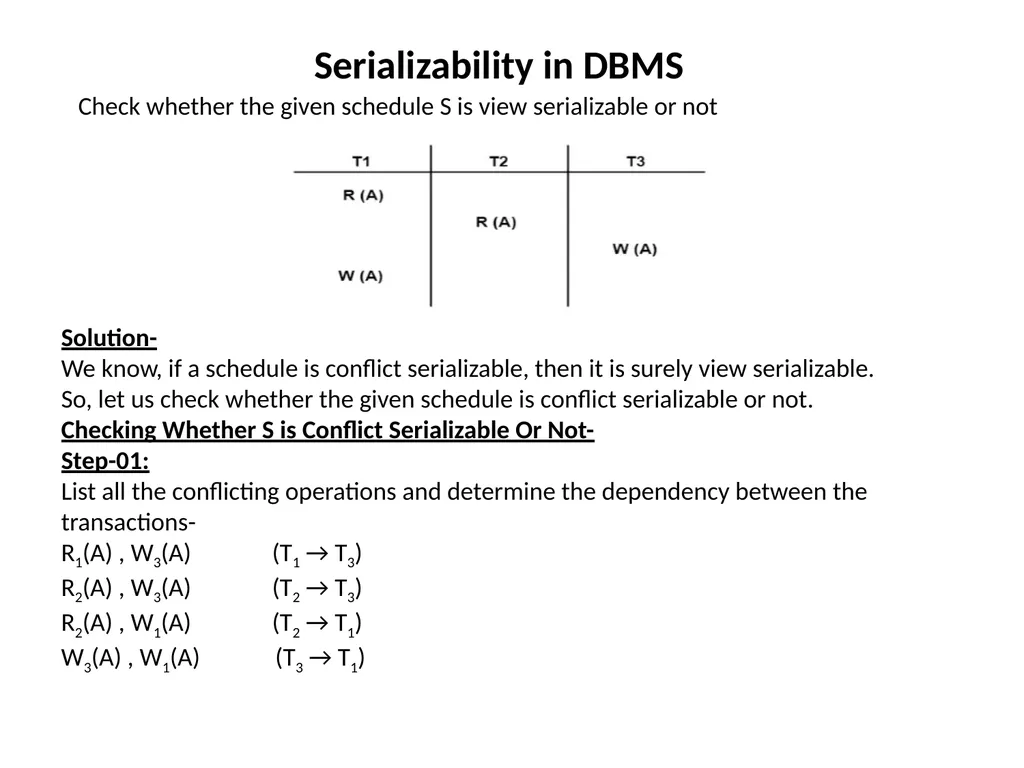
Serializability in DBMS Check whether the given schedule S is view serializable or not Solution-
We know, if a schedule is conflict serializable, then it is surely view serializable.
So, let us check whether the given schedule is conflict serializable or not.
Checking Whether S is Conflict Serializable Or Not-
Step-01:
List all the conflicting operations and determine the dependency between the transactions-
R1(A) , W3(A) (T1 → T3)
R2(A) , W3(A) (T2 → T3)
R2(A) , W1(A) (T2 → T1)
W3(A) , W1(A) (T3 → T1)<br>
We know, if a schedule is conflict serializable, then it is surely view serializable.
So, let us check whether the given schedule is conflict serializable or not.
Checking Whether S is Conflict Serializable Or Not-
Step-01:
List all the conflicting operations and determine the dependency between the transactions-
R1(A) , W3(A) (T1 → T3)
R2(A) , W3(A) (T2 → T3)
R2(A) , W1(A) (T2 → T1)
W3(A) , W1(A) (T3 → T1)<br>
29
Serializability in DBMS Step-02:
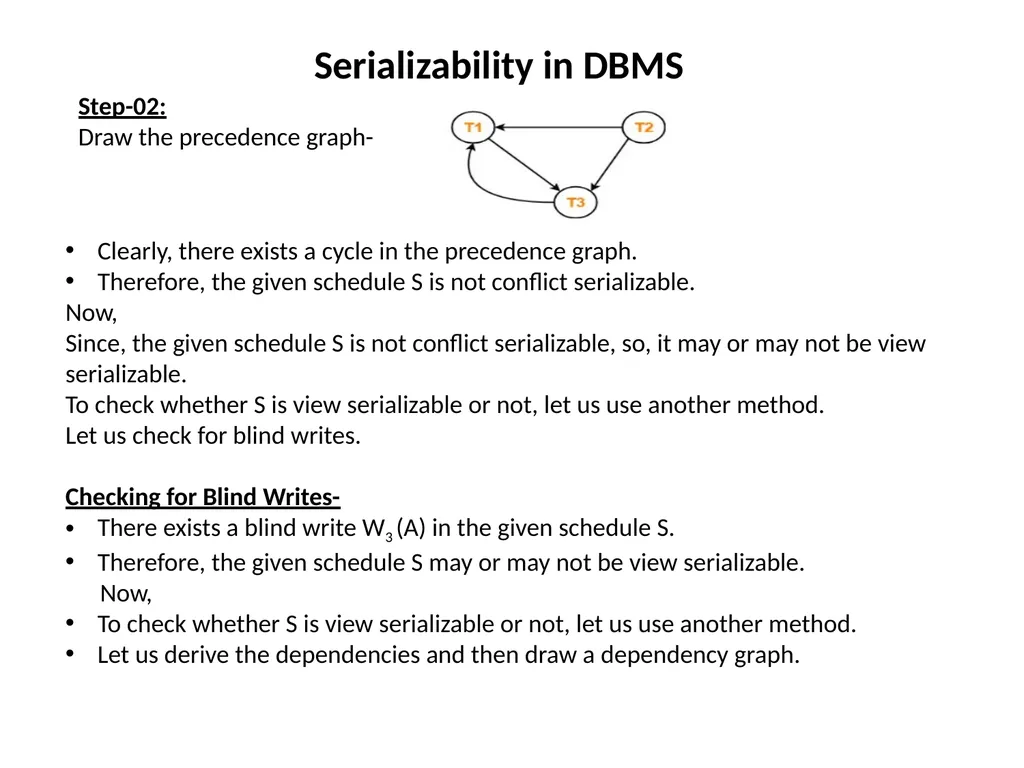
Draw the precedence graph- Clearly, there exists a cycle in the precedence graph.
Therefore, the given schedule S is not conflict serializable.
Now,
Since, the given schedule S is not conflict serializable, so, it may or may not be view serializable.
To check whether S is view serializable or not, let us use another method.
Let us check for blind writes.
Checking for Blind Writes-
There exists a blind write W3 (A) in the given schedule S.
Therefore, the given schedule S may or may not be view serializable.
Now,
To check whether S is view serializable or not, let us use another method.
Let us derive the dependencies and then draw a dependency graph.<br>
Draw the precedence graph- Clearly, there exists a cycle in the precedence graph.
Therefore, the given schedule S is not conflict serializable.
Now,
Since, the given schedule S is not conflict serializable, so, it may or may not be view serializable.
To check whether S is view serializable or not, let us use another method.
Let us check for blind writes.
Checking for Blind Writes-
There exists a blind write W3 (A) in the given schedule S.
Therefore, the given schedule S may or may not be view serializable.
Now,
To check whether S is view serializable or not, let us use another method.
Let us derive the dependencies and then draw a dependency graph.<br>
30
Serializability in DBMS Drawing a Dependency Graph-
T1 firstly reads A and T3 firstly updates A.
So, T1 must execute before T3.
Thus, we get the dependency T1 → T3.
Final updation on A is made by the transaction T1.
So, T1 must execute after all other transactions.
Thus, we get the dependency (T2, T3) → T1.
There exists no write-read sequence.
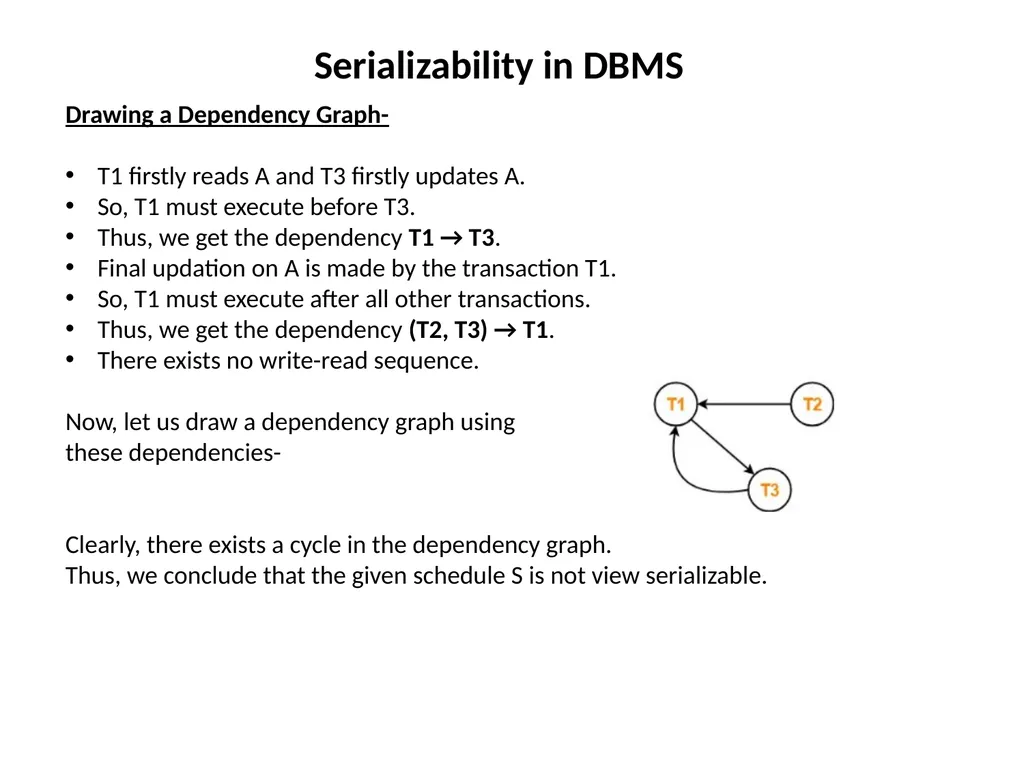
Now, let us draw a dependency graph using
these dependencies-
Clearly, there exists a cycle in the dependency graph.
Thus, we conclude that the given schedule S is not view serializable.<br>
T1 firstly reads A and T3 firstly updates A.
So, T1 must execute before T3.
Thus, we get the dependency T1 → T3.
Final updation on A is made by the transaction T1.
So, T1 must execute after all other transactions.
Thus, we get the dependency (T2, T3) → T1.
There exists no write-read sequence.
Now, let us draw a dependency graph using
these dependencies-
Clearly, there exists a cycle in the dependency graph.
Thus, we conclude that the given schedule S is not view serializable.<br>
31
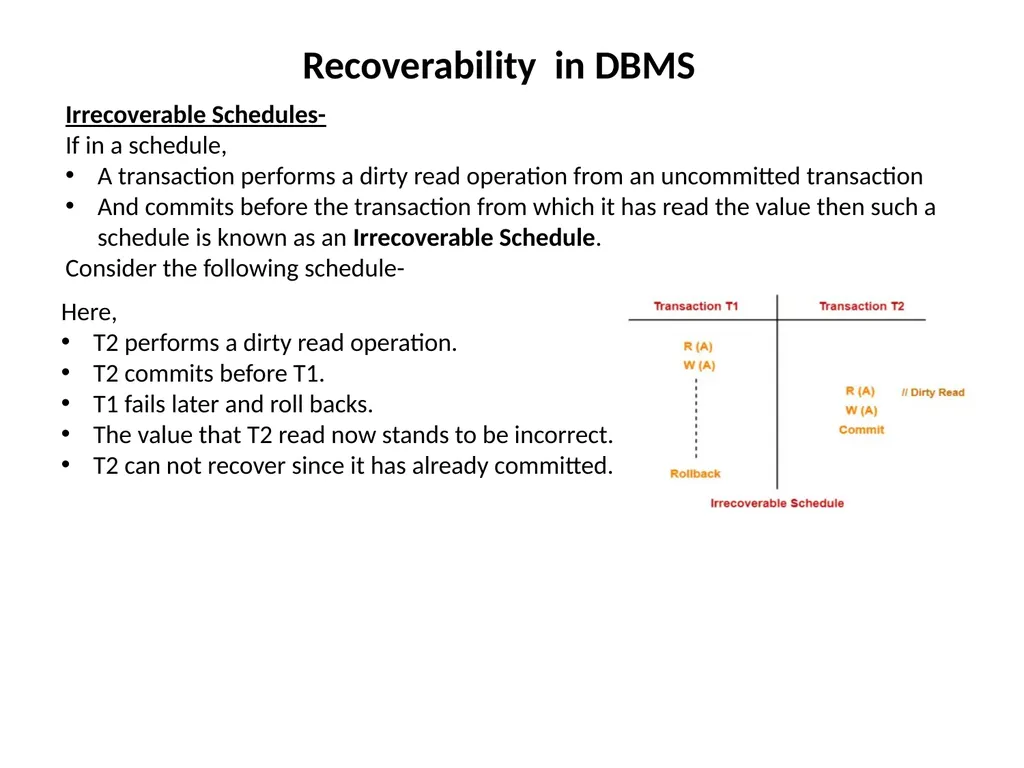
Recoverability in DBMS Here,
T2 performs a dirty read operation.
T2 commits before T1.
T1 fails later and roll backs.
The value that T2 read now stands to be incorrect.
T2 can not recover since it has already committed. Irrecoverable Schedules-
If in a schedule,
A transaction performs a dirty read operation from an uncommitted transaction
And commits before the transaction from which it has read the value then such a schedule is known as an Irrecoverable Schedule.
Consider the following schedule-<br>
T2 performs a dirty read operation.
T2 commits before T1.
T1 fails later and roll backs.
The value that T2 read now stands to be incorrect.
T2 can not recover since it has already committed. Irrecoverable Schedules-
If in a schedule,
A transaction performs a dirty read operation from an uncommitted transaction
And commits before the transaction from which it has read the value then such a schedule is known as an Irrecoverable Schedule.
Consider the following schedule-<br>
32
Recoverability in DBMS Recoverable Schedules-
If in a schedule,
A transaction performs a dirty read operation from an uncommitted transaction
And its commit operation is delayed till the uncommitted transaction either commits or roll backs then such a schedule is known as a Recoverable Schedule.
Here,
The commit operation of the transaction that performs the dirty read is delayed.
This ensures that it still has a chance to recover if the uncommitted transaction fails later.
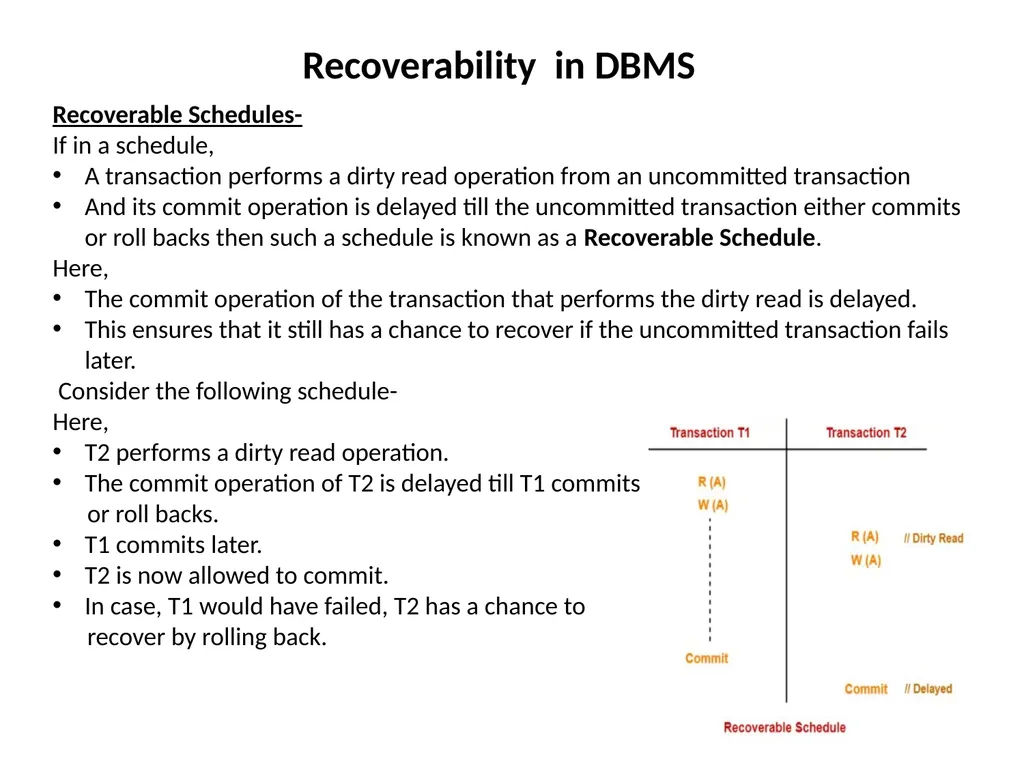
Consider the following schedule-
Here,
T2 performs a dirty read operation.
The commit operation of T2 is delayed till T1 commits
or roll backs.
T1 commits later.
T2 is now allowed to commit.
In case, T1 would have failed, T2 has a chance to
recover by rolling back.<br>
If in a schedule,
A transaction performs a dirty read operation from an uncommitted transaction
And its commit operation is delayed till the uncommitted transaction either commits or roll backs then such a schedule is known as a Recoverable Schedule.
Here,
The commit operation of the transaction that performs the dirty read is delayed.
This ensures that it still has a chance to recover if the uncommitted transaction fails later.
Consider the following schedule-
Here,
T2 performs a dirty read operation.
The commit operation of T2 is delayed till T1 commits
or roll backs.
T1 commits later.
T2 is now allowed to commit.
In case, T1 would have failed, T2 has a chance to
recover by rolling back.<br>
33
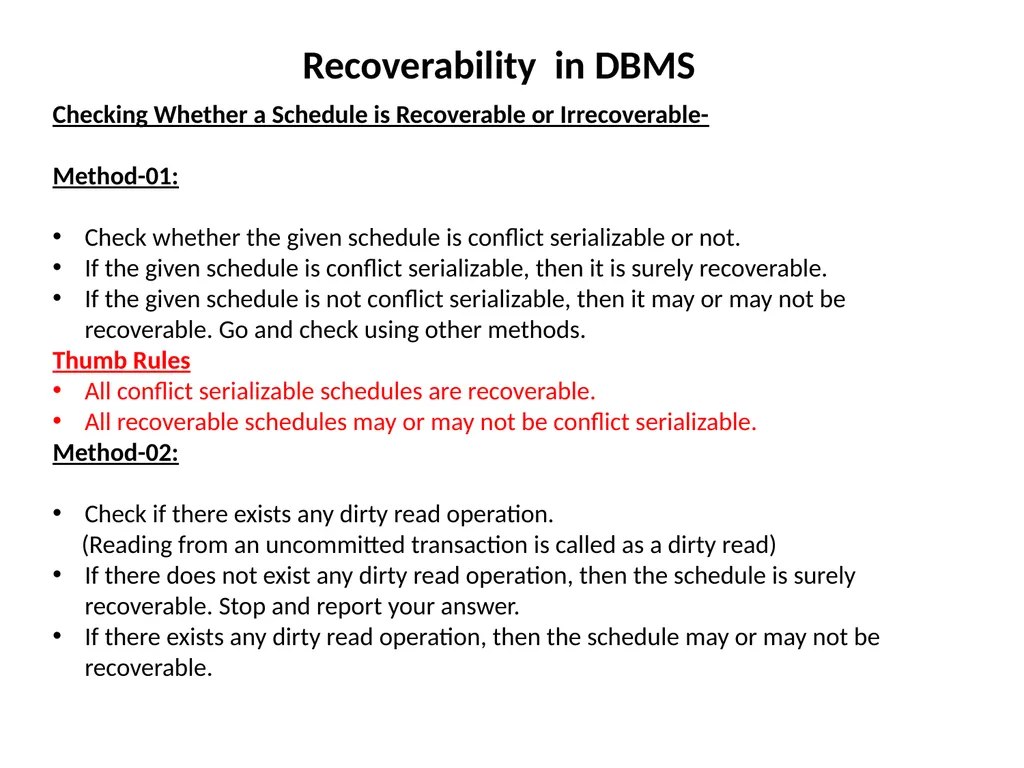
Recoverability in DBMS Checking Whether a Schedule is Recoverable or Irrecoverable-
Method-01:
Check whether the given schedule is conflict serializable or not.
If the given schedule is conflict serializable, then it is surely recoverable.
If the given schedule is not conflict serializable, then it may or may not be recoverable. Go and check using other methods.
Thumb Rules
All conflict serializable schedules are recoverable.
All recoverable schedules may or may not be conflict serializable.
Method-02:
Check if there exists any dirty read operation.
(Reading from an uncommitted transaction is called as a dirty read)
If there does not exist any dirty read operation, then the schedule is surely recoverable. Stop and report your answer.
If there exists any dirty read operation, then the schedule may or may not be recoverable.<br>
Method-01:
Check whether the given schedule is conflict serializable or not.
If the given schedule is conflict serializable, then it is surely recoverable.
If the given schedule is not conflict serializable, then it may or may not be recoverable. Go and check using other methods.
Thumb Rules
All conflict serializable schedules are recoverable.
All recoverable schedules may or may not be conflict serializable.
Method-02:
Check if there exists any dirty read operation.
(Reading from an uncommitted transaction is called as a dirty read)
If there does not exist any dirty read operation, then the schedule is surely recoverable. Stop and report your answer.
If there exists any dirty read operation, then the schedule may or may not be recoverable.<br>
34
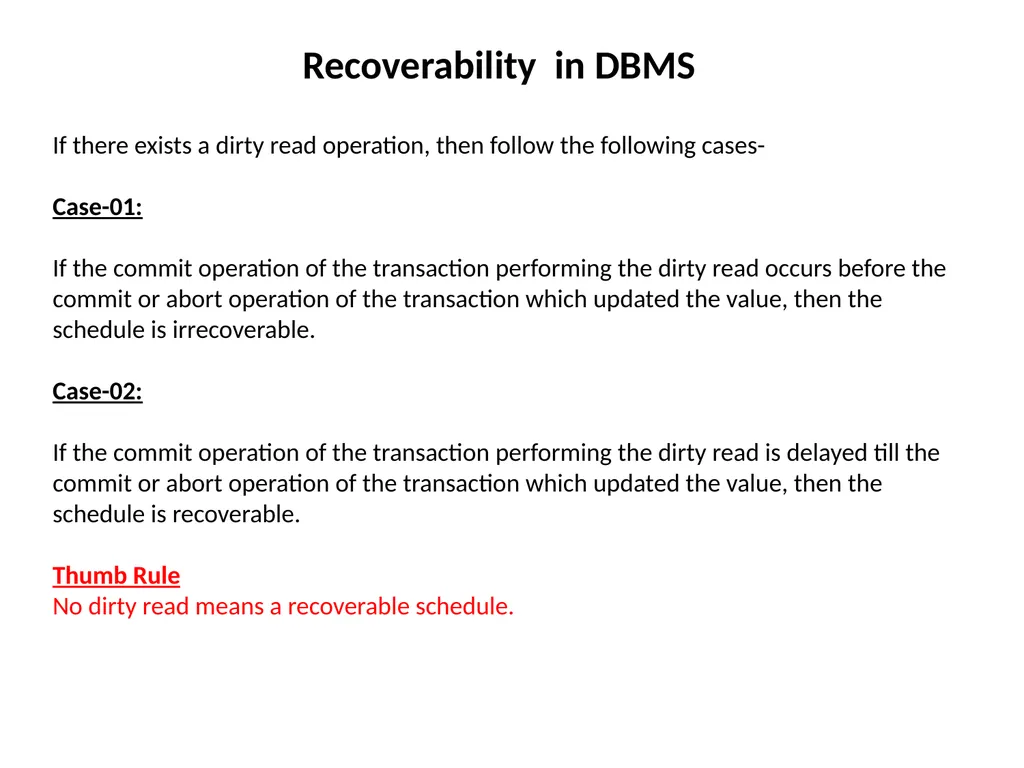
Recoverability in DBMS If there exists a dirty read operation, then follow the following cases-
Case-01:
If the commit operation of the transaction performing the dirty read occurs before the commit or abort operation of the transaction which updated the value, then the schedule is irrecoverable.
Case-02:
If the commit operation of the transaction performing the dirty read is delayed till the commit or abort operation of the transaction which updated the value, then the schedule is recoverable.
Thumb Rule
No dirty read means a recoverable schedule.<br>
Case-01:
If the commit operation of the transaction performing the dirty read occurs before the commit or abort operation of the transaction which updated the value, then the schedule is irrecoverable.
Case-02:
If the commit operation of the transaction performing the dirty read is delayed till the commit or abort operation of the transaction which updated the value, then the schedule is recoverable.
Thumb Rule
No dirty read means a recoverable schedule.<br>
35
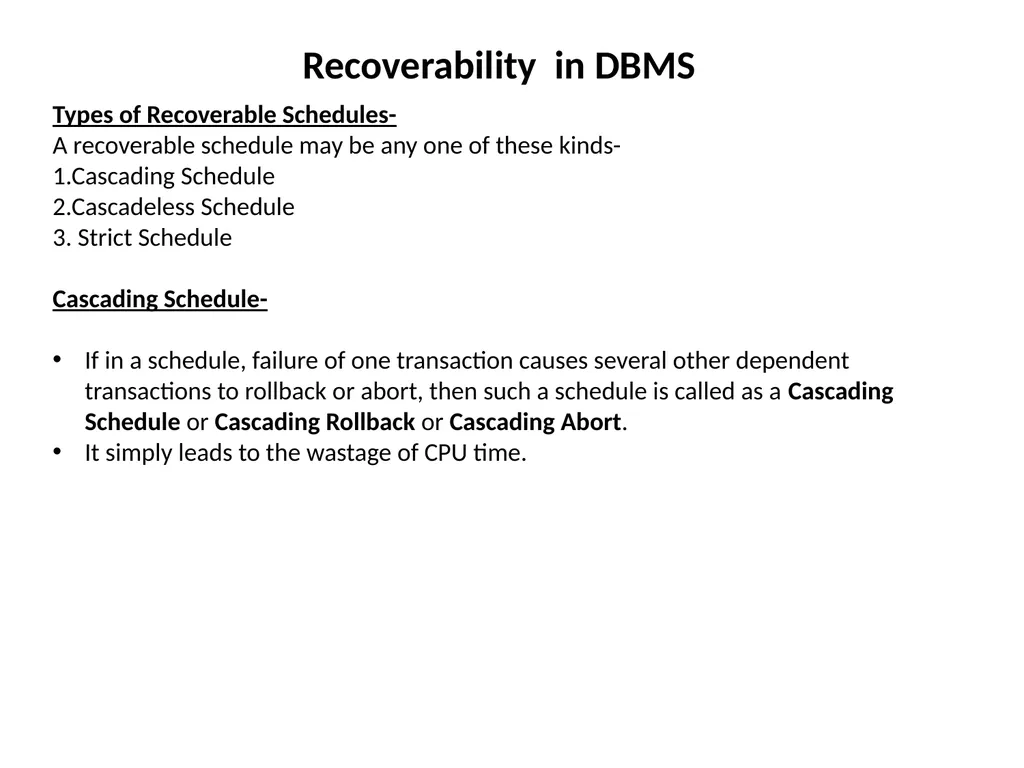
Recoverability in DBMS Types of Recoverable Schedules-
A recoverable schedule may be any one of these kinds-
1.Cascading Schedule
2.Cascadeless Schedule
3. Strict Schedule
Cascading Schedule-
If in a schedule, failure of one transaction causes several other dependent transactions to rollback or abort, then such a schedule is called as a Cascading Schedule or Cascading Rollback or Cascading Abort.
It simply leads to the wastage of CPU time.<br>
A recoverable schedule may be any one of these kinds-
1.Cascading Schedule
2.Cascadeless Schedule
3. Strict Schedule
Cascading Schedule-
If in a schedule, failure of one transaction causes several other dependent transactions to rollback or abort, then such a schedule is called as a Cascading Schedule or Cascading Rollback or Cascading Abort.
It simply leads to the wastage of CPU time.<br>
36
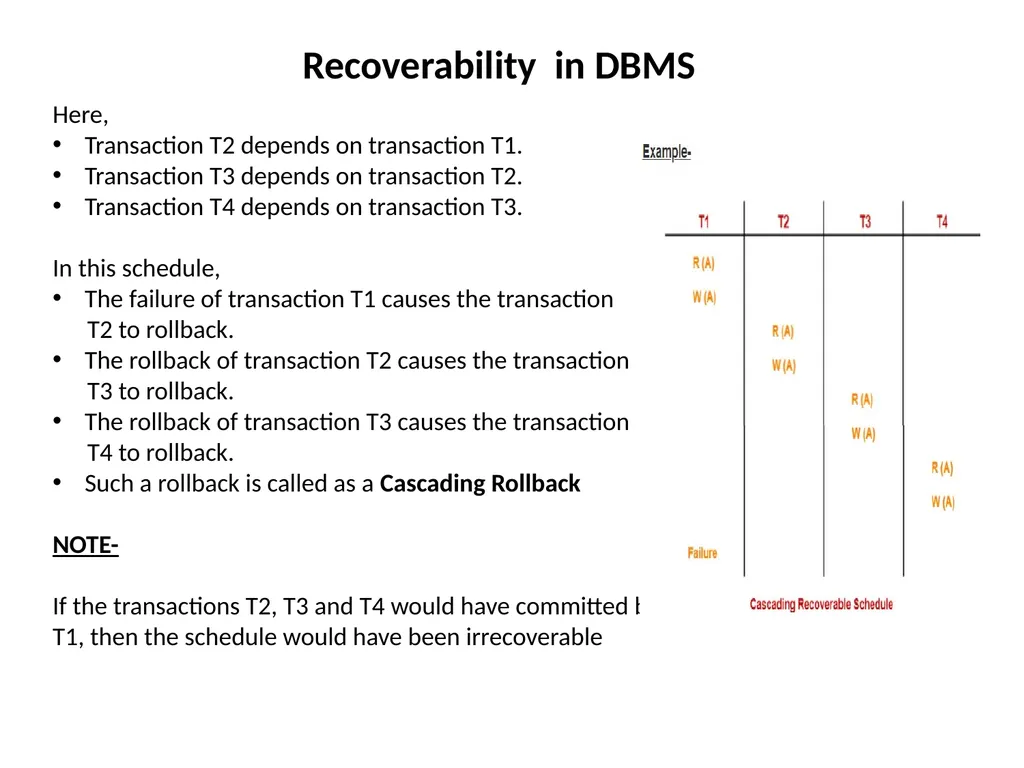
Recoverability in DBMS Here,
Transaction T2 depends on transaction T1.
Transaction T3 depends on transaction T2.
Transaction T4 depends on transaction T3.
In this schedule,
The failure of transaction T1 causes the transaction
T2 to rollback.
The rollback of transaction T2 causes the transaction
T3 to rollback.
The rollback of transaction T3 causes the transaction
T4 to rollback.
Such a rollback is called as a Cascading Rollback
NOTE-
If the transactions T2, T3 and T4 would have committed before the failure of transaction T1, then the schedule would have been irrecoverable<br>
Transaction T2 depends on transaction T1.
Transaction T3 depends on transaction T2.
Transaction T4 depends on transaction T3.
In this schedule,
The failure of transaction T1 causes the transaction
T2 to rollback.
The rollback of transaction T2 causes the transaction
T3 to rollback.
The rollback of transaction T3 causes the transaction
T4 to rollback.
Such a rollback is called as a Cascading Rollback
NOTE-
If the transactions T2, T3 and T4 would have committed before the failure of transaction T1, then the schedule would have been irrecoverable<br>
37
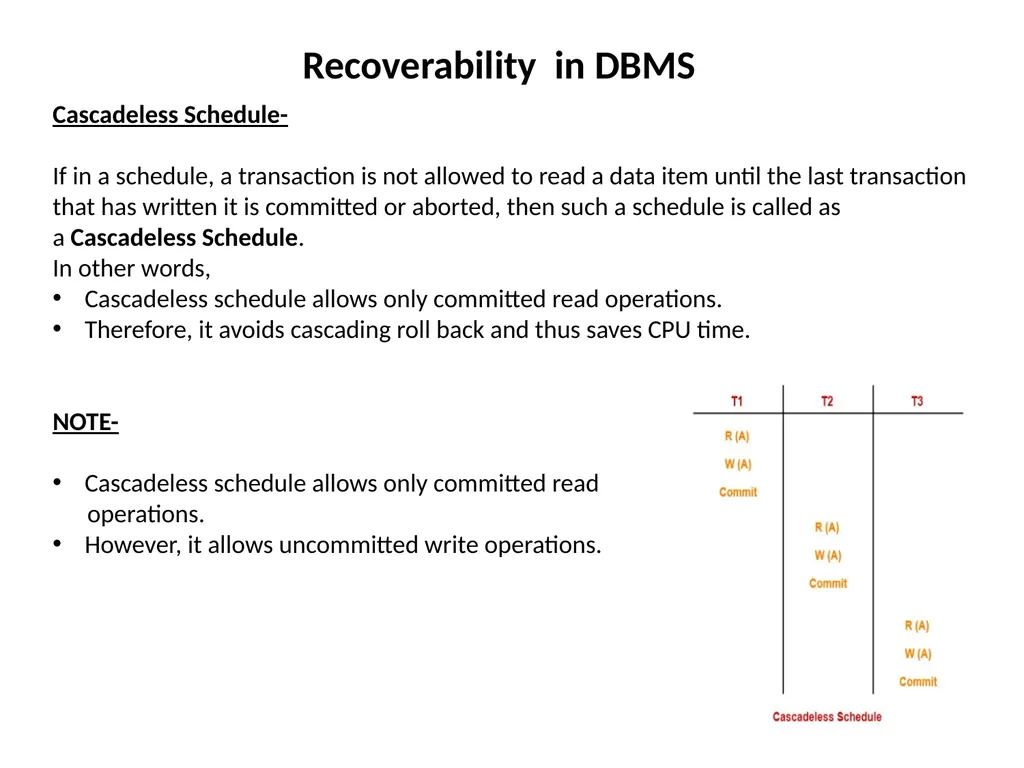
Recoverability in DBMS Cascadeless Schedule-
If in a schedule, a transaction is not allowed to read a data item until the last transaction that has written it is committed or aborted, then such a schedule is called as a Cascadeless Schedule.
In other words,
Cascadeless schedule allows only committed read operations.
Therefore, it avoids cascading roll back and thus saves CPU time.
NOTE-
Cascadeless schedule allows only committed read
operations.
However, it allows uncommitted write operations.<br>
If in a schedule, a transaction is not allowed to read a data item until the last transaction that has written it is committed or aborted, then such a schedule is called as a Cascadeless Schedule.
In other words,
Cascadeless schedule allows only committed read operations.
Therefore, it avoids cascading roll back and thus saves CPU time.
NOTE-
Cascadeless schedule allows only committed read
operations.
However, it allows uncommitted write operations.<br>
38
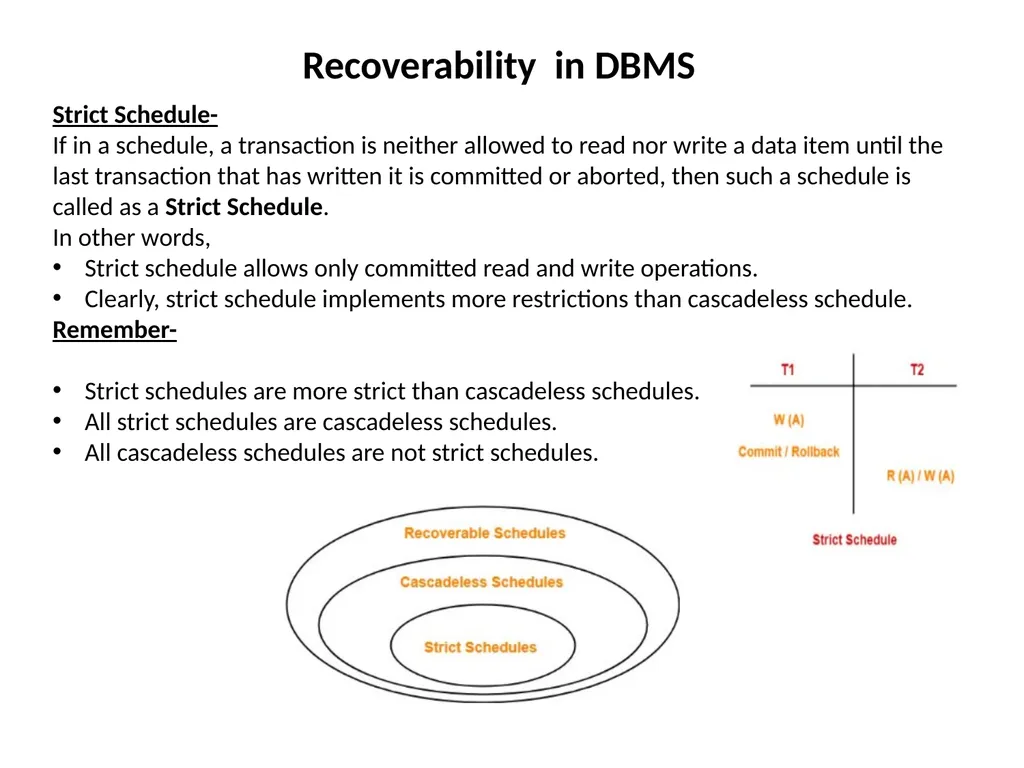
Recoverability in DBMS Strict Schedule-
If in a schedule, a transaction is neither allowed to read nor write a data item until the last transaction that has written it is committed or aborted, then such a schedule is called as a Strict Schedule.
In other words,
Strict schedule allows only committed read and write operations.
Clearly, strict schedule implements more restrictions than cascadeless schedule.
Remember-
Strict schedules are more strict than cascadeless schedules.
All strict schedules are cascadeless schedules.
All cascadeless schedules are not strict schedules.<br>
If in a schedule, a transaction is neither allowed to read nor write a data item until the last transaction that has written it is committed or aborted, then such a schedule is called as a Strict Schedule.
In other words,
Strict schedule allows only committed read and write operations.
Clearly, strict schedule implements more restrictions than cascadeless schedule.
Remember-
Strict schedules are more strict than cascadeless schedules.
All strict schedules are cascadeless schedules.
All cascadeless schedules are not strict schedules.<br>