Search Results for 'text tab'
text tab published presentations and documents on DocSlides.

Text Features Text Features Help Students Understand Nonfiction Text
by karlyn-bohler
Examples of Text Features. With Definitions. Expl...

A content placeholder. Use for text, graphics, tables and
by calandra-battersby
Here is a placeholder for more text. You may del...
Objectives To identify methods of creating tables, text boxes and graphic objects.
by reportssuper
To show techniques for formatting tables, text box...


Formatting text and paragraphs: tabs, indents, bullets, bo
by pasty-toler
10/25/13. Warm-up. When you see a document that i...
1 Word Lesson 4 Formatting Text
by cheryl-pisano
Microsoft Office 2010 Introductory. Pasewark &...
Rich Accessibility in Rich Text Editors
by riley
Douglas Harriman, Instructional/Web Designer, UCOP...

Subhead level one Main text (select text, then go
by trish-goza
Subhead level one Main text (select text, then go ...




CS 1501: Algorithm Implementation
by min-jolicoeur
LZW Data Compression. Data Compression. Reduce th...
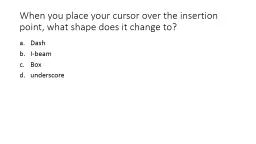
When you place your cursor over the insertion point, what s
by lindy-dunigan
Dash. I-beam. Box. underscore. When you place you...
This booth planner has been designed to show the 8 booth st
by lois-ondreau
. On each booth you will find 4 to 6 banners. Yo...

LIS650 part 5 Minor CSS, accessibility
by lindy-dunigan
Thomas Krichel. today. More on CSS. advice for ch...

Programming the Web using XHTML and JavaScript
by lois-ondreau
Chapter 4. Attributes, Lists, and Tables. Extensi...

Windows 7 Ribbon Framework: The Next Generation User Experience for Presenting Commands
by tawny-fly
in Windows Applications. Ryan Demopoulos. Program...

Advanced Accessible PDF Document Training
by alexa-scheidler
Adobe Acrobat 11. Agenda. Defining Accessibility....
Results: How to describe what you found
by briana-ranney
Today’s agenda:. Headings and . subheadings. Di...

Mr. Putter and Tabby Comparing & Contrasting Text to Text
by myesha-ticknor
Directions. Students, you will be creating a Powe...
Adding Pictures and Shapes to a Worksheet
by sherrill-nordquist
Lesson 11. Objectives. Software Orientation: The ...
PDF Accessibility Principles Part II
by phoebe-click
Crystal Monroy, Project Analyst. Kathryn Sharron,...

Romans a week-by-week Bible study for 2017
by alida-meadow
week . 35: . Romans . 12:9-21. Bible study time. ...
1 Word Lesson 5 Formatting Paragraphs and Documents
by aaron
Microsoft Office 2010 Introductory. Pasewark &...

[EBOOK] TABE 11 12 Student Math Manual and Practice Tests for Level D: Preparing Adult Learners to Ace TABE 11 12 Math Test Level D TABE 11 12 Math Student Textbooks
by jorelolan
[EBOOK] TABE 11 12 Student Math Manual and Practi...


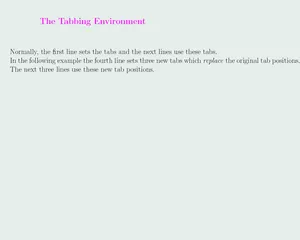
Program:TEXAuthor:DonaldKnuthManuals:TitleAuthorPublisherTheTEXBookDon
by celsa-spraggs
\begin{tabbing}Program\quad\=:\=\TeX\\[5pt]Author...