
Chapter 12: Programming Graphic LCD Raspberry Pi
Description: Chapter 12: Programming Graphic LCD Raspberry Pi Pico Interfacing and Programming with MicroPython www.NicerLand.com www.MicroDigitalEd.com Figure 12-1: A picture on a Mono-color LCD Figure 12-2: A Zoomed Picture on a Mono-color LCD Figure
Related Topics
Download Presentation
"Chapter 12: Programming Graphic LCD Raspberry Pi" is the property of its rightful owner. Permission is granted to download and print the materials on this website for personal, non-commercial use only, and to display it on your personal computer provided you do not modify the materials and that you retain all copyright notices contained in the materials. By downloading content from our website, you accept the terms of this agreement.
Presentation Transcript
slide1. Chapter 12:
Programming Graphic LCD Raspberry Pi Pico
Interfacing and Programming
with MicroPython www.NicerLand.com
www.MicroDigitalEd.com<br>
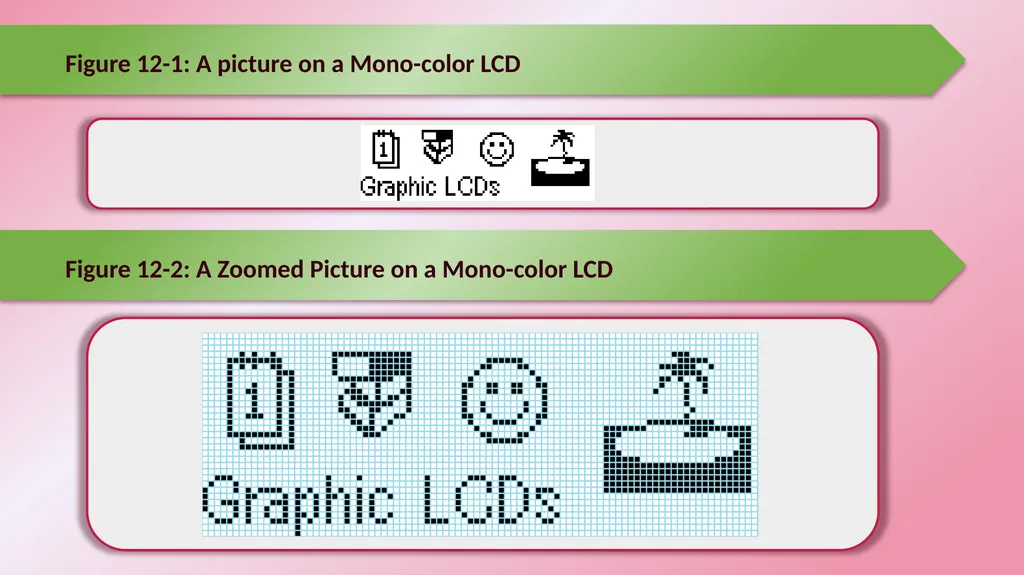
slide2. Figure 12-1: A picture on a Mono-color LCD Figure 12-2: A Zoomed Picture on a Mono-color LCD<br>
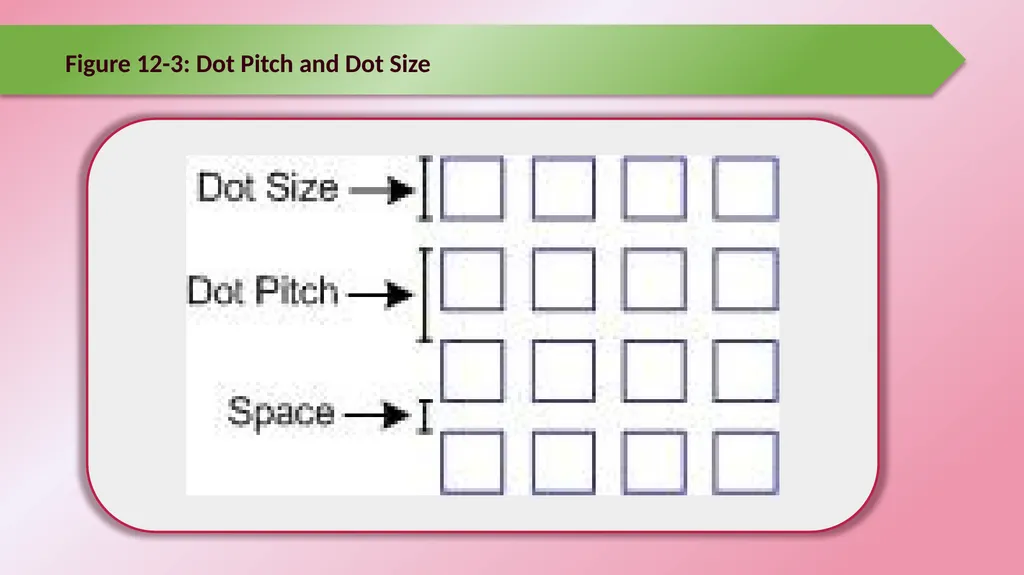
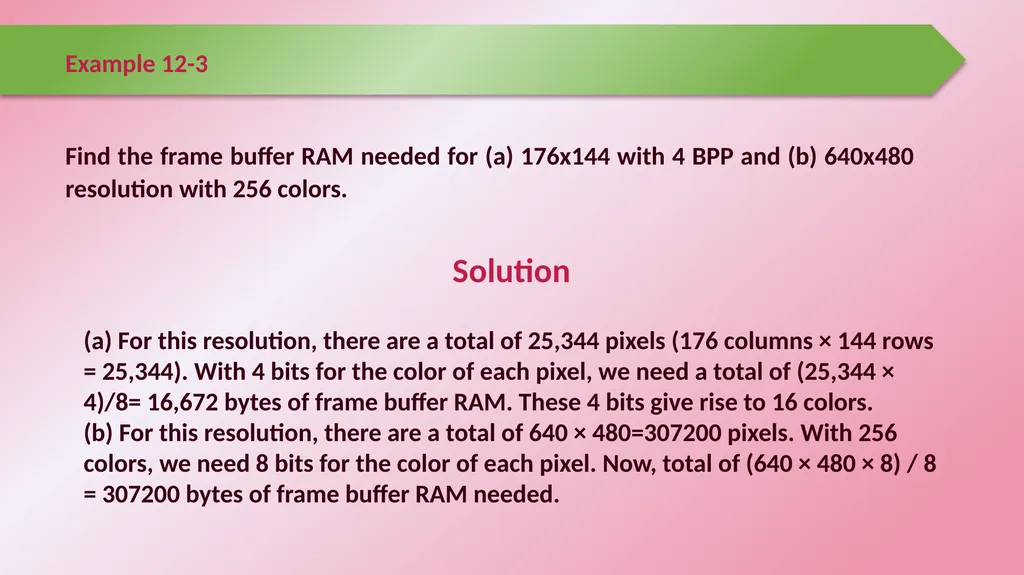
slide3. Figure 12-3: Dot Pitch and Dot Size<br>
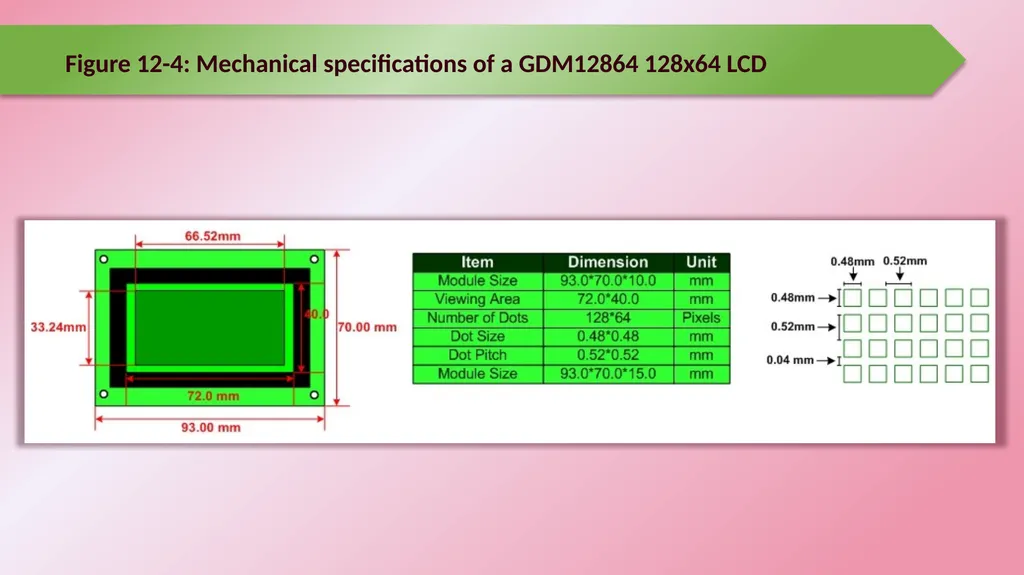
slide4. Figure 12-4: Mechanical specifications of a GDM12864 128x64 LCD<br>
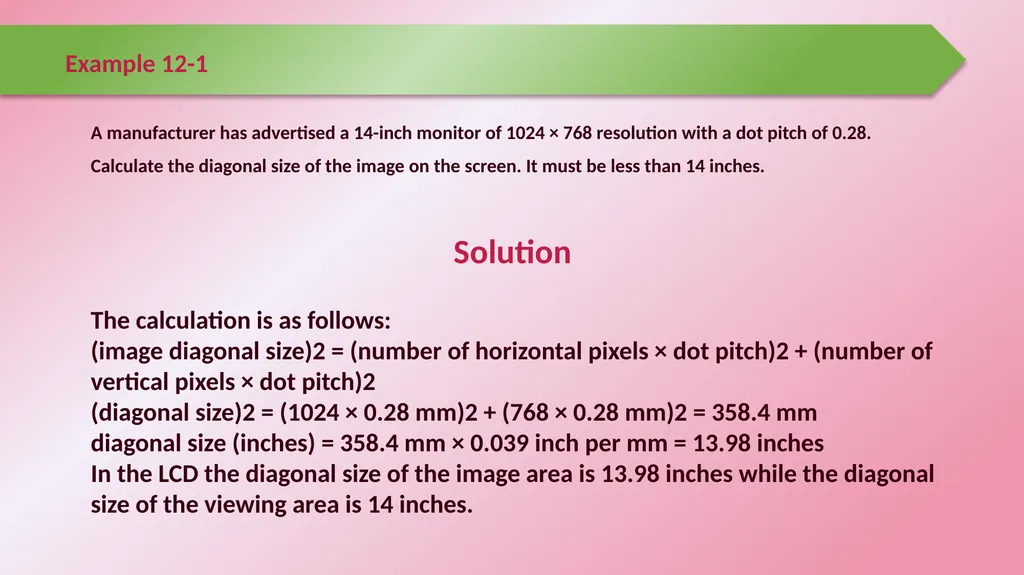
slide5. Example 12-1 A manufacturer has advertised a 14-inch monitor of 1024 × 768 resolution with a dot pitch of 0.28.
Calculate the diagonal size of the image on the screen. It must be less than 14 inches. Solution The calculation is as follows:
(image diagonal size)2 = (number of horizontal pixels × dot pitch)2 + (number of vertical pixels × dot pitch)2
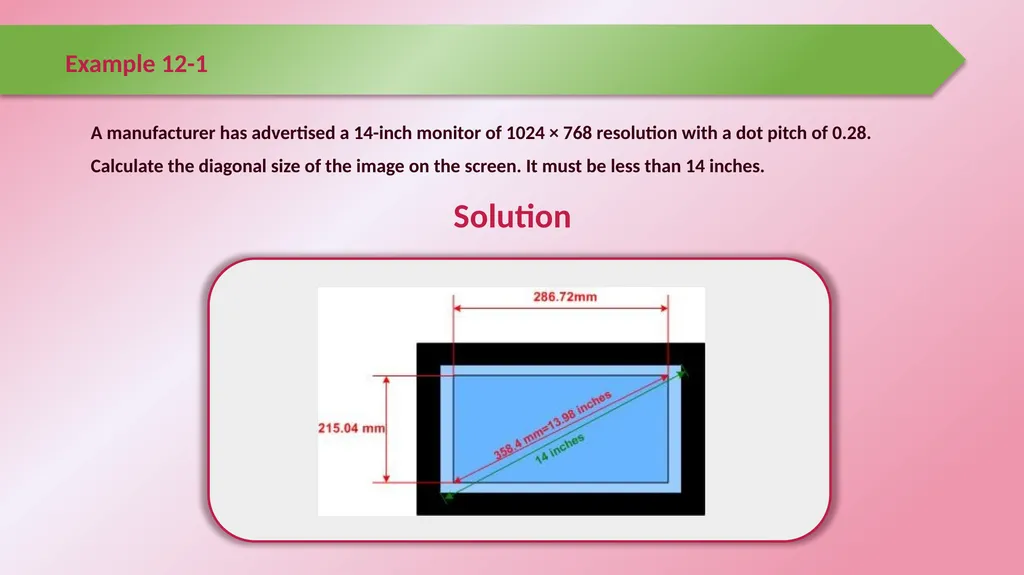
(diagonal size)2 = (1024 × 0.28 mm)2 + (768 × 0.28 mm)2 = 358.4 mm
diagonal size (inches) = 358.4 mm × 0.039 inch per mm = 13.98 inches
In the LCD the diagonal size of the image area is 13.98 inches while the diagonal size of the viewing area is 14 inches.<br>
slide6. Example 12-1 A manufacturer has advertised a 14-inch monitor of 1024 × 768 resolution with a dot pitch of 0.28.
Calculate the diagonal size of the image on the screen. It must be less than 14 inches. Solution<br>
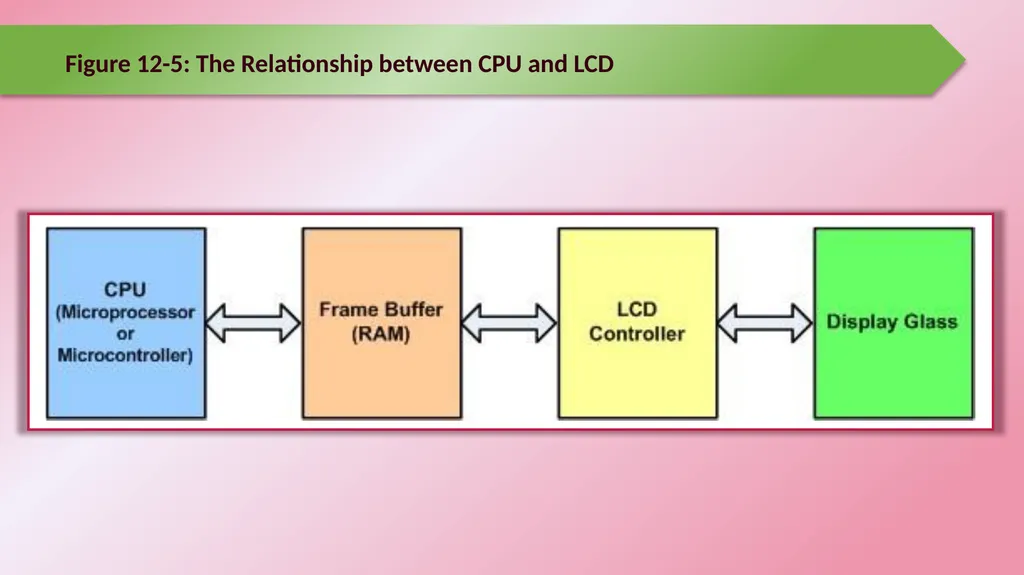
slide7. Figure 12-5: The Relationship between CPU and LCD<br>
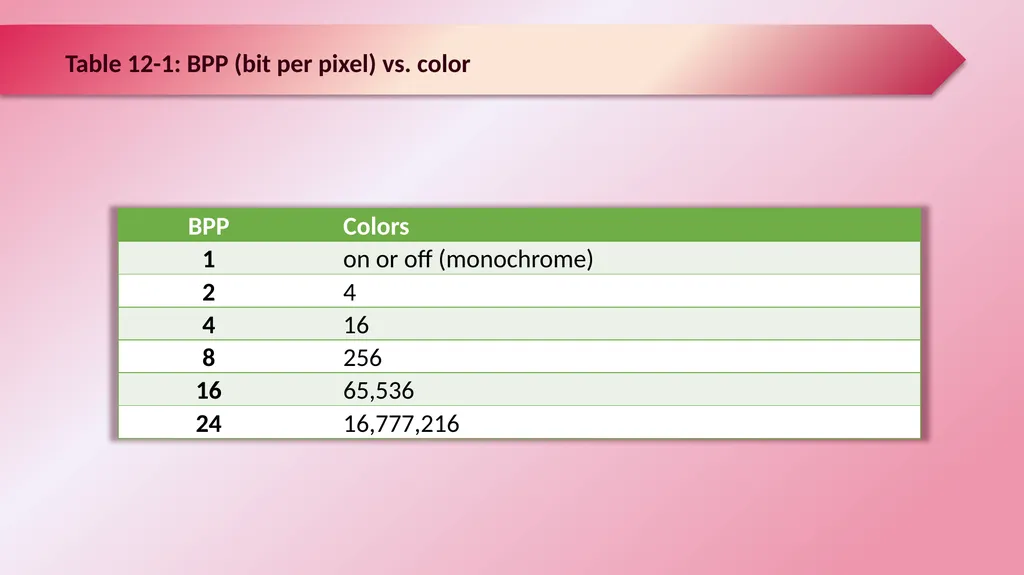
slide8. Table 12-1: BPP (bit per pixel) vs. color<br>
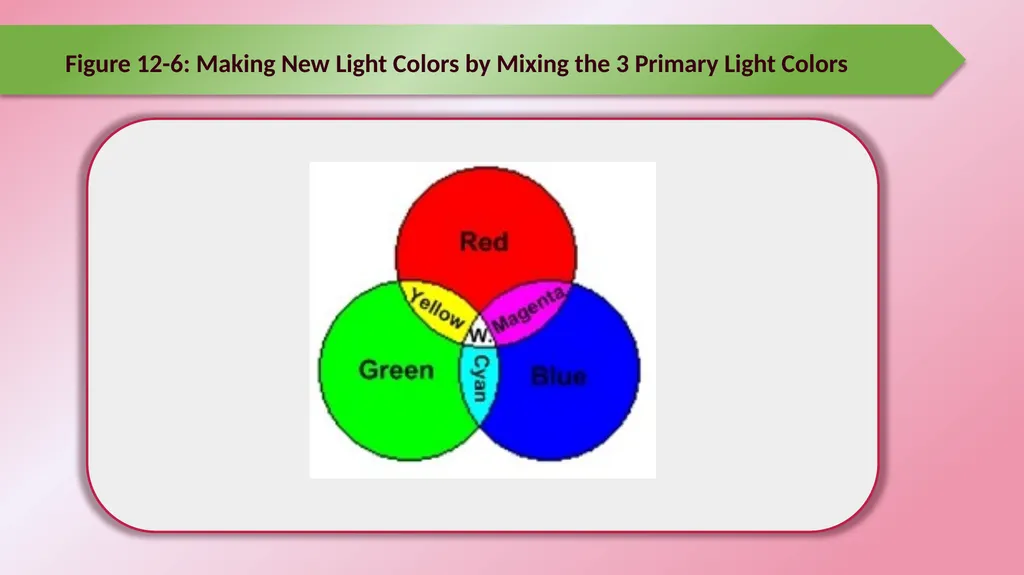
slide9. Figure 12-6: Making New Light Colors by Mixing the 3 Primary Light Colors<br>
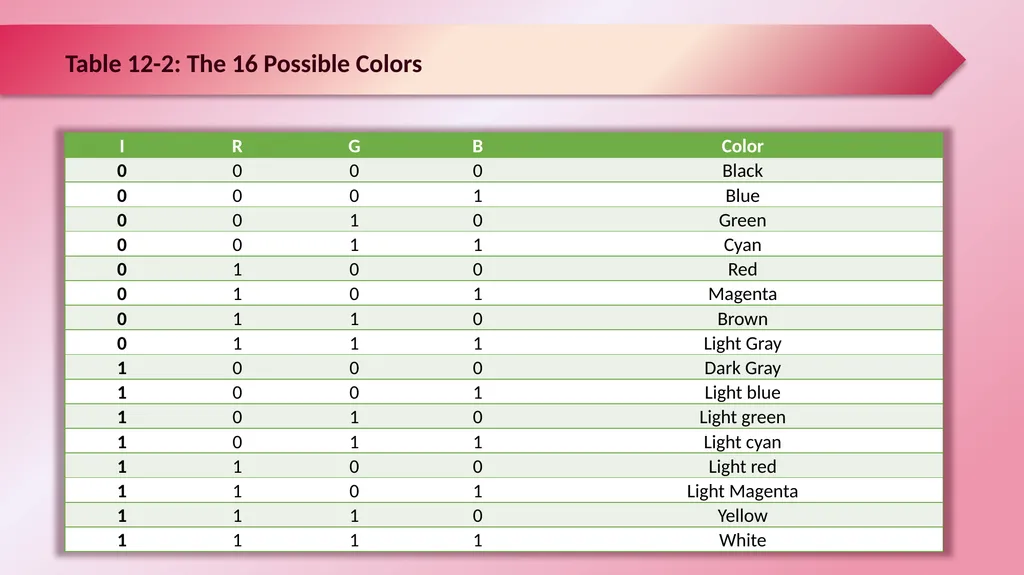
slide10. Table 12-2: The 16 Possible Colors<br>
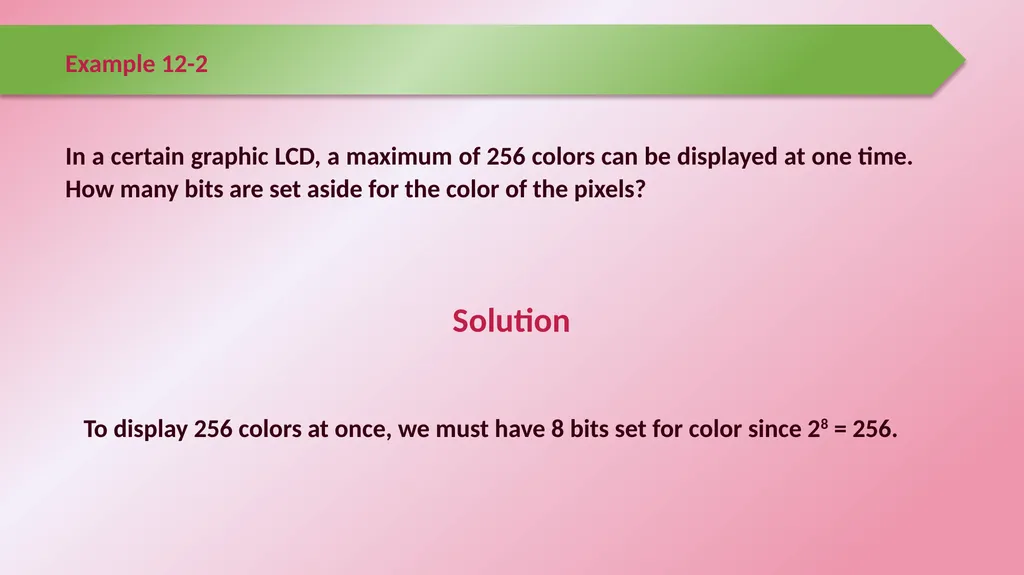
slide11. Example 12-2 In a certain graphic LCD, a maximum of 256 colors can be displayed at one time. How many bits are set aside for the color of the pixels? Solution To display 256 colors at once, we must have 8 bits set for color since 28 = 256.<br>
slide12. Example 12-3 Find the frame buffer RAM needed for (a) 176x144 with 4 BPP and (b) 640x480 resolution with 256 colors. Solution (a) For this resolution, there are a total of 25,344 pixels (176 columns × 144 rows = 25,344). With 4 bits for the color of each pixel, we need a total of (25,344 × 4)/8= 16,672 bytes of frame buffer RAM. These 4 bits give rise to 16 colors.
(b) For this resolution, there are a total of 640 × 480=307200 pixels. With 256 colors, we need 8 bits for the color of each pixel. Now, total of (640 × 480 × 8) / 8 = 307200 bytes of frame buffer RAM needed.<br>
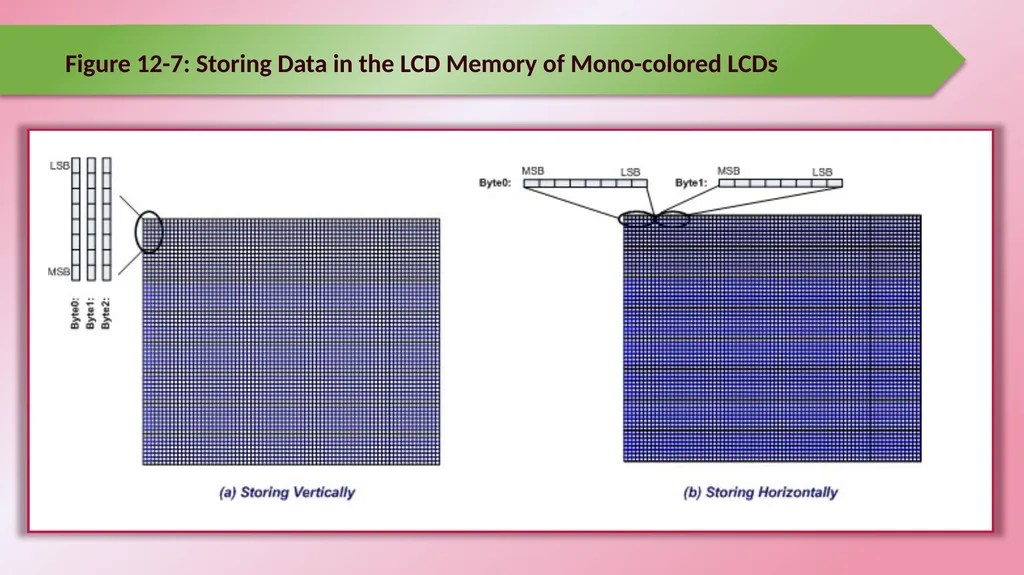
slide13. Figure 12-7: Storing Data in the LCD Memory of Mono-colored LCDs<br>
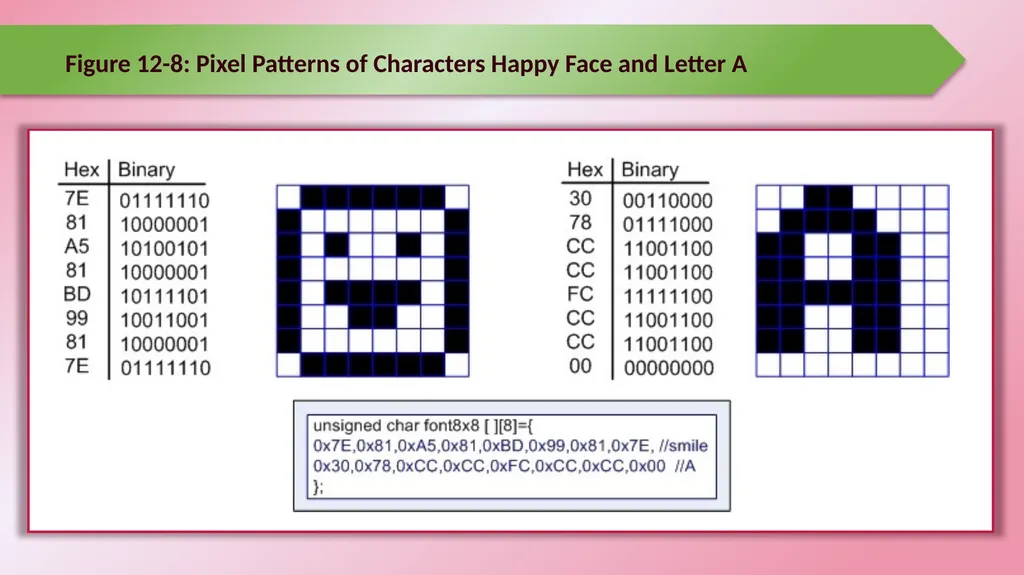
slide14. Figure 12-8: Pixel Patterns of Characters Happy Face and Letter A<br>
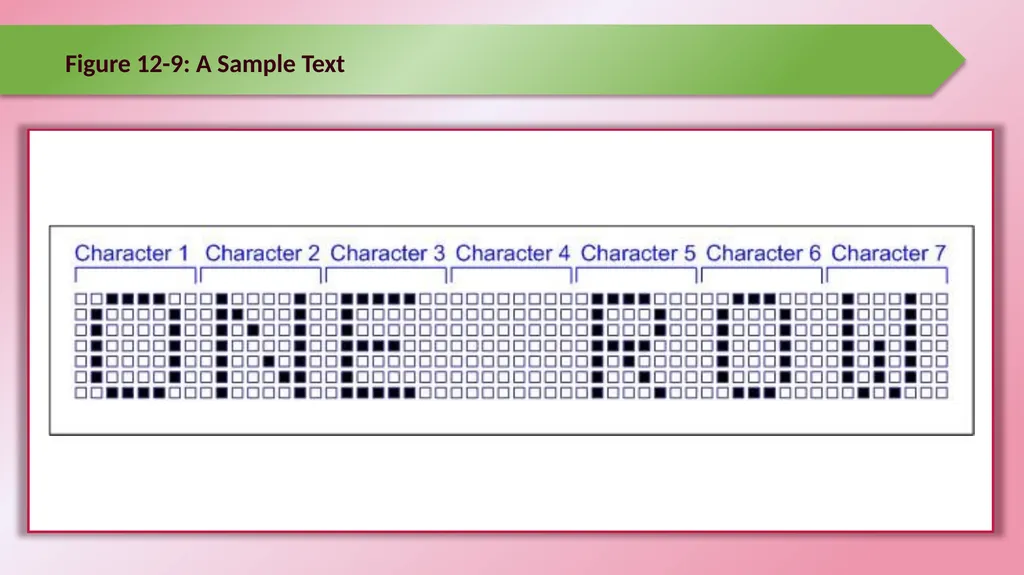
slide15. Figure 12-9: A Sample Text<br>
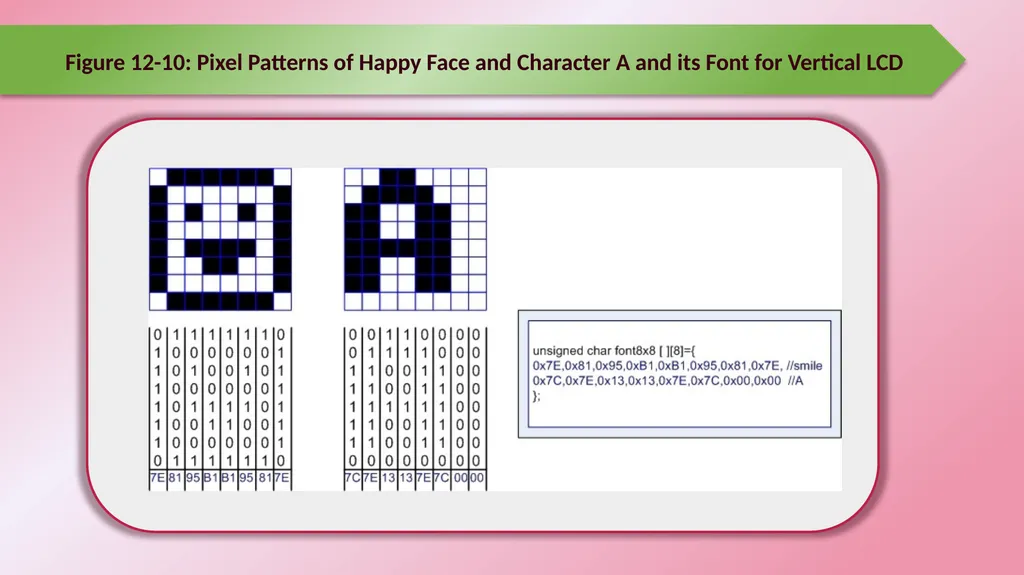
slide16. Figure 12-10: Pixel Patterns of Happy Face and Character A and its Font for Vertical LCD<br>
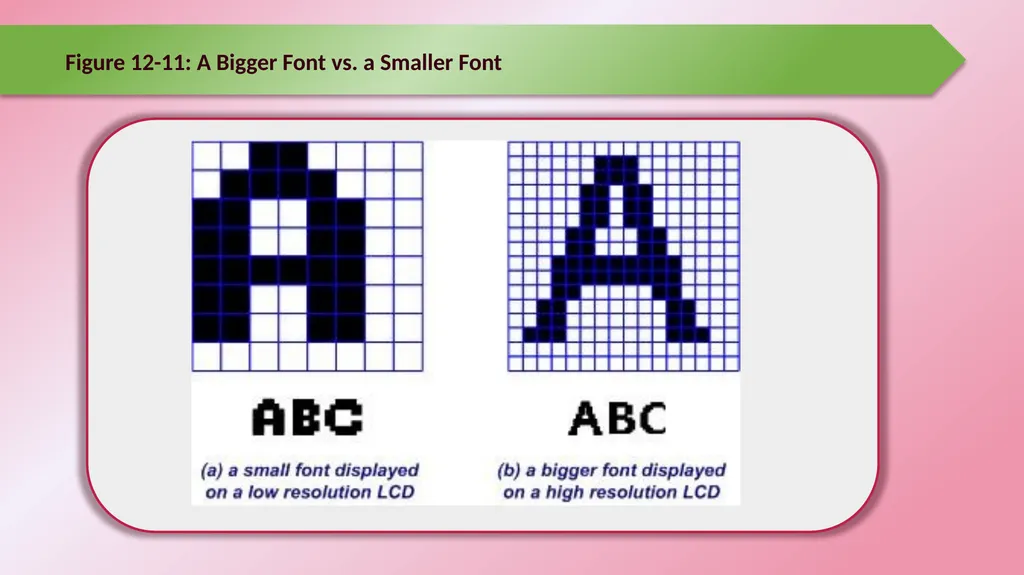
slide17. Figure 12-11: A Bigger Font vs. a Smaller Font<br>
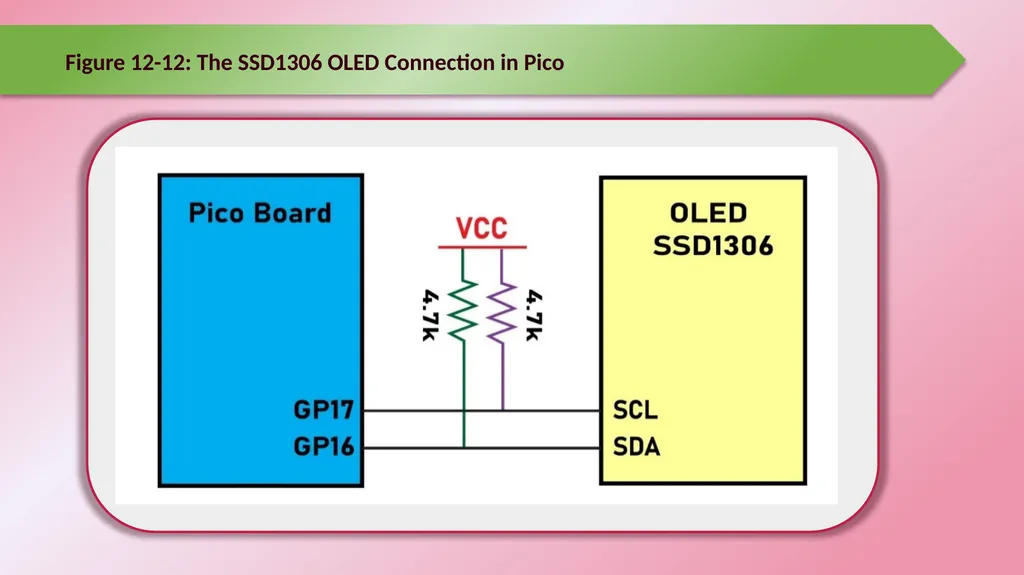
slide18. Figure 12-12: The SSD1306 OLED Connection in Pico<br>
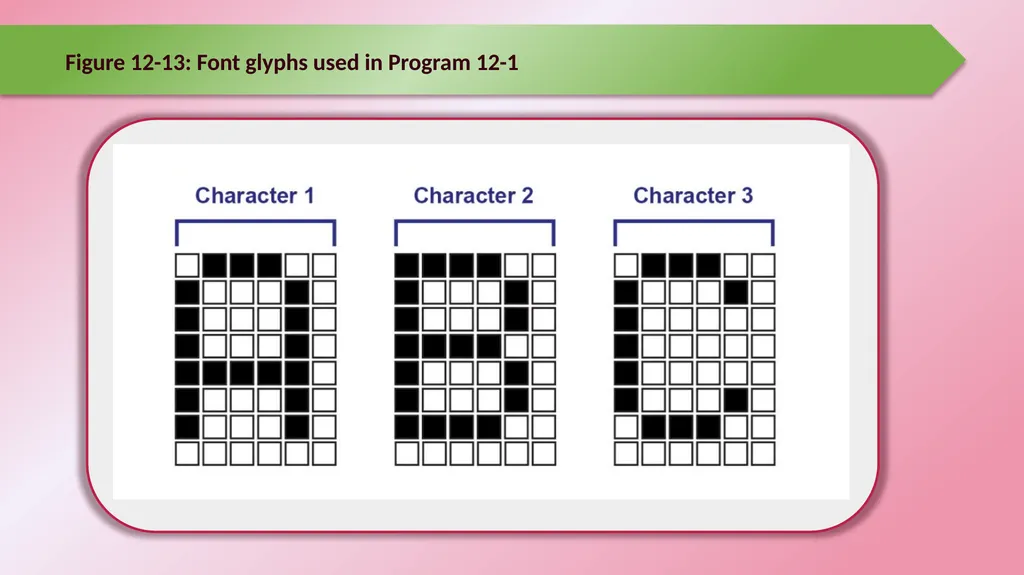
slide19. Figure 12-13: Font glyphs used in Program 12-1<br>
Programming Graphic LCD Raspberry Pi Pico
Interfacing and Programming
with MicroPython www.NicerLand.com
www.MicroDigitalEd.com<br>
slide2. Figure 12-1: A picture on a Mono-color LCD Figure 12-2: A Zoomed Picture on a Mono-color LCD<br>
slide3. Figure 12-3: Dot Pitch and Dot Size<br>
slide4. Figure 12-4: Mechanical specifications of a GDM12864 128x64 LCD<br>
slide5. Example 12-1 A manufacturer has advertised a 14-inch monitor of 1024 × 768 resolution with a dot pitch of 0.28.
Calculate the diagonal size of the image on the screen. It must be less than 14 inches. Solution The calculation is as follows:
(image diagonal size)2 = (number of horizontal pixels × dot pitch)2 + (number of vertical pixels × dot pitch)2
(diagonal size)2 = (1024 × 0.28 mm)2 + (768 × 0.28 mm)2 = 358.4 mm
diagonal size (inches) = 358.4 mm × 0.039 inch per mm = 13.98 inches
In the LCD the diagonal size of the image area is 13.98 inches while the diagonal size of the viewing area is 14 inches.<br>
slide6. Example 12-1 A manufacturer has advertised a 14-inch monitor of 1024 × 768 resolution with a dot pitch of 0.28.
Calculate the diagonal size of the image on the screen. It must be less than 14 inches. Solution<br>
slide7. Figure 12-5: The Relationship between CPU and LCD<br>
slide8. Table 12-1: BPP (bit per pixel) vs. color<br>
slide9. Figure 12-6: Making New Light Colors by Mixing the 3 Primary Light Colors<br>
slide10. Table 12-2: The 16 Possible Colors<br>
slide11. Example 12-2 In a certain graphic LCD, a maximum of 256 colors can be displayed at one time. How many bits are set aside for the color of the pixels? Solution To display 256 colors at once, we must have 8 bits set for color since 28 = 256.<br>
slide12. Example 12-3 Find the frame buffer RAM needed for (a) 176x144 with 4 BPP and (b) 640x480 resolution with 256 colors. Solution (a) For this resolution, there are a total of 25,344 pixels (176 columns × 144 rows = 25,344). With 4 bits for the color of each pixel, we need a total of (25,344 × 4)/8= 16,672 bytes of frame buffer RAM. These 4 bits give rise to 16 colors.
(b) For this resolution, there are a total of 640 × 480=307200 pixels. With 256 colors, we need 8 bits for the color of each pixel. Now, total of (640 × 480 × 8) / 8 = 307200 bytes of frame buffer RAM needed.<br>
slide13. Figure 12-7: Storing Data in the LCD Memory of Mono-colored LCDs<br>
slide14. Figure 12-8: Pixel Patterns of Characters Happy Face and Letter A<br>
slide15. Figure 12-9: A Sample Text<br>
slide16. Figure 12-10: Pixel Patterns of Happy Face and Character A and its Font for Vertical LCD<br>
slide17. Figure 12-11: A Bigger Font vs. a Smaller Font<br>
slide18. Figure 12-12: The SSD1306 OLED Connection in Pico<br>
slide19. Figure 12-13: Font glyphs used in Program 12-1<br>