
Computer Graphics Chapter 1 Third Lecture 4.
CP
Published · 26 slides · 0 views
1 / 1

Description
Computer Graphics Chapter 1 Third Lecture 4. Raster Graphics An image that is presented on the computer screen is made up of pixels. The screen consists of a rectangular grid of pixels, arranged in rows and columns. The pixels are small
Related Topics
Share
Embed code
Download this presentation From Below
"Computer Graphics Chapter 1 Third Lecture 4." is the property of its rightful owner. Permission is granted to download and print the materials on this website for personal, non-commercial use only, and to display it on your personal computer provided you do not modify the materials and that you retain all copyright notices contained in the materials. By downloading content from our website, you accept the terms of this agreement.
Presentation Transcript
01
Computer Graphics Chapter 1
Third Lecture<br>
Third Lecture<br>
02
4. Raster Graphics An image that is presented on the computer screen is made up of pixels. The screen consists of a rectangular grid of pixels, arranged in rows and columns. The pixels are small enough that they are not easy to see individually. In fact, for many very high-resolution displays, they become essentially invisible. At a given time, each pixel can show only one color. Most screens these days use 24-bit color, where a color can be specified by three 8-bit numbers, giving the levels of red, green, and blue in the color. Any color that can be shown on the screen is made up of some combination of these three “primary” colors.<br>
03
4. Raster Graphics In any case, the color values for all the pixels on the screen are stored in a large block of memory known as a frame buffer. Changing the image on the screen requires changing color values that are stored in the frame buffer. The screen is redrawn many times per second,
so that almost immediately after the color values are changed in the frame buffer, the colors of the pixels on the screen will be changed to match, and the displayed image will change.<br>
so that almost immediately after the color values are changed in the frame buffer, the colors of the pixels on the screen will be changed to match, and the displayed image will change.<br>
04
4. Raster Graphics A computer screen used in this way is the basic model of raster graphics. The term “raster” technically refers to the mechanism used on older vacuum tube computer monitors: An electron beam would move along the rows of pixels, making them glow. The beam was moved across the screen by powerful magnets that would deflect the path of the electrons.
The stronger the beam, the brighter the glow of the pixel, so the brightness of the pixels could be controlled by modulating the intensity of the electron beam. The color values stored in the frame buffer were used to determine the intensity of the electron beam. (For a color screen, each pixel had a red dot, a green dot, and a blue dot, which were separately illuminated by the beam.)<br>
The stronger the beam, the brighter the glow of the pixel, so the brightness of the pixels could be controlled by modulating the intensity of the electron beam. The color values stored in the frame buffer were used to determine the intensity of the electron beam. (For a color screen, each pixel had a red dot, a green dot, and a blue dot, which were separately illuminated by the beam.)<br>
05
4. Raster Graphics A modern flat-screen computer monitor is not a raster in the same sense. There is no moving electron beam. The mechanism that controls the colors of the pixels is different for different types of screen. But the screen is still made up of pixels, and the color values for all the pixels are still stored in a frame buffer. The idea of an image consisting of a grid of pixels, with numerical color values for each pixel, defines raster graphics.<br>
06
Display Screens Display screens are output devices that show programming instructions and data as they are being and information after it is processed, display screens are either CRT (Cathode-Ray-Tube) or flat-panel display.
CRT Displays: use vacuum tube like that in a TV set.
Flat-panel displays: are thinner, weightless, and consume less power than CRT displays but are not as clear. Principal flat-panel displays are liquid-crystal displays (LCD) and gas-plasma display.
The size of screen is measured diagonally from corner to corner in inches.<br>
CRT Displays: use vacuum tube like that in a TV set.
Flat-panel displays: are thinner, weightless, and consume less power than CRT displays but are not as clear. Principal flat-panel displays are liquid-crystal displays (LCD) and gas-plasma display.
The size of screen is measured diagonally from corner to corner in inches.<br>
07
Display Screens The Cathode Ray Tube (CRT) Display:
The CRT display screens consist of three components:
Cathode Ray Tube (CRT).
Frame buffer.
Display controller.<br>
The CRT display screens consist of three components:
Cathode Ray Tube (CRT).
Frame buffer.
Display controller.<br>
08
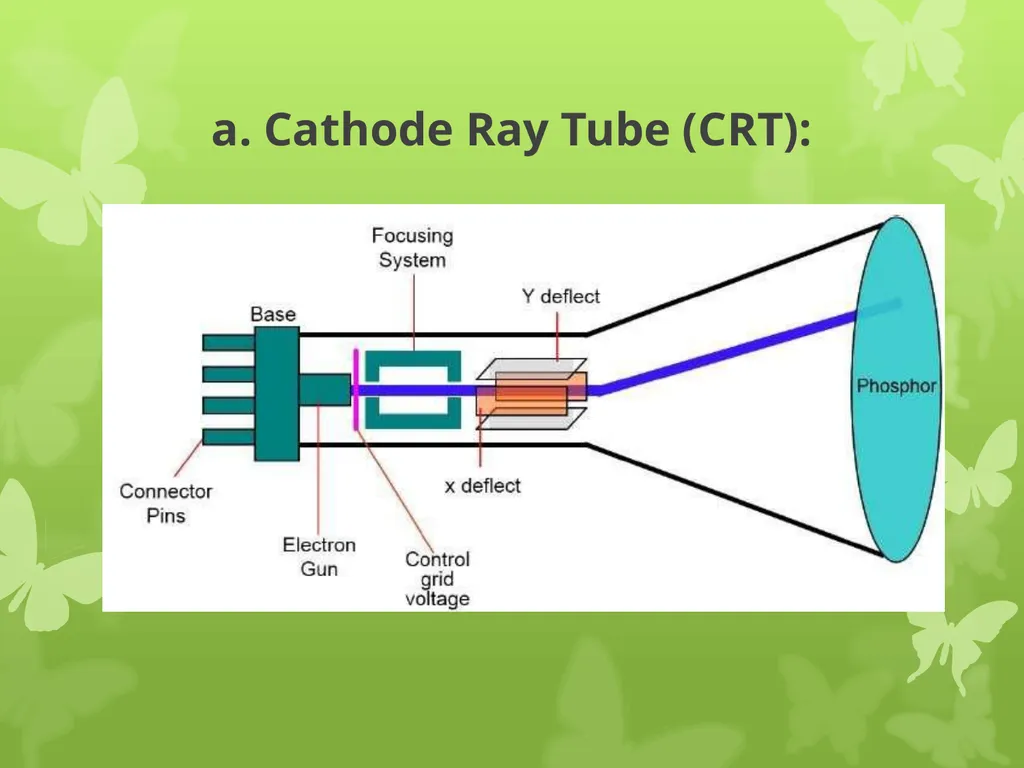
a. Cathode Ray Tube (CRT) Consists of electron gun that contains a cathode that when heated emits a beam of negatively charged electrons towards a positively charged phosphor coated screen. The electron beam passes through the focusing and deflection system, which consist of an electrostatic or magnetic field. A color CRT has three electron guns, one for each of three primary colors: red, green, and blue.<br>
09
a. Cathode Ray Tube (CRT): The focusing system concentrates the beam so that by the time the electrons reach the screen, they have converted to small dot. The deflection system, which consists of two pairs of deflection plates (horizontal and vertical) directs the electron beam to any point on the screen.<br>
10
a. Cathode Ray Tube (CRT): When the electron beam strikes the screen, the phosphor emits a spot of visible light that intensity depends on the number of electrons on the beam. The duration of this light, called persistence, depends on the type of phosphor that coats the screen. In order to give the viewer the appearance of continuous flicker-free image, each dot on the screen must be intensified many times per second. This type of CRT is called a refresh CRT. Two types of refresh CRTs are available: raster-scan and random vector.<br>
11
a. Cathode Ray Tube (CRT):<br>
12
b. Frame Buffer: Each screen pixel corresponds to a particular entry in a two dimensional array residing in memory. This memory is called a frame buffer or a bit map. The number of rows in the frame buffer array equals the number of raster lines on the display screen. The number of columns in this array equals the number of pixels on each raster line.<br>
13
b. Frame Buffer: The term pixel (picture element) is also used to describe the row and column location in the frame buffer arrays that corresponds to the screen location. A 512*512 display screen requires 262,144 pixel memory location. Whenever we wish to display a pixel on the screen, a specific value is placed into the corresponding memory location in the frame buffer array. Each screen location pixel and corresponding memory location in the frame buffer is accessed by an (X,Y) integer coordinate pair. The x value refers to the columns, the y value to the row position.<br>
14
b. Frame Buffer: Each pixel in the frame buffer array is composed of a number of bits. A black and white image that has only two intensity levels, on-off, has single bit plane frame buffer. In order to display a color or a black and white quality image with shades of gray, additional bit planes are needed.<br>
15
c. Display Controller: The hardware device that read the contents of the frame buffer into video buffer, which then converts the digital representation of a string of pixel values into analogue voltage signals that are sent serially to the video display screen (CRT).<br>
16
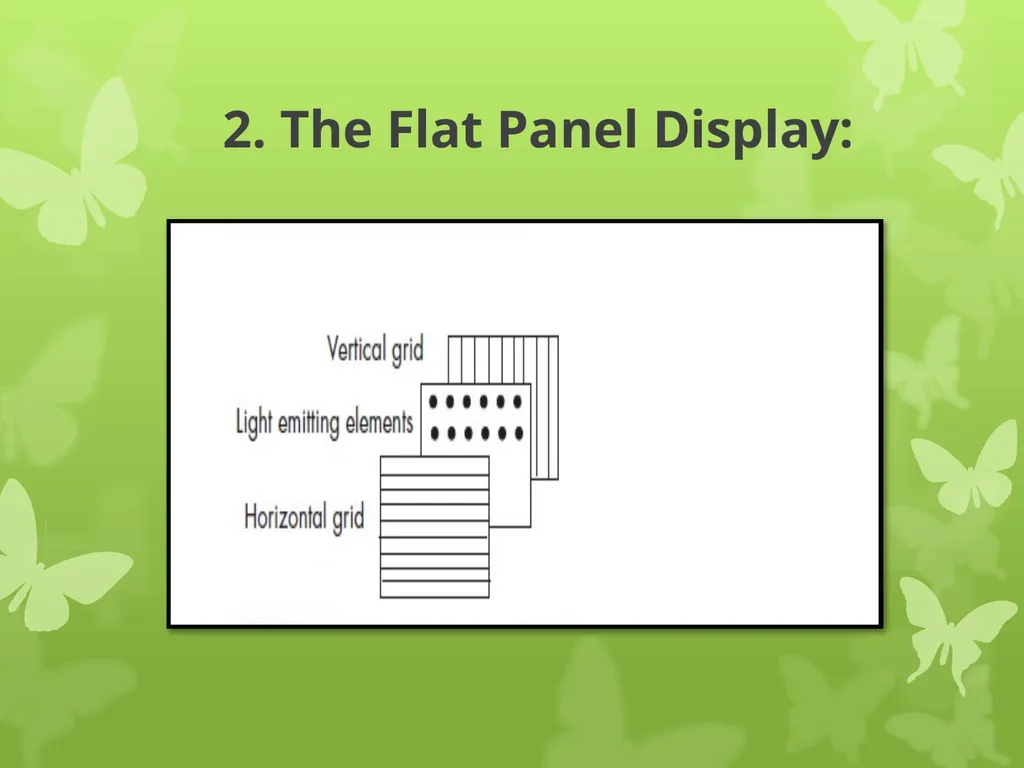
2. The Flat Panel Display: Compared to CRT displays, flat panel displays are much thinner, weightless, and consuming less power. Thus they are better for portable computers. Flat panel displays are made up of two plates of glass with a substance between them, which is activating in different ways.<br>
17
2. The Flat Panel Display: which is activating in different ways. Flat panel displays are distinguished in two ways:
1- By the substance between the plates of glass.
2- By the arrangement of the transistors in the screens.<br>
1- By the substance between the plates of glass.
2- By the arrangement of the transistors in the screens.<br>
18
2. The Flat Panel Display: Two common types of technology used in flat panel display screens are:
a. Liquid Crystal display (LCD)
b. Gas Plasma Display<br>
a. Liquid Crystal display (LCD)
b. Gas Plasma Display<br>
19
2. The Flat Panel Display: a. Liquid Crystal display (LCD):
It consists of a substance called liquid crystal, the molecules of which line up in a way that alter their optical properties. As a result, light usually backlighting behind the screen is blocked or allowed through to create an image.<br>
It consists of a substance called liquid crystal, the molecules of which line up in a way that alter their optical properties. As a result, light usually backlighting behind the screen is blocked or allowed through to create an image.<br>
20
2. The Flat Panel Display: b. Gas Plasma Display:
It is like a neon bulb, in which the display uses a gas that emits light in the presence of an electric current. That is, the technology uses neon gas and electrodes above and below the gas. When electric current passes between the electrodes, the gas glows. Although gas plasma technology has better resolution than LCD technology, it is more expensive and thus is not used as often as a LCD. On the other hand, LCDs are not practical for screens larger than 20 inches and so are not practical for TV size screen.<br>
It is like a neon bulb, in which the display uses a gas that emits light in the presence of an electric current. That is, the technology uses neon gas and electrodes above and below the gas. When electric current passes between the electrodes, the gas glows. Although gas plasma technology has better resolution than LCD technology, it is more expensive and thus is not used as often as a LCD. On the other hand, LCDs are not practical for screens larger than 20 inches and so are not practical for TV size screen.<br>
21
2. The Flat Panel Display:<br>
22
6. Screen Clarity: The screen clarity depends on three qualities:
Resolution
Dot Pitch
Refresh Rate<br>
Resolution
Dot Pitch
Refresh Rate<br>
23
1.Resolution Resolution is the numbers of pixels in digital image with N*M(N horizontal pixels M vertical pixels),the number of pixels give the capacity to display the details in original image. Resolution is expressed in terms of the formula Each pixel can be assigned a color or particular shade of gray. A screen with 640*480 pixels multiplied together equals 307,200 pixels. This screen will be less clear and sharp than a screen with 800* 600 (equals 480,000) 01024*768 r (equals 786,432) pixels.<br>
24
1.Resolution Resolution depend on :
1. Special resolution (number of pixels).
2. Brightness resolution (values of pixels).<br>
1. Special resolution (number of pixels).
2. Brightness resolution (values of pixels).<br>
25
2. Dot Pitch It is the amount of space between the center of adjacent pixels, the closer the dots, the crisper the image. For crisp images, dot pitch should be less than 0.31 millimeter.<br>
26
3. Refresh Rate It is the number of times per second that the pixels are recharged so that their glow remains bright. In general, displays are refreshed 45 to 100 times per second.<br>