
CS639: Data Management for Data Science Lecture 4:
Description: CS639: Data Management for Data Science Lecture 4: SQL for Data Science Theodoros Rekatsinas 1 2 Announcements Assignment 1 is due tomorrow (end of day) Any questions? PA2 is out. It is due on the 19th Start early Ask questions on Piazza
Related Topics
Download Presentation
"CS639: Data Management for Data Science Lecture 4:" is the property of its rightful owner. Permission is granted to download and print the materials on this website for personal, non-commercial use only, and to display it on your personal computer provided you do not modify the materials and that you retain all copyright notices contained in the materials. By downloading content from our website, you accept the terms of this agreement.
Presentation Transcript
slide1. CS639:
Data Management for
Data Science Lecture 4: SQL for Data Science
Theodoros Rekatsinas 1<br>
slide2. 2 Announcements Assignment 1 is due tomorrow (end of day)
Any questions?
PA2 is out. It is due on the 19th
Start early
Ask questions on Piazza
Go over activities and reading before attempting
Out of town for the next two lectures.
We will resume on Feb 13th.<br>
slide3. Today’s Lecture Finish Relational Algebra (slides in previous lecture)
Introduction to SQL
Single-table queries
Multi-table queries
Advanced SQL 3<br>
slide4. 1. Introduction to SQL 4<br>
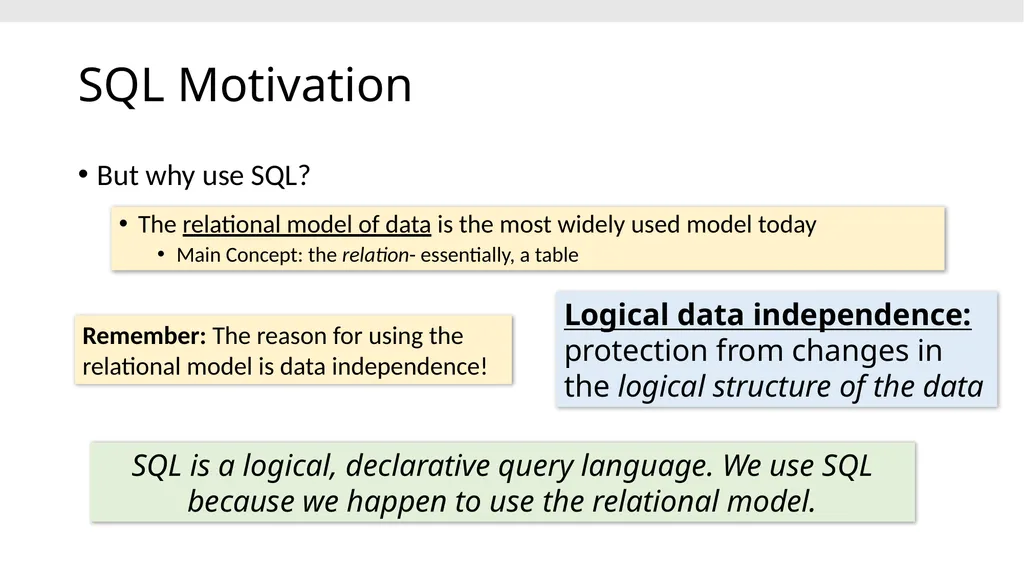
slide5. SQL Motivation But why use SQL? The relational model of data is the most widely used model today
Main Concept: the relation- essentially, a table Logical data independence: protection from changes in the logical structure of the data SQL is a logical, declarative query language. We use SQL because we happen to use the relational model. Remember: The reason for using the relational model is data independence!<br>
slide6. 6 Basic SQL<br>
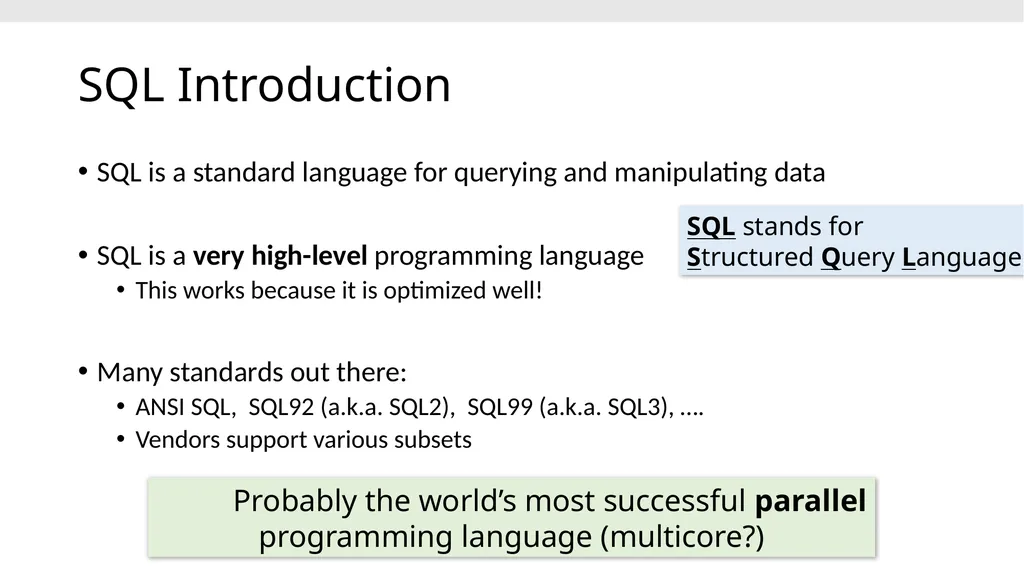
slide7. SQL Introduction SQL is a standard language for querying and manipulating data
SQL is a very high-level programming language
This works because it is optimized well!
Many standards out there:
ANSI SQL, SQL92 (a.k.a. SQL2), SQL99 (a.k.a. SQL3), ….
Vendors support various subsets Probably the world’s most successful parallel programming language (multicore?) SQL stands for
Structured Query Language<br>
slide8. 8 SQL is a… Data Definition Language (DDL)
Define relational schemata
Create/alter/delete tables and their attributes
Data Manipulation Language (DML)
Insert/delete/modify tuples in tables
Query one or more tables – discussed next!<br>
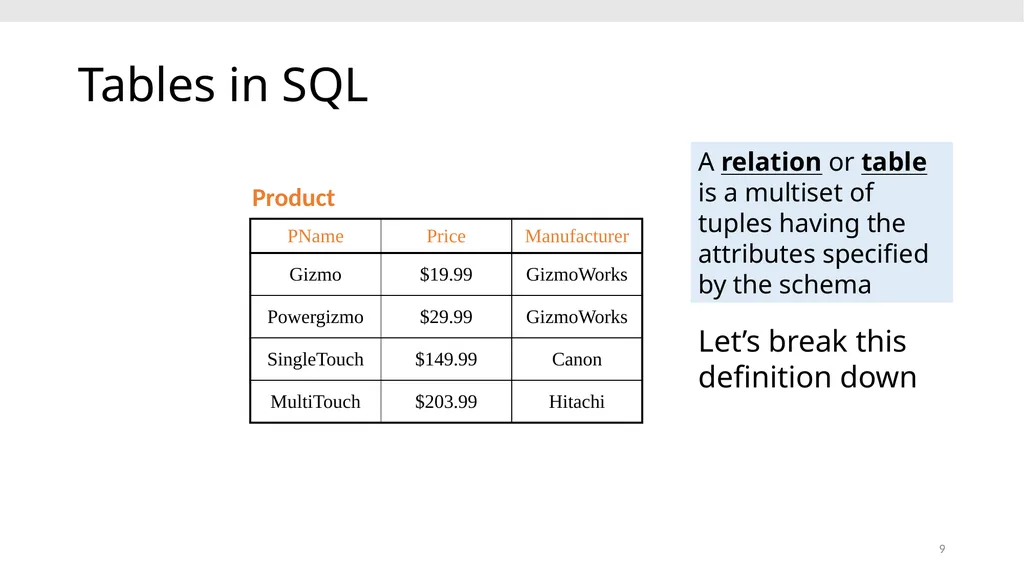
slide9. 9 Tables in SQL Product A relation or table is a multiset of tuples having the attributes specified by the schema Let’s break this definition down<br>
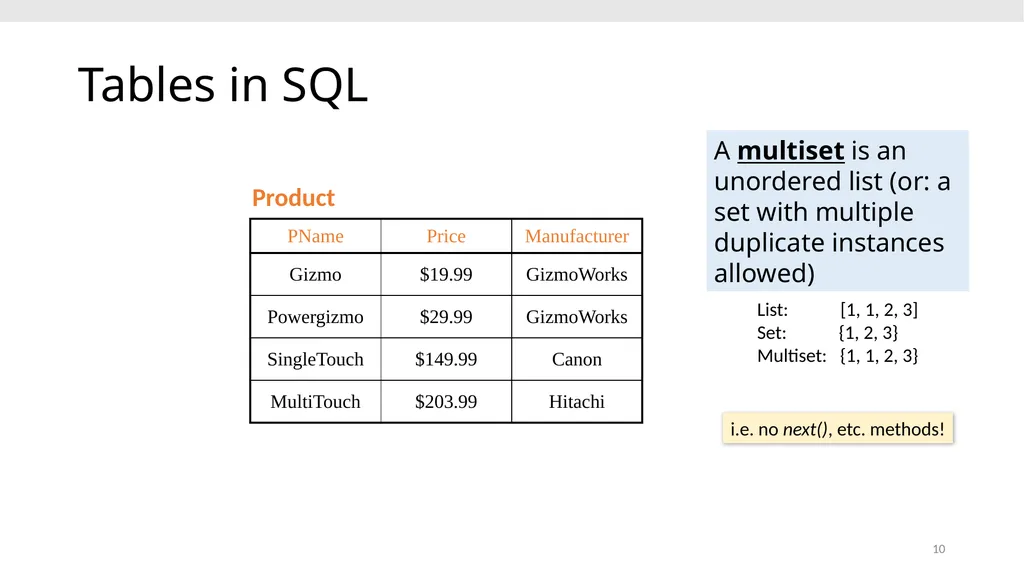
slide10. 10 Tables in SQL Product A multiset is an unordered list (or: a set with multiple duplicate instances allowed) List: [1, 1, 2, 3]
Set: {1, 2, 3}
Multiset: {1, 1, 2, 3} i.e. no next(), etc. methods!<br>
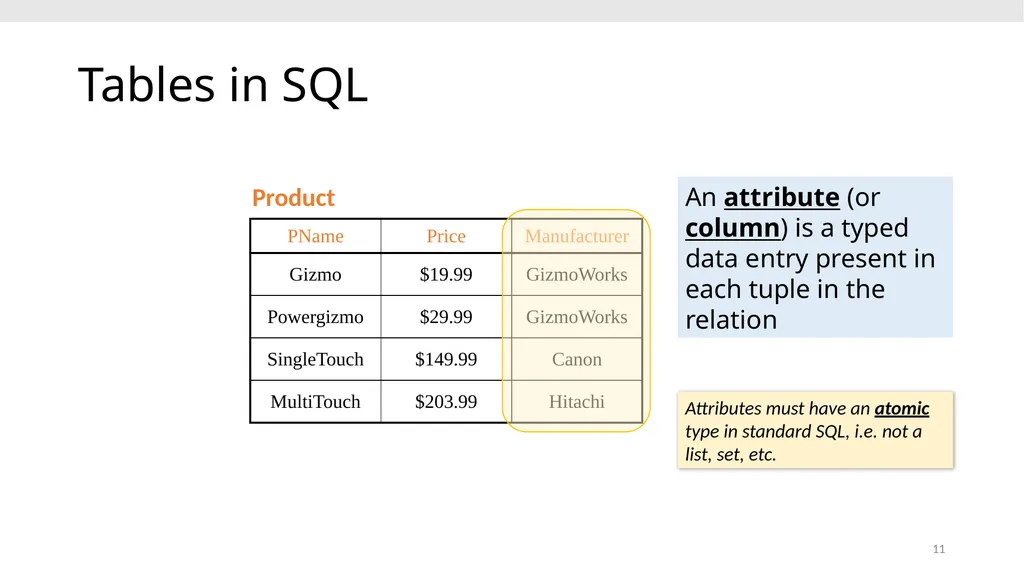
slide11. 11 Tables in SQL Product An attribute (or column) is a typed data entry present in each tuple in the relation Attributes must have an atomic type in standard SQL, i.e. not a list, set, etc.<br>
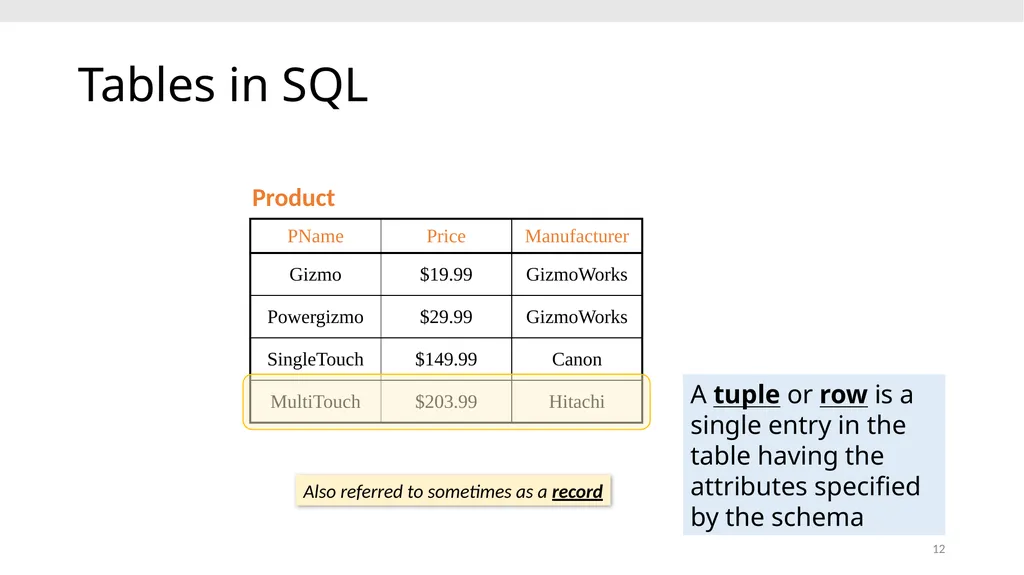
slide12. 12 Tables in SQL Product A tuple or row is a single entry in the table having the attributes specified by the schema Also referred to sometimes as a record<br>
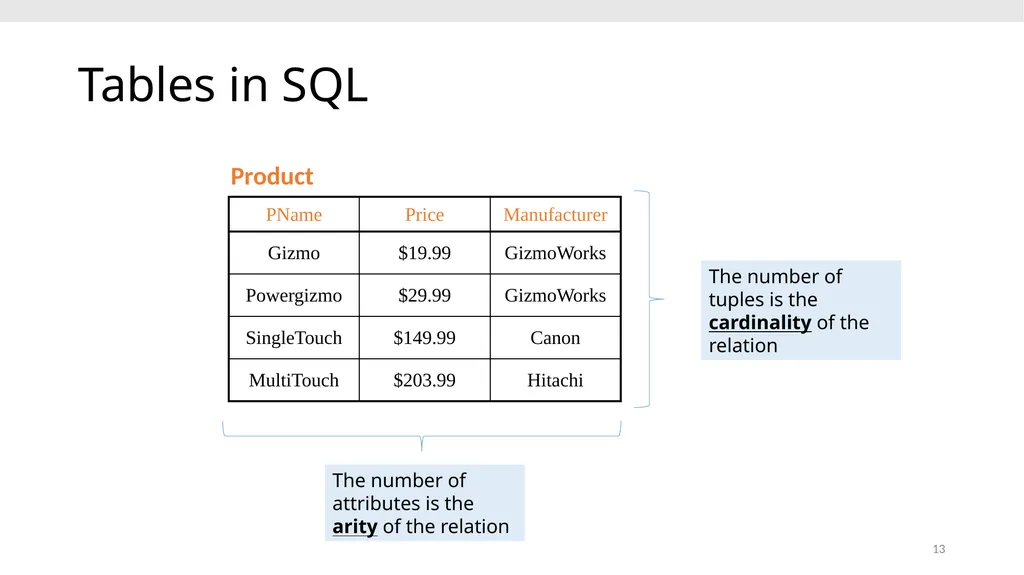
slide13. 13 Tables in SQL Product The number of tuples is the cardinality of the relation The number of attributes is the arity of the relation<br>
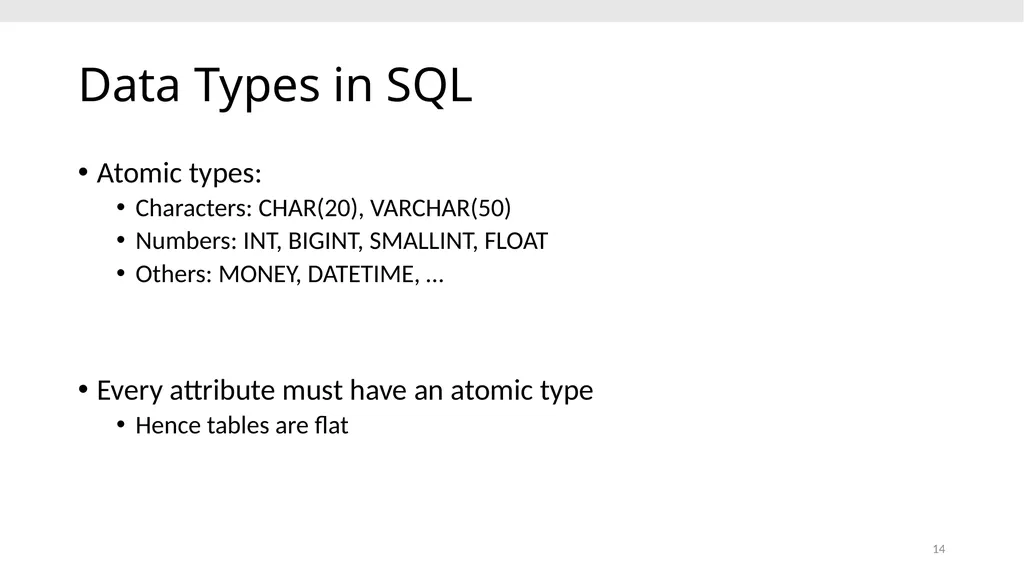
slide14. 14 Data Types in SQL Atomic types:
Characters: CHAR(20), VARCHAR(50)
Numbers: INT, BIGINT, SMALLINT, FLOAT
Others: MONEY, DATETIME, …
Every attribute must have an atomic type
Hence tables are flat<br>
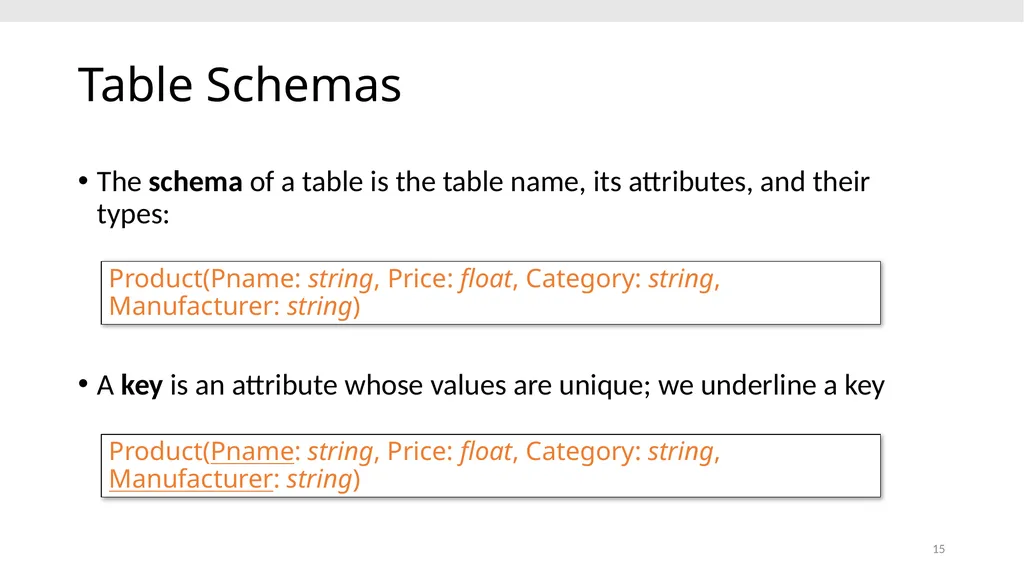
slide15. 15 Table Schemas The schema of a table is the table name, its attributes, and their types:
A key is an attribute whose values are unique; we underline a key Product(Pname: string, Price: float, Category: string, Manufacturer: string) Product(Pname: string, Price: float, Category: string, Manufacturer: string)<br>
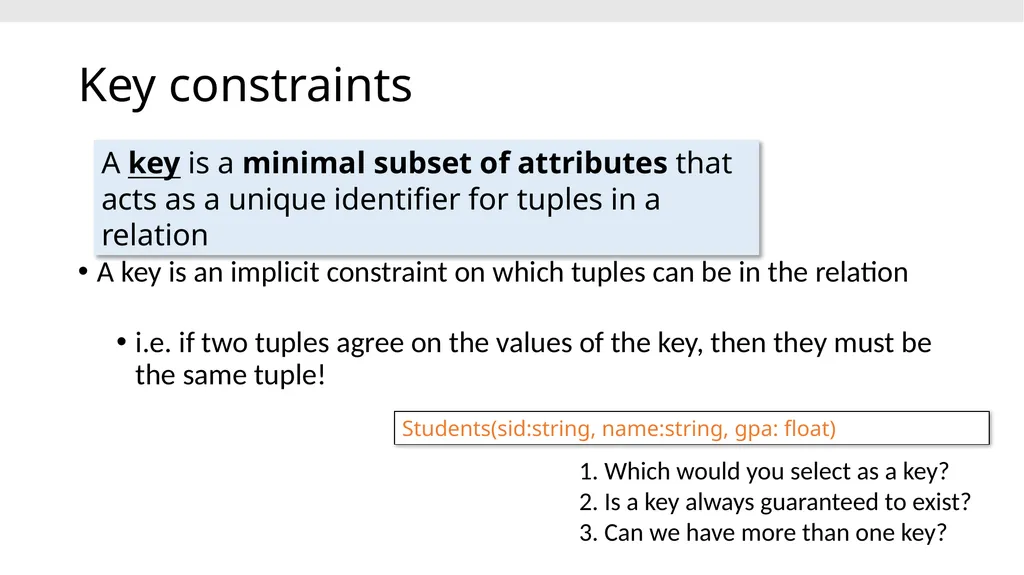
slide16. Key constraints A key is an implicit constraint on which tuples can be in the relation
i.e. if two tuples agree on the values of the key, then they must be the same tuple! 1. Which would you select as a key?
2. Is a key always guaranteed to exist?
3. Can we have more than one key? A key is a minimal subset of attributes that acts as a unique identifier for tuples in a relation Students(sid:string, name:string, gpa: float)<br>
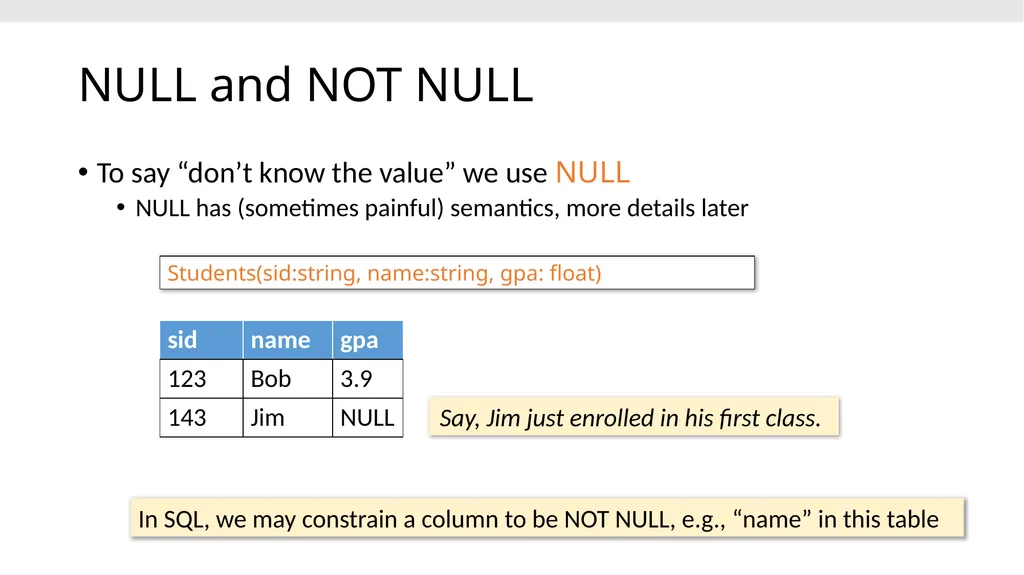
slide17. NULL and NOT NULL To say “don’t know the value” we use NULL
NULL has (sometimes painful) semantics, more details later Say, Jim just enrolled in his first class. In SQL, we may constrain a column to be NOT NULL, e.g., “name” in this table Students(sid:string, name:string, gpa: float)<br>
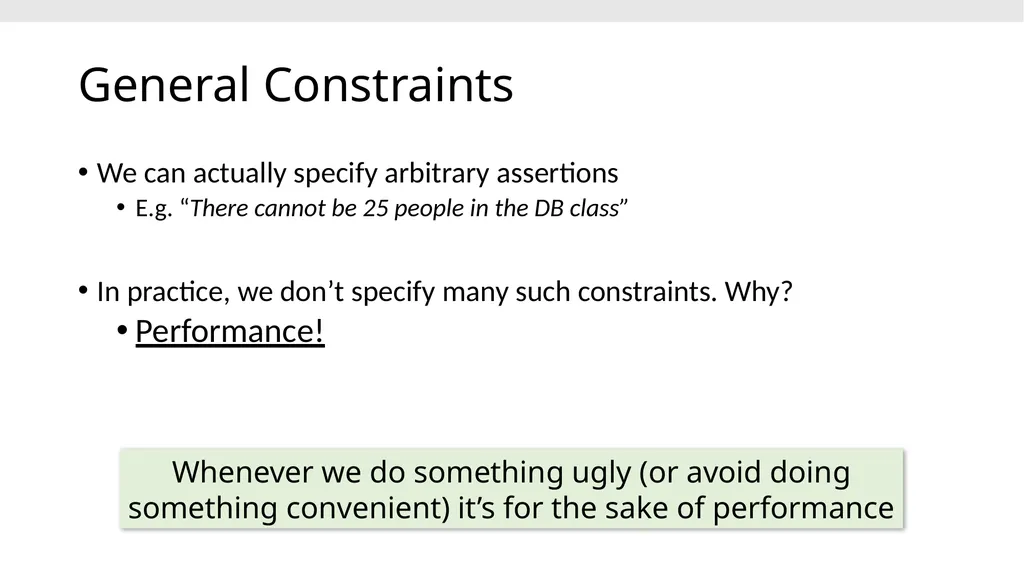
slide18. General Constraints We can actually specify arbitrary assertions
E.g. “There cannot be 25 people in the DB class”
In practice, we don’t specify many such constraints. Why?
Performance! Whenever we do something ugly (or avoid doing something convenient) it’s for the sake of performance<br>
slide19. Go over Activity 2-1 19<br>
slide20. 2. Single-table queries 20<br>
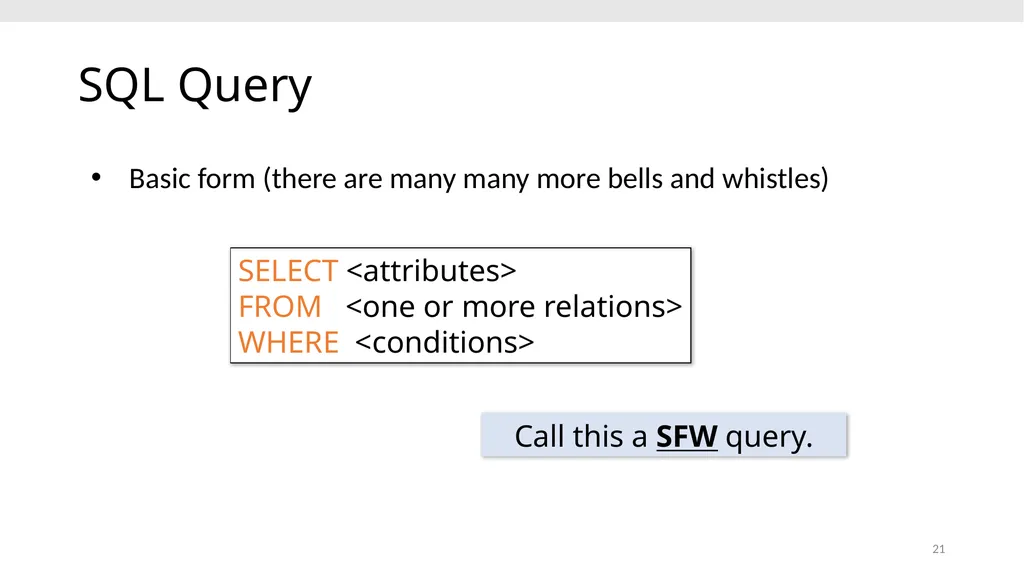
slide21. 21 SQL Query Basic form (there are many many more bells and whistles) Call this a SFW query. SELECT <attributes> FROM <one or more relations> WHERE <conditions><br>
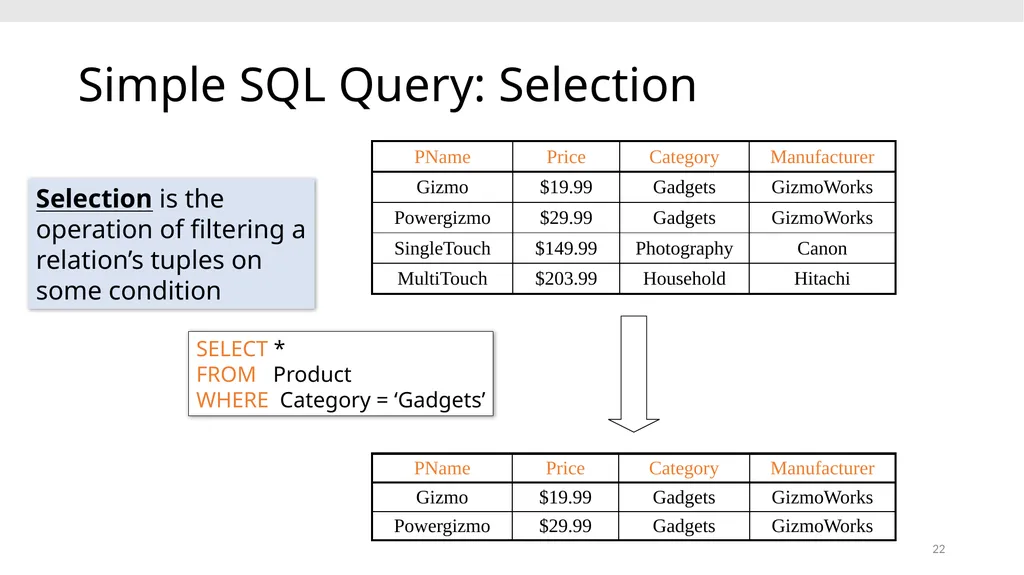
slide22. 22 Simple SQL Query: Selection SELECT * FROM Product WHERE Category = ‘Gadgets’ Selection is the operation of filtering a relation’s tuples on some condition<br>
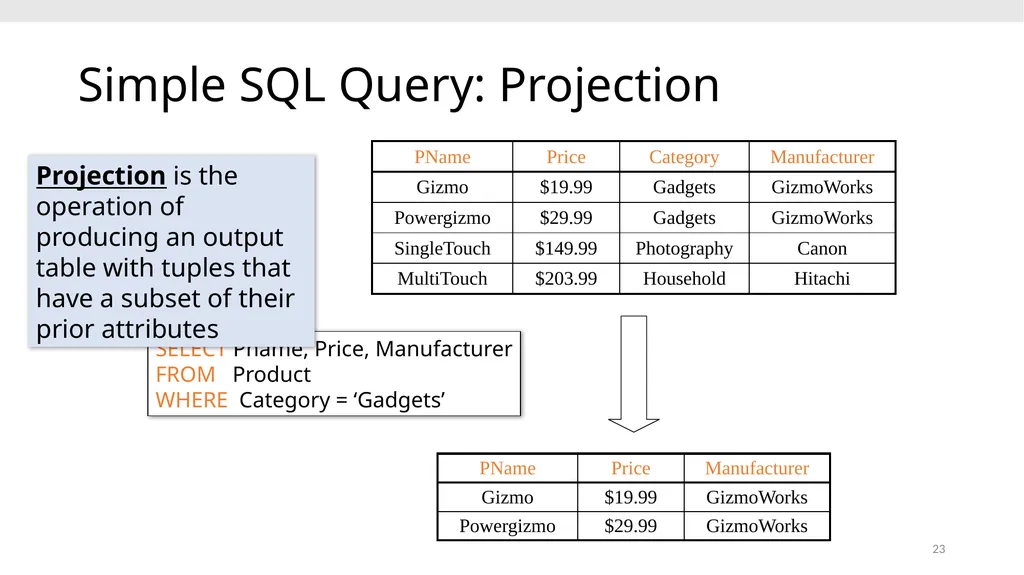
slide23. 23 Simple SQL Query: Projection SELECT Pname, Price, Manufacturer FROM Product WHERE Category = ‘Gadgets’ Projection is the operation of producing an output table with tuples that have a subset of their prior attributes<br>
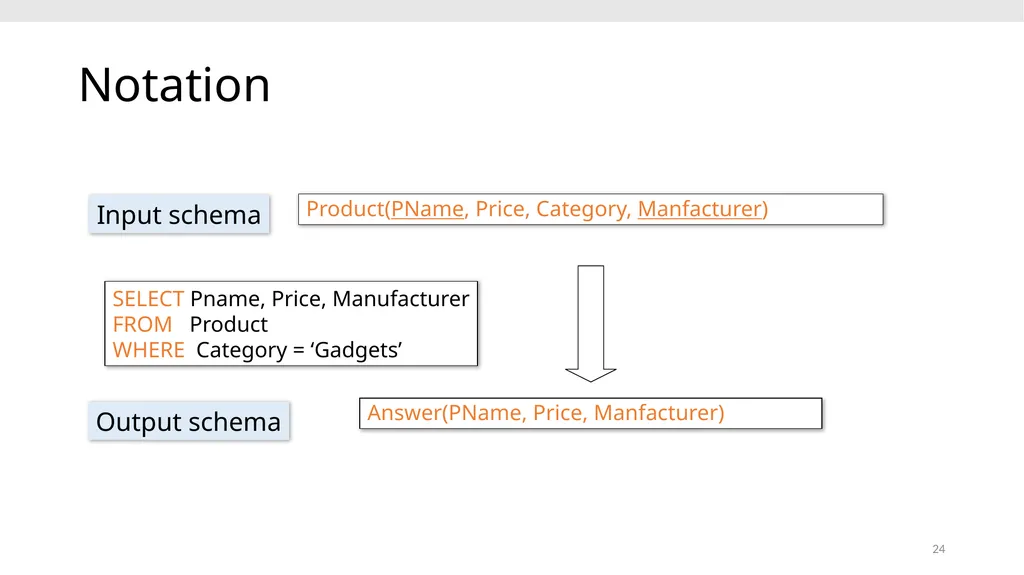
slide24. 24 Notation SELECT Pname, Price, Manufacturer FROM Product WHERE Category = ‘Gadgets’ Product(PName, Price, Category, Manfacturer) Answer(PName, Price, Manfacturer) Input schema Output schema<br>
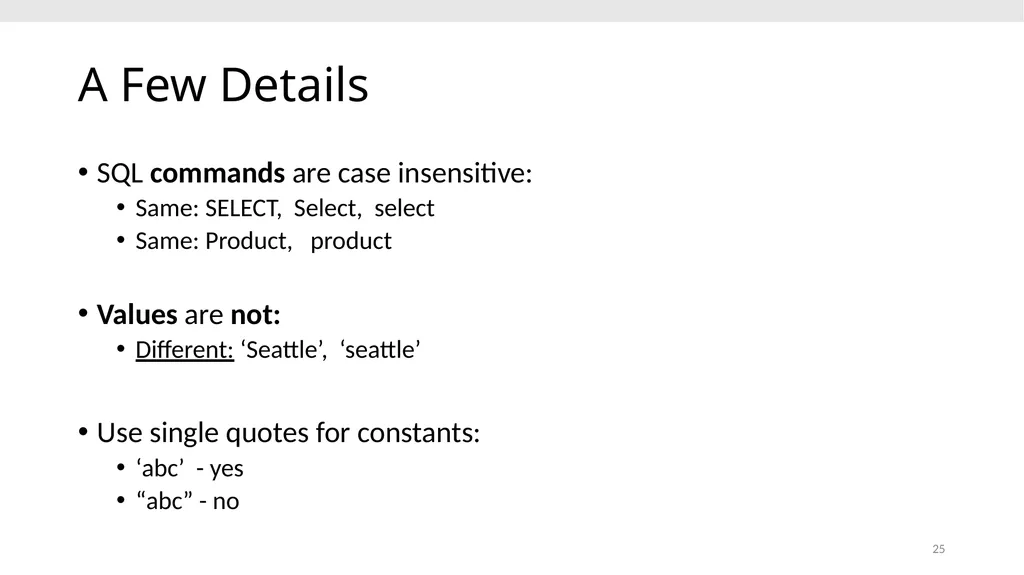
slide25. 25 A Few Details SQL commands are case insensitive:
Same: SELECT, Select, select
Same: Product, product
Values are not:
Different: ‘Seattle’, ‘seattle’
Use single quotes for constants:
‘abc’ - yes
“abc” - no<br>
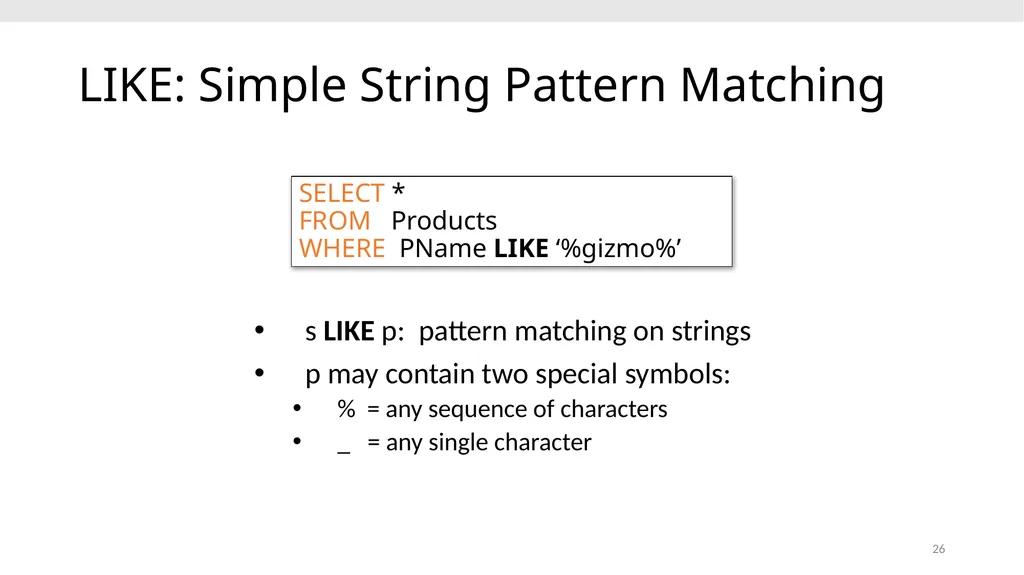
slide26. 26 LIKE: Simple String Pattern Matching s LIKE p: pattern matching on strings
p may contain two special symbols:
% = any sequence of characters
_ = any single character SELECT * FROM Products WHERE PName LIKE ‘%gizmo%’<br>
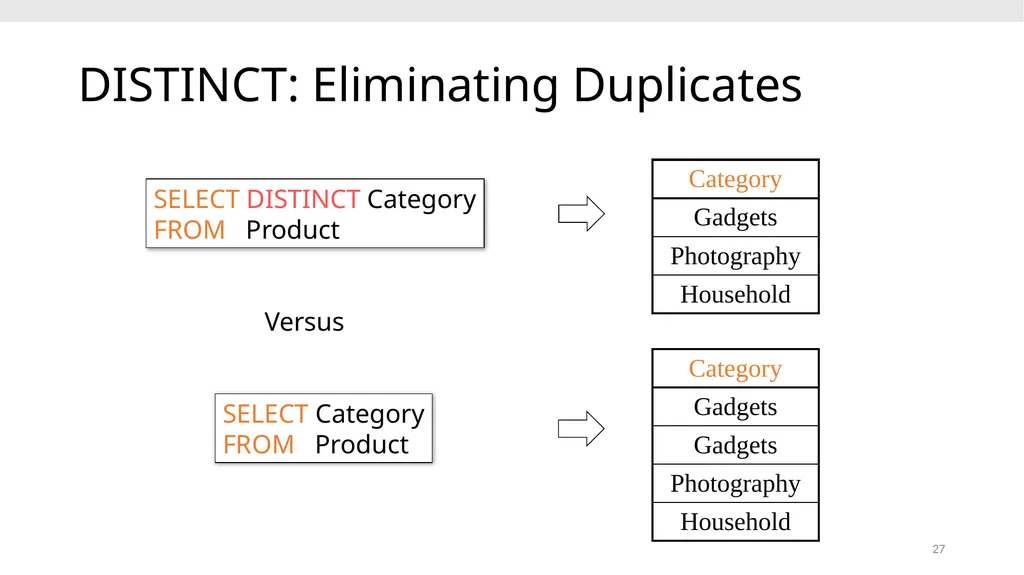
slide27. 27 DISTINCT: Eliminating Duplicates SELECT DISTINCT Category
FROM Product Versus SELECT Category
FROM Product<br>
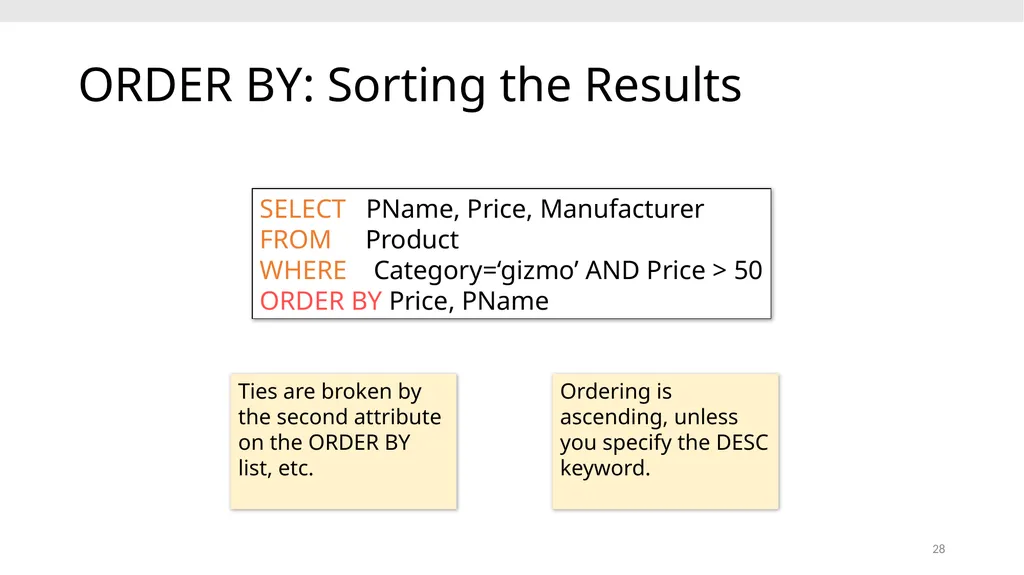
slide28. 28 ORDER BY: Sorting the Results SELECT PName, Price, Manufacturer
FROM Product
WHERE Category=‘gizmo’ AND Price > 50
ORDER BY Price, PName Ties are broken by the second attribute on the ORDER BY list, etc. Ordering is ascending, unless you specify the DESC keyword.<br>
slide29. Go over Activity 2-2 29<br>
slide30. 3. Multi-table queries 30<br>
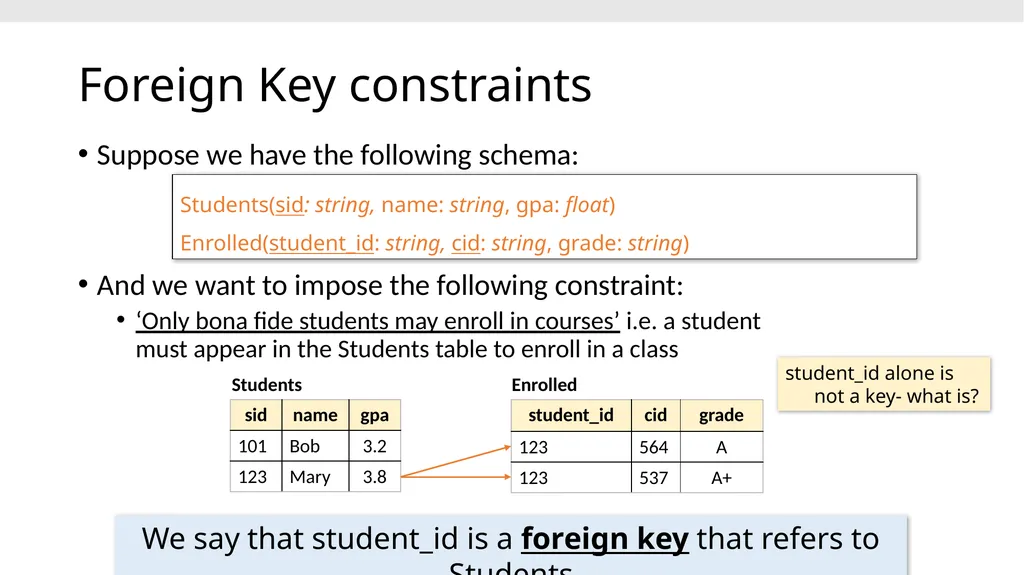
slide31. Foreign Key constraints student_id alone is not a key- what is? Students Enrolled We say that student_id is a foreign key that refers to Students Students(sid: string, name: string, gpa: float)
Enrolled(student_id: string, cid: string, grade: string) Suppose we have the following schema:
And we want to impose the following constraint:
‘Only bona fide students may enroll in courses’ i.e. a student must appear in the Students table to enroll in a class<br>
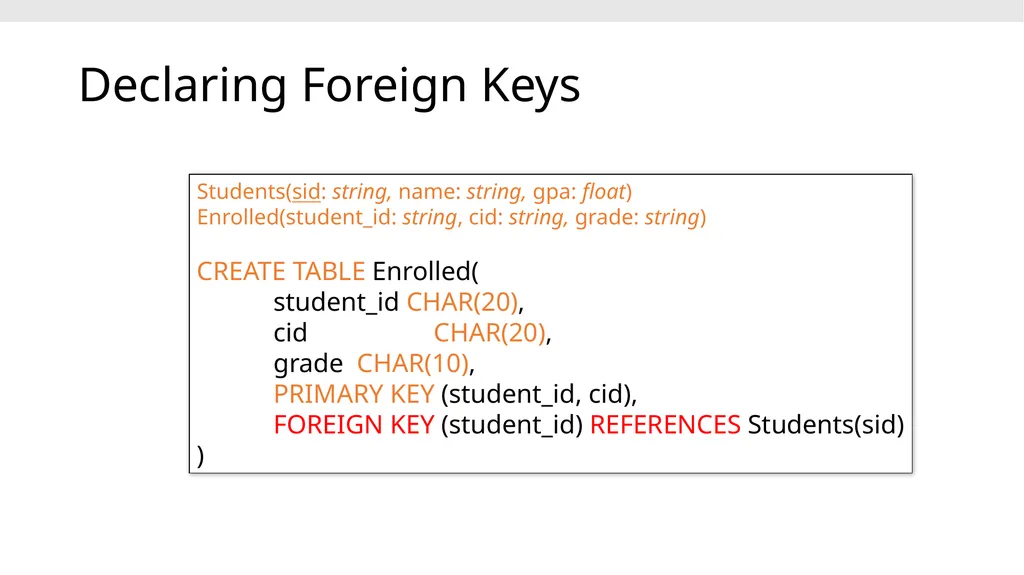
slide32. Declaring Foreign Keys Students(sid: string, name: string, gpa: float)
Enrolled(student_id: string, cid: string, grade: string)
CREATE TABLE Enrolled(
student_id CHAR(20),
cid CHAR(20),
grade CHAR(10),
PRIMARY KEY (student_id, cid),
FOREIGN KEY (student_id) REFERENCES Students(sid)
)<br>
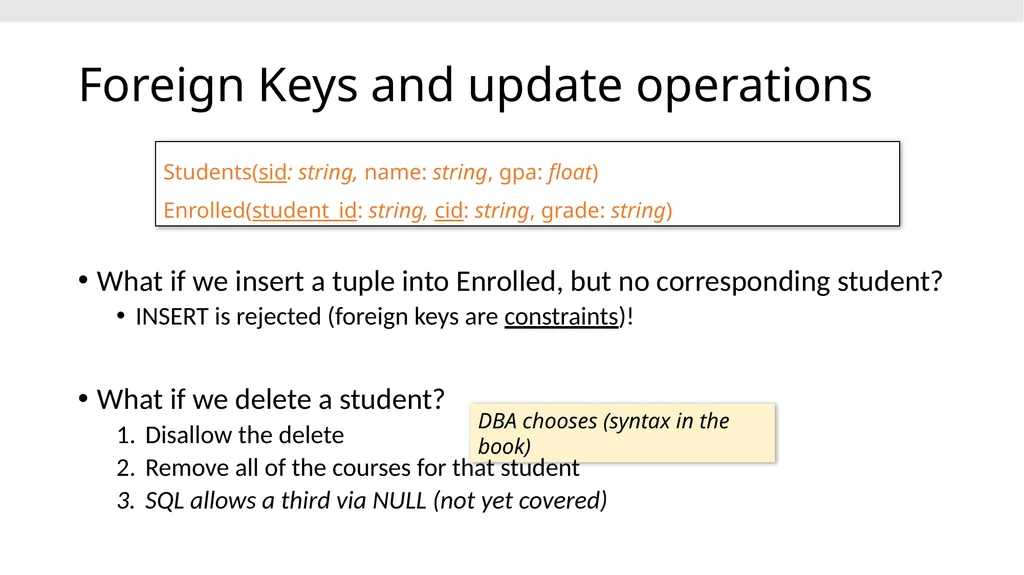
slide33. Foreign Keys and update operations DBA chooses (syntax in the book) Students(sid: string, name: string, gpa: float)
Enrolled(student_id: string, cid: string, grade: string) What if we insert a tuple into Enrolled, but no corresponding student?
INSERT is rejected (foreign keys are constraints)!
What if we delete a student?
Disallow the delete
Remove all of the courses for that student
SQL allows a third via NULL (not yet covered)<br>
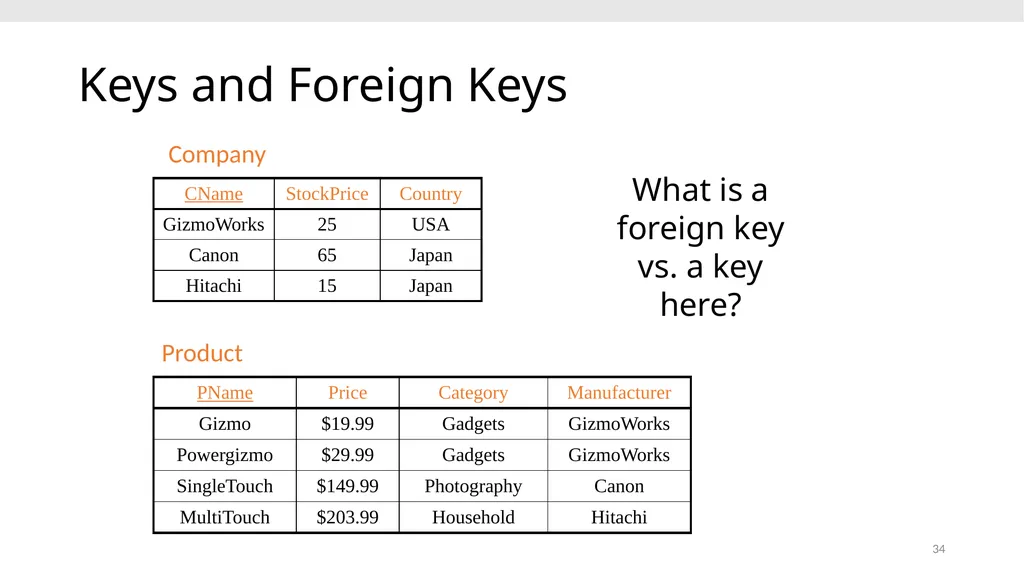
slide34. 34 Keys and Foreign Keys Product Company What is a foreign key vs. a key here?<br>
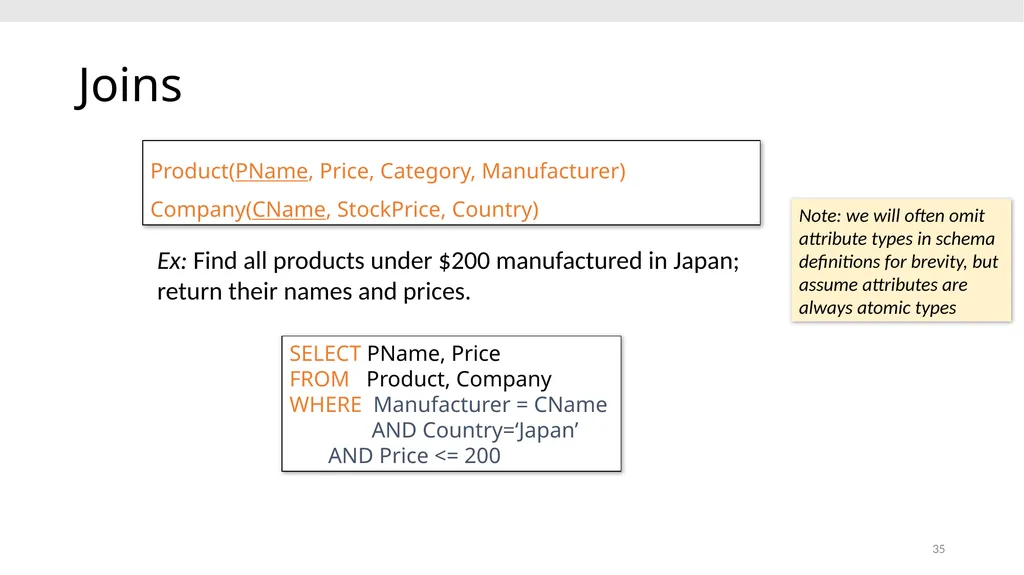
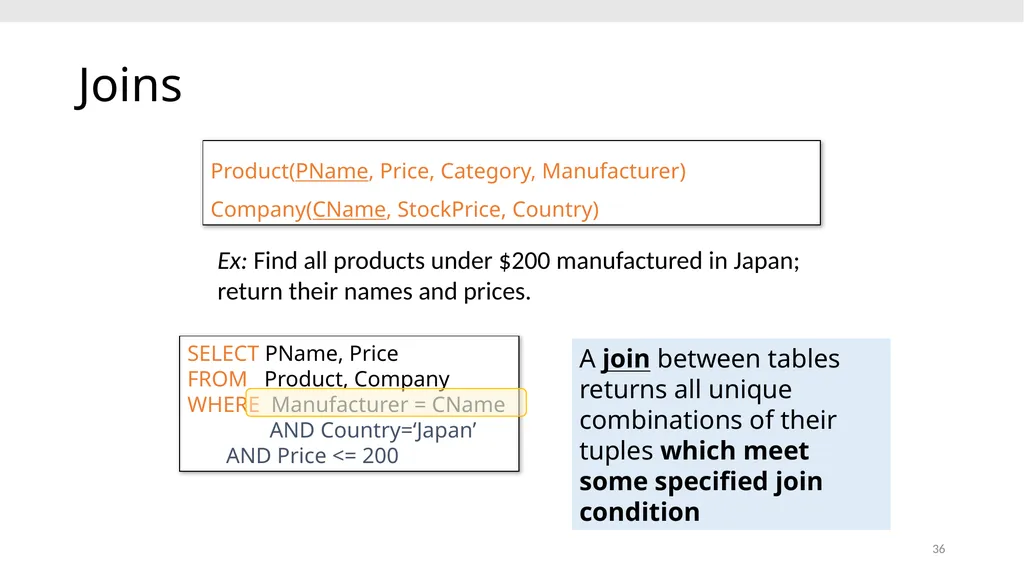
slide35. 35 Joins Ex: Find all products under $200 manufactured in Japan; return their names and prices. SELECT PName, Price FROM Product, Company WHERE Manufacturer = CName
AND Country=‘Japan’ AND Price <= 200 Product(PName, Price, Category, Manufacturer)
Company(CName, StockPrice, Country) Note: we will often omit attribute types in schema definitions for brevity, but assume attributes are always atomic types<br>
slide36. 36 Joins Ex: Find all products under $200 manufactured in Japan; return their names and prices. SELECT PName, Price FROM Product, Company WHERE Manufacturer = CName
AND Country=‘Japan’ AND Price <= 200 A join between tables returns all unique combinations of their tuples which meet some specified join condition Product(PName, Price, Category, Manufacturer)
Company(CName, StockPrice, Country)<br>
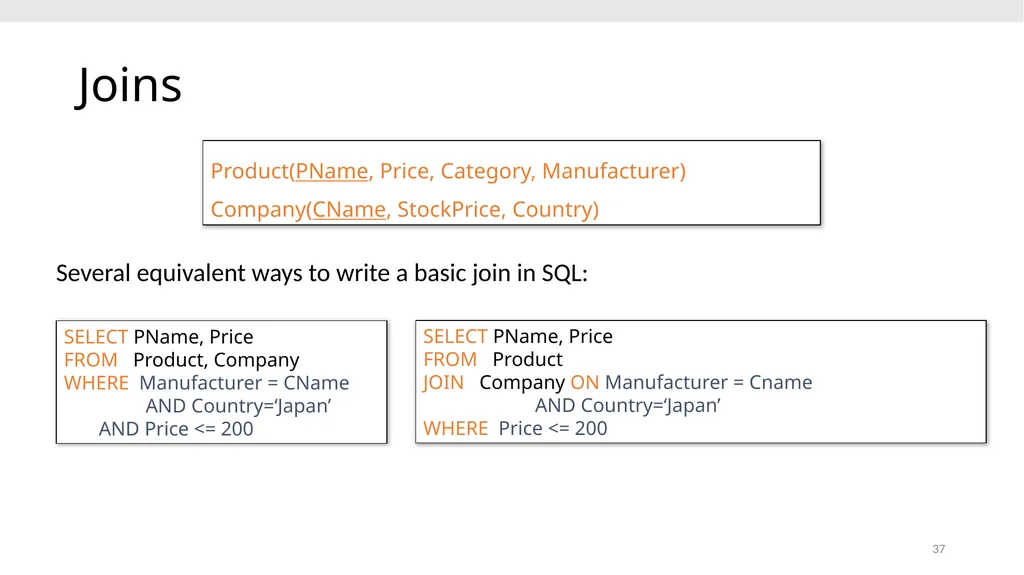
slide37. 37 Joins Several equivalent ways to write a basic join in SQL: SELECT PName, Price FROM Product, Company WHERE Manufacturer = CName
AND Country=‘Japan’ AND Price <= 200 SELECT PName, Price FROM Product
JOIN Company ON Manufacturer = Cname
AND Country=‘Japan’ WHERE Price <= 200 Product(PName, Price, Category, Manufacturer)
Company(CName, StockPrice, Country)<br>
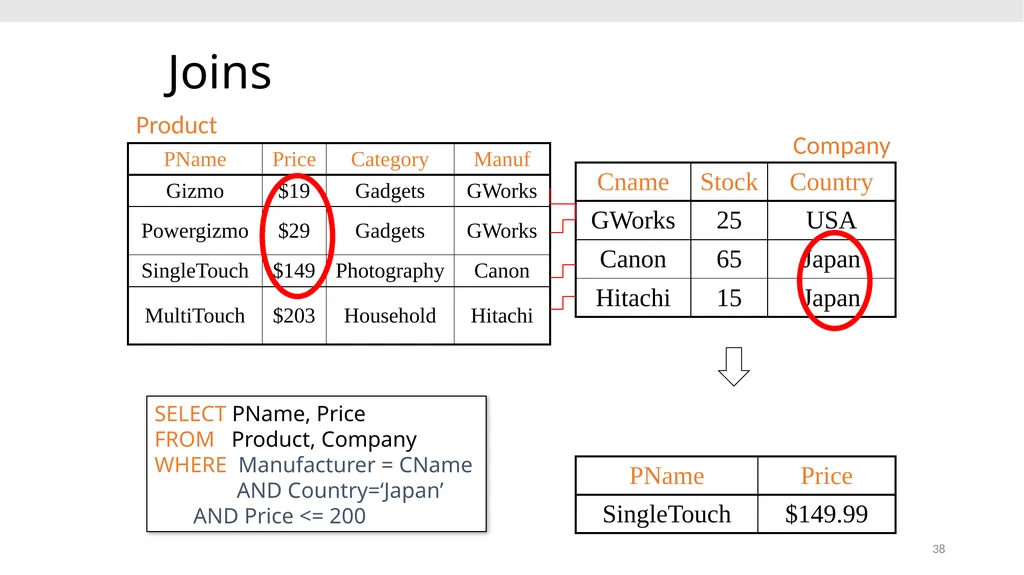
slide38. 38 Joins Product Company SELECT PName, Price FROM Product, Company WHERE Manufacturer = CName
AND Country=‘Japan’ AND Price <= 200<br>
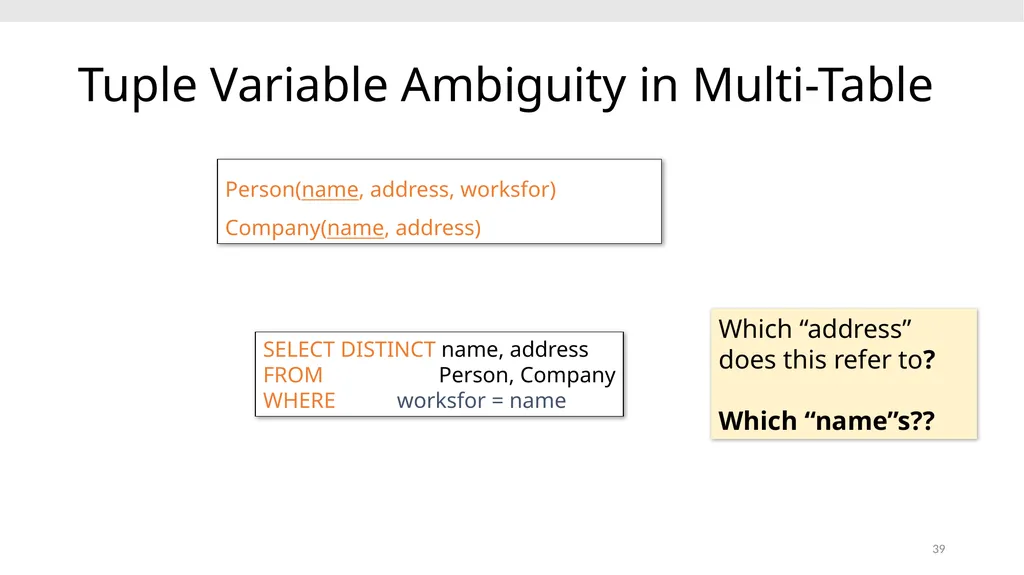
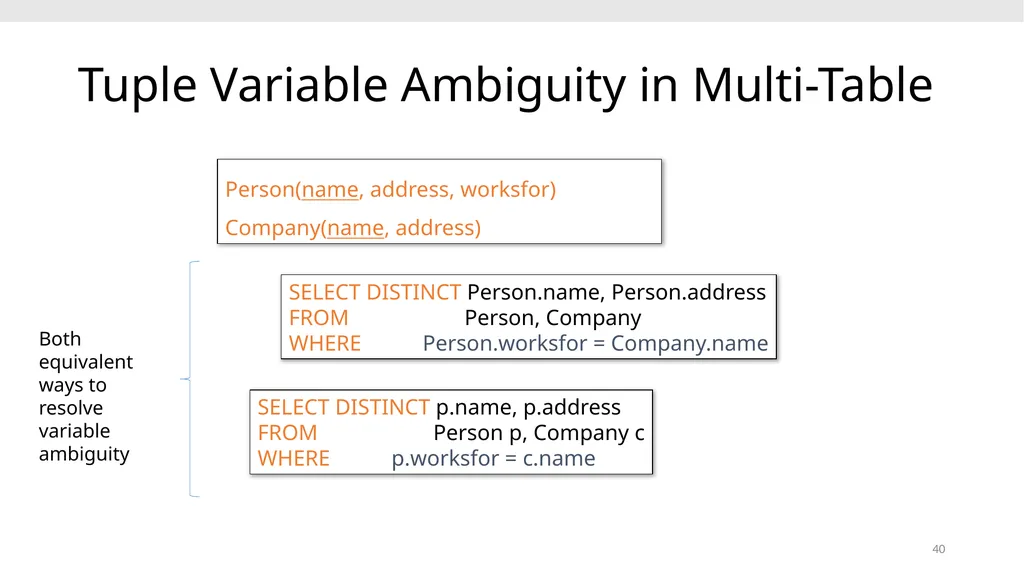
slide39. 39 Tuple Variable Ambiguity in Multi-Table SELECT DISTINCT name, address FROM Person, Company WHERE worksfor = name Person(name, address, worksfor) Company(name, address) Which “address” does this refer to?
Which “name”s??<br>
slide40. 40 Person(name, address, worksfor) Company(name, address) SELECT DISTINCT Person.name, Person.address FROM Person, Company WHERE Person.worksfor = Company.name SELECT DISTINCT p.name, p.address FROM Person p, Company c WHERE p.worksfor = c.name Both equivalent ways to resolve variable ambiguity Tuple Variable Ambiguity in Multi-Table<br>
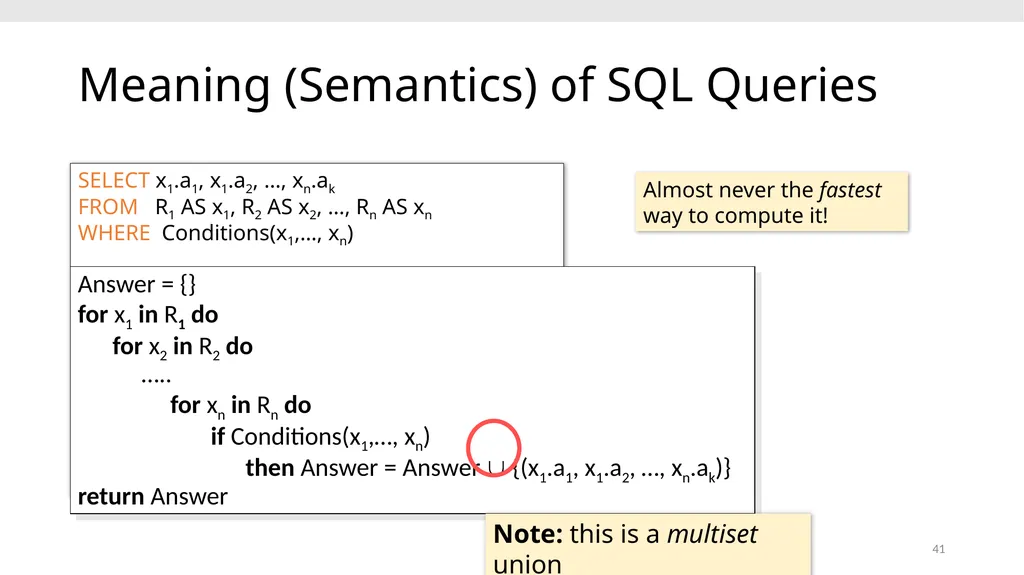
slide41. 41 Meaning (Semantics) of SQL Queries SELECT x1.a1, x1.a2, …, xn.ak
FROM R1 AS x1, R2 AS x2, …, Rn AS xn
WHERE Conditions(x1,…, xn) Answer = {}
for x1 in R1 do
for x2 in R2 do
…..
for xn in Rn do
if Conditions(x1,…, xn)
then Answer = Answer {(x1.a1, x1.a2, …, xn.ak)}
return Answer Almost never the fastest way to compute it! Note: this is a multiset union<br>
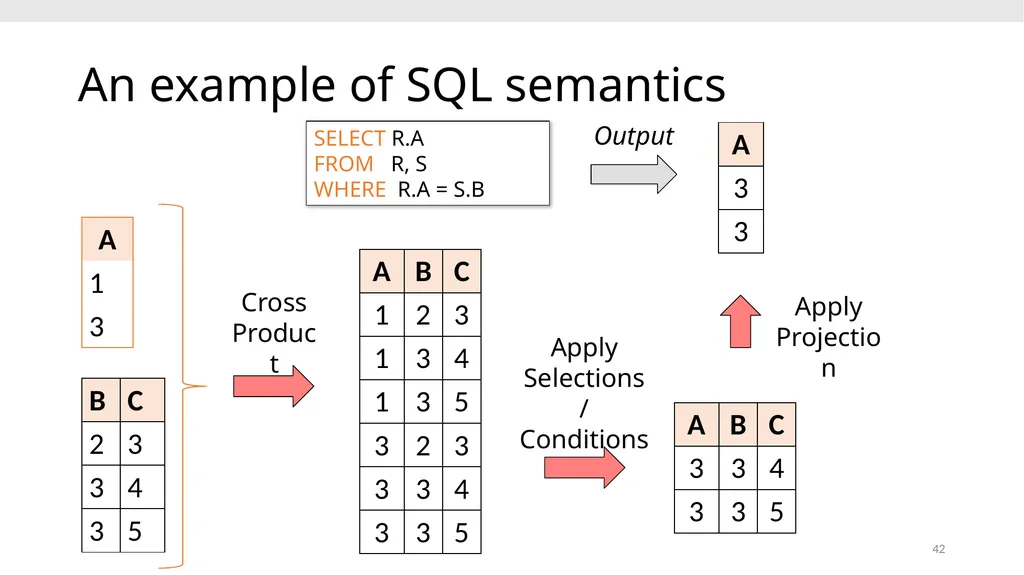
slide42. An example of SQL semantics 42 SELECT R.A
FROM R, S
WHERE R.A = S.B Cross Product Apply Projection Apply Selections / Conditions Output<br>
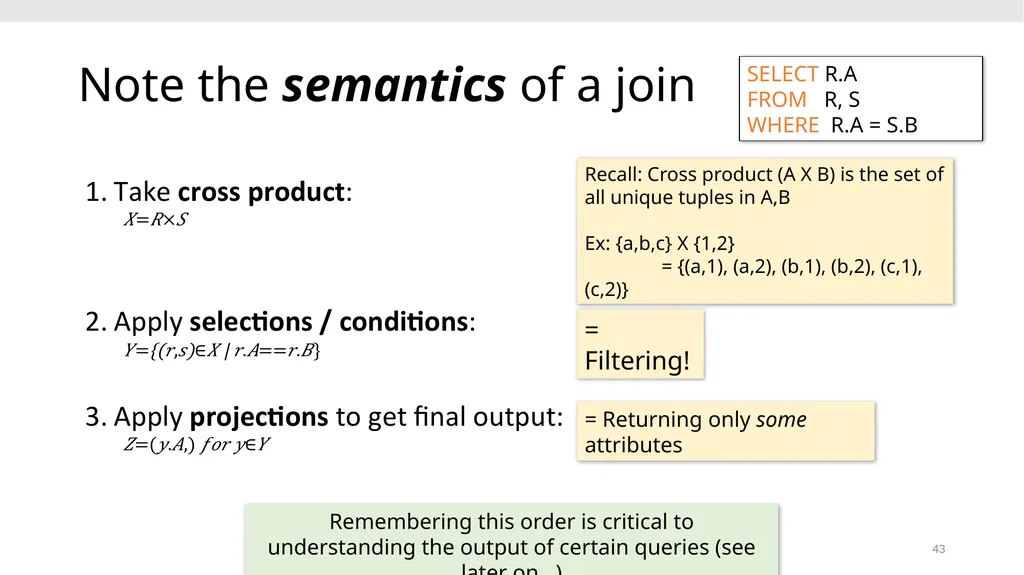
slide43. Note the semantics of a join 43 SELECT R.A
FROM R, S
WHERE R.A = S.B Recall: Cross product (A X B) is the set of all unique tuples in A,B
Ex: {a,b,c} X {1,2}
= {(a,1), (a,2), (b,1), (b,2), (c,1), (c,2)} = Filtering! = Returning only some attributes Remembering this order is critical to understanding the output of certain queries (see later on…)<br>
slide44. Note: we say “semantics” not “execution order” The preceding slides show what a join means
Not actually how the DBMS executes it under the covers<br>
slide45. Go over Activity 2-3 45<br>
slide46. 4. Advanced SQL 46<br>
slide47. 47 Set Operators and Nested Queries<br>
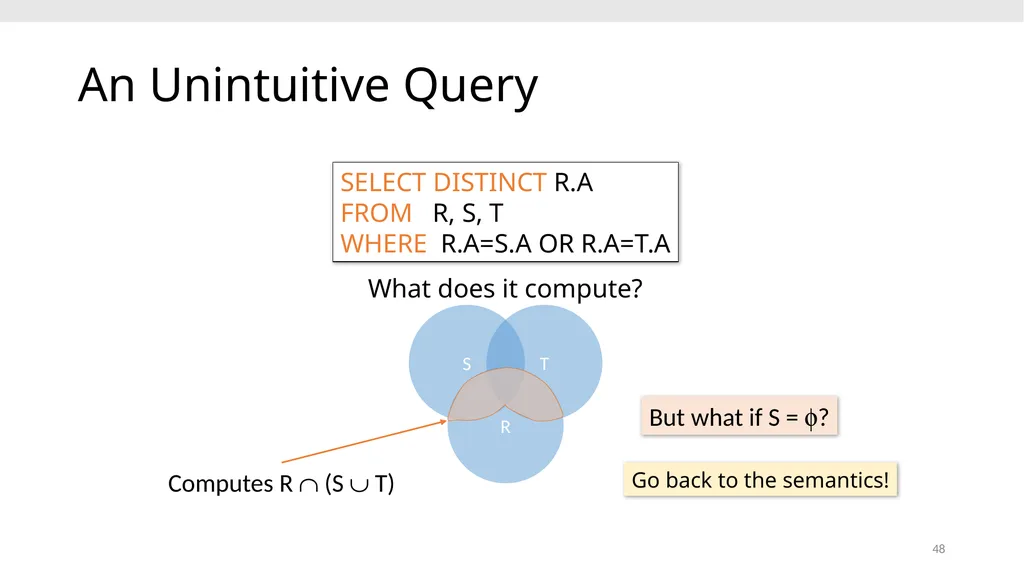
slide48. 48 SELECT DISTINCT R.A
FROM R, S, T
WHERE R.A=S.A OR R.A=T.A An Unintuitive Query Computes R Ç (S È T) But what if S = f? S T R Go back to the semantics! What does it compute?<br>
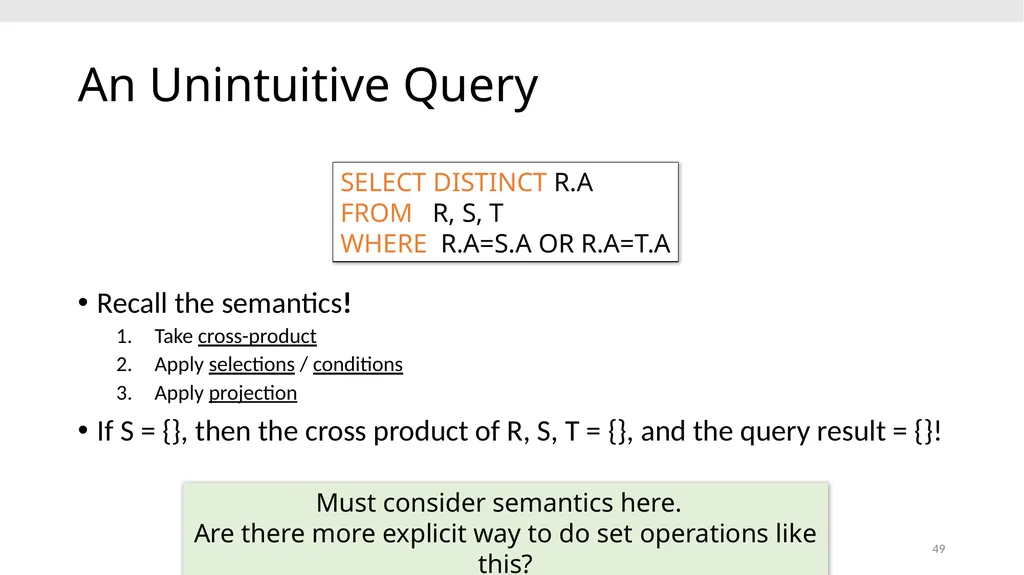
slide49. 49 SELECT DISTINCT R.A
FROM R, S, T
WHERE R.A=S.A OR R.A=T.A An Unintuitive Query Recall the semantics!
Take cross-product
Apply selections / conditions
Apply projection
If S = {}, then the cross product of R, S, T = {}, and the query result = {}! Must consider semantics here.
Are there more explicit way to do set operations like this?<br>
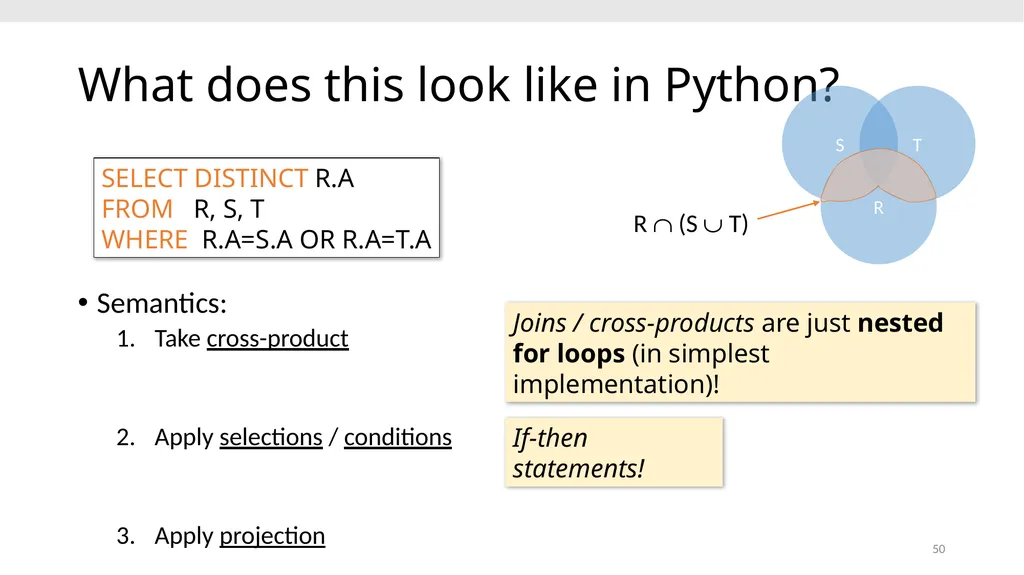
slide50. 50 SELECT DISTINCT R.A
FROM R, S, T
WHERE R.A=S.A OR R.A=T.A What does this look like in Python? Semantics:
Take cross-product
Apply selections / conditions
Apply projection Joins / cross-products are just nested for loops (in simplest implementation)! If-then statements!<br>
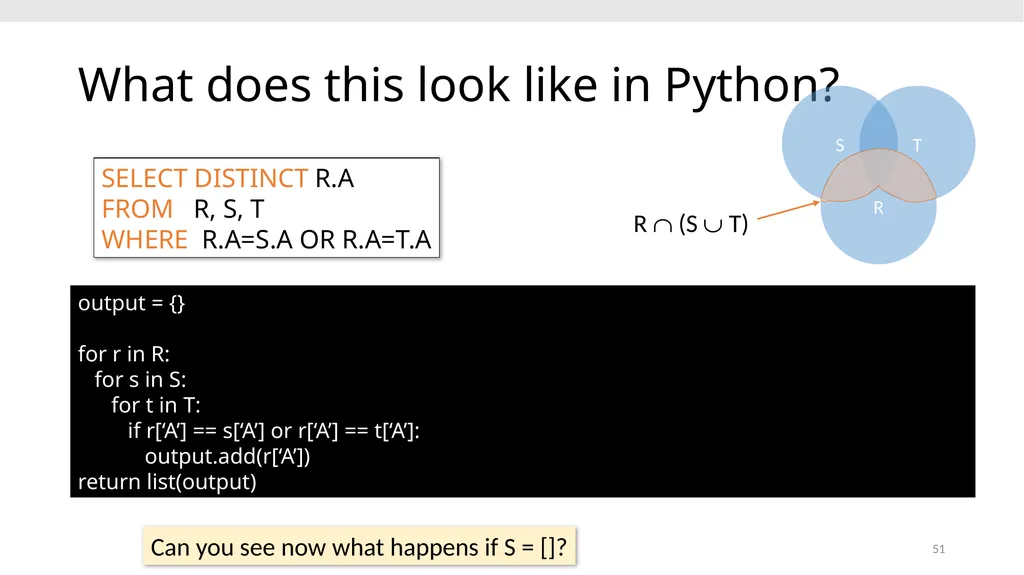
slide51. 51 SELECT DISTINCT R.A
FROM R, S, T
WHERE R.A=S.A OR R.A=T.A What does this look like in Python? output = {}
for r in R:
for s in S:
for t in T:
if r[‘A’] == s[‘A’] or r[‘A’] == t[‘A’]:
output.add(r[‘A’])
return list(output) Can you see now what happens if S = []?<br>
slide52. 52 Multiset operations<br>
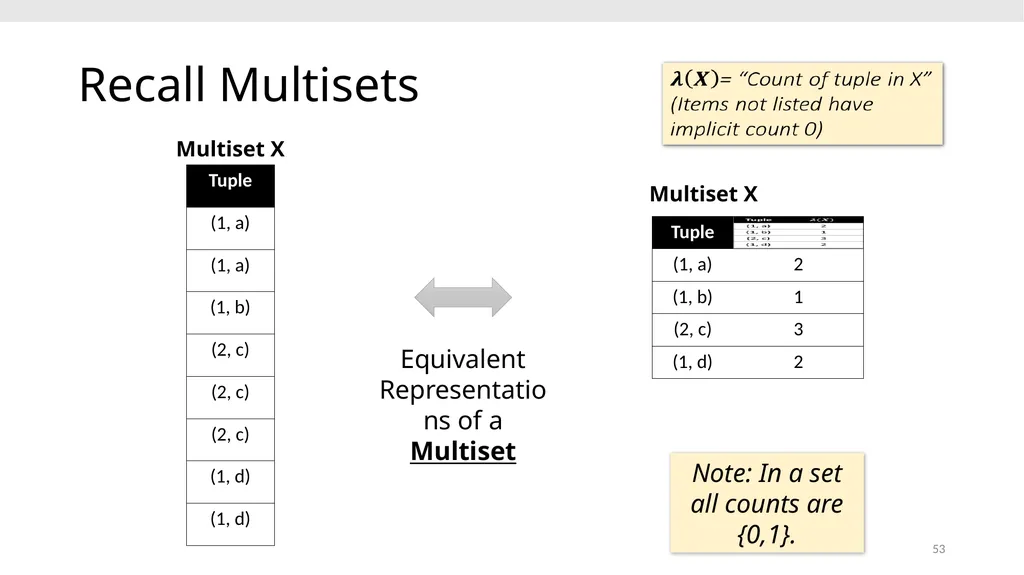
slide53. Recall Multisets 53 Equivalent Representations of a Multiset Multiset X Multiset X Note: In a set all counts are {0,1}.<br>
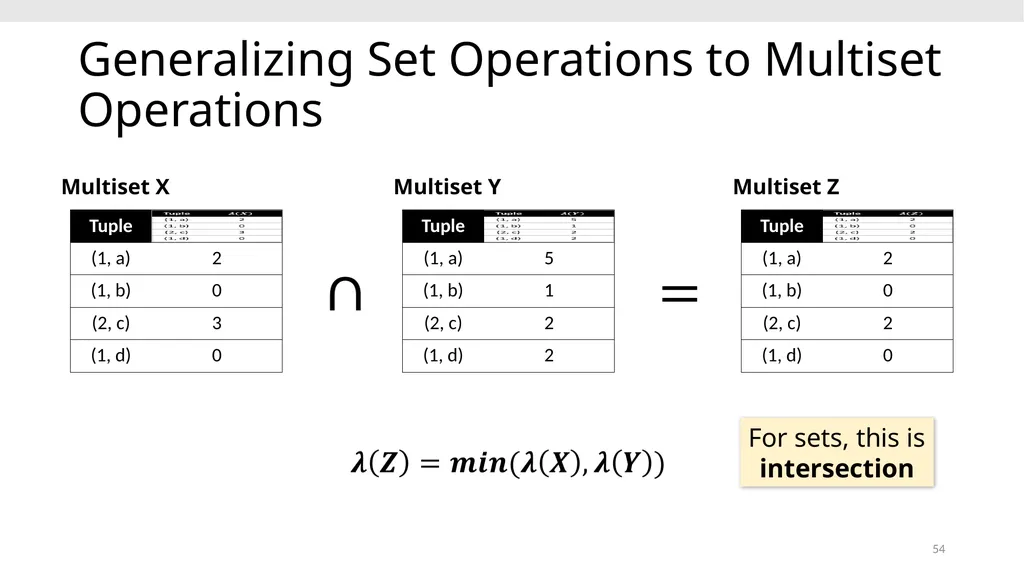
slide54. Generalizing Set Operations to Multiset Operations 54 Multiset X Multiset Y Multiset Z For sets, this is intersection<br>
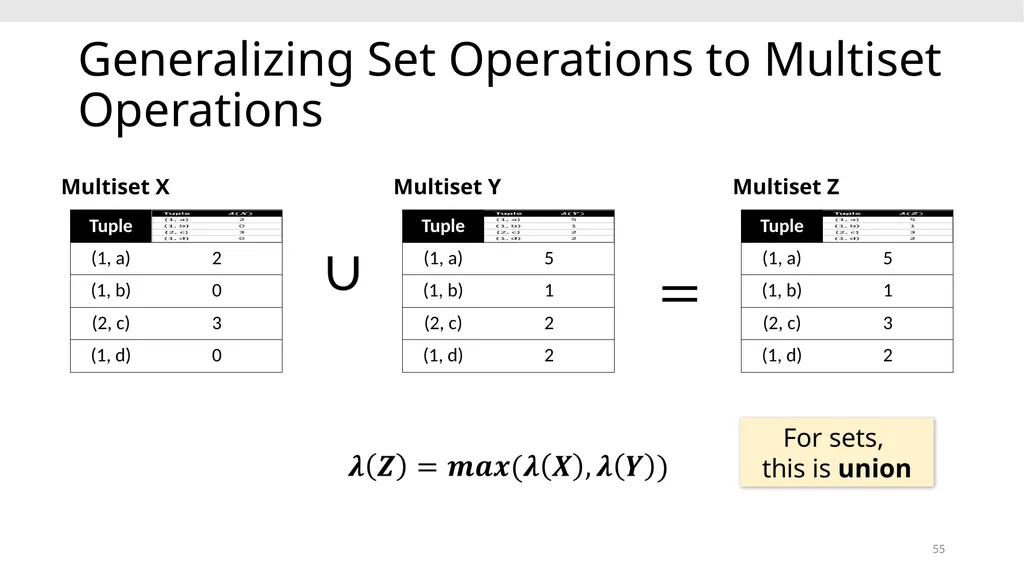
slide55. 55 Multiset X Multiset Y Multiset Z For sets,
this is union Generalizing Set Operations to Multiset Operations<br>
slide56. Multiset Operations in SQL 56 s<br>
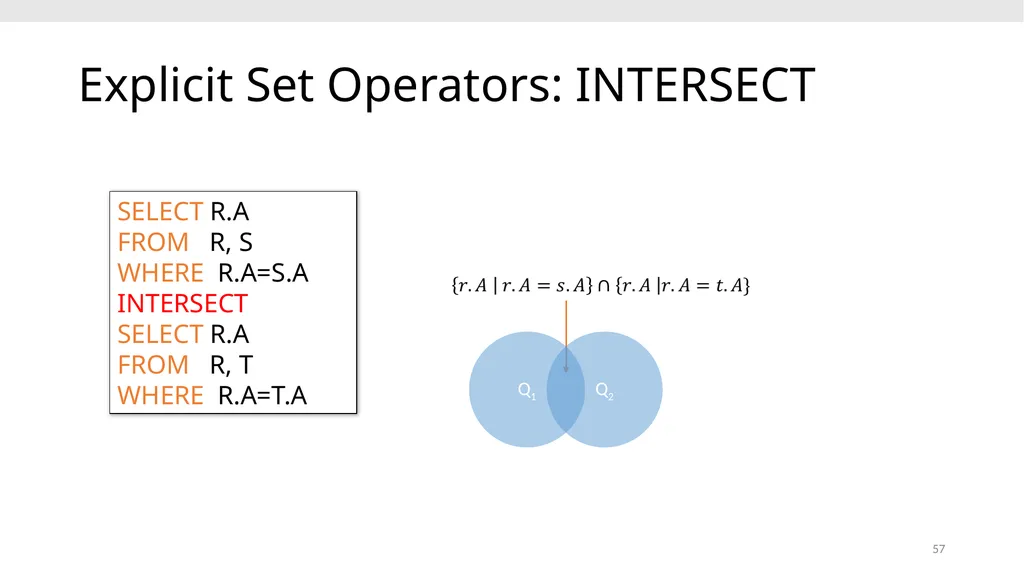
slide57. Explicit Set Operators: INTERSECT 57 SELECT R.A
FROM R, S
WHERE R.A=S.A
INTERSECT
SELECT R.A
FROM R, T
WHERE R.A=T.A<br>
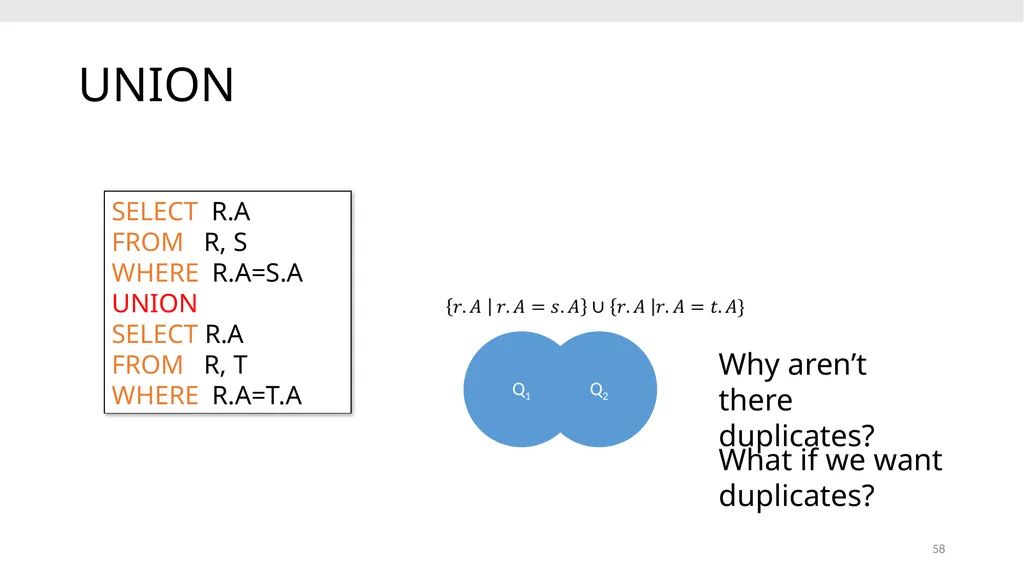
slide58. UNION 58 SELECT R.A
FROM R, S
WHERE R.A=S.A
UNION
SELECT R.A
FROM R, T
WHERE R.A=T.A Why aren’t there duplicates? What if we want duplicates?<br>
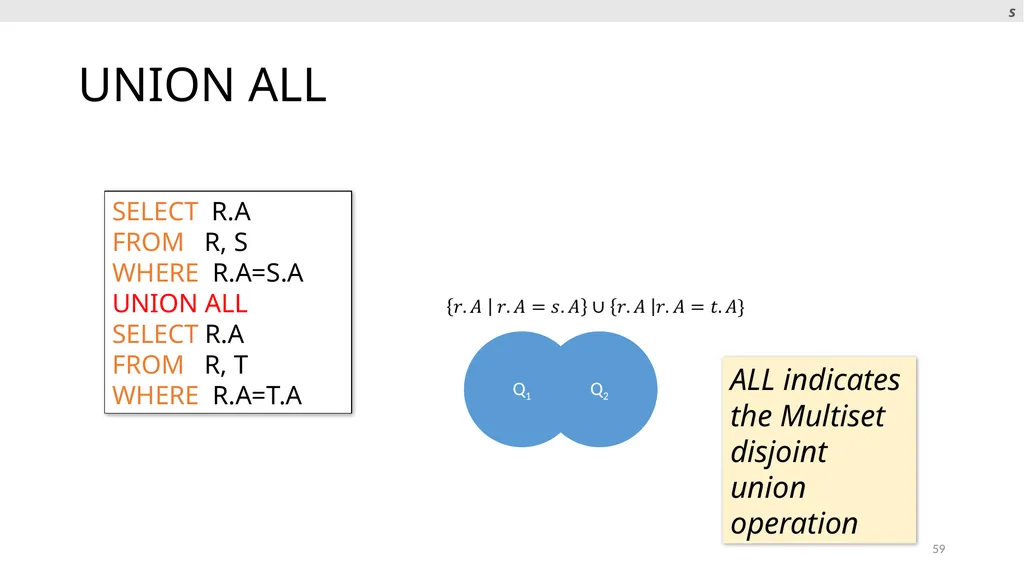
slide59. UNION ALL 59 SELECT R.A
FROM R, S
WHERE R.A=S.A
UNION ALL
SELECT R.A
FROM R, T
WHERE R.A=T.A ALL indicates the Multiset disjoint union operation s<br>
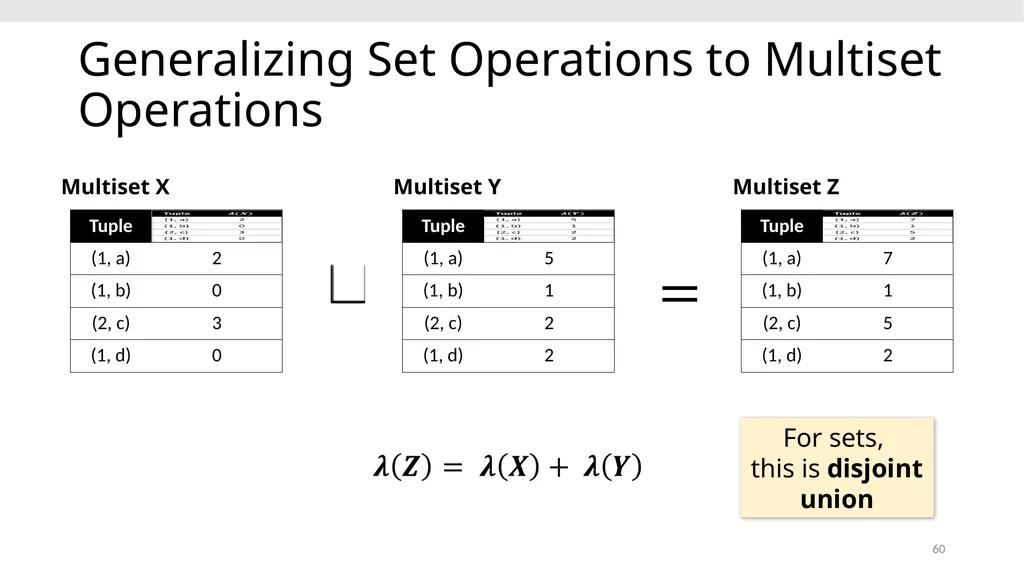
slide60. 60 Multiset X Multiset Y Multiset Z For sets,
this is disjoint union Generalizing Set Operations to Multiset Operations<br>
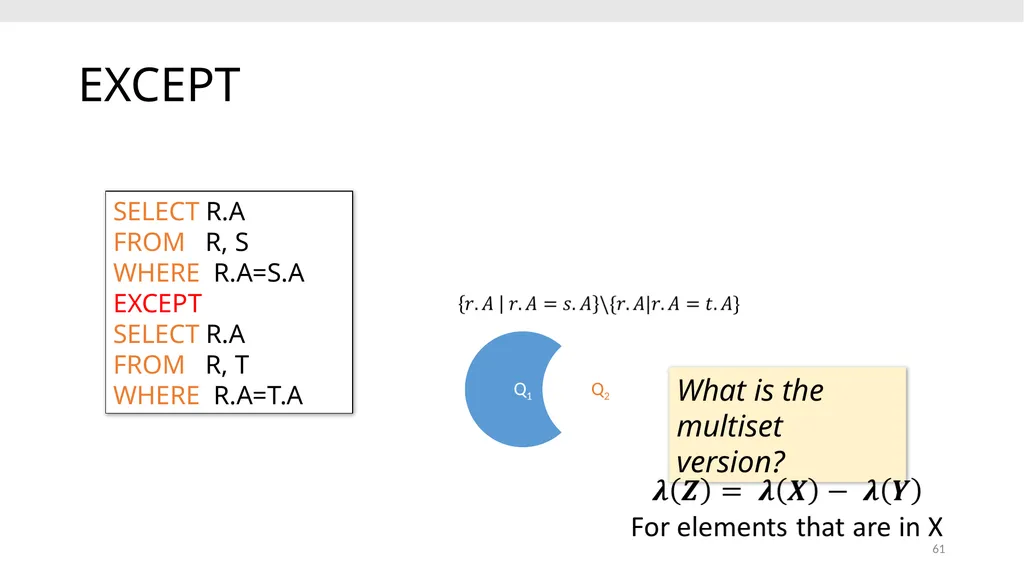
slide61. EXCEPT 61 SELECT R.A
FROM R, S
WHERE R.A=S.A
EXCEPT
SELECT R.A
FROM R, T
WHERE R.A=T.A What is the multiset version?<br>
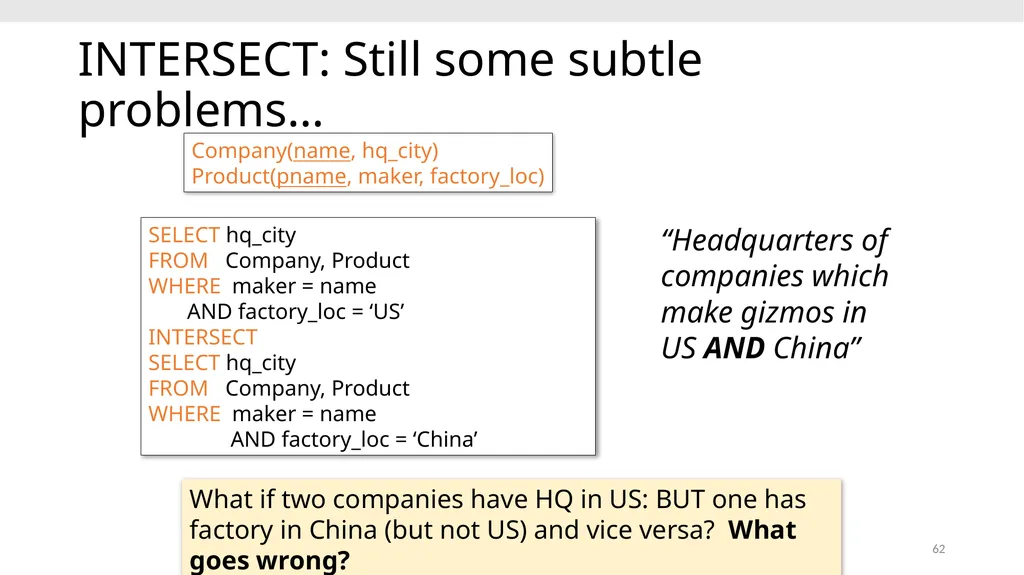
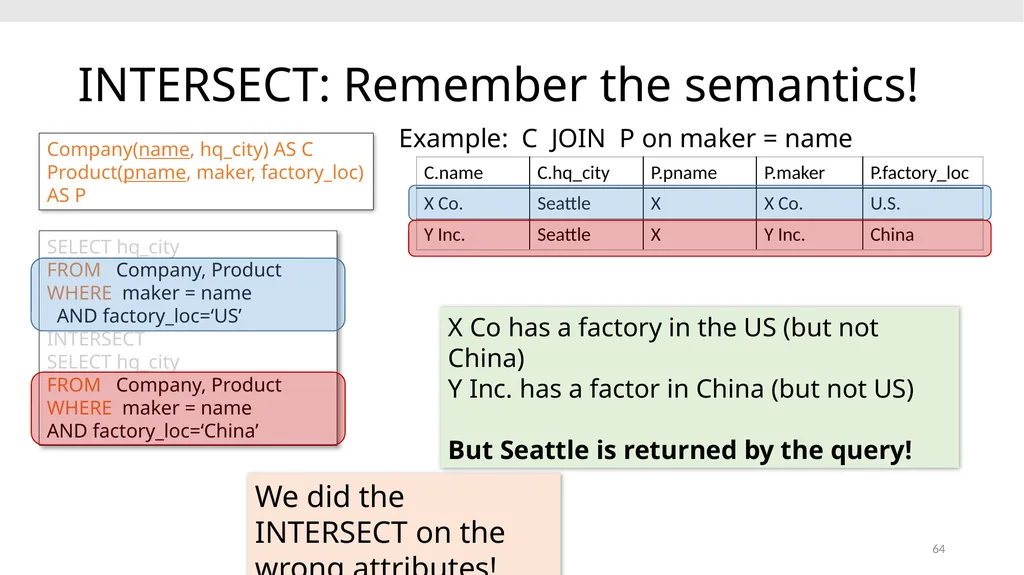
slide62. INTERSECT: Still some subtle problems… 62 Company(name, hq_city)
Product(pname, maker, factory_loc) SELECT hq_city
FROM Company, Product
WHERE maker = name
AND factory_loc = ‘US’
INTERSECT
SELECT hq_city
FROM Company, Product
WHERE maker = name
AND factory_loc = ‘China’ What if two companies have HQ in US: BUT one has factory in China (but not US) and vice versa? What goes wrong? “Headquarters of companies which make gizmos in US AND China”<br>
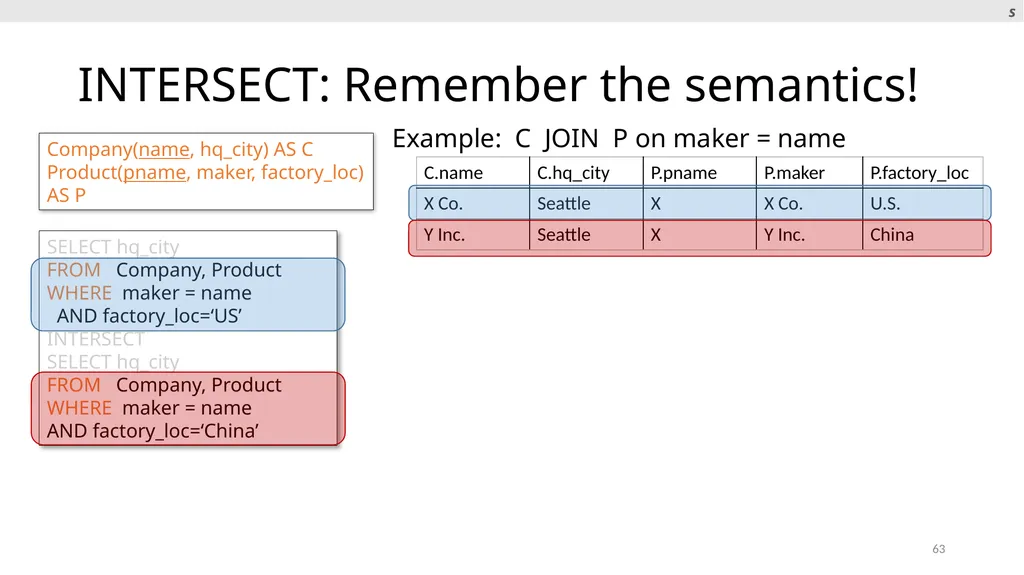
slide63. INTERSECT: Remember the semantics! 63 Company(name, hq_city) AS C
Product(pname, maker, factory_loc) AS P SELECT hq_city
FROM Company, Product
WHERE maker = name
AND factory_loc=‘US’
INTERSECT
SELECT hq_city
FROM Company, Product
WHERE maker = name
AND factory_loc=‘China’ Example: C JOIN P on maker = name s<br>
slide64. INTERSECT: Remember the semantics! 64 Company(name, hq_city) AS C
Product(pname, maker, factory_loc) AS P SELECT hq_city
FROM Company, Product
WHERE maker = name
AND factory_loc=‘US’
INTERSECT
SELECT hq_city
FROM Company, Product
WHERE maker = name
AND factory_loc=‘China’ Example: C JOIN P on maker = name X Co has a factory in the US (but not China)
Y Inc. has a factor in China (but not US)
But Seattle is returned by the query! We did the INTERSECT on the wrong attributes!<br>
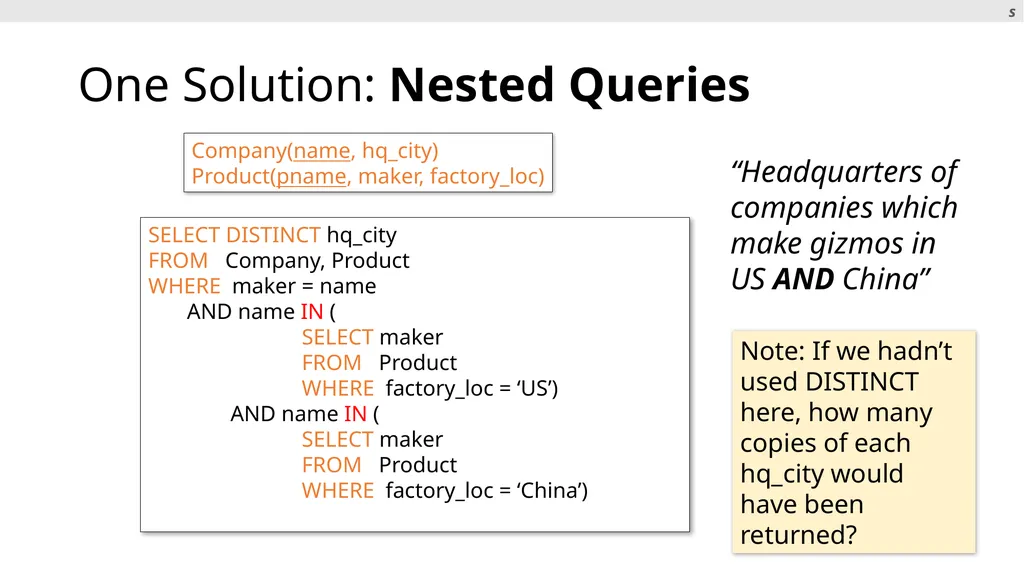
slide65. One Solution: Nested Queries 65 Company(name, hq_city)
Product(pname, maker, factory_loc) SELECT DISTINCT hq_city
FROM Company, Product
WHERE maker = name
AND name IN (
SELECT maker
FROM Product
WHERE factory_loc = ‘US’)
AND name IN (
SELECT maker
FROM Product
WHERE factory_loc = ‘China’) “Headquarters of companies which make gizmos in US AND China” Note: If we hadn’t used DISTINCT here, how many copies of each hq_city would have been returned? s<br>
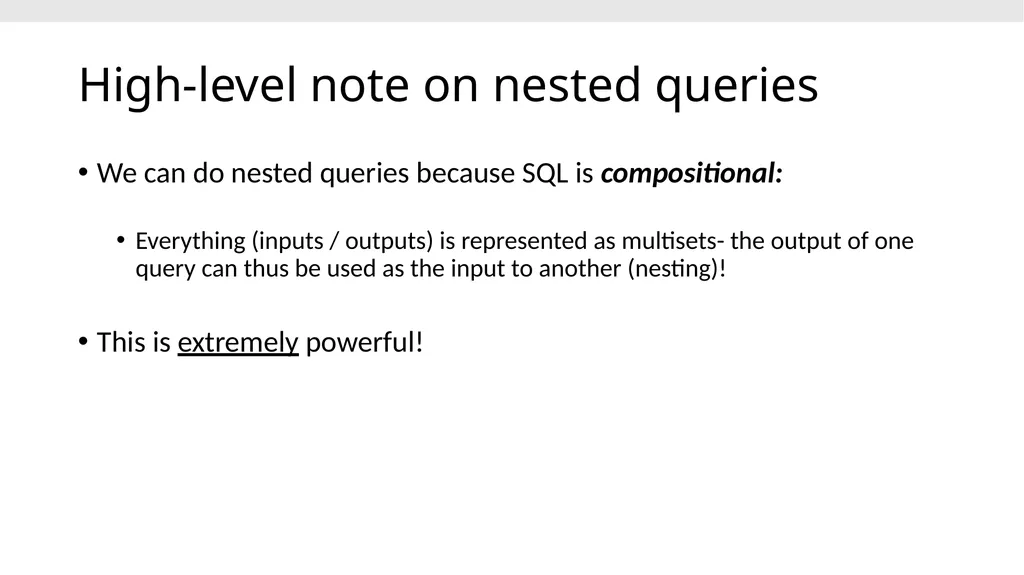
slide66. High-level note on nested queries We can do nested queries because SQL is compositional:
Everything (inputs / outputs) is represented as multisets- the output of one query can thus be used as the input to another (nesting)!
This is extremely powerful!<br>
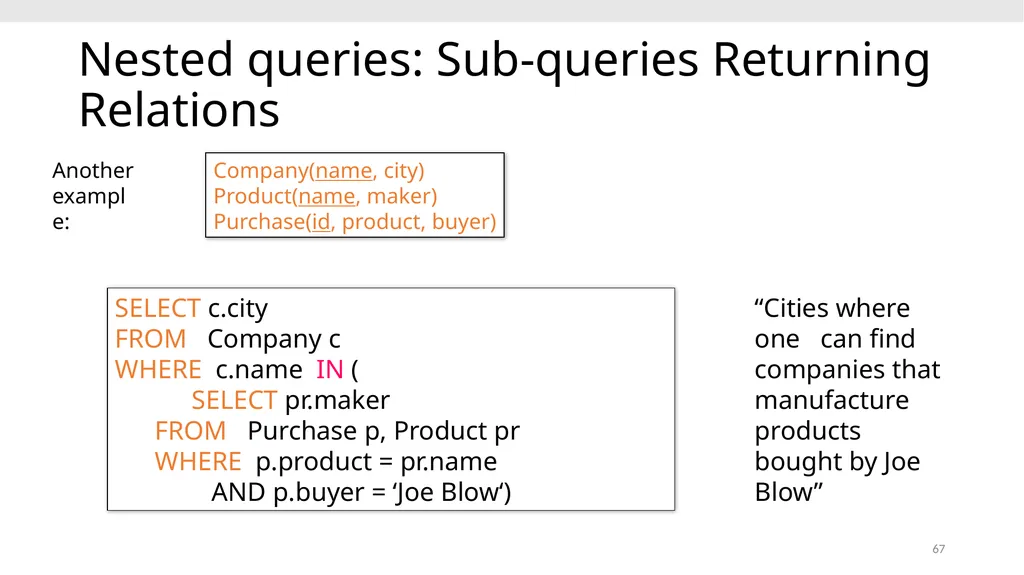
slide67. 67 Nested queries: Sub-queries Returning Relations SELECT c.city
FROM Company c
WHERE c.name IN (
SELECT pr.maker
FROM Purchase p, Product pr
WHERE p.product = pr.name
AND p.buyer = ‘Joe Blow‘) “Cities where one can find companies that manufacture products bought by Joe Blow” Company(name, city) Product(name, maker) Purchase(id, product, buyer) Another example:<br>
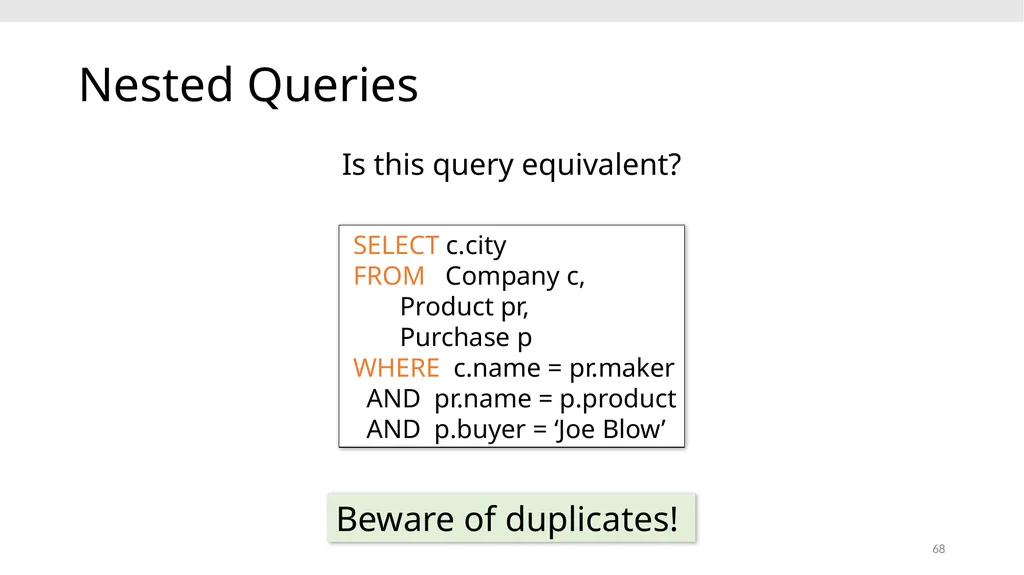
slide68. 68 Nested Queries SELECT c.city
FROM Company c,
Product pr,
Purchase p
WHERE c.name = pr.maker
AND pr.name = p.product
AND p.buyer = ‘Joe Blow’ Is this query equivalent? Beware of duplicates!<br>
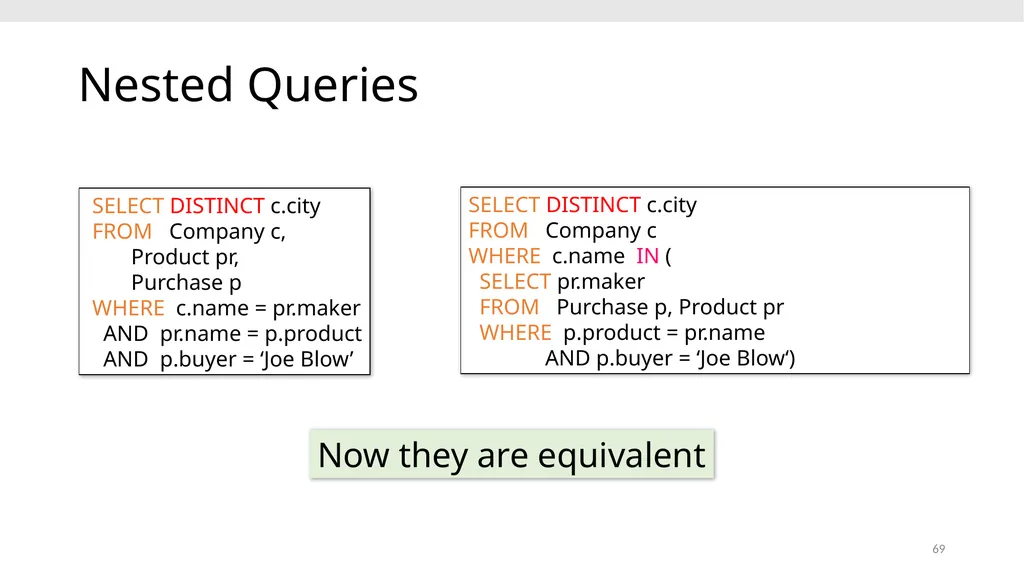
slide69. 69 Nested Queries SELECT DISTINCT c.city
FROM Company c,
Product pr,
Purchase p
WHERE c.name = pr.maker
AND pr.name = p.product
AND p.buyer = ‘Joe Blow’ Now they are equivalent SELECT DISTINCT c.city
FROM Company c
WHERE c.name IN (
SELECT pr.maker
FROM Purchase p, Product pr
WHERE p.product = pr.name
AND p.buyer = ‘Joe Blow‘)<br>
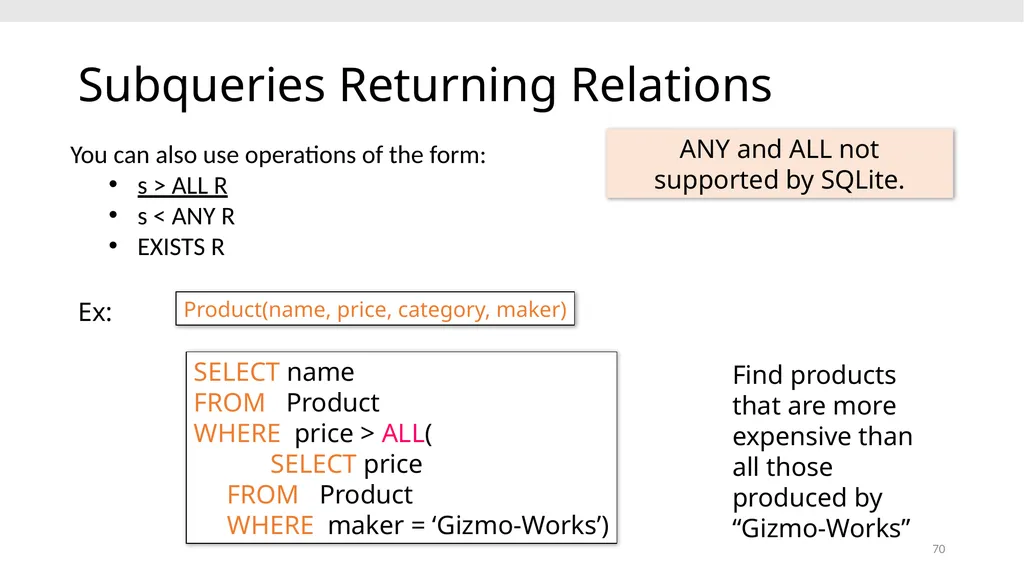
slide70. 70 Subqueries Returning Relations SELECT name
FROM Product
WHERE price > ALL(
SELECT price
FROM Product
WHERE maker = ‘Gizmo-Works’) Product(name, price, category, maker) You can also use operations of the form:
s > ALL R
s < ANY R
EXISTS R Find products that are more expensive than all those produced by “Gizmo-Works” Ex: ANY and ALL not supported by SQLite.<br>
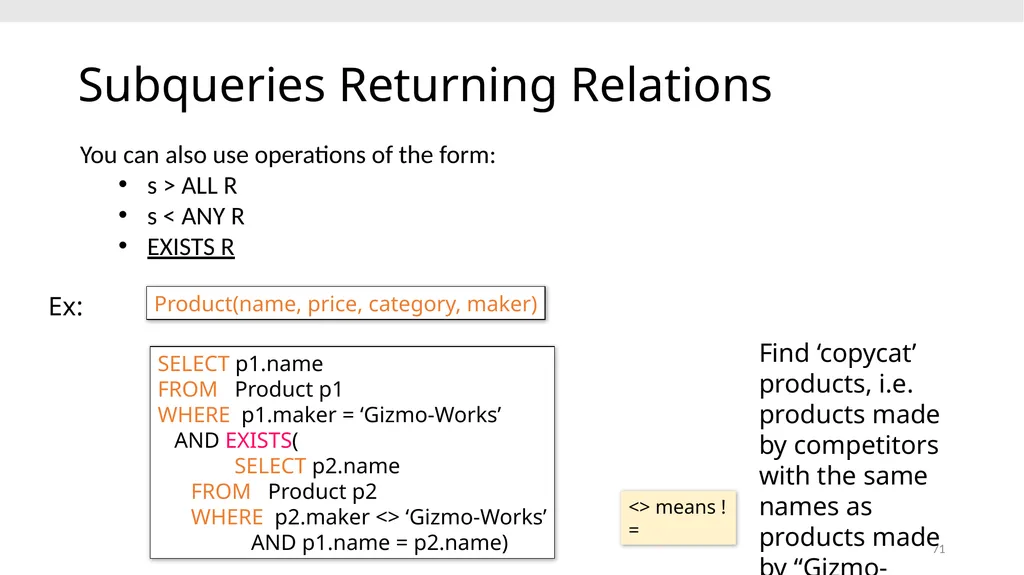
slide71. 71 Subqueries Returning Relations SELECT p1.name
FROM Product p1
WHERE p1.maker = ‘Gizmo-Works’
AND EXISTS(
SELECT p2.name
FROM Product p2
WHERE p2.maker <> ‘Gizmo-Works’
AND p1.name = p2.name) Product(name, price, category, maker) You can also use operations of the form:
s > ALL R
s < ANY R
EXISTS R Find ‘copycat’ products, i.e. products made by competitors with the same names as products made by “Gizmo-Works” Ex: <> means !=<br>
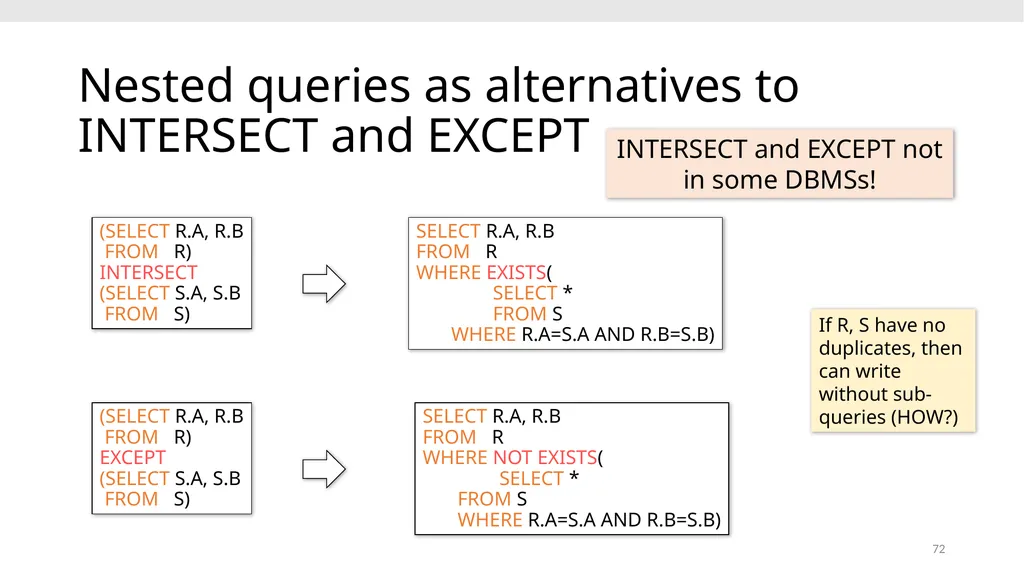
slide72. 72 Nested queries as alternatives to INTERSECT and EXCEPT (SELECT R.A, R.B
FROM R) INTERSECT
(SELECT S.A, S.B
FROM S) SELECT R.A, R.B
FROM R WHERE EXISTS(
SELECT * FROM S WHERE R.A=S.A AND R.B=S.B) SELECT R.A, R.B
FROM R WHERE NOT EXISTS(
SELECT * FROM S WHERE R.A=S.A AND R.B=S.B) INTERSECT and EXCEPT not in some DBMSs! If R, S have no duplicates, then can write without sub-queries (HOW?) (SELECT R.A, R.B
FROM R) EXCEPT
(SELECT S.A, S.B
FROM S)<br>
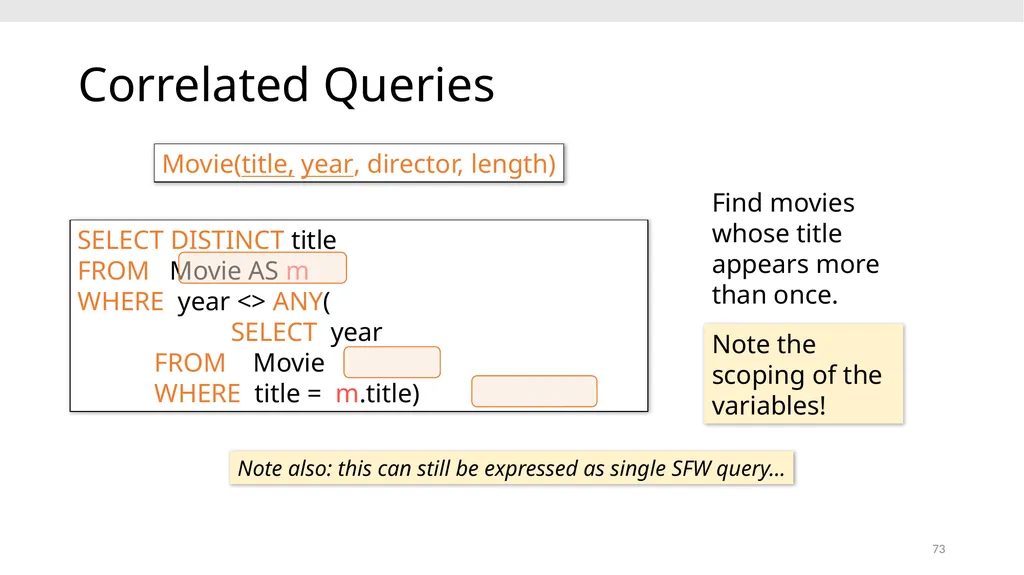
slide73. 73 Correlated Queries SELECT DISTINCT title
FROM Movie AS m
WHERE year <> ANY(
SELECT year
FROM Movie
WHERE title = m.title) Movie(title, year, director, length) Note also: this can still be expressed as single SFW query… Find movies whose title appears more than once. Note the scoping of the variables!<br>
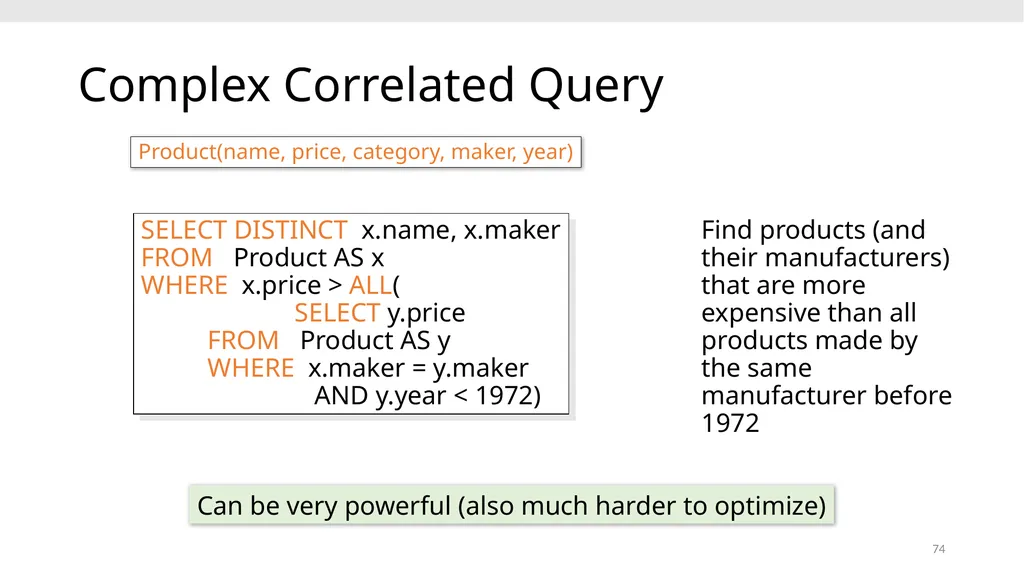
slide74. 74 Complex Correlated Query SELECT DISTINCT x.name, x.maker
FROM Product AS x
WHERE x.price > ALL(
SELECT y.price
FROM Product AS y
WHERE x.maker = y.maker
AND y.year < 1972) Find products (and their manufacturers) that are more expensive than all products made by the same manufacturer before 1972 Product(name, price, category, maker, year) Can be very powerful (also much harder to optimize)<br>
slide75. Go over Activity 3-1 75<br>
slide76. Basic SQL Summary SQL provides a high-level declarative language for manipulating data (DML)
The workhorse is the SFW block
Set operators are powerful but have some subtleties
Powerful, nested queries also allowed. 76<br>
Theodoros Rekatsinas 1<br>
slide2. 2 Announcements Assignment 1 is due tomorrow (end of day)
Any questions?
PA2 is out. It is due on the 19th
Start early
Ask questions on Piazza
Go over activities and reading before attempting
Out of town for the next two lectures.
We will resume on Feb 13th.<br>
slide3. Today’s Lecture Finish Relational Algebra (slides in previous lecture)
Introduction to SQL
Single-table queries
Multi-table queries
Advanced SQL 3<br>
slide4. 1. Introduction to SQL 4<br>
slide5. SQL Motivation But why use SQL? The relational model of data is the most widely used model today
Main Concept: the relation- essentially, a table Logical data independence: protection from changes in the logical structure of the data SQL is a logical, declarative query language. We use SQL because we happen to use the relational model. Remember: The reason for using the relational model is data independence!<br>
slide6. 6 Basic SQL<br>
slide7. SQL Introduction SQL is a standard language for querying and manipulating data
SQL is a very high-level programming language
This works because it is optimized well!
Many standards out there:
ANSI SQL, SQL92 (a.k.a. SQL2), SQL99 (a.k.a. SQL3), ….
Vendors support various subsets Probably the world’s most successful parallel programming language (multicore?) SQL stands for
Structured Query Language<br>
slide8. 8 SQL is a… Data Definition Language (DDL)
Define relational schemata
Create/alter/delete tables and their attributes
Data Manipulation Language (DML)
Insert/delete/modify tuples in tables
Query one or more tables – discussed next!<br>
slide9. 9 Tables in SQL Product A relation or table is a multiset of tuples having the attributes specified by the schema Let’s break this definition down<br>
slide10. 10 Tables in SQL Product A multiset is an unordered list (or: a set with multiple duplicate instances allowed) List: [1, 1, 2, 3]
Set: {1, 2, 3}
Multiset: {1, 1, 2, 3} i.e. no next(), etc. methods!<br>
slide11. 11 Tables in SQL Product An attribute (or column) is a typed data entry present in each tuple in the relation Attributes must have an atomic type in standard SQL, i.e. not a list, set, etc.<br>
slide12. 12 Tables in SQL Product A tuple or row is a single entry in the table having the attributes specified by the schema Also referred to sometimes as a record<br>
slide13. 13 Tables in SQL Product The number of tuples is the cardinality of the relation The number of attributes is the arity of the relation<br>
slide14. 14 Data Types in SQL Atomic types:
Characters: CHAR(20), VARCHAR(50)
Numbers: INT, BIGINT, SMALLINT, FLOAT
Others: MONEY, DATETIME, …
Every attribute must have an atomic type
Hence tables are flat<br>
slide15. 15 Table Schemas The schema of a table is the table name, its attributes, and their types:
A key is an attribute whose values are unique; we underline a key Product(Pname: string, Price: float, Category: string, Manufacturer: string) Product(Pname: string, Price: float, Category: string, Manufacturer: string)<br>
slide16. Key constraints A key is an implicit constraint on which tuples can be in the relation
i.e. if two tuples agree on the values of the key, then they must be the same tuple! 1. Which would you select as a key?
2. Is a key always guaranteed to exist?
3. Can we have more than one key? A key is a minimal subset of attributes that acts as a unique identifier for tuples in a relation Students(sid:string, name:string, gpa: float)<br>
slide17. NULL and NOT NULL To say “don’t know the value” we use NULL
NULL has (sometimes painful) semantics, more details later Say, Jim just enrolled in his first class. In SQL, we may constrain a column to be NOT NULL, e.g., “name” in this table Students(sid:string, name:string, gpa: float)<br>
slide18. General Constraints We can actually specify arbitrary assertions
E.g. “There cannot be 25 people in the DB class”
In practice, we don’t specify many such constraints. Why?
Performance! Whenever we do something ugly (or avoid doing something convenient) it’s for the sake of performance<br>
slide19. Go over Activity 2-1 19<br>
slide20. 2. Single-table queries 20<br>
slide21. 21 SQL Query Basic form (there are many many more bells and whistles) Call this a SFW query. SELECT <attributes> FROM <one or more relations> WHERE <conditions><br>
slide22. 22 Simple SQL Query: Selection SELECT * FROM Product WHERE Category = ‘Gadgets’ Selection is the operation of filtering a relation’s tuples on some condition<br>
slide23. 23 Simple SQL Query: Projection SELECT Pname, Price, Manufacturer FROM Product WHERE Category = ‘Gadgets’ Projection is the operation of producing an output table with tuples that have a subset of their prior attributes<br>
slide24. 24 Notation SELECT Pname, Price, Manufacturer FROM Product WHERE Category = ‘Gadgets’ Product(PName, Price, Category, Manfacturer) Answer(PName, Price, Manfacturer) Input schema Output schema<br>
slide25. 25 A Few Details SQL commands are case insensitive:
Same: SELECT, Select, select
Same: Product, product
Values are not:
Different: ‘Seattle’, ‘seattle’
Use single quotes for constants:
‘abc’ - yes
“abc” - no<br>
slide26. 26 LIKE: Simple String Pattern Matching s LIKE p: pattern matching on strings
p may contain two special symbols:
% = any sequence of characters
_ = any single character SELECT * FROM Products WHERE PName LIKE ‘%gizmo%’<br>
slide27. 27 DISTINCT: Eliminating Duplicates SELECT DISTINCT Category
FROM Product Versus SELECT Category
FROM Product<br>
slide28. 28 ORDER BY: Sorting the Results SELECT PName, Price, Manufacturer
FROM Product
WHERE Category=‘gizmo’ AND Price > 50
ORDER BY Price, PName Ties are broken by the second attribute on the ORDER BY list, etc. Ordering is ascending, unless you specify the DESC keyword.<br>
slide29. Go over Activity 2-2 29<br>
slide30. 3. Multi-table queries 30<br>
slide31. Foreign Key constraints student_id alone is not a key- what is? Students Enrolled We say that student_id is a foreign key that refers to Students Students(sid: string, name: string, gpa: float)
Enrolled(student_id: string, cid: string, grade: string) Suppose we have the following schema:
And we want to impose the following constraint:
‘Only bona fide students may enroll in courses’ i.e. a student must appear in the Students table to enroll in a class<br>
slide32. Declaring Foreign Keys Students(sid: string, name: string, gpa: float)
Enrolled(student_id: string, cid: string, grade: string)
CREATE TABLE Enrolled(
student_id CHAR(20),
cid CHAR(20),
grade CHAR(10),
PRIMARY KEY (student_id, cid),
FOREIGN KEY (student_id) REFERENCES Students(sid)
)<br>
slide33. Foreign Keys and update operations DBA chooses (syntax in the book) Students(sid: string, name: string, gpa: float)
Enrolled(student_id: string, cid: string, grade: string) What if we insert a tuple into Enrolled, but no corresponding student?
INSERT is rejected (foreign keys are constraints)!
What if we delete a student?
Disallow the delete
Remove all of the courses for that student
SQL allows a third via NULL (not yet covered)<br>
slide34. 34 Keys and Foreign Keys Product Company What is a foreign key vs. a key here?<br>
slide35. 35 Joins Ex: Find all products under $200 manufactured in Japan; return their names and prices. SELECT PName, Price FROM Product, Company WHERE Manufacturer = CName
AND Country=‘Japan’ AND Price <= 200 Product(PName, Price, Category, Manufacturer)
Company(CName, StockPrice, Country) Note: we will often omit attribute types in schema definitions for brevity, but assume attributes are always atomic types<br>
slide36. 36 Joins Ex: Find all products under $200 manufactured in Japan; return their names and prices. SELECT PName, Price FROM Product, Company WHERE Manufacturer = CName
AND Country=‘Japan’ AND Price <= 200 A join between tables returns all unique combinations of their tuples which meet some specified join condition Product(PName, Price, Category, Manufacturer)
Company(CName, StockPrice, Country)<br>
slide37. 37 Joins Several equivalent ways to write a basic join in SQL: SELECT PName, Price FROM Product, Company WHERE Manufacturer = CName
AND Country=‘Japan’ AND Price <= 200 SELECT PName, Price FROM Product
JOIN Company ON Manufacturer = Cname
AND Country=‘Japan’ WHERE Price <= 200 Product(PName, Price, Category, Manufacturer)
Company(CName, StockPrice, Country)<br>
slide38. 38 Joins Product Company SELECT PName, Price FROM Product, Company WHERE Manufacturer = CName
AND Country=‘Japan’ AND Price <= 200<br>
slide39. 39 Tuple Variable Ambiguity in Multi-Table SELECT DISTINCT name, address FROM Person, Company WHERE worksfor = name Person(name, address, worksfor) Company(name, address) Which “address” does this refer to?
Which “name”s??<br>
slide40. 40 Person(name, address, worksfor) Company(name, address) SELECT DISTINCT Person.name, Person.address FROM Person, Company WHERE Person.worksfor = Company.name SELECT DISTINCT p.name, p.address FROM Person p, Company c WHERE p.worksfor = c.name Both equivalent ways to resolve variable ambiguity Tuple Variable Ambiguity in Multi-Table<br>
slide41. 41 Meaning (Semantics) of SQL Queries SELECT x1.a1, x1.a2, …, xn.ak
FROM R1 AS x1, R2 AS x2, …, Rn AS xn
WHERE Conditions(x1,…, xn) Answer = {}
for x1 in R1 do
for x2 in R2 do
…..
for xn in Rn do
if Conditions(x1,…, xn)
then Answer = Answer {(x1.a1, x1.a2, …, xn.ak)}
return Answer Almost never the fastest way to compute it! Note: this is a multiset union<br>
slide42. An example of SQL semantics 42 SELECT R.A
FROM R, S
WHERE R.A = S.B Cross Product Apply Projection Apply Selections / Conditions Output<br>
slide43. Note the semantics of a join 43 SELECT R.A
FROM R, S
WHERE R.A = S.B Recall: Cross product (A X B) is the set of all unique tuples in A,B
Ex: {a,b,c} X {1,2}
= {(a,1), (a,2), (b,1), (b,2), (c,1), (c,2)} = Filtering! = Returning only some attributes Remembering this order is critical to understanding the output of certain queries (see later on…)<br>
slide44. Note: we say “semantics” not “execution order” The preceding slides show what a join means
Not actually how the DBMS executes it under the covers<br>
slide45. Go over Activity 2-3 45<br>
slide46. 4. Advanced SQL 46<br>
slide47. 47 Set Operators and Nested Queries<br>
slide48. 48 SELECT DISTINCT R.A
FROM R, S, T
WHERE R.A=S.A OR R.A=T.A An Unintuitive Query Computes R Ç (S È T) But what if S = f? S T R Go back to the semantics! What does it compute?<br>
slide49. 49 SELECT DISTINCT R.A
FROM R, S, T
WHERE R.A=S.A OR R.A=T.A An Unintuitive Query Recall the semantics!
Take cross-product
Apply selections / conditions
Apply projection
If S = {}, then the cross product of R, S, T = {}, and the query result = {}! Must consider semantics here.
Are there more explicit way to do set operations like this?<br>
slide50. 50 SELECT DISTINCT R.A
FROM R, S, T
WHERE R.A=S.A OR R.A=T.A What does this look like in Python? Semantics:
Take cross-product
Apply selections / conditions
Apply projection Joins / cross-products are just nested for loops (in simplest implementation)! If-then statements!<br>
slide51. 51 SELECT DISTINCT R.A
FROM R, S, T
WHERE R.A=S.A OR R.A=T.A What does this look like in Python? output = {}
for r in R:
for s in S:
for t in T:
if r[‘A’] == s[‘A’] or r[‘A’] == t[‘A’]:
output.add(r[‘A’])
return list(output) Can you see now what happens if S = []?<br>
slide52. 52 Multiset operations<br>
slide53. Recall Multisets 53 Equivalent Representations of a Multiset Multiset X Multiset X Note: In a set all counts are {0,1}.<br>
slide54. Generalizing Set Operations to Multiset Operations 54 Multiset X Multiset Y Multiset Z For sets, this is intersection<br>
slide55. 55 Multiset X Multiset Y Multiset Z For sets,
this is union Generalizing Set Operations to Multiset Operations<br>
slide56. Multiset Operations in SQL 56 s<br>
slide57. Explicit Set Operators: INTERSECT 57 SELECT R.A
FROM R, S
WHERE R.A=S.A
INTERSECT
SELECT R.A
FROM R, T
WHERE R.A=T.A<br>
slide58. UNION 58 SELECT R.A
FROM R, S
WHERE R.A=S.A
UNION
SELECT R.A
FROM R, T
WHERE R.A=T.A Why aren’t there duplicates? What if we want duplicates?<br>
slide59. UNION ALL 59 SELECT R.A
FROM R, S
WHERE R.A=S.A
UNION ALL
SELECT R.A
FROM R, T
WHERE R.A=T.A ALL indicates the Multiset disjoint union operation s<br>
slide60. 60 Multiset X Multiset Y Multiset Z For sets,
this is disjoint union Generalizing Set Operations to Multiset Operations<br>
slide61. EXCEPT 61 SELECT R.A
FROM R, S
WHERE R.A=S.A
EXCEPT
SELECT R.A
FROM R, T
WHERE R.A=T.A What is the multiset version?<br>
slide62. INTERSECT: Still some subtle problems… 62 Company(name, hq_city)
Product(pname, maker, factory_loc) SELECT hq_city
FROM Company, Product
WHERE maker = name
AND factory_loc = ‘US’
INTERSECT
SELECT hq_city
FROM Company, Product
WHERE maker = name
AND factory_loc = ‘China’ What if two companies have HQ in US: BUT one has factory in China (but not US) and vice versa? What goes wrong? “Headquarters of companies which make gizmos in US AND China”<br>
slide63. INTERSECT: Remember the semantics! 63 Company(name, hq_city) AS C
Product(pname, maker, factory_loc) AS P SELECT hq_city
FROM Company, Product
WHERE maker = name
AND factory_loc=‘US’
INTERSECT
SELECT hq_city
FROM Company, Product
WHERE maker = name
AND factory_loc=‘China’ Example: C JOIN P on maker = name s<br>
slide64. INTERSECT: Remember the semantics! 64 Company(name, hq_city) AS C
Product(pname, maker, factory_loc) AS P SELECT hq_city
FROM Company, Product
WHERE maker = name
AND factory_loc=‘US’
INTERSECT
SELECT hq_city
FROM Company, Product
WHERE maker = name
AND factory_loc=‘China’ Example: C JOIN P on maker = name X Co has a factory in the US (but not China)
Y Inc. has a factor in China (but not US)
But Seattle is returned by the query! We did the INTERSECT on the wrong attributes!<br>
slide65. One Solution: Nested Queries 65 Company(name, hq_city)
Product(pname, maker, factory_loc) SELECT DISTINCT hq_city
FROM Company, Product
WHERE maker = name
AND name IN (
SELECT maker
FROM Product
WHERE factory_loc = ‘US’)
AND name IN (
SELECT maker
FROM Product
WHERE factory_loc = ‘China’) “Headquarters of companies which make gizmos in US AND China” Note: If we hadn’t used DISTINCT here, how many copies of each hq_city would have been returned? s<br>
slide66. High-level note on nested queries We can do nested queries because SQL is compositional:
Everything (inputs / outputs) is represented as multisets- the output of one query can thus be used as the input to another (nesting)!
This is extremely powerful!<br>
slide67. 67 Nested queries: Sub-queries Returning Relations SELECT c.city
FROM Company c
WHERE c.name IN (
SELECT pr.maker
FROM Purchase p, Product pr
WHERE p.product = pr.name
AND p.buyer = ‘Joe Blow‘) “Cities where one can find companies that manufacture products bought by Joe Blow” Company(name, city) Product(name, maker) Purchase(id, product, buyer) Another example:<br>
slide68. 68 Nested Queries SELECT c.city
FROM Company c,
Product pr,
Purchase p
WHERE c.name = pr.maker
AND pr.name = p.product
AND p.buyer = ‘Joe Blow’ Is this query equivalent? Beware of duplicates!<br>
slide69. 69 Nested Queries SELECT DISTINCT c.city
FROM Company c,
Product pr,
Purchase p
WHERE c.name = pr.maker
AND pr.name = p.product
AND p.buyer = ‘Joe Blow’ Now they are equivalent SELECT DISTINCT c.city
FROM Company c
WHERE c.name IN (
SELECT pr.maker
FROM Purchase p, Product pr
WHERE p.product = pr.name
AND p.buyer = ‘Joe Blow‘)<br>
slide70. 70 Subqueries Returning Relations SELECT name
FROM Product
WHERE price > ALL(
SELECT price
FROM Product
WHERE maker = ‘Gizmo-Works’) Product(name, price, category, maker) You can also use operations of the form:
s > ALL R
s < ANY R
EXISTS R Find products that are more expensive than all those produced by “Gizmo-Works” Ex: ANY and ALL not supported by SQLite.<br>
slide71. 71 Subqueries Returning Relations SELECT p1.name
FROM Product p1
WHERE p1.maker = ‘Gizmo-Works’
AND EXISTS(
SELECT p2.name
FROM Product p2
WHERE p2.maker <> ‘Gizmo-Works’
AND p1.name = p2.name) Product(name, price, category, maker) You can also use operations of the form:
s > ALL R
s < ANY R
EXISTS R Find ‘copycat’ products, i.e. products made by competitors with the same names as products made by “Gizmo-Works” Ex: <> means !=<br>
slide72. 72 Nested queries as alternatives to INTERSECT and EXCEPT (SELECT R.A, R.B
FROM R) INTERSECT
(SELECT S.A, S.B
FROM S) SELECT R.A, R.B
FROM R WHERE EXISTS(
SELECT * FROM S WHERE R.A=S.A AND R.B=S.B) SELECT R.A, R.B
FROM R WHERE NOT EXISTS(
SELECT * FROM S WHERE R.A=S.A AND R.B=S.B) INTERSECT and EXCEPT not in some DBMSs! If R, S have no duplicates, then can write without sub-queries (HOW?) (SELECT R.A, R.B
FROM R) EXCEPT
(SELECT S.A, S.B
FROM S)<br>
slide73. 73 Correlated Queries SELECT DISTINCT title
FROM Movie AS m
WHERE year <> ANY(
SELECT year
FROM Movie
WHERE title = m.title) Movie(title, year, director, length) Note also: this can still be expressed as single SFW query… Find movies whose title appears more than once. Note the scoping of the variables!<br>
slide74. 74 Complex Correlated Query SELECT DISTINCT x.name, x.maker
FROM Product AS x
WHERE x.price > ALL(
SELECT y.price
FROM Product AS y
WHERE x.maker = y.maker
AND y.year < 1972) Find products (and their manufacturers) that are more expensive than all products made by the same manufacturer before 1972 Product(name, price, category, maker, year) Can be very powerful (also much harder to optimize)<br>
slide75. Go over Activity 3-1 75<br>
slide76. Basic SQL Summary SQL provides a high-level declarative language for manipulating data (DML)
The workhorse is the SFW block
Set operators are powerful but have some subtleties
Powerful, nested queries also allowed. 76<br>