
Email Etiquette for Business Tips to represent
SB
Published · 32 slides · 0 views

1 / 1

Description
Email Etiquette for Business Tips to represent yourself and your company well through email. There is a problem. Theres likely someonea colleague, a client, or your bosswho is noticing your writing and, even worse, making a judgment of
Related Topics
Share
Embed code
Download this presentation From Below
"Email Etiquette for Business Tips to represent" is the property of its rightful owner. Permission is granted to download and print the materials on this website for personal, non-commercial use only, and to display it on your personal computer provided you do not modify the materials and that you retain all copyright notices contained in the materials. By downloading content from our website, you accept the terms of this agreement.
Presentation Transcript
01
Email Etiquette for Business Tips to represent yourself and your company well through email.<br>
02
There is a problem. There’s likely someone—a colleague, a client, or your boss—who is noticing your writing and, even worse, making a judgment of your professionalism based on it.
-Jenna (Britton) Arak from The Muse<br>
-Jenna (Britton) Arak from The Muse<br>
03
We have a solution. After this workshop, you will be able to:
Represent your company well when you write emails
Understand how to use the parts of an email
Write effective subject lines
Address someone professionally
Write concise emails
Communicate appropriately with an IT department
Close an email professionally
Avoid commonly misspelled words<br>
Represent your company well when you write emails
Understand how to use the parts of an email
Write effective subject lines
Address someone professionally
Write concise emails
Communicate appropriately with an IT department
Close an email professionally
Avoid commonly misspelled words<br>
04
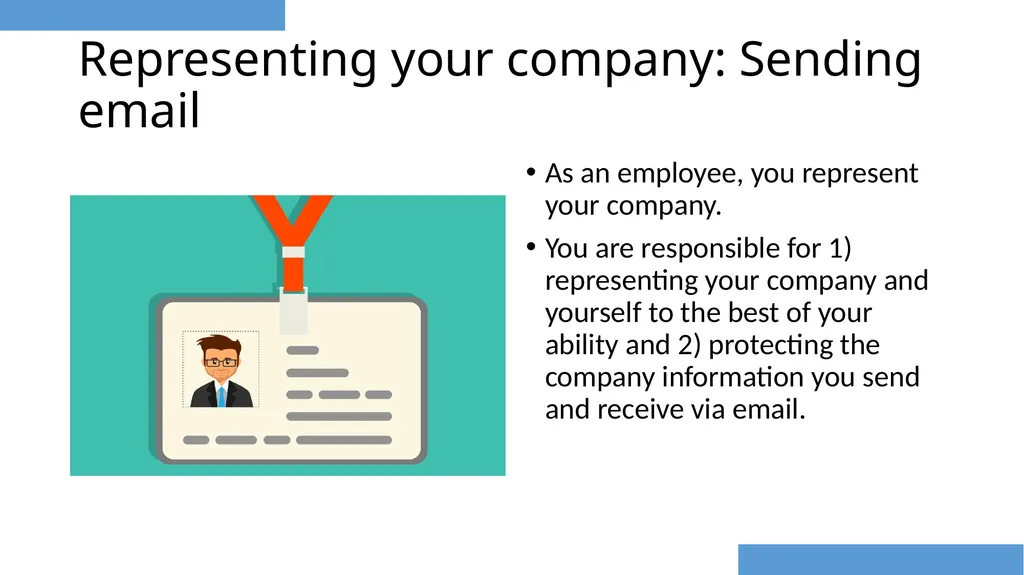
Representing your company: Sending email As an employee, you represent your company.
You are responsible for 1) representing your company and yourself to the best of your ability and 2) protecting the company information you send and receive via email.<br>
You are responsible for 1) representing your company and yourself to the best of your ability and 2) protecting the company information you send and receive via email.<br>
05
Representing your company: Sending email, cont. Emails sent to and from your work inbox are company files.
It is your responsibility to protect company files/data:
Do not transfer large files between two offices using your personal cloud storage.
Do not share work emails on social media.
Do not forward your work emails to your personal email address.
Your employer has access to your work email. Mixing work and personal emails blurs the lines between work and personal business.<br>
It is your responsibility to protect company files/data:
Do not transfer large files between two offices using your personal cloud storage.
Do not share work emails on social media.
Do not forward your work emails to your personal email address.
Your employer has access to your work email. Mixing work and personal emails blurs the lines between work and personal business.<br>
06
When NOT to use email Andrea Lunsford, author of The Everyday Writer, asks us to “consider your email messages permanent and always findable, even if you delete them. Many people have been embarrassed (or worse, prosecuted) because of email trails” (p.20).
Do NOT use email when the information is better handled in person.
Some ideas are better expressed in person, such as negative feelings about projects or performance reviews.
Do NOT use email to relay confidential information.
Email is not private. Do not include anything that you would not want someone else to read.
Do NOT use email when you’re angry and want to vent.
It’s better to give the issue some time before writing.<br>
Do NOT use email when the information is better handled in person.
Some ideas are better expressed in person, such as negative feelings about projects or performance reviews.
Do NOT use email to relay confidential information.
Email is not private. Do not include anything that you would not want someone else to read.
Do NOT use email when you’re angry and want to vent.
It’s better to give the issue some time before writing.<br>
07
Quiz No. It is not appropriate for an employee to email work files to their personal email address.
Talk to your IT department so you can access your email from home using their secure Virtual Private Network (VPN). Should I email work files to my personal Gmail address, so I can keep working from home?<br>
Talk to your IT department so you can access your email from home using their secure Virtual Private Network (VPN). Should I email work files to my personal Gmail address, so I can keep working from home?<br>
08
Who are you writing to? Audience and Purpose Ask yourself these questions about your audience:
Who am I writing to?
How much background information do I need to provide on this topic?
If I am writing to a group, are there people in the group with more experience/expertise than others? Ask yourself these questions about your purpose:
Why am I sending this email?
What action do I want my reader to take? By when do I expect the action to take place? Give someone a deadline or target date.
What information will my reader need in order to achieve my purpose? As a college student, you brainstormed. Brainstorming is a useful skill to use in the workplace.<br>
Who am I writing to?
How much background information do I need to provide on this topic?
If I am writing to a group, are there people in the group with more experience/expertise than others? Ask yourself these questions about your purpose:
Why am I sending this email?
What action do I want my reader to take? By when do I expect the action to take place? Give someone a deadline or target date.
What information will my reader need in order to achieve my purpose? As a college student, you brainstormed. Brainstorming is a useful skill to use in the workplace.<br>
09
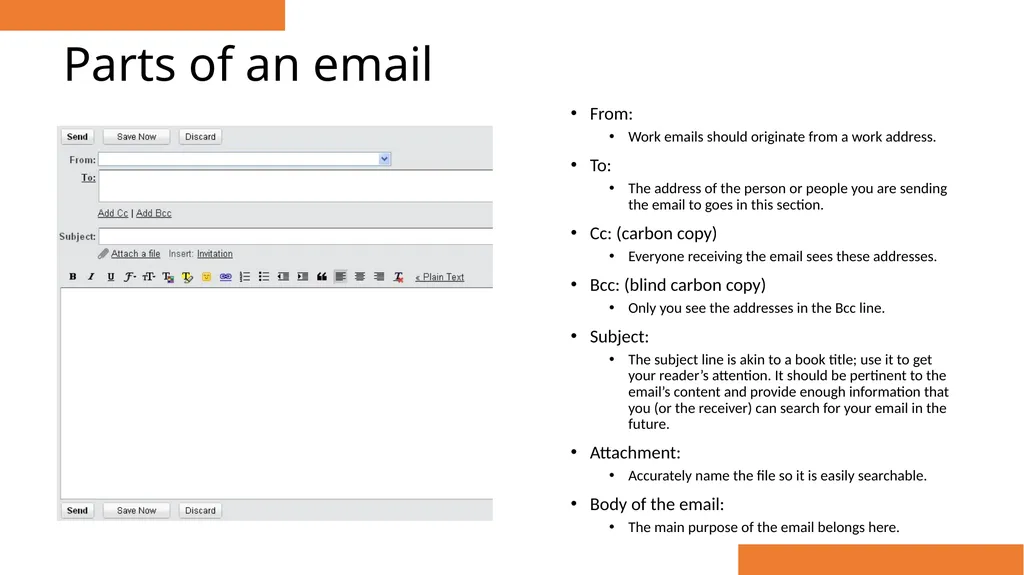
Parts of an email From:
Work emails should originate from a work address.
To:
The address of the person or people you are sending the email to goes in this section.
Cc: (carbon copy)
Everyone receiving the email sees these addresses.
Bcc: (blind carbon copy)
Only you see the addresses in the Bcc line.
Subject:
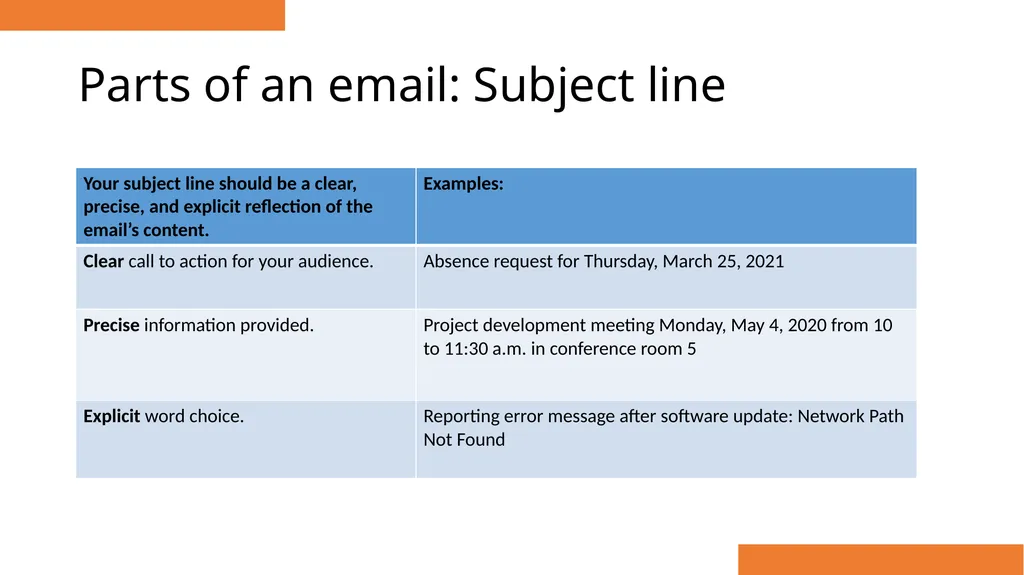
The subject line is akin to a book title; use it to get your reader’s attention. It should be pertinent to the email’s content and provide enough information that you (or the receiver) can search for your email in the future.
Attachment:
Accurately name the file so it is easily searchable.
Body of the email:
The main purpose of the email belongs here.<br>
Work emails should originate from a work address.
To:
The address of the person or people you are sending the email to goes in this section.
Cc: (carbon copy)
Everyone receiving the email sees these addresses.
Bcc: (blind carbon copy)
Only you see the addresses in the Bcc line.
Subject:
The subject line is akin to a book title; use it to get your reader’s attention. It should be pertinent to the email’s content and provide enough information that you (or the receiver) can search for your email in the future.
Attachment:
Accurately name the file so it is easily searchable.
Body of the email:
The main purpose of the email belongs here.<br>
10
Parts of an email: Subject line<br>
11
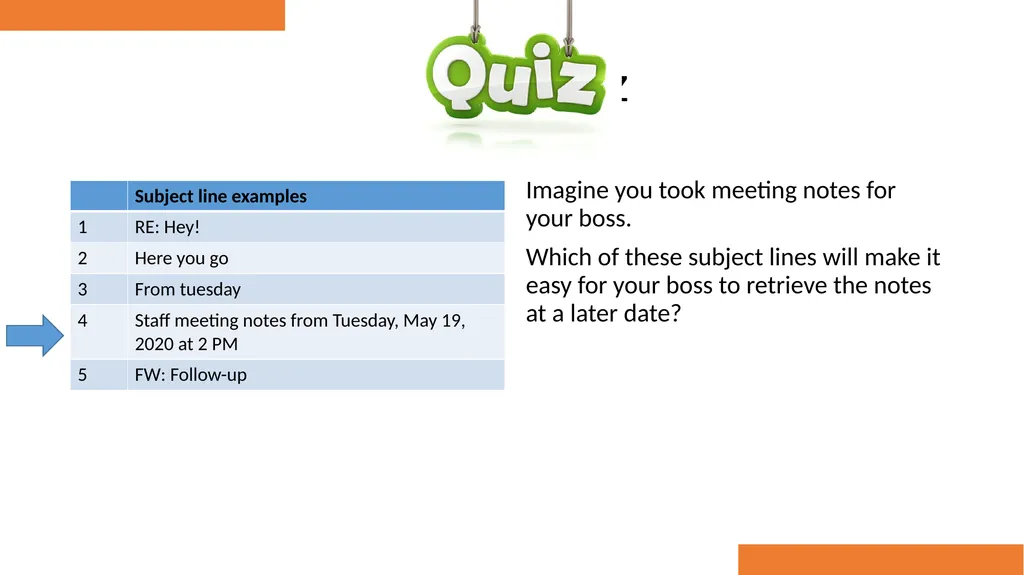
Quiz Imagine you took meeting notes for your boss.
Which of these subject lines will make it easy for your boss to retrieve the notes at a later date?<br>
Which of these subject lines will make it easy for your boss to retrieve the notes at a later date?<br>
12
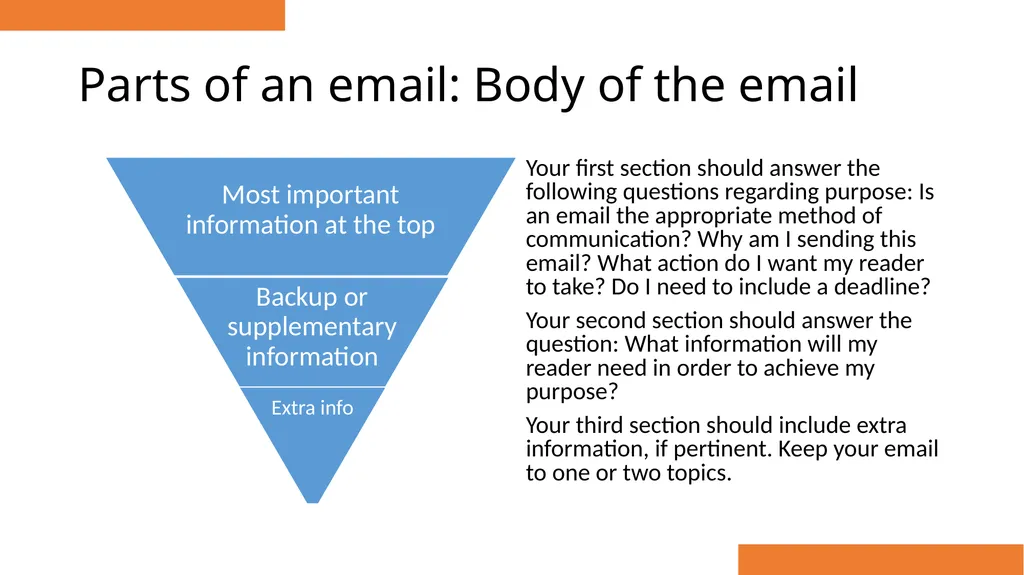
Parts of an email: Body of the email Your first section should answer the following questions regarding purpose: Is an email the appropriate method of communication? Why am I sending this email? What action do I want my reader to take? Do I need to include a deadline?
Your second section should answer the question: What information will my reader need in order to achieve my purpose?
Your third section should include extra information, if pertinent. Keep your email to one or two topics.<br>
Your second section should answer the question: What information will my reader need in order to achieve my purpose?
Your third section should include extra information, if pertinent. Keep your email to one or two topics.<br>
13
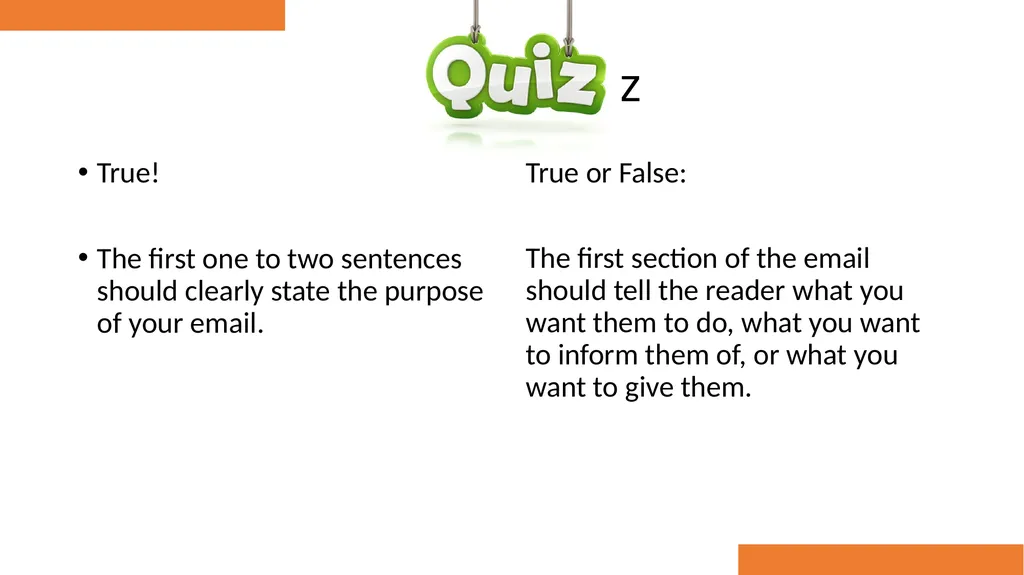
Quiz True!
The first one to two sentences should clearly state the purpose of your email. True or False:
The first section of the email should tell the reader what you want them to do, what you want to inform them of, or what you want to give them.<br>
The first one to two sentences should clearly state the purpose of your email. True or False:
The first section of the email should tell the reader what you want them to do, what you want to inform them of, or what you want to give them.<br>
14
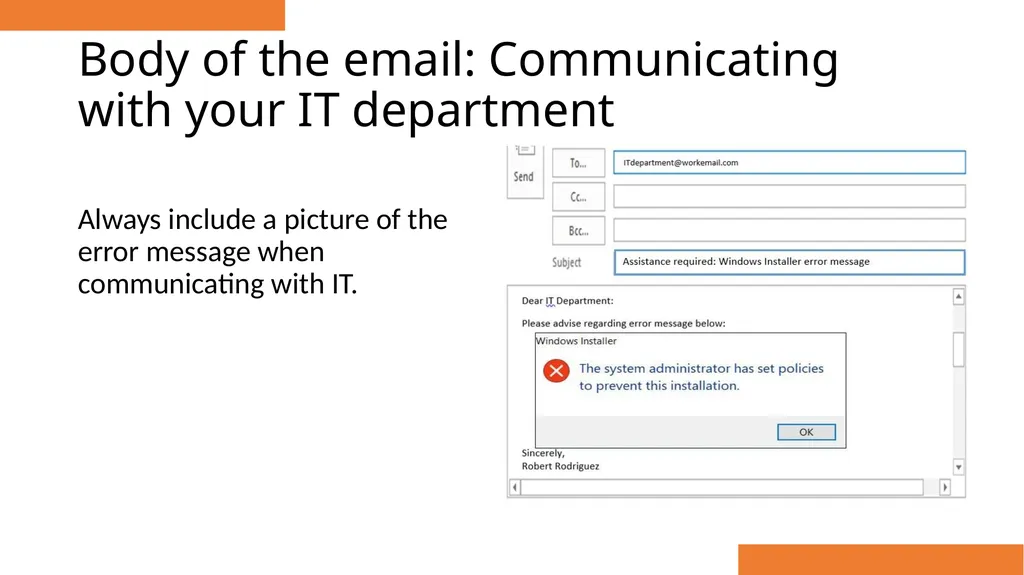
Body of the email: Communicating with your IT department Always include a picture of the error message when communicating with IT.<br>
15
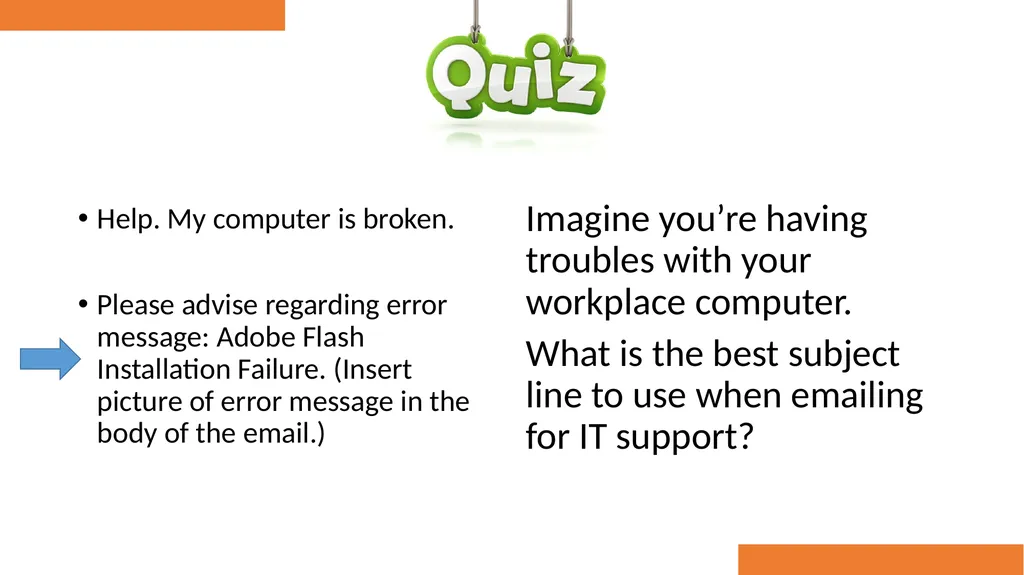
Quiz Help. My computer is broken.
Please advise regarding error message: Adobe Flash Installation Failure. (Insert picture of error message in the body of the email.) Imagine you’re having troubles with your workplace computer.
What is the best subject line to use when emailing for IT support?<br>
Please advise regarding error message: Adobe Flash Installation Failure. (Insert picture of error message in the body of the email.) Imagine you’re having troubles with your workplace computer.
What is the best subject line to use when emailing for IT support?<br>
16
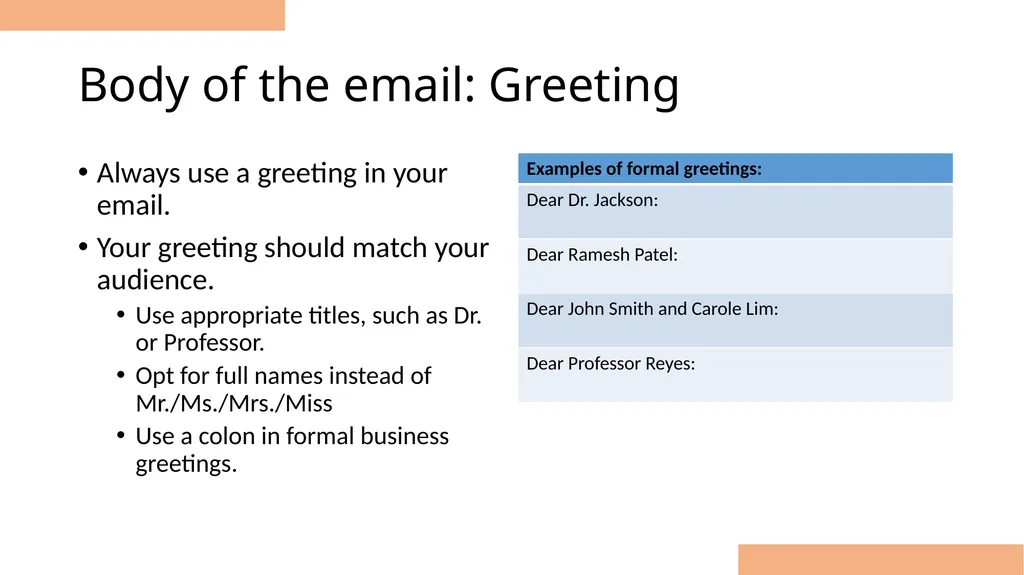
Body of the email: Greeting Always use a greeting in your email.
Your greeting should match your audience.
Use appropriate titles, such as Dr. or Professor.
Opt for full names instead of Mr./Ms./Mrs./Miss
Use a colon in formal business greetings.<br>
Your greeting should match your audience.
Use appropriate titles, such as Dr. or Professor.
Opt for full names instead of Mr./Ms./Mrs./Miss
Use a colon in formal business greetings.<br>
17
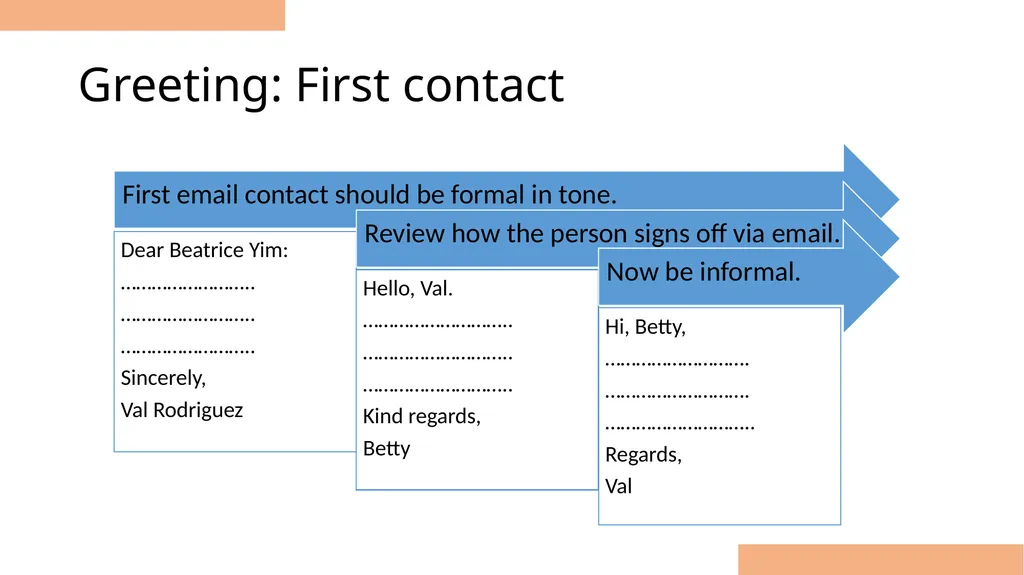
Greeting: First contact<br>
18
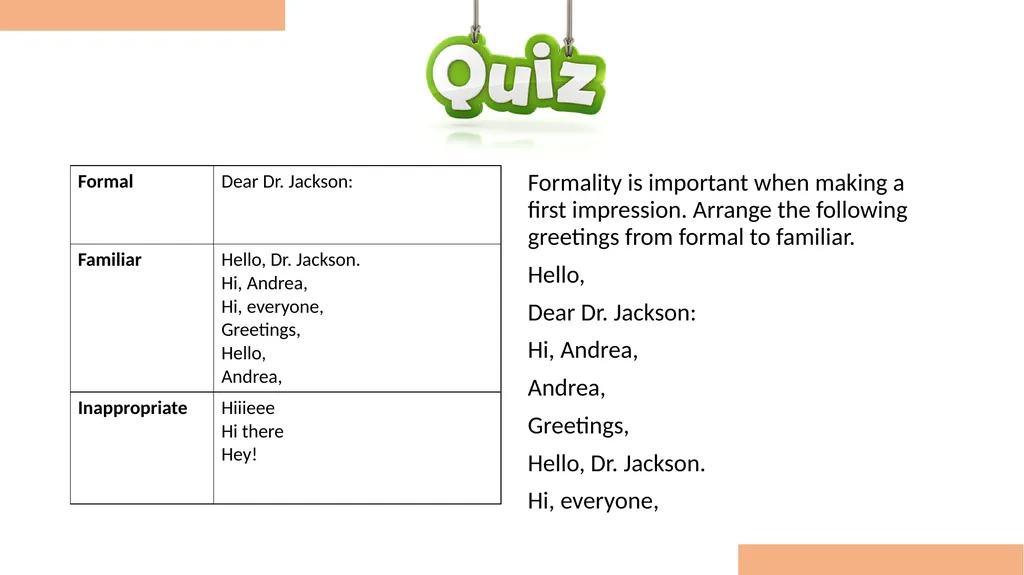
Quiz Formality is important when making a first impression. Arrange the following greetings from formal to familiar.
Hello,
Dear Dr. Jackson:
Hi, Andrea,
Andrea,
Greetings,
Hello, Dr. Jackson.
Hi, everyone,<br>
Hello,
Dear Dr. Jackson:
Hi, Andrea,
Andrea,
Greetings,
Hello, Dr. Jackson.
Hi, everyone,<br>
19
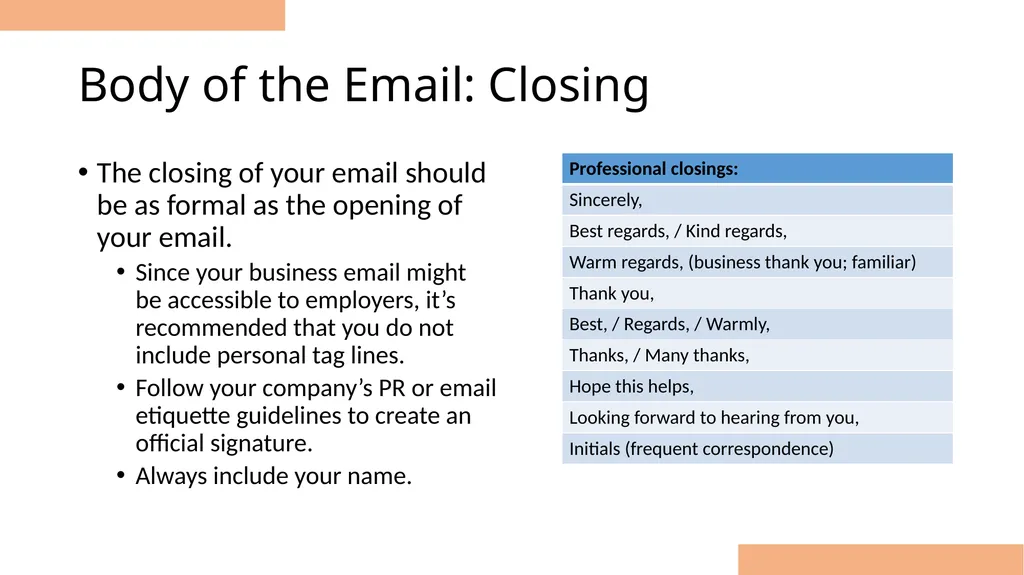
Body of the Email: Closing The closing of your email should be as formal as the opening of your email.
Since your business email might be accessible to employers, it’s recommended that you do not include personal tag lines.
Follow your company’s PR or email etiquette guidelines to create an official signature.
Always include your name.<br>
Since your business email might be accessible to employers, it’s recommended that you do not include personal tag lines.
Follow your company’s PR or email etiquette guidelines to create an official signature.
Always include your name.<br>
20
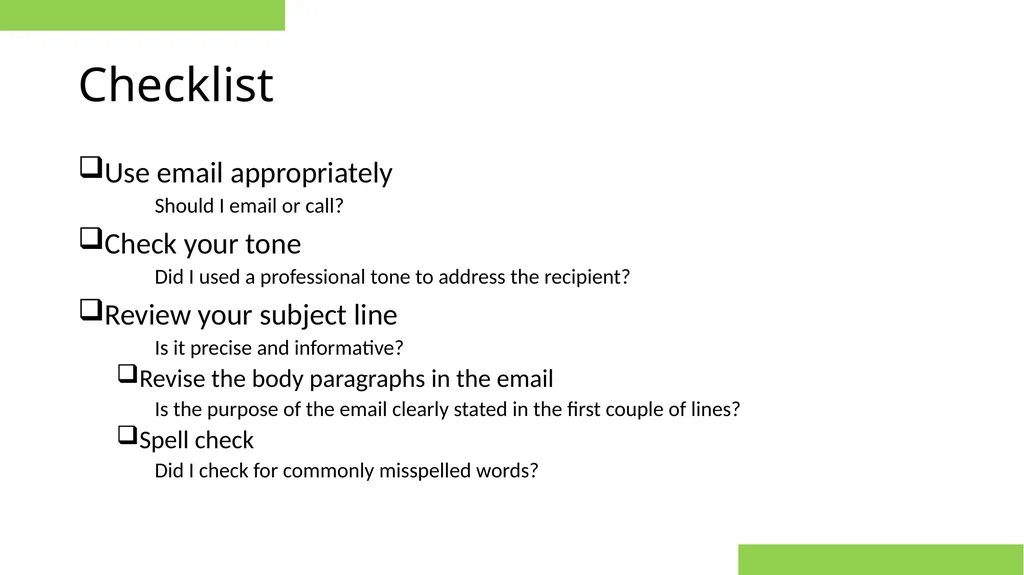
Checklist Use email appropriately
Should I email or call?
Check your tone
Did I used a professional tone to address the recipient?
Review your subject line
Is it precise and informative?
Revise the body paragraphs in the email
Is the purpose of the email clearly stated in the first couple of lines?
Spell check
Did I check for commonly misspelled words?<br>
Should I email or call?
Check your tone
Did I used a professional tone to address the recipient?
Review your subject line
Is it precise and informative?
Revise the body paragraphs in the email
Is the purpose of the email clearly stated in the first couple of lines?
Spell check
Did I check for commonly misspelled words?<br>
21
Review this email<br>
22
Sample email Dear all,
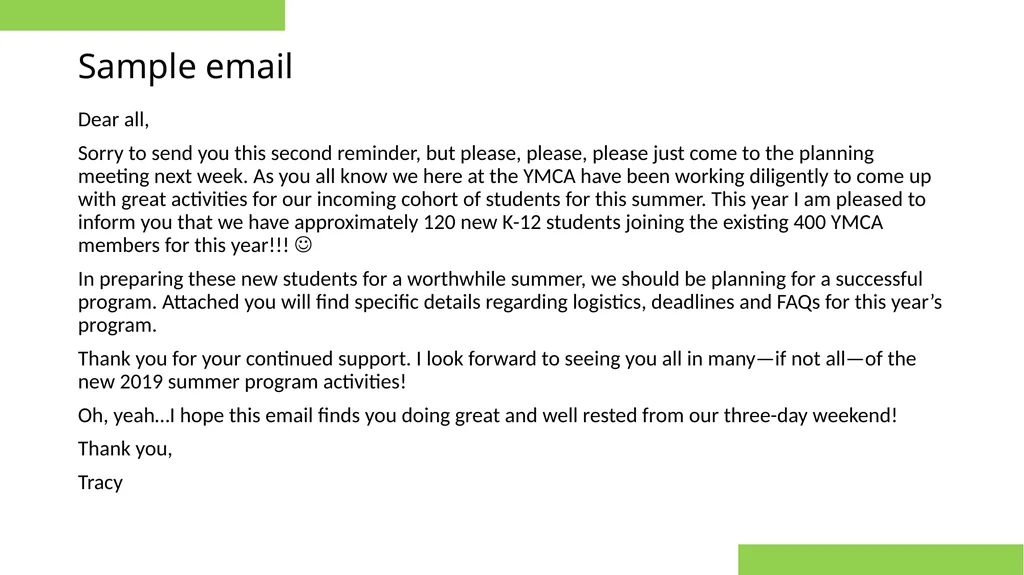
Sorry to send you this second reminder, but please, please, please just come to the planning meeting next week. As you all know we here at the YMCA have been working diligently to come up with great activities for our incoming cohort of students for this summer. This year I am pleased to inform you that we have approximately 120 new K-12 students joining the existing 400 YMCA members for this year!!!
In preparing these new students for a worthwhile summer, we should be planning for a successful program. Attached you will find specific details regarding logistics, deadlines and FAQs for this year’s program.
Thank you for your continued support. I look forward to seeing you all in many—if not all—of the new 2019 summer program activities!
Oh, yeah…I hope this email finds you doing great and well rested from our three-day weekend!
Thank you,
Tracy<br>
Sorry to send you this second reminder, but please, please, please just come to the planning meeting next week. As you all know we here at the YMCA have been working diligently to come up with great activities for our incoming cohort of students for this summer. This year I am pleased to inform you that we have approximately 120 new K-12 students joining the existing 400 YMCA members for this year!!!
In preparing these new students for a worthwhile summer, we should be planning for a successful program. Attached you will find specific details regarding logistics, deadlines and FAQs for this year’s program.
Thank you for your continued support. I look forward to seeing you all in many—if not all—of the new 2019 summer program activities!
Oh, yeah…I hope this email finds you doing great and well rested from our three-day weekend!
Thank you,
Tracy<br>
23
Sample email Dear all,
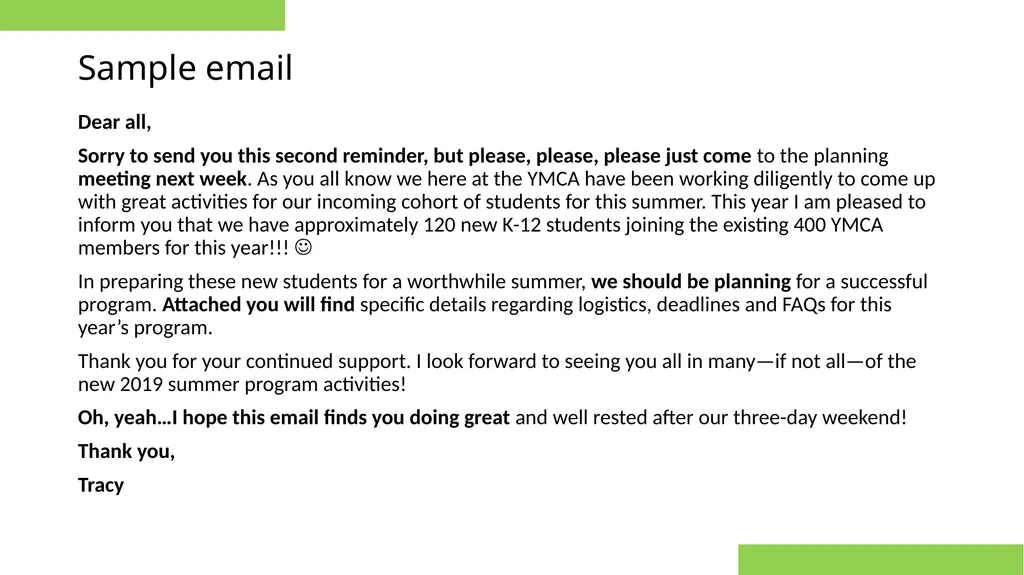
Sorry to send you this second reminder, but please, please, please just come to the planning meeting next week. As you all know we here at the YMCA have been working diligently to come up with great activities for our incoming cohort of students for this summer. This year I am pleased to inform you that we have approximately 120 new K-12 students joining the existing 400 YMCA members for this year!!!
In preparing these new students for a worthwhile summer, we should be planning for a successful program. Attached you will find specific details regarding logistics, deadlines and FAQs for this year’s program.
Thank you for your continued support. I look forward to seeing you all in many—if not all—of the new 2019 summer program activities!
Oh, yeah…I hope this email finds you doing great and well rested after our three-day weekend!
Thank you,
Tracy<br>
Sorry to send you this second reminder, but please, please, please just come to the planning meeting next week. As you all know we here at the YMCA have been working diligently to come up with great activities for our incoming cohort of students for this summer. This year I am pleased to inform you that we have approximately 120 new K-12 students joining the existing 400 YMCA members for this year!!!
In preparing these new students for a worthwhile summer, we should be planning for a successful program. Attached you will find specific details regarding logistics, deadlines and FAQs for this year’s program.
Thank you for your continued support. I look forward to seeing you all in many—if not all—of the new 2019 summer program activities!
Oh, yeah…I hope this email finds you doing great and well rested after our three-day weekend!
Thank you,
Tracy<br>
24
Sample email Dear Summer Activities Team Members:
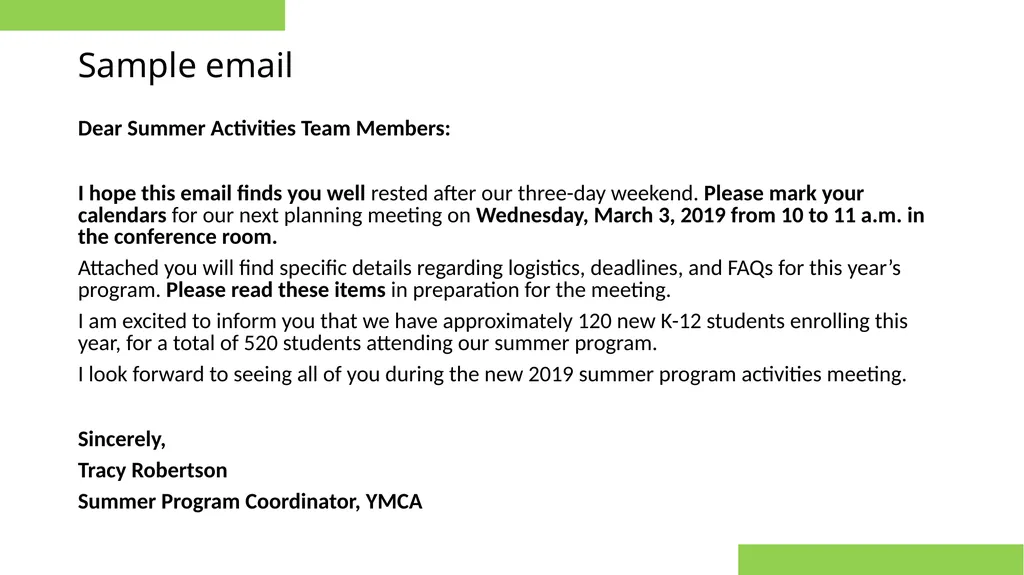
I hope this email finds you well rested after our three-day weekend. Please mark your calendars for our next planning meeting on Wednesday, March 3, 2019 from 10 to 11 a.m. in the conference room.
Attached you will find specific details regarding logistics, deadlines, and FAQs for this year’s program. Please read these items in preparation for the meeting.
I am excited to inform you that we have approximately 120 new K-12 students enrolling this year, for a total of 520 students attending our summer program.
I look forward to seeing all of you during the new 2019 summer program activities meeting.
Sincerely,
Tracy Robertson
Summer Program Coordinator, YMCA<br>
I hope this email finds you well rested after our three-day weekend. Please mark your calendars for our next planning meeting on Wednesday, March 3, 2019 from 10 to 11 a.m. in the conference room.
Attached you will find specific details regarding logistics, deadlines, and FAQs for this year’s program. Please read these items in preparation for the meeting.
I am excited to inform you that we have approximately 120 new K-12 students enrolling this year, for a total of 520 students attending our summer program.
I look forward to seeing all of you during the new 2019 summer program activities meeting.
Sincerely,
Tracy Robertson
Summer Program Coordinator, YMCA<br>
25
Grammar rules<br>
26
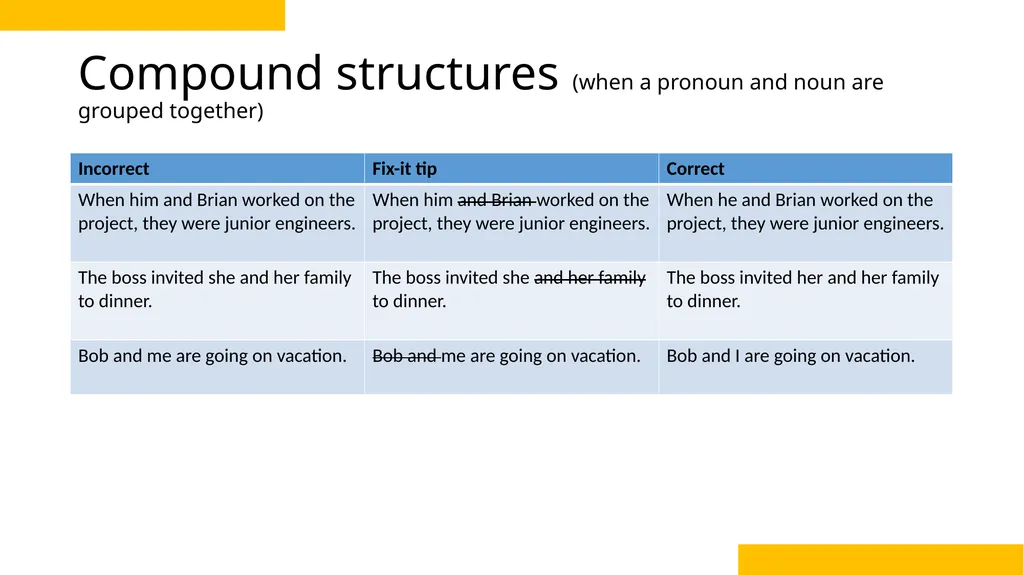
Compound structures (when a pronoun and noun are grouped together)<br>
27
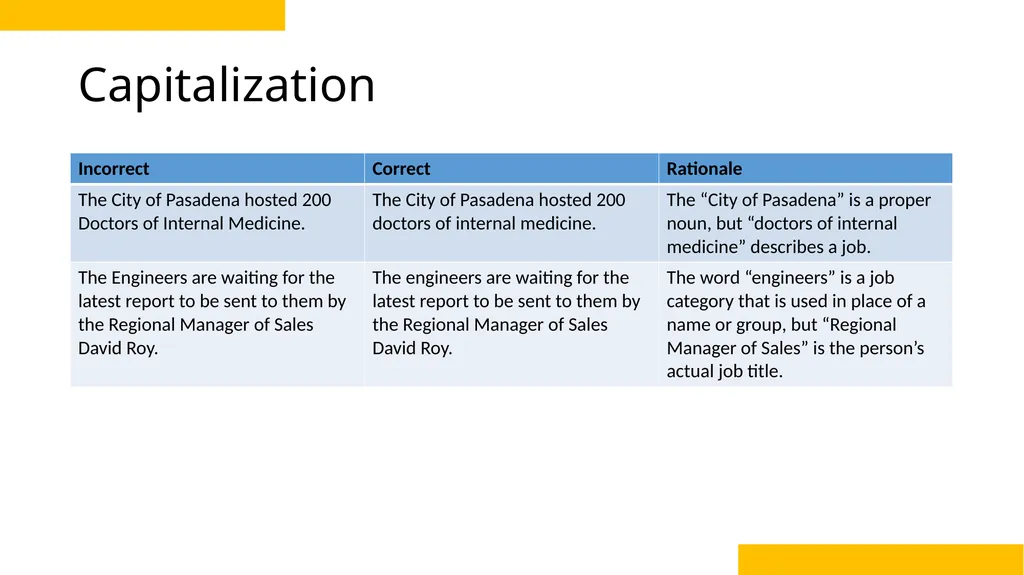
Capitalization<br>
28
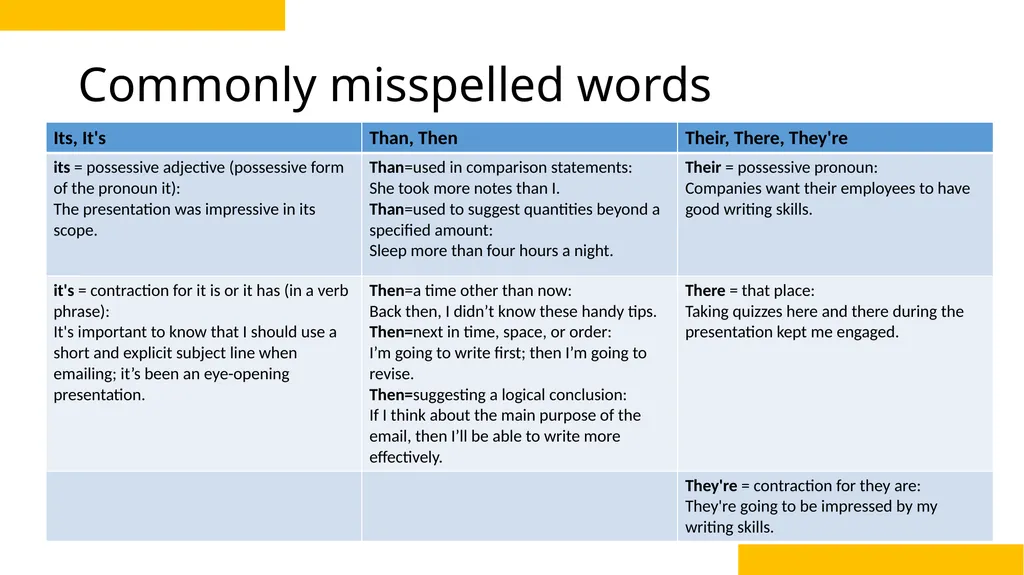
Commonly misspelled words<br>
29
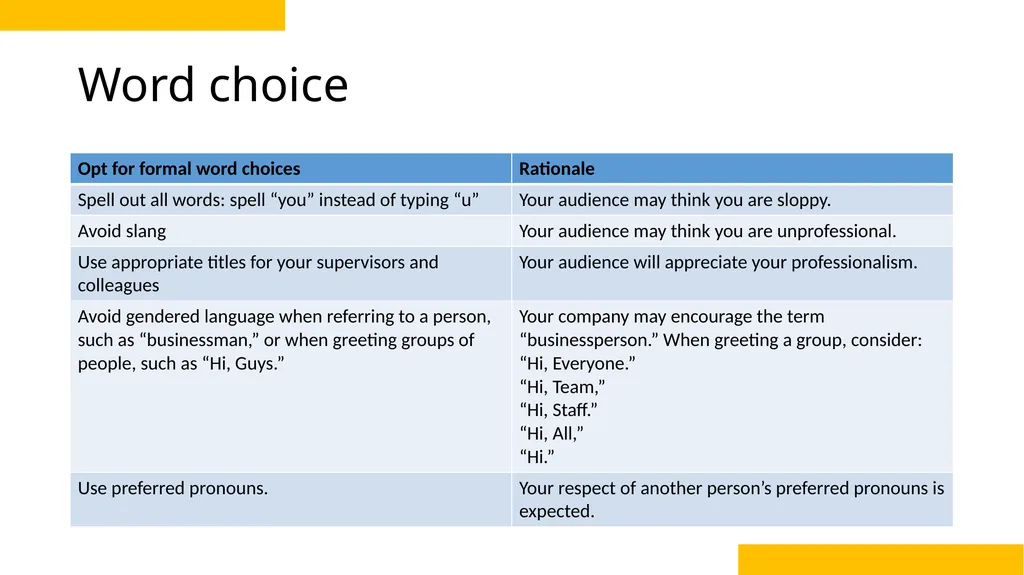
Word choice<br>
30
Continue to explore this topic with more resources<br>
31
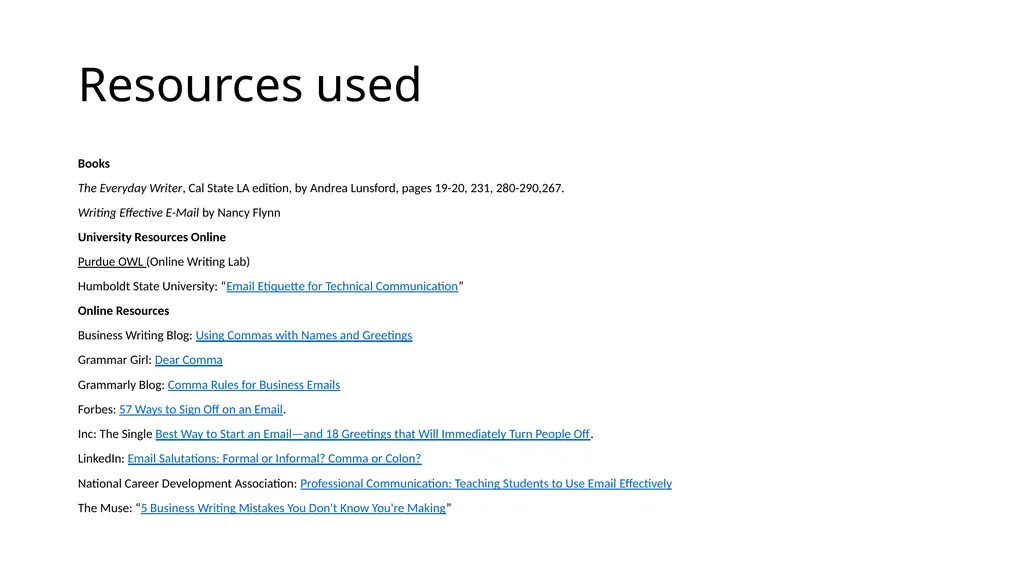
Resources used Books
The Everyday Writer, Cal State LA edition, by Andrea Lunsford, pages 19-20, 231, 280-290,267.
Writing Effective E-Mail by Nancy Flynn
University Resources Online
Purdue OWL (Online Writing Lab)
Humboldt State University: “Email Etiquette for Technical Communication”
Online Resources
Business Writing Blog: Using Commas with Names and Greetings
Grammar Girl: Dear Comma
Grammarly Blog: Comma Rules for Business Emails
Forbes: 57 Ways to Sign Off on an Email.
Inc: The Single Best Way to Start an Email—and 18 Greetings that Will Immediately Turn People Off.
LinkedIn: Email Salutations: Formal or Informal? Comma or Colon?
National Career Development Association: Professional Communication: Teaching Students to Use Email Effectively
The Muse: “5 Business Writing Mistakes You Don't Know You're Making”<br>
The Everyday Writer, Cal State LA edition, by Andrea Lunsford, pages 19-20, 231, 280-290,267.
Writing Effective E-Mail by Nancy Flynn
University Resources Online
Purdue OWL (Online Writing Lab)
Humboldt State University: “Email Etiquette for Technical Communication”
Online Resources
Business Writing Blog: Using Commas with Names and Greetings
Grammar Girl: Dear Comma
Grammarly Blog: Comma Rules for Business Emails
Forbes: 57 Ways to Sign Off on an Email.
Inc: The Single Best Way to Start an Email—and 18 Greetings that Will Immediately Turn People Off.
LinkedIn: Email Salutations: Formal or Informal? Comma or Colon?
National Career Development Association: Professional Communication: Teaching Students to Use Email Effectively
The Muse: “5 Business Writing Mistakes You Don't Know You're Making”<br>
32
Thank you for your participation<br>