
FINACLE & CORE BANKING SOLUTION BH RAMA MURTY ,
EM
Published · 26 slides · 0 views
1 / 1
Description
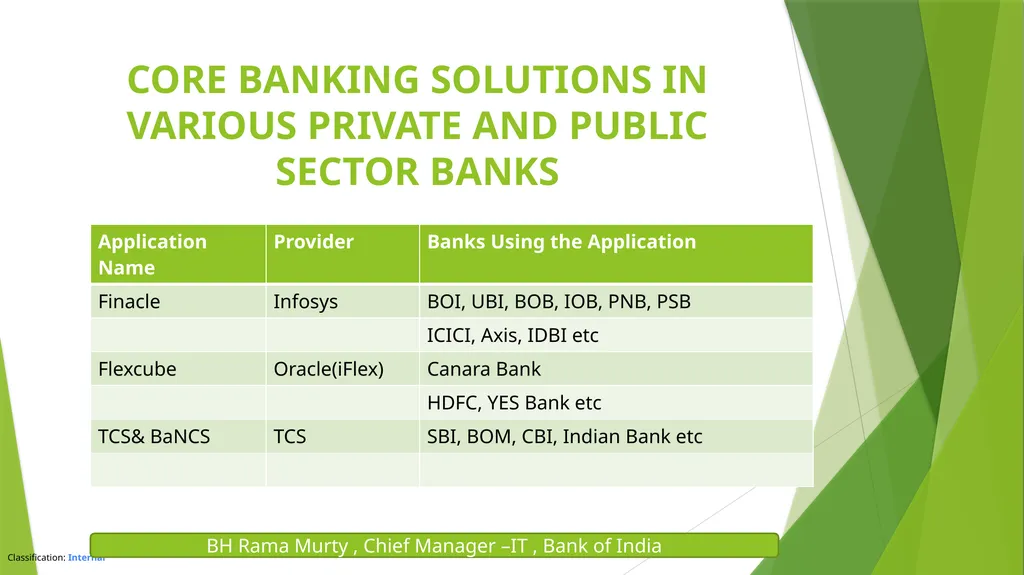
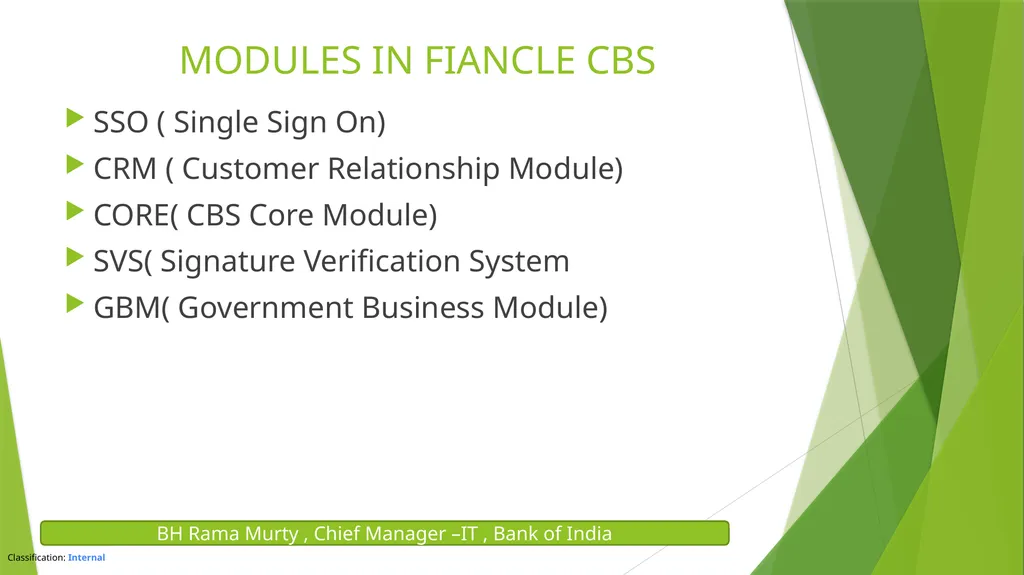
FINACLE CORE BANKING SOLUTION BH RAMA MURTY , CHIEF MANAGER IT BANK OF INDIA CORE BANKING SOLUTIONS IN VARIOUS PRIVATE AND PUBLIC SECTOR BANKS BH Rama Murty , Chief Manager IT , Bank of India MODULES IN FIANCLE CBS SSO ( Single Sign On)
Related Topics
Share
Embed code
Download this presentation From Below
"FINACLE & CORE BANKING SOLUTION BH RAMA MURTY ," is the property of its rightful owner. Permission is granted to download and print the materials on this website for personal, non-commercial use only, and to display it on your personal computer provided you do not modify the materials and that you retain all copyright notices contained in the materials. By downloading content from our website, you accept the terms of this agreement.
Presentation Transcript
01
FINACLE
&
CORE BANKING SOLUTION BH RAMA MURTY , CHIEF MANAGER –IT
BANK OF INDIA<br>
BANK OF INDIA<br>
02
CORE BANKING SOLUTIONS IN VARIOUS PRIVATE AND PUBLIC SECTOR BANKS BH Rama Murty , Chief Manager –IT , Bank of India<br>
03
MODULES IN FIANCLE CBS SSO ( Single Sign On)
CRM ( Customer Relationship Module)
CORE( CBS Core Module)
SVS( Signature Verification System
GBM( Government Business Module) BH Rama Murty , Chief Manager –IT , Bank of India<br>
CRM ( Customer Relationship Module)
CORE( CBS Core Module)
SVS( Signature Verification System
GBM( Government Business Module) BH Rama Murty , Chief Manager –IT , Bank of India<br>
04
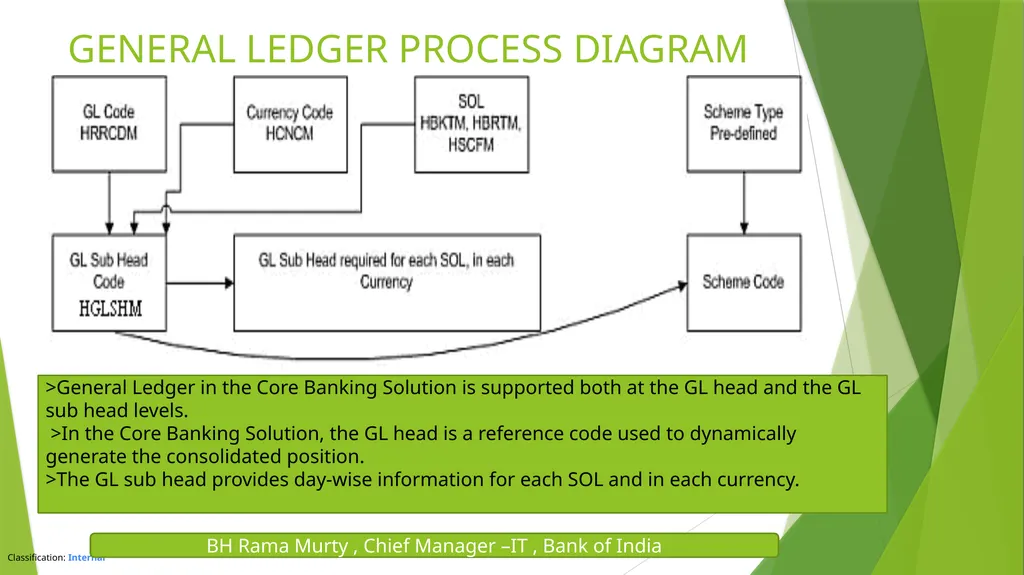
GENERAL LEDGER PROCESS DIAGRAM BH Rama Murty , Chief Manager –IT , Bank of India >General Ledger in the Core Banking Solution is supported both at the GL head and the GL sub head levels.
>In the Core Banking Solution, the GL head is a reference code used to dynamically generate the consolidated position.
>The GL sub head provides day-wise information for each SOL and in each currency.<br>
>In the Core Banking Solution, the GL head is a reference code used to dynamically generate the consolidated position.
>The GL sub head provides day-wise information for each SOL and in each currency.<br>
05
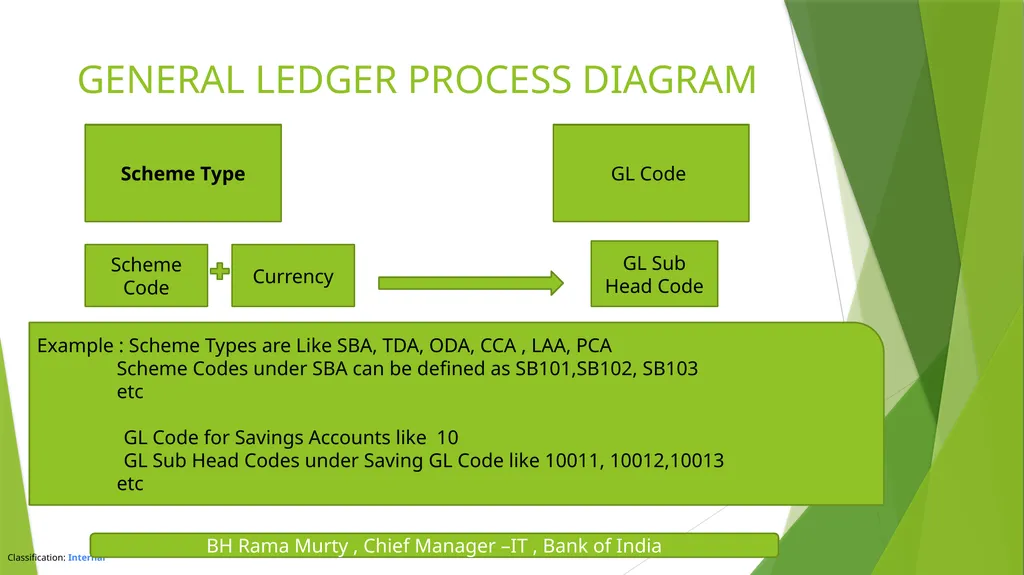
GENERAL LEDGER PROCESS DIAGRAM Scheme Type GL Code Scheme Code GL Sub Head Code Currency Example : Scheme Types are Like SBA, TDA, ODA, CCA , LAA, PCA
Scheme Codes under SBA can be defined as SB101,SB102, SB103
etc
GL Code for Savings Accounts like 10
GL Sub Head Codes under Saving GL Code like 10011, 10012,10013
etc BH Rama Murty , Chief Manager –IT , Bank of India<br>
Scheme Codes under SBA can be defined as SB101,SB102, SB103
etc
GL Code for Savings Accounts like 10
GL Sub Head Codes under Saving GL Code like 10011, 10012,10013
etc BH Rama Murty , Chief Manager –IT , Bank of India<br>
06
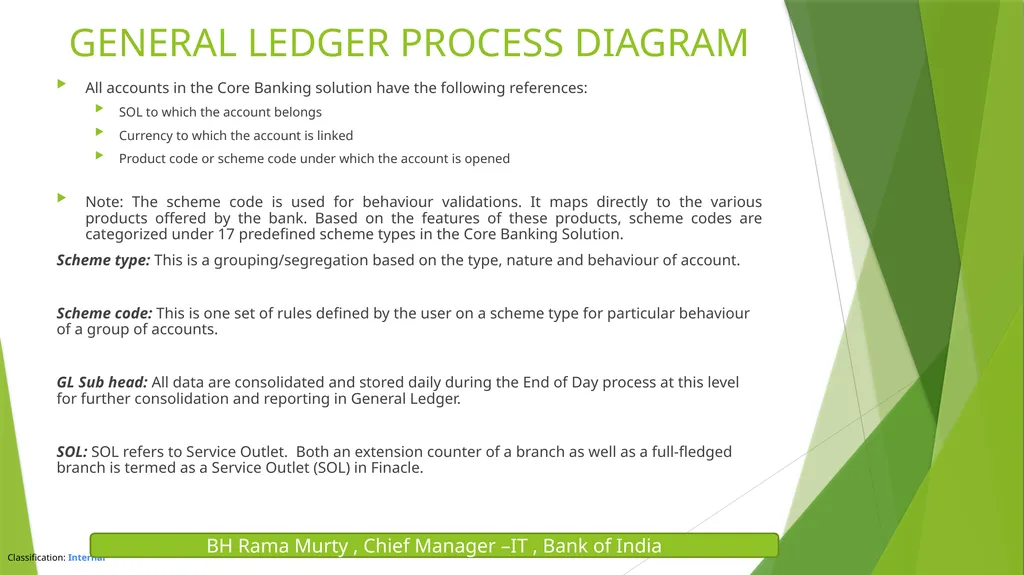
All accounts in the Core Banking solution have the following references:
SOL to which the account belongs
Currency to which the account is linked
Product code or scheme code under which the account is opened
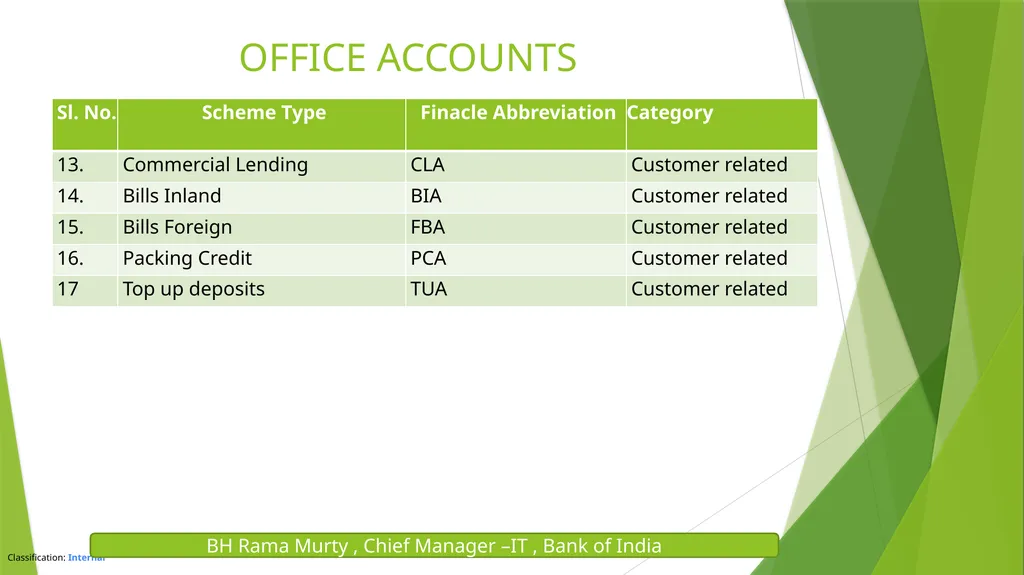
Note: The scheme code is used for behaviour validations. It maps directly to the various products offered by the bank. Based on the features of these products, scheme codes are categorized under 17 predefined scheme types in the Core Banking Solution.
Scheme type: This is a grouping/segregation based on the type, nature and behaviour of account.
Scheme code: This is one set of rules defined by the user on a scheme type for particular behaviour of a group of accounts.
GL Sub head: All data are consolidated and stored daily during the End of Day process at this level for further consolidation and reporting in General Ledger.
SOL: SOL refers to Service Outlet. Both an extension counter of a branch as well as a full-fledged branch is termed as a Service Outlet (SOL) in Finacle. BH Rama Murty , Chief Manager –IT , Bank of India GENERAL LEDGER PROCESS DIAGRAM<br>
SOL to which the account belongs
Currency to which the account is linked
Product code or scheme code under which the account is opened
Note: The scheme code is used for behaviour validations. It maps directly to the various products offered by the bank. Based on the features of these products, scheme codes are categorized under 17 predefined scheme types in the Core Banking Solution.
Scheme type: This is a grouping/segregation based on the type, nature and behaviour of account.
Scheme code: This is one set of rules defined by the user on a scheme type for particular behaviour of a group of accounts.
GL Sub head: All data are consolidated and stored daily during the End of Day process at this level for further consolidation and reporting in General Ledger.
SOL: SOL refers to Service Outlet. Both an extension counter of a branch as well as a full-fledged branch is termed as a Service Outlet (SOL) in Finacle. BH Rama Murty , Chief Manager –IT , Bank of India GENERAL LEDGER PROCESS DIAGRAM<br>
07
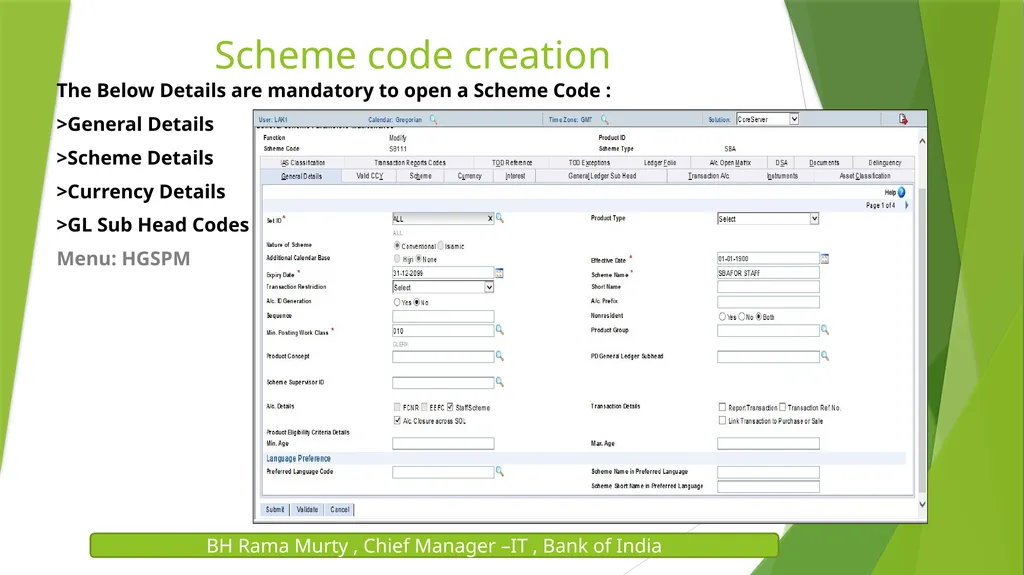
BH Rama Murty , Chief Manager –IT , Bank of India Scheme code creation The Below Details are mandatory to open a Scheme Code :
>General Details
>Scheme Details
>Currency Details
>GL Sub Head Codes
Menu: HGSPM<br>
>General Details
>Scheme Details
>Currency Details
>GL Sub Head Codes
Menu: HGSPM<br>
08
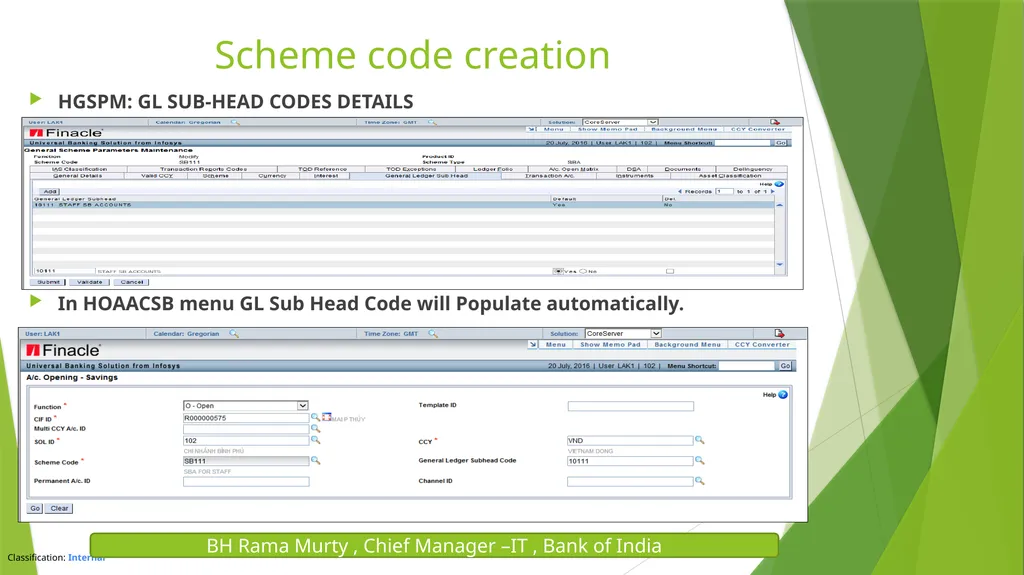
HGSPM: GL SUB-HEAD CODES DETAILS
In HOAACSB menu GL Sub Head Code will Populate automatically. Scheme code creation BH Rama Murty , Chief Manager –IT , Bank of India<br>
In HOAACSB menu GL Sub Head Code will Populate automatically. Scheme code creation BH Rama Murty , Chief Manager –IT , Bank of India<br>
09
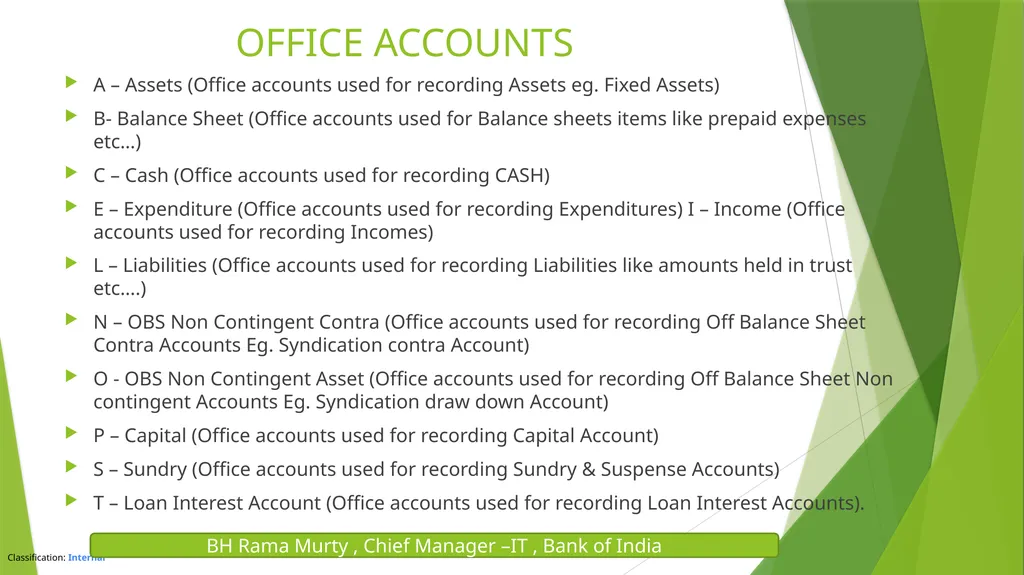
A – Assets (Office accounts used for recording Assets eg. Fixed Assets)
B- Balance Sheet (Office accounts used for Balance sheets items like prepaid expenses etc…)
C – Cash (Office accounts used for recording CASH)
E – Expenditure (Office accounts used for recording Expenditures) I – Income (Office accounts used for recording Incomes)
L – Liabilities (Office accounts used for recording Liabilities like amounts held in trust etc….)
N – OBS Non Contingent Contra (Office accounts used for recording Off Balance Sheet Contra Accounts Eg. Syndication contra Account)
O - OBS Non Contingent Asset (Office accounts used for recording Off Balance Sheet Non contingent Accounts Eg. Syndication draw down Account)
P – Capital (Office accounts used for recording Capital Account)
S – Sundry (Office accounts used for recording Sundry & Suspense Accounts)
T – Loan Interest Account (Office accounts used for recording Loan Interest Accounts). OFFICE ACCOUNTS BH Rama Murty , Chief Manager –IT , Bank of India<br>
B- Balance Sheet (Office accounts used for Balance sheets items like prepaid expenses etc…)
C – Cash (Office accounts used for recording CASH)
E – Expenditure (Office accounts used for recording Expenditures) I – Income (Office accounts used for recording Incomes)
L – Liabilities (Office accounts used for recording Liabilities like amounts held in trust etc….)
N – OBS Non Contingent Contra (Office accounts used for recording Off Balance Sheet Contra Accounts Eg. Syndication contra Account)
O - OBS Non Contingent Asset (Office accounts used for recording Off Balance Sheet Non contingent Accounts Eg. Syndication draw down Account)
P – Capital (Office accounts used for recording Capital Account)
S – Sundry (Office accounts used for recording Sundry & Suspense Accounts)
T – Loan Interest Account (Office accounts used for recording Loan Interest Accounts). OFFICE ACCOUNTS BH Rama Murty , Chief Manager –IT , Bank of India<br>
10
OFFICE ACCOUNTS BH Rama Murty , Chief Manager –IT , Bank of India<br>
11
OFFICE ACCOUNTS BH Rama Murty , Chief Manager –IT , Bank of India<br>
12
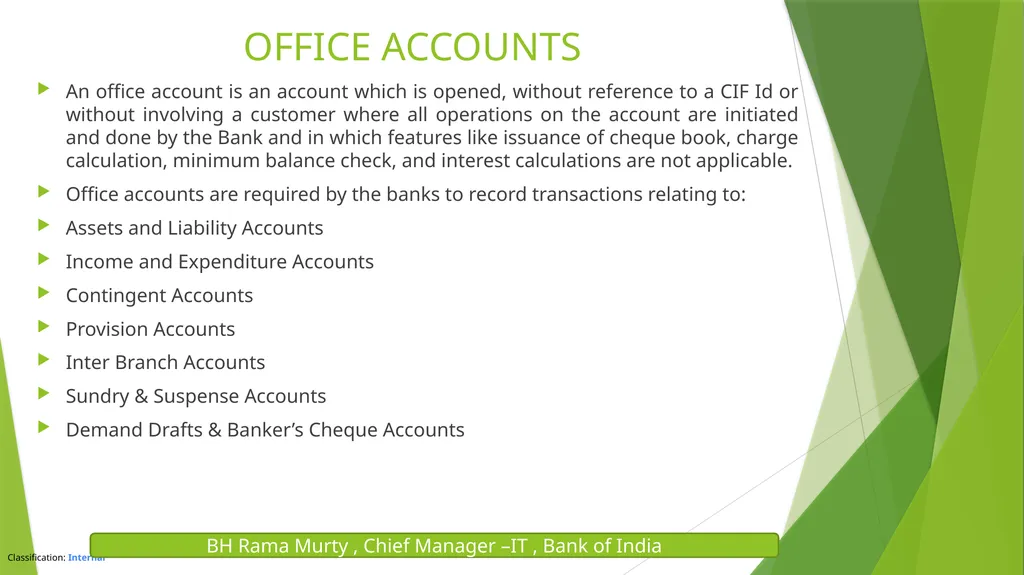
OFFICE ACCOUNTS An office account is an account which is opened, without reference to a CIF Id or without involving a customer where all operations on the account are initiated and done by the Bank and in which features like issuance of cheque book, charge calculation, minimum balance check, and interest calculations are not applicable.
Office accounts are required by the banks to record transactions relating to:
Assets and Liability Accounts
Income and Expenditure Accounts
Contingent Accounts
Provision Accounts
Inter Branch Accounts
Sundry & Suspense Accounts
Demand Drafts & Banker’s Cheque Accounts BH Rama Murty , Chief Manager –IT , Bank of India<br>
Office accounts are required by the banks to record transactions relating to:
Assets and Liability Accounts
Income and Expenditure Accounts
Contingent Accounts
Provision Accounts
Inter Branch Accounts
Sundry & Suspense Accounts
Demand Drafts & Banker’s Cheque Accounts BH Rama Murty , Chief Manager –IT , Bank of India<br>
13
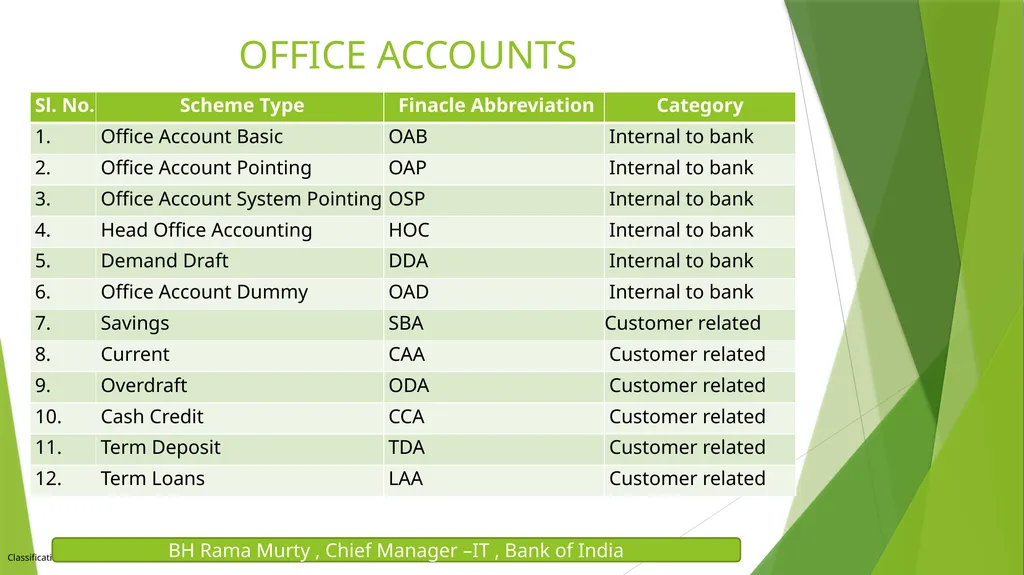
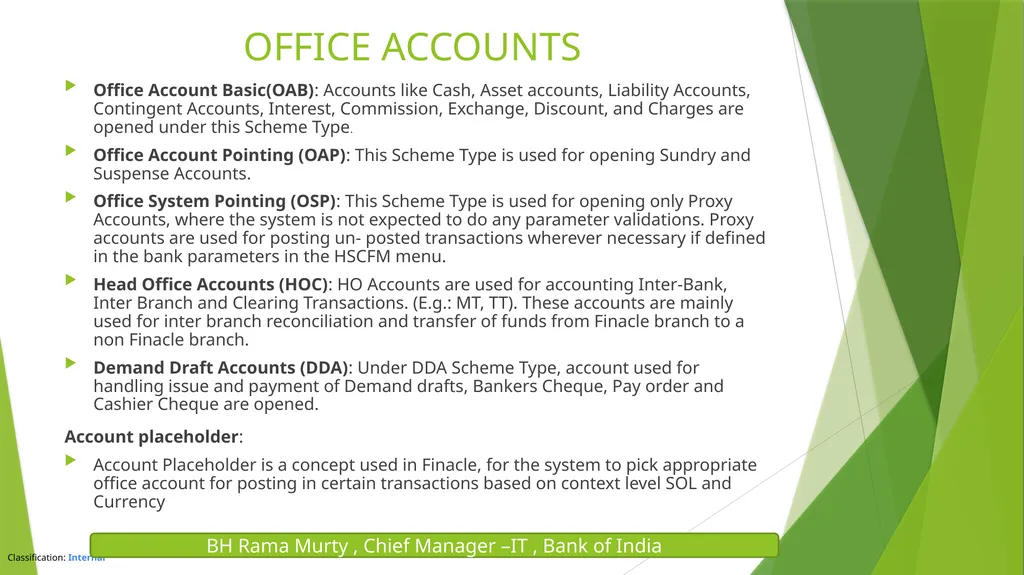
Office Account Basic(OAB): Accounts like Cash, Asset accounts, Liability Accounts, Contingent Accounts, Interest, Commission, Exchange, Discount, and Charges are opened under this Scheme Type.
Office Account Pointing (OAP): This Scheme Type is used for opening Sundry and Suspense Accounts.
Office System Pointing (OSP): This Scheme Type is used for opening only Proxy Accounts, where the system is not expected to do any parameter validations. Proxy accounts are used for posting un- posted transactions wherever necessary if defined in the bank parameters in the HSCFM menu.
Head Office Accounts (HOC): HO Accounts are used for accounting Inter-Bank, Inter Branch and Clearing Transactions. (E.g.: MT, TT). These accounts are mainly used for inter branch reconciliation and transfer of funds from Finacle branch to a non Finacle branch.
Demand Draft Accounts (DDA): Under DDA Scheme Type, account used for handling issue and payment of Demand drafts, Bankers Cheque, Pay order and Cashier Cheque are opened.
Account placeholder:
Account Placeholder is a concept used in Finacle, for the system to pick appropriate office account for posting in certain transactions based on context level SOL and Currency OFFICE ACCOUNTS BH Rama Murty , Chief Manager –IT , Bank of India<br>
Office Account Pointing (OAP): This Scheme Type is used for opening Sundry and Suspense Accounts.
Office System Pointing (OSP): This Scheme Type is used for opening only Proxy Accounts, where the system is not expected to do any parameter validations. Proxy accounts are used for posting un- posted transactions wherever necessary if defined in the bank parameters in the HSCFM menu.
Head Office Accounts (HOC): HO Accounts are used for accounting Inter-Bank, Inter Branch and Clearing Transactions. (E.g.: MT, TT). These accounts are mainly used for inter branch reconciliation and transfer of funds from Finacle branch to a non Finacle branch.
Demand Draft Accounts (DDA): Under DDA Scheme Type, account used for handling issue and payment of Demand drafts, Bankers Cheque, Pay order and Cashier Cheque are opened.
Account placeholder:
Account Placeholder is a concept used in Finacle, for the system to pick appropriate office account for posting in certain transactions based on context level SOL and Currency OFFICE ACCOUNTS BH Rama Murty , Chief Manager –IT , Bank of India<br>
14
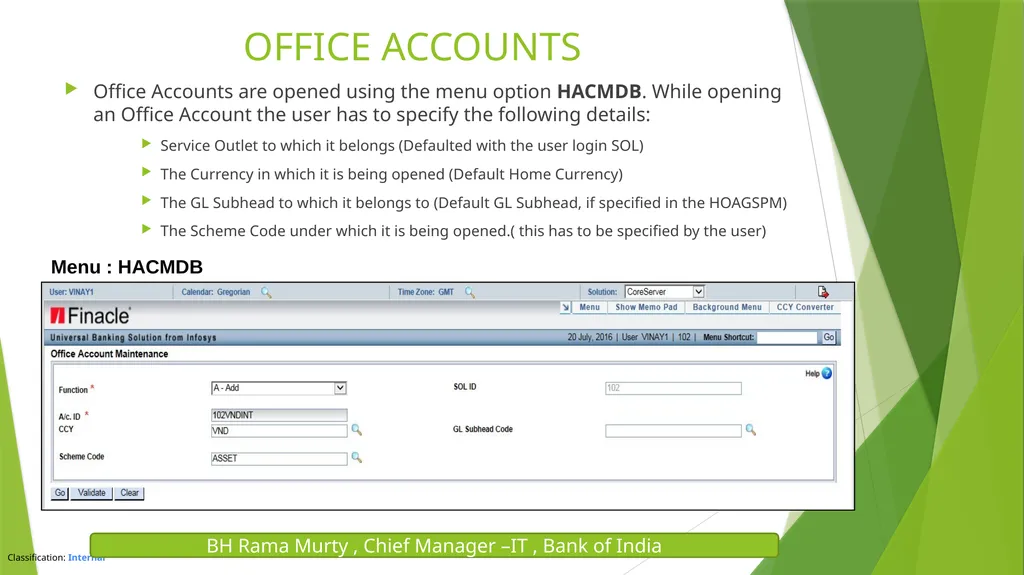
Office Accounts are opened using the menu option HACMDB. While opening an Office Account the user has to specify the following details:
Service Outlet to which it belongs (Defaulted with the user login SOL)
The Currency in which it is being opened (Default Home Currency)
The GL Subhead to which it belongs to (Default GL Subhead, if specified in the HOAGSPM)
The Scheme Code under which it is being opened.( this has to be specified by the user) OFFICE ACCOUNTS BH Rama Murty , Chief Manager –IT , Bank of India Menu : HACMDB BH Rama Murty , Chief Manager –IT , Bank of India<br>
Service Outlet to which it belongs (Defaulted with the user login SOL)
The Currency in which it is being opened (Default Home Currency)
The GL Subhead to which it belongs to (Default GL Subhead, if specified in the HOAGSPM)
The Scheme Code under which it is being opened.( this has to be specified by the user) OFFICE ACCOUNTS BH Rama Murty , Chief Manager –IT , Bank of India Menu : HACMDB BH Rama Murty , Chief Manager –IT , Bank of India<br>
15
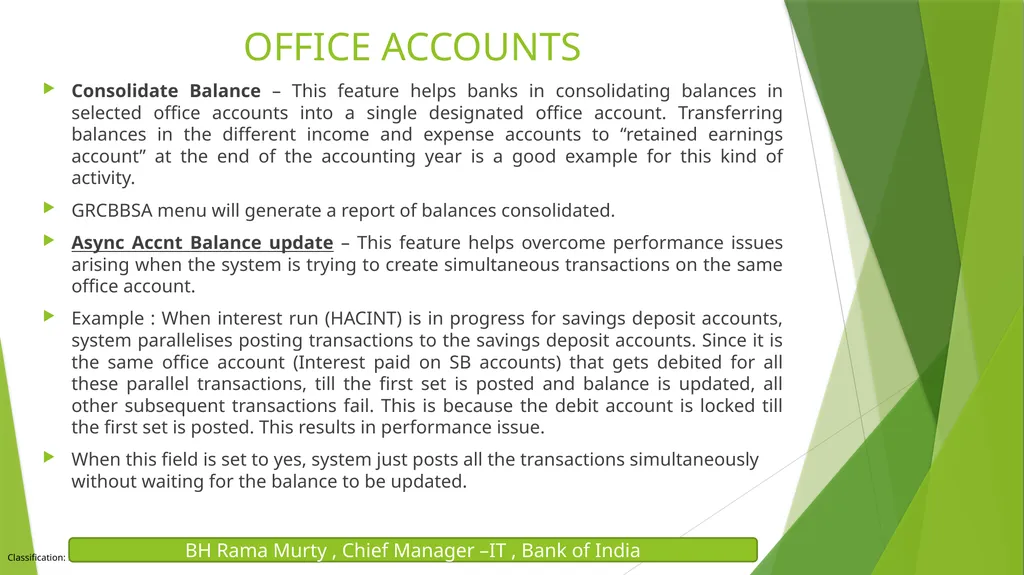
Consolidate Balance – This feature helps banks in consolidating balances in selected office accounts into a single designated office account. Transferring balances in the different income and expense accounts to “retained earnings account” at the end of the accounting year is a good example for this kind of activity.
GRCBBSA menu will generate a report of balances consolidated.
Async Accnt Balance update – This feature helps overcome performance issues arising when the system is trying to create simultaneous transactions on the same office account.
Example : When interest run (HACINT) is in progress for savings deposit accounts, system parallelises posting transactions to the savings deposit accounts. Since it is the same office account (Interest paid on SB accounts) that gets debited for all these parallel transactions, till the first set is posted and balance is updated, all other subsequent transactions fail. This is because the debit account is locked till the first set is posted. This results in performance issue.
When this field is set to yes, system just posts all the transactions simultaneously without waiting for the balance to be updated. OFFICE ACCOUNTS BH Rama Murty , Chief Manager –IT , Bank of India<br>
GRCBBSA menu will generate a report of balances consolidated.
Async Accnt Balance update – This feature helps overcome performance issues arising when the system is trying to create simultaneous transactions on the same office account.
Example : When interest run (HACINT) is in progress for savings deposit accounts, system parallelises posting transactions to the savings deposit accounts. Since it is the same office account (Interest paid on SB accounts) that gets debited for all these parallel transactions, till the first set is posted and balance is updated, all other subsequent transactions fail. This is because the debit account is locked till the first set is posted. This results in performance issue.
When this field is set to yes, system just posts all the transactions simultaneously without waiting for the balance to be updated. OFFICE ACCOUNTS BH Rama Murty , Chief Manager –IT , Bank of India<br>
16
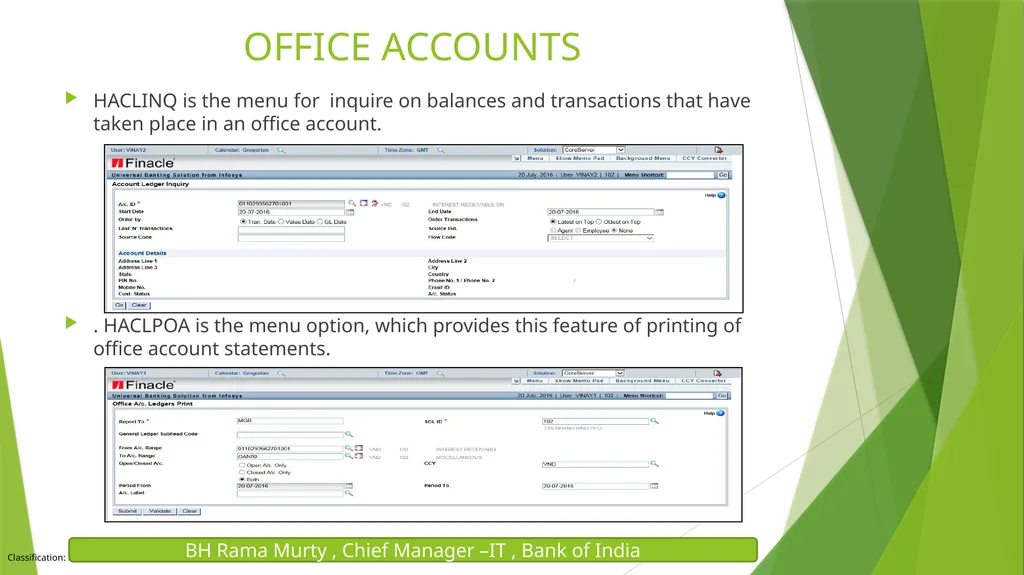
HACLINQ is the menu for inquire on balances and transactions that have taken place in an office account.
. HACLPOA is the menu option, which provides this feature of printing of office account statements. OFFICE ACCOUNTS BH Rama Murty , Chief Manager –IT , Bank of India<br>
. HACLPOA is the menu option, which provides this feature of printing of office account statements. OFFICE ACCOUNTS BH Rama Murty , Chief Manager –IT , Bank of India<br>
17
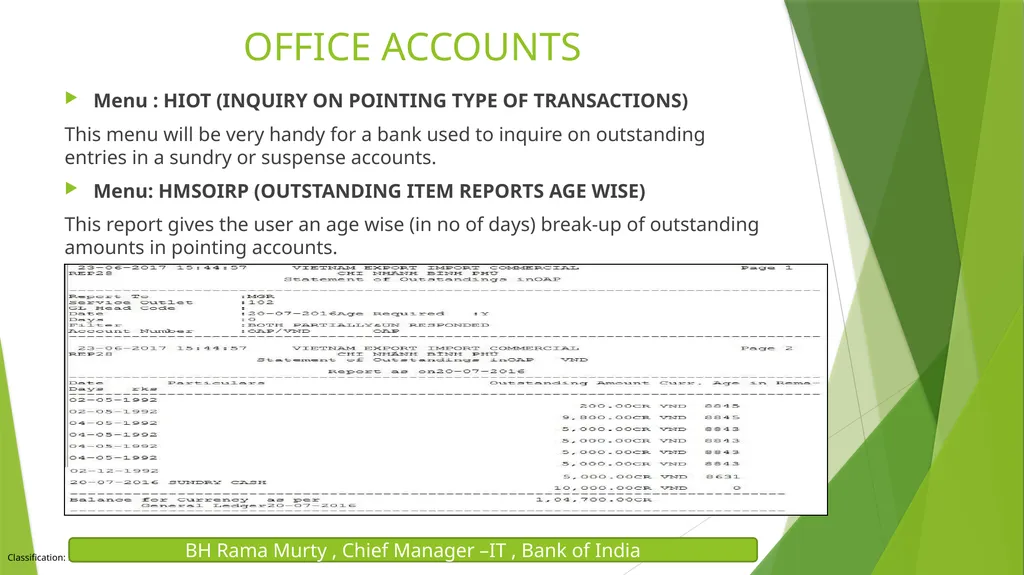
Menu : HIOT (INQUIRY ON POINTING TYPE OF TRANSACTIONS)
This menu will be very handy for a bank used to inquire on outstanding entries in a sundry or suspense accounts.
Menu: HMSOIRP (OUTSTANDING ITEM REPORTS AGE WISE)
This report gives the user an age wise (in no of days) break-up of outstanding amounts in pointing accounts. OFFICE ACCOUNTS BH Rama Murty , Chief Manager –IT , Bank of India<br>
This menu will be very handy for a bank used to inquire on outstanding entries in a sundry or suspense accounts.
Menu: HMSOIRP (OUTSTANDING ITEM REPORTS AGE WISE)
This report gives the user an age wise (in no of days) break-up of outstanding amounts in pointing accounts. OFFICE ACCOUNTS BH Rama Murty , Chief Manager –IT , Bank of India<br>
18
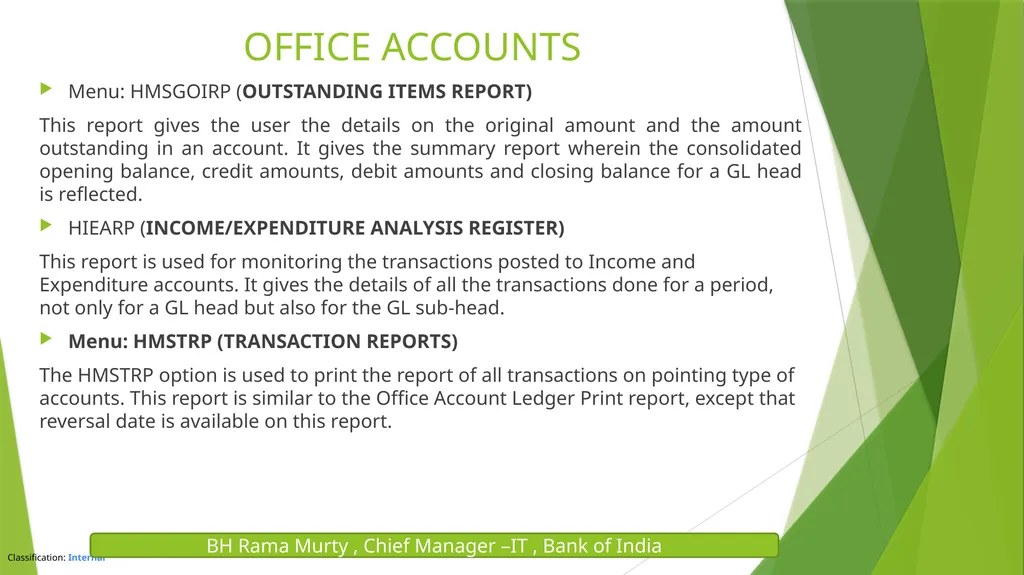
Menu: HMSGOIRP (OUTSTANDING ITEMS REPORT)
This report gives the user the details on the original amount and the amount outstanding in an account. It gives the summary report wherein the consolidated opening balance, credit amounts, debit amounts and closing balance for a GL head is reflected.
HIEARP (INCOME/EXPENDITURE ANALYSIS REGISTER)
This report is used for monitoring the transactions posted to Income and Expenditure accounts. It gives the details of all the transactions done for a period, not only for a GL head but also for the GL sub-head.
Menu: HMSTRP (TRANSACTION REPORTS)
The HMSTRP option is used to print the report of all transactions on pointing type of accounts. This report is similar to the Office Account Ledger Print report, except that reversal date is available on this report. OFFICE ACCOUNTS BH Rama Murty , Chief Manager –IT , Bank of India<br>
This report gives the user the details on the original amount and the amount outstanding in an account. It gives the summary report wherein the consolidated opening balance, credit amounts, debit amounts and closing balance for a GL head is reflected.
HIEARP (INCOME/EXPENDITURE ANALYSIS REGISTER)
This report is used for monitoring the transactions posted to Income and Expenditure accounts. It gives the details of all the transactions done for a period, not only for a GL head but also for the GL sub-head.
Menu: HMSTRP (TRANSACTION REPORTS)
The HMSTRP option is used to print the report of all transactions on pointing type of accounts. This report is similar to the Office Account Ledger Print report, except that reversal date is available on this report. OFFICE ACCOUNTS BH Rama Murty , Chief Manager –IT , Bank of India<br>
19
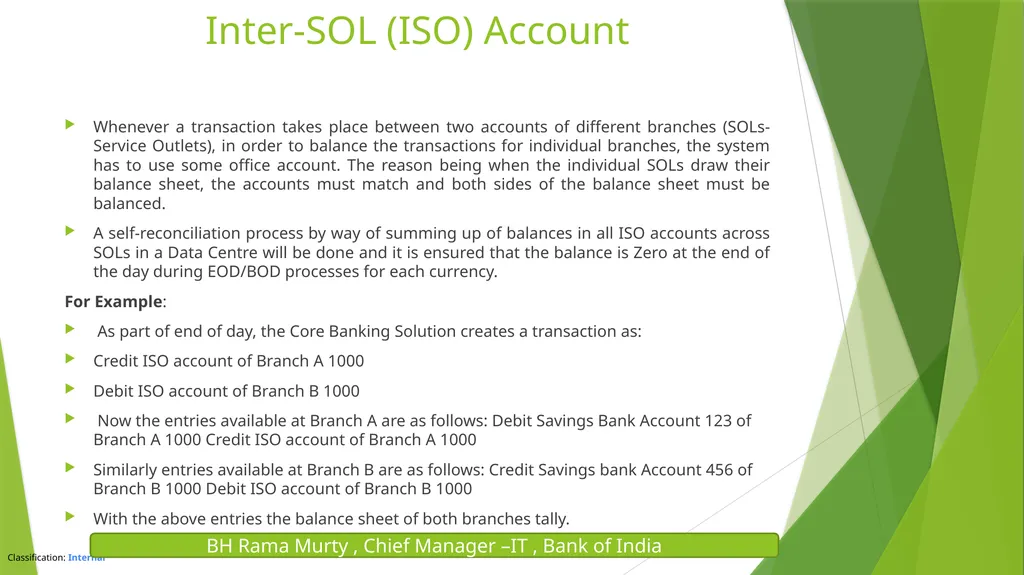
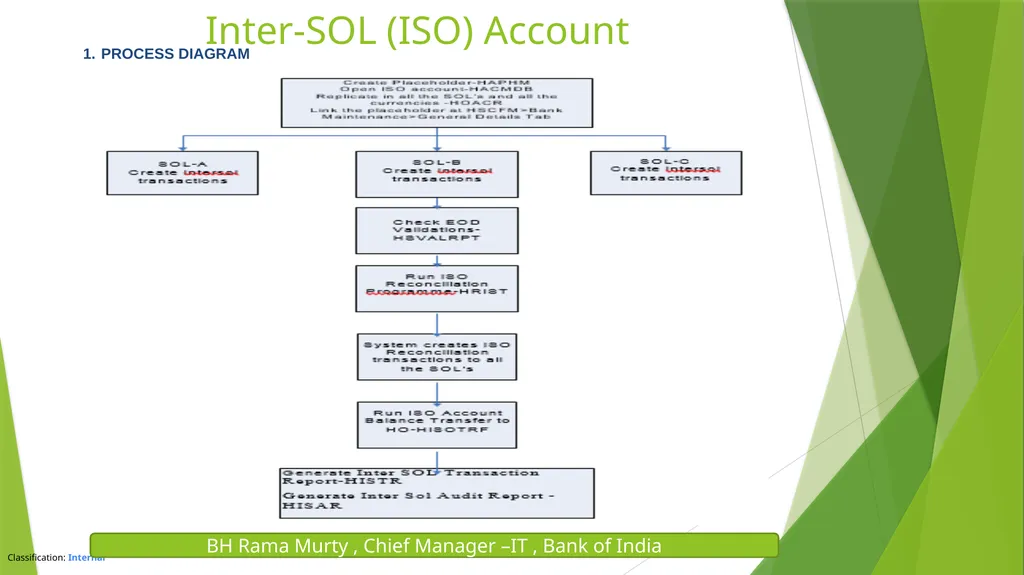
Inter-SOL (ISO) Account Whenever a transaction takes place between two accounts of different branches (SOLs-Service Outlets), in order to balance the transactions for individual branches, the system has to use some office account. The reason being when the individual SOLs draw their balance sheet, the accounts must match and both sides of the balance sheet must be balanced.
A self-reconciliation process by way of summing up of balances in all ISO accounts across SOLs in a Data Centre will be done and it is ensured that the balance is Zero at the end of the day during EOD/BOD processes for each currency.
For Example:
As part of end of day, the Core Banking Solution creates a transaction as:
Credit ISO account of Branch A 1000
Debit ISO account of Branch B 1000
Now the entries available at Branch A are as follows: Debit Savings Bank Account 123 of Branch A 1000 Credit ISO account of Branch A 1000
Similarly entries available at Branch B are as follows: Credit Savings bank Account 456 of Branch B 1000 Debit ISO account of Branch B 1000
With the above entries the balance sheet of both branches tally. BH Rama Murty , Chief Manager –IT , Bank of India<br>
A self-reconciliation process by way of summing up of balances in all ISO accounts across SOLs in a Data Centre will be done and it is ensured that the balance is Zero at the end of the day during EOD/BOD processes for each currency.
For Example:
As part of end of day, the Core Banking Solution creates a transaction as:
Credit ISO account of Branch A 1000
Debit ISO account of Branch B 1000
Now the entries available at Branch A are as follows: Debit Savings Bank Account 123 of Branch A 1000 Credit ISO account of Branch A 1000
Similarly entries available at Branch B are as follows: Credit Savings bank Account 456 of Branch B 1000 Debit ISO account of Branch B 1000
With the above entries the balance sheet of both branches tally. BH Rama Murty , Chief Manager –IT , Bank of India<br>
20
BH Rama Murty , Chief Manager –IT , Bank of India Run ISO Reconciliation Programme-HRIST Inter-SOL (ISO) Account PROCESS DIAGRAM<br>
21
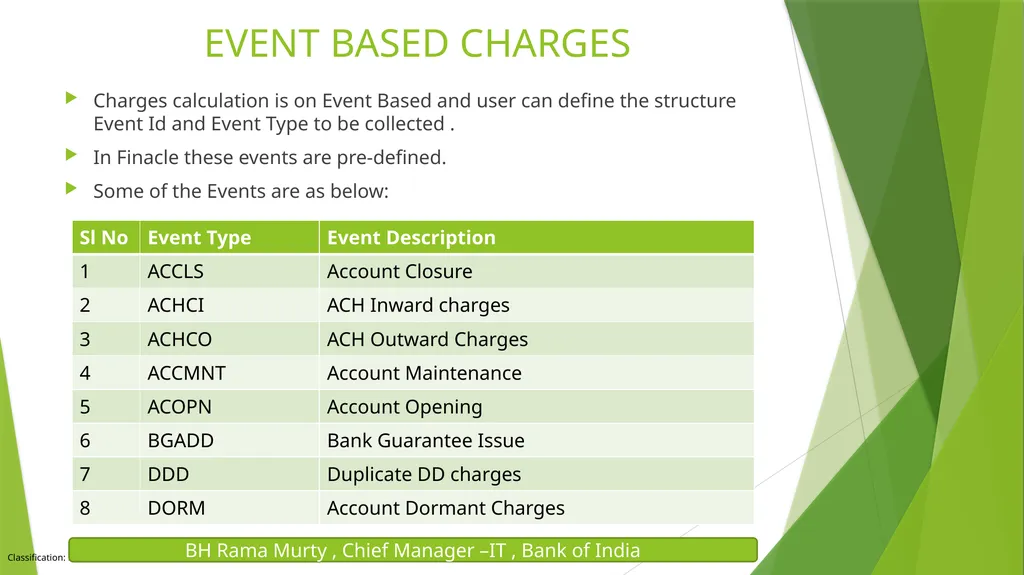
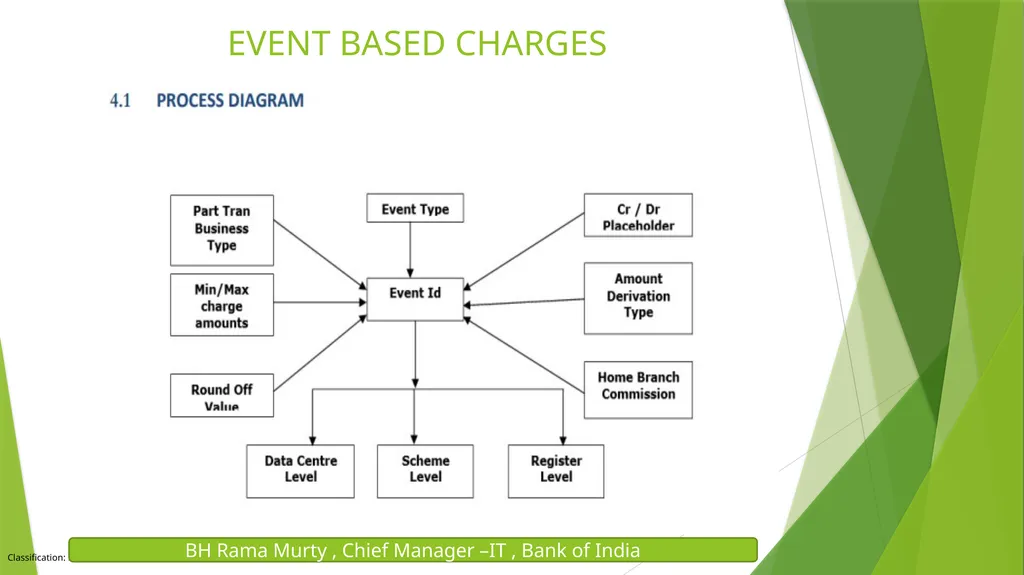
EVENT BASED CHARGES Charges calculation is on Event Based and user can define the structure Event Id and Event Type to be collected .
In Finacle these events are pre-defined.
Some of the Events are as below: BH Rama Murty , Chief Manager –IT , Bank of India<br>
In Finacle these events are pre-defined.
Some of the Events are as below: BH Rama Murty , Chief Manager –IT , Bank of India<br>
22
EVENT BASED CHARGES BH Rama Murty , Chief Manager –IT , Bank of India<br>
23
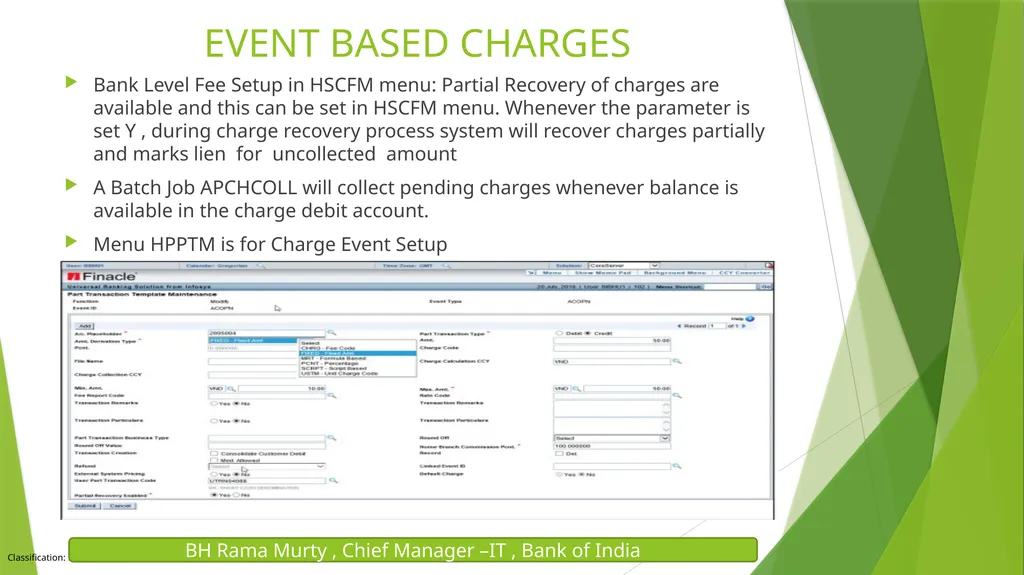
Bank Level Fee Setup in HSCFM menu: Partial Recovery of charges are available and this can be set in HSCFM menu. Whenever the parameter is set Y , during charge recovery process system will recover charges partially and marks lien for uncollected amount
A Batch Job APCHCOLL will collect pending charges whenever balance is available in the charge debit account.
Menu HPPTM is for Charge Event Setup EVENT BASED CHARGES BH Rama Murty , Chief Manager –IT , Bank of India<br>
A Batch Job APCHCOLL will collect pending charges whenever balance is available in the charge debit account.
Menu HPPTM is for Charge Event Setup EVENT BASED CHARGES BH Rama Murty , Chief Manager –IT , Bank of India<br>
24
Batch Charge Calculation: Using HBCCALC menu , the following charges can be collected.
Ledger Folio Charges/Account maintenance charges, Dormant charges, Minimum Balance charges, Inactive charges , Commitment charges.
Reports/ Inquiry Menus:
HCLCI : Charge level code can be enquired using the menu HCLCI.
HCLCSR: Charge level Code status report – Status report of different versions of the charge level code , active as well as suspended.
HCRV : Inquiry option for charge related details
HCHGIR: Information related to the charges collected and charges computed.
HCCI: Customer Charges Inquiry : This menu can be used to view the charges inquiry for a customer/account based on selection criteria.
IRPC: This menu is to list charge transactions for which default charge is collected/adjusted. EVENT BASED CHARGES BH Rama Murty , Chief Manager –IT , Bank of India<br>
Ledger Folio Charges/Account maintenance charges, Dormant charges, Minimum Balance charges, Inactive charges , Commitment charges.
Reports/ Inquiry Menus:
HCLCI : Charge level code can be enquired using the menu HCLCI.
HCLCSR: Charge level Code status report – Status report of different versions of the charge level code , active as well as suspended.
HCRV : Inquiry option for charge related details
HCHGIR: Information related to the charges collected and charges computed.
HCCI: Customer Charges Inquiry : This menu can be used to view the charges inquiry for a customer/account based on selection criteria.
IRPC: This menu is to list charge transactions for which default charge is collected/adjusted. EVENT BASED CHARGES BH Rama Murty , Chief Manager –IT , Bank of India<br>
25
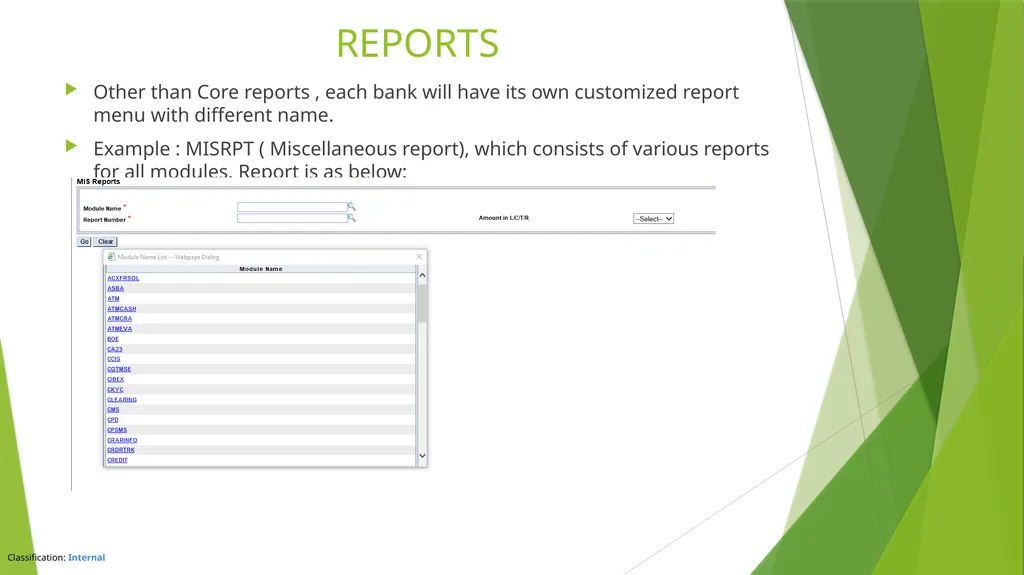
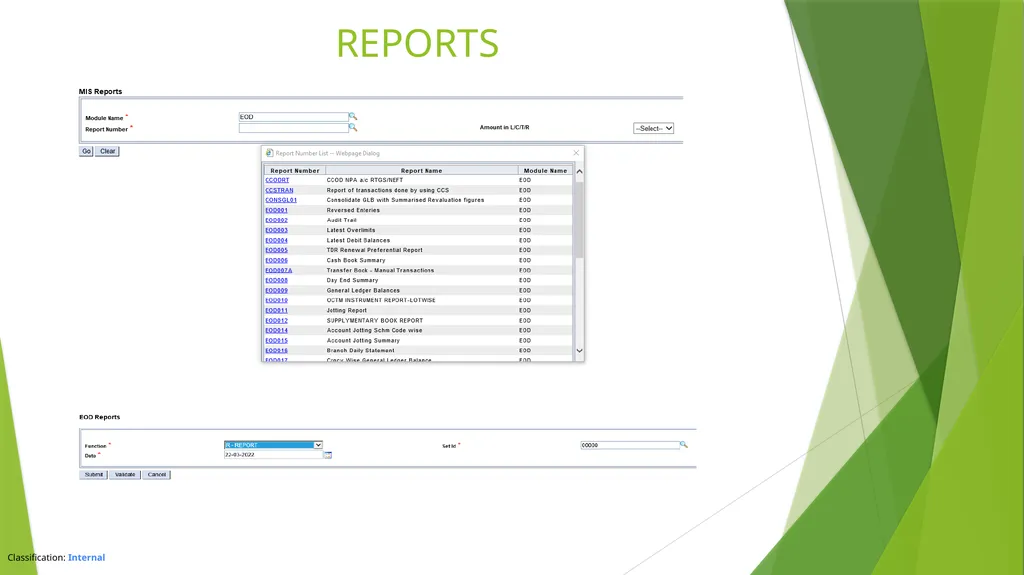
Other than Core reports , each bank will have its own customized report menu with different name.
Example : MISRPT ( Miscellaneous report), which consists of various reports for all modules. Report is as below: REPORTS<br>
Example : MISRPT ( Miscellaneous report), which consists of various reports for all modules. Report is as below: REPORTS<br>
26
REPORTS<br>