
Introduction to Microsoft 365 Groups for Business

Published  . 0 views
↓ Download
Introduction to Microsoft 365 Groups for Business
1 / 1
Introduction to Microsoft 365 Groups for Business - slide 1 of 15 Introduction to Microsoft 365 Groups for Business - slide 2 of 15 Introduction to Microsoft 365 Groups for Business - slide 3 of 15 Introduction to Microsoft 365 Groups for Business - slide 4 of 15 Introduction to Microsoft 365 Groups for Business - slide 5 of 15 Introduction to Microsoft 365 Groups for Business - slide 6 of 15 Introduction to Microsoft 365 Groups for Business - slide 7 of 15 Introduction to Microsoft 365 Groups for Business - slide 8 of 15 Introduction to Microsoft 365 Groups for Business - slide 9 of 15 Introduction to Microsoft 365 Groups for Business - slide 10 of 15 Introduction to Microsoft 365 Groups for Business - slide 11 of 15 Introduction to Microsoft 365 Groups for Business - slide 12 of 15 Introduction to Microsoft 365 Groups for Business - slide 13 of 15 Introduction to Microsoft 365 Groups for Business - slide 14 of 15 Introduction to Microsoft 365 Groups for Business - slide 15 of 15
Description: Introduction to Microsoft 365 Groups for Business Users Nov 2020 Agenda Introduction to Microsoft 365 Groups Best practices for Group owners FAQ for Group management What are Microsoft 365 Groups? What is Microsoft 365? Windows Office

Related Topics

Download Presentation

"Introduction to Microsoft 365 Groups for Business" is the property of its rightful owner. Permission is granted to download and print the materials on this website for personal, non-commercial use only, and to display it on your personal computer provided you do not modify the materials and that you retain all copyright notices contained in the materials. By downloading content from our website, you accept the terms of this agreement.

Presentation Transcript

slide1. Introduction to Microsoft 365 Groups for Business Users Nov 2020<br>
slide2. Agenda Introduction to Microsoft 365 Groups
Best practices for Group owners
FAQ for Group management<br>
slide3. What are Microsoft 365 Groups?<br>
slide4. What is Microsoft 365? Windows + Office + EMS
Best-in-class Productivity apps
Desktop, web and mobile apps for all authoring needs like Word, Excel, PowerPoint and OneNote
Growing list of apps for new scenarios like Planner, Forms, and Teams

Security & Compliance
Built-into the platform
Coherent set of policies across suite

Collaboration tools that suit your needs
Teams: Fast-paced chat for small groups
Yammer: Large company-wide communities
Outlook: Email-based messaging
SharePoint: Document collaboration<br>
slide5. Different types of Groups<br>
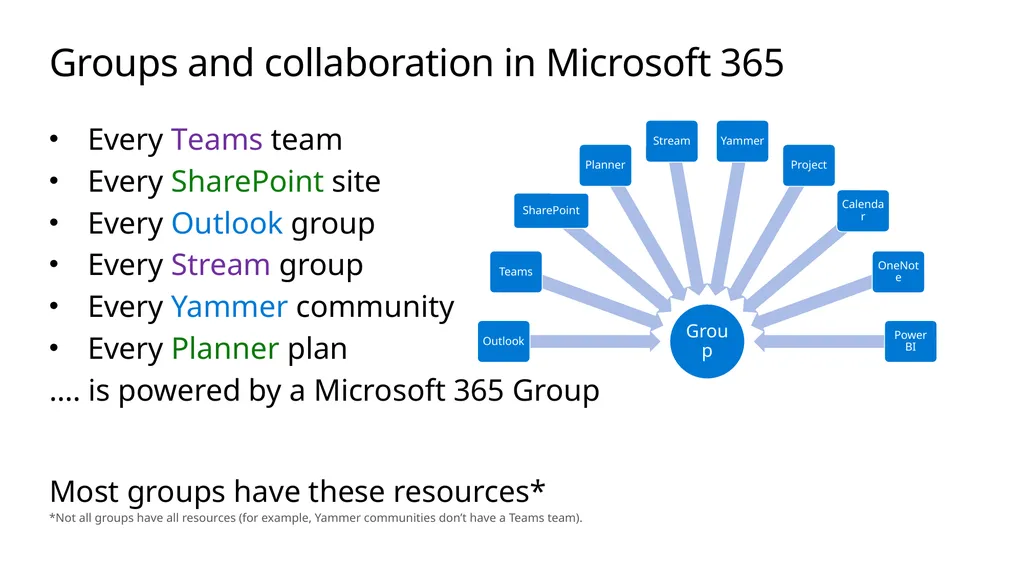
slide6. Groups and collaboration in Microsoft 365 Every Teams team
Every SharePoint site
Every Outlook group
Every Stream group
Every Yammer community
Every Planner plan
…. is powered by a Microsoft 365 Group

Most groups have these resources*
*Not all groups have all resources (for example, Yammer communities don’t have a Teams team).<br>
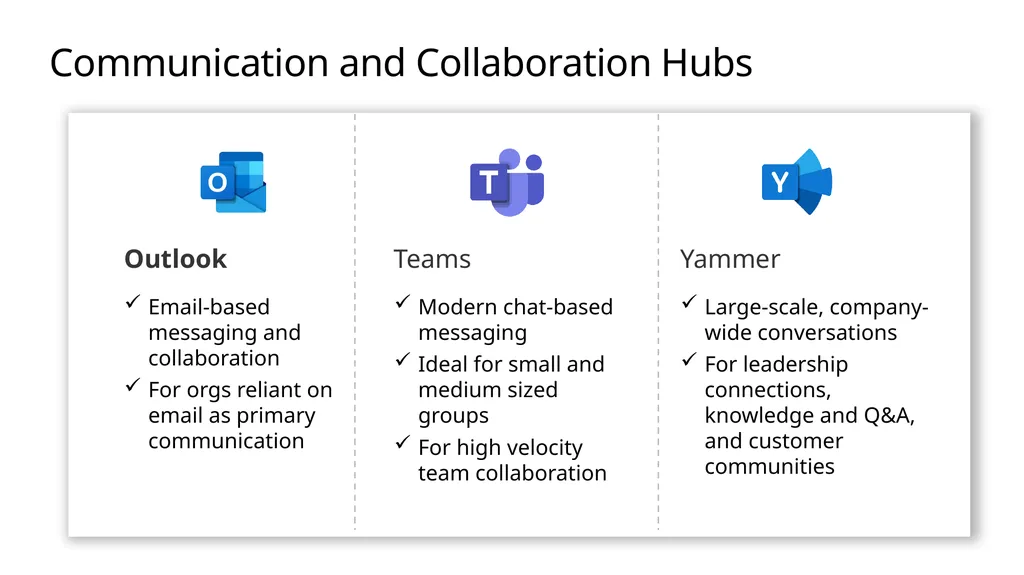
slide7. Communication and Collaboration Hubs Outlook Teams Yammer Email-based messaging and collaboration
For orgs reliant on email as primary communication Modern chat-based messaging
Ideal for small and medium sized groups
For high velocity team collaboration Large-scale, company-wide conversations
For leadership connections, knowledge and Q&A, and customer communities<br>
slide8. Best practices for Groups<br>
slide9. Steps for an end user creating a Group<br>
slide10. When creating a Group, consider these<br>
slide11. Best Practices for Group Owners<br>
slide12. Best practices: Groups lifecycle<br>
slide13. FAQ for Group management<br>
slide14. Frequently Asked Questions<br>
slide15. More resources End user documentation - Learn about Microsoft 365 Groups
Admin documentation - Overview of Microsoft 365 Groups for administrators<br>