
Microsoft Scenario Library Discover industry and
DP
Published · 26 slides · 0 views

1 / 1





Description
Microsoft Scenario Library Discover industry and role-based use cases Top 10 to Try First with Microsoft 365 Copilot Foundational skills for new users For more prompts, visit Prompt Gallery at: aka.msprompts AI value journey Org Value
Related Topics
Share
Embed code
Download this presentation From Below
"Microsoft Scenario Library Discover industry and" is the property of its rightful owner. Permission is granted to download and print the materials on this website for personal, non-commercial use only, and to display it on your personal computer provided you do not modify the materials and that you retain all copyright notices contained in the materials. By downloading content from our website, you accept the terms of this agreement.
Presentation Transcript
01
Microsoft Scenario Library Discover industry and role-based use cases<br>
02
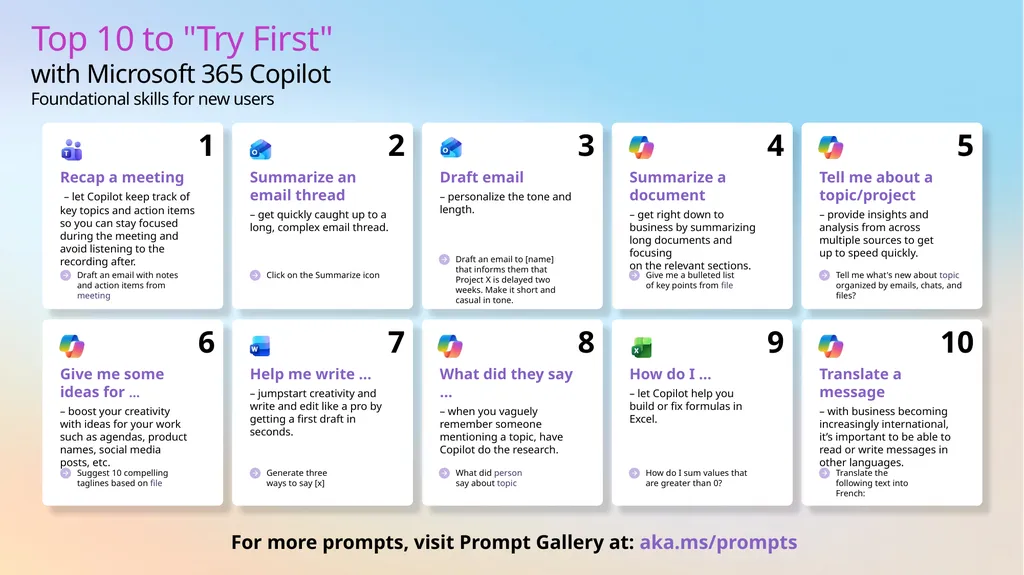
Top 10 to "Try First" with Microsoft 365 Copilot
Foundational skills for new users For more prompts, visit Prompt Gallery at: aka.ms/prompts<br>
03
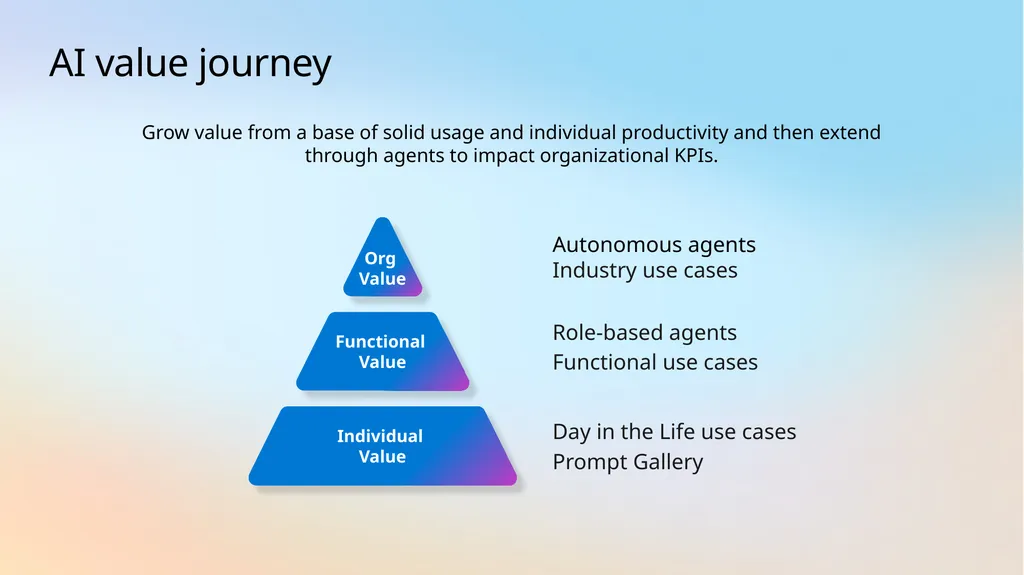
AI value journey Org
Value Functional
Value Autonomous agents
Industry use cases Role-based agents
Functional use cases Individual Value Day in the Life use cases
Prompt Gallery Grow value from a base of solid usage and individual productivity and then extend through agents to impact organizational KPIs.<br>
Industry use cases Role-based agents
Functional use cases Individual Value Day in the Life use cases
Prompt Gallery Grow value from a base of solid usage and individual productivity and then extend through agents to impact organizational KPIs.<br>
04
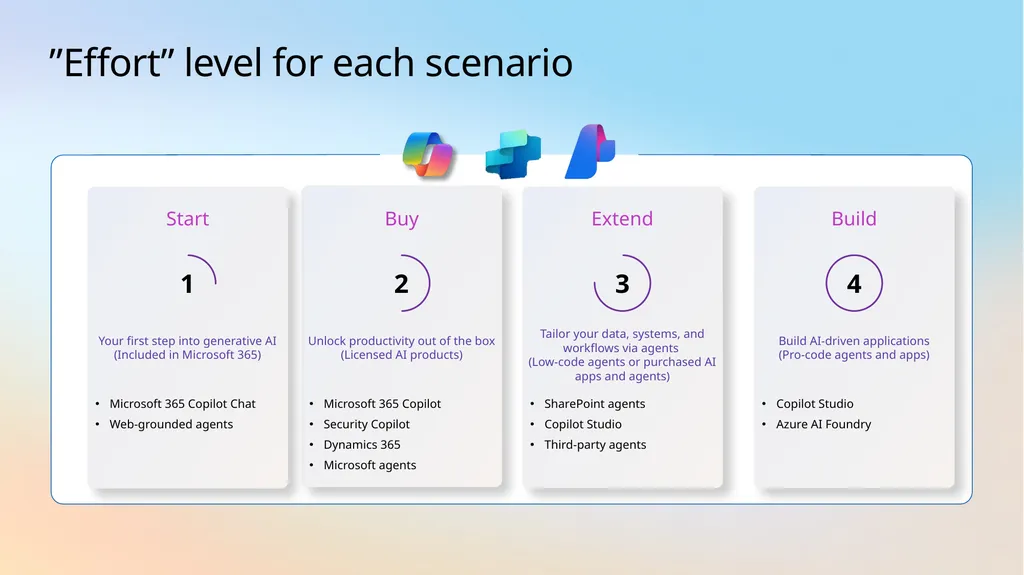
”Effort” level for each scenario Buy Microsoft 365 Copilot
Security Copilot
Dynamics 365
Microsoft agents Unlock productivity out of the box (Licensed AI products) 2 Extend SharePoint agents
Copilot Studio
Third-party agents Tailor your data, systems, and workflows via agents
(Low-code agents or purchased AI apps and agents) 3 Start Microsoft 365 Copilot Chat
Web-grounded agents Your first step into generative AI (Included in Microsoft 365) 1 Build Copilot Studio
Azure AI Foundry Build AI-driven applications
(Pro-code agents and apps) 4<br>
Security Copilot
Dynamics 365
Microsoft agents Unlock productivity out of the box (Licensed AI products) 2 Extend SharePoint agents
Copilot Studio
Third-party agents Tailor your data, systems, and workflows via agents
(Low-code agents or purchased AI apps and agents) 3 Start Microsoft 365 Copilot Chat
Web-grounded agents Your first step into generative AI (Included in Microsoft 365) 1 Build Copilot Studio
Azure AI Foundry Build AI-driven applications
(Pro-code agents and apps) 4<br>
05
AI use cases for
Marketing<br>
06
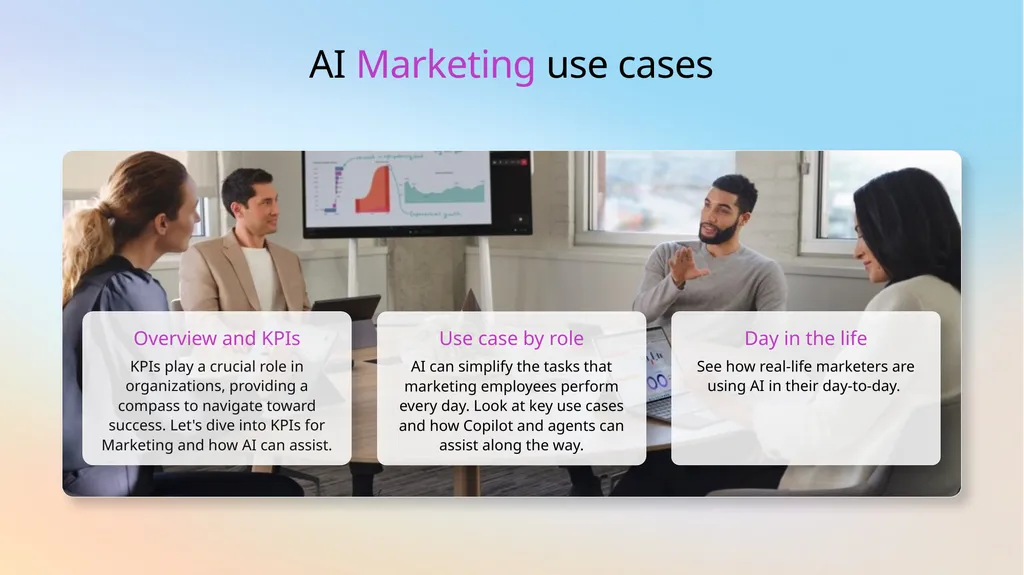
AI Marketing use cases Overview and KPIs KPIs play a crucial role in organizations, providing a compass to navigate toward success. Let's dive into KPIs for Marketing and how AI can assist. Use case by role AI can simplify the tasks that marketing employees perform every day. Look at key use cases and how Copilot and agents can assist along the way. Day in the life See how real-life marketers are using AI in their day-to-day.<br>
07
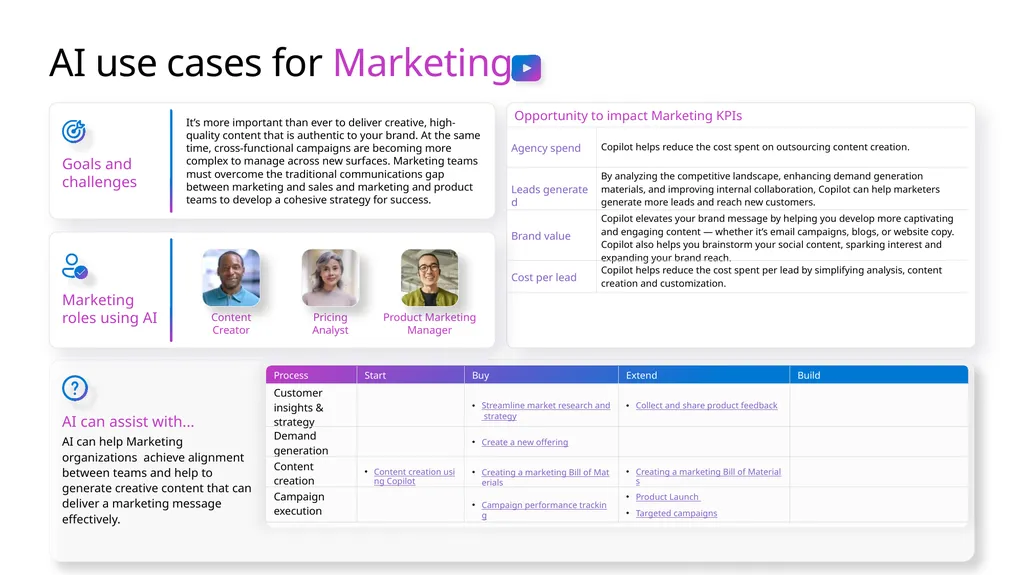
AI use cases for Marketing Goals and challenges It’s more important than ever to deliver creative, high-quality content that is authentic to your brand. At the same time, cross-functional campaigns are becoming more complex to manage across new surfaces. Marketing teams must overcome the traditional communications gap between marketing and sales and marketing and product teams to develop a cohesive strategy for success. AI can assist with... AI can help Marketing organizations achieve alignment between teams and help to generate creative content that can deliver a marketing message effectively. Marketing roles using AI Product Marketing Manager Content Creator Pricing Analyst<br>
08
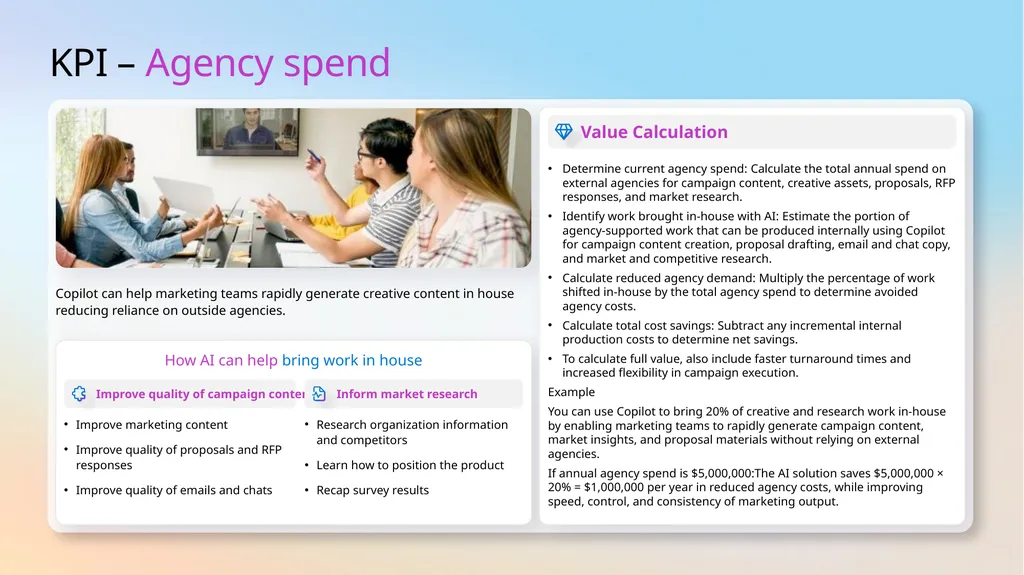
KPI – Agency spend How AI can help bring work in house Improve quality of campaign content Inform market research Copilot can help marketing teams rapidly generate creative content in house reducing reliance on outside agencies. Improve marketing content
Improve quality of proposals and RFP responses
Improve quality of emails and chats Research organization information and competitors
Learn how to position the product
Recap survey results Value Calculation Determine current agency spend: Calculate the total annual spend on external agencies for campaign content, creative assets, proposals, RFP responses, and market research.
Identify work brought in‑house with AI: Estimate the portion of agency‑supported work that can be produced internally using Copilot for campaign content creation, proposal drafting, email and chat copy, and market and competitive research.
Calculate reduced agency demand: Multiply the percentage of work shifted in‑house by the total agency spend to determine avoided agency costs.
Calculate total cost savings: Subtract any incremental internal production costs to determine net savings.
To calculate full value, also include faster turnaround times and increased flexibility in campaign execution.
Example
You can use Copilot to bring 20% of creative and research work in‑house by enabling marketing teams to rapidly generate campaign content, market insights, and proposal materials without relying on external agencies.
If annual agency spend is $5,000,000:The AI solution saves $5,000,000 × 20% = $1,000,000 per year in reduced agency costs, while improving speed, control, and consistency of marketing output.<br>
Improve quality of proposals and RFP responses
Improve quality of emails and chats Research organization information and competitors
Learn how to position the product
Recap survey results Value Calculation Determine current agency spend: Calculate the total annual spend on external agencies for campaign content, creative assets, proposals, RFP responses, and market research.
Identify work brought in‑house with AI: Estimate the portion of agency‑supported work that can be produced internally using Copilot for campaign content creation, proposal drafting, email and chat copy, and market and competitive research.
Calculate reduced agency demand: Multiply the percentage of work shifted in‑house by the total agency spend to determine avoided agency costs.
Calculate total cost savings: Subtract any incremental internal production costs to determine net savings.
To calculate full value, also include faster turnaround times and increased flexibility in campaign execution.
Example
You can use Copilot to bring 20% of creative and research work in‑house by enabling marketing teams to rapidly generate campaign content, market insights, and proposal materials without relying on external agencies.
If annual agency spend is $5,000,000:The AI solution saves $5,000,000 × 20% = $1,000,000 per year in reduced agency costs, while improving speed, control, and consistency of marketing output.<br>
09
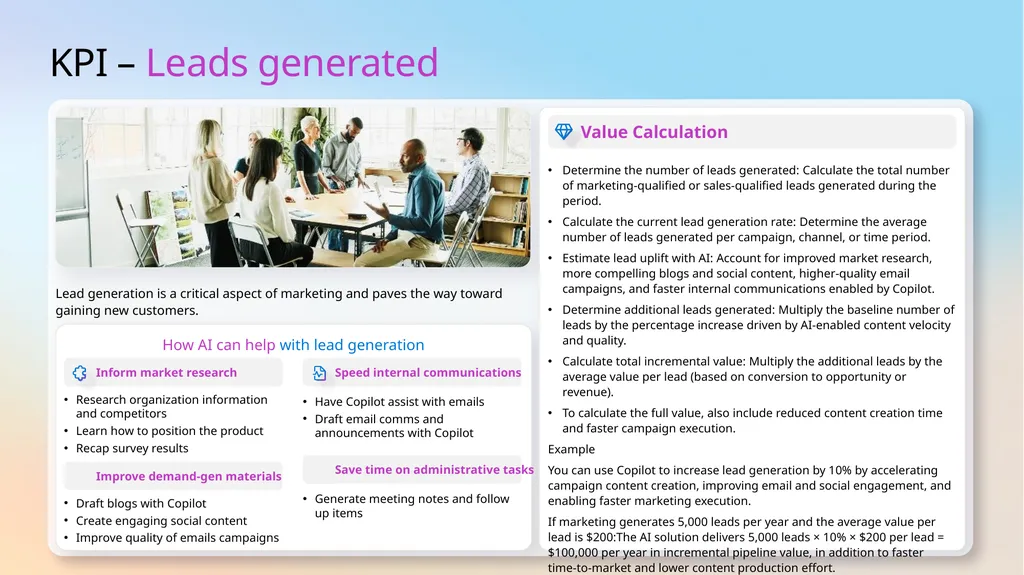
KPI – Leads generated How AI can help with lead generation Lead generation is a critical aspect of marketing and paves the way toward gaining new customers. Value Calculation Determine the number of leads generated: Calculate the total number of marketing‑qualified or sales‑qualified leads generated during the period.
Calculate the current lead generation rate: Determine the average number of leads generated per campaign, channel, or time period.
Estimate lead uplift with AI: Account for improved market research, more compelling blogs and social content, higher‑quality email campaigns, and faster internal communications enabled by Copilot.
Determine additional leads generated: Multiply the baseline number of leads by the percentage increase driven by AI‑enabled content velocity and quality.
Calculate total incremental value: Multiply the additional leads by the average value per lead (based on conversion to opportunity or revenue).
To calculate the full value, also include reduced content creation time and faster campaign execution.
Example
You can use Copilot to increase lead generation by 10% by accelerating campaign content creation, improving email and social engagement, and enabling faster marketing execution.
If marketing generates 5,000 leads per year and the average value per lead is $200:The AI solution delivers 5,000 leads × 10% × $200 per lead = $100,000 per year in incremental pipeline value, in addition to faster time‑to‑market and lower content production effort.<br>
Calculate the current lead generation rate: Determine the average number of leads generated per campaign, channel, or time period.
Estimate lead uplift with AI: Account for improved market research, more compelling blogs and social content, higher‑quality email campaigns, and faster internal communications enabled by Copilot.
Determine additional leads generated: Multiply the baseline number of leads by the percentage increase driven by AI‑enabled content velocity and quality.
Calculate total incremental value: Multiply the additional leads by the average value per lead (based on conversion to opportunity or revenue).
To calculate the full value, also include reduced content creation time and faster campaign execution.
Example
You can use Copilot to increase lead generation by 10% by accelerating campaign content creation, improving email and social engagement, and enabling faster marketing execution.
If marketing generates 5,000 leads per year and the average value per lead is $200:The AI solution delivers 5,000 leads × 10% × $200 per lead = $100,000 per year in incremental pipeline value, in addition to faster time‑to‑market and lower content production effort.<br>
10
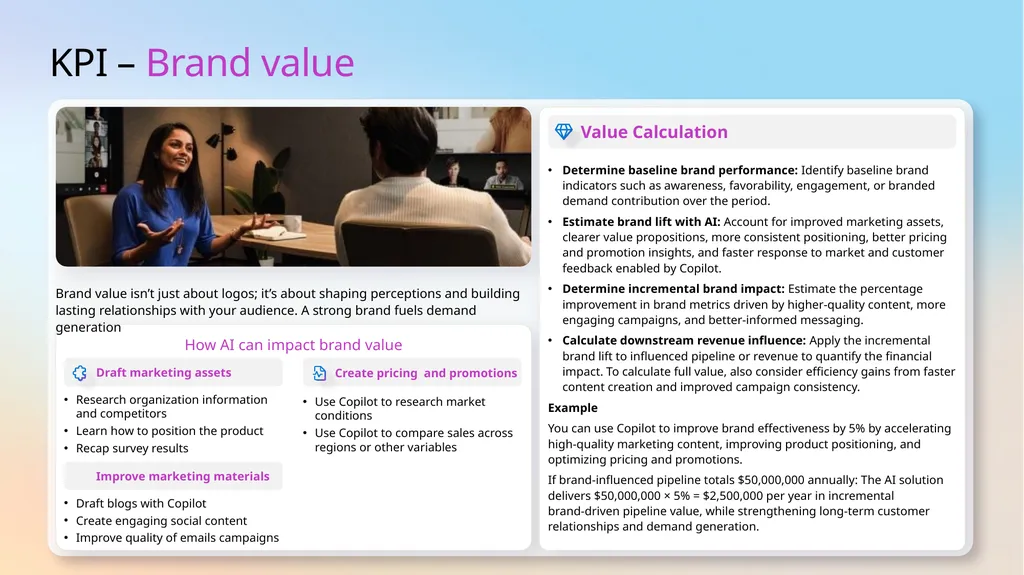
KPI – Brand value How AI can impact brand value Brand value isn’t just about logos; it’s about shaping perceptions and building lasting relationships with your audience. A strong brand fuels demand generation Value Calculation Determine baseline brand performance: Identify baseline brand indicators such as awareness, favorability, engagement, or branded demand contribution over the period.
Estimate brand lift with AI: Account for improved marketing assets, clearer value propositions, more consistent positioning, better pricing and promotion insights, and faster response to market and customer feedback enabled by Copilot.
Determine incremental brand impact: Estimate the percentage improvement in brand metrics driven by higher‑quality content, more engaging campaigns, and better‑informed messaging.
Calculate downstream revenue influence: Apply the incremental brand lift to influenced pipeline or revenue to quantify the financial impact. To calculate full value, also consider efficiency gains from faster content creation and improved campaign consistency.
Example
You can use Copilot to improve brand effectiveness by 5% by accelerating high‑quality marketing content, improving product positioning, and optimizing pricing and promotions.
If brand‑influenced pipeline totals $50,000,000 annually: The AI solution delivers $50,000,000 × 5% = $2,500,000 per year in incremental brand‑driven pipeline value, while strengthening long‑term customer relationships and demand generation.<br>
Estimate brand lift with AI: Account for improved marketing assets, clearer value propositions, more consistent positioning, better pricing and promotion insights, and faster response to market and customer feedback enabled by Copilot.
Determine incremental brand impact: Estimate the percentage improvement in brand metrics driven by higher‑quality content, more engaging campaigns, and better‑informed messaging.
Calculate downstream revenue influence: Apply the incremental brand lift to influenced pipeline or revenue to quantify the financial impact. To calculate full value, also consider efficiency gains from faster content creation and improved campaign consistency.
Example
You can use Copilot to improve brand effectiveness by 5% by accelerating high‑quality marketing content, improving product positioning, and optimizing pricing and promotions.
If brand‑influenced pipeline totals $50,000,000 annually: The AI solution delivers $50,000,000 × 5% = $2,500,000 per year in incremental brand‑driven pipeline value, while strengthening long‑term customer relationships and demand generation.<br>
11
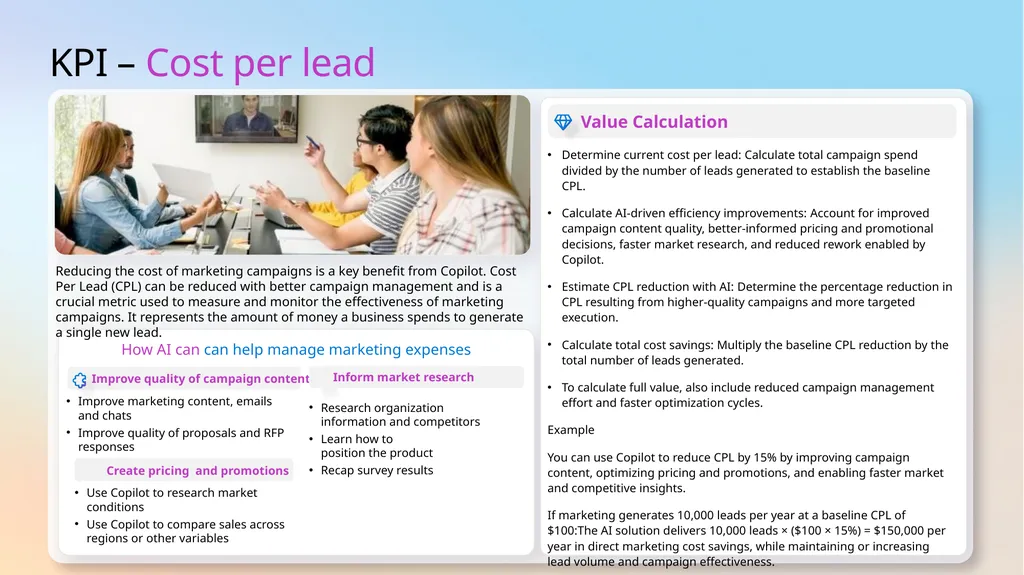
KPI – Cost per lead How AI can can help manage marketing expenses Reducing the cost of marketing campaigns is a key benefit from Copilot. Cost Per Lead (CPL) can be reduced with better campaign management and is a crucial metric used to measure and monitor the effectiveness of marketing campaigns. It represents the amount of money a business spends to generate a single new lead. Value Calculation Determine current cost per lead: Calculate total campaign spend divided by the number of leads generated to establish the baseline CPL.
Calculate AI‑driven efficiency improvements: Account for improved campaign content quality, better‑informed pricing and promotional decisions, faster market research, and reduced rework enabled by Copilot.
Estimate CPL reduction with AI: Determine the percentage reduction in CPL resulting from higher‑quality campaigns and more targeted execution.
Calculate total cost savings: Multiply the baseline CPL reduction by the total number of leads generated.
To calculate full value, also include reduced campaign management effort and faster optimization cycles.
Example
You can use Copilot to reduce CPL by 15% by improving campaign content, optimizing pricing and promotions, and enabling faster market and competitive insights.
If marketing generates 10,000 leads per year at a baseline CPL of $100:The AI solution delivers 10,000 leads × ($100 × 15%) = $150,000 per year in direct marketing cost savings, while maintaining or increasing lead volume and campaign effectiveness.<br>
Calculate AI‑driven efficiency improvements: Account for improved campaign content quality, better‑informed pricing and promotional decisions, faster market research, and reduced rework enabled by Copilot.
Estimate CPL reduction with AI: Determine the percentage reduction in CPL resulting from higher‑quality campaigns and more targeted execution.
Calculate total cost savings: Multiply the baseline CPL reduction by the total number of leads generated.
To calculate full value, also include reduced campaign management effort and faster optimization cycles.
Example
You can use Copilot to reduce CPL by 15% by improving campaign content, optimizing pricing and promotions, and enabling faster market and competitive insights.
If marketing generates 10,000 leads per year at a baseline CPL of $100:The AI solution delivers 10,000 leads × ($100 × 15%) = $150,000 per year in direct marketing cost savings, while maintaining or increasing lead volume and campaign effectiveness.<br>
12
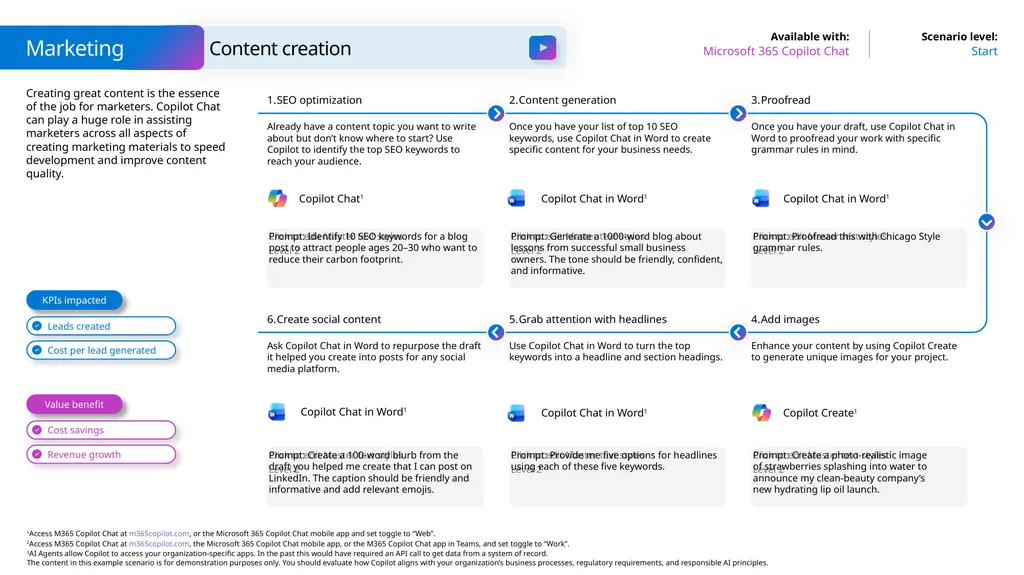
Creating great content is the essence of the job for marketers. Copilot Chat can play a huge role in assisting marketers across all aspects of creating marketing materials to speed development and improve content quality. Marketing Start Microsoft 365 Copilot Chat Content creation Prompt: Identify 10 SEO keywords for a blog post to attract people ages 20–30 who want to reduce their carbon footprint. SEO optimization Already have a content topic you want to write about but don’t know where to start? Use Copilot to identify the top SEO keywords to reach your audience. Content generation Once you have your list of top 10 SEO keywords, use Copilot Chat in Word to create specific content for your business needs. Prompt: Proofread this with Chicago Style grammar rules. Proofread Once you have your draft, use Copilot Chat in Word to proofread your work with specific grammar rules in mind. Prompt: Generate a 1000-word blog about lessons from successful small business owners. The tone should be friendly, confident, and informative. Prompt: Create a 100-word blurb from the draft you helped me create that I can post on LinkedIn. The caption should be friendly and informative and add relevant emojis. Create social content Ask Copilot Chat in Word to repurpose the draft it helped you create into posts for any social media platform. Grab attention with headlines Use Copilot Chat in Word to turn the top keywords into a headline and section headings. Prompt: Create a photo-realistic image
of strawberries splashing into water to
announce my clean-beauty company’s
new hydrating lip oil launch. Add images Enhance your content by using Copilot Create to generate unique images for your project. Prompt: Provide me five options for headlines using each of these five keywords. Value benefit KPIs impacted Copilot Chat in Word1 Copilot Chat1 Copilot Chat in Word1 Copilot Create1 Copilot Chat in Word1 Copilot Chat in Word1<br>
13
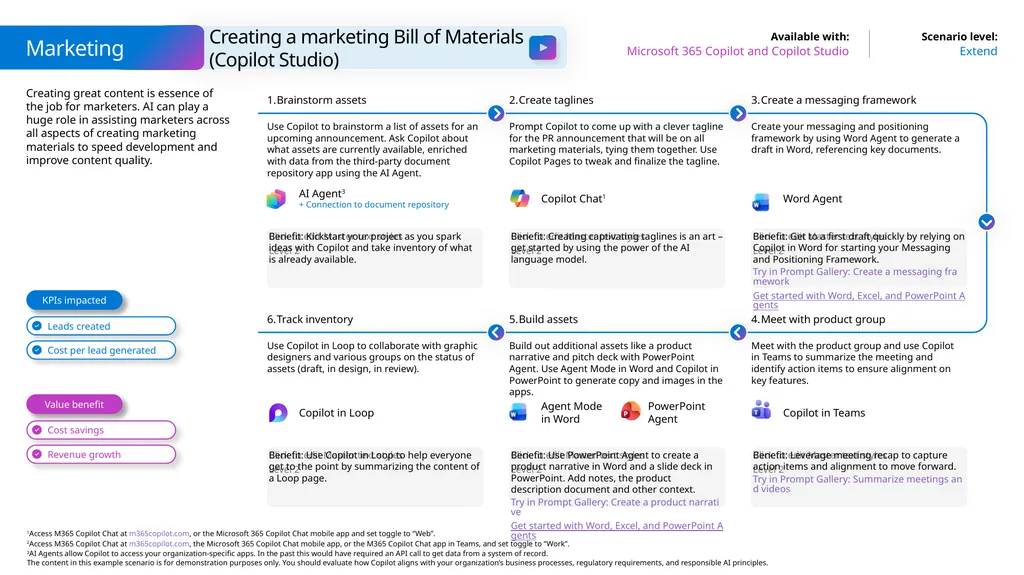
Creating great content is essence of the job for marketers. AI can play a huge role in assisting marketers across all aspects of creating marketing materials to speed development and improve content quality. Marketing Extend Microsoft 365 Copilot and Copilot Studio Creating a marketing Bill of Materials
(Copilot Studio) Benefit: Kickstart your project as you spark ideas with Copilot and take inventory of what is already available. Brainstorm assets Use Copilot to brainstorm a list of assets for an upcoming announcement. Ask Copilot about what assets are currently available, enriched with data from the third-party document repository app using the AI Agent. Create taglines Prompt Copilot to come up with a clever tagline for the PR announcement that will be on all marketing materials, tying them together. Use Copilot Pages to tweak and finalize the tagline. Benefit: Get to a first draft quickly by relying on Copilot in Word for starting your Messaging and Positioning Framework.
Try in Prompt Gallery: Create a messaging framework
Get started with Word, Excel, and PowerPoint Agents Create a messaging framework Create your messaging and positioning framework by using Word Agent to generate a draft in Word, referencing key documents. Benefit: Creating captivating taglines is an art –get started by using the power of the AI language model. Benefit: Use Copilot in Loop to help everyone get to the point by summarizing the content of a Loop page. Track inventory Use Copilot in Loop to collaborate with graphic designers and various groups on the status of assets (draft, in design, in review). Build assets Build out additional assets like a product narrative and pitch deck with PowerPoint Agent. Use Agent Mode in Word and Copilot in PowerPoint to generate copy and images in the apps. Benefit: Leverage meeting recap to capture action items and alignment to move forward.
Try in Prompt Gallery: Summarize meetings and videos Meet with product group Meet with the product group and use Copilot in Teams to summarize the meeting and identify action items to ensure alignment on key features. Benefit: Use PowerPoint Agent to create a product narrative in Word and a slide deck in PowerPoint. Add notes, the product description document and other context.
Try in Prompt Gallery: Create a product narrative
Get started with Word, Excel, and PowerPoint Agents Value benefit KPIs impacted PowerPoint Agent Agent Mode in Word Copilot Chat1 Copilot in Teams AI Agent3
+ Connection to document repository Copilot in Loop Word Agent<br>
Try in Prompt Gallery: Create a messaging framework
Get started with Word, Excel, and PowerPoint Agents Create a messaging framework Create your messaging and positioning framework by using Word Agent to generate a draft in Word, referencing key documents. Benefit: Creating captivating taglines is an art –get started by using the power of the AI language model. Benefit: Use Copilot in Loop to help everyone get to the point by summarizing the content of a Loop page. Track inventory Use Copilot in Loop to collaborate with graphic designers and various groups on the status of assets (draft, in design, in review). Build assets Build out additional assets like a product narrative and pitch deck with PowerPoint Agent. Use Agent Mode in Word and Copilot in PowerPoint to generate copy and images in the apps. Benefit: Leverage meeting recap to capture action items and alignment to move forward.
Try in Prompt Gallery: Summarize meetings and videos Meet with product group Meet with the product group and use Copilot in Teams to summarize the meeting and identify action items to ensure alignment on key features. Benefit: Use PowerPoint Agent to create a product narrative in Word and a slide deck in PowerPoint. Add notes, the product description document and other context.
Try in Prompt Gallery: Create a product narrative
Get started with Word, Excel, and PowerPoint Agents Value benefit KPIs impacted PowerPoint Agent Agent Mode in Word Copilot Chat1 Copilot in Teams AI Agent3
+ Connection to document repository Copilot in Loop Word Agent<br>
14
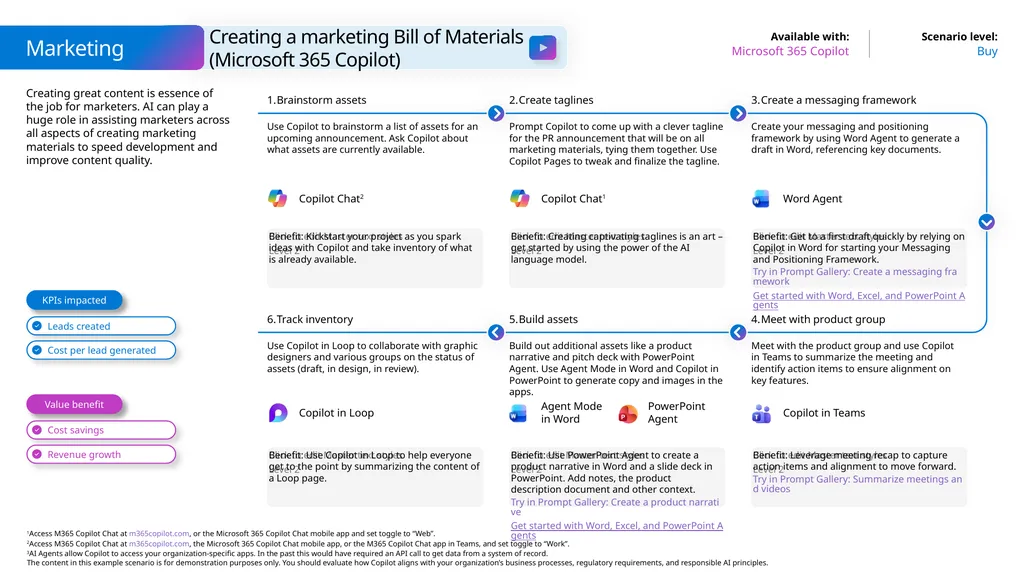
Creating great content is essence of the job for marketers. AI can play a huge role in assisting marketers across all aspects of creating marketing materials to speed development and improve content quality. Buy Microsoft 365 Copilot Benefit: Kickstart your project as you spark ideas with Copilot and take inventory of what is already available. Brainstorm assets Use Copilot to brainstorm a list of assets for an upcoming announcement. Ask Copilot about what assets are currently available. Create taglines Prompt Copilot to come up with a clever tagline for the PR announcement that will be on all marketing materials, tying them together. Use Copilot Pages to tweak and finalize the tagline. Benefit: Get to a first draft quickly by relying on Copilot in Word for starting your Messaging and Positioning Framework.
Try in Prompt Gallery: Create a messaging framework
Get started with Word, Excel, and PowerPoint Agents Create a messaging framework Create your messaging and positioning framework by using Word Agent to generate a draft in Word, referencing key documents. Benefit: Creating captivating taglines is an art –get started by using the power of the AI language model. Benefit: Use Copilot in Loop to help everyone get to the point by summarizing the content of a Loop page. Track inventory Use Copilot in Loop to collaborate with graphic designers and various groups on the status of assets (draft, in design, in review). Build assets Build out additional assets like a product narrative and pitch deck with PowerPoint Agent. Use Agent Mode in Word and Copilot in PowerPoint to generate copy and images in the apps. Benefit: Leverage meeting recap to capture action items and alignment to move forward.
Try in Prompt Gallery: Summarize meetings and videos Meet with product group Meet with the product group and use Copilot in Teams to summarize the meeting and identify action items to ensure alignment on key features. Benefit: Use PowerPoint Agent to create a product narrative in Word and a slide deck in PowerPoint. Add notes, the product description document and other context.
Try in Prompt Gallery: Create a product narrative
Get started with Word, Excel, and PowerPoint Agents Value benefit KPIs impacted Copilot in Teams Copilot in Loop Copilot Chat1 Word Agent Copilot Chat2 Creating a marketing Bill of Materials (Microsoft 365 Copilot) Marketing PowerPoint Agent Agent Mode in Word<br>
Try in Prompt Gallery: Create a messaging framework
Get started with Word, Excel, and PowerPoint Agents Create a messaging framework Create your messaging and positioning framework by using Word Agent to generate a draft in Word, referencing key documents. Benefit: Creating captivating taglines is an art –get started by using the power of the AI language model. Benefit: Use Copilot in Loop to help everyone get to the point by summarizing the content of a Loop page. Track inventory Use Copilot in Loop to collaborate with graphic designers and various groups on the status of assets (draft, in design, in review). Build assets Build out additional assets like a product narrative and pitch deck with PowerPoint Agent. Use Agent Mode in Word and Copilot in PowerPoint to generate copy and images in the apps. Benefit: Leverage meeting recap to capture action items and alignment to move forward.
Try in Prompt Gallery: Summarize meetings and videos Meet with product group Meet with the product group and use Copilot in Teams to summarize the meeting and identify action items to ensure alignment on key features. Benefit: Use PowerPoint Agent to create a product narrative in Word and a slide deck in PowerPoint. Add notes, the product description document and other context.
Try in Prompt Gallery: Create a product narrative
Get started with Word, Excel, and PowerPoint Agents Value benefit KPIs impacted Copilot in Teams Copilot in Loop Copilot Chat1 Word Agent Copilot Chat2 Creating a marketing Bill of Materials (Microsoft 365 Copilot) Marketing PowerPoint Agent Agent Mode in Word<br>
15
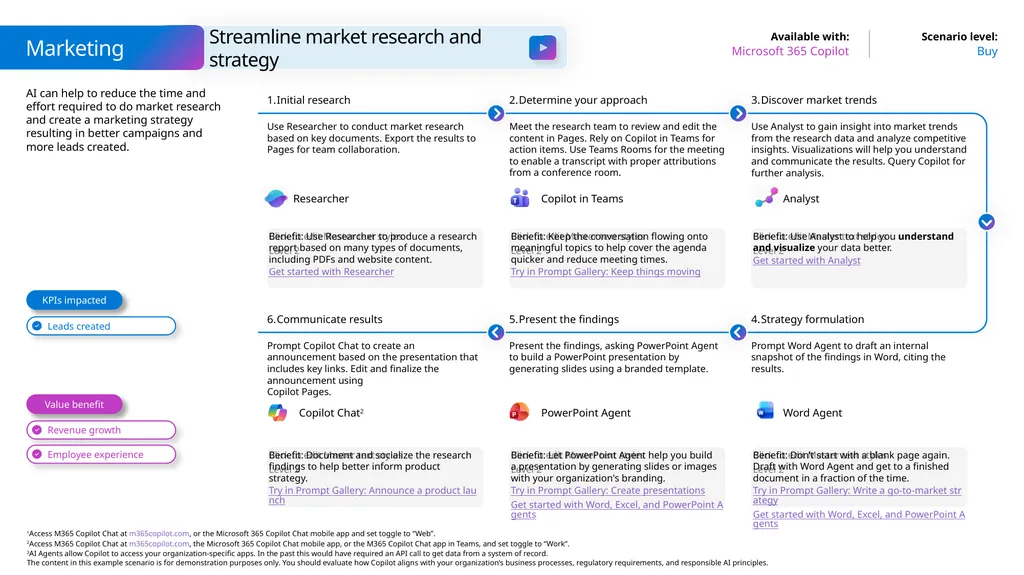
AI can help to reduce the time and effort required to do market research and create a marketing strategy resulting in better campaigns and more leads created. Buy Microsoft 365 Copilot Benefit: Use Researcher to produce a research report based on many types of documents, including PDFs and website content.
Get started with Researcher Initial research Use Researcher to conduct market research based on key documents. Export the results to Pages for team collaboration. Determine your approach Meet the research team to review and edit the content in Pages. Rely on Copilot in Teams for action items. Use Teams Rooms for the meeting to enable a transcript with proper attributions from a conference room. Benefit: Use Analyst to help you understand and visualize your data better.
Get started with Analyst Discover market trends Use Analyst to gain insight into market trends from the research data and analyze competitive insights. Visualizations will help you understand and communicate the results. Query Copilot for further analysis. Benefit: Keep the conversation flowing onto meaningful topics to help cover the agenda quicker and reduce meeting times.
Try in Prompt Gallery: Keep things moving Benefit: Document and socialize the research findings to help better inform product strategy.
Try in Prompt Gallery: Announce a product launch Communicate results Prompt Copilot Chat to create an announcement based on the presentation that includes key links. Edit and finalize the announcement using Copilot Pages. Present the findings Present the findings, asking PowerPoint Agent to build a PowerPoint presentation by generating slides using a branded template. Benefit: Don’t start with a blank page again. Draft with Word Agent and get to a finished document in a fraction of the time.
Try in Prompt Gallery: Write a go-to-market strategy
Get started with Word, Excel, and PowerPoint Agents Strategy formulation Prompt Word Agent to draft an internal snapshot of the findings in Word, citing the results. Benefit: Let PowerPoint Agent help you build a presentation by generating slides or images with your organization's branding.
Try in Prompt Gallery: Create presentations
Get started with Word, Excel, and PowerPoint Agents Value benefit KPIs impacted Analyst Copilot Chat2 Word Agent PowerPoint Agent Copilot in Teams Streamline market research and strategy Marketing Researcher<br>
Get started with Researcher Initial research Use Researcher to conduct market research based on key documents. Export the results to Pages for team collaboration. Determine your approach Meet the research team to review and edit the content in Pages. Rely on Copilot in Teams for action items. Use Teams Rooms for the meeting to enable a transcript with proper attributions from a conference room. Benefit: Use Analyst to help you understand and visualize your data better.
Get started with Analyst Discover market trends Use Analyst to gain insight into market trends from the research data and analyze competitive insights. Visualizations will help you understand and communicate the results. Query Copilot for further analysis. Benefit: Keep the conversation flowing onto meaningful topics to help cover the agenda quicker and reduce meeting times.
Try in Prompt Gallery: Keep things moving Benefit: Document and socialize the research findings to help better inform product strategy.
Try in Prompt Gallery: Announce a product launch Communicate results Prompt Copilot Chat to create an announcement based on the presentation that includes key links. Edit and finalize the announcement using Copilot Pages. Present the findings Present the findings, asking PowerPoint Agent to build a PowerPoint presentation by generating slides using a branded template. Benefit: Don’t start with a blank page again. Draft with Word Agent and get to a finished document in a fraction of the time.
Try in Prompt Gallery: Write a go-to-market strategy
Get started with Word, Excel, and PowerPoint Agents Strategy formulation Prompt Word Agent to draft an internal snapshot of the findings in Word, citing the results. Benefit: Let PowerPoint Agent help you build a presentation by generating slides or images with your organization's branding.
Try in Prompt Gallery: Create presentations
Get started with Word, Excel, and PowerPoint Agents Value benefit KPIs impacted Analyst Copilot Chat2 Word Agent PowerPoint Agent Copilot in Teams Streamline market research and strategy Marketing Researcher<br>
16
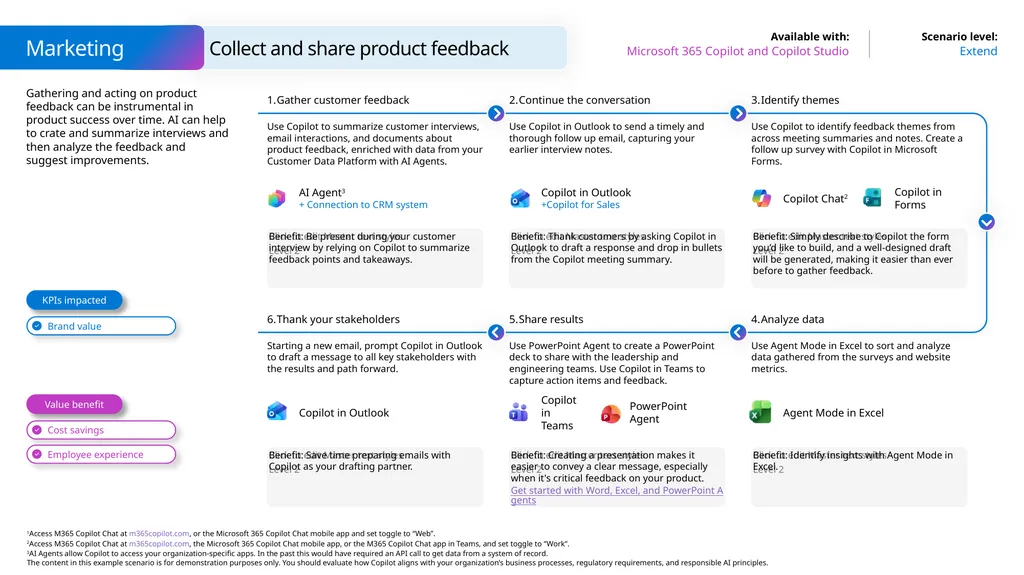
Gathering and acting on product feedback can be instrumental in product success over time. AI can help to crate and summarize interviews and then analyze the feedback and suggest improvements. Extend Microsoft 365 Copilot and Copilot Studio Benefit: Be present during your customer interview by relying on Copilot to summarize feedback points and takeaways. Gather customer feedback Use Copilot to summarize customer interviews, email interactions, and documents about product feedback, enriched with data from your Customer Data Platform with AI Agents. Continue the conversation Use Copilot in Outlook to send a timely and thorough follow up email, capturing your earlier interview notes. Benefit: Simply describe to Copilot the form you’d like to build, and a well-designed draft will be generated, making it easier than ever before to gather feedback. Identify themes Use Copilot to identify feedback themes from across meeting summaries and notes. Create a follow up survey with Copilot in Microsoft Forms. Benefit: Thank customers by asking Copilot in Outlook to draft a response and drop in bullets from the Copilot meeting summary. Benefit: Save time preparing emails with Copilot as your drafting partner. Thank your stakeholders Starting a new email, prompt Copilot in Outlook to draft a message to all key stakeholders with the results and path forward. Share results Use PowerPoint Agent to create a PowerPoint deck to share with the leadership and engineering teams. Use Copilot in Teams to capture action items and feedback. Benefit: Identify insights with Agent Mode in Excel. Analyze data Use Agent Mode in Excel to sort and analyze data gathered from the surveys and website metrics. Benefit: Creating a presentation makes it easier to convey a clear message, especially when it's critical feedback on your product.
Get started with Word, Excel, and PowerPoint Agents Value benefit KPIs impacted AI Agent3
+ Connection to CRM system Copilot in Outlook +Copilot for Sales Copilot Chat2 Copilot in Forms Agent Mode in Excel Copilot in Outlook Copilot in Teams PowerPoint Agent Collect and share product feedback Marketing<br>
Get started with Word, Excel, and PowerPoint Agents Value benefit KPIs impacted AI Agent3
+ Connection to CRM system Copilot in Outlook +Copilot for Sales Copilot Chat2 Copilot in Forms Agent Mode in Excel Copilot in Outlook Copilot in Teams PowerPoint Agent Collect and share product feedback Marketing<br>
17
AI is great at coming up with new ideas but Copilot can help you take that even farther and assist with collaboration, seller preparation, and campaigns. Buy Microsoft 365 Copilot Benefit: Kickstart your project as you plan and collaborate easier with Copilot. Brainstorm new offerings Use Copilot to generate ideas for new product offerings. Format the response in Copilot Pages, adding collaborators to create a go-to-market strategy. Draft announcement Prompt Copilot to draft blog and social media posts, leverage existing documents like your marketing plan. Benefit: Don’t start with a blank page. Draft with Agent Mode and get to a finished document in a fraction of the time. Keep the team up to date Use Copilot in Teams to summarize key meetings, identify most frequent questions, and record action items from the meeting. Use Agent Mode to generate an initial FAQ Word document. Benefit: Brainstorm and draft content quickly with Copilot. Collaborate on ideas and content using your instructions or reference files. Benefit: Use Copilot to help you explore and understand your data better. Analyze performance Use Agent Mode in Excel to perform advanced analysis to understand how your campaign landed. Query for things like top performing channel or geographic impact or use Agent Mode to create Python code for analysis. Execute your campaign Leverage Copilot to create tailored messages to each of your communication channels to drive sales. Benefit: Document and socialize your plan to
keep sellers up to date.
Get started with Word, Excel, and PowerPoint Agents Prep your sellers Create a PowerPoint presentation from your Marketing Plan with PowerPoint Agent to share with your sales team. Benefit: With the right prompt ingredients, Copilot can provide something in the voice of your organization – witty, smart, creative – you choose. Value benefit KPIs impacted Copilot Chat1 Copilot in Teams Agent Mode with Word PowerPoint Agent Agent Mode in Excel Copilot Chat1 Copilot Chat2 Create a new offering Marketing<br>
Get started with Word, Excel, and PowerPoint Agents Prep your sellers Create a PowerPoint presentation from your Marketing Plan with PowerPoint Agent to share with your sales team. Benefit: With the right prompt ingredients, Copilot can provide something in the voice of your organization – witty, smart, creative – you choose. Value benefit KPIs impacted Copilot Chat1 Copilot in Teams Agent Mode with Word PowerPoint Agent Agent Mode in Excel Copilot Chat1 Copilot Chat2 Create a new offering Marketing<br>
18
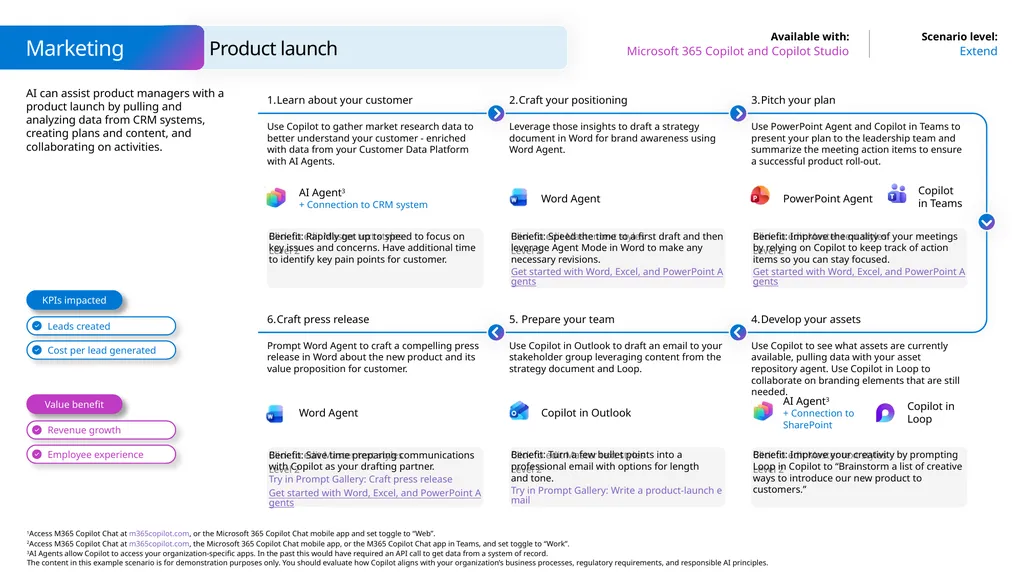
AI can assist product managers with a product launch by pulling and analyzing data from CRM systems, creating plans and content, and collaborating on activities. Extend Microsoft 365 Copilot and Copilot Studio Benefit: Rapidly get up to speed to focus on key issues and concerns. Have additional time to identify key pain points for customer. Learn about your customer Use Copilot to gather market research data to better understand your customer - enriched with data from your Customer Data Platform with AI Agents. Craft your positioning Leverage those insights to draft a strategy document in Word for brand awareness using Word Agent. Benefit: Improve the quality of your meetings by relying on Copilot to keep track of action items so you can stay focused.
Get started with Word, Excel, and PowerPoint Agents Pitch your plan Use PowerPoint Agent and Copilot in Teams to present your plan to the leadership team and summarize the meeting action items to ensure a successful product roll-out. Benefit: Speed the time to a first draft and then leverage Agent Mode in Word to make any necessary revisions.
Get started with Word, Excel, and PowerPoint Agents Benefit: Save time preparing communications with Copilot as your drafting partner.
Try in Prompt Gallery: Craft press release
Get started with Word, Excel, and PowerPoint Agents Craft press release Prompt Word Agent to craft a compelling press release in Word about the new product and its value proposition for customer. Prepare your team Use Copilot in Outlook to draft an email to your stakeholder group leveraging content from the strategy document and Loop. Benefit: Improve your creativity by prompting Loop in Copilot to “Brainstorm a list of creative ways to introduce our new product to customers.” Develop your assets Use Copilot to see what assets are currently available, pulling data with your asset repository agent. Use Copilot in Loop to collaborate on branding elements that are still needed. Benefit: Turn a few bullet points into a professional email with options for length and tone.
Try in Prompt Gallery: Write a product-launch email Value benefit KPIs impacted AI Agent3
+ Connection to CRM system Word Agent PowerPoint Agent Copilot
in Teams AI Agent3
+ Connection to SharePoint Word Agent Copilot in Outlook Copilot in Loop Product launch Marketing<br>
Get started with Word, Excel, and PowerPoint Agents Pitch your plan Use PowerPoint Agent and Copilot in Teams to present your plan to the leadership team and summarize the meeting action items to ensure a successful product roll-out. Benefit: Speed the time to a first draft and then leverage Agent Mode in Word to make any necessary revisions.
Get started with Word, Excel, and PowerPoint Agents Benefit: Save time preparing communications with Copilot as your drafting partner.
Try in Prompt Gallery: Craft press release
Get started with Word, Excel, and PowerPoint Agents Craft press release Prompt Word Agent to craft a compelling press release in Word about the new product and its value proposition for customer. Prepare your team Use Copilot in Outlook to draft an email to your stakeholder group leveraging content from the strategy document and Loop. Benefit: Improve your creativity by prompting Loop in Copilot to “Brainstorm a list of creative ways to introduce our new product to customers.” Develop your assets Use Copilot to see what assets are currently available, pulling data with your asset repository agent. Use Copilot in Loop to collaborate on branding elements that are still needed. Benefit: Turn a few bullet points into a professional email with options for length and tone.
Try in Prompt Gallery: Write a product-launch email Value benefit KPIs impacted AI Agent3
+ Connection to CRM system Word Agent PowerPoint Agent Copilot
in Teams AI Agent3
+ Connection to SharePoint Word Agent Copilot in Outlook Copilot in Loop Product launch Marketing<br>
19
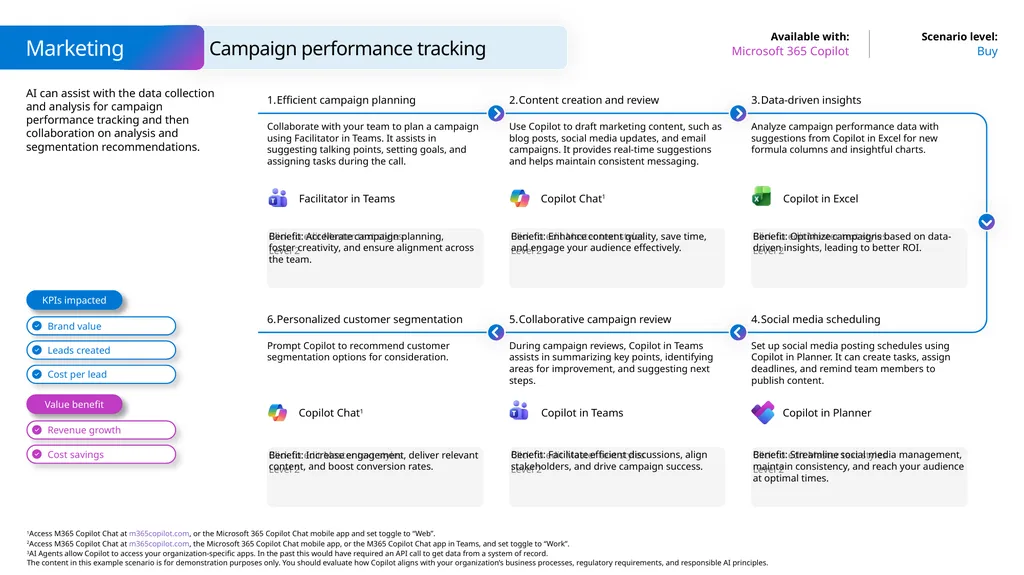
AI can assist with the data collection and analysis for campaign performance tracking and then collaboration on analysis and segmentation recommendations. Buy Microsoft 365 Copilot Benefit: Accelerate campaign planning,
foster creativity, and ensure alignment across the team. Efficient campaign planning Collaborate with your team to plan a campaign using Facilitator in Teams. It assists in suggesting talking points, setting goals, and assigning tasks during the call. Content creation and review Use Copilot to draft marketing content, such as blog posts, social media updates, and email campaigns. It provides real-time suggestions and helps maintain consistent messaging. Benefit: Optimize campaigns based on data-driven insights, leading to better ROI. Data-driven insights Analyze campaign performance data with suggestions from Copilot in Excel for new formula columns and insightful charts. Benefit: Enhance content quality, save time, and engage your audience effectively. Benefit: Increase engagement, deliver relevant content, and boost conversion rates. Personalized customer segmentation Prompt Copilot to recommend customer segmentation options for consideration. Collaborative campaign review During campaign reviews, Copilot in Teams assists in summarizing key points, identifying areas for improvement, and suggesting next steps. Benefit: Streamline social media management, maintain consistency, and reach your audience at optimal times. Social media scheduling Set up social media posting schedules using Copilot in Planner. It can create tasks, assign deadlines, and remind team members to publish content. Benefit: Facilitate efficient discussions, align stakeholders, and drive campaign success. Value benefit KPIs impacted Copilot Chat1 Facilitator in Teams Copilot in Teams Copilot in Excel Copilot Chat1 Copilot in Planner Campaign performance tracking Marketing<br>
20
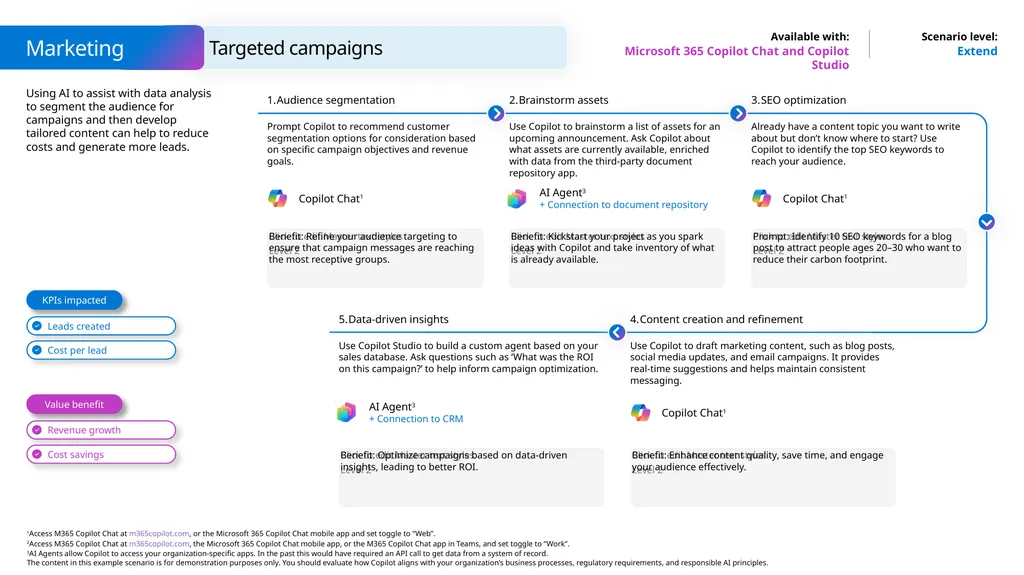
Using AI to assist with data analysis to segment the audience for campaigns and then develop tailored content can help to reduce costs and generate more leads. Extend Microsoft 365 Copilot Chat and Copilot Studio Benefit: Refine your audience targeting to ensure that campaign messages are reaching the most receptive groups. Audience segmentation Prompt Copilot to recommend customer segmentation options for consideration based on specific campaign objectives and revenue goals. Brainstorm assets Use Copilot to brainstorm a list of assets for an upcoming announcement. Ask Copilot about what assets are currently available, enriched with data from the third-party document repository app. Prompt: Identify 10 SEO keywords for a blog post to attract people ages 20–30 who want to reduce their carbon footprint. SEO optimization Already have a content topic you want to write about but don’t know where to start? Use Copilot to identify the top SEO keywords to reach your audience. Benefit: Kickstart your project as you spark ideas with Copilot and take inventory of what is already available. Data-driven insights Use Copilot Studio to build a custom agent based on your sales database. Ask questions such as ‘What was the ROI on this campaign?’ to help inform campaign optimization. Benefit: Enhance content quality, save time, and engage your audience effectively. Content creation and refinement Use Copilot to draft marketing content, such as blog posts, social media updates, and email campaigns. It provides real-time suggestions and helps maintain consistent messaging. Benefit: Optimize campaigns based on data-driven insights, leading to better ROI. Value benefit KPIs impacted Copilot Chat1 AI Agent3
+ Connection to document repository Copilot Chat1 AI Agent3
+ Connection to CRM Copilot Chat1 Marketing Targeted campaigns<br>
+ Connection to document repository Copilot Chat1 AI Agent3
+ Connection to CRM Copilot Chat1 Marketing Targeted campaigns<br>
21
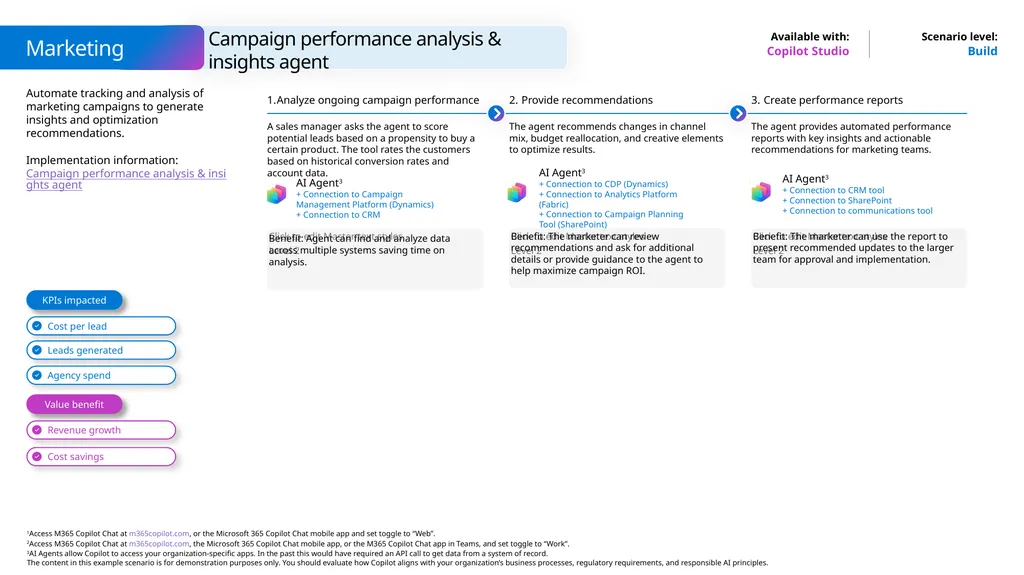
Campaign performance analysis & insights agent Marketing Copilot Studio Build Automate tracking and analysis of marketing campaigns to generate insights and optimization recommendations.
Implementation information: Campaign performance analysis & insights agent KPIs impacted Value benefit Analyze ongoing campaign performance A sales manager asks the agent to score potential leads based on a propensity to buy a certain product. The tool rates the customers based on historical conversion rates and account data. Benefit: Agent can find and analyze data across multiple systems saving time on analysis. Provide recommendations The agent recommends changes in channel mix, budget reallocation, and creative elements to optimize results. Benefit: The marketer can review recommendations and ask for additional details or provide guidance to the agent to help maximize campaign ROI. Create performance reports The agent provides automated performance reports with key insights and actionable recommendations for marketing teams. Benefit: The marketer can use the report to present recommended updates to the larger team for approval and implementation. AI Agent3
+ Connection to CDP (Dynamics)
+ Connection to Analytics Platform (Fabric)
+ Connection to Campaign Planning Tool (SharePoint) AI Agent3
+ Connection to Campaign Management Platform (Dynamics)
+ Connection to CRM AI Agent3
+ Connection to CRM tool
+ Connection to SharePoint
+ Connection to communications tool<br>
Implementation information: Campaign performance analysis & insights agent KPIs impacted Value benefit Analyze ongoing campaign performance A sales manager asks the agent to score potential leads based on a propensity to buy a certain product. The tool rates the customers based on historical conversion rates and account data. Benefit: Agent can find and analyze data across multiple systems saving time on analysis. Provide recommendations The agent recommends changes in channel mix, budget reallocation, and creative elements to optimize results. Benefit: The marketer can review recommendations and ask for additional details or provide guidance to the agent to help maximize campaign ROI. Create performance reports The agent provides automated performance reports with key insights and actionable recommendations for marketing teams. Benefit: The marketer can use the report to present recommended updates to the larger team for approval and implementation. AI Agent3
+ Connection to CDP (Dynamics)
+ Connection to Analytics Platform (Fabric)
+ Connection to Campaign Planning Tool (SharePoint) AI Agent3
+ Connection to Campaign Management Platform (Dynamics)
+ Connection to CRM AI Agent3
+ Connection to CRM tool
+ Connection to SharePoint
+ Connection to communications tool<br>
22
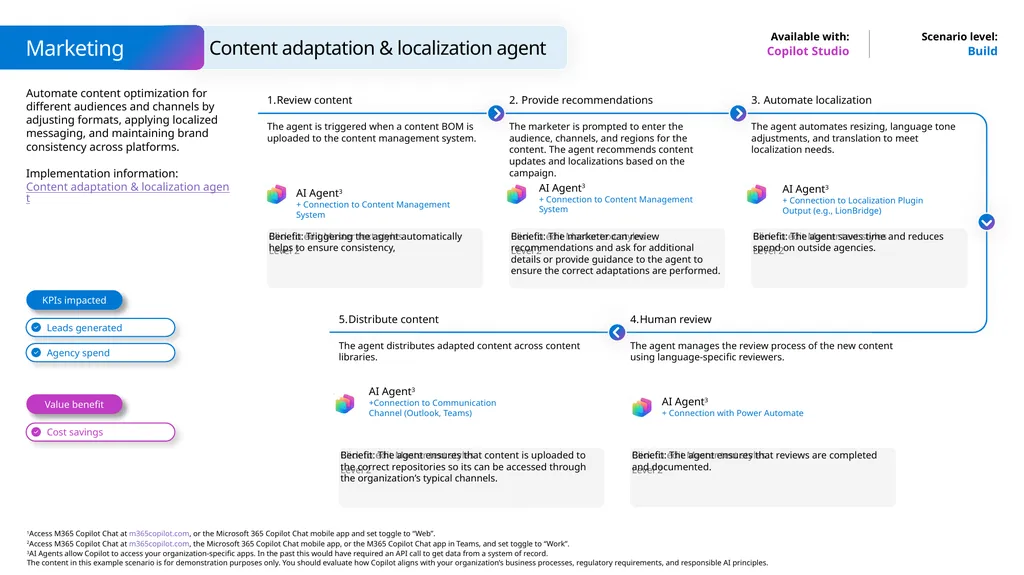
Content adaptation & localization agent Marketing Copilot Studio Build Automate content optimization for different audiences and channels by adjusting formats, applying localized messaging, and maintaining brand consistency across platforms.
Implementation information: Content adaptation & localization agent KPIs impacted Value benefit Review content The agent is triggered when a content BOM is uploaded to the content management system. Benefit: Triggering the agent automatically helps to ensure consistency, Provide recommendations The marketer is prompted to enter the audience, channels, and regions for the content. The agent recommends content updates and localizations based on the campaign. Benefit: The marketer can review recommendations and ask for additional details or provide guidance to the agent to ensure the correct adaptations are performed. Automate localization The agent automates resizing, language tone adjustments, and translation to meet localization needs. Benefit: The agent saves time and reduces spend on outside agencies. The agent manages the review process of the new content using language-specific reviewers. Benefit: The agent ensures that reviews are completed and documented. Distribute content The agent distributes adapted content across content libraries. Benefit: The agent ensures that content is uploaded to the correct repositories so its can be accessed through the organization’s typical channels. AI Agent3
+ Connection to Content Management System AI Agent3
+ Connection to Content Management System AI Agent3
+ Connection to Localization Plugin Output (e.g., LionBridge) Human review AI Agent3
+ Connection with Power Automate AI Agent3
+Connection to Communication Channel (Outlook, Teams)<br>
Implementation information: Content adaptation & localization agent KPIs impacted Value benefit Review content The agent is triggered when a content BOM is uploaded to the content management system. Benefit: Triggering the agent automatically helps to ensure consistency, Provide recommendations The marketer is prompted to enter the audience, channels, and regions for the content. The agent recommends content updates and localizations based on the campaign. Benefit: The marketer can review recommendations and ask for additional details or provide guidance to the agent to ensure the correct adaptations are performed. Automate localization The agent automates resizing, language tone adjustments, and translation to meet localization needs. Benefit: The agent saves time and reduces spend on outside agencies. The agent manages the review process of the new content using language-specific reviewers. Benefit: The agent ensures that reviews are completed and documented. Distribute content The agent distributes adapted content across content libraries. Benefit: The agent ensures that content is uploaded to the correct repositories so its can be accessed through the organization’s typical channels. AI Agent3
+ Connection to Content Management System AI Agent3
+ Connection to Content Management System AI Agent3
+ Connection to Localization Plugin Output (e.g., LionBridge) Human review AI Agent3
+ Connection with Power Automate AI Agent3
+Connection to Communication Channel (Outlook, Teams)<br>
23
A day in the life of a Marketing Manager (Copilot Studio) Extend Microsoft 365 Copilot and Copilot Studio 8:00 am – Prepare a brief Mio uses Word Agent to prepare a brief in Word to give to the agencies bidding on a new advertising campaign. He can refine it further using Copilot in Word. Example prompt: Prepare a brief outlining the advertising strategy from [Contoso widget marketing plan]. Include sections on target market, pricing, tone, imagery, and taglines.
Get started with Word, Excel, and PowerPoint Agents 8:30 am – Categorize ideas Mio meets with the team to brainstorm feature enhancements based on customer feedback. Copilot in Whiteboard categorizes the ideas for easier discussion. Action: Categorize the ideas. 10:00 am – Show data insights Using agents made in Copilot Studio, Copilot provides a list of active campaigns, pulling data from their email marketing platform. Mio uses Copilot in Excel to prepare charts that show data trends. Action: Show all data insights. 11:00 am – Categorize information Mio meets with the engineering team to plan the development of new features. During the meeting, Mio uses Copilot in Teams to take meeting notes, noting prioritized features. Example prompt: Create a table to categorize the features discussed so far by priority. 2:00 pm – Add a slide Mio uses Copilot in PowerPoint to update the roadmap deck to reflect the commitments from the engineering team meeting. Example prompt: Add a slide based on [copy in bulleted list of roadmap updates] 4:00 pm – Summarize email Mio needs to catch up on email and chats before end of day. Copilot speeds up the work by summarizing recent email and chat threads. Action: In the Copilot Teams app select – Summarize latest emails. Mio is a Marketing Manager at Contoso. Benefits Word Agent Copilot in Teams Copilot in Excel AI Agent3
+ Connection to SharePoint<br>
Get started with Word, Excel, and PowerPoint Agents 8:30 am – Categorize ideas Mio meets with the team to brainstorm feature enhancements based on customer feedback. Copilot in Whiteboard categorizes the ideas for easier discussion. Action: Categorize the ideas. 10:00 am – Show data insights Using agents made in Copilot Studio, Copilot provides a list of active campaigns, pulling data from their email marketing platform. Mio uses Copilot in Excel to prepare charts that show data trends. Action: Show all data insights. 11:00 am – Categorize information Mio meets with the engineering team to plan the development of new features. During the meeting, Mio uses Copilot in Teams to take meeting notes, noting prioritized features. Example prompt: Create a table to categorize the features discussed so far by priority. 2:00 pm – Add a slide Mio uses Copilot in PowerPoint to update the roadmap deck to reflect the commitments from the engineering team meeting. Example prompt: Add a slide based on [copy in bulleted list of roadmap updates] 4:00 pm – Summarize email Mio needs to catch up on email and chats before end of day. Copilot speeds up the work by summarizing recent email and chat threads. Action: In the Copilot Teams app select – Summarize latest emails. Mio is a Marketing Manager at Contoso. Benefits Word Agent Copilot in Teams Copilot in Excel AI Agent3
+ Connection to SharePoint<br>
24
A day in the life of a Marketing Manager (Microsoft 365 Copilot) Buy Microsoft 365 Copilot 8:00 am – Recap meeting decisions Dave has missed an important product launch meeting and needs to learn what happened. Example prompt: What decisions were made in this meeting. Were there any disagreements on the decisions. List the pros and cons of each decision. 8:30 am – Summarize emails Dave receives more than 200 emails per day. He asks Copilot to quickly summarize all of the information he has about the project. Example prompt: Summarize my emails from the past few days that mention this project. Organize the topics in a table with columns for topic, update, and actions items. 10:00 am – Draft an email Dave now asks Copilot to draft an email recap of the launch meeting that highlights some key dates and next steps for his leadership team to review. Example prompt: Draft an email to my leadership team updating them on the delay to this project. 11:00 am – Draft a pitch Dave asks Word Agent to create a pitch document in Word using prior documentation related to the product and meeting recap notes. Example prompt: Create a 50-word elevator pitch for this product including a catchy tag line at the top.
Get started with Word, Excel, and PowerPoint Agents 2:00 pm – Create a presentation It’s time for Dave to create the product pitch deck. He asks PowerPoint Agent to use the specification document he edited before lunch to create the PowerPoint deck. Example prompt: Create a presentation from [product specification document]
Get started with Word, Excel, and PowerPoint Agents Dave is a Marketing Manager at Contoso. Benefits Word Agent Copilot Chat in Outlook Copilot in Teams<br>
Get started with Word, Excel, and PowerPoint Agents 2:00 pm – Create a presentation It’s time for Dave to create the product pitch deck. He asks PowerPoint Agent to use the specification document he edited before lunch to create the PowerPoint deck. Example prompt: Create a presentation from [product specification document]
Get started with Word, Excel, and PowerPoint Agents Dave is a Marketing Manager at Contoso. Benefits Word Agent Copilot Chat in Outlook Copilot in Teams<br>
25
A day in the life of a Product Marketing Manager at Microsoft Buy Microsoft 365 Copilot 8:00 am – Summarize chats Cynthia catches up on Teams chat conversations across multiple projects she is working on. She uses Copilot to summarize the messages and help craft responses. Example prompt: Summarize my Teams chat messages from the past 24 hours and note which ones still require replies. 8:30 am – Recap a meeting Cynthia joins a meeting to discuss customer trials. She uses Copilot to find an email with the latest usage report to share. After the meeting, she uses Copilot to recap status for her manager. Example prompt: Create a meeting report for my manager that includes a brief summary of the meeting and include the key points. End with a list of actions required. 9:00 am – Get writing suggestions Cynthia reviews a white paper she is producing on Copilot adoption. She uses Copilot in Word to rewrite a paragraph for clarity. She asks Copilot to act like an IT administrator and evaluate the content. Example prompt: You are an IT administrator. Does this white paper contain enough detail to implement a user enablement program for your organization? What additional topics would you like to see covered? 11:00 am – Organize a presentation Cynthia is working on her presentation for an upcoming conference. She uses Copilot in PowerPoint to evaluate the flow of her presentation and make suggestions on the slide order. Example prompt: Please make suggestions on the slide order to make the ideas in this presentation flow better. 1:00 pm – Draft an email Cynthia has a long email thread with a video production agency for a training series with various SMEs. She asks Copilot to summarize the thread to find when all the recording sessions are occurring. Action: Summarize the thread.
Use Draft with Copilot to create an email with the summary containing the full list of recording sessions. 3:00 am – Compare two documents Cynthia is preparing for a meeting on messaging across AI solutions. She asks Copilot to compare the positioning and messaging documents and create a table of similarities and differences. Example prompt: Compare these two positioning and messaging documents and produce a table of similarities and difference. Then produce some recommendations on how to co-market them. Benefits Cynthia
is a Sr. Product Marketing Manager. Copilot in Teams Copilot Chat in Word Copilot in Outlook<br>
Use Draft with Copilot to create an email with the summary containing the full list of recording sessions. 3:00 am – Compare two documents Cynthia is preparing for a meeting on messaging across AI solutions. She asks Copilot to compare the positioning and messaging documents and create a table of similarities and differences. Example prompt: Compare these two positioning and messaging documents and produce a table of similarities and difference. Then produce some recommendations on how to co-market them. Benefits Cynthia
is a Sr. Product Marketing Manager. Copilot in Teams Copilot Chat in Word Copilot in Outlook<br>
26
A day in the life of a Product Marketing Manager at Microsoft Buy Microsoft 365 Copilot 8:00 am – Catch up on email Andrea uses Copilot to catch up on unread email and chat messages. Copilot surfaces an ask from her communications lead for her to draft an announcement blog for the upcoming event. Example prompt: Catch up on email and Teams chats from the past day, highlighting the primary asks and open items. 8:15 am – Summarize this presentation Andrea receives the latest product planning deck from her engineering colleague. She opens the deck and uses Copilot in PowerPoint to summarize key points. Example prompt: Summarize this presentation, highlighting upcoming product changes in the next few months. 9:00 am – Draft a blog Now that she’s digested the technical details, Andrea uses Word Agent to draft an announcement blog in Word, using the product planning deck as a source file. Example prompt: Draft an announcement blog with an introduction explaining the product, middle explaining new features, and conclusion based on [Q3CopilotPlanning].
Get started with Word, Excel, and PowerPoint Agents 11:00 am – Summarize a topic Andrea wants to add some background information to the blog intro. She Copilot Search to find relevant industry articles from analysts. Copilot summarizes each article and provides links to the sources. Example prompt: What are some recent trends on generative AI for work from well known industry analysts and influencers? 2:00 pm – Get action items Switching over to Teams, Andrea takes her 1:1 meeting with her manager. Copilot in Teams helps her take meeting notes and record action items so she can focus on her conversation. Example prompt: What were the action items from the meeting? 4:00 am – Draft an email With the announcement blog in good shape, Andrea uses Copilot in Outlook to draft an email to her product, communications, and marketing stakeholders to review the announcement blog. Example prompt: Draft an email to my colleagues asking for them to review my draft of the blog for the upcoming event by June 5. Andrea is a Sr. Product Marketing Manager. Benefits Word Agent Copilot in Outlook Copilot in Teams<br>
Get started with Word, Excel, and PowerPoint Agents 11:00 am – Summarize a topic Andrea wants to add some background information to the blog intro. She Copilot Search to find relevant industry articles from analysts. Copilot summarizes each article and provides links to the sources. Example prompt: What are some recent trends on generative AI for work from well known industry analysts and influencers? 2:00 pm – Get action items Switching over to Teams, Andrea takes her 1:1 meeting with her manager. Copilot in Teams helps her take meeting notes and record action items so she can focus on her conversation. Example prompt: What were the action items from the meeting? 4:00 am – Draft an email With the announcement blog in good shape, Andrea uses Copilot in Outlook to draft an email to her product, communications, and marketing stakeholders to review the announcement blog. Example prompt: Draft an email to my colleagues asking for them to review my draft of the blog for the upcoming event by June 5. Andrea is a Sr. Product Marketing Manager. Benefits Word Agent Copilot in Outlook Copilot in Teams<br>