Remote ID and UAS Registration The following slides pertain to UAS operated under Parts 91 or 107 only Rec Flyers operating under 49 USC 44809 have a slightly different procedure and those are not covered in this presentation All UAS flown
"Remote ID and UAS Registration The following" is the property of its rightful owner. Permission is granted to
download and print the materials on this website for personal, non-commercial use only, and to display it
on your personal computer provided you do not modify the materials and that you retain all copyright
notices contained in the materials. By downloading content from our website, you accept the terms of this
agreement.
Presentation Transcript
01
Remote ID and UAS Registration The following slides pertain to UAS operated under Parts 91 or 107 only
Rec Flyers operating under 49 USC 44809 have a slightly different procedure and those are not covered in this presentation
All UAS flown under Parts 91 or 107 must be registered
If it’s registered, or required to be registered, Remote ID applies 1 Uh oh. That means me! Part 89, subpart B applies to operators https://www.ecfr.gov/current/title-14/chapter-I/subchapter-F/part-89/subpart-B?toc=1<br>
02
When Did the Remote ID Requirement Take Effect? After 16 Sep 2023, unless otherwise authorized by the FAA, before takeoff, the operator must ensure that each registerable drone has its own Remote ID Serial Number added to the drone registration card
Part 91 drones using ADS-B Out, and DoD are exempted
ADS-B Out is prohibited without (written) authorization from the FAA 2<br>
03
Step 1 Have the Remote ID Serial Number in Hand Have the Remote ID serial number before starting the process of updating the UAS registration
NOTE: this number may be on the UAS or on the controller screen
Contact the manufacturer if you can’t find it
Many new drones, including some DJI Matrices, have Standard Remote ID
Each drone flown under Part 91 or Part 107 must have a unique Remote ID number assigned to it.
Broadcast modules must be assigned to one drone only, in other words 3<br>
04
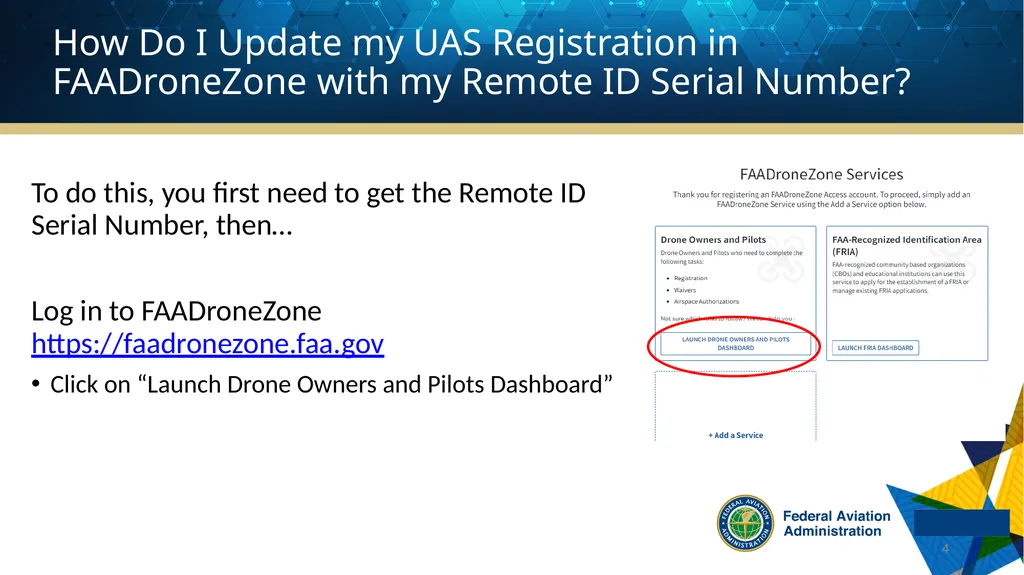
To do this, you first need to get the Remote ID Serial Number, then…
Log in to FAADroneZone https://faadronezone.faa.gov
Click on “Launch Drone Owners and Pilots Dashboard” 4 How Do I Update my UAS Registration in FAADroneZone with my Remote ID Serial Number?<br>
05
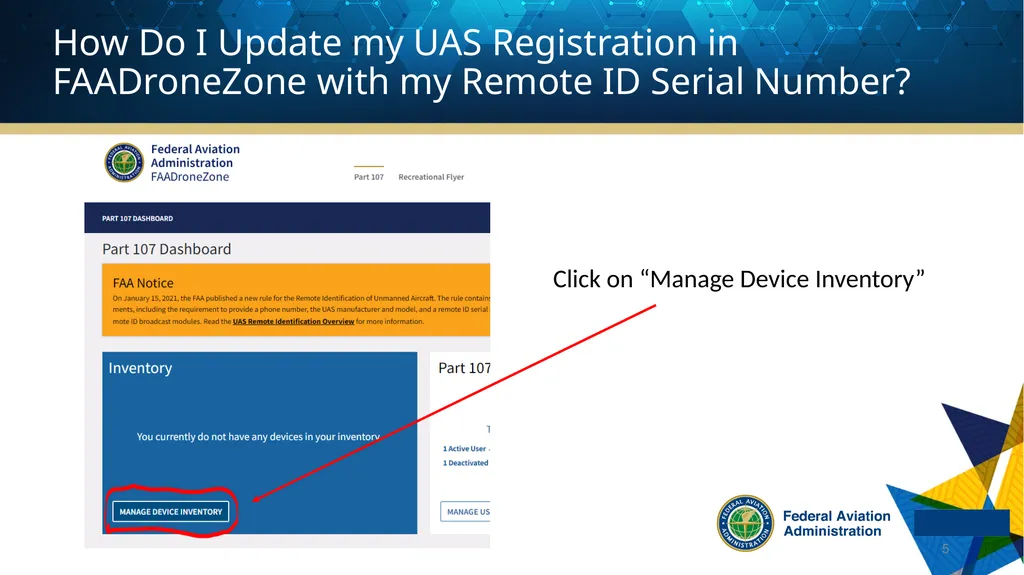
Click on “Manage Device Inventory” 5 How Do I Update my UAS Registration in FAADroneZone with my Remote ID Serial Number?<br>
06
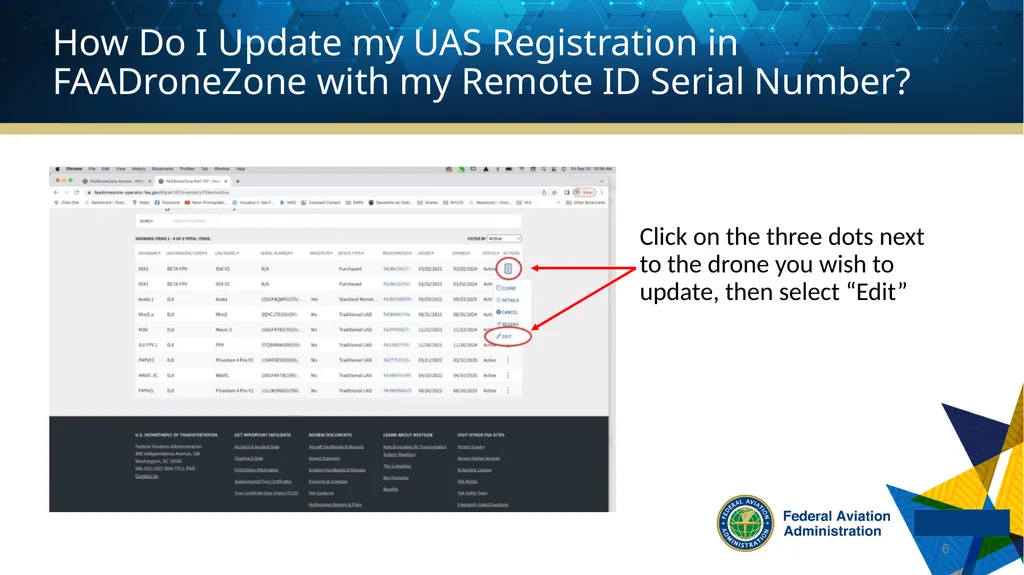
Click on the three dots next to the drone you wish to update, then select “Edit” 6 How Do I Update my UAS Registration in FAADroneZone with my Remote ID Serial Number?<br>
07
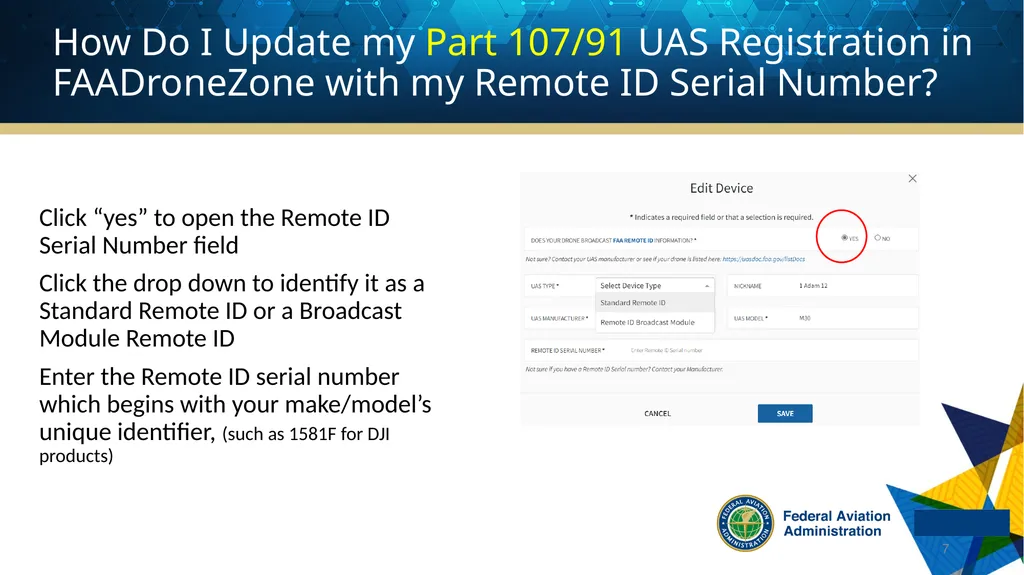
Click “yes” to open the Remote ID Serial Number field
Click the drop down to identify it as a Standard Remote ID or a Broadcast Module Remote ID
Enter the Remote ID serial number which begins with your make/model’s unique identifier, (such as 1581F for DJI products) 7 How Do I Update my Part 107/91 UAS Registration in FAADroneZone with my Remote ID Serial Number?<br>
08
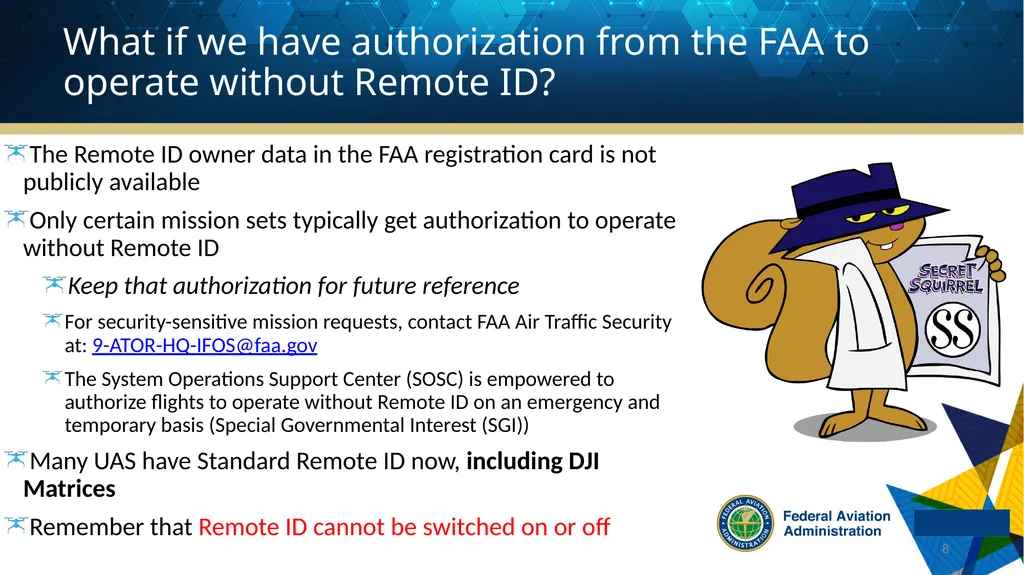
What if we have authorization from the FAA to operate without Remote ID? The Remote ID owner data in the FAA registration card is not publicly available
Only certain mission sets typically get authorization to operate without Remote ID
Keep that authorization for future reference
For security-sensitive mission requests, contact FAA Air Traffic Security at: 9-ATOR-HQ-IFOS@faa.gov
The System Operations Support Center (SOSC) is empowered to authorize flights to operate without Remote ID on an emergency and temporary basis (Special Governmental Interest (SGI))
Many UAS have Standard Remote ID now, including DJI Matrices
Remember that Remote ID cannot be switched on or off 8<br>
09
How does an owner update their Part 47 (N number) registration with Remote ID? Submit a written statement requesting the current serial number listed in the registration be updated in order to comply with part 89 requirements for Remote Identification (RID)
The request may be submitted electronically as a pdf attachment via email at 9-avs-ar-electronic-submittals@faa.gov or by mail 9 This does not apply to those few UAS that have been approved to operate using ADS-B Out But wait! There’s more!<br>
10
The statement must contain:
Complete Legal Name of the Registered Owner(s) including signature(s), and title(s), if appropriate
Complete UA description (N-number, current Serial Number, Manufacturer and Model)
For UA equipped with Remote ID, request that the serial number in the registration be changed to
the standard remote ID serial number (and state that number), or
the remote ID broadcast module serial number (and state that number)
No fee is required 10 How does an owner update their Part 47 (N number) registration with Remote ID? Note: If the drone will not have Remote ID, the serial number listed for the drone must be a manufacturer serial number<br>
11
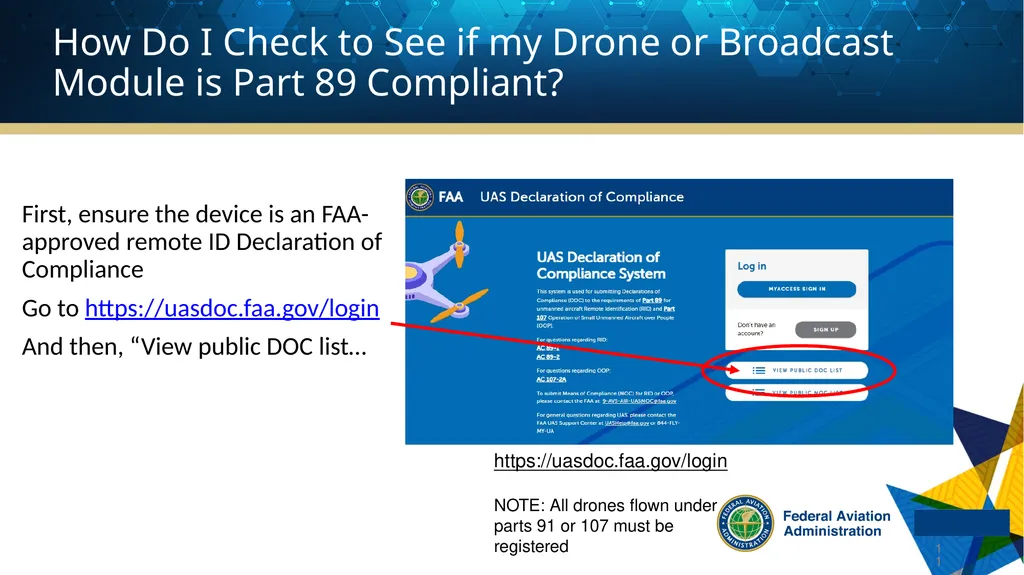
First, ensure the device is an FAA-approved remote ID Declaration of Compliance
Go to https://uasdoc.faa.gov/login
And then, “View public DOC list… 11 How Do I Check to See if my Drone or Broadcast Module is Part 89 Compliant? https://uasdoc.faa.gov/login
NOTE: All drones flown under parts 91 or 107 must be registered<br>
12
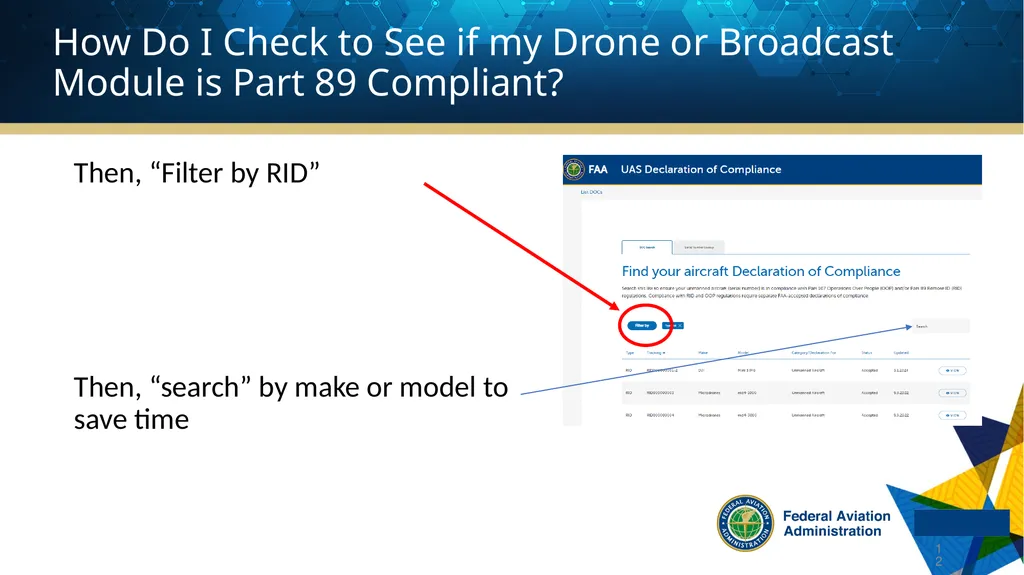
Then, “Filter by RID”
Then, “search” by make or model to save time 12 How Do I Check to See if my Drone or Broadcast Module is Part 89 Compliant?<br>
13
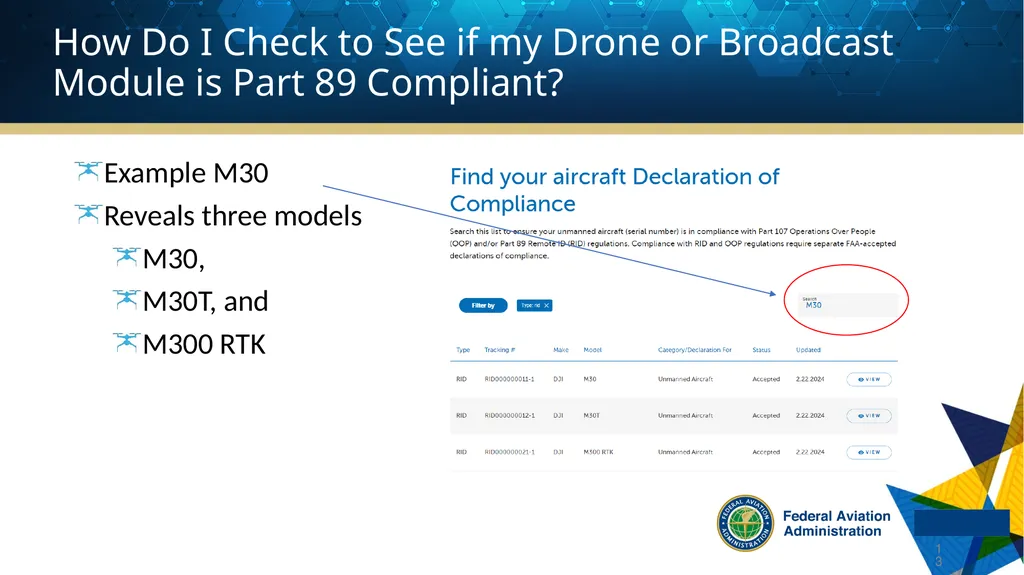
Example M30
Reveals three models
M30,
M30T, and
M300 RTK 13 How Do I Check to See if my Drone or Broadcast Module is Part 89 Compliant?<br>
14
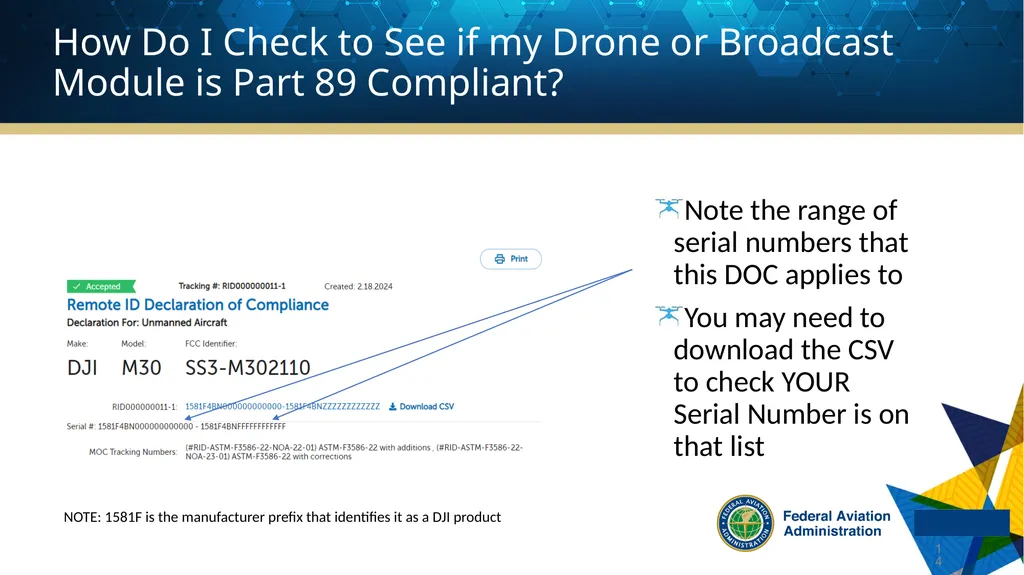
Note the range of serial numbers that this DOC applies to
You may need to download the CSV to check YOUR Serial Number is on that list 14 NOTE: 1581F is the manufacturer prefix that identifies it as a DJI product How Do I Check to See if my Drone or Broadcast Module is Part 89 Compliant?<br>
15
Still Have Questions About Updating a UAS Registration with Remote ID Serial Numbers? https://www.faa.gov/uas/getting_started/remote_id
Reach out to the UAS Support Center
uashelp@faa.gov
844-FLY-MYUA (844-359-6982) 15<br>